Ask An SEO: How Do I Rebuild My Website After A Dispute With The Hosting Company? via @sejournal, @HelenPollitt1

The question today comes from Raoof, who asks:

“I completely lost my website due to financial disputes with the hosting company. I have no backup and the only thing I have left is a domain.

I am currently preparing a new website with the previous content and theme. Can I use the previous domain or not? What is your suggestion?”

This is a difficult, but not uncommon, issue to face. You invested time, money, and resources in creating your website. To lose it is highly frustrating.

From an SEO perspective, it might feel like all is lost – the topical authority, the backlinks, your high-performing content.

But don’t worry, it’s not! I’m going to take you through a few steps to recover as much of your website and previous rankings as possible.

I see no issue with reusing your old domain address for the recovered site. That is, as long as no other site was hosted on it while yours was down.

If you owned the domain name throughout this time, you should be fine to restore your site at that address.

In fact, I would highly recommend it to ensure you recapture as much of your old site’s authority as you can.

Recovering Your Assets

The first step is to recover as much of your existing website as you can. You might not have a backup of your site, but thankfully, the internet does!

Content

I would start by going to the Wayback Machine. This is essentially a non-profit archive of the internet.

It claims to have saved over 928 billion webpages. There is a high chance that some of those will be yours!

You can search for your website domain and scroll back through time to when screenshots of your pages were taken. That should enable you to copy and paste some, if not all, of the copy that was on your site.

I would also suggest having a look at your analytics program to identify what your top-visited content was. This should be what you look to recover or recreate first.

Authority

The good news with still having your website domain is that you will still have the opportunity to recover backlinks that were pointing to your pages.

It’s important to host your content on the same URLs as it previously was. This means that if you still have links pointing to your site from external sources, they will continue to work when you set the URL live again.

If you are unable to recreate the exact URL for some reason, make sure to implement a 301 redirect from the old URL to the new one to retain the value of those links.

Reclaim Old Backlinks

If your site went down during the hosting dispute, your webpages were likely to return a 404 or other non-200 status code.

This could mean that external publications chose to change their links from pointing to your page to another so as to still enable their visitors to reach usable content.

This doesn’t mean that those links are gone forever. Evaluate which links were lost during the domain issues using a backlink analytics tool, and begin reaching out to those publications to inform them that your content is back.

It may be that they choose to link to your content again over the newer content they found.

Link Building To Help Crawling

External links aren’t just helpful for signaling relevancy and authority; they can also help to encourage the search bots to crawl the content they link to.

If your site has been offline for a while, it’s possible that the bots have reduced their frequency of crawling. New backlinks could indicate that the website is worth crawling more frequently again.

Technical

There is more to restoring your website to its former glory than just recovering the old content, of course.

A large part of what makes a website well-optimized for search engines and humans alike is its technical foundation.

Same Architecture

Where possible, try to recreate the website’s architecture.

I’ve already mentioned trying to re-use the old URLs, but also consider how and where they linked to each other.

Use the same menu structure and anchor text. This will help reinforce the relevance of the pages to each other and demonstrate that the site is the same as it was before.

Submit To Be Crawled

Once you’ve got your website back to how it was, you will want to let the search engines know to crawl it again.

Aside from encouraging crawling by getting new backlinks, as already mentioned, you can submit a request in Google Search Console and Bing Webmaster Tools for their bots to recrawl individual pages. Note that you may need to verify ownership of the domain in Google Search Console and Bing Webmaster Tools again.

Choose some of your more important pages so that they get crawled and back into the indexes as soon as possible.

XML Sitemaps

You should also make sure you have set up XML sitemaps again for the pages that you have recovered.

Submit these to the search consoles to further inform the Google and Bing bots of your pages’ existence, so they can crawl them and see that they are live again.

Take Note Of Any Issues Found

As the search engines begin to recrawl the site, take note of any issues Google and Bing report on through their search consoles.

There may be new issues that have crept in during the rebuild of your website that weren’t there before.

Improve

You can use this as an opportunity to evaluate what was working with your website and what wasn’t.

The temptation might be to recover and rebuild the site to reflect its former state. However, you might find that you can actually improve it instead.

What Were You Ranking For

As you review your old content’s performance, take a look at whether it ranked well before it was lost.

It may be that, instead of recovering it and uploading it exactly as it was before, you can use this as an opportunity to improve its relevancy to the search phrases users would use to land on it.

Review competitors’ content that has been flourishing while yours has been lost. Take note of what the top-ranking content contains that your recovered content doesn’t.

What’s Changed In The Industry

If your website has been down for a while during this hosting dispute, then the industry may have moved on.

Start to look for gaps in the content that your site used to address and what users are looking for now.

Are there new trends, products, or services that are becoming popular in your industry that you have not covered with your site previously?

Protect

The most important step once you have recovered and improved your site is to reduce the risk of losing it in the future.

You will hopefully never have an issue with your hosting again, but other issues can occur that can cause your website to go offline.

Backups

First of all, take backups of your new site. Many content management systems make it easy to do this, but if yours doesn’t, or if you’ve built it yourself, consider what you can save offline.

Save Your Content

Take copies of all the written content on your site. Make sure that you save it somewhere that isn’t directly linked to your website in case you run into issues again.

Don’t forget to save copies of the images you use, especially if they are unique to your website.

Save Your Meta

Take copies of each page’s search engine optimization.

For example, download the page title and description alongside your main body content.

Mark up the headers and save the image descriptions, and keep the filenames as you used on the site. This will speed up the recovery of your site in the future.

Save Your Schema Markup

Don’t forget to take copies of any bespoke code you used. This includes schema markup. This could save you a lot of time in the future, especially if you write your own schema rather than using plugins.

This can also help if you end up migrating from one CMS to another that doesn’t use the same schema modules.

Resuming Your Optimization Efforts

It is horrifying to think that the website you have spent so much time on is gone for good. Thankfully, it’s probably not.

It’s worth consider that there may be legal recourse available to you to aid in the recovery of your website.

Make sure to check your hosting terms of service thoroughly, as they may give avenues you can explore to regain control of your content.

It may not be as simple as asking your hosting provider for support if you are already in a legal dispute with them, but there may be some legal options available to you.

In the future, it is important to consider the trustworthiness and levels of support provided by your hosting provider.

Look up reviews of potential hosting services before committing to them to make sure you don’t end up going through a similar struggle again.

Losing access to your website can be costly in terms of money and time, and a highly stressful situation. But, follow the steps above and you should get back to working on your website.

More Resources:


Featured Image: Paulo Bobita/Search Engine Journal

Ask An SEO: How To Implement Faceted Navigation Without Hurting Crawl Efficiency via @sejournal, @kevgibbo

This week’s question tackles the potential SEO fallouts when implementing faceted navigation:

“How can ecommerce sites implement SEO-friendly faceted navigation without hurting crawl efficiency or creating index bloat?”

Faceted navigation is a game-changer for user experience (UX) on large ecommerce sites. It helps users quickly narrow down what they’re looking for, whether it’s a size 8 pair of red road running trainers for women, or a blue, waterproof winter hiking jacket for men.

For your customers, faceted navigation makes huge inventories feel manageable and, when done right, enhances both UX and SEO.

However, when these facets create a new URL for every possible filter combination, they can lead to significant SEO issues that harm your rankings, and waste valuable crawl budget if not managed properly.

How To Spot Faceted Navigation Issues

Faceted navigation issues often fly under the radar – until they start causing real SEO damage. The good news? You don’t need to be a tech wizard to spot the early warning signs.

With the right tools and a bit of detective work, you can uncover whether filters are bloating your site, wasting crawl budget, or diluting rankings.

Here’s a step-by-step approach to auditing your site for faceted SEO issues:

1. Do A Quick “Site:” Search

Start by searching on Google with this query: site:yourdomain.com.

This will show you all the URLs Google has indexed for your site. Review the list:

  • Does the number seem higher than the total pages you want indexed?
  • Are there lots of similar URLs, like ?color=red&size=8?

If so, you may have index bloat.

2. Dig Into Google Search Console

Check Google Search Console (GSC) for a clearer picture. Look under “Coverage” to see how many pages are indexed.

Pay attention to the “Indexed, not submitted in sitemap” section for unintended filter-generated pages.

3. Understand How Facets Work On Your Site

Not all faceted navigation behaves the same. Make sure you understand how filters work on your site:

  • Are they present on category pages, search results, or blog listings?
  • How do filters stack in the URL (e.g.,?brand=ASICS&color=red)?

4. Compare Crawl Activity To Organic Visits

Some faceted pages drive traffic; others burn crawl budget without returns.

Use tools like Botify, Screaming Frog, or Ahrefs to compare Googlebot’s crawling behavior with actual organic visits.

If a page gets crawled a lot but doesn’t attract visitors, it’s a sign that it’s consuming crawl resources unnecessarily.

5. Look For Patterns In URL Data

Run a crawler to scan your site’s URLs. Check for repetitive patterns, such as endless combinations of parameters like ?price=low&sort=best-sellers. These are potential crawler traps and unnecessary variations.

6. Match Faceted Pages With Search Demand

To decide which SEO tactics to use for faceted navigation, assess the search demand for specific filters and whether unique content can be created for those variations.

Use keyword research tools like Google Keyword Planner or Ahrefs to check for user demand for specific filter combinations. For example:

  • White running shoes (SV 1000; index).
  • White waterproof running shoes (SV 20; index).
  • Red trail running trainers size 9 (SV 0; noindex).

This helps prioritize which facet combinations should be indexed.

If there’s enough value in targeting a specific query, such as product features, a dedicated URL may be worthwhile.

However, low-value filters like price or size should remain no-indexed to avoid bloated indexing.

The decision should balance the effort needed to create new URLs against the potential SEO benefits.

7. Log File Analysis For Faceted URLs

Log files record every request, including those from search engine bots.

By analyzing them, you can track which URLs Googlebot is crawling and how often, helping you identify wasted crawl budget on low-value pages.

For example, if Googlebot is repeatedly crawling deep-filtered URLs like /jackets?size=large&brand=ASICS&price=100-200&page=12 with little traffic, that’s a red flag.

Key signs of inefficiency include:

  • Excessive crawling of multi-filtered or deeply paginated URLs.
  • Frequent crawling of low-value pages.
  • Googlebot is stuck in filter loops or parameter traps.

By regularly checking your logs, you get a clear picture of Googlebot’s behavior, enabling you to optimize crawl budget and focus Googlebot’s attention on more valuable pages.

Best Practices To Control Crawl And Indexation For Faceted Navigation

Here’s how to keep things under control, so your site stays crawl-efficient and search-friendly.

1. Use Clear, User-Friendly Labels

Start with the basics: Your facet labels should be intuitive. “Blue,” “Leather,” “Under £200” – these need to make instant sense to your users.

Confusing or overly technical terms can lead to a frustrating experience and missed conversions. Not sure what resonates? Check out competitor sites and see how they’re labeling similar filters.

2. Don’t Overdo It With Facets

Just because you can add 30 different filters doesn’t mean you should. Too many options can overwhelm users and generate thousands of unnecessary URL combinations.

Stick to what genuinely helps customers narrow down their search.

3. Keep URLs Clean When Possible

If your platform allows it, use clean, readable URLs for facets like /sofas/blue rather than messy query strings like ?color[blue].

Reserve query parameters for optional filters (e.g., sort order or availability), and don’t index those.

4. Use Canonical Tags

Use canonical tags to point similar or filtered pages back to the main category/parent page. This helps consolidate link equity and avoid duplicate content issues.

Just remember, canonical tags are suggestions, not commands. Google may ignore them if your filtered pages appear too different or are heavily linked internally.

For any faceted pages you want indexed, these should include a self-referencing canonical, and for any that don’t, canonicalize these to the parent page.

5. Create Rules For Indexing Faceted Pages

Break your URLs into three clear groups:

  • Index (e.g., /trainers/blue/leather): Add a self-referencing canonical, keep them crawlable, and internally link to them. These pages represent valuable, unique combinations of filters (like color and material) that users may search for.
  • Noindex (e.g., /trainers/blue_black): Use a to remove them from the index while still allowing crawling. This is suitable for less useful or low-demand filter combinations (e.g., overly niche color mixes).
  • Block Crawl (e.g., filters with query parameters like /trainers?color=blue&sort=popularity): Use robots.txt, JavaScript, or parameter handling to prevent crawling entirely. These URLs are often duplicate or near-duplicate versions of indexable pages and don’t need to be crawled.

6. Maintain A Consistent Facet Order

No matter the order in which users apply filters, the resulting URL should be consistent.

For example, /trainers/blue/leather and /trainers/leather/blue should result in the same URL, or else you’ll end up with duplicate content that dilutes SEO value.

7. Use Robots.txt To Conserve Crawl Budget

One way to reduce unnecessary crawling is by blocking faceted URLs through your robots.txt file.

That said, it’s important to know that robots.txt is more of a polite request than a strict rule. Search engines like Google typically respect it, but not all bots do, and some may interpret the syntax differently.

To prevent search engines from crawling pages you don’t want indexed, it’s also smart to ensure those pages aren’t linked to internally or externally (e.g., backlinks).

If search engines find value in those pages through links, they might still crawl or index them, even with a disallow rule in place.

Here’s a basic example of how to block a faceted URL pattern using the robots.txt file. Suppose you want to stop crawlers from accessing URLs that include a color parameter:

User-agent: *
Disallow: /*color*

In this rule:

  • User-agent: * targets all bots.
  • The * wildcard means “match anything,” so this tells bots not to crawl any URL containing the word “color.”

However, if your faceted navigation requires a more nuanced approach, such as blocking most color options but allowing specific ones, you’ll need to mix Disallow and Allow rules.

For instance, to block all color parameters except for “black,” your file might include:

User-agent: *
Disallow: /*color*
Allow: /*color=black*

A word of caution: This strategy only works well if your URLs follow a consistent structure. Without clear patterns, it becomes harder to manage, and you risk accidentally blocking key pages or leaving unwanted URLs crawlable.

If you’re working with complex URLs or an inconsistent setup, consider combining this with other techniques like meta noindex tags or parameter handling in Google Search Console.

8. Be Selective With Internal Links

Internal links signal importance to search engines. So, if you link frequently to faceted URLs that are canonicalized or blocked, you’re sending mixed signals.

Consider using rel=”nofollow” on links you don’t want crawled – but be cautious. Google treats nofollow as a hint, not a rule, so results may vary.

Point to only canonical URLs within your website wherever possible. This includes dropping parameters and slugs from links that are not necessary for your URLs to work.

You should also prioritize pillar pages; the more inlinks a page has, the more authoritative search engines will deem that page to be.

In 2019, Google’s John Mueller said:

“In general, we ignore everything after hash… So things like links to the site and the indexing, all of that will be based on the non hash URL. And if there are any links to the hashed URL, then we will fold up into the non hash URL.”

9. Use Analytics To Guide Facet Strategy

Track which filters users actually engage with, and which lead to conversions.

If no one ever uses the “beige” filter, it may not deserve crawlable status. Use tools like Google Analytics 4 or Hotjar to see what users care about and streamline your navigation accordingly.

10. Deal With Empty Result Pages Gracefully

When a filtered page returns no results, respond with a 404 status, unless it’s a temporary out-of-stock issue, in which case show a friendly message stating so, and return a 200.

This helps avoid wasting crawl budget on thin content.

11. Using AJAX For Facets

When you interact with a page – say, filtering a product list, selecting a color, or typing in a live search box – AJAX lets the site fetch or send data behind the scenes, so the rest of the page stays put.

It can be really effective to implement facets client-side via AJAX, which doesn’t create multiple URLs for every filter change. This reduces unnecessary load on the server and improves performance.

12. Handling Pagination In Faceted Navigation

Faceted navigation often leads to large sets of results, which naturally introduces pagination (e.g., ?category=shoes&page=2).

But when combined with layered filters, these paginated URLs can balloon into thousands of crawlable variations.

Left unchecked, this can create serious crawl and index bloat, wasting search engine resources on near-duplicate pages.

So, should paginated URLs be indexed? In most cases, no.

Pages beyond the first page rarely offer unique value or attract meaningful traffic, so it’s best to prevent them from being indexed while still allowing crawlers to follow links.

The standard approach here is to use noindex, follow on all pages after page 1. This ensures your deeper pagination doesn’t get indexed, but search engines can still discover products via internal links.

When it comes to canonical tags, you’ve got two options depending on the content.

If pages 2, 3, and so on are simply continuations of the same result set, it makes sense to canonicalize them to page 1. This consolidates ranking signals and avoids duplication.

However, if each paginated page features distinct content or meaningful differences, a self-referencing canonical might be the better fit.

The key is consistency – don’t mix page 2 canonical to page 1 and page 3 to itself, for example.

About rel=”next” and rel=”prev,” while Google no longer uses these signals for indexing, they still offer UX benefits and remain valid HTML markup.

They also help communicate page flow to accessibility tools and browsers, so there’s no harm in including them.

To help control crawl depth, especially in large ecommerce sites, it’s wise to combine pagination handling with other crawl management tactics:

  • Block excessively deep pages (e.g., page=11+) in robots.txt.
  • Use internal linking to surface only the first few pages.
  • Monitor crawl activity with log files or tools like Screaming Frog.

For example, a faceted URL like /trainers?color=white&brand=asics&page=3 would typically:

  • Canonical to /trainers?color=white&brand=asics (page 1).
  • Include noindex, follow.
  • Use rel=”prev” and rel=”next” where appropriate.

Handling pagination well is just as important as managing the filters themselves. It’s all part of keeping your site lean, crawlable, and search-friendly.

Final Thoughts

When properly managed, faceted navigation can be an invaluable tool for improving user experience, targeting long-tail keywords, and boosting conversions.

However, without the right SEO strategy in place, it can quickly turn into a crawl efficiency nightmare that damages your rankings.

By following the best practices outlined above, you can enjoy all the benefits of faceted navigation while avoiding the common pitfalls that often trip up ecommerce sites.

More Resources:


Featured Image: Paulo Bobita/Search Engine Journal
Ask An SEO: Should We Optimize For Keywords With High Search Volume Or Competition? via @sejournal, @rollerblader

In this week’s Ask An SEO, Chandrika asks:

“What are the important points to consider when doing keyword research for SEO using Google Keyword Planner? Should we focus on keywords with a monthly search volume of 500? Or, should we prioritize keywords with low or high competition?”

This is a great question, and here’s an easy answer: Don’t focus on the keyword. Focus on the solution for the user based on the intent of the keyword.

Google Keyword Planner shares the estimated search volume for a keyword, but that doesn’t mean the entire volume represents your audience. Some of them may be looking for information rather than shopping, and only a portion of them are there to be converted into revenue.

The word “bark,” for example, could be the bark on a tree or the noise a dog makes.

A search for bark on a tree could be what it looks like or feels like, whether it’s a sign the tree is healthy or not, and questions about using it to determine the age or genus of the tree.

“Bark” for a dog could refer to the specific sounds made by certain breeds, could indicate that the dog is sick, or the user is looking for ways to get a dog to stop barking or train a dog to bark on command.

If there are 500 searches, perhaps 300 are for the noise the dog makes, from which 200 are for determining if the dog is sick or healthy, and 50 are for training your dog to bark.

If you sell books on dog training, this may not be the best phrase to go after, but it is a topic you may want to cover. This is where optimizing for the topic comes in.

The topic will encompass the “SEO keywords” and increase the potential pool of traffic based on the entity it ranks for, and the solution it provides.

Optimize For The Solution And Topic

Instead of optimizing for a keyword by stuffing it into the copy, headers, and title, optimize for the topic it relates to.

Ask yourself what the person searching for this keyword is looking for, and build a series of pages that meet these needs.

  • If it is a conversion phrase, then incorporate the questions and solutions the person has related to the product query into the product or collection page. This can be done in the copy itself or in the FAQs, if your template has them.
  • When the keyword has an informational and conversion intent, such as “micro needling,” it can be about the process and procedure, a before-and-after photo series, or someone looking to find a local med spa. This means your site should have multiple content types for the SEO keywords based on the stage of the customer’s journey, including:
    • Pages that show the before and after, and by skin type and age.
    • Blog posts and guides that cover the process and alternatives if it isn’t a match.
    • Comparisons between micro needling and similar procedures to help the person know which is better suited to their needs.
    • A direct conversion page where you can onboard the lead or take payment.

By creating guides that address the topic, your website becomes stronger for the specific phrases.

Machine learning and AI are getting better at understanding what the content solves, and they use the trustworthiness of the content and its phrasing to determine the keywords the page should rank for.

If the content is clearly showing knowledge and expertise, and the claims or solutions are backed up by proven facts, you can show up for keywords without optimizing for the phrase from Google Keyword Planner.

Once you have the content and user intent, like shopping or learning, completed text-wise, add schema.

Use article or blog post schema, depending on whether you’re a news site, for informative content. Use the shopping schema, such as product, collection, or service, along with the area served and additional types to help drive the intent of the page home.

Keywords With Higher Search Volumes

Keywords with high search volumes are tempting to optimize for. However, instead of worrying about the keyword, take other keywords that are similar and are part of the solution.

Put those together into a group, and then think about how they interact to educate the person so that the person will have the information they need to make an informed decision about their purchase, whether it is a product or a collection/category page.

Keywords and search volumes are part of topics, but you don’t focus on their volumes – focus on the solutions for the phrases.

Your goal is to create the ultimate resource for the topic, whether it’s a question, a guide, or compatibility for products and services.

When you do this, the keyword search volume may multiply exponentially, and you can optimize the same page for multiple high-volume phrases.

By doing this, you may also be able to avoid creating content that cannibalizes itself by having a content map of your website.

When you know a page is dedicated to a topic and specific intent, you have your reminder not to create another page just because there is a search volume you found.

Instead, try to incorporate the theme of the phrase based on the search intent into the correct page for that search volume.

Competition Scores Do Not Matter

Someone has to show up for the phrase, so why shouldn’t it be you?

Competition scores are scores made up by SEO tools, not used by search engines.

Search engines are concerned with providing the most accurate answer in the easiest-to-absorb format and in the fastest way possible. If you do this, you may be the site that gets the ranking and the traffic.

For highly competitive phrases where big money is being spent, you will need some authority and trust, but there’s no reason you shouldn’t create the content that can rank.

You may get lucky and take traffic from the more established sites – it happens a lot. When it does, it can attract backlinks naturally from highly authoritative sites, which helps build your site’s stability.

Another reason to create this content now is that having it in an easy-to-use and trustworthy format can help it rank once your website is strong enough. I’ve seen this happen, where multiple pages rise to the top during core updates.

If you don’t create the content because you think it’s too competitive, you won’t have the chance to rank it when core updates happen.

The last thing I’d consider when looking at keywords with 500+ monthly searches is the long tail.

Long-tail phrases can be part of the topic. When you filter a keyword research tool to only show volumes at 500+, you miss out on parts of the entity, which can include consumer questions.

Knowing what matters to the consumer or user helps to provide them with more complete solutions.

When the page answers all of their questions, they can now convert (if your funnel is good), or they may subscribe to your publication because you’re a solution provider.

We never focus on SEO keyword volume when doing research, but we love high volumes when we find them.

We look at what will benefit the person on the page and if it matches the topic of the site, products, and services.

From there, we use keywords and search volumes to set a potential goal in traffic, but we don’t stress if there is no search volume.

Google Discover data, for example, isn’t going to show up, but if the content aligns with interests and your site qualifies, you could get featured and attract a ton of new visitors.

I hope this helps answer your question.

More Resources:


Featured Image: Paulo Bobita/Search Engine Journal

Ask An SEO: How To Convince C-Suite To Support Brand-Based SEO via @sejournal, @MordyOberstein

In this edition of Ask An SEO, a marketing leader reaches out with a question:

My company put pressure on me to deliver results of more traffic to our product pages.

How can I try to convince the CMO that we should invest more in brand building that will most likely reduce traffic?

There’s so much to chew on with this question. Before I get into the thick of it, I want to challenge the premise: “brand building that will most likely reduce traffic.”

It’s something I hear from clients often enough. It’s a premise I hear from SEOs all the time. While it may be true in this specific case, I would like to say something regardless.

I’m glad brand has entered into the SEO conversation. Long overdue.

At the same time, brand hasn’t been the forte of the search marketing industry. As a result, there’s a lot being said that, when put under scrutiny, doesn’t hold up.

I’d take a lot of the brand strategy you’re hearing from the SEO industry with a grain of salt.

Just because you target an audience doesn’t mean you lose wider reach. It can happen – and very often it should happen – but does it not have to happen?

You can speak to a core audience very deeply while not losing the attention of your secondary audience. Streaming platforms do this all the time.

Apple TV has an identity around great sci-fi content, but it also speaks to a wider audience as it throws some solid comedies into the mix (at least in my opinion).

Both of these “identities” work because there is a common thread: Apple puts out higher-quality content than other platforms.

So, will you lose traffic by focusing on brand? You probably should, but that’s only because I’ve been around the proverbial SEO block a few times.

It is, however, entirely possible to do things like pivot to a new audience while retaining the old one.

Losing audience as a result of building the brand is 100% not an inherent outcome. If anything, in the long term, it’s the total opposite. Brand building is all about connecting with more audiences over time.

Let’s move on to your question and work with the premise that you will lose traffic by increasing content and audience targeting.

I’m not even going to go into the obvious point and glaring absurdity of not wanting to have a more specific focus and more refined audience targeting in favor of “traffic.”

So, we’re going to work with two premises:

  1. You will lose traffic by focusing on brand.
  2. Not getting that “traffic” is “bad” somehow.

How do you sell this to the CMO?

For The Conceptual CMO

I’m going to start at a very conceptual level that will probably not speak to your CMO, but is very important for you to understand when you make your pitch.

The web is not the web you think it is. The web was a place where Wired could write about coffee mugs and rank them because everything was on an equal footing.

It was one giant “web” that was unified, where anyone could rank for anything so long as the content was halfway decent.

That web doesn’t exist anymore.

There is no “internet.” There is the internet that talks about home goods. There is the internet that deals with technology products. There is the internet that takes up sports.

On this internet, Wired isn’t relevant for coffee mugs. That’s not its sphere of influence. The web is no longer one giant unified void that algorithms sift through to pick up whatever site on whatever topics.

Think of the internet as independent spheres that sometimes move and overlap with other orbits but are generally self-contained.

If you’re selling this bowl of goods to a CMO, I would pitch it as you’re getting ahead of the curve. You’re getting ahead of the traffic loss that has already hit so many sites and is going to hit yours eventually.

I would sell this as “being able to perform as the landscape shifts.” You have to function in alignment with the ecosystem. There’s no way around it.

If you don’t, it will all hit the fan. It’s only a question of “when.” Usually, brands will wait until it’s already too late.

Not operating within the confines of the ecosystem is like trying to row a boat on an ice skating rink using a tennis racket.

For The Pragmatic CMO

The conceptual construct I just defined above will not speak to most CMOs.

While it’s extremely likely that you, the VP of marketing, head of growth, marketing manager, etc., understand this point, most CMOs are not in touch with the ecosystem enough to be swayed by this argument.

For most CMOs, I would start with the competition. Show similar sites that have undergone traffic losses because they haven’t changed with the tides.

If you’re a HubSpot competitor, showcase all the traffic HubSpot lost. And then, translate that into all the dollars spent in time and resources trying to capture traffic, as if it were 2015.

Image from author, April 2025

Honing your audience makes it less expensive to run marketing campaigns and assets.

Don’t pay to speak to everyone. Pay to speak to the right ones.

If your marketing strategy is aimed at casting a wide net, you will inevitably either pay for content production that isn’t of value or simply pay for pure visibility that isn’t worth the value.

You can also do the opposite. You can show competitors who have gotten ahead of the curve. That usually lights a fire under most CMOs. Seeing that the competition is getting “ahead” in whatever way is very uncomfortable for the C-level staff.

If you can show that your strategy is already being implemented by competitors, squeeze. And frame it. Frame it well: “Our competitors are starting to speak more directly to our ultimate target audience, and you can see that here, here, and here.” That will have an impact that they won’t ignore.

You have to try to concretize this as much as possible.

The problem with brand, as Alli Berry once put it to me, is that it’s the silent killer. I have witnessed this firsthand on more than one occasion with clients.

You don’t realize it’s the decline of brand efficacy until you have a real problem on your hands.

What happens is, time and time again, the decline of brand efficacy first manifests itself in whatever performance channel.

Suddenly, your social media performance or organic search performance is on the decline.

The immediate knee-jerk reaction brands have (especially as you move up the ladder) is to fix the channel.

These are the meetings where you are told to change things up and fix performance. You know, the meetings where you leave with your head shaking since it’s clear no one knows what they’re talking about.

The reason this happens is that the issue isn’t the channel. There’s nothing wrong with the social or SEO strategy per se. Rather, there’s a huge gap in the brand strategy, and it’s starting to have an impact.

The “suddenness” of a performance problem can be an external shift (a change in consumer behavior, for example) – and that definitely can and does happen.

However, from my experience, the usual culprit is the loss of brand traction.

Often, a product hits the market at the right time, in the right way, in the right place. The stars align and the brand takes off.

At a certain point, the brand hits what I tell my clients is a “maturity inflection point.” The brand can no longer ride the momentum of its product or service the same way, and brand efficacy (and marketing potency) ebbs away.

By the time this happens, most brands have a strong client base, etc., so they never look internally. Instead, they focus on the specific performance problems. Thus, the brand becomes the silent killer.

Your job is not to let this happen to you. If you’re managing a marketing team at whatever level, your job is to nip this problem in the bud.

Now, if your CMO is more reflective and so forth, then the argument I gave earlier might work.

This is not the norm, so you need to concretize the argument.

Whether it be, as I mentioned, through the competitor angle or whatever, you have to gain some perspective and then translate that perspective into practicality.

Roll With Your CMO

My last piece of advice is to know your audience. CMOs are often bold and brash (likely because they feel they have to be), so speak that language. Come with a plan that has a bit of edge and flair to it.

If that’s not your CMO, don’t. If they are more analytical by nature, show the data.

It’s just a matter of knowing your audience and what language they speak. You have to roll with where your CMO and company overall are at. Otherwise, you might have the greatest plan, but it won’t land.

More Resources:


Featured Image: Paulo Bobita/Search Engine Journal

Ask An SEO: My Content Can’t Be Seen When I Disable JavaScript – Will This Affect My SEO? via @sejournal, @HelenPollitt1

This week’s question comes from Thomas, who asks:

I disabled the JavaScript just to check the content of my webpage, but unfortunately I could not see any content except the banner H1 tag.

Will it hurt my SEO? If yes, what are the advisable solutions for this?

This is a great question – it’s something that all SEO professionals need to be aware of.

We spend so much time trying to create interesting, engaging content that it would be heartbreaking to think that it isn’t visible to search engines.

However, given the recent advancements in Google’s ability to render JavaScript content, is that something we still need to be concerned about?

The short answer is yes.

Why JavaScript Can Be A Problem

We know that to ingest information, Googlebot will discover a page, crawl it, parse and index it. For JavaScript, the crawler needs to “render” the code. The rendering stage is where JavaScript problems can occur.

JavaScript has to be downloaded and executed in order for the content to be parsed. This takes more resources than the bot parsing content in HTML.

As such, sometimes Google will defer the rendering stage and come back to a page to render it at a later date.

Most websites these days will use some JavaScript – that’s absolutely fine.

However, if your website requires JavaScript to load important content that is crucial to the page, then it might be a risk.

If, for some reason, a search bot does not render the JavaScript on a page, then it will not have any context as to what the page is about.

It is crucial to remember that not every search engine can render JavaScript. This is becoming increasingly important in the era of generative search engines – very few of which render JavaScript.

Diagnosing A Problem

You’ve done the right thing by starting to investigate the effect JavaScript rendering might be having on your site.

Turning off the JavaScript and seeing what content remains, and what is still interactive without it, is important.

I suggest going a step further and looking at what is available to the search bots to read on a page’s first load. This will help you identify content accessible without JavaScript rendering.

Check Google Search Console

First off, use Google Search Console URL Inspection tool and look at the rendered HTML. If the content is present in the rendered HTML then Google should be able to read the content.

Check Chrome Browser

You can go to “View Source” in Chrome to see what the pre-rendered HTML looks like. If the content is all there, you don’t need to worry any further.

However, if it’s not, then you can use the Developer Tools in Chrome for further diagnostics. Look in the “Elements” tab. If you can see your content, then again, you are probably OK.

Check The Robots.txt

Sometimes, developers may choose to block specific JavaScript files from being crawled by disallowing them in the robots.txt.

This isn’t necessarily an issue unless those files are needed to render important information.

It’s always worth checking your robots.txt file to see if there are any JavaScript files blocked that could prevent the bots, in particular, from accessing the content of the page.

Next Steps

JavaScript tends to worry a lot of people when it comes to SEO. It’s a significant part of the modern web, however. There’s no escaping the use of JavaScript.

We need to ensure that our websites utilize JavaScript so that both popular and emerging search engines can find and read our content.

You don’t need to worry but be diligent.

If you have developer resources at hand, you can work with them to identify the most applicable solution.

Here are some checks you may want to make:

Are We Using Client-Side Rendering Or Server-Side Rendering?

Client-side rendering essentially utilizes the browser to render the JavaScript of a page.

When a page is visited, the server responds by sending the HTML code and the JavaScript files. The browser then downloads those files and generates the content from the JavaScript.

This is counter to server-side rendering, where the content is rendered by the server and then sent to the browser with the data provided.

In general, server-side rendering is easier for bots, can be a quicker experience for users, and tends to be the default recommendation for SEO.

However, it can be more costly for the websites and, therefore, isn’t always the default choice for developers.

Is Our Main Content Able To Be Rendered Without JavaScript?

The most important content on your page, the main content, needs to be possible to parse without JavaScript rendering.

That is always the safest way to ensure that bots can access the content.

Are We Using JavaScript Links?

A further consideration is whether your links can be crawled easily by the search bots.

It’s not always an issue to have links generated through JavaScript. However, there is a risk that bots might not be able to resolve them unless they are properly contained in HTML element with an href attribute.

Google states it “can’t reliably extract URLs from elements that don’t have an href attribute or other tags that perform as links because of script events.”

Remember, though, it’s not just Google that you need to be conscious of. It’s always better to err on the side of making your links easy to follow.

In Summary

It is crucial to make sure your content is accessible to bots, now and in the future.

That means that if your website relies heavily on JavaScript to load content, you may struggle to communicate that information to some search engines.

It’s true that Google is much better at rendering JavaScript-heavy sites than it used to be, but the SEO playing field is not just Google.

To make sure your website can perform well in search platforms beyond Google, you may want to change how your website renders content, making sure your main content is in HTML.

More Resources:


Featured Image: Paulo Bobita/Search Engine Journal
Ask An SEO: If I Am Not An SEO Expert, Is It Better For Me To Start An Agency? via @sejournal, @HelenPollitt1

Today’s question from Kazi is such an honest and important one for our industry. Kazi asks:

“I’m new to this sector. Should I start an agency as an one-man employee? I know it sounds ridiculous, but I am very much in need of work – more specifically, in need of money.

So, I think an agency will have better pull power than me working as a solo search engine optimizer because clients won’t get attracted if they see a new SEO learner…”

I understand that the crux of this question is, “Will you appear more legitimate and competitive if you are offering services as an agency rather than a solo contractor?”

However, I really want to address the more important aspect of this: Should you be offering SEO services for a fee as someone brand new to the industry?

My answer to that is no. Not only shouldn’t you be offering SEO services as an agency, but you also shouldn’t be offering them as a solo contractor if you are brand new to SEO.

Why SEO Is A Great Career Move

I completely get the appeal of this as a career move. On the face of it, SEO has no barriers to entry, which is great!

I fully recommend this industry to anyone passionate about analysis, psychology, creativity, sustainability, and technology.

You’ll hear me encourage it for people who like to problem-solve and find solutions that don’t have obvious answers.

I recommend it not only for those who have a background in creative pursuits, but also for those whose background is more tech-focused. It is a career that captures the interests of a lot of different types of people.

Not only does it give you the opportunity to earn money through skills that are in demand, but there are also no expensive overheads.

There are no formal qualifications needed and no regulatory bodies to convince. All you need is a computer, the internet, and the passion to develop your skills.

But it’s not easy.

There is a lot to learn before you can realistically start charging for your services. It is not just about the mechanics of SEO, but also how to apply them in different situations.

Risks To Clients

If you take on SEO work for a business or organization without knowing how to apply SEO concepts in practice, you could open them up to significant risk.

Learning On The Job

SEO is not a straightforward practice. There are a lot of variables and circumstances that affect what we might deem “good practice.” Because of this, you can’t apply a blanket solution to every situation you encounter.

If you are brand new to SEO, there may be nuances with your client’s industry, website, or tech stack that you aren’t aware of, which will impact how successful your strategy is.

A lot of SEO comes down to problem-solving. This is a skill that gets honed over time. As you encounter more situations and learn from what worked and what didn’t, you will become more adept at creating successful strategies.

If you are a brand-new SEO bearing full responsibility for the success of the organic performance of a client, you will come unstuck.

SEO is a great industry for learning on the job. However, if you are learning SEO from scratch, you don’t want the pressure of being the most senior SEO in the room. You will likely make mistakes, and these could be costly to your client.

May Cause Significant Traffic Loss

In some situations, a junior SEO working on a website alone could cause significant traffic loss for a client.

For example, you could accidentally set live a solution that de-indexes their whole site. You may not know how to guard against that sort of mistake. You could see your client’s organic traffic disappear in a matter of days.

These are risks that more experienced SEO professionals face as well, but after years of working in SEO, we can foresee what issues might arise from the recommendations we make.

Could Cause Financial Harm

If your SEO recommendations cause organic performance issues, your client’s revenue could be significantly affected.

If they run a business that relies on their website – and in particular, organic traffic – then your mistakes could be very costly.

People have lost jobs over organic traffic loss. Without much experience in SEO and no one more senior to help flag risks, this is something that you could easily cause.

Risks To You

Not only would charging for your services as an SEO when you’ve never done it before put your clients at risk, but it could also be harmful to you.

Significant Pressure

You will face significant pressure. You will be expected to set reasonable goals and achieve them in a timely manner.

Without much experience in SEO, that’s going to be incredibly difficult to do. You’ll either set unattainable goals that no SEO could realistically achieve, or you simply won’t have the skills to achieve more practical objectives.

With that, you will find yourself trying to appease an increasingly disgruntled client.

Any SEO professional who has worked as a freelancer or as part of an agency has had to have difficult conversations with a client. They have expected results that you have not been able to deliver.

However, an experienced SEO will be able to identify when that is likely to be the case and adapt strategy, or inform the client of more realistic timelines or goals.

They will also have ways to help the client feel like they are getting a genuine return on their investment, even if it’s not as much or as quickly as they had anticipated.

A brand-new SEO specialist simply will not know how to do that. It’s too much to expect from someone so early on in their career. You will likely feel the pressure of that.

Your lack Of Experience Will Be Discovered Quickly

The above is really a best-case scenario – you actually make it to the point where you have convinced clients to trust you, and you are beginning to see that you can’t hold up to the promised performance standards.

Most likely, your lack of knowledge and experience will be identified more quickly. You may be working with people with more SEO knowledge than you, such as marketers or product owners.

They may not consider themselves experts in SEO, but they will assume you are if you sell it as a service. They will probably be able to identify significant gaps in your knowledge very early on in your relationship.

Not only will that likely sour the client-agency relationship, but you may also find yourself without a client pretty quickly.

Could Have Legal Ramifications

In some situations, positioning yourself as someone who can get results through offering a service – without the ability to fulfill that – could be a breach of contract.

I would be very wary of making promises to clients about your abilities unless you are upfront that you are brand new to SEO and they are among your first-ever clients.

What You Could Try Instead

So, if I’ve managed to give you pause about committing to offering SEO services as a contractor or an agency, may I suggest some other ways forward?

You can still make money through a career in SEO, even if you are beginning to learn about it.

Join A Company As An Intern

You are clearly passionate about SEO if you are already thinking about starting a business working in the industry. That passion is a great start.

Consider finding an entry-level job in the SEO field and learning on the job in a more supportive, less pressured way.

You could find an agency or in-house position that values your drive and ambition but can support you with the right resources and opportunities to learn SEO while minimizing the risk to yourself and others.

Practice On Sites That You Can Fail With And Learn

If you are struggling to find employment within SEO but want to learn it to get into a position where you can legitimately offer SEO services, you need practice.

Do not practice on sites that rely on organic traffic. Instead, consider building your own sites around subjects you are passionate about and develop your experience and confidence in SEO.

You can make mistakes, weather traffic drops, and be hit by algorithm updates – all without risking anyone’s livelihood. Through that, you will develop the skills you need to work on other people’s sites.

I would still consider graduating to other sites where the risk is low. For example, volunteering your time to work alongside other SEO professionals.

Or, you could try optimizing the site of a friend who understands you are still learning SEO and is happy for you to practice and make mistakes on their site.

Set Up Your Own Site And Monetize It

If you are determined to make money through SEO right away, then build and optimize a site that you can monetize.

This might mean an affiliate site, or perhaps you can start a business that drop-ships.

Whatever course you take, make sure that the risk is minimal, and you will not suffer if you lose traffic and revenue while perfecting your SEO skills.

Make Sure You Have The Experience Before You Go Alone

Most importantly, understand that learning SEO well takes time.

You can easily read up on SEO and have a very high theoretical knowledge of it, but you still need to put what you’ve learned into practice.

This way, you will be able to understand how to adapt strategies for different goals or how to rally when performance doesn’t go as expected.

I want to encourage you to pursue a career in SEO, but I caution you against running before you can walk.

More Resources:


Featured Image: Paulo Bobita/Search Engine Journal
Ask An SEO: Should I Prioritize Selling On Marketplaces Or My Own Website? via @sejournal, @kevgibbo

This week’s Ask an SEO question comes from Mike in Toronto who enquires:

“For a small business that wants to sell products online, would you advise me to set up my own ecommerce website, or should I use a marketplace like Amazon instead?

This is undoubtedly one of the most common dilemmas for small business owners when they decide to start selling online.

It is a particularly tricky one to weigh up because the choices you make now could have quite a big influence on your strategy for months or even years to come.

But to give you my answer up front, my general advice is to begin selling via marketplaces such as Amazon, eBay, or Etsy. This will give you visibility, sales, and near-immediate exposure with minimal effort.

Then, in the long term, you should gradually build out your own website, letting you own your brand and audience.

Of course, there are caveats here. Some product categories don’t tend to do well via online marketplaces. This often, but not always, includes things like furniture, fine art, vehicle spare parts, and so on.

The reverse is also true. If you’re selling books, personal care products, and some kinds of handmade goods, it often makes more sense to stick with the marketplaces.

The Pros And Cons Of Selling On Marketplaces

To help you weigh up whether or not to sell on marketplaces like Amazon, Etsy, or eBay, here’s my take on the pros and cons of using them.

Advantages Of Selling On Marketplaces

  • Instant exposure: Online marketplaces put you in front of millions of shoppers. In the UK, for instance, a whopping 20% of consumers buy goods on Amazon each week, and 80% buy something at least monthly. Having your products available on marketplaces helps you get exposure without having to build traffic from scratch.
  • Easy setup: Listing your products on an established site is much faster than setting up a content management system (CMS) such as Shopify. You need very little technical know-how to list products on marketplaces, and you can get up and running in just a couple of hours.
  • Marketplace SEO tends to be simpler: Optimizing your product descriptions, images, and titles for search algorithms on marketplaces is much more straightforward than trying to compete in Google search (indeed, you could even be competing against marketplaces in search engine results pages).
  • Trust: Millions of people use marketplaces every single day. They trust these websites and are more likely to buy through them, compared to a brand they’ve never heard of.
  • Logistics support: Online marketplaces offer different packages to their sellers, but there’s usually quite a bit of support available for deliveries, returns, refunds, and customer payment processing.

Disadvantages Of Selling On Marketplaces

  • Fees: Marketplaces charge sellers varying fees. These can range from about 2% of the transaction value up to 20%, or even more for some product categories/price brackets. That can really undercut your profitability.
  • No brand control: When you sell on marketplaces, you really are at the mercy of their algorithms, their policies, and their rules. There is very little you can do if the marketplace decides to push its own products over yours or suspend your account for whatever reason.
  • No customer relationship: When you sell on marketplaces, you don’t own the customer data. This makes it very difficult, if not impossible, to cultivate long-term loyalty. You also can’t email customers with discounts or offers outside of the marketplace.
  • The competition: Marketplaces are intensely competitive places. Not only will you be competing against many other small businesses in your niche, but you could also be up against big brands with name recognition. Somewhat disconcertingly, marketplaces like Amazon also sell their own versions of products (from jewelry to sweets to clothes hangers), which could directly compete with yours.
  • Brand visibility: People who buy on marketplaces like Amazon may not even be aware that your brand exists. Many consumers assume they are buying from the marketplace itself, rather than your company.

The Pros And Cons Of Setting Up Your Own Website

Many ecommerce business owners dream of setting up their own websites. There’s something really exciting about having your own shop front to the world.

Here’s what you need to know before going ahead with that.

Advantages Of Setting Up Your Own Ecommerce Site

  • Full brand control: If you run your own website, you own everything. It’s your site, your URL, your designs, your pricing. Rather than having to rely on a fairly generic marketplace storefront template, you can build a website that really matches your company’s ethos.
  • Potentially better profit margins: By avoiding marketplace fees and commissions, you can potentially increase your profit margins.
  • Better customer relationship: With your own website, you have direct access to customer emails and data. This allows for re-marketing and personalization (provided those customers have consented to communications).
  • SEO: If you have built a well-optimized website, this can bring in traffic from Google and other search engines without you having to pay for ads. Essentially, that’s free exposure for the right audiences.
  • Faster payments: When using marketplaces, you typically have to wait for scheduled payout dates (marketplaces typically hold onto money for longer in case of customer complaints or refund requests). With your own website, money from each sale will often land in your business bank account the next business day.

Disadvantages Of Setting Up Your Own Ecommerce Site

  • Building traffic is hard: If you don’t yet have an existing audience, you need to invest in SEO, ads, social media, and content to start attracting potential customers.
  • Technical setup: Building and running an ecommerce website is technically challenging. While a CMS like Shopify makes it a little easier, this is a lot more work than simply setting up a listing on a marketplace.
  • Tech costs: The costs of setting up an ecommerce website are equally significant. You need to buy a domain name, code the pages, maintain the data, ensure the site and customer data are protected, maintain the website, and do various other technical tasks. Unless you’re confident doing this yourself, you’ll probably need to pay a specialist to do this for you.
  • Trust takes time: Assuming your brand is fairly small, building up trust in your website takes time. The best way to do that is through social proof (for example, from customer reviews or companies like Trustpilot). But this won’t happen overnight; it can take months or even years to achieve.
  • Logistics: There are various logistical issues to be aware of when setting up your own website. These include choosing a secure point of sale, managing shipping, setting up policy pages, or getting to grips with legal issues about refunds and returns.

Multi-Channel Is The Way To Go

It is very common nowadays to find small ecommerce companies that sell through multiple channels, including major platforms like Amazon, niche local marketplaces for specific geographies or interests, as well as their own websites and even social media.

It’s a bit outdated, but a 2017 study is quite illustrative. It found that 60% of SMEs made over half of their ecommerce sales on marketplaces, and a quarter had an equal split between marketplaces and their own websites.

Only 12% made all their sales on marketplaces, and only 8% sold exclusively through their own websites. Essentially, most SMEs eventually opt for multi-channel sales.

As I mentioned above, my feeling is that for most businesses, a multi-channel route is the best option.

Starting on a marketplace will help you win customers, gain some visibility, and also allow you to gauge demand for your idea.

As sales start to pick up in the marketplace, you can then begin investing in a website that will ultimately become the primary focus of your offering.

So, there is a lot to think about, but I really encourage you to jump in. It’s important to have a long-term strategy, but there is also a lot you can pick up through trial and error – and the journey can be incredibly fun and rewarding.

Good luck!

More Resources:


Featured Image: Paulo Bobita/Search Engine Journal
Ask An SEO: What Should Be On Your Author Pages? via @sejournal, @MordyOberstein

This week’s question about author pages comes from Joylyn:

We are working on building author pages for our content, would you mind teaching us best practices for building author archive pages with any SEO best practices.

A great question and perfect for me to answer from a branding perspective.

Author pages serve to build trust, authority, and all of that good stuff. That much should be obvious.

However, a lot of nuance goes into leveraging author pages. More than that, I would challenge the very notion of what an author page is and why we need them.

What Should Be On Your Author Pages?

The answer to that depends on what you’re trying to accomplish.

Yes, you’re to establish trust, but how you do that depends on a variety of factors.

Say, for example, your industry is constantly evolving and changing. Harping on your author’s past may not be the way to go.

Instead, trust may be better built by focusing on their recent accolades and accomplishments. It can be as simple as showing they have written extensively on the topic recently.

In other words, you need to establish what “trust” means in your scenario because it’s not universal.

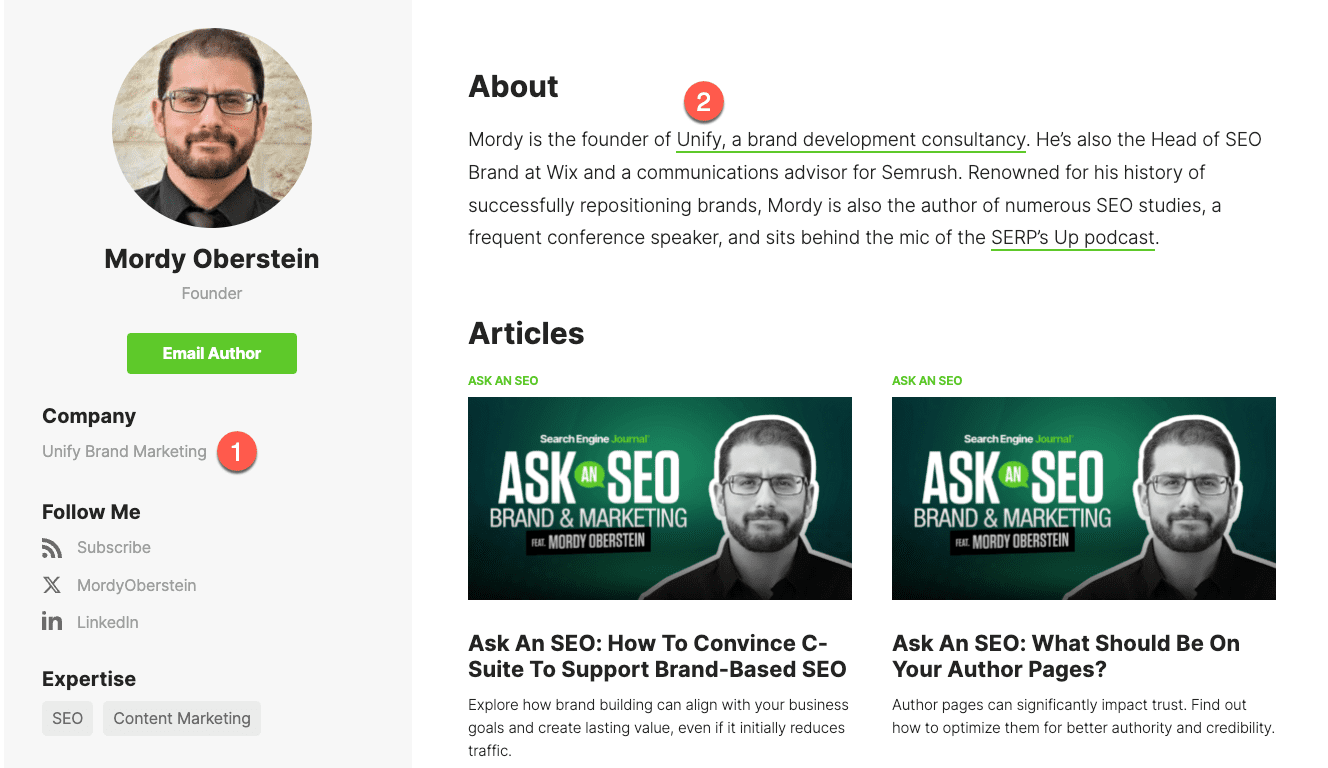
Think of your author pages as “About Pages.” There’s a certain narrative to a good About Page and you can do the same with your author pages.

Don’t just say who the person is, but show how they got there.

Trust is often about contextualization. Don’t think about only presenting who the author is – rather, try to paint a picture that frames them.

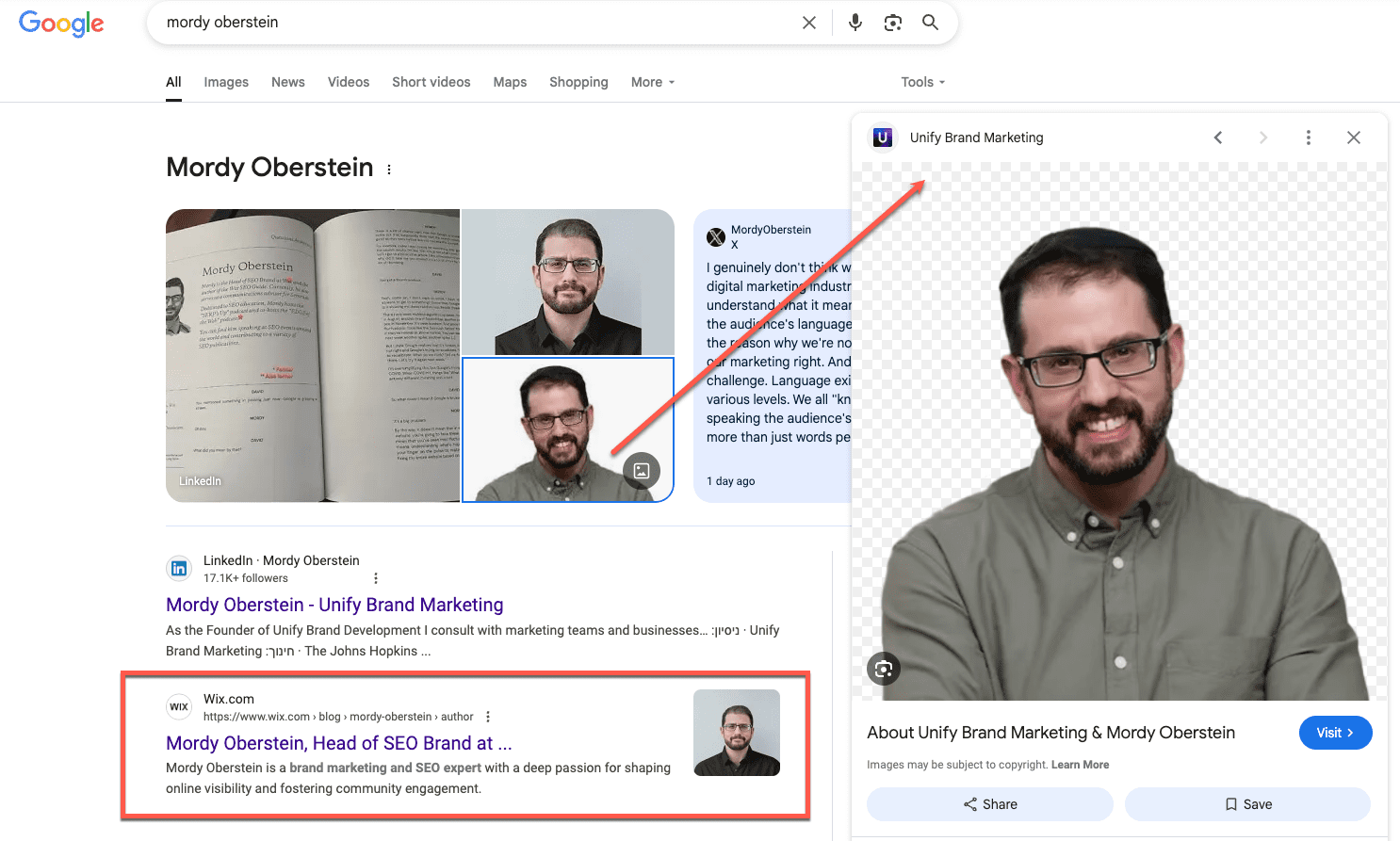
Author pages don’t just offer some background about your contributors but your site. They become a pillar of “who you are” across the web. Your authors aren’t just authors – they are representatives.

Screenshot from Google, March 2025

When someone runs across your author pages (perhaps by Googling one of your authors, as I did with Loren Baker above), they and the page connected with them substantiate who you are.

The authority of a good author page goes beyond visitors to your site.

If you’re running a marketing strategy that is heavy in employee advocacy, these pages are a major part of any outreach program.

If your goal is to get your own people out there repp’ing the brand on podcasts, webinars, conference stages, etc., the author page becomes a pillar. It becomes the “home” that represents your advocates and you at the same time.

This again speaks to the author page not merely being a list of credentials and accomplishments but as a narrative around the authors themselves.

If you’re trying to build your brand and performance by leveraging your employees, contributors, etc., you need pages that offer strong contextualization.

Even if you don’t use the bio/author page as part of the outreach per se, there’s a very good chance anyone interested will run some kind of search and find these pages on their own (again, as I did above).

Which brings us to…

Who Needs Author Pages?

Let me challenge the entire question. Why are we stopping at authors? The question should be, “Who needs people pages?” The answer is everyone whose company has any people. So, the answer is everyone.

Every business needs to contextualize itself via the people associated with it. That can be the CEO, CMO, CFO, CTO, or COO – I’m out of “Cs,” but it should not stop there.

When I see a company only list its top employees, it comes off as one giant ego stroke. So, mission accomplished: You have contextualized your business. I now know you’re a bunch of narcissists.

Even if you’re a solopreneur, there should be content that in a sense parses out who you are on the site.

I think we’ve come to look at “author pages” as being this very narrowed page type. To me, it’s the wrong way to look at them. It’s not an “SEO” play.

And when you think beyond SEO per se, is there really a difference between an author page and an employee bio page?

Yet, it’s funny because we’ll spend all day talking about how to bolster your author pages and then create one never-ending page for the employees that merely lists their names.

How exactly is that helpful beyond giving your user the ability to manually look up some of these folks on LinkedIn (which means leaving your website)?

So, who needs “author pages”? Everyone. The question is, what type of “author page” do you need? Can you combine your About Page and “author page”?

I do that on my own website since I’m a one-person show, and the format allows me that opportunity. I felt that having a separate page was a bit of overkill.

There’s a bio about who I am on my homepage and then a longer section on the About Page – do I really need to create another separate page to talk about me again? Doing so felt like it would be too much focus on myself and not my audience.

Again, it’s not a question of “if” you need some sort of author or bio page, but what kind and in what format?

Author Page Best Practices

That said, here are some quick best practices I would consider adding to your author pages (and similar “bio” pages). Some of them are obvious, like:

  • Social links.
  • Standard bio.
  • Image.
  • Recent posts.
  • Formal industry recogniton (such as Search Engine Journal does with its “Certification & Awards” tab).
  • Areas of expertise.

Some less so (and again, it all depends on your goals):

  • Conference talks.
  • Podcast, webinar appearances, and other “third-party placements” (similar to Search Engine Journal’s “Published Works” tab).
  • Outlets where the author is quoted.
  • Work experience (current and previous).
  • History of how the author got into the industry and why.
  • Personal industry philosophy (can even be a video).

The last thing I’ll say is: Watch the formatting.

99% of author pages, assuming they are substantial, feel like you’re reading a long article.

If you want to get the most out of the author page, you need to lay things out so that the audience can get a holistic sense of things at a glance.

Screenshot from Search Engine Journal, March 2025

The Search Engine Journal layout is one of the best I’ve seen online (and I’m not saying that because I’m writing this on Search Engine Journal).

I don’t feel overwhelmed by information. It’s all “chunked” in a way where I clearly notice the various areas of information without having to work hard to see it all.

That’s why it works.

More Resources:


Featured Image: Paulo Bobita/Search Engine Journal

Ask An SEO: How Can You Distinguish Yourself In This Era Of AI Search Engines? via @sejournal, @HelenPollitt1

Today’s question comes from FC, who asks:

“As an SEO specialist for over 6 years now, what and where does one need to focus with regard to SEO in this current dispensation.

How can you distinguish yourself and standout as an SEO specialist in this era of generative AI and AI search engines?”

This is an excellent question because it goes right to the heart of concerns I hear from a lot of SEO professionals. They have managed to build a solid career and name for themselves as an SEO specialist, but it now feels like the game has changed.

They worry that the skills and experience that got them to this point will not be enough to keep them excelling.

I want to address those concerns, both from the perspective of job seekers and those looking to make an impression in their current role.

What’s Changed

Up until a couple of years ago, it felt like there were clear career choices for SEO specialists to make.

Employed or self-employed? In-house or agency? Technical SEO or content SEO? Small business or enterprise sites? People manager or hands-on practitioner?

These series of decisions, or simply circumstances we found ourselves in, shaped our career paths.

There were central components to SEO. Primarily, you would be working with Google. You would be measured on key performance indicators (KPIs) like clicks and conversions.

You could impress stakeholders by linking your work directly to revenue.

It doesn’t seem as simple as that now, though.

LLMs And Social Media

More recently, there has been a focus on looking at optimizing brands’ presence in other search platforms, not just Bing, Yandex, Baidu, and other regionally relevant search engines.

It now includes platforms not traditionally thought of as belonging to the purview of SEO: TikTok, Perplexity AI, and app stores.

KPIs And Metrics

Google’s walled garden is growing larger, and proving the worth of SEO is getting harder. It’s increasingly difficult to show growth in your share of organic clicks when the pot is getting smaller.

With more answers being given in the search results themselves, and a reduction in the need for clicks off the SERPs, tracking the impact of SEO isn’t straightforward.

With potential – and current – employers still looking at year-on-year clicks, impressions, and revenue growth as their measure of an SEO’s success, this makes standing out quite challenging.

The Skills That Remain Important

I fundamentally believe that the foundational principles of SEO remain unchanged.

However, how we apply them may change with the advent of LLMs and other search platforms.

Technical SEO

A crawl issue that is preventing Googlebot smartphone from accessing the key pages on your site will likely also affect PerplexityBot and OpenAI’s OAI-SearchBot.

As an SEO, we will need to be able to identify where these bots are struggling to crawl pages. We will need to find solutions that enable them to access the pages we want to have served in their search results.

To stand out, make sure you are not just thinking Google-first with your technical solutions.

Consider the other sources of traffic, like LLMs and social media, which might be impacted by the decisions you are making.

Ensure you are also tracking and reporting on the impact of these changes across these other platforms.

Content SEO

Understanding what content searchers are looking for, how search engines perceive it, and what they are choosing to serve as search results is a fundamental aspect of SEO. This won’t change.

However, how you discuss it and the actions you take will change.

From now on, not only are the Google algorithms important for how you create and optimize content, but so are a host of other algorithms.

You will need to consider how searchers are surfacing content through other search platforms. You will also need to know how to make sure your content is served as the result.

Make sure you are moving away from Google as the only algorithm to optimize for and towards the other drivers of traffic and visibility.

Digital PR

I would suggest that digital PR is becoming even more important.

As the search engines we are optimizing for become more numerous, the key factor that seems to unite them is a reward of “authority.”

That is, to give your content a chance of being served as a result in any search engine, it needs to be perceived as authoritative on the subject.

These newer search platforms will still need to use similar methods to Google in identifying expertise and authoritativeness. Digital PR will be key in that.

I do feel that we need to stop making backlinks the main priority of digital PR, however.

Instead, we need to start focusing on how we report on mentions, citations, and conversations about brands and products.

For example, we can look at social media engagement metrics as an indicator of authority. Brand perception may well be formed through forum discussions, reviews, and comments on social media sites.

Just because we know that Googlebot discounts links from some social media platforms in attributing authority doesn’t mean that the newer search engines will. Indeed, they will not rely on social media sites heavily to understand brands.

For now, set yourself apart by rethinking the purpose of digital PR for SEO. Look at the benefits to the brand as a whole and start factoring this into your strategies.

“Soft” Skills

I maintain that the most successful SEO professionals are those who have mastered the non-SEO-specific skills that make businesses work.

Strategic thinking, stakeholder management, and leadership skills are all critical to success not only in SEO, but also in any career.

To really stand out in the changing SEO industry, focus on how these skills will need to be applied.

For example, factor in social media and LLMs into your SEO strategies. Make sure you are not just focusing on Google, but introducing the idea that SEO is broader than that.

Make sure you are liaising with development teams to loop them into your ideas for how to make the site accessible to AI bots. Work on being a thought leader in LLMs and new search platforms for your company.

These sorts of skills are those that will really make you stand out, but you need to apply them with the future of SEO in mind. Future-proof your careers as well as your websites!

Cross-Platform Knowledge

This is probably the hardest one for some SEO specialists to do. Stop looking at Google as the source of all SEO performance and widen the net.

Get comfortable with the other AI search platforms that are beginning to send traffic to your site. Use them yourself, and get familiar with what sort of content they serve and why.

Use social media sites and forums that are where your audience discusses brands like yours. Make sure that you are aware of how they work, and how to participate in those discussions without negative backlash.

Stand out by looking outside of the narrow “Google is SEO” box.

Being An Expert In The New Era Of SEO

How, then, can you guarantee that you are still perceived as an expert in SEO while the goalposts are changing?

What will make you stand out when you are applying for new jobs right now?

How can you prove that your skillset is still relevant whilst others are proclaiming “SEO is dead” (again)?

Demonstrate Impact Through Other Channels

Look at how you can collaborate more with adjacent channels.

For example, I’ve mentioned that social media and forums will be key areas where LLMs will discern brand relevancy and trustworthiness. Work with your teams who are already on those platforms.

Start helping them in areas that you are already an expert, for example: understanding algorithms, creating optimized content and measuring brand authority.

Drive impact in those areas and report on it alongside your more traditional SEO metrics.

Demonstrate Impact Through Other Metrics That Still Line Up With Corporate Goals

Although we are used to reporting on metrics like clicks, rankings, and impressions for SEO, we may need to start looking at other metrics if we want to continue showing the worth of SEO.

For example, consider utilizing tools like Otterly and Goodie to measure visibility in AI search platforms. Or, at the very least, some of the more traditional search engine rankings tools also cover Google’s AI Overview visibility.

Use these tools to demonstrate how the work you are doing is impacting the brand’s performance in AI search platforms.

Continue to relate all work you do back to revenue, or other core conversion goals for your business. Don’t forget to show how traffic from LLMs is converting on your site.

Continue Learning

A key way to stand out in your SEO career at the moment is to show a willingness to upskill and diversify your skillset.

The SEO landscape is shifting, and as such, it’s important to stay on top of new platforms and how they work.

Make sure you are utilizing training that is available on LLM optimization. Use the platforms yourself so you can understand what search real estate is available on them.

Share your findings in interviews and discussions with colleagues so you are highlighting what you’ve learned.

Although this may seem basic, you may find there are a lot of SEO professionals out there with their heads still buried in the sand when it comes to the evolution of the discipline.

Stand Out By Being Adaptable

At the end of the day, SEO is changing. That doesn’t mean that the skills we’ve developed over the past years are obsolete.

Instead, they are even more in demand as new platforms promise new avenues to reach prospective audiences.

The best way to stand out as an SEO in the current era of SEO is by being adaptable.

Learn how to apply your SEO skills to these emerging platforms and track your success.

More Resources:


Featured Image: Paulo Bobita/Search Engine Journal

Ask An SEO: How To Handle Duplicate Content Across Multiple Domains via @sejournal, @rollerblader

Today’s Ask an SEO question comes from Colin in London, UK.

“My question is about duplicate content. I work for a group of schools in the UK. We have 21 schools, each has its own website and domain with a link or banner linking back to our main group website. The schools are very busy, so to save time, we have created blog posts centrally to give to the schools. They change a few things but basically the pages are pretty much the same.

I have experience with SEO, so I put my Google good boy white hat on and said, ‘Google says not to do it, it’s duplicate content. We need them to be different.’

My question is will we be penalized? I understand they will compete with each other (multiples have taken page 1 at the same time), but otherwise, is this doing us harm?

Is Google smart enough to know we are a group with different emails? Should we rewrite them all? Should we just stop? It would be good to get a second opinion – maybe I need to lighten up or take take action and remove.

Please help. Thanks, Colin.”

Great question, Colin! It is something that comes up about once a year with our clients or as a question when I’m speaking at conferences.

I’m breaking the answer out into a few sections so that it can be applied to non-school situations, too.

But first, check out this post about Google’s duplicate content penalty myth, as it is something that is commonly misunderstood.

Use Canonicals When Publishing To Secondary Sites

In the situation above, it sounds like there is a main website and multiple variations.

If you’re worried about the variation websites taking from the main website, place canonical links back to the main site from the duplicate posts.

Let’s pretend these are the URLs:

  • Official site – colininlondon.com/blog-post-school.
  • Duplicate 1 – colininleeds.com/blog-post-school.
  • Duplicate 2 – colininglasgow.com/blog-post-school.

The official site will have a self-referencing canonical link because it is the main website and the post that should be ranking.

Duplicates 1 and 2 should have their canonical links point back to the (official) main website. This way, Google knows which site is the official one and which are duplicates.

You can also use schema, addresses, and other localization factors to help define that these are the same company and brand, similar to doing locations if you’re a brick-and-mortar business or using TLDs for country-specific targeting.

One thing to be careful of is having canonical links go to the wrong site.

When you publish original content on a specific school location site, make sure the canonical link is self-referencing vs. going back to the official site or main site.

And if the content gets published to the official site and secondary websites, have the canonicals point to the specific school location site.

You also want to make sure your sitemap excludes the content if it is not the official version. Not a big deal at this point, but still something you can control.

Publish To The Most Relevant Audience

When you’re stuck trying to think of which site should be the official one, or your content management system (CMS) allows you to assign a main site for the content, think about who would benefit most from the post and publish there.

If it is an event and only accessible to one or five schools vs. the 21, publish to the most relevant audience and use the same canonical plan above.

You may want the content to be accessible to all students, parents, and faculty, but if it is only relevant to a smaller grouping or a single school, only publish it to the most relevant location.

Some Content Is Not A Duplicate

In the case of snow days where some schools may be cancelled, others delayed, and some are business as usual, feel free to post these.

The main part of the content will be the same or similar, and that is ok. You can have the same opening and closing of the post; the most important content is the name of the school and the information about when school starts based on the location.

It may be beneficial to have a main post with all locations and their status on the main site, then have the “duplicate” variations with localized information on the individual.

A lot of people assume this would be duplicate content. It shouldn’t be as it is catered to a specific audience and only that audience.

Think about a pharmacy or retail chain where the only differences are hours of operation, phone number, and a couple store-specific details.

Should Content Be Rewritten For Each Site?

If you have the ability and you can make it relevant to that specific location, then yes, there would be a benefit.

For example, you may have a boys-only or girls-only school, or elementary, high, and preschool. If the content is for the Parent Teacher Association (PTA), chances are the concerns for the elementary school parent meetings will be different from those in high school.

By adding the agendas, decisions, board members, times, and other unique attributes of the meetings, you can have similar openings and closings because the body and meat of the posts will be unique.

Use Google Business Profile

Something I have not personally done, as I’ve not worked specifically on schools with multiple websites, is using Google Business Profile for your local locations.

I have done this with retailers and similar industries, such as non-profits and service providers, that have local branches, each with its own domain.

By setting the URLs up and combining them as entities, you may help to reduce the duplication of similar content. Google Business Profile will allow you to sync them together.

This will not help with your main duplicate content question, but it could help with making sure the locations are accounted for in the local search results which may be relevant in specific situations.

If your sites make it clear you’re not trying to game the system, then I wouldn’t worry about duplicate content penalties.

If you’re really concerned, use canonical links that reference the main version that lives on the group website. Then use self-referencing canonicals for any unique content published on the individual school sites.

I hope this helps, and thank you for asking!

More Resources:


Featured Image: Paulo Bobita/Search Engine Journal