Google’s Office Hours podcast answered the important question of whether it matters if the title element and the H1 element match. It’s a good question because Google handles these elements in a unique way that’s different from how traditional SEO thinks about it.
How Important Is It For H1 & Title Tags To Match?
The question and answer are short. Google’s Gary Illyes answers the question and then links to documentation about how Google produces “title links” in the search engine results pages (SERPs).
This is the question:
“…is it important for title tags to match the H1 tag?”
Gary answers:
“No, just do whatever makes sense from a user’s perspective.”
That’s a useful answer but it’s also missing the explanation of why it’s not important that the title tag matches the first heading element.
The Title And H1 Elements
The title element is in the
section with the other metadata and scripts that are used by search engines and browsers. The role of the element is to offer a general but concise description of what the web page is about before a potential site visitor clicks from the SERPs to the web page. So the title must describe the web page in a way that tells the potential visitor that the web page contains the content about whatever topic the page is about and if that’s a match to what the person is looking for then they’ll click through.
So it’s not that the title tag entices a click. It’s job is to say this is what’s on the page.
Now the heading elements (H1, H2, etc) are like mini titles, they describe what each section of a web page is about. Except for the first heading, which is usually an H1 (but could be an H2, it doesn’t matter to Google).
The first heading offers a concise description of what the web page is about to a site visitor that already knows what the page is about in a general way. So the H1 element can be said to be a little more specific in a way.
The official W3C HTML documentation for the H1 tells how the H1 is supposed to be used:
“It is suggested that the the text of the first heading be suitable for a reader who is already browsing in related information, in contrast to the title tag which should identify the node in a wider context.”
How Does Google Use H1 and Titles?
Google uses the headings and titles as a source of information about what the web page is about. But it also uses them to create the title link, which is the title that shows in the SERPs. So if the
element is inappropriate because it’s got a popular keyword phrase that the SEO wants to rank for but doesn’t describe what the page is about, Google’s going to check the heading tags and use one of those as the title link.
Twenty years ago it used to be mandatory to put the keyword phrase you wanted to rank for in the title tag. But ranking factors don’t work like that anymore because Google has natural language processing, neural networks, machine learning and AI that helps it understand concepts and topics.
That’s why the title tag and the heading tags are not parking spots for the keywords you want to rank for. They are best used to describe the page in a general (title element) and a bit more specific (H1) way.
Google’s Rules For Title Links
Gary Illyes of Google linked to documentation about how Google uses titles and headings to produce title links.
Titles must be descriptive and concise. Yes, use keywords but remember that the title must accurately describe the content.
Google’s guidelines explain:
“Title links are critical to giving users a quick insight into the content of a result and why it’s relevant to their query. It’s often the primary piece of information people use to decide which result to click on, so it’s important to use high-quality title text on your web pages.”
Avoid Boilerplate
Boilerplate is a phrase that’s repeated across the site. It’s usually templated content, like:
(type of law) Lawyers In (insert city name), (insert state name) – Name Of Website
Google’s documentation recommends that a potential site visitor should be able to distinguish between different pages by the title elements.
This is the recommendation:
“Avoid repeated or boilerplate text in
elements. It’s important to have distinct text that describes the content of the page in the <title> element for each page on your site.”
Branding In Title Tags
Another helpful tip is about website branding. Google advises that the home page is an appropriate location to provide extra information about the site.
Google provides this example:
ExampleSocialSite, a place for people to meet and mingle
The extra information about the site is not appropriate to have on the inner pages because that looks really bad when Google ranks more than one page from the website plus it’s missing the point about what the title tag is supposed be about.
Google advises:
“…consider including just your site name at the beginning or end of each
element, separated from the rest of the text with a delimiter such as a hyphen, colon, or pipe like this:ExampleSocialSite: Sign up for a new account.”
Content That Google Uses For Title Links
Google uses the following content for creating title links:
“Content in elements
Main visual title shown on the page
Heading elements, such as
elements
Other content that’s large and prominent through the use of style treatments
Other text contained in the page
Anchor text on the page
Text within links that point to the page
WebSite structured data”
Takeaways:
Google is choosing the title element to display as the title link. If it’s not a good match it may use the first heading as the title link in the SERPs. If that’s not good enough then it’ll search elsewhere on the page.
Use the title to describe what the page is about in a general way.
Headings are basically section “titles,” so the first heading (or H1) can be an opportunity to describe what the page is about in a more precise way than the title so that the reader is compelled to start reading or shopping or whatever they’re trying to do.
All of the headings in a web page together communicate what the entire page is about, like a table of contents.
The title element could be seen as serving the function similar to the title of a non-fiction book.
The first heading is more specific than the title about what the page is about.
Listen to the question and answer at the 10:46 minute mark:
Schema.org is a collection of vocabulary (or schemas) used to apply structured data markup to web pages and content. Correctly applying schema can improve SEO outcomes through rich snippets.
Structured data markup is translated by platforms such as Google and Microsoft to provide enhanced rich results (or rich snippets) in search engine results pages or emails. For example, you can markup your ecommerce product pages with variants schema to help Google understand product variations.
Schema.org is an independent project that has helped establish structured data consistency across the internet. It began collaborating with search engines such as Google, Yahoo, Bing, and Yandex back in 2011.
The Schema vocabulary can be applied to pages through encodings such as RDFa, Microdata, and JSON-LD. JSON-LD schema is preferred by Google as it is the easiest to apply and maintain.
Does Schema Markup Improve Your Search Rankings?
Schema is not a ranking factor.
However, your webpage becomes eligible for rich snippets in SERPs only when you use schema markup. This can enhance your search visibility and increase CTR on your webpage from search results.
Schema can also be used to build a knowledge graph of entities and topics. Using semantic markup in this way aligns your website with how AI algorithms categorize entities, assisting search engines in understanding your website and content.
“Most webmasters are familiar with HTML tags on their pages. Usually, HTML tags tell the browser how to display the information included in the tag. For example,
Avatar
tells the browser to display the text string “Avatar” in a heading 1 format.
However, the HTML tag doesn’t give any information about what that text string means—“Avatar” could refer to the hugely successful 3D movie, or it could refer to a type of profile picture—and this can make it more difficult for search engines to intelligently display relevant content to a user.”
This means that search engines should have additional information to help them figure out what the webpage is about.
You can even link your entities directly to sites like Wikipedia or Google’s knowledge graph to build explicit connections. Using Schema this way can have positive SEO results, according to Martha van Berkel, CEO of Schema App:
“At Schema App, we’ve tested how entity linking can impact SEO. We found that disambiguating entities like places resulted in pages performing better on [near me] and other location-based search queries.
Our experiments also showed that entity linking can help pages show up for more relevant non-branded search queries, increasing click-through rates to the pages.
Here’s an example of entity linking. If your page talks about “Paris”, it can be confusing to search engines because there are several cities in the world named Paris.
If you are talking about the city of Paris in Ontario, Canada, you can use the sameAs property to link the Paris entity on your site to the known Paris, Ontario entity on Wikipedia, Wikidata, and Google’s Knowledge Graph.”
By helping search engines understand content, you are assisting them in saving resources (especially important when you have a large website with millions of pages) and increasing the chances for your content to be interpreted properly and ranked well. While this may not be a ranking factor directly, Schema helps your SEO efforts by giving search engines the best chance of interpreting your content correctly, giving users the best chance of discovering it.
What Is Schema Markup Used For?
Listed above are some of the most popular uses of schema, which are supported by Google and other search engines.
You may have an object type that has a schema.org definition but is not supported by search engines.
In such cases, it is advised to implement them, as search engines may start supporting them in the future, and you may benefit from them as you already have that implementation.
Types Of Schema Encoding: JSON-LD, Microdata, & RDFa
There are three primary formats for encoding schema markup:
JSON-LD.
Microdata.
RDFa.
Google recommends JSON-LD as the preferred format for structured data. Microdata is still supported, but JSON-LD schema is recommended.
In certain circumstances, it isn’t possible to implement JSON-LD schema due to website technical infrastructure limitations such as old content management systems). In these cases, the only option is to markup HTML via Microdata or RDFa.
You can now mix JSON-LD and Microdata formats by matching the @idattribute of JSON-LD schema with theitemidattribute of Microdata schema. This approach helps reduce the HTML size of your pages.
For example, in a FAQ section with extensive text, you can use Microdata for the content and JSON-LD for the structured data without duplicating the text, thus avoiding an increase in page size. We will dive deeper into this below in the article when discussing each type in detail.
1. JSON-LD Schema Format
JSON-LD encodes data using JSON, making it easy to integrate structured data into web pages. JSON-LD allows connecting different schema types using a graph with @ids, improving data integration and reducing redundancy.
Let’s look at an example. Let’s say that you own a store that sells high-quality routers. If you were to look at the source code of your homepage, you would likely see something like this:
Once you dive into the code, you’ll want to find the portion of your webpage that discusses what your business offers. In this example, that data can be found between the two
tags.
The following JSON-LD formatted text will markup the information within that HTML fragment on your webpage, which you may want to include in your webpage’s
section.
This snippet of code defines your business as a store via the attribute"@type": "Store".
Then, it details its location, contact information, hours of operation from Monday to Saturday, and different operational hours for Sunday.
By structuring your webpage data this way, you provide critical information directly to search engines, which can improve how they index and display your site in search results. Just like adding tags in the initial HTML, inserting this JSON-LD script tells search engines specific aspects of your business.
Let’s review another example of WebPage schema connected with Organization and Author schemas via @id. JSON-LD is the format Google recommends andother search engines because it’s extremely flexible, and this is a great example.
In the example:
Website links to the organization as the publisher with @id.
The organization is described with detailed properties.
WebPage links to the WebSite with isPartOf.
NewsArticle links to the WebPage with isPartOf, and back to the WebPage with mainEntityOfPage, and includes the author property via @id.
You can see how graph nodes are linked to each other using the"@id"attribute. This way, we inform Google that it is a webpage published by the publisher described in the schema.
The use of hashes (#) for IDs is optional. You should only ensure that different schema types don’t have the same ID by accident. Adding custom hashes (#) can be helpful, as it provides an extra layer of insurance that they will not be repeated.
You may wonder why we use"@id"to connect graph nodes. Can’t we just drop organization, author, and webpage schemas separately on the same page, and it is intuitive that those are connected?
The issue is that Google and other search engines cannot reliably interpret these connections unless explicitly linked using@id.
Adding to the graph additional schema types is as easy as constructing Lego bricks. Say we want to add an image to the schema:
As you already know from the NewsArticle schema, you need to add it to the above schema graph as a parent node and link via @id.
As you do that, it will have this structure:
Quite easy, isn’t it? Now that you understand the main principle, you can build your own schema based on the content you have on your website.
And since we live in the age of AI, you may also want to use ChatGPT or other chatbots to help you build any schema you want.
2. Microdata Schema Format
Microdata is a set of tags that aims to make annotating HTML elements with machine-readable tags much easier.
However, the one downside to using Microdata is that you have to mark every individual item within the body of your webpage. As you can imagine, this can quickly get messy.
Take a look at this sample HTML code, which corresponds to the above JSON schema with NewsArticle:
Our Company
Example Company, also known as Example Co., is a leading innovator in the tech industry.
Founded in 2000, we have grown to a team of 200 dedicated employees.
Our slogan is: "Innovation at its best".
Contact us at +1-800-555-1212 for customer service.
Our Founder
Our founder, Jane Smith, is a pioneer in the tech industry.
This example shows how complicated it becomes compared to JSON-LD since the markup is spread over HTML. Let’s understand what is in the markup.
You can see
tags like:
By adding this tag, we’re stating that the HTML code contained between the
blocks identifies a specific item.
Next, we have to identify what that item is by using the ‘itemtype’ attribute to identify the type of item (Person).
An item type comes in the form of a URL (such as https://schema.org/Person). Let’s say, for example, you have a product you may use http://schema.org/Product.
To make things easier, you can browse a list of item types here and view extensions to identify the specific entity you’re looking for. Keep in mind that this list is not all-encompassing but only includes ones that are supported by Google, so there is a possibility that you won’t find the item type for your specific niche.
It may look complicated, but Schema.org provides examples of how to use the different item types so you can see what the code is supposed to do.
Don’t worry; you won’t be left out in the cold trying to figure this out on your own!
To use this amazing tool, just select your item type, paste in the URL of the target page or the content you want to target, and then highlight the different elements so that you can tag them.
3. RDFa Schema Format
RDFa is an acronym for Resource Description Framework in Attributes. Essentially, RDFa is an extension to HTML5 designed to aid users in marking up structured data.
RDFa isn’t much different from Microdata. RDFa tags incorporate the preexisting HTML code in the body of your webpage. For familiarity, we’ll look at the same code above.
The HTML for the same JSON-LD news article will look like:
Unlike Microdata, which uses a URL to identify types, RDFa uses one or more words to classify types.
vocab=”http://schema.org/” typeof=”WebPage”>
If you wish to identify a property further, use the ‘typeof’ attribute.
Let’s compare JSON-LD, Microdata, and RDFa side by side. The @type attribute of JSON-LD is equivalent to the itemtype attribute of Microdata format and the typeof attribute in RDFa. Furthermore, the propertyName of JSON-LD attribute would be the equivalent of the itemprop and property attributes.
Attribute Name
JSON-LD
Microdata
RDFa
Type
@type
itemtype
typeof
ID
@id
itemid
resource
Property
propertyName
itemprop
property
Name
name
itemprop=”name”
property=”name”
Description
description
itemprop=”description”
property=”description”
For further explanation, you can visit Schema.org to check lists and view examples. You can find which kinds of elements are defined as properties and which are defined as types.
To help, every page on Schema.org provides examples of how to apply tags properly. Of course, you can also fall back on Google’s Structured Data Testing Tool.
4. Mixing Different Formats Of Structured Data With JSON-LD
If you use JSON-LD schema but certain parts of pages aren’t compatible with it, you can mix schema formats by linking them via @id.
For example, if you have live blogging on the website and a JSON-LD schema, including all live blogging items in the JSON schema would mean having the same content twice on the page, which may increase HTML size and affect First Contentful Paint and Largest Contentful Paint page speed metrics.
You can solve this either by generating JSON-LD dynamically with JavaScript when the page loads or by marking up HTML tags of live blogging via the Microdata format, then linking to your JSON-LD schema in the head section via “@id“.
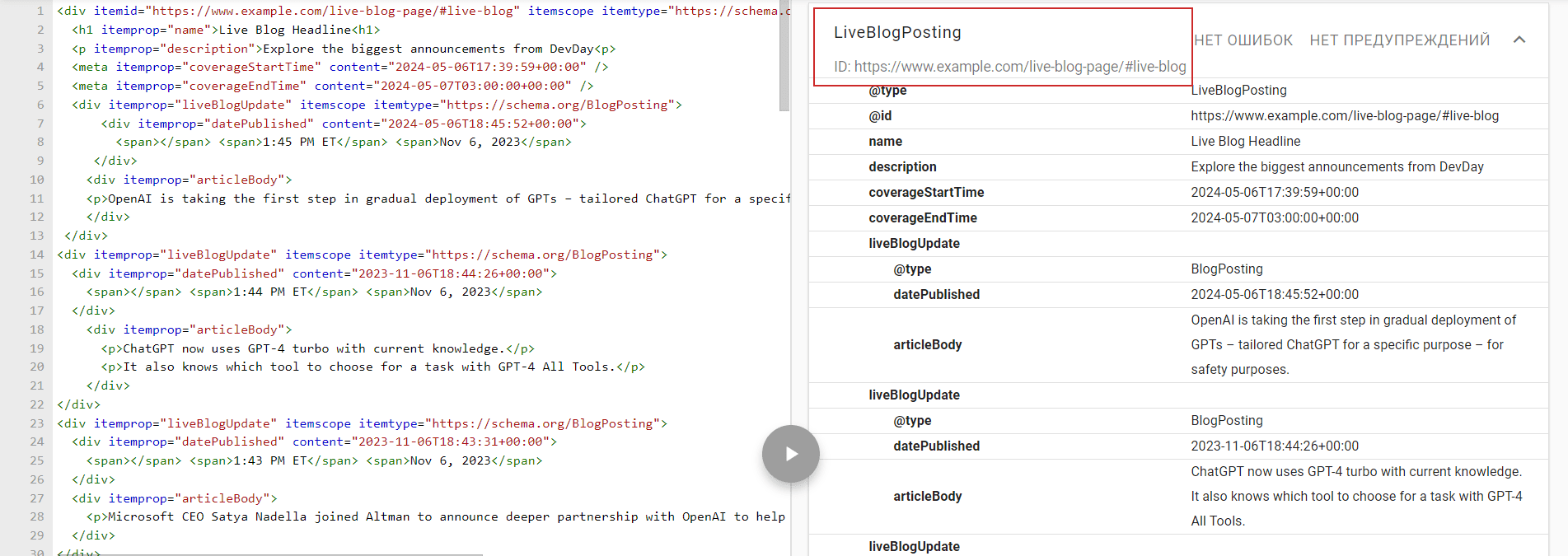
Here is an example of how to do it.
Say we have this HTML with Microdata markup with itemid="https://www.example.com/live-blog-page/#live-blog"
Live Blog Headline
Explore the biggest announcements from DevDay
1:45 PM ETNov 6, 2023
OpenAI is taking the first step in gradual deployment of GPTs – tailored ChatGPT for a specific purpose – for safety purposes.
1:44 PM ETNov 6, 2023
ChatGPT now uses GPT-4 turbo with current knowledge.
It also knows which tool to choose for a task with GPT-4 All Tools.
1:43 PM ETNov 6, 2023
Microsoft CEO Satya Nadella joined Altman to announce deeper partnership with OpenAI to help developers bring more AI advancements.
We can link to it from the sample JSON-LD example we had like this:
If you copy and paste HTML and JSON examples underneath in the schema validator tool, you will see that they are validating properly.
The schema validator does validate the above example.
The SEO Impact Of Structured Data
This article explored the different schema encoding types and all the nuances regarding structured data implementation.
Schema is much easier to apply than it seems, and it’s a best practice you must incorporate into your webpages. While you won’t receive a direct boost in your SEO rankings for implementing Schema, it can:
Make your pages eligible to appear in rich results.
Ensure your pages get seen by the right users more often.
Avoid confusion and ambiguity.
The work may seem tedious. However, given time and effort, properly implementing Schema markup is good for your website and can lead to better user journeys through the accuracy of information you’re supplying to search engines.
Image Credits
Featured Image: Paulo Bobita Screenshot taken by author
Google’s John Mueller clarified that localized duplicate content across regional websites is acceptable. Unique content is still recommended for specific page types.
Google doesn’t penalize duplicate content on localized websites.
Translating or customizing core content for local markets is acceptable.
However, unique content is still needed for certain pages.
Google’s John Mueller responded to a question about whether affiliate links have a negative impact on rankings, touching on factors that affiliate sites should keep in mind.
Hypothesis: Google Targets Affiliate Sites
There is a decades-long hypothesis that Google targets affiliate sites. SEOs were talking about it as far back as Pubcon Orlando 2004 and for longer than that on SEO forums.
In hindsight it’s easy to see that that Google wasn’t targeting affiliate sites, Google was targeting the quality level of sites that followed certain tactics like keyword stuffing, organized link rings, scaled automated content and so on.
Image Representing A Low Quality Site
The idea that Google targets affiliate sites persists, probably because so many affiliate sites tend to lose rankings every update. But it’s also true that those same affiliate sites have shortcomings that the marketers are may or may not be aware of.
It’s those shortcomings that John Mueller’s answer implies that affiliates should focus on.
Do Many Affiliate Links Hurt Rankings?
This is the question:
“…do many affiliate links hurt the ranking of a page?”
Google’s John Mueller answered:
“We have a blog post from about 10 years ago about this, and it’s just as relevant now. The short version is that having affiliate links on a page does not automatically make your pages unhelpful or bad, and also, it doesn’t automatically make the pages helpful.
You need to make sure that your pages can stand on their own, that they’re really useful and helpful in the context of the web, and for your users.”
Pages That Can Stand On Their Own
The thing about some affiliate marketers that encounter ranking issues is that even though they “did everything perfect” a lot of their ideas of perfections come from reading blogs tha recommend outdated tactics.
Consider that today, in 2024, there are some SEOs who are still insisting that Google uses simple clickthrough rates as a ranking factor, as if AI hasn’t been a part of Google’s algorithm for the past 10+ years, insisting as if machine learning couldn’t use clicks to create classifiers that can be used to predict which content is most likely to satisfy users.
What Are Common Outdated Tactics?
These are in my opinion the kind of tactics that can lead to unhelpful content:
Targeting Keywords Not People Keywords, in my opinion, are the starting point for identifying topics that people are interested in. Google doesn’t rank keywords, they rank content that’s about the topics and concepts associated with those keywords. An affiliate, or anyone else, who begins and ends their content by targeting keywords is unintentionally creating content for search engines not people and lacks the elements of usefulness and helpfulness that Google’s signals are looking for.
Copying Competitors Another tactic that’s more harmful than helpful is the ones that advise site owners to copy what competitors who rank are doing and then do it ten times better. That’s basically just giving Google what they already have in the search results and is the kind of thing that Google will not find unique or original and risks getting discovered/not indexed at worst and ranking on page two or three at best.
The essence of outcompeting a competitor isn’t copying them, it’s doing something users appreciate that competitor’s aren’t doing.
Takeaways:
The following are my takeaways, my opinion on three ways to do better in search.
Don’t just target keywords. Focus on the people who are searching for those keywords and what their needs are.
Don’t research your competitors to copy what their doing. Research your competitors to identify what they’re not doing (or doing poorly) and make that your competitive strength.
Don’t just build links to promote your site to other sites. Promote your sites to actual people. Identify where your typical site visitor might be and identify ways of making your website known to them, there. Promotion does not begin and end with links.
What Does Google Say About Affiliate Sites?
Mueller mentioned that he wrote something ten years ago but he didn’t link to it. Good luck finding it.
But Google has published content about the topic and here are a few things to keep in mind.
“Affiliate links on pages such as product reviews or shopping guides are a common way for blogs and publishers to monetize their traffic. In general, using affiliate links to monetize a website is fine. We ask sites participating in affiliate programs to qualify these links with rel=”sponsored”, regardless of whether these links were created manually or dynamically.
As a part of our ongoing effort to improve ranking for product-related searches and better reward high-quality content, when we find sites failing to qualify affiliate links appropriately, we may issue manual actions to prevent these links from affecting Search, and our systems might also take algorithmic actions. Both manual and algorithmic actions may affect how we see a site in Search, so it’s good to avoid things that may cause actions, where possible.”
“If your site syndicates content that’s available elsewhere, a good question to ask is: “Does this site provide significant added benefits that would make a user want to visit this site in search results instead of the original source of the content?” If the answer is “No,” the site may frustrate searchers and violate our quality guidelines. As with any violation of our quality guidelines, we may take action, including removal from our index, in order to maintain the quality of our users’ search results. “
“Thin affiliate pages are pages with product affiliate links on which the product descriptions and reviews are copied directly from the original merchant without any original content or added value.”
5. Google has an entire webpage that documents how to write high quality reviews:
It’s a fact that affiliate sites routinely rank at the top of the search results. It’s also true that Google doesn’t target affiliate sites, Google generally targets spammy tactics and low quality content.
Yes there are false positives and Google’s algorithms have room for improvement. But in general, it’s best to keep an open mind about why a site might not be ranking.
Listen to the Office Hours podcast at the 4:55 minute mark:
In a recording of Google’s June SEO office-hours Q&A session, John Mueller, a Google’s Search Relations team member, discussed the impact of AI-generated content on SEO.
The discussion focused on two key areas: the indexing of AI-translated content and using AI tools for initial content drafting.
As the use of AI in content creation grows, Mueller’s advice can help you decide what’s best for your website and audience.
AI-Generated Translations
One of the questions posed to Mueller was: “How can one be transparent in the use of AI translations without being punished for AI-heavy content?”
In response, Mueller clarified that there’s no specific markup or labeling for automatically translated pages.
Instead, website owners should evaluate whether the translated content meets their quality standards and resonates with their target audience.
Mueller advised:
“If the pages are well-translated, if it uses the right wording for your audience, in short, if you think they’re good for your users, then making them indexable is fine.”
However, if the translated content falls short of expectations, website owners can exclude those pages from search engines’ indexing using the “noindex” robots meta tag.
Mueller encouraged website owners to go beyond the bare minimum of word-for-word translation, stating:
“Ultimately, a good localization is much more than just a translation of words and sentences, so I would definitely encourage you to go beyond the minimal bar if you want users in other regions to cherish your site.”
AI-Assisted Content Creation
Another question addressed using AI tools to generate initial content drafts, with human editors reviewing and refining the content.
Mueller’s response focused on the overall quality of the published content, regardless of the tools or processes used in its creation.
Mueller explained:
“What matters for us is the overall quality that you end up publishing on your website.”
He acknowledged that using tools to assist with spelling, formulations, and initial drafting is not inherently problematic.
However, he cautioned that AI-generated content is only sometimes considered high-quality.
Mueller recommended referring to Google’s guidance on AI-generated content and the company’s “helpful content” page, which provides a framework for evaluating content quality.
He also encourages seeking input from independent third-party reviewers, stating:
“I realize it’s more work, but I find getting input from independent third-party folks on these kinds of questions extremely insightful.”
Analyzing Google’s Advice
On the surface, Mueller’s guidance is straightforward: evaluate the quality of AI-translated or AI-assisted content and ensure it meets quality standards.
However, his repetition of Google’s oft-cited “focus on quality” mantra offered little in the way of specific, actionable advice.
While Mueller acknowledged AI tools can assist with drafting, formatting, and other content creation tasks, his warning that AI output isn’t automatically “high-quality” hints at Google’s underlying skepticism toward the technology.
Reading between the lines, one could interpret Google’s stance as an attempt to discourage reliance on AI, at least for now.
Until more transparent and practical guidelines emerge, websites will be left to take their own calculated risks with AI-assisted content creation.
How This Can Help You
Whether using AI for translations or initial drafting, the key takeaway is prioritizing overall content quality, audience relevance, and adherence to Google’s guidelines.
Additionally, seeking third-party feedback can provide help ensure that AI-assisted content meets the highest standards for user experience and SEO.
Listen to the full episode of Google’s June SEO office-hours below:
Recent statements by Googlers indicate that the algorithm is working the way it’s supposed to and that site owners should just focus more on their users and less on trying to give the algorithm what it’s looking for. But the same Googlers also say that the search team is working on a way to show more good content.
That can seem confusing because if the algorithm isn’t broken then why are they also working on it as if it’s broken in some way? The answer to the question is a bit surprising.
Google’s Point Of View
It’s important to try to understand how search looks like from Google’s point of view. Google makes it easier to do with their Search Off The Record (SOTR) podcast because it’s often just Googlers talking about search from their side of the search box.
And in a recent SOTR podcast Googlers Gary Illyes and John Mueller talked about how something inside Google might break but from their side of the search box it’s a minor thing, not worth making an announcement. But then people outside of Google notice that something’s broken.
It’s in that context that Gary Illyes made the following statement about deciding whether to “externalize” (communicate) that something is broken.
He shared:
“There’s also the flip side where we are like, “Well, we don’t actually know if this is going to be noticed,” and then two minutes later there’s a blog that puts up something about “Google is not indexing new articles anymore. What up?” And I say, “Okay, let’s externalize it.””
John Mueller then asks:
“Okay, so if there’s more pressure on us externally, we would externalize it?”
And Gary answered:
“Yeah. For sure. Yeah.”
John follows up with:
“So the louder people are externally, the more likely Google will say something?”
Gary then answered yes and no because sometimes nothing is broken and there’s nothing to announce, even though people are complaining that something is broken.
He explained:
“I mean, in certain cases, yes, but it doesn’t work all the time, because some of the things that people perceive externally as a failure on our end is actually working as intended.”
So okay, sometimes things are working as they should but what’s broken is on the site owner’s side and maybe they can’t see it for whatever reason and you can tell because sometimes people tweet about getting caught in an update that didn’t happen, like some people thought their sites were mistakenly caught in Site Reputation Abuse crackdown because their sites lost rankings at the same time that the manual actions went out.
The Non-Existent Algorithms
Then there are the people who continue to insist that their sites are suffering from the HCU (the helpful content update) even though there is no HCU system anymore.
SearchLiaison recently tweeted about the topic of people who say they were caught in the HCU.
“I know people keep referring to the helpful content system (or update), and I understand that — but we don’t have a separate system like that now. It’s all part of our core ranking systems: https://developers.google.com/search/help/helpful-content-faq
It’s a fact, all the signals of the HCU are now a part of the core algorithm which consists of a lot of parts and there is no longer that one thing that used to be the HCU. So the algorithm is still looking for helpfulness but there are other signals as well because in a core update there are a lot of things changing.
So it may be the case that people should focus less on helpfulness related signals and be more open to the possibility of a wider range of issues instead of just one thing (helpfulness) which might not even be the reason why a site lost rankings.
Mixed Signals
But then there are the mixed signals where Googlers say that things are working the way they should but that the search team is working on showing more sites, which kind of implies the algorithm isn’t working the way it should be working.
On June 3rd SearchLiaison discussed how people who claim they have algorithmic actions against them don’t. The context of the statement was in answering a June 3rd tweet by someone who said they were hit by an algorithm update on May 6th and that they don’t know what to fix because they didn’t receive a manual action. Please note that the tweet has a type where they wrote June 6th when they meant May 6th.
The original June 3rd tweet refers to the site reputation abuse manual actions:
“I know @searchliaison says that there was no algorithmic change on June 6, but the hits we’ve taken since then have been swift and brutal.
Something changed, and we didn’t get the luxury of manual actions to tell us what we did wrong, nor did anyone else in games media.”
Before we get into what SearchLiason said, the above tweet could be seen as an example of focusing on the wrong “signal” or thing and instead it might be more productive to be open to a wider range of possible reasons why the site lost rankings.
SearchLiaison responded:
“I totally understand that thinking, and I won’t go back over what I covered in my long post above other than to reiterate that 1) some people think they have an algorithmic spam action but they don’t and 2) you really don’t want a manual action.”
In the same response, SearchLiaison left the door open that it’s possible search could do better and that they’re researching on how to do that.
He said:
“And I’ll also reiterate what both John and I have said. We’ve heard the concerns such as you’ve expressed; the search team that we’re both part of has heard that. We are looking at ways to improve.”
And it’s not just SearchLiaison leaving the door open to the possibility of something changing at Google so that more sites are shown, John Mueller also said something similar last month.
“I can’t make any promises, but the team working on this is explicitly evaluating how sites can / will improve in Search for the next update. It would be great to show more users the content that folks have worked hard on, and where sites have taken helpfulness to heart.”
SearchLiaison said that they’re looking at ways to improve and Mueller said they’re evaluating how sites “can/will improve in Search for the next update.” So, how does one reconcile that something is working the way it’s supposed to and yet there’s room to be improved?
Well, one way to consider it is that the algorithm is functional and satisfactory but that it’s not perfect. And because nothing is perfect that means there is room for refinement and opportunities to improve, which is the case about everything, right?
Takeaways:
1. It may be helpful to consider that everything can be refined and made better is not necessarily broken because nothing is perfect.
2. It may also be productive to consider that helpfulness is just one signal out of many signals and what might look like an HCU issue might not be that at all, in which case a wider range of possibilities should be considered.
Google updated their hreflang documentation to note a quirk in how some websites are using it which (presumably) can lead to unintended consequences with how Google processes it.
hreflang Link Tag Attributes
is an HTML attribute that can be used to communicate data to the browser and search engines about linked resources relevant to the webpage. There are multiple kinds of data that can be linked to such as CSS, JS, favicons and hreflang data.
In the case of the hreflang attribute (attribute of the link element), the purpose is to specify the languages. All of the link elements belong in the
section of the document.
Quirk In hreflang
Google noticed that there is an unintended behavior that happens when publishers combine multiple in attributes in one link element so they updated the hreflang documentation to make this more broadly known.
“Clarifying link tag attributes What: Clarified in our hreflang documentation that link tags for denoting alternate versions of a page must not be combined in a single link tag.
Why: While debugging a report from a site owner we noticed we don’t have this quirk documented.”
What Changed In The Documentation
There was one change to the documentation that warns publishers and SEOs to watch out for this issue. Those who audit websites should take notice of this.
This is the old version of the documentation:
“Put your tags near the top of the
element. At minimum, the tags must be inside a well-formed section, or before any items that might cause the to be closed prematurely, such as
or a tracking pixel. If in doubt, paste code from your rendered page into an HTML validator to ensure that the links are inside the
element.”
This is the newly updated version:
“The tags must be inside a well-formed
section of the HTML. If in doubt, paste code from your rendered page into an HTML validator to ensure that the links are inside the element. Additionally, don’t combine link tags for alternate representations of the document; for example don’t combine hreflang annotations with other attributes such as media in a single tag.”
Google’s documentation didn’t say what the consequence of the quirk is but if Google was debugging it then that means it did cause some kind of issue. It’s a seemingly minor thing that could have an outsized impact.
A new study shows that readers prefer simple, straightforward headlines over complex ones.
The researchers, Hillary C. Shulman, David M. Markowitz, and Todd Rogers, did over 30,000 experiments with The Washington Post and Upworthy.
They found that readers are likelier to click on and read headlines with common, easy-to-understand words.
The study, published in Science Advances, suggests that people are naturally drawn to simpler writing.
In the crowded online world, plain headline language can help grab more readers’ attention.
Field Experiments and Findings
Between March 2021 and December 2022, researchers conducted experiments analyzing nearly 9,000 tests involving over 24,000 headlines.
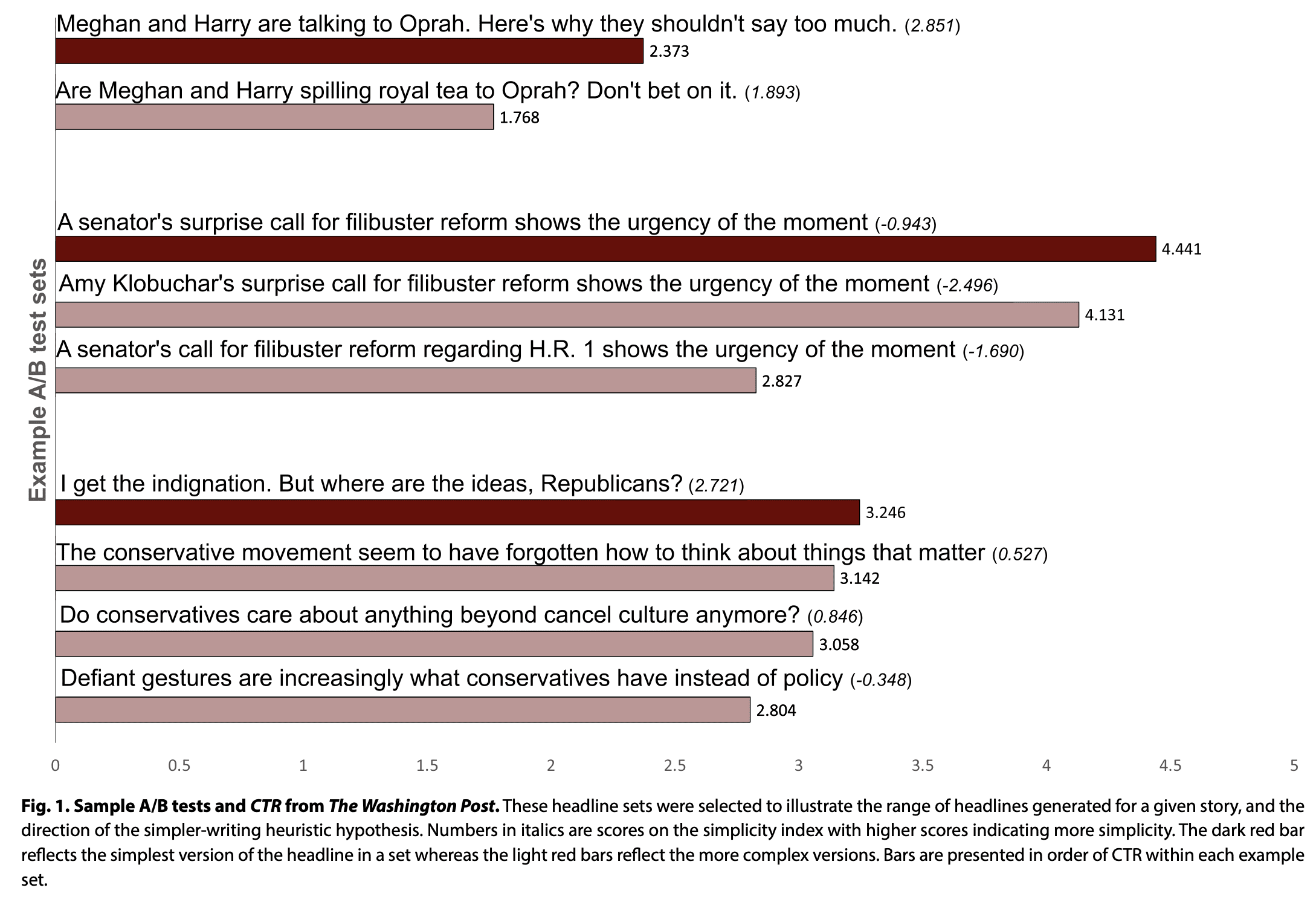
Data from The Washington Post showed that simpler headlines had higher click-through rates.
The study found that using more common words, a simpler writing style, and more readable text led to more clicks.
In the screenshot below, you can see examples of headline tests conducted at The Washington Post.
Screenshot from: science.org, June 2024.
A follow-up experiment looked more closely at how people process news headlines.
This experiment used a signal detection task (SDT) to find that readers more closely read simpler headlines when presented with a set of headlines of varied complexity.
The finding that readers engage less deeply with complex writing suggests that simple writing can help publishers increase audience engagement even for complicated stories.
Professional Writers vs. General Readers
The study revealed a difference between professional writers and general readers.
A separate survey showed that journalists didn’t prefer simpler headlines.
This finding is important because it suggests that journalists may need help understanding how their audiences will react to and engage with the headlines they write.
Implications For Publishers
As publishers compete for readers’ attention, simpler headline language could create an advantage.
Simplified writing makes content more accessible and engaging, even for complex articles.
To show how important this is, look at The Washington Post’s audience data from March 2021 to December 2022. They averaged around 70 million unique digital visitors per month.
If each visitor reads three articles, a 0.1% increase in click-through rates (from 2.0% to 2.1%) means 200,000 more readers engaging with stories due to the simpler language.
Boost your skills with Growth Memo’s weekly expert insights. Subscribe for free!
Taking a break from analyzing leaked Google ranking factors and AI Overviews, let’s come back to the question, “Do big sites get an unfair advantage in Google Search?”
In part 1 of David vs. Goliath, I found that bigger sites indeed grow faster than smaller sites, but likely not because they’re big but because they’ve found growth levers they can pull over a long time period.
The analysis of 1,000 winner and 1,000 loser sites shows that communities have gained disproportional SEO visibility over the last 12 months, while ecommerce retailers and publishers have lost the most.
Backlinks seem to have lost weight in Google’s ranking systems over the last 12 months, even though overperformers still have stronger backlink profiles than underperformers.
However, newcomer sites still have good chances to grow big, but not in established verticals.
The correlation between SEO visibility and the number of linking domains is strong but was higher in May 2023 (.81) than in May 2024 (0.62). Sites that lost organic traffic showed lower correlations (0.39 in May 2023 and 0.41 in May 2024). Even though sites that gained organic visibility have more backlinks, the signal seems to have come down significantly over the last 12 months.
In the second part, I share more insights from the data about how and when sites grow or decline in SEO traffic. My goal is to colorize the modern, working approach to SEO and contrast the old, dying approach.
Insights:
Most sites lose during core algorithm updates but win outside of them.
Most sites grow linearly, not “exponentially.”
Tool + programmatic SEO works well.
High ad load and confusing design work poorly.
Image Credit: Lyna ™
Hard(Core) Algorithm Updates
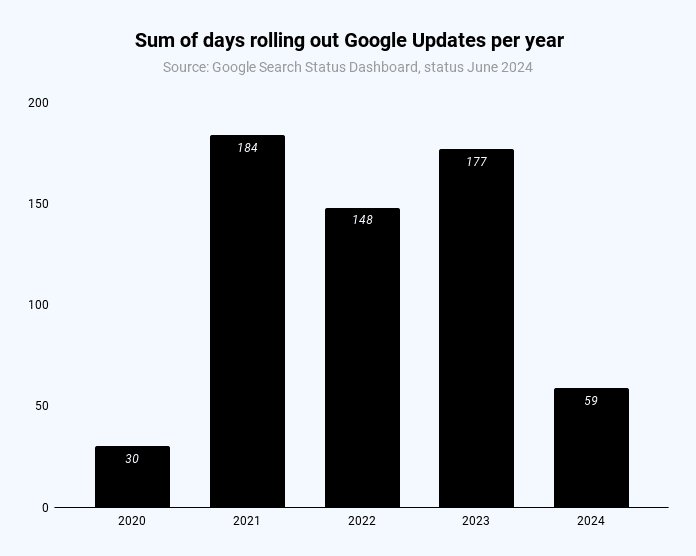
During almost half of the year, you can expect at least one Google update to be rolling out.
According to the official page for ranking “incidents,” 2021-2023 had an average of 170 days of Google updates.
Days of the year with Google updates (Image Credit: Kevin Indig)
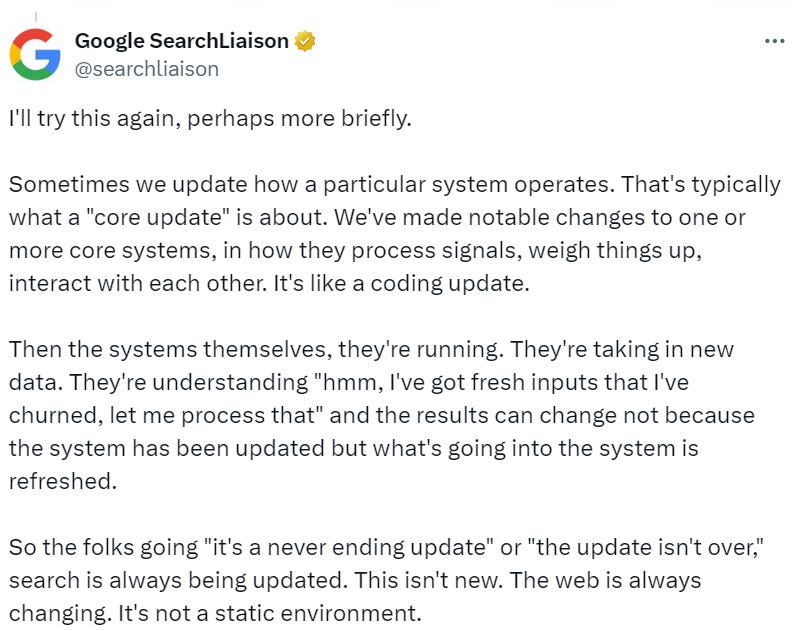
Keep in mind that roll-out days reflect official updates and the times new updates roll out. The impact of updated rank systems can come into effect way after roll-out when new data is infused into the system, according to Danny Sullivan.
So the folks going “it’s a never ending update” or “the update isn’t over,” search is always being updated.
Image Credit: Kevin Indig
As I wrote in Hard(Core) Algorithm Updates, algo updates become a growing challenge for Google as a user acquisition channel:
No platform has as many changes of requirements. Over the last 3 years, Google launched 8 Core, 19 major and 75-150 minor updates. The company mentions thousands of improvements every year.
Every platform improves its algorithms, but not as often as Google. Instagram launched 6 major algorithm changes over the last 3 years. Linkedin launched 4.
The top 1,000 domains with the biggest traffic losses reflect the risk: When a domain loses organic traffic, it’s most likely due to a Google core algorithm update. A few examples:
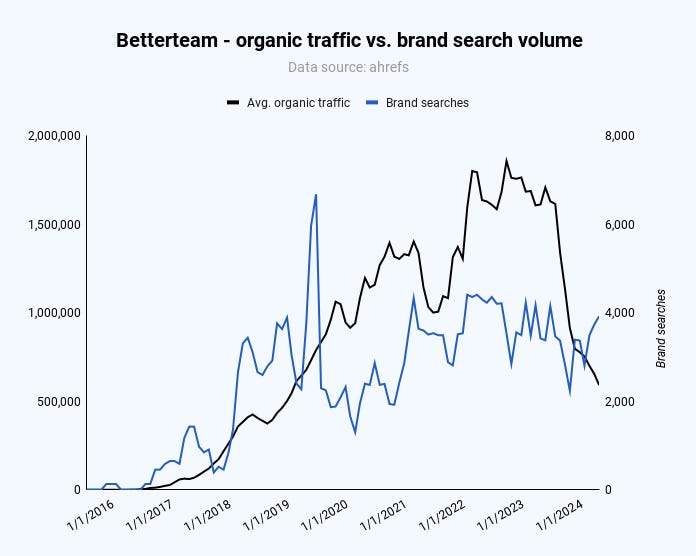
In SaaS, applicant tracking software company Betterteam was caught by the September 2023 Helpful Content and October 2023 core update, likely because of too much programmatic “low-quality” content.
Hints from the Google ranking factor leak indicate a connection between brand searches, backlinks, and content. Whether that’s true or not and if we can influence it remains to be seen, but for Betterteam, brand searches have stagnated since March 2022 while the number of pages has been growing.
Image Credit: Kevin Indig
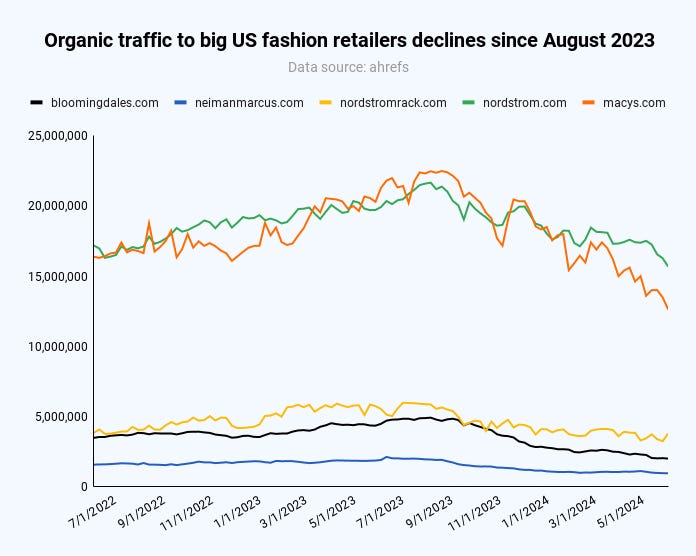
In ecommerce, big US retailers across all verticals (fashion, home, mega-retailers) have been on the decline since the August 2023 core update. More about that in a moment.
Image Credit: Kevin Indig
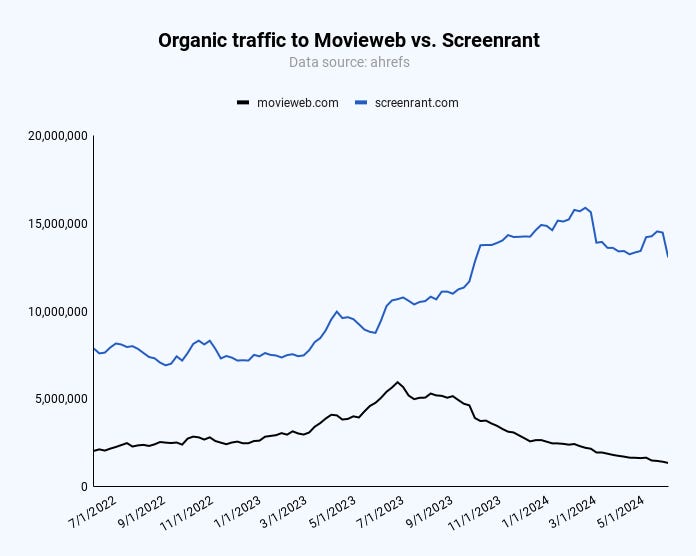
In publishing, sites like Movieweb have also started declining since August 2023. In this case, it’s interesting how Screenrant picks up market share but also dips during the March 2024 core update.
Image Credit: Kevin Indig
Overlapping algorithm updates make it near-impossible to understand what happened, which is a reverse engineering problem for SEO pros and also a guideline issue for anyone responsible for organic traffic. To understand what guideline you violated, you need to be able to understand what happened.
S-Curves Are Rare
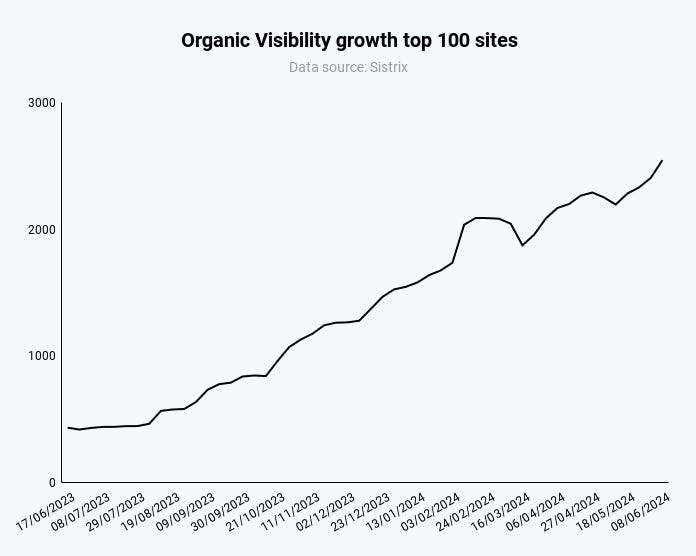
It’s rare for a domain to grow exponentially (actually, sigmoidal ), and the average of the top 1,000 domains by organic traffic growth shows linear growth as well. The upside is that growth is more predictable.
Image Credit: Kevin Indig
A great example of the modern approach to SEO in SaaS is the AI tool Quillbot. With a simple but effective design, the tool makes it easy for users to solve issues instead of reading about how to solve them.
Owner Learneo, who also owns Course Hero, saw consistent growth outside of Google algorithm updates. Like German startup DeepL, Quillbot has programmatic pages for translation queries like “translate Arabic to Hindu” or “translate German to English.” The combination of programmatic SEO and a tool works like a charm.
Public relations management tool Muck Rack has programmatic pages for every client (+50,000) in its /media-outlet/ folder, like muckrack.com/media-outlet/fintechzoom. Each page ranks for the client name and has a description, a few details about the company, and the latest press releases for fresh content. Despite not being a tool, the programmatic play works, and Google deems it valuable.
In ecommerce, brands saw the strongest growth.
A few examples:
Kay Jewelry (outlet).
Lenovo.
Steve Madden.
Sigma (photo).
Billabong.
Coleman.
Hanes.
Etc.
Obviously, there are exceptions on both fronts: brands that lost organic traffic and retailers that gained. We need more data, but it seems that Google has favored brands in the search results over retailers since August 2023.
In publishing, garagegymreviews.com is one of the few affiliate sites that has seen strong growth. It’s important to point out that the main channel of the business is YouTube.
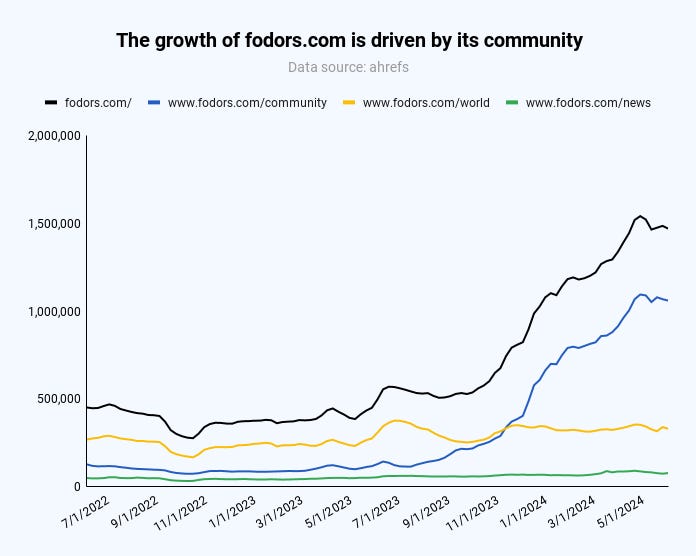
Another example is fodors.com, a travel site that grew predominantly because of its community.
Image Credit: Kevin Indig
Algo Thrashing
We want a better Google, and Google seems to have taken notice. The response is stronger algorithms that can thrash sites into oblivion and have become the biggest risk in SEO.
At the same time, I haven’t noticed many sites growing due to algorithm updates, meaning the positive effect is indirect: Competitors might be losing traffic.
The big question to finish with is how to mitigate the risk of being hit by an algorithm update. While there is absolutely no guarantee, we can agree on what sites that are unaffected by updates have in common:
Allowing Google to index only high-quality pages.
Investing in content quality with expert writers and high effort (research, design).
Offering good design that makes content easy to read and answers quick to find.
Google removed the Covid-era structured data associated with the Home Activities rich results that allowed online events to be surfaced in search since August 2020, publishing a mention of the removal in the search documentation changelog.
Home Activities Rich Results
The structured data for the Home Activities rich results allowed providers of online livestreams, pre-recorded events and online events to be findable in Google Search.
The original documentation has been completely removed from the Google Search Central webpages and now redirects to a changelog notation that explains that the Home Activity rich results is no longer available for display.
The original purpose was to allow people to discover things to do from home while in quarantine, particularly online classes and events. Google’s rich results surfaced details of how to watch, description of the activities and registration information.
Providers of online events were required to use Event or Video structured data. Publishers and businesses who have this kind of structured data should be aware that this kind of rich result is no longer surfaced but it’s not necessary to remove the structured data if it’s a burden, it’s not going to hurt anything to publish structured data that isn’t used for rich results.
The changelog for Google’s official documentation explains:
“Removing home activity documentation What: Removed documentation on home activity structured data.
Why: The home activity feature no longer appears in Google Search results.”
Read more about Google’s Home Activities rich results: