Why Search (And The User) Is Still Important To SEO via @sejournal, @RyanJones

Throughout every technological change, the one constant always seems to be people calling for the death of SEO and search engines.

While pundits have been quick to call for the death of SEO, SEO itself has been all too reluctant to die. This article will look at how SEO evolves and why that makes it even more important.

Sure we could just spout some random facts about how most online purchases begin with a search and how a majority of online sessions include search – but there is a much bigger case to be made.

To fully grasp the importance of SEO and search, we first need to go back and understand both user intent (why people search) and how search engines have changed.

SEO Isn’t Dead

The “SEO is dead” articles always seem to follow a change to search that makes information easier to access for consumers. We saw it with featured snippets, we saw it with instant answers, and we’re seeing it again with AI.

We’ve also seen the “death of SEO” articles pop up around new and emerging social media sites like Meta, TikTok, X, etc – but the fact remains that overall web searches on search engines have continued to increase every year for the last decade plus.

Search isn’t dying, and new social networks or technology like AI aren’t cutting into search – they’re just making people search more. Search is becoming ingrained in (if not defining) our everyday online behavior.

While often associated, SEO is more than just building links or tricking search engines with spammy tactics. That stuff can work – temporarily – but not long-term for a real business or a brand. Sustained SEO growth needs to focus on more than keywords and tricks.

From Keywords To Intent

There’s a great quote from Bill Gates back in 2009 where he said “the future of search is verbs.”

This quote really summarizes the heart of “why” people search. People are searching to accomplish a task or do something.

It’s important that we consider this search intent when evaluating SEO and search. Not all searchers want websites. In the early days of search, links to websites were the best thing we had.

Today, however, search engines and AI are getting better at answering common questions.

For a search like [how old is taylor swift] or [when is the NHL trade deadline?] users just want an answer – without having to click over to a website, accept the cookie consent notice, close the alert popup, decline to subscribe to the newsletter, stop the auto-play video ad, and scroll past three irrelevant paragraphs to get the answer.

If creating thin ad-rich pages to answer public domain questions was your idea of SEO, then yes SEO is dead – however, SEO is much more than that now.

SEO Is Marketing

When many say search and SEO are dying, those factoid searches are the SEO they’re talking about – but there’s an entire section of search that’s thriving: The verbs!

This shift makes SEO even more important because search is no longer about the word the user typed and is all about doing actual marketing.

SEOs can help understand user intents and personas.

A good SEO professional can help you understand not only what users are searching for but “why” they’re searching – and then help marketers build something that meets the users needs.

Just as search engines have evolved, so, too, has SEO.

The days of keyword density and meta tags are gone. Search engines don’t really work like that anymore.

They’ve moved on to a semantic model that uses vectors to try to understand meaning – and marketers would do well to make the same moves by understanding their user’s intent.

Evolution Of The Consumer Journey

We typically think of the consumer journey as a funnel – but that funnel in every business school textbook doesn’t really exist. Today’s consumer journey is more like one of those crazy straws you got in a cereal box as a kid with lots of bends and loops and turns it in.

Consumers are searching more than ever across multiple devices, platforms, networks, apps, and websites. This spread-out user behavior makes having an experienced SEO pro even more important.

It’s not just about getting the right words on the page anymore, and understanding user intent isn’t enough – we also have to understand where our users are acting on each of those intents.

Technical Still Matters, Too

Despite many platforms and frameworks claiming to be SEO-friendly, technical SEO issues and opportunities still remain abundant.

Most of today’s most popular website frameworks aren’t very SEO-friendly out of the box and still require customization and tweaking to really drive results.

There still isn’t a one size fits all solution and I’m not sure there ever will be.

A good SEO will help you ensure that there aren’t confusing duplicate versions of pages, that the pages you want to be seen are all easily understood by search engines, and that your re-design or re-platform won’t hurt your existing traffic.

So Why Is Search Still Important?

Search is important because users are important.

Sure, users are going to different platforms or using apps/AI – but those things are still technically a search and we still need to make sure that they’re surfacing our brands/products.

It doesn’t matter if the user is typing into a web form, talking to a device, asking an AI, using their camera, or even talking into a smart pin – they’re still trying to “do” something – and as long as users have tasks to accomplish, SEO pros will be there to influence them.

More resources:


Featured Image: Accogliente Design/Shutterstock

Google Gives 5 SEO Insights On Google Trends via @sejournal, @martinibuster

Google published a video that disclosed five insights about Google Trends that could be helpful for SEO, topic research and debugging issues with search rankings. The video was hosted by Daniel Waisberg, a Search Advocate at Google.

1. What Does Google Trends Offer?

Google Trends is an official tool created by Google that shows a representation of how often people search with certain keyword phrases and how those searches have changed over time. It’s not only helpful for discovering time-based changes in search queries but it also segments queries by geographic popularity which is useful for learning who to focus content for (or even to learn what geographic areas may be best to get links from).

This kind of information is invaluable for debugging why a site may have issues with organic traffic as it can show seasonal and consumer trends.

2. Google Trends Only Uses A Sample Of Data

An important fact about Google Trends that Waisberg shared is that the data that Google Trends reports on is based on a statistically significant but random sample of actual search queries.

He said:

“Google Trends is a tool that provides a random sample of aggregated, anonymized and categorized Google searches.”

This does not mean that the data is less accurate. The phrase statistically significant means that the data is representative of the actual search queries.

The reason Google uses a sample is that they have an enormous amount of data and it’s simply faster to work with samples that are representative of actual trends.

3. Google Cleans Noise In The Trends Data

Daniel Waisberg also said that Google cleans the data to remove noise and data that relates to user privacy.

“The search query data is processed to remove noise in the data and also to remove anything that might compromise a user’s privacy.”

An example of private data that is removed is the full names of people. An example of “noise” in the data are search queries made by the same person over and over, using the example of a trivial search for how to boil eggs that a person makes every morning.

That last one, about people repeating a search query is interesting because back in the early days of SEO, before Google Trends existed, SEOs used a public keyword volume tool by Overture (owned by Yahoo). Some SEOs poisoned the data by making thousands of searches for keyword phrases that were rarely queried by users, inflating the query volume, so that competitors would focus on optimizing on the useless keywords.

4. Google Normalizes Google Trends Data?

Google doesn’t show actual search query volume like a million queries per day for one query and 200,000 queries per day for another. Instead Google will select the point where a keyword phrase is searched the most and use that as the 100% mark and then adjust the Google Trends graph to percentages that are relative to that high point. So if the most searches a query gets in a day is 1 million, then a day in which it gets searched 500,000 times will be represented on the graph as 50%. This is what it means that Google Trends data is normalized.

5. Explore Search Queries And Topics

SEOs have focused on optimizing for keywords for over 25 years. But Google has long moved beyond keywords and has been labeling documents by the topics and even by queries they are relevant to (which also relates more to topics than keywords).

That’s why in my opinion one of the most useful offerings is the ability to explore the topic that’s related to the entity of the search query. Exploring the topic shows the query volume of all the related keywords.

The “explore by topic” tool arguably offers a more accurate idea of how popular a topic is, which is important because Google’s algorithms, machine learning systems, and AI models create representations of content at the sentence, paragraph and document level, representations that correspond to topics. I believe that’s what is one of the things referred to when Googlers talk about Core Topicality Systems.

Waisberg explained:

“Now, back to the Explore page. You’ll notice that, sometimes, in addition to a search term, you get an option to choose a topic. For example, when you type “cappuccino,” you can choose either the search term exactly matching “cappuccino” or the “cappuccino coffee drink” topic, which is the group of search terms that relate to that entity. These will include the exact term as well as misspellings. The topic also includes acronyms, and it covers all languages, which can be very useful, especially when looking at global data.

Using topics, you also avoid including terms that are unrelated to your interests. For example, if you’re looking at the trends for the company Alphabet, you might want to choose the Alphabet Inc company topic. If you just type “alphabet,” the trends will also include a lot of other meanings, as you can see in this example.”

The Big Picture

One of the interesting facts revealed in this video is that Google isn’t showing normalized actual search trends, that it’s showing a normalized “statistically significant” sample of the actual search trends. A statistically significant sample is one in which random chance is not a factor and thus represents the actual search trends.

The other noteworthy takeaway is the reminder that Google Trends is useful for exploring topics, which in my opinion is far more useful than Google Suggest and People Also Ask (PAA) data.

I have seen evidence that slavish optimization with Google Suggest and PAA data can make a website appear to be optimizing for search engines and not for people, which is something that Google explicitly cautions against. Those who were hit by the recent Google Updates should think hard about the implications of what their SEO practices in relation to keywords.

Exploring and optimizing with topics won’t behind statistical footprints of optimizing for search engines because the authenticity of content based on topics will always shine through.

Watch the Google Trends video:

Intro to Google Trends data

Featured Image by Shutterstock/Luis Molinero

Understanding & Optimizing Cumulative Layout Shift (CLS) via @sejournal, @vahandev

Cumulative Layout Shift (CLS) is a Google Core Web Vitals metric that measures a user experience event.

CLS became a ranking factor in 2021 and that means it’s important to understand what it is and how to optimize for it.

What Is Cumulative Layout Shift?

CLS is the unexpected shifting of webpage elements on a page while a user is scrolling or interacting on the page

The kinds of elements that tend to cause shift are fonts, images, videos, contact forms, buttons, and other kinds of content.

Minimizing CLS is important because pages that shift around can cause a poor user experience.

A poor CLS score (below > 0.1 ) is indicative of coding issues that can be solved.

What Causes CLS Issues?

There are four reasons why Cumulative Layout Shift happens:

  • Images without dimensions.
  • Ads, embeds, and iframes without dimensions.
  • Dynamically injected content.
  • Web Fonts causing FOIT/FOUT.
  • CSS or JavaScript animations.

Images and videos must have the height and width dimensions declared in the HTML. For responsive images, make sure that the different image sizes for the different viewports use the same aspect ratio.

Let’s dive into each of these factors to understand how they contribute to CLS.

Images Without Dimensions

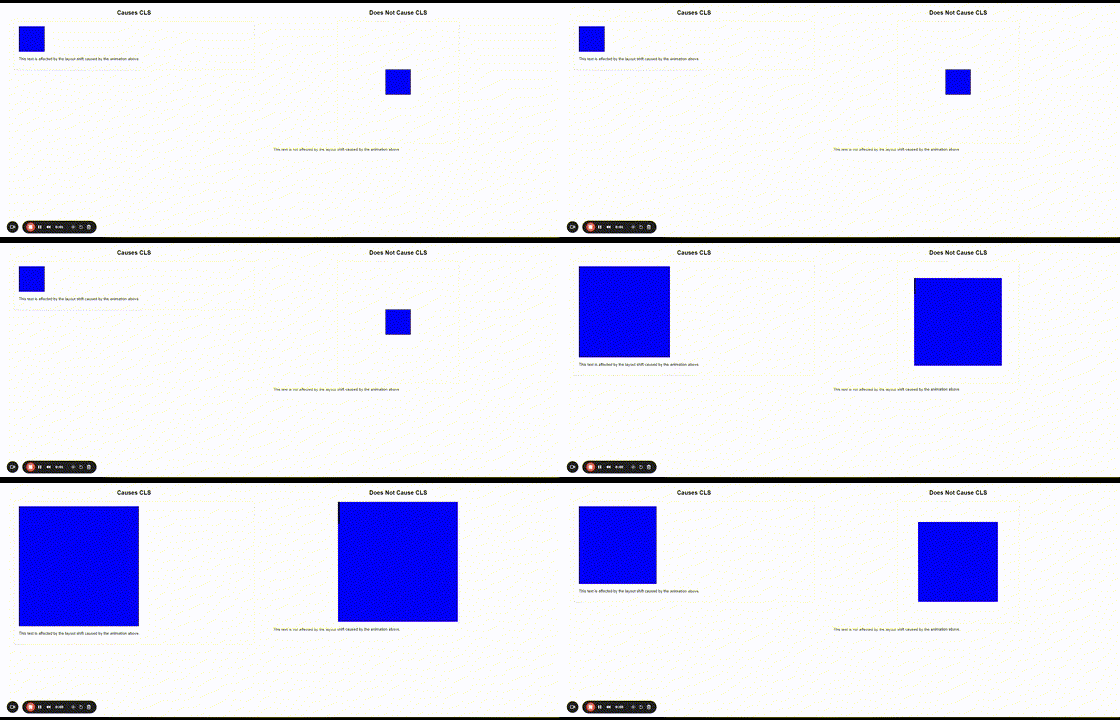
Browsers cannot determine the image’s dimensions until they download them. As a result, upon encountering anHTML tag, the browser can’t allocate space for the image. The example video below illustrates that.

Once the image is downloaded, the browser needs to recalculate the layout and allocate space for the image to fit, which causes other elements on the page to shift.

By providing width and height attributes in the tag, you inform the browser of the image’s aspect ratio. This allows the browser to allocate the correct amount of space in the layout before the image is fully downloaded and prevents any unexpected layout shifts.

Ads Can Cause CLS

If you load AdSense ads in the content or leaderboard on top of the articles without proper styling and settings, the layout may shift.

This one is a little tricky to deal with because ad sizes can be different. For example, it may be a 970×250 or 970×90 ad, and if you allocate 970×90 space, it may load a 970×250 ad and cause a shift.

In contrast, if you allocate a 970×250 ad and it loads a 970×90 banner, there will be a lot of white space around it, making the page look bad.

It is a trade-off, either you should load ads with the same size and benefit from increased inventory and higher CPMs or load multiple-sized ads at the expense of user experience or CLS metric.

Dynamically Injected Content

This is content that is injected into the webpage.

For example, posts on X (formerly Twitter), which load in the content of an article, may have arbitrary height depending on the post content length, causing the layout to shift.

Of course, those usually are below the fold and don’t count on the initial page load, but if the user scrolls fast enough to reach the point where the X post is placed and it hasn’t yet loaded, then it will cause a layout shift and contribute into your CLS metric.

One way to mitigate this shift is to give the average min-height CSS property to the tweet parent div tag because it is impossible to know the height of the tweet post before it loads so we can pre-allocate space.

Another way to fix this is to apply a CSS rule to the parent div tag containing the tweet to fix the height.

#tweet-div {
max-height: 300px;
overflow: auto;
}

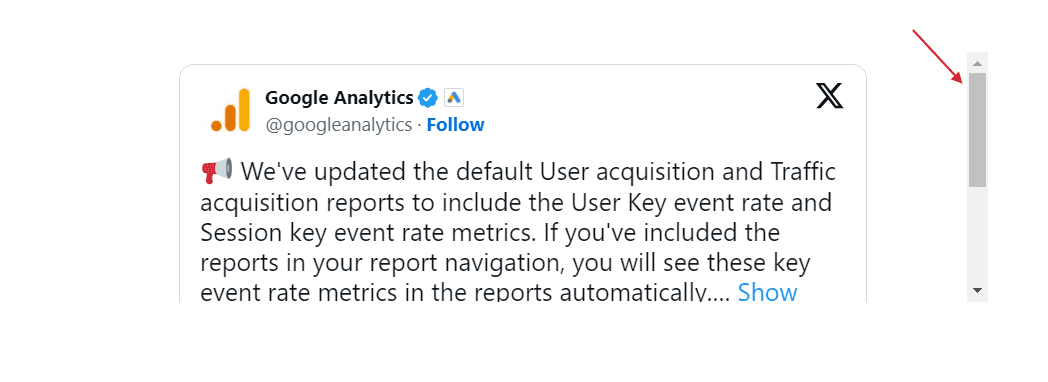
However, it will cause a scrollbar to appear, and users will have to scroll to view the tweet, which may not be best for user experience.

Tweet with scroll

If none of the suggested methods works, you could take a screenshot of the tweet and link to it.

Web-Based Fonts

Downloaded web fonts can cause what’s known as Flash of invisible text (FOIT).

A way to prevent that is to use preload fonts

and using font-display: swap; css property on @font-face at-rule.

@font-face {
   font-family: Inter;
   font-style: normal;
   font-weight: 200 900;
   font-display: swap;
   src: url('https://www.example.com/fonts/inter.woff2') format('woff2');
}

With these rules, you are loading web fonts as quickly as possible and telling the browser to use the system font until it loads the web fonts. As soon as the browser finishes loading the fonts, it swaps the system fonts with the loaded web fonts.

However, you may still have an effect called Flash of Unstyled Text (FOUT), which is impossible to avoid when using non-system fonts because it takes some time until web fonts load, and system fonts will be displayed during that time.

In the video below, you can see how the title font is changed by causing a shift.

The visibility of FOUT depends on the user’s connection speed if the recommended font loading mechanism is implemented.

If the user’s connection is sufficiently fast, the web fonts may load quickly enough and eliminate the noticeable FOUT effect.

Therefore, using system fonts whenever possible is a great approach, but it may not always be possible due to brand style guidelines or specific design requirements.

CSS Or JavaScript Animations

When animating HTML elements’ height via CSS or JS, for example, it expands an element vertically and shrinks by pushing down content, causing a layout shift.

To prevent that, use CSS transforms by allocating space for the element being animated. You can see the difference between CSS animation, which causes a shift on the left, and the same animation, which uses CSS transformation.

CSS animation example causing CLS CSS animation example causing CLS

How Cumulative Layout Shift Is Calculated

This is a product of two metrics/events called “Impact Fraction” and “Distance Fraction.”

CLS = ( Impact Fraction)×( Distance Fraction)

Impact Fraction

Impact fraction measures how much space an unstable element takes up in the viewport.

A viewport is what you see on the mobile screen.

When an element downloads and then shifts, the total space that the element occupies, from the location that it occupied in the viewport when it’s first rendered to the final location when the page is rendered.

The example that Google uses is an element that occupies 50% of the viewport and then drops down by another 25%.

When added together, the 75% value is called the Impact Fraction, and it’s expressed as a score of 0.75.

Distance Fraction

The second measurement is called the Distance Fraction. The distance fraction is the amount of space the page element has moved from the original to the final position.

In the above example, the page element moved 25%.

So now the Cumulative Layout Score is calculated by multiplying the Impact Fraction by the Distance Fraction:

0.75 x 0.25 = 0.1875

The calculation involves some more math and other considerations. What’s important to take away from this is that the score is one way to measure an important user experience factor.

Here is an example video visually illustrating what impact and distance factors are:

Understand Cumulative Layout Shift

Understanding Cumulative Layout Shift is important, but it’s not necessary to know how to do the calculations yourself.

However, understanding what it means and how it works is key, as this has become part of the Core Web Vitals ranking factor.

More resources: 


Featured image credit: BestForBest/Shutterstock

What Are Breadcrumbs & Why Do They Matter For SEO? via @sejournal, @sejournal

Breadcrumbs are a navigational feature for your website, and they can greatly impact SEO and user experience.

Many websites still don’t implement breadcrumbs, which is a huge mistake. Not only do breadcrumbs impact SEO, but they are also pretty easy to implement.

Here’s what you need to know about breadcrumbs, how they impact SEO, and common mistakes to avoid.

What Are Breadcrumbs In SEO?

Breadcrumbs are automated internal links that allow users to track their location on a website and their distance from the homepage.

You’ll usually find them at the top of a website or just under the navigation bar.

Just like internal links, they help keep users on a website and help them find the information they are looking for. If they feel disoriented, they can use breadcrumbs links to go one level up and continue their journey on the website rather than clicking a browser’s back button.

Here’s an example of breadcrumbs from eBay’s website:

men's clothing on ebayScreenshot from eBay, June 2024

It shows exactly what categories I clicked on to land on the page I am viewing.

The breadcrumbs make it easy to backtrack to a previous page if I need to.

4 Common Types Of Breadcrumbs

Not all breadcrumbs are created equal!

There are four main types of breadcrumbs, each with their own purpose.

Before adding breadcrumbs to your site, determine which type will be the best fit for user experience.

1. Hierarchy-Based Breadcrumbs (a.k.a., Location-Based Breadcrumbs)

The most common type of breadcrumbs that tell users where they are in the site structure and how to get back to the homepage.

For example: Home > California > San Francisco

Used cars for sale on cars.comScreenshot from cars.com, June 2024

2. Attribute-Based Breadcrumbs

These breadcrumbs are commonly used on ecommerce sites to show what attributes the user has clicked.

For example: Home > Shoes > Hiking > Womens

Attribute based breadcrumbs Screenshot from eBay, June 2024

Please note how smartly eBay handles breadcrumbs for attributes when the trail is too long.

It shows the last three items following the home page and truncates previous ones under a three-dot menu; you can see all previous items in the breadcrumbs upon clicking.

3. Forward Or Look-Ahead Breadcrumbs

This type of breadcrumb not only shows the user’s current path within a website’s hierarchy but also provides a preview of the next steps they can take.

Here is an example from the Statista website, which illustrates how useful it can be by giving users a preview of other sections of the subsection.

Statista's look ahead breadcrumbs exampleScreenshot from Statista, June 2024

4. History-Based Breadcrumbs

This type of breadcrumb is rarely used and shows users what other pages on the site they have visited, similar to a browser history.

For example, if you were searching for SEO news and read three different articles, the breadcrumbs might look like this: Home > SEO article 1 > SEO article 2 > Current page.

But I recommend avoiding this because it may confuse users. Users may navigate to the same destination through different journeys, which means you will show a different breadcrumb structure each time, confusing users.

Additionally, you can’t markup with schema such as breadcrumbs and benefit from rich results because of its random nature.

3 Benefits of Using Breadcrumbs

This all sounds great, you’re thinking.

But what will breadcrumbs actually do?

If you’re unsure breadcrumbs are worth the hassle (spoiler, they totally are!), then you’ll want to read the section below.

1. Breadcrumbs Improve UX

Breadcrumbs make it easier for users to navigate a website and encourage them to browse other sections.

For example, if you want to learn more about Nestle, you head to its site and end up on the Nestle company history page.

nestle's breadcrumbsScreenshot from Nestle, June 2024

Using its breadcrumbs, you can easily navigate back to About Us, History, or even its homepage.

It’s a handy way to help users easily find what they are looking for – and hopefully draw them deeper into your website.

2. Keep People Onsite Longer

Bounce rate is not a ranking factor. But keeping users from bouncing can still help SEO as it helps users click and navigate through the website, an engagement signal that Google uses for ranking purposes.

Say, you are looking for a new pair of sneakers on Adidas’s website.

Addidas breadcrumpsScreenshot from Adidas, June 2024

Using Adidas’s breadcrumbs, you can easily navigate back to the boots category and look for a different pair.

This is great for Adidas because it will likely keep you from returning to Google and landing on another shoe website.

That’s the power of the humble breadcrumb!

A case study on Moz shows what happened when it added breadcrumbs to a site and made several other changes.

Sessions drastically increased in just a few months.

breadcrumbs seo site trafficScreenshot from Moz, June 2024

Granted, they also added meta descriptions and eliminated a few other UX issues, but breadcrumbs also played a part.

3. Breadcrumbs Improve Internal Linking

Breadcrumbs are not just a navigational utility; they play a crucial role in enhancing a website’s internal linking structure. Google uses breadcrumbs to determine the relationship between different pages which are deeper in the site structure.

By implementing breadcrumbs’s structured data markup, you can help search engines understand the site’s architecture.

Read: Site Structure & Internal Linking in SEO: Why It’s Important

4. Rich Snippets In SERPs

As discussed, breadcrumbs make site navigation easier, but they do a lot more so as Google displays rich snippets in the search results.

Screenshot from Google.comScreenshot from Google.com

But this doesn’t happen until you markup your breadcrumbs with structured data so Google can pick it up and surface it in search engine results pages (SERP).

Here is a JSON-LD structured data code example for a breadcrumb that matched the rich snippet from the screenshot:

[{
"@context": "https://schema.org",
  "@id": "https://www.example.com/#breadcrump", 
  "@type": "BreadcrumbList",
    "itemListElement": [
    {
       "@type": "ListItem",
       "position": 1,
       "item":   "@id": "https://www.example.com/",      
       "name": "Home"       
   },
   {
       "@type": "ListItem",
       "position": 2,
       "item": "https://www.example.com/real-estate/",
       "name": "Real estate"
  },
  {
       "@type": "ListItem",
       "position": 3,
       "item": "https://www.example.com/en/paris/",
       "name": "Paris"
  },
  {
      "@type": "ListItem",
      "position": 4,
      "item": "https://www.example.com/en/paris/apartment/",
      "name": "Apartment"
   },
  {
     "@type": "ListItem",
     "position": 5,
     "item": "https://www.example.com/en/paris/apartment/affordable",
     "name": "Affordable rentals Paris"      
    }
   ]
}]

Here is a breakdown of each attribute in the breadcrumb JSON-LD schema.

Attribute Description
@context This tells search engines where to find the definitions of the structured data
@type Defines the type of schema used, in this case, “BreadcrumbList”
itemListElement An array of list items representing a breadcrumb.
itemListElement[position] Indicates the position of the breadcrumb in the list, starting from 1.
itemListElement[item] The URL of the breadcrumb’s target page
itemListElement[name] The visible name of the breadcrumb as it appears to users.

Please note that you can’t game Google by having structured data on the website without having an actual breadcrumb visible to users.

If Google detects such manipulations, violating Google’s guidelines, you may get a manual penalty. However, that doesn’t cause a drop in rankings, but your website will not be eligible for any kind of rich snippets in search results.

So, the golden rule is that every schema markup you have on the website has to exist on the page and be visible to users.

4 Common Mistakes When Using Breadcrumbs For SEO

Implementing breadcrumbs is a straightforward way to improve a site’s SEO and provide better UX.

However, sometimes, implementing breadcrumbs could cause more harm than good.

Here are a few breadcrumb mistakes you’ll want to avoid.

1. Don’t Go Too Big or Too Small – Aim For Just Right

Breadcrumbs should be easy to see but unobtrusive.

A slightly smaller font is fine, but too small text will be hard to see and hard to click on mobile devices.

Position them at the top of the page, beneath the hero image, or just above the H1 title so they are easy to find.

2. Don’t Just Repeat Your Navigation Bar

If the breadcrumbs just duplicate what is already in your navbar, they might not serve any additional purpose.

There’s no need to add more coding (and take up room!) if it doesn’t help.

3. Don’t Ditch Your Navigation Bar In Favor Of Breadcrumbs

While you don’t want to repeat navigation, you also don’t want to rely entirely on breadcrumbs.

They serve as a supplement, not a replacement for other navigational features.

4. Use The Right Type Of Breadcrumbs

Location breadcrumbs are the most common type, but they might not be the best choice for your site.

Don’t use location breadcrumbs if your site doesn’t use a nested structure where most pages fit under a few categories.

In that case, history-based breadcrumbs might be more beneficial.

How To Implement Breadcrumbs In WordPress

Breadcrumbs are an incredibly useful navigation element for both users and search engines — and they are easy to add to your site.

Here are a few ways to add these useful features to your site.

Yoast breadcrumbsScreenshot from Yoast SEO, June 2024
  • Use Yoast SEO: If you already use Yoast, adding breadcrumbs will only take a few steps. Simply log in and follow these steps to implement breadcrumbs.
  • WordPress Plugins: If you use WordPress, there are several plugins that can add breadcrumbs in a few steps. I like Breadcrumb NavXT because it is easy to implement and generates locational breadcrumbs that can be customized as needed.
  • WooCommerce Breadcrumb Plugin: If you have an ecommerce site that uses Woocommerce, consider using their breadcrumb plugin, which allows you to restyle the built-in WooCommerce breadcrumbs.

Finally, your site builder or WordPress theme might have a built-in breadcrumb feature.

Shopify, Wix, or Squarespace sites have built-in features you can enable on their settings page.

Breadcrumbs Are An Easy-to-Grasp Way To Navigate Your Website

Think of breadcrumbs as the butter to your bread. The Kermit to your Miss Piggy. The animal sauce to your In N’ Out burger.

You get the point.

Breadcrumbs are a simple change that can help your site stand out on the search results page.

Though they won’t guarantee a significant boost to SERPs, they are helpful to users and search engines alike.

As an added bonus, breadcrumbs are easy to implement using a plugin like Yoast.

In just a few clicks, you could make your site easier to navigate and maybe rank higher in SERPs.

More resources:


Featured Image: BestForBest/Shutterstock

Google Confirms Robots.txt Can’t Prevent Unauthorized Access via @sejournal, @martinibuster

Google’s Gary Illyes confirmed a common observation that robots.txt has limited control over unauthorized access by crawlers. Gary then offered an overview of access controls that all SEOs and website owners should know.

Common Argument About Robots.txt

Seems like any time the topic of Robots.txt comes up there’s always that one person who has to point out that it can’t block all crawlers.

Gary agreed with that point:

“robots.txt can’t prevent unauthorized access to content”, a common argument popping up in discussions about robots.txt nowadays; yes, I paraphrased. This claim is true, however I don’t think anyone familiar with robots.txt has claimed otherwise.”

Next he took a deep dive on deconstructing what blocking crawlers really means. He framed the process of blocking crawlers as choosing a solution that inherently controls or cedes control to a website. He framed it as a request for access (browser or crawler) and the server responding in multiple ways.

He listed examples of control:

  • A robots.txt (leaves it up to the crawler to decide whether or not to crawl).
  • Firewalls (WAF aka web application firewall – firewall controls access)
  • Password protection

Here are his remarks:

“If you need access authorization, you need something that authenticates the requestor and then controls access. Firewalls may do the authentication based on IP, your web server based on credentials handed to HTTP Auth or a certificate to its SSL/TLS client, or your CMS based on a username and a password, and then a 1P cookie.

There’s always some piece of information that the requestor passes to a network component that will allow that component to identify the requestor and control its access to a resource. robots.txt, or any other file hosting directives for that matter, hands the decision of accessing a resource to the requestor which may not be what you want. These files are more like those annoying lane control stanchions at airports that everyone wants to just barge through, but they don’t.

There’s a place for stanchions, but there’s also a place for blast doors and irises over your Stargate.

TL;DR: don’t think of robots.txt (or other files hosting directives) as a form of access authorization, use the proper tools for that for there are plenty.”

Use The Proper Tools To Control Bots

There are many ways to block scrapers, hacker bots, search crawlers, visits from AI user agents and search crawlers. Aside from blocking search crawlers, a firewall of some type is a good solution because they can block by behavior (like crawl rate), IP address, user agent, and country, among many other ways. Typical solutions can be at the server level with something like Fail2Ban, cloud based like Cloudflare WAF, or as a WordPress security plugin like Wordfence.

Read Gary Illyes post on LinkedIn:

robots.txt can’t prevent unauthorized access to content

Featured Image by Shutterstock/Ollyy

Google Clarifies Autocomplete Functionality Amid User Concerns via @sejournal, @MattGSouthern

Google’s Communications team recently took to X to clarify its Search Autocomplete feature following user complaints and misconceptions.

Autocomplete’s Purpose & Functionality

Addressing claims of search term censorship Google stated:

“Autocomplete is just a tool to help you complete a search quickly.”

Google notes that users can always search for their intended queries regardless of Autocomplete predictions.

Recent Issues Explained

Google acknowledged two specific problems that had sparked user concerns.

Addressing lack of predictions for certain political queries, Google says:

“Autocomplete wasn’t providing predictions for queries about the assassination attempt against former President Trump.”

Google claims this was due to”built-in protections related to political violence” that were outdated.

The company said it’s working on improvements that are “already rolling out.”

Google also addressed missing autocomplete predictions for some political figures.

Google described this as:

“… a bug that spanned the political spectrum, also affecting queries for several past presidents, such as former President Obama.”

The issue extended to other queries like “vice president k,” which showed no predictions.

Google confirmed it’s “made an update that has improved these predictions across the board.”

Algorithmic Nature Of Predictions

Google emphasized the algorithmic basis of its prediction and labeling systems, stating:

“While our systems work very well most of the time, you can find predictions that may be unexpected or imperfect, and bugs will occur,”

The company noted that such issues are not unique to their platform, stating:

“Many platforms, including the one we’re posting on now, will show strange or incomplete predictions at various times.”

Commitment To Improvement

The thread concluded with a pledge from Google to address issues as they arise:

“For our part, when issues come up, we will make improvements so you can find what you’re looking for, quickly and easily.”

Broader Context

This explanation from Google comes at a time when tech companies face increasing scrutiny over their influence on information access.

This incident also highlights the broader debate about algorithmic transparency in tech.

While autocomplete might seem like a background feature, it significantly impacts what people search for and the websites they visit.


Featured Image: Galeh Nur Wihantara/Shutterstock

What Are Google’s Core Topicality Systems? via @sejournal, @martinibuster

Topicality in relation to search ranking algorithms has become of interest for SEO after a recent Google Search Off The Record podcast mentioned the existence of Core Topicality Systems as a part of the ranking algorithms, so it may be useful to think about what those systems could be and what it means for SEO.

Not much is known about what could be a part of those core topicality systems but it is possible to infer what those systems are. Google’s documentation for their commercial cloud search offers a definition of topicality that while it’s not in the context of their own search engine it still provides a useful idea of what Google might mean when it refers to Core Topicality Systems.

This is how that cloud documentation defines topicality:

“Topicality refers to the relevance of a search result to the original query terms.”

That’s a good explanation of the relationship of web pages to search queries in the context of search results. There’s no reason to make it more complicated than that.

How To Achieve Relevance?

A starting point for understanding what might be a component of Google’s Topicality Systems is to start with how search engines understand search queries and represent topics in web page documents.

  • Understanding Search Queries
  • Understanding Topics

Understanding Search Queries

Understanding what users mean can be said to be about understanding the topic a user is interested in. There’s a taxonomic quality to how people search in that a search engine user might use an ambiguous query when they really mean something more specific.

The first AI system Google deployed was RankBrain, which was deployed to better understand the concepts inherent in search queries. The word concept is broader than the word topic because concepts are abstract representations. A system that understands concepts in search queries can then help the search engine return relevant results on the correct topic.

Google explained the job of RankBrain like this:

“RankBrain helps us find information we weren’t able to before by more broadly understanding how words in a search relate to real-world concepts. For example, if you search for “what’s the title of the consumer at the highest level of a food chain,” our systems learn from seeing those words on various pages that the concept of a food chain may have to do with animals, and not human consumers. By understanding and matching these words to their related concepts, RankBrain understands that you’re looking for what’s commonly referred to as an “apex predator.”

BERT is a deep learning model that helps Google understand the context of words in queries to better understand the overall topic the text.

Understanding Topics

I don’t think that modern search engines use Topic Modeling anymore because of deep learning and AI. However, a statistical modeling technique called Topic Modeling was used in the past by search engines to understand what a web page is about and to match it to search queries. Latent Dirichlet Allocation (LDA) was a breakthrough technology around the mid 2000s that helped search engines understand topics.

Around 2015 researchers published papers about the Neural Variational Document Model (NVDM), which was an even more powerful way to represent the underlying topics of documents.

One of the most latest research papers is one called, Beyond Yes and No: Improving Zero-Shot LLM Rankers via Scoring Fine-Grained Relevance Labels. That research paper is about enhancing the use of Large Language Models to rank web pages, a process of relevance scoring. It involves going beyond a binary yes or no ranking to a more precise way using labels like “Highly Relevant”, “Somewhat Relevant” and “Not Relevant”

This research paper states:

“We propose to incorporate fine-grained relevance labels into the prompt for LLM rankers, enabling them to better differentiate among documents with different levels of relevance to the query and thus derive a more accurate ranking.”

Avoid Reductionist Thinking

Search engines are going beyond information retrieval and have been (for a long time) moving in the direction of answering questions, a situation that has accelerated in recent years and months.  This was predicted in 2001 paper that titled,  Rethinking Search: Making Domain Experts out of Dilettantes where they proposed the necessity to engage fully in returning human-level responses.

The paper begins:

“When experiencing an information need, users want to engage with a domain expert, but often turn to an information retrieval system, such as a search engine, instead. Classical information retrieval systems do not answer information needs directly, but instead provide references to (hopefully authoritative) answers. Successful question answering systems offer a limited corpus created on-demand by human experts, which is neither timely nor scalable. Pre-trained language models, by contrast, are capable of directly generating prose that may be responsive to an information need, but at present they are dilettantes rather than domain experts – they do not have a true understanding of the world…”

The major takeaway is that it’s self-defeating to apply reductionist thinking to how Google ranks web pages by doing something like putting an exaggerated emphasis on keywords, on title elements and headings. The underlying technologies are rapidly moving to understanding the world, so if one is to think about Core Topicality Systems then it’s useful to put that into a context that goes beyond the traditional “classical” information retrieval systems.

The methods Google uses to understand topics on web pages that match search queries are increasingly sophisticated and it’s a good idea to get acquainted with the ways Google has done it in the past and how they may be doing it in the present.

Featured Image by Shutterstock/Cookie Studio

Google Expands ‘About This Image’ To More Platforms via @sejournal, @MattGSouthern

Google has announced the expansion of its “About this image” feature to additional platforms, including Circle to Search and Google Lens.

This move gives people more access points to obtain context about images they encounter online.

New Access Points

The “About this image” tool, which offers information about an image’s origins and usage, is now available through:

  1. Circle to Search: A feature on select Android devices
  2. Google Lens: Available in the Google app on both Android and iOS

Functionality & Usage

You can access the feature through different methods depending on the platform:

For Circle to Search:

  • Activate the feature by long-pressing the home button or navigation bar
  • Circle or tap the image on the screen
  • Swipe up on search results and select the “About this image” tab

For Google Lens:

  • Screenshot or download the image
  • Open the Google app and use the Lens icon
  • Select the image and tap the “About this image” tab

Information Provided

The tool offers various details about images, including:

  • How other websites use and describe the image
  • Available metadata
  • Identification of AI-generated images with specific watermarks

Availability & Language Support

“About this image” is available in 40 languages globally, including French, German, Hindi, Italian, Japanese, Korean, Portuguese, Spanish, and Vietnamese.

Broader Context

This expansion comes at a time when digital literacy and the ability to verify online information are increasingly important.

However, it’s worth noting that while such tools can be helpful, they’re not infallible.

Users are still encouraged to critically evaluate information and consult multiple sources when verifying claims or images online.

How Does This Help You?

Here’s how the expansion of Google’s “About this image” feature can help you:

  • Quickly verify claims associated with images.
  • Understand where an image originated and how it’s been used across the web.
  • This tool can help you distinguish between human-created and AI-created visual content.
  • It provides a quick way for students, journalists, and researchers to gather context and potential sources related to an image.
  • Understanding an image’s history and context can help protect you from visual manipulation tactics often used in scams.

Related Algorithm Update: Combating Explicit Deepfakes

Today, Google announced an algorithm update targeting explicit deepfakes in search results.

Key aspects of this update include:

  1. Improved Content Removal: When a removal request is approved, the system will attempt to filter similar explicit results across related searches for the affected individual.
  2. Ranking Adjustments: The search algorithm has been modified to reduce the visibility of explicit fake content in many searches. For queries seeking such content and including people’s names, Google will prioritize non-explicit content, such as news articles.
  3. Site-Wide Impact: Websites with numerous pages removed due to fake explicit imagery may see changes in their overall search rankings.

Google reports that these changes have reduced exposure to explicit image results for specific queries, decreasing over 70% for targeted searches.

Google’s doing two things at once: making it easier to spot fake images and cracking down on deepfakes algorithmically.

These updates demonstrate Google’s commitment to keeping search results safe and trustworthy as the web changes.


Featured Image: Screenshot from blog.google.com, July 2024.