Google Shopping can be a goldmine for many ecommerce retailers.
But, it also comes with the risk of losing money if not managed properly.
Even seasoned PPC advertisers can make easy mistakes that can drain the budget and lose campaign effectiveness.
However, making mistakes is a necessary part of any learning process. Each misstep can provide valuable insights to better optimize your Google Shopping campaigns.
In this article, we’ll review seven common mistakes ecommerce retailers make with Google Shopping and how you can turn those pitfalls into opportunities for growth.
1. Poor Product Feed Quality
The foundation for any successful Google Shopping campaign is undoubtedly the quality of a product feed.
Better data quality leads to better campaign outcomes.
However, many retailers overlook the importance of feed quality, which can lead to issues like:
Missing or incorrect product information.
Poorly written descriptions.
Lack of relevant keywords.
A poor product feed can result in low ad relevance and a poor-performing campaign.
So, where does one start to ensure a solid product feed?
The first priority of your product feed should be the title attribute. Some key items to consider when optimizing product titles include:
Avoid using the brand name in the title if it doesn’t perform.
Use descriptive words.
Embrace the title character limit for maximum communication about the product.
It’s important to regularly audit your Google Shopping product feed to ensure all information is accurate, complete, and optimized for your top-performing keywords.
Google Merchant Center also includes diagnostics tools to identify any errors to fix.
Additionally, leveraging feed management tools can help automate and enhance the feed optimization process.
2. Ignoring Negative Keywords
While Google Shopping campaigns don’t have a keyword bidding component, they certainly have a negative keyword component.
For that reason, many retailers forget the importance of having a negative keyword strategy in their Shopping campaigns.
Ignoring the use of negative keywords is an easy gateway to wasted advertising spend on irrelevant searches. This can lead to reducing the overall campaign efficiency and return on investment (ROI).
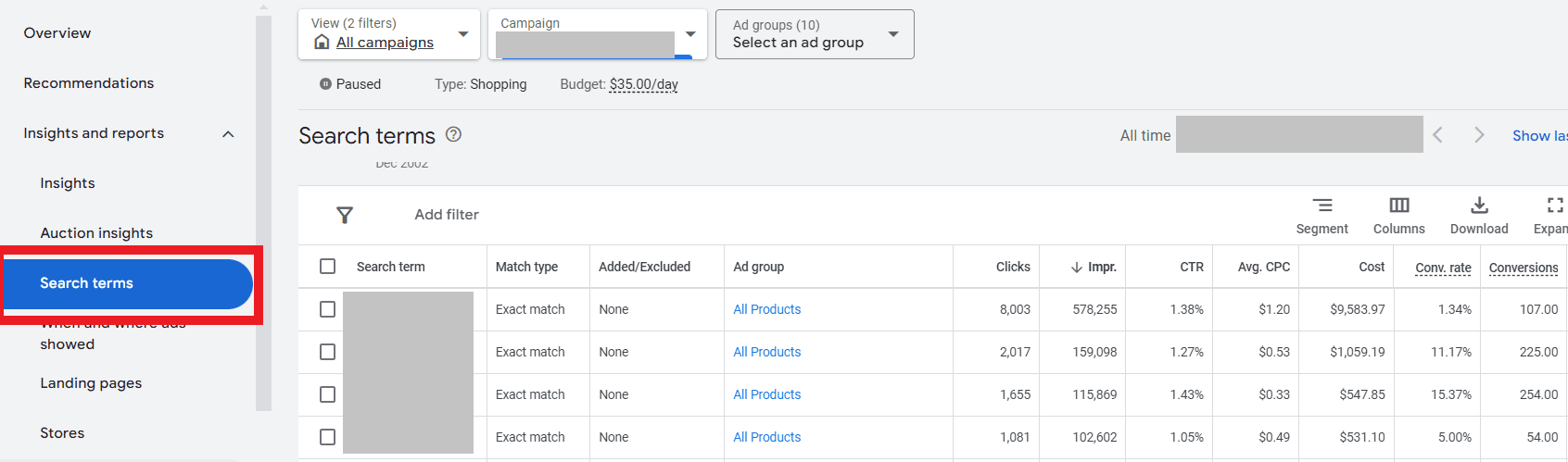
To combat this potential wasted ad spend, start by reviewing the search terms report regularly to identify and add any negative keywords.
In your Google Shopping campaign, navigate to Insights and reports > Search terms.
From there, you can review what search terms triggered your products and how they performed.
If you find any irrelevant terms triggering your ads, you can add them as a negative – or better yet, create a negative keywords list to easily add to in the future.
This helps refine your targeting by showing your ads on more relevant searches, reducing wasted ad spend on non-converting traffic.
3. Inadequate Bid Management
Bid management is another critical component of a successful Google Shopping ads strategy.
However, many PPC managers will set bids once and then forget about them, instead of adjusting them based on performance data.
This hands-off approach can lead to underbidding or overbidding, and both scenarios can hurt your campaign’s ROI.
Another common mistake is using a “one size fits all” bid strategy, where you set the same bid amount or bid strategy across all products and campaigns.
To start optimizing your Google Shopping bid strategy, utilize automated bid strategies like:
Target return on ad spend (ROAS).
Target cost per action (CPA).
Maximize Conversion Value.
These Smart Bidding strategies help optimize your bids in real time, looking at factors like device, location, time of day, audience segments, and more.
Additionally, make sure that your daily budget aligns with your Smart Bidding strategy to ensure you’re not over- or under-bidding in any particular campaign.
For example, if you have a daily budget of $50 but are using a Target CPA bid strategy with a goal of $25, you’ll likely need to increase the daily budget significantly to give the algorithm a chance to learn more by serving more ad impressions.
4. Not Optimizing Images
With Google Shopping ads, the product image is likely the first thing to catch the user’s attention.
Most ecommerce retailers use the standard images from the official manufacturer’s website.
But wait, why would that be a bad thing?
Well, to start, this means everyone will see the same image across a variety of brands, making it extremely difficult to stand out from your competitors.
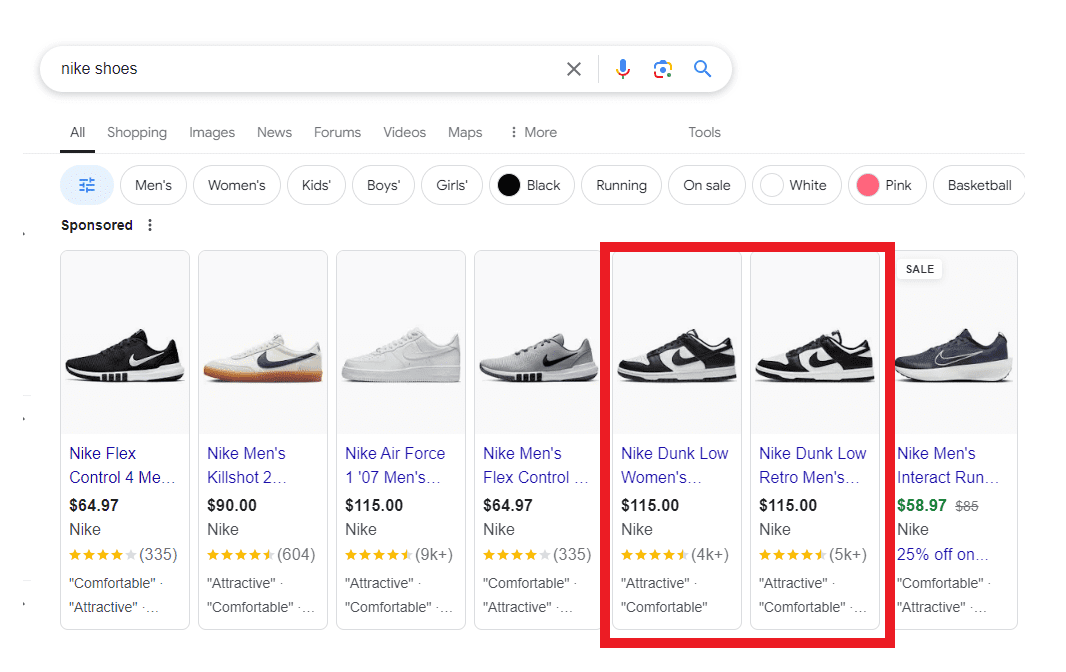
For example, when was the last time you searched for “Nike shoes” and got a barrage of Shopping ads for the same shoes, just different retailers?
Screenshot taken by author, July 2024.
If you’re used to using the same stock images, try taking advantage of some of the recent tools announced by Google at this year’s Google Marketing Live.
For example, advertisers can use Product Studio later this year, which instantly turns static images into eye-catching videos.
Additionally, you can use the new generative AI tools like their AI-powered image editing for product images from your Google Merchant Center feed.
Lastly, try A/B testing the standard stock photos against lifestyle images featuring the product to understand what resonates better with users.
5. Misunderstanding Campaign Types & Structure
As with any other campaign type, the structure can make or break your performance.
With Google Shopping, there are essentially three different options when creating a campaign:
Performance Max (with a feed).
Performance Max (feed-only).
Standard Shopping.
Both campaign types have their pros and cons when it comes to Google Shopping. The key is to understand the differences in features, functionality, and amount of control in order to choose the right campaign type for your goals.
In a regular Performance Max campaign, you have the option to add a feed as an asset, among many other assets like headlines, descriptions, images, etc.
This essentially means your Google Shopping ads can show across many types of Google inventory, not just on the Google Shopping network.
Now, feed-only Performance Max campaigns and Standard Shopping campaigns both focus on only showing ads on the Google Shopping network.
Next, let’s talk about the structure of your campaigns.
It may be tempting to lump everything into an “All Products” ad group and call it a day.
This mistake can cost you a lot of wasted ad dollars if not monitored closely.
If you’ve taken the steps to have a well-organized and clean product feed, don’t let that work go to waste!
A well-structured product feed will make your Google Shopping campaigns run much smoother by giving you control of how and when certain products are triggered.
If you’re unsure where to start, try grouping your products by their category. This allows for greater control over the ad listings.
Additionally, if you know you have low-margin products or products you want to avoid completely from showing, make sure to exclude those when setting up your campaign.
6. Overlooking Competitive Pricing
Google Shopping is a highly competitive channel, especially when it comes to pricing and its effect on ad performance.
Retailers who ignore their competitors’ pricing strategies may find their ads less appealing to customers, which leads to lower click-through rates and conversions.
For retailers who sell items in minimum quantities, it may be about lowering your prices. It may also be about analyzing how your feed is structured by showing the “price per quantity.”
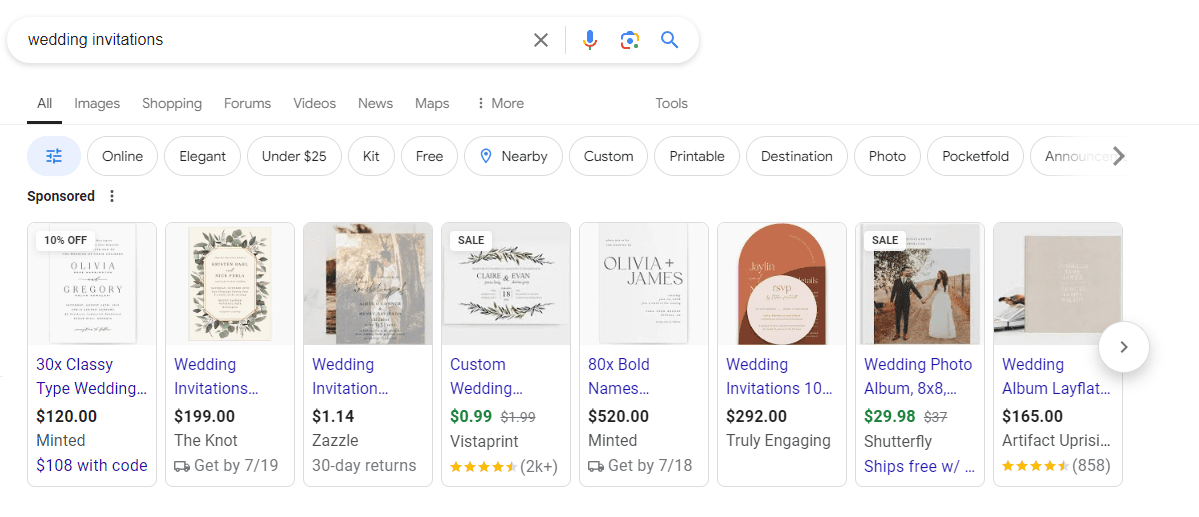
For example, when searching for ‘wedding invitations,’ the Shopping results come back with different brands with vastly different price points:
Screenshot taken by author, July 2024
It’s clear that from this example, some brands show the price for a minimum of 30 (in the first example).
Other brands in the middle look to show the price per individual invitation.
When regularly analyzing your Shopping listings compared to others in the auction, it may be worth adjusting your price feed structure to stay competitive and remain attractive to active shoppers.
7. Not Using Merchant Promotions
In this economy, it’s no secret that almost everyone is looking for a deal when shopping.
If you actively run promotions on your website, make sure to take advantage of Merchant Promotions and promotion assets in Google Ads.
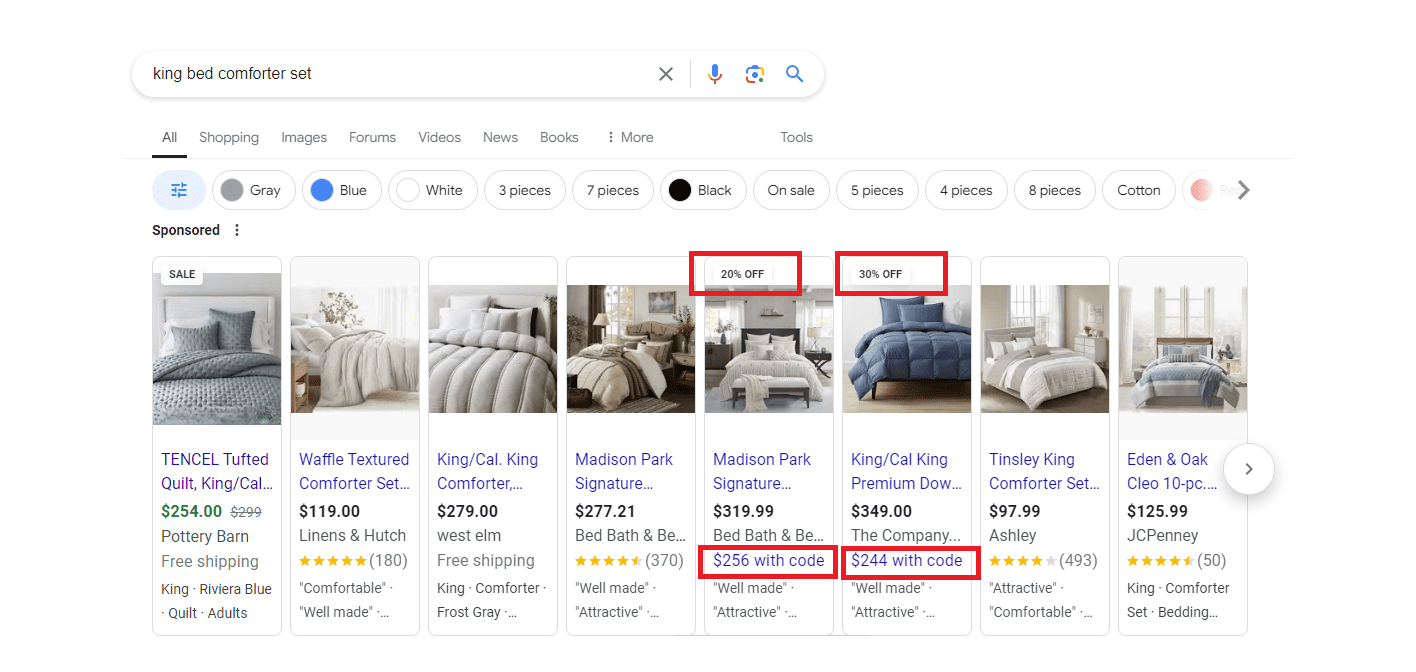
Running Merchant Promotions will help make your product listing more attractive to shoppers, which could lead to higher click-thru rates and better ROI.
In this example, the Shopping ads shown when searching for ‘king bed comforter set’ showed two listings that were using Merchant Promotions.
Screenshot taken by author, July 2024
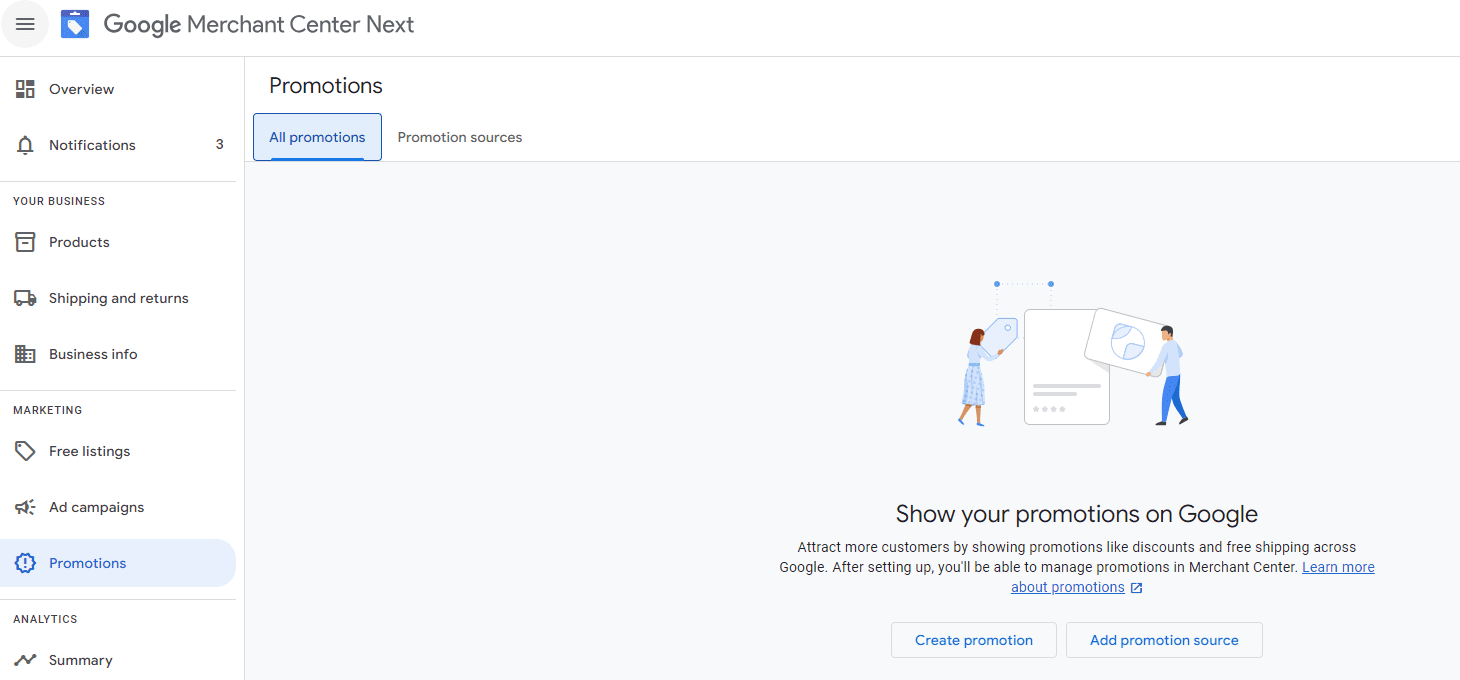
To set up a promotion, navigate to Promotions on the left-hand side of your Google Merchant Center platform. Then, click Create promotion:
Screenshot taken by author, July 2024
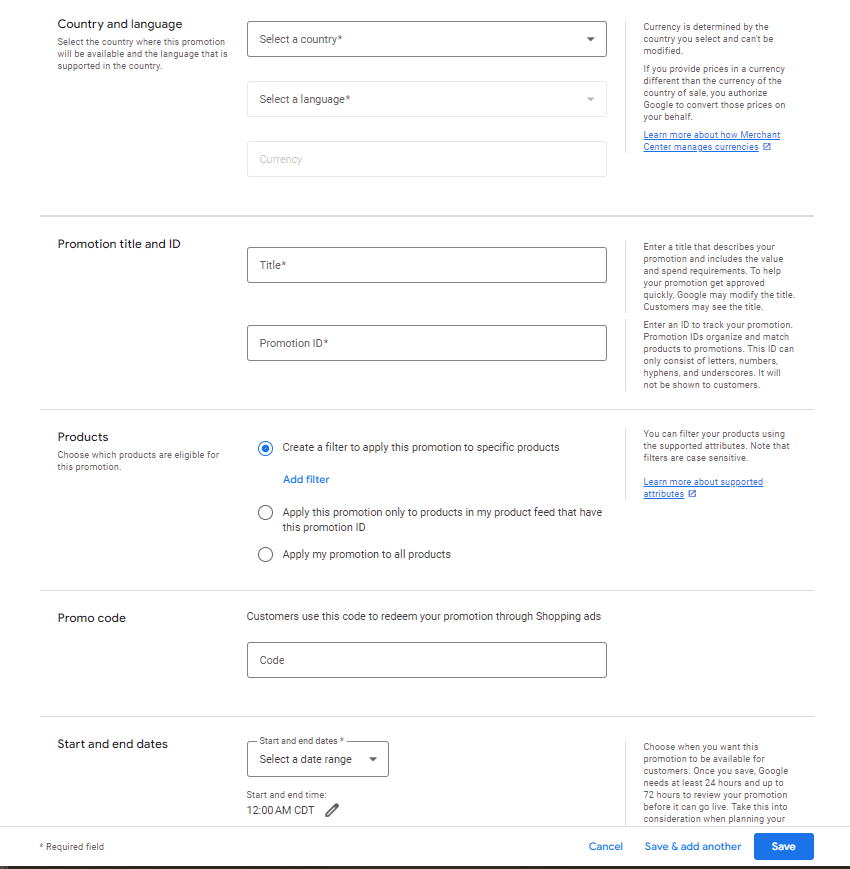
From there, you’ll enter the required information in order to save the promotion. After saving, the promotion can take up to 15 minutes to be visible to shoppers.
The required fields include:
Country.
Language.
Promotion Title.
Promotion ID.
Start and end dates.
The use of promo code is optional, where you can add it in if necessary for users to enter in order to redeem the sale.
Screenshot taken by author, July 2024
Later this year, Google also announced the rollout of a new way to tailor promotions in Shopping, like member-only exclusives or special pricing.
Additionally, Google announced on the same day that advertisers will be able to feature ‘first order’ promotions for new customers, which will be available in both Performance Max and Standard Shopping campaigns.
Continually Refine Your Google Shopping Campaigns
Avoiding these common Google Shopping mistakes can save you significant time, money, and headaches, as well as enhance campaign performance.
By focusing on things like product feed quality, bid management, negative keywords, and more, you can be on your way to driving better results and achieving a better ROI.
Remember, every mistake is an opportunity to learn and refine your strategy.
Stay proactive and continuously optimize, and you’ll turn your Google Shopping campaigns into a well-oiled machine and power revenue driver for your ecommerce business.
Google has announced plans to transition all retailers to its updated Merchant Center platform by September.
This move will affect e-commerce businesses globally and comes ahead of the holiday shopping season.
The Merchant Center is a tool for online retailers to manage how their products appear across Google’s shopping services.
Key Changes & Features
The new Merchant Center includes several significant updates.
Product Studio
An AI-powered tool for content creation. Google reports that 80% of current users view it as improving efficiency.
This feature allows retailers to generate tailored product assets, animate still images, and modify existing product images to match brand aesthetics.
It also simplifies tasks like background removal and image resolution enhancement.
Centralized Analytics
A new tab consolidating various business insights, including pricing data and competitive analysis tools.
Retailers can access pricing recommendations, competitive visibility reports, and retail-specific search trends, enabling them to make data-driven decisions and capitalize on popular product categories.
Redesigned Navigation
Google claims the new interface is more intuitive and cites increased setup success rates for new merchants.
The platform now offers simplified website verification processes and can pre-populate product information during setup.
Initial User Response
According to Google, early adopters have shown increased engagement with the platform.
The company reports a 25% increase in omnichannel merchants adding product offers in the new system. However, these figures have yet to be independently verified.
Jeff Harrell, Google’s Senior Director of Merchant Shopping, states in an announcement:
“We’ve seen a significant increase in retention and engagement among existing online merchants who have moved to the new Merchant Center.”
Potential Challenges and Support
While Google emphasizes the upgrade’s benefits, some retailers, particularly those comfortable with the current version, may face challenges adapting to the new system.
The upgrade’s mandatory nature could raise concerns among users who prefer the existing interface or have integrated workflows based on the current system.
To address these concerns, Google has stated that it will provide resources and support to help with the transition. This includes tutorial videos, detailed documentation, and access to customer support teams for troubleshooting.
Industry Context
This update comes as e-commerce platforms evolve, with major players like Amazon and Shopify enhancing their seller tools. Google’s move is part of broader efforts to maintain competitiveness in the e-commerce services sector.
The upgrade could impact consumers by improving product listings and providing more accurate information across Google’s shopping services.
For the e-commerce industry as a whole, it signals a continued push towards AI-driven tools and data-centric decision-making.
Transition Timeline
Google states that retailers will be automatically upgraded by September if they still need to transition.
The company advises users to familiarize themselves with the new features before the busy holiday shopping period.
In an SEO Office Hours podcast, Google’s John Mueller answered the question of how to get more product rich results to show in the search results. John listed four things that are important in order to get rich results for product listings.
Product Rich Results
Product search queries can trigger rich results that presents products in a visually rich manner that Google refers to as Search Experiences.
Google product search experiences can include:
Product snippets that include ratings, reviews, price, and whether availability information.
Visual representations of products
Knowledge panel with vendors and products
Product images in Google Images search results
Result enhancements (reviews, shipping information, etc.)
John Mueller Answers Question About Product Rich Results
The person asking the question wanted to know how to get more “product snippets in Search Console” which confused Mueller because product snippets are displayed in the search results, not search console. So Mueller answered the question in the context of search results.
This is the question:
“How to increase the number of product snippets in Search Console?”
John Mueller explained that there were four things to get right in order to qualify for product rich results.
Mueller answered:
“It’s not really clear to me what exactly you mean… If you’re asking about product rich results, these are tied to the pages that are indexed for your site. And that’s not something which you can change by force.
It requires that the page be indexed, that the page has valid structured data on it, and that our systems have determined that it’s worth showing this structured data.”
So, according to John Mueller, these are the four things to get right to qualify for product rich results:
Page must be indexed
The page has valid structured data
Google’s systems determine that it’s worth showing
Submit a product feed
1. Page Indexing
Getting a page indexed (and ranked) can be difficult for some search queries. People who come to me with this kind of problem tend to have content quality issues that can be traced back to using outdated SEO strategies like copying what’s already ranking in the SERPs but making it “better” which often results in content that’s not meaningfully different than what Google is already ranking.
Content quality on the page level and on the site level are important. Focusing on content that has that little extra, like better images, helpful graphs, or content that’s more concise, all of that is so much better than focusing on keywords and entities.
2. Valid Structured Data
This is another area that explains why some sites lose their rich results or fail to get them altogether. Google changes their structured data recommendations and usually the structured data plugins will update to conform to the new guidelines. But I’ve seen examples where that doesn’t happen. So when there’s a problem with rich results, go to Google’s Rich Results Test tool first.
It’s also important to be aware that getting the structured data correct is not a guarantee that Google will show rich results for that page, it’s just makes the page qualified to show in the rich results.
3. How Does Google Determine Something’s Worth Showing?
This is the part that Google doesn’t talk about. But if you’re read about reviews systems, quality guidelines, Google’s SEO starter guide and maybe even the Search Quality Raters Guidelines then that should be more than enough information to inform any question about content quality.
Google doesn’t say why they may decline to show an image thumbnail as a rich result or why they’ll not show a product in the rich results. My opinion is that debugging the issue is more productive if the problem is reconceptualized as a content quality issue. Images are content, if it’s on the page, even if it’s not text, it’s content. Evaluate all of the content in terms of how the images or products or whatever might look like in the search results. Does it look good as a thumbnail? Is the content distinctive or helpful or useful, etc.?
4. Merchant Feed
John Mueller lastly said that the merchant feed is another way to get products from a website to show as a rich result in Google.
Mueller answered:
“There’s also the possibility to submit a feed to your merchant center account, to show products there. This is somewhat separate, and has different requirements which I’ll link to. Often a CMS or platform will take care of these things for you, which makes it a bit easier.”
While John Mueller listed four ways to get product rich results, Google Search Experiences, it’s not always as easy as 1, 2, 3, and 4. There are always nuances to be aware of.
Listen to the Google SEO Office Hours podcast at the 7:00 minute mark: