Google is introducing a filter that allows you to view only text-based webpages in search results.
The “Web” filter, rolling out globally over the next two days, addresses demand from searchers who prefer a stripped-down, simplified view of search results.
Danny Sullivan, Google’s Search Liaison, states in an announcement:
“We’ve added this after hearing from some that there are times when they’d prefer to just see links to web pages in their search results, such as if they’re looking for longer-form text documents, using a device with limited internet access, or those who just prefer text-based results shown separately from search features.”
We’ve added this after hearing from some that there are times when they’d prefer to just see links to web pages in their search results, such as if they’re looking for longer-form text documents, using a device with limited internet access, or those who just prefer text-based…
— Google SearchLiaison (@searchliaison) May 14, 2024
The new functionality is a throwback to when search results were more straightforward. Now, they often combine rich media like images, videos, and shopping ads alongside the traditional list of web links.
How It Works
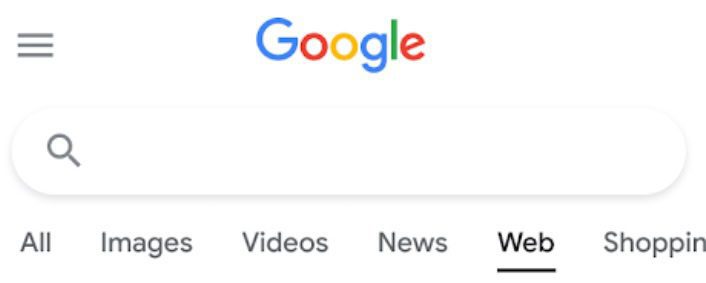
On mobile devices, the “Web” filter will be displayed alongside other filter options like “Images” and “News.”
Screenshot from: twitter.com/GoogleSearchLiaison, May 2024.
If Google’s systems don’t automatically surface it based on the search query, desktop users may need to select “More” to access it.
Screenshot from: twitter.com/GoogleSearchLiaison, May 2024.
More About Google Search Filters
Google’s search filters allow you to narrow results by type. The options displayed are dynamically generated based on your search query and what Google’s systems determine could be most relevant.
The “All Filters” option provides access to filters that are not shown automatically.
Alongside filters, Google also displays “Topics” – suggested related terms that can further refine or expand a user’s original query into new areas of exploration.
For more about Google’s search filters, see its official help page.
At its annual I/O developer conference, Google unveiled plans to incorporate generative AI directly into Google Search.
Additionally, Google announced an expansion to Search Generative Experience (SGE), designed to reinvent how people discover and consume information.
Upcoming upgrades include:
Adjustable overviews to simplify language or provide more detail
Multi-step reasoning to handle complex queries with nuances
Built-in planning capabilities for tasks like meal prep and vacations
AI-organized search result pages to explore ideas and inspiration
Visual search querying through uploaded videos and images
Liz Reid, Head of Google Search, states in an announcement:
“Now, with generative AI, Search can do more than you ever imagined. So you can ask whatever’s on your mind or whatever you need to get done — from researching to planning to brainstorming — and Google will take care of the legwork.”
What’s New In Google Search & SGE
New Gemini Model
A customized Gemini language model is central to Google’s AI-powered Search revamp.
Google’s announcement states:
“This is all made possible by a new Gemini model customized for Google Search. It brings together Gemini’s advanced capabilities — including multi-step reasoning, planning and multimodality — with our best-in-class Search systems.”
AI overviews generate quick answers to their queries, piecing together information from multiple sources.
Google reports that people have already used AI Overviews billions of times through Search Labs.
AI Overviews In US Search Results
Google is bringing AI overviews from Search Labs into its general search results pages.
That means hundreds of millions of US searchers will gain access to AI overviews this week and over 1 billion by year’s end.
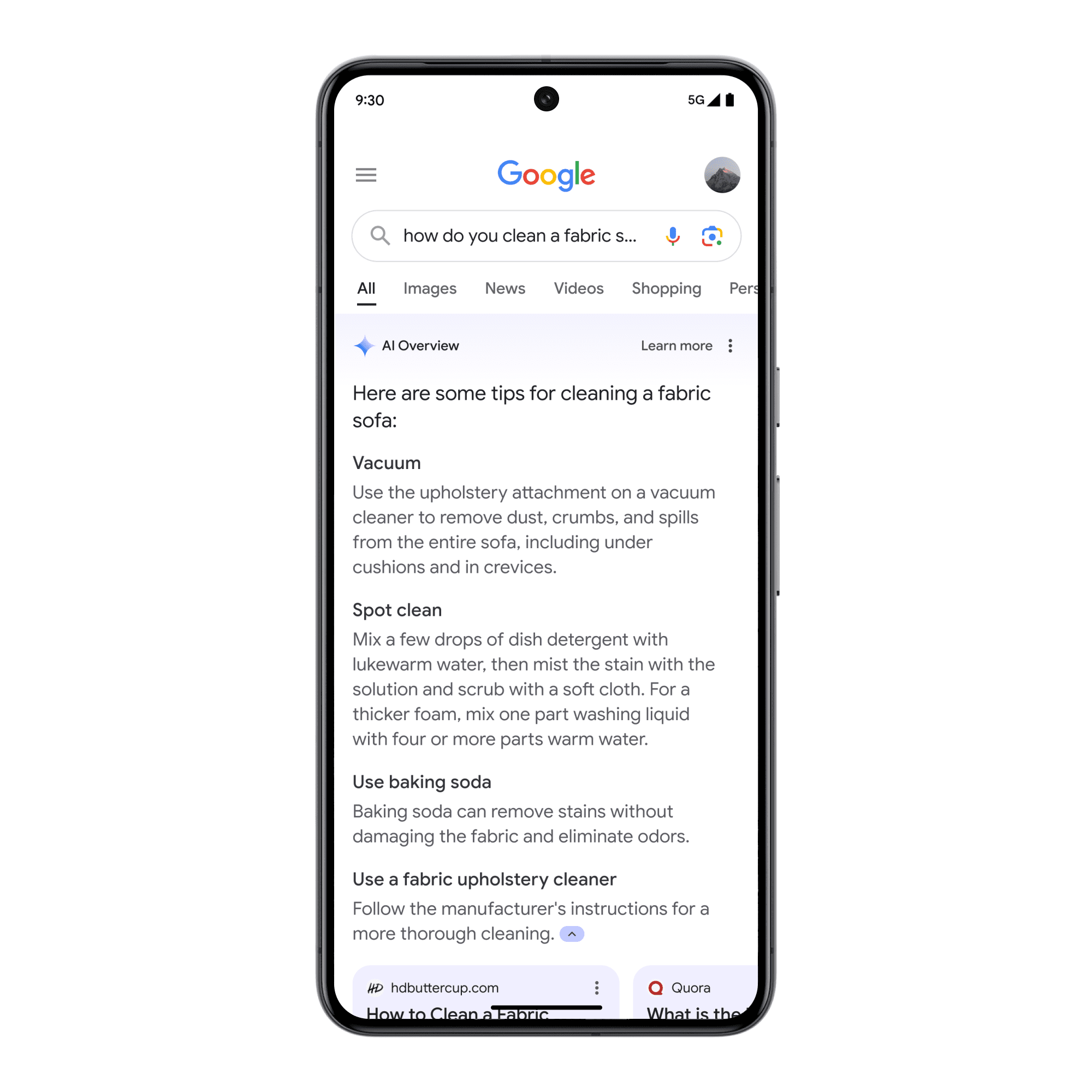
Image Credit: blog.google/products/search/generative-ai-google-search-may-2024/, May 2024.
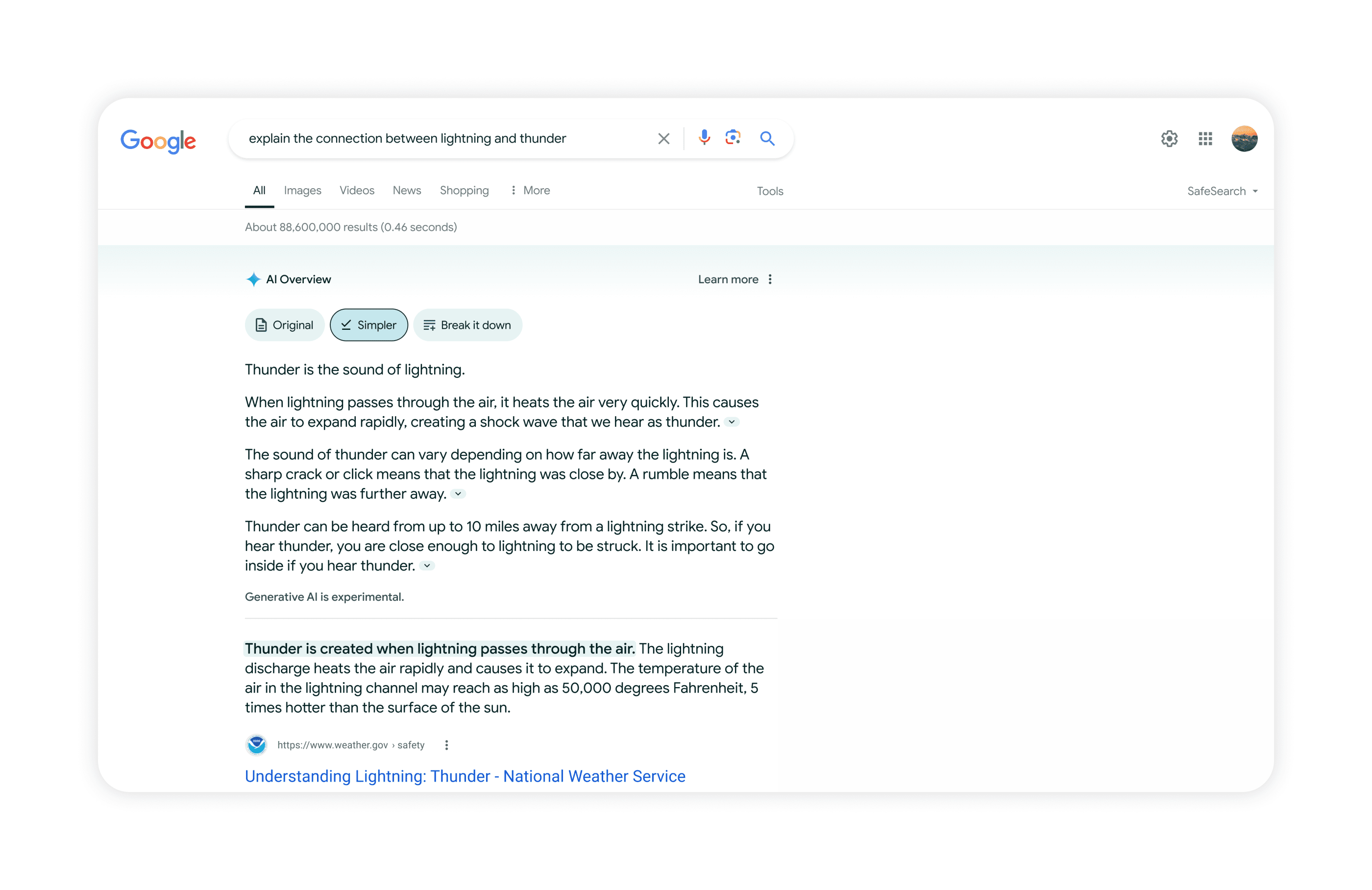
Searchers will soon be able to adjust the language and level of detail in AI overviews to suit their needs and understanding of the topic.
Image Credit: blog.google/products/search/generative-ai-google-search-may-2024/, May 2024.
Complex Questions & Planning Capabilities
SGE’s multi-step reasoning capabilities will allow you to ask complex questions and receive detailed answers.
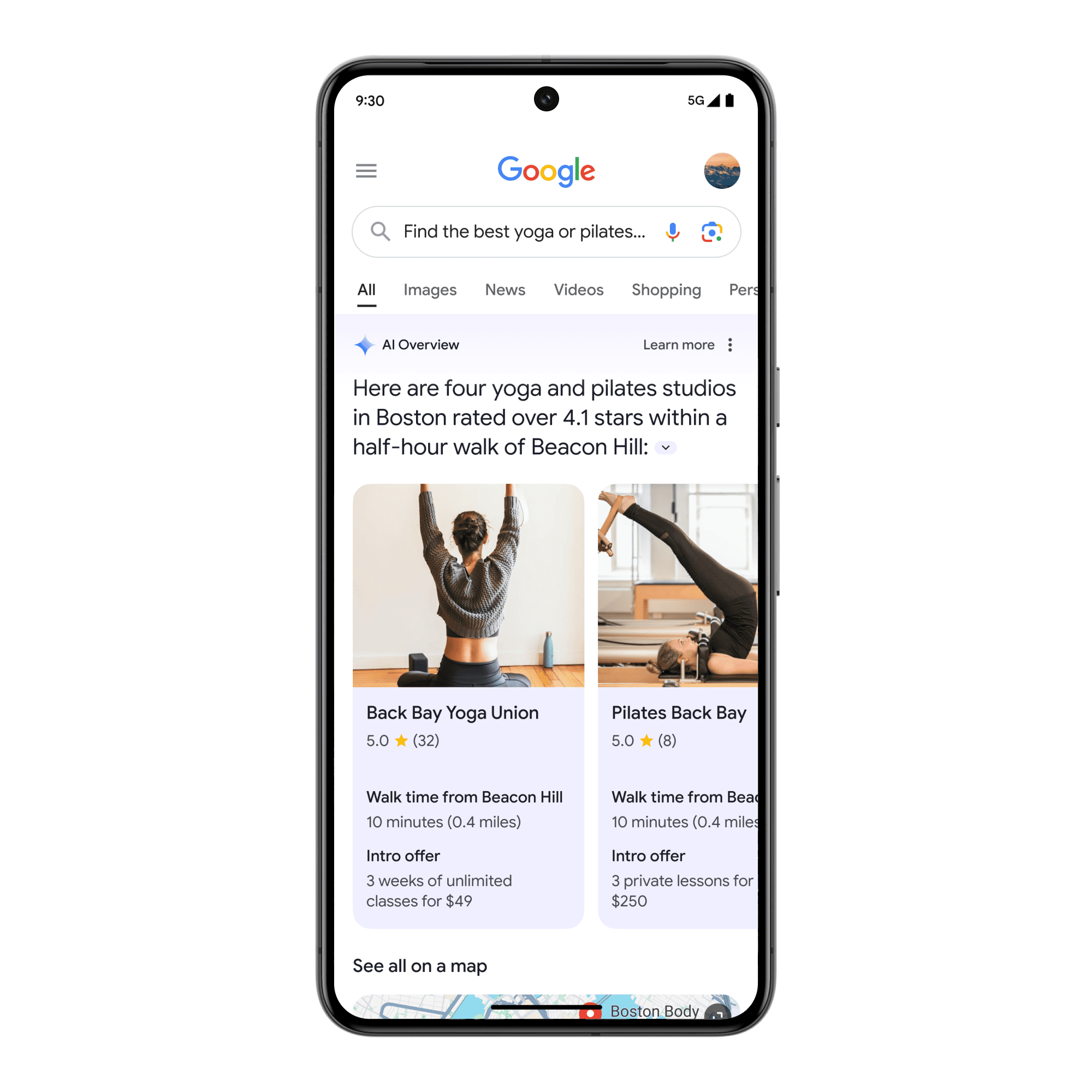
For example, you could ask, “Find the best yoga or pilates studios in Boston and show details on their intro offers and walking time from Beacon Hill,” and receive a comprehensive response.
Image Credit: blog.google/products/search/generative-ai-google-search-may-2024/, May 2024.
In addition to answering complex queries, SGE will offer planning assistance for various aspects of life, such as meal planning and vacations.
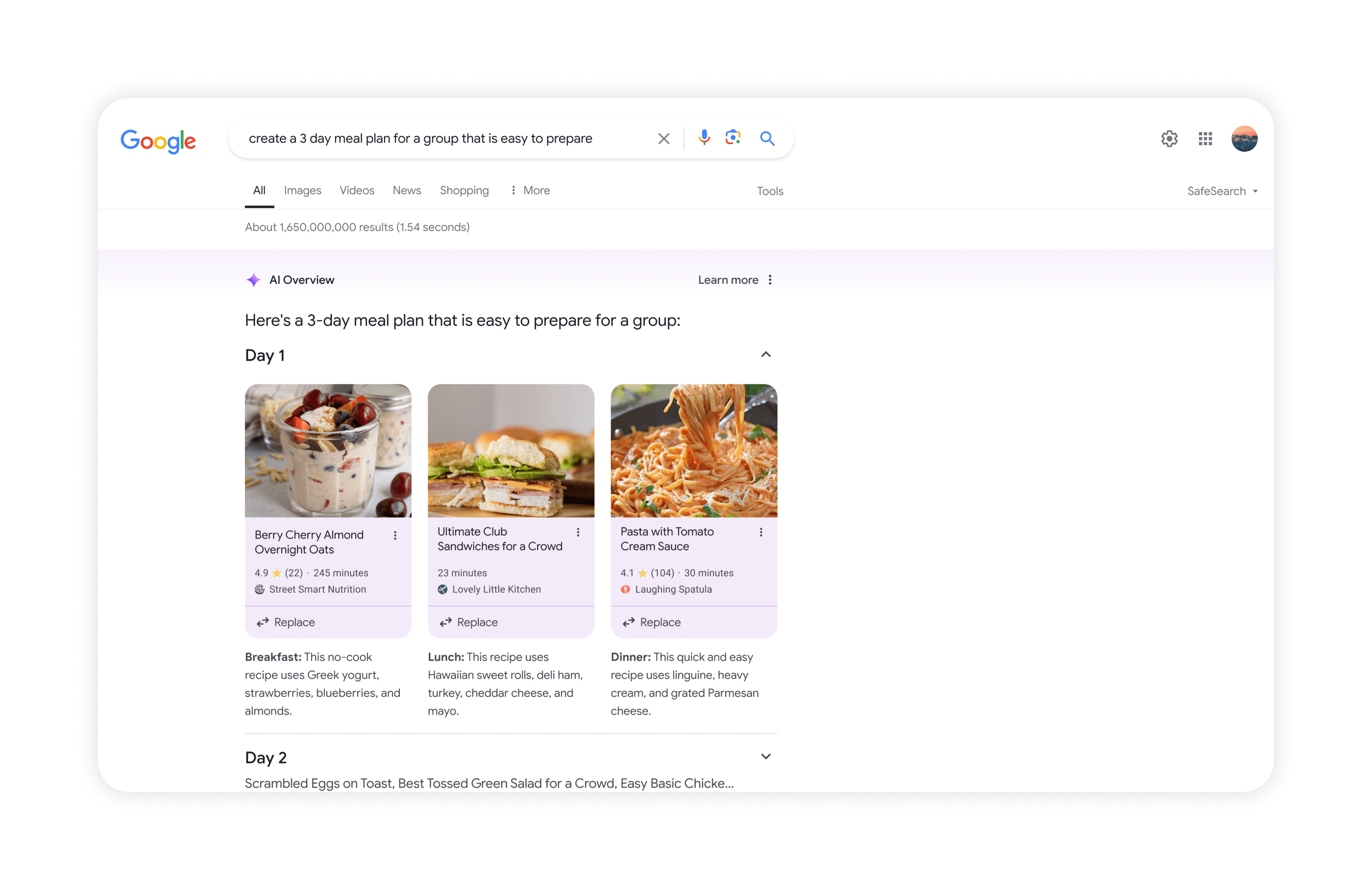
You can request a customized meal plan by searching for something like “create a 3-day meal plan for a group that’s easy to prepare.” You will receive a tailored plan with recipes from across the web.
AI-Organized Results & Visual Search
Google is introducing AI-organized results pages that categorize helpful results under unique, AI-generated headlines, presenting diverse perspectives and content types.
This feature will initially be available for dining and recipes, with plans to expand to movies, music, books, hotels, shopping, and more.
SGE will also enable users to ask questions using video content. This visual search capability can save you time describing issues or typing queries, as you can record a video instead.
Image Credit: blog.google/products/search/generative-ai-google-search-may-2024/, May 2024.
What Does This Mean For Businesses?
While Google touts SGE as a way to enhance search quality, the prominence of AI-generated content could impact businesses and publishers who rely on Google Search traffic.
AI overviews occupy extensive screen real estate and could bury traditional “blue link” web results, significantly limiting clickthrough rates.
Data from ZipTie and Search Engine Journal contributor Bart Goralewicz indicate that SGE displays cover over 80% of search queries across most verticals.
Additionally, under SGE’s unique ranking system, only 47% of the top 10 traditional web results appear as sources powering AI overview generation.
“SGE operates on a completely different level compared to traditional search. If you aim to be featured in Google SGE, you’ll need to develop a distinct strategy tailored to this new environment. It’s a whole new game.”
Tomasz Rudzki of ZipTie cautions:
“Google SGE is the most controversial and anxiety-provoking change in search,” commented. With so much changing week by week, businesses relying on organic search must carefully monitor SGE’s evolution.”
How To Optimize Your Site for SGE
As AI search accelerates, SEO professionals and content creators face new challenges in optimizing for discoverability.
Consider implementing these tactics for a potential increase in visibility in search results.
Structure content explicitly as questions and direct answers. With AI overviews answering queries directly, optimizing content in a question-and-answer format may increase the likelihood of having it surfaced by Google’s AI models.
Create topic overview pages spanning initial research to final decisions. Google’s AI search can handle complex, multi-step queries. Creating comprehensive overview content that covers the entire journey—from initial research to final purchasing decisions—could position those pages as prime sources for Google’s AI.
Pursue featured status on high-authority Q&A and information sites. Studies found sites like Quora and Reddit are frequently cited in Google’s AI overviews. Having authoritative, industry-expert-level content featured prominently on these high-profile Q&A platforms could increase visibility within AI search results.
Maximize technical SEO for improved crawling of on-page content. Like traditional search-leveraged web crawlers, Google’s AI models still rely on crawling a site’s content. Ensuring optimal technical SEO for crawlers to access and adequately render all on-page content is crucial for it to surface in AI overviews.
Tracking search volume for queries exhibiting AI overviews. Identifying queries that currently trigger AI overviews can reveal content gaps and optimization opportunities. Tracking search volume for these queries enables prioritizing efforts around high-value terms and topics Google already enhances with AI results.
Looking Ahead
As Google moves forward with its AI-centric search vision, disruptions could reshape digital economies and information ecosystems.
Companies must acclimate their strategies for an AI-powered search landscape.
We will be following these developments closely at Search Engine Journal with an aim to provide strategies to help make your content discoverable in SGE.
Boost your skills with Growth Memo’s weekly expert insights. Subscribe for free!
The voices criticizing Google for killing small sites are shouting louder.
Cases like HouseFresh or Retro Dodo garnered a lot of attention and made compelling cases. Hardcore updates and the growing rift between SEOs, publishers, and Google add kerosene to the fire.
The most volatile market in the world is not Brazil, Russia, or China. It’s Google search. No platform has as many changes of requirements. Over the last 3 years, Google launched 8 Core, 19 major and 75-150 minor updates. The company mentions thousands of improvements every year.
The common argumentation is that Google is breaking apart under the weight of the web’s commercialization. Or Google is cutting off middlemen like affiliates and publishers and sending traffic directly to software vendors and ecommerce brands.
But does the data support those claims?
As the saying goes, “In God we trust, all others must bring data.”
Image Credit: Lyna ™
Does Google Give Big Sites An Unfair SEO Advantage?
I thoroughly analyzed sites that lost and gained the most SEO traffic over the last 12 months to answer the question of whether big sites get an unfair SEO advantage.
TL;DR: Google does indeed seem to grow large sites faster, but likely due to secondary factors instead of the amount of traffic they get.
Method
I pulled the top 1,000 sites that gained and lost the most visibility over the last 12 months, each from Sistrix. I picked relative change over absolute to normalize for size of the site. For the list of winner sites, I set a minimum SEO visibility of one to filter out spam and noise.
Then, I cross-referenced the sites with backlinks and traffic data from Ahrefs to run correlations against factors like site traffic or backlinks.
Results
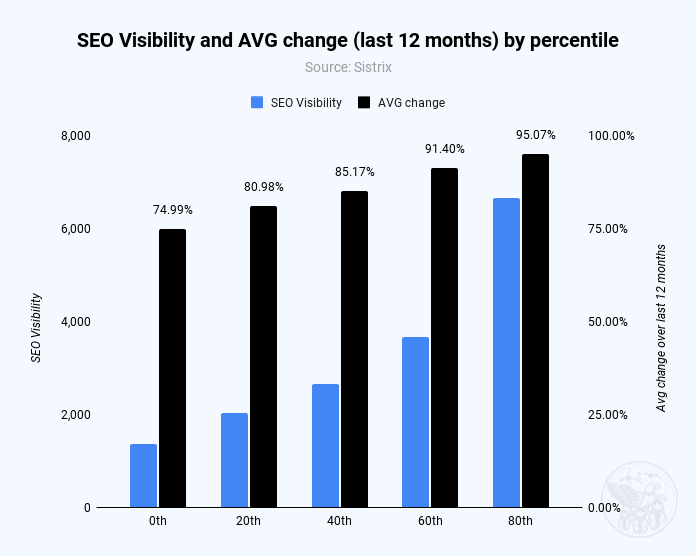
Sites in higher visibility percentiles have a strong relationship with SEO visibility growth over the last 12 months.
Sites that lost visibility have no relationship between the size of their loss and SEO visibility. We can, therefore, say bigger sites are more likely to be successful in SEO.
Sites in higher percentiles (= more SEO visibility) see stronger growth (Image Credit: Kevin Indig)
However, let’s not forget one thing: Newcomer sites can still get big. It’s harder than it was five or ten years ago, but it’s possible.
There are two reasons why big sites tend to gain more organic traffic.
One reason is how Google weighs ranking signals. Bigger sites tend to have more authority, which allows them to rank for more terms and grow their visibility if they’re able to avoid scale issues, keep content quality high, and continue to satisfy users by solving their problems.
Authority, based on our understanding, is the result of backlinks, content quality, and brand strength.
Google seems to be aware and taking action.
The correlation between SEO visibility and the number of linking domains is strong but was higher in May 2023 (.81) than in May 2024 (0.62). Sites that lost organic traffic showed lower correlations (0.39 in May 2023 and 0.41 in May 2024).
Even though sites that gained organic visibility have more backlinks, the signal seems to have come down significantly over the last 12 months. Backlink volume is still important, but its impact is shrinking. Mind you, volume and quality are two different pairs of sneakers.
The second reason big sites are gaining more organic traffic is Google’s Hidden Gem update, which gives preferential treatment to online communities. The impact is quite visible in the data.
High at the top of the winner list, you find online communities like:
Reddit.
Quora.
Steam Community.
Stack Exchange.
Ask Ubuntu.
Anecdotally, I noticed strong growth in popular SaaS vendor communities like HubSpot, Shopify, and Zapier. Surely, there are online communities that don’t have the same visibility as the big ones, but still grew significantly over the last 12 months.
The list of losers concentrates on publishers and ecommerce. A surprising number of big publishers lost organic traffic from classic blue links, equal to smaller publishers.
Examples of big publishers:
nypost.com (-62.3%).
bbc.com (-58.6%).
nytimes.com (-40.3%).
cnn.com (-40.1%).
theguardian.co.uk (-32.8%).
Examples of small publishers:
makeuseof.com (-79%).
everydayhealth.com (-70.6%).
thespruce.com (-58.5%).
goodhousekeeping.com (-46.5%).
verywellfamily.com (-38.4%).
Keep in mind that publishers rely a lot more on traffic from Top Stories, Google News, and Google Discover, which are not reflected in the data.
Popular Parasite SEO targets like chron.com or timesofindia.com lost significant SEO traffic, as did sites that are not on the list, like medium.com or linkedin.com/pulse. How much effort Google puts into cleaning the search engine results pages (SERPs) is unclear.
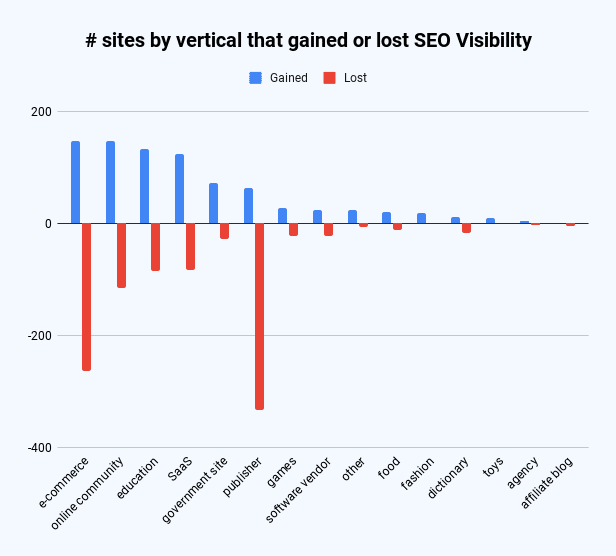
Two-thirds of sites on the list of winners were either SaaS companies, ecommerce companies, education companies, or online communities, with gains between 63% and 83%.
Over 50% of sites on the loser list were publishers or ecommerce sites, with losses between -45% and -53% SEO visibility.
It’s a lot harder to succeed in ecommerce and publisher SEO as almost twice as many ecommerce and five times as many publishers lost SEO visibility than gained.
Image Credit: Kevin Indig
The top 5 loser sites with the highest SEO visibility in May 2023 are:
target.com (-35.5%).
wiktionary.org (-61.5%).
etsy.com (-43.6%).
nytimes.com (-40.3%).
thesaurus.com (-59.7%).
I found no discernible pattern for country code top-level domains (ccTLDs): 75% of sites on the winner list had .com ccTLDs. Only 65 were .edu, 39 were .gov, and 94 were .org.
Limitations
Of course, the biggest limitation of the analysis is that sites could have gained or lost traffic due to SEO campaigns, technical issues, or domain migrations.
The second limitation is the small sample set of 2,000 sites. Even though the analysis looks at the peak of the iceberg, the web might hold millions of sites.
Open Questions
There is a lot of room for interpretation when we talk about the word “big” in big sites. Are we talking about a certain amount of traffic, being owned by a big company, or making a lot of money when calling a big site big?
I focused on organic traffic in this analysis, but it would be interesting to see how some of the biggest companies fare in SEO. One reference point could be Glen Allsopp’s analysis of the big publishing houses dominating the SERPs.
Another question is when Google rewards big sites. During algorithm updates? Continuously over time? An answer would help us understand better how Google works.
I’ll leave you with this: In my interpretation of the data, what made big sites successful is often what keeps their growth going. When a site figures out the right quality for content or a good user experience, it’s more likely to grow continuously than sites that have plateaued or declined in traffic.
Personally, I doubt that people at Google deliberately decide to “go after a niche” or “kill small sites,” but rather that algorithmic decisions lead to those outcomes.
That is not to say Google doesn’t carry a certain responsibility.
Featured Image: Paulo Bobita/Search Engine Journal
In a recent Twitter exchange, Google’s Search Liaison, Danny Sullivan, provided insight into how the search engine handles algorithmic spam actions and ranking drops.
The discussion was sparked by a website owner’s complaint about a significant traffic loss and the inability to request a manual review.
Sullivan clarified that a site could be affected by an algorithmic spam action or simply not ranking well due to other factors.
He emphasized that many sites experiencing ranking drops mistakenly attribute it to an algorithmic spam action when that may not be the case.
“I’ve looked at many sites where people have complained about losing rankings and decide they have a algorithmic spam action against them, but they don’t. “
Sullivan’s full statement will help you understand Google’s transparency challenges.
Additionally, he explains why the desire for manual review to override automated rankings may be misguided.
Two different things. A site could have an algorithmic spam action. A site could be not ranking well because other systems that *are not about spam* just don’t see it as helpful.
I’ve looked at many sites where people have complained about losing rankings and decide they have a…
— Google SearchLiaison (@searchliaison) May 13, 2024
Challenges In Transparency & Manual Intervention
Sullivan acknowledged the idea of providing more transparency in Search Console, potentially notifying site owners of algorithmic actions similar to manual actions.
However, he highlighted two key challenges:
Revealing algorithmic spam indicators could allow bad actors to game the system.
Algorithmic actions are not site-specific and cannot be manually lifted.
Sullivan expressed sympathy for the frustration of not knowing the cause of a traffic drop and the inability to communicate with someone about it.
However, he cautioned against the desire for a manual intervention to override the automated systems’ rankings.
Sullivan states:
“…you don’t really want to think “Oh, I just wish I had a manual action, that would be so much easier.” You really don’t want your individual site coming the attention of our spam analysts. First, it’s not like manual actions are somehow instantly processed. Second, it’s just something we know about a site going forward, especially if it says it has change but hasn’t really.”
Determining Content Helpfulness & Reliability
Moving beyond spam, Sullivan discussed various systems that assess the helpfulness, usefulness, and reliability of individual content and sites.
He acknowledged that these systems are imperfect and some high-quality sites may not be recognized as well as they should be.
“Some of them ranking really well. But they’ve moved down a bit in small positions enough that the traffic drop is notable. They assume they have fundamental issues but don’t, really — which is why we added a whole section about this to our debugging traffic drops page.”
Sullivan revealed ongoing discussions about providing more indicators in Search Console to help creators understand their content’s performance.
“Another thing I’ve been discussing, and I’m not alone in this, is could we do more in Search Console to show some of these indicators. This is all challenging similar to all the stuff I said about spam, about how not wanting to let the systems get gamed, and also how there’s then no button we would push that’s like “actually more useful than our automated systems think — rank it better!” But maybe there’s a way we can find to share more, in a way that helps everyone and coupled with better guidance, would help creators.”
Advocacy For Small Publishers & Positive Progress
In response to a suggestion from Brandon Saltalamacchia, founder of RetroDodo, about manually reviewing “good” sites and providing guidance, Sullivan shared his thoughts on potential solutions.
He mentioned exploring ideas such as self-declaration through structured data for small publishers and learning from that information to make positive changes.
“I have some thoughts I’ve been exploring and proposing on what we might do with small publishers and self-declaring with structured data and how we might learn from that and use that in various ways. Which is getting way ahead of myself and the usual no promises but yes, I think and hope for ways to move ahead more positively.”
Sullivan said he can’t make promises or implement changes overnight, but he expressed hope for finding ways to move forward positively.
Google’s Lizzi Sassman and John Mueller answered a question about Content Decay, expressing confusion over the phrase because they’d never heard of it. Turns out there’s a good reason: Content Decay is a just a new name created to make an old problem look like a new one.
Googlers Never Heard Of Content Decay
Google tech writer Lizzi Sassman began a Google Search Off The Record podcast by stating that they are talking about Content Decay because someone submitted that topic and then remarked that she had never heard of Content Decay.
She said:
“…I saw this come up, I think, in your feedback form for topics for Search Off the Record podcast that someone thought that we should talk about content decay, and I did not know what that was, and so I thought I should look into it, and then maybe we could talk about it.”
Google’s John Mueller responded:
“Well, it’s good that someone knows what it is. …When I looked at it, it sounded like this was a known term, and I felt inadequate when I realized I had no idea what it actually meant, and I had to interpret what it probably means from the name.”
Then Lizzi pointed out that the name Content Decay sounds like it’s referring to something that’s wrong with the content:
“Like it sounds a little bit negative. A bit negative, yeah. Like, yeah. Like something’s probably wrong with the content. Probably it’s rotting or something has happened to it over time.”
It’s not just Googlers who don’t know what the term Content Decay means, experienced SEOs with over 25 years of experience had never heard of it either, including myself. I reached out to several experienced SEOs and nobody had heard of the term Content Decay.
Like Lizzi, anyone who hears the term Content Decay will reasonably assume that this name refers to something that’s wrong with the content. But that is incorrect. As Lizzi and John Mueller figured out, content decay is not really about content, it’s just a name that someone gave to a natural phenomenon that’s been happening for thousands of years.
If you feel out of the loop because you too have never heard of Content Decay, don’t. Content Decay is one of those inept labels someone coined to put a fresh name on a problem that is so old it predates not just the Internet but the invention of writing itself.
What Is Content Decay?
What people mean when they talk about Content Decay is a slow drop in search traffic. But a slow drop in traffic is not a definition, it’s just a symptom of the actual problem which is declining user interest. Declining user interest in a topic, product, service or virtually any entity is something that that is normal and expected that can sneak up affect organic search trends, even for evergreen topics. Content Decay is an inept name for an actual SEO issue to deal with. Just don’t call it Content Decay.
How Does User Interest Dwindle?
Dwindling interest is a longstanding phenomenon that is older than the Internet. Fashion, musical styles and topics come and go in the physical and the Internet planes.
A classic example of dwindling interest is how search queries for digital cameras collapsed after the introduction of the iPhone because most people no longer needed a separate camera device.
Similarly, the problem with dwindling traffic is not necessarily the content. It’s search trends. If search trends are the reason for declining traffic then that’s probably declining user interest and the problem to solve is figuring out why interest in a topic is changing.
Typical reasons for declining user interest:
Perceptions of the topic changed
Seasonality
A technological disruption
The way words are used has changed
Popularity of the topic has waned
When diagnosing a drop in traffic always keep an open mind to all possibilities because sometimes there’s nothing wrong with the content or the SEO. The problem is with user interest, trends and other factors that have nothing to do with the content itself.
There Are Many Reasons For A Drop In Traffic
The problem with inept SEO catch-all phrases is that because they do not describe anything specific the meaning of the catch-all phrase tends to morph and pretty much the catch-all begins describing things beyond what it initially ineptly described.
Here are other reasons for why traffic could decline (both slow and precipitously):
The decay is happening to user interest in a topic (declining user interest is a better description).
Traffic slows down because Google introduces a new navigational feature (like people also ask.
Traffic slows because Google introduces a new rich result (video results, shopping results, featured snippets)
The slow decline in search traffic could be a side effect of personalized search causes the site to rank less often and only for specific people/areas (personalized search)
The drop in search traffic is because relevance changed (Algorithm Relevance Change)
A drop in organic search traffic is due to improved competition (Competition)
Catchall Phrases Are Not Useful
Content Decay is one of many SEO labels put on problems or strategies in order to make old problems and methods appear to be new. Too often those labels are inept and cause confusion because they don’t describe the problem.
Putting a name to the cause of the problem is a good practice. So rather than use fake names like Content Decay maybe make a conscious effort to use the actual name of what the problem or solution is. In the case of Content Decay it’s best to identify the problem (declining user interest) and refer to the problem by that name.
When dealing with outdated website content, Google has warned against using certain redirects that could be perceived as misleading to users.
The advice came up during a recent episode of Google’s Search Off The Record podcast.
In the episode, Search Relations team members John Mueller and Lizzi Sassman discussed strategies for managing “content decay” – the gradual process of website content becoming obsolete over time.
During the conversation, the two Googlers addressed the practice of using redirects when older content is replaced or updated.
However, they cautioned against specific redirect methods that could be seen as “sneaky.”
When Rel=canonical Becomes “Sneaky”
The redirect method that raised red flags is the incorrect use of rel=canonical tags.
This was brought up during a discussion about linking similar, but not equivalent, content.
Sassman stated:
“… for that case, I wish that there was something where I could tie those things together, because it almost feels like that would be better to just redirect it.
For example, Daniel Weisberg on our team blogged about debugging traffic drops with Search Console in a blog post. And then we worked on that to turn that into documentation and we added content to it. We want people to go look at the new thing, and I would want people to find that new thing in search results as well.
So, to me, like that one, I don’t know why people would need to find the older version forthat, because it’s not like an announcement. It was best practice kind of information.
So, for that, would it be better to do like a rel=canonical situation?”
Mueller immediately raised concerns with Sassman’s proposed use of the rel=canonical tag.
Mueller replied:
“The rel=canonical would be kind of sneaky there because it’s not really the same thing… it’s not equivalent.
I always see rel=canonical as something where you tell search engines ‘these are actually equivalent, and you can pick whichever one you want.
We’re kind of seeing it as like, ‘Well, these are equivalent, but treat this as a redirect,’ which is tricky because they’re like, ‘Ah, they say rel=canonical, but they actually mean something different.’”
What To Do Instead
If you find yourself having to make a similar decision as Sassman, Mueller says this is the correct approach:
“I think either redirecting or not redirecting. It’s like really saying that it’s replaced or keeping both.”
The best way to link a page to a newer, more comprehensive page is with a redirect, not a rel=canonical.
Or you can keep them both up if you feel there’s still value in the older page.
Why SEJ Cares
Using redirects or canonical tags incorrectly can be seen as an attempt to manipulate search rankings, which violates Google’s guidelines and can result in penalties or a decrease in visibility.
Following Google’s recommendations can ensure your site remains in good standing and visitors access the most relevant content.
Listen to the full podcast episode below:
FAQ
What are the issues with using rel=canonical tags for updated content?
Using rel=canonical tags can be misleading if the old and new pages aren’t equivalent.
Google’s John Mueller suggests that rel=canonical implies the pages are identical and a search engine can choose either. Using it to signal a redirect when the content isn’t equivalent is seen as “sneaky” and potentially manipulative.
Rel=canonical should only be used when content is truly equivalent; otherwise, a 301 redirect or maintaining both pages is recommended.
Is it acceptable to keep outdated content accessible to users?
Yes, it’s acceptable to keep outdated content accessible if it still holds value. Google’s John Mueller suggests that you can either redirect outdated content to the updated page or keep both versions of the content live.
If the older content offers valuable information or historical context, it’s worthwhile to keep it accessible along with the updated version.
How should redirects be handled when updating website content?
The correct approach to handling redirects is to use a 301 redirect if the old content has been replaced or is considered obsolete.
A 301 redirect tells search engines—and visitors—that the old page has moved permanently to a new location. Additionally, it allows the transfer of link equity and minimizes negative impact on search rankings.
While Google informs the public about broad core algorithm updates, it doesn’t announce every minor change or tweak, according to Google’s Search Liaison Danny Sullivan.
The comments were in response to Glenn Gabe’s question about why Google doesn’t provide information about volatility following the March core update.
OK, I love that Google informs us about broad core updates rolling out, but why not also explain when huge changes roll out that seem like an extension of the broad core update? I mean, it’s cool that Google can decouple algorithms from broad core updates and run them separately… https://t.co/2Oan7X6FTk
“… when site owners think a major update is done, they are not expecting crazy volatility that sometimes completely reverses what happened with the major update. The impact from whatever rolled out on 5/3 and now 5/8 into 5/9 has been strong.”
Sullivan explained that Google continuously updates its search ranking systems, with around 5,000 updates per year across different algorithms and components.
Many of these are minor adjustments that would go unnoticed, Sullivan says:
“If we were giving notice about all the ranking system updates we do, it would be like this:
Hi. It’s 1:14pm — we just did an update to system 112! Hi. It’s 2:26pm — we just did an update to system 34!
That’s because we do around 5,000 updates per year.”
“We’re constantly making updates to our search algorithms, including smaller core updates. We don’t announce all of these because they’re generally not widely noticeable. Still, when released,…
— Google SearchLiaison (@searchliaison) May 9, 2024
While Google may consider these minor changes, combining thousands of those tweaks can lead to significant shifts in rankings and traffic that sites need help understanding.
More open communication from Google could go a long way.
Ongoing Shifts From Web Changes
Beyond algorithm adjustments, Sullivan noted that search results can fluctuate due to the nature of web content.
Google’s ranking systems continually process new information, Sullivan explains:
“… already launched and existing systems aren’t themselves being updated in how they operate, but the information they’re processing isn’t static but instead is constantly changing.”
Google focuses communications on major updates versus a never-ending stream of notifications about minor changes.
Sullivan continues:
“This type of constant ‘hey, we did an update’ notification stuff probably isn’t really that useful to creators. There’s nothing to ‘do’ with those types of updates.”
Why SEJ Cares
Understanding that Google Search is an ever-evolving platform is vital for businesses and publishers that rely on search traffic.
It reiterates the need for a long-term SEO strategy focused on delivering high-quality, relevant content rather than reacting to individual algorithm updates.
However, we realize Google’s approach to announcing updates can leave businesses scrambling to keep up with ranking movements.
More insight into these changes would be valuable for many.
How This Can Help You
Knowing that Google processes new information in addition to algorithm changes, you may have more realistic expectations post-core updates.
Instead of assuming stability after a major update, anticipate fluctuations as Google’s systems adapt to new web data.
In the latest episode of the Search Off The Record podcast, Google Search Relations team members John Mueller and Lizzi Sassman did a deep dive into dealing with “content decay” on websites.
Outdated content is a natural issue all sites face over time, and Google has outlined strategies beyond just deleting old pages.
While removing stale content is sometimes necessary, Google recommends taking an intentional, format-specific approach to tackling content decay.
Archiving vs. Transitional Guides
Google advises against immediately removing content that becomes obsolete, like materials referencing discontinued products or services.
Removing content too soon could confuse readers and lead to a poor experience, Sassman explains:
“So, if I’m trying to find out like what happened, I almost need that first thing to know. Like, “What happened to you?” And, otherwise, it feels almost like an error. Like, “Did I click a wrong link or they redirect to the wrong thing?””
Sassman says you can avoid confusion by providing transitional “explainer” pages during deprecation periods.
A temporary transition guide informs readers of the outdated content while steering them toward updated resources.
Sassman continues:
“That could be like an intermediary step where maybe you don’t do that forever, but you do it during the transition period where, for like six months, you have them go funnel them to the explanation, and then after that, all right, call it a day. Like enough people know about it. Enough time has passed. We can just redirect right to the thing and people aren’t as confused anymore.”
When To Updates Vs. When To Write New Content
For reference guides and content that provide authoritative overviews, Google suggests updating information to maintain accuracy and relevance.
However, for archival purposes, major updates may warrant creating a new piece instead of editing the original.
Sassman explains:
“I still want to retain the original piece of content as it was, in case we need to look back or refer to it, and to change it or rehabilitate it into a new thing would almost be worth republishing as a new blog post if we had that much additional things to say about it.”
Remove Potentially Harmful Content
Google recommends removing pages in cases where the outdated information is potentially harmful.
Sassman says she arrived at this conclusion when deciding what to do with a guide involving obsolete structured data:
“I think something that we deleted recently was the “How to Structure Data” documentation page, which I thought we should just get rid of it… it almost felt like that’s going to be more confusing to leave it up for a period of time.
And actually it would be negative if people are still adding markup, thinking they’re going to get something. So what we ended up doing was just delete the page and redirect to the changelog entry so that, if people clicked “How To Structure Data” still, if there was a link somewhere, they could still find out what happened to that feature.”
Internal Auditing Processes
To keep your content current, Google advises implementing a system for auditing aging content and flagging it for review.
Sassman says she sets automated alerts for pages that haven’t been checked in set periods:
“Oh, so we have a little robot to come and remind us, “Hey, you should come investigate this documentation page. It’s been x amount of time. Please come and look at it again to make sure that all of your links are still up to date, that it’s still fresh.””
Context Is Key
Google’s tips for dealing with content decay center around understanding the context of outdated materials.
You want to prevent visitors from stumbling across obsolete pages without clarity.
Additional Google-recommended tactics include:
Prominent banners or notices clarifying a page’s dated nature
Listing original publish dates
Providing inline annotations explaining how older references or screenshots may be obsolete
How This Can Help You
Following Google’s recommendations for tackling content decay can benefit you in several ways:
Improved user experience: By providing clear explanations, transition guides, and redirects, you can ensure that visitors don’t encounter confusing or broken pages.
Maintained trust and credibility: Removing potentially harmful or inaccurate content and keeping your information up-to-date demonstrates your commitment to providing reliable and trustworthy resources.
Better SEO: Regularly auditing and updating your pages can benefit your website’s search rankings and visibility.
Archival purposes: By creating new content instead of editing older pieces, you can maintain a historical record of your website’s evolution.
Streamlined content management: Implementing internal auditing processes makes it easier to identify and address outdated or problematic pages.
By proactively tackling content decay, you can keep your website a valuable resource, improve SEO, and maintain an organized content library.
Listen to the full episode of Google’s podcast below:
In the latest episode of Google’s Search Off The Record podcast, hosts John Mueller and Lizzi Sassman discussed “content decay”—the natural process by which online content becomes outdated or loses relevance over time.
While not a widely used term among SEO professionals, the concept raises questions about how websites should handle aging content that may contain obsolete information, broken links, or outdated references.
What Is Content Decay?
Mueller, a Search Advocate at Google, defines content decay as:
“[Content decay is] something where, when you look at reference material, it’s kind of by definition old. People wrote about it because they’ve studied it for a really long time. So it’s an old thing. But that doesn’t mean it’s no longer true or no longer useful.”
It’s worth noting Mueller was initially unfamiliar with the term:
“When I looked at it, it sounded like this was a known term, and I felt inadequate when I realized I had no idea what it actually meant, and I had to interpret what it probably means from the name.
Sassman, who oversees the Search Central website’s content, admitted she was also unfamiliar with content decay.
She stated:
“… it sounded a little bit negative … Like something’s probably wrong with the content. Probably it’s rotting or something has happened to it over time.”
After defining the term, the two dissected various approaches to handling content decay, using Google’s help documents as a case study.
Content Decay Not Necessarily A Bad Thing
Content decay isn’t, by definition, a bad thing.
Blog posts announcing past events or product changes may seem like sources of content decay.
However, Sassman advises keeping that content for historical accuracy.
Sassman gives an example, citing Google’s decision to keep pages containing the outdated term “Webmaster Tools.”
“If we went back and replaced everything where we said ‘Google Webmasters’ with ‘Search Console,’ it would be factually incorrect. Search Console didn’t exist at that point. It was Webmaster Tools.”
Avoiding User Confusion
According to Mueller, the challenge in dealing with content decay is “avoiding confusing people.”
Indicating when content is outdated, providing context around obsolete references, and sensible use of redirects can help mitigate potential confusion.
Mueller stated
“People come to our site for whatever reason, then we should make sure that they find information that’s helpful for them and that they understand the context. If something is old and they search for it, they should be able to recognize, ‘Oh, maybe I have to rethink what I wanted to do because what I was searching for doesn’t exist anymore or is completely different now.’”
No One-Size-Fits-All Solution
There are no easy solutions to content decay. You must thoughtfully evaluate aging content, understanding that some pieces warrant archiving while others remain valuable historical references despite age.
Listen to the full episode of Google’s podcast below:
Why SEJ Cares
The concept of “content decay” addresses a challenge all website owners face – how to manage and maintain content as it ages.
Dealing with outdated website content is essential to creating a positive user experience and building brand trust.
How This Can Help You
By examining Google’s approaches, this podcast episode offers the following takeaways:
There’s value in preserving old content for historical accuracy.
Consider updating old pages to indicate outdated advice or deprecated features.
Establish an auditing process for routinely evaluating aging content.
FAQ
What does “content decay” mean in the context of SEO?
Online content tends to become outdated or irrelevant over time. This can happen due to industry changes, shifts in user interests, or simply the passing of time.
In the context of SEO, outdated content impacts how useful and accurate the information is for users, which can negatively affect website traffic and search rankings.
To maintain a website’s credibility and performance in search results, SEO professionals need to identify and update or repurpose content that has become outdated.
Should all outdated content be removed from a website?
Not all old content needs to be deleted. It depends on what kind of content it is and why it was created. Content that shows past events, product changes, or uses outdated terms can be kept for historical accuracy.
Old content provides context and shows how a brand or industry has evolved over time. It’s important to consider value before removing, updating, or keeping old content.
What are the best practices to avoid user confusion with outdated content?
Website owners and SEO professionals should take the following steps to avoid confusing users with outdated content:
Show when content was published or note if the information has changed since it was created.
Add explanations around outdated references to explain why they may no longer be relevant.
Set up redirects to guide users to the most current information if the content has moved or been updated.
These strategies help people understand a page’s relevance and assist them in getting the most accurate information for their needs.
Featured Image: Screenshot from YouTube.com/GoogleSearchCentral, May 2024.
Eric Schmidt, former CEO of Google, said in an interview that Google’s mission is to organize the world’s information, not to provide blue links. Schmidt’s pragmatic statements seem to describe a future where websites are unnecessary and advertising is increasingly effective.
Answers Without Links Is A Good User Experience?
The ex-CEO’s prediction of the future of Google may seems to contradict statements by Google’s current CEO that assert that search and the web will continue to coexist as well as by Danny Sullivan who has many times said that a healthy web ecosystem is important to Google.
There are many actions taken by Google in the past that indicate that Eric Schmidt’s prediction fit perfectly with how Google has ranked sites in the past.
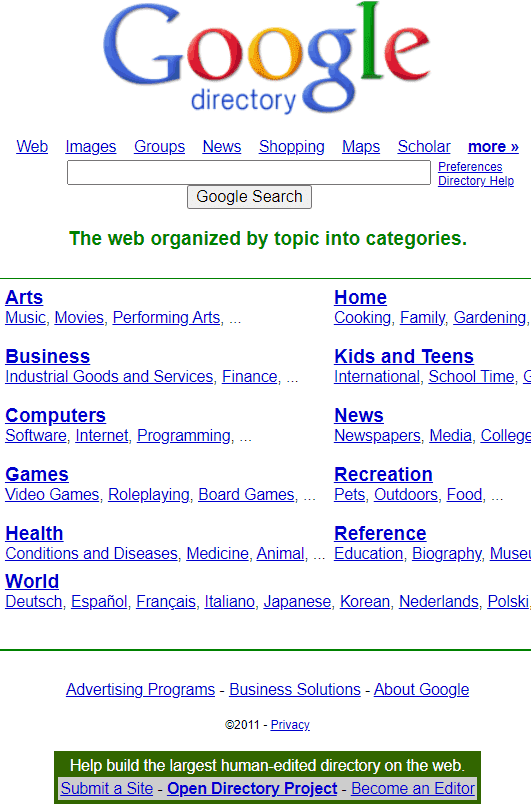
The early days of the web were navigated not just by search engines but by curated web directories that served as starting places for Internet users to go find information, hopping from link to link in a hyperlinked Internet. The idea was that hyperlinks was how users could find information.
Google Search not only ranked webpages from web directories, Google itself hosted a version of DMOZ, an open source web directory that was curated by thousands of volunteers much like Wikipedia is maintained by volunteer editors today.
But a day came when Google stopped ranking directories and the reason given was that it was a better user experience show answers and not links to pages with more links (this event is likely archived somewhere on the WebmasterWorld forum, it happened a long time ago).
Then there are Google’s answers for flight tracking, package tracking, stock quotes, the time and weather information that has zero links.
Example Of An Answer Without Links
Eric Schmidt’s assertion that Google will take advantage of AI to show answers fits into Google’s design principle that showing answers is a good user experience if it fully satisfies the query.
The only difference between the old days and now is that Google is that AI has (mostly) unlocked the ability to show answers without linking to any websites.
So it’s not far-fetched that Google may decide that showing answers is a good user experience, there is precedence for that approach.
AI Is Underhyped
Schmidt put forward the idea that AI is not overhyped but in fact is underhyped.
He observed:
“I hate to tell you but I think this stuff is underhyped not overhyped. Because the arrival of intelligence of a non-human form is really a big deal for the world.
It’s coming. It’s here. It’s about to happen. It happens in stages. …the reason I’m saying it’s underhyped is you’re seeing the future of reasoning, the future of human interaction, the future of research, the future of planning is being invented right now.
There’s something called infinite context windows, which means that you can — it’s like having an infinite short-term memory, which I certainly don’t have, where you can basically keep feeding it information and it keeps learning and changing.”
Eric Schmidt On The Future Of Search
The interviewer asked Schmidt about a future where AI answers questions without links to sources on the web.
The interviewer asked this question:
“In a world where the AI provides the answer, and doesn’t necessarily need to send you to 12 places where you’re going to go find it yourself… what happens to all of that?
Eric Schmidt answered:
“It’s pretty important to understand that Google is not about blue links, it’s about organizing the world’s information. What better tool than the arrival of AI to do that better.
Do you think you can monetize that? You betcha.”
Will Answers Without Links Happen?
It has to be reiterated that Eric Schmidt (LinkedIn profile) is no longer the CEO at Google or Executive Chairman & Technical Advisor at Alphabet (for four years now). His opinions may not reflect the current thinking within Google.
However it’s not unreasonable to speculate that maybe he is saying out loud what those within Google cannot officially discuss.
The most solid information we have now is that Google Search will continue to have links but that Google (and others like Apple) are moving ahead with AI assistants on mobile devices that can answer questions and perform tasks.

 Screenshot from: twitter.com/GoogleSearchLiaison, May 2024.
 Screenshot from: twitter.com/GoogleSearchLiaison, May 2024.