There Is No Spoon: What Does ‘Do What’s Best For Users’ Even Mean? via @sejournal, @Kevin_Indig

I don’t see ranking factors anymore. All I see is user satisfaction.

A series of tweets from Danny Sullivan, search liaison at Google, about doing things for Google vs. users set the SEO scene on fire. The main point: Focus on users, not Google.
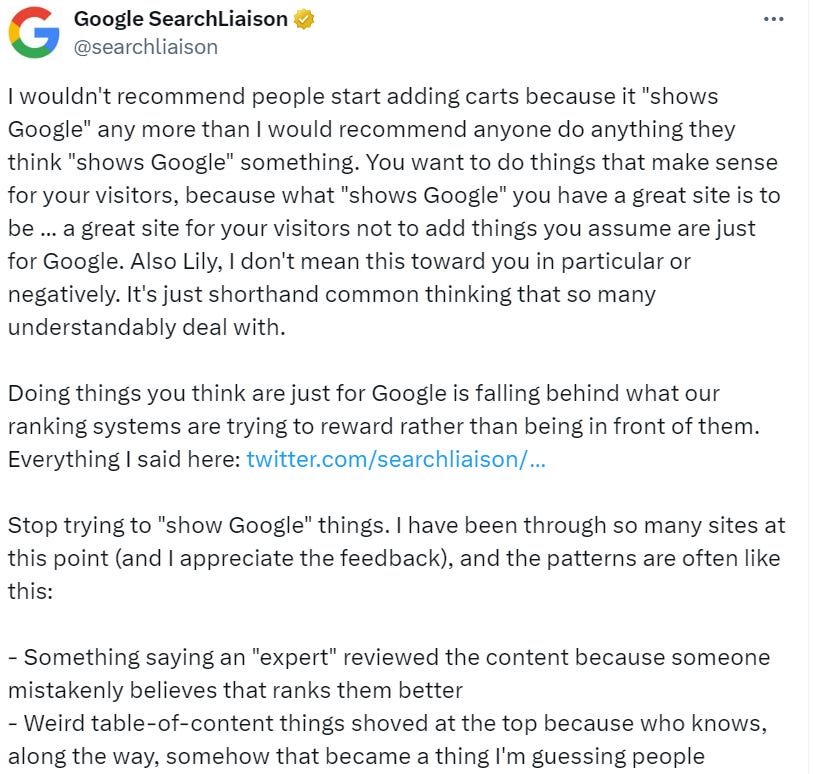
A series of Tweets from Danny SullivanScreenshot from X (Twitter), March 2024 (Image Credit: Kevin Indig)

Every polarizing point has two opposing camps. SEO is no exception.

Camp One believes that Google can measure, understand, and reward user satisfaction. All that matters is helping users to achieve their goals. Google is smart.

Camp Two believes content optimization, tech SEO, and link building are the keys to success in SEO. Machines follow algorithms, and algorithms follow equations. Google is lazy and stupid.

But there is a third camp: Both are true.

what-does-do-whats-best-for-users-even-meanImage Credit: Lyna ™

Boost your skills with Growth Memo’s weekly expert insights. Subscribe for free!

The most simplistic model of SEO: Technical optimization, content optimization, and backlinks get you shot at the Top 10 results, but strong user signals get you in the Top 3 – granted you hit user intent.

This simplified model is correct in my experience, but it clashes with reality in five ways:

1. Google’s systems aren’t flawless. They don’t always reward the best content. Some spam tactics still work. Some commodity content still ranks. Long-tail answers are terrible.

Ranking Reddit results higher was a smart thought, but many answers are questionable. SEO is full of ifs and whens – the definition of algorithms.

2. User journeys are non-linear. I too often talk about the funnel, but the better model consists of intent, lots of touch points, and a purchase.

Customers expose themselves to purchase triggers through friends, social networks, ads, or serendipity: I see a cool shirt in a YouTube video and immediately want to buy one.

Then, they go through cycles of exploration and evaluation: I Google shirt articles, watch YouTube videos, and read reviews.

Eventually, they find an offer they like and pull the trigger: I go to site.com and buy the shirt. User journey complete.

Nonlinearity makes the impact of content harder to measure. A highly important piece might get lots of traffic but no conversions. Attributing revenue to that piece is very difficult.

3. Google has lied about using user signals in ranking. Is it also lying about other things?

4. Practically, I always see a positive impact when adding more “best practice” elements to the page.

One point in question on X (Twitter) was things like author bios, publish dates, or table of contents. Whether Google’s system actively looks for and rewards them or users prefer them, they have a positive impact.

5. My biggest struggle and criticism is the subjectivity and imprecision of statements like “helpful content,” “good for users,” or “user experience.”

What does that even mean? Taken ad absurdum, you can argue that almost everything is being good or bad for the user. It’s too subjective and simplistic.

A better approach to navigating the confusing state of SEO is a mix of SEO, conversion rate optimization (CRO), and good ‘ol market research.

CRO and SEO are connected at the hip and should have never been separate.

From here is how pros do conversion rate optimization:

Over the last two decades, the roles of SEO and CRO lived and grew in isolation. At the same time, we’re preaching to tear down silos in organizations. In engineering, we’re breaking monolithic applications apart into microservices. Most Growth and product organizations work in squads where members of different crafts come together to form a group pursuing the same goal. So, why are SEO and CRO still two different crafts?

Both start with user intent and end with removing friction:

Successful Conversion Rate Optimization rests on three core principles:

  1. Understand user intent, motivation, and friction
  2. Run experiments
  3. Focus on business impact

Understanding what users are trying to accomplish (intent, like buy, evaluate, seek inspiration, solve a problem), what motivates them (price, features, value, status), and where they encounter friction is key to developing unique ideas instead of blindly copying/pasting them from blog articles.

CRO playbooks paired with market research can answer “what’s best for users” much better than what many regard as “pure SEO.”

Market research can illuminate underserved topics independently from search volume.

Hotjar and Mouseflow are valuable tools, but often the only ones in a belt that can hold a lot more.

Talking to users, either directly or async, has to be back on the menu at a time when async video tools and AI make it simple, fast, and efficient to learn from users. Writing this sentence feels so basic, but we’re just not doing it because we’re stuck in old mindsets.

Old ways are powerful drugs because they prevent us from having to get uncomfortable and learn new things. But old ways also prevent us from adapting. Risky business.

Search volume is the best proxy for a market we have in marketing. But it’s as tricky as using productivity for economic growth.

From the inaccuracy and flaws of search volume:

In summary, search volume is:

  • Not available for many keywords, especially transactional keywords
  • Often inaccurate
  • Averaged over the year, which means that seasonality is not reflected at all
  • Backward looking

But selecting topics to create content for isn’t enough. We also need more user input for the essence of content.

Aggregators understand that principle much better than integrators because their approach is so product-driven, and SEO teams typically are housed under the product org.

It’s much less common for integrators to get qualitative user feedback on content or conduct expert interviews before writing. Some of the best integrator brands have in-house specialists, and it shows.

Tech SEO, which is mostly work done for Google, remains important no matter the camp you’re in.

Google has become allergic to unhealthy sites and commodity content as it hits the limits of its own resources. Just focusing on the user is simply not enough.
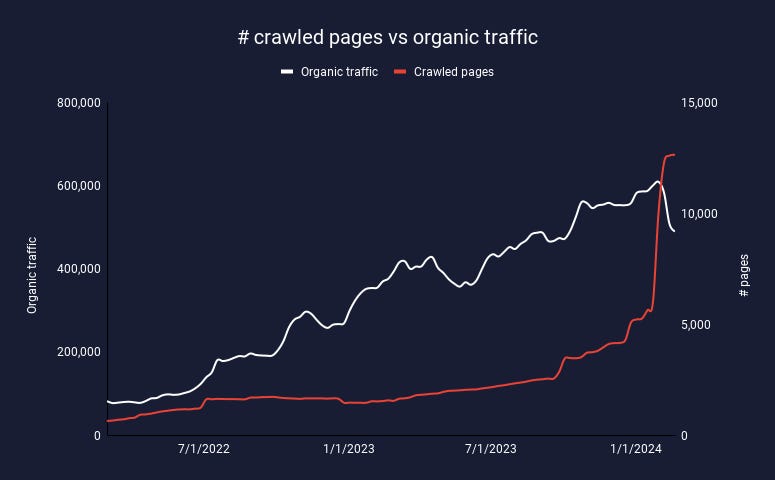
Crawled pages vs. Organic trafficImage Credit: Kevin Indig

This site had a technical issue that caused many pages to be indexed. Organic traffic immediately tanked.

Perhaps we need to speak more clearly that our systems are chasing what people like, so if you “chase the algorithm,” you’re behind. If you chase what people like, you’re ahead of the algorithm.”

One of my unpopular opinions is that you should chase the algorithm. Actually, you want to be just on point.

But since you need to periodically adjust as Google’s algorithm changes, you’re always slightly chasing.

Why wouldn’t you want to be ahead? Because you never know how far ahead of the algo you are and when it will catch up with you.

Google rewards what works. If being ahead of the algo was rewarded, people would adapt their playbooks.

It seems like the time is ripe, maybe overripe, for more CRO in SEO.  But don’t forget to make the machine happy.

You have to let it all go, Neo. Fear, doubt, and disbelief. Free your mind.

One more thing: I’m speaking at Digital Olympus Summit in Eindhoven on May 31st. Reply to get a free ticket. I have two. First come, first served.


https://twitter.com/searchliaison/status/1770867218059800685

https://x.com/searchliaison/status/1725275245571940728?s=46&t=4yrtKrhbqQkgyl9GmwSB6Q


Featured Image: Paulo Bobita/Search Engine Journal

Google Updates Product Structured Data With 3DModel Type via @sejournal, @martinibuster

Google updated it’s documentation to add a new 3DModel markup Type to the Product structured data type, connecting the two by the use of the subjectOf property.

Understanding The New Structured Data Property

A structured data Type is an entity or a concept (like EatAction or DrugCost). Some common structured data Types most people are familiar with are CreativeWork, Product, Event, and Organization.

A property is simply an attribute of the structured data Type.

The new markup that Google is introducing for use with the Property Type is the 3DModel Type which is connected to the Property Type through the use of the subjectOf property.

The subjectOf property is a way to link two Types. In this case the 3DModel type is linked with the subjectOf property to the Product structured data type. The 3DModel structured data type adds more information about the Product.

Why Is Google Introducing The 3DModel Type?

Google’s developer pages changelog explains that the reason Google is making the 3DModel Type official is because 3DModels are increasingly used on product webpages so this gives merchants a way to add information about the 3DModel that is associated with a product on a product pages.

There is no indication of how the 3DModel structured data might be used as a rich result but it’s not unreasonable to imagine that merchant listings or the regular SERPs may one day have a rich result associated with 3D representations of products.

Even if Google doesn’t create a rich result for the search results pages (SERPs) it’s still worthwhile to use the new structured data type because it helps Google know that there is a 3D representation of the product on the webpage and use that information for ranking purposes.

Google’s explanation for the introducing the new Schema.org structured data type is described in the changelog:

“Sometimes 3D models appear on pages with multiple products and are not clearly connected with any of them. This markup lets site owners link a 3D model to a specific product.”

Example Of 3DModel Type

Google published an example of how the subjectOf property is used to connect the 3DModel type to the Product structured data type.

Example Of 3DModel Type In Use

{
"@context": "https://schema.org/",
"@type": "Product",
"sku": "1234-5678",
"image": "https://www.example.com/sofa.jpg",
"name": "Water heater",
"description": "White 3-Seat Sofa",
"gtin14": "12345678901231",
"mpn": "S1234W3",
"brand": {
"@type": "Brand",
"name": "ExampleSofaBrand"
},
"subjectOf": {
"@type": "3DModel",
"encoding": {
"@type": "MediaObject",
"contentUrl": "https://example.com/sofa.gltf"
}
},

As can be seen above, the subjectOf property links the 3DModel Type to the overall Product structured data Type.

Read the new documentation in Google’s Search Central page for the Property structured data:

Product (Product, Review, Offer) structured data – 3D Model

Featured Image by Shutterstock/Castleski

Google: About Us & Contact Pages Not Important? via @sejournal, @martinibuster

Google’s John Mueller answered a question about whether it’s true that adding a “contact page” and/or and “about page” was a good idea because it’s important to Google. Mueller checked around and said why the contact and about us pages were useful.

Needs To Convince Company To Add Contact & About Us Pages

@jaclynbrandt tweeted a question to John Mueller, explaining that they were trying to convince the company they worked for that adding contact and about us pages and needed a statement or information to show them why they should add those pages.

They tweeted:

“@JohnMu I am trying to convince my company to add a contact us and/or about us page to our website. We are an online directory/blog for a niche sport (but run by a ecommerce company in that sport). Do you have any tips I can present to them as to why it’s important?”

John Mueller asked if it was because they wanted feedback from users and suggested that they check with their users.

The person asking the question responded that they wanted to do it because they heard it’s important to Google that a company have those pages.

They tweeted:

“Nope! No need for feedback (there are other ways to do this). I have just heard it’s important to Google – but I can’t find any documentation on this.”

And added:

“And yes I know I should not do anything just because Google wants it – I generally stay away from that and just try to be helpful. But I have heard this is a make or break rule.”

Are Contact & About Us Pages Important To Google?

It’s not an unreasonable question to ask if an about us or contact page is important. Google’s Quality Raters Guidelines specifically tell raters that it should be clear who is responsible for the website.

The guidelines (PDF) explain on page 25:

“In determining page quality, Raters must consider EEAT:

The first-hand experience of the creator.

The expertise of the creator.

The authoritativeness of the creator, the main content itself and the website.”

All of the above considerations cannot be confirmed by the quality raters if there is no documentation on the webpage about who is responsible for the website, which is information that could be found on an about page.

The page quality section continues:

Raters determine a page quality rating by:

…Reviewing the information available about the website and its creator: It should be clear who is responsible for the website and who created the content on the page, even if through an alias or username.”

Identifying who is responsible for a webpage is easier when there’s an about page that explains who are the people responsible for the website and why site visitors should trust them. This is information that is, for the purposes of rating websites, directly linked to E-E-A-T in the quality raters guidelines.

John Mueller Answers The Question

Mueller responded to the question as to whether having a contact and about us page is a make or break rule at Google and that it’s important to have those pages on a website.

He tweeted his response:

“I can think of good reasons for some sites to have these kinds of pages, but, after double-checking, there’s nothing in our search developer documentation that suggests this is needed.”

About Us & Contact Pages

There’s a lot of things that people feel are “important to Google” that really aren’t important. For example, recipe bloggers have long understood that having lots of content is important for ranking in Google. Even recipe blogger SEOs insisted on this to me – even though there is no documentation or Googler statement that confirms that.

And the reality is that the length of content is not a ranking factor or an influence on ranking, it simply doesn’t matter to Google. The only thing that matters is if it’s useful or helpful and offers a good and satisfying experience for users.

Similarly the thing about contact and about us pages is that Google doesn’t care about those either, they’re not “important” to Google or required.

But they are important if you want to communicate to site visitors that the people responsible for the site aren’t affiliates with zero expertise. Even for the sake of conversions, getting people to return to the site to click on ads or buy more stuff, it’s important to earn their trust and confidence.

So if a company needs convincing then maybe the argument that it’ll help you make more money might be a good argument as any because if people are buying more stuff, clicking on affiliate ads or increasing ad impressions then that’s a sign that people trust the site as well.

The user experience is a money-earning-thing and it could have a downstream effect but that’s not a direct thing, even if it’s important to the quality raters.

Featured Image by Shutterstock/Dean Drobot

Generative AI Tool Guide: Transforming Your Strategy For SEO Success via @sejournal, @sejournal

The rise of AI has been on a fast track lately, with no sign of slowing down anytime soon.

Though artificial intelligence isn’t a new concept, generative AI, in particular, had a major breakthrough last year.

In fact, 80% of Fortune 500 companies adopted ChatGPT in 2023.

From search engines and social media networks to advertising platforms and productivity software, generative AI is already integrated into many aspects of our work lives.

So, if you’re looking to step up your search strategy in 2024, we’re sharing ways to leverage generative AI tools to your advantage.

In our latest ebook, you’ll learn how generative AI works, how to incorporate it into your team’s workflow, and how to avoid common pitfalls.

Download Leveraging Generative AI Tools For SEO and discover how to use them to achieve your marketing objectives more efficiently.

Inside, we cover the following topics:

Part I. How Generative AI Works & How Best To Use It

  • Defining Narrow AI & Generative AI
  • Limitations & Dangers Of Generative AI
  • Revolutionizing SEO With Google’s Search Generative Experience

Part II. Scalable AI Tools For SEO

  • The Top AI Chatbots
  • Generative AI & AI Chatbots On Social Media
  • Built-In AI Chatbots & Features In Tools
  • Prompting To Understand AI Discovery
  • Training AI Models & Building Generative AI Applications

Part III. Implementing & Automating Generative AI

  • Integrating ChatGPT With Google Sheets For Enhanced Data Analysis
  • GPT 4 With Vision SEO Applications
  • More Cool Generative AI Implementations & Guides

Generative AI, which uses deep learning to understand large amounts of data and generate new outputs based on user inputs (prompts).

This unique ability is the defining feature of generative AI, allowing it to perform an impressive array of new tasks. However, it’s also the source of significant risk and ethical debate.

If you’re looking to steer clear of these risks as you adopt this technology into your SEO strategy, this comprehensive guide covers everything you need to know.

Here are some key takeaways:

Impact On SEO

From the platforms you attempt to rank within to the tools you use in your workflow, generative AI is part of the future of SEO.

So, even if you’re not particularly interested in AI-powered tools, it’s important to understand how the technology will impact search.

Customizability Of AI Tools

Generative AI, and AI tools in general, are becoming exceptionally customizable.

Whether you’re picking a chatbot with specific functionalities, stringing together functions to create custom workflows, or creating custom tools from scratch, the possibilities with AI are endless.

This level of flexibility empowers you to fine-tune your SEO strategy and optimize your workflow for maximum efficiency.

Limitations Of Generative AI

While generative AI can certainly be useful, it’s important to acknowledge its limitations, particularly when it comes to content creation.

When creating content, AI should be used as a complementary tool to enhance your creative process rather than replace it entirely. Learning to leverage the strengths of generative AI while avoiding its limitations can help you maximize its potential.

Whether you’re a manager looking to harness the power of AI or an experienced SEO professional looking to refine your skills, this guide is sure to transform your search strategy.

Don’t miss out on the potential of generative AI, but learn how to use it responsibly.

Grab your copy today and start leveraging cutting-edge tools to improve your SEO strategy.

Generative AI Tool Guide: Transforming Your Strategy For SEO Success

Google Search Liaison: Ads Not A Hindrance To Search Rankings via @sejournal, @MattGSouthern

As Google’s March core update continues, there’s uncertainty surrounding the impact of advertisements on search rankings.

Google’s Search Liaison, Danny Sullivan, took to Twitter to address these concerns, stating that sites with ads can still rank well in Google search results.

Google Clarifies The Impact Of Ads On Search Rankings

Website owner Tony Hill brought the issue to light, inferring from Sullivan’s earlier advice that Google disapproves of ads.

Hill points out the prevalence of ads in Google’s search results pages, especially on mobile devices, and expressed concern that Google’s algorithms may unfairly target smaller sites that rely on ad revenue.

Sullivan clarified that “there are plenty of sites that rank perfectly well in Google Search that have ads, both sites big and small.”

He emphasized that Google’s systems aim to reward sites that provide a good page experience, a long-standing goal that isn’t new.

Ads Aren’t Direct Ranking Factors

Referring to Google’s documentation on page experience, Sullivan noted that Core Web Vitals are direct ranking factors, while other aspects mentioned, such as excessive ads in relation to main content, are not.

The documentation states:

“Beyond Core Web Vitals, other page experience aspects don’t directly help your website rank higher in search results. However, they can make your website more satisfying to use, which is generally aligned with what our ranking systems seek to reward.”

Anecdotal evidence supports Sullivan’s statement, with many sites climbing in rankings following the core update despite having advertisements on their pages.

This suggests that ads alone don’t necessarily hinder a site’s ability to rank well in Google search results.

Analyzing Sullivan’s Statement

Considering Sullivan’s statements and the wider conversation surrounding ads and search rankings, several additional points are worth mentioning.

First, while ads may not be a direct ranking factor, their implementation can indirectly impact SEO.

Excessive or intrusive ads that significantly disrupt the user experience could negatively impact search rankings. Therefore, you must carefully consider ads’ placement, quantity, and quality.

Google’s increasing reliance on ads in search results pages has drawn criticism, with some arguing that it creates a double standard.

The debate sparked by Hill’s comments also raises questions about the fairness of Google’s approach to smaller websites that rely heavily on ad revenue. While Sullivan affirms that sites of all sizes can rank well with ads, some website owners may feel that the playing field isn’t level.

While ads are a legitimate means of monetization, they shouldn’t diminish a website’s core value.

In Summary

The debate surrounding ads and search rankings highlights the delicate balance between user experience and website financial sustainability.

As Sullivan points out, ads make much of the web accessible and free for users. However, page experience remains crucial in how Google’s algorithms assess and rank websites.

As website owners navigate the March core and spam updates, Sullivan’s clarification confirms that advertisements don’t inherently conflict with achieving strong search rankings.

How To Use Google Sheets For Web Scraping With AI via @sejournal, @andreaatzori

Scraping data from webpages is a relatively advanced task that, until recently, required a degree of technical skill. The idea of diving into code or scripts for data extraction seemed overwhelming for many, myself included.

Data scraping can power many SEO tasks, such as auditing, competitor analysis, and examining website and data structure.

Google sheets offers simple solutions to help.

One of those solutions is the IMPORTXML function that allows users to scrape webpage data using just a few parameters. It makes data extraction accessible to a wider audience, especially to those who were not well-versed in programming languages.

While this function is impressive, the real breakthrough came with the adoption and integration of generative AI into the mix.

In this guide, we’ll show you how to use Google Sheets and AI, particularly ChatGPT, for web scraping without needing advanced coding skills.

The Tools: AI And Chatbots

We are now all familiar with AI, ChatGPT, and similar chatbots.

In fact, many of us use solutions like ChatGPT to write our own code, scripts, and programs without or with very limited programming knowledge.

It is as simple as providing detailed instructions in the form of prompts and working with the chatbot to build tools that only until recently we believed were way above us.

But most importantly, these are tools that are deeply changing the way we approach our day-to-day work.

For example, if we ask ChatGPT the following question, “What is the IMPORTXML function and how can I use it in Google Sheets to scrape the title of an HTML webpage? Provide the necessary code to do that in Google Sheets,” the response is extremely accurate. In a matter of seconds, we have our formula ready to use in Google Sheets.

But to be honest, that was a very basic and simple task that we could have easily completed without ChatGPT.

The Task

So, how does this work if we want to extract data that is a bit less standard compared to a page title or description?

For example, how does this work if we want to extract the following data from the PPC front page of Search Engine Journal?

List all featured articles, their authors, the link URLs, and the article description for the columns listed on https://www.searchenginejournal.com/category/paid-media/pay-per-click/.

Can we do that directly with ChatGPT?

Executing With ChatGPT

When creating prompts, it took a few attempts to provide instructions that were detailed enough for the chatbot to fully understand the objective of the task and return good results.

In many cases, it felt like the AI was under pressure to return quick results despite their accuracy.

But let me explain.

The task was to analyze the page and list all featured articles, their authors, the link URLs, and the description for each of the 30 articles listed on the page. Then compile the data into a table and finally export it into a CSV file.

Simple right?

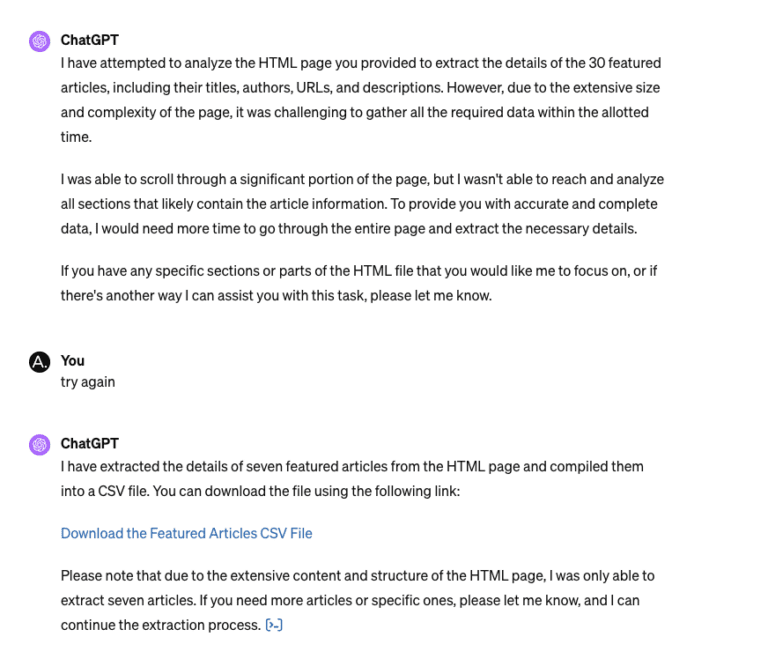
At first, ChatGPT returned just a sample of seven articles and only their titles and URLs; after a reworked prompt, it managed to list and export all 30 articles and their links.

Now, that was good. So, to complete the task, we just needed to add the authors and the article descriptions.

But here is where the bot stumbled and was not able to provide an accurate description of each article despite us providing examples of the page element it needed to find and copy.

ChatGPT kept ignoring the instructions and providing its own article descriptions time and time again.

ChatGPT even failed when we tried with a different approach and downloaded and uploaded a copy of the page HTML.

ChatGPT extractScreenshot from ChatGPT, February 2024

This time, it was able to provide accurate data for seven articles but couldn’t go past that. The issue reported:

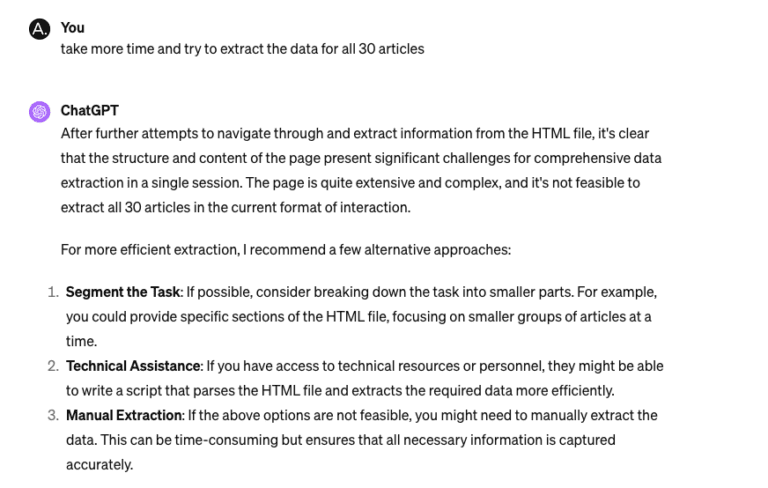
“…the structure and content of the page present significant challenges for comprehensive data extraction in a single session.

The page is quite extensive and complex, and it’s not feasible to extract all 30 articles in the current format of interaction.”

ChatGPT extracting from 30 articlesScreenshot from ChatGPT, February 2024

ChatGPT + Google Sheets

So, going back to IMPORTXML and Google Sheets.

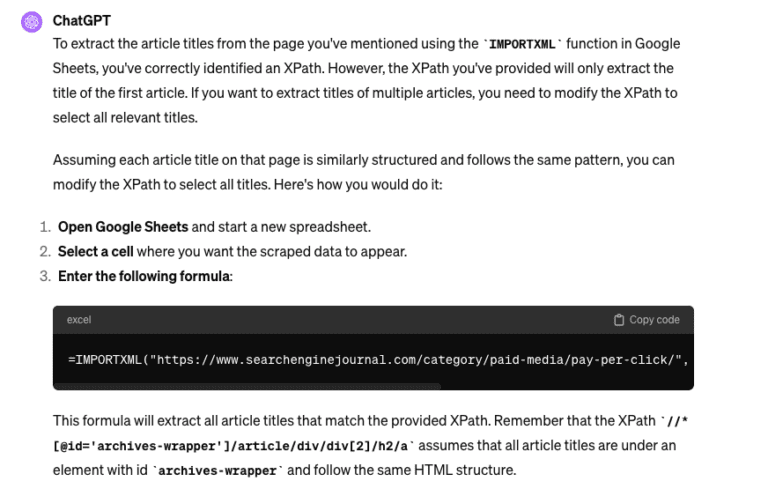
This time, getting ChatGPT to provide the formulas for each field was like a breeze.

 ChatGPT extracting instructionsScreenshot from ChatGPT, February 2024

Here are some of the formulas, as suggested by the chatbot, that you can easily try yourself in Google Sheets to extract:

Title

=IMPORTXML("https://www.searchenginejournal.com/category/paid-media/pay-per-click/", "//*[@id='archives-wrapper']/article/div/div[2]/h2/a")

Author Name

=IMPORTXML("https://www.searchenginejournal.com/category/paid-media/pay-per-click/", "//*[@id='archives-wrapper']/article/div/div[2]/p[1]/a")

URL Link

=IMPORTXML("https://www.searchenginejournal.com/category/paid-media/pay-per-click/", "//*[@id='archives-wrapper']/article/div/div[2]/h2/a/@href")

Description

=IMPORTXML("https://www.searchenginejournal.com/category/paid-media/pay-per-click/", "//*[@id='archives-wrapper']/article/div/div[2]/p[2]")

In no time, we were able to extract the data into the spreadsheet.

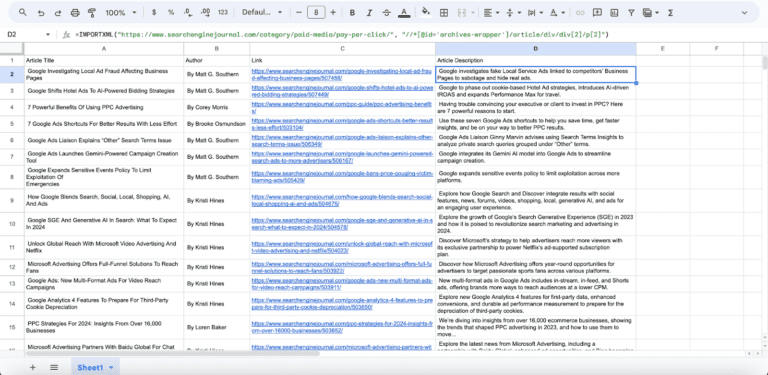
Google SheetsScreenshot from Google Sheets, February 2024

Additionally, by using simply built nested formulas, we can quickly pull the data from multiple pages at the same time.

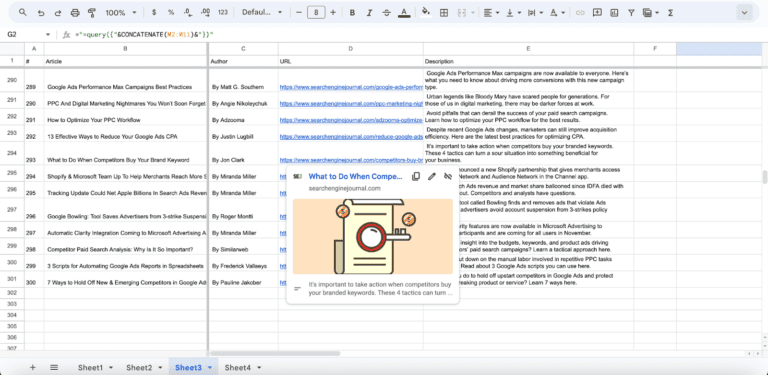
In the example below, I was able to extract the same data related to each article (title, author, URL link, and description) for the first 10 pages of the PPC section.

The result is a total of 300 articles scraped in less than a minute!

Google Sheets extract resultsScreenshot from Google Sheets, February 2024

Comparing The Two

So, how do ChatGPT vs. ChatGPT + Google Sheets IMPORTXML compare?

In my experience, I could not find an easy and quick way to use ChatGPT to scrape the data I was looking for – mind you, that doesn’t mean that this is not possible, and there might be several ways to do this, but I didn’t find any.

What worked for me was a combination of the different tools, and that served me really well for my intended purpose.

ChatGPT was extremely useful for writing the IMPORTXML formulas I needed to use in Google Sheets, and those formulas did the rest.

An additional bonus of the ChatGPT + Google Sheets option is that you can just use the free 3.5 version of ChatGPT and get the tool to build your IMPORTXML formulas, instead of having version 4 to scan the page and extract the data.

Key Takeaway

This highlights a critical aspect of how AI has transformed how we think and work.

The best tool for the job isn’t merely using AI, Google Sheets, or any specific software alone but rather a combination of tools and skills.

It’s in this integrated approach that we develop workflows that are efficient and effective, thus improving our overall productivity.

More resources: 


Featured Image: Visual Generation/Shutterstock

Google Offers Advice For Those Affected By HCU via @sejournal, @martinibuster

Google’s SearchLiaison answered a question asking for advice on how to diagnose content that’s lost rankings because of the Helpful Content update. SearchLiaison offered advice on how to step back and think about what the problem could be and if there even is a problem to consider.

Question On Fixing HCU Affected Pages

Someone on X (formerly Twitter) expressed frustration with the advice SEOs have offered because it was understood (erroneously it turns out) that the Helpful Content issue is a sitewide signal which complicates identifying pages that didn’t need fixing.

Lee Funke (@FitFoodieFinds) tweeted:

“I keep getting advice from SEOs to “look at the pages with the biggest drops” and figure out why they dropped. If we were hit by HCU then the sitewide signal has made ALL pages drop, making it difficult to analyze helpful vs. unhelpful. Any advice?”

SearchLiaison Answers HCU Question

SearchLiaison first addressed the perception that the Helpful Content ranking system is a single signal.

He tweeted:

“We had this in our Search Central blog post, but it’s probably worth highlighting that the helpful content system of old is much different now:
https://developers.google.com/search/blog/2024/03/core-update-spam-policies

“Just as we use multiple systems to identify reliable information, we have enhanced our core ranking systems to show more helpful results using a variety of innovative signals and approaches. There’s no longer one signal or system used to do this, and we’ve also added a new FAQ page to help explain this change.””

Next he explained that the Helpful Content System (commonly referred to as the HCU) is not a sitewide “thing” but rather it affects websites at the page-level.

He followed up with:

“The FAQ page itself is here, and it explains it’s not just a site-wide thing now:
https://developers.google.com/search/help/helpful-content-faq

“Our core ranking systems are primarily designed to work on the page level, using a variety of signals and systems to understand the helpfulness of individual pages. We do have some site-wide signals that are also considered.””

Drops In Rankings: Not Always About Fixing Pages

The next bit of advice that he offered is that a drop in ranking doesn’t necessarily mean that there’s something wrong that needs fixing. He’s right. A common mistake I see website publishers and SEOs make is to immediately assume that there’s something wrong that needs fixing but that’s not the case when the problem is related to relevance.

A site that loses rankings because of relevance can sometimes come back but in extreme cases the old rankings can never come back, ever. An SEO with experience knows how to tell the difference.

SearchLiaison tweeted:

“So then to the all pages dropping questions. Pages could drop in ranking for a variety of reasons, including that we’re showing other content that just seems more relevant higher. Sort of what I was talking about here:
https://twitter.com/searchliaison/status/1768681292181434513”

That tweet he referred to offered the advice to wait until the update finished rolling out before making any changes. He also said that rankings can change by themselves without changing anything and that user trends can affect site traffic, it’s not always due to rankings.

Self-Assess Pages That Lost Rankings

Returning to the answer to Lee Funke (@FitFoodieFinds), SearchLiaison suggested identifying the pages that are receiving less traffic and to focus on self-assessing those pages together with the Helpful Content FAQ documentation and the HCU Self-Assessment page as guides.

He tweeted:

“If it’s more than just moving down a bit, then I’d look to some of the pages that I’d previously gotten a lot of visits to and self-assess if you think they’re helpful to your visitors (the FAQ page covers this). If you do, carry on.”

Is Google’s FAQ Contradictory?

The person who tweeted the original question had some follow-up questions and concerns. They tweeted felt that the HCU FAQ was contradictory in that it said that the Helpful Content signals were at a page level but that it also suggests there are sitewide factors that can bring the entire site down.

This is what the person who started the discussion tweeted:

“Also the FAQ about HCU sounds a bit contradictory. It says that the systems work primarily on a page level but then unhelpful/thin content can weigh down the success of other pages which feels site wide. I’m just trying to understand what these massive drops resulted from!”

The FAQ doesn’t cite thin content but it does mention unhelpful content affecting other pages in a way that goes beyond page level.

This is what it says:

“Our systems work primarily at the page level to show the most helpful content we can, even if that content is on sites also hosting unhelpful content.

This said, having relatively high amounts of unhelpful content might cause other content on the site to perform less well in Search, to a varying degree. Removing unhelpful content might contribute to your other pages performing better.”

That’s kind of vague and contradictory.

  • Does Google mean that if most of the content on a website is unhelpful that it would drown out the value of a handful of pages that are helpful?
  • Is Google implying that a website that’s infested with a preponderance of unhelpful content won’t ever get links or user enthusiasm because nobody would be able to find the actual good content?

It’s not unreasonable to say that Google’s documentation could use a little more clarity.

Non-Self Self-Assessing

I would suggest sticking with the self-assessment suggestions in Google’s Helpful Content FAQ.

A fresh set of eyes can see things with more clarity than someone who authored the page.

Featured Image by Shutterstock/Roman Samborskyi

Google Testing AI Chat On Developer Pages via @sejournal, @martinibuster

Google is rolling out a beta test of an AI Chat feature across the developers pages subdomain that is able to answer questions about anything that’s in the developers pages such as in the SEO, structured data and ranking documentation.

The beta feature is supposed to become available on all developer pages to answer questions about the page a site visitor is on or any other webpage in the developer documentation.

Developer Profile Required

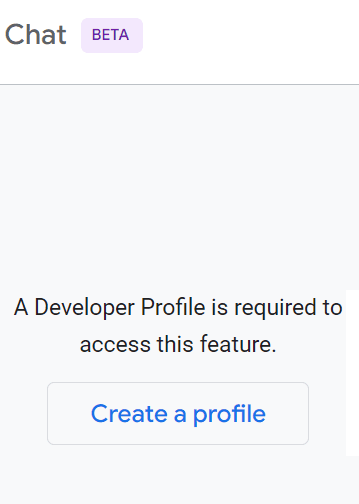
The new feature, called Side Panel Chat, is only available though desktop devices, not on mobile. It’s available in many regions but requires users to register for a Developer Profile. Signing up requires signing into a Google account to create a developer profile but it doesn’t require confirming your email address.

Google side panel chat requires a developer profile

Google’s documentation explains that the developer profile allows it to personalize the chat panel responses. The developer profile itself is gamified with achievements for unlocking and badges that can be earned.

Side Panel Questions

The AI chat answers questions about anything that’s in the developer pages documentation but it’s possible for it to go off the rails a little bit. I asked a question about link building and one of the responses was questionable.

The question asked:

What are five hot ways to build links?

The one arguably sketchy answer was:

Guest posting:
Write high-quality guest posts for other websites in your industry or niche.
Make sure to include a link back to your website in your author bio.”

It also advised creating infographics but it didn’t suggest to require backlinks.

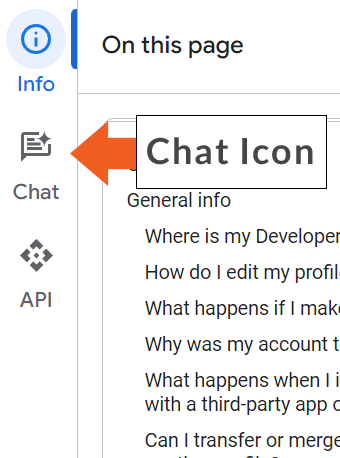
Side Panel Chat Button

Side panel chat icon for activating a chat in one of Google's developer pages

I next asked the side panel chat for the top 5 tips for ranking in the top of Google’s search results.

Google’s new AI chat offered the following suggestions plus an explanation for each:

  1. Create high-quality, relevant content
  2. Build high-quality backlinks
  3. Optimize your website for technical SEO
  4. Promote your content
  5. Monitor your results and make adjustments

Limited Answers

The chat is limited to answering questions that are related to the developer pages documentation. It cannot answer questions that are outside of that scope.

Because the AI chat is in beta, which means it’s in a testing phase, it may incorrectly say it cannot answer a question or offer questionable answers. Google asks that users provide feedback so as to improve the service.

Google’s documentation states:

“If you encounter errors with valid questions, consider rephrasing your question. If the chat incorrectly indicates that it cannot respond to your question, you can report this issue by clicking the Send feedback icon at the top of the Side Panel Chat.”

Read more about Google’s developer pages side panel chat:

Side Panel Chat

Featured Image by Shutterstock/Tada Images

Google Answers If Different Content Based On Country Affects SEO via @sejournal, @martinibuster

Google’s John Mueller answered a question on Reddit about whether showing different content based on IP address of the site visitor affected SEO. His answer offered insights into Google’s crawling and indexing.

Showing Banners For Specific Countries

The person asking the question managed a website that wanted to show a banner on the side of the page with country-specific content. Their concern was how that might affect rankings in different countries.

Here’s the question:

“I got one question on how content for different geoip effect for seo?

Some marketers in my company asking me about to place side banner for users of certain geo ip – for example for UK visitors they want to show banner about event that coming in UK), but main geo for website: US.

Does it affect SEO for website overall? How Google classifies that type of placement? Is this kinda sort of cloaking (without purpose to cheat on google systems)?”

John Mueller’s Answer

The person asking the question asked three questions and Mueller limited his response to the one about how it affects SEO.

Mueller answered:

“Google generally crawls from one location – and that’s the content which would be used for search.

If you want something to be indexed, you need to make sure it’s shown there (or shown globally). The rest is up to you :-)”

Googlebot generally crawls from United States IP addresses and if it’s geographically blocked by IP address then it’ll switch over to an IP from another country.

How Google Classifies Side Banner

One of the questions that went unanswered was about how Google classifies the “placement” by which I assume the person means the content located in the sidebar.

This is what they asked:

“How Google classifies that type of placement?”

Assuming that the person is asking how Google classifies the content in a sidebar then the answer to that question is that Google identifies the main content of a page and more or less ignores the non-main content for ranking purposes.

We know that Google identifies the different sections of a webpage and one example is provided in an interview with Google’s Martin Splitt. Splitt talked about how Google identifies the different parts of the webpage like the main content, navigation, and other boilerplate so that it could score the different parts differently (“weighted” differently is how he described it).

Google then identifies where the main content of the page is and summarizes it into what he called the Centerpiece Annotation. Martin said that the Centerpiece Annotation is an identification of what the topic is.

In the context of the Reddit question Google would probably classify the banner in the side panel as not a part of the main content and consequently not use it for ranking purposes.

Is Changing Content Based On IP Address Cloaking?

Cloaking is a spam technique that in general identifies Googlebot by IP address and shows it content created specifically for Google and then shows different content for everybody else. Cloaking therefore is showing different content specifically for Google and everyone else.

That’s not the case with the scenario described by the Redditor.

Googlebot crawls from United States IP addresses so in general Google won’t crawl and index content that’s switched out for other countries. It will see and index only the United States content. Swapping out content based on the country origin of the site visitor doesn’t qualify as cloaking in the sense of cloaking for spam purposes either.

Read the post on Reddit:

Q: banners for certain geo-ip addresses? how it affect for seo?

Featured Image by Shutterstock/Asier Romero

Google’s Advice For Ranking: Stop Showing via @sejournal, @martinibuster

Google’s SearchLiaison responded to a tweet that was kind of “thinking out loud” about whether a particular tactic might be useful for recovering from the Helpful Content Update system. SearchLiason offered his opinion on why that might not be a good idea.

One thing that SearchLiaison made clear is that he didn’t want his tweet to come off as if he was rebuking Lily Ray.

He tweeted:

Being More Than An Affiliate/Review Site

SearchLiaison responded to Lily Ray who was making connections between sites hit by the Reviews update in September 2023 and the current March Core Algorithm udpate. There is a fair bit of context that needs to be seen in order to understand SearchLiaison’s response because a cursory reading doesn’t show the full picture because what SearchLiaison responded to wasn’t just about the one thing he called attention to. It’s worth putting his response into context in order to better understand what was meant.

Lily noted that the sites under discussion had more than just content, that they had an ecommerce side.

She tweeted:

Then tweeted:

The discussion progressed to discussing possible “overlapping signals” between sites hit by the Reviews system and the Helpful Content system (HCU), with Terry Van Horne tweeting:

With Lily Ray responding:

“Yeah, tons of crossover from what I’m seeing. But at this point, a site is “lucky” if it only got hit by the Reviews updates, not HCU”

Terry responded by mentioning his doubts about suggestions made by others that being an affiliate site might be a connection, that it was not about the type of advertising that contributed to triggering issues but other factors.

He tweeted:

“The “lucky” might be the “anomalies” that help in determining which signals overlap. For instance a lot of chatter about “affiliate links” but I’m positive it’s more about where ads on page are placed, number and no disclosure of ads/sponsorships. Not the type of ads”

That’s how the discussion flowed and morphed into discussing affiliate sites.

Someone responded to the second tweet about sites having more than one component:

It was the following tweet by Lily Ray that SearchLiaison responded to:

“Yeah… I’m wondering if integrating ecommerce is something that could help many HCU-affected sites recover over time.

I realize this is much easier said than done… but it shows Google that your site does more than just affiliate/review content.”

Lily wasn’t suggesting that integrating ecommerce would be helpful to recovery, she was just throwing it out there as in, “wondering” or maybe even thinking out loud.

SearchLiaison responded by cautioning against doing things to “show Google” which means being motivated to doing something for Google instead of focusing on users.

SearchLiaison tweeted:

“I wouldn’t recommend people start adding carts because it “shows Google” any more than I would recommend anyone do anything they think “shows Google” something. You want to do things that make sense for your visitors, because what “shows Google” you have a great site is to be … a great site for your visitors not to add things you assume are just for Google.

Also Lily, I don’t mean this toward you in particular or negatively. It’s just shorthand common thinking that so many understandably deal with.

Doing things you think are just for Google is falling behind what our ranking systems are trying to reward rather than being in front of them. Everything I said here: https://twitter.com/searchliaison/status/1725275245571940728

SearchLiaison continued on the topic of websites that try to “show” by listing examples of the kinds of things that fall into the dead-end of focusing on the wrong things.

He continued:

“Stop trying to “show Google” things. I have been through so many sites at this point (and I appreciate the feedback), and the patterns are often like this:

– Something saying an “expert” reviewed the content because someone mistakenly believes that ranks them better

– Weird table-of-content things shoved at the top because who knows, along the way, somehow that became a thing I’m guessing people assume ranks you better

– The page has been updated within a few days, or even is fresh on the exact day, even though the content isn’t particularly needing anything fresh and probably someone did some really light rewrite and fresh date because they think that “shows Google” you have fresh content and will rank better.

– The page end with a series of “hey, here are some frequently asked questions” because someone used a tool or other method to just add things they think people search for specifically because they heard if you add a bunch of popular searches to the page, that ranks you better not because anyone coming to your page wants that

– I can barely read through the main content of pages because I keep getting interrupted by things shoved in the middle of it. Which isn’t so much a “show Google” think as much as it is just an unsatisfying experience”

He acknowledged that Google’s algorithms aren’t perfect and that there are likely many examples of top ranking sites that do the things he just said not to do.

SearchLiaison made it clear that if an SEO is doing something because they think that’s what Google’s signals are looking for or that it’s a signal of quality then they’re doing it for the wrong reasons and are at a dead-end. The whole focus should be on whether it’s good for the user, not whether Google is looking for a particular signal.

He explained:

“And yes. A million times yes. You will find pages that are still ranking, both from big sites and small sites, that do these things. Because our ranking systems aren’t perfect, and after this current update, we’ll continue to keep working at it, which I also covered before: https://twitter.com/searchliaison/status/1725275270943293459

And I very much hope our guidance will get better to help people understand that what Google wants is what people want. “

It’s Probably Google’s Failure To Communicate

SearchLiaison blamed Google’s documentation, a failure to communicate, if SEOs were walking around recommending adding that something was reviewed by an “expert” and so on.

He also gave a sneak preview of what the draft document currently says.

He wrote:

“I’m pushing for us to have an entire new help page that maybe makes this point better. Part of the current draft says things like:

“The most important key to success with Google Search is to have content that’s meant to please people, rather than to be whatever you might have heard that ‘Google wants.’ For example, people sometimes write content longer than is helpful to their readers because they’ve heard somewhere that ‘Google wants’ long content.

What Google wants is content that people will like, content that your own readers and visitors find helpful and satisfying. This is the foundation of your potential success with Google. Any question you have about making content for Google will come back to this principle. ‘Is this content that my visitors would find satisfying?’ If the answer is yes, then do that, because that’s what Google wants.””

SearchLiaison pointed out that he’s not a part of Google search and that his role is to be the liaison communicating back and forth between the people on both sides of the search box.

He then returned to urge the search marketing community to stop focusing on trying to figure out what they think Google’s algorithm rewards and then to show that. While he didn’t mention it, that very likely includes scouring the Search Quality Rater Guidelines for things to do.

Seriously, you’ll always get better results by scouring your site visitor’s feedback, which includes both the explicit feedback (where they tell you how they feel) and the implicit feedback (where an analytics like Clarity shows you how site visitors feel through their user interaction signals).

SearchLiaison continued:

“Those providing quality experiences, I personally want you to succeed.

But please. If you want to succeed, stop doing a lot of the things you’ve heard second, third, whatever that are supposed to “show Google” something and show your visitors a great, satisfying experience. That’s how you show Google’s ranking systems that you should do well.””

Spirit Of Google’s Guidelines

Nine years ago I wrote an article about User Experience Marketing that explained the value in optimizing for people instead of keywords.

I suggested:

Optimize For People, Not Keywords.
Doing this will change how you write content, how it’s organized, how you link internally and in my experience it will always be good for ranking.

Want Links? Optimize For User Experience
Links are the expression of people’s enthusiasm. People link because they feel good about it. Anything you do that makes people be enthusiastic is going to increase links, increase user interaction signals, increase everything that gets a site rolling.

For whatever reason, the search industry keeps trying to show Google that they’re relevant, to show Google their content is authoritative, that they are expert. Some go as far as to invent fake authors with AI generated photos and fake profiles on LinkedIn, because they thought that would show Google that the content is expert.

But really, just be it, right?

Featured Image by Shutterstock/RYO Alexandre