Google’s Structured Data Update May Boost Merchant Sales via @sejournal, @martinibuster

Google updated their structured data guidelines to reflect support for a sitewide return policy within the Organization structured data. This eliminates the need to add redundant return policy information for every product listing structured data and can result in more traffic and sales to online merchants.

This doesn’t mean that merchants are required to change their current structured data, the old method remains unchanged. This simply adds an alternative way that is more streamlined and reduces the size of product structured data.

Improvement To Brand Knowledge Panel

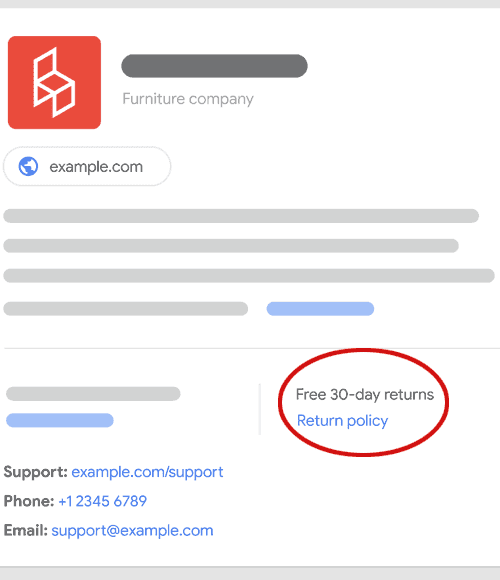
Google’s change to the organization structured data will be reflected in the brand panel that Google shows when someone searches on a brand name. The updated brand panel will feature a new entry that reflects the company’s return policy.

Screenshot Of Brand Knowledge Panel Example

Benefits Of Organization-Level Return Policy

As part of this change Google is adding search features in Knowledge Panels and in Brand Panels that can show a merchant’s return policies. This means that a merchant’s search feature will be eligible to show a returns policy which in turn can encourage a higher clickthrough rate from the search engine results pages (SERPs) and a higher conversion rate.

Research conducted by the International Council of Shopping Centers (ICSC) in 2024 shows that online shoppers are strongly influenced by a merchant’s returns policy.

They discovered:

“82% of respondents said that when shopping online, return policies influence whether they decide to purchase from a retailer.

… If retailers charged a fee to ship back purchases made online, nearly three-fourths (71%) of respondents said they’d likely stop shopping online from that company altogether, while 6 in 10 said they’d likely stop shopping online with retailers that shortened the free return window.”

Clearly a return policy can be a way to generate more online sales and Google’s new support for a sitewide returns policy structured data helps to communicate that information to online shoppers directly from search.

Google’s announcement explained:

“A return policy is a major factor considered by shoppers when buying products online, and so last year we enabled the extraction of structured data return policies for individual products. Today we’re adding support for return policies at the organization level as well, which means you’ll be able to specify a general return policy for your business instead of having to define one for each individual product you sell.

Adding a return policy to your organization structured data is especially important if you don’t have a Merchant Center account and want the ability to provide a return policy for your business. Merchant Center already lets you provide a return policy for your business, so if you have a Merchant Center account we recommend defining your return policy there instead.

…If your site is an online or local business, we recommend using one of the OnlineStore, or LocalBusiness subtypes of Organization.

We hope this addition makes it easier for you to add return policies for your business, and enable them to be shown across Google shopping experiences.”

Google Updates Organization Structured Data Documentation

Google added a new section to their Organization structured data documentation to reflect support for this new way to show return policies in the search results.

The new documentation states:

“MerchantReturnPolicy
Use the following properties to describe general return policies for your entire Organization, if applicable to your business. If you have specific policies for individual products, use merchant listing markup instead.”

Read Google’s announcement:

Adding markup support for organization-level return policies

Read the new MerchantReturnPolicy documentation on Google’s official Organization structured data page:

Organization (Organization) structured data – MerchantReturnPolicy

6 Local SEO Full-Guides That Help You Rank For Your Business Type

The elusive five-star review used to be something you could only flaunt in a rotating reviews section on your website.

But today, Google has pulled these stars out of the shadows and features them front and center across branded SERPs and beyond.

Star ratings can help businesses earn trust from potential customers, improve local search rankings, and boost conversions.

This is your guide to how they work.

Stars And SERPs: What Is The Google Star Rating?

A Google star rating is a consumer-powered grading system that lets other consumers know how good a business is based on a score of one to five stars.

These star ratings can appear across maps and different Google search results properties like standard blue link search listings, ads, rich results like recipe cards, local pack results, third-party review sites, and on-app store results.

How Does The Google Star Rating Work?

When a person searches Google, they will see star ratings in the results. Google uses an algorithm and an average to determine how many stars are displayed on different review properties.

Google explains that the star score system operates based on an average of all review ratings for that business that have been published on Google.

It’s important to note that this average is not calculated in real-time and can take up to two weeks to update after a new review is created.

When users leave a review, they are asked to rate a business based on specific aspects of their customer experience, as well as the type of business being reviewed and the services they’ve included.

For example, “plumbers may get “Install faucet” or “Repair toilet” as services to add,” and Google also allows businesses to add custom services that aren’t listed.

When customers are prompted to give feedback, they can give positive or critical feedback, or they can choose not to select a specific aspect to review, in which case this feedback aspect is considered unavailable.

This combination of feedback is what Google uses to determine a business’s average score by “dividing the number of positive ratings by the total number of ratings (except the ones where the aspect was not rated).”

Google star ratings do have some exceptions in how they function.

For example, the UK and EU have certain restrictions that don’t apply to other regions, following recent scrutiny by the EU Consumer Protection Cooperation and the UK Competitions and Market Authority about fake reviews being generated.

Additionally, the type of rating search property will determine the specifics of how it operates and how to gather and manage reviews there.

Keep reading to get an in-depth explanation of each type of Google star rating available on the search engine results pages (SERPs).

How To Get Google Star Ratings On Different Search Properties

As mentioned above, there are different types of Google star ratings available across search results, including the standard blue-link listings, ads, local pack results, rich snippets, third-party reviews, and app store results.

Here’s what the different types of star-rating results look like in Google and how they work on each listing type.

Standard “Blue Link” Listings And Google Stars

In 2021, Google started testing star ratings in organic search and has since kept this SERP feature intact.

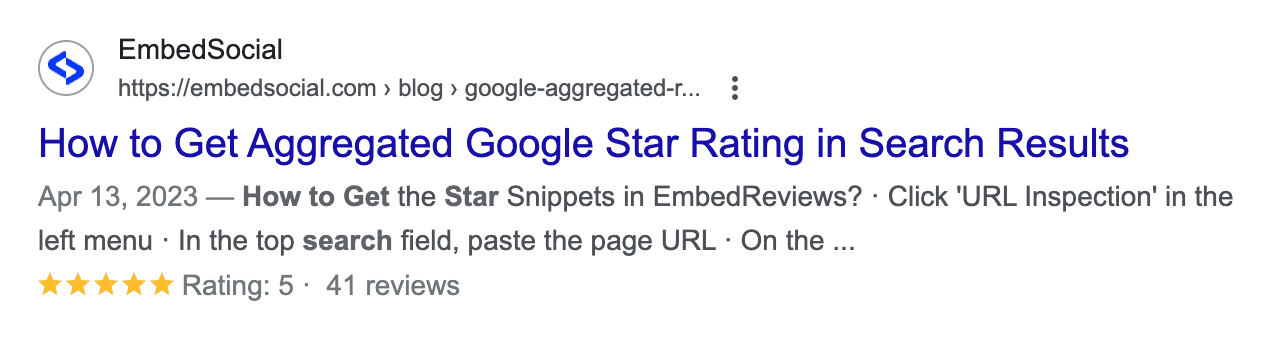
Websites can stand out from their competitors by getting stars to show up around their organic search results listing pages.

Text result showing google star ratings in the SERPsScreenshot from SERPs, Google, February 2024

How To Get Google Stars On Organic SERPs

If you want stars to show up on your organic search results, add schema markup to your website.

Learn how to do that in the video below:

As the video points out, you need actual reviews to get your structured data markup to show.

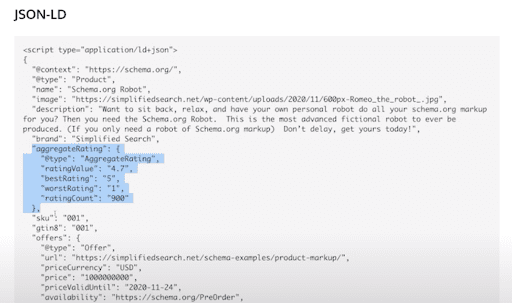
Then, you can work with your development team to input the code on your site that indicates your average rating, highest, lowest, and total rating count.

structured markup example for google star ratings and reviewsScreenshot JSON-LD script on Google Developers, August 2021

Once you add the rich snippet to your site, there is no clear timeline for when they will start appearing in the SERPs – that’s up to Google.

In fact, Google specifically mentions that reviews in properties like search can take longer to appear, and often, this delay is caused by business profiles being merged.

When you’re done, you can check your work with Google’s Structured Data Testing Tool.

Adding schema is strongly encouraged. But even without it, if you own a retail store with ratings, Google may still show your star ratings in the search engine results.

They do this to ensure searchers are getting access to a variety of results. Google says:

“content on your website that’s been crawled and is related to retail may also be shown in product listings and annotations for free across Google.”

If you want star ratings to show up on Shopping Ads, you’ll have to pay for that.

Paid Ads And Google Stars

When Google Stars appear in paid search ads, they’re known as seller ratings, “an automated extension type that showcases advertisers with high ratings.”

These can appear in text ads, shopping ads, and free listings. Both the star rating and the total number of votes or reviews are displayed.

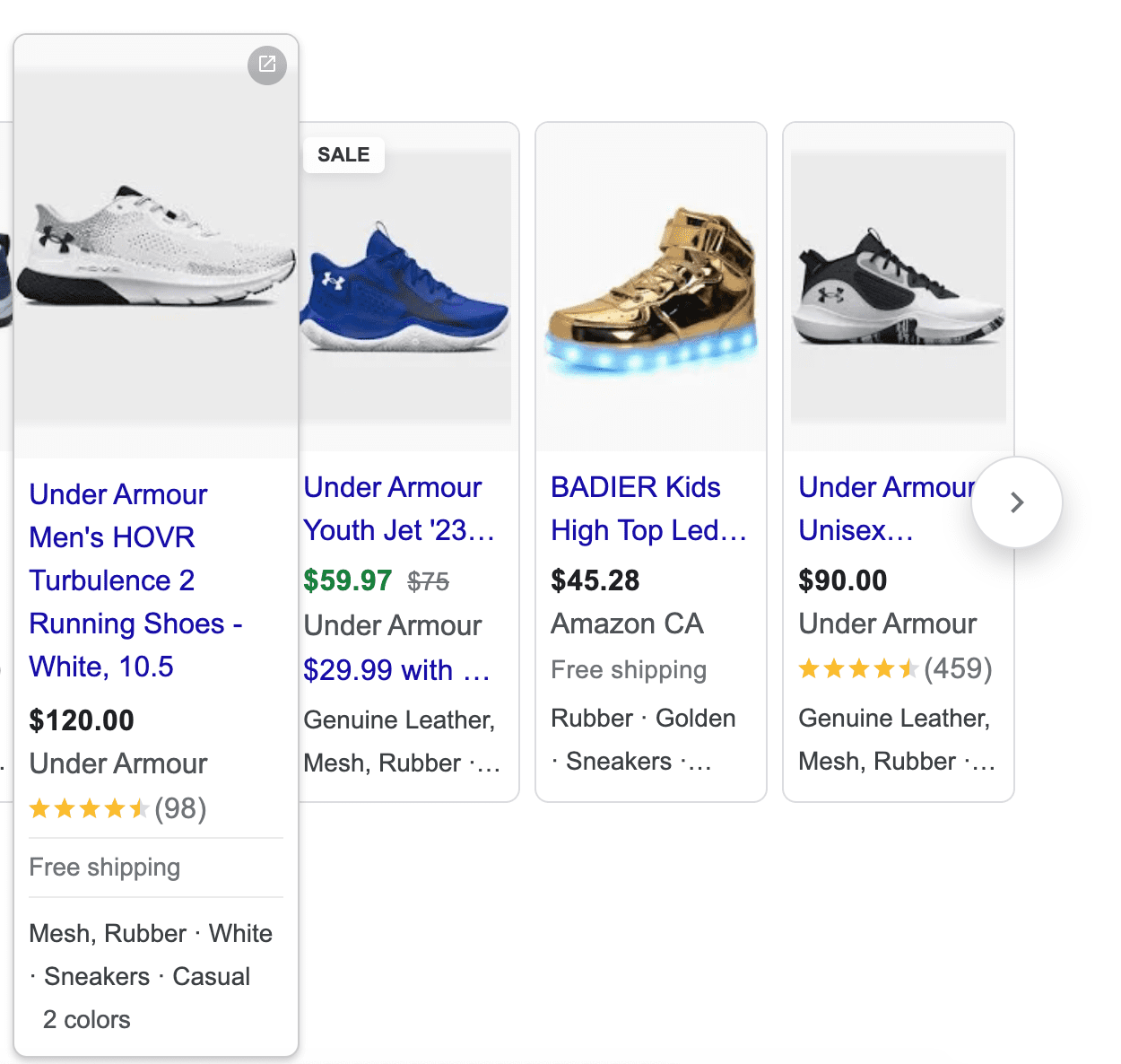
In addition to Google star ratings, shopping ads may include additional production information such as shipping details, color, material, and more, as shown below.

Google shopping ads showing star ratingsScreenshot from SERPs ads, Google, February 2024

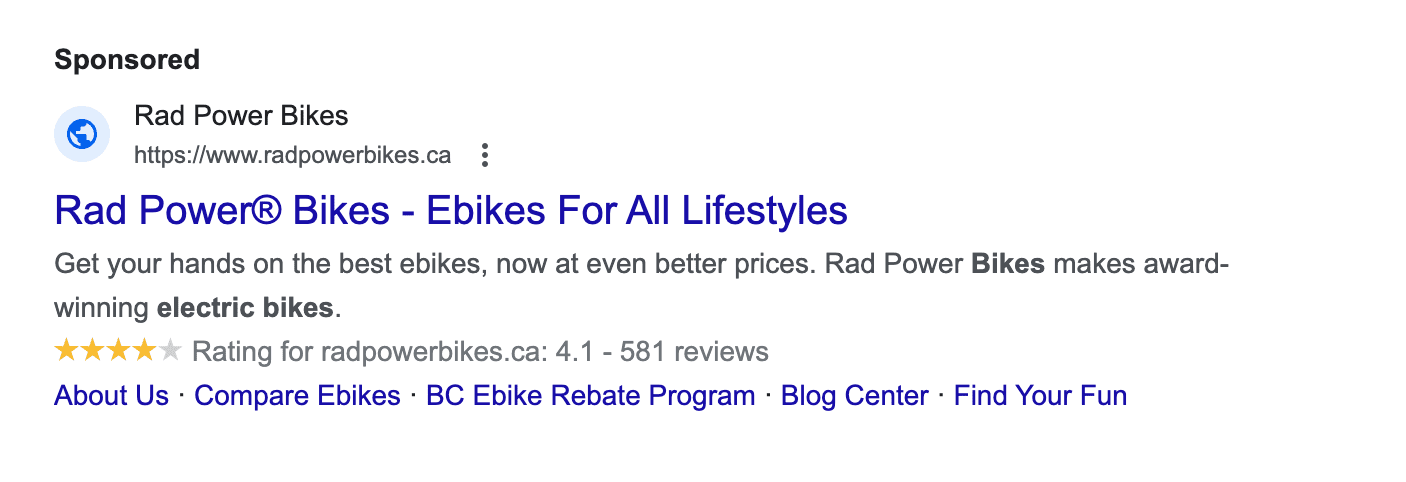
Paid text ads were previously labeled as “ads” and recently have been upgraded to a “sponsored” label, as shown below.

paid ad showing google star ratingsScreenshot from SERPs ads, Google, February 2024

How To Get Google Stars On Paid Ads

To participate in free listings, sellers have to do three things:

  • Follow all the required policies around personally identifiable information, spam, malware, legal requirements, return policies, and more.
  • Submit a feed through the Google Merchant Center or have structured data markup on their website (as described in the previous section).
  • Add their shipping settings.

Again, some ecommerce sellers who do not have schema markup may still have their content show up in the SERPs.

For text ads and shopping ads to show star ratings, sellers are typically required to have at least 100 reviews in the last 12 months.

Paid advertisers must also meet a minimum number of stars for seller ratings to appear on their text ads. This helps higher-quality advertisers stand out from the competition.

For example, text ads have to have a minimum rating of 3.5 for the Google star ratings to show.

Google treats reviews on a per-country basis, so the minimum review threshold of 100 also applies only to 1 region at a time.

For star ratings to appear on a Canadian ecommerce company’s ads, for example, they would have to have obtained a minimum of 100 reviews from within Canada in the last year.

Google considers reviews from its own Google Customer Reviews and also from approved third-party partner review sites from its list of 29 supported review partners, which makes it easier for sellers to meet the minimum review threshold each year.

Google also requests:

  • The domain that has ratings must be the same as the one that’s visible in the ad.
  • Google or its partners must conduct a research evaluation of your site.
  • The reviews included must be about the product or service being sold.

Local Pack Results And Google Stars

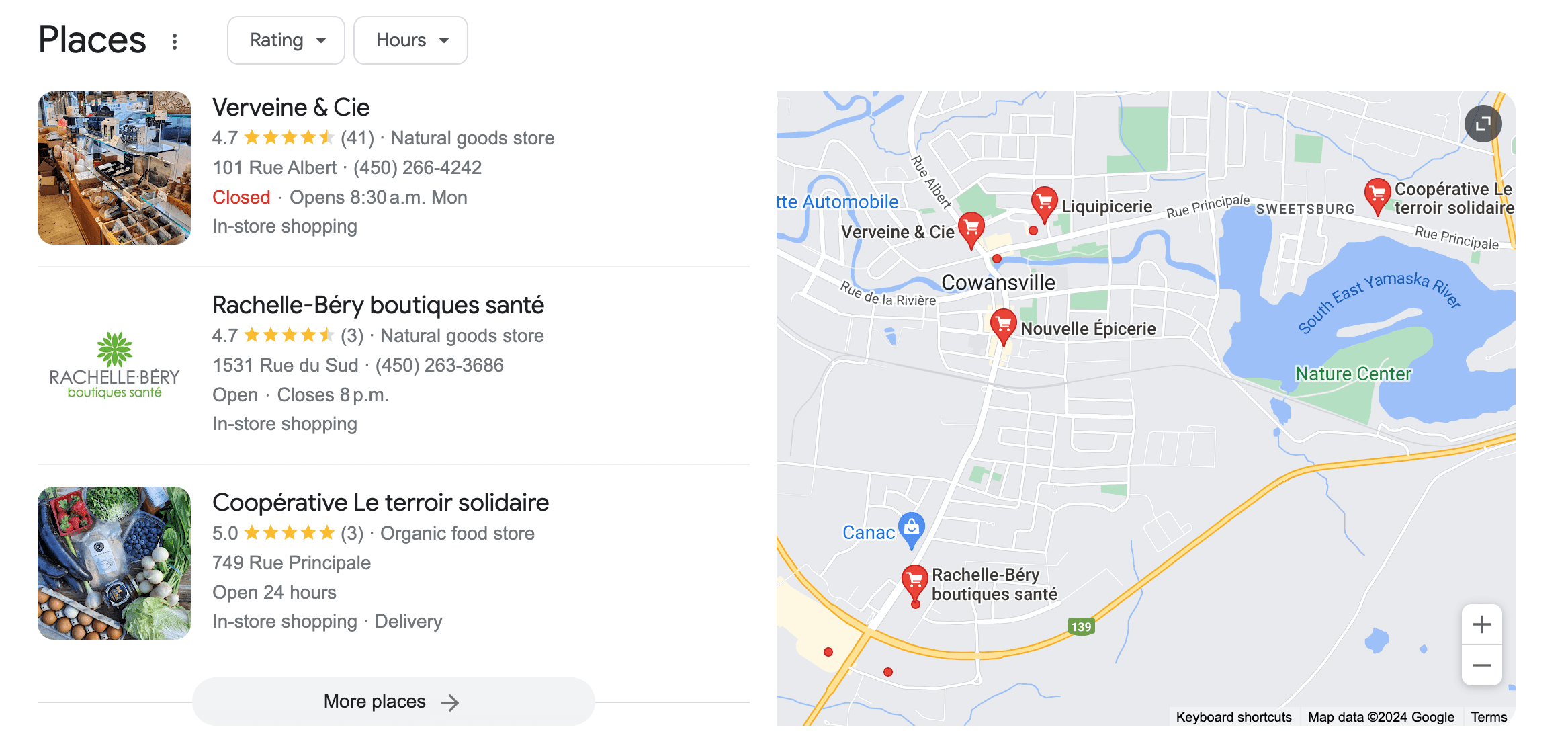
Local businesses have a handful of options for their business to appear on Google via Places, local map results, and a Google Business Profile page – all of which can show star ratings.

Consumers even have the option to sort local pack results by their rating, as shown in the image example below.

Google star ratings on search resultsScreenshot from SERPs local pack, Google, February 2024

How To Get Google Stars On Local Search Results

To appear in local search results, a Google Business Profile is required.

Customers may leave reviews directly on local business properties without being asked, but Google also encourages business owners to solicit reviews from their customers and shares best practices, including:

  • Asking your customers to leave you a review and make it easy for them to do so by providing a link to your review pages.
  • Making review prompts desktop and mobile-friendly.
  • Replying to customer reviews (ensure you’re a verified provider on Google first).
  • Be sure you do not offer incentives for reviews.

Customers can also leave star ratings on other local review sites, as Google can pull from both to display on local business search properties. It can take up to two weeks to get new local reviews to show in your overall score.

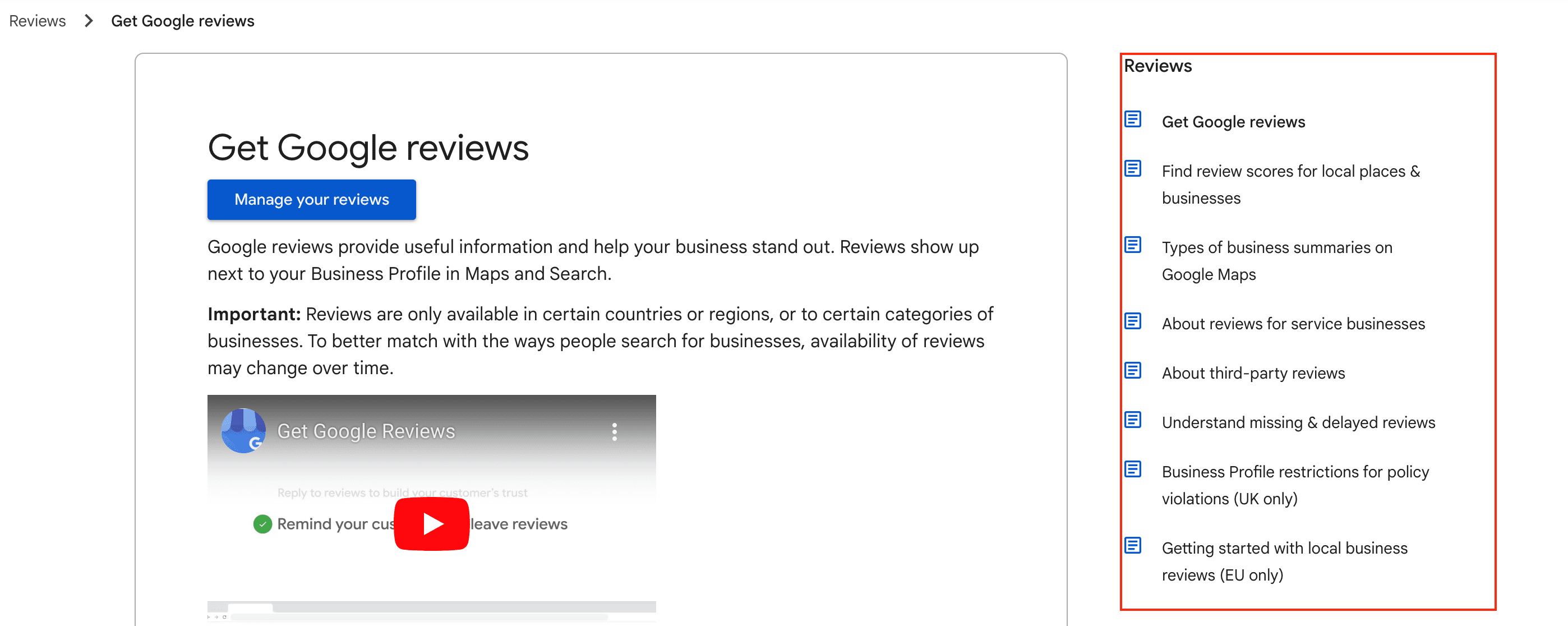
Once customers are actively leaving reviews, Google Business Profile owners have a number of options to help them manage these:

options to manage review on google business profileScreenshot from Google Business Profile Help, Google, February 2024

Rich Results, Like Recipes, And Google Stars

Everybody’s gotta eat, and we celebrate food in many ways — one of which is recipe blogs.

While restaurants rely more on local reviews, organic search results, and even paid ads, food bloggers seek to have their recipes rated.

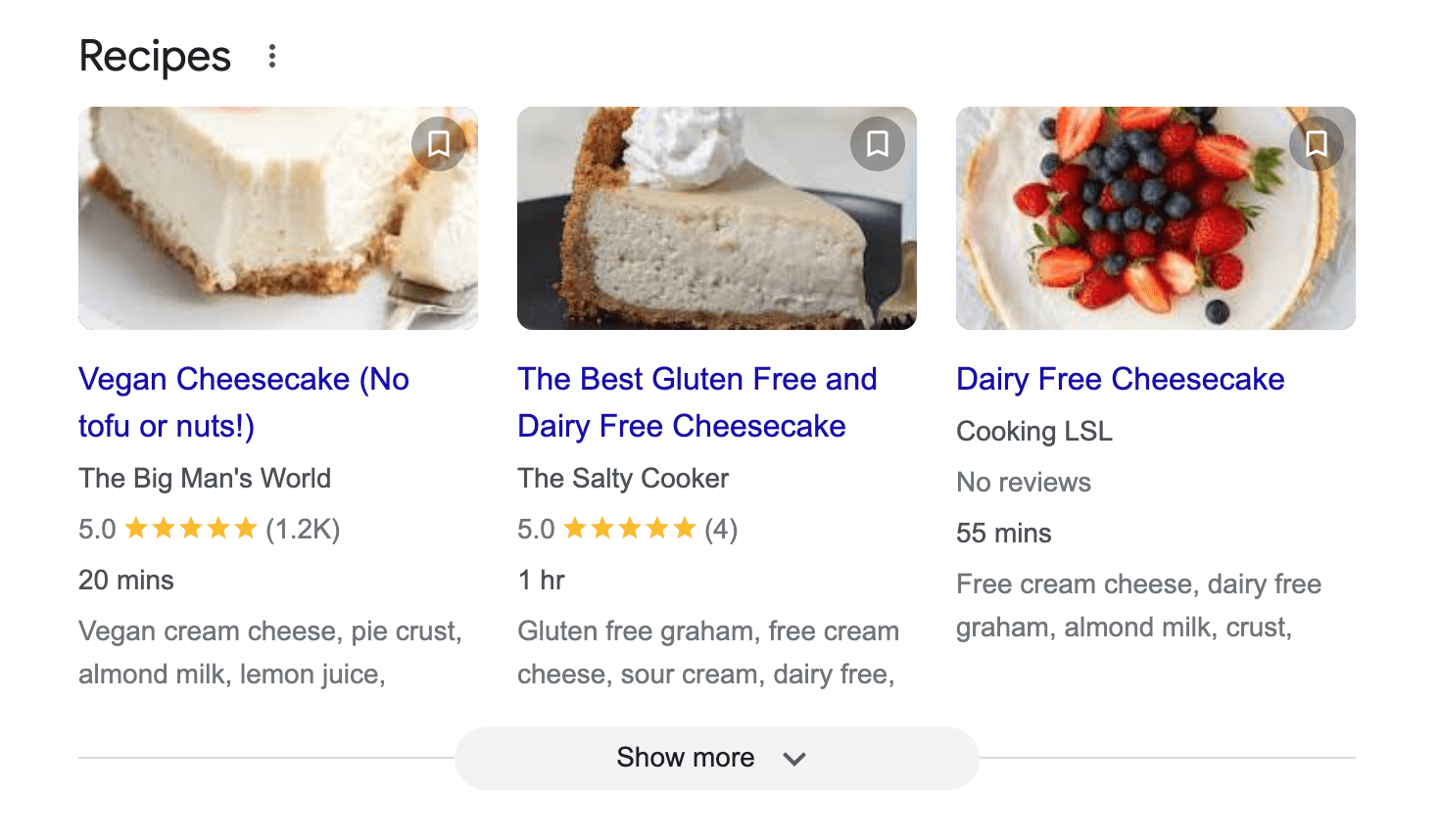
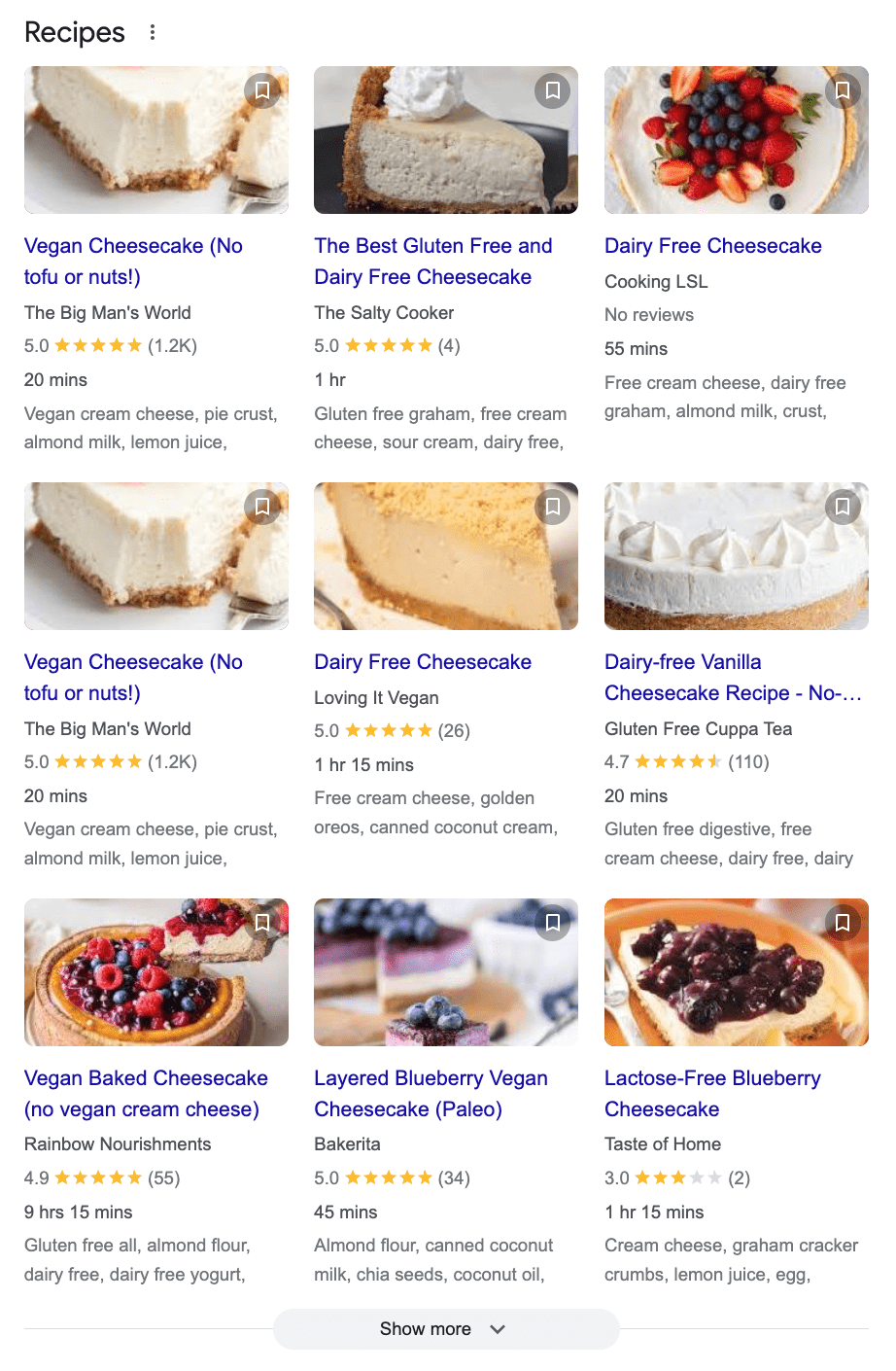
Similar to other types of reviews, recipe cards in search results show the average review rating and the total number of reviews.

recipe search results on desktopScreenshot from search for [best vegan winter recipes], Google, February 2024

The outcome has become a point of contention among the food blogging community, since only three recipes per search can be seen on Google desktop results (like shown in the image above), and four on a mobile browser.

These coveted spots will attract clicks, leaving anyone who hasn’t mastered online customer reviews in the dust. That means that the quality of the recipe isn’t necessarily driving these results.

Google gives users the option to click “Show more” to see two additional rows of results:

expanded desktop recipe search resultsScreenshot from SERPs, Google, February 2024

Searchers can continue to click the “Show more” button to see additional recipe results.

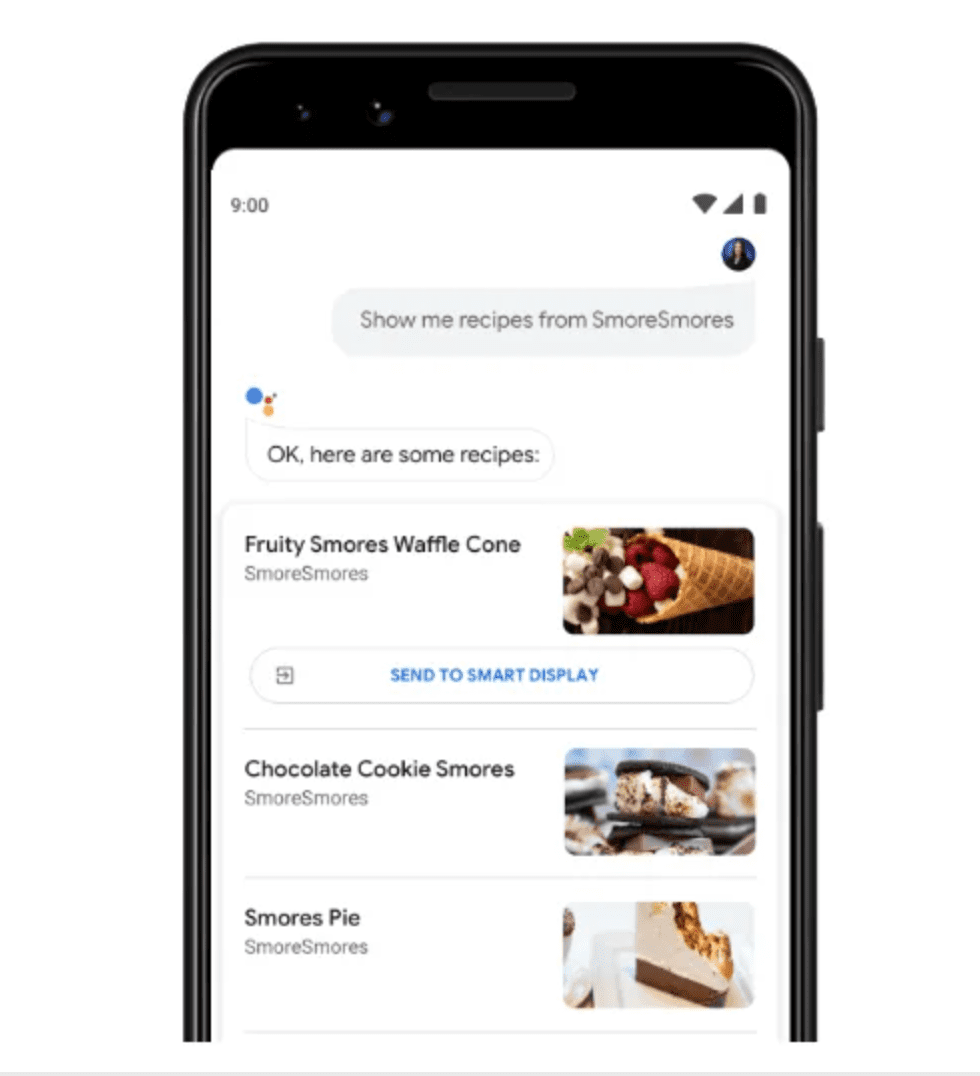
Anyone using Google Home can search for a recipe and get results through their phone:

Google assistant recipesScreenshot from Elfsight, February 2024

Similarly, recipe search results can be sent from the device to the Google Home assistant. Both methods will enable easy and interactive step-by-step recipe instructions using commands like “start recipe,” “next step,” or even “how much olive oil?”

How To Get Google Stars On Recipe Results

Similar to the steps to have stars appear on organic blue-link listings, food bloggers and recipe websites need to add schema to their websites in order for star ratings to show.

However, it’s not as straightforward as listing the average and the total number of ratings. Developers should follow Google’s instructions for recipe markup.

There is both required and recommended markup:

Required Markup For Recipes

  • Name of the recipe.
  • Image of the recipe in a BMP, GIF, JPEG, PNG, WebP, or SVG format.

Recommended Markup For Recipes

  • Aggregate rating.
  • Author.
  • Cook time, preparation time, and total duration.
  • Date published.
  • Description.
  • Keywords.
  • Nutrition information.
  • Prep time.
  • Recipe category by meal type, like “dinner.”
  • Region associated with the recipe.
  • Ingredients.
  • Instructions.
  • Yield or total serving.
  • Total time.
  • Video (and other related markup, if there is a video in the recipe).

To have recipes included in Google Assistant Guided Recipes, the following markup must be included:

  • recipeIngredient
  • recipeInstructions
  • To have the video property, add the contentUrl.

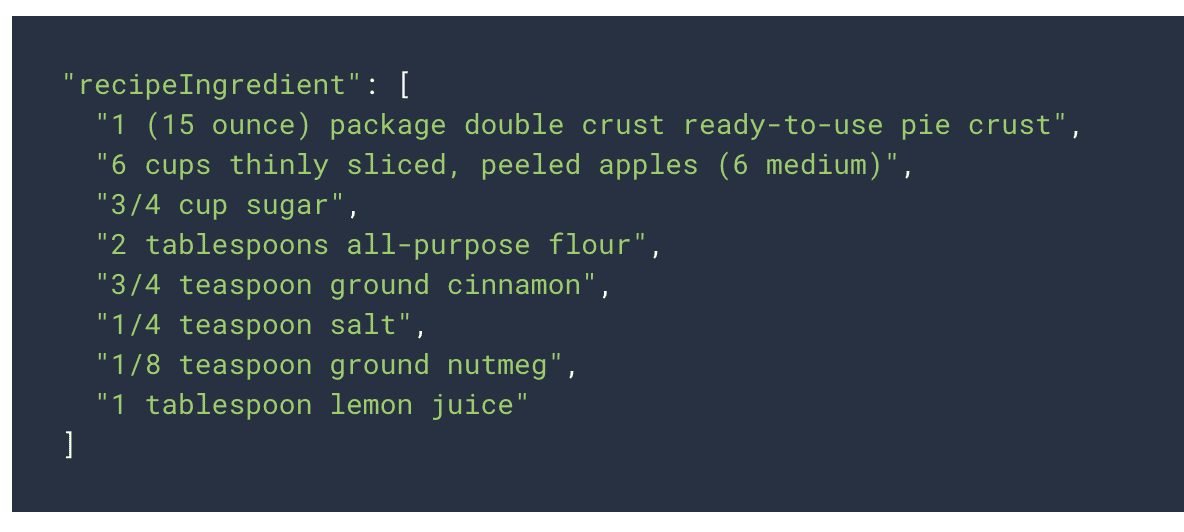
For example, here’s what the structured markup would look like for the recipeIngredient property:

example of structured markup for recipe steps in Google AssistantScreenshot from Google Developer, February 2024

Third-Party Review Sites And Google Stars

Many software companies rely on third-party review sites to help inform their customer’s purchasing decisions.

Third-party review sites include any website a brand doesn’t own where a customer can submit a review, such as Yelp, G2, and many more.

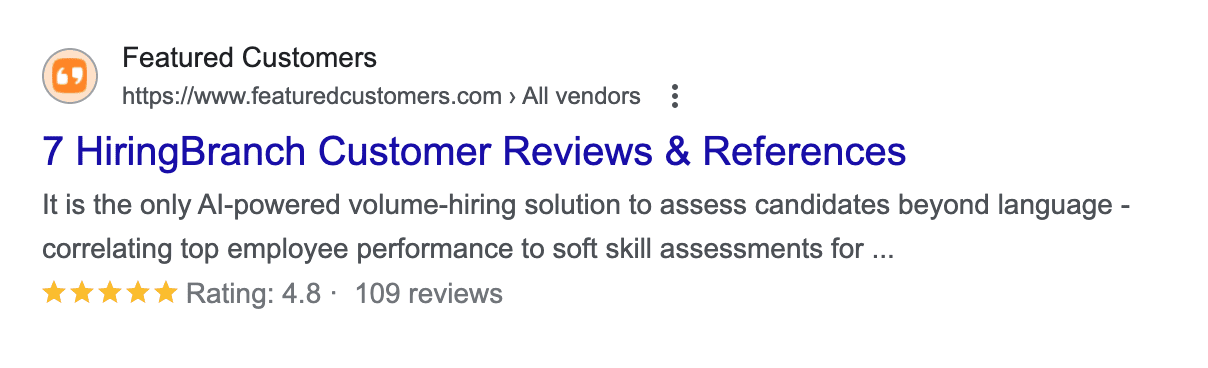
Many of these sites, like Featured Customers shown below, can display star ratings within Google search results.

Example of star ratings showing in SERPs from third-party review sitesScreenshot from SERPs listing of a review site, Google, February 2024

Rich snippets from third-party reviews, such as stars, summary info, or ratings, can also appear on a Google Business Profile or map view from approved sites.

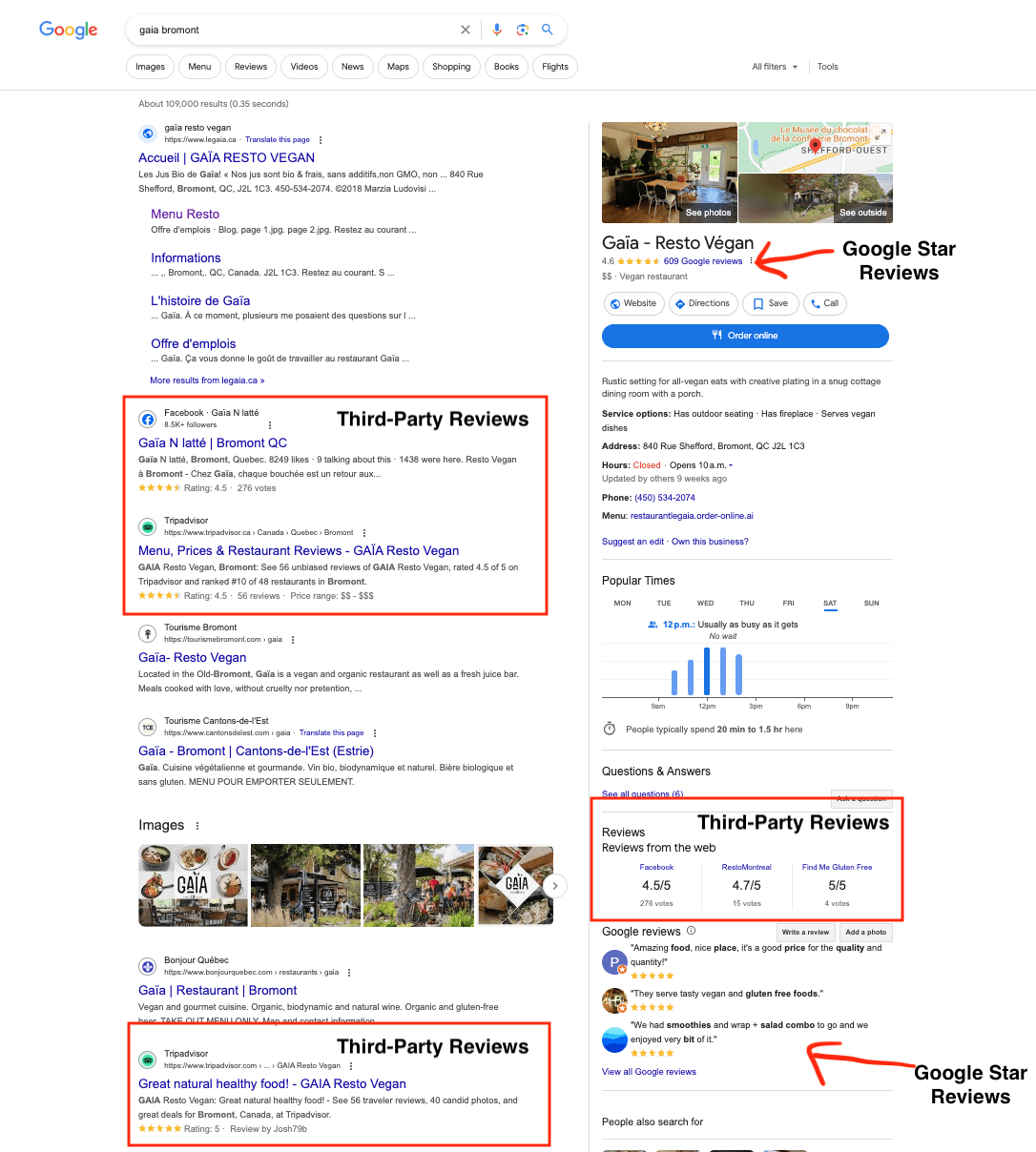
For local businesses, Google star ratings appear in different locations than the third-party reviews on a desktop:

third party reviews and google stars on desktop resultsScreenshot from SERPs listing of a review site, Google, February 2024

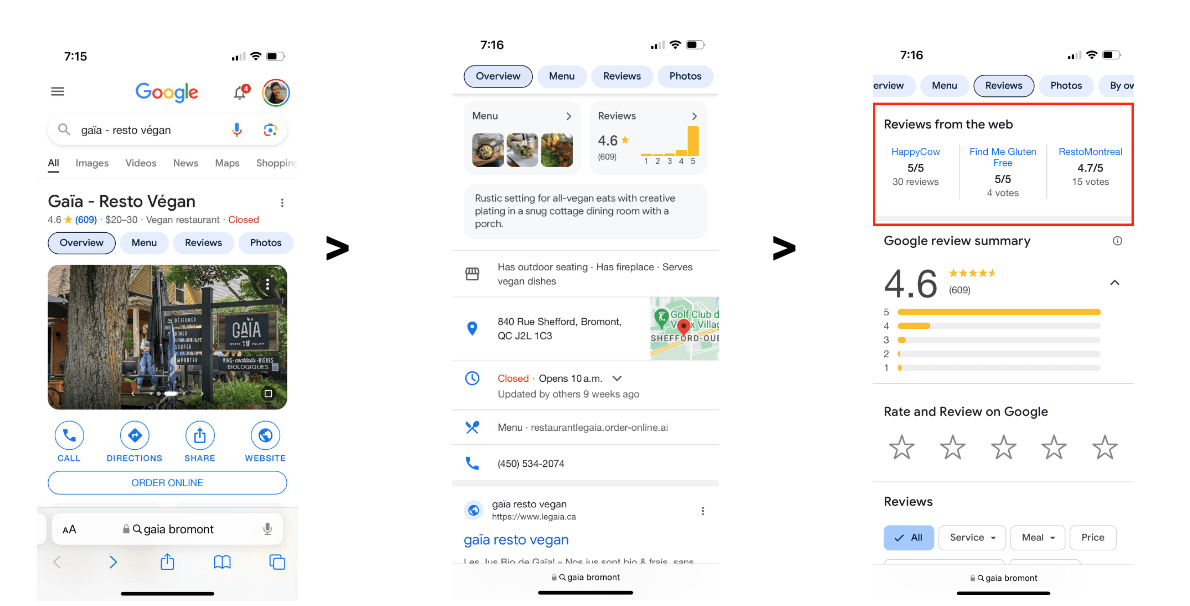
On mobile, ratings are displayed on a company’s Google Business Profile. Users need to click on Reviews or scroll down to see the third-party reviews:

third party reviews in local mobile resultsScreenshot from SERPs listing of a review site, Google, February 2024

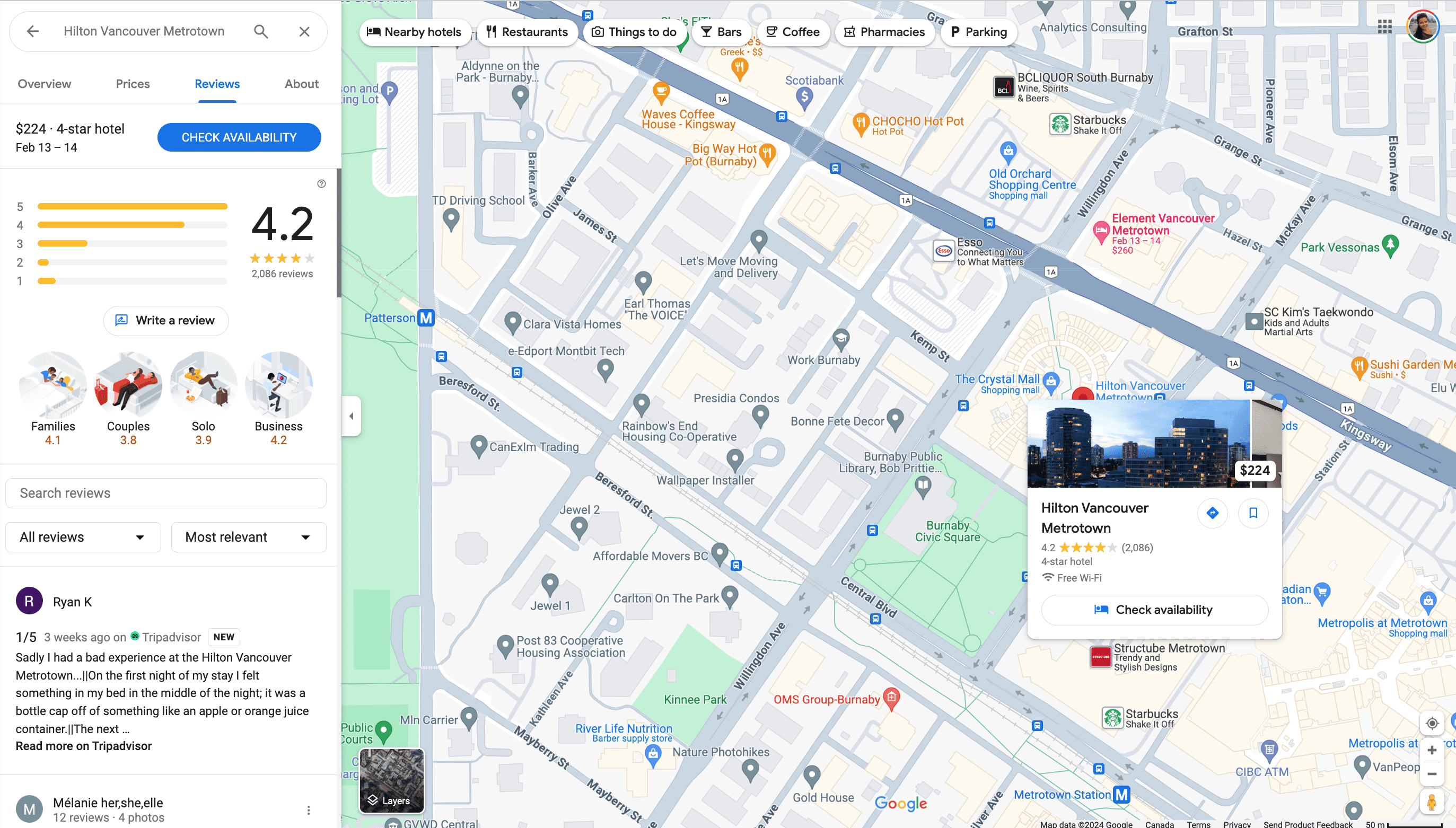
On a map, the results from third parties may be more prominent, like the Tripadvisor review that shows up for a map search of The Hilton in Vancouver (although it does not display a star rating even though Tripadvisor does provide star ratings):

third party reviews in map resultsScreenshot from SERPs listing of a review site, Google, February 2024

How To Get Google Stars On Third-Party Review Sites

The best way to get a review on a third-party review site depends on which site is best for the brand or the business.

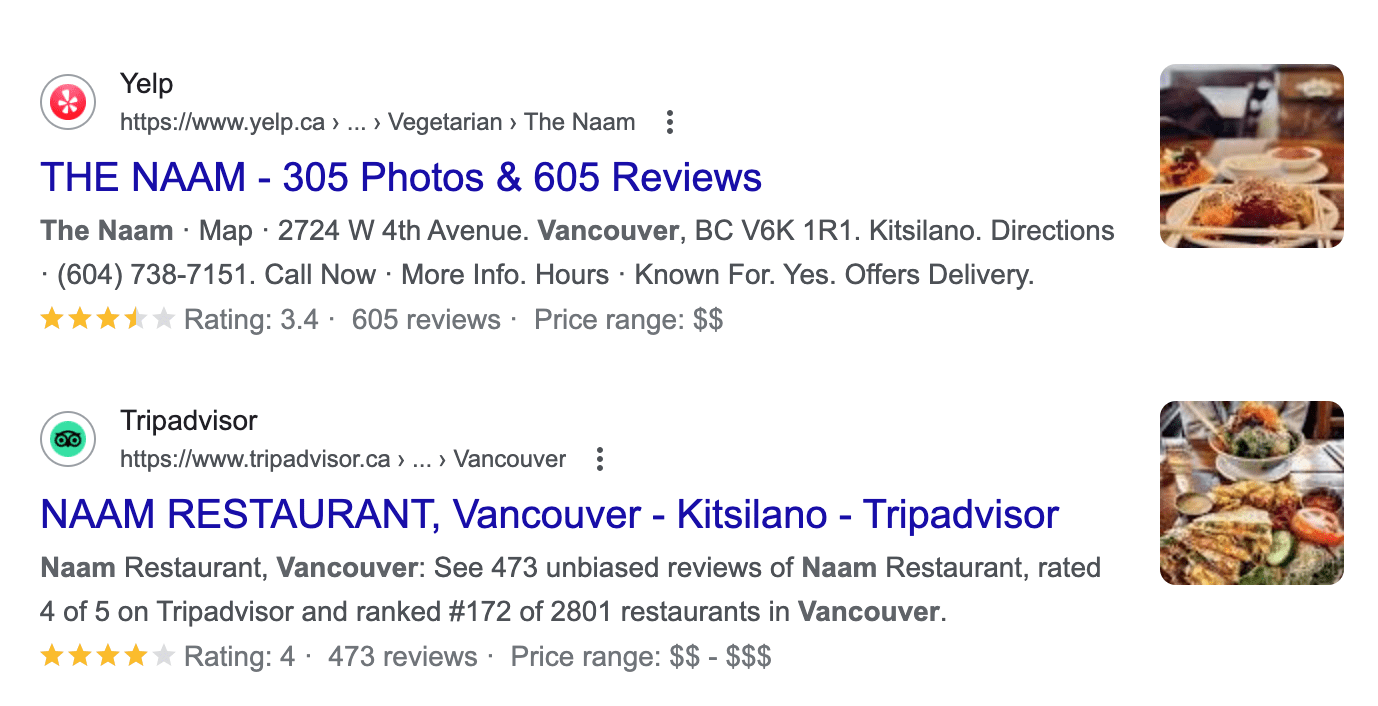
For example, if you have active customers on Yelp or Tripadvisor, you may choose to engage with customers there.

third-party reviews in search resultsScreenshot from SERPs listing of a review site, Google, February 2024

Similarly, if a software review site like Trustpilot shows up for your branded search, you could do an email campaign with your customer list asking them to leave you a review there.

Here are a few of the third-party review websites that Google recognizes:

  • Trustpilot.
  • Reevoo.
  • Bizrate – through Shopzilla.

When it comes to third-party reviews, Google reminds businesses that there is no way to opt out of third-party reviews, and they need to take up any issues with third-party site owners.

App Store Results And Google Stars

When businesses have an application as their core product, they typically rely on App Store and Google Play Store downloads.

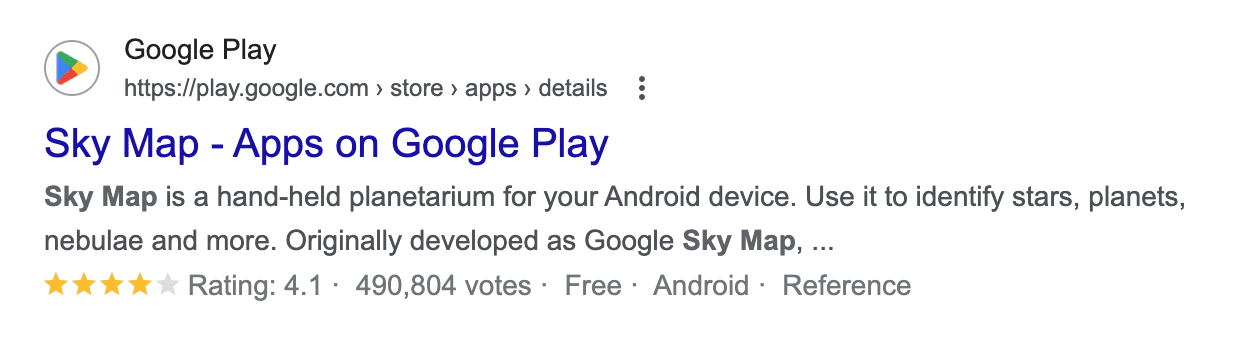
Right from the SERPs, searchers can see an app’s star ratings, as well as the total votes and other important information, like whether the app is free or not.

App store reviews in search resultsScreenshot from SERP play store results, Google, February 2024

How To Get Google Stars On App Store Results

Businesses can list their iOS apps in the App Store or on the Google Play store, prompt customers to leave reviews there, and also respond to them.

Does The Google Star Rating Influence SEO Rankings?

John Mueller confirmed that Google does not factor star ratings or customer reviews into web search rankings. However, Google is clear that star ratings influence local search results and rankings:

“Google review count and review score factor into local search ranking. More reviews and positive ratings can improve your business’ local ranking.”

Even though they are not a ranking factor for non-local organic search, star ratings can serve as an important conversion element, helping you display social proof, build credibility, and increase your click-through rate from search engines (which may indirectly impact your search rankings).

For local businesses, both Google stars and third-party ratings appear in desktop and mobile searches, as seen above.

These ratings not only help local businesses rank above their competitors for key phrases, but they will also help convince more customers to click, which is every company’s search game.

How Do I Improve My Star Rating?

Businesses that want to improve their Google star rating should start by claiming their Google Business Profile and making sure all the information is complete and up to date.

If a company has already taken these steps and wants to offset a poor rating, they are going to need more reviews to offset the average.

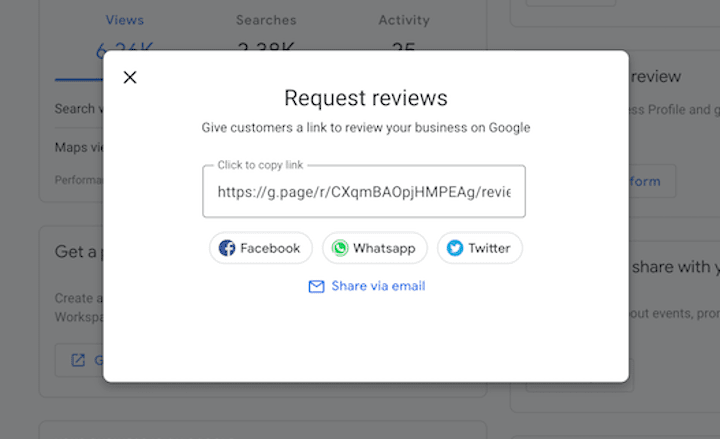
Companies can get more Google reviews by making it easy for customers to leave one. The first step for a company is to get the link to leave a review inside their Google Business Profile:

Ask customers for reviews linkScreenshot from Wordstream, February 2024

From there, companies can send this link out to customers directly (there are four options displayed right from the link as seen above), include it on social media, and even dedicate sections of their website to gathering more reviews and/or displaying reviews from other users.

It isn’t clear whether or not responding to reviews will help improve a local business’s ranking; however, it’s still a good idea for companies to respond to reviews on their Google Business Profile in order to improve their ratings overall.

That’s because responding to reviews can entice other customers to leave a review since they know they will get a response and because the owner is actually seeing the feedback.

For service businesses, Google provides the option for customers to rate aspects of the experience.

This is helpful since giving reviewers this option allows anyone who had a negative experience to rate just one aspect negatively rather than giving a one-star review overall.

Does Having A Star Rating On Google Matter? Yes! So Shoot For The Stars

Stars indicate quality to consumers, so they almost always improve click-through rates wherever they are present.

Consumers tend to trust and buy from brands with higher star ratings in local listings, paid ads, or even app downloads.

Many, many, many studies have demonstrated this phenomenon time and again. So, don’t hold back when it comes to reviews.

Do an audit of where your brand shows up in SERPs and get stars next to as many placements as possible.

The most important part of star ratings across Google, however, will always be the service and experiences companies provide that fuel good reviews from happy customers.

More resources:


Feature Image: BestForBest/Shutterstock
All screenshots taken by author

Google’s Gary Illyes: Lastmod Signal Is Binary via @sejournal, @MattGSouthern

In a recent LinkedIn discussion, Gary Illyes, Analyst at Google, revealed that the search engine takes a binary approach when assessing a website’s lastmod signal from sitemaps.

The revelation came as Illyes encouraged website owners to upgrade to WordPress 6.5, which now natively supports the lastmod element in sitemaps.

When Mark Williams-Cook asked if Google has a “reputation system” to gauge how much to trust a site’s reported lastmod dates, Illyes stated, “It’s binary: we either trust it or we don’t.”

No Shades Of Gray For Lastmod

The lastmod tag indicates the date of the most recent significant update to a webpage, helping search engines prioritize crawling and indexing.

Illyes’ response suggests Google doesn’t factor in a website’s history or gradually build trust in the lastmod values being reported.

Google either accepts the lastmod dates provided in a site’s sitemap as accurate, or it disregards them.

This binary approach reinforces the need to implement the lastmod tag correctly and only specify dates when making meaningful changes.

Illyes commends the WordPress developer community for their work on version 6.5, which automatically populates the lastmod field without extra configuration.

Accurate Lastmod Essential For Crawl Prioritization

While convenient for WordPress users, the native lastmod support is only beneficial if Google trusts you’re using it correctly.

Inaccurate lastmod tags could lead to Google ignoring the signal when scheduling crawls.

With Illyes confirming Google’s stance, it shows there’s no room for error when using this tag.

Why SEJ Cares

Understanding how Google acts on lastmod can help ensure Google displays new publish dates in search results when you update your content.

It’s an all-or-nothing situation – if the dates are deemed untrustworthy, the signal could be disregarded sitewide.

With the information revealed by Illyes, you can ensure your implementation follows best practices to the letter.


Featured Image: Danishch/Shutterstock

Google Reminds Websites To Use Robots.txt To Block Action URLs via @sejournal, @MattGSouthern

In a LinkedIn post, Gary Illyes, an Analyst at Google, reiterated long-standing guidance for website owners: Use the robots.txt file to prevent web crawlers from accessing URLs that trigger actions like adding items to carts or wishlists.

Illyes highlighted the common complaint of unnecessary crawler traffic overloading servers, often stemming from search engine bots crawling URLs intended for user actions.

He wrote:

“Looking at what we’re crawling from the sites in the complaints, way too often it’s action URLs such as ‘add to cart’ and ‘add to wishlist.’ These are useless for crawlers, and you likely don’t want them crawled.”

To avoid this wasted server load, Illyes advised blocking access in the robots.txt file for URLs with parameters like “?add_to_cart” or “?add_to_wishlist.”

As an example, he suggests:

“If you have URLs like:
https://example.com/product/scented-candle-v1?add_to_cart
and
https://example.com/product/scented-candle-v1?add_to_wishlist

You should probably add a disallow rule for them in your robots.txt file.”

While using the HTTP POST method can also prevent the crawling of such URLs, Illyes noted crawlers can still make POST requests, so robots.txt remains advisable.

Reinforcing Decades-Old Best Practices

Alan Perkins, who engaged in the thread, pointed out that this guidance echoes web standards introduced in the 1990s for the same reasons.

Quoting from a 1993 document titled “A Standard for Robot Exclusion”:

“In 1993 and 1994 there have been occasions where robots have visited WWW servers where they weren’t welcome for various reasons…robots traversed parts of WWW servers that weren’t suitable, e.g. very deep virtual trees, duplicated information, temporary information, or cgi-scripts with side-effects (such as voting).”

The robots.txt standard, proposing rules to restrict well-behaved crawler access, emerged as a “consensus” solution among web stakeholders back in 1994.

Obedience & Exceptions

Illyes affirmed that Google’s crawlers fully obey robots.txt rules, with rare exceptions thoroughly documented for scenarios involving “user-triggered or contractual fetches.”

This adherence to the robots.txt protocol has been a pillar of Google’s web crawling policies.

Why SEJ Cares

While the advice may seem rudimentary, the re-emergence of this decades-old best practice underscores its relevance.

By leveraging the robots.txt standard, sites can help tame overzealous crawlers from hogging bandwidth with unproductive requests.

How This Can Help You

Whether you run a small blog or a major e-commerce platform, following Google’s advice to leverage robots.txt for blocking crawler access to action URLs can help in several ways:

  • Reduced Server Load: You can reduce needless server requests and bandwidth usage by preventing crawlers from hitting URLs that invoke actions like adding items to carts or wishlists.
  • Improved Crawler Efficiency: Giving more explicit rules in your robots.txt file about which URLs crawlers should avoid can lead to more efficient crawling of the pages/content you want to be indexed and ranked.
  • Better User Experience: With server resources focused on actual user actions rather than wasted crawler hits, end-users will likely experience faster load times and smoother functionality.
  • Stay Aligned with Standards: Implementing the guidance puts your site in compliance with the widely adopted robots.txt protocol standards, which have been industry best practices for decades.

Revisiting robots.txt directives could be a simple but impactful step for websites looking to exert more control over crawler activity.

Illyes’ messaging indicates that the ancient robots.txt rules remain relevant in our modern web environment.


Featured Image: BestForBest/Shutterstock

Something Weird Is Going On In Google’s SERPs via @sejournal, @martinibuster

People are always complaining that there’s something wrong with Google’s search results but what’s going on with search results for queries with the acronym “SEO” is in a class by itself and has to be seen to be believed.

Anomalies In Search Results

An anomaly is something that deviates from the norm or what’s expected. A lot of time when there’s something wrong with the search engine results pages (SERPs) the anomaly is explainable. For example, queries that combine a geographical element with a relatively longtail phrase tend to generate weird results. Another driver of strange search results is when there simply isn’t enough data about a specific combination of words, which sometimes leads to offensive search results.

What’s happening with a particular group of keyword phrases that are related to the word “SEO ” is not any of those kinds of anomalies. It’s a true anomaly.

Here are the keywords that Google is (arguably) getting wrong:

  • SEO program
  • What is an SEO program?
  • SEO New York (City)
  • SEO NYC
  • SEO Conference
  • SEO Events
  • SEO Education
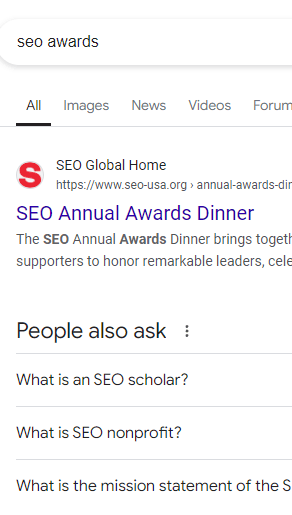
  • SEO Awards
  • SEO-USA.Org

The site that’s ranking for all those SEO search queries (and probably more) is a site called SEO-USA.org. The acronym SEO in that website stands for Sponsors for Educational Opportunity. It’s not a spam site, it’s a legit non-profit website that’s been around since 1963. The purpose of the non-profit is to provide mentorship to young people who are underserved to help them get into colleges and universities. That program evolved in the SEO Scholars, an eight year academic program for talented young people to help them through high school and college.

“SEO Scholars creates a more equitable society by closing the academic opportunity gap for motivated young people, setting the standard for academics, mentorship, community, peer-to-peer support, and a powerful, lifelong network.”

SEO-USA.org Is Not Relevant For SEO

The acronym SEO is heavily relevant for the context of online marketing. A search for “SEO” in Google spawns suggestions that are all relevant for SEO in the sense of search marketing.

Google Trends shows that the phrase SEO Scholars and SEO Scholars Application are not widely searched in the United States, most of the searches occur in New York. But SEO-USA.org is top ranked for the group of keywords listed above in other areas outside of New York.

Screenshot Of SERPs For Keyword Phrase “SEO Awards”

It’s kind of obvious that SEO-USA.org is not relevant for the most commonly understood meaning for the acronym SEO.

Could Backlinks Be The Reason?

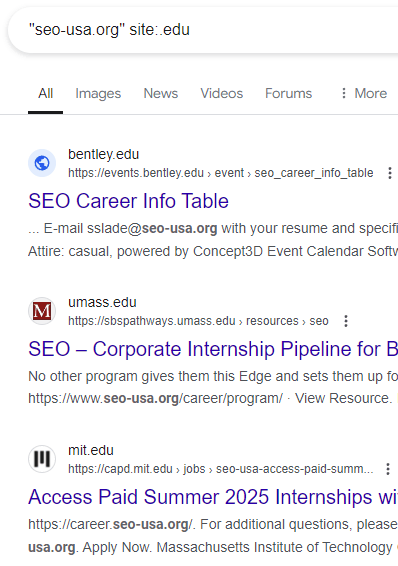
It’s possible that the reason SEO-USA.org is ranking for all of those phrases is because of backlinks. A search for the domain name but restricted to .edu sites shows almost seventy .edu websites that link to the the SEO-USA.org domain name.

This is the advanced search that shows scores of .edu sites that link or mention SEO-USA.org:

"seo-usa.org" site:.edu"

Screenshot Of Site:.EDU Search

There are also a large amount of high quality sites with dot org domains that link to SEO-USA.org as well, which is observable using the following advanced search:

"seo-usa.org" site:.org -site:seo-usa.org"

On the surface it looks clear that backlinks are the reason why SEO-USA.org ranks for irrelevant keywords.

But of course, the most obvious answer isn’t always the right answer. There’s more to the picture.

Why Links Probably Don’t Explain The Rankings

If links were the reason for SEO-USA.org’s rankings then it would follow that virtually every keyword phrase related to SEO would be littered with .edu and .org websites but that’s not the case.

I’ve been doing SEO for about 25 years now and I remember the days when sites that had the maximum level of PageRank used to rank for virtually anything. Also, dot edu links were regarded as powerful because SEOs were able to rank quite well with them.

Google’s algorithms improved and the effect from .edu links started to wane because context of a link started counting more. The words in the title element and the words in the surrounding text influenced the links. I know this too from my experience.

Another important change in Google’s link ranking algorithms was to dampen the effect of quantity of links. It used to be that an avalanche of links was enough to help a site rank over more authoritative sites. I know this from my experience too.

But the effect of a huge amount of links also changed in many ways, like hundreds of links from one domain stopped counting as hundreds of links and began counting as just one link. The position of a link within a page also mattered more, there were lots of changes that whittled down the power of links so that less and less links mattered for the wrong reasons.

I’m kind of skeptical that links is the reason why SEO-USA.org ranks.

What’s The Answer?

For some reason, a relevance factor is not kicking in, which allows the (arguably) irrelevant SEO-USA.org site to rank for keywords it probably shouldn’t rank for.

I think that’s a clue, a reason for why that site is ranking where it should not. It’s slipping through because something is missing that would ordinarily be there to keep it out.

It may very well be that there’s a factor related to trustworthiness that is allowing that site to slip through. That’s just speculation. Do you have any ideas?

Featured Image by Shutterstock/SS 360

Google Ranking Systems & Signals: How To Adapt Your SEO Strategy In 2024 & Beyond via @sejournal, @sejournal

Have you noticed a dip in your search rankings lately?

Are you feeling frustrated and anxious about your website’s performance?

Given the state of SEO this past year, we’d be surprised if you didn’t.

As the search landscape continues to evolve, we’re seeing a surge in volatility, with high-quality content often outranked by spam pages.

And with Google’s algorithms becoming more and more complex, traditional best practices no longer seem to cut it.

So, what does this mean for you and your strategy?

How can you navigate these complexities and boost your search rankings?

Our new ebook, Google Ranking Systems & Signals 2024, is the ultimate resource for understanding the recent ranking trends and unlocking sustainable SEO success.

You’ll get expert insights and analysis from seasoned SEO professionals, digital marketing strategists, industry thought leaders, and more.

Our featured experts include:

  • Adam Riemer, President, Adam Riemer Marketing.
  • Aleh Barysevich, Founder, SEO PowerSuite.
  • Andrea Volpini, Co-Founder and CEO, WordLift.
  • Dan Taylor, Partner & Head of Technical SEO, SALT.agency.
  • Erika Varangouli, Head of Branded Content at Riverside.fm.
  • Helen Pollitt, Head of SEO, Car & Classic.
  • Kevin Indig, Writer of the Growth Memo.
  • Kevin Rowe, Founder & Head of Digital PR Strategy, PureLinq.
  • Ludwig Makhyan, Global Head of Technical SEO, EssilorLuxottica.
  • Mordy Oberstein, Head of SEO Brand at Wix.
  • Scott Stouffer, CTO and Co-Founder, Market Brew.

Download the ebook to learn about the latest developments in Google Search, and how to meet the challenges of today’s competitive search environment.

From the rise of spam content on SERPs to the most reliable ranking factors, this comprehensive guide covers it all.

We also address where different types of content belong and offer advice on whether you should diversify your acquisition channels or pivot to gated content models.

Explore the following topics inside:

  • Why Is Search Full Of Spam?
  • What Are The Top Ranking Factors That SEO Pros Can Rely On Right Now?
    • The Top 3 Ranking Factors
    • Freshness & Content Maintenance
    • “Ranking” In Search Generative Experience
  • Staying Indexed Is The New SEO Challenge
  • Where Does Your Best Content Belong?
  • Proactively Embracing SEO Disruption By Focusing On User Needs
  • Making Sense Of Ranking In 2024

Whether you’re a seasoned professional or just starting out, this ebook is full of practical tips and actionable strategies to help you improve your website’s visibility and drive organic traffic.

Grab your copy of Google Ranking Systems & Signals 2024 today, and start optimizing your website for success in 2024 and beyond!

An announcement to adapt SEO strategies for Google's systems with an image of a book titled


Featured Image: Paulo Bobita/Search Engine Journal

Apple’s AI Push: ChatGPT For Everyone, But At What Cost? via @sejournal, @MattGSouthern

At its annual developer conference, Apple announced a wave of AI-powered features for users of the latest devices.

While these developments showcase new ways to use generative AI, they raise questions about the potential impact on content creators, publishers, and search and discovery.

Here’s an overview of what Apple announced and the broader considerations.

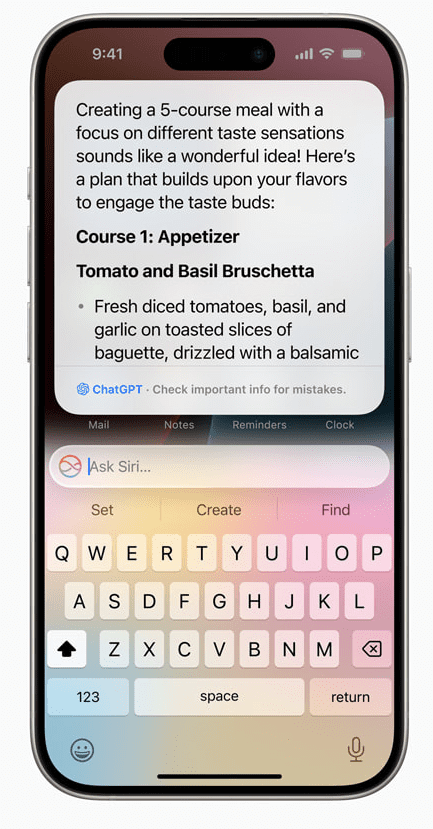
Integration Of ChatGPT

Screenshot from: Apple.com, June 2024.

At the heart of Apple’s AI push is the integration of ChatGPT, the chatbot developed by OpenAI.

By weaving ChatGPT’s capabilities into Siri, systemwide writing tools, and image generation features, Apple is making generative AI more accessible to users.

However, this integration has implications that extend beyond user convenience.

Potential Impact On Content Visibility & Discoverability

One of the primary concerns is how Apple’s AI will affect the visibility and discoverability of publisher content within apps and on the web.

As Siri and other AI-powered features become more adept at understanding context and providing targeted suggestions, there is a risk that certain types of content or sources may be prioritized over others.

This could impact traffic and revenue for publishers outside of Apple’s preferred partner ecosystem.

Concerns About Control & Transparency

An increased reliance on AI-driven recommendations and content curation raises questions about the level of control and transparency.

If Apple’s algorithms begin to favor specific content types, formats, or sources, it could create an uneven playing field for publishers and limit the diversity of information available to users.

This is concerning, given Apple’s scale and influence in the tech industry.

Potential For A Closed Ecosystem

Another potential consequence of Apple’s AI advancements is the creation of a more closed and curated ecosystem.

By providing users with highly personalized and context-aware experiences, Apple may inadvertently discourage them from venturing outside its walled garden.

This could limit opportunities for publishers and marketers outside Apple’s inner circle, as they may need help gaining visibility and engaging with users within the Apple ecosystem.

Availability

Apple’s new AI capabilities will be free for users. ChatGPT subscribers can connect their accounts to access premium features.

A beta version in English will launch this fall for iPhones, iPads, and Macs in the U.S., and more languages and capabilities will roll out over the next year.

To access the features, you’ll need an iPhone 15 Pro or a Mac with an M1 chip (or newer).

Looking Ahead

As Apple rolls out these AI features to millions of users worldwide, publishers, content creators, and the tech community should closely monitor their impact.

While Apple’s AI advancements undoubtedly offer exciting possibilities for enhancing the user experience, they must be approached critically.

How Apple’s AI shapes user behavior and content discovery could have far-reaching consequences.

By carefully examining the potential risks, the industry can work toward a future that balances innovation with equal opportunities.

Google Issues Statement About CTR And HCU via @sejournal, @martinibuster

In a series of tweets, Google’s SearchLiaison responded to a question that connected click-through rates (CTR) and HCU (Helpful Content Update) with how Google ranks websites, remarking that if the associated ideas were true it would be impossible for any new website to rank.

Users Are Voting With Their Feet?

Search Liaison’s answer was to a tweet that quoted an interview answer by Google CEO Sundar Pichai, the quote being, “Users vote with their feet”.

Here is the tweet:

“If the HCU (Navboost, whatever you want to call it) is clicks/user reaction based – how could sites hit by the HCU ever hope to recover if we’re no longer being served to Google readers?

@sundarpichai “Users vote with their feet”,

Okay I’ve changed my whole site – let them vote!”

The above tweet appears to connect Pichai’s statement to Navboost, user clicks and rankings. But as you’ll see below, Sundar’s statement about users voting “with their feet” has nothing to do with clicks or ranking algorithms.

Background Information

Sundar Pichai’s answer about users voting “with their feet” has nothing to do with clicks.

The problem with the interview question (and Sundar Pichai’s answer) is that the question and answer are in the context of “AI-powered search and the future of the web.”

The interviewer at The Verge used a site called HouseFresh as an example of a site that’s losing traffic because of Google’s platform shift to the new AI Overviews.

But the HouseFresh site’s complaints predate AI Overviews. Their complaints are about Google ranking low quality “big media” product reviews over independent sites like HouseFresh.

HouseFresh wrote:

“Big media publishers are inundating the web with subpar product recommendations you can’t trust…

Savvy SEOs at big media publishers (or third-party vendors hired by them) realized that they could create pages for ‘best of’ product recommendations without the need to invest any time or effort in actually testing and reviewing the products first.”

Sundar Pichai’s answer has nothing to do with why HouseFresh is losing traffic. His answer is about AI Overviews. HouseFresh’s issues are about low quality big brands outranking them. Two different things.

  • The Verge-affiliated interviewer was mistaken to cite HouseFresh in connection with Google’s platform shift to AI Overviews.
  • Furthermore, Pichai’s statement has nothing to do with clicks and rankings.

Here is the interview question published on The Verge:

“There’s an air purifier blog that we covered called HouseFresh. There’s a gaming site called Retro Dodo. Both of these sites have said, “Look, our Google traffic went to zero. Our businesses are doomed.”

…Is that the right outcome here in all of this — that the people who care so much about video games or air purifiers that they started websites and made the content for the web are the ones getting hurt the most in the platform shift?”

Sundar Pichai answered:

“It’s always difficult to talk about individual cases, and at the end of the day, we are trying to satisfy user expectations. Users are voting with their feet, and people are trying to figure out what’s valuable to them. We are doing it at scale, and I can’t answer on the particular site—”

Pichai’s answer has nothing to do with ranking websites and absolutely zero context with the HCU. What Pichai’s answer means is that users are determining whether or not AI Overviews are helpful to them.

SearchLiaison’s Answer

Let’s reset the context of SearchLiaison’s answer, here is the tweet (again) that started the discussion:

“If the HCU (Navboost, whatever you want to call it) is clicks/user reaction based – how could sites hit by the HCU ever hope to recover if we’re no longer being served to Google readers?

@sundarpichai “Users vote with their feet”,

Okay I’ve changed my whole site – let them vote!”

Here is SearchLiaison’s response:

“If you think further about this type of belief, no one would ever rank in the first place if that were supposedly all that matters — because how would a new site (including your site, which would have been new at one point) ever been seen?

The reality is we use a variety of different ranking signals including, but not solely, “aggregated and anonymized interaction data” as covered here:”

The person who started the discussion responded with:

“Can you please tell me if I’m doing right by focusing on my site and content – writing new articles to be found through search – or if I should be focusing on some off-site effort related to building a readership? It’s frustrating to see traffic go down the more effort I put in.”

When a client says something like “writing new articles to be found through search” I always follow up with questions to understand what they mean. I’m not commenting about the person who made the tweet, I’m just making an observation about past conversations I’ve had with clients. When a client says something like that, they sometimes mean that they’re researching Google keywords and competitor sites and using that keyword data verbatim within their content instead of relying on their own personal expertise and understanding of what the readers want and need.

Here’s SearchLiaison’s answer:

“As I’ve said before, I think everyone should focus on doing whatever they think is best for their readers. I know it can be confusing when people get lots of advice from different places, and then they also hear about all these things Google is supposedly doing, or not doing, and really they just want to focus on content. If you’re lost, again, focus on that. That is your touchstone.”

Site Promotion To People

SearchLiaison next addressed the excellent question about off-site promotion where he strongly asserted focusing on the readers. A lot of SEOs focus on promoting sites to Google, which is what link building is all about.

Promoting sites to people is super important. It’s one of the things that I see high ranking sites do and, although I won’t mention specifics, I believe it feeds into higher rankings in an indirect way.

SearchLiaison continued:

“As to the off-site effort question, I think from what I know from before I worked at Google Search, as well as my time being part of the search ranking team, is that one of the ways to be successful with Google Search is to think beyond it.

Great sites with content that people like receive traffic in many ways. People go to them directly. They come via email referrals. They arrive via links from other sites. They get social media mentions.

This doesn’t mean you should get a bunch of social mentions, or a bunch of email mentions because these will somehow magically rank you better in Google (they don’t, from how I know things). It just means you’re likely building a normal site in the sense that it’s not just intended for Google but instead for people. And that’s what our ranking systems are trying to reward, good content made for people.”

What About False Positives?

The phrase false positive is used in many contexts and one of them is to describe the situation of a high quality site that loses rankings because an algorithm erroneously identified it as low quality. SearchLiaison offered hope to high quality sites that may have seen a decrease in traffic, saying that it’s possible that the next update may offer a positive change.

He tweeted:

“As to the inevitable “but I’ve done all these things when will I recover!” questions, I’d go back to what we’ve said before. It might be the next core update will help, as covered here:

It might also be that, as I said here, it’s us in some of these cases, not the sites, and that part of us releasing future updates is doing a better job in some of these cases:

SearchLiaison linked to a tweet by John Mueller from a month ago where he said that the search team is looking for ways to surface more helpful content.

“I can’t make any promises, but the team working on this is explicitly evaluating how sites can / will improve in Search for the next update. It would be great to show more users the content that folks have worked hard on, and where sites have taken helpfulness to heart.”

Is Your Site High Quality?

Everyone likes to think that their site is high quality and most times it is. But there are also cases where a site publisher will do “everything right” in terms of following SEO practices but what they’re unaware of is that those “good SEO practices” that are backfiring on them.

One example, in my opinion, is the widely practiced strategy of copying what competitors are doing but “doing it better.” I’ve been hands-on involved in SEO for well over 20 years and that’s an example of building a site for Google and not for users. It’s a strategy that explicitly begins and ends with the question of “what is Google ranking and how can I create that?”

That kind of strategy can create patterns that overtly signal that a site is not created for users.  It’s also a recipe for creating a site that offers nothing new from what Google is already ranking. So before assuming that everything is fine with the site, be certain that everything is indeed fine with the site.

Featured Image by Shutterstock/Michael Vi

Google Gives Merchants New Insights Into Shopping Search Performance via @sejournal, @MattGSouthern

Google has introduced a feature in Search Console that allows merchants to track their product listings in the Google Search Image tab.

This expanded functionality can help businesses better understand their visibility across Google’s shopping experiences.

Where To Find ‘Merchant Listings Performance’ In Search Console

The new data is accessible through the “Performance” report under the “Google Search Image” tab.

From there, you can monitor the performance of your listings across various Google surfaces.

This includes information on impressions, clicks, and other key metrics related to your product showcases.

By integrating merchant listing performance into Search Console, businesses get a more comprehensive view of their product visibility to optimize their strategies accordingly.

Eligibility & Shopping Section In Search Console

To qualify for merchant listing reports, a website must be identified by Google as an online merchant primarily selling physical goods or services directly to consumers.

Affiliate sites or those that redirect users to other platforms for purchase completion are not considered eligible.

Once recognized as an online merchant, the Search Console will display a “Shopping” section in its navigation bar.

This dedicated area houses tools and reports tailored to shopping experiences, including:

  1. Product Snippet Rich Report: Providing insights into product snippet structured data on the site, enabling enhanced search result displays with visual elements like ratings and prices.
  2. Merchant Listing Rich Report: Offering analytics on merchant listing structured data enables more comprehensive search results, often appearing in carousels or knowledge panels.
  3. Shopping Tab Listings: Information and guidance on enabling products to appear in the dedicated Shopping tab within Google Search results.

Google’s automated systems determine a site’s eligibility as an online merchant based on the presence of structured data and other factors.

In Summary

This new feature in Google’s Search Console provides valuable information about the visibility of your product listings in search results.

You can use these insights to make changes and improve your products’ visibility so that more potential customers can find them.


Featured Image: T. Schneider/Shutterstock

Google Responds: Is Desktop SEO Still Necessary? via @sejournal, @martinibuster

Google’s John Mueller responded to a question about whether it’s okay to stop optimizing a desktop version of a website now that Google is switching over to exclusively indexing mobile versions of websites.

The question asked is related to an announcement they made a week ago:

“…the small set of sites we’ve still been crawling with desktop Googlebot will be crawled with mobile Googlebot after July 5, 2024. … After July 5, 2024, we’ll crawl and index these sites with only Googlebot Smartphone. If your site’s content is not accessible at all with a mobile device, it will no longer be indexable.”

Stop Optimizing Desktop Version Of A Site?

The person asking the question wanted to know if it’s okay to abandon optimizing a purely desktop version of a site and just focus on the mobile friendly version. The person is asking because they’re new to a company and the developers are far into the process of developing a mobile-only version of a site.

This is the question:

“I am currently in a discussion at my new company, because they are implementing a different mobile site via dynamic serving instead of just going responsive. Next to requirements like http vary header my reasoning is that by having two code bases we need to crawl, analyze and optimize two websites instead of one. However, this got shut down because “due to mobile first indexing we no longer need to optimize the desktop website for SEO”. I read up on all the google docs etc. but I couldn’t find any reasons as to why I would need to keep improving the desktop website for SEO, meaning crawlability, indexability, using correct HTML etc. etc. What reasons are there, can you help me?”

Mobile-Only Versus Responsive Website

Google’s John Mueller expressed the benefits of one version of a website that’s responsive. This eliminates the necessity of maintaining two websites plus it’s desktop-friendly to site visitors who are visiting a site with a desktop browser.

He answered:

“First off, not making a responsive site in this day & age seems foreign to me. I realize sometimes things just haven’t been updated in a long time and you might need to maintain it for a while, but if you’re making a new site”

Maintaining A Desktop-Friendly Site Is A Good Idea

Mueller next offered reasons why it’s a good idea to maintain a functional desktop version of a website, such as other search engines, crawlers and site visitors who actually are on desktop devices. Most SEOs understand that conversions, generating income with a website, depends on being accessible to all site visitors, that’s the big picture. Optimizing a site for Google is only a part of that picture, it’s not the entire thing itself.

Mueller explained:

“With mobile indexing, it’s true that Google focuses on the mobile version for web search indexing. However, there are other search engines & crawlers / requestors, and there are other requests that use a desktop user-agent (I mentioned some in the recent blog post, there are also the non-search user-agents on the user-agent documentation page).”

He then said that websites exist for more than just getting crawled and ranked by Google.

“All in all, I don’t think it’s the case that you can completely disregard what’s served on desktop in terms of SEO & related. If you had to pick one and the only reason you’re running the site is for Google SEO, I’d probably pick mobile now, but it’s an artificial decision, sites don’t live in isolation like that, businesses do more than just Google SEO (and TBH I hope you do: a healthy mix of traffic sources is good for peace of mind). And also, if you don’t want to have to make this decision: go responsive.”

After the person asking the question explained that the decision had already been made to focus on mobile, Mueller responded that this is a case of choosing your battles.

“If this is an ongoing project, then shifting to dynamic serving is already a pretty big step forwards. Pick your battles :). Depending on the existing site, sometimes launching with a sub-optimal better version earlier is better than waiting for the ideal version to be completed. I’d just keep the fact that it’s dynamic-serving in mind when you work on it, with any tools that you use for diagnosing, monitoring, and tracking. It’s more work, but it’s not impossible. Just make sure the desktop version isn’t ignored completely :). Maybe there’s also room to grow what the team (developers + leads) is comfortable with – perhaps some smaller part of the site that folks could work on making responsive. Good luck!”

Choose Your Battles Or Stand Your Ground?

John Mueller’s right that there are times where it’s better to choose your battles rather than dig in and compromise. But just make sure that your recommendations are on record and that those pushing back are on record. That way if things go wrong the blame will find it’s way back to the ones who are responsible.

Featured Image by Shutterstock/Luis Molinero