Google announced that images in the AVIF file format will now be eligible to be shown in Google Search and Google Images, including all platforms that surface Google Search data. AVIF will dramatically lower image sizes and improve Core Web Vitals scores, particularly Largest Contentful Paint.
How AVIF Can Improve SEO
Getting pages crawled and indexed are the first step of effective SEO. Anything that lowers file size and speeds up web page rendering will help search crawlers get to the content faster and improve the amount of pages crawled.
Google’s crawl budget documentation recommends increasing the speeds of page loading and rendering as a way to avoid receiving “Hostload exceeded” warnings.
It also says that faster loading times enables Googlebot to crawl more pages:
Improve your site’s crawl efficiency
Increase your page loading speed Google’s crawling is limited by bandwidth, time, and availability of Googlebot instances. If your server responds to requests quicker, we might be able to crawl more pages on your site.
What Is AVIF?
AVIF (AVI Image File Format) is a next generation open source image file format that combines the best of JPEG, PNG, and GIF image file formats but in a more compressed format for smaller image files (by 50% for JPEG format). AVIF supports transparency like PNG and photographic images like JPEG does but does but with a higher level of dynamic range, deeper blacks, and better compression (meaning smaller file sizes). AVIF even supports animation like GIF does.
Is AVIF Supported?
AVIF is currently supported by Chrome, Edge, Firefox, Opera, and Safari browsers. Not all content management systems support AVIF. However, both WordPress and Joomla support AVIF. In terms of CDN, Cloudflare also already supports AVIF.
I couldn’t at this time ascertain whether Bing supports AVIF files and will update this article once I find out.
Current website usage of AVIF stands at 0.2% but now that it’s available to surfaced in Google Search, expect that percentage to grow. AVIF images will probably become a standard image format because of its high compression will help sites perform far better than they currently do with JPEG and PNG formats. https://w3techs.com/technologies/overview/image_format
AVIF Images Are Automatically Indexable By Google
According to Google’s announcement there is nothing special that needs to be done to make AVIF image files indexable.
“Over the recent years, AVIF has become one of the most commonly used image formats on the web. We’re happy to announce that AVIF is now a supported file type in Google Search, for Google Images as well as any place that uses images in Google Search. You don’t need to do anything special to have your AVIF files indexed by Google.”
Outbound have traditionally been considered a ranking or relevance related factor but those ideas are outdated now that search engines use AI for spam detection and the ranking process. It’s time to consider new ways of thinking about outbound links.
1. A Page Is About Multiple Subtopics
One thing people worry about is whether linking out to pages that aren’t specifically about what the entire page is about is a good practice. The more important thing to think about is if the sentence or paragraph supports an irrelevant outbound link then the bigger problem is that the entire paragraph is off-topic and should be removed. Every outbound link should be relevant to the context where it originates and every context should be relevant within the overall context of the entire page.
A webpage is rarely ever about one topic. It’s usually about one topic and the related subtopics, whatever makes sense for the user.
Never link out because you think it will make the page more relevant for the topic or subtopic.
Always link out if it makes sense within the context.
If the content says that research proves X,Y, and Z then it makes sense to link out to a page about that research so that the user knows this is a fact.
A page that links out to other pages that are on related subtopics is fine.
2. Relevance Is Not Always About Keywords
In the context of outbound links, relevance could be said to be about how closely related a word, sentence, paragraph or webpage is to whatever is being linked to.
A more up to date definition of relevance is how closely the link aligns with the needs or expectations of the reader at the exact moment that an outbound link can satisfy those needs or expectations.
3. Poor Outbound Links May Impact Site Quality
Linking to low quality sites could cause Google to consider the linking site as also low quality. What a site links to may impact the quality of the site. But what’s a low quality site?
Check If The Site Is Created For Search Engines
The most current definition of a low quality site is one that is created to rank for search engines. That can be an affiliate site that’s created to rank for specific keyword phrases without any expertise, or anything to new or unique to add to what is already ranking for the topic.
Typical signs of site created to rank are keyword focused content (instead of reader-focused content), keyword focused titles, keyword focused headings, and virtually all the pages are about keywords with the highest level of query volume and the headings are an exact match for People Also Ask phrases, that kind of thing.
In a way, judging if a site is created for search engines can also be one of those “you know it when you see it” type judgments calls.
4. Quality Check All Outbound Links
One way to evaluate a site you’re considering linking to is to look at the sites that they are linking to. If it looks like they’re engaged in selling links then I would consider the entire site to be poisoned.
Link sellers are easy to spot. They typically link to three pages, two of them are to reputable websites and one of them is a low quality site that no sane person would link to. Yes, it’s that easy to spot and yes they are naïve to believe they can mask their link selling by linking to two reputable sites.
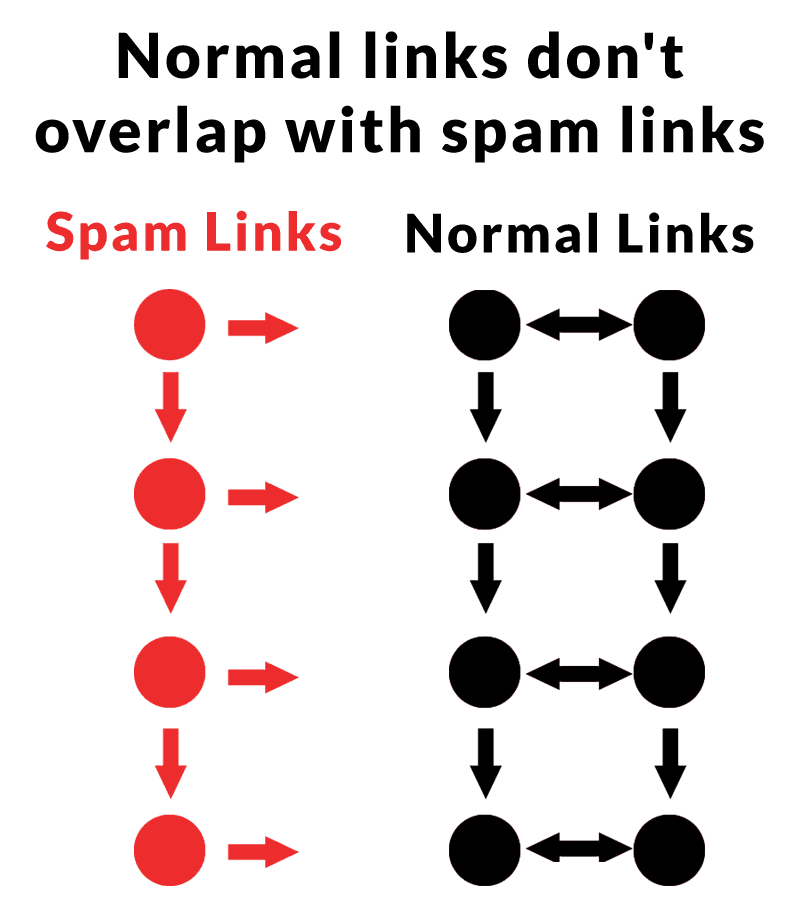
The following image represents the linking patterns of spam sites and normal sites. Spam sites tend to link to other spam sites and to reputable sites. A reputable site never links to a spam site (unless they were tricked by a link builder). This is an insight discovered in a research paper about link spam detection that looked at the direction of links.
Spammy links and normal links tend to form communities with their linking patterns. While spammy pages may link to normal pages, normal pages rarely link to spammy pages. This creates a map of the Internet that makes it easier to find linking patterns between normal pages, while rejecting the spam links.
If the sites you link to have spammy outbound links, then maybe you should reconsider linking out to those sites.
The point is that low quality sites link to normal sites. And normal sites don’t tend to link to low quality sites. This is the directional quality of outbound links which was discovered in 2007 as a way to unmask spam sites and help confirm normal sites by their outbound links (PDF on Archive.org). Even though that research paper is old, the insight about the directional quality of outbound links may still be pertinent today.
Google uses an AI system called SpamBrain to discover spammy links, so it’s not inconceivable that directionality of outbound links is one of many considerations for determining spammy sites and networks of spammy sites.
Google’s documentation says this about SpamBrain, the spam fighting AI:
“Links still help us discover and rank results in meaningful ways, and we made a lot of progress in 2021 to protect this core signal. We launched a link spam update to broadly identify unnatural links and prevent them from affecting search quality.”
“SpamBrain is our AI-based spam-prevention system. Besides using it to detect spam directly, it can now detect both sites buying links, and sites used for the purpose of passing outgoing links.”
5. Linking To .Edu and .Gov Sites Makes No Difference
Linking out to .edu and .gov pages is ok as long as it meets the information needs of the reader at the moment they come across the link.
Some people believe that linking to .gov and .edu pages helps rankings. This idea has been around since the very early 2000s.
Googlers have consistently debunked the idea that that .gov and .edu pages have a special ranking benefit.
There is no patent or research that explicitly or implicitly says that sites with links from .edu and .gov sites are considered higher quality.
The entire idea is pure conjecture.
Outbound Links And Modern SEO
AI, neural networks and transformer based systems like BERT have changed how search engines detect site quality and links. This means that old practices related to outbound links should be reconsidered.
Eli Schwartz, Author of Product-Led SEO, started a discussion on LinkedIn about there being too many CMOs (Chief Marketing Officers) who believe that AI written content is an SEO strategy. He predicted that there will be reckoning on the way after their strategies end in failure.
This is what Eli had to say:
“Too many CMOs think that AI-written content is an SEO strategy that will replace actual SEO.
This mistake is going to lead to an explosion in demand for SEO strategists to help them fix their traffic when they find out they might have been wrong.”
Everyone in the discussion, which received 54 comments, strongly agreed with Eli, except for one guy.
What Is Google’s Policy On AI Generated Content?
Google’s policy hasn’t changed although they did update their guidance and spam policies on March 5, 2024 at the same time as the rollout of the March 2024 Core Algorithm Update. Many publishers who used AI to create content subsequently reported losing rankings.
Yet it’s not said that using AI is enough to merit poor rankings, it’s content that is created for ranking purposes.
“Our long-standing spam policy has been that use of automation, including generative AI, is spam if the primary purpose is manipulating ranking in Search results. The updated policy is in the same spirit of our previous policy and based on the same principle. It’s been expanded to account for more sophisticated scaled content creation methods where it isn’t always clear whether low quality content was created purely through automation.
Our new policy is meant to help people focus more clearly on the idea that producing content at scale is abusive if done for the purpose of manipulating search rankings and that this applies whether automation or humans are involved.”
Many in Eli’s discussion were in agreement that reliance on AI by some organizations may come to haunt them, except for that one guy in the discussion
Google’s John Mueller debunked the common recommendation that it’s good to link out to other websites for SEO and ranking benefits.
Canonical SEO
The word canonical (in the context of facts and rules) means ideas and beliefs that are commonly accepted as true and correct. SEO has a number of canonical beliefs that data back decades. Some of the canonical SEO practices used to be true but lost their relevance after Google evolved. Other canonical practices are purely speculative beliefs based on “common sense reasoning” but not on anything real like a research paper, patent or a statement by a Googler.
Origins Of Outbound Link SEO
One such speculative canonical belief is the SEO practice of adding three outgoing links to every article. The reason for that belief probably comes from things Google said in a different context and also from how SEOs responded to Google’s link spam algorithms.
Speaking from memory, it was announced in 2005 at Pubcon New Orleans that Google was using statistical analysis to identify spammy linking patterns. SEOs responded by creating links that “looked normal” which meant to link out to a paid link but surround it with links to “authority sites” like .edu and .gov pages. At this point SEOs were linking out in order to make their paid outbound links “look normal.”
Again speaking from memory, there was a trend where SEOs didn’t want to link to other sites because they wanted to “hoard” PageRank and circulate it only to their own pages. The idea was that linking to other sites would “waste” that PageRank and make their sites weaker because there was less PageRank circulating to through their internal links. Googlers responded by saying that it’s good to link out. SEOs responded by saying that it’s good for SEO to link out. Which entirely misses the context in which Googlers said it was good to link out.
Decades later SEOs are telling each other that linking out is good for SEO but none of them knows why it’s good for SEO. They just tell each other that because the practice of linking out has become a canonical belief, something that everyone agrees is true and accurate.
I lived through all these changes and know where those beliefs came from. They came from a combination of statements that Googlers have made and were repeated over the years but the context was forgotten so that all that’s left is “it’s good to link out” and that’s what people believe.
John Mueller Debunks Outbound Link Myth
Someone on LinkedIn asked for what the specific amount of links were best for SEO. They wanted clarification on what the exact amount of outbound links were for SEO.
This is the question that was asked:
“I have a question. It’s a common practice among SEOs to believe that adding a total of 2-5 internal links and around 1-3 external links in a 1000-word blog post is beneficial. They also think that adding more links could be harmful to their site, while adding fewer links might not provide much value.
Could you please clarify whether the quantity of links really matters?”
Google’s John Mueller answered:
“Nobody at Google counts the links or the words on your blog posts, and even if they did, I’d still recommend writing for your audience. I don’t know your audience, but I have yet to run across *anyone* who counts the words before reading a piece of content.”
What Is The Right Answer?
Mueller recommends writing for the audience. The underlying idea there is that if you know what the audience wants then you know what to give them.
What the audience wants has nothing to do with the number of “entities” you add to your content or how many outbound links you have on the page. If that’s your approach to SEO then you may want to evaluate how much of what’s published is for search engines and how much of it is for users because creating content for search engines have always been the likeliest way to produce content that doesn’t catch on and ranks.
I’m not being a Google apologist either, this is the pragmatic approach for beating competitors by understanding what works. For example, years before the Reviews algorithm came out I consulted for clients who had review websites and I told them that they needed to add more original images, more hands-on reviews, more metrics and comparisons. So a couple years later when the Reviews update guidelines came out it all made sense because I knew from my own personal experience ranking my own review websites that this was the best approach.
So the right answer for most SEO questions is most often found by reframing the question around the people the content is created for. When it comes to outbound links the question shouldn’t be “how many outbound links is best for SEO?” the question should be “do these outbound links fit the context of what the web page and what a reader would want?”
A good context for adding an outbound link is when something is quoted or cited. For example, if the content mentions scientific research or what someone else said, then that research or the page page documenting what was said should be linked to. That’s what users would want, right?
Google announced a new feature for Gemini AI called Gems that are pre-defined specialized experts to help users code, coach, create content, brainstorm and handle other tasks. Gems will soon roll out with premade experts and the ability for user to create their own experts to handle specific tasks.
What Is Gemini Gems?
Gemini Gems is a feature of Google’s Gemini AI platform that are created for specific narrowly defined tasks. Users can create their custom AI experts by providing specific instructions that will make the Gems an expert that can offer help in a highly defined role.
Real-World Practical Uses
I haven’t seen Gems yet but I wonder what would happen if you feed it Google’s quality raters guidelines, their SEO starter guide, and other documentation then set it loose on content to see if it could identify where it could be improved and why.
Google offered examples of how Gems can be used in business and professional settings.
Coding Assistance: Gems can be a coding assistant that can focus on a specific need like debugging code or making improvement suggestions.
Career Planning: A career planning professional can create a Gem to behave like a career coach that can offer advice and personalized career plans.
Content Gem can provide writers ideas, improve content and offer feedback like a writing expert.
An analogy of Gemini Gems, for example, can be like a bag of tools. Each tool specializes in something different like a drill, screwdriver and a hammer.
Impact Of Gems
Gems is a useful feature for Gemini users because they may no longer need to subscribe to a service that provides AI assistance in any given task. This may be bad news for SaaS businesses that offer AI content creation and other services but it’s good news for businesses because it will make users able to do more and do it better.
According to Google’s announcement:
“With Gems, you can create a team of experts to help you think through a challenging project, brainstorm ideas for an upcoming event, or write the perfect caption for a social media post. Your Gem can also remember a detailed set of instructions to help you save time on tedious, repetitive or difficult tasks.”
This new feature may very well make a subscription to Google Gemini something to give a try because it has the potential to make an impact in business and personal settings.
Google published a video tutorial with seven tips for using Google Trends to research and share keyword and topic data. The tutorial shows how to find hidden filters and search tools in the Trends interface and explains how they help identify actionable data.
The seven ways to explore and share are:
Punctuation
By Language
Comparison Functions
Seasonality Discovery
Year Over Year Trends
Interest By Country
3 Ways To Export Or Share
1. Punctuation For Finding Hidden Insights
Omri Weisman, Google Trends Engineering Manager, shared how to use advanced search operators to dig deeper into the data and extract actionable user query insights.
He presented an overview of three advanced search operators:
A. Quotation marks
B. Plus operator (the + sign)
C. Minus operator (the – sign)
He started with the example of search a two-word keyword term without punctuation, explaining that the keyword query volume data is for both words in any order. He also pointed out that no misspellings, variations, or plural versions are included in the search volume data.
A. Quotation Marks
The first search operator he discussed was the quotation mark. The quotation marks shows data for the exact match phrase, including when embedded as part of a larger phrase, with words before or after the exact match search query.
B. Minus Sign
Adding a minus sign to a search phrase filters out the word that’s modified with the minus sign, like this:
Keyword -Phrase
In the above example the word ‘phrase” will not be included in the search query data. This is a great way to manipulate the data and extract more precise variations.
C. Plus Sign – Good Way To Research Topics
Searching with a plus sign and two keywords shows query volume for one or other keyword. As such, this way of searching provides the broadest keyword query amounts and represents an excellent way to research a topic. With a plus sign you can add in all the related phrases for a topic and then see all of them lumped together.
2. Segment By Language
…if you’re interested in a specific language, you might want to look only for that language. They use the example of identifying how many searches for cat are done in Japanese in the United States, which allows you to segment searches with greater granularity.
You can also combine two languages using the plus sign search operator to see the combined query volume.
They said:
“For example, if you enter the Japanese character for cat… You might miss the overall trends, since many people in the US, for example, search for cat in English.
To get the full picture. Compare searches for the Japanese character for Cat and English searches for cat using the plus operator.”
3. Use Filters To Identify More Actionable Data
Daniel Waisberg said that comparing keywords helps identify more meaningful trends. In order to do
He said:
“Getting the data you need is essential, but to understand what it means, you need a comparison point. For example, is the growth localized or global? Is the growth seasonal, and if so, how does this season compare to the previous one?
To create a meaningful comparison, you can use the filter capability inside the search term.”
The following screenshot shows where a three dot menu in a drop down to access the filters.
4. Seasonality Discovery
He next showed how to use the filters to discover seasonality.
He explained:
“First enter the term in the trends explore section and change the time frame to five years.
This will create an interesting chart showing that this term is highly seasonal. People search for boat trips significantly more in the UK summer than in the winter. “
5. How To Remove Seasonality Trends
Next he explained how to use the built-in filters to analyze year over year trends.
This is again accessed through the filters that are somewhat hidden in the Google Trends interface.
He showed how to do it:
“While it is interesting to know the time of the year when the term has a higher interest, you’ll need more information if you want to make decisions based on the data.
You can use a special filter to analyze trends year over year. This will help you neutralize the seasonality effect, making sure you’re comparing like for like.
Start by changing the date to past 12 months.
Add an identical term to the compare box and hover over the box.
Click the three dots menu and select Change Filters.
Here you see two options, location and time range. Click the time range and select the custom time range to choose the previous time period.
If you’re looking for full years, you can use the built in capability to choose the past five years. That would make your search quicker.
After these steps, you’ll end up with two lines in your chart, one for the past 12 months and a second for the previous 12 months.”
This comparison can be done with up to five searches, which has the effect of being able to see the general trends in comparison, without the noise introduced by seasonality.
6. Compare Interest By Countries
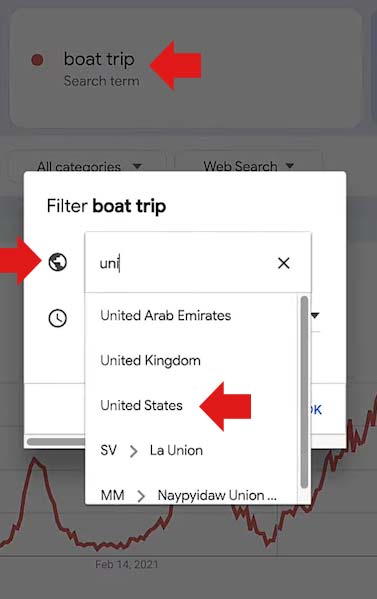
The comparison by country allows users to compare search query volumes by country, two or more countries together.
The way to do that is with the filters that are accessed by the three-dot menu located next to the search query being researched.
Screenshot Of Country Filter
7. Save Or Share Trend Results
Ori explained that there are three ways to save or share Google Trends results.
URL
Embedded
Export to spreadsheet
Share By URL
Sharing by URL is easy. Just copy the URL from the browser then share it.
Embed Trend Data
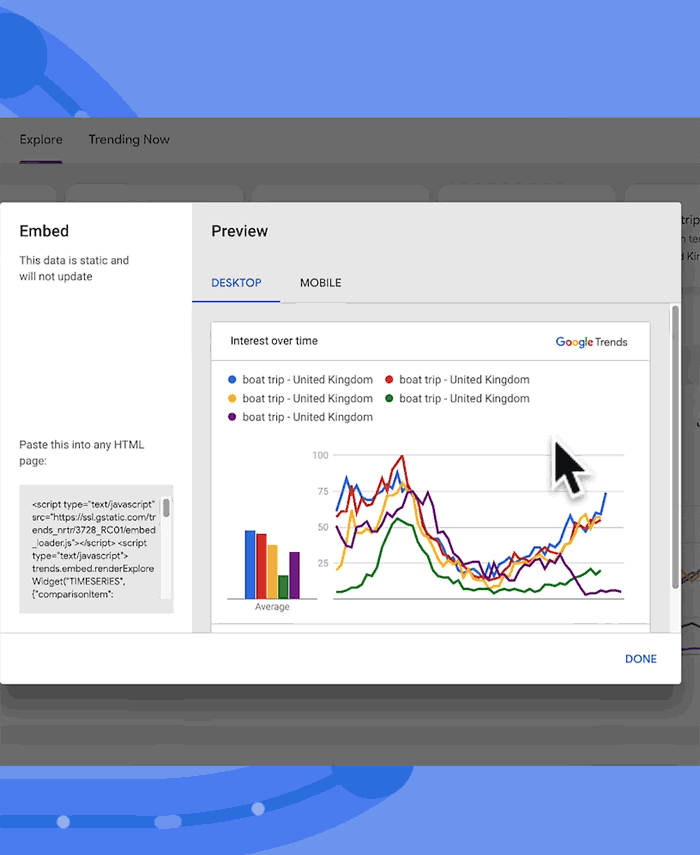
Embedding is a way to generate an embeddable card with the data that can be inserted into a web page, with bonus that the data is constantly updated.
“Another way to share a chart is to embed it on your website. You can generate an embeddable card to add to your website from almost any card on the page.”
Screenshot Of Embed User Interface
These cards will show up to date data and may also reproduce some in-product interactions.
Export The Data
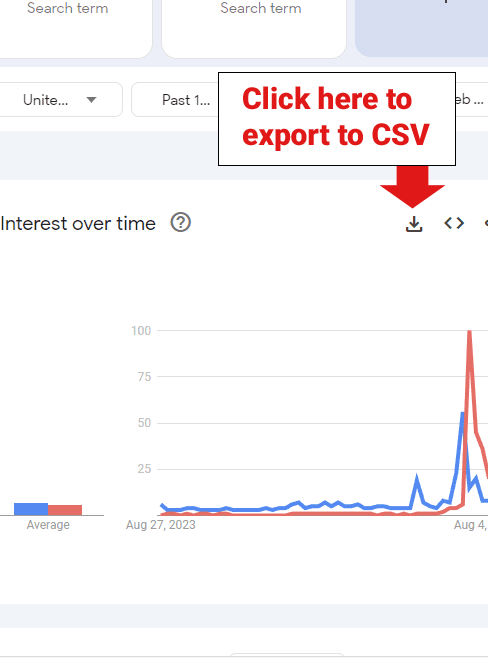
Clicking the export icon will provide the Google Trends data in the CSV format.
Screenshot Of Download Icon
Use Google Trends For Research
Google Trends is an excellent source of keyword and topic research and it’s completely free. Using these advanced methods will help get even more actionable data.
Google’s Martin Splitt answered a question about whether internal nofollow links and noindex meta robots directives send the wrong signal to Google that the website is low quality.
Nofollow Link Attribute
The nofollow link attribute came about as a standard created by Google, Yahoo and Microsoft that publishers can use to signal that a link can’t be trusted (such as links in user generated content) or for paid links. The idea is that the links can’t be trusted or used for ranking purposes or for whatever reason.
SEOs discovered that PageRank didn’t flow through links that had the nofollow attribute so naturally the self-identified “white hat” SEOs tried gaming Google by adding nofollow links to their privacy and about us pages in order to funnel the maximum amount of PageRank to the pages that mattered. This practice was called PageRank Sculpting and it shows that adding nofollows to internal links is longtime practice and that it’s never been a problem before.
For the record, PageRank sculpting doesn’t work because, in a highly simplified explanation, Google essentially counts the amount of links on a page, including links with nofollows and divides the amount of PageRank that flows as if all the links counted. That’s how it was explained many years ago and that may have changed over the years, we don’t really know.
Noindex Robots Meta tag
The noindex robots meta tag is a directive that crawlers like Googlebot are required to obey. It allows a publisher a way to block crawling at the page level.
There is nothing about the noindex value of the meta element that indicates whether the page is untrustworthy or anything like that. It’s just a way to control crawlers.
Google’s Martin Splitt narrated the question:
“Can a lot of internal links with nofollow tags or many pages with noindex tags signal to Google that the site has many low-quality pages?”
Martin answered:
“No, it doesn’t signal low-quality content to us, just that you have links you’re not willing to be associated with. That might have many reasons – you’re not sure where the link goes, because it is user-generated content (in which case consider using rel=ugc instead of rel=nofollow) or you don’t know what the site you’re linking to is going to do in a couple of years or so, so you mark them as rel=nofollow.”
Nofollow Is Not A Quality Signal
Martin confirmed that there is no signal indicating a value judgement about “quality” that’s associated with the use of a nofollow link attribute or the noindex robots meta tag. Using them on internal links or for preventing crawling is fine and have no effect on Google site quality judgements.
Listen to the podcast question and answer at the 1:17 minute mark:
Google’s John Mueller answered a question the question of how long it takes for SEO to work and what it means if rankings don’t change after a year. Sometimes best practices doesn’t work and John Mueller explains why this sometimes is the case.
What Is SEO?
There is no single definition of SEO. What constitutes good SEO is subjective and highly dependent on where one learned about SEO.
Some believe that SEO is adding keywords into content and building links.
Others don’t really bother with links and are more concerned with building content.
Some are highly focused on technical aspects like site performance metrics and structured data.
In some corners of the SEO community, there are those who passionately believe that SEO doesn’t matter because Google prioritizes ads, big brands, YouTube videos, more ads, and then leaves the crumbs of what’s left for small businesses.
So when someone asks why their SEO isn’t working, the answer can be a toss-up, and if ten SEOs agree, there’s a chance they haven’t identified the problem—they’ve only agreed on the most obvious reason. This was the situation John Mueller encountered when asked why a site wasn’t ranking despite following SEO best practices.
Hard To Answer Without Specifics
John Mueller narrated the question:
“I changed my website a year ago and did a lot of work on SEO. Should this be affecting my website’s traffic by now?”
It’s a hard question to answer when you don’t have the specifics of the webpage in front of you. So Mueller answered in a fairly general manner that ends with him recommending he ask someone else for advice in Google’s help forums.
The first part of Mueller’s response acknowledges the difficulty of answering the question.
He responded:
“It’s tricky to say much here. I don’t know what specifically you did to work on SEO, and I don’t know if that would have resulted in significant changes.”
Why SEO Doesn’t Work
Mueller’s right. Maybe the website has a great layout, fast page speed performance, spot on structured data and a logical site architecture that optimizes internal linking.
What could go wrong with a properly SEO’d website, right?
Well, the content could be incomplete.
The content could be too comprehensive.
The content might be unfocused, lacking a clear comprehension of the topic.
The content might be too focused on keywords and not focused enough on users.
The content might not match the topic suggested by the keywords in the title and the headings.
Maybe the content is aiming too high, trying to rank for a highly competitive search phrase.
No amount of SEO is going to save a website with the above listed problems… and that’s just a sample of what can go wrong.
Mueller addressed this shortcoming of SEO in situations where it has zero effect.
He continued his answer:
“There are many best practices which have minimal effect on the day-to-day performance of a website. For example, having a clean page structure helps search engines to better understand the content on a page, but it might not necessarily result in immediate search ranking or traffic changes.”
Ranking Criteria Is Different Across Topics
Another factor that Mueller touches on is that what’s important for SEO varies according to the topic. Some topics require fresh content, some content requires establishing signals of trustworthiness and authoritativeness, maybe even signals that communicate user brand preference and popularity, signals that indicate that users expect to see a specific brand for certain queries.
There could be a geographic component that prioritizes local signals. It could be an intent thing where a user just wants to read what a person wrote in a forum.
This may be what Mueller is talking about when he says that the best elements of SEO vary across websites.
He answered:
“The most effective elements of SEO will vary across websites, it takes a lot of experience to go from a long checklist of possible items to a short prioritized list of critical items.”
Experience Is Important
The last factor Mueller discussed is the role of experience in making one a better SEO. Here’s an example: I thought I was pretty good at creating content that ranks and then I wrote a couple thousand articles for Search Engine Journal and it opened up a whole new conception of content creation, I discovered levels of understanding that could only come from writing about a couple thousand articles.
Mentorship, is an option that can cut down the amount of time it takes to learn, but experience is still important.
John Mueller recommended experience as an important factor for understanding SEO.
He wrote:
“Your experience here will grow over time as you practice.
I recommend getting input from others, and practicing by helping with challenges that others post in help forums. Good luck!”
Google’s Martin Splitt answered a question in the SEO Office Hours podcast about whether reproducing YouTube video content into text on a web page would be seen as duplicate content and have a negative impact on the web page rankings.
Although duplicate content is not a negative ranking factor, content published on a more authoritative site can cause the content on the less authoritative site to be outranked. It’s a valid question to ask because content on an authoritative will outrank the same content on a less authoritative one.
Some in the search community refer to one piece of content usurping the rankings of another as ‘cannibalization’ of the webpage’s ranking potential. This is the concern of the person asking the question.
Google’s Martin Splitt narrated the submitted question:
“If I create a YouTube video and then take that exact text or content and place it on a web page, could Google flag that web page or site for duplicate content?”
Different Content Media Are Treated As Separate
Martin Splitt answered that the two forms of content are different and will not be treated as the same content, thus publishing text content extracted from a video will not be considered duplicate content.
This is his answer:
“No, one is a video and the other one is text content, and that would be unique content!”
Publishing Extracted Text From Video
Martin praised the idea of extracting text content from a video and republishing it as text, noting that some people prefer to consume content in text form rather than watching a video. Reversing the flow of content from text to audio or video is probably not a bad idea also because some people have trouble reading text content and may prefer listening to it from a video or a podcast format.
Martin commented on publishing video content in a textual version:
“It’s also not a bad idea, some users (like me) might prefer a text version and others might not be able to use a video version of the content in the first place due to bandwidth or visual constraints.”
Takeaways
The idea behind the question is repurposing content and it’s a good idea. Search is more than Google, it’s also YouTube and wherever people get their audio content, like Spotify. The fact that there is no cannibalization of the content between mediums makes repurposing a viable approach to extending your content reach.
Google updated their documentation for the profile page structured data, a structured data that all creators including recipe bloggers can use and become eligible for enhanced listings in the search results.
What is ProfilePage Structured Data?
ProfilePage structured data is a Schema.org markup that Google uses for enhanced listings in the search results. It’s well known for use with forum and discussion communities but it’s also of use for any profile page where there’s information about the author.
What Changed In The Official Documentation?
Google updated the opening paragraph to make it clearer how Google uses it in the search results and removes the mention of “Perspectives” and replaces it with references to Forums, which aligns with how Google Search refers to them in the search results.
The new version of the opening paragraph is about 26% shorter but offers more precise information.
This is the original version (64 words):
“ProfilePage markup is designed for any site where creators (either people or organizations) share first-hand perspectives. It helps Google Search highlight information about the creator, such as their name or social handle, profile photo, follower count, or the popularity of their content. Google Search also makes use of this markup when disambiguating the creator, and in features such as Perspectives and Discussions and Forums.”
This is the revised version (47 words):
“ProfilePage markup is designed for any site where creators (either people or organizations) share first-hand perspectives. Adding this markup helps Google Search understand the creators that post in an online community, and show better content from that community in search results, including the Discussions and Forums feature.”
What’s ProfilePage Markup Good For?
The ProfilePage structured data markup can be used on any profile page where there’s a creator. It’s not just for communities and can make a profile page eligible to show an enhanced listing in the search results.
This is what Google’s documentation says:
“Other structured data features can link to pages with ProfilePage markup too. For example, Article and Recipe structured data have authors…”
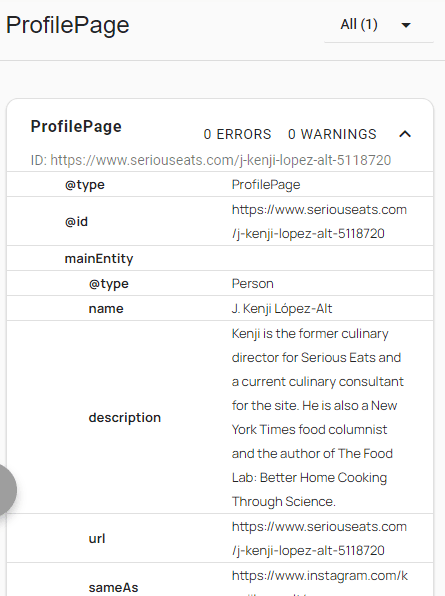
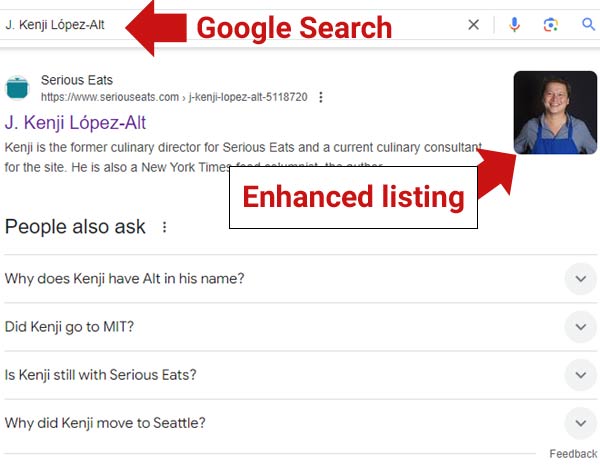
It seems like the ProfilePage markup is underused in the recipe blogger space, not sure why. For example, the Serious Eats profile page for recipe writer J. Kenji López-Alt has ProfilePage structured data markup on his profile page and Google appears to reward that markup with an enhanced listing for his Serious Eats profile page.
Screenshot Of Serious Eats ProfilePage Markup
Screenshot Of Rich Results For Profile Page
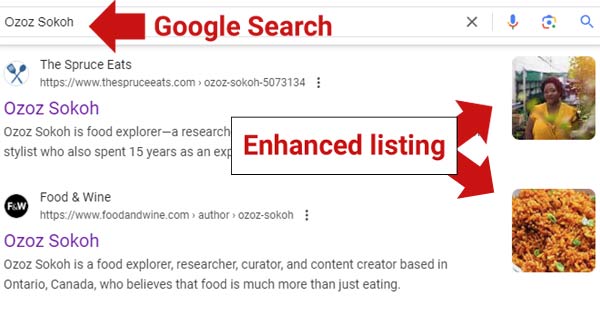
Another Screenshot
The above two screenshots are of rich results for the profile pages of recipe authors, pages that use the ProfilePage structured data markup.