Research Confirms Google AIO Keyword Trends via @sejournal, @martinibuster

New research by enterprise search marketing company BrightEdge reveals dramatic changes to sites surfaced through Google’s AI Overviews search feature and though it maintains search market share, the data shows that AI search engine Perplexity is gaining ground at a remarkable pace.

Rapid & Dramatic Changes In AIO Triggers

The words that trigger AI Overviews are changing at an incredibly rapid pace. Some keyword trends in June may already changed in July.

AI Overviews were triggered 50% more times for keywords with the word “best” in them. But Google may have reversed that behavior because those phrases, when applied to products, don’t appear to be triggering AIOs in July.

Other AIO triggers for June 2024:

  • “What Is” keywords increased by 20% more times
  • “How to” queries increased by 15%
  • Queries with the phrase “”symptoms of” increased by about 12%
  • Queries with the word “treatment” increased by 10%

A spokesperson from BrightEdge responded to my questions about ecommerce search queries:

“AI’s prevalence in ecommerce is indeed increasing, with a nearly 20% rise in ecommerce keywords showing AI overviews since the beginning of July, and a dramatic 62.6% increase compared to the last week of June. Alongside this growth, we’re seeing a significant 66.67% uptick in product searches that contain both pros and cons from the AI overview. This dual trend indicates not only more prevalent use of AI in ecommerce search results but also more comprehensive and useful information being provided to consumers through features like the pros/cons modules.”

Google Search And AI Trends

BrightEdge used its proprietary BrightEdge Generative Parser™ (BGP) tool to identify key trends in search that may influence digital marketing for the rest of 2024. BGP is a tool that collects massive amounts of search trend data and turns it into actionable insights.

Their research estimates that each percentage point of search market share represents $1.2 billion, which means that gains as small as single digits are still incredibly valuable.

Jim Yu, founder and executive chairman of BrightEdge noted:

“There is no doubt that Google’s dominance remains strong, and what it does in AI matters to every business and marketer across the planet.

At the same time, new players are laying new foundations as we enter an AI-led multi-search universe. AI is in a constant state of progress, so the most important thing marketers can do now is leverage the precision of insights to monitor, prepare for changes, and adapt accordingly.

Google continues to be the most dominant source of search traffic, driving approximately 92% organic search referrals. A remarkable data point from the research is that AI competitors in all forms have not yet made a significant impact as a source of traffic, completely deflating speculation that AI competitors will cut into Google’s search traffic.

Massive Decrease In Reddit & Quora Referrals

Back in May 2024 Google Of interest to search marketers is that Google has followed through in reducing the amount of user generated content (UGC) surfaced through its AI Overviews search feature. UGC is responsible for many of the outrageously bad responses that generated negative press. BrightEdge’s research shows that referrals to Reddit and Quora from AI Overviews declined to “near zero” in the month of June.

Citations to Quora from AI Overviews are reported to have decreased by 99.69%. Reddit fared marginally etter in June with an 85.71% decrease

BrightEdge’s report noted:

“Google is prioritizing established, expert content over user discussions and forums.”

Bing, Perplexity And Chatbot Impact

Market share for Bing continues to increase but only by fractions of a percentage point, growing from 4.2% to 4.5%. But as they say, it’s better to be moving forward than standing still.

Perplexity on the other hand is growing at a monthly rate of 31%. Percentages however can be misleading because 31% of a relatively small number is still a relatively small number. Most publishers aren’t talking about all the traffic they’re getting from Perplexity so they still have a way to go. Nevertheless, a monthly growth rate of 31% is movement in the right direction.

Traffic from Chatbots aren’t really a thing, so this comparison should be put into that perspective. Sending referral traffic to websites isn’t really what chatbots like Claude and ChatGPT are about (at this point in time). The data shows that both Claude and ChatGPT are not sending much traffic.

OpenAI however is hiding referrals from the websites that it’s sending traffic to which makes it difficult to track it. Therefore a full understanding of the impact of LLM traffic, because ChatGPT uses a rel=noreferrer HTML attribute which hides all traffic originating from ChatGPT to websites. The use of the rel=noreferrer link attribute is not unusual though because it’s an industry standard for privacy and security.

BrightEdge’s analysis looks at this from a long term perspective and anticipates that referral traffic from LLMs will become more prevalent and at some point will become a significant consideration for marketers.

This is the conclusion reached by BrightEdge:

“The overall number of referrals from LLMs is small and expected to have little industry impact at this time. However, if this incremental growth continues, BrightEdge predicts it will influence where people search online and how brands approach optimizing for different engines.”

Before the iPhone existed, many scoffed at the idea of the Internet on mobile devices. So BrightEdge’s conclusions about what to expect from LLMs are not unreasonable.

AIO trends have already changed in July, pointing to the importance of having fresh data for adapting to fast changing AIO keyword trends.  BrightEdge delivers real-time data updated on a daily basis so that marketers can make better informed decisions.

Understand AI Overview Trends:

Ten Observations On AI Overviews For June 2024

Featured Image by Shutterstock/Krakenimages.com
SEO For Higher Education: Best Practices For Academic Institutions via @sejournal, @AdamHeitzman

The competition for student enrollment has never been stronger.

Many colleges struggle to stand out online and attract new students. Without a strong SEO strategy, your school remains hidden, and potential students won’t find you.

This includes details about admission processes, available programs, extracurricular activities, and other tiny details that attract the typical student.

A solid SEO strategy helps you appear in search results, increases brand recognition, boosts credibility among parents and students, and ultimately increases enrollment.

Here’s how you can implement it:

Critical Components Of An Effective SEO Strategy

Understanding Your Target Audience

Identify audience segments, such as prospective students, current students, faculty, staff, alumni, and visitors. Rank them by importance based on the institution’s goals. For example, prospective students could be the highest priority.

Understanding these audiences, their needs, and search habits will help you create content and SEO strategies to reach them effectively.

However, with over 17 million high schoolers and 16 million undergraduates in the U.S. (data from 2021), who are your target audiences?

Here’s how to know them:

  • Use surveys among current students to understand their motivations and concerns. For example, use a simple poll on the school website asking, “What are the top three factors you consider when choosing a university?” or “Why did you choose us?”

Their answers can give insights into why your institution was a top choice, and you can include these details while writing landing pages, program pages, or student experience pages.

This makes it easy to lead every page with a promise that matters to your target audience.

  • Analyze website analytics to determine your traffic sources and most popular pages. Traffic sources reveal the demographics engaging with your website and how they are led to it. Analyzing the most popular pages also shows the content that resonates with your target audience.

Merging this analysis helps you create content that targets your audience and meets their search intent.

There are four types of search intent (commercial, transactional, informational, and navigational). For colleges and universities, the most common intents tend to be informational, commercial, and transactional.

Analyzing search intent helps you target keywords that reflect what searchers are looking for. Here’s what that looks like:

  • Informational keywords, such as “best universities in the US,” “top engineering schools,” or “best liberal arts colleges” are common queries for general information. These keywords indicate that searchers are looking for options.
  • Commercial keywords, e.g., “online MBA programs,” “online master’s in data science,” and “nursing programs with scholarships,” are common queries for specific programs. These indicate that searchers want to know about schools offering these programs (and also learn about what sets each institution apart). This is where you create dedicated landing pages for each program explaining why your school should be at the top of students’ minds in their decision-making phase.
  • Transactional keywords, e.g., “application deadlines,” “tuition fees,” or “campus dates,” show intent to do something. These users are closer to making a decision, and they want information on their exact query. These keywords are usually preceded by a branded search (e.g., “UCLA application deadline”).

Creating content that engages your target audience is essential. When your content matches their search intent, it sends positive signals to Google.

This can improve your rankings and increase traffic. Keyword research plays a key role in this process, ensuring your content meets the needs and search habits of your audience.

Read more: How People Search: Understanding User Intent

Keyword Research And Analysis

Keyword research means finding the words students use when they search online. These terms can help your website show up in searches.

Tips to get started:

  • Brainstorm seed keywords: Make a list of words related to your school and programs. For example: “computer science,” “business administration,” “online MBA in marketing,” “online courses,” “coastal university,” and “urban campus.”
  • Use advanced keyword tools: Tools like Semrush and Ahrefs offer detailed insights into search volume, competition, keyword difficulty, and trends. Use these tools to discover keyword opportunities that your competitors might be missing.
  • Identify long-tail keywords: These longer phrases, like “scholarships for international students studying cyber security,” have lower search volumes but higher conversion rates. They attract users who are further along in their decision-making process.
  • Analyze competitor keywords: Use tools to spy on competitors’ keywords and find gaps in their content. Target these gaps to improve your visibility and attract more traffic.
  • Consider seasonal trends: Use tools to analyze search trends throughout the year. Optimize your landing pages for terms like “summer courses” or “fall application deadlines” during relevant periods.

Read more: Keyword Research: An In-Depth Beginner’s Guide

On-Page Optimization

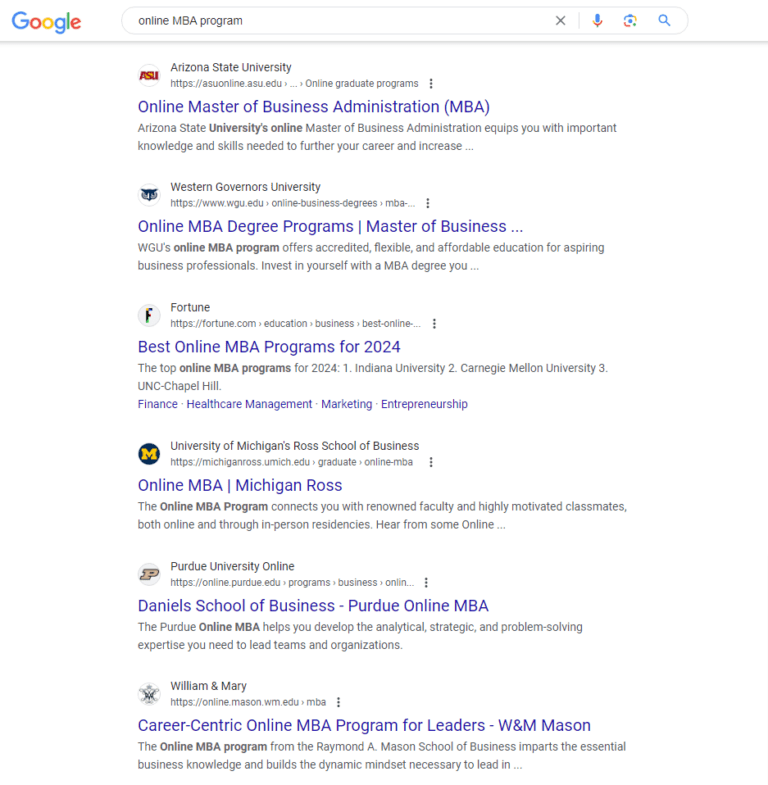
On-page optimization is where you include relevant keywords in your content to improve visibility on search engine results pages (SERPs). Use your primary keyword in:

Google search results for [online MBA program]Screenshot from search for [online MBA program], June 2024
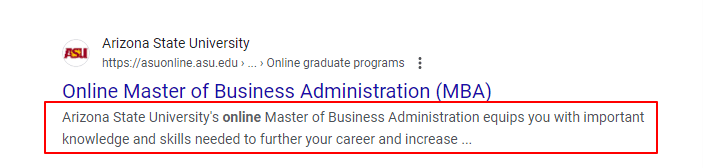
  • Meta Description: It’s a summary of your content located under your title page in search results. You can use it to entice users to click your link by incorporating relevant keywords that provide context to the webpage. See ASU’s copy here:
Arizone state university on SERPScreenshot from search for [online MBA program], June 2024
  • Headers: Headers structure your content and make it easier to read. Use keywords in your main header (H1) and subheaders (H2, H3, etc.) to signal to search engines what your page is about.
  • Body of your content: Incorporate keywords naturally throughout the page. You can also use variations of your keyword – long-term or semantic topics – to avoid repetition and keyword stuffing.

Read more: 12 Essential On-Page SEO Factors You Need To Know

Technical SEO Considerations

The goal of every search engine is to provide relevant content to searchers, and good technical SEO makes your website easier to find and use. Focus on these areas:

  • Page Speed: Your website should load in one to three seconds. A slow site can frustrate users and impact your rankings.
    • Choose reliable hosting: Ensure your hosting can handle your website’s traffic.
    • Compress images and files: Use tools like TinyPNG or ShortPixel to reduce file sizes without losing quality.
    • Enable browser caching: This helps returning visitors load your site faster.
  • Mobile Optimization: Use a responsive design that adjusts to different screen sizes. Test your site on various devices to ensure it works well everywhere.
  • Schema Markup: Add structured data to your website’s HTML. Schema markup, or structured data, allows search engines to understand your institution and its offerings better. It’s a form of code you can add to your website’s HTML that uses a specific vocabulary to label and describe different elements of your content.

Schema Markup is important because it enables search engines to display rich snippets in search results.

These enhanced listings can include star ratings, images, event dates, and other relevant details to make your institution’s results more visually appealing and informative. Here’s an example from Rutgers Business School:

Google search results for [rutgers university]Screenshot from search for [rutgers university], June 2024

You can see details about addresses, tuition fees, campus type, and other helpful links without directly engaging the website.

Research shows that structured data increases click-through rates by presenting users with context-rich information in search results. This captures user attention and builds trust even before they visit the site, which in turn increases organic traffic.

Read more: The Complete Technical SEO Audit Workbook

Implementing Local SEO For Campuses

If your school has multiple campuses, local SEO is important.

  • Create location pages: Make a separate page for each campus with details like address, contact information, and unique programs.
  • Optimize for local keywords: Use keywords that include your city or neighborhood, like “best colleges in downtown Chicago.”
  • Claim your Google Business Profile: Make sure each campus has a Google Business Profile listing with up-to-date information.

Read more: How To Create A Winning Local SEO Content Strategy

Leveraging Video Content

Video content can engage students better than text alone.

  • Create informative videos: Make videos about campus tours, student testimonials, and program highlights.
  • Optimize video titles and descriptions: Use keywords in your video titles and descriptions to help them show up in search results.
  • Embed videos on your website: This can keep visitors on your site longer and improve engagement.

Read more: 10 YouTube Marketing Strategies & Tips (With Examples)

Optimizing Site Structure And Navigation

A well-structured website helps both users and search engines.

  • Simple navigation: Keep your menu simple and easy to use.
  • Clear hierarchy: Organize your pages logically, with main categories and subcategories.
  • Internal linking: Link-related pages to each other to help users find more information and search engines understand your site better.

Read more: Why Google Recommends Hierarchical Site Structure For SEO

Conclusion

Improving your school’s SEO is a long-term investment.

However, you can start today by creating content that targets students to amplify your brand and increase credibility. This will help increase visibility, attract more students, and build your school’s online reputation.

Whether you’re a new or established institution, good SEO practices can help you reach your goals.

More resources:


Featured Image: Prostock-studio/Shutterstock
Google’s Web Crawler Fakes Being “Idle” To Render JavaScript via @sejournal, @MattGSouthern

In a recent episode of the Search Off The Record podcast, it was revealed that Google’s rendering system now pretends to be “idle” to trigger certain JavaScript events and improve webpage rendering.

The podcast features Zoe Clifford from Google’s rendering team, who discussed how the company’s web crawlers deal with JavaScript-based sites.

This revelation is insightful for web developers who use such methods to defer content loading.

Google’s “Idle” Trick

Googlebot simulates “idle” states during rendering, which triggers JavaScript events like requestIdleCallback.

Developers use this function to defer loading less critical content until the browser is free from other tasks.

Before this change, Google’s rendering process was so efficient that the browser was always active, causing some websites to fail to load important content.

Clifford explained:

“There was a certain popular video website which I won’t name…which deferred loading any of the page contents until after requestIdleCallback was fired.”

Since the browser was never idle, this event wouldn’t fire, preventing much of the page from loading properly.

Faking Idle Time To Improve Rendering

Google implemented a system where the browser pretends to be idle periodically, even when it’s busy rendering pages.

This tweak ensures that idle callbacks are triggered correctly, allowing pages to fully load their content for indexing.

Importance Of Error Handling

Clifford emphasized the importance of developers implementing graceful error handling in their JavaScript code.

Unhandled errors can lead to blank pages, redirects, or missing content, negatively impacting indexing.

She advised:

“If there is an error, I just try and handle it as gracefully as possible…web development is hard stuff.”

What Does This Mean?

Implications For Web Developers

  • Graceful Error Handling: Implementing graceful error handling ensures pages load as intended, even if certain code elements fail.
  • Cautious Use of Idle Callbacks: While Google has adapted to handle idle callbacks, be wary of over-relying on these functions.

Implications For SEO Professionals

  • Monitoring & Testing: Implement regular website monitoring and testing to identify rendering issues that may impact search visibility.
  • Developer Collaboration: Collaborate with your development team to create user-friendly and search engine-friendly websites.
  • Continuous Learning: Stay updated with the latest developments and best practices in how search engines handle JavaScript, render web pages, and evaluate content.

Other Rendering-Related Topics Discussed

The discussion also touched on other rendering-related topics, such as the challenges posed by user agent detection and the handling of JavaScript redirects.

The whole podcast provides valuable insights into web rendering and the steps Google takes to assess pages accurately.

See also: Google Renders All Pages For Search, Including JavaScript-Heavy Sites


Featured Image: fizkes/Shutterstock

CWV & Google Page Experience Ranking Factor Updated via @sejournal, @martinibuster

The June 2024 Chrome User Experience Report (CrUX) is out and it shows that websites in the real-world experienced an averaged across the board improvement in all Core Web Vitals (CWV) website performance scores. Some of the improvements are attributable to a change in how Interaction To Next Paint is measured, which will be good news to websites with dialog modals (popups).

CrUX Dataset

The CrUX dataset consists of actual Core Web Vitals performance scores as measured in Chrome browsers when visiting websites. The data comes from browsers that were voluntarily opted in to report website performance metrics. The CrUX dataset is publicly available and is used by PageSpeed Insights, third party tools.

CrUX Influences Page Experience Ranking Factor

The CrUX report is used for Google’s Page Experience Ranking Factor. The data is publicly available and can be used for evaluating performance, including competitor performance. CrUX is important because it is one of the only metrics that a website publishers can check that have something to do with a website ranking factor.

According to Google’s overview documentation:

“The data collected by CrUX is available publicly through a number of Google tools and third-party tools and is used by Google Search to inform the page experience ranking factor.”

While the influence of the Page Experience Ranking Factor may be on the lower side, it’s still important for reasons outside of algorithms like improving conversions and ad clicks.

June 2024 Dataset

The dataset for June 2024 has been published and it shows that Core Web Vitals (CWV) website performance scores have incrementally risen across the board by modest percentages. This shows that website performance continues to be a focus for websites. Most of the popular content management systems are doing their best to improve, with WordPress making positive improvements with each new version that’s released.

The following scores are for origins. Origins are the entire website, which is different from Pages.

These are the average origin scores:

  • Largest Contentful Paint (LCP)
    This is a measurement of how fast the main content of a page loads. It specifically measures the largest image or content block that’s visible in a browser (viewport).
    63.4% (↑ 2.0%) had good LCP
  • Cumulative Layout Shift (CLS)
    Measures how long it takes for web page layout to become stable without elements jumping and shifting on the page.
    77.8% (↑ 0.5%) had good CLS
  • Interaction to Next Paint (INP)
    INP measures how long it takes for a web page to become responsive to user interactions
    84.1% (↑ 1.1%) had good INP
  • Percentage Of Sites With Good CWV
    This is the percentage of sites that had passing scores across all three Core Web Vitals metrics
    51.0% (↑ 2.3%) had good LCP, CLS and INP

Changes To INP Measurements

Chrome made changes to how long it takes for a page to become interactive (Interaction to Next Paint – INP) is measured, making it more accurate. This may have helped to increase the scores of some sites that were inadvertently ranked lower for INP because the metric failed to account for some kinds of popups.

The Chrome team explained:

“The Chrome team has been continuing work on improving efficiencies in Chrome’s handling of the Core Web Vitals metrics and recently launched some changes to INP which may have contributed to the positive trend this month. The most notable change is to better handle use of the basic modal dialogs (alert, confirm, print). While technically these are synchronous and block the main thread—and so are not recommended if there are alternatives—they do present user feedback for an interaction. They were previously not counted as presentation feedback for INP, which could result in very high INP values for sites that did use these. From Chrome 127 the presentation of the modal will mark the end measurement time for INP and so should lead to improved INP times for those sites.”

Read the June 2024 CWV Announcement

The 202406 dataset is live

Featured Image by Shutterstock/Ivan Dudka

What 4,538 Domains Tell Us About ccTLDs Ranking In The US via @sejournal, @Kevin_Indig

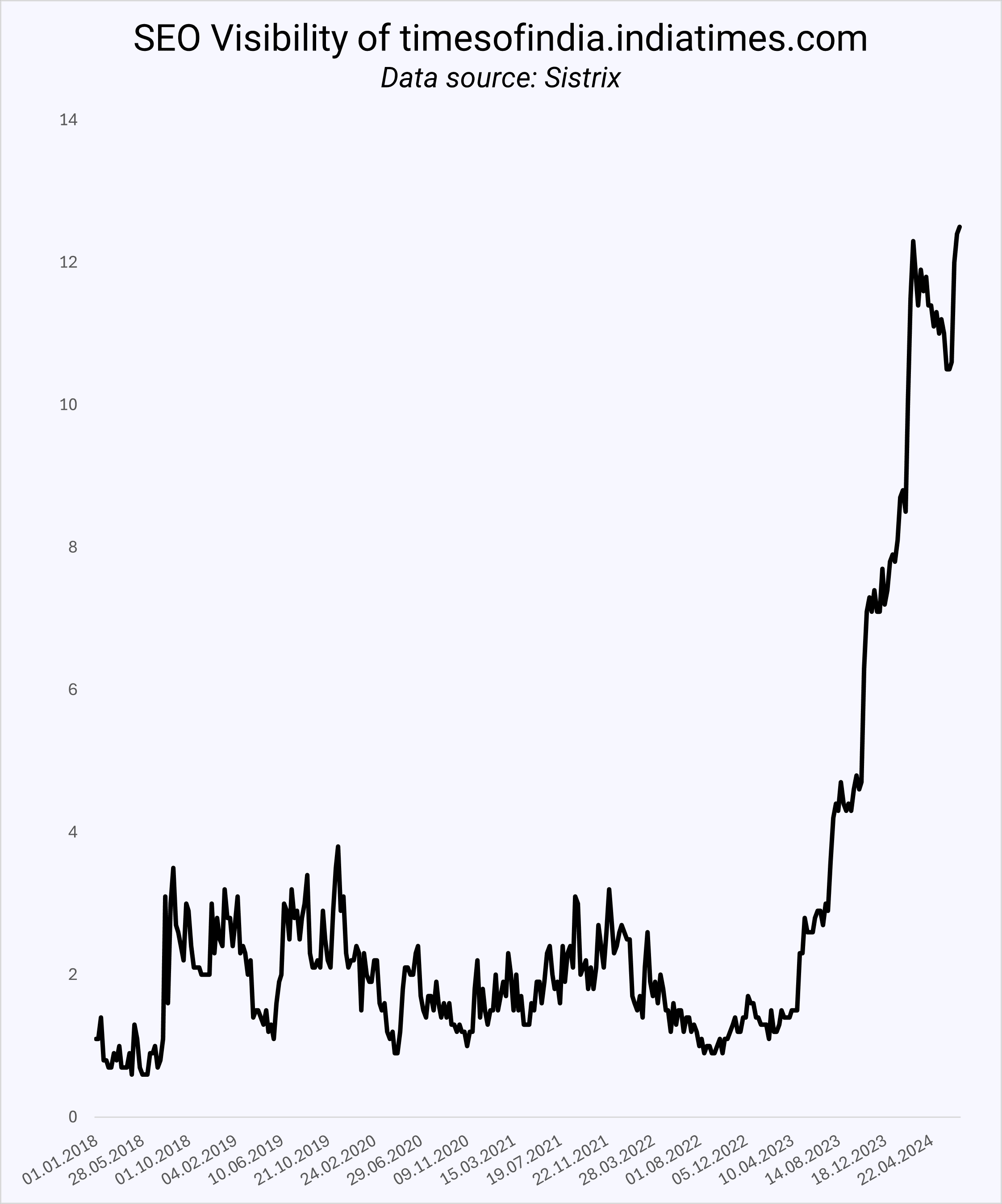
Since the Times Of India quadrupled its organic growth in the US in 12 months, more ccTLDs (international domains) have been spotted ranking in the US.

SEO Visibility of timesof india.comImage Credit: Kevin Indig

More international domains would make sense as Google is testing country labels indicating where the site operates.

Google has also expanded Translated Results:

Translated Results is a Google Search feature that will automatically translate the title link and meta description into the local language of a user, making a website published in one language available to a searcher in another language. If the searcher clicks on the link of a translated result the web page itself will also be automatically translated.

Maybe Google wants more international domains in US Search? If a site in English from another country is a better result in an English-speaking country, why not rank it?

International domains might be most relevant when the location matters less.

For example, publishers could rank in other countries with the same language, but SaaS or ecommerce companies that don’t sell in that specific country would not be a good result. As a result, the playing field for “foreign” domains would grow.

Boost your skills with Growth Memo’s weekly expert insights. Subscribe for free!

Do More ccTLDs Rank In The US?

I picked 1,000 random keywords from a large pool of queries across travel, ecommerce, publishing, SaaS, services, finance, health, and other verticals.

The data surfaced 4,538 domains in organic results. I focused heavily on the first five positions on Google since any URL ranking higher than that likely won’t see much traffic, especially with the flux of SERP features these days.

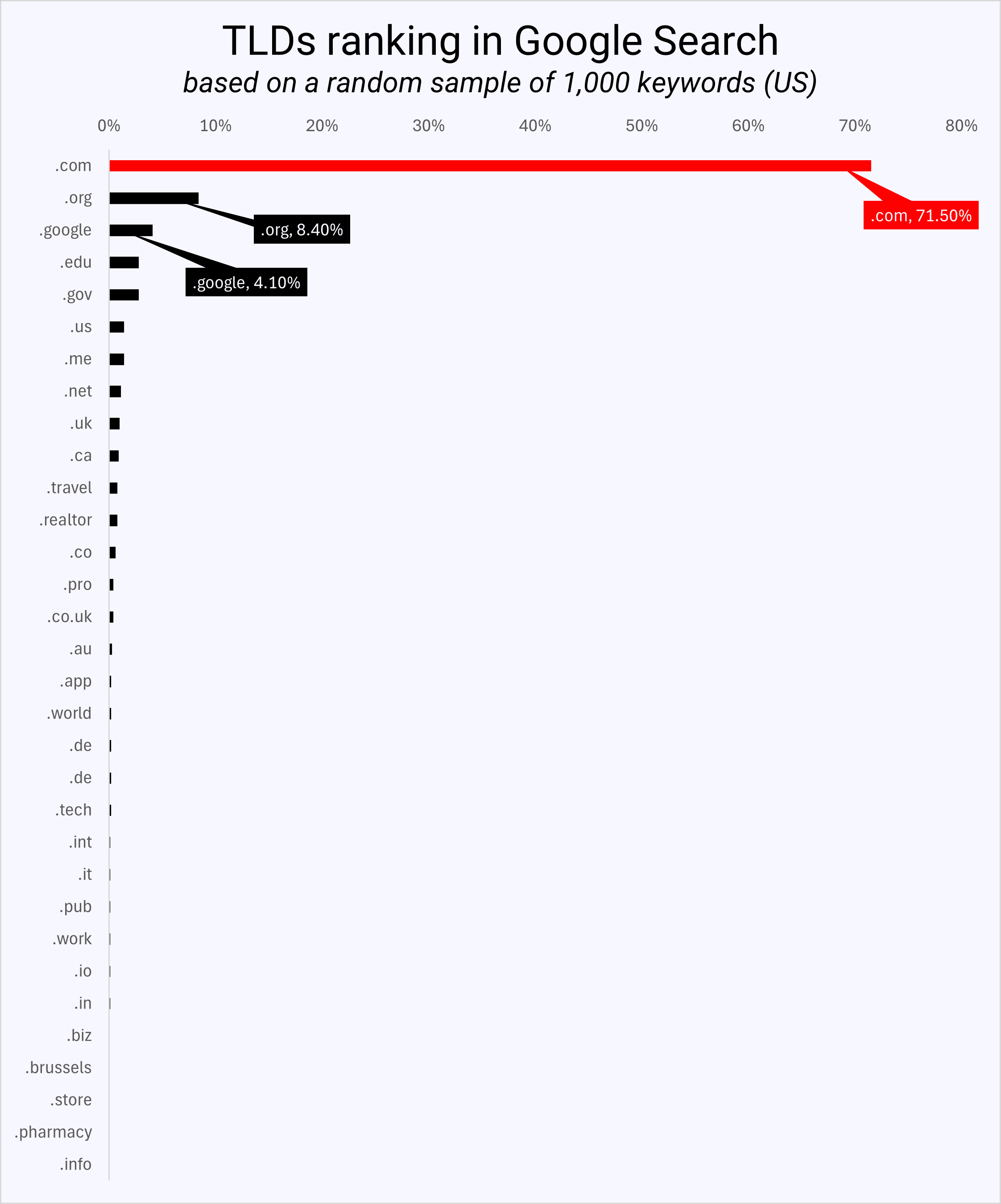
TLDs ranking in Google SearchImage Credit: Kevin Indig

The data shows that .com domains rank 71.8% of the time in the top five positions, followed by .org (8.4%), .google (4.1%), .edu and .gov. Only 52 out of 4,538 domains were from the UK, 11 from Canada, and three from India.

As a result, we can say that international domains performing in the US, like the Times of India, are outliers more than the norm.

What Else Can We Learn From The Data About URL Structure?

The dataset of 1,000 random keywords provides more insights into the nature of TLDs, subdomains, and URL slugs in terms of organic ranks.

TLD Matters A Bit

I wanted to find out if the TLD (.com, .net, .org, etc.) has an impact on ranking. Traditionally, we know that ccTLDs (country-code TLDs like .fr) have a better chance of ranking in their respective country than gTLDs (generic TLDs like .com), which are country-agnostic.

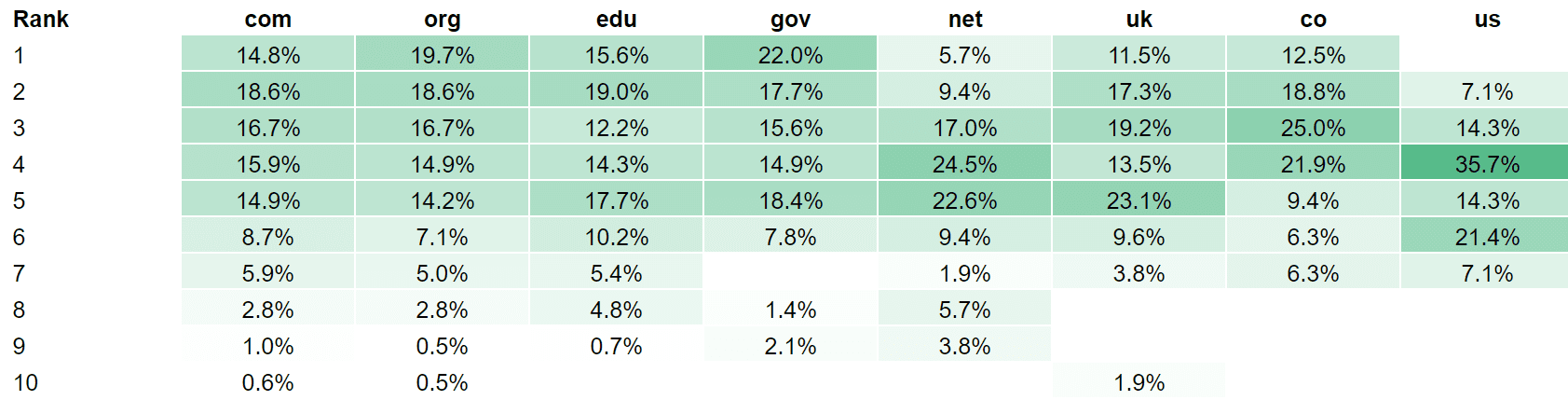
I ran correlations between TLDs and rank across 7,678 results while normalizing for factors around backlinks, content quality, content volume, and rank distribution – but I couldn’t find any relationships. I found that:

  • .net TLDs have a lower chance of showing up in the top two positions.
  • .us didn’t show up in top positions at all (even though I know a .us domain that performs really well).
  • .gov has the best chance to rank at the top – go figure.
  • .uk has a lower chance of ranking at the top compared to .com.
  • .co has a lower chance of ranking at the top than .com.
  • .edu doesn’t perform as well in position 1 compared to .gov.
  • .org has a higher chance of ranking at the top than .com (might be influenced by Wikipedia).
  • .com TLDs rank 71.8% in the top 5 but are registered only 36.31% as often compared to other TLDs (~2x).
TLD by average rank in organic searchTLD by average rank in organic search (Image Credit: Kevin Indig)

The rank benefit of a .com domain is disputable: Due to mere exposure, users are more familiar with .com domains, which means sites might be more likely to link to them, too.

Even if .com domains got a small rank boost from Google, it most likely doesn’t outweigh the importance of content, backlinks, brand, and user experience.

URL Slugs Matter A Bit

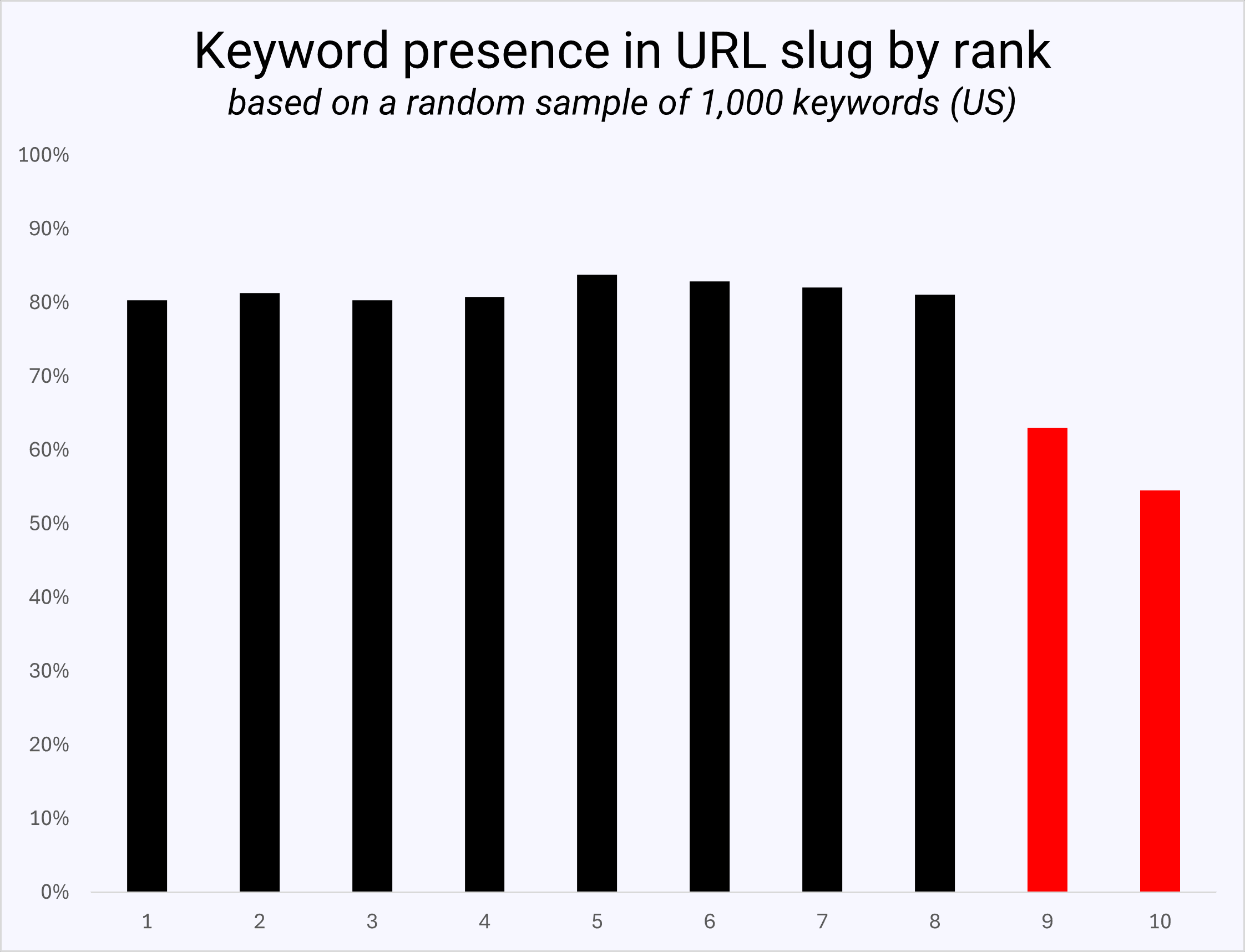
Next, I wanted to answer whether having the keyword in the URL slug, the part after the TLD, matters.

The data shows no advantage to having the keyword in the URL slug for ranking in the top eight positions. However, URLs ranking in positions 9 and 10 carried the keyword way less often, indicating that its tables take to “apply” for the top results.

Keyword presence in URL slug by rankImage Credit: Kevin Indig

In conclusion, scanning for the keyword in the URL or meta title was and is a low-hanging fruit SEO exercise.

From experience, optimizing the slug just to match the keyword is not worth the cost of a redirect. It should be taken into consideration more when creating a new URL.

Subdomains Matter A Lot

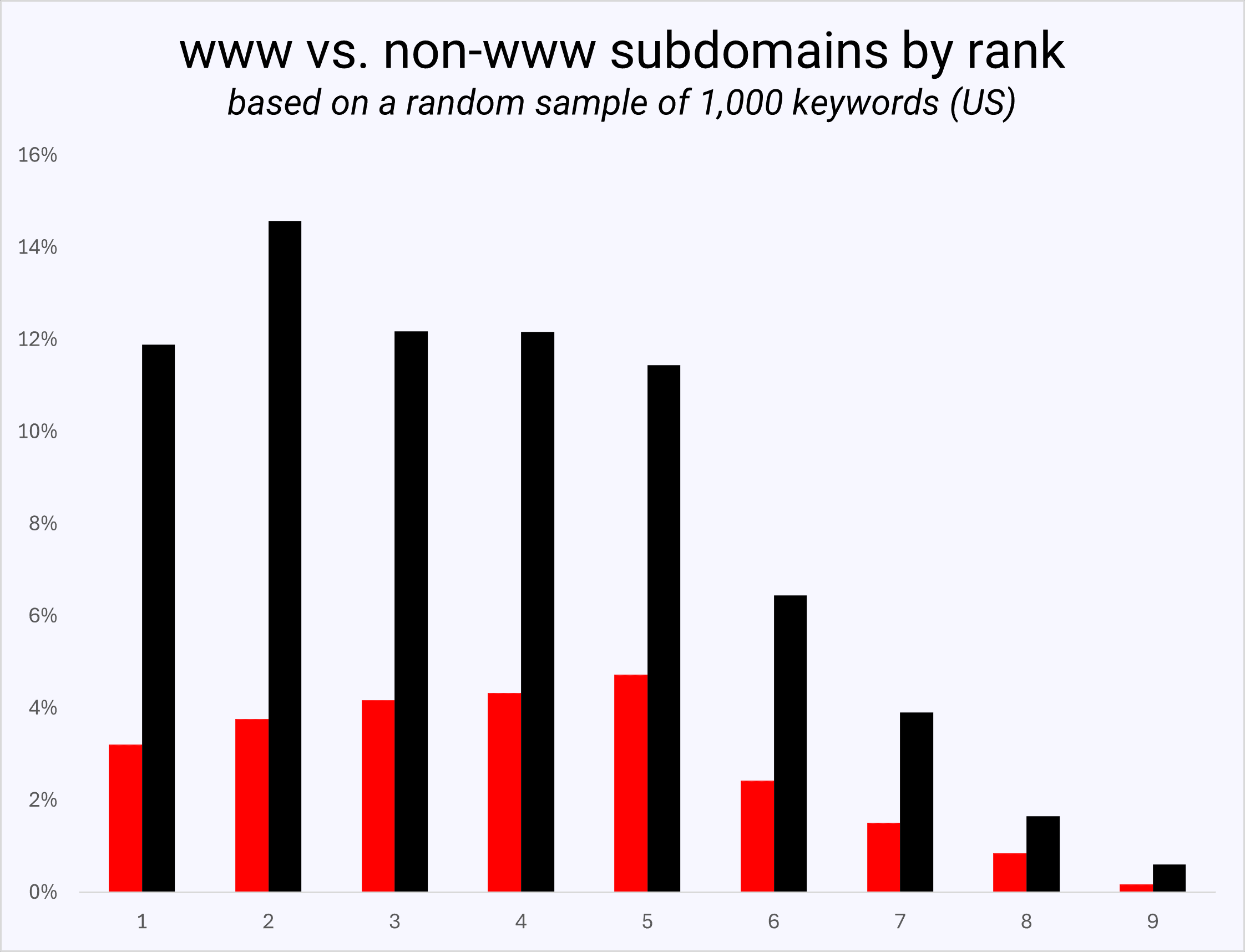
Lastly, I was curious whether (non-www) subdomains have an impact on rank.

In Google’s ranking factor leak, we learned that keyword exact-match domains (EMDs) were demoted many years ago. Google also evaluates subdomains separately from root domains, which makes sense because they have a different DNS address.

www vs non-www subdomains by rankImage Credit: Kevin Indig

I found in the data that URLs, including www, show up on average thrice as often in the top five results as non-www subdomains.

That ratio shrinks as we go further down the SERPs, meaning there does seem to be a benefit of avoiding subdomains, even though we always have to consider the non-SEO benefits of subdomains.


 Google Tests Country Label In Search Result Snippets

Google’s Now Translating SERPs Into More Languages

Top level domains


Featured Image: Paulo Bobita/Search Engine Journal

AI Has Changed How Search Works via @sejournal, @marie_haynes

This extract is from SEO in the Gemini Era by Marie Haynes ©2024 and reproduced with permission from Marie Haynes Consulting Inc.

Much of the SEO advice you will see online today is borne from shared community wisdom that was learned about Search in the days before Google was actively using AI.

So much of what many of us do as SEOs and treat as standard practice is based on a search engine that was a list of heuristics – handwritten rules programmed by humans. So much has changed.

For example, let’s say you are tasked with creating a new article for the website you are working on.

You’ll likely start with keyword research because we know that in order to appear relevant to a search engine, you need to write content that covers a topic thoroughly and uses keywords that are semantically related to your topic.

So much of the content that we have on the web today is borne from a process that looks like this:

  • Do keyword research to see what your competitors have written.
  • Create content that’s similar but perhaps a little bit better, or more comprehensive than theirs.
  • Do keyword research to see what other people have covered, but you have not included.
  • Create content that covers that stuff too.
  • Do People Also Ask research to find related questions to cover so that we can write content that looks even more relevant and comprehensive to search engines.
  • Create more content to answer those questions even though Google already has content to answer them.

Nothing in that process is causing us to create content that truly is original, insightful, and substantially more helpful than what exists online.

Yet, that is what Google wants to reward!

An SEO agency will often spend many hours each month improving the technical SEO of a site, improving the internal link structure, or perhaps getting external links and mentions. These are all things that can possibly help a webpage to look better to a search engine.

They are not bad things to do and some of them have the potential to help a site improve. But again, those things are unlikely to make the content on a page substantially more helpful to searchers, which is, once again, what Google wants to reward.

I want to be clear here. I’m not saying that technical SEO is dead.

There are benefits to be had by having a technically sound, fast site that search engines can easily navigate and understand, especially if you have a large site.

Schema can still do wonders when it comes to helping Google understand your business and its E-E-A-T, especially a new one. There are some verticals where technical improvements will give you enough advantage to improve rankings to some degree.

There is one thing that makes content more helpful.

Are you ready for this deep, insightful secret?

Here it is…

The secret to having content that is likely to be considered by Google as more helpful than others’ is to have content that users are finding helpful.

A Mindset Shift Is Needed For SEOs

For more than a decade now, my main source of income has come from advising businesses how to improve their search presence.

I have pored over every word Google has published that talks about what it is that they want to reward and have produced pages and pages of checklists, training documents and advice.

I had one goal: Help people understand what it is that Google rewards, and help them become that result.

Do you see the paradox that is hidden in that statement? The more I think about it, it’s laughable!

I didn’t realize the whole time that while I was preaching on creating People-first content, as Google now calls it, much of what I was doing was geared far more towards satisfying Google than searchers.

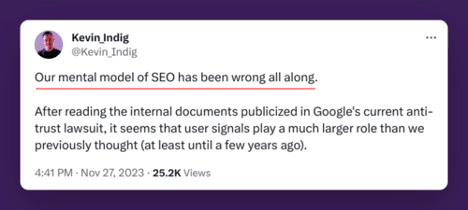
Other SEOs are catching on to this mindset as well now. What users do on our websites matters immensely. The actions of users shape Google’s rankings dramatically.

Kevin Indig's take on SEO tweetScreenshot from X/Twitter, July 2024

I have historically treated Google’s guidance on creating helpful content as a checklist of things we could look to for improvement.

Have an author bio? Check. Good descriptive heading? Check. Demonstrating experience? Information gain? Another check.

My first book on creating helpful content takes you through multiple checklists like this. You can see improvement by working through these checklists.

Actually, I know this as I commonly will have people reach out to me to tell me that they have implemented changes based on the checklists and have been seeing improvements.

But, it turns out what Google gave us was not a list of criteria to be analyzed as a checklist!

I realize now that what Google was telling us was: Our systems are built to reward the types of things that people tend to find helpful and reliable. And if you want to know what that is, here are some ideas.

It’s not a checklist, but rather, a list of the types of things that searchers tend to like. The algorithm is built to reward what it is that searchers like.

An author bio isn’t a ranking factor, but, in many verticals, demonstrating the experience of your authors is something that users like.

Core web vitals, metrics used to measure load time and other similar things, used to be a score we’d aim to get…but really, the reason we work to improve on core web vital scores is because users tend to like pages that load fast and don’t jump around.

It’s not like Google has a checklist or a scorecard when it comes to the quality of every page. Google doesn’t know exactly what your content is or whether it is high quality.

As we discussed earlier, search is a complex AI driven system that is trying to predict what searchers are going to find helpful.

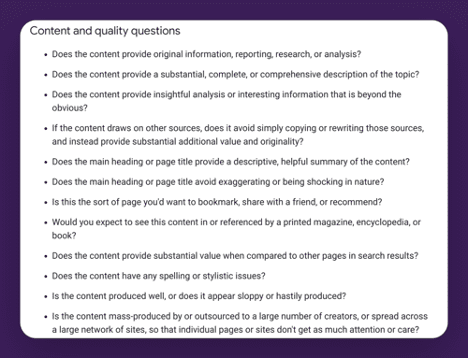
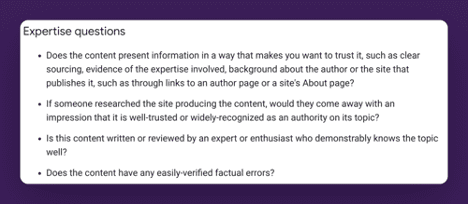
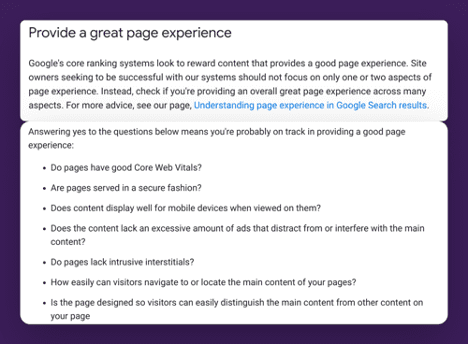
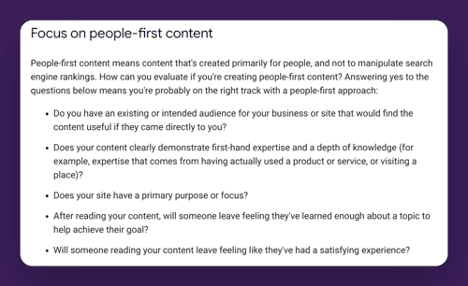
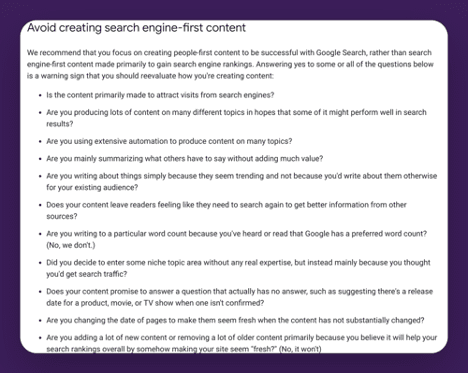
Here are the full list of “ideas” Google gives us to help us understand what searchers might find helpful:

Content and quality questions

Expertise questions

Expertise questions

Provide a great page experience

Focus on people first content

Avoid creating search engine-first content

In the past I’ve taught on looking at these ideals one by one for inspiration on how you can improve your site. I still think there is great value in doing this.

But, now I realize I was missing the main point. I have been thinking about helpful content like an SEO.

If you are truly creating People-First content, you will already be aligned with Google’s helpful content recommendations.

I had it the wrong way around.

If you know what your audience’s needs are, and know the questions that they have, and you create content that answers those questions you are on your way to creating the type of People-First Content Google wants to reward.

People First Content Is:

  • Usually created by people with real world experience on a topic. A store that sells a product to real customers is more likely to produce helpful content advising people on that product. A person who advises professionally on a topic, is more likely to have fresh content that understands the current needs of that audience.
  • There is an exception to this: Sometimes authority can trump experience. We see this when a website like Forbes is ranking for [BBQ reviews]. In this case, Forbes is likely seen as a place that users trust for its overall authority in journalism. It’s got sufficient E-E-A-T to be considered a trustworthy answer for this query. And as long as searchers are indicating they are satisfied, it will continue to rank. (I think this will change though as we learn to create truly helpful content. We should start to see more truly helpful content from topic experts recommended.)
  • Content that provides real value to searchers.
  • Written clearly and concisely in a manner that is easy to understand.
  • Original and insightful.

But how does Google determine this?

In the next section we’ll talk about something that has been mostly unknown to SEOs until just recently – just how much Google uses user engagement signals.

It turns out that Google knows what it is that’s helpful to people because signals from every single interaction that happens in search are fed back into machine learning systems with one goal in mind – for the systems to learn how to best work together to create present the searcher with information that they are most likely to find helpful.

Notes

[1] Creating Helpful Content. Marie Haynes. 2023. https://mariehaynes.com/product/creating-helpful-content-workbook/


To read the full book, SEJ readers have an exclusive 20% discount for Marie’s book, workbook and course bundle. The discount will be applied automatically by following these links:


More resources:


Featured Image: MT.PHOTOSTOCK/Shutterstock

The Reason Why Google Uses The Word “Creators” via @sejournal, @martinibuster

Google’s SearchLiaison responded to criticism over how they refer to website publishers with an answer that reflects not just changing times but also the practical reasons for doing so. The answer reflects how important it is for digital marketing to maintain the flexibility to bend with change.

Change: There Isn’t Always A Motivation

The discussion began with a tweet by someone who objected to the use of the phrase “creators” instead of other terms like businesses or publishers because the word creators minimizes the fact that there are businesses behind the websites.

This is the tweet:

“Notice the term “creators” in this piece. This is an example of Google’s successful effort to change the narrative. In the past they have used “publishers”, “businesses”, and just “web sites”. But “creators” minimizes business impact. And clearly some are falling for the trap.”

Keeping Up With The Pace Of Change

SearchLiaison’s response reflected something that is commonly misunderstood, which is that everything changes, including fashion, customs, norms and even speech. Those who lack self-awareness on this point will blink and miss it when the page turns on their generation and another one steps forward to take take their place at the center of the world.

This is especially true for SEO, where Google typically is a brand new search engine every five years.

This is SearchLiaison’s answer:

“We used to say “webmasters” in the past, and that doesn’t really speak to so many people who have an interest in appearing in search results. That’s in part why we have tended to say “creators” more — though not exclusively — for years now. It’s not a particularly new thing. It’s also why Search Central got its new name in 2020, the whole “webmasters” isn’t really that inclusive (or used) term: https://developers.google.com/search/blog/2020/11/goodbye-google-webmasters

“Publishers” tends to be heard by and used by those involved in news publishing. Businesses often just think of themselves as businesses. SEOs tend to be SEOs, and if you use that term, you exclude those who don’t think of SEOs but want to understand some of the things we share.

So “creators” tends to be the catch-all term we used, as imperfect as it is, because sometime you really need one term rather than “Here’s what creators and SEO and businesses and brands and news publishers and etc etc should know about something….”

All that said, I am seeing more of a need to use creators as less a catch-all and more to refer to people like Brandon who really do view themselves as content creators first-and-foremost. The work they do can be much different than an SEO, or a content marketer, or a local business and so on.”

And in a follow up he continued:

“We do say web sites when talking about web sites. But “web sites” isn’t a term that’s workable when addressing the people who are involved with web sites and have questions about their content appearing in search results.”

Ephemeral Quality Of Digital Marketing

It’s not just Google that changes, people change as well. Demand for certain products peak and then disappear. Ringtones used to be the hot affiliate product and then it was not. Technology drives change as well, as we’re currently seeing with AI.

Google’s choice of the word creators is a small marker of change. You can roll with it or simply roll your own.

Featured Image by Shutterstock/Mix and Match Studio

Google’s Indifference To Site Publishers Explained via @sejournal, @martinibuster

An interview with Google’s SearchLiaison offered hope that quality sites hit by Google’s algorithms may soon see their traffic levels bounce back. But that interview and a recent Google podcast reveal deeper issues that may explain why Google seems indifferent to publishers with every update.

The interview by Brandon Saltalamacchia comes against the background of many websites having lost traffic due to Google’s recent algorithm updates that have created the situation where Google feels that their algorithms are generally working fine for users while many website publishers are insisting that no, Google’s algorithms are not working fine.

Search ranking updates are just one reason why publishers are hurting. The decision at Google to send more traffic Reddit is also impacting website owners. It’s a fact that Reddit traffic is surging.  Another issue bedeviling publishers is AI Overviews, where Google’s AI is summarizing answers derived from websites so that users no longer have to visit a website to get their answers.

Those changes are driven by a desire to increase user satisfaction. The problem is that website publishers have been left out of the equation that determines whether the algorithm is working as it should.

Google Historically Doesn’t Focus On Publishers

A remark by Gary Illyes in a recent Search Off The Record indicated that in Gary’s opinion Google is all about the user experience because if search is good for the user then that’ll trickle down to the publishers and will be good for them too.

In the context of Gary explaining whether Google will announce that something is broken in search, Gary emphasized that search relations is focused on the search users and not the publishers who may be suffering from whatever is broken.

John Mueller asked:

“So, is the focus more on what users would see or what site owners would see? Because, as a Search Relations team, we would focus more on site owners. But it sounds like you’re saying, for these issues, we would look at what users would experience.”

Gary Illyes answered:

“So it’s Search Relations, not Site Owners Relations, from Search perspective.”

Google’s Indifference To Publishers

Google’s focus on satisfying search users can in practice turn into indifference toward publishers.  If you read all the Google patents and research papers related to information retrieval (search technology) the one thing that becomes apparent is that the measure of success is always about the users. The impact to site publishers are consistently ignored. That’s why Google Search is perceived as indifferent to site publishers, because publishers have never been a part of the search satisfaction equation.

This is something that publishers and Google may not have wrapped their minds around just yet.

Later on, in the Search Off The Record  podcast, the Googlers specifically discuss how an update is deemed to be working well regardless if a (relatively) small amount of publishers are complaining that Google Search is broken, because what matters is if Google perceives that they are doing the right thing from Google’s perspective.

John said:

“…Sometimes we get feedback after big ranking updates, like core updates, where people are like, “Oh, everything is broken.”

At the 12:06 minute mark of the podcast Gary made light of that kind of feedback:

“Do we? We get feedback like that?”

Mueller responded:

“Well, yeah.”

Then Mueller completed his thought:

“I feel bad for them. I kind of understand that. I think those are the kind of situations where we would look at the examples and be like, “Oh, I see some sites are unhappy with this, but overall we’re doing the right thing from our perspective.”

And Gary responded:

“Right.”

And John asks:

“And then we wouldn’t see it as an issue, right?”

Gary affirmed that Google wouldn’t see it as an issue if a legit publisher loses traffic when overall the algorithm is working as they feel it should.

“Yeah.”

It is precisely that shrugging indifference that a website publisher, Brandon Saltalamacchia, is concerned about and discussed with SearchLiaison in a recent blog post.

Lots of Questions

SearchLiaison asked many questions about how Google could better support content creators, which is notable because Google has a long history of focusing on their user experience but seemingly not also considering what the impact on businesses with an online presence.

That’s a good sign from SearchLiaison but not entirely a surprise because unlike most Googlers, SearchLiaison (aka Danny Sullivan) has decades of experience as a publisher so he knows what it’s like on our side of the search box.

It will be interesting if SearchLiaison’s concern for publishers makes it back to Google in a more profound way so that there’s a better understanding that the Search Ecosystem is greater than Google’s users and encompasses website publishers, too. Algorithm updates should be about more than how they impact users, the updates should also be about how they impact publishers.

Hope For Sites That Lost Traffic

Perhaps the most important news from the interview is that SearchLiaison expressed that there may be changes coming over the next few months that will benefit the publishers who have lost rankings over the past few months of updates.

Brandon wrote:

“One main take away from my conversation with Danny is that he did say to hang on, to keep doing what we are doing and that he’s hopeful that those of us building great websites will see some signs of recovery over the coming months.”

Yet despite those promises from Danny, Brandon didn’t come away with hope.

Brandon wrote:

“I got the sense things won’t change fast, nor anytime soon. “

Read the entire interview:

A Brief Meeting With Google After The Apocalypse

Listen to the Search Off The Record Podcast

Featured Image by Shutterstock/Roman Samborskyi

Google Says There’s No Way To Block Content From Discover Feed via @sejournal, @MattGSouthern

Google officials confirmed on X (formerly Twitter) that there’s no way to block content from appearing in Google Discover, despite the ability to do so for Google News.

The conversation was initiated by Lily Ray, who raised concerns about a common challenge where certain content may not be suitable for Google News or Discover but performs well in organic search results.

Ray states:

“We have experienced many situations with publisher clients where it would be helpful to prevent some content from being crawled/indexed specifically for Google News & Discover.

However, this content often performs incredibly well in organic search, so it’s not a good idea to noindex it across the board.

This content often falls in the grey area of what is forbidden in Google’s News & Discover guidelines, but still drives massive SEO traffic. We have noticed that having too much of this content appears to be detrimental to Discover performance over time.

Outside of your guidelines for SafeSearch – has Google considered a mechanism to prevent individual pages from being considered for News/Discover?”

Google’s Response

In response to Ray’s question, Google’s Search Liaison pointed to existing methods for blocking content from Google News.

However, upon checking with John Mueller of Google’s Search Relations team, the Liaison confirmed these methods don’t extend to Google Discover.

The Search Liaison stated:

“John [Mueller] and I pinged, and we’re pretty sure there’s not an option to just block content from Discover.”

Recognizing the potential value of such a feature, he added:

“That would seem useful, so we’ll pass it on.”

What Does This Mean?

This admission from Google highlights a gap in publishers’ ability to control how Google crawls their content.

While tools exist to manage content crawling for Google News and organic search results, the lack of similar controls for Discover presents a challenge.

Google’s Search Liaison suggests there’s potential for more granular controls, though there are no immediate plans to introduce content blocking features for Discover.


Featured Image: Informa Plus/Shutterstock

Google Renders All Pages For Search, Including JavaScript-Heavy Sites via @sejournal, @MattGSouthern

In a recent episode of Google’s “Search Off The Record” podcast, Zoe Clifford from the rendering team joined Martin Splitt and John Mueller from Search Relations to discuss how Google handles JavaScript-heavy websites.

Google affirms that it renders all websites in its search results, even if those sites rely on JavaScript.

Rendering Process Explained

In the context of Google Search, Clifford explained that rendering involves using a headless browser to process web pages.

This allows Google to index the content as a user would see it after JavaScript has executed and the page has fully loaded.

Clifford stated

“We run a browser in the indexing pipeline so we can index the view of the web page as a user would see it after it has loaded and JavaScript has executed.”

All HTML Pages Rendered

One of the podcast’s most significant revelations was that Google renders all HTML pages, not just a select few. Despite the resource-intensive process, Google has committed to this approach to ensure comprehensive indexing.

Clifford confirmed:

“We just render all of them, as long as they’re HTML and not other content types like PDFs.”

She acknowledged that while the process is expensive, accessing the full content of web pages, especially those relying heavily on JavaScript, is necessary.

Continuous Browser Updates

The team also discussed Google’s shift to using the “Evergreen Googlebot” in 2019.

This update ensures that Googlebot, Google’s web crawling bot, stays current with the latest stable version of Chrome.

This change has improved Google’s ability to render and index modern websites.

What This Means for Website Owners & Developers

  1. Good news for JavaScript: If your website uses a lot of JavaScript, Google will likely understand it.
  2. Speed still matters: Although Google can handle JavaScript better, having a fast-loading website is still important.
  3. Keep it simple when you can: While it’s okay to use JavaScript, try not to overdo it. Simpler websites are often easier for both Google and visitors to understand.
  4. Check your work: Use Google’s free tools, like Fetch As Google, to ensure search crawlers can render your site.
  5. Think about all users: Remember that some people might have slow internet or older devices. Ensure your main content works even if JavaScript doesn’t load perfectly.

Wrapping Up

Google’s ability to handle JavaScript-heavy websites gives developers more freedom. However, it’s still smart to focus on creating fast, easy-to-use websites that work well for everyone.

By keeping these points in mind, you can keep your website in good shape for both Google and your visitors.

Listen to the full podcast episode below: