How To Evaluate Creative Performance in Meta Ads (and What To Test) via @sejournal, @timothyjjensen

When running a Meta Ads campaign, creative should be at the center of your strategy. As targeting options have become more limited in the platform from the super-granular segments available in years past, overthinking targeting layers often raises cost while sacrificing performance.

Meta has also been emphasizing the importance of differentiating creative, warning that similar assets will essentially be seen as the same by their system, and potentially limiting reach as audience fatigue sets in from seeing an image or video over and over.

Assuming you’ve started with a foundation of properly configured event tracking, keeping your audience targeting high-level and focusing on testing diverse creative will generally drive the best results. Given the importance of creative, understanding how you can view the performance of your assets is crucial to informing your Meta advertising strategy.

Breaking It Down

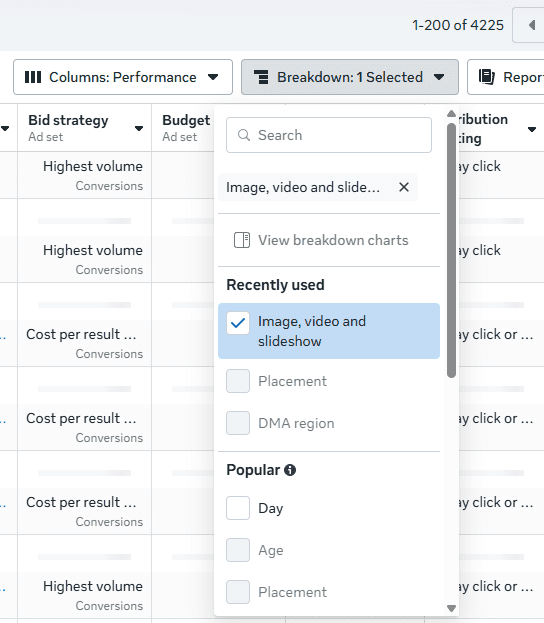
From the main Ads Manager screen, you can use the Breakdown option to segment performance by individual ad creative (images and videos). This can be done at either the ad set or ad level.

Breaking down performance by creative in MetaImage from author, October 2025

You can then see metrics such as clicks, link clicks, impressions, cost-per-click (CPC), click-through rate (CTR), reach, frequency, and spend for individual assets. However, you unfortunately cannot see counts for custom conversions or events broken down at this level.

While the lack of conversion data is a miss on Meta’s part, you can still find value in this reporting. If you’re using dynamic creative, you can see which individual assets are being served the most and which are receiving the highest engagement (based on CTR). You can also determine if frequency is running high for particular assets and if fatigue may be setting in.

If you’re running a single image ad without dynamic creative, but using different images for various placements (e.g., square images for feed placements and vertical images for Stories/Reels), you can still see conversion performance separated by breaking down by Placement instead of creative. Here, you can also delineate between different platforms (Facebook vs. Instagram vs. Threads) for individual placement types as well.

Custom Reporting

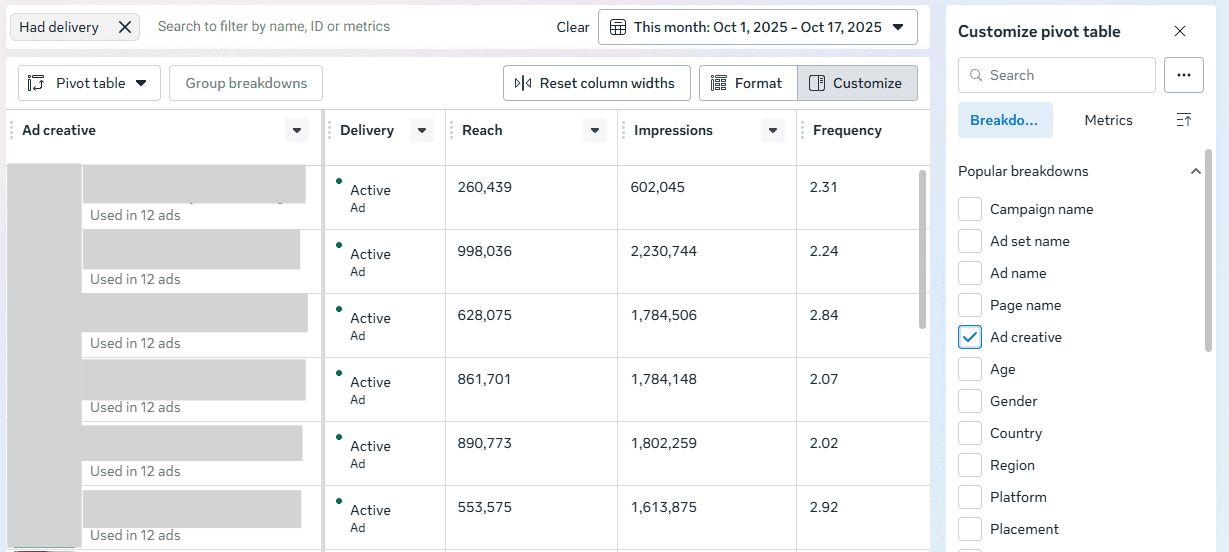
You can also use the Ads Reporting section to create a custom report that includes individual ad creatives in addition to metrics you’d like to see. When building your report, use a pivot table and check the box for “Ad creative” if you’d like to see data aggregated across campaigns and ad sets that are using the same creative.

Meta Ads ReportingImage from author, October 2025

You’ll then see a thumbnail of the image or video, along with the accompanying copy. This report can be helpful for doing aggregate comparisons of how specific images are performing if you’re reusing them for different ad sets or campaigns. For instance, you may have campaigns segmented by market for budget reasons, but be serving the same assets.

Creative Testing

We’ve looked at how to view creative performance across your Meta campaigns in a couple of different ways, but what if you want to stage a test from the ground up to compare how different creative assets might perform? You can use the standard Experiments feature that has existed for a while in Meta and set up separate ad sets or campaigns with different ads, but let’s hone in on the Creative Testing feature that’s specifically built for this purpose.

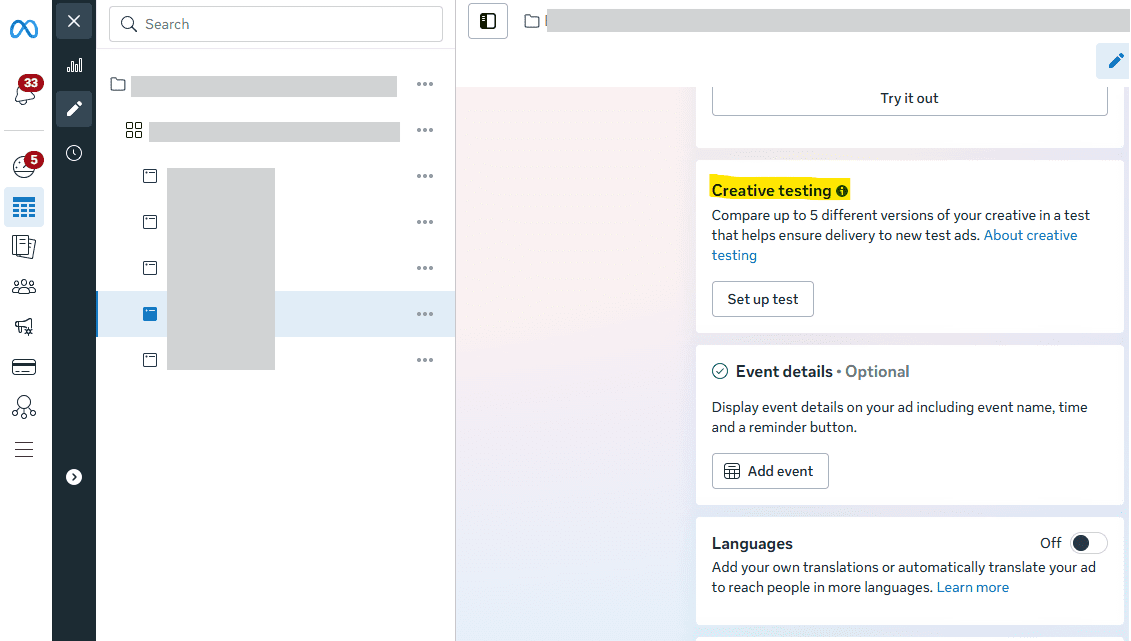
To kick off a test, go to the edit view for an existing ad within a campaign and scroll down until you see the “Creative Testing” section. Select the option to “Set up test.”

Creative TestingImage from author, October 2025

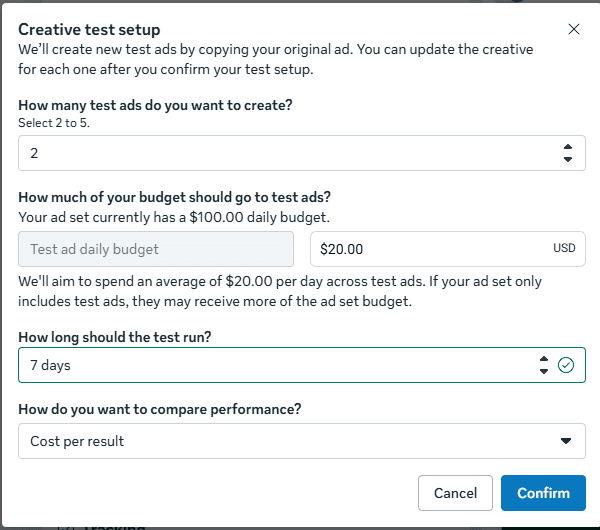
Next, you can define the criteria for your test setup. Start by choosing to create up to five ads. Then, allocate the amount of budget that you’d like to use and define the length of the test (up to 30 days).

Creative Test SetupImage from author, October 2025

Finally, select the metric you’ll use to evaluate success. You can choose a more general goal, such as CPC or cost per result, or you can choose a specific conversion (either custom conversion or event) to look at CPA.

Finally, confirm your test, and adjust the new creatives to include the updated assets you’d like to use. You can then view results in the Experiments section, or via the campaign in Ads Manager, as the test begins to run.

According to Meta, using this approach allows you to keep learnings from the test ads within your ad set if you choose to run them moving forward. As the learning phase can be a hindrance to getting new ads off the ground, this tactic can be a benefit in addition to the ease of testing.

Measurement Outside Meta

In addition to what you can see in Meta, use tools such as Google Analytics to see performance from ad clicks to your site. As long as you’ve properly tagged your ad URLs, you can see how specific ones have driven engagement and conversions on your site.

Meta’s attribution (even click attribution) is notorious for taking all the credit it can, but using another platform can allow you to see Meta traffic alongside other sources that may also have influenced conversion. You can then determine how Meta may have influenced the buying journey, as it often may appear earlier in consideration and be followed up by sources such as search.

What Should You Test?

How can you plan creative tests that give you actionable data? As discussed at the beginning of the article, differentiation is key to both avoiding fatigue and providing significant results.

While design capabilities may vary depending on your business’s resources and bandwidth, the availability of a plethora of AI tools and user-friendly design platforms allows for simple creation of multiple assets. Think through what works best for your brand, but some potential suggestions for comparison include:

  • Illustrated vector images vs. photography.
  • Stock photography vs. your brand’s photography.
  • Animation vs. static images.
  • Text-heavy assets vs. minimal or no text.
  • Informal “phone” videos vs. polished formal videos.

From here, you can evaluate which types of assets tend to best resonate with your audience based on the data you’re able to see both in Meta and in third-party platforms. Also, be careful not to completely write off a particular type of creative because of a past test. Audience preferences can change over time, so it’s worth retesting periodically.

How Can You Apply Your Learnings?

As you evaluate the performance of various assets, you can translate the learnings into practical application in Meta and beyond. For instance, if you find that animated text videos tend to perform well, you can create them for multiple products and test different video backgrounds.

Additionally, take learnings beyond Meta and apply them to other platforms. With the caveat that each platform is unique and what works on one may not be guaranteed to perform elsewhere, images that work on Meta may be worth testing in other channels, such as Google Demand Gen and LinkedIn.

Outside of ad platforms, you can also implement image styles or videos that performed in Meta testing onto your landing pages. For instance, if your Meta audience appears to resonate more with illustrated vector imagery as opposed to photography, test that type of creative in graphics on your site.

Start Evaluating & Start Testing

If you haven’t previously been paying enough attention to the performance of specific creatives in Meta, now is a crucial time to start doing so. Ensure that you’re using different enough variants and avoiding fatigue. Think through some tests you can set up for your clients or your brand, and start creating and launching new graphics.

More Resources:


Featured Image: Viktoriia_M/Shutterstock

Meta Projected $16B From Scam Ads, Internal Docs Show via @sejournal, @MattGSouthern

Advertisers on Meta may be unknowingly competing against suspected scam ads that stay in auctions at higher “penalty bid” prices.

Internal documents obtained by Reuters estimate that around 10% of Meta’s 2024 ad revenue, approximately $16 billion, would come from scam ads and banned goods.

Although Meta disagrees with these estimates, the real impact for advertisers includes potential increases in CPM, brand safety concerns, and uneven enforcement risks.

What Advertisers Should Know

Meta reportedly displays an estimated 15 billion ‘higher-risk’ scam advertisements daily across Facebook, Instagram and WhatsApp.

Meta earns about $7 billion annually just from these higher-risk scam ads that show clear signs of fraud, a late 2024 document states.

The company only bans advertisers when automated systems predict they are at least 95% certain to be committing fraud. Advertisers below that threshold face higher ad rates as a penalty but can continue running campaigns.

Internal Review: Easier To Run Scams On Meta Than Google

An internal Meta review concluded it’s easier to advertise scams on its platforms than on Google. The document doesn’t explain why.

Meta restricted anti-scam enforcement in the first half of the year to actions costing no more than 0.15% of total revenue, or approximately $135 million. A manager overseeing the effort wrote: “Let’s be cautious. We have specific revenue guardrails.”

Company spokesman Andy Stone said the internal estimates were “rough and overly-inclusive” and included many legitimate ads. He declined to provide an updated figure.

Meta reduced user reports of scam ads globally by 58% over the past 18 months and removed more than 134 million pieces of scam ad content in 2025, Stone said.

Why This Matters

On Meta’s platforms, internal documents projected about one in ten ad dollars in 2024 came from ads for scams and banned goods.

Meta’s penalty bid system charges suspected scammers higher rates but keeps them in ad auctions. You don’t know when you’re bidding against these inflated rates.

The revenue guardrails mean Meta caps how much fraud enforcement it will do if it impacts financial projections. Small advertisers must be flagged eight times for financial fraud before getting banned. Some large “High Value Accounts” accrued more than 500 strikes without Meta shutting them down.

A Meta presentation estimated the company’s platforms were involved in one-third of all successful scams in the United States.

The SEC is investigating Meta for running ads for financial scams, according to internal documents reviewed by Reuters. The UK Payment Systems Regulator said Meta’s products were linked to 54% of payment-related scam incidents in 2023.

What Meta Says

Stone clarified that the idea Meta should only take action when regulators demand it isn’t how the company operates.

He explained that the 0.15% figure mentioned in strategy documents was based on a revenue forecast and isn’t a strict cutoff. Additionally, testing the penalty bid program revealed a decrease in scam reports and a small dip in total ad revenue.

The main goal was to cut down on scam advertising by making suspicious advertisers less competitive in auctions.

Meta also outlines recent enforcement actions against scam centers in a Newsroom update.

Looking Ahead

Meta plans to lower the share of revenue from scams, illegal gambling, and prohibited goods from an estimated 10.1% in 2024 to 7.3% by the end of 2025. The target is to reach 6% by the end of 2026 and 5.8% in 2027, as outlined in strategy documents.


Featured Image: JarTee/Shutterstock

Pinterest Launches “Top of Search” Ads In Beta via @sejournal, @MattGSouthern

Pinterest has introduced new ad products focused on visual search, highlighted by ‘Top of Search’ ads.

Currently in beta across all monetized markets, these ads can appear within the first ten search results and in Related Pins, targeting users as they begin discovering products.

Why This Matters For Search Marketers

Pinterest is a search platform where users arrive with shopping intent, much of which remains unfulfilled.

According to the company’s data, 45% of clicks occur within the first ten results, and 96% of top searches are unbranded. That makes Top of Search placements ideal for category discovery through paid ads.

For advertising teams, this creates a new SERP-like space to compete in, combining search intent with visual creative.

Additionally, Media Network Connect integrates retailer first-party audiences and conversion data into Pinterest Ads Manager via partners such as Kroger Precision Marketing and Instacart Ads, making measurement and incrementality testing more feasible than before.

Early Results

Pinterest reports that Top of Search ads have a 29% higher average CTR compared to typical campaigns and are 32% more likely to attract new customers.

These results are based on platform data and may differ depending on the category and creative used.

Additional Updates

Local Inventory Ads Expanded

Pinterest has expanded Local Inventory Ads in shopping markets, providing real-time prices for in-stock items within a shopper’s nearby store radius.

Retailer Data In Ads Manager

A new self-service feature, Media Network Connect, allows media networks to share first-party audiences, product catalogs, and conversion data directly with advertisers within Pinterest Ads Manager.

Early U.S. partners include Kroger Precision Marketing and Instacart Ads, with additional partners upcoming.

Christine Foster, Senior Vice President at Kroger Precision Marketing, said:

“This new capability empowers advertisers with faster decision-making and control, while using purchase-based audiences direct from the retailer.”

Looking Ahead

Competition for commerce search is expanding across social media and retail platforms. Pinterest emphasizes unbranded, visual discovery and stronger retailer data integrations.

If you’re already using Pinterest Shopping or Catalog campaigns, trying the beta, despite limited inventory, can help you identify where search-related visual placements could integrate into your marketing strategy.

YouTube Lets Creators Pick Exact CTAs In Promote Website Ads via @sejournal, @MattGSouthern

YouTube has updated its Promote feature, giving you more control over campaigns designed to drive website traffic.

When you set a campaign goal of “more website visits,” you can now choose a specific call to action, such as “Book now,” “Get quote,” or “Contact us.”

The change was announced during YouTube’s weekly news update for creators:

More Targeted Campaign Goals

Previously, Promote campaigns for website traffic used broader objectives. Now, you can define a more granular outcome that better matches your business goals.

For example, a consulting service might pair its campaign with a “Get quote” button, while an event organizer could use “Book now.”

By letting you choose the intended action, YouTube is making it easier to connect video promotion with measurable results.

How YouTube Promote Works

Promote is YouTube’s built-in ad creation tool, available directly in YouTube Studio.

It allows you to run ads for Shorts and videos without going through the Google Ads interface. You can create campaigns to:

  • Gain more subscribers
  • Increase video views
  • Drive visits to your website

Campaign creation and management happen entirely within YouTube Studio’s Promotions tab, keeping the process straightforward for creators who may not have experience with traditional advertising platforms.

Why This Matters

For creators promoting services, products, or events, the ability to align ads with a specific action could improve return on investment and make performance tracking easier.

Marketing teams managing YouTube channels for clients can now link spend to clear outcomes, strengthening the case for campaign value.

Looking Ahead

This update is part of YouTube’s push to give creators accessible yet more powerful monetization and promotion tools.

For marketers, it creates another measurable step in the customer journey, offering insight into how video campaigns contribute to broader marketing goals.


Featured Image: Roman Samborskyi/Shutterstock
How To Use Paid Search & Social Ads For Promoting Events via @sejournal, @LisaRocksSEM

Paid media offers one of the fastest ways to promote a business event and get the right people to take action.

Event campaigns are not just regular ads with a date added. They need a dedicated strategy, setup, budget, and audience targeting to succeed.

From webinars and product launches to open houses and local promotions, you’ll get better results by treating your event like a stand-alone campaign.

Here’s how to approach it with paid search and social ads that drive participation.

What Types Of Events Can Be Promoted?

Here are common examples of business events that can benefit from paid ad promotion:

  • Conferences (virtual or in-person).
  • Webinars.
  • Product launches.
  • Open houses.
  • Grand openings.
  • Sales or seasonal promotions.
  • Trade show participation or speaking engagements.
  • Local festivals or community events.
  • Pet adoption events.
  • Sports or sponsorship tie-ins.
  • Class registrations or training signups.

For an “event,” we generally look for a special, notable activity outside of normal business, with a limited time for engagement.

Considerations Before Campaign Setup

Use A Stand-Alone Campaign

Each event should have its own dedicated campaign. This gives you more control over:

  • Budget.
  • Targeting.
  • Messaging.
  • Conversion tracking.

Don’t try to squeeze event ads into your evergreen campaigns. Keep it separate so you can measure impact clearly.

Budget Separately

A separate budget prevents your main campaigns from losing momentum. Even a small spend focused on urgency and high-intent audiences can produce a strong ROI.

Incorporate Into Your Ad Copy

Add event details directly into your ad copy, such as headlines or descriptions in responsive search ads (RSAs), and use the pinning feature to lock critical details into place.

For higher control, create an entirely new custom ad built specifically around the event message.

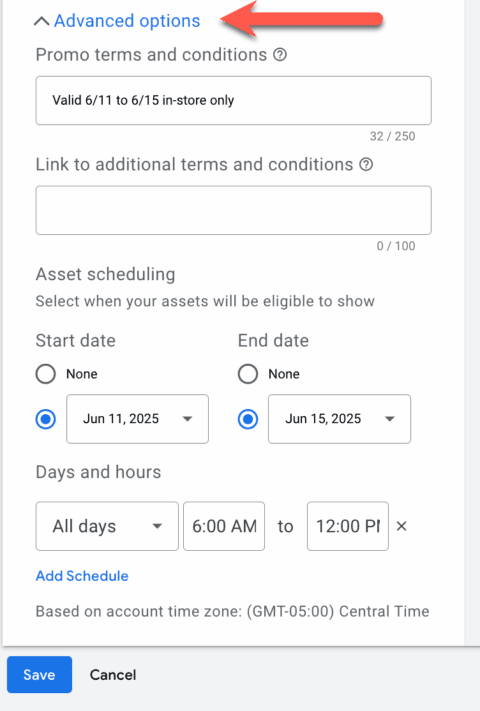
Use promotion assets in Google Ads for sales-driven events that include a discount or monetary offer.

Double-check each platform’s documentation to confirm which features are available and how they are currently labeled.

screenshot of promotion extension in google adsScreenshot by author, June 2025

4 Tips To Design High-Performing Event Campaigns

After creating a new campaign for your event and allocating its budget, there are several other factors to consider when promoting events.

Tip 1: Get Straight To The Point

Event ads need clear details upfront:

  • Event name.
  • Date and time.
  • Location (or virtual link).
  • A CTA like “Register”, “Sign Up”, or “Save Your Seat.”

Use direct headlines and don’t leave room for interpretation. Test countdown timers (Google) in your ad copy to build urgency.

Check out Microsoft Ads, which has a great explanation on how the countdown feature works.

  • Example: “Only 3 Days Left to Register for the Free AI Workshop”

If you’re offering discounts or early-bird pricing, clearly state it in both the headline and description.

Below is the Google Ads example of setting this up in a headline and steps to implement.

screenshot of countdown timer steps in google adsScreenshot by author, May 2025

Tip 2: Be Strategic About Timing

The timeline for event promotion is mission-critical. Some events only require a few days of promotion, while others may need weeks or months of preparation.

Plan around three phases:

  • Pre-event hype: Build interest and drive signups.
  • During the event: Push for last-minute attendance or livestream engagement.
  • Post-event: Retarget attendees for future events or promote replays.

Also, confirm your ad platform’s scheduling limits. Google ends ads at 11:59 p.m. of the advertiser’s time zone. Some let you choose a specific time (in 24-hour format).

Tip 3: Location Targeting

The location targeting will be largely determined by the event’s real, physical location, but there are a few things to consider.

Depending on the density of the customer base, location targeting will vary for each advertiser. Match the event’s scale to your location settings:

For example:

  • Local: Use radius or city-level targeting around the physical location.
  • Regional: Layer metro areas or ZIP codes with high interest.
  • National or online: Prioritize geos with the highest engagement or ROI historically.

With national targeting, you may want to prioritize budget allocation to major metro areas. Another approach is to review your customer purchase data for trends in revenue or return on investment (ROI) by location.

Tip 4. Use Targeting Unique To The Event

Your existing keyword list or audience segments may not apply to an event. Build targeting around:

  • Specific event names or branded keywords, such as “Tech Expo 2025.”
  • Related topics or products featured at the event, such as boat models for the boat show.
  • Competitor brands or category searches.
  • Audience interests like “small business tools” or “data analytics training.”
  • Use customer lists on your preferred platform to reach similar audiences.

Bonus Tip: How To Leverage Events (Local Or Otherwise) Even If You Are Not Participating In Them

You don’t need to be directly involved in the event to benefit from event-driven ad traffic. You can also capitalize on events related to your business to gain extra exposure.

For example, if a local wedding expo is happening in your area, a florist or event planner can run campaigns targeting attendees who are searching for event services during the show.

This strategy works for:

  • Industry conferences.
  • Seasonal community events.
  • Awareness days or promotional months.

Set up a parallel campaign with relevant offers or content that aligns with the audience’s mindset during the event.

Final Thoughts

Event campaigns deserve more than a last-minute or a generic ad slot.

With a strategic approach, they can build brand awareness, generate leads, and leave a lasting impression.

By setting up a dedicated campaign, writing clear and timely messaging, and using specific targeting, you’re setting the stage for better results.

Even if you’re not hosting the event, there are still ways to show up and be seen.

Put your event in the spotlight. When you run it like a pro with paid media, the results speak for themselves.

More resources: 


Featured Image: PeopleImages.com – Yuri A/Shutterstock

TikTok Ads Achieve Highest Short-Term ROI, Says Dentsu Study via @sejournal, @MattGSouthern

A recent Dentsu study, in partnership with TikTok, shows that advertisers on the platform achieve strong returns on investment (ROI) for both short-term and long-term sales.

The analysis (PDF link) focused on 15 brands in Norway, Denmark, Sweden, and Finland and compared TikTok’s performance with other media channels.

Dentsu found:

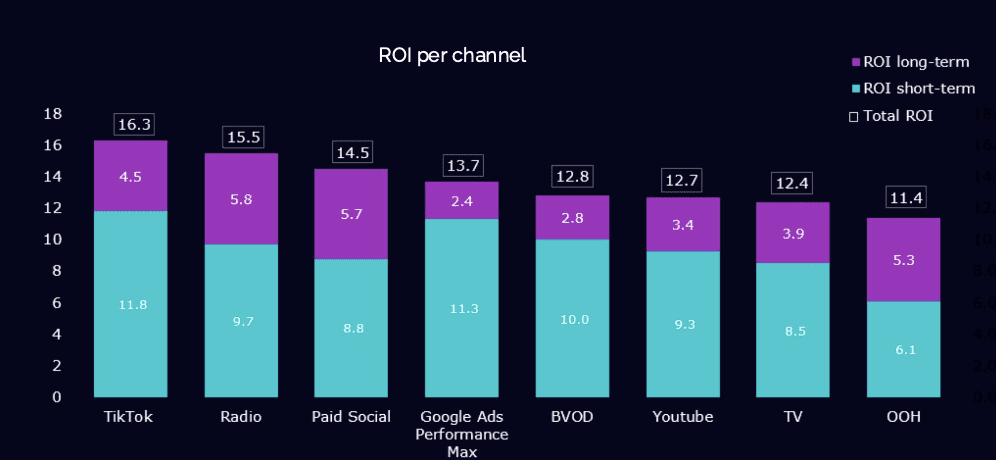
“With a short-term ROI of 11.8, TikTok ranks among the most effective media channels for driving immediate sales, according to dentsu benchmark data. In practical terms, this means that advertisers generate nearly 12 times their initial investment in sales revenue within just six weeks—establishing TikTok as one of the strongest performance marketing channels available.”

In other words, advertisers gained nearly 12 dollars in sales for every dollar spent in six weeks or less.

For comparison, Dentsu measured the average short-term ROI from all media at 8.7.

Other top findings from the Dentsu study include:

  • 75% of advertisers found that TikTok provided the highest ROI compared to other channels.
  • All advertisers saw a substantial boost in short-term sales from TikTok.
  • To achieve the best short-term results, combine lower-funnel platforms with TikTok.
  • TikTok’s sales impact lasts 3 to 4 weeks after a campaign ends.
  • Advertisers with the best ROI stayed active on TikTok.
  • User-generated content featuring creators had the strongest sales impact.

What About Long-Term Impact?

The data indicates that, in addition to the 11.8 ROI achieved in the first six weeks, a 4.5 ROI is observed within 10 months after exposure.

This suggests that TikTok can function as a performance channel for immediate results and a tool for building brand equity over the long term.

However, as you can see in the chart below, several ad platforms achieve better results than TikTok in the longer term.

Screenshot from: From Storytelling to Sales: Short and Long-Term ROI of TikTok. A Marketing Mix Modeling Study By Dentsu. February 2025.

Storytelling Ads Perform Better

The study examined two main types of user-generated content (UGC):

  • Storytelling UGC: Content with a narrative focus and no direct promotional offers.
  • Tactical UGC: Content centered on pricing, sales promotions, or direct product calls to action.

Dentsu found that storytelling-based UGC drove stronger sales results than tactical promotions.

The narrative approach generated better audience engagement and recall, translating to 70% higher ROI than promotional content.

What This Means

Dentsu’s data shows TikTok can help meet both short-term sales goals and long-term brand goals.

Advertisers looking for quick sales and lasting brand impact could consider including TikTok in their media strategy.

Methodology

Dentsu used a three-step approach to measure TikTok’s full impact:

  • Short-Term Sales: Tracked direct revenue within 6 weeks of ads running while filtering out other market factors.
  • Brand Metrics: Measured how TikTok advertising shifted consumer perceptions.
  • Long-Term Sales: Connected those brand perception changes to additional sales 1-10 months later.

The study analyzed actual spending and sales data from 15 Nordic brands over 2-3 years. Statistical models isolated TikTok’s contribution from external factors like seasonality, competition, and other marketing channels.

This methodology captures both immediate performance and longer-term brand effects in a single framework.


Featured Image: Poetra.RH/Shutterstock

Meta Threads Takes the Next Step By Launching Ads via @sejournal, @brookeosmundson

Big news from Meta: Threads, the platform everyone rushed to last summer, is officially testing ads.

In its announcement today, Threads is launching an image ads test with select brands in the United States and Japan.

For now, this is just a trial run with a handful of brands, but it’s a clear sign that Meta is ready to monetize its newest social media experiment.

In case you missed it, Threads launched in July 2023 as Meta’s answer to X (formerly Twitter). It quickly gained traction, passing 300 million monthly active users, largely thanks to its integration with Instagram.

While its user base might not be as sticky as Meta hoped, this move shows that they’re betting on Threads as more than just a fleeting trend.

What Does the Ad Test Look Like?

The ads being tested are image-based and will pop up in users’ home feeds. In early testing, ads on Threads will show for only a small percentage of people.

Image credit: Facebook.com, January 2025

Meta is gauging how users respond and will decide whether to expand the program based on the data.

Meta’s Approach to Brand Safety

Meta is providing Threads users with control over the ads they see to help them understand how their information is used for ads, and ways to change their experience.

Users will be able to skip an ad they don’t like, or hide or report an ad that they deem inappropriate.

Additionally, Meta is testing an AI-powered inventory filter. This tools lets advertisers control the types of content their ads appear next to, giving brands more confidence to experiment with new platforms like Threads.

Why Advertisers Should Care

For advertisers wanting to jump on this initial test, businesses can simply extend their existing Meta campaigns to Threads without additional creative.

In Meta Ads Manager, advertisers can simply check a box indicating that they’d like to add Threads as a placement.

It’s important to note that by checking the Threads placement box, it does not automatically mean your ads will appear right away because this is a limited test.

Meta did not confirm what brands or verticals would be eligible for this initial test, but we’ll keep an eye out for early advertisements.

Threads’ emphasis on visual content and casual conversations creates a unique opportunity for advertisers to experiment with creative approaches. If your audience is already active on Instagram or Facebook, this could be the perfect extension to your campaigns.

Being an early adopter on a platform could give you a competitive edge when it comes to understanding what resonates.

Next Steps for Marketers

While Threads may still be finding its identity, it’s already proven it can attract a massive audience. And with Meta’s established advertising infrastructure, it’s only a matter of time before Threads becomes a key player in the ad space.

If you’re already running campaigns with Meta, this is your chance to get a head start on a brand new ad platform.

When testing, start small, monitor your performance, and pay attention to how users interact with ads on the platform.

Don’t sleep on the opportunity to test creative formats. Keep an eye on updates from Meta as they expand this test. We will continue to update as more information comes to light.

How To Optimize TikTok Ads After You Set Up Your Campaign via @sejournal, @brookeosmundson

TikTok isn’t just a place for dance challenges or trendy lip-sync videos; it’s now one of the most powerful platforms for advertisers.

With its unique mix of authenticity and creativity, TikTok offers marketers a golden opportunity to reach engaged audiences in fresh ways.

But setting up a campaign is only the beginning. Once your ads are live, optimizing them to meet your goals is where the real magic happens.

In this guide, we’ll dive into practical, data-driven steps to improve TikTok ad performance after setup.

Whether your goal is to boost brand awareness or drive conversions, this article will show you how to refine your strategy for maximum impact.

1. Know Your Objectives And KPIs

Before diving into optimization, it’s essential to clarify your campaign’s objectives and identify key performance indicators (KPIs).

Are you aiming for brand awareness, engagement, or conversions?

Each objective requires different tactics and metrics to gauge success.

Review KPIs like impressions, clicks, click-through rates (CTR), and conversions regularly. Tracking these lets you adjust your approach based on how close you are to your goals.

For instance, if your primary goal is brand awareness, focus on engagement rates rather than immediate conversions. Keeping your objectives front and center will help shape every decision as you optimize.

2. Audience Refinement And Targeting Adjustments

TikTok’s wide-reaching audience is one of its strengths, but casting too broad a net can dilute your results.

Once you have initial data from your live ads, it’s time to refine your targeting:

  • Demographic Adjustments: Analyze the demographics of users interacting with your ads. Adjust your target audience to match the profiles that are responding best. For example, if you see a strong engagement from a particular age group or gender, double down there.
  • Interest And Behavior-Based Refinement: TikTok allows for interest-based targeting, which can help you reach specific niches. If you see that users interested in “travel” engage with your content more, consider adjusting your interests or behaviors to focus on that.
  • Custom And Lookalike Audiences: Custom audiences (based on engagement or website traffic) and lookalike audiences (based on your existing customers) are invaluable for re-targeting and prospecting. These segments let you focus your budget on high-intent users who are likely to convert, creating a win-win for efficiency and results.

Additionally, TikTok Ads has the ability to create “AND” audiences, allowing for further refinement based on behavioral performance.

For example, you can create an audience that includes a certain demographic factor, AND portrays a specific interest. This type of targeting narrows down the focus instead of using an “OR” behavior, which targets anyone in either of those categories chosen.

3. Optimize Your Ad Creative

TikTok is all about eye-catching content, so optimizing ad creative is non-negotiable.

Dive into your metrics – CTR, engagement rate, completion rate – and identify trends in what’s working.

  • A/B Testing: Split-testing different video creations can provide insights into what resonates most. Test elements like video length, style, and music choice to see what improves results.
  • Trendy, Authentic Content: TikTok users are drawn to authenticity. Swap polished brand visuals for raw, relatable content that feels natural in users’ feeds. Experiment with user-generated content (UGC) styles to tap into TikTok’s unique vibe.
  • Adjust Visuals Regularly: TikTok trends move fast. Refresh visuals, sounds, and messaging to stay relevant and avoid “ad fatigue,” where users tune out repetitive content.

If possible, try to have five to 10 creatives per ad group running at all times to reduce creative fatigue.

When first starting out, try testing creatives with big differences between the two, not small nuances, to really understand what’s going to capture your audience from the start.

These steps help you create a feedback loop where the data from each test iteration informs the next, sharpening your creative with each optimization cycle.

TikTok has a variety of creative tools in its Business Help Center, including:

  • Video template tool.
  • Smart creative.
  • Creative exchange.
  • Creative best practices.
  • And more.

4. Use Automated Bidding Strategically

TikTok’s automated bidding options, like “Maximum Delivery” and “Bid Cap,” can help streamline budget management. Knowing when to use them effectively, though, is key.

  • Start With Manual, Then Test Automated: Many advertisers find value in starting with manual bidding for tighter control, then testing TikTok’s automated options once they gather performance data.
  • Bid Adjustments Based On Engagement: If an ad shows high engagement but low conversions, consider using manual bid adjustments to focus spend on high-engagement periods or audiences.

Here’s a quick breakdown of the two automated bid strategy options:

Cost Cap Bidding

  • How It Works: Keeps your average cost similar to your bid, regardless of daily/lifetime budget.
  • Advertising Objectives available: App Installs, Conversions, or Lead Generation objectives can be chosen with this strategy.
  • Cost Metrics: Cost per Click (CPC), Cost per Thousand (CPM), Cost per View (CPV), and Optimized Cost per Thousand (oCPM).

Maximum Delivery Bidding

  • How It Works: Maximizes budget usage by driving the most results possible, given a specified budget and a certain time period.
  • Advertising Objectives available: Traffic, Reach, Video Views, App Installs, Conversions, Lead Generation, and Catalog Sales objectives can be chosen with this strategy.
  • Cost Metrics: CPC, CPM, CPV, oCPM.

Automated bidding is particularly beneficial when managing multiple campaigns, but always monitor closely.

TikTok’s bidding algorithm can free up time, but a “set it and forget it” approach rarely leads to optimal results.

5. Ad Placement And Schedule Adjustments

TikTok gives you control over placement and scheduling – two levers you can use to ensure your ads reach the right audience at the right time.

By default, TikTok will set an ad group with Automatic Placements, meaning your ad will be available to be chosen in each available ad placement (depending on your ad type, bid strategy, etc.)

If you’re looking to harness more control at the beginning, you can turn that setting off. The following manual placements can be selected or de-selected:

  • TikTok: Allows for placement on TikTok based on your advertising objective.
  • Global App Bundle: An integrated traffic solution that places ads on other popular apps, like CapCut and Fizzo.
  • Pangle: The ad network of TikTok for business that allows you to reach users across top local publishers on the platform.

Below are a few tips for getting started with ad placement and schedule adjustments.

  • Review Placement Performance: Ads can show up in different TikTok placements. Start by examining how each is performing. If the “For You” feed drives better engagement than other placements, consider focusing your budget there.
  • Dayparting For Maximum Impact: Dayparting – scheduling ads to run at specific times – can improve efficiency. Look at when your target audience is most active and adjust your schedule to maximize impact during those hours.

These adjustments ensure your ads are not just “on” but active in ways that maximize visibility and relevance.

6. Retargeting And Sequencing For Engagement

As users engage with your brand on TikTok, retargeting allows you to keep them in the loop without starting from scratch.

  • Engagement-Based Retargeting: Use retargeting to reach users who have interacted with your brand but haven’t converted. Target viewers who’ve engaged with your videos or clicked but haven’t completed an action. This high-intent group is more likely to convert with the right nudge.
  • Sequencing Ads To Tell A Story: Ad sequencing is a powerful way to build a narrative across multiple videos. A sequential approach lets you nurture leads by gradually building brand familiarity and trust, guiding users down the conversion funnel naturally.

Considering 72% of TikTok users agree that a brand is memorable even three weeks after initial ad exposure, remarketing efforts on TikTok are a no-brainer.

These techniques can boost engagement and help guide audiences from mere interest to genuine investment in your brand.

7. Analyze And Optimize Landing Pages

If your landing page or app experience doesn’t align with your TikTok ad, you’ll likely see high bounce rates.

As with any ad, optimize those landing pages for a seamless transition from ad to action.

  • A/B Test Landing Pages: Experiment with different layouts, messaging, and calls to action on your landing pages. TikTok users prefer a smooth, distraction-free experience, so every element on your landing page should support your ad’s call to action.
  • Page Speed Matters: TikTok is a fast-paced platform, and users expect speed. Ensure your landing pages load quickly to reduce drop-off.

In short, your ad and landing page should feel like a cohesive journey that’s frictionless and aligned with your audience’s expectations.

8. Experiment With TikTok’s Advanced Features

As TikTok evolves, so do its advertising options.

Advanced features like Spark Ads, Dynamic Showcase Ads, and Catalog Sales provide unique ways to reach audiences.

  • Spark Ads For Organic Feel: Spark Ads allow brands to partner with influencers or use existing organic posts as ads. This format enhances trust and engagement as it appears less like a traditional ad and more like organic content.
  • Dynamic Showcase Ads And Catalog Sales: For ecommerce brands, these features let you showcase products dynamically, creating a more personalized ad experience. Optimize these ads by using high-quality visuals and up-to-date catalog information.

Taking advantage of these advanced features allows your brand to stay ahead of the curve and engage audiences in innovative ways.

Embrace Optimization With Continuous Testing

The TikTok landscape moves quickly, making continuous testing essential for ad performance. Every ad format, audience adjustment, and creative tweak contributes to your overall learning.

Setting up TikTok ads is just the first step in a larger optimization journey.

To unlock the full potential of TikTok, marketers need to embrace data-driven adjustments, experiment with new formats, and consistently align their content with TikTok’s fast-moving trends.

By refining targeting, leveraging creative testing, and optimizing placements, you can push your campaigns to perform at their best.

Let’s face it: TikTok is one of the most dynamic platforms today. With a bit of experimentation and a lot of flexibility, your ads can thrive here, bringing both visibility and results to your brand.

More resources:


Featured Image: Roman Samborskyi/Shutterstock
LinkedIn Reveals Data-Backed Formula For B2B Ad Success via @sejournal, @MattGSouthern

LinkedIn unveils research-backed creative principles to boost B2B ad performance, as 90% of CMOs seek bolder marketing approaches.

  • Vertical mobile ads drive 31% higher engagement than horizontal formats on LinkedIn.
  • 81% of B2B ad campaigns fail to achieve both attention capture and brand recall.
  • Humorous content generates 65% higher engagement rates on LinkedIn.