We launched the Yoast SEO Task List in December to give you a clear, actionable to-do list for your site’s SEO. In this update, we’ve added two new tasks, improved how you navigate to fixes, and resolved a bug that was showing tasks in the wrong language.
A quick recap: what does the Task List do?
The Task List scans your site and surfaces specific content that needs attention, ranked by priority with an estimated time to fix. Instead of guessing what to work on next, you click a task and Yoast takes you directly to the right place to make the improvement. Think of it as a personal SEO assistant that knows your site.
What’s new in this update
New task: improve your meta descriptions
Meta descriptions are the short snippets that appear under your page title in Google search results. They don’t directly affect rankings, however they have a significant impact on whether someone clicks your link. The Task List will now flag recent posts where the meta description is missing or could be stronger, and point you to where you can fix it. Premium users can use the AI Generate button to write one in seconds.
New task: delete your sample page
Every new WordPress site comes with a default “Sample Page” that most people never delete. It adds no value and can create unnecessary noise for search engines. The Task List will now remind you to remove it if it’s still there. It’s a two-minute job that’s easy to overlook.
When someone shares your content on Facebook or X, the image that appears alongside it can make a real difference to whether people click. The Task List will now remind you to set a custom social sharing image for your posts and pages, so your content looks its best every time it gets shared.
Go directly to the right place in the editor
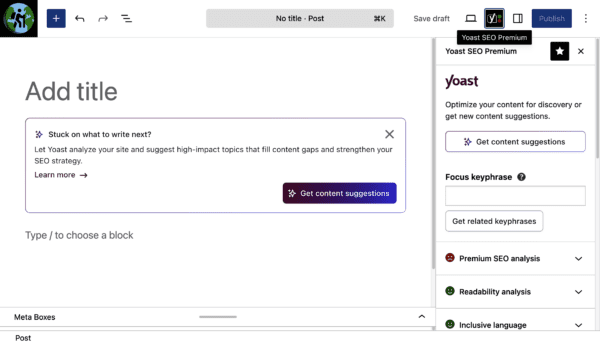
Previously, clicking a task would open the post editor and leave you to find the right section yourself. Now, Yoast takes you to the exact part of the editor you need: the SEO tab, the readability panel, or the meta description field. Less scrolling, faster fixing.
Bug fix: tasks now appear in your language
We fixed a bug where task descriptions were showing up in the site’s language rather than the logged-in user’s language. If you manage a multilingual site, or your personal language settings differ from your site’s default, tasks will now display correctly for you.
Also in this release
We’ve added a new Yoast tab to the WordPress Plugins screen that groups all your installed Yoast plugins in one place. This requires WordPress 7.0+.
We fixed a bug where alt text changes made via the inline image editor in How-to and FAQ blocks weren’t saving correctly to the frontend. Thanks to @param-chandarana for the report.
What’s coming next
We’re continuing to expand the Task List with improvements that surface high-impact changes specific to your content. Users of paid plans will see additional tasks in upcoming releases.
Update to Yoast SEO 27.4 to get these improvements automatically, or download the latest version from the WordPress plugin directory.
Beth is Product Marketing Manager at Yoast. Before joining the company, she honed her digital marketing and project management skills in various in-house and agency environments.
Eligible Yoast customers can now run a free Yoast AI Brand Insights scan and get a personalized report showing how ChatGPT, Perplexity, and Gemini see your brand. Your brand is part of the AI conversation whether you’re monitoring it or not. Yoast AI Brand Insights, part of the Yoast SEO AI+ plan gives you visibility into what AI tools say about you, how often you appear, and whether the picture they paint matches reality. To help you see that for yourself, we’re offering eligible customers a free, one-time scan.
What you’ll see
Your AI Visibility Index: a clear score showing how present your brand is across ChatGPT, Perplexity, and Gemini
Sentiment analysis: whether AI describes you positively, neutrally, or in a way that needs attention
Competitor benchmarking: how often your competitors appear alongside you, so you know where you stand
Citation tracking: which sources AI is drawing on when it talks about your brand
How it works
Add your brand details, set your location, and generate your queries. Your personalized report is ready in minutes.
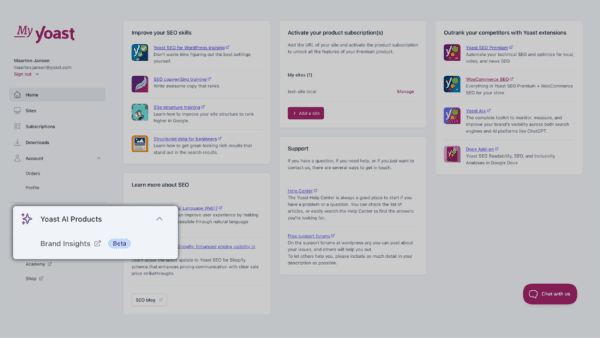
Current customers can locate Yoast AI Brand Insights inside their MyYoast account
Who is eligible
Existing customers on one of the following plans can log in and try a brand scan for free today.
Yoast SEO Premium
Yoast WooCommerce SEO
Yoast SEO Google Docs add-on
Look out for your invitation inside the product the next time you log in.
Beth is Product Marketing Manager at Yoast. Before joining the company, she honed her digital marketing and project management skills in various in-house and agency environments.
You’ve worked hard to build your product catalog. The last thing you want is AI tools like ChatGPT or Google Gemini describing your products inaccurately to potential customers.
AI tools don’t browse your whole store the way a search engine does. They grab what they can find, quickly, and fill in the gaps. For a store with a large catalog, that means incomplete answers, outdated information, or worse, sending shoppers to a competitor.
The new llms.txt feature, available in Yoast SEO for Shopify bridges that gap.
What does it actually do?
It creates a file that tells AI tools which parts of your store matter most: your top products, your collections, your policies, and your key pages. Think of it as handing AI a well-organized store guide instead of letting it wander around on its own.
You switch it on once. We handle the rest.
Two ways to use it
Let Yoast handle it automatically
Turn it on and we’ll build and update the file each week based on your Shopify data. No decisions needed. The file automatically highlights:
Your 10 most-sold products over time
Up to 5 of your largest collections, plus a link to your full product range
Your store policies, including shipping, returns, and privacy
Your homepage, latest blog posts, and most recently updated pages
Any pages you’ve already marked as cornerstone content
Or choose exactly what’s included
If you’d rather have full control, switch to manual selection. You can hand-pick the products and pages you want to feature, and there’s a dedicated spot to add your “About us” page so AI knows the story behind your brand.
Either way, the file updates weekly and removes deleted products automatically.
No technical knowledge needed
Setting this up from scratch would normally mean editing code. We’ve built it directly into your Yoast SEO for Shopify settings so any member of your team can turn it on in seconds. If you already have a redirect set up for /llms.txt, we’ll respect it and let you know, so nothing breaks.
You decide when it’s right for your business
We believe every merchant should have a say in how their content is seen and used as AI plays a bigger role in how people discover products online. That’s why this feature is opt-in.
Turn on the llms.txt toggle in Yoast SEO for Shopify next time you log in to your store.
Beth is Product Marketing Manager at Yoast. Before joining the company, she honed her digital marketing and project management skills in various in-house and agency environments.
In November 2025, Yoast announced a collaboration with NLWeb, an open web protocol developed by Microsoft designed to simplify building conversational interfaces for the web.
Today, we are proud to introduce the first major result of that work: Yoast SEO Schema Aggregation. This is an opt in feature that brings your website’s structured data together in a clearer and more consistent way. By choosing to enable it, you can help search engines and intelligent agents better understand and use your content.
If you want to see which schema types are available for your WordPress setup, our schema overview explains what is included across different product plans.
Bridging the gap: from discovery to conversation
Yoast has a history of helping WordPress websites be represented fairly and responsibly in the open web.
Today: we are taking the next step. As the agentic web becomes more important, we are helping your WordPress site move from being discovered to being understood and engaged with through conversation.
Starting today, the new Schema Aggregation feature in Yoast SEO is here. It establishes a standardized connection between your website’s structured data and the systems that power AI-driven discovery and interaction. These include large language models, agents, and conversational assistants such as Copilot. It helps ensure your published content can be understood correctly by AI. This matters as AI becomes part of how people find and use information online.
The NLWeb + Yoast integration is built in collaboration with the NLWeb team, including R.V. Guha, co-founder of Schema.org. Together, we are extending the open web standards you already rely on, so your WordPress website can participate confidently in the emerging agentic web in a responsible and future ready way.
Benefits of the Schema Aggregation feature
Questions about AI often come down to one thing: who can access your data. This feature is built with a privacy first approach from the start.
Complete: All indexable content included
Clean: No duplicate entities, no navigation clutter
Connected: Relationships between entities preserved (author → articles)
Compliant: Respects exisiting privacy settings
Fast: Sub-100ms cached responses, pagination for large sites
For developers and technical users who want more control, we have developer documentation on schema markup. It explains how to inspect and extend your schema graph. This gives you maximum personalization, while retaining standardization at scale.
“You can’t stop the AI wave, but you can direct it. Our integration with NLWeb puts you back in charge. It allows you to manage server load efficiently and ensures that when AIs do access your content, they get the rich, semantic understanding necessary to represent you correctly.” Alain Schlesser – Principal Architect, Yoast.
What’s new
The next time you log in and open Yoast SEO (updated to 27.1), you’ll see a short guided walkthrough. It introduces the new Schema Aggregation feature. It also shows how to enable it using a simple toggle.
We have added a new endpoint to Yoast SEO (free), making the Schema Aggregation feature available to all customers who choose to enable it. The endpoint exposes your site’s full structured data graph in a proposed new standard called a schemamap.
That means, instead of an AI system crawling hundreds of pages individually (or however many pages you have on your website), it can now retrieve your site’s schema, including articles, authors, products, and organizational data, in one optimized request.
Before and after: from pages to a connected site
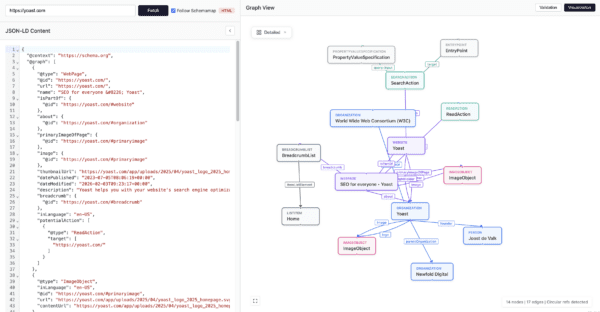
Below is an example of the structured data Yoast already outputs on an individual page. This page level schema helps search engines understand what that specific page is about, including its content type, author, and relationships.
An example of Yoast schema markup at the individual page level, the example shown is yoast.com
With Schema Aggregation enabled, Yoast provides a site-level view. Instead of looking at pages in isolation, your entire website’s structured data is connected. It consolidates into a single output called a schemamap. This can appear quite overwhelming to look at. It makes it easier for AI systems to understand your content. They can see how your articles, authors, products, and organisation relate to each other across the site.
How it works: Standardized, connected, and deduplicated
The Schema Aggregation feature doesn’t just share data; it organizes it for AI consumption:
Eliminates data mess: It merges duplicate mentions of authors, products, or articles into one scalable, connected record.
Integrates automatically: If you use one of our Schema API partners like The Events Calendar or WP Recipe Maker, those schema types are included in the graph automatically.
Developers can also explore our Schema Integrations page to see how Schema API partners connect to and extend the Yoast SEO Schema Framework (the graph).
Collaborative innovation
When working at scale across tens of millions of websites, careful testing is essential to ensure a safe and reliable launch. This feature was developed with agencies and advanced users in mind, and tested in controlled environments.
We collaborated closely with Syde, our Innovation Partner, to test the new feature across a diverse range of real-world client scenarios. The approach for this release was tested in controlled environments to confirm scalability and consistent output quality before deployment.
Syde’s feedback has been instrumental in refining the schema aggregation logic. We look forward to continuing this partnership, working together to help clients remain visible and accurately represented as AI driven systems evolve.
Be visible, understood, and represented
The rules of discovery are shifting, but your site doesn’t have to be left behind. With NLWeb and Yoast, your website stays at the center of the conversation.
Beth is Product Marketing Manager at Yoast. Before joining the company, she honed her digital marketing and project management skills in various in-house and agency environments.
Yoast AI Brand Insights now lets you track how your brand appears in Google’s Gemini. You can see your Gemini data alongside ChatGPT and Perplexity, all in one dashboard.
With a single analysis, you can see how different AI platforms describe your brand with the Yoast SEO AI+ plan. You’ll see which sources they use and how sentiment compares across the tools your customers use most.
Why this matters
AI platforms use different methods to answer questions about your brand, often leading to different results. Seeing these results side-by-side helps you spot gaps or missed opportunities in your brand’s AI presence.
ChatGPT is designed as a conversational assistant, focusing on natural dialogue and using multi-step reasoning to explain complex topics.
Perplexity positions itself as an “answer engine”, emphasizing transparency by grounding every response in cited web sources.
Gemini presents itself as a search-driven LLM, leveraging Google’s vast index to show how your brand appears in real-time search contexts.
As these tools frame your brand differently, from conversational reasoning to source-heavy citations, you need a single dashboard which covers all to see which sources they rely on and how their sentiment compares.
What’s new
You can now:
Run brand visibility analyses in Gemini, in addition to ChatGPT and Perplexity.
Compare results across all three platforms with the added benefit of a built-in historical view.
Track brand mentions, sentiment, and citations in one place.
Monitor changes over time in your AI Visibility Index.
How to get started
If you’re already using Yoast SEO AI+, nothing changes in how you work. Log in and at your next analysis, Gemini data is now included automatically at no extra cost. You can select the AI platform from the dropdown, and your dashboard will show a broader view of how your brand appears across AI search and chat.
To upgrade
If you don’t yet have Yoast SEO AI+, you’ll need to upgrade to access the Yoast AI Brand Insights tool. The AI+ plan brings brand visibility tracking together with on-page SEO tools, content optimization, and AI-powered insights in one package, so you can analyze how your brand is mentioned and act from the same workflow.
Upgrade to Yoast SEO AI+ to start scanning your brand across Gemini, ChatGPT, and Perplexity.
Beth is Product Marketing Manager at Yoast. Before joining the company, she honed her digital marketing and project management skills in various in-house and agency environments.
This first release of 2026 brings Site Kit by Google insights into your Yoast SEO Dashboard. After introducing the integration in phases throughout 2025, we are pleased to share that the rollout is now complete and available to all Yoast customers using WordPress.
What you can see in your Yoast SEO Dashboard
You can now view key performance data from Google Search Console and Google Analytics via Site Kit in your Yoast SEO Dashboard, without changing tools or tabs. These insights include search impressions, clicks, average click through rate, average position, and organic sessions, which are combined with your Yoast SEO and readability scores so you can better understand how content quality relates to real search performance.
Find opportunities faster
The integration also surfaces your top performing content and search queries, helping you quickly spot which pages and topics are driving results and where improvements may have the most impact. Connecting Site Kit by Google is straightforward. Once connected, insights become available immediately, giving you faster access to the data you need to guide your SEO work.
If you are interested in the technical background of this integration and our collaboration with Google, we share the full story on our developer blog.
Get started
Update to Yoast SEO 26.7 to start using Site Kit by Google insights in your Dashboard and streamline your workflow with key performance data in one place. For step by step guidance on enabling the integration, see our help center guide.
Beth is Product Marketing Manager at Yoast. Before joining the company, she honed her digital marketing and project management skills in various in-house and agency environments.
Doing SEO well often means knowing what to focus on and when to do so. That is not always easy, especially when you are juggling content, updates, and day-to-day site management. That is why we are introducing a new SEO task list in the Yoast plugin.
The Task List helps you improve your SEO step by step, directly inside your dashboard. It turns best practices into clear, actionable tasks, so you can make progress with confidence and without second-guessing your work.
Why the SEO checklist matters:
Turn SEO advice into clear actions
Instead of vague recommendations or long documentation, the Task List shows you exactly what to do next. Each item focuses on a crucial SEO fundamental, helping you take meaningful action rather than getting lost in details that don’t move the needle.
This makes SEO more approachable, especially if you are not an expert. You do not need to keep up with every update or technique. The Task List guides you through what matters most.
Build better SEO habits over time
The Task List is not just about finishing tasks. By following it regularly, you start to recognize patterns and best practices that lead to stronger content and a healthier site. Over time, this helps you build better SEO habits that carry over into everything you publish.
For teams, the Task List also brings consistency. It helps everyone follow the same SEO standards, regardless of skill level or experience.
SEO guidance where you already work
Because the Task List lives inside Yoast SEO, you can improve your SEO without switching tools or breaking your workflow. It supports you where the work happens, making SEO a natural part of creating and maintaining your content.
The foundational version of the SEO Task List is available in Yoast SEO, and a more comprehensive list is available for Yoast SEO Premium users.
When I first started working in marketing, Yoast SEO was the first plugin I used. Today, I work with the tool that I depended on the most. I’m Carl Henry, my background is in SaaS marketing with a focus on content. I like basketball, padel, painting, and gaming.
Today, we’re rolling out an improvement to Yoast AI Brand Insights, part of the Yoast SEO AI+ package. You can now scan how your brand appears in answers generated by Perplexity, in addition to ChatGPT at no extra cost. This builds on our mission to help marketers, bloggers, and business owners understand how their brand is represented across major AI platforms.
AI powered answers are fast becoming a new gateway for discovery. People increasingly turn to AI tools to research, compare, and choose products or services. Those answers often mention brands as recommendations or sources. When someone asks a question in your niche, you should be able to see if your brand is part of the conversation.
This update makes that possible across more platforms.
AI Brand Insights now lets you see when and how your brand appears in AI generated answers for relevant search style queries. You can track sentiment, and compare your visibility to competitors. By adding support for Perplexity, you get a broader view of how AI systems describe your brand and which sources they rely on, helping you stay visible and confidently represented in AI driven discovery
What’s new
You can now:
Run brand visibility scans in Perplexity
Compare how ChatGPT and Perplexity talk about your brand
Track mentions, sentiment, and citations across both platforms
Monitor changes over time in your AI Visibility Index
Nothing else changes in your workflow. The next time you log in, you’ll see a visual notification guiding you to run your first Perplexity scan.
Why this matters
Understanding how AI answers present your brand helps you move beyond guesswork and see the tone, accuracy, and sources AI chooses when mentioning you. With more customers relying on AI powered explanations than ever, visibility in these answers is now an important part of brand discovery and trust building.
How to try it
Log in through MyYoast, open AI Brand Insights, and run your next scan. Your dashboard now includes results from Perplexity alongside ChatGPT. This gives you a fuller, more accurate view of your brand’s presence in AI generated answers.
If you’re already using Yoast SEO AI+, this enhancement is available to you immediately. If you’re not, upgrading gives you access to this feature along with a complete set of tools for brand visibility, AI insights, and on page SEO.
Beth is Product Marketing Manager at Yoast. Before joining the company, she honed her digital marketing and project management skills in various in-house and agency environments.
Since its launch in June we have been rolling out our integration with Site Kit by Google. Every Yoast SEO Premium customer now has access to it. The update brings key Google Analytics and Search Console insights directly into your Yoast Dashboard, giving you a clear view of your site’s performance without switching between tools or tabs.
Previously, only users of Yoast SEO (free) and Yoast SEO Premium who already had the Site Kit plugin installed could use the integration. Access is now available to all Yoast SEO Premium customers even if Site Kit is not installed, and it will become available to remaining Yoast SEO (free) users soon.
What you can do with the new integration
Connect once to see an immediate overview of your most important metrics. View organic traffic, impressions, clicks, and bounce rates in one place. Spot opportunities faster and understand where to focus your SEO work.
Benefits
See how your site is performing without switching between tools
Quickly spot what needs attention with a clear site wide overview
Dig into categories or individual pages to understand patterns and save time
Group content by type to focus on the areas that matter most
Find new opportunities to grow traffic by combining Yoast insights with Google data
Update Yoast to the latest version (26.5), open your Yoast Dashboard, follow the steps in the Site Kit widget, and your insights will appear right away.
If you want step by step guidance on how to connect Site Kit by Google insights to Yoast SEO, please visit this help article on how to set up.
For Yoast SEO (free) users
We will continue rolling out access to the integration with Site Kit by Google for free users. Keep an eye on your Yoast Dashboard as it becomes available over time.
Beth is Product Marketing Manager at Yoast. Before joining the company, she honed her digital marketing and project management skills in various in-house and agency environments.
We’re excited to announce the beta release of Yoast AI Brand Insights, available as part of the Yoast SEO AI+ package. This new tool helps you understand how your brand appears in AI-powered answers, and where you can improve your visibility. Ideal for bloggers, marketers, and brand managers, Yoast AI Brand Insights gives you an overview of your brand presence across tools like ChatGPT, Perplexity, and Gemini.
For years, Yoast has helped you get found in search engines. Recently though, search is changing. People aren’t just using Google anymore, they’re turning to AI tools like ChatGPT for answers. Those answers often mention brand names as recommendations. So here’s the big question: when AI tools answer questions in your niche, does your brand show up? Our new tool, Yoast AI Brand Insights (beta), helps you find out.
Yoast AI Brand Insights lets you see when and how your brand appears in AI-generated answers and helps you understand where you need to focus your effort to improve your visibility.
Why Yoast AI Brand Insights matters, now
AI-powered answers are shaping customer decisions faster than ever. Visitors from AI search are often more likely to convert than those from regular search. It’s no surprise, because asking an AI-powered chatbot can feel like getting a personal recommendation. Afterall, word of mouth remains one of the most powerful ways to build trust and spark interest.
Most analytics tools can’t tell you how your brand appears in AI answers, or if it’s mentioned at all. With more people turning to tools like ChatGPT, Perplexity, and Gemini for advice, that’s a big blind spot if you are trying to get your name out there.
Yoast AI Brand Insights aims to close that gap. You’ll see when and how your brand appears, what’s being said, and where the information comes from, so you can take action to ensure your brand is part of the conversation.
See how you stack up against other brands mentioned in your prompts
With just a few clicks, you can:
Check if your brand is mentioned in AI-generated answers for relevant search queries
Benchmark against competitors: see how often your brand comes up
Understand the sentiment connected to your brand: positive, neutral, or negative
Find the sources AI tools use when they mention you
Track your progress over time so you can respond to changes quickly
Pricing & getting started
Yoast SEO AI+ is priced at $29.90/month, billed annually ($358.80 plus VAT). The plan includes one automated brand analysis per week per brand, so you can track and compare how your brand is showing up in AI-powered search over time. With each purchase of Yoast SEO AI+ you recieve one extra brand.
With this package you also get the full value of Yoast WooCommerce SEO, which includes everything from Yoast SEO Premium, News SEO, Local SEO, and Video SEO, in addition to one free seat of the Yoast SEO Google Docs add-on.
For marketers, this means you no longer need to patch together separate solutions for on-page SEO, ecommerce optimization, content creation, or LLM visibility. Everything you need to analyze, optimize, and grow your brand presence is included in one complete package.
How to get started
Login with MyYoast: secure, single sign-on for all your Yoast tools and products.
Open Yoast AI Brand Insights: You can find it near the Yoast SEO Academy
Set up your brand: add your brand’s name and a short introduction to your business
Run your scan: we’ll find relevant AI search queries for you, you can use them or tweak them to your liking.
Review your results: see relevant mentions and their sources, your brand sentiment, and the AI Visibility Index in an easy-to-read dashboard
Yoast AI Brand Insights is now available in beta as part of Yoast SEO AI+. This is your chance to be among the first to explore how your brand shows up in AI-powered search. We’d love your thoughts as we refine the tool, your thoughts here.
Beth is Product Marketing Manager at Yoast. Before joining the company, she honed her digital marketing and project management skills in various in-house and agency environments.