Google’s Web Performance Developer Advocate, Barry Pollard, has clarified how Cumulative Layout Shift (CLS) is measured.
CLS quantifies how much unexpected layout shift occurs when a person browses your site.
This metric matters to SEO as it’s one of Google’s Core Web Vitals. Pages with low CLS scores provide a more stable experience, potentially leading to better search visibility.
How is it measured? Pollard addressed this question in a thread on X.
For Core Web Vitals what is CLS measured in? Why is 0.1 considered not good and 0.25 bad, and what do those numbers represent?
I’ve had 3 separate conversations on this with various people in last 24 hours so figured it’s time for another deep dive thread to explain…
Pollard began by explaining the nature of CLS measurement:
“CLS is ‘unitless’ unlike LCP and INP which are measured in seconds/milliseconds.”
He further clarified:
“Each layout shift is calculated by multipyling two percentages or fractions together: What moved (impact fraction) How much it moved (distance fraction).”
This calculation method helps quantify the severity of layout shifts.
As Pollard explained:
“The whole viewport moves all the way down – that’s worse than just half the view port moving all the way down. The whole viewport moving down a little? That’s not as bad as the whole viewport moving down a lot.”
Worse Case Scenario
Pollard described the worst-case scenario for a single layout shift:
“The maximum layout shift is if 100% of the viewport (impact fraction = 1.0) is moved one full viewport down (distance fraction = 1.0).
This gives a layout shift score of 1.0 and is basically the worst type of shift.”
However, he reminds us of the cumulative nature of CLS:
“CLS is Cumulative Layout Shift, and that first word (cumulative) matters. We take all the individual shifts that happen within a short space of time (max 5 seconds) and sum them up to get the CLS score.”
Pollard explained the reasoning behind the 5-second measurement window:
“Originally we cumulated ALL the shifts, but that didn’t really measure the UX—especially for pages opened for a long time (think SPAs or email). Measuring all shifts meant, given enough, time even the best pages would fail!”
He also noted the theoretical maximum CLS score:
“Since each element can only shift when a frame is drawn and we have a 5 second cap and most devices run at 60fps, that gives a theoretical cap on CLS of 5 secs * 60 fps * 1.0 max shift = 300.”
Interpreting CLS Scores
Pollard addressed how to interpret CLS scores:
“… it helps to think of CLS as a percentage of movement. The good threshold of 0.1 means about the page moved 10%—which could mean the whole page moved 10%, or half the page moved 20%, or lots of little movements were equivalent to either of those.”
Regarding the specific threshold values, Pollard explained:
“So why is 0.1 ‘good’ and 0.25 ‘poor’? That’s explained here as was a combination of what we’d want (CLS = 0!) and what is achievable … 0.05 was actually achievable at the median, but for many sites it wouldn’t be, so went slightly higher.”
Google has announced an update to its Search Central documentation, introducing support for certification markup in product structured data.
This change will take full effect in April and aims to provide more comprehensive and globally relevant product information.
New Certification Markup For Merchant Listings
Google has added Certification markup support for merchant listings in its product structured data documentation.
This addition allows retailers and ecommerce sites to include detailed certification information about their products
Transition From EnergyConsumptionDetails to Certification Type
A key aspect of this update is replacing the EnergyConsumptionDetails type with the more versatile Certification type.
The new type can support a wider range of countries and broader certifications.
Google recommends websites using EnergyConsumptionDetails in their structured data to switch to the Certification type before April.
This will ensure product pages remain optimized for Google’s merchant listing experiences.
Expanded Capabilities & Global Relevance
The move to the Certification type represents an expansion in the types of product certifications that can be communicated through structured data.
While energy efficiency ratings were a primary focus of the EnergyConsumptionDetails type, the new Certification markup can encompass a much wider array of product certifications and standards.
This change is relevant for businesses operating in multiple countries, as it allows for more nuanced and locally applicable certification information to be included
Implementation Guidelines
Google has provided examples in its updated documentation to guide webmasters in implementing the new Certification markup.
These examples include specifying certifications such as CO2 emission classes for vehicles and energy efficiency labels for electronics.
The structured data should be added to product pages using JSON-LD format, with the Certification type nested within the product’s structured data.
Review the full documentation to ensure proper implementation.
Including certification information in structured data could lead to more informative product listings, potentially influencing user click-through rates and purchase decisions.
For consumers, this update means access to more detailed and standardized product information directly in search results, particularly regarding certifications and compliance with various standards.
Next Steps
Website owners and SEO professionals should take the following steps:
Review current use of EnergyConsumptionDetails in product structured data.
Plan for the transition to the Certification type before April.
Implement the new Certification markup on product pages, following Google’s guidelines.
Test the implementation using Google’s Rich Results Test tool.
As with any significant change to structured data implementation, it is advisable to monitor search performance and rich result appearances after making these updates.
Today’s Ask An SEO question comes from Michal in Bratislava, who asks:
“I have a client who has a website with filters based on a map locations. When the visitor makes a move on the map, a new URL with filters is created. They are not in the sitemap. However, there are over 700,000 URLs in the Search Console (not indexed) and eating crawl budget.
What would be the best way to get rid of these URLs? My idea is keep the base location ‘index, follow’ and newly created URLs of surrounded area with filters switch to ‘noindex, no follow’. Also mark surrounded areas with canonicals to the base location + disavow the unwanted links.”
Great question, Michal, and good news! The answer is an easy one to implement.
First, let’s look at what you’re trying and apply it to other situations like ecommerce and publishers. This way, more people can benefit. Then, go into your strategies above and end with the solution.
What Crawl Budget Is And How Parameters Are Created That Waste It
If you’re not sure what Michal is referring to with crawl budget, this is a term some SEO pros use to explain that Google and other search engines will only crawl so many pages on your website before it stops.
If your crawl budget is used on low-value, thin, or non-indexable pages, your good pages and new pages may not be found in a crawl.
If they’re not found, they may not get indexed or refreshed. If they’re not indexed, they cannot bring you SEO traffic.
Michal shared an example of how “thin” URLs from an SEO point of view are created as customers use filters.
The experience for the user is value-adding, but from an SEO standpoint, a location-based page would be better. This applies to ecommerce and publishers, too.
Ecommerce stores will have searches for colors like red or green and products like t-shirts and potato chips.
These create URLs with parameters just like a filter search for locations. They could also be created by using filters for size, gender, color, price, variation, compatibility, etc. in the shopping process.
The filtered results help the end user but compete directly with the collection page, and the collection would be the “non-thin” version.
Publishers have the same. Someone might be on SEJ looking for SEO or PPC in the search box and get a filtered result. The filtered result will have articles, but the category of the publication is likely the best result for a search engine.
These filtered results can be indexed because they get shared on social media or someone adds them as a comment on a blog or forum, creating a crawlable backlink. It might also be an employee in customer service responded to a question on the company blog or any other number of ways.
The goal now is to make sure search engines don’t spend time crawling the “thin” versions so you can get the most from your crawl budget.
The Difference Between Indexing And Crawling
There’s one more thing to learn before we go into the proposed ideas and solutions – the difference between indexing and crawling.
Crawling is the discovery of new pages within a website.
Indexing is adding the pages that are worthy of showing to a person using the search engine to the database of pages.
Pages can get crawled but not indexed. Indexed pages have likely been crawled and will likely get crawled again to look for updates and server responses.
But not all indexed pages will bring in traffic or hit the first page because they may not be the best possible answer for queries being searched.
Now, let’s go into making efficient use of crawl budgets for these types of solutions.
Using Meta Robots Or X Robots
The first solution Michal pointed out was an “index,follow” directive. This tells a search engine to index the page and follow the links on it. This is a good idea, but only if the filtered result is the ideal experience.
From what I can see, this would not be the case, so I would recommend making it “noindex,follow.”
Noindex would say, “This is not an official page, but hey, keep crawling my site, you’ll find good pages in here.”
And if you have your main menu and navigational internal links done correctly, the spider will hopefully keep crawling them.
Canonicals To Solve Wasted Crawl Budget
Canonical links are used to help search engines know what the official page to index is.
If a product exists in three categories on three separate URLs, only one should be “the official” version, so the two duplicates should have a canonical pointing to the official version. The official one should have a canonical link that points to itself. This applies to the filtered locations.
If the location search would result in multiple city or neighborhood pages, the result would likely be a duplicate of the official one you have in your sitemap.
Have the filtered results point a canonical back to the main page of filtering instead of being self-referencing if the content on the page stays the same as the original category.
If the content pulls in your localized page with the same locations, point the canonical to that page instead.
In most cases, the filtered version inherits the page you searched or filtered from, so that is where the canonical should point to.
If you do both noindex and have a self-referencing canonical, which is overkill, it becomes a conflicting signal.
The same applies to when someone searches for a product by name on your website. The search result may compete with the actual product or service page.
With this solution, you’re telling the spider not to index this page because it isn’t worth indexing, but it is also the official version. It doesn’t make sense to do this.
Instead, use a canonical link, as I mentioned above, or noindex the result and point the canonical to the official version.
Disavow To Increase Crawl Efficiency
Disavowing doesn’t have anything to do with crawl efficiency unless the search engine spiders are finding your “thin” pages through spammy backlinks.
The disavow tool from Google is a way to say, “Hey, these backlinks are spammy, and we don’t want them to hurt us. Please don’t count them towards our site’s authority.”
In most cases, it doesn’t matter, as Google is good at detecting spammy links and ignoring them.
You do not want to add your own site and your own URLs to the disavow tool. You’re telling Google your own site is spammy and not worth anything.
Plus, submitting backlinks to disavow won’t prevent a spider from seeing what you want and do not want to be crawled, as it is only for saying a link from another site is spammy.
Disavowing won’t help with crawl efficiency or saving crawl budget.
How To Make Crawl Budgets More Efficient
The answer is robots.txt. This is how you tell specific search engines and spiders what to crawl.
You can include the folders you want them to crawl by marketing them as “allow,” and you can say “disallow” on filtered results by disallowing the “?” or “&” symbol or whichever you use.
If some of those parameters should be crawled, add the main word like “?filter=location” or a specific parameter.
Robots.txt is how you define crawl paths and work on crawl efficiency. Once you’ve optimized that, look at your internal links. A link from one page on your site to another.
These help spiders find your most important pages while learning what each is about.
“The noarchive rule is no longer used by Google Search to control whether a cached link is shown in search results, as the cached link feature no longer exists.”
This move follows Google’s earlier decision to remove the cache: search operator, which was reported last week.
Implications For Websites
While Google says websites don’t need to remove the meta tag, it noted that “other search engines and services may be using it.”
The ‘noarchive‘ tag has been a staple of SEO practices for years, allowing websites to prevent search engines from storing cached versions of their pages.
Its relegation to a historical reference highlights the dynamic nature of Google Search.
The Gradual Phasing Out of Cached Pages
This documentation update aligns with Google’s gradual phasing out of the cached page feature.
Last week, Google removed the documentation for the cache: search operator, which had allowed users to view Google’s stored version of a webpage.
At the time, Google’s Search Liaison explained on social media that the cache feature was originally intended to help users access pages when loading was unreliable.
With improvements in web technology, Google deemed the feature no longer necessary.
As an alternative, Google has begun incorporating links to the Internet Archive’s Wayback Machine in its “About this page” feature, providing searchers with a way to view historical versions of webpages.
Controlling Archiving In The Wayback Machine
The ‘noarchive’ tag doesn’t affect the Internet Archive’s Wayback Machine.
The Wayback Machine, which Google now links to in search results pages, has its own rules for archiving and exclusion.
To prevent pages from being archived by the Wayback Machine, you have several options:
Robots.txt: Adding specific directives to the robots.txt file can prevent the Wayback Machine from crawling and archiving pages. For example:
User-agent: ia_archiver Disallow: /
Direct Request: Website owners can contact the Internet Archive to request removal of specific pages or domains from the Wayback Machine.
Password Protection: Placing content behind a login wall effectively prevents it from being archived.
Note that these methods are specific to the Wayback Machine and differ from Google’s now-deprecated ‘noarchive’ tag.
Conclusion
As search technology advances, it’s common to see legacy features retired in favor of new solutions.
It’s time to update those best practice guides to note Google’s deprecation of noarchive.
When it comes to large websites, such as ecommerce sites with thousands upon thousands of pages, the importance of things like crawl budget cannot be understated.
However, doing that properly oftentimes involves new challenges when trying to accommodate various attributes that are a common theme with ecommerce (sizes, colors, price ranges, etc.).
Faceted navigation can help solve these challenges on large websites.
However, faceted navigation must be well thought out and executed properly so that both users and search engine bots remain happy.
What Is Faceted Navigation?
To begin, let’s dive into what faceted navigation actually is.
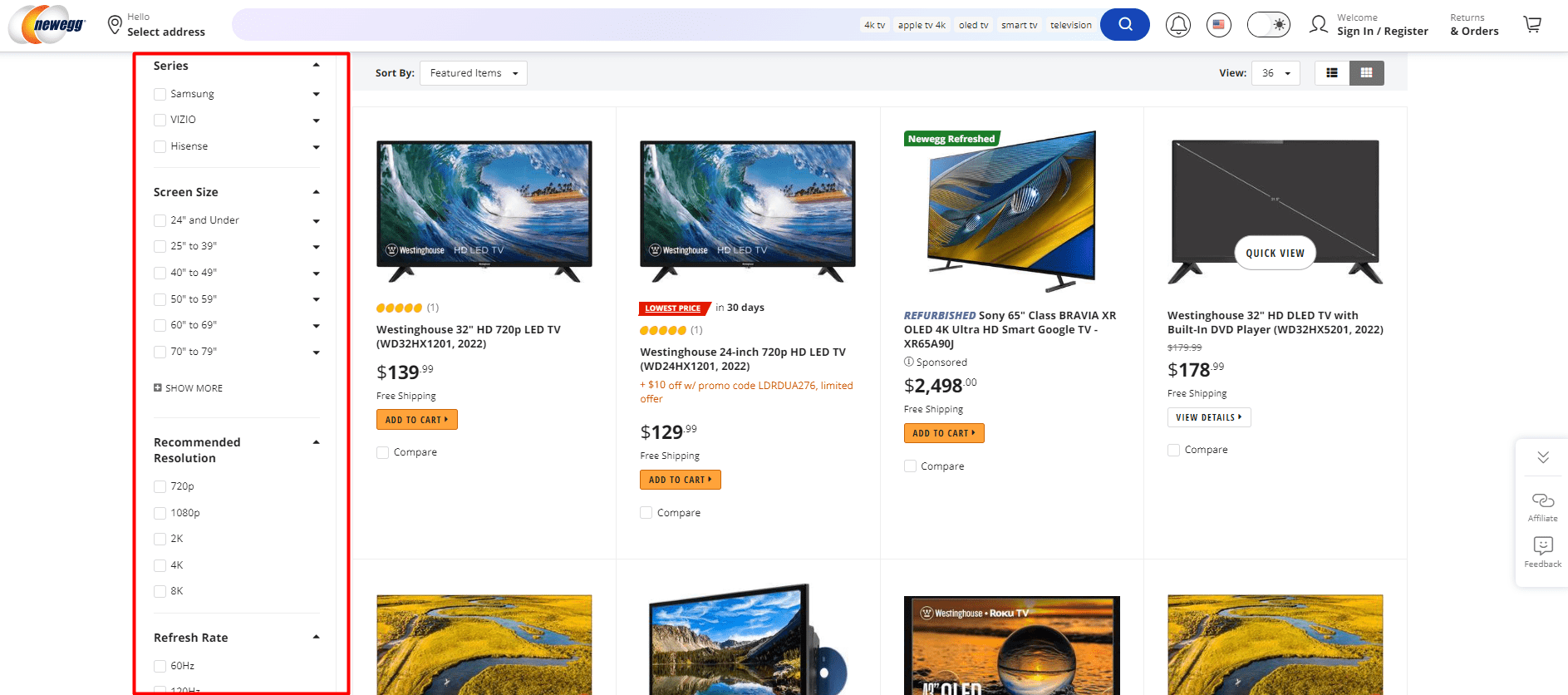
Faceted navigation is, in most cases, located on the sidebars of an e-commerce website and has multiple categories, files, and facets.
It essentially allows people to customize their search based on what they are looking for on the site.
For example, a visitor may want a purple cardigan, in a size medium, with black trim.
Facets are indexed categories that help to narrow down a production listing and also function as an extension of a site’s main categories.
Facets, in their best form, should ideally provide a unique value for each selection and, as they are indexed, each one on a site should send relevancy signals to search engines by making sure that all critical attributes appear within the content of the page.
Example of Facet Navigation from newegg.com, August 2024
Filters are utilized to sort items with a listings page.
While the user can use this to narrow down what they are looking for, the actual content on the page remains the same.
This can potentially lead to multiple URLs creating duplicate content, which is a concern for SEO.
There are a few potential issues that faceted navigation can create that can negatively affect SEO. The main three issues boil down to:
Duplicate content.
Wasted crawl budget.
Diluted link equity.
The number of highly related pieces of content continues to grow significantly, and different links may be going to all of these different versions of a page, which can dilute link equity and thus affect the page’s ranking ability as well as create infinite crawl space.
You need to take certain steps to ensure that search engine crawlers aren’t wasting valuable crawl budgets on pages that have little to no value.
Canonicalization
Turning facet search pages into SEO-friendly canonical URLs for collection landing pages is a common SEO strategy.
For example, if you want to target the keyword “gray t-shirts,” which is broad in context, it would not be ideal to focus on a single specific t-shirt. Instead, the keyword should be used on a page that lists all available gray t-shirts. This can be achieved by turning facets into user-friendly URLs and canonicalizing them.
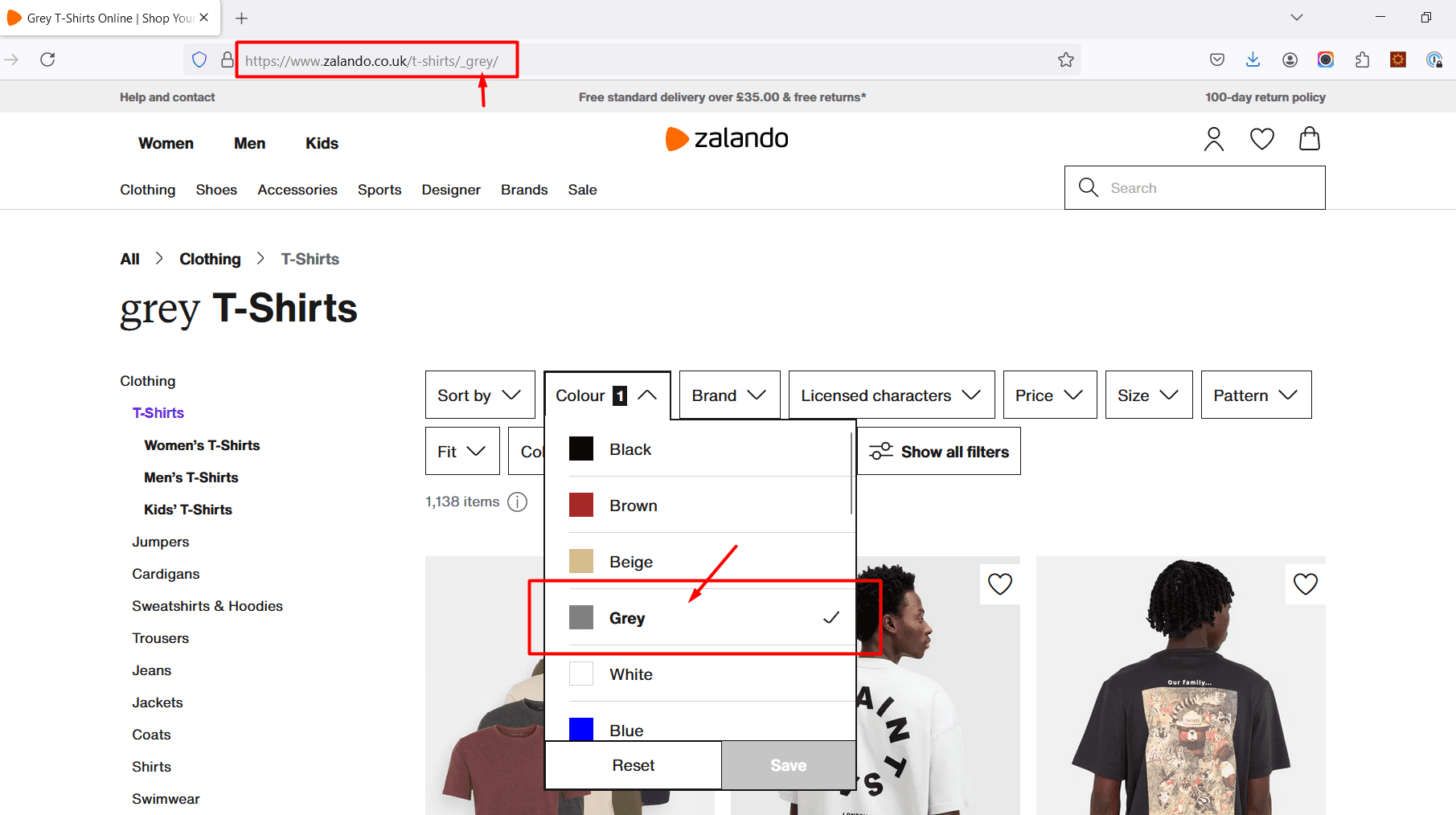
For example, Zalando’s facets are great examples where it uses facets as collection pages.
Screenshot from Zalando, August 2024
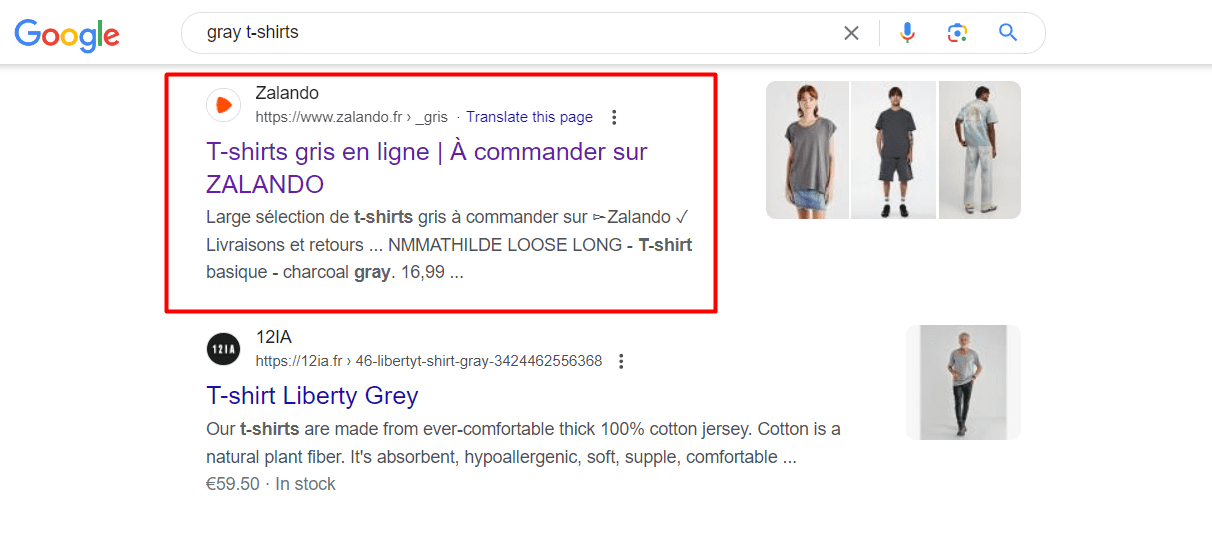
When you search in Google [gray t-shirts] you can see Zalando’s facet page ranking in the top #10.
Screenshot from search for [gray t-shirts], Google, August 2024
If you try to add another filter over a gray t-shirt, let’s say the brand name ‘Adidas,’ you will get a new SEO-friendly URL with canonical meta tags and proper hreflangs for multiple languages in the source code
https://www.zalando.co.uk/t-shirts/adidas_grey/
However, if you decide to include a copy on those pages, make sure you change the H1 tag and copy accordingly to avoid keyword cannibalization.
Noindex
Noindex tags can be implemented to inform bots of which pages not to include in the index.
For example, if you wished to include a page for “gray t-shirt” in the index, but did not want pages with price filter in the index, then a noindex tag to the second result would exclude it.
For example, if you have price filters that have these URLs…
…And if you don’t want them to appear in the index, you can use the “noindex” meta robots tag in the
tag:
This method tells search engines to “noindex” the page filtered by price.
Note that even if this approach removes pages from the index, there will still be crawl budget spent on them if search engine bots find those links and crawl these pages. For optimizing crawl budget, using robots.txt is the best approach.
Robots.txt
Disallowing facet search pages via robots.txt is the best way to manage crawl budget. To disallow pages with price parameters, e.g. ‘/?price=50_100’, you can use the following robots.txt rule.
Disallow: *price=*
This directive informs search engines not to crawl any URL that includes the ‘price=’ parameter, thus optimizing the crawl budget by excluding these pages.
However, if any outbound links pointing to any URL with that parameter in it existed, Google could still possibly index it. If the quality of those backlinks is high, you may consider using noindex and canonical approach to consolidate the link equity to a preferred URL.
Otherwise, you don’t need to worry about that, as Google confirmed they will drop over time.
Other Ways To Get The Most Out Of Faceted Navigation
Implement pagination with rel=”next” and rel=”prev” in order to group indexing properties from pages to a series as a whole.
Each page needs to link to children pages and parent. This can be done with breadcrumbs.
Only use canonical URLs in sitemaps in case you choose to canonicalize your facets search pages.
Include unique H1 tags and content in case of canonicalized facet URLs.
Facets should always be presented in a unified, logical manner (i.e., alphabetical order).
Implement AJAX for filtering to allow users to see results without reloading the page. However always change the URL after filtering so users can bookmark their searched pages and visit them later. Never implement AJAX without changing the URL.
Make sure faceted navigation is optimized for all devices, including mobile, through responsive design.
Conclusion
Although faceted navigation can be great for UX, it can cause a multitude of problems for SEO.
Duplicate content, wasted crawl budget, and diluted link equity can all cause severe problems on a site. However, you can fix those issues by applying one of the strategies discussed in this article.
It is crucial to carefully plan and implement facet navigation in order to avoid many issues down the line when it comes to faceted navigation.
In the world of SEO, URL parameters pose a significant problem.
While developers and data analysts may appreciate their utility, these query strings are an SEO headache.
Countless parameter combinations can split a single user intent across thousands of URL variations. This can cause complications for crawling, indexing, visibility and, ultimately, lead to lower traffic.
The issue is we can’t simply wish them away, which means it’s crucial to master how to manage URL parameters in an SEO-friendly way.
To do so, we will explore:
What Are URL Parameters?
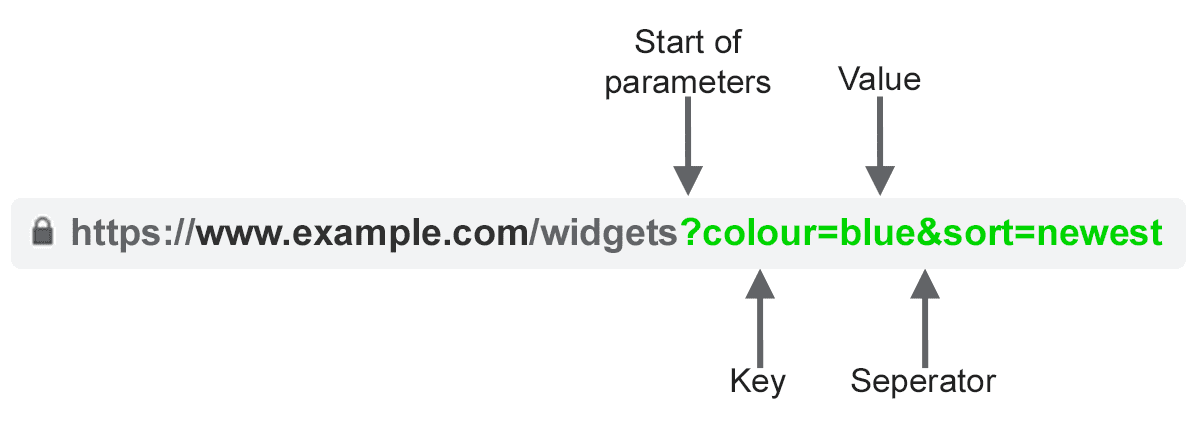
Image created by author
URL parameters, also known as query strings or URI variables, are the portion of a URL that follows the ‘?’ symbol. They are comprised of a key and a value pair, separated by an ‘=’ sign. Multiple parameters can be added to a single page when separated by an ‘&’.
The most common use cases for parameters are:
Tracking – For example ?utm_medium=social, ?sessionid=123 or ?affiliateid=abc
Reordering – For example ?sort=lowest-price, ?order=highest-rated or ?so=latest
Filtering – For example ?type=widget, colour=purple or ?price-range=20-50
Identifying – For example ?product=small-purple-widget, categoryid=124 or itemid=24AU
Paginating – For example, ?page=2, ?p=2 or viewItems=10-30
Searching – For example, ?query=users-query, ?q=users-query or ?search=drop-down-option
Translating – For example, ?lang=fr or ?language=de
SEO Issues With URL Parameters
1. Parameters Create Duplicate Content
Often, URL parameters make no significant change to the content of a page.
A re-ordered version of the page is often not so different from the original. A page URL with tracking tags or a session ID is identical to the original.
For example, the following URLs would all return a collection of widgets.
That’s quite a few URLs for what is effectively the same content – now imagine this over every category on your site. It can really add up.
The challenge is that search engines treat every parameter-based URL as a new page. So, they see multiple variations of the same page, all serving duplicate content and all targeting the same search intent or semantic topic.
While such duplication is unlikely to cause a website to be completely filtered out of the search results, it does lead to keyword cannibalization and could downgrade Google’s view of your overall site quality, as these additional URLs add no real value.
2. Parameters Reduce Crawl Efficacy
Crawling redundant parameter pages distracts Googlebot, reducing your site’s ability to index SEO-relevant pages and increasing server load.
“Overly complex URLs, especially those containing multiple parameters, can cause a problems for crawlers by creating unnecessarily high numbers of URLs that point to identical or similar content on your site.
As a result, Googlebot may consume much more bandwidth than necessary, or may be unable to completely index all the content on your site.”
3. Parameters Split Page Ranking Signals
If you have multiple permutations of the same page content, links and social shares may be coming in on various versions.
This dilutes your ranking signals. When you confuse a crawler, it becomes unsure which of the competing pages to index for the search query.
4. Parameters Make URLs Less Clickable
Image created by author
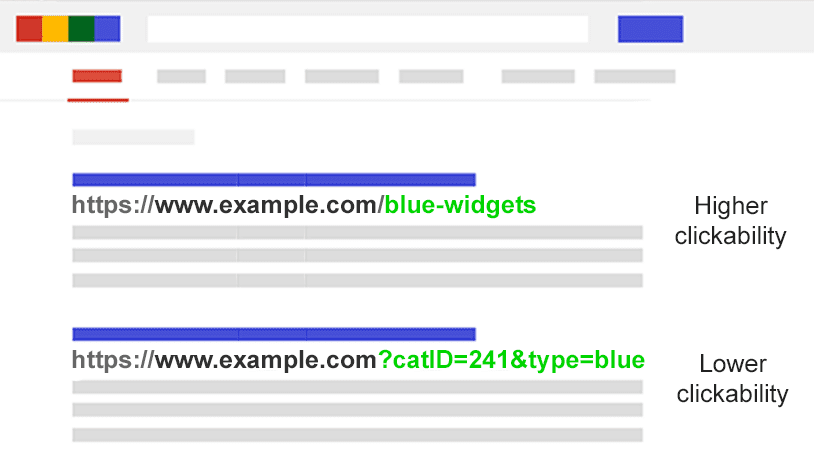
Let’s face it: parameter URLs are unsightly. They’re hard to read. They don’t seem as trustworthy. As such, they are slightly less likely to be clicked.
This may impact page performance. Not only because CTR influences rankings, but also because it’s less clickable in AI chatbots, social media, in emails, when copy-pasted into forums, or anywhere else the full URL may be displayed.
While this may only have a fractional impact on a single page’s amplification, every tweet, like, share, email, link, and mention matters for the domain.
Poor URL readability could contribute to a decrease in brand engagement.
Assess The Extent Of Your Parameter Problem
It’s important to know every parameter used on your website. But chances are your developers don’t keep an up-to-date list.
So how do you find all the parameters that need handling? Or understand how search engines crawl and index such pages? Know the value they bring to users?
Follow these five steps:
Run a crawler: With a tool like Screaming Frog, you can search for “?” in the URL.
Review your log files: See if Googlebot is crawling parameter-based URLs.
Look in the Google Search Console page indexing report: In the samples of index and relevant non-indexed exclusions, search for ‘?’ in the URL.
Search with site: inurl: advanced operators: Know how Google is indexing the parameters you found by putting the key in a site:example.com inurl:key combination query.
Look in Google Analytics all pages report: Search for “?” to see how each of the parameters you found are used by users. Be sure to check that URL query parameters have not been excluded in the view setting.
Armed with this data, you can now decide how to best handle each of your website’s parameters.
SEO Solutions To Tame URL Parameters
You have six tools in your SEO arsenal to deal with URL parameters on a strategic level.
Limit Parameter-based URLs
A simple review of how and why parameters are generated can provide an SEO quick win.
You will often find ways to reduce the number of parameter URLs and thus minimize the negative SEO impact. There are four common issues to begin your review.
1. Eliminate Unnecessary Parameters
Image created by author
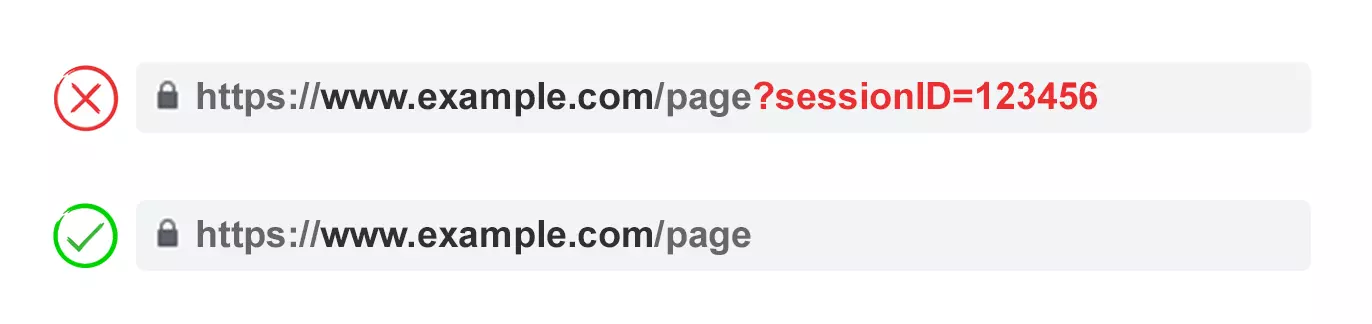
Ask your developer for a list of every website’s parameters and their functions. Chances are, you will discover parameters that no longer perform a valuable function.
For example, users can be better identified by cookies than sessionIDs. Yet the sessionID parameter may still exist on your website as it was used historically.
Or you may discover that a filter in your faceted navigation is rarely applied by your users.
Any parameters caused by technical debt should be eliminated immediately.
2. Prevent Empty Values
Image created by author
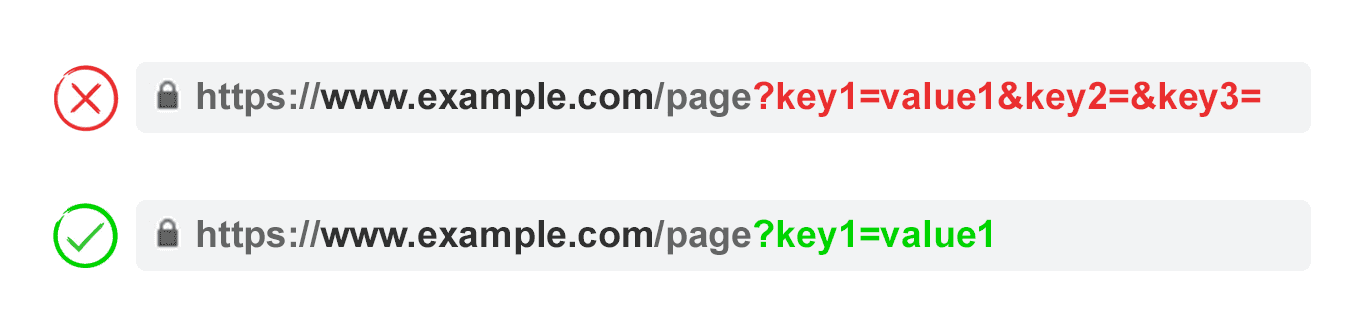
URL parameters should be added to a URL only when they have a function. Don’t permit parameter keys to be added if the value is blank.
In the above example, key2 and key3 add no value, both literally and figuratively.
3. Use Keys Only Once
Image created by author
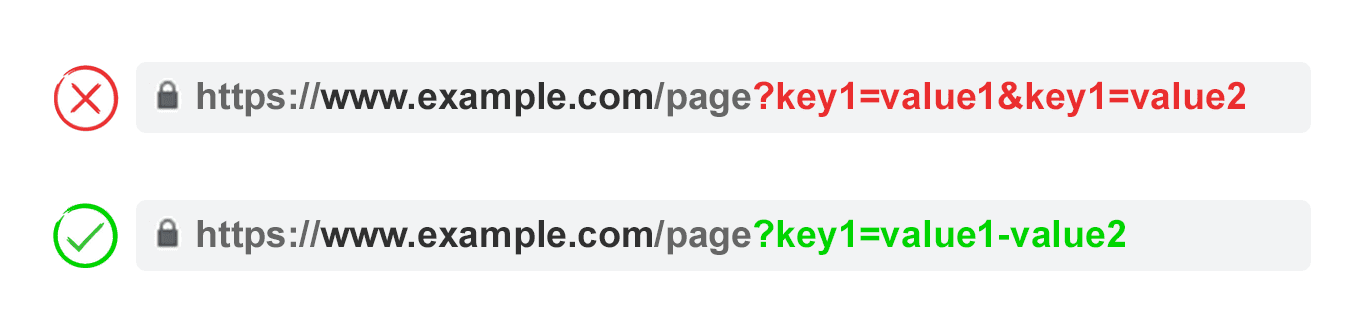
Avoid applying multiple parameters with the same parameter name and a different value.
For multi-select options, it is better to combine the values after a single key.
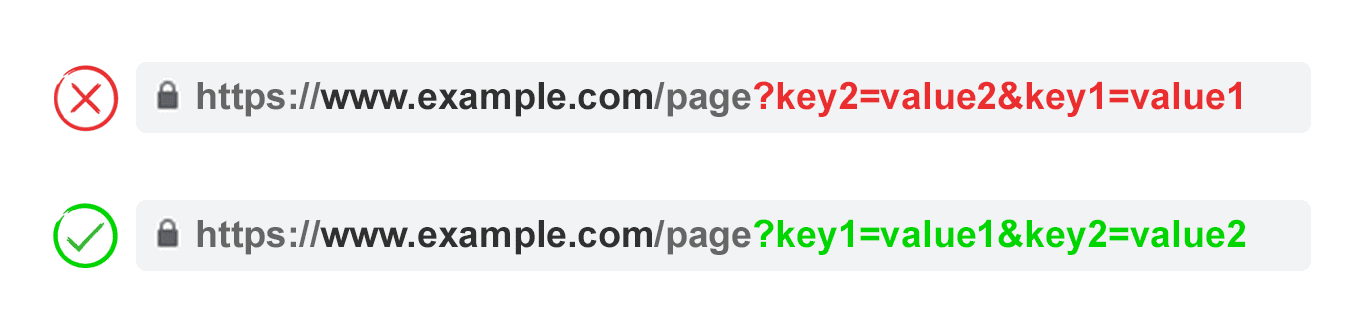
4. Order URL Parameters
Image created by author
If the same URL parameter is rearranged, the pages are interpreted by search engines as equal.
As such, parameter order doesn’t matter from a duplicate content perspective. But each of those combinations burns crawl budget and split ranking signals.
Avoid these issues by asking your developer to write a script to always place parameters in a consistent order, regardless of how the user selected them.
In my opinion, you should start with any translating parameters, followed by identifying, then pagination, then layering on filtering and reordering or search parameters, and finally tracking.
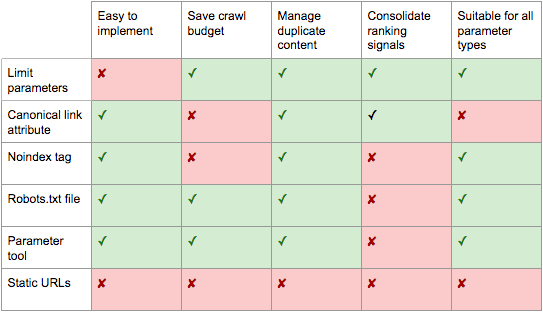
Pros:
Ensures more efficient crawling.
Reduces duplicate content issues.
Consolidates ranking signals to fewer pages.
Suitable for all parameter types.
Cons:
Moderate technical implementation time.
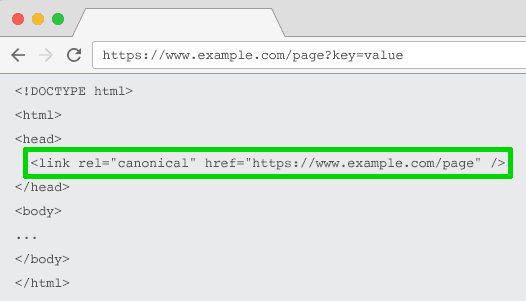
Rel=”Canonical” Link Attribute
Image created by author
The rel=”canonical” link attribute calls out that a page has identical or similar content to another. This encourages search engines to consolidate the ranking signals to the URL specified as canonical.
You can rel=canonical your parameter-based URLs to your SEO-friendly URL for tracking, identifying, or reordering parameters.
But this tactic is not suitable when the parameter page content is not close enough to the canonical, such as pagination, searching, translating, or some filtering parameters.
Pros:
Relatively easy technical implementation.
Very likely to safeguard against duplicate content issues.
Consolidates ranking signals to the canonical URL.
Cons:
Wastes crawling on parameter pages.
Not suitable for all parameter types.
Interpreted by search engines as a strong hint, not a directive.
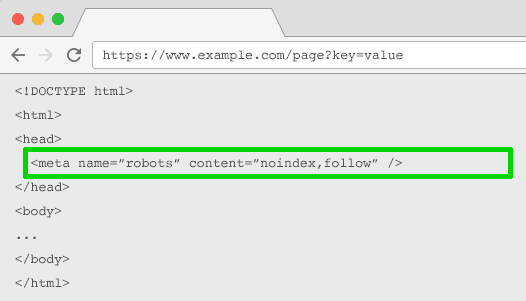
Meta Robots Noindex Tag
Image created by author
Set a noindex directive for any parameter-based page that doesn’t add SEO value. This tag will prevent search engines from indexing the page.
URLs with a “noindex” tag are also likely to be crawled less frequently and if it’s present for a long time will eventually lead Google to nofollow the page’s links.
Pros:
Relatively easy technical implementation.
Very likely to safeguard against duplicate content issues.
Suitable for all parameter types you do not wish to be indexed.
Removes existing parameter-based URLs from the index.
Cons:
Won’t prevent search engines from crawling URLs, but will encourage them to do so less frequently.
Doesn’t consolidate ranking signals.
Interpreted by search engines as a strong hint, not a directive.
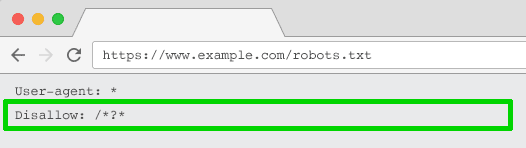
Robots.txt Disallow
Image created by author
The robots.txt file is what search engines look at first before crawling your site. If they see something is disallowed, they won’t even go there.
You can use this file to block crawler access to every parameter based URL (with Disallow: /*?*) or only to specific query strings you don’t want to be indexed.
Pros:
Simple technical implementation.
Allows more efficient crawling.
Avoids duplicate content issues.
Suitable for all parameter types you do not wish to be crawled.
Cons:
Doesn’t consolidate ranking signals.
Doesn’t remove existing URLs from the index.
Move From Dynamic To Static URLs
Many people think the optimal way to handle URL parameters is to simply avoid them in the first place.
After all, subfolders surpass parameters to help Google understand site structure and static, keyword-based URLs have always been a cornerstone of on-page SEO.
To achieve this, you can use server-side URL rewrites to convert parameters into subfolder URLs.
For example, the URL:
www.example.com/view-product?id=482794
Would become:
www.example.com/widgets/purple
This approach works well for descriptive keyword-based parameters, such as those that identify categories, products, or filters for search engine-relevant attributes. It is also effective for translated content.
But it becomes problematic for non-keyword-relevant elements of faceted navigation, such as an exact price. Having such a filter as a static, indexable URL offers no SEO value.
It’s also an issue for searching parameters, as every user-generated query would create a static page that vies for ranking against the canonical – or worse presents to crawlers low-quality content pages whenever a user has searched for an item you don’t offer.
It’s somewhat odd when applied to pagination (although not uncommon due to WordPress), which would give a URL such as
www.example.com/widgets/purple/page2
Very odd for reordering, which would give a URL such as
www.example.com/widgets/purple/lowest-price
And is often not a viable option for tracking. Google Analytics will not acknowledge a static version of the UTM parameter.
More to the point: Replacing dynamic parameters with static URLs for things like pagination, on-site search box results, or sorting does not address duplicate content, crawl budget, or internal link equity dilution.
Having all the combinations of filters from your faceted navigation as indexable URLs often results in thin content issues. Especially if you offer multi-select filters.
Many SEO pros argue it’s possible to provide the same user experience without impacting the URL. For example, by using POST rather than GET requests to modify the page content. Thus, preserving the user experience and avoiding SEO problems.
But stripping out parameters in this manner would remove the possibility for your audience to bookmark or share a link to that specific page – and is obviously not feasible for tracking parameters and not optimal for pagination.
The crux of the matter is that for many websites, completely avoiding parameters is simply not possible if you want to provide the ideal user experience. Nor would it be best practice SEO.
So we are left with this. For parameters that you don’t want to be indexed in search results (paginating, reordering, tracking, etc) implement them as query strings. For parameters that you do want to be indexed, use static URL paths.
Pros:
Shifts crawler focus from parameter-based to static URLs which have a higher likelihood to rank.
Cons:
Significant investment of development time for URL rewrites and 301 redirects.
Doesn’t prevent duplicate content issues.
Doesn’t consolidate ranking signals.
Not suitable for all parameter types.
May lead to thin content issues.
Doesn’t always provide a linkable or bookmarkable URL.
Best Practices For URL Parameter Handling For SEO
So which of these six SEO tactics should you implement?
The answer can’t be all of them.
Not only would that create unnecessary complexity, but often, the SEO solutions actively conflict with one another.
Google’s John Mueller, Gary Ilyes, and Lizzi Sassman couldn’t even decide on an approach. In a Search Off The Record episode, they discussed the challenges that parameters present for crawling.
They even suggest bringing back a parameter handling tool in Google Search Console. Google, if you are reading this, please do bring it back!
What becomes clear is there isn’t one perfect solution. There are occasions when crawling efficiency is more important than consolidating authority signals.
Ultimately, what’s right for your website will depend on your priorities.
Image created by author
Personally, I take the following plan of attack for SEO-friendly parameter handling:
Research user intents to understand what parameters should be search engine friendly, static URLs.
Ecommerce mistakes are as common as shopping carts filled to the brim during a Black Friday sale. Why is that, you ask? Well, the ecommerce world is complex. It’s easy for online retailers to trip over unexpected — but also quite common — hurdles. But fear not! Identifying and correcting these technical SEO mistakes helps turn your online store into a success story.
Table of contents
1. Poorly structured online stores
A well-organized site structure is fundamental for both user experience and SEO. It helps search engines crawl and index your site efficiently while guiding users seamlessly through your products and categories. Yet, many ecommerce retailers make the mistake of using very complex site structures.
Common issues:
Inconsistent URL structures: URLs that lack a clear hierarchy or use random character strings can confuse users and search engines.
Lack of breadcrumbs: Without breadcrumbs, users might struggle to navigate back to previous categories or search results, leading to a frustrating user experience.
Ineffective internal linking: Poor internal linking can prevent search engines from understanding the relationship between pages and dilute the distribution of page authority.
Solutions:
Organize URLs: Develop a clear and logical URL structure that reflects your site hierarchy. For example, use /category/subcategory/product-name instead of non-descriptive strings. This structure helps search engines understand the importance and context of each page.
Implement breadcrumbs: Breadcrumb navigation provides a secondary navigation aid, showing users their current location within the site hierarchy. Ensure breadcrumbs are visible on all pages and structured consistently.
Optimize internal linking: Create a strategic internal linking plan to connect related products and categories. Use descriptive anchor text to improve keyword relevance effectively. Check 404 errors and fix these, if necessary.
More tips:
Faceted navigation: If your site uses faceted navigation for filtering products, ensure it’s implemented to avoid creating duplicate content or excessive crawl paths. Use canonical tags or noindex directives where necessary.
Site architecture depth: Keep your site architecture shallow, ideally allowing users and search engines to reach any page within as few clicks as possible from the homepage. This enhances crawlability and improves user experience.
XML sitemaps: Regularly update your XML sitemap to reflect your site’s current structure and submit it to search engines. This ensures all important pages are indexed efficiently.
2. Ignoring mobile optimization
It seems strange to say this in 2024, but mobile is where it’s at. Today, if your online store isn’t optimized for mobile, you’re missing out on a big chunk of potential customers. Mobile shopping is not just a trend; it’s the norm. Remember, your customers are swiping, tapping, and buying on their phones — don’t make the mistake of focusing your ecommerce business on desktop users only.
Common issues:
Slow mobile load times: Mobile users demand quick access to content. Slow-loading pages can drive potential customers away and negatively impact your performance.
Poor user interface and user experience: A website design that doesn’t adapt well to mobile screens can make navigation difficult and frustrate users.
Scaling issues: Websites that aren’t responsive can appear cluttered or require excessive zooming and scrolling on mobile devices.
Solutions:
Responsive design: Ensure your website uses a responsive design that automatically adjusts the layout, images, and text to fit any screen size seamlessly.
Optimize mobile performance: Improve load times by compressing images, minifying CSS and JavaScript files, and using asynchronous loading for scripts. Use tools like Google PageSpeed Insights to identify speed bottlenecks and fix mobile SEO.
Improve navigation: Make your mobile navigation intuitive and easy to use. Consider implementing a fixed navigation bar for easy access and use clear, concise labels for menu items.
Streamline the checkout process: Simplify the mobile checkout process by reducing the required fields, enabling auto-fill for forms, and providing multiple payment options such as digital wallets. Ensure that call-to-action buttons are prominently displayed and easy to tap.
Test across devices: Regularly test your site on various devices and screen sizes to ensure a consistent and smooth user experience.
More tips:
Leverage mobile-specific features: Use device-specific capabilities like geolocation to enhance user experience. For example, offer location-based services or promotions.
Optimize images for mobile: Use responsive images that adjust in size depending on the device. Implement lazy loading so images only load when they appear in the viewport, improving initial load times.
3. Neglecting Schema structured data markup
Schema structured data markup is code that helps search engines understand the context of your content. Among other things, search engines use this to help display rich snippets in search results. Despite its benefits, many ecommerce sites underestimate its potential, missing out on enhanced visibility and click-through rates.
Common issues:
Lack of implementation: Many ecommerce sites make the mistake of failing to implement schema markup, leaving potential enhancements in search results untapped.
Incorrect or incomplete markup: When schema markup is applied incorrectly or not fully utilized, it can lead to missed opportunities for rich snippets.
Overlooking updates: Schema standards and best practices evolve, and failing to update markup can result in outdated, incomplete, or ineffective data.
Solutions:
Implement product schema: Use product schema markup to display key details such as price and availability directly in search results. This can make your listings more attractive and informative to potential customers.
Utilize review and rating schema: Highlight customer reviews and ratings with schema markup to increase trust and engagement. Rich snippets featuring star ratings can significantly improve click-through rates.
Add breadcrumb schema: Implement breadcrumb schema to enhance navigation paths in search results. This makes it easier for search engines to understand your site’s structure.
Use structured data testing tools: Use Google’s Rich Results Test and Schema Markup Validator to ensure your markup is correctly implemented and eligible for rich results. Address any errors or warnings promptly.
More tips:
Expand to additional schema types: Beyond product and review schema, consider using additional types relevant to your site, such as FAQ schema for common questions or product variant schema.
JSON-LD format: Implement schema markup using JSON-LD format, which is Google’s recommended method. It’s easier to read and maintain, especially for complex data sets.
4. Inadequate page speed optimization
Page speed is critical to user experience and SEO. Google’s emphasis on Core Web Vitals and page experience underscores the importance of fast, smooth, and stable web experiences. Slow pages frustrate users and negatively impact SEO, which can reduce visibility and traffic.
Common issues:
Large, unoptimized images: High-resolution images that aren’t compressed can significantly increase load times. This is one of the biggest and most common ecommerce mistakes.
Render-blocking resources: CSS and JavaScript files that prevent a page from rendering quickly can delay visible content.
Poor server response times: Slow server responses can delay the initial loading of a page, affecting LCP.
Solutions:
Optimize images: Compress images using formats like WebP and utilize responsive image techniques to serve appropriately sized images for different devices.
Eliminate render-blocking resources:
Defer non-critical CSS: Load essential CSS inline for above-the-fold content and defer the rest.
Async JavaScript: Use the async attribute for scripts that can load asynchronously or defer for scripts that are not crucial for initial rendering.
Optimize server performance by upgrading hosting plans, using faster DNS providers, and implementing HTTP/2 — or the upcoming HTTP/3 standard — for faster data transfer.
Enhance Core Web Vitals:
For LCP: Optimize server performance, prioritize loading of critical resources, and consider preloading key assets.
For INP: Focus on minimizing CPU processing by running code asynchronously, breaking up long tasks, and ensuring the main thread is not blocked by heavy JavaScript execution.
For CLS: Set explicit dimensions for images and ads, avoid inserting content above existing content, and ensure fonts load without causing layout shifts.
More tips:
Lazy loading: This method delays the loading of off-screen images and videos until they are needed, reducing initial load times.
Minimise HTTP requests: Reduce the number of requests by combining CSS and JavaScript files, using CSS sprites, and eliminating unnecessary plugins or widgets.
Use browser caching: Implement caching policies to store static resources on users’ browsers, reducing load times for returning visitors.
5. Improper canonicalization
Canonicalization helps search engines understand the preferred version of a webpage when multiple versions exist. This is important for ecommerce sites, where similar or duplicate content is common due to variations in products, categories, and pagination. Improper canonicalization can lead to duplicate content issues.
Common issues:
Duplicate content: Multiple URLs displaying the same or similar content can confuse search engines, leading to reduced performance.
Product variations: Different URLs for product variations (e.g., size, color) can create duplicate content without proper canonical tags.
Pagination: Paginated pages without canonical tags can lead to indexing issues.
Solutions:
Use canonical tags: Implement canonical tags to specify the preferred version of a page. This tells search engines which URL to index and attribute full authority to, helping to consolidate ranking signals.
Handle product variations: For product pages with variations, use canonical tags to point to the main product page.
Optimize pagination: Link pages sequentially with clear, unique URLs (e.g., using “?page=n”) and avoid using URL fragment identifiers for pagination. Make sure that paginated URLs are not indexed if they include filters or alternative sort orders by using the “noindex” robots meta tag or robots.txt file.
More tips:
Consistent URL structures: To minimize the potential for duplicate content, maintain a consistent URL structure across your site. Use descriptive, keyword-rich URLs that clearly convey the page’s content.
Avoid session IDs in URLs: If your ecommerce platform uses session IDs, configure your system to avoid appending them to URLs, as this can create multiple versions of the same page.
Monitor changes: Track any changes to your site architecture or content management system that could affect canonicalization.
6. Not using XML sitemaps and robots.txt effectively
XML sitemaps and robots.txt files help guide search engines through your ecommerce site. These tools ensure that search engines can efficiently crawl and index your pages. Missing or misconfigured files can lead to indexing issues, negatively impacting your site’s SEO performance.
Common issues:
Incomplete or outdated XML sitemaps: Many sites fail to update their sitemaps, which excludes important pages from search engine indexing.
Misconfigured robots.txt files: Incorrect directives in robots.txt files can inadvertently block search engines from accessing critical pages.
Exclusion of important pages: Errors in these files can result in important pages, like product or category pages, being overlooked by search engines.
Solutions:
Create and update XML sitemaps: Generate an XML sitemap that includes all relevant pages, such as product, category, and blog pages. Regularly update the sitemap to reflect new content or structure changes and submit it to search engines via tools like Google Search Console.
Optimize robots.txt files: Ensure your robots.txt file includes directives to block irrelevant or duplicate pages (e.g., admin pages, filtering parameters) while allowing access to important sections. Use the file to guide crawlers efficiently through your site without wasting crawl budget.
Use sitemap index files: For large ecommerce sites, consider using a sitemap index file to organize multiple sitemap files. This approach helps manage extensive product catalogs and ensures comprehensive coverage.
More tips:
Dynamic sitemaps for ecommerce: Implement dynamic sitemaps that automatically update to reflect inventory changes, ensuring that new products are indexed quickly.
Leverage hreflang in sitemaps: If your site targets multiple languages or regions, include hreflang annotations within your XML sitemaps to help search engines identify the correct version for each user.
7. Failing to optimize for international SEO
For ecommerce retailers targeting global markets, international SEO is crucial for reaching audiences in different countries and languages. A good international SEO strategy ensures your site is accessible and relevant to users worldwide. International ecommerce SEO is all about maximizing your global reach and sales potential — it would be a mistake to forget about this.
Common issues:
Incorrect hreflang implementation: Misconfigured hreflang tags can display incorrect language versions to users, confusing search engines and visitors.
Uniform content across regions: Using the same content for regions without localization can make your site less appealing to local audiences.
Ignoring local search engines: Focusing solely on Google can mean missing out on significant portions of the market in countries where other search engines dominate.
Solutions:
Implement hreflang tags correctly: Use hreflang tags to indicate language and regional targeting for your pages. This helps search engines serve users the correct language version. Ensure each hreflang tag references a self-referential URL and includes all language versions.
Create region-specific content: Localize your content to reflect cultural nuances, currency, units of measure, and local terminology. This enhances user experience and increases relevance and engagement.
Optimize for local search engines: Optimize your site according to their specific algorithms and requirements in markets where other search engines like Baidu (China) or Yandex (Russia) are prevalent.
Use geotargeted URLs: Implement subdirectories (e.g., example.com/us, example.com/fr) or country-code top-level domains (ccTLDs) such as example.fr to effectively target specific countries.
More tips:
Local backlinks: Build backlinks from local websites to improve visibility in specific regions. Set up local PR campaigns and partnerships to build credibility and authority.
CDNs and server locations: Host your site on servers within your target market to improve load times and performance for users in that region.
Structured data for local business: Use structured data markup to highlight local business information, such as location and contact details.
8. Not using Yoast SEO for Shopify
This is a bit of a sneaky addition, but number eight in this list of common ecommerce mistakes to avoid is not using Yoast SEO for Shopify or our WooCommerce SEO add-on. Both come with solutions for many of the common errors described in this article. Our tools make it easier to manage ecommerce SEO and Shopify SEO so you can focus on improving many other aspects of your online store. We provide a solid groundwork in a technical SEO sense and provide tools to improve your product content. We even have AI features that make this takes easier than ever.
Be sure to check out Yoast SEO for Shopify and WooCommerce SEO!
Common ecommerce mistakes to avoid
Regular technical audits and improvements are crucial if you want your online store to keep performing well. Addressing these technical issues helps ecommerce retailers improve search visibility, user experience, and conversion rates. Just be sure not to make these common ecommerce SEO mistakes again!
Edwin is an experienced strategic content specialist. Before joining Yoast, he worked for a top-tier web design magazine, where he developed a keen understanding of how to create great content.
Crawl budget is a vital SEO concept for large websites with millions of pages or medium-sized websites with a few thousand pages that change daily.
An example of a website with millions of pages would be eBay.com, and websites with tens of thousands of pages that update frequently would be user reviews and rating websites similar to Gamespot.com.
There are so many tasks and issues an SEO expert has to consider that crawling is often put on the back burner.
But crawl budget can and should be optimized.
In this article, you will learn:
How to improve your crawl budget along the way.
Go over the changes to crawl budget as a concept in the last couple of years.
(Note: If you have a website with just a few hundred pages, and pages are not indexed, we recommend reading our article on common issues causing indexing problems, as it is certainly not because of crawl budget.)
What Is Crawl Budget?
Crawl budget refers to the number of pages that search engine crawlers (i.e., spiders and bots) visit within a certain timeframe.
There are certain considerations that go into crawl budget, such as a tentative balance between Googlebot’s attempts to not overload your server and Google’s overall desire to crawl your domain.
Crawl budget optimization is a series of steps you can take to increase efficiency and the rate at which search engines’ bots visit your pages.
Why Is Crawl Budget Optimization Important?
Crawling is the first step to appearing in search. Without being crawled, new pages and page updates won’t be added to search engine indexes.
The more often that crawlers visit your pages, the quicker updates and new pages appear in the index. Consequently, your optimization efforts will take less time to take hold and start affecting your rankings.
Google’s index contains hundreds of billions of pages and is growing each day. It costs search engines to crawl each URL, and with the growing number of websites, they want to reduce computational and storage costs by reducing the crawl rate and indexation of URLs.
There is also a growing urgency to reduce carbon emissions for climate change, and Google has a long-term strategy to improve sustainability and reduce carbon emissions.
These priorities could make it difficult for websites to be crawled effectively in the future. While crawl budget isn’t something you need to worry about with small websites with a few hundred pages, resource management becomes an important issue for massive websites. Optimizing crawl budget means having Google crawl your website by spending as few resources as possible.
So, let’s discuss how you can optimize your crawl budget in today’s world.
Well, if you disallow URLs that are not important, you basically tell Google to crawl useful parts of your website at a higher rate.
For example, if your website has an internal search feature with query parameters like /?q=google, Google will crawl these URLs if they are linked from somewhere.
Similarly, in an e-commerce site, you might have facet filters generating URLs like /?color=red&size=s.
These query string parameters can create an infinite number of unique URL combinations that Google may try to crawl.
Those URLs basically don’t have unique content and just filter the data you have, which is great for user experience but not for Googlebot.
Allowing Google to crawl these URLs wastes crawl budget and affects your website’s overall crawlability. By blocking them via robots.txt rules, Google will focus its crawl efforts on more useful pages on your site.
Here is how to block internal search, facets, or any URLs containing query strings via robots.txt:
Each rule disallows any URL containing the respective query parameter, regardless of other parameters that may be present.
* (asterisk) matches any sequence of characters (including none).
? (Question Mark): Indicates the beginning of a query string.
=*: Matches the = sign and any subsequent characters.
This approach helps avoid redundancy and ensures that URLs with these specific query parameters are blocked from being crawled by search engines.
Note, however, that this method ensures any URLs containing the indicated characters will be disallowed no matter where the characters appear. This can lead to unintended disallows. For example, query parameters containing a single character will disallow any URLs containing that character regardless of where it appears. If you disallow ‘s’, URLs containing ‘/?pages=2’ will be blocked because *?*s= matches also ‘?pages=’. If you want to disallow URLs with a specific single character, you can use a combination of rules:
Disallow: *?s=*
Disallow: *&s=*
The critical change is that there is no asterisk ‘*’ between the ‘?’ and ‘s’ characters. This method allows you to disallow specific exact ‘s’ parameters in URLs, but you’ll need to add each variation individually.
Apply these rules to your specific use cases for any URLs that don’t provide unique content. For example, in case you have wishlist buttons with “?add_to_wishlist=1” URLs, you need to disallow them by the rule:
Disallow: /*?*add_to_wishlist=*
This is a no-brainer and a natural first and most important step recommended by Google.
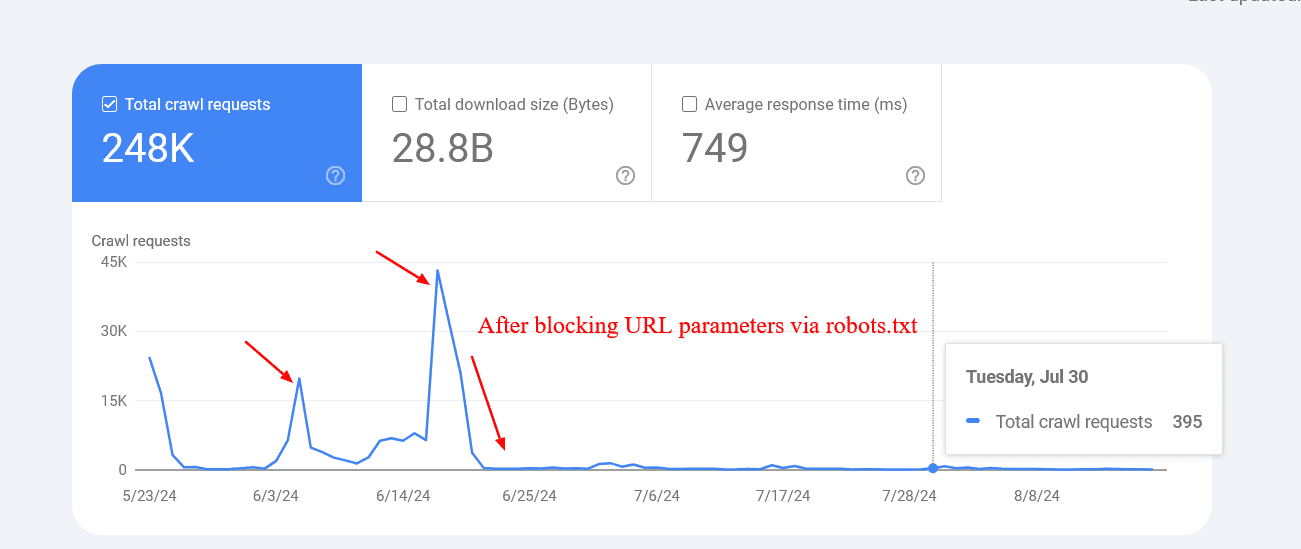
An example below shows how blocking those parameters helped to reduce the crawling of pages with query strings. Google was trying to crawl tens of thousands of URLs with different parameter values that didn’t make sense, leading to non-existent pages.
Reduced crawl rate of URLs with parameters after blocking via robots.txt.
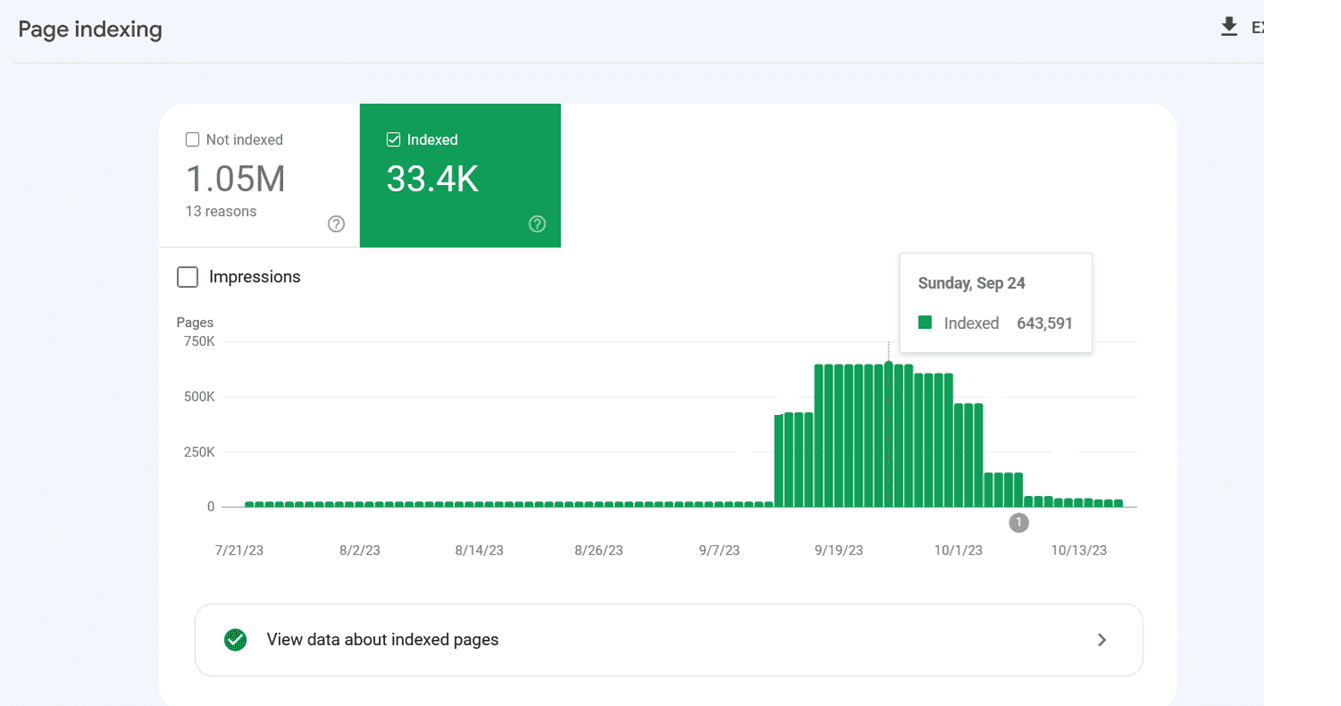
However, sometimes disallowed URLs might still be crawled and indexed by search engines. This may seem strange, but it isn’t generally cause for alarm. It usually means that other websites link to those URLs.
Indexing spiked because Google indexed internal search URLs after they were blocked via robots.txt.
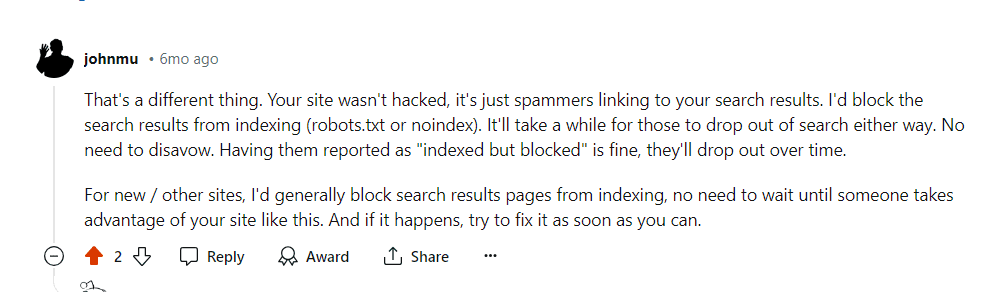
Google confirmed that the crawling activity will drop over time in these cases.
Google’s comment on Reddit, July 2024
Another important benefit of blocking these URLs via robots.txt is saving your server resources. When a URL contains parameters that indicate the presence of dynamic content, requests will go to the server instead of the cache. This increases the load on your server with every page crawled.
Please remember not to use “noindex meta tag” for blocking since Googlebot has to perform a request to see the meta tag or HTTP response code, wasting crawl budget.
1.2. Disallow Unimportant Resource URLs In Robots.txt
Besides disallowing action URLs, you may want to disallow JavaScript files that are not part of the website layout or rendering.
For example, if you have JavaScript files responsible for opening images in a popup when users click, you can disallow them in robots.txt so Google doesn’t waste budget crawling them.
Here is an example of the disallow rule of JavaScript file:
Disallow: /assets/js/popup.js
However, you should never disallow resources that are part of rendering. For example, if your content is dynamically loaded via JavaScript, Google needs to crawl the JS files to index the content they load.
Another example is REST API endpoints for form submissions. Say you have a form with action URL “/rest-api/form-submissions/”.
Potentially, Google may crawl them. Those URLs are in no way related to rendering, and it would be good practice to block them.
Disallow: /rest-api/form-submissions/
However, headless CMSs often use REST APIs to load content dynamically, so make sure you don’t block those endpoints.
In a nutshell, look at whatever isn’t related to rendering and block them.
2. Watch Out For Redirect Chains
Redirect chains occur when multiple URLs redirect to other URLs that also redirect. If this goes on for too long, crawlers may abandon the chain before reaching the final destination.
URL 1 redirects to URL 2, which directs to URL 3, and so on. Chains can also take the form of infinite loops when URLs redirect to one another.
Avoiding these is a common-sense approach to website health.
Ideally, you would be able to avoid having even a single redirect chain on your entire domain.
But it may be an impossible task for a large website – 301 and 302 redirects are bound to appear, and you can’t fix redirects from inbound backlinks simply because you don’t have control over external websites.
One or two redirects here and there might not hurt much, but long chains and loops can become problematic.
In order to troubleshoot redirect chains you can use one of the SEO tools like Screaming Frog, Lumar, or Oncrawl to find chains.
When you discover a chain, the best way to fix it is to remove all the URLs between the first page and the final page. If you have a chain that passes through seven pages, then redirect the first URL directly to the seventh.
Another great way to reduce redirect chains is to replace internal URLs that redirect with final destinations in your CMS.
Depending on your CMS, there may be different solutions in place; for example, you can use this plugin for WordPress. If you have a different CMS, you may need to use a custom solution or ask your dev team to do it.
3. Use Server Side Rendering (HTML) Whenever Possible
Now, if we’re talking about Google, its crawler uses the latest version of Chrome and is able to see content loaded by JavaScript just fine.
But let’s think critically. What does that mean? Googlebot crawls a page and resources such as JavaScript then spends more computational resources to render them.
Remember, computational costs are important for Google, and it wants to reduce them as much as possible.
So why render content via JavaScript (client side) and add extra computational cost for Google to crawl your pages?
Because of that, whenever possible, you should stick to HTML.
That way, you’re not hurting your chances with any crawler.
4. Improve Page Speed
As we discussed above, Googlebot crawls and renders pages with JavaScript, which means if it spends fewer resources to render webpages, the easier it will be for it to crawl, which depends on how well optimized your website speed is.
Google’s crawling is limited by bandwidth, time, and availability of Googlebot instances. If your server responds to requests quicker, we might be able to crawl more pages on your site.
So using server-side rendering is already a great step towards improving page speed, but you need to make sure your Core Web Vital metrics are optimized, especially server response time.
5. Take Care of Your Internal Links
Google crawls URLs that are on the page, and always keep in mind that different URLs are counted by crawlers as separate pages.
If you have a website with the ‘www’ version, make sure your internal URLs, especially on navigation, point to the canonical version, i.e. with the ‘www’ version and vice versa.
Another common mistake is missing a trailing slash. If your URLs have a trailing slash at the end, make sure your internal URLs also have it.
Otherwise, unnecessary redirects, for example, “https://www.example.com/sample-page” to “https://www.example.com/sample-page/” will result in two crawls per URL.
Another important aspect is to avoid broken internal links pages, which can eat your crawl budget and soft 404 pages.
And if that wasn’t bad enough, they also hurt your user experience!
In this case, again, I’m in favor of using a tool for website audit.
WebSite Auditor, Screaming Frog, Lumar or Oncrawl, and SE Ranking are examples of great tools for a website audit.
6. Update Your Sitemap
Once again, it’s a real win-win to take care of your XML sitemap.
The bots will have a much better and easier time understanding where the internal links lead.
Use only the URLs that are canonical for your sitemap.
Also, make sure that it corresponds to the newest uploaded version of robots.txt and loads fast.
7. Implement 304 Status Code
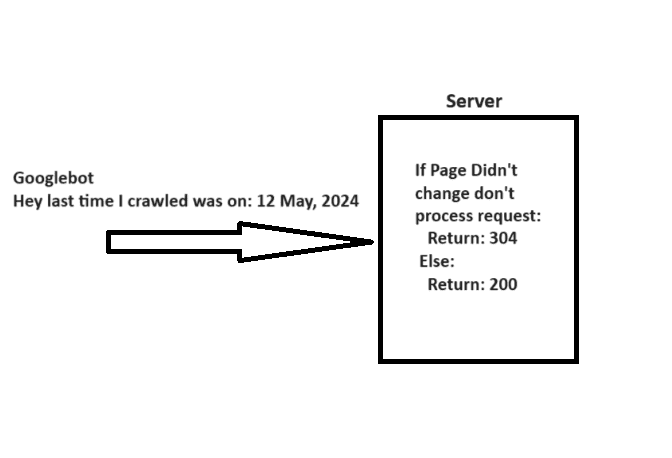
When crawling a URL, Googlebot sends a date via the “If-Modified-Since” header, which is additional information about the last time it crawled the given URL.
If your webpage hasn’t changed since then (specified in “If-Modified-Since“), you may return the “304 Not Modified” status code with no response body. This tells search engines that webpage content didn’t change, and Googlebot can use the version from the last visit it has on the file.
A simple explanation of how 304 not modified http status code works.
Imagine how many server resources you can save while helping Googlebot save resources when you have millions of webpages. Quite big, isn’t it?
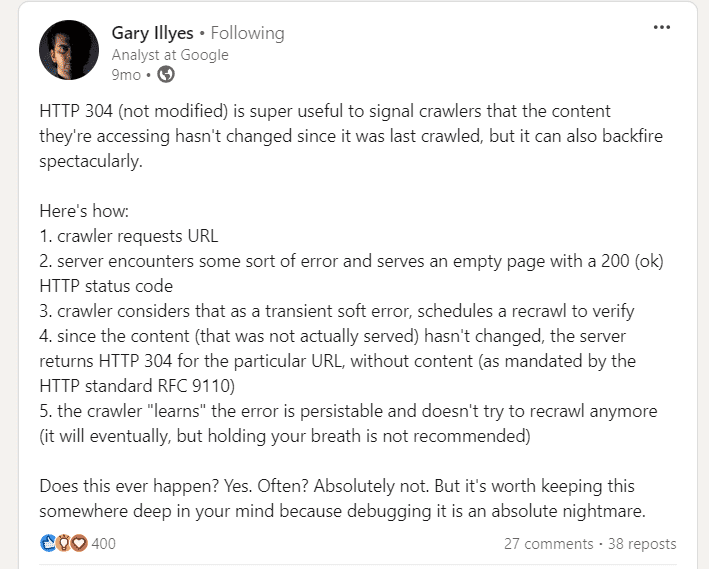
So be cautious. Server errors serving empty pages with a 200 status can cause crawlers to stop recrawling, leading to long-lasting indexing issues.
8. Hreflang Tags Are Vital
In order to analyze your localized pages, crawlers employ hreflang tags. You should be telling Google about localized versions of your pages as clearly as possible.
First off, use the lang_code" href="url_of_page" /> in your page’s header. Where “lang_code” is a code for a supported language.
You should use the element for any given URL. That way, you can point to the localized versions of a page.
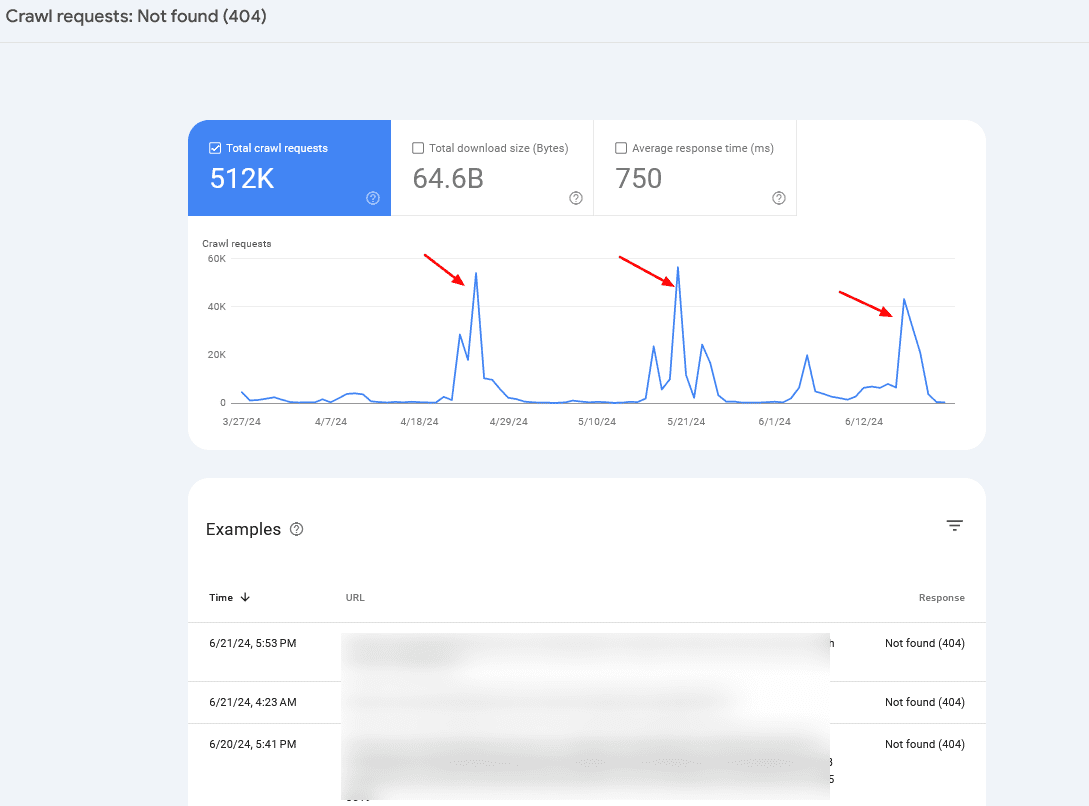
Check your server logs and Google Search Console’s Crawl Stats report to monitor crawl anomalies and identify potential problems.
If you notice periodic crawl spikes of 404 pages, in 99% of cases, it is caused by infinite crawl spaces, which we have discussed above, or indicates other problems your website may be experiencing.
Crawl rate spikes
Often, you may want to combine server log information with Search Console data to identify the root cause.
Summary
So, if you were wondering whether crawl budget optimization is still important for your website, the answer is clearly yes.
Crawl budget is, was, and probably will be an important thing to keep in mind for every SEO professional.
Hopefully, these tips will help you optimize your crawl budget and improve your SEO performance – but remember, getting your pages crawled doesn’t mean they will be indexed.
In case you face indexation issues, I suggest reading the following articles:
Featured Image: BestForBest/Shutterstock All screenshots taken by author