Google Rolls Out Tag Diagnostics Tool To Improve Data Quality via @sejournal, @MattGSouthern

Google introduces Tag Diagnostics tool to help advertisers improve ad measurement accuracy and compliance across its platforms.

  • Google has introduced a new Tag Diagnostics tool.
  • The tool provides enhanced insights into measurement setups and helps identify potential data accuracy issues.
  • Tag Diagnostics is integrated across Google Ads, Tag Manager, and Analytics.
Google Trends Update: Faster, Smarter, More Customizable via @sejournal, @MattGSouthern

Google has updated its Trending Now tool in Google Trends, offering faster and more comprehensive search data.

The tool now detects more trends, covers more countries, and provides more visualization and filtering options.

These changes further enhance Google Trends’ value for marketers, researchers, and anyone seeking real-time insights into search behavior.

Updates To ‘Trending Now’ In Google Trends

Improved Trend Detection & Refresh Rate

Google says its new trend forecasting engine spots ten times more emerging trends than before.

It now updates every 10 minutes, providing real-time insights on rising search interests.

Expanded Global Coverage

The Trending Now tool is now available in 125 countries, 40 of which offer region-specific trend data.

This expansion allows for more localized trend analysis and comparison.

Enhanced Context & Visualization

You can now view a breakdown of each trend, including its emergence time, duration, and related news articles.

A graph displaying Search interest over time is also provided, along with the ability to compare multiple trends and export data for further analysis.

Customizable Filters

The redesigned filters tab lets you fine-tune trend results based on location, time frame, and trend status.

To concentrate on currently popular searches, you can select a time frame (4 hours, 24 hours, 48 hours, or 7 days) and filter out inactive trends.

Google Trends Tutorial Video

To complement the Trending Now update, Google has released a comprehensive video tutorial on its Google Search Central YouTube channel.

The video features Daniel Waisberg, a Google search Advocate, and Hadas Jacobi, a software engineer on the Google Trends team.

They demonstrate using Google Trends to compare search terms and topics across Google Search and YouTube.

The tutorial covers:

  • Navigating the Google Trends interface
  • Comparing up to five topics or search terms
  • Utilizing filters for location, time period, category, and Google property
  • Interpreting trend data and charts
  • Understanding related topics and queries

See the full video below.

Why This Matters

Google Trends remains a powerful tool for understanding public interest and search behavior.

As Waisberg states in the tutorial:

“Whether you’re a marketer, journalist or researcher, understanding Google Trends can help you uncover emerging trends and make informed decisions.”

As search patterns change, these updates will help you stay ahead with the latest insight into global and local search trends.


Featured Image: DANIEL CONSTANTE/Shutterstock

Google Chrome Adds Visual Search, Tab Compare, & Smart History via @sejournal, @MattGSouthern

Google has announced three features for its Chrome browser, which will roll out in the coming weeks.

These additions, incorporating Google’s AI and Gemini models, offer new ways to interact with web content and manage browsing history.

Desktop Integration Of Google Lens

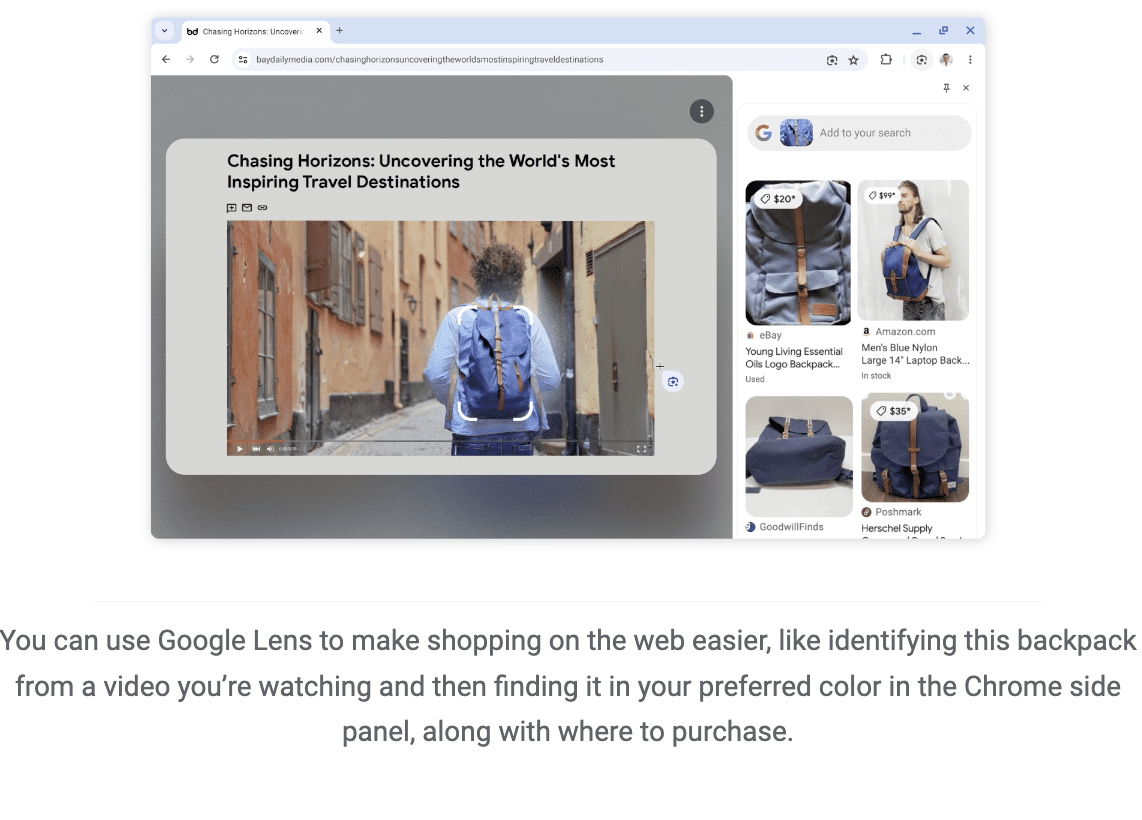
The first update brings Google Lens, previously a mobile-only feature, to the desktop version of Chrome. This tool allows you to search and ask questions about visual content on webpages.

You can activate Lens via an icon in the address bar or through the right-click menu, then select areas of a page to initiate a visual search.

Results appear in a side panel, where users can refine searches or ask follow-up questions.

Screenshot from blog.google.com, August 2024.

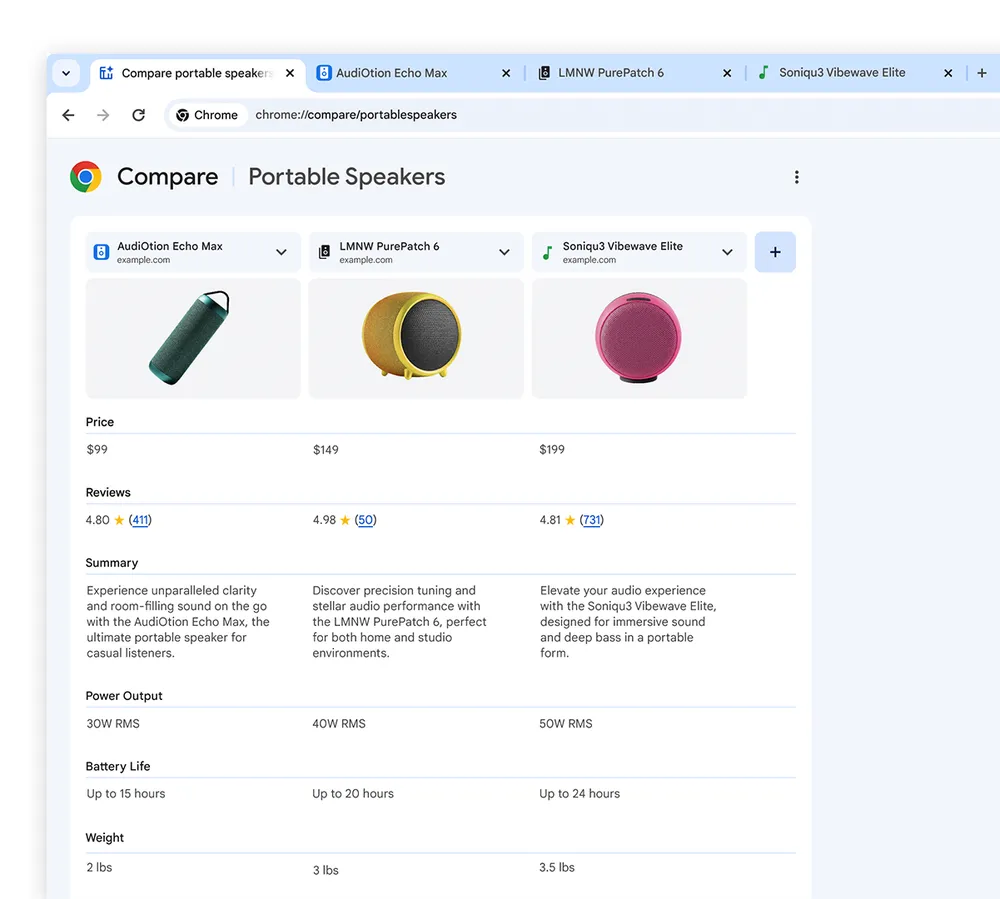
Tab Compare For Product Research

A new feature called Tab Compare is being introduced, initially for U.S. users.

This tool generates an AI-powered overview of products from multiple open tabs, compiling information such as specifications, features, prices, and ratings into a single comparison table.

The feature is designed to streamline online shopping research, though its effectiveness in real-world scenarios remains to be seen.

Screenshot from blog.google.com, August 2024.

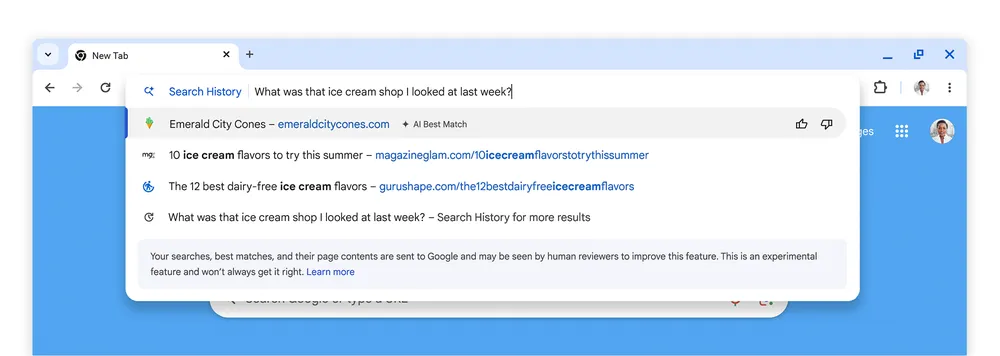
Natural Language Processing For Browser History

Google is updating Chrome’s history feature with natural language processing capabilities.

This will allow users to search their browsing history using conversational queries, such as “What was that ice cream shop I looked at last week?”

Google states that this feature will be optional and can be turned on or off in the browser settings.

Screenshot from blog.google.com, August 2024.

Privacy Considerations

While these features promise enhanced functionality, they also raise potential privacy concerns.

Google assures that the enhanced history search will not include data from incognito mode browsing. However, the extent of data collection and processing required for these AI features is unclear from the announcement.

Broader Context

These updates show AI’s growing role in browsers. As tech companies race to add advanced features, we see trade-offs between functionality and privacy, with potential ripple effects on web usage and ecommerce.

Parisa Tabriz, Vice President of Chrome, hints at more AI features in the pipeline, signaling a broader push to weave AI into browsing tools.

The rollout starts stateside and will be phased. As always, performance and user uptake will be the success metrics.

GA4 Update Brings Alignment With Google Ads Targeting via @sejournal, @MattGSouthern

Google announced an update to the advertising section within Google Analytics 4 (GA4).

The enhancement aims to clarify and align user counts eligible for remarketing and ad personalization.

Under the change, advertisers can now quickly view the size of their “Advertising Segments” within GA4’s interface.

These segments represent the pool of users whose data can be leveraged for remarketing campaigns and personalized ad targeting through products like Google Ads.

Improved Synchronization For Unified Insights

Previously, there could be discrepancies between the user counts shown as eligible for advertising use cases in GA4 and the Google Ads Audience Manager.

With this update, Google says the numbers will be fully aligned, allowing marketers to confidently make data-driven advertising decisions.

Expanding Advertising Segment Visibility

Along with the alignment fix, the update expands visibility into advertising segment sizes within the GA4 interface.

A new “Advertising segments” panel under the “Advertising” section reports the number of users GA4 collects and sends to ad products for personalization.

An “advertising segment” is a list of GA4 users synchronized with Google advertising products for remarketing and personalized ad targeting purposes.

Segment sizes can vary based on targeting requirements for different ad networks.

Why SEJ Cares

This update from Google addresses a key pain point for advertisers utilizing GA4 and Google Ads.

Full alignment between advertising audience sizes across products eliminates confusion and enables more data-driven strategies.

The added transparency into advertising segment sizes directly in GA4 is also a welcomed upgrade.

How This Can Help You

With aligned user counts, advertisers can plan and forecast remarketing campaigns with greater precision using GA4 data.

This unified view means you can make media investment decisions based on accurate reach projections.

Additionally, the new advertising segments panel provides extra context about the scope of your audiences for ad personalization.

This visibility allows for more informed strategies tailored to your specific segment sizes.


Featured Image: Lightspring/Shutterstock

Google Launches Custom Event Data Import For GA4 via @sejournal, @MattGSouthern

Google announced a new feature for Google Analytics 4 (GA4), rolling out support for custom event data import.

This allows you to combine external data sources with existing GA4 data for more comprehensive reporting and analysis.

Google’s announcement reads:

“With this feature, you can use a combination of standard fields and event-scoped custom dimensions to join and analyze imported event metadata with your existing Analytics data.

You can then create custom reports for a more complete view of your Analytics data and imported event metadata.”

Custom Event Data Import: How It Works

Google’s help documentation describes the new capability:

“Custom event data import allows you to import and join data in ways that make sense to you. You have more flexibility in the choice of key and import dimensions.”

You begin the process by defining reporting goals and identifying any relevant external data sources not collected in Google Analytics.

You can then set up custom, event-scoped dimensions to use as “join keys” to link the imported data with Analytics data.

Mapping Fields & Uploading Data

Once the custom dimensions are configured, Google provides a detailed mapping interface for associating the external data fields with the corresponding Analytics fields and parameters.

This allows seamless integration of the two data sources.

Google’s help documentation reads:

“In the Key fields table, you’ll add the Analytics fields to join your imported data. In the Import fields table, you’ll select the external fields to include via the join key across both standard Analytics fields/dimensions and custom typed-in event parameters.”

After the data is uploaded through the import interface, Google notes it can take up to 24 hours for the integrated data set to become available in Analytics reports, audiences, and explorations.

Why SEJ Cares

GA4’s custom event data import feature creates opportunities for augmenting Google Analytics data with a business’s proprietary sources.

This allows you to leverage all available data, extract actionable insights, and optimize strategies.

How This Can Help You

Combining your data with Google’s analytics data can help in several ways:

  1. You can create a centralized data repository containing information from multiple sources for deeper insights.
  2. You can analyze user behavior through additional lenses by layering your internal data, such as customer details, product usage, marketing campaigns, etc., on top of Google’s engagement metrics.
  3. Combining analytics data with supplementary data allows you to define audience segments more granularly for targeted strategies.
  4. Using the new data fields and dimensions, You can build custom reports and dashboards tailored to your specific business.

For businesses using GA4, these expanded reporting possibilities can level up your data-driven decision-making.


Featured Image: Muhammad Alimaki/Shutterstock

Google Analytics Update To Improve Paid Search Attribution via @sejournal, @MattGSouthern

Google has announced an update to the attribution models in Google Analytics 4 (GA4) to improve the accuracy of paid search campaigns.

Google plans to roll out adjustments over the next two weeks to address a longstanding issue where conversions originating from paid search were mistakenly attributed to organic search traffic.

According to the company’s statement, this misattribution occurs with single-page applications when the “gclid” parameter — a unique identifier for paid search clicks — fails to persist across multiple page views.

As a result, conversions that should have been credited to paid search campaigns were incorrectly assigned to organic search channels.

Improved Conversion Attribution Methodology

To address this problem, Google is modifying how it attributes conversions to ensure campaign information is captured from the initial event on each page.

Under the new methodology, the attribution will be updated to reflect the appropriate traffic source if a user exits the site and returns through a different channel.

This change is expected to increase the number of conversions attributed to paid search campaigns, potentially impacting advertising expenditures for marketers leveraging Google Ads.

Preparation & Review Recommended

In light of the impending update, Google strongly advises advertisers to review their budget caps and make necessary adjustments before the changes take effect.

As more conversions may be assigned to paid search efforts, campaign spending levels could be affected.

Proactive budget management should be used to align with evolving performance data.

Why SEJ Cares

Improved attribution accuracy gives you a clearer picture of how well your paid search advertising works.

This will allow you to make smarter decisions about where to spend your marketing budget and how to improve your paid search campaigns based on precise data.

How This Can Help You

With more accurate conversion data, you can:

  • Gain a clearer picture of your paid search campaigns’ actual impact and return on investment (ROI).
  • Optimize campaigns based on reliable performance metrics, allowing for more effective budget allocation and targeting strategies.
  • Identify areas for improvement or expansion within your paid search efforts, informed by precise attribution data.
  • Make data-driven decisions regarding budget adjustments, bid strategies, and overall campaign management.

To get the most out of these changes, review your budget caps and make necessary adjustments to anticipate the potential increase in conversions attributed to paid search campaigns.

Staying ahead will make it easier to adapt to the new attribution method and leverage the improved data.


Featured Image: Piotr Swat/Shutterstock