Mullenweg Takes On Inc Magazine For “Biased” Interview via @sejournal, @martinibuster

Matt Mullenweg accused Inc Magazine of distorting an interview with him, publishing verifiably fake facts and quoting people who lacked credibility. Mullenweg posted compelling examples of how the Inc magazine misrepresented his quotes and presented false fact, citing the selection of unflattering photos as evidence of a conscious effort to negatively slant their interview of him.

Mullenweg explains why he agreed to the interview:

When Inc Magazine reached out to have David H. Freedman (website powered by WordPress) write a feature piece I was excited because though Inc wasn’t a magazine I have read much since I was a teenager, David seemed like a legit journalist who usually writes for better publications like The Atlantic. I opened up to David with a number of vulnerable stories, and allowed the photo shoot in my home in Houston.”

The article begins with an unflattering portrait of Mullenweg as a control freak that is fussy about the kind of toilet paper and soap is provided at Automattic’s offices. Mullenweg writes that he had shared an anecdote with the writer of the time he visited Google’s headquarters in 2004 and was surprised by what he felt was “cheap toilet” paper. Years later when he had his own offices he made the decision to spend extra on good soap and toilet paper to benefit his employee’s experience at work. In other words, the choice to do that came from altruism and a concern for others, not a desire to control every detail.

But that’s not how Inc magazine portrayed it.

They write:

“Stooping to fling open a storage cabinet built into the bathroom wall, he points to a neat stack of wrapped toilet paper rolls. “The best toilet paper you can buy,” he assures me. “How much extra does really nice toilet paper cost? A buck or two?” The handsome bottles of soap by the sinks are premium, too, he adds.

I ask him who at Automattic, the estimated $710-million company of which Mullenweg is CEO, is responsible for toilet paper and soap quality control?

“Me,” he says, beaming.

Of course, Mullenweg’s control of Automattic extends well beyond the bathroom walls.”

Grim Images In Photographs

The author of the article described Mullenweg as a young looking forty year old with a “near-constant grin” which contradicted the photographs Inc chose to publish, neither of which showed him smiling. Of the two photographs from the interview they chose to publish, one captures Mullenweg mid-blink, resulting in an absurd image of him typing with his eyes closed.

There are two other photographs from the past nine and twelve years ago which do show him smiling. Mullenweg’s smile is not an affectation; it’s an authentic expression. Videos of him participating in interviews or speaking publicly consistently show him smiling. Mullenweg is correct to point out that Inc magazine made a deliberate choice to not publish an image of him smiling, which is his characteristic expression, as noted in the article itself.

Poorly Researched Article

Mullenweg’s critique of the article zeroes in on a series of false statements that are indicative of poor research, including a consistent misrepresentation of a company’s earnings with its valuation.

One of the false facts wrongfully asserts that Mullenweg coded WordPress in three “obsessive days” when the actual time period was four months. This might seem minor but it’s not because it’s evidence of what Mullenweg points out is poor research that could have been easily verified on Wikipedia.

His critique is thoroughly convincing and shows how he agreed to the interview with openness and the expectation of balanced reporting. His dismay at the results is palpably communicated in his blog post about it.

Nevertheless he goes on to say that he supports journalism and puts the blame on the editor of the article.

He writes:

“I know a lot of entrepreneurs follow me and I don’t want your takeaway to be “don’t talk to journalists” or “don’t engage with mainstream media.”

…this is a good example of where a decent journalist can’t overcome a crappy editor and quality control. I probably wouldn’t be excited to work with Inc Magazine again while Mike Hofman is in charge as editor-in-chief, he’s clearly overseeing a declining brand. But I will continue to engage with other media, and blog, and tweet, and tell my story directly.

When an editor wants to make you look good, they can! If they decide they want to drag you, they can too. Everything in my interactions with David and Inc made it seem this would be a positive piece, so be careful.

We’ll see if Inc Magazine has any journalistic integrity by their updates to the article.”

Rightfully Disappointed

Mullenweg researched the interviewer and verified that they were a competent and respectable writer. From Mullenweg’s point of view the Inc magazine article was poorly researched and heavily slanted against him, what he termed a hit piece.

Read Mullenweg’s account of the interview:

Inc Hit Piece

Featured Image by Shutterstock/tomertu

Mullenweg Pauses WordPress Services – Hopes To Reopen Next Year via @sejournal, @martinibuster

Matt Mullenweg announced the abrupt pause in services offered by WordPress.org, affecting plugin submissions, reviews, theme submissions, and additions to the photo directory. He offers to keep providing these services to WP Engine, citing the recent court order against him and Automattic that compels him to offer “free labor and services.”

Pause For The Holidays

Mullenweg published a post on the official WordPress blog to announce a pause in free services offered by WordPress.org to give the “many tired volunteers around WordPress.org a break for the holidays.”

The pause affects:

  • New account registrations on WordPress.org
  • New plugin directory submissions
  • New plugin reviews
  • New theme directory submissions
  • New photo directory submissions

The pause doesn’t affect the ability to install new instances of WordPress sites or accounts, which sounds contradictory.

Here’s what he wrote in his list of what services are paused:

“New account registrations on WordPress.org (clarifying so press doesn’t confuse this: people can still make their own WordPress installs and accounts)”

Mullenweg makes a point to note that the pause doesn’t affect WP Engine, stating that he’s legally required to keep providing free labor and services” services to WP Engine, writing that if WP Engine requires those services they can have their “high-priced attorneys” speak to his “high-priced attorneys” to gain access.

He then shared a cryptic message that implied there was a chance that WordPress may not resume those services in 2025, saying that it hinged on his being able to find the “time, energy, and money” to undo the pause in 2025, which he writes is being expended defending against WP Engine’s lawsuit against him and Automattic.

Mullenweg wrote:

“Right now much of the time I would spend making WordPress better is being taken up defending against WP Engine’s legal attacks. Their attacks are against Automattic, but also me individually as the owner of WordPress.org, which means if they win I can be personally liable for millions of dollars of damages.”

He signs off inviting those who’d like to fund those attacks on him to sign up for WP Engine and that those who don’t can sign up for other web hosts, linking to both WP Engine and a WordPress.org page that offers promotions to induce WP Engine clients to switch away.

Read Mullenweg’s announcement here:

Holiday Break

Featured Image by Shutterstock/MPIX

Essential WordPress Plugins Every Site Should Have via @sejournal, @martinibuster

WordPress is the most popular CMS with majority market share. Out of the box, it’s a powerful platform, but it’s the WordPress plugins that really add the functionality and versatility to be configured in many different ways.

The WordPress plugin community is what really brings the platform to life and enables publishers and developers to build websites that enhance the experience for site visitors and publishers.

Based on my own experience and from others in the WordPress community, the following plugins were chosen for their reliability and effectiveness in helping SEOs and marketers grow audiences, increase sales, and improve site security and usability.

Plugin Categories

The following is a list of essential plugins, organized into six categories, that many publishers may find useful.

  • SEO Plugins: List of top six WordPress SEO plugins.
  • Site Security: Keeps your site from getting hacked and losing rankings.
  • Website Backups: Protects websites from mistakes and offers a way to come back from getting hacked.
  • WordPress Search Engine Plugins: Gives site visitors a better way to find your content and products to buy. Plus, it can improve user engagement and satisfaction signals.
  • Website Staging: This is a way to protect your site from crashing, as well as to test out improvements and updates before rolling them out to the live site.
  • Contact Forms: Because it’s important to communicate with site visitors

WordPress SEO Plugins

SEO plugins streamline basic tasks like adding meta descriptions, title tags, article excerpts, and Schema.org structured data.

These are the six most popular SEO plugins, listed by number of installations:

  1. Yoast SEO (10+ million installations).
  2. Rank Math (3+ million installations).
  3. All-in-One SEO (3+ million installations).
  4. SEOPress (300,000+ installations).
  5. The SEO Framework (200,000+ installations).
  6. SEO Plugin by Squirrly SEO (100,000+ installations).

A special note about The SEO Framework:

The SEO Framework caught my attention several years ago for its modular approach, allowing users to activate only the features they needed – a unique method at the time for creating a plugin that won’t slow your website down.

This thoughtful approach continues in the latest versions, which include automation to streamline deployment, helpful suggestions, and accessibility optimizations such as enhanced color contrast for colorblind users, keyboard navigation, and screen reader compatibility.

The SEO Framework is ad-free, privacy-focused, and can import settings from Yoast, Rank Math, and SEOPress.

Premium extensions provide additional features, including local SEO optimizations, comprehensive Schema.org structured data for news sites and bloggers, and more.

WordPress Security Plugins

Site security is often overlooked as a sales or SEO-related consideration. All it takes is to be hacked one time to understand how directly related website security is to publishing and ranking a website.

Read: The WordPress Security Guide To Keep Your Site Safe

Wordfence

  • Installed on 5+ million websites.

The free version of Wordfence protects a website against external threats by locking down areas of the site that are commonly exploited – and has a malware scan to check for intrusions.

It does things like blocking malicious files from executing in WordPress folders where they commonly hide, sending alerts when plugins and themes need updating, and providing an option to force strong passwords.

It even provides the option for instituting two-factor authentication – previously a Premium feature, now available in the free version.

The standout feature is its firewall. Wordfence’s built-in firewall rules automatically detect and block malicious activities or suspicious user agents.

These blocks are temporary and automatically lifted after a pre-set duration to prevent database bloat. While the firewall effectively blocks external threats, adding custom rules delivers a decisive blow to malicious bots (learn how to use Wordfence custom rules).

Wordfence is also authorized by the Common Vulnerabilities and Exposures Program as a CVE Numbering Authority. This gives it the authority to contribute vulnerability information that its researchers discover and add it to the CVE® Program, a database of vulnerabilities. I mention this only to show how Wordfence is an authoritative and expert organization.

Over 5 million users trust Wordfence, and for a good reason – it’s easy to configure, and it works.

The Premium version of Wordfence offers a more advanced proactive stance that receives up-to-the-minute threat signatures that protect against newly discovered vulnerabilities.

Sucuri Security

  • Installed in 700,000+ websites.

Sucuri, which is currently owned by GoDaddy, is a security auditing, malware scanning, and website hardening solution.

It doesn’t duplicate the features in Wordfence, so it can work together with Wordfence as a two-part security solution.

Sucuri features a file integrity scanner that alerts users to changed files, hardens the website against intrusions, and offers security notices like when someone logs in.

The paid version of Sucuri offers a firewall that actively blocks threats.

Using the free version of Sucuri, together with Wordfence, offers an outstanding level of WordPress security.

Patchstack

  • 20,000+ installations.

Patchstack provides 48-hour early warning alerts of security vulnerabilities on plugins and themes, providing an extra layer of protection.

This early warning generally provides users a chance to take proactive action before hackers are able to take advantage of the vulnerability.

Users of the paid version receive real-time alerts and patches to mitigate the vulnerabilities.

Pricing for the premium plugin starts at $5 per month, which makes it a highly affordable solution.

Akismet Spam Protection

  • Installed on 6+ million websites.

Akismet Spam Protection is used by over 6 million users. It was created by Automattic, which is a for-profit company founded by Matt Mullenweg, co-creator of WordPress.

You can count on seamless integration between Akismet and the WordPress CMS.

Akismet is easy to implement to protect contact forms and comment sections. It’s a useful plugin to install on any site that has comments turned on and/or a contact form.

WordPress Backup Plugins

Backing up and archiving a WordPress site is critical to protecting a site from catastrophic failure.

For example, if a site becomes hacked, a complete backup from before the site was hacked will ensure that a site can be restored on a staging server and fully updated with the latest security patches, with a clean WordPress installation, and then restored to the live server.

A backup can save a site from a bad update that crashes the website or a mistake that completely wipes out the important data.

UpdraftPlus WordPress Backup

  • Installed on 3+ million websites.

UpdraftPlus WordPress Backup plugin is trusted by over 3 million users. It’s an easy-to-use backup solution that makes it simple to roll the site back to a previous version.

I’ve used it to successfully migrate a site from one server to another server. It also helped me recover after pushing the wrong button and deleting my website template. Yeah, I did that once.

Migrating from one server to another is as simple as backing up with UpdraftPlus, setting up WordPress on the new server, adding the plugin to the new installation, and then using it to recover the site from a backup. That’s it.

Moving a site with UpdraftPlus is so easy – it feels like magic.

BlogVault

  • 90,000+ installations.

This plugin offers real-time incremental backup that offers free offsite storage and a 90-day archive. The plugin backs up the WordPress database, themes, plugins, settings, images – everything.

The official WordPress repository page for the plugin advertises that BlogVault is the official site migration plugin for Cloudways, FlyWheel, LiquidWeb, Pantheon, and WPEngine.

BlogVault also provides a free staging environment. The paid pro version offers automation features, one-click recovery, and migration, plus priority customer support starting at $149.

Higher tiers offer built-in malware scans. The free version offers many of the backup and storage functionalities that most websites need.

The free staging capabilities are a strong bonus that may allow users of the free plugin to create a staging site that can be used for testing new plugins and themes before deploying on a live site.

The BlogVault plugin was developed by the same company behind the MalCare WordPress security plugin, which has over 400,000 WordPress website installations. Its products are advertised to be trusted by companies like eBay, Intel, and other enterprise brands.

WPvivid Backup & Migration

  • 600,000+ website installations.

WPvivid enables users to create website backups and can be used for site migrations.

It can also be used to create a staging site on a subdirectory so that new versions of the WordPress core, plugins, or themes can be tested for compatibility before being pushed to the live production site.

The difference between the free and the paid pro version is that the pro version offers incremental backups, exclusion/inclusion rules, partial backups, and crash protection for site migrations.

Both versions offer backups to third-party cloud servers, like DigitalOcean Space, Dropbox, Google Drive, Microsoft OneDrive, and other popular cloud storage providers.

The site is trusted on over 600,000 websites. I reached out to the developers, and they confirmed that they are based in California.

The plugin has received over a thousand five-star reviews, indicating the high level of satisfaction users experience.

WordPress Search Engine Plugins

The default WordPress search engine is basic and offers limited functionality.

Its algorithm cannot handle misspellings or use stemming to deliver broader, more relevant results, which can harm user experience and reduce sales.

Replacing it is essential for serious websites. The following plugins address these limitations and should be considered essential for many WordPress websites.

Relevanssi

  • 100,000+ installations.

Relevanssi is a free WordPress search plugin that offers features that other plugins charge for.

For searching, it offers sorting by order of relevance (in place of date) partial word match, supports the “and,” “or,” and quotation mark exact match search operators.

The search results can be set to display excerpts that show the context of the search result on the page (shows the passage) and highlight the search terms on the webpage when users click through. The plugin also integrates with WPML and Polylang.

The developers of the plugin note that it uses “hundreds of megabytes” of database space. They suggest taking note of the current size of the wp_posts database table and tripling it to understand how much server storage space will be required.

The paid Pro version contains the “Did you mean?” feature, enables search results with PDF, including taxonomy (navigational data), and weighs search results.

What’s especially useful about the paid version is that it offers stemming, which is a natural language processing feature that allows search results to match the topic of the page instead of just ordinary keyword matching.

This allows a wider range of relevant search results that don’t necessarily contain the exact match keywords. It also has the happy side effect of reducing the size of the search index.

The annual fee is $109 USD, but there’s also a lifetime deal of $379 USD, which includes lifetime support and upgrades.

Ajax Search Lite

  • 80,000+ installations.

This plugin replaces the default WordPress search box that can search in posts, pages, and custom post types like events, portfolio items, and WooCommerce products. It can search in titles, descriptions, article excerpts, and custom fields.

A handy feature is the ability to exclude specific categories and posts. Plus, it can integrate with Google Analytics. It’s also multilingual-friendly and compatible with Polylang, QtranslateX, and WPML.

The paid pro version adds support for popular page builders, supports more kinds of content (PDF, Events Calendar, etc.), and WooCommerce plugin, plus many other features.

A lifetime license starts at $49.

SearchWP

  • 50,000+ installations.

This paid search plugin is popular with developers and publishers. Pricing at the time of writing is on sale for $99 per year.

The algorithm used by this plugin can prioritize frequently clicked search results, allows custom weighting, has an include/exclude feature, and can index custom fields, PDFs, media files, and custom post types.

There are also ecommerce optimizations that can include results from product attributes and taxonomies and are compatible with WooCommerce, Easy Digital Downloads, and BigCommerce plugins.

Pricing currently starts at $99/year.

WordPress Website Staging

Website staging is a function that allows users to create an exact copy of a website and then make changes to test if the website functions normally without any glitches.

It’s useful for testing a site before updating the WordPress core, plugins, or themes. It’s also useful for previewing what a website would look like with a new template, debugging, and customizing it.

WP STAGING WordPress Backup Plugin

  • 100,000+ website installations.

The free version of the WP STAGING plugin enables users to clone their website to a subfolder of the website, including the database.

The clone can be used for staging a website, as well as for backup and migration.

The pro version of the plugin enables users to back up the website to third-party cloud providers and offers advanced site migration capabilities.

The free version of the plugin advertises that it’s so lightweight that it can even be used on a low-powered shared hosting environment. The paid version of the plugin starts at $93 per year.

WP Stagecoach

WP Stagecoach is a paid premium solution that offers an easy way to stage a website safely on the WP Stagecoach servers and then push it to the live production server when it’s ready.

I’ve used WP Stagecoach and found it to be simple and convenient.

Pricing starts at $99/year.

WPvivid And BlogVault

WPvivid and BlogVault both offer website staging capabilities in addition to backing up websites.

Scroll up to the WordPress Backup Plugin section to read more about WPvivid and BlogVault.

Theme Switcha

  • Installed on 6,000+ WordPress sites.

This is a plugin for theme developers and not really for the average user.

The software developer created this plugin for their own website projects and subsequently released it for free on the official WordPress plugin repository.

This plugin enables theme previews for logged-in users and can be restricted to admin-level users. It’s a way to preview a theme and see what it looks like. Developers like it because it’s an easy way to show clients a redesign.

Emphasizing that this is a developer-focused plugin, the software developer cautions that it doesn’t work with Gutenberg blocks, although some users have reported that it works. The plugin author writes:

“Please understand that this plugin should not be used together with WordPress features such as Gutenberg Block Editor, Theme Customizer, Widgets, Menus, and other theme-related options. Doing so may result in private changes being made public on the current active theme.”

The plugin was developed by Jeff Starr of Plugin Planet, which offers free and paid WordPress plugins that are used by over 1.5 million users.

A review published in the private Dynamic WordPress Facebook group (membership necessary to view post) noted that it enables the convenience of staging a website for reviewing a template without having to clone files or reproducing it on another server.

Contact Form WordPress Plugins

There are many contact form options to suit a wide variety of website needs.

While a theme’s built-in contact form is often sufficient, third-party plugins offer significantly greater functionality and customization.

WPForms (WPForms Lite)

  • Installed on 6+ million sites.

WPForms is a basic contact form that’s easy to use and that I have experience with. It doesn’t deliver the ultimate configurable contact form, but if all you want is an easy-to-deploy contact form, this is for you.

It integrates easily with over 200 apps, including page builders like Divi and Elementor.

There are different paid version levels, each providing increasingly sophisticated features and abilities.

The free version is a fine solution when all you need is a contact form.

Ninja Forms

  • Installed on 700,000+ websites.

Ninja Forms is another easy-to-use contact form builder – but this one has increasingly complex functionalities.

What’s attractive about Ninja Forms is that it uses a modular approach that allows one to purchase add-ons that extend its functionality. Paid add-ons include functionality like multi-step forms and conditional logic.

That said, the free version of Ninja Forms has options that are premium features on other contact forms.

For example, it is Akismet and Google ReCaptcha friendly and can accommodate uploads, accept payments via PayPal and other gateways, integrate with MailChimp, Constant Contact, multiple CRMs, and more.

It’s a good choice to start with and expand on available features as the site grows.

Formidable Forms

  • 400,000+ website installations.

Formidable Forms is perfectly named because it is impressive, has a large number of features and capabilities, and is capable of accomplishing far more than many other contact forms.

It’s more than a contact form because it also functions as a lead generation form builder capable of creating quizzes and surveys.

An especially attractive feature is that it creates WCAG/A11Y compliant forms, which means that it is accessible.

The free Lite version is a highly capable form builder. The premium version of Formidable Forms extends the plugin with lead generation features and other advanced capabilities.

Gravity Forms

Gravity Forms is a paid contact form that offers extensive advanced features that are useful for sites with complex needs and integrations.

Gravity Forms markets itself as a form manager that is useful for data capture. It’s strongly suited for marketing campaigns and monetization.

Even the Basic version has strong integrations with services like SendGrid, HubSpot, Emma, and MailChimp.

Useful WordPress Plugins

Which plugin is the “best” is determined by what functionalities are needed.

The WordPress ecosystem offers thousands of plugins that extend the functionality of websites to help them rank better, generate more sales, create a better user experience, and contribute to why WordPress is the No. 1 CMS choice in the world.

More Resources:


Featured Image: Krakenimages.com/Shutterstock

Mullenweg Disgusted & Sickened As WP Engine Regains Access via @sejournal, @martinibuster

WP Engine regained control of their Advanced Custom Forms plugin and login access to WordPress.org. Matt Mullenweg responded by expressing that he is “disgusted and sickened.”

Mullenweg tweeted about how he felt about how things turned out:

“I’m disgusted and sickened by being legally forced to provide free labor and services to @wpengine, a dangerous precedent that should chill every open source maintainer. While I disagree with the court’s decision, I’ve fully complied with its order. You can see most changes on the site. They have access to ACF slug but haven’t changed it… must not have been the emergency they claimed.”

The response to Matt’s tweet was predictable.

One person reflected Matt’s words back at him:

I’m disgusted and sickened that you released software as GPL, made it intimately dependent on a private website+APIs you personally own and then you’re shocked when you learn you can’t discriminate against users

Another accused Mullenweg of tricking the WordPress community:

“And what about all of the free labor that you, @photomatt , tricked the WordPress community into providing to your personal .org website that the community believed was owned by the Foundation?”

Despite the compliance, Mullenweg pointed out that WP Engine had yet to change the plugin slug, questioning their claim of urgency. The ACF team subsequently reclaimed the plugin slug and tweeted an announcement about it.

On December 13, 2024, WP Engine’s official Advanced Custom Fields account confirmed on X (formerly Twitter) that they had regained access. The WordPress.org plugin directory now displays the original ACF plugin instead of Mullenweg’s forked version, Secure Custom Fields.

The ACF team tweeted:

“We’re pleased to share that our team has had account access restored on WordPress dot org along with control of the ACF plugin repo. This means all ACF users can rest assured that the ACF team you trust is once again maintaining the plugin. There’s no action required if you have installed ACF directly from the ACF website or you are an ACF PRO user.”

Members of the WordPress community congratulated WP Engine.

Some offered congratulations:

“Excellent news. Congratulations!”

Others expressed their happiness that ACF’s access was restored:

Happy for @wpengine. You have done a great job.

👏🏼 YES!!!!
https://x.com/CaroManelR/status/1867934316992610459

Another person tweeted:

NEVER trusting wordpess dot org again.

Origin Of Mullenweg – WP Engine Dispute

Matt Mullenweg claims that WP Engine does not contribute enough to the WordPress ecosystem. He has also raised concerns about WP Engine’s use of the word “WordPress” and has written about his years long attempt to get WP Engine to pay a “fair share” back into the WordPress open source project. On the September 20, 2024 Matt Mullenweg publicy denounced WP Engine at the United States WordCamp conference, after WP Engine declined to agree to his demands for $30 million dollars.

WP Engine sued Automattic and Matt Mullenweg in federal court, obtaining a preliminary injunction that required Automattic and Mullenweg to restore WP Engine’s access to WordPress.org, the plugin repository, logins and to remove a WP Engine customer list from a website Mullenweg created to encourage customers to leave WP Engine.

Mullenweg’s History Of Disputes

There is some history of Mullenweg engaging in disputes related to GPL licensing of code and trademarks. In 2010 Mullenweg rightfully challenged Chris Pearson and his theme company Thesis over software licensing. Chris Pearson himself has acknowledged that he was ignorant at the time about software licensing.

Mullenweg escalated his dispute with Pearson by offering Thesis customers any premium theme of their choice in exchange for abandoning their use of the Thesis them. These disputes caused Pearson to lose a significant amount of business and gain a negative perception in the WordPress community, which he described in a blog post:

“…I was woefully ignorant about software licensing, and I felt as though I was being backed into a corner and asked to accept something I didn’t fully understand. Instead of handling it in a measured, polite manner, I was a jerk.

I made a mistake, and I paid dearly for it.The WordPress community’s reaction towards me was incredibly negative, but on top of that, Matt did whatever he could to further damage what was left of my business. His most blatant effort in this regard was making a public offer to buy Thesis customers the premium, GPL-licensed Theme of their choice if they quit using Thesis.”

Three years later Mullenweg purchased the Thesis.com domain name which began another dispute with Pearson that Mullenweg also won. His motivation for going after the Thesis.com domain name was never fully acknowledged but the WordPress community largely understood it as “retribution” against Pearson.

The comments in a WP Tavern report about Automattic were largely negative, with one person’s comment representative of the negative sentiment:

“I don’t think anyone is saying what Automattic did was illegal, they’re saying it was unethical.

It’s possible to be a jerk without breaking the law, but that doesn’t make it acceptable behavior.”

In 2016 Matt Mullenweg initiated a dispute with Wix in relation to GPL licensing. Wix’s CEO responded with his own blog post showing how Wix had contributed over 224 open source projects, writing:

“Yes, we did use the WordPress open source library for a minor part of the application (that is the concept of open source right?), and everything we improved there or modified, we submitted back as open source, see here in this link – you should check it out, pretty cool way of using it on mobile native. I really think you guys can use it with your app (and it is open source, so you are welcome to use it for free). And, by the way, the part that we used was in fact developed by another and modified by you.”

Wix eventually removed the disputed code from their mobile app.

Mullenweg Complies To Court Order… With Humor

The court’s ruling emphasizes the importance of adherence to legal agreements within the WordPress ecosystem. WP Engine’s victory may bolster its chances of prevailing in the ongoing federal lawsuit. Automattic’s to their loss signals their intention to challenge the outcome during a full trial, stating:

“We look forward to prevailing at trial as we continue to protect the open-source ecosystem during full-fact discovery and a full review of the merits.”

Matt Mullenweg continues to provoke WP Engine, only this time using humor. Automattic removed a checkmark from the WordPress.org login page that previously required users to affirm that they are not associated with WP Engine. Today there’s a checkbox asking users to affirm that pineapple on pizza is delicious.

Screenshot of updated WordPress.org login page

Automattic Removes WP Engine Client List From Tracker Site via @sejournal, @martinibuster

Automattic removed a spreadsheet containing the domain names of WP Engine customers from the WP Engine Tracker website. The removal is in response to a preliminary injunction granted to WP Engine, ordering Automattic and Matt Mullenweg to remove the spreadsheet within 72 hours.

The preliminary injunction was warmly received on X (formerly Twitter), a tweet by Joe Youngblood representative of the general sentiment:

“The ruling was a gigantic win for small businesses and entrepreneurs that rely on open source keeping it’s promises. That includes allowing webhosts to host and not stealing code repositories.

I am hopeful the full outcome of this looks much the same.”

Someone else tweeted:

“Unbiased parties watching on the sidelines think the court got it right. This was obvious from day one.

Next step for you guys is to try to settle out of court to prevent further embarrassment and reduce potential risk in damages.”

Mullenweg’s Dispute With WP Engine

Matt Mullenweg began an attack against WP Engine on September 20, 2024 after WP Engine declined to pay tens of millions of dollars, what WP Engine’s attorney’s called “extortionate monetary demands” in a cease and desist letter sent to Automattic’s Chief Legal Officer on September 23rd.

On November 6th Automattic intensified the pressure on WP Engine by launching a website called WP Engine Tracker that offered a list of WP Engine customers that could be used by other web hosts to solicit the clients with offers to leave WP Engine.

Solicitations of WP Engine customers apparently followed, as related by a Redditor in a discussion about the WP Engine Tracker website:

“I was out of the office for some medical procedures, so I missed the WPE Tracker thing. However, this explains why I’ve received unsolicited hosting calls from certain operations. Clearly, someone is mining it to solicit business. Absolutely aggravating and also completely expected.

All this does is further entrench me on WP Engine. Good work, Matt, you dweeb.”

The WP Engine Tracker website became evidence of the harm Mullenweg was causing to WP Engine and was cited in the request for a preliminary injunction.

The judge sided with WP Engine and granted the preliminary injunction, requiring among many other things that Automattic and Mullenweg take down the list of WP Engine customers.

The court order states:

“Within 72 hours, Defendants are ORDERED to:

…(a) remove the purported list of WPEngine customers contained in the “domains.csv” file linked to Defendants’ wordpressenginetracker.com website (which was launched on or about
November 7, 2024) and stored in the associated GitHub repository located at https://github.com/wordpressenginetracker/wordpressenginetracker.github.io.”

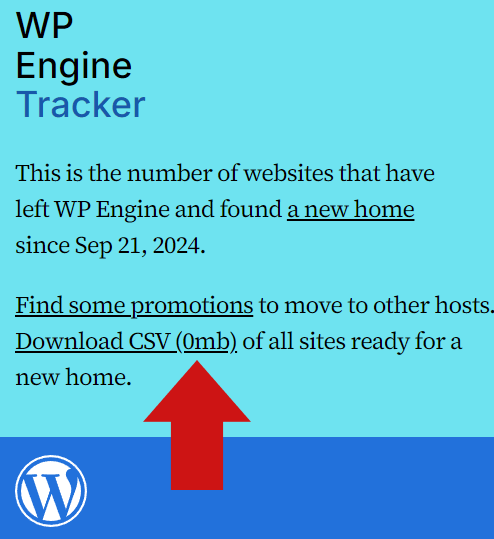
The CSV file was subsequently removed although the link to a non-existent file , with a link showing zero :

Screenshot Of WP Engine Tracker Website

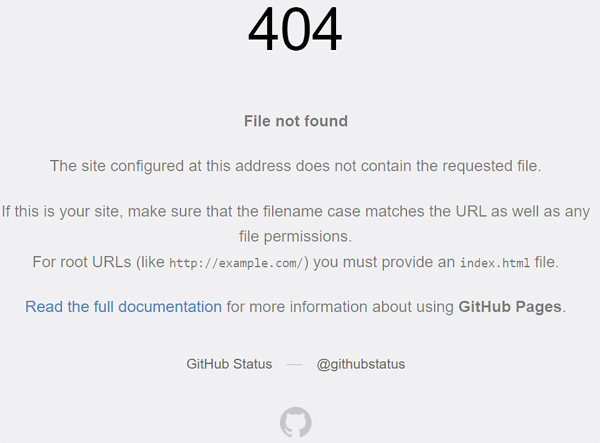
Clicking the link leads to a 404 error response message.

Screenshot Of 404 Error Response For CSV Download

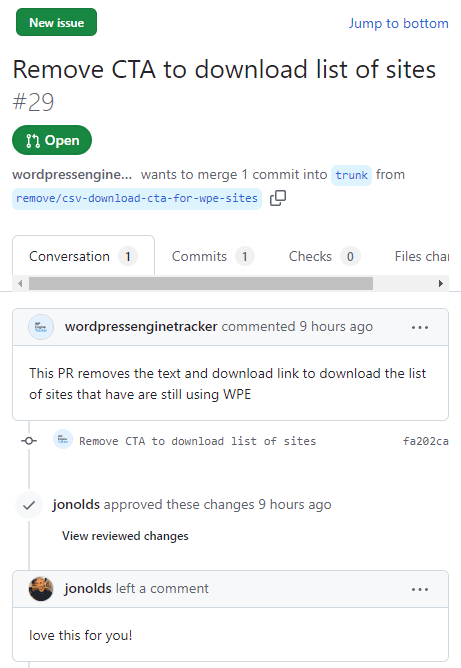
A pull request on GitHub shows that a request was made to remove the CSV file on December 11th.

“Remove CTA to download list of sites #29

wordpressenginetracker commented 9 hours ago
This PR removes the text and download link to download the list of sites that have are still using WPE”

Screenshot Of GitHub Pull Request

Advanced Custom Fields Plugin

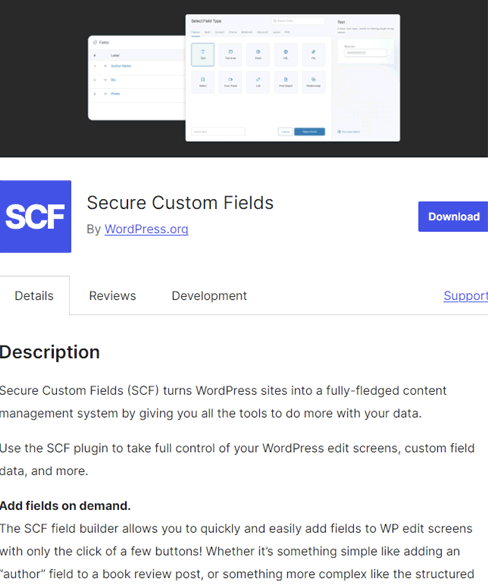
Automattic removed WP Engine’s Advanced Custom Fields (ACF) plugin from the official WordPress.org plugin repository and replaced it with Automattic’s cloned version, renamed as Secure Custom Fields (SCF).

The preliminary injunction orders Automattic to also restore access to the Advanced Custom Fields (ACF) plugin repository:

“Within 72 hours, Defendants are ORDERED to:

…(v) returning and restoring WPEngine’s access to and control of its Advanced Custom Fields (“ACF”) plugin directory listing at https://wordpress.org/plugins/advanced-customfields, as it existed as of September 20, 2024.”

The cloned SCF plugin currently still exists at that URL, although Automattic still has time to take it down.

Screenshot Of SCF Plugin In The ACF Directory Listing

Featured Image by Shutterstock/tomertu

Judge Sides With WP Engine Against Automattic & Mullenweg In WordPress Dispute via @sejournal, @martinibuster

A judge ruled in WP Engine’s favor in their request for a preliminary injunction against Automattic and Matt Mullenweg. The court agreed that WP Engine will suffer irreparable harm if the injunction is not granted and giving the defendants (Automattic and Mullenweg) 72 hours to return things to the way they were as of September 20th, 2024.

The judge ruled against Mullenweg and Automattic on every argument, granting WP Engine a preliminary injunction. The ruling requires the defendants to restore WP Engine’s access to WordPress.org, regain control of the WordPress.org directory listing for the Advanced Custom Fields (ACF) plugin, and remove a list of WP Engine customers from the domains.csv file linked on the wordpressenginetracker.com website.

There were six parts labeled A – F that outline the judge’s analysis of the case:

A. Success on the Merits

B. Irreparable Harm

C. Balance of Equities

D. Public Interest

E. Bond

F. Scope of Injunction

A. Success on the Merits

On WP Engine’s “claim for tortious interference with contractual relations” the judge ruled:

“Defendants’ arguments in opposition do not compel a different conclusion.

Defendants’ argument that the interference WPEngine alleges consists of acts they had a right to take fares no better.”

B. Irreparable Harm

Mullenweg and Automattic completely failed at defending against WP Engine’s claims of irreparable harm if the injunction isn’t granted. The judge wrote:

“Defendants counter with four arguments. None is persuasive”

C. Balance of Equities

In this part of the ruling the judge had to weigh the impact of the injunction on both parties. The judge found that WP Engine had good reason for obtaining an injunction to prevent further harm and that there would be no impact on Automattic or Mullenweg.

The judge wrote:

“The conduct described at length above – including the termination of WPEngine’s access to WordPress, the interference with the ACF plugin, and the additional burdens imposed on WPEngine’s customers, such as the sign-in pledge – demonstrates that WPEngine has a significant interest in obtaining preliminary injunctive relief.

Defendants’ arguments in opposition do not establish that they will suffer any damage that overrides WPEngine’s interest in obtaining relief. …Requiring Defendants to restore access on those terms while this action proceeds imposes a minimal burden.”

D. Public Interest

This part of the ruling addresses how granting the injunction impacts parties beyond the plaintiff and defendants. The judge concluded that denying the preliminary injunction would cause significant harm.

The court explained:

“Here, the public consequences of withholding injunctive relief are significant. Mullenweg himself acknowledges that ‘[t]oday, more than 40% of all websites run on WordPress.’

…Over two million websites run the ACF plugin Mullenweg allegedly tampered with, and those users rely on the stability of the plugin, and WordPress more broadly, to operate their websites, run their businesses, and go about their day online.

Moreover, the availability of WordPress as open-source software has created a sector for companies to operate at a profit. This includes Mullenweg’s own companies like Automattic and Pressable, and as Mullenweg himself acknowledged in 2017, it also includes WPEngine, which at the time, Mullenweg described as ‘the largest dedicated managed WP host…’

Those who have relied on the WordPress’s stability, and the continuity of support from for-fee service providers who have built businesses around WordPress, should not have to suffer the uncertainty, losses, and increased costs of doing business attendant to the parties’ current dispute.

Defendants’ arguments in opposition do not persuade otherwise.

…Accordingly, the final Winter element – the public interest – weighs in favor of granting preliminary injunctive relief.”

E. Bond

Automattic and Mullenweg argued that WP Engine should be required file a bond of $1.6 million to ensure that they are compensated for potential costs and damages if it’s later found that the preliminary injunction was granted without sufficient basis.

The judge agreed with WP Engine’s argument that reverting to the status quo, to how things were on September 20th, would have no effect.

They wrote:

“WPEngine’s arguments are persuasive. …the Court finds that any harm to Defendants resulting from the issuance of preliminary injunctive relief is unlikely, as it merely requires them to revert to business as usual as of September 20, 2024. Accordingly, the Court declines to require WPEngine to post a bond.”

F. Scope Of Injunction

The court has ordered the defendants, their coworkers, and anyone helping them to stop doing the following things:

  • Preventing WP Engine, its employees, users, customers, or partners from accessing WordPress.org.
  • Disrupting WP Engine’s control over or access to plugins or extensions hosted on WordPress.org
  • Modifying WP Engine plugins on WordPress installations (websites built with WordPress software) through unauthorized auto-migrate or auto-update commands
  • The court ordered that the defendants take actions within 72 hours to address WP Engine’s claims and restore things to the way they were on September 20, 2024.
  • Delete the list of WP Engine customers from the WP Engine Tracker website and the GitHub repository.
  • Restore WP Engine employee login credentials to WordPress.org and login.wordpress.org.
  • Disable any “technological blocking” like IP blocking, that were set up around September 25, 2024.
  • Remove the checkbox added on October 8, 2024, at login.wordpress.org, which required users to confirm they were ‘not affiliated with WP Engine in any way, financially or otherwise.’
  • Restore WP Engine’s control over its Advanced Custom Fields (ACF) plugin directory listing to the way it was on September 20, 2024.

The injunction goes into effect immediately and will remain until the court issues a final judgment after the trial.

A Win For WP Engine And The WordPress Community

Many people agree with the principle that those who profit from WordPress should give back to it. However the overwhelming sentiment on social media has not been supportive of how Mullenweg’s actions against WP Engine. Today a judge agreed with WP Engine and issued a preliminary injunction in their favor.

Featured Image by Shutterstock/Brian A Jackson

Automattic Acquisition Will Bring AI Into WordPress via @sejournal, @martinibuster

Automattic announced the acquisition of WPAI, a company that creates AI-powered functionalities that make WordPress easier and more efficient to use. The core technologies of the current apps will be integrated into new offerings by Automattic.

WPAI

WPAI released it’s first product, CodeWP in 2022. CodeWP was an AI integrated development environment (IDE) for developers, enabling them to quickly generate code that’s optimized for performance and WordPress standards.

The second app produced by WPAI is AgentWP, released in August 2024. AgentWP was an autonomous AI agent that could proactively take action such as as making design changes. It indexes a website and is able to improve WordPress website workflow from content to code generation.

The technology of both apps will be integrated into WordPress.

According to the announcement by WPAI:

“We are excited to combine forces with Automattic to push the boundaries of how we can apply artificial intelligence to be more impactful on the CMS that powers the majority of the internet,’ says James LePage. ‘By integrating our technology and research with current and future Automattic products, we’ll be able to accelerate towards our goal of making WordPress, the Operating System of the Web, more accessible to everybody.”

Automattic explains:

“WPAI is an AI startup, focused on building AI solutions for WordPress. The brilliant founding team behind it—James LePage, Greg Hunt, and Ovidiu “Ovi” Iulian Galatan—will be joining Automattic to lead the exploration of applied AI as an interaction paradigm for WordPress. They’ll be working on testing, building, and integrating innovative AI solutions into the core ecosystem to redefine how users and developers work with WordPress.”

Read the announcement on Automattic:

Automattic Welcomes WPAI

Read the announcement on WPAI:

WPAI Has Been Acquired by Automattic

Check out WPAI’s free WP Chat tool that answers WordPress related questions (while it’s still available):

https://wp.chat

WPForms Plugin Vulnerability Affects Up To 6 Million Sites via @sejournal, @martinibuster

The WPForms plugin for WordPress exposes websites to a vulnerability that allows attackers to update subscriptions and issue refunds. This flaw enables attackers to modify data they normally should not have access to.

Missing Capability Check

The vulnerability is due to a missing capability check in a function within the plugin called wpforms_is_admin_page, which means that the plugin doesn’t check for appropriate permissions of the user attempting to make a change with this function. That means that the plugin allows data to be modified by attackers lacking sufficient privileges.

Attackers need to acquire at least subscriber level permissions in order to launch an attack. Normally this kind of attack doesn’t attain this high of a severity rating. But it may be because sites that have users that pay for a subscription are likely to have subscriber level users. This may be why the severity level of this authenticated attack is higher than general.

The Wordfence announcement explains it like this:

“The WPForms plugin for WordPress is vulnerable to unauthorized modification of data due to a missing capability check on the ‘wpforms_is_admin_page’ function in versions starting from 1.8.4 up to, and including, 1.9.2.1. This makes it possible for authenticated attackers, with Subscriber-level access and above, to refund payments and cancel subscriptions.”

It’s recommended that users of versions WPForms plugin users from versions 1.8.4 up to an including 1.9.2.1 update their plugins.

Read the Wordfence security alert:

WPForms 1.8.4 – 1.9.2.1 – Missing Authorization to Authenticated (Subscriber+) Payment Refund and Subscription Cancellation

Featured Image by Shutterstock/Tithi Luadthong

Accessibility Champ: Wix, WordPress, Squarespace, Duda, Or…? via @sejournal, @martinibuster

The HTTP Archive published its report on the state of accessibility on the web, based on scores generated with the Lighthouse Accessibility Audit, a feature of Google’s Lighthouse website auditing tool that also measures website performance, best practices, and SEO. The report compared traditional content management systems with website building platforms, with WordPress scoring surprisingly well.

Lighthouse is a feature available through Chrome DevTools built into every Chrome-based browser and as one of the audits on the standalone PageSpeed Insights tool.

HTTP Archive

The research was conducted by the HTTP Archive, a community driven open source project that tracks data about how how sites are built and perform. They offer a configurable report of how different content management platforms perform that is updated monthly.

The accessibility report was done using data collected by the The WebAim Million study which is based on the top one million website home pages. WebAim Million uses data from the Tranco list which itself is based on six different sources to come up with the list of million sites, a list that is designed to be resistant to manipulation.

The Tranco List site explains:

“Researchers in web security or Internet measurements often use rankings of popular websites. However, in our paper we showed that these rankings disagree on which domains are most popular, can change significantly on a daily basis and can be manipulated (by malicious actors).

As the research community still benefits from regularly updated lists of popular domains, we provide Tranco, a ranking that improves upon the shortcomings of current lists. We also emphasize the reproducibility of these rankings and the studies using them by providing permanent citable references.

We currently use the lists from five providers: Cisco Umbrella (available free of charge), and Majestic (available under a CC BY 3.0 license), Farsight (only for the default list), the Chrome User Experience Report (CrUX) (available under a CC BY-SA 4.0 license), and Cloudflare Radar (available under a CC BY-NC 4.0 license). Tranco is not affiliated with any of these providers.”

Top CMS Accessibility Performance

HTTP Archive performed it’s research to identify the best performing platforms and shortcomings of each.

Accessibility: Traditional CMS

Adobe Experience Manager and Contentful were the top traditional content management systems when it came to accessibility, tied with a score of 87%, followed by Sitecore and WordPress in second place. An interesting fact about the top ranked CMSs is that, except for WordPress, three of the four top ranked CMSs were closed source, Adobe Experience Manager (AEM), Contentful and Sitecore .

Accessibility Scores By CMS:

  • Adobe Experience Manager 87%
  • Contentful 87%
  • Sitecore 85%
  • WordPress 85%
  • Craft CMS 84%
  • Contao 84%
  • Drupal 84%
  • Liferay 83%
  • TYPO3 CMS 83%
  • DNN 82%

What’s going on with the CMS scores? HTTP Archive explains:

“When most folks think about CMS, they think about the ones that you can download and install yourself. This is predominantly made up of open source tools, but not exclusively. Adobe Experience Manager (AEM), Contentful and Sitecore were the most accessible three in this list of top 10. A possible explanation for this is that closed-source software like AEM is more likely to be used by larger corporations, which have more resources to address accessibility issues. Additionally, open-source software gives website owners a lot of freedom, which in some cases can lead to worse accessibility.”

Accessibility: Website Platforms

This comparison is by website building platform, comparing platforms like Wix, Duda, and Squarespace. The accessibility scores for the platforms were higher than the scores for traditional CMSs, reflecting how private platforms are better able to control variables as opposed to an open source CMS that offers users a more open ended experience.

Accessibility Scores By Website Platform

  • Wix 94%
  • Squarespace 92%
  • Google Sites 90%
  • Duda 87%
  • Hubspot CMS Hub 87%
  • Pixnet 87%
  • Weebly 86%
  • GoDaddy Website Builder 85%
  • Webnode 84%
  • Tilda 83%

Wix Beats Out All CMS & Platforms

What’s notable about these scores is that sites built with Wix score higher for accessibility than all other sites built on any other CMS or website building platform. Ninety four percent of sites built with Wix have a That’s a reflection of Wix’s well-known effort to create a product that is strong in performance, SEO and accessibility.

Here is the list arranged in descending order by percentage:

1. Wix – 94%
2. Squarespace – 92%
3. Google Sites – 90%
4. Adobe Experience Manager – 87%
5. Contentful – 87%
6. Duda – 87%
7. Hubspot CMS Hub – 87%
8. Pixnet – 87%
9. Sitecore – 85%
10. WordPress – 85%
11. GoDaddy Website Builder – 85%
12. Weebly – 86%
13. Craft CMS – 84%
14. Contao – 84%
15. Drupal – 84%
16. Webnode – 84%
17. Liferay – 83%
18. TYPO3 CMS – 83%
19. Tilda – 83%
20. DNN – 82%

Website Accessibility

SEOs are understandably motivated by best practices for ranking better. For example, many didn’t prioritize site performance until it became a ranking factor, even though website performance improves sales and advertising performance and may have indirect impact on rankings.

Accessibility also has indirect advantages for improved search performance. For example, about .5% of the female population and 8% of males are color blind. Why would anyone who cares about their rankings alienate, frustrate and exclude approximately 4.5% of website visitors?

Wix and Squarespace are prioritizing accessibility. Everyone else should as well, because it’s both ethical and a sound business practice.

Read the HTTP Archive report here.

Featured Image by Shutterstock/Happy_Nati

Maximize SEO Efforts: How To Fix Website Issues That Drain Time, Money & Performance

This post was sponsored by Bluehost. The opinions expressed in this article are the sponsor’s own.

Your website’s hosting is more than a technical decision.

It’s a cornerstone of your business’s online success that impacts everything from site speed and uptime to customer trust and overall branding.

Yet, many businesses stick with subpar hosting providers, often unaware of how much it’s costing them in time, money, and lost opportunities.

The reality is that bad hosting doesn’t just frustrate you. It frustrates your customers, hurts conversions, and can even damage your brand reputation.

The good news?

Choosing the right host can turn hosting into an investment that works for you, not against you.

Let’s explore how hosting affects your bottom line, identify common problems, and discuss what features you should look for to maximize your return on investment.

1. Start By Auditing Your Website’s Hosting Provider

The wrong hosting provider can quickly eat away at your time & efficiency.

In fact, time is the biggest cost of an insufficient hosting provider.

To start out, ask yourself:

  • Is Your Bounce Rate High?
  • Are Customers Not Converting?
  • Is Revenue Down?

If you answered yes to any of those questions, and no amount of on-page optimization seems to make a difference, it may be time to audit your website host.

Why Audit Your Web Host?

Frequent downtime, poor support, and slow server response times can disrupt workflows and create frustration for both your team and your visitors.

From an SEO & marketing perspective, a sluggish website often leads to:

  • Increased bounce rates.
  • Missed customer opportunities.
  • Wasted time troubleshooting technical issues.

Could you find workarounds for some of these problems? Sure. But they take time and money, too.

The more dashboards and tools you use, the more time you spend managing it all, and the more opportunities you’ll miss out on.

For example, hosts offering integrated domain and hosting management make overseeing your website easier and reduce administrative hassles.

Bluehost’s integrated domain services simplify website management by bringing all your hosting and domain tools into one intuitive platform.

2. Check If Your Hosting Provider Is Causing Slow Site Load Speeds

Your website is often the first interaction a customer has with your brand.

A fast, reliable website reflects professionalism and trustworthiness.

Customers associate smooth experiences with strong brands, while frequent glitches or outages send a message that you’re not dependable.

Your hosting provider should enhance your brand’s reputation, not detract from it.

How To Identify & Measure Slow Page Load Speeds

Identifying and measuring slow site and page loading speeds starts with using tools designed to analyze performance, such as Google PageSpeed Insights, GTmetrix, or Lighthouse.

These tools provide metrics like First Contentful Paint (FCP) and Largest Contentful Paint (LCP), which help you see how quickly key elements of your page load.

Pay attention to your site’s Time to First Byte (TTFB), a critical indicator of how fast your server responds to requests.

Regularly test your site’s performance across different devices, browsers, and internet connections to identify bottlenecks. High bounce rates or short average session durations in analytics reports can also hint at speed issues.

Bandwidth limitations can create bottlenecks for growing websites, especially during traffic spikes.

How To Find A Fast Hosting Provider

Opt for hosting providers that offer unmetered or scalable bandwidth to ensure seamless performance even during periods of high demand.

Cloud hosting is designed to deliver exceptional site and page load speeds, ensuring a seamless experience for your visitors and boosting your site’s SEO.

With advanced caching technology and optimized server configurations, Bluehost Cloud accelerates content delivery to provide fast, reliable performance even during high-traffic periods.

Its scalable infrastructure ensures your website maintains consistent speeds as your business grows, while a global Content Delivery Network (CDN) helps reduce latency for users around the world.

With Bluehost Cloud, you can trust that your site will load quickly and keep your audience engaged.

3. Check If Your Site Has Frequent Or Prolonged Downtime

Measuring and identifying downtime starts with having the right tools and a clear understanding of your site’s performance.

Tools like uptime monitoring services can track when your site is accessible and alert you to outages in real time.

You should also look at patterns.

Frequent interruptions or prolonged periods of unavailability are red flags. Check your server logs for error codes and timestamps that indicate when the site was down.

Tracking how quickly your hosting provider responds and resolves issues is also helpful, as slow resolutions can compound the problem.

Remember, even a few minutes of downtime during peak traffic hours can lead to lost revenue and customer trust, so understanding and monitoring downtime is critical for keeping your site reliable.

No matter how feature-packed your hosting provider is, unreliable uptime or poor support can undermine its value. These two factors are critical for ensuring a high-performing, efficient website.

What Your Hosting Server Should Have For Guaranteed Uptime

A Service Level Agreement (SLA) guarantees uptime, response time, and resolution time, ensuring that your site remains online and functional. Look for hosting providers that back their promises with a 100% uptime SLA.

Bluehost Cloud offers a 100% uptime SLA and 24/7 priority support, giving you peace of mind that your website will remain operational and any issues will be addressed promptly.

Our team of WordPress experts ensures quick resolutions to technical challenges, reducing downtime and optimizing your hosting ROI.

4. Check Your Host For Security Efficacy

Strong security measures protect your customers and show them you value their privacy and trust.

A single security breach can ruin your brand’s image, especially if customer data is compromised.

Hosts that lack built-in security features like SSL certificates, malware scanning, and regular backups leave your site vulnerable.

How Hosting Impacts Security

Security breaches don’t just affect your website. They affect your customers.

Whether it’s stolen data, phishing attacks, or malware, these breaches can erode trust and cause long-term damage to your business.

Recovering from a security breach is expensive and time-consuming. It often involves hiring specialists, paying fines, and repairing the damage to your reputation.

Is Your Hosting Provider Lacking Proactive Security Measures?

Assessing and measuring security vulnerabilities or a lack of proactive protection measures begins with a thorough evaluation of your hosting provider’s features and practices.

  1. Review Included Security Tools

Start by reviewing whether your provider includes essential security tools such as SSL certificates, malware scanning, firewalls, and automated backups in their standard offerings.

If these are missing or come as costly add-ons, your site may already be at risk.

  1. Leverage Brute Force Tools To Check For Vulnerabilities

Next, use website vulnerability scanning tools like Sucuri, Qualys SSL Labs, or SiteLock to identify potential weaknesses, such as outdated software, unpatched plugins, or misconfigured settings.

These tools can flag issues like weak encryption, exposed directories, or malware infections.

Monitor your site for unusual activity, such as unexpected traffic spikes or changes to critical files, which could signal a breach.

  1. Make Sure The Host Also Routinely Scans For & Eliminates Threats

It’s also crucial to evaluate how your hosting provider handles updates and threat prevention.

  • Do they offer automatic updates to patch vulnerabilities?
  • Do they monitor for emerging threats and take steps to block them proactively?

A good hosting provider takes a proactive approach to security, offering built-in protections that reduce your risks.

Look for hosting providers that include automatic SSL encryption, regular malware scans, and daily backups. These features not only protect your site but also give you peace of mind.

Bluehost offers robust security tools as part of its standard WordPress hosting package, ensuring your site stays protected without extra costs. With built-in SSL certificates and daily backups, Bluehost Cloud keeps your site secure and your customers’ trust intact.

5. Audit Your WordPress Hosting Provider’s Customer Support

Is your host delivering limited or inconsistent customer support?

Limited or inconsistent customer support can turn minor issues into major roadblocks. When hosting providers fail to offer timely, knowledgeable assistance, you’re left scrambling to resolve problems that could have been easily fixed.

Delayed responses or unhelpful support can lead to prolonged downtime, slower page speeds, and unresolved security concerns, all of which impact your business and reputation.

Reliable hosting providers should offer 24/7 priority support through multiple channels, such as chat and phone, so you can get expert help whenever you need it.

Consistent, high-quality support is essential for keeping your website running smoothly and minimizing disruptions.

Bluehost takes customer service to the next level with 24/7 priority support available via phone, chat, and email. Our team of knowledgeable experts specializes in WordPress, providing quick and effective solutions to keep your site running smoothly.

Whether you’re troubleshooting an issue, setting up your site, or optimizing performance, Bluehost’s dedicated support ensures you’re never left navigating challenges alone.

Bonus: Check Your Host For Hidden Costs For Essential Hosting Features

Hidden costs for essential hosting features like:

  • Backups.
  • SSL certificates.
  • Additional bandwidth can quickly erode the value of a seemingly affordable hosting plan.

What Does This Look Like?

For example, daily backups, which are vital for recovery after data loss or cyberattacks, may come with an unexpected monthly fee.

Similarly, SSL certificates, which are essential for encrypting data and maintaining trust with visitors, are often sold as expensive add-ons.

If your site experiences traffic spikes, additional bandwidth charges can catch you off guard, adding to your monthly costs.

Many providers, as you likely have seen, lure customers in with low entry prices, only to charge extra for services that are critical to your website’s functionality and security.

These hidden expenses not only strain your budget but also create unnecessary complexity in managing your site.

A reliable hosting provider includes these features as part of their standard offering, ensuring you have the tools you need without the surprise bills.

Which Hosting Provider Does Not Charge For Essential Features?

Bluehost is a great option, as their pricing is upfront.

Bluehost includes crucial tools like daily automated backups, SSL certificates, and unmetered bandwidth in their standard plans.

This means you won’t face surprise fees for the basic functionalities your website needs to operate securely and effectively.

Whether you’re safeguarding your site from potential data loss or ensuring encrypted, trustworthy connections for your visitors, or need unmetered bandwidth to ensure your site can handle traffic surges without penalty, you’ll gain the flexibility to scale without worrying about extra charges.

We even give WordPress users the option to bundle premium plugins together to help you save even more.

By including these features upfront, Bluehost simplifies your WordPress hosting experience and helps you maintain a predictable budget, freeing you to focus on growing your business instead of worrying about unexpected hosting costs.

Transitioning To A Better Hosting Solution: What To Consider

Switching hosting providers might seem daunting, but the right provider can make the process simple and cost-effective. Here are key considerations for transitioning to a better hosting solution:

Migration Challenges

Migrating your site to a new host can involve technical hurdles, including transferring content, preserving configurations, and minimizing downtime. A hosting provider with dedicated migration support can make this process seamless.

Cost of Switching Providers

Many businesses hesitate to switch hosts due to the cost of ending a contract early. To offset these expenses, search for hosting providers that offer migration incentives, such as contract buyouts or credit for remaining fees.

Why Bluehost Cloud Stands Out

Bluehost Cloud provides comprehensive migration support, handling every detail of the transfer to ensure a smooth transition.

Plus, our migration promotion includes $0 switching costs and credit for remaining contracts, making the move to Bluehost not only hassle-free but also financially advantageous.

Your hosting provider plays a pivotal role in the success of your WordPress site. By addressing performance issues, integrating essential features, and offering reliable support, you can maximize your hosting ROI and create a foundation for long-term success.

If your current hosting provider is falling short, it’s time to evaluate your options. Bluehost Cloud delivers performance-focused features, 100% uptime, premium support, and cost-effective migration services, ensuring your WordPress site runs smoothly and efficiently.

In addition, Bluehost has been a trusted partner of WordPress since 2005, working closely to create a hosting platform tailored to the unique needs of WordPress websites.

Beyond hosting, Bluehost empowers users through education, offering webinars, masterclasses, and resources like the WordPress Academy to help you maximize your WordPress experience and build successful websites.

Take control of your website’s performance and ROI. Visit the Bluehost Migration Page to learn how Bluehost Cloud can elevate your hosting experience.

This article has been sponsored by Bluehost, and the views presented herein represent the sponsor’s perspective.


Image Credits

Featured Image: Image by Bluehost. Used with permission.