WordPress Astra Theme Vulnerability Affects +1 Million Sites via @sejournal, @martinibuster

One of the World’s most popular WordPress themes quietly patched a security vulnerability over the weekend that security researchers say appears to have patch a stored XSS vulnerability.

The official Astra changelog offered this explanation of the security release:

“Enhanced Security: Our codebase has been strengthened to further protect your website.”

Their changelog, which documents changes to the code that’s included in every update, offers no information about what the vulnerability was or the severity of it.  Theme users thus can’t make an informed decision as to whether to update their theme as soon as possible or to conduct tests first before updating to insure that the updated theme is compatible with other plugins in use.

SEJ reached out to the Patchstack WordPress security company who verified that Astra may have patched a cross-site scripting vulnerability.

Brainstorm Force Astra WordPress Theme

Astra is one of the world’s most popular WordPress theme. It’s a free theme that’s relatively  lightweight, easy to use and results in professional looking websites. It even has Schema.org structured data integrated within it.

Cross-Site Scripting Vulnerability (XSS)

A cross-site scripting vulnerability is one of the most common type of vulnerabilities found on WordPress that generally arises within third party plugins and themes. It’s a vulnerability that occurs when there’s a way to input data but the plugin or theme doesn’t sufficiently filter what’s being input or output which can subsequently allow an attacker to upload a malicious payload.

This particular vulnerability is called a stored XSS. A stored XSS is so-called because it involves directly uploading the payload to the website server and stored.

The non-profit Open Worldwide Application Security Project (OWASP) website offers the following description of a stored XSS vulnerability:

“Stored attacks are those where the injected script is permanently stored on the target servers, such as in a database, in a message forum, visitor log, comment field, etc. The victim then retrieves the malicious script from the server when it requests the stored information. Stored XSS is also sometimes referred to as Persistent or Type-II XSS.”

Patchstack Review Of Plugin

SEJ contacted Patchstack who promptly reviewed the changed files and identified a possible theme security issue in three WordPress functions. WordPress functions are code that can change how WordPress features behave such as changing how long an excerpt is. Functions can add customizations and introduce new features to a theme.

Patchstack explained their findings:

“I downloaded version 4.6.9 and 4.6.8 (free version) from the WordPress.org repository and checked the differences.

It seems that several functions have had a change made to them to escape the return value from the WordPress function get_the_author.

This function prints the “display_name” property of a user, which could contain something malicious to end up with a cross-site scripting vulnerability if printed directly without using any output escaping function.

The following functions have had this change made to them:

astra_archive_page_info
astra_post_author_name
astra_post_author

If, for example, a contributor wrote a post and this contributor changes their display name to contain a malicious payload, this malicious payload will be executed when a visitor visits that page with their malicious display name.”

Untrusted data in the context of XSS vulnerabilities in WordPress can happen where a user is able to input data.

These processes are called Sanitization, Validation, and Escaping, three ways of securing a WordPress website.

Sanitization can be said to be a process that filters input data. Validation is the process of checking what’s input to determine if it’s exactly what’s expected, like text instead of code. Escaping output makes sure that anything that’s output, such as user input or database content, is safe to display in the browser.

WordPress security company Patchstack identified changes to functions that escape data which in turn gives clues as to what the vulnerability is and how it was fixed.

Patchstack Security Advisory

It’s unknown whether a third party security researcher discovered the vulnerability or if Brainstorm, the makers of the Astra theme, discovered it themselves and patched it.

The official Patchstack advisory offered this information:

“An unknown person discovered and reported this Cross Site Scripting (XSS) vulnerability in WordPress Astra Theme. This could allow a malicious actor to inject malicious scripts, such as redirects, advertisements, and other HTML payloads into your website which will be executed when guests visit your site. This vulnerability has been fixed in version 4.6.9.”

Patchstack assessed the vulnerability as a medium threat and assigned it a score of 6.5 on a scale of 1 – 10.

Wordfence Security Advisory

Wordfence also just published a security advisory.  They analyzed the Astra files and concluded:

“The Astra theme for WordPress is vulnerable to Stored Cross-Site Scripting via a user’s display name in all versions up to, and including, 4.6.8 due to insufficient input sanitization and output escaping. This makes it possible for authenticated attackers, with contributor-level access and above, to inject arbitrary web scripts in pages that will execute whenever a user accesses an injected page.”

It’s generally recommended that users of the theme update their installation but it’s also prudent to test whether the updated theme doesn’t cause errors before pushing it to a live website.

Featured Image by Shutterstock/GB_Art
WordPress 6.5: The features you want to know about

It’s almost time for a new WordPress release! On the 26th of March, WordPress 6.5 will be released. Once again, the WordPress team, consisting of people from all over the world, has lots of new improvements in store for us. To get you excited, we already had a quick look at what features it will bring. So let’s see what we can expect and how you can use these changes to improve your own WordPress website when the release is out.

Introducing the Font Library

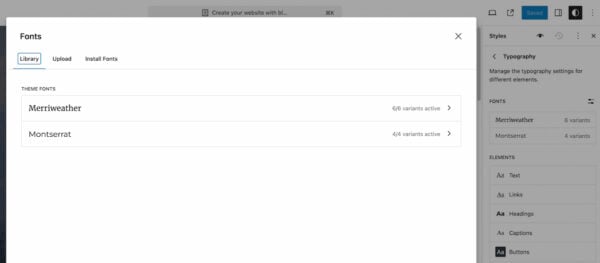
The upcoming release includes a new Font Library for the block editor. This library gives you more control over the typography you use throughout your pages. What’s cool about it is that it allows you to install and activate local fonts and Google Fonts on your website. By allowing us to add the fonts of our choice, regardless of the chosen theme, this library gives you more freedom when it comes to design. So make sure to give it a try now that you can manage your used fonts.

Use the Font Library to view your current fonts and upload new ones

New features in the block editor

There are loads of tweaks made to the block editor, so we’ll highlight a few cool ones here. First of all, WordPress 6.5 will make it possible to rename your blocks in the list view. Right now, this is already possible for your group blocks but the new release will allow you to rename individual blocks as well. Especially with longer pages or pages that consist of lots of different types of blocks, this can be very helpful in keeping an overview while you’re working on that page.

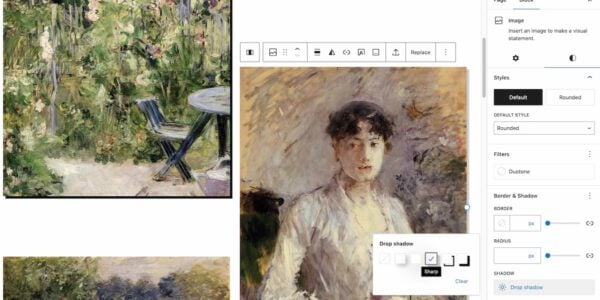
Image blocks with drop shadow effect in WordPress 6.5
Example of different drop shadow effects on two images

The upcoming release also brings us a few new design options. The drop shadow effect will be available for more blocks, such as the image block and columns. This helps you give a little bit more depth to your pages, make elements stand out and play with the design of your pages. Another design feature that’s coming our way is getting more control over the look of your cover blocks. You will be able to set aspect ratios and add color overlays that are based on colors in your chosen image. Which helps you really customize these cover blocks to fit into the overall look and feel of your website.

Renewed overview of style revisions

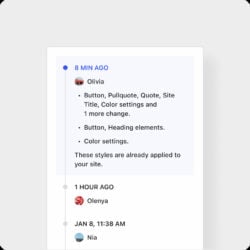
Screenshot of Style revisions in WordPress 6.5
The style revisions overview

WordPress 6.5 comes with an improved style revision that shows you more information about the changes made during each revision. Go to the editor and click Styles, where you’ll see an option to view past revisions. These are also accessible while you’re working on the design of your templates. The fun thing about this overview of revisions is that it’s a lot more visual than the revision overview you get when editing a page or post.

This overview is shown next to the page and it allows you to view past designs and even apply them again. Overall it feels easier to use and more efficient as it shows you the effect on the page right away. It’s good to know that this is only available for themes that use the block editor.

The Interactivity API

This release also comes with something called the Interactivity API. This feature provides developers with a framework to build interactive front-end experiences while using blocks. The idea is that interacting with these elements doesn’t come with a new page load, making them more interactive than regular pages. This framework is intended to simplify the process without having to use external tools. To give you an idea of what the Interactivity API can be used for, the WordPress team created a WP Movies demo website you can visit.

Improvements in performance and accessibility

The upcoming WordPress 6.5 includes loads of performance updates. One of the main things that comes out of this is a huge improvement in speed when using the Block Editor and Site Editor. In addition, translated websites will see a much quicker load time due to a new, lightweight library.

This new version of WordPress also comes with a bunch of accessibility improvements (more than 65 to be exact). To name a few changes, there have been fixes to contrast settings, positioning of elements and cursor focus. Staying true to the WordPress promise of working towards a platform that is accessible for everyone. If you want to dive into the features of WordPress 6.5 a bit more, I would recommend going through their Field Guide to read up on all the changes in this release.

Read more: WordPress 6.4: A more intuitive building experience »

Coming up next!

WordPress Site Builder Plugin Accused Of Adding A “Backdoor” via @sejournal, @martinibuster

A widely used add-on plugin for a popular WordPress site builder installed an anti-piracy script that essentially unpublishes all posts. WordPress developers are livid, with some calling the script a malware, a backdoor,  and a violation of laws.

BricksUltimate Add-On For Bricks Builder

Bricks site builder is a site building platform for WordPress that is wildly popular with web developers who cite the intuitive user interface, the class-based CSS and the clean high performance HTML code it generates as features that elevate over many other site builders. What sets this site builder apart is that it’s created for developers who have advanced skills, which enables them to create virtually anything they want without having to fight against built-in code that’s created by typical drag and drop site builders that are meant for non-developers.

A benefit of the Bricks site builder is that there’s a community of third-party plugin developers that extends the power of Bricks to make it faster to add more website features.

BricksUltimate Addon for Bricks Builder is a third-party plugin that makes it easy to add features like breadcrumbs, animated menus, accordion menus, star ratings and other interactive on-page elements.

It is this plugin that has stirred up controversy in the WordPress developer community by adding anti-piracy elements that many in the WordPress community feel is a “very bad practice” and others referring to it as “malware”.

BricksUltimate Anti-Piracy Measures

What is causing the controversy appears to be a script that checks for a valid license. It is unclear exactly what is installed, but according to a developer who examined the plugin code there appears to be a script installed that is designed to hide all posts across the entire website if it detects a pirated copy of the plugin (more about this below).

The developer of the plugin, Chinmoy Kumar Paul, downplayed the controversy, writing that people are “overreacting”.

An ongoing discussion in the Dynamic WordPress Facebook group about the BricksUltimate anti-piracy measure has over 60 posts, with the overwhelming majority of posts objecting to the anti-piracy script.

Typical reactions in that discussion:

“…hiding a backdoor that reads the client database, is itself a breach of trust and shows malicious intent on the developer’s part.”

“I simply refuse to support or recommend any developer who thinks they have the right to secretly add a malicious payload to a piece of software. And then, once confronted defends it and sees no wrong. Absolutely not acceptable and I’m glad the community has clubbed together stating that such an approach should not be tolerated…”

“…the fact the code is there is terrible. I would not let any plugin with that sort of back door on any site, let alone anyone doing it for a client site. That spoils the plugin for me fully!”

“This dude here and his company could be easily reported and exposed to the The General Data Protection Regulation Authority (GDPR) in any EU country for injecting an undeclared “monitor” code that has a non authorized access to DB’s and actually behaves like malware!!!!!! is just unbelievable! “

One of the developers in the Dynamic WordPress Facebook community reported their findings of what the anti-piracy script does.

They explained their findings:

“Me and my colleague have investigated this. Granted, we are not backend experts. Our findings are that the plugin has an encoded code that is not human-readable without decoding.

That code is an additional remote license check. If it fails, it seems to replace values in the wp->posts database, essentially making all posts from all post types unreadable to WordPress.
It doesn’t seem to delete them outright as first suspected, but it does appear as deleted on the frontend for any non-expert user.

This seems to be implemented in 1.5.3+ BU versions and as there aren’t any posts here about it from legit users, I tend to trust Chinmoy that it’s very unlikely to affect legit users.

Now, my colleague indeed had a pirated version of the plugin, but sadly, she wasn’t aware of it because it was purchased as a legitimate version from a third-party seller.”

Response From the BricksUltimate Developer:

The developer of the plugin, Chinmoy Kumar Paul, posted a response in the BricksUltimate Facebook group.

They wrote:

“Re: Some coders are bypassing the license API with some custom code. That time plugin is activating and it is smoothly working. My script is just tracking those sites and checking the license key. If not match, is deleted the data. But it is not the best solution. I was just testing.

Next time I shall improve it with other logic and tests.

People are just overreacting.

I am still searching for the best solution and updating the codes as per my report.

…A lot of unwanted users are submitting the issue via email and I am losing my time for them. So I am just trying to find the best option to avoid this kind of thing.”

Several BricksUltimate users defended the plugin developer’s attempt to fight back against users with pirated copies of the plugin. But for every post defending the developer there were others that expressed strong disapproval.

Developer Backtracks On Anti-Piracy Measure

The developer may have read the room and seen that the move was highly unpopular. They said they had reversed course on taking action.

They insisted:

“…I stated that I shall change the current approach with a better option. People do not understand the concept and spread the rumors here and there.”

Backdoors Can Lead To Fines And Prison

Wordfence recently published an article about backdoors left by developers that intentionally interfere with or damage a website by publishers who owe them money.

In post titled: PSA: Intentionally Leaving Backdoors in Your Code Can Lead to Fines and Jail Time they wrote:

“One of the biggest reasons a web developer may be tempted to include a hardcoded backdoor is to ensure their work is not used without payment.

…What should be obvious is that intentionally damaging a website is a violation of laws in many countries, and could lead to fines or even jail time. In the United States, the Computer Fraud and Abuse Act of 1986 (CFAA) clearly defines illegal use of computer systems. According to 18 U.S.C. § 1030 (e)(8), simply accessing computer systems in a way that uses higher privileges or access levels than permitted is a violation of the law. Further, intentionally damaging the system or data is also a crime. The penalty for violating the CFAA can include sentences 10 years or more in prison, in addition to large financial penalties.”

Fighting piracy is a legitimate issue. But it’s a little more difficult in the WordPress community because WordPress licensing specifies that everything created with WordPress must be released with an open source license.

Featured Image by Shutterstock/Dikushin Dmitry

WordPress Announces Bluehost Managed Cloud Hosting via @sejournal, @martinibuster

WordPress.com and Bluehost announced a new managed WordPress cloud hosting solution that offers optimized WordPress performance features unavailable to traditional shared, VPN and dedicated hosting environments. The new managed WordPress cloud service handles virtually all of the technical details for maintaining a fast and secure website with 100% uptime.

Managed WordPress Hosting

Managed WordPress hosting is a type of hosting that are optimized for WordPress websites with built-in security and tools for small businesses, developers and agencies.

What’s different about the new Bluehost and WordPress.com hosting is that it brings all of the managed WordPress optimizations to a cloud hosted platform which brings a higher level of performance and scaling that exceeds traditional shared, VPS and dedicated hosting environments.

Managed WordPress Cloud Hosting

The new cloud hosting infrastructure offers built-in security, DDOS protection, CDN and scaling that virtually assures that the site will always be available at the fastest speeds possible.

Managed cloud hosting is basically hosting on a network of servers at a datacenter and can be as large as a global network of datacenters, which offers benefits not available in other hosting environments.

A shared hosting environment is one server that is hosting thousands of websites. Shared hosting is cheaper but their performance levels are generally at the lowest levels.

A Virtual Private Server (VPS) is generally a hosting environment that operates like a dedicated server that is shared with a limited number of other virtual servers on one machine. These offer a high level of performance but they don’t offer the benefits of managed WordPress hosting because it falls on the hosting subscriber to DIY the security and other requirements of hosting.

A dedicated server is one machine that is under control of one publisher. The word “control” is the key to dedicated hosting because a dedicated server offers complete control over the server. It takes technical knowledge to run a dedicated server but delivers incredibly fast and responsive websites.

The cloud hosting environment offers hosting across multiple machines in a datacenter, which is essentially why it’s called a cloud. Unlike other cloud providers, the Bluehost managed WordPress cloud environment is based on a global infrastructure.

According to Bluehost:

“Bluehost Cloud is built and supported by top-tier WordPress experts and powered by a redundant global server infrastructure.

… This platform is built on a scalable, multi-regional fault-tolerant infrastructure, ensuring 100% network uptime and allowing for seamless scaling according to traffic demands.”

Who Bluehost WordPress Managed Cloud Is For

The Bluehost WordPress Cloud hosting environment is meant for publishers and stores that are serious about their business and demand dependable uptime, the highest levels of performance and thoroughly locked down security.

Prices start at $79.99/month and go up to $299/month (early access prices are up to 56% off). The difference between each plan is the amount of virtual centralized processing units (vCPU) and SSD storage space that is allocated. The lowest tier cloud hosting is perfect for one site and the higher priced versions are optimized for hosting multiple sites or one site with a lot of traffic.

Read the announcement on Bluehost.com

Unmatched power, speed, & control with WordPress cloud hosting

Read the announcement at WordPress.com:

WP Cloud Is Powering the Future of WordPress

Featured Image by Shutterstock/file404