WooCommerce Customer Review Plugin Vulnerability Affects 80,000+ Sites via @sejournal, @martinibuster

An advisory was issued about a vulnerability in the Customer Reviews for WooCommerce plugin, which is installed on over 80,000 websites. The plugin enables unauthenticated attackers to launch a stored cross-site scripting attack.

Customer Reviews for WooCommerce Vulnerability

The Customer Reviews for WooCommerce plugin enables users to send customers an email reminder to leave a review and also offers other features designed to increase customer engagement with a brand.

Wordfence issued an advisory about a flaw in the plugin that makes it possible for attackers to inject scripts into web pages that execute whenever a user visits the affected page.

The exploit is due to a failure to “sanitize” inputs and “escape” outputs. Sanitizing inputs in this context is a basic WordPress security measure that checks if uploaded data conforms to expected types and removes dangerous content like scripts. Output escaping is another security measure that ensures any special characters produced by the plugin aren’t executable.

According to the official Wordfence advisory:

“The Customer Reviews for WooCommerce plugin for WordPress is vulnerable to Stored Cross-Site Scripting via the ‘author’ parameter in all versions up to, and including, 5.80.2 due to insufficient input sanitization and output escaping. This makes it possible for unauthenticated attackers to inject arbitrary web scripts in pages that will execute whenever a user accesses an injected page.”

Users of the plugin are advised to update to version 5.81.0 or newer version.

Featured Image by Shutterstock/Brilliant Eye

WordPress AI Engine Plugin Vulnerability Affects Up To 100,000 Websites via @sejournal, @martinibuster

A security advisory was issued for the AI Engine WordPress plugin, installed on over 100,000 websites, the fourth one this month. Rated 8.8, this vulnerability enables attackers with only subscriber-level authentication to upload malicious files when the REST API is enabled.

AI Engine Plugin: Fifth Vulnerability In 2025

This is the fourth vulnerability discovered in the AI Engine plugin in July, following the first one of the year discovered in June, making a total of five vulnerabilities discovered in the plugin so far in 2025. There were nine vulnerabilities discovered in 2024, one of which was rated 9.8 because it enabled unauthenticated attackers to upload malicious files, plus another rated 9.1 that also enabled arbitrary uploads.

Authenticated (Subscriber+) Arbitrary File Upload

The latest vulnerability enables authenticated file uploads. What makes this exploit more dangerous is that it requires only subscriber-level authentication for an attacker to take advantage of the security weakness. That isn’t as bad as a vulnerability that doesn’t require authentication, but it’s still rated 8.8 on a scale of 1 to 10.

Wordfence describes the vulnerability as being due to missing file type validation in a function related to the REST API in versions 2.9.3 and 2.9.4.

File type validation is a security measure typically used within WordPress to make sure that the content of a file matches the type of file being uploaded to the website.

According to Wordfence:

“This makes it possible for authenticated attackers, with Subscriber-level access and above, to upload arbitrary files on the affected site’s server when the REST API is enabled, which may make remote code execution possible.”

Users of the AI Engine plugin are recommended updating their plugin to the latest version, 2.9.5, or a newer version.

The plugin changelog for version 2.9.5 shares what was updated:

“Fix: Resolved a security issue related to SSRF by validating URL schemes in audio transcription and sanitizing REST API parameters to prevent API key misuse.

Fix: Corrected a critical security vulnerability that allowed unauthorized file uploads by adding strict file type validation to prevent PHP execution.”

Featured Image by Shutterstock/Jiri Hera

Why Is SureRank WordPress SEO Plugin So Popular? via @sejournal, @martinibuster

A new SEO plugin called SureRank, by Brainstorm Force, makers of the popular Astra theme, is rapidly growing in popularity. In beta for a few months, it was announced in July and has amassed over twenty thousand installations. That’s a pretty good start for an SEO plugin that has only been out of beta for a few weeks.

One possible reason that SureRank is quickly becoming popular is that it’s created by a trusted brand, much loved for its Astra WordPress theme.

SureRank By Brainstorm Force

SureRank is the creation of the publishers of many highly popular plugins and themes installed in many millions of websites, such as Astra theme, Ultimate Addons for Elementor, Spectra Gutenberg Blocks – Website Builder for the Block Editor, and Starter Templates – AI-Powered Templates for Elementor & Gutenberg, to name a few.

Why Another SEO Plugin?

The goal of SureRank is to provide an easy-to-use SEO solution that includes only the necessary features every site needs in order to avoid feature bloat. It positions itself as an SEO assistant that guides the user with an intuitive user interface.

What Does SureRank Do?

SureRank has an onboarding process that walks a user through the initial optimizations and setup. It then performs an analysis and offers suggestions for site-level improvements.

It currently enables users to handle the basics like:

  • Edit titles and meta descriptions
  • Custom write social media titles, descriptions, and featured images,
  • Tweak home page and, archive page meta data
  • Meta robot directives, canonicals, and sitemaps
  • Schema structured data
  • Site and page level SEO analysis
  • Automatic image alt text generation
  • Google Search Console integration
  • WooCommerce integration

SureRank also provides a built-in tool for migrating settings from other popular SEO plugins like Rank Math, Yoast, and AIOSEO.

Check out the SureRank SEO plugin at the official WordPress.org repository:

SureRank – SEO Assistant with Meta Tags, Social Preview, XML Sitemap, and Schema

Featured Image by Shutterstock/Roman Samborskyi

WP Engine’s AI Toolkit Vectorizes WordPress Sites For Smart Search via @sejournal, @martinibuster

WP Engine announced the release of its AI Toolkit, a way to easily integrate advanced AI search and product recommendations into WordPress websites, plus a Managed Vector Database that enables developers to easily integrate AI features directly into websites.

Smart Search AI

WP Engine’s AI Toolkit helps WordPress site owners improve search and content visibility without requiring a steep technical learning curve. Smart Search AI is easily enabled in just a few clicks. Once activated, it syncs with WordPress content, including:

  • Posts
  • Pages
  • Tags
  • Metadata
  • Custom fields

Smart Search AI converts a website’s content into a vector format to deliver faster, more useful search results. The system combines natural-language and keyword search to help contextualize queries and guide visitors to what they need, which may help reduce bounce rates and support higher conversions.

AI-Powered Recommendations

The AI-powered recommendations feature uses past and current user session data to suggest products or content that is relevant to the user. This helps increase shopping sales and keeps readers engaged with content. The system runs efficiently without slowing down the website and uses flat-rate pricing with no overage fees. It’s suited for eCommerce, media, and any site focused on driving sales and engagement through personalized experiences.

Managed Vector Database

WP Engine’s Managed Vector Database is a service that simplifies building AI features directly into WordPress websites. Designed for developers, agencies, and site owners, it removes the need to manage tasks like data extraction, embedding creation, and content updates. Developers can start building content-based AI apps and functionalities immediately, because the system automatically processes and trains on their WordPress content without additional setup.

Integrated with WordPress, the database keeps AI outputs aligned with current site content without extra work. It enables developers to connect WordPress data directly to chatbot frameworks or APIs, and it also makes AI features accessible to non-technical creators or site owners. This enables creators to focus on building meaningful experiences without getting bogged down in technical setup.

Read more about WP Engine’s AI Toolkit:

WP Engine Launches AI Toolkit Empowering Website Owners to Drive Engagement and Growth

Featured Image by Shutterstock/Ground Picture

WordPress Malware Scanner Plugin Contains Vulnerability via @sejournal, @martinibuster

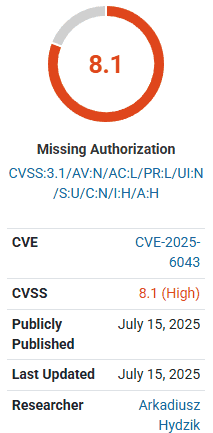
Wordfence published an advisory on the WordPress Malcure Malware Scanner plugin, which was discovered to have a vulnerability rated at a severity level of 8.1. At the time of publishing, there is no patch to fix the problem.

Screenshot Showing 8.1 Severity Rating

Malcure Malware Scanner Vulnerability

The Malcure Malware Scanner plugin, installed on over 10,000 WordPress websites, is vulnerable to “Arbitrary File Deletion due to a missing capability check on the wpmr_delete_file() function” by authenticated attackers. The fact that an attacker needs authentication as a user makes it a little less likely for it to be exploited, however not by much because it only requires subscriber level authentication, which is the lowest level of authentication. The “subscriber” role is the default level of registration on a WordPress website (if registration is allowed).

According to Wordfence:

“This makes it possible for authenticated attackers, with Subscriber-level access and above, to delete arbitrary files making remote code execution possible. This is only exploitable when advanced mode is enabled on the site.”

There is no known patch available for the plugin and users are cautioned to take necessary actions such as uninstalling the plugin to mitigate risk.

The plugin is currently unavailable for download with a notice showing that it is under review.

Screenshot Of Malcure Plugin At WordPress Repository

Read More WordPress News

WordPress Update 6.8.2 – Ends Security Support For 0.9% of Sites

Featured Image by Shutterstock/Kues

WordPress Update 6.8.2 – Ends Security Support For 0.9% of Sites via @sejournal, @martinibuster

WordPress released a maintenance update that contains twenty changes to the core and fixes fifteen issues in the Gutenberg block editor. WordPress also announced that it is dropping security support for WordPress versions 4.1 to 4.6.

Short-Cycle Maintenance Release

This is a maintenance release that incrementally makes WordPress a smoother experience.

Some of the fixes that are representative of what’s in this release:

Dropping Security Support

WordPress announced that it is dropping support for versions 4.1 through 4.6. According to the official WordPress stats, only 0.9% of websites are using those versions of WordPress.

Statement on release page:

“Dropping security updates for WordPress versions 4.1 through 4.6
This is not directly related to the 6.8.2 maintenance release, but branches 4.1 to 4.6 had their final release today. These branches won’t receive any security update anymore.”

Another WordPress page provides more information:

“As of July 2025, the WordPress Security Team will no longer provide security updates for WordPress versions 4.1 through 4.6.

These versions were first released nine or more years ago and over 99% of WordPress installations run a more recent version. The chances this will affect your site, or sites, is very small.”

Read the official WordPress 6.8.2 announcement:

WordPress 6.8.2 Maintenance Release

Read More WordPress News

Malware Discovered In Gravity Forms WordPress Plugin

Featured Image by Shutterstock/Praew stock

Malware Discovered In Gravity Forms WordPress Plugin via @sejournal, @martinibuster

WordPress security company Patchstack published an advisory about a serious vulnerability in Gravity Forms caused by a supply chain attack. Gravity Forms responded immediately and released an update to fix the issue.

Supply Chain Attack

Patchstack has been monitoring an attack on a WordPress plugin in which the attackers uploaded an infected version of the plugin directly to the publisher’s repository and fetched other files from a domain name similar to the official domain. This, in turn, led to a serious compromise of websites that used that plugin.

A similar attack was observed in Gravity Forms and was immediately addressed by the publisher. Malicious code had been injected into Gravity Forms (specifically in gravityforms/common.php) by the attackers. The code caused the plugin, when installed, to make HTTP POST requests to the rogue domain gravityapi.org, which was registered just days before the attack and controlled by the attacker.

The compromised plugin sent detailed site and server information to the attacker’s server and enabled remote code execution on the infected sites. In the context of a WordPress plugin, a remote code execution (RCE) vulnerability occurs when an attacker can run malicious code on a targeted website from a remote location.

Patchstack explained the extent of the vulnerability:

“…it can perform multiple processes:

  • Upload an arbitrary file to the server.
  • List all of the user accounts on the WordPress site (ID, username, email, display name).
  • Delete any user accounts on the WordPress site.
  • Perform arbitrary file and directory listings on the WordPress server.”

That last one means that the attacker can view any file, regardless of permissions, which would include the wp-config.php file which contains database credentials.

Gravity Forms Responds

RocketGenius, the publishers of Gravity Forms, took immediate action and uploaded a fixed version of the plugin right away, on the very same day. The domain name registrar, Namecheap, suspended the rogue typosquatted domain which effectively blocked any compromised websites from contacting the attackers.

Gravity Forms has released an update to the plugin, version 2.9.13. Users may want to consider updating to the very latest version.

Read more at Patchstack:

Malware Found in Official Gravity Forms Plugin Indicating Supply Chain Breach

Featured Image by Shutterstock/Warm_Tail

Payment Processor Startup Finix Announces WooCommerce Plugin via @sejournal, @martinibuster

Finix, a payment processing company, has launched a new WooCommerce plugin that enables WordPress merchants to integrate embedded payments directly into their stores. The new plugin enables WooCommerce merchants to accept all major credit cards, as well as Apple Pay and bank transfers. Setting up via the WooCommerce plugin is easy and is said to take only ten minutes to set up and start accepting payments.

Features available through the plugin:

  • “Flexible Payment Methods: Accept major credit and debit cards, Apple Pay, and bank transfers. Offer flexibility customers expect and reduce checkout friction.
  • Transparent Pricing: Finix uses interchange-plus pricing for clear, detailed fee breakdowns, ideal for high-volume merchants.
  • Apple Pay Integration: Enable Apple Pay on supported browsers like Safari and Chrome, with customizable button styles and types that blend seamlessly into your storefront.
  • Customizable Checkout Display: Match your brand’s voice by tailoring the look and language of each payment method for a more intuitive customer experience.
  • WooCommerce Blocks Checkout Compatible Fully supports WooCommerce’s new block-based checkout and the classic flow, keeping your store aligned with the latest updates.
  • Automated Dispute & Bank Return Handling Reduce operational overhead with automatic order status updates triggered by webhook events.”

Finix is a payment processor that was founded in San Francisco in 2015. It has received funding from major Silicon Valley venture capitalists and is regarded as a rising competitor to companies like Stripe.

Finix claims that merchants report faster payouts using its systems and that it offers a streamlined checkout flow.

Read more about the Finix announcement:

Enhance Your WooCommerce Checkout with the Power of Finix Payment Gateway

Featured Image by Shutterstock/Tapati Rinchumrus

Best WordPress SEO Tools & Plugins For Enterprise Sites

When it comes to enterprise SEO, you need more than just the basics. You need tools that scale, provide deep insights, and plug seamlessly into your WordPress ecosystem.

Enterprise businesses require a scalable, credible, and reliable website. While many organizations invest in expensive platforms that consume a significant portion of their budget and come with limited support, WordPress offers a powerful alternative without the hefty annual software fees.

The latest version of WordPress (6.8) has been downloaded over 28 million times. There are also over 59,000 plugins and 13,000 free themes.

This is a testament to the core WordPress development team’s ability to improve the platform and meet modern business needs.

Let me break down the best WordPress SEO tools as I see them that will help your enterprise site boost rankings, improve core web vitals, and gain visibility in even the most competitive markets.

Top 8 WordPress Plugins And Tools For Enterprise Sites

WordPress plugins and tools can assist in optimizing your site and improve site security, performance, and speed.

But, with so many different plugins and tools in the market today, how do you choose the right ones that will improve your site’s visibility?

To help you avoid an SEO disaster, let’s take a look at the top WordPress tools and plugins for search optimization of enterprise brands.

1. All In One SEO (AIOSEO)

Made popular by over 3 million users, AIOSEO offers a comprehensive toolkit and setup wizard for you to establish SEO settings for your website quickly.

The checklist includes features like meta tag generators, titles, descriptions, rich snippets, schema markup, and XML sitemaps.

For tech-savvy users, AIOSEO gives you complete control of robots.txt, local SEO, RSS videos, and video and photo optimizations. It also allows enterprises to assign user roles to employees or contractors.

2. BrightEdge

BrightEdge provides AI-powered data-driven solutions to help you manage your SEO and content performance to convert more users into customers.

You can leverage BrightEdge throughout every stage of content optimization: discovering your target audience’s search demand, creating impactful content, and measuring results to scale.

With powerful data insights like share of voice, opportunity forecasting, and ContentIQ, your content is more likely to capture your audience’s attention and boost SEO efforts.

This is especially effective for sites with complex structures or multiple departments contributing content.

3. Semrush

Semrush allows you to find all the organic keywords and search terms that your website can rank.

It also provides a competitive analysis of how your competitors rank, so you know how to gain an edge over their SEO strategy.

Our enterprise clients using Semrush reduced keyword blind spots by ~64% after refining their strategy using the Keyword Magic Tool.

With Semrush’s Writing Assistant Tool, you can also improve your existing WordPress content with targeted focus keywords to help you make the top 10 results.

I, however, like their backlink tracking capabilities the best.

4. Yoast SEO

In our work across dozens of enterprise WordPress deployments, Yoast SEO lets you easily update descriptions, titles, and social media images throughout your website.

With a user-friendly platform, Yoast SEO automatically creates an XML sitemap to make it easier for search engines to crawl your website and import data from other plugins.

You also have complete control of your site breadcrumbs and premium loading times. (While Yoast is the gold standard, I would also highly consider RankMath.)

5. Ahrefs

Ahrefs is an all-in-one SEO tool that helps optimize your website, analyze industry content, and study your customers’ top keywords to help you improve.

With Ahrefs, you can track your ranking progress and learn from your competitors’ content to deliver a high-ranking website that builds authority.

Additionally, Ahrefs offers enterprise-level support with unique features, including multiple user seats, personalized customer support, daily updates, and more, to help your business grow globally.

6. NitroPack

With over 240,000 websites using NitroPack, it’s a popular performance plugin.

NitroPack helps increase your speed score by 60% and improves your core web vitals, which can provide a better experience to users.

Enterprise teams we work with prioritize core web vitals for performance and SEO.

One client we worked with in the energy sector saw a 42% boost in mobile conversions after optimizing core web vitals with NitroPack.

It offers advanced features such as caching, a built-in CDN, and HTML optimization on a user-friendly platform.

7. MonsterInsights

Instead of relying on SEO assumptions, MonsterInsights provides you with all the insights you need to improve search rankings by connecting Google Analytics to your WordPress site.

MonsterInsights shows you top content, how users interact on your site, and connects ecommerce SEO.

Also, MonsterInsights provides over 100 data points to help you make better marketing decisions through real-time analytics.

Bonus Tool: DemandSphere

In my recent experience, DemandSphere has been a valuable tool for managing SEO at scale, especially when working with enterprise clients across multiple regions or business units.

Its AI-powered insights helped me surface priority keywords and content gaps, especially across large or multi-regional sites.

In one case, we used its predictive models to reorganize a content roadmap, which led to measurable improvements in mid-funnel visibility.

One of the features I find especially useful is the ability to segment data by market or product line, which helps clarify where to focus our efforts.

Is WordPress Good For Enterprises?

Here are a few reasons why WordPress is great for enterprises:

  • Ongoing support as opposed to proprietary systems that provide more flexibility and customization.
  • Robust content editing experience with WordPress Gutenberg and accessibility standards.
  • High-level security that keeps you protected against cyberattacks.
  • Scalable infrastructure with consistent themes and plugins to help reach your goals.
  • Huge cost savings by not having to pay hefty licensing costs compared to competitors like Adobe, Magento, and HubSpot.

Since WordPress is open-source software, your business has access to an endless pool of designers, developers, and specialized agencies, along with a massive community that is always ready to collaborate, innovate, and troubleshoot together.

With millions of WordPress websites live, the user community allows you to leverage best practices and implement them within your own system, instead of relying on inconsistent customer service or a limited FAQ page from closed-off systems.

WordPress includes several built-in features that help you better optimize your site, and has many plugins that can support SEO (some mentioned above).

These are a few reasons why WordPress can support the SEO for an enterprise site:

  • Permalinks: Customize your permalinks with targeted keywords to increase your click-through rate.
  • Metadata: Automatically add title and meta description to every post or page on your website to improve your position.
  • Images: Optimize your images by using keywords in the ALT text, description, and caption, and improve your page speed by editing the size.
  • User experience: Develop a well-designed site that enhances the user experience to increase page views, conversions, and session times.
  • Site speed: Select the right themes and plugins that help you maintain a fast-loading time.
  • Mobile-friendly: Use a mobile-responsive theme to ensure it’s the same quality as the desktop version for a better user experience.
  • Social media: Increase your brand visibility by including social media share and follow buttons on your website.
  • Integration: Seamlessly integrate your WordPress site with other software like G Suite, Google Analytics, ConvertKit, and more.

Scale Your WordPress Enterprise Website With SEO

Is WordPress enterprise-ready?

Combined with powerful plugins and themes, WordPress’s content management system is more than ready to handle the needs of a complex enterprise website.

With WordPress, you can scale your website with flexible infrastructure and reliable SEO features.

We’ve implemented this setup across various industries, including manufacturing, healthcare, and legal, each with its own unique technical and SEO requirements.

WordPress is one of the best platforms for SEO. Not only does the system provide SEO features, but the available plugins also make it easy for your website to start building authority and boost its overall rankings.

Continue optimizing and adapting to maintain long-term growth. The key is to keep your SEO strategy evolving to keep up with the changes in the industry.

More Resources:


Featured Image: hasan as’ari/Shutterstock

How To Efficiently Plan A WordPress Site

The most exciting moment of your new WordPress project is right at the beginning. You have an idea that one day, you hope will soon be shared with the world. But it can also be overwhelming.

WordPress has countless plugins that do pretty much everything under the sun. In fact, the WordPress ecosystem has doubled in terms of plugin submissions in 2025.

So, which ones should you use?

In this post, I will talk through how I plan to build a WordPress website.

Why You Should Plan A WordPress Site

To plan a WordPress site really is a must-do process that reduces the risk of the project spiralling in time and cost.

Spending an hour or two following a simple checklist, like the one I’ve detailed below, puts you and the client on the same page when building the website.

Time and again, I’ve seen projects that’ve undefined elements that need to be factored in, which eliminates potential scope creep.

It will also give you a list of tasks, so as well as avoiding scope creep, you can easily transfer the elements of your plan into your project management tool as tasks and milestones. That will speed up development time.

Define Your WordPress Website Goals

The first thing you should do is define the goals of the website. The easiest way to begin this process is to ask yourself the following two questions:

  1. Where are your visitors most likely to come from?
  2. What do you wish them to do when you’re on the website?

Assuming that the site is a brochure site, then more than likely, you’d want your visitors to come from search engines, and you want them to contact you.

That way, you’ll need a plugin like Yoast SEO or Gravity Forms.

You may have other goals, like growing a newsletter or an ecommerce store. Or you may get traffic from a social media platform that your blog needs to integrate with.

Each of these needs to be defined, as this will help define your tech stack.

Goals Defined? Great. Now, Plan The Layout

Once you’ve defined your goals, you need to think about the layout and what custom work you will need to do.

When building your site, I prefer to think of templates, rather than pages.

You don’t need a template for every blog post, for example. If you are building a website for a solicitor, for example, all services it offers (e.g., Conveyancing/Wills & Probate) could run off a similar template, cutting build time.

This is not necessarily true if you’re using a page builder, as sometimes page builders treat each individual page separately.

You could also look at custom post types and taxonomies for certain pages.

For example, if you have a “Meet the Team” page, then every person could be their own post. This makes maintenance a lot easier, as it allows a new team member to be easily integrated without too much trouble.

Testimonials work well as a custom post type as you can create a “bank” of them to use throughout the site.

Once you’ve got the structure of the site and what you are using to build it, that should be the templates.

Generally, for a brochure site with a blog and a “Meet the Team” section, you would have the following templates:

  1. Home Page Template.
  2. About Page Template.
  3. Contact Us Page Template.
  4. News Post Template (Single).
  5. News Post Template (Archive).
  6. Team Member Template (Single).
  7. Team Member Template (Archive).
  8. Catch All Template.

The “Catch All” template I find useful as it’s used for pages that are present but don’t need much design, something like a Terms & Conditions or your Privacy Policy pages.

I tend to start with these first, as you can build a header/footer easily enough here.

Finally, you may want to consider whether you have multiple languages or if you have different regional offices. A large site may be better suited for a multisite, rather than an individual WordPress installation.

Once done, you should have a WordPress theme and a WordPress plugin ready to build.

My general thought is that any WordPress functionality you wish to retain when redesigning should be in a plugin, rather than a theme.

Things like definitions of custom post types or SEO changes you make programmatically are ideal for a custom plugin.

Depending on the complexity of the project, it could mean that you split functionality into a number of plugins.

For example, I have an ecommerce site where their custom invoicing is in one plugin, and the voucher management is in another plugin. There is also the “helper” plugin that has minor performance improvements and a custom post type.

Don’t Forget The Ancillaries!

Of course, a well-built WordPress theme, with a range of custom and supporting plugins, is just the beginning. Your website needs content.

If you are a marketing agency, you may be responsible for the creation of the content, but what about imagery? It’s a good idea to define in the WordPress site planning things like who is responsible for the content.

If you are using the content of the old site, it’s a good idea to define who handles the migration, or at the very least be aware if it’s transferable – not all content systems are!

Other things to define in your WordPress site plan are training, who will have access to the site, and what level. Ideally, you want as few administrators as possible.

If you are pushing a new design to an existing site, there’s an approach of making everybody but yourself authors or editors, and see who complains about lacking access. That works remarkably well!

The First Step Comes With Experience

In reality, the more you create plans and pitches for WordPress websites, the more refined your toolset and your planning process become.

I already know the tools I’ll be using for the next 10, maybe 20 sites, with often very little variance among them. What works for a solicitor’s website will probably work for a cleaning firm.

I have a core group of about five to 10 plugins and two to three themes that I use, and then I add extra plugins as needed.

Those plugins are personal to me, but over time, you’ll build your own list of plugins. Doing so will make WordPress site planning far more efficient.

More Resources:


Featured Image: one photo/Shutterstock