Imagine that you head up digital marketing at Turner Sports or CBS Sports, which have the exclusive rights to license NCAA marks, tickets, and taglines in commercial promotions.
Or suppose that your social video agency was just invited to pitch AT&T, Capital One, or Coca-Cola, which are official NCAA corporate champions.
And you have an assignment to identify the most engaged YouTube fans for the NCAA Division 1 Men’s and Women’s basketball teams.
I realize that you probably don’t work at one of those sports media and entertainment companies and it’s highly unlikely that you’ll be asked to pitch one of those brands in the foreseeable future.
So, why should you care about what makes engaged NCAA fans on YouTube?
Keep reading, there is method in the madness.
Cognitive, Emotional, And Behavioral Metrics
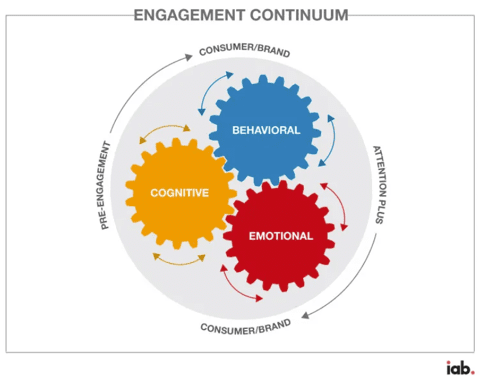
As mentioned previously, the Interactive Advertising Bureau (IAB) has identified 30 metrics – 7 cognitive, 4 emotional, and 19 behavioral – that brands or agencies can use to measure the “engagement continuum.”
Image from IAB, March 2024
But fan engagement can fluctuate depending on whether a college basketball team is on the bubble, makes it to the Big Dance, or goes deep into the Sweet 16, Elite Eight, and Final Four.
Fan engagement can also vary depending on the number of logo 3s, buzzer beaters, or overtime wins.
That’s why this hypothetical assignment is so hard.
Nevertheless, exploring various video engagement metrics from several video intelligence sources can help you better understand the most engaged YouTube fans for NCAA basketball teams and how to apply what you’ve learned to your brands or clients.
Here are three cognitive metrics that you should explore when measuring engagement:
Change in Brand Awareness/Familiarity: You can use surveys to measure the extent your brand is recognized by potential customers before and after this year’s NCAA tournaments.
Change in Brand Consideration: You can also use pre- and post-March Madness surveys to measure your brand’s inclusion in a set customers would select from.
Change in Purchase Intent: You can also use Brand Lift surveys to measure the delta in customers’ plans or willingness to purchase your brand in the future.
Here are three emotional metrics that you should look at using to measure engagement:
Change in Baseline Brand Perception: Surveys enable you to measure the pre-post delta in what potential customers think and feel about your brand.
Change in Baseline Brand Favorability: Surveys also enable you to measure what potential customers like and value about your brand before and after the Big Dance.
Change in Baseline Brand Loyalty: Surveys enable you to measure customer loyalty in terms of weight and frequency of usage – as well as likelihood to switch – from Selection Sunday, March 17, to the women’s NCAA championship game on Sunday, April 7, and the men’s NCAA championship game on Monday, April 8, 2024.
Here are six behavioral metrics worth exploring to measure engagement:
Watch Time: The total amount of time viewers spend watching a video, including any replays or rewatches, should be a key metric. Since it’s only available if you have access to your brand or client’s YouTube Analytics, digital marketers and social video agencies use “views” as a metric to compare videos across other YouTube channels.
Applause Rate: The number of likes a YouTube video gets.
Amplification Rate: The number of shares a YouTube video gets.
Conversation Rate: The number of comments a YouTube video gets.
Engaged-View Conversions (EVCs): In Google Analytics 4 (GA4), an engaged-view conversion (EVC) indicates that someone watched a YouTube video for at least 10 seconds and then converted on your website or app within 3 days of viewing the video.
Economic Value: This is the monetary value of visitors from YouTube to your site who go on to complete micro conversions like subscribing to a newsletter or initiating a chat with your business, as well as macro conversions like purchasing a product or registering for a service.
In addition, here are some of the video intelligence sources you should evaluate:
Official Team and Conference Channels: Many NCAA Division 1 teams and major conferences, like the ACC,Big 10, and SEC, have their own YouTube channels. These channels feature highlights, interviews, and behind-the-scenes content. Comparing their metrics can provide you with insights.
Media and NCAA Basketball Channels: YouTube channels like CBS Sports and March Madness upload video content about various college basketball teams, allowing you to compare fan engagement based on comments and viewership.
Third-Party Tools: Tubular Labs, a social video intelligence company that provides data on social video audiences, and Pixability, a company that helps brands monitor their YouTube and CTV campaigns, can provide deeper insights into engagement, but they require paid subscriptions.
For this article, I contacted Matt Duffy, the company’s CMO, and Sean Alie, the head of its insights team, to see if they had any critical data or strategic insights worth sharing.
They did – and it appears below.
There are four sections: men’s team views, women’s team views, year-over-year (YoY) data for men’s and women’s teams + men’s vs. women’s teams, and lastly, views by popular players (such as Caitlin Clark, the NCAA Division I all-time leading scorer of the Iowa Hawkeyes in the Big Ten Conference).
Here’s what the men’s NCAA basketball views look like.
They are filtered to sports videos only, and each video includes the keywords “*team name*,” “basketball,” and “men” somewhere in the metadata.
The timeline is February only.
Men’s Basketball
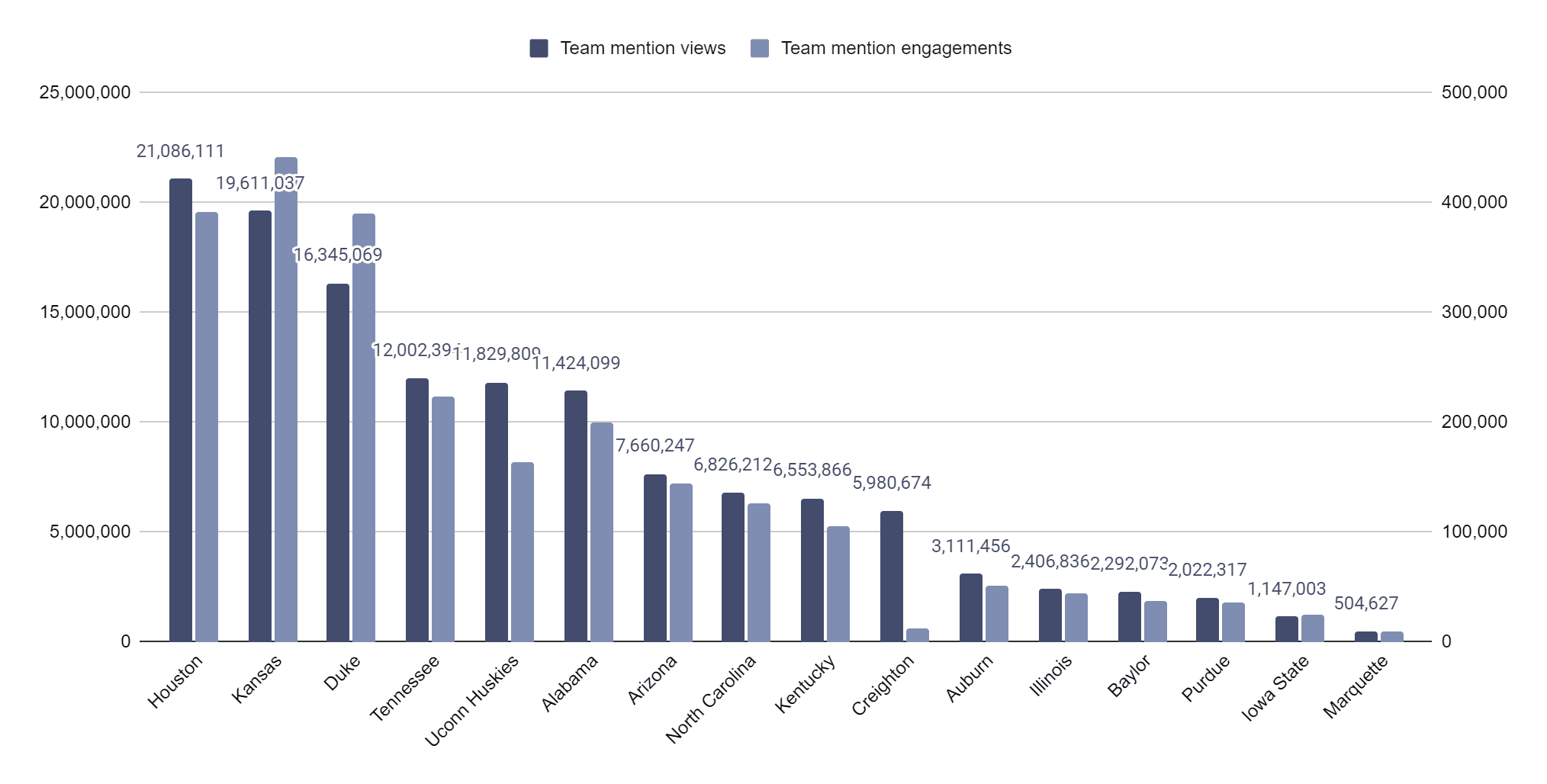
Houston, the #1 ranked team, earned 7.5% more views than the next leading team, Kansas (21M vs 19.6M). Kansas did rank first in engagements, though, earning 13% more engagements than Houston (442K vs 391K).
Duke ranked 3rd in views (16M) and engagements (389K). One thing to note is Houston is the #1 ranked team and the most viewed team on YouTube.
However, Kansas was ranked 14th and Duke 9th, yet they were able to rank 2nd and 3rd in views. This is a testament to the brand awareness these programs hold.
Image from Pixability, March 2024
Women’s Basketball
This data uses the same methodology as the men’s data except with “women” as a keyword instead of “men.”
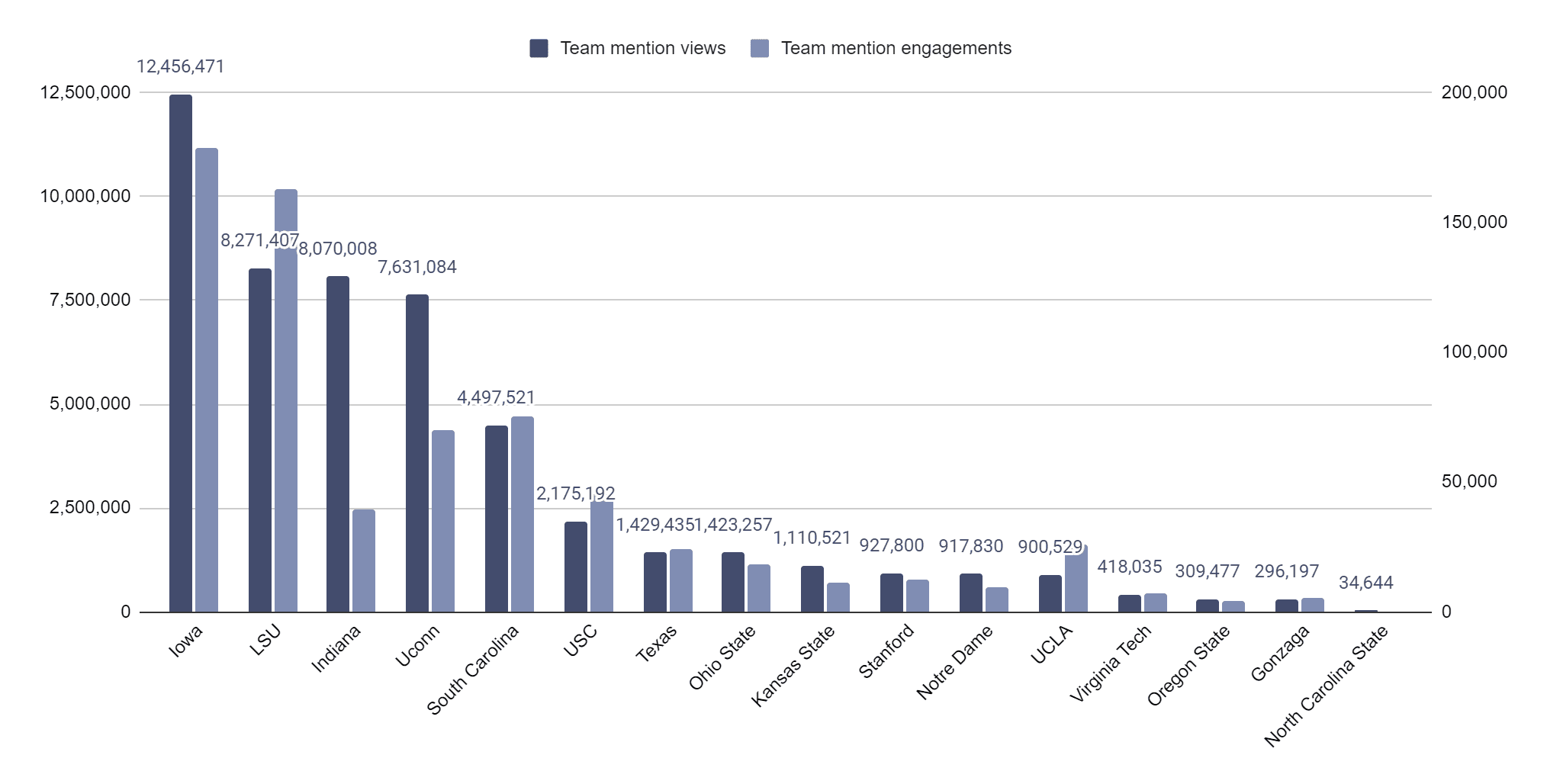
Iowa, home of star Caitlin Clark, earned 51% more views than the next leading program, LSU (12.4M vs 8.2M). This makes sense as Angel Reece plays for LSU and is widely considered the second most popular player in women’s college basketball, after Caitlin.
The individual stars may influence views for women’s programs more than the team’s fan base. Iowa earned 9.5% more engagements than LSU (178.5K vs 162.9K). Indiana ranked 3rd in views, followed by UConn.
Image from Pixability, March 2024
Men’s Vs. Women’s Teams And YoY Stats
The top 16 men’s teams earned a combined 130.8M views in February 2024, which is 157% more than the top 16 women’s teams have earned (50.8M). Men’s teams earned 247% more engagements (2.4M) than women’s teams (690K).
YoY, the top 16 ranked men’s teams earned 61% more views this year compared to the top 16 ranked teams last year in February (130.8M vs 81.2M).
YoY, the top 16 ranked women’s teams earned 147% more views this year compared to the top 16 ranked teams last year in February (50.8M vs 20.5M). This means that views for women’s college basketball are growing faster than the men’s. A large part of this was due to the rise of Caitlin Clark.
Views By Popular Basketball Players
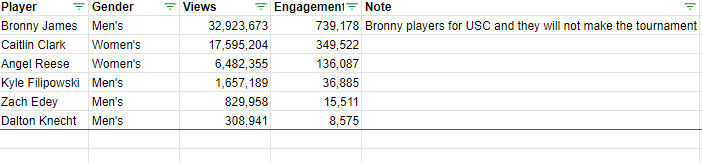
The stats below are based on players participating in the tournament: Caitlin Clark earned 17.5M player mention views in February, which is more than any other player in the men’s and women’s tournaments.
Caitlin earned 10.6x more views in February than the highest male player (Kyle Filipowski) views polled in February (17.5M vs 1.6M).
The second most viewed player was also a woman, Angel Reese, who plays for the LSU Tigers in the Southeastern Conference. Angel earned 3.9x more views than Kyle Filipowski, who plays for the Duke Blue Devils in the Atlantic Coast Conference (6.4M vs 1.6M).
The rivalry between these two women stars has fueled incredible engagement on YouTube.
Again, men’s teams are more popular than women’s teams, but at the individual level, women players are outperforming men by a large margin.
Although the USC Trojans of the Pac-12 Conference won’t make the tournament this year, LeBron Raymone “Bronny” James earned 32M views, which is 87% higher than Caitlin Clark’s views.
This is still incredibly impressive for Caitlin as she is putting up numbers that compete with someone as well-known as Bronny James.
Image from Pixability, March 2024
Of course, you could figure out who are the most engaged YouTube fans for NCAA basketball teams without using third-party tools.
But that might take so much time that you’d miss some of the games that make March Madness worth watching and create highlights worth sharing on YouTube.
Hey, you make the call.
How Marketers Can Use Insights Into The Most Engaged Fans
So, how can digital marketers use these insights about NCAA basketball’s most engaged fans?
Well, I can think of three key ways to apply what we’ve just learned.
First, as I mentioned in “39 Emotions Digital Marketers Can Use In Advertising,” people share videos that elicit “high-arousal” or intense emotions twice as much as ones that elicit “low-arousal” or moderate emotions. And March Madness elicits several intense emotions.
For example, the Big Dance triggers nostalgia, a sentimental longing or wistful affection for some past period or irrecoverable condition. How do you make use of this insight?
Watch Continental Tire’s “Grant Hill, Christian Laettner, and the Smart Choice!” Basketball legends Grant Hill and Christian Laettner of Duke not only tell us about the importance of making smart choices but also remind us of “The Shot” during the 1992 NCAA tournament.
During a game between East Region #1 seed Duke and #2 seed Kentucky in the East Regional Final to determine a spot in the Final Four, defending national champion Duke trailed 103–102 with 2.1 seconds remaining in overtime.
That’s when Hill threw a pass three-quarters of the length of the court to Laettner, who faked right, dribbled once, turned, and hit a jumper as time expired for the 104–103 win. In 2004, Sports Illustrated called it the greatest college basketball game of all time.
It’s worth noting that State Farm uploaded this video on Nov. 21, 2023, almost three months before Clark broke “Pistol” Pete Maravich’s NCAA Division I scoring record on Feb. 15, 2024. Kudos to the brand and their agency for being ahead of the curve.
Third, the line between creators and their audiences is blurring.
At last year’s Brandcast, YouTube CEO Neal Mohan told advertisers, “The universe of ‘creators’ is growing every day as more people make videos on their phones.
This limitless access means the world of creation is changing. Fans used to engage with a like or subscribe. But now, you can see a trend and easily jump in with your own video.”
If you use Tubular Intelligence, then you will see that 1,536 accounts in the U.S. uploaded 3,208 videos about “March Madness” to YouTube in the last 90 days.
And influencers uploaded 2,359 of these videos (73.5%), while media and entertainment companies uploaded 602 (18.8%), and brands uploaded only 224 (7.0%).
Now, these 3,208 YouTube videos about March Madness got a total of 11.6 million views and 455,000 engagements.
So, targeting affinity segments, people who already have a strong interest in relevant topics, may be a much smarter option than targeting placements, specific YouTube channels or websites and apps on the Google Display Network.
How SEO Pros Can Use This Information, Too
So, how could an SEO specialist use this information to make actionable decisions?
Well, I’m sad to say that some won’t.
Why? As Captain Spock (Leonard Nimoy) said in “Star Trek II: The Wrath of Kahn”,
“He is intelligent, but not experienced. His pattern indicates two-dimensional thinking.”
In other words, some intelligent SEO specialists think their job is to work with text, not videos. And they also think that the content that their optimizing is to help people make rational decisions, not emotional ones.
As Justin De Graaf, Head of Ads Research and Insights at Google, observed back then,
“The truth is, decision-making is not a rational process, but one driven mainly by how people feel. The rational brain layers on reasons for our choices only after they’re made.”
So, if SEO specialists continue to focus on optimizing text to help people make rational decisions, then their pattern indicates two-dimensional thinking.
Now, they may continue to be somewhat successful, especially if they can answer “yes” when asked: “After reading your content, will someone leave feeling they’ve learned enough about a topic to help achieve their goal?”
But, as Google has said,
“The helpful content update aims to better reward content where visitors feel they’ve had a satisfying experience, while content that doesn’t meet a visitor’s expectations won’t perform as well.”
So, SEO specialists who can’t create (and optimize) video content that tells a good story and makes a visitor feel something emotionally may struggle to provide a satisfying experience.
In conclusion, this is why it’s worth dreaming about getting a starring role in a Cinderella story.
I realize that you probably won’t get a job at one of those media and entertainment companies and it’s highly unlikely that you’ll be asked to pitch one of those brands in the foreseeable future.
But, if and when your opportunity presents itself, then you will be ready to take your best shot at the buzzer.