Anthropic has released Claude Opus 4.1, an upgrade to its flagship model that’s said to deliver better performance in coding, reasoning, and autonomous task handling.
The new model is available now to Claude Pro users, Claude Code subscribers, and developers using the API, Amazon Bedrock, or Google Cloud’s Vertex AI.
Performance Gains
Claude Opus 4.1 scores 74.5% on SWE-bench Verified, a benchmark for real-world coding problems, and is positioned as a drop-in replacement for Opus 4.
The model shows notable improvements in multi-file code refactoring and debugging, particularly in large codebases. According to GitHub and enterprise feedback cited by Anthropic, it outperforms Opus 4 in most coding tasks.
Rakuten’s engineering team reports that Claude 4.1 precisely identifies code fixes without introducing unnecessary changes. Windsurf, a developer platform, measured a one standard deviation performance gain compared to Opus 4, comparable to the leap from Claude Sonnet 3.7 to Sonnet 4.
Expanded Use Cases
Anthropic describes Claude 4.1 as a hybrid reasoning model designed to handle both instant outputs and extended thinking. Developers can fine-tune “thinking budgets” via the API to balance cost and performance.
Key use cases include:
AI Agents: Strong results on TAU-bench and long-horizon tasks make the model suitable for autonomous workflows and enterprise automation.
Advanced Coding: With support for 32,000 output tokens, Claude 4.1 handles complex refactoring and multi-step generation while adapting to coding style and context.
Data Analysis: The model can synthesize insights from large volumes of structured and unstructured data, such as patent filings and research papers.
Content Generation: Claude 4.1 generates more natural writing and richer prose than previous versions, with better structure and tone.
Safety Improvements
Claude 4.1 continues to operate under Anthropic’s AI Safety Level 3 standard. Although the upgrade is considered incremental, the company voluntarily ran safety evaluations to ensure performance stayed within acceptable risk boundaries.
Harmlessness: The model refused policy-violating requests 98.76% of the time, up from 97.27% with Opus 4.
Over-refusal: On benign requests, the refusal rate remains low at 0.08%.
Bias and Child Safety: Evaluations found no significant regression in political bias, discriminatory behavior, or child safety responses.
Anthropic also tested the model’s resistance to prompt injection and agent misuse. Results showed comparable or improved behavior over Opus 4, with additional training and safeguards in place to mitigate edge cases.
Looking Ahead
Anthropic says larger upgrades are on the horizon, with Claude 4.1 positioned as a stability-focused release ahead of future leaps.
For teams already using Claude Opus 4, the upgrade path is seamless, with no changes to API structure or pricing.
Search is changing, and not just because of Google updates.
Buyers are changing how they find, evaluate, and decide. They are researching in AI summaries, asking questions out loud to their phones, and converting through conversations that happen outside of what most analytics can track.
It offers a closer look at what it means to optimize for visibility, engagement, and results in a fragmented, AI-influenced search landscape.
Here are five key takeaways.
1. Ranking Well Doesn’t Guarantee Visibility
Getting to the top of search results used to be enough. Today, that’s no longer the case.
AI summaries, voice assistants, and platform-native answers often intercept the buyer before they reach your website.
Even high-ranking content can go unseen if it’s not structured in a way that’s easily digestible by large language models.
For example, research shows AI-generated summaries often prioritize single-sentence answers and structured formats like tables and lists.
Only a small fraction of AI citations rely on exact-match keywords, reinforcing that clarity and context are now more important than repetition.
To stay visible, businesses need to consider how their content is interpreted across multiple AI systems, not just traditional SERPs.
2. Many Conversions Happen Offscreen
Clicks and page views only tell part of the story.
High-intent actions like phone calls, text messages, and offline conversations are often left out of attribution models, yet they play a critical role in decision-making.
These touchpoints are especially common in service-based industries and B2B scenarios where buyers want real interaction.
One case study reveals that a company discovered nearly 90% of their Yelp conversions came through phone calls they weren’t tracking. Another saw appointment bookings spike after attributing organic search traffic to calls rather than clicks.
Our ebook refers to this as the insight gap, and highlights how conversation tracking helps marketers close it.
3. Listening Is More Effective Than Guessing
Marketers have access to more customer input than ever, but much of it goes unused.
Call transcripts, support calls, and chat logs contain the language buyers actually use.
Teams that analyze these conversations are gaining an edge, using real voice-of-customer insights to refine messaging, improve landing pages, and inform campaign strategy.
In one example, a marketing agency increased qualified leads by 67% simply by identifying the specific terminology customers used when asking about their services.
The shift from assumptions to evidence is helping brands prioritize what matters most, and it’s making their campaigns more effective.
4. Paid Search Works Better When It Aligns With Everything Else
Search behavior is not linear, and neither is the buyer journey.
Users often move between organic results, paid ads, and AI-generated suggestions in the same session. The strongest-performing campaigns tend to be the ones that echo the same language and value props across all these touchpoints.
That includes aligning ad copy with real customer concerns, drawing from call transcripts, and building landing pages that reflect the buyer’s stage in the decision process.
5. Attribution Models Are Out Of Step With Reality
Most attribution still assumes that conversions happen on a single screen. That’s rarely true.
A manager might discover your brand in an AI-generated search snippet on a desktop, send the link to themselves in Slack, and later call your sales team from their iPhone after revisiting the content on mobile.
Marketers relying only on last-click attribution may be optimizing based on incomplete or misleading data.
The report makes the case for models that include multi-touch, cross-device, and offline activity to give a fuller picture of what drives conversions.
This isn’t about tracking more for the sake of it. It’s about making smarter decisions with the signals that matter.
Rethinking Search Starts With Rethinking Buyers
The ebook, written in collaboration with CallRail, offers more than strategy updates. It is a reminder that behind every metric is a person making a decision.
Marketers who succeed in this new environment aren’t just optimizing for rankings or clicks. They are optimizing for how people think, search, and take action.
Download the full report to explore how buyer behavior is reshaping search strategy.
In 2024, Google turned the SERP into a storefront.
In 2025, it turned it into a marketplace with an AI-based mind of its own.
Over the past 12 months, Google has layered AI into nearly every inch of the shopping search experience by merging organic results with product listings, rolling out AI Overviews that replace traditional product grids, and introducing a full-screen “AI Mode.”
Meanwhile, ChatGPT is inching closer to becoming a personalized shopping assistant, but for now, the most dramatic shifts for SEOs are still happening inside Google.
To understand the impact, I revisited a set of 35,000+ U.S. shopping queries I first analyzed in July 2024.
In today’s Memo, I’m breaking down the state of Google Shopping SERPs in 2025. A year later, the landscape looks … different:
AI Overviews have started to displace classic ecommerce SERP features.
Image packs dominate the page.
Discussion forums are on the decline.
Plus, an exclusive comparison of 2024 vs. 2025 ecommerce SERP features and a full, detailed checklist of optimizations for the SERP features that matter most today (available for premium subscribers. I show you exactly how I do this).
This memo breaks down exactly what’s changed in Google’s shopping SERPs over the past year. Let’s goooooo.
Boost your skills with Growth Memo’s weekly expert insights. Subscribe for free!
In the last 12 months, Google hasn’t just transformed itself into a publisher that serves up content to answer queries right in the SERP (via AI Overviews and AI Mode). It’s also built out an extensive marketplace for shopping queries.
However, Google now provides a whole slew of SERP features and AI features for ecommerce queries that are at least as impactful as AIOs and AI Mode.
Meanwhile, ChatGPT & Co. are starting to include product recommendations with links, reviews, buy buttons, and recommendations directly in the chat. (But this analysis focuses on Google results only.)
To better understand the key trends for Google shopping queries, in July 2024, I analyzed 35,305 keywords across product categories like fashion, beds, plants, and automotive in the U.S. over the last five months using seoClarity.
We’re revisiting that data today, examining those same keywords and categories for July 2025.
The results:
AI Overviews have started to replace product grids.
Ecommerce SERPs are increasingly visual.
There are more question-related SERP features (like People Also Ask), less UGC.
Fewer videos are appearing across the SERPs for product-related searches.
About the data:
This data specifically covers Google search results and features. It doesn’t include ChatGPT, Perplexity, etc. However, we’ll touch on this briefly below.
Over 35,000 search queries were analyzed, and the same group was examined in both July 2024 and July 2025.
The search queries analyzed include product-related queries across a broad spectrum, from brand terms (like Walmart) to individual products (iPads) and categories (e-bikes).
If you’re curious about the exact list of Google shopping SERP features included in this analysis, they’re included at the bottom of this memo.
Web results and the shopping tab for shopping searches were combined as a response to Amazon’s long-standing dominance.
The shopping tab still exists, sure.
But for product-related searches, the main search page and the Google shopping experience look incredibly similar, with the Shopping tab streamlined to a product-grid experience only.
Google has fully transitioned into a shopping marketplace by adding product filters to search result pages and implementing a direct checkout option.
These new features create an ecommerce search experience within Google Search and may significantly impact the organic traffic merchants and retailers rely on.
Google has quietly introduced a direct checkout feature that allows merchants to link free listings directly to their checkout pages.
Google’s move to a shopping marketplace was likely driven by the need to compete with Amazon’s successful advertising business.
Google faces the challenge of balancing its role as a search engine with the need to generate revenue through its shopping marketplace, especially considering its dependence on partners for logistics.
And now?
Google’s layered AI and personalized SERP features into the shopping experience as well.
Below are the Google SERP features I’ll be examining in this year-over-year (YoY) analysis, specifically, with a quick synopsis if you’re not familiar.
Images: A horizontal carousel of image results related to the query pulled from product pages or image-rich content; usually appear at the top or mid-page and link to Google Images or directly to source pages.
Products: Displays a visual grid or carousel of products with titles, images, prices, reviews, and merchants. This includes free product listings (organic) and Product Listing Ads (PLAs) (paid).
People Also Ask (PAA): Related questions users frequently ask. Clicking a question reveals a source link. (These often inform Google’s understanding of search intent and user curiosity.)
Things To Know: An AI-driven feature that breaks a topic into subtopics and frequently misunderstood concepts. Found mostly on broad, educational, or commercial-intent queries, this is Google’s way of guiding users deeper into a topic and understanding deeper search intent.
Discussion and Forums: Highlights relevant threads from platforms like Reddit, Quora, and niche forums. Answers are often community-generated and authentic. Replaced some traditional “People Also Ask” real estate for shopping or reviews queries.
Knowledge Graph: Displays structured facts about a person, brand, product, or topic-sourced from trusted databases. Appears in a right-hand sidebar or embedded box.
Buying Guide: A feature that explains what to consider when shopping for a product, e.g., “What to look for in a DSLR camera.” Usually placed mid-page for commerce-intent queries. It mimics a human assistant or product expert’s advice. Contains snippets and links to sources.
Local Listing: Shows local business listings with map, ratings, hours, and quick call/location links. Prominent in searches with local intent like “shoe store near me” or “coffee shops in Detroit.”
AI Overview: Generative AI summary at the top of the SERP that answers the query using information synthesized from multiple sources. For shopping queries, it often includes product summaries.
Video: A carousel or block of video content, mostly from YouTube, but also from other video-hosting platforms. May include timestamps, captions, or “key moments” for long videos.
Answer Box (a.k.a. Featured Snippet): A direct answer to a query extracted from a single web page, shown at the top of the SERP in a stylized box. Often used for factual or how-to queries. Includes the source link.
Free Product Listings: Organic product results submitted via Google Merchant Center feeds. These listings show in the Shopping tab and occasionally in the main SERP product grid (distinct from paid Shopping ads).
From sources across the web: A content block showing opinions or quotes on a product or topic from a variety of sites. Often used in AI Overviews or product reviews to surface aggregated user sentiment or editorial input.
FAQ: An expandable schema-driven block showing common questions and answers sourced from a specific page. Typically appears under a site’s organic result when FAQ schema is properly implemented.
PPC: Sponsored links shown at the top or bottom of the SERP, marked “Sponsored” or “Ad.” These can show up as text, product images/grids, etc.
In addition to the standard SERP features tracked in this analysis via the above list, here’s a look at the current Google shopping marketplace SERP features and/or elements (like toggle filters) that we’re dealing with at the halfway point of 2025.
AI Mode (Full-Screen): Interactive, immersive full-page AI shopping experience with filters and buy links.
Shopping filters inline: Dynamic filters (brand, color, price) within AI Mode and Shopping grids.
Virtual try-on: This feature was recently released. It’s a generative AI module showing clothes on diverse body types (expanding by category).
Price tracking/alerts: Users can track price drops and get alerts via Gmail or Chrome. Honestly, a pretty great tool.
Popular stores/top stores: Scrollable carousel of prominent retailers for the product category.
Product sites (EU market): Organic feature that shows prominent ecommerce domains (due to regulatory changes in the EU).
Trending products/popular products: Highlights products rising in popularity based on recent search activity.
Merchant star ratings: Display review scores and counts in summaries or tiles.
Free shipping/returns labels: Highlighted callouts in product tiles.
“Verified by Google” merchant badges: Google-trusted seller icon in some listings.
Quick comparison panels: Side-by-side spec or feature comparisons (this is an early-stage rollout, similar to Amazon’s product comparison panel or module).
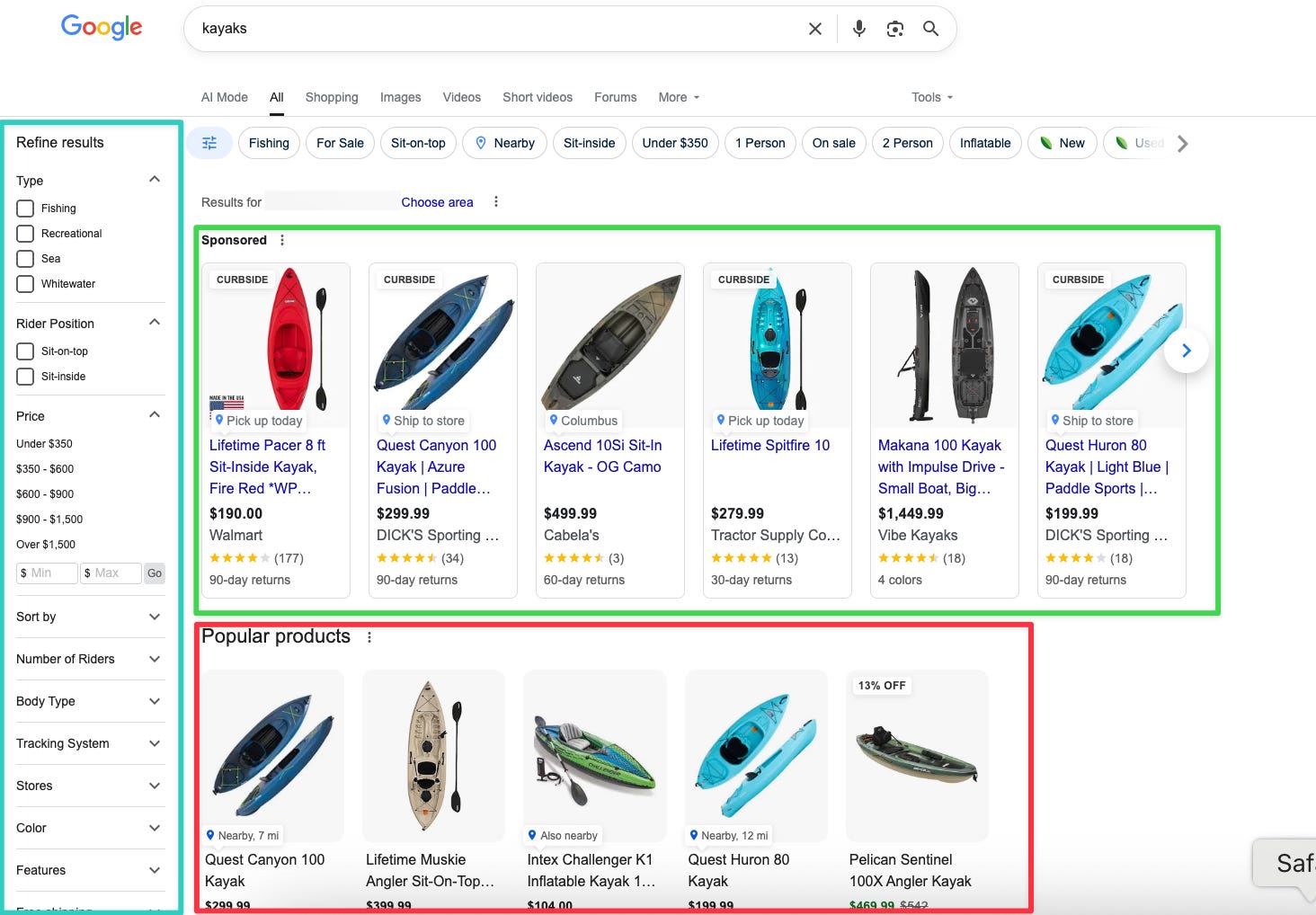
To illustrate with an example, let’s say you are looking for kayaks (summertime!).
On desktop (logged-in), Google will now show you product filters on the left sidebar and “Popular products” carousels in the middle on top of classic organic results, but under ads, of course.
Image Credit: Kevin Indig
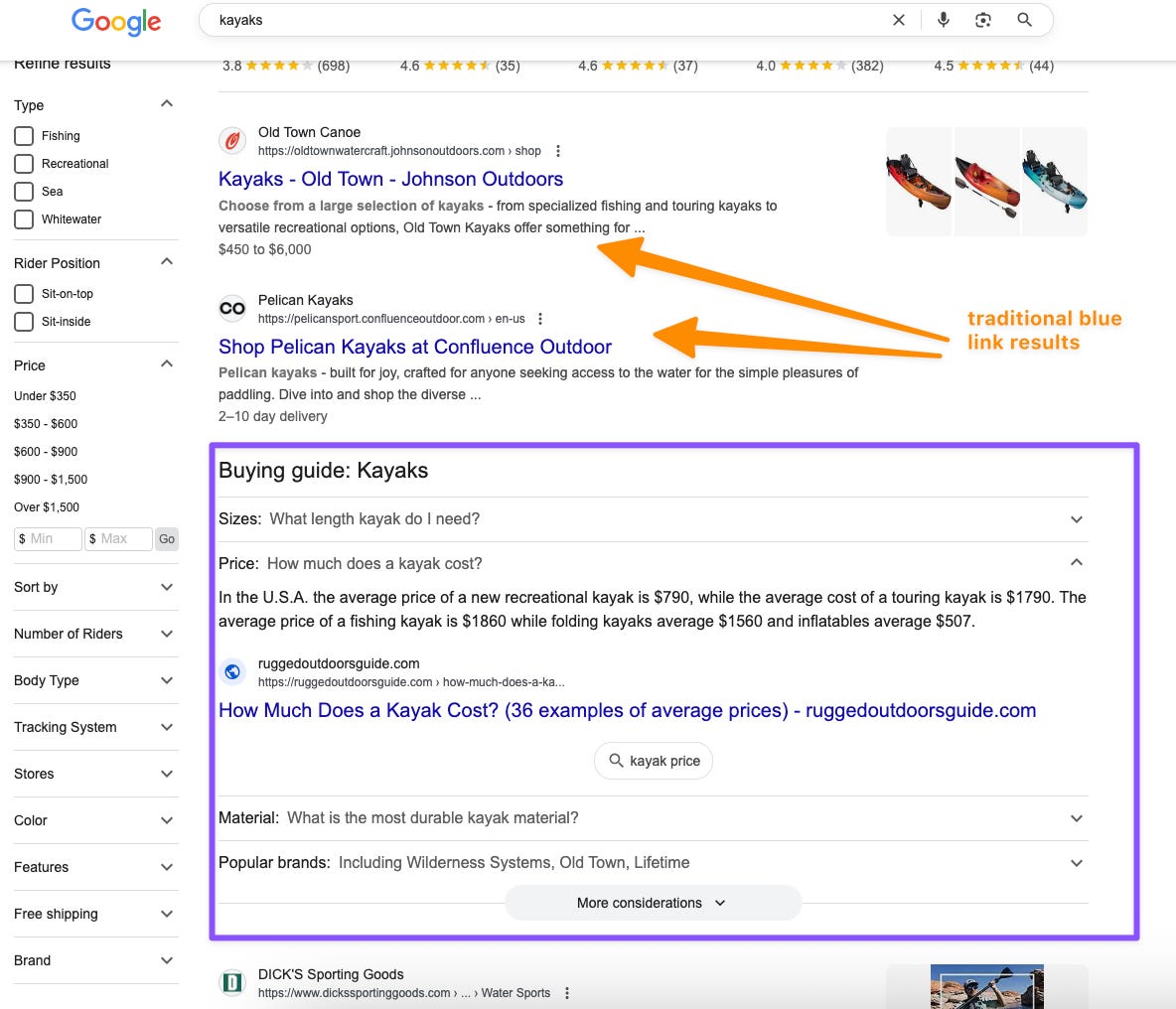
Directly under the shopping product grids, you have traditional organic results along with an on-SERP Buying Guide, similar to People Also Ask questions (which is also included further down the page).
Both the Buying Guide and People Also Ask features deliver answers with links to original content.
Image Credit: Kevin Indig
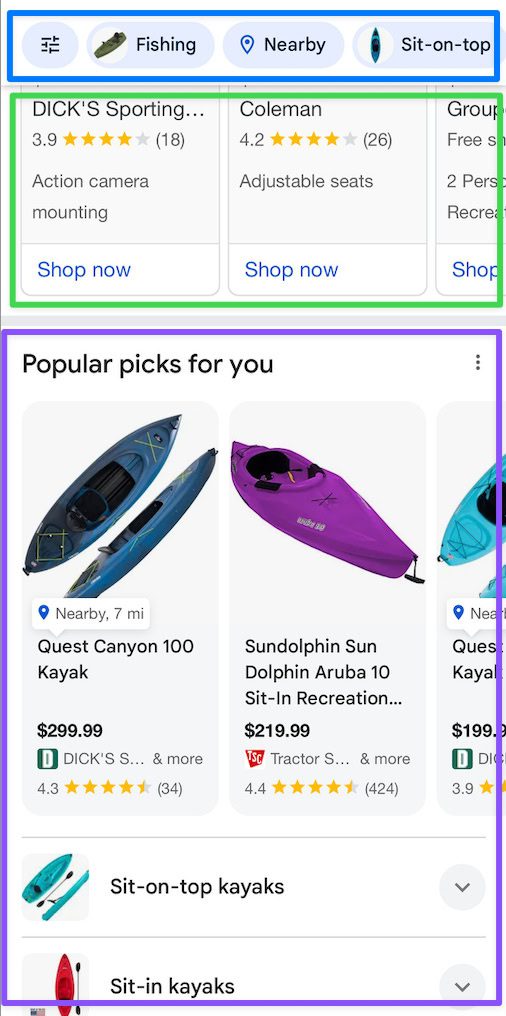
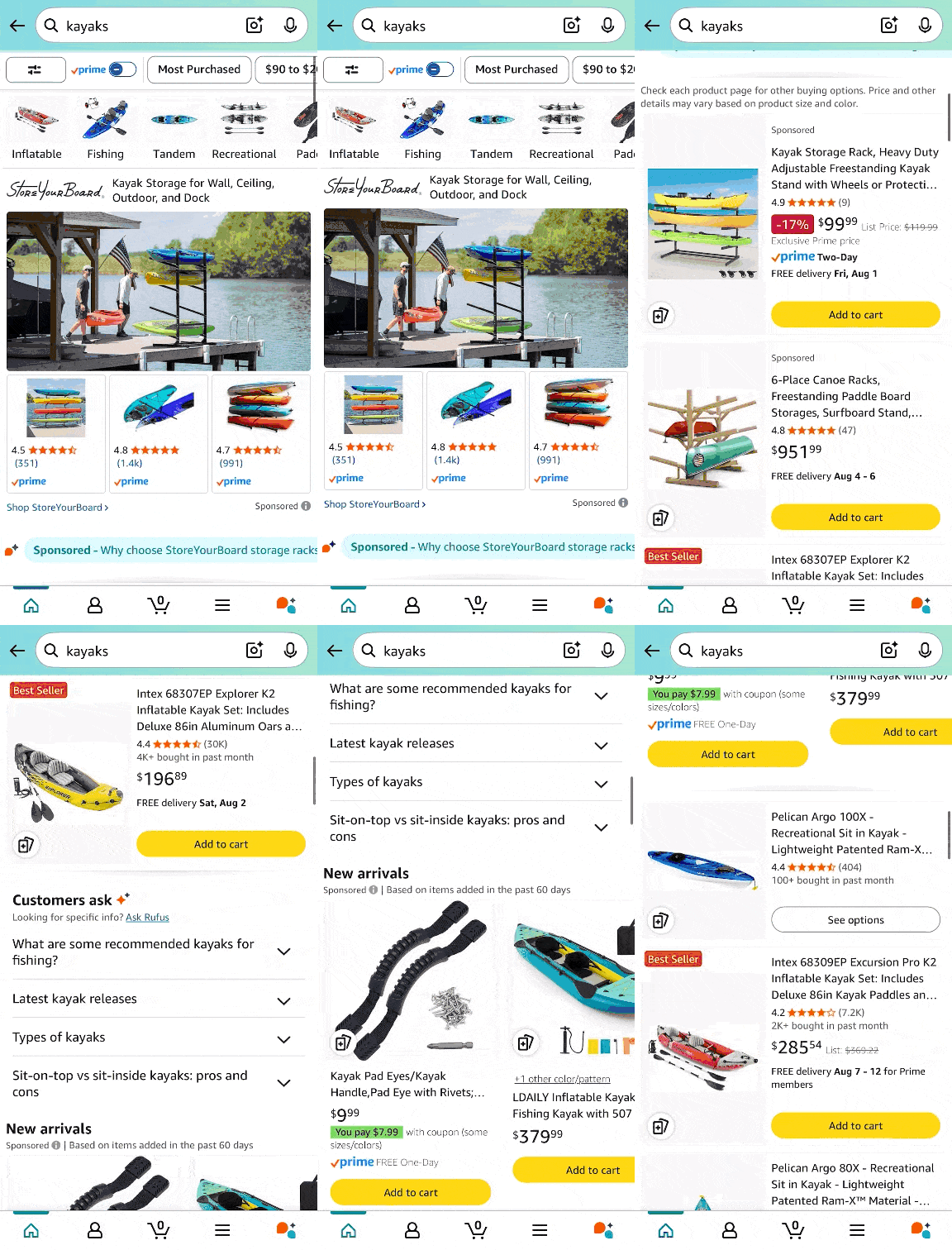
On mobile, you get product filters at the top, ads above organic results, and product carousels in the form of Popular products or “Products for you.”
Image Credit: Kevin Indig
This experience doesn’t look very different from Amazon … which is the whole point.
Image Credit: Kevin Indig
Google’s shopping experience lets users explore products on a variety of marketplaces, like Amazon, Walmart, eBay, Etsy, & Co.
From an SEO perspective, the prominent position of product grid (listings) and filters likely significantly impacts CTR, organic visibility, and ultimately, revenue.
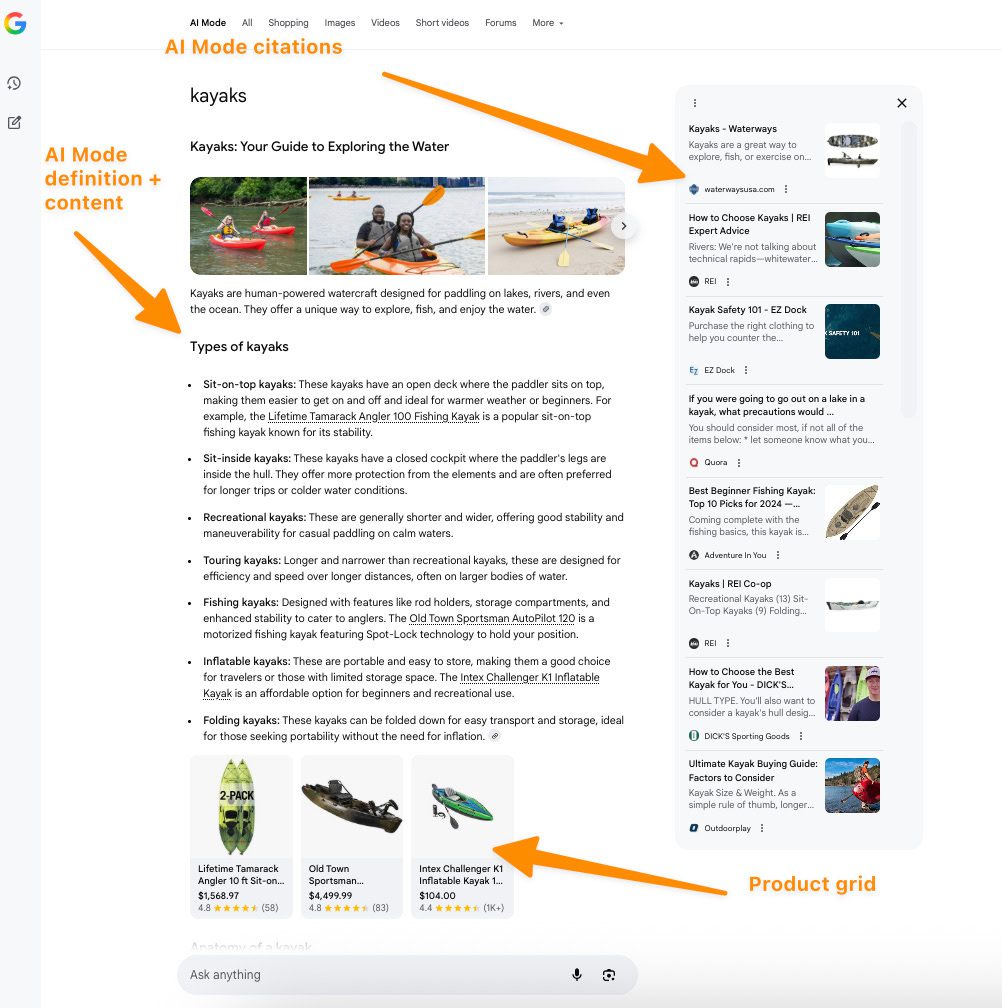
But let’s take a look at the same search via AI Mode.
Below is the desktop experience via Chrome.
I’ve zoomed out here so you get the whole view, but it takes the user two to three scrolls to get to the product grid when in a standard view.
Image Credit: Kevin Indig
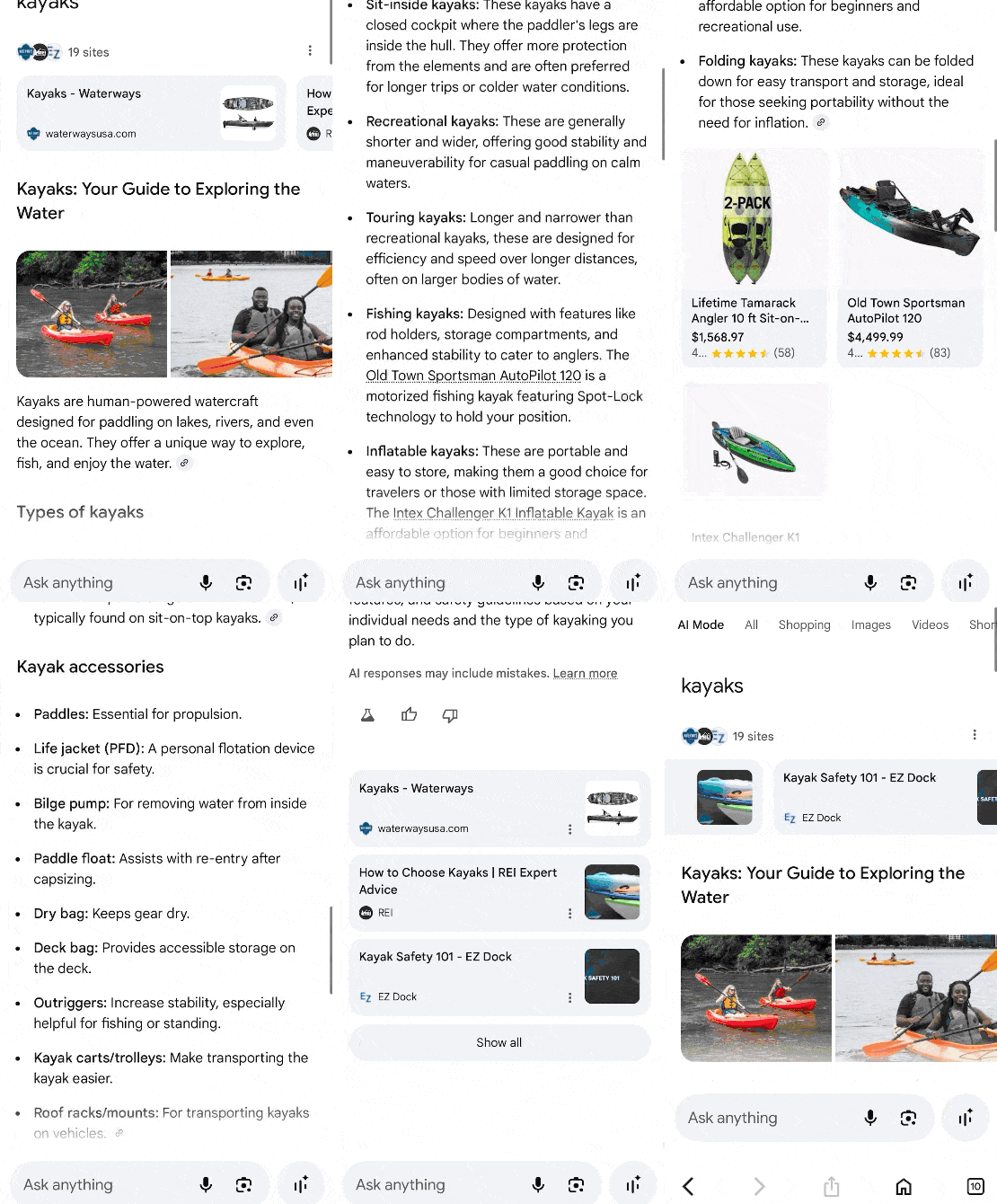
Here on mobile, getting to product recommendations takes several scrolls. In one instance, I received a result that included a list of places near me in my city where I could get a kayak.
Image Credit: Kevin Indig
Keeping the current Google shopping SERP experience in mind, here’s what the data shows.
This is the most noteworthy shift found in the data, as you can probably guess.
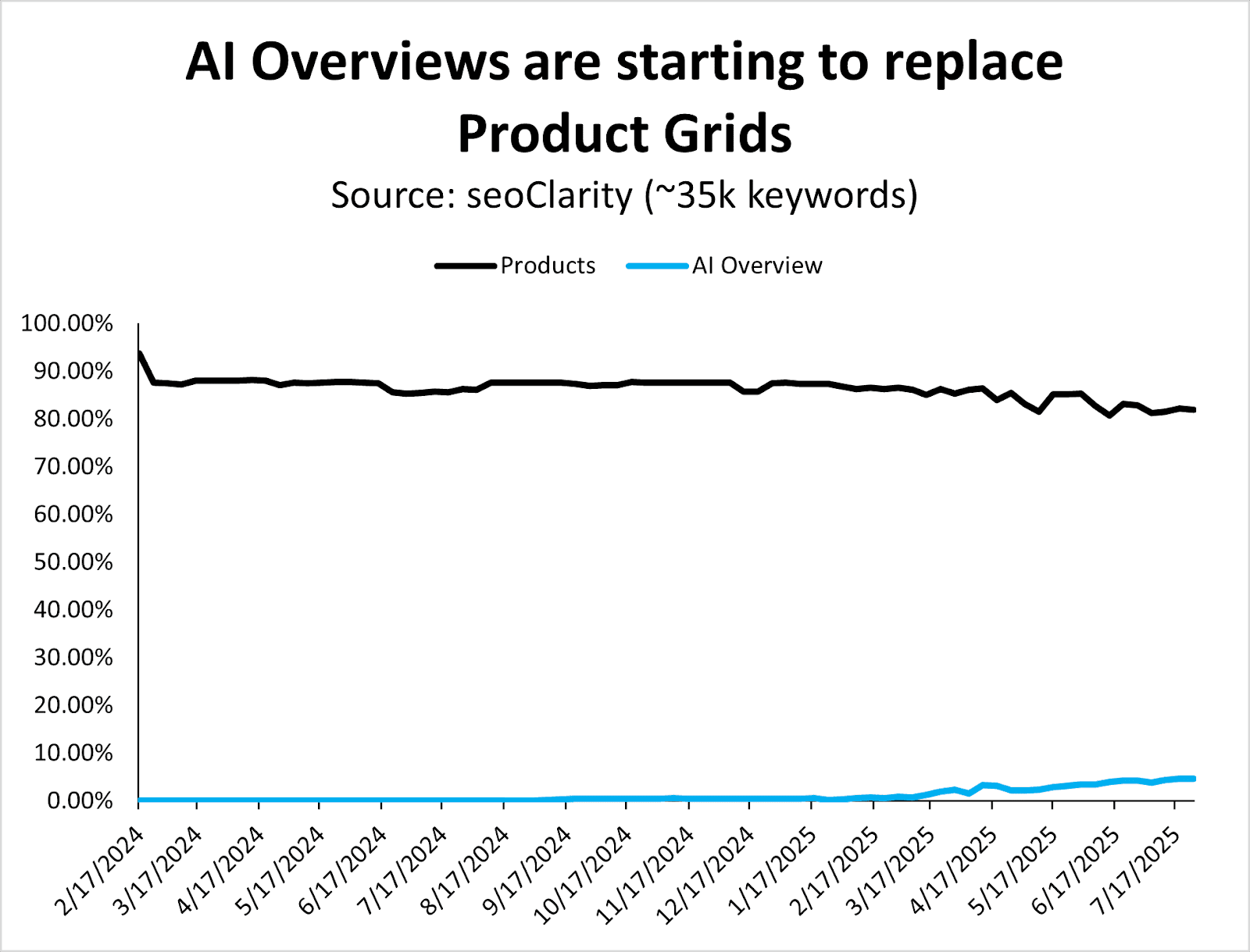
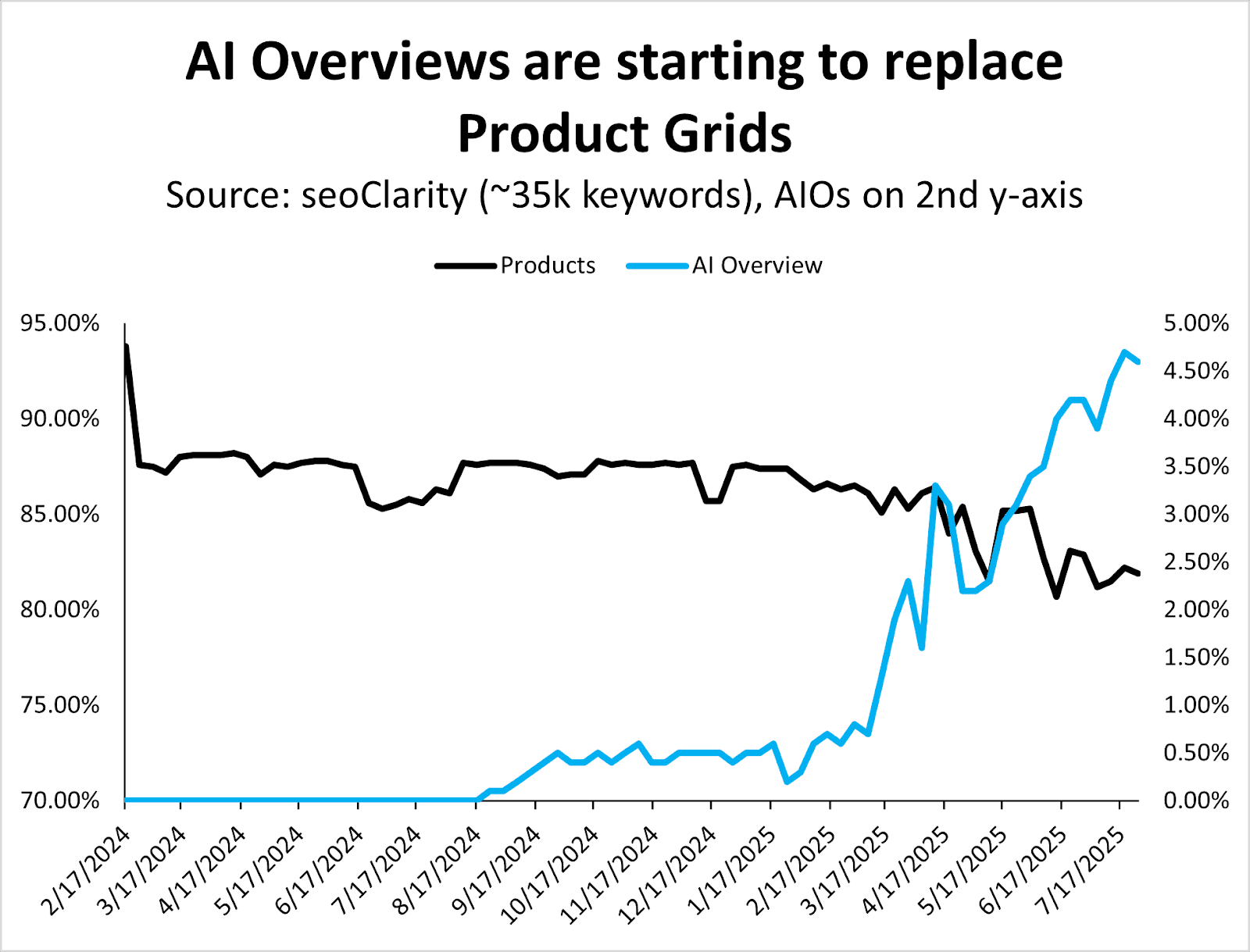
Since March 2025, when Google began rolling out AI Overviews more aggressively, they’ve also started replacing (organic) product grids.
Image Credit: Kevin Indig
The graph above might look like it represents minimal changes when you examine it in a timeline view, but you can see the trend even better when moving AIOs to a second y-axis (below).
Image Credit: Kevin Indig
I expect AI Overviews to still show the product grids searchers have become accustomed to, although they might take a different form.
When searching for [which camera tripod should I buy?], for example, we find an AI Overview at the top with specific product recommendations.
Image Credit: Kevin Indig
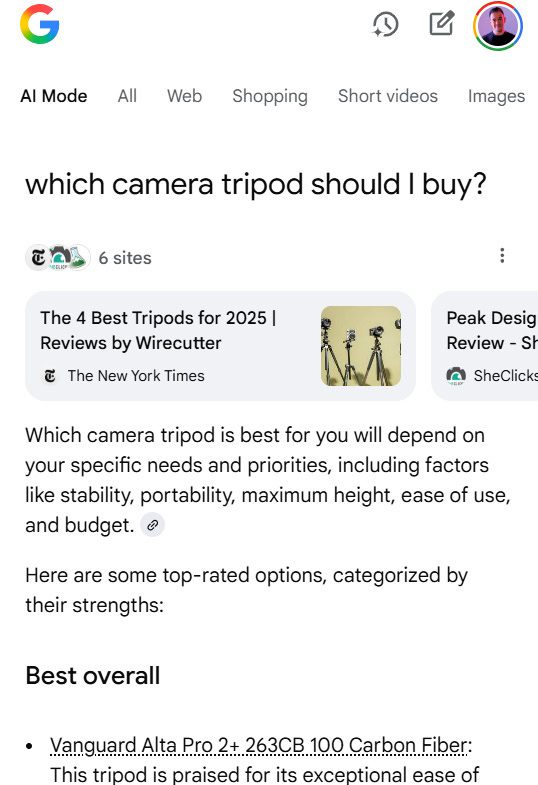
Of course, AI Mode takes that a step further with richer product recommendations and buying guides.
(Shoutout to The New York Times and the other five sources for this AI Mode answer … which now don’t see an ad impression or affiliate click.)
Image Credit: Kevin Indig
As a result of this shift, which I predict will only increase over time, tracking your brand mentions and product links in AI Overviews becomes critical. Skip this at your own risk.
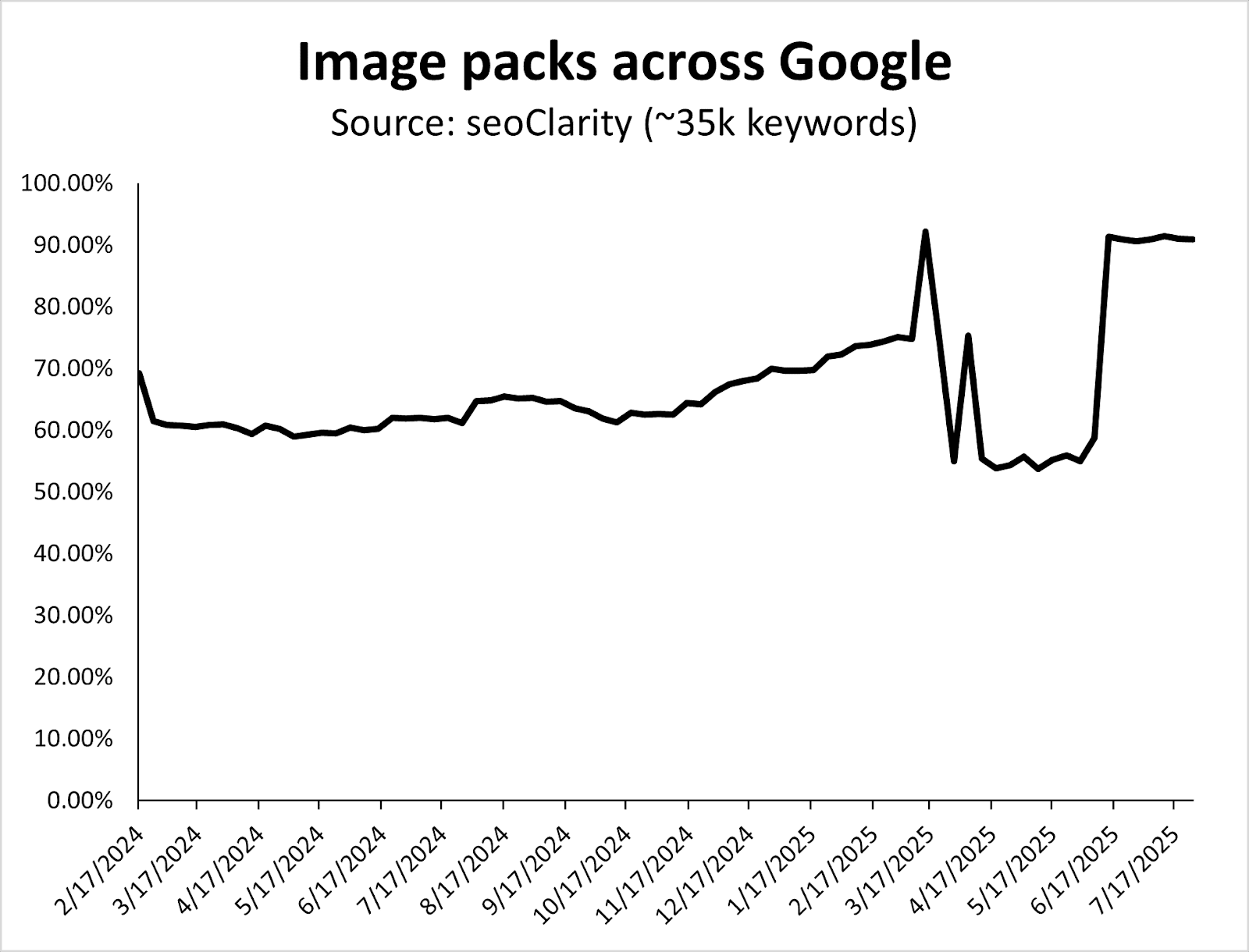
Here, you’ll see the increase in image packs over time, with a big shift in March 2025.
Image packs for ecommerce-related queries grew from ~60% in 2024 to a new baseline of over 90% of keywords in 2025.
Image Credit: Kevin Indig
Also, notice how Google systematically tests SERP layouts between core updates (e.g., the dip in the graph above happens between the March and June 2025 Core Updates).
Having strong product images, which are properly optimized, continues to be crucial for ecommerce search.
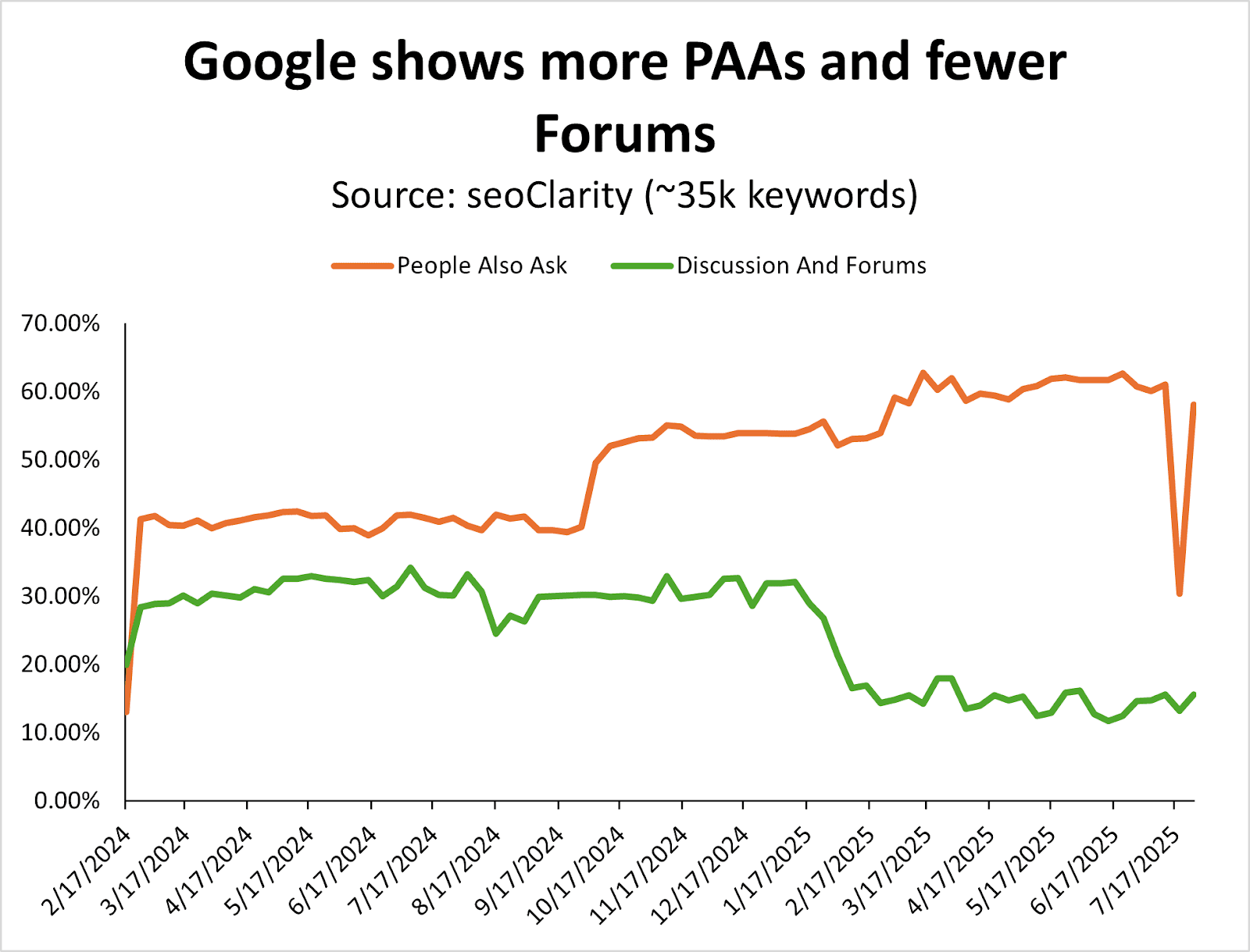
Since January 2025, Google has shown more People Also Asked (PAA) features at the cost of Discussions & Forums.
Even though Reddit is the second most visible site on the web, I’m surprised to see more PAA – two years after Google removed FAQ rich snippets from the SERPs.
Image Credit: Kevin Indig
This is something you want to consider tracking for queries that are directly related to your products, if you’re not doing so already. (You can do this in classic SEO tools like Semrush or Ahrefs, for example.)
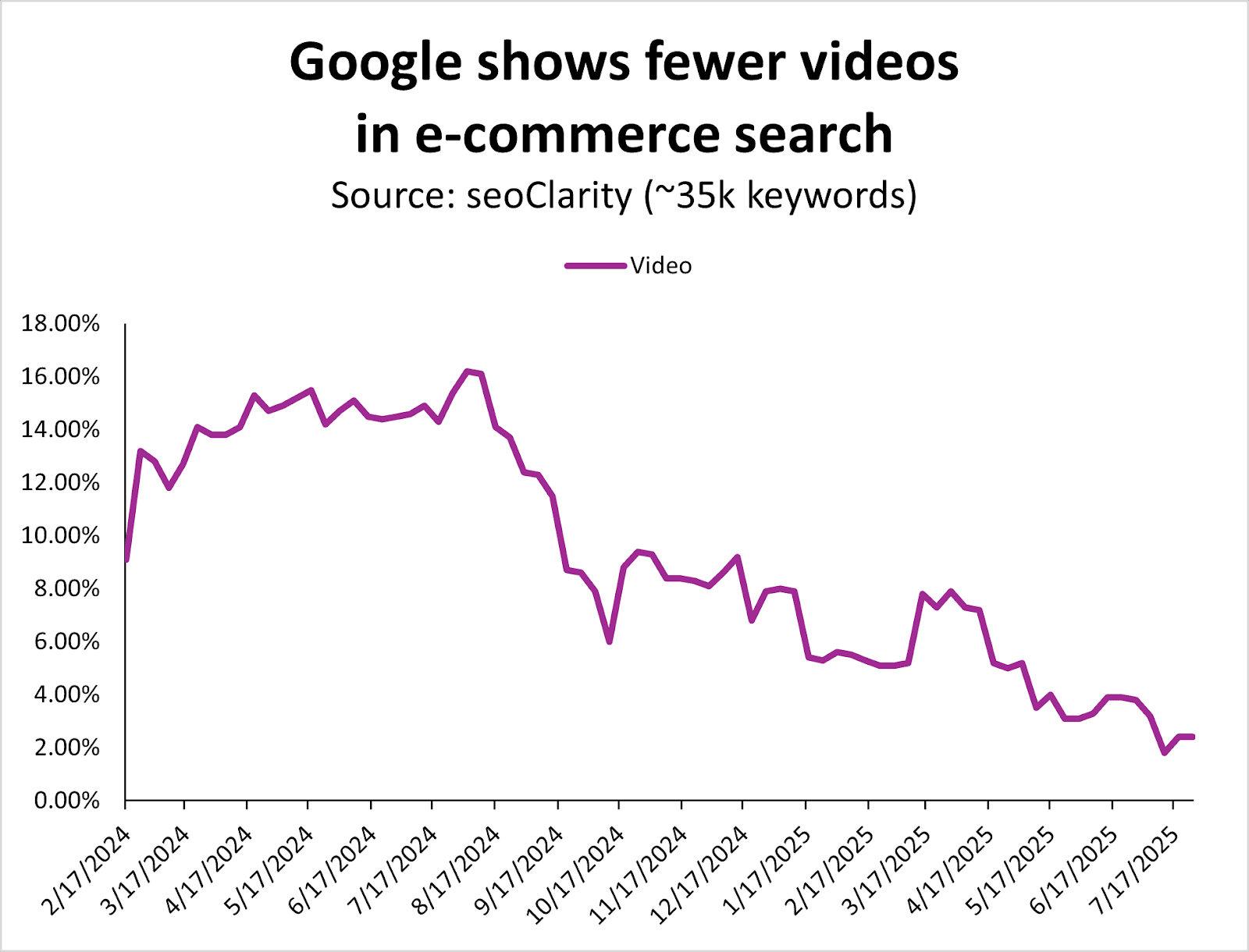
Since August 2024, Google has systematically reduced the number of videos in the ecommerce search results.
Image Credit: Kevin Indig
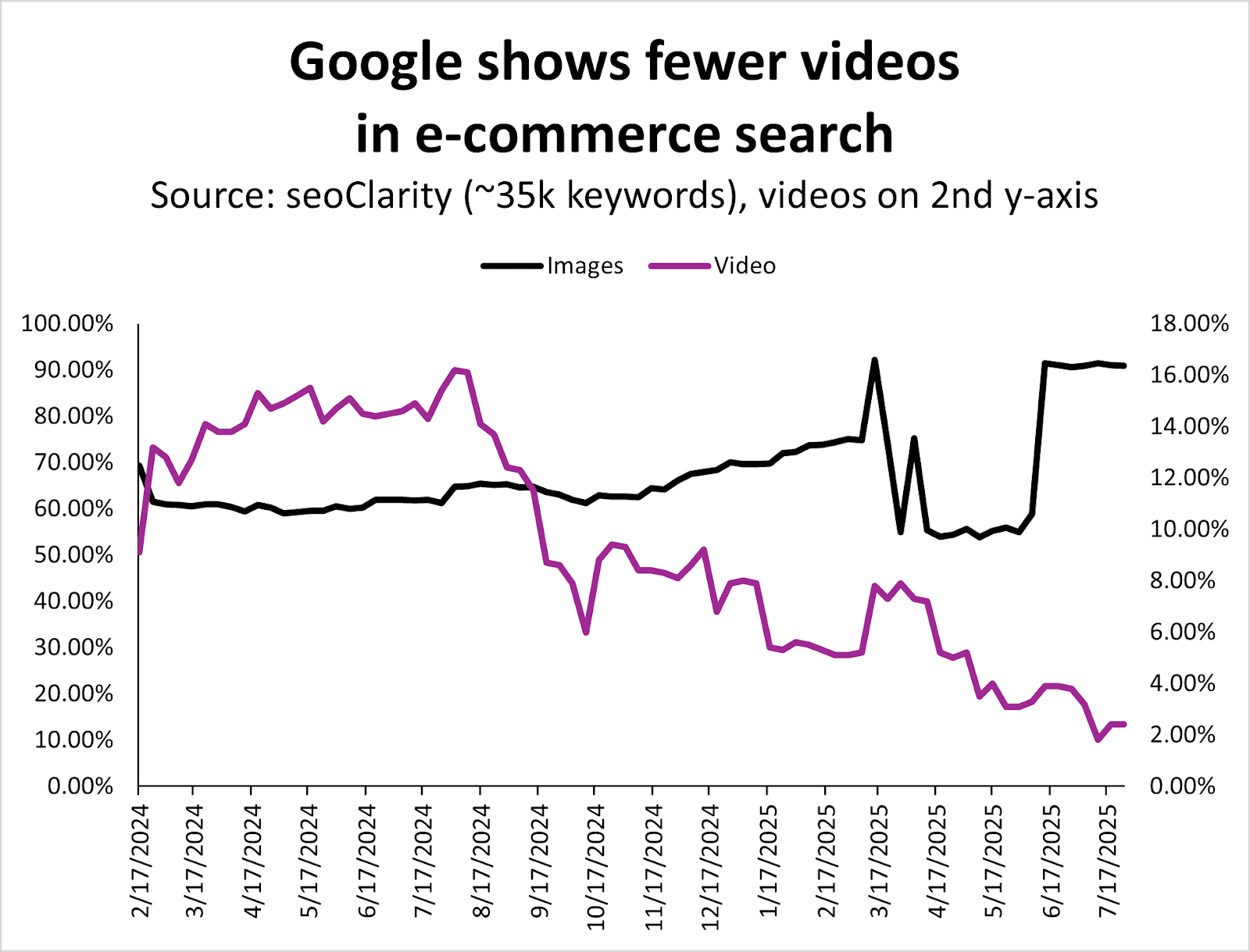
It seems that images have taken a lot of the real estate videos that used to own.
Image Credit: Kevin Indig
As a result, videos are less important in ecommerce search, while images are increasingly more important.
If you’ve been creating and optimizing videos and haven’t seen the SEO results you wanted for your products/site, this could be your signal to invest in other types of content.
While this analysis covers Google SERP data specifically, it’d be a miss to not discuss the new shopping features in ChatGPT.
However, we don’t yet have months and months of data on LLM-based conversational product recommendations to give us good, clear information, so I anticipate there will be more analysis ahead once more time passes.
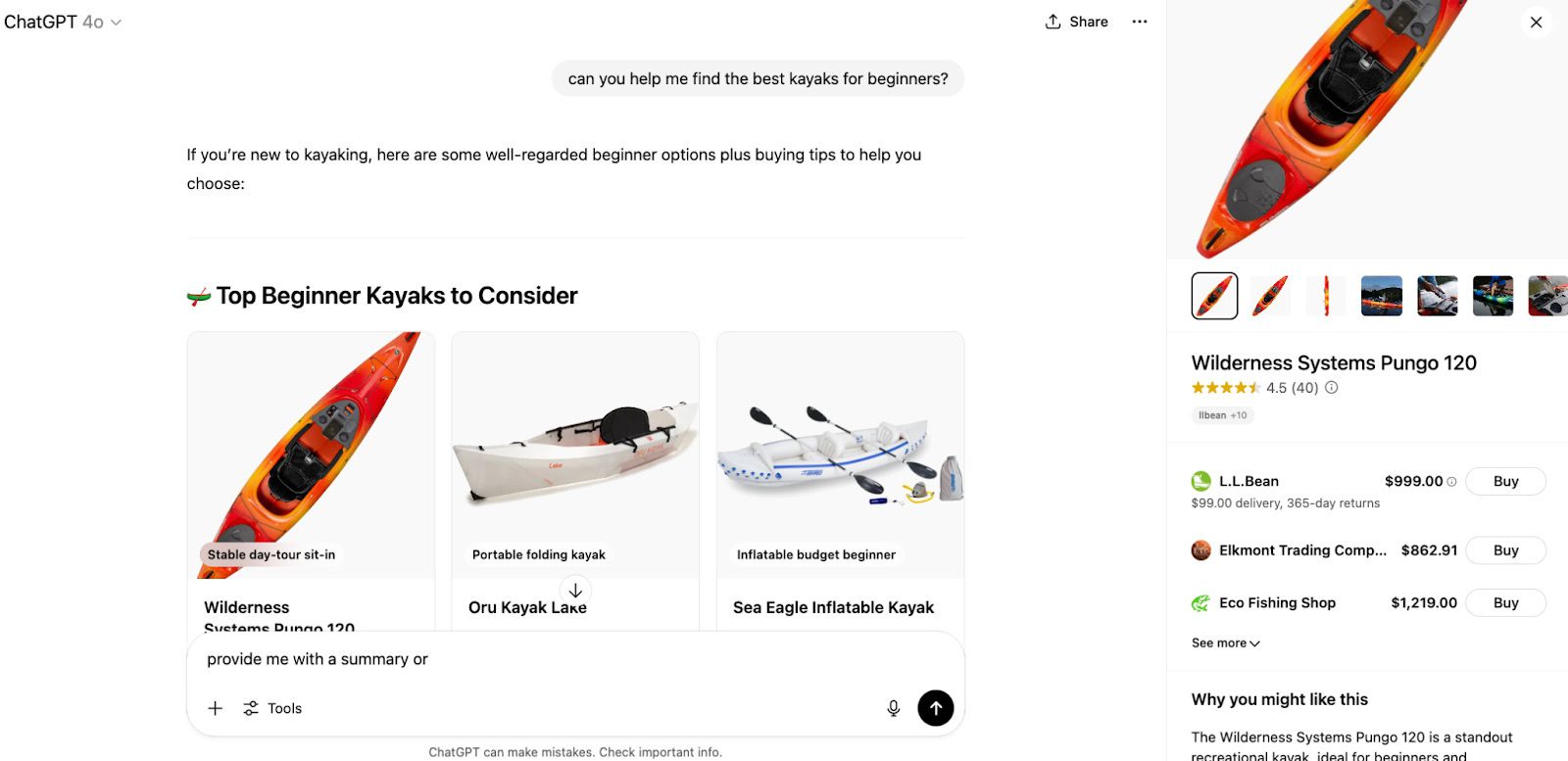
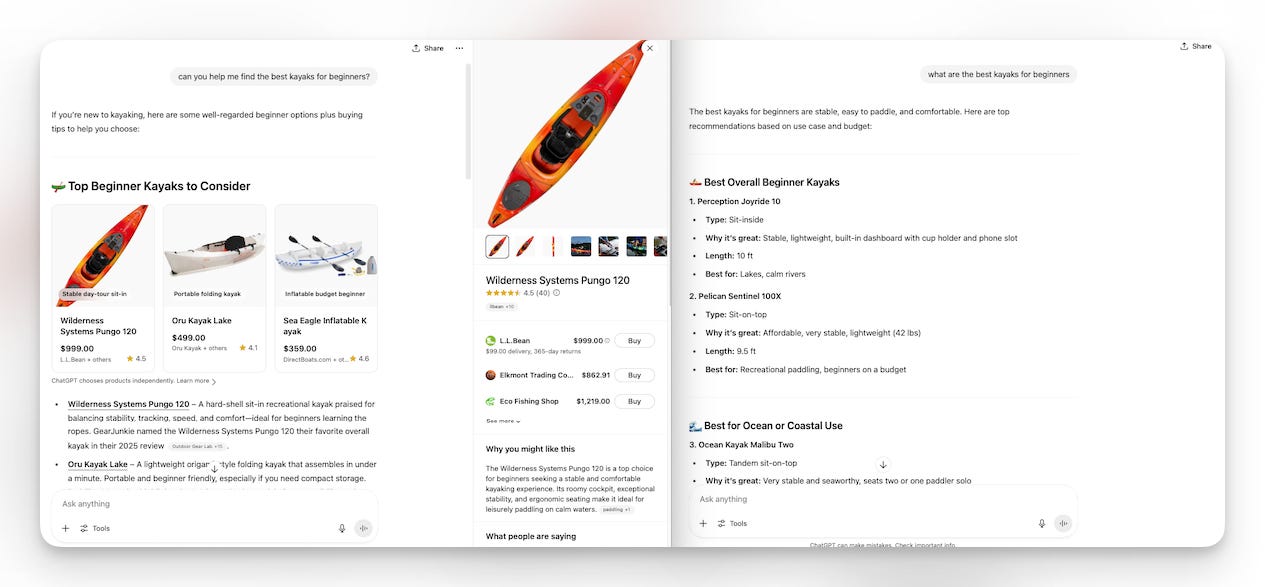
ChatGPT’s shopping experience is starting to look a lot like Google’s – but with a twist: Instead of viewing lists of blue links or multiple product grids, it curates a conversational shortlist with minimal product listings included.
No affiliate links and no paid ads (yet).
Image Credit: Kevin Indig
OpenAI integrates real-time product data from tools like Klarna and Shopify, allowing ChatGPT to surface up-to-date prices, availability, reviews, and product details in a shoppable card-style format.
ChatGPT also offers a “Why you might like this” and “What people are saying” generative summary when a specific product is clicked.
Image Credit: Kevin Indig
OpenAI offers the following guidance about how these products are selected [source]:
A product appears in the visual carousel when ChatGPT perceives it’s relevant to the user’s intent. ChatGPT assesses intent based on the user’s query and other available context, such as memories or custom instructions….
When determining which products to surface, ChatGPT considers:
• Structured metadata from third-party providers (e.g., price, product description) and other third-party content (e.g., reviews).
• Model responses generated by ChatGPT before it considers any new search results. Learn more.
• OpenAI safety standards.
Depending on the user’s needs, some of these factors will be more relevant than others. For example, if the user specifies a budget of $30, ChatGPT will focus more on price, whereas if price isn’t important, it may focus on other aspects instead.
OpenAI also explains how merchants are selected for products [source]:
When a user clicks on a product, we may show a list of merchants offering it. This list is generated based on merchant and product metadata we receive from third-party providers. Currently, the order in which we display merchants is predominantly determined by these providers….
To that end, we’re exploring ways for merchants to provide us their product feeds directly, which will help ensure more accurate and current listings. If you’re interested in participating, complete the interest form here, and we’ll notify you once submissions open.
That being said, it takes some trial and error to trigger product recommendations directly in the chat.
For instance, the prompt [can you help me find the best kayaks for beginners] results in an output that includes product recommendations, while the query [what are the best kayaks for beginners] results in a list without shopping results, features, or links.
Prompts with action-oriented language like “can you help me” and “will you find” may have a higher likelihood of offering shopping results directly in the chat, while queries like “what is the best” and “what are the best” and “compare the features of” may result in a variety of recommendations.
Image Credit: Kevin Indig
Featured Image: Paulo Bobita/Search Engine Journal
“Why, even though I have correctly composed and linked the sitemap to a client’s website, and I have checked everything, am I having indexing problems with some articles, not all of them, even after repeated requests to Google and Google Search Console. What could be the problem? I can’t figure it out.”
The very first aspect to check is if the page is truly not indexed, or simply isn’t ranking well.
It could be that the page appears not indexed because you can’t find it for what you consider the relevant keywords. However, that doesn’t mean it’s not indexed.
For the purposes of this question, I’m going to give you advice on how to deal with both circumstances.
What Could Be The Issue?
There are many reasons that a page might not be indexed by, or rank well, on Google. Let’s discuss the main ones.
Technical Issue
There are technical reasons, both mistakes and conscious decisions, that could be stopping Googlebot from reaching your page and indexing it.
Bots Blocked In Robots.txt
Google needs to be able to reach a page’s content if it is to understand the value of the page and ultimately serve it as a search result for relevant queries.
It can technically still index a page that it can’t access, but it will not be able to determine the content of the page and therefore will have to use external signals like backlinks to determine its relevancy.
If it cannot crawl the page, even if it knows it exists via the sitemap, it will still make it unlikely to rank.
Page Can’t Be Rendered
In a similar way, if the bot can crawl the page but it can’t render the content, it might choose not to index it. It will certainly be unlikely to rank the page well as it won’t be able to read the content of the page.
Page Has A No-Index Tag
An obvious, but often overlooked, issue is that a noindex tag has been applied to the page. This will literally instruct Googlebot not to index the page.
This is a directive, that is, something Googlebot is committed to enacting.
Server-Level Bot Blocking
There could be an issue at your server level that is preventing Googlebot from crawling your webpage.
There may well have been rules set at your server or CDN level that are preventing Googlebot from crawling your site again and discovering these new pages.
It is something that can be quite a common issue when teams that aren’t well-versed in SEO are responsible for the technical maintenance of a website.
Non-200 Server Response Codes
The pages you have added to the sitemap may well be returning a server status code that confuses Googlebot.
For example, if a page is returning a 4XX code, despite you being able to see the content on the page, Googlebot may decide it isn’t a live page and will not index it.
Slow Loading Page
It could be that your webpages are loading very slowly. As a result, the perception of their quality may be diminished.
It could also be that they are taking so long to load that the bots are having to prioritize the pages they crawl so much that your newer pages are not being crawled.
Page Quality
There are also issues with the content of the website itself that could be preventing a page from being indexed.
Low Internal Links Suggesting Low-Value Page
One of the ways Google will determine if a page is worth ranking highly is through the internal links pointing to it. The links between pages on your website can both signify the content of the page being linked to, but also whether the page is an important part of your site. A page that has few internal links may not seem valuable enough to rank well.
Pages Don’t Add Value
One of the main reasons why a page isn’t indexed by Google is that it isn’t perceived as of high enough quality.
Google will not crawl and index every page that it could. Google will prioritize unique, engaging content.
If your pages are thin, or do not really add value to the internet, they may not be indexed even though they technically could be.
They Are Duplicates Or Near Duplicates
In a similar way, if Google perceives your pages to be exact or very near duplicate versions of existing pages, it may well not index your new ones.
Even if you have signaled that the page is unique by including it in your XML sitemap, and using a self-referencing canonical tag, Google will still make its own assessment as to whether a page is worth indexing.
Manual Action
There is also the possibility that your webpage has been subject to a manual action, and that’s why Google is not indexing it.
For example, if the pages that you are trying to get Google to index are what it considers “thin affiliate pages,” you may not be able to rank them due to a manual penalty.
Manual actions are relatively rare and usually affect broader site areas, but it’s worth checking Search Console’s Manual Actions report to rule this out.
Identify The Issue
Knowing what could be the cause of your issue is only half the battle. Let’s look at how you could potentially narrow down the problem and then how you could fix it.
Check Bing Webmaster Tools
My first suggestion is to check if your page is indexed in Bing.
You may not be focusing much on Bing in your SEO strategy, but it is a quick way to determine whether this is a Google-focused issue, like a manual action or poor rankings, rather than something on your site that is preventing the page from being indexed.
Go to Bing Webmaster Tools and enter the page in its URL Inspection tool. From here, you will see if Bing is indexing the page or not. If it is, then you know this is something that is only affecting Google.
Check Google Search Console’s “Page” Report
Next, go to Google Search Console. Inspect the page and see if it is genuinely marked as not indexed. If it isn’t indexed, Google should give an explanation as to why.
For example, it could be that the page is:
Excluded By “Noindex”
If Google detects a noindex tag on the page, it will not index it. Under the URL Inspection tool results, it will tell you that “page is not indexed: Excluded by ‘noindex’ tag”
If this is the result you are getting for your pages, your next step will be to remove the noindex tag and resubmit the page to be crawled by Googlebot.
Discovered – Currently Not Indexed
The inspection tool might tell you the “page is not indexed: Currently not indexed.”
If that is the case, you know for certain that it is an indexing issue, and not a problem with poor rankings, that is causing your page not to appear in Google Search.
Google explains that a URL appearing as “Discovered – currently not indexed” is:
“The page was found by Google, but not crawled yet. Typically, Google wanted to crawl the URL but this was expected to overload the site; therefore Google rescheduled the crawl. This is why the last crawl date is empty on the report.”
If you are seeing this status, there is a high chance that Google has looked at other pages on your website and deemed them not worth adding to the index, and as such, is not spending resources crawling these other pages that it is aware of because it expects them to be of as low quality.
To fix this issue, you need to signify a page’s quality and relevance to Googlebot. It is time to take a critical look at your website and identify if there are reasons why Google may consider your pages to be low quality.
If your inspected page returns a status of “Crawled – currently not indexed,” this means that Google is aware of the page, has crawled it, but doesn’t see value in adding it to the index.
If you are getting this status code, you are best off looking for ways to improve the page’s quality.
Duplicate, Google Chose Different Canonical Than User
You may see an alert for the page you have inspected, which tells you this page is a “Duplicate, Google chose different canonical than user.”
What this means is that it sees the URL as a close duplicate of an existing page, and it is choosing the other page to be displayed in the SERPs instead of the inspected page, despite you having correctly set a canonical tag.
The way to encourage Google to display both pages in the SERPs is to make sure they are unique, have sufficient content so as to be useful to readers.
Essentially, you need to give Google a reason to index both pages.
Fixing The Issues
Although your pages may not be indexed for one or more of various reasons, the fixes are all pretty similar.
It is likely that there is either a technical issue with the site, like an errant canonical tag or a robots.txt block, that has been preventing correct crawling and indexing of a page.
Or, there is an issue with the quality of the page, which is causing Google to not see it as valuable enough to be indexed.
Start by reviewing the potential technical causes. These will help you to quickly identify if this is a “quick” fix that you or your developers can change.
Once you have ruled out the technical issues, you are most likely looking at quality problems.
Depending on what you now think is causing the page to not appear in the SERPs, it may be that the page itself has quality issues, or a larger part of your website does.
If it is the former, consider E-E-A-T, uniqueness of the page in the scope of the internet, and how you can signify the page’s importance, such as through relevant backlinks.
If it is the latter, you may wish to run a content audit to help you narrow down ways to improve the overall perception of quality across your website.
Summary
There will be a bit of investigation needed to identify if your page is truly not indexed, or if Google is just choosing not to rank it highly for queries you feel are relevant.
Once you have identified that, you can begin closing in on whether it is a technical or quality issue that is affecting your pages.
This is a frustrating issue to have, but the fixes are quite logical, and the investigation should hopefully reveal more ways to improve the crawling and indexing of your site.
More Resources:
Featured Image: Paulo Bobita/Search Engine Journal
Perplexity published a response to Cloudflare’s claims that it disrespects robots.txt and engages in stealth crawling. Perplexity argues that Cloudflare is mischaracterizing AI Assistants as web crawlers, saying that they should not be subject to the same restrictions since they are user-initiated assistants.
Perplexity AI Assistants Fetch On Demand
According to Perplexity, its system does not store or index content ahead of time. Instead, it fetches webpages only in response to specific user questions. For example, when a user asks for recent restaurant reviews, the assistant retrieves and summarizes relevant content on demand. This, the company says, contrasts with how traditional crawlers operate, systematically indexing vast portions of the web without regard to immediate user intent.
Perplexity compared this on-demand fetching to Google’s user-triggered fetches. Although that is not an apples-to-apples comparison because Google’s user-triggered fetches are in the service of reading text aloud or site verification, it’s still an example of user-triggered fetching that bypasses robots.txt restrictions.
In the same way, Perplexity argues that its AI operates as an extension of a user’s request, not as an autonomous bot crawling indiscriminately. The company states that it does not retain or use the fetched content for training its models.
Criticizes Cloudflare’s Infrastructure
Perplexity also criticized Cloudflare’s infrastructure for failing to distinguish between malicious scraping and legitimate, user-initiated traffic, suggesting that Cloudflare’s approach to bot management risks overblocking services that are acting responsibly. Perplexity argues that a platform’s inability to differentiate between helpful AI assistants and harmful bots causes misclassification of legitimate web traffic.
Perplexity makes a strong case for the claim that Cloudflare is blocking legitimate bot traffic and says that Cloudflare’s decision to block its traffic was based on a misunderstanding of how its technology works.
This is today’s edition of The Download, our weekday newsletter that provides a daily dose of what’s going on in the world of technology.
Forcing LLMs to be evil during training can make them nicer in the long run
Large language models have recently acquired a reputation for behaving badly. In April, ChatGPT suddenly became an aggressive yes-man—it endorsed harebrained business ideas, and even encouraged people to go off their psychiatric medication. More recently, xAI’s Grok adopted what can best be described as a 4chan neo-Nazi persona and repeatedly referred to itself as “MechaHitler” on X.
Both changes were quickly reversed—but why did they happen at all? And how do we stop AI going off the rails like this?
A new study from Anthropic suggests that traits such as sycophancy or evilness are associated with specific patterns of activity in large language models—and turning on those patterns during training can, paradoxically, prevent the model from adopting the related traits. Read the full story.
—Grace Huckins
Read more of our top stories about AI:
+ Five things you need to know about AI right now.
+ Amsterdam thought it could break a decade-long trend of implementing discriminatory algorithms. Its failure raises the question: can AI programs ever be made fair? Read our story.
+ AI companies have stopped warning you that you shouldn’t rely on their chatbots for medical advice.
I’ve combed the internet to find you today’s most fun/important/scary/fascinating stories about technology.
1 The US is losing its scientific supremacy Money and talent are starting to leave as a hostile White House ramps up its attacks. (The Atlantic $) + The foundations of America’s prosperity are being dismantled. (MIT Technology Review)
2 Global markets are swooning again New tariffs, weak jobs data, and Trump’s decision to fire a top economic official are not going down well. (Reuters $)
3 Big Tech is turning into Big Infrastructure Capital expenditure on AI contributed more to US economic growth in the last two quarters than all consumer spending, which is kind of wild. (WSJ $) + But are they likely to get a return on their huge investments? (FT $)
4 OpenAI pulled a feature that let you see strangers’ conversations with ChatGPT They’d opted in to sharing them—but may well have not realized that’d mean their chats would be indexed on Google Search. (TechCrunch)
5 Tesla has to pay $243 million over the role Autopilot played in a fatal crash The plaintiffs successfully argued that the company’s promises about its tech can lull drivers into a false sense of security. (NBC)
6 Tech workers in China are desperate to learn AI skills And they’re assuaging their anxiety with online courses, though they say they vary in quality. (Rest of World) + Chinese universities want students to use more AI, not less. (MIT Technology Review)
7 Russia is escalating its crackdown on online freedoms There are growing fears that it’s planning to ban WhatsApp and Telegram. (NYT $)
8 People are using AI to write obituaries But what do we lose when we outsource expressing our emotions to a machine? (WP $) + Deepfakes of your dead loved ones are a booming Chinese business. (MIT Technology Review)
9 Just seeing a sick person triggers your immune response This is a pretty cool finding —and the study was conducted in virtual reality too. (Nature)
10 The US has recorded the longest lightning flash ever A “mega-flash” over the Great Plains stretched to about 515 miles! (New Scientist $)
Quote of the day
“Apple must do this. Apple will do this. This is sort of ours to grab.”
—During an hour-long pep talk, Apple CEO Tim Cook tells staff he’s playing the long game on AI with an “amazing” pipeline of products on the way, Bloomberg reports.
One more thing
MICHAEL BYERS
Think that your plastic is being recycled? Think again.
The problem of plastic waste hides in plain sight, a ubiquitous part of our lives we rarely question. But a closer examination of the situation is shocking.
To date, humans have created around 11 billion metric tons of plastic, the vast majority of which ends up in landfills or the environment. Only 9% of the plastic ever produced has been recycled.
To make matters worse, plastic production is growing dramatically; in fact, half of all plastics in existence have been produced in just the last two decades.
So what do we do? Sadly, solutions such as recycling and reuse aren’t equal to the scale of the task. The only answer is drastic cuts in production in the first place. Read the full story.
—Douglas Main
We can still have nice things
A place for comfort, fun and distraction to brighten up your day. (Got any ideas? Drop me a line or skeet ’em at me.)
+ The new Alien TV series sounds fantastic. + A 500km-long Indigenous pilgrimage route through Mexico has been added to the Unesco World Heritage list. + The Danish National Symphony Orchestra playing the Blade Runner score is quite something. + It’s not too late to spice up your summer with an icebox cake.
A growing number of companies are launching AI agents that can do things on your behalf—actions like sending an email, making a document, or editing a database. Initial reviews for these agents have been mixed at best, though, because they struggle to interact with all the different components of our digital lives.
Part of the problem is that we are still building the necessary infrastructure to help agents navigate the world. If we want agents to complete tasks for us, we need to give them the necessary tools while also making sure they use that power responsibly.
Anthropic and Google are among the companies and groups working to do those. Over the past year, they have both introduced protocols that try to define how AI agents should interact with each other and the world around them. These protocols could make it easier for agents to control other programs like email clients and note-taking apps.
The reason has to do with application programming interfaces, the connections between computers or programs that govern much of our online world. APIs currently reply to “pings” with standardized information. But AI models aren’t made to work exactly the same every time. The very randomness that helps them come across as conversational and expressive also makes it difficult for them to both call an API and understand the response.
“Models speak a natural language,” says Theo Chu, a project manager at Anthropic. “For [a model] to get context and do something with that context, there is a translation layer that has to happen for it to make sense to the model.” Chu works on one such translation technique, the Model Context Protocol (MCP), which Anthropic introduced at the end of last year.
MCP attempts to standardize how AI agents interact with the world via various programs, and it’s already very popular. One web aggregator for MCP servers (essentially, the portals for different programs or tools that agents can access) lists over 15,000 servers already.
Working out how to govern how AI agents interact with each other is arguably an even steeper challenge, and it’s one the Agent2Agent protocol (A2A), introduced by Google in April, tries to take on. Whereas MCP translates requests between words and code, A2A tries to moderate exchanges between agents, which is an “essential next step for the industry to move beyond single-purpose agents,” Rao Surapaneni, who works with A2A at Google Cloud, wrote in an email to MIT Technology Review.
Google says 150 companies have already partnered with it to develop and adopt A2A, including Adobe and Salesforce. At a high level, both MCP and A2A tell an AI agent what it absolutely needs to do, what it should do, and what it should not do to ensure a safe interaction with other services. In a way, they are complementary—each agent in an A2A interaction could individually be using MCP to fetch information the other asks for.
However, Chu stresses that it is “definitely still early days” for MCP, and the A2A road map lists plenty of tasks still to be done. We’ve identified the three main areas of growth for MCP, A2A, and other agent protocols: security, openness, and efficiency.
What should these protocols say about security?
Researchers and developers still don’t really understand how AI models work, and new vulnerabilities are being discovered all the time. For chatbot-style AI applications, malicious attacks can cause models to do all sorts of bad things, including regurgitating training data and spouting slurs. But for AI agents, which interact with the world on someone’s behalf, the possibilities are far riskier.
For example, one AI agent, made to read and send emails for someone, has already been shown to be vulnerable to what’s known as an indirect prompt injection attack. Essentially, an email could be written in a way that hijacks the AI model and causes it to malfunction. Then, if that agent has access to the user’s files, it could be instructed to send private documents to the attacker.
Some researchers believe that protocols like MCP should prevent agents from carrying out harmful actions like this. However, it does not at the moment. “Basically, it does not have any security design,” says Zhaorun Chen, a University of Chicago PhD student who works on AI agent security and uses MCP servers.
Bruce Schneier, a security researcher and activist, is skeptical that protocols like MCP will be able to do much to reduce the inherent risks that come with AI and is concerned that giving such technology more power will just give it more ability to cause harm in the real, physical world. “We just don’t have good answers on how to secure this stuff,” says Schneier. “It’s going to be a security cesspool really fast.”
Others are more hopeful. Security design could be added to MCP and A2A similar to the way it is for internet protocols like HTTPS (though the nature of attacks on AI systems is very different). And Chen and Anthropic believe that standardizing protocols like MCP and A2A can help make it easier to catch and resolve security issues even as is. Chen uses MCP in his research to test the roles different programs can play in attacks to better understand vulnerabilities. Chu at Anthropic believes that these tools could let cybersecurity companies more easily deal with attacks against agents, because it will be easier to unpack who sent what.
How open should these protocols be?
Although MCP and A2A are two of the most popular agent protocols available today, there are plenty of others in the works. Large companies like Cisco and IBM are working on their own protocols, and other groups have put forth different designs like Agora, designed by researchers at the University of Oxford, which upgrades an agent-service communication from human language to structured data in real time.
Many developers hope there could eventually be a registry of safe, trusted systems to navigate the proliferation of agents and tools. Others, including Chen, want users to be able to rate different services in something like a Yelp for AI agent tools. Some more niche protocols have even built blockchains on top of MCP and A2A so that servers can show they are not just spam.
Both MCP and A2A are open-source, which is common for would-be standards as it lets others work on building them. This can help protocols develop faster and more transparently.
“If we go build something together, we spend less time overall, because we’re not having to each reinvent the wheel,” says David Nalley, who leads developer experience at Amazon Web Services and works with a lot of open-source systems, including A2A and MCP.
Nalley oversaw Google’s donation of A2A to the Linux Foundation, a nonprofit organization that guides open-source projects, back in June. With the foundation’s stewardship, the developers who work on A2A (including employees at Google and many others) all get a say in how it should evolve. MCP, on the other hand, is owned by Anthropic and licensed for free. That is a sticking point for some open-source advocates, who want others to have a say in how the code base itself is developed.
“There’s admittedly some increased risk around a single person or a single entity being in absolute control,” says Nalley. He says most people would prefer multiple groups to have a “seat at the table” to make sure that these protocols are serving everyone’s best interests.
However, Nalley does believe Anthropic is acting in good faith—its license, he says, is incredibly permissive, allowing other groups to create their own modified versions of the code (a process known as “forking”).
“Someone could fork it if they needed to, if something went completely off the rails,” says Nalley. IBM’s Agent Communication Protocol was actually spun off of MCP.
Anthropic is still deciding exactly how to develop MCP. For now, it works with a steering committee of outside companies that help make decisions on MCP’s development, but Anthropic seems open to changing this approach. “We are looking to evolve how we think about both ownership and governance in the future,” says Chu.
Is natural language fast enough?
MCP and A2A work on the agents’ terms—they use words and phrases (termed natural language in AI), just as AI models do when they are responding to a person. This is part of the selling point for these protocols, because it means the model doesn’t have to be trained to talk in a way that is unnatural to it. “Allowing a natural-language interface to be used between agents and not just with humans unlocks sharing the intelligence that is built into these agents,” says Surapaneni.
But this choice does come with drawbacks. Natural-language interfaces lack the precision of APIs, and that could result in incorrect responses. And it creates inefficiencies.
Usually, an AI model reads and responds to text by splitting words into tokens. The AI model will read a prompt, split it into input tokens, generate a response in the form of output tokens, and then put these tokens into words to send back. These tokens define in some sense how much work the AI model has to do—that’s why most AI platforms charge users according to the number of tokens used.
But the whole point of working in tokens is so that people can understand the output—it’s usually faster and more efficient for machine-to-machine communication to just work over code. MCP and A2A both work in natural language, so they require the model to spend tokens as the agent talks to other machines, like tools and other agents. The user never even sees these exchanges—all the effort of making everything human-readable doesn’t ever get read by a human. “You waste a lot of tokens if you want to use MCP,” says Chen.
Chen describes this process as potentially very costly. For example, suppose the user wants the agent to read a document and summarize it. If the agent uses another program to summarize here, it needs to read the document, write the document to the program, read back the summary, and write it back to the user. Since the agent needed to read and write everything, both the document and the summary get doubled up. According to Chen, “It’s actually a lot of tokens.”
As with so many aspects of MCP and A2A’s designs, their benefits also create new challenges. “There’s a long way to go if we want to scale up and actually make them useful,” says Chen.
In September 2025, ecommerce content marketers will find inspiration in holidays, both serious and quirky.
Content such as articles and videos can build a relationship with shoppers and keep folks visiting a business’s website. Content drives visibility in generative AI platforms and organic search and fuels social media and email marketing.
The content challenge, however, is generating new topics and material.
What follows are five content marketing ideas your business can use in September 2025.
Labor Day
Labor Day signals seasonal change, creating content marketing opportunities.
Celebrated in the U.S. on the first Monday of September, Labor Day has its roots in the 19th-century workers’ movement, when unions fought for higher wages, better working conditions, and shorter work days at the peak of the Industrial Revolution.
While it retains some of its workers’ pride, the holiday now represents the unofficial end of summer and an occasion for grilling, parades, and Autumn preparation.
It’s a major retail event, too.
Taken together, the day’s history, emphasis on seasonal change, and revenue value make it an exceptional marketing opportunity.
“Ultimate Guide to Hosting a Last-Minute Labor Day BBQ” could list products such as grilling accessories, BBQ rubs, and similar.
“How to Dress for Labor Day 2025” would feature inspiration styles and the option to “buy the look.”
“Get Your Home Ready for the Fall” could leverage the season’s “fresh start,” offering tips on decluttering, organizing, or swapping out decor.
Classical Music Month
Classical Music Month provides ideas beyond music and instruments.
President Bill Clinton established Classical Music Month in 1994.
“Classical music is a celebration of artistic excellence. It spans centuries and generations, delighting and inspiring listeners of all ages. During Classical Music Month, we recognize the many talented composers, conductors, and musicians who bring classical music to our ears and enrich our lives,” wrote Clinton in his official proclamation.
Classical Music Month is an obvious marketing opportunity for music stores, but plenty of other retailers could benefit. Here are example titles:
A kitchen or party supplier: “The Perfect Classical Music Playlist for a Relaxing Evening”
A formal wear shop: “What to Wear to the Symphony This Fall”
Niche memorabilia store: “The 10 Greatest Classical Movie Themes”
National Read a Book Day
Reading is a pastime and a marketing opportunity.
According to various “national day” websites, September 6, 2025, is National Read a Book Day. It’s hardly an official holiday, but there are plenty of opportunities to create blog posts, long-form articles, videos, or podcasts aimed at bibliophiles.
Marketers can frame National Read a Book Day not to sell books, but rather a holiday celebrating quiet, comfort, and imagination. This approach opens up myriad content options.
Here are some example article or video titles.
“19 Gift Ideas for Readers Who Already Own Too Many Books”
“How to Create the Ultimate Reading Nook at Home”
“Evening Reading Routines That Make You Sleep Better”
National Salami Day
National Salami Day is ripe with content marketing flavor.
There is no doubt that September 7th’s National Salami Day is a playful observance, meant to bring a little laughter and food to its celebrants.
Merchants selling items such as charcuterie boards, knives, specialty foods, cheese, wine, or picnic accessories will likely have the most success with salami articles, videos, and podcasts. But folks in other industries can attract readers and viewers, too.
Mr. Porter has long been an example of good ecommerce content marketing.
How-to articles and videos are the foundation of ecommerce content marketing, delivering on the three pillars of attracting, engaging, and retaining shoppers.
Instructional content is also a powerful lead magnet and can fuel search, social media, newsletters, and shoppable videos.
Take inspiration from many retail websites. Here are five how-to articles from The Journal by men’s apparel merchant Mr. Porter:
Cloudflare announced that they delisted Perplexity’s crawler as a verified bot and are now actively blocking Perplexity and all of its stealth bots from crawling websites. Cloudflare acted in response to multiple user complaints against Perplexity related to violations of robots.txt protocols, and a subsequent investigation revealed that Perplexity was using aggressive rogue bot tactics to force its crawlers onto websites.
Cloudflare Verified Bots Program
Cloudflare has a system called Verified Bots that whitelists bots in their system, allowing them to crawl the websites that are protected by Cloudflare. Verified bots must conform to specific policies, such as obeying the robots.txt protocols, in order to maintain their privileged status within Cloudflare’s system.
Perplexity was found to be violating Cloudflare’s requirements that bots abide by the robots.txt protocol and refrain from using IP addresses that are not declared as belonging to the crawling service.
Cloudflare Accuses Perplexity Of Using Stealth Crawling
Cloudflare observed various activities indicative of highly aggressive crawling, with the intent of circumventing the robots.txt protocol.
Stealth Crawling Behavior: Rotating IP Addresses
Perplexity circumvents blocks by using rotating IP addresses, changing ASNs, and impersonating browsers like Chrome.
Perplexity has a list of official IP addresses that crawl from a specific ASN (Autonomous System Number). These IP addresses help identify legitimate crawlers from Perplexity.
An ASN is part of the Internet networking system that provides a unique identifying number for a group of IP addresses. For example, users who access the Internet via an ISP do so with a specific IP address that belongs to an ASN assigned to that ISP.
When blocked, Perplexity attempted to evade the restriction by switching to different IP addresses that are not listed as official Perplexity IPs, including entirely different ones that belonged to a different ASN.
Stealth Crawling Behavior: Spoofed User Agent
The other sneaky behavior that Cloudflare identified was that Perplexity changed its user agent in order to circumvent attempts to block its crawler via robots.txt.
For example, Perplexity’s bots are identified with the following user agents:
PerplexityBot
Perplexity-User
Cloudflare observed that Perplexity responded to user agent blocks by using a different user agent that posed as a person crawling with Chrome 124 on a Mac system. That’s a practice called spoofing, where a rogue crawler identifies itself as a legitimate browser.
“Mozilla/5.0 (Macintosh; Intel Mac OS X 10_15_7) AppleWebKit/537.36 (KHTML, like Gecko) Chrome/124.0.0.0 Safari/537.36”
Cloudflare Delists Perplexity
Cloudflare announced that Perplexity is delisted as a verified bot and that they will be blocked:
“The Internet as we have known it for the past three decades is rapidly changing, but one thing remains constant: it is built on trust. There are clear preferences that crawlers should be transparent, serve a clear purpose, perform a specific activity, and, most importantly, follow website directives and preferences. Based on Perplexity’s observed behavior, which is incompatible with those preferences, we have de-listed them as a verified bot and added heuristics to our managed rules that block this stealth crawling.”
Takeaways
Violation Of Cloudflare’s Verified Bots Policy Perplexity violated Cloudflare’s Verified Bots policy, which grants crawling access to trusted bots that follow common-sense rules like honoring the robots.txt protocol.
Perplexity Used Stealth Crawling Tactics Perplexity used undeclared IP addresses from different ASNs and spoofed user agents to crawl content after being blocked from accessing it.
User Agent Spoofing Perplexity disguised its bot as a human user by posing as Chrome on a Mac operating system in attempts to bypass filters that block known crawlers.
Cloudflare’s Response Cloudflare delisted Perplexity as a Verified Bot and implemented new blocking rules to prevent the stealth crawling.
SEO Implications Cloudflare users who want Perplexity to crawl their sites may wish to check if Cloudflare is blocking the Perplexity crawlers, and, if so, enable crawling via their Cloudflare dashboard.
Cloudflare delisted Perplexity as a Verified Bot after discovering that it repeatedly violated the Verified Bots policies by disobeying robots.txt. To evade detection, Perplexity also rotated IPs, changed ASNs, and spoofed its user agent to appear as a human browser. Cloudflare’s decision to block the bot is a strong response to aggressive bot behavior on the part of Perplexity.
OpenAI’s ChatGPT is on pace to reach 700 million weekly active users, according to a statement this week from Nick Turley, VP and head of the ChatGPT app.
The milestone marks a sharp increase from 500 million in March and represents a fourfold jump compared to the same time last year.
“This week, ChatGPT is on track to reach 700M weekly active users — up from 500M at the end of March and 4× since last year. Every day, people and teams are learning, creating, and solving harder problems. Big week ahead. Grateful to the team for making ChatGPT more useful and delivering on our mission so everyone can benefit from AI.”
How Does This Compare to Other Search Engines?
Weekly active user (WAU) counts aren’t typically shared by traditional search engines, making direct comparisons difficult. Google reports aggregate data like total queries or monthly product usage.
While Google handles billions of searches daily and reaches billions of users globally, its early growth metrics were limited to search volume.
By 2004, roughly six years after launch, Google was processing over 200 million daily searches. That figure grew to four billion daily searches by 2009, more than a decade into the company’s existence.
For Microsoft’s Bing search engine, a comparable data point came in 2023, when Microsoft reported that its AI-powered Bing Chat had reached 100 million daily active users. However, that refers to the new conversational interface, not Bing Search as a whole.
How ChatGPT’s Growth Stands Out
Unlike traditional search engines, which built their user bases during a time of limited internet access, ChatGPT entered a mature digital market where global adoption could happen immediately. Still, its growth is significant even by today’s standards.
Although OpenAI hasn’t shared daily usage numbers, reporting WAU gives us a picture of steady engagement from a wide range of users. Weekly stats tend to be a more reliable measure of product value than daily fluctuations.
Why This Matters
The rise in ChatGPT usage is evidence of a broader shift in how people find information online.
A Wall Street Journal report cites market intelligence firm Datos, which found that AI-powered tools like ChatGPT and Perplexity make up 5.6% of desktop browser searches in the U.S., more than double their share from a year earlier.
The trend is even stronger among early adopters. Among people who began using large language models in 2024, nearly 40% of their desktop browser visits now go to AI search tools. During the same period, traditional search engines’ share of traffic from these users dropped from 76% to 61%, according to Datos.
Looking Ahead
With ChatGPT on track to reach 700 million weekly users, OpenAI’s platform is now rivaling the scale of mainstream consumer products.
As AI tools become a primary starting point for queries, marketers will need to rethink how they approach visibility and engagement. Staying competitive will require strategies focused as much on AI optimization as on traditional SEO.