Can AI Mode Ads Actually Drive Conversions, Or Is It Just Awareness? – Ask A PPC via @sejournal, @brookeosmundson

This month’s Ask A PPC explores a question many advertisers are starting to ask:

“Can AI Mode ads actually drive conversions, or is this just another awareness play?”

The answer to this question will vary based on how advertisers define success and what they’re comparing it against. Many accounts measure new opportunities against campaigns that have been refined for years through search query mining, bidding adjustments, landing page testing, and budget prioritization.

That type of comparison can create unrealistic expectations for any new traffic source.

In this post, we’ll look at where AI Mode may drive direct net-new conversions, where it may play more of an awareness role, and how advertisers should evaluate performance without using the wrong benchmark.

AI Mode Is Not Competing With Your Best Keywords

One of the biggest mistakes advertisers can make is comparing AI Mode traffic to their top-performing branded or bottom-funnel non-brand campaigns.

That is not the right comparison when looking at AI Max performance.

Your best campaigns are often built on years of optimization. Of course, those campaigns are efficient.

AI Mode opens the door to longer, more exploratory searches that may never have triggered your traditional keyword strategy in the first place. Google has also said ads can appear when users ask deeper, more complex questions inside AI Mode.

Those searches may not convert at the same rate on day one. That doesn’t mean they have no value in your campaigns.

It means you are entering net-new demand and broader intent pools.

If you feel your existing campaigns have maxed out (no pun intended) your bottom-of-funnel searches, why wouldn’t you want to expand to show up for searches that a user might be doing to find your brand?

AI Mode Can Drive Conversion, But Expect Different Economics

Can AI Mode generate conversions? Absolutely.

The real question is: at what cost, and with what expectations?

Most non-brand expansion efforts come with a higher cost per action than what advertisers are used to seeing from their core campaigns. That has historically been true. It was true with broad match expansion, Dynamic Search Ads, Performance Max, and now AI-driven placements.

If you are only willing to buy conversions at the exact same CPA as your most mature campaigns, you may shut off growth opportunities before they have a chance to develop.

That does not mean you should spend any extra or testing budgets blindly. It means understanding that incremental conversions often cost more than your historical average.

A better way to think about it is not “Does this beat my blended CPA?” but “What will my next dollar get me?”

That is the question growth-focused advertisers should be asking.

What Early AI Max Data Suggests

While AI Mode ad data is still limited, early AI Max performance data gives advertisers a useful directional signal.

In an analysis of 250+ campaigns, Mike Ryan of SMEC found AI Max delivered a 13% lift in conversion value overall, though CPA increased and return on ad spend results were less predictable across accounts.

In Google’s latest announcement with AI Max coming out of beta, it stated that advertisers saw an average of 7% increase in conversions at a similar ROAS or CPA.

That lines up with how many expansion products behave.

You may get more volume, and you may reach new search terms. You may increase total conversion value. But, efficiency can soften if you compare it to your most optimized traffic sources.

That does not make the channel bad. It means it needs the right job description and expectations for your overall business goals.

AI Max Can Be Used To Drive Awareness

There is also an honest answer here: Some AI Mode traffic will be more upper funnel.

If someone searches broad informational questions, comparison queries, or early research topics, that click may not convert immediately. In those cases, AI Mode can function more like awareness or assisted discovery.

That shouldn’t scare advertisers. In my opinion, informational or research-based search terms are still further down the funnel than true awareness tactics like YouTube, OTT, Direct Mail, etc. Those are still creating demand where ads in searches are still capturing (or reacting) to the demand already there.

Many customer journeys are not one-click journeys. A user may discover you through an AI-assisted search, return later through branded search, then convert through email or direct traffic.

If you only judge AI Mode through last-click reporting, you’re going to undervalue what it contributes to the overall business.

This is where marketers should also consider assisted conversions, branded search lift, remarketing incremental growth, and total account performance.

How I’d Approach Testing AI Mode

If I were evaluating AI Mode today, I would keep expectations realistic and testing structured. Start with a budget you can afford to learn with and don’t let your best campaigns carry the burden of comparison.

Segment performance where possible. Watch query quality, conversion lag, assisted paths, and total conversion volume. Most importantly, give it enough time to gather signal before making a final call.

Too many advertisers want expansion-level growth with core campaign efficiency on day one. That is rarely how growth works.

In Conclusion

AI Mode ads can drive conversions. I do not view them as awareness-only inventory.

But, I also would not expect them to perform like the most polished parts of an account that have been tuned for years.

For some advertisers, AI Mode may become a meaningful source of incremental growth. For others, it may be better suited for discovery and assisted conversions.

The opportunity is there, but advertiser expectations need to be realistic based on what AI Max is intended to do.

More Resources:


Featured Image: Roman Samborskyi/Shutterstock
Should You Use Auto-Generated Creative? – Ask A PPC via @sejournal, @navahf

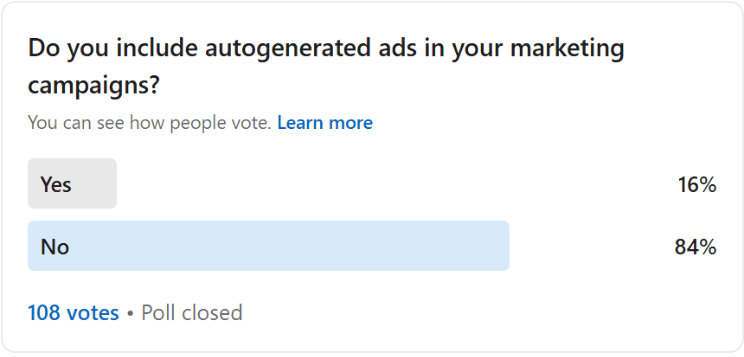
It won’t surprise anyone that most advertisers are hesitant to use auto-generated creative from ad platforms. Auto-generated ads fall into the following categories:

  • Customer-in-the-loop (CITL): Assets are generated based on inputs like a website URL or a user prompt. The advertiser always has a choice as to whether or not they want to include these assets in their campaigns.
  • Dynamic composition: Ads are composed at serving time in different formats based on existing groups of assets, with performant winners selected and scaled (i.e., how Performance Max works). May or may not include AI-generated assets based on customer preferences.
  • Auto-generated: New assets or ads are generated after a campaign is launched based on inputs like URLs, search queries, or existing videos to improve performance. These assets are not reviewed and approved by advertisers before serving, but can generally be viewed and controlled in reporting.

Even advertisers who embrace automation in bidding, targeting, and budget allocation often draw a firm line when it comes to creative.

Image from author, April 2026

That resistance usually comes from a few places:

  • Quality concerns due to generic copy instead of product/service-specific.
  • Brand compliance requirements.
  • A strong desire to maintain creative ownership.
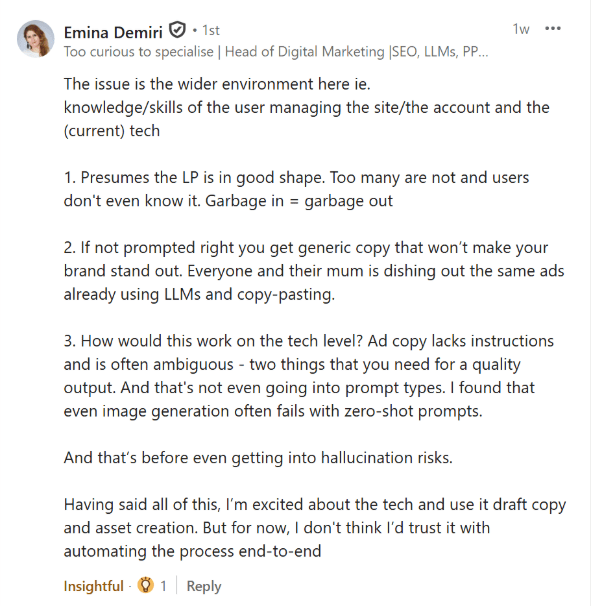
  • Discomfort with the idea of ads going live without a human signing off on every variation.

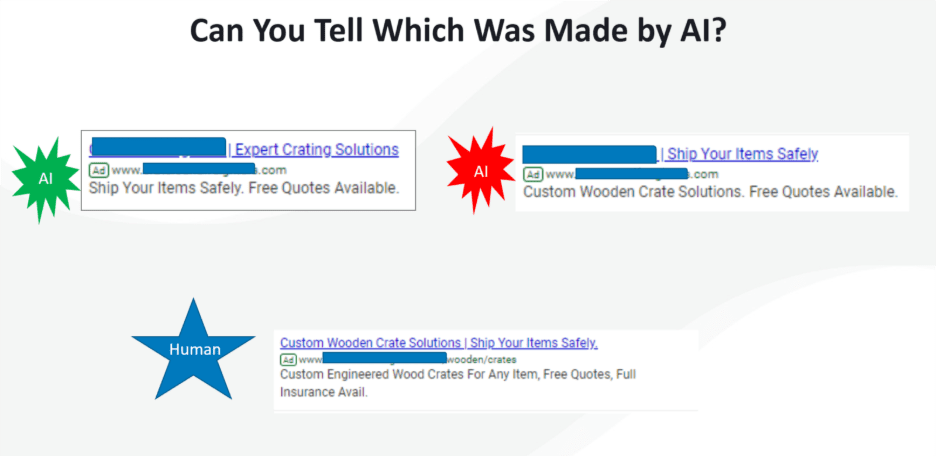
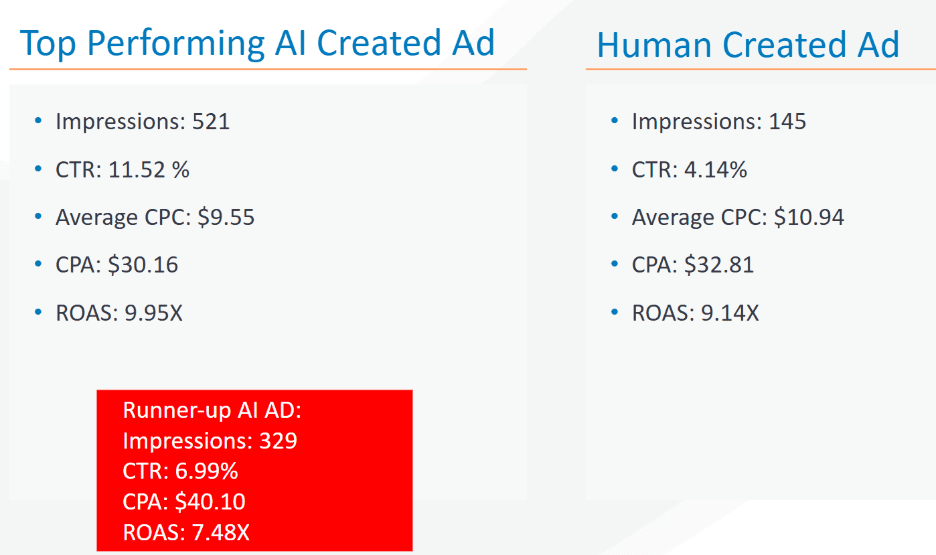
Yet, auto-generated creative can sometimes perform just as well as, if not better than, human-created assets. A 2025 study found that autogenerated ads had a 19% better CTR.

These performance gains aren’t new; AI ads have been meeting or exceeding human creative as early as 2018.

Three text ads: one made by a human, the others autogenerated (Image from author, April 2026)
Results of three ads from a logistics company over 30 days (Image from author, April 2026)

That performance edge comes from two core advantages.

First, auto-generated creative is highly adaptable. It can flex across formats and placements in ways that would be time-consuming or impractical for humans to manage manually.

Second, it is bias-free in its willingness to apply the creative most likely to perform for humans searching in a profitable way, rather than the semantic syntax we think will succeed.

This article is not about declaring auto-generated creative right or wrong. There is no universal answer. Whether leaning into it makes sense will always depend on business constraints, brand rules, and personal comfort levels.

What we are going to do is walk through a practical framework you can use to decide whether auto-generated creative is worth testing for your business, and how to use platform tools to better understand how well your site and messaging are being interpreted by AI systems.

Before we get into it, an important disclosure. I am a Microsoft Advertising employee. The guidance here is intended to be platform-agnostic, but I will reference a few Microsoft-specific tools that are free to use and particularly helpful for understanding how your site is being interpreted by machines and humans alike.

The Case For Using Auto-Generated Creative

The number one reason to consider auto-generated creative is simple: time savings.

At its core, auto-generated creative takes your existing assets and adapts them to meet the formatting and placement needs of different inventory. Instead of building bespoke creative for every surface, you allow the system to reassemble what you already have in ways that let you reach more people with less manual effort.

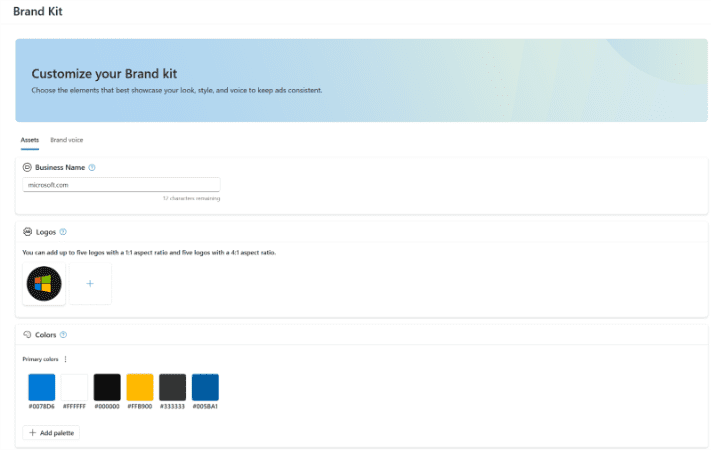
The inputs for auto-generated creative typically come from your website, your existing ads, and, in some cases, proven concepts that are broadly applicable across advertisers. You can also apply brand style guides to ensure fonts, colors, and creative (including tone of voice) are compliant with brand standards.

Image from author, April 2026

Advertisers who are able to say yes to auto-generated creative often see faster campaign ramp-up. Eligibility for more placements means more opportunities to enter auctions, and fewer bottlenecks make it easier for the system to test and learn which creative works best in which contexts.

Because auto-generated creative allows advertisers to be eligible for more placements (with Ad Rank determining the ad shown), it naturally has access to more impressions. More impressions create more opportunities to win auctions, which can translate into incremental volume that would have been difficult to capture using tightly controlled, manually built assets alone.

Auto-generated creative does not have to be all-or-nothing. There is also a hybrid approach where humans partner with AI systems. That can mean using in-platform tools from Google or Microsoft, or external AI tools, to help generate ideas, headlines, or variations that are then reviewed, approved, and manually uploaded.

Some advertisers draw a distinction between AI-assisted ideation and auto-generated creative. In practice, if you are using AI at any point to help create or shape ad messaging, there is already an element of automation in the process.

The Case Against Using Auto-Generated Creative

There are absolutely valid reasons to opt out.

The most pressing is brand compliance. If your organization requires explicit approval for every piece of creative before spend can occur, allowing systems to dynamically generate variations may simply not be permissible.

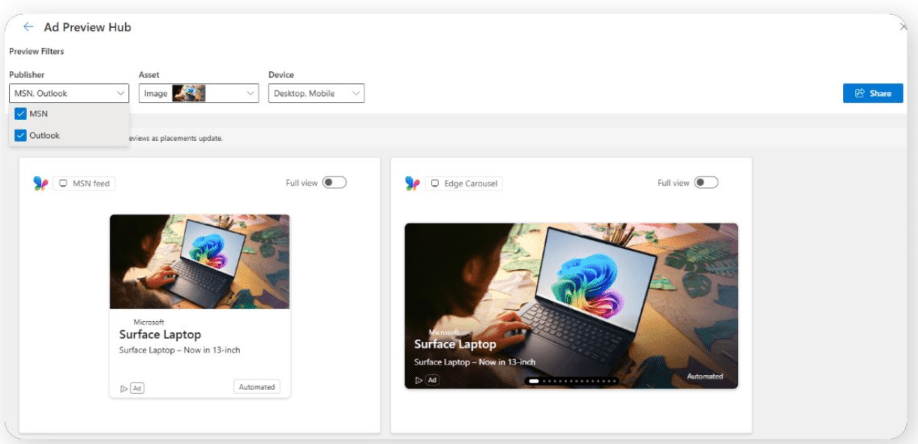
That said, many platforms provide preview tools that show examples of how creative may appear.

Image from author, April 2026

If you are willing to explore those previews and lean into tools like brand kits that enforce fonts, colors, and tone, it may be possible to secure internal approval where it previously felt impossible.

Another reason advertisers shy away from auto-generated creative is reliance on proven assets with no tolerance for variation. Sometimes budget approval is contingent on using specific creative that has already demonstrated performance, and there is no room to test alternatives.

Image from author, April 2026

It is worth noting, however, that auto-generated creative already relies heavily on your existing assets. If the primary concern is avoiding untested messaging, allowing your site content and proven ads to inform the system can help mitigate that risk.

Bonus Tip: Using Auto-Generated Creative To Understand How AI Sees You

One of the most underrated benefits of campaigns like Performance Max, Dynamic Search Ads, and other feed or keywordless-based formats is that they reveal how well platforms understand your site and landing pages.

Image from author, April 2026

If you strongly disagree with the creative shown in previews for AI Max, Performance Max, or similar formats, that is a warning sign. Running budget to those pages risks confusing users if the system’s interpretation does not align with your intended messaging.

These tools can function as diagnostic instruments, not just delivery mechanisms.

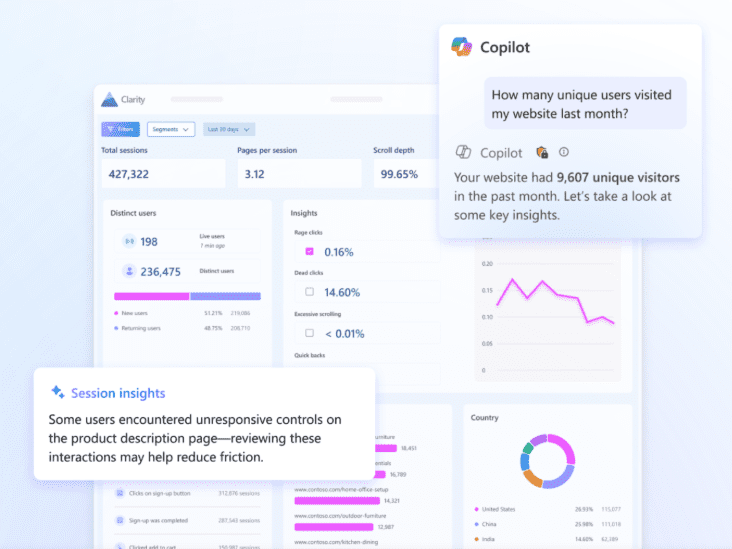
Image from author, April 2026

You can go a step further by pairing them with behavioral analysis tools like Microsoft Clarity, which shows how users actually interact with your site. When creative interpretation and user behavior do not line up, the issue is often not the ads, but the underlying content.

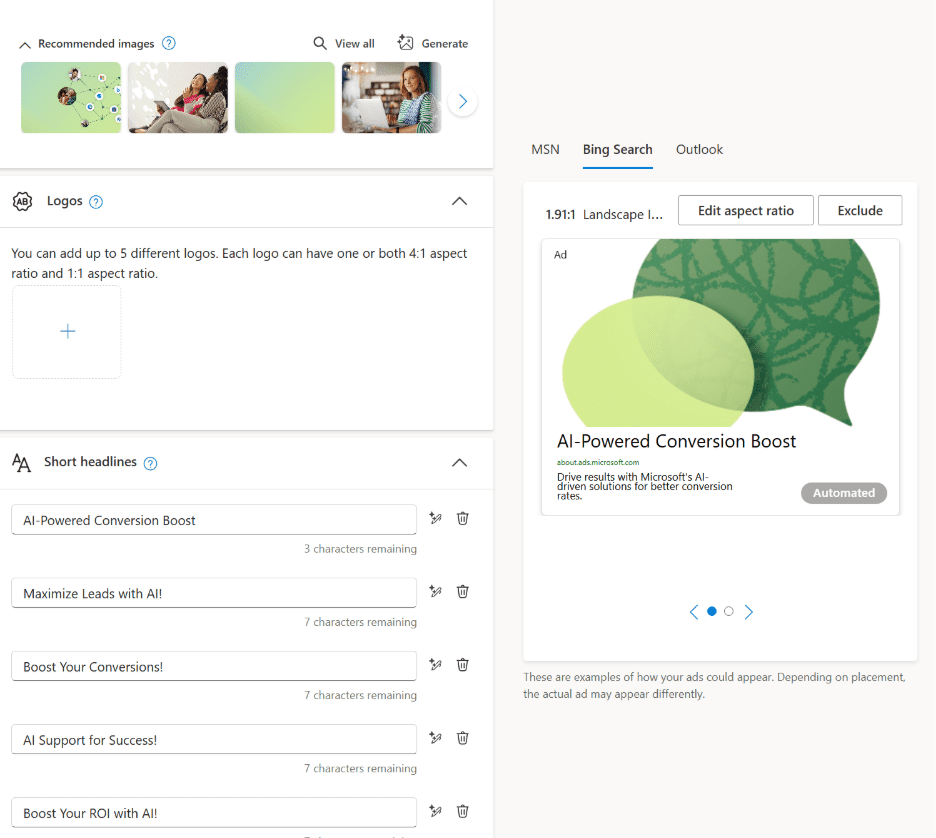
Another advantage of modern campaign creation tools is their built-in AI editing capabilities. Even if you never allow auto-generated creative to go live, you can still use these tools to explore tone shifts, rewrites, and messaging ideas that inform your manual creative work.

Image from author, April 2026

There are many use cases for these systems beyond automation alone. Insight generation is one of the most valuable.

Final Takeaways

At its core, the decision to lean into auto-generated creative comes down to whether your brand is allowed to test.

If the answer is yes, there is little downside to experimenting. Auto-generated creative is largely built from your existing assets, and poor results are often a signal that your landing pages or messaging need refinement anyway.

If the answer is no, whether due to brand compliance, limited testing bandwidth, or the need to lock spend behind proven creative, it is entirely reasonable to opt out.

Used thoughtfully, it can save time, unlock scale, and surface insights about how your brand is understood by machines and users alike. Used blindly, it can create risk. The goal is not blind trust, but informed experimentation.

Hope you found this helpful, and I’ll see you next month for another edition of Ask the PPC.

More Resources:


Featured Image: Paulo Bobita/Search Engine Journal

How To Identify And Solve Click Fraud In Paid Media – Ask A PPC via @sejournal, @navahf

This week’s Ask a PPC addresses one of advertisers’ most frustrating fears:

“I suspect my account has click fraud. What checks can I do to confirm this, and what can I do about it?”

Click fraud is easily one of the most frustrating pitfalls in managing a paid media account. Whether it shows up as bots on low‑quality apps, suspicious display placements, or highly sophisticated schemes that mimic real search behavior, click fraud is real.

That said, not every odd click pattern, low cost-per-click, or disappointing conversion rate is the result of fraud. In many cases, what looks like click fraud is actually the outcome of campaign settings, targeting choices, or creative mismatches.

In this article, we will cover:

  • How to distinguish click fraud from human‑driven performance issues.
  • What ad platforms proactively do to protect advertisers.
  • What you can do when click fraud is genuinely present.

A quick note on perspective: I am a Microsoft Ads employee. This article is platform‑agnostic, and the guidance shared here applies broadly across paid media platforms.

1. Distinguishing Click Fraud From Human Error

Before assuming malicious intent, it is critical to audit whether your own campaign setup could be creating performance patterns that resemble click fraud.

There are several common scenarios where human behavior can look suspicious at first glance.

Start With Where Your Budget Is Going

The first question to ask is simple: Is the majority of my spend going to placements I intentionally targeted?

If the answer is no, that is your first red flag.

  • Review placement and domain reports carefully.
  • Identify whether spend is flowing to sites, apps, or partner placements you do not recognize.
  • If you see unfamiliar placements, open those URLs on a device or browser where you are comfortable evaluating risk.

If a placement feels spammy, low‑quality, or clearly misaligned with your brand, exclude it immediately. If the placement appears legitimate but you cannot realistically see how a user would engage with the ad, that may indicate fraudulent behavior.

In either case, exclusion is the right move, followed by a conversation with platform support. Ad platforms have a vested interest in removing low‑quality or fraudulent inventory.

Review Location Targeting Settings Closely

Location targeting is one of the most common sources of perceived click fraud.

When advertisers enable “People who show interest in your target locations,” they are effectively allowing global eligibility. This can lead to traffic from regions with higher bot activity or from users who appear suspicious simply because they are unlikely to convert.

If you choose to use “showing interest in,” consider adding an additional layer of geographic exclusions to ensure your ads only serve where you truly intend.

Evaluate Creative For Accidental Click Risk

Ad creative can also create misleading signals.

  • Display ads with prominent buttons can invite accidental clicks.
  • Creative that does not clearly communicate value may generate curiosity clicks without intent.
  • Small screens increase the risk of fat‑finger clicks.

In these cases, the issue is not fraud. It is design. Adjusting creative can often resolve the problem.

2. What Ad Platforms Proactively Do To Prevent Click Fraud

While I cannot speak for every ad platform, there are shared principles across the industry.

Platforms Are Incentivized To Protect Inventory Quality

If inventory performs poorly, advertisers stop investing. That creates a strong incentive for platforms to maintain secure, valuable placements.

One example from Microsoft Ads is a policy requiring Search Partner publishers to implement Microsoft Clarity. This allows deeper insight into user behavior and helps identify invalid or fraudulent activity before advertisers are exposed to it.

Other platforms have similar verification and monitoring systems in place, even if the tools differ.

Advertisers Are Not Charged For Invalid Clicks

Another core principle is that advertisers should not pay for fraudulent activity.

Most platforms continuously review clicks. When invalid or fraudulent clicks are detected, those costs are credited back to the advertiser. These credits may not appear immediately, as click validation takes time, but they are visible in platform reporting.

If you believe a significant spike in fraudulent clicks was missed, you should contact support. Platforms expect and encourage those conversations.

3. What You Can Do When Click Fraud Is Real

Once you have ruled out configuration and creative issues, and click fraud still appears present, there are concrete actions you can take.

Consider Click Fraud Mitigation Tools

If fraudulent clicks represent 40% or more of your traffic, I would recommend investing in a third‑party solution.

These tools typically focus on:

  • IP‑based blocking for simpler threats.
  • Behavioral pattern detection for advanced schemes.

Be aware that consent requirements can complicate implementation in certain regions, particularly where third‑party cookie consent is required. In markets with fewer restrictions, these tools are easier to deploy.

Use AI And Automation Where Possible

Some advertisers choose to build their own systems using AI to identify patterns and automatically exclude malicious IPs. This can be effective when done carefully and within privacy and consent guidelines.

Set Expectations Around Risky Placements And Markets

Certain placements and regions carry higher click fraud risk. If you choose to invest in them, transparency matters.

A practical approach is to communicate a 10% variance buffer to clients or stakeholders. This acknowledges that temporary spikes may occur before credits are issued.

You should not ultimately pay for click fraud, but there may be short periods where spend looks inflated before reconciliation. Monitoring credit card billing closely is important to avoid overcharging during those windows.

Remember That Fraud Is Not Limited To Clicks

Some of the most damaging fraud never happens at the click level.

Account takeovers, My Client Center (MCC) compromises, and phishing attempts are real threats. Protect yourself by:

  • Only opening emails from trusted senders.
  • Verifying suspicious messages with peers or platform support.
  • Avoiding login links unless you are certain of their legitimacy.

A well‑run account can unravel quickly if access is compromised.

Final Thoughts

Click fraud is frustrating, but it is manageable. The key is separating perception from reality, understanding how platforms protect advertisers, and knowing when to take action.

If you found this helpful, I would love to hear from you. And as always, stay tuned for next month’s Ask the PPC.

More Resources:


Featured Image: Paulo Bobita/Search Engine Journal

Why Do Budgets Overspend Even With A Target ROAS or CPA? – Ask A PPC via @sejournal, @navahf

This month’s Ask a PPC explores a common advertiser question: Why budgets sometimes overspend even when a target ROAS or target CPA is in place.

Understanding this behavior requires separating two concepts that are often conflated: budgets and goals. While they work together, they serve very different functions within auction‑based ad platforms. In this post, we’ll walk through how budgets and goals operate, why target ROAS can sometimes increase spend, and which levers advertisers can use to keep budgets under control.

Disclaimer: I am a Microsoft employee. The examples below reference Microsoft Advertising, but the underlying principles apply to any platform that uses automated or goal‑based bidding.

The Difference Between Budgets And Goals

When you set a daily budget, the ad platform averages across approximately 30.4 days. While there are daily fluctuations, the platform’s objective is to meet that average over the course of the period rather than strictly adhere to the number each day.

As a result, a daily budget of $50 can spend up to $100 on a given day. Here are the core reasons for “over” spending:

  • Under spending too many days during the 30.4-day period.
  • Average CPCs don’t align with the daily budget.

Goals function differently. A target ROAS or target CPA is not a spending limit. Instead, it is an optimization instruction.

A target ROAS asks the platform to achieve a specified return based on the conversion values being passed in. A target CPA instructs the platform to drive conversions at or below a certain cost, regardless of differences in conversion value.

Because goals are optimization signals rather than caps, the platform may spend more budget if it believes that doing so will help reach the target.

Why Target ROAS Can Increase Spend

Target ROAS is often perceived as a conservative bidding approach, but in practice, it can drive higher spend under certain conditions.

One common scenario involves high CPCs relative to budget size. If the average CPC exceeds roughly 10% of the daily budget, the platform may need to stretch spending in order to secure enough eligible clicks to meet the ROAS goal.

Overspending can also occur when there has been underspending earlier in the month. Since budgets are averaged, the platform may increase spend later in the period to compensate for missed opportunities. This behavior can look abrupt from an advertiser perspective, but it aligns with how budget pacing operates.

Image from author, February 2026

Accurate conversion values are critical in these situations. When incorrect or inflated values are passed to the platform, the system may believe it is driving strong returns when it is not. That misunderstanding can lead to increased spend in pursuit of perceived performance.

Another important consideration is how conversion actions are classified. Primary conversions influence bidding and reporting, while secondary conversions are observed but excluded from optimization logic. When too many conversion actions are set as primary, particularly if they overlap, the platform may double-count success and bias spend toward certain keywords, audiences, or signals.

Microsoft Conversion View (Image from author, January 2026)
Google Conversion View (Image from author, February 2026)

How Advertisers Can Protect Against Overspending

Advertisers do have meaningful controls available to manage spend behavior.

The first is aligning budgets with auction realities. A practical guideline is ensuring that a daily budget can support at least 10 clicks at the average CPC. For non‑branded search, a 10% conversion rate is unusually strong. Without sufficient click volume, the platform may either restrict spend to high‑cost opportunities or over‑allocate budget to lower‑quality traffic to meet pacing expectations.

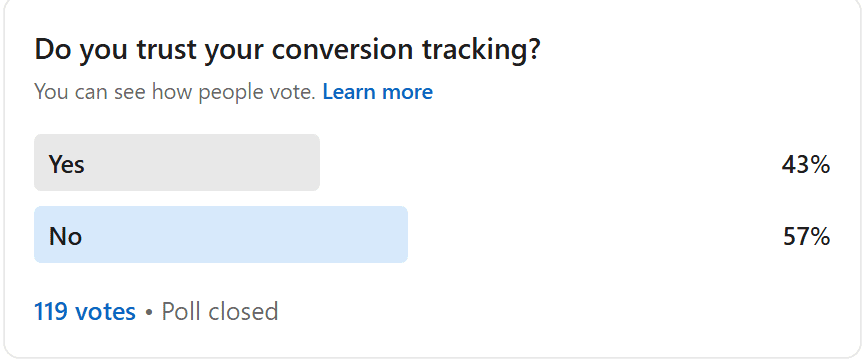
The second lever is being realistic about conversion trust. Many advertisers have inconsistent attribution models or partial tracking implementations, which reduces confidence in reported conversion data. When conversion data is not reliable, aggressive ROAS or CPA targets can be counterproductive.

In those cases, advertisers may choose to set more conservative goals or opt for a bid strategy that better matches the quality of available data. For example, if conversion values are inconsistent, target CPA may be more appropriate. Conversely, if certain conversions are significantly more valuable than others, a purely CPA‑based approach may lead to inefficient spend allocation.

A final lever that is often underutilized is ad scheduling. Restricting campaigns to specific hours of the day can reduce volatility and improve budget efficiency. When budget pressure exists, running ads during a focused three‑to‑six‑hour window rather than all day can provide stronger control without turning automation off entirely.

Closing Thoughts

When budgets overspend in goal‑based bidding strategies, it is rarely the result of a platform error. More often, it reflects a mismatch between budgets, goals, and the quality of data being supplied.

Careful attention to conversion accuracy, realistic budget sizing, and thoughtful use of controls such as ad scheduling can significantly reduce unexpected spend behavior. Automated bidding is most effective when inputs are intentional and aligned with actual business value.

More Resources:


Featured Image: Paulo Bobita.Search Engine Journal

Ask A PPC: What Is The PPC Manager’s Role In The AI Era? via @sejournal, @navahf

Every few months, someone asks a version of the same question “What happens to PPC managers now that AI runs the platforms?” The question usually comes wrapped in anxiety, sometimes in frustration, and often in the hope that there is still a lever left to pull.

At this point, the answer has become clearer. PPC did not lose its human role. It shed the parts of the job that never required human judgment in the first place. The real shift is not about replacement. It is about responsibility.

Automation exposed where strategy was missing.

What Still Matters In PPC

PPC still lives and dies by business context. AI does not understand your margins, your inventory constraints, or which customers actually grow the business over time. It also does not know when a message feels off-brand, misaligned, or risky.

The fundamentals still belong to humans.

Business strategy sets direction. Creativity determines how a brand earns attention. Human insight defines personas, priorities, and tradeoffs. AI can optimize toward an outcome, but it cannot decide which outcome matters most.

Teams that struggle in the AI era rarely struggle because machines outperform them. They struggle because they never clearly defined what success meant beyond short-term efficiency.

How PPC Tasks Are Changing

The day-to-day work of PPC has changed significantly. Account management no longer rewards micromanagement. Data relationships matter more than granular keyword sculpting. Message mapping must account for systems that assemble ads dynamically rather than follow static instructions.

Automation now handles execution better than humans ever could. Machines win at real-time bidding, predictive logic, and pattern recognition across massive datasets. Humans still own the decisions that shape those systems.

This shift creates discomfort for practitioners who built careers on control. It creates opportunity for those willing to trade knobs for judgment.

Account Structure In An Automated World

Modern PPC account structure follows one rule above all others. Consolidation wins.

Platforms need data density to learn. Fragmented accounts starve algorithms and produce misleading conclusions. In my experience, campaigns that fail to reach roughly 30 conversions within 30 days rarely generate stable performance signals. Manual bidding collapses under the weight of sparse data, especially when layered with audiences, match types, and device modifiers.

Consolidation means fewer campaigns with clearer goals. By consolidating, it makes it easier to deploy sufficient budget to exit learning phases.

Google supports this through close variants, dynamic search ads, and increasingly flexible matching. Microsoft and Meta allow precise targeting at the ad group or ad set level while still benefiting from broader delivery.

While segmentation might be comfortable because “it’s how we’ve always managed campaigns,” it makes it very challenging to ensure budgets are deployed correctly.

Data Cleanliness Becomes The Real Bottleneck

First-party data determines how well algorithms can marry your business goals with potential placements. If the data isn’t accurate, you face ad platforms over-indexing on the wrong “wins.”

CRM integrations break accounts when lifecycle stages drift from reality. Micro-conversions can be helpful, but they need to be paired with realistic return on ad spend (ROAS) goals.

Google now allows secondary conversions to inform bidding decisions. That flexibility helps advertisers who think carefully about value. It punishes those who inflate metrics to make reports look better.

Imperfect data produces imperfect performance. AI does not fix broken inputs. It accelerates their consequences.

Rethinking KPIs And Reporting

Performance media and brand media no longer live in separate lanes. AI blends them by design. Metrics like click-through rate, conversion rate, ROAS, and CPA now reflect mixed intent rather than pure demand capture.

Teams must set goals that acknowledge blended influence, including brand lift and assisted conversions. Budgets must support top-of-funnel exposure for users who do not yet know what they need. Reporting must evolve past the illusion of isolation.

Blended metrics represent the new standard. Advertisers who demand perfect attribution often measure familiarity rather than impact.

AI Beyond The Account Interface

Some of the biggest shifts in PPC sit outside practitioner control. AI-powered surfaces introduce new questions about where ads belong and when they help.

Most AI queries lack transactional intent. They function more like brand interactions than shopping moments. Platforms generally restrict ads to situations where purchase intent exists, which protects both advertisers and users.

Top 5 topics and intents from the Microsoft Copilot usage study (Screenshot by author, January 2026)

Serving ads in non-transactional AI environments risks irritating prospects rather than advancing consideration. Restraint often performs better than presence.

Practitioners now play the role of translator. Clients need help understanding how AI determines readiness and relevance. Ads shown within AI systems tend to carry higher relevancy because the system has already qualified the user’s intent.

Chasing every placement rarely pays off. Knowing when not to show up has become a competitive advantage.

Privacy, Content, And Creative Reality

Perfect data rarely exists. The same applies to websites and creative assets.

Auto-generated creative reflects the source material it pulls from. When advertisers dislike the output, the issue usually lives upstream. If the seed website/landing page doesn’t result in ideal content, that could indicate deeper issues crawling the site and ingesting the content for AI.

PPC teams benefit from closer collaboration with SEO and content teams. Improving site clarity improves both paid performance and AI-driven visibility. Creative quality no longer lives in isolation.

The Human Role Going Forward

Humans still make the decisions that matter most.

They decide how to allocate budget across objectives. They prioritize which business lines deserve scale. They choose which personas to pursue and which messages carry risk. They determine what data enters the system and how honestly it reflects reality.

Automation handles bidding, pacing, and formatting. Humans handle meaning.

Manual bid adjustments and creative micromanagement no longer define excellence. Strategic clarity does. Clean data does. Sound judgment does.

The AI era did not erase the human role in PPC. It stripped away the noise and left the work that actually requires expertise.

More Resources:


Featured Image: Paulo Bobita/Search Engine Journal

Ask A PPC: What Are Learning Periods In Digital Marketing? via @sejournal, @navahf

Most ad platforms have something called a “learning period.” This is not a period for the marketer to observe and learn from the performance. Instead, it’s a period of time ranging from 48 hours to two to four weeks when the ad platform is learning how the campaigns should behave based on conversion rates and auction prices of targets.

There is a lot of debate in the industry around learning periods and how much they impact or don’t impact performance at various stages of an account’s life. This post will:

  • Outline exactly what’s covered in learning periods.
  • What can reset learning periods, and whether you should be concerned about that.
  • Strategies to work with learning periods at various stages of an account.

Note: This is written by a Microsoft employee, and the content is intended to be a platform-agnostic take on learning periods.

What Is Covered In Learning Periods?

Learning periods revolve mostly around conversion tracking and bidding. However, they can also be impacted by ad creative.

Campaigns in learning periods might under- or overbid in the first few days of going live. This is because the algorithm is learning what auction prices (CPCs or CPMs) will serve the campaign based on the targets chosen. However, if the campaign is in an older account, it might clear this learning faster. Additionally, if there is a lot of data (either historical data from other campaigns or spend to gather data more quickly) it’s possible to clear learning periods faster.

Ad creative learning periods revolve around which creative is served more often and paired with other supplied creative. While you can pin creative to force it to serve in specific spots, that may limit the placements available to you.

What Triggers Learning Periods And How Concerned Should You Be?

Lots of things can trigger learning periods, though how “severe” the learning period is depends on historical data as well as the specific changes being made.

Here is a list of common actions a marketer can take that would trigger learning periods:

  • Pausing a campaign for more than 72 hours.
  • Changing the budget more than 15% in a 7-day period.
  • Pausing a keyword/ad that has conversions to launch a new one.
  • Changing TCPA/TROAS goals (especially if they are large changes).
  • Adding a new campaign (learning period contained in the new campaign).

Note that changing creative in an existing ad, as well as small pauses, are not enough to trigger a learning period. This is because there’s enough data to counteract a small interruption.

However, if you’re making changes to all creative, that creative will still need to go through editorial. If you will be making that kind of wholesale change to an ad, it might be better to create a new ad and then change the rotation to rotate indefinitely.

Learning periods typically mean spend fluctuation (i.e., spending more per click or not serving as often as you were before). Ideally, you would make any needed changes to your campaigns before a major event like seasonal shopping events or major times for your service. However, if you can’t avoid those changes, these are the signs to look for that you might need to build in an extra 15-20% “learning period budget” to clear it faster:

  1. Impression share lost to rank goes up by more than 30%. If your impression share lost to rank is on the rise, that’s a sign you’re being forced to underbid for your targets. This is very common in learning periods as ad platforms wrestle with new conversion data.
  2. Average CPCs rise/fall by ~50%. While related to impression share, the most obvious sign of learning periods is fluctuating CPCs. Many understandably find it frustrating when CPCs rise, the more insidious change is when they drop. This is a sign you’re likely not serving for previously attainable queries.
  3. Drops in CTR, especially if drops in conversion rate follow. Learning periods in creative mean your headlines, descriptions, image assets, and other components of your ads may not serve in ideal pairings. If your ad was previously getting decent CTR and that has fallen, it could be a sign that learning periods are causing less-than-ideal pairings. This also could be a sign that the creative you’re testing are not ideal.

How To Work With Learning Periods At All Stages Of An Account

It’s important to put learning periods in context: They’re not monsters, and they’re not imaginary. They’re akin to taking a nap in the middle of the day or taking it easy if you get a migraine. Successful account management requires us to work with learning periods, but not allow them to dominate our strategy.

In new accounts, it’s fair to be fearless. Everything is new, and there’s a built-in expectation that campaigns will take extra time to ramp up. This is the time to make any needed changes and be bold in structure choices. Once the account finds its rhythm (i.e., consistent conversion volumes), it will be much harder to make bigger changes without initiating learning periods.

Accounts with at least 90 days of data should embrace the historical data they have. It means new campaigns will ramp up faster, and you likely can lean into conversion-based bidding. However, any major budget change (more than 15%) will likely cause fluctuations. This is why week-over-week increases until you reach the ideal budget are better.

Once you have more than a year of data, you should be pretty stable and able to launch new entities without issue. Major changes to existing entities with conversions should only be undertaken if absolutely necessary, and even then, you may want to use data exclusions to help the algorithms recover.

Learning periods are a normal part of managing campaigns. The key is to understand what triggers them and how to work with them.

More Resources:


Featured Image: Paulo Bobita/Search Engine Journal

Ask A PPC: How To Protect A Budget From Competitor-Branded Terms via @sejournal, @navahf

This week’s question comes from Evan, who asked: “How do I prevent my PPC budget from getting eaten by branded competitor terms?”

It’s a good question, as few things frustrate advertisers more than watching transactional budgets get drained by competitor-branded searches. Marketing dollars intended for high-intent, conversion-ready audiences often get spent on clicks from users searching for competitors instead. These searches typically convert at lower rates and can produce deceptively low CPCs, creating false positives that distort performance data.

Protecting spend from competitor traffic requires a mix of negative keyword management, platform tools, and thoughtful campaign structure. Here’s how advertisers can take control and ensure their budgets stay focused on profitable intent.

Use Strategic Negatives

Negative keywords remain the most reliable way to prevent ads from serving on competitor-branded queries. Adding competitor names as phrase match negatives blocks variations of that brand name, while exact match negatives offer more precision when overlap risk is high.

However, advertisers must be careful. Some competitor names resemble valuable generic phrases. For example, if a competitor calls its business “Dog Trainer Near Me,” excluding that term could block qualified local leads. The goal is to remove competitor intent, not legitimate customer searches.

It’s also important to recognize that negative keyword limits are imposed by the ad platforms themselves. Google Ads and Microsoft Ads both restrict the number of negatives an account can include. Most advertisers can expect to cap out between 2,500 and 10,000 negatives per account, depending on structure and platform. Because of this limitation, advertisers should be selective about what they block.

The most efficient approach is to create a shared list of proven competitor negatives and apply it at the campaign or account level. This method saves space and keeps exclusions consistent across campaigns. Regularly review search term reports to identify new competitor variants and refine your list based on performance data.

Leverage Brand Inclusions And Exclusions In AI Campaigns

Advertisers running AI-driven campaign types, such as Performance Max, can use brand inclusion and exclusion controls to refine targeting. These tools allow advertisers to specify which brands their ads can or cannot appear alongside.

It’s important to understand that brand exclusions are not the same as negative keywords. A negative keyword blocks a specific word or phrase. A brand exclusion tells the system to avoid what it identifies as queries related to a particular brand. This AI-driven interpretation can reduce the need for lengthy negative lists, though close variants may still slip through.

These settings only apply to campaigns that use AI optimization, so advertisers must opt into automated formats to access them. If an account does not meet the required conversion thresholds for AI bidding, traditional negatives remain the best control option.

Assign Accurate Conversion Values And ROAS Goals

Competitor searches often look cheap on paper but cost more in practice due to lower conversion rates. A click on a competitor term may cost less, but it usually takes many more of those clicks to produce a single conversion.

To correct for this, advertisers should ensure their conversion tracking reflects actual business value. Assign different conversion values to calls, form fills, trial signups, or purchases to align with real-world outcomes. This helps automated bidding systems prioritize actions that contribute most to revenue rather than chasing inexpensive but unprofitable clicks.

On Google Ads, using Maximize Conversion Value with a ROAS target or applying cross-per-click floors can guide automation toward efficiency. Bid caps on both Google and Microsoft Ads help maintain control and prevent runaway spend on experimental traffic.

Structure Competitor Campaigns Separately

When an advertiser chooses to bid on competitor-branded keywords intentionally, those campaigns should operate in isolation. Competitor campaigns need their own budget, bidding strategy, and performance goals.

If the purpose is awareness, advertisers can remove ROAS targets and focus on visibility. If the purpose is performance, set high ROAS thresholds to ensure efficiency. The goal is to appear in competitor search results strategically, not to capture volume for its own sake.

Each competitor should live in a separate ad group with tailored creative. Avoid dynamic keyword insertion and never include competitor names in ad copy. Doing so risks ad disapprovals or account suspensions. Instead, ads should highlight what differentiates the advertiser (unique offers, service quality, or proprietary advantages) without mentioning the competitor directly.

Competitor bidding should remain limited to a short list of key rivals. A smaller, well-targeted approach allows for better creative control and clearer measurement of performance impact.

Continuously Audit And Refine

Competitor-related traffic shifts over time, and advertisers need to stay vigilant. Regularly reviewing search term reports helps uncover new variations or misspellings of competitor names that may be triggering ads. When low-performing competitor queries appear, add them to your shared negative list.

Segment performance by device, location, and audience type to find patterns. For instance, competitor clicks may be less efficient on mobile devices or in certain regions. These insights can guide bid adjustments, audience exclusions, or negative refinements that further protect the budget.

Balance Control With Opportunity

Blocking competitor-branded traffic improves efficiency, but advertisers must balance control with opportunity. Removing competitor terms completely eliminates the chance to influence potential buyers who are comparing options. This trade-off is worth making for consistently underperforming queries, but should always be intentional.

Negatives and brand exclusions create a strong defense. Accurate conversion valuation and disciplined bidding drive smarter optimization. Separate competitor campaigns allow for strategic engagement without risking broad budget leakage.

More Resources:


Featured Image: Paulo Bobita/Search Engine Journal

Ask A PPC: How To Manage Brand Safety In PPC via @sejournal, @navahf

Brand safety has always been part of the conversation in digital advertising, but recent shifts in the broader media landscape have brought new layers of complexity. Advertisers today are working in a climate where audience expectations, platform behavior, and public scrutiny intersect in ways that are not always easy to predict – or to manage.

In this edition of Ask A PPC, we will explore how advertisers can protect their brand’s integrity across platforms like Google and Microsoft. While this piece comes from a Microsoft employee, the goal is not to highlight one platform over another.

Whether you’re building upper-funnel brand campaigns or performance-driven media, the question of where and how your ads show up has never mattered more. What used to be a set-it-and-forget-it filter has become a strategic consideration that shapes both campaign outcomes and brand perception.

This piece explores brand safety across three key areas: where ads serve, how ads serve, and how your brand voice is carried through.

Where Ads Serve: Context Still Matters

Most PPC campaigns begin with a defined audience. Whether you’re optimizing for reach or conversion, there’s usually a persona or intent signal guiding the targeting.

But placements introduce a separate layer of decision-making. It’s not just who you’re reaching; it’s where that audience is when they see your message. Some advertisers feel comfortable casting a wide net, trusting the platform to find performance. Others prefer a more curated approach, particularly when certain environments may not align with their brand’s tone or audience expectations.

This is where brand controls come into play.

Both Google and Microsoft offer tools to help advertisers manage where their ads appear across display, video, and native inventory. On Google, these settings include “expanded,” “standard,” and “limited” inventory tiers. Microsoft takes a more category-based approach, with exclusions that cover areas like political content, mature themes, and natural disasters.

These controls can help brands preserve access to valuable, high-utility placements (i.e., major news sites), while reducing the risk of serving next to content that might feel misaligned.

There’s also the option to take a more targeted route by targeting specific placements. This can be useful if you already have a strong sense of where your audience converts or where your creative performs well. However, placement-level targeting relies on historical performance and excluding other placements, which can make it harder to uncover new profitable inventory.

A useful test is building one campaign/ad group that leans into known placements while also running a parallel one that’s fully audience-based, while maintaining strict brand controls. This helps you balance performance with brand alignment, without having to commit fully in either direction right away.

For advertisers using video placements, it’s important to understand delivery mechanics as well. Ad placement within videos (pre-roll, mid-roll, post-roll) and the type of content your ads accompany can have an impact on how your brand is perceived. Most platforms offer exclusion settings as well as frequency caps.

How Ads Serve: Maintaining Brand Integrity Through Creative Formatting

The second layer of brand safety goes beyond placements. It’s about how your ad actually appears once it serves.

Ad platforms have made significant investments in dynamic creative. Responsive formats, automated asset combinations, and AI-generated content all promise broader reach and better performance. These features can be incredibly useful for scaling campaigns, though they can introduce variability in how your brand presents.

If you work in a regulated industry, or if your brand has established tone and visual standards, this variability may not feel like a worthwhile tradeoff.

To help with that, both Google and Microsoft have released tools to give advertisers more control. Google offers creative instructions, which let you define parameters around copy, tone, colors, and visual elements. This helps ensure that even dynamically assembled ads still adhere to your guidelines.

Microsoft has integrated brand safety tools powered by Copilot, allowing advertisers to upload brand kits that include fonts, colors, and other visual standards. Copilot can also support A/B testing of creative tones, which can help teams learn how different styles resonate without stepping outside of their guardrails.

Whether or not you choose to lean into these dynamic features depends on your goals and internal thresholds. Some brands may prioritize reach and performance over strict formatting control. Others may want to preserve consistency across every touchpoint. Neither choice is inherently better, and it helps to be clear on what level of flexibility your brand is comfortable with.

Brand Voice: Values, Budget Allocation, And Long-Term Trust

The final piece of brand safety has less to do with campaign setup and more to do with organizational alignment. In short: How do your media decisions reflect your brand values?

This part of the conversation has become more visible in recent years. Public reactions to brand placement decisions have ranged from quiet disengagement to full-scale boycotts. Social media has made it easier for consumers to surface concerns and ask questions about where ad dollars are going.

There’s no single right way to navigate this. Every brand operates with its own set of priorities, risk tolerance, and customer expectations. What one company sees as a necessary stance, another may see as outside its scope.

What can help is having clarity. When you know what your brand stands for, and where those values show up in media strategy, you’re in a better position to make confident decisions about where to invest and where to pause.

If a content environment shifts in a way that no longer feels aligned, it may make sense to reallocate spend. That’s not just a brand safety response; it’s a brand clarity move. It sends a signal to your team and your audience that your budget decisions are rooted in something consistent.

This is also where trust becomes part of the performance equation. If your audience senses that your brand is inconsistent about where and how it shows up, that can erode the relationship you’ve built.

No strategy will remove all risk. Internal alignment on what matters can help reduce ambiguity and create a more resilient brand presence over time.

Final Takeaways: Brand Safety As A Strategic Layer

Brand safety in PPC is not just a reactive setting. It’s a foundational principle that influences everything from targeting to performance to brand perception. Here are three go-dos:

  1. Understand how placements happen. Review inventory settings, set clear exclusions where needed, and test into new placements thoughtfully. Context matters.
  2. Audit how your creative formats. Use platform tools to guide dynamic creative toward your standards. Decide how much flexibility makes sense for your brand and opt out of formatting changes that feel misaligned.
  3. Let your values shape your budget. Internal clarity helps guide external decisions. Know where your brand draws the line and structure your media investments to reflect that understanding.

If you have a PPC question you want answered in a future edition of Ask A PPC, send it in!

More Resources:


Featured Image: Paulo Bobita/Search Engine Journal

Ask A PPC: How Do I Nail A PPC Job Interview For Google & Meta Ads? via @sejournal, @navahf

It is a wild job market right now, and if you’re applying for a PPC role, you’re probably feeling the pressure to stand out in interviews that are increasingly demanding and often unclear in their expectations.

Whether you’re interviewing for a specialist, manager, or hybrid media role, one thing is certain: You need to be ready to demonstrate platform expertise, strategic thinking, and the ability to connect performance with business outcomes.

One reader put it this way:

“I’m preparing for a performance marketing job, specifically in PPC, and I want to focus on Google and Meta ads. Have you any advice that would help me with interview preparation for these roles?”

This question is particularly timely because it doesn’t just ask about one platform. It is looking for dual fluency in Google and Meta, which represent paid search and paid social. That nuance matters.

Stopping there, however, is a mistake. Savvy employers will appreciate an applicant who can speak to Microsoft Ads, TikTok, LinkedIn, Pinterest, Reddit, and emerging platforms, even if those channels are not in scope right now. That breadth of perspective signals that you’re not just a button-pusher; you’re a strategist.

Below is a breakdown of the three core areas most interviewers will evaluate: Paid Search, Paid Social, and General Marketing and Culture Fit.

Paid Search Interview Prep (Google, Microsoft, Etc.)

Modern paid search, especially within Google, demands more than keyword-level tactics. You need to understand how campaigns serve business objectives.

Expect strategy questions like, “X business has Y budget and Z goals – what kind of campaign would you run and why?” Strong candidates will be able to discuss budgeting frameworks, auction mechanics, audience segmentation, and creative message mapping.

You will likely be asked about reporting. Expect to reference tools like Looker Studio, Google Analytics 4, Power BI, Adobe, or Triple Whale. Even speaking confidently about one tool while showing awareness of others can be impressive.

Mention tools like Microsoft Clarity when discussing conversion rate optimization. Behavioral analytics insights reinforce that you understand the full user journey and do not treat campaigns as isolated events.

One frequently asked question involves account structure. You might be asked, “Why would you structure a campaign/account this way?” Never cite “best practices” or default methods as your rationale. Interviewers want reasoning rooted in context, goals, and a test-and-learn approach.

Stay current on innovations. Be ready to speak about features such as Performance Max, audience expansion tools, or any other platform updates that impact strategy. Share why you find them valuable and how you would explain their relevance to a client.

To stand out even further, draw comparisons between Google and Microsoft Ads, or highlight how Reddit and Amazon are bringing new energy to the paid search space.

Paid Social Interview Prep (Meta, TikTok, LinkedIn, Etc.)

Paid social requires creative fluency, audience empathy, and an understanding of privacy constraints. These platforms are less about exact keyword intent and more about relevance, scale, and emotional resonance.

Prepare to talk about platform-specific ad types and creative strategies. Discuss how you would use Facebook, Instagram, WhatsApp, and Threads, and how your tactics might differ on TikTok, LinkedIn, YouTube Shorts, or Reddit.

Understand how platforms organize their campaign hierarchies. For instance, Meta emphasizes the ad set level for budgeting and targeting, whereas Google does not. Create a reference sheet for yourself so you can confidently speak to the differences during interviews.

Expect questions around creative production and reporting. Interviewers may ask, “What would you do if the client is picky about creative but refuses to supply any?” or “How would you prove that your campaign delivered results if the client questions the attribution?” These are behavioral and strategic tests rolled into one.

Be prepared to explain your approach to budgeting. Paid social often involves very large or very small budgets, and employers want to hear how you allocate funds based on audience size, objective, and creative lifecycle.

Show an understanding of creative testing frameworks, including how you develop variations of hooks, visuals, or calls to action across placements and formats.

General Marketing And Culture Fit

Some parts of the interview will focus less on tactics and more on how you think and collaborate. These are just as important to prepare for.

Be ready to answer questions like, “Tell me about a campaign that worked – and one that didn’t.” Use those stories to demonstrate analytical thinking, cross-functional collaboration, and your ability to learn from both success and failure.

You will also likely get questions about how you communicate performance. You might be asked how you handle underperformance and how you keep stakeholders aligned and informed during those periods.

Come prepared with thoughtful questions of your own. Ask, “What’s behind hiring for this role?” This can give insight into whether the role is tied to growth, turnover, or team restructuring. It also helps you gauge whether expectations are realistic.

Another useful question is, “What does success look like in this role?” This will tell you whether the role is tied to long-term strategic goals or short-term revenue. Follow that up with, “How will I be measured in the first six months versus the next two years?” This demonstrates that you are serious about growth and longevity.

Culture questions are also important. Asking, “Do people tend to hang out or do their own thing?” invites a conversation about the team dynamic, without feeling overly formal or forced.

Preparation Support

You do not need to prepare alone. Use AI tools like ChatGPT, Copilot, or Gemini to help you simulate interviews, organize your thoughts, or analyze job descriptions. Ask the AI to role-play as an interviewer and challenge you with platform-specific or scenario-based questions.

Use those tools to map out which metrics, frameworks, and features align with each platform. You want your prep to feel structured so you can walk into the interview with clarity and confidence.

Ultimately, interviews are not just an audition. They are a dialogue. Prepare thoroughly, think critically, and lead with the mindset of a strategist. That is how you stand out in a sea of applicants, and that is how you set yourself up for success.

If you have a PPC question you want answered in a future edition of Ask the PPC, send it in. Whether you’re prepping for interviews, troubleshooting performance issues, or pitching channel expansion, we are here to help.

More Resources:


Featured Image: Paulo Bobita/Search Engine Journal

Ask A PPC: How Do I Avoid Cannibalization On Similar Products? via @sejournal, @navahf

There’s nothing worse than watching your own products compete against each other.

When your paid media strategy starts pitting your product lines against one another, you’re not just inflating costs; you’re undercutting your own chances at conversion.

That’s the question this month’s “Ask A PPC” will tackle:

“I work for a company that has three brands in the same niche with a high ticket item for house renovation. All companies have high spend on search ads, but we are targeting the same keywords and we are seeing cannibalization.

What can we do with our bidding strategy to try and reduce our CPC and still compete on the same products/keywords, but not cannibalize each other?”

Let’s break down how to avoid keyword cannibalization, particularly when dealing with premium products, and how to structure campaigns in a way that keeps everything working together.

The Hard Truth: You Can’t Avoid All Cannibalization

Let’s start here because this is what no one wants to hear: If you’re targeting the same non-branded keywords, the same geographies, and similar audiences with similar value props, some level of internal competition is inevitable.

Search campaigns don’t know your product lines are siblings. All they see are bids, relevance scores, and conversion data. Some keywords/ads will win. Some won’t.

The goal is to mitigate the internal crossfire and make strategic decisions that give every product its best shot to shine.

Prioritize: Which Products Get Which Keywords?

We don’t like to play favorites with our products, but when it comes to generic, high-volume keywords, you might have to.

Unless you have contractual obligations to spend equally across product lines (try to avoid this), you’ll need to assign certain non-branded queries to one product or another.

Here’s how you can do it:

  • Segment by market: Allocate geographic zones to different products based on performance trends, sales reps, or product-market fit.
  • Use keyword research as a compass: Both Google’s and Microsoft’s keyword planners can show you which search terms have better affinity with which product.
  • Establish thematic lanes: If Product A is more “entry-level” and Product B is the “pro version,” let them own different stages of the funnel.

Use Category Pages, Not Product Pages

One workaround, especially with Dynamic Search Ads (DSA) and Performance Max (PMax), is to avoid pushing people directly to product pages. Instead, drive them to category or collection pages.

Why this works:

  • It gives consumers options without forcing them to pick one.
  • You can still control targeting and ad creative at the campaign or asset group level.
  • It creates a more balanced distribution of visibility without inflating cost-per-click (CPCs) by bidding on the same SKUs.

DSAs and PMax campaigns do this particularly well. You’re not bidding on keywords in the traditional sense; you’re letting Google’s (or Microsoft’s) AI determine which queries to match based on content and intent.

On Google, AI Max lets you guide that intent more narrowly through ad group-level settings.

On Microsoft, PMax can do something similar, especially if you feed it clean, structured data and lean into visual creative.

Build A Branded Safety Net

You likely already have branded campaigns in place, and if you don’t, this is an important go do.

Branded search and Shopping should ensure that anyone looking for a specific product by name sees only that product. This is where you can (and should) be strict about campaign segmentation.

Branded campaigns give you clean performance data, protect your CPCs from cannibalization, and provide the clearest attribution path.

Leverage Visual Differentiation

This is where platforms like Google Demand Gen and Microsoft Audience Ads really shine.

Visual content lets you sidestep keywords altogether and lean into product storytelling. You can target by interest, topic, or custom segments – not search intent – which means you can:

  • Run one campaign per product and assign each a budget.
  • Or run one big campaign and let the creative guide user choice.

You can use PMax here, too, especially on Microsoft, where PMax makes it more likely to secure Copilot placements across mobile and desktop.

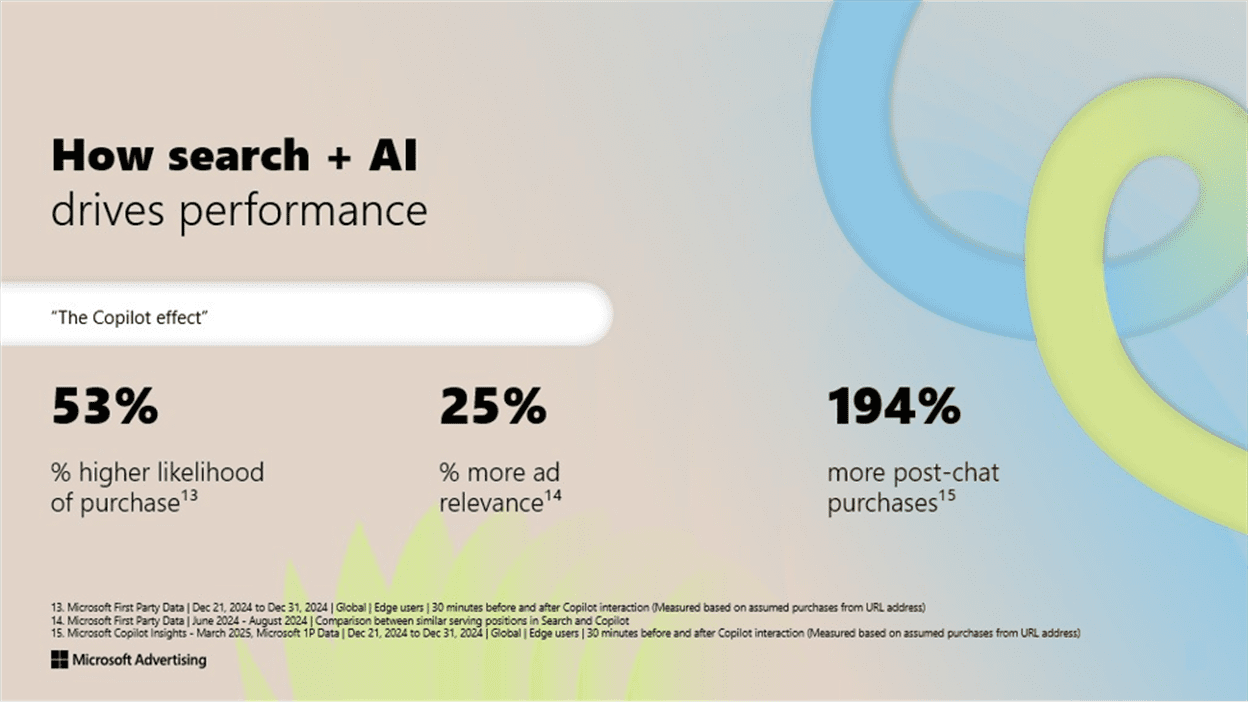
Copilot has been shown to have 25% more relevancy than traditional search, according to Microsoft internal data.

The key is to treat these upper-funnel plays as audience builders. Then, once users engage, you can segment them with remarketing across both platforms.

Pro tip: On Microsoft, even just an impression is enough to build an audience. Which means your remarketing and exclusions can get very precise, very quickly.

So long as there’s at least one audience ad campaign in your impression-based remarketing sources, you can allow PMax to remarket to PMax and Search/Shopping to remarket to Search/Shopping, i.e., you can capture intent from Copilot even if they didn’t engage with you there.

Does This Really Solve Cannibalization?

The only surefire way to fully prevent cannibalization would be to run entirely separate ad accounts, one per product. But that opens up a Pandora’s box of compliance risks.

Google and Microsoft are both very aware of efforts to double-serve, and if they perceive your accounts as trying to game the system – even if you’re just trying to stay organized – you could end up suspended.

So instead, your best move is to manage the overlap, not eliminate it. Focus on:

  • Using category pages for non-branded queries.
  • Owning branded queries with tightly segmented campaigns.
  • Differentiating products visually through audience-first formats.
  • Using geographic and thematic separation when assigning generic keywords.

When done right, the consumer makes the final decision, not your CPC strategy. That’s not cannibalization. That’s just a user choosing which of your great products fits their needs best. And either way? You win.

Final Takeaways

To recap:

  • You can’t fully eliminate cannibalization without risking violating platform policies.
  • Smart segmentation of campaigns by geography, theme, and intent, helps mitigate overlap.
  • Category pages + visual ads can guide consumers to the right product without inflating CPCs.
  • Branded campaigns are your best friend; keep them clean, tight, and product-specific.
  • Audience-based targeting gives you control without competing on search terms.

At the end of the day, your campaigns should reflect how your users shop: exploring, comparing, deciding. Make that process easier for them, and less expensive for you.

More Resources:


Featured Image: Paulo Bobita/Search Engine Journal