Ecommerce SEO: how to rank higher & sell more online

People are making more purchases online, whether from home on a laptop or on their mobile phone while on the go. In 2025, retail e-commerce sales are estimated to exceed 4.3 trillion U.S. dollars worldwide, and this number is expected to go up in the following years. Naturally, this rise in online shopping has come with a surge in online stores worldwide. How can you make sure your online store stands out and reaches the right people? Ecommerce SEO can help drive up those sales numbers. In this guide, we’ll explain every aspect and help you get started!

Table of contents

What is ecommerce SEO?

Ecommerce SEO concerns all the tactics you can use to gain more visibility and organic traffic for your online store in search engines, like Google. These tactics focus on the technical and content sides of SEO. By optimizing your store you can get a dependable stream of targeted traffic to your site. This, in turn, should lead to more sales.

Branding is key

You are one of the millions of companies trying to sell something online. Of course, you might think you’re unique, but, in most cases, that’s not true. In most niches, you compete with dozens, if not hundreds or even thousands of others. What you need to do is stand out. But how?

First of all, you need to write down your mission. Your mission will clarify what you – and your customers – want your business to be. This will help you identify your USPs (unique selling points) and create a strong brand that resonates with your audience.

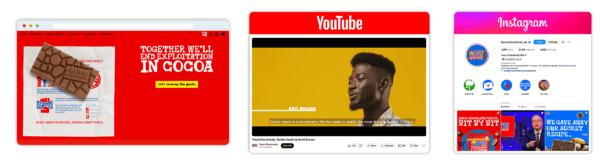
Example of strong branding across platforms by Tony Chocolonely.

Building a recognizable brand is not just about visuals like a logo or the colors you use, but also your tone of voice or your handling of customer requests. Being present on the right platforms and showing your audience that you are trustworthy and there to help them. How you present yourself to the outside world makes all the difference. Branding helps you get inside people’s minds and stay there. But stay genuine and fit your branding to your audience.


SEO helps online stores get found by the right customers at the right time. Unlike ads, which stop when you stop paying, strong SEO keeps bringing in shoppers over time. A well-optimized store makes products easier to discover, builds trust, and reduces reliance on paid traffic.

Carolyn Shelby – Principal SEO at Yoast


Technical ecommerce SEO

To get properly started we need to look at the technical aspects first. Here, we’ll go over some important considerations for your online store.

The importance of good hosting

One of the simplest but most impactful things you can do is choose the right hosting for your site and upgrade your hosting plan when needed. Starting out, it might not make sense to drop hundreds of dollars for an extensive hosting plan. But once you reach a certain level, it makes all the sense in the world. Good hosting makes your site faster, pages load properly, and you’ll be able to handle more traffic than ever before. It can also better handle the crawling efforts of Google and other search engines, making it easier for them to index your URLs.

Most hosting providers offer several packages with uptime guarantees, scalability options, dedicated support, et cetera. Find a hosting provider specialized in ecommerce, and don’t try to take the cheap route.

SSL is essential for ecommerce SEO

Long gone are the days when having an SSL certificate for your site was optional. When you are selling something and/or collecting customer data in any way, you need to do so in a secure environment. No one will leave their credit card details on a website that is not adequately secured.

There are other benefits to having a properly secured website. Google, for instance, has said many times that having an SSL connection can give your site a ranking boost. In addition, many of the newer internet technologies like HTTP/2 only work on websites that use HTTPS connections.

Make your site visible through crawling and indexing

You probably want to have all your pages shown in Google, but not being mindful of this can backfire. For example, indexable results from your internal search engine, URLs with parameters from your faceted navigation or product filters, outdated content, temporary pages, and test content can be considered useless URLs. If you have a ton of them, Google will spend a valuable part of your crawl budget indexing those instead of crawling and indexing the pages that you do want to show up in the search results.

Use your robots.txt file to control what search engines can and can’t do on your website and adequately use meta robots tags to block stuff that doesn’t make sense to show in the search results. Also, to get Google to crawl your store correctly, you need optimized XML sitemaps that list your most essential pages. 

Improve the URLs of your online store

Getting your URLs right is a crucial aspect of ecommerce SEO. Unreadable URLs make it harder for search engines and site visitors to understand your products. And online stores tend to have a ton of URLs. Usually, every single product has its own URL and every product variation also comes with its own URL. On top of that, things like faceted navigation can generate an endless stream of URL variants. If Google finds the same products on multiple URLs, how will it know which one to show in the search results?

Help search engines by minimizing the number of URLs on your online store to prevent confusion and unnecessary crawling. Check your paginated search results and see if all of these have a unique URL. Give your URLs descriptive names to help search engines identify the contents, so change URLs like /sweaters/323551 to /sweaters/ugly-christmas-sweater. Follow Google’s advice on how to design a URL structure for ecommerce websites.

Be aware of duplicate content

This endless number of URLs showing the same content can cause another SEO issue you want to prevent. If they find duplicate content on multiple pages, search engines won’t know which URL to show which can lead to lower rankings for all pages involved. So make sure to check how your ecommerce CMS handles product variations and faceted navigation. You can use a canonical URL to signal to Google what the original version of a page or product is.

Duplicate content is also a risk when you use product descriptions provided by manufacturers, which are used on other websites. Although you’ll be competing with content on other websites, it will make your product page stand out less. Leading to search engines favoring other websites that do write their own product descriptions. 

Add structured data to your products

Structured data lets you describe your products and business information to Google. This makes it easier for the search engine to understand your business and products. In return, you can get rich results like highlighted product information. You can use structured data to provide details like titles and descriptions, stock and shipping details, SKUs, prices, reviews, ratings, and product images for products. Using these details, Google can highlight your products in diverse ways and various locations, like Google Images and Shopping.
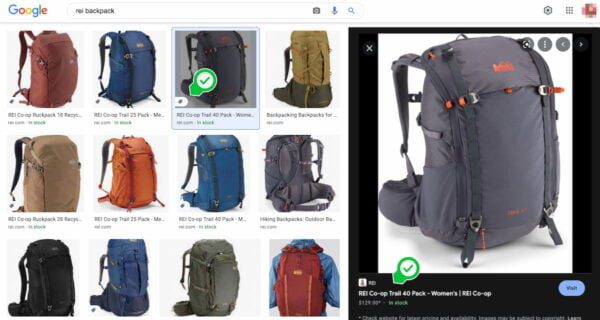
With product structured data your products can be highlighted in Google Images (for example).

You can also use structured data to provide business information. Google uses this data to verify whether you say who you say you are. It cross-references the information it finds on your site with what it finds on Google Business Profile. So make sure to keep this information (f.e. location, phone number, opening hours) up to date and consistent. If you want to add structured data to your products (or other pages), the structured data feature in our WordPress plugin and Shopify app might be worth checking out.

Improve your mobile shopping experience

Many people do their online shopping on a mobile phone, and that number is only growing. That’s why your mobile site has to offer a great shopping experience, similar to your website shown on a computer. We call this mobile parity. Your mobile pages should load quickly, work properly, and have no unnecessary distractions. People should not have to wait for your page to load, only to be confronted with things jumping around and buttons that aren’t clickable.
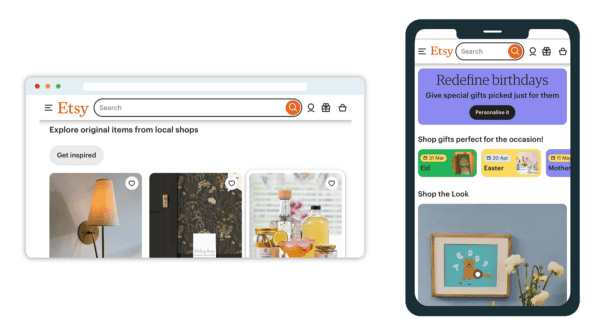
The desktop and mobile version of Etsy's website
Example of desktop and mobile version of a website: Etsy

Keep the design of your mobile site simple while still offering the branding experience that people are familiar with. Especially on your product pages, you should offer a minimal amount of distraction to get people to convert as quickly as possible. Make sure that your theme is responsive and scales appropriately to all screen sizes without having multiple designs. Give extra attention to the readability of your pages, especially those with more than a bit of text, like product pages or blog posts.

Optimize the page speed of your online store

Site speed is an ongoing challenge for most websites, especially since Google has declared it a ranking factor. For ecommerce sites, that’s even more important because a slow store can cost you customers. It is proven repeatedly that people will more likely buy from an online store with proper page speed. It’s also a vital part of another ranking factor, page experience.

How you improve the loading times of your store depends on the type of store you’re running. Hosted platforms like Shopify and Wix have built-in performance enhancements, like a CDN and image optimization options. For these SaaS platforms, you’re somewhat limited to the choices they make. If you run a WooCommerce store on WordPress, you have more control over your performance. You can choose your hosting plans, your CDN, your cache management, et cetera. Of course, there is no wrong solution. Pick whatever fits your goals and budget.

Improve your code

Many of the performance improvements you can make are found in your code. Make sure that the code of your theme is lean and mean. Fix scripts that block the rendering of your content in the DOM. Minify your code and try to add lazy loading to images where it makes sense. Don’t rely on JavaScript for loading critical functionality and content.

All the evergreen site speed tactics should also be applied to your online store. Think optimizing your images, uninstalling unnecessary apps and plugins, updating your CMS and plugins, optimizing your caching, minimizing the number of HTTP requests, asynchronously loading scripts, et cetera. To get an idea of where you should start, make sure to look at the Core Web Vitals.

User experience improves conversion rates

Related to technical SEO and branding, it’s important to be aware of the overall experience your online store offers its users. You need to help customers feel safe and welcome before they are ready to buy from your store. A well-optimized online store is a joy to use, offers a safe and secure buying experience, and loads in no time — both on mobile and desktop. Photography, typography, and content also contribute to user experience.

User experience is also about taking away frustrations and barriers for users to reach their goals quickly. It’s about optimizing product pages, CTAs, and payment flows to get people moving through the process without issue. Focusing on user experience can help you improve your store’s conversion rates. In addition, it builds a relationship with the customer and helps them come back for more. Build brand loyalty through a pleasant user experience. So add an option for guest checkout, make your site search work, improve the text on your CTAs, and offer proper faceted navigation. To give a few examples.

Don’t underestimate the importance of content

Content is, and will remain, still a very important part of SEO. Ecommerce SEO is no exception to this rule. Having great content on your website, and a proper content SEO strategy can help Google and your customers choose your shop above your competitors.

Keyword research for your online store

An important aspect is figuring out which keywords you can target — and which keywords your potential customers are searching for. It gives you a better sense of the competition and the landscape you are operating in. While doing keyword research for your online store, you’ll also uncover different search intents. Often enough, the customer doesn’t follow a straight line in their buying journey.

However, you can guide potential customers during their buyer journey with helpful content in the right place at the right time. For this, you can use proven marketing strategies like the AIDA model (Attention, Interest, Desire, Action) to guide a customer from discovering their need to guiding them to a purchase. At any touchpoint during their journey, you need to be there to stay part of their buyer journey. Keyword research will help you uncover the terms searchers use during the different sections — helping you write content that is valuable and on point.

Improve category pages for ecommerce SEO

Often, category pages can be easier to rank than individual product pages. You can set them up to target a broader set of terms instead of one specific product. Your keyword research can help you use keywords that your audience searches for. Give your category pages a good title and meta description featuring the keywords you want the page to rank for. In addition, pick a proper URL structure for your category pages. Keep them short and focused.

Add a piece of text to the category page to give Google and customers more insight into what this page holds. Don’t overdo it, though; it doesn’t have to be a wall of text. Just ensure that it is written for humans and isn’t stuffed with your keywords. Add great product images to your category pages and link to them from other relevant pages on your website.

Again, consider search intent here; category pages should target and offer solutions for ‘browsing’ behavior. This differs from what you do with individual product pages. For category pages, you want to rank for “Black Dresses” while your product page might want to rank for “Black Dress”.

Add a blog to your online store

One of the most important ways of promoting your online store is via content marketing. Adding a blog to your site gives you a range of options to rank in the search engines and attract a new wave of customers.

While your product descriptions and landing pages allow you to talk about specific products, a blog can be much more flexible. Here, you can dive deeper into your product, your business, and topics related to what you sell. Just make sure it’s relevant to the people you’re trying to target.
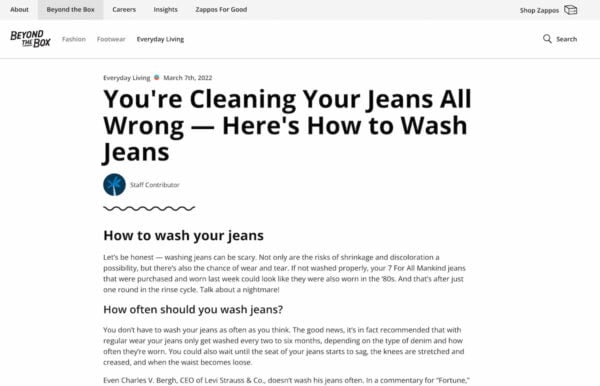
an example of a good blog on an ecommerce site, this one is from Zappos
Zappos has a great blog with excellent content on various relevant topics.

With high-quality content, you show that you are passionate about your product and that you are an expert on the topic. Trust and expertise are crucial factors for Google and visitors to find the business they want to buy their products from.

Relevant content has a great chance of ranking if you target the right keywords. You can write all-encompassing, authoritative cornerstone content that you can use as a base for your content strategy. Supporting those articles, you can go into more detail about specific aspects. For instance, the guide you are reading now is supported by numerous articles on ecommerce SEO topics which are all interlinked.

Improve your product pages for SEO and conversion

Your product page is where the magic happens. Here, you want your customers to hit that buy button without hesitation. But what are the aspects of an excellent product page? What can you do to improve your product page SEO

Write great titles and meta descriptions

The words you use to describe your articles are essential. Of course, this also goes for the words you provide for your product to be used in the SERPs — the titles and the meta descriptions. In 2021, Google was actively rewriting more page titles than ever. According to them, too many sites were using non-descript or spammy titles. Therefore, it is even more important to improve your titles and keep an eye on what Google is showing for your products.

Using WordPress/WooCommerce SEO plugins and Shopify SEO apps like Yoast SEO for Shopify, you can set up templates for both titles and meta descriptions, so they follow a similar pattern. This saves you time, and you won’t have to do everything by hand. Of course, you should write everything by hand for your most important articles and pages. Make them stand out!

Write your own product descriptions

We already touched on this topic briefly while discussing the risk of duplicate content. To prevent your product descriptions from being the same as 100+ online stores out there, you need to write them yourself.  If you have a ton of products, start with the ones most important or most valuable.
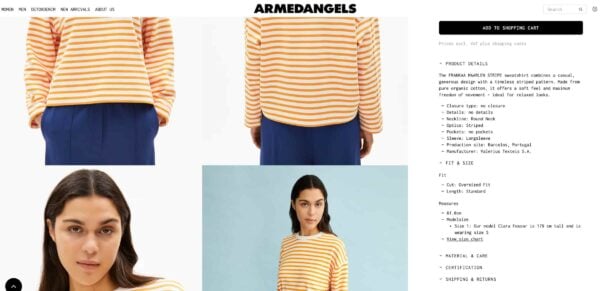
Example of unique product description on Armed Angels website
Example of an elaborate and informative description on Armed Angels webshop.

Be sure to write in the language your audience uses to find and describe these products. Don’t use jargon or made-up words that only a few people will understand. Good product descriptions are easy to grasp and easy to read. Also, stay away from walls of text — use a good header hierarchy and break up the text with paragraphs and lists for readability.

Add unique, high-quality product photos

Excellent product images are another great way to set yourself apart from your competitors. Your customer wants to see your products in detail. Even if you have an offline store as well, photos show what your products look like and give you that edge over competitors who just use the images provided by the manufacturer. Try to take authentic photos and do it yourself. Make sure they are high-quality and show your product in use to show what it looks like in real-life situations.

product photography helps ecommerce seo
Everlane combines great product photography with animated GIFs to show their backpack in use.

If you’ve shot good photos of your products, optimize them for the right size, compress them and give them a proper SEO-proof name. Use the product name in the image file name and the alt text when you upload it to your store.

Add reviews of your product or service

Reviews are incredibly important for your business. Collect them, display them and add review and ratings structured data. It can nudge customers to buy your product or service. It also helps Google turn those reviews into highlighted listings in the search results — with stars and all.
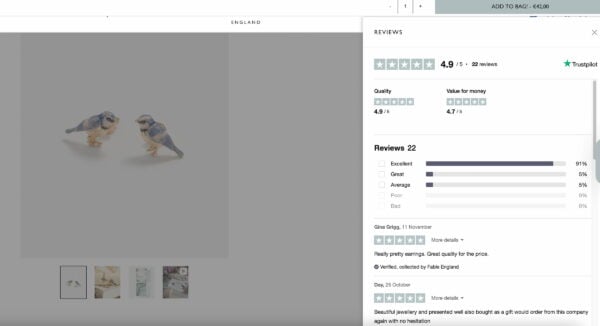
Reviews shown on product page Fable England
Fable England shows a reviews tab next to their products that allows you to scroll through reviews.

Most shoppers look up reviews before buying a product or deciding on a service. While the availability of reviews on your product pages helps build trust, they need to be genuine. Don’t publish fake reviews or only publish the ones that paint your product or service in a positive light. Even negative reviews have a place! What’s more, how you respond to negative reviews says a lot about you and your business.

Add related products for cross-selling and internal linking

To increase the conversion rate and the total amount spent per cart, you can use a variety of tactics. One of those tactics is adding related products on your product pages and even on your checkout screen, although you need to test that second option so that it doesn’t harm the checkout process.

The same goes for a list of alternative products for the one a customer is looking for. An ‘Other customers also look at’ feature helps uncover more products for your customers, plus it helps them reach their goal more quickly. In addition, this helps your internal linking as well. By doing this, you make it easier for customers and search engines to reach different parts of your site.

Improve the shopping experience with filters

For online stores, faceted navigation is a must-have on category pages. Faceted navigation — also known as product filters —, lets users filter their search to a more manageable level. We all know filters like size, price, color, brand, et cetera. Offering ample filter options genuinely improves a shopper’s experience on your site. Filters give them the possibility of finding a product with much less friction.
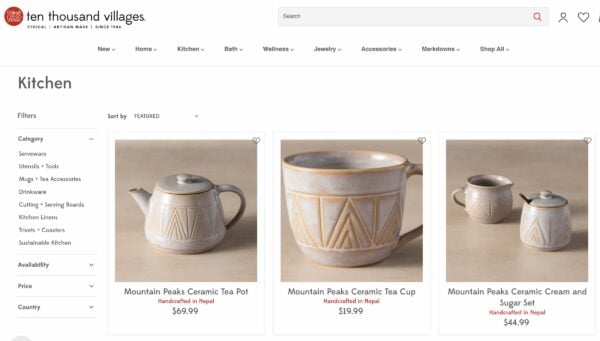
Filtering on website Ten Thousand Villages
Filtering (subcategories, availability, price, country) on a category page of Ten Thousand Villages.

When set up correctly, they should work without issue. The problems with faceted navigation start whenever this system spits out a massive amount of indexable URLs, thanks to the filtered parameters. This could lead to duplicate content, index bloat, and crawling issues. These URLs mustn’t get indexed by Google.

Handle out-of-stock products

Every online store will eventually reach a point where products run out of stock. How you deal with that is more important. Manage expectations by showing when this product will be back in stock. Or offer ways to keep them in the loop by offering to send an email when it’s available again. There’s more you can do to handle products that are out of stock, but it is important to act upon it to show potential customers and Google that you’re active and trustworthy.

Site structure, navigation, and internal linking

Site structure is essential for every site — and the larger your site is, the more important it gets to keep it under control. Setting everything up transparently helps customers and search engines find their way on your ecommerce site easily. As Google uses the structure to understand your site, you need to think about how you link everything together. With proper internal linking, you can signal to Google which pages are the most important ones. It will prioritize these over other, less-linked pages.

Think about your navigation

The same goes for your navigation. Well-thought-out navigation doesn’t just please Google, but users as well. Search engines like Google use the navigation of your online store to uncover your content. They also use your navigation and your site structure to connect the various parts of your site.

Google, for instance, advises shop owners to add links from menus to category pages, from category pages to sub-category pages, and finally from sub-category pages to all product pages. It’s vital to link to all the products you want to have indexed. Don’t forget to add your most important pages and categories to the footer, as that is important real estate!

Don’t forget about internal linking

Other than having a proper navigation and site structure in place, you also need to link related content to each other. This shows search engines what pages and topics are related to each other and which pages are most important. It also helps site visitors find other related content or pages to the page their currently on, keeping them on your site and helping them find what they are looking for. When you have a blog, internal links also give you a great opportunity to link directly to specific products or categories that are related to that topic. Use internal linking to show the importance of pages and help users navigate through your site.

You shouldn’t underestimate the power of link building. These are links from other websites leading to your products and/or content. This is, to this day, an important ranking factor for search engines. Not just having as many links to your website as possible, they need to come from relevant websites and make sense. 

You need to publish content that people will link to for this to happen. That doesn’t strictly have to be a blog post, but that could also be a buying guide, an infographic, a tool that helps people make decisions, original research, et cetera. Excellent, unique content has a bigger chance of getting links from relevant sites and people.

Another link building strategy is to reach out to your local community to get them to talk about you. Or you could invest in influencer marketing and digital PR to boost your online store.

Marketing and ecommerce SEO

You can sit and wait for people to show up in your online store, or you can act. While not technically SEO, marketing is still at your disposal — and there’s a lot you can do. We’ve already talked about content marketing, but we’ll also discuss social media, ads, and video marketing.

Social media

Everybody knows social media can do a lot of good when used right. So, use it to your advantage. It won’t help your store rank better, but it can help you get and build an audience. It can function as an extension of ecommerce SEO, and it is a wonderful way of contacting your customers. Social media marketing is essential for your branding — it’s where people can see you and what you do. Make the most of it!

Video marketing

Video is huge, and its growth is nowhere near stopping. Invest in video SEO if you have the budget. Just make sure it looks good and represents your business. With video, it’s important to know what you want to achieve. Do you want to get recognized on YouTube and have your videos rank well there? Then that’s where you should focus your attention as simply adding a few videos to your store won’t help in this situation.

Do you want to produce the best videos on your ecommerce site? Then you need to think about where you want to host these and how to make them click with your audience. Want videos to do well in the organic search results? That’s something else entirely. Figure out if you want to focus on videos for YouTube or your own site.

Running paid ads

Running ads in the search results is another way to stand out from the crowd. It gives you the option to bid for specific keywords and — depending on your niche — can get you a relatively cheap way to the top of the search results.

Fledgling stores often rely on paid ads to get noticed in the search results. There’s nothing wrong with this, of course. But, with paid ads, you must keep paying, or else your stream of customers will dry up. It’s not a sensible strategy to just focus on running paid ads. Combine it with SEO, social media, and content marketing.

Google Shopping feed/Merchant Center

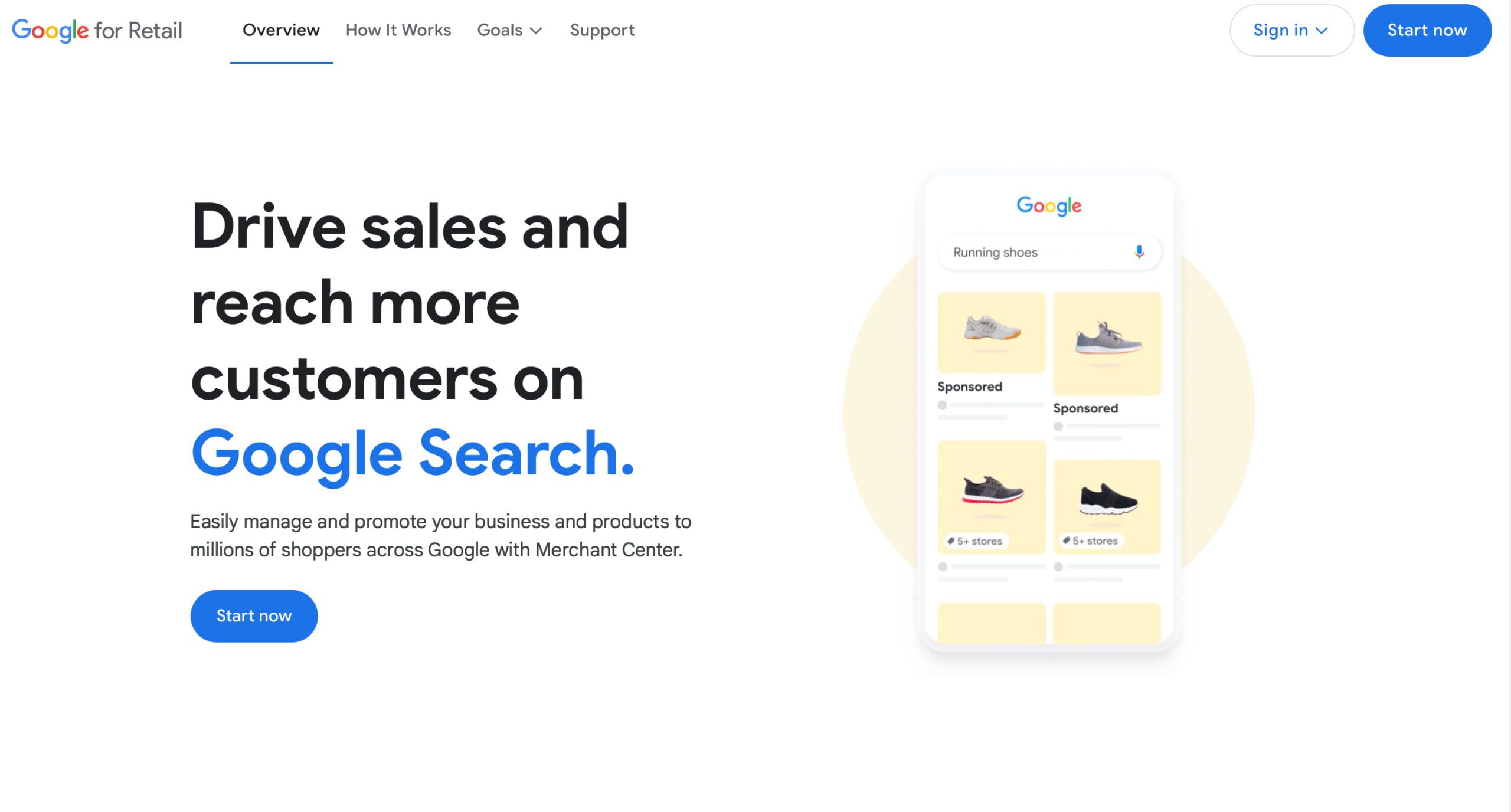
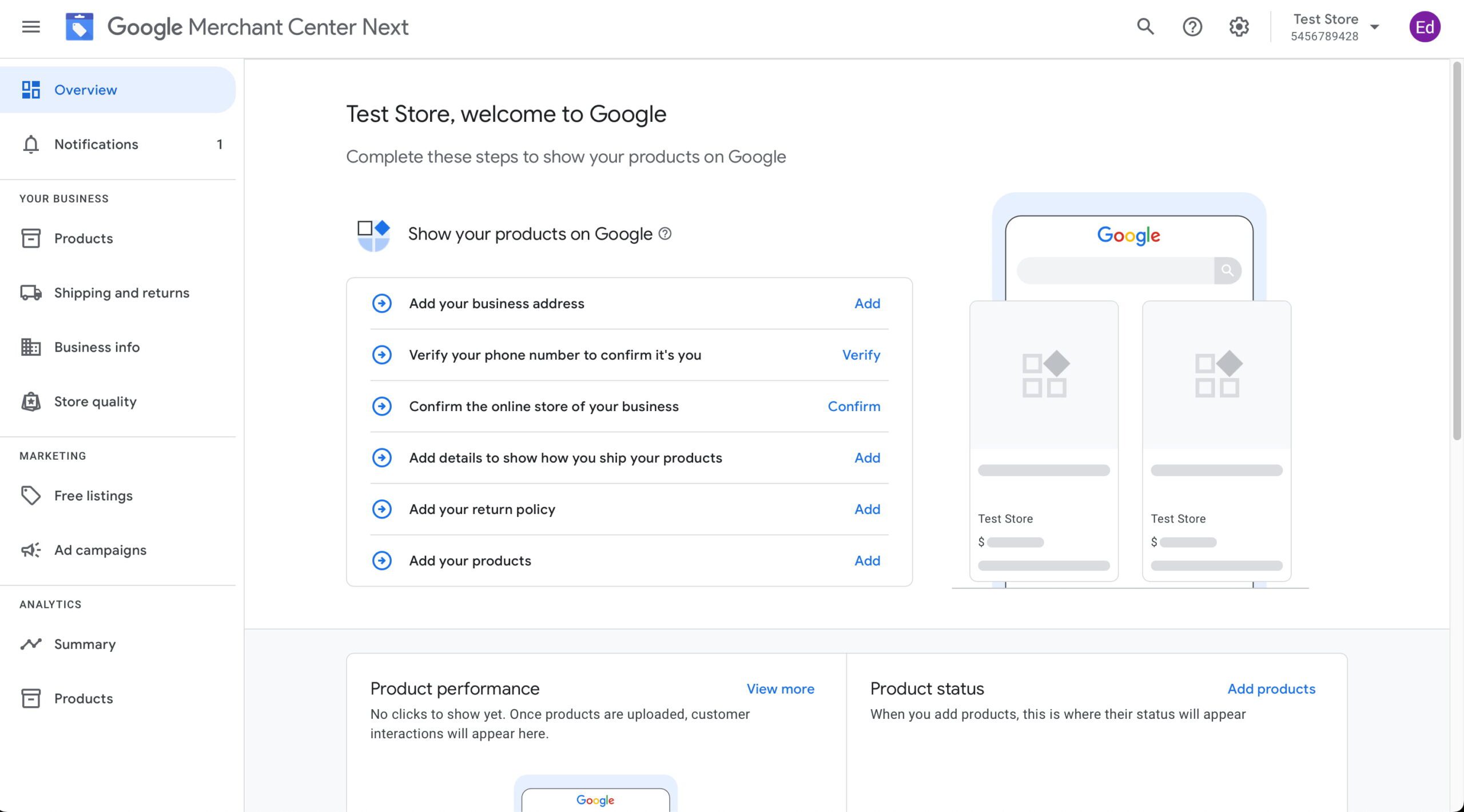
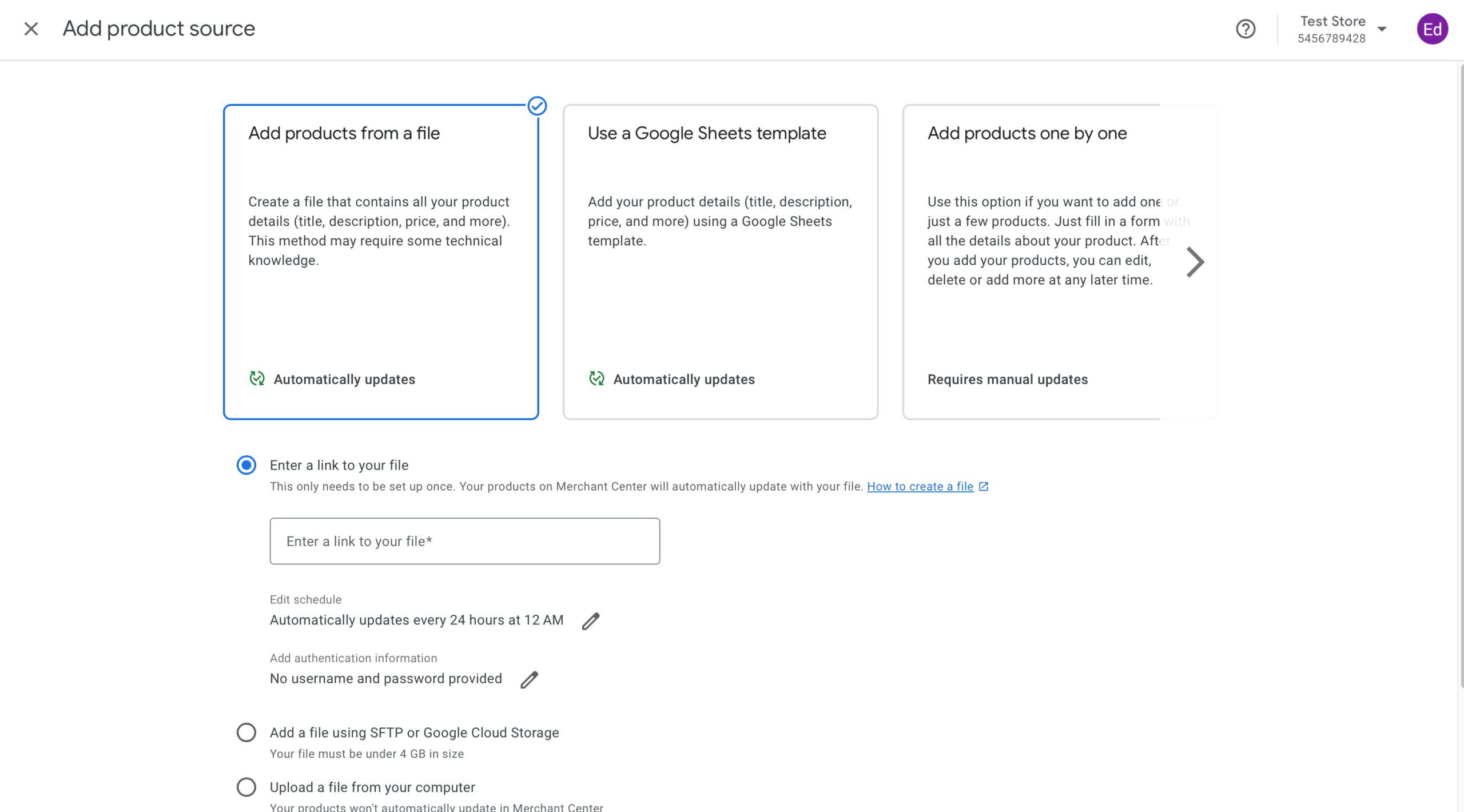
While it is good to focus on getting your products found in Google’s organic search results, most online stores also put effort into Google Shopping. Google helps customers find the best products for the best prices in the Shopping section. In 2020, Google made it free for merchants to add their products to the Shopping section. Simply sign up for Google Merchant Center, correctly fill in all the required data about your business and follow the guidelines.

Local SEO for ecommerce

If you combine your online store with a brick-and-mortar one, you must also focus on local SEO. Discover how your online and offline stores can support each other to strengthen each other. Write content optimized for your locale and build good landing pages that help you get noticed for searches in your area. We also offer a local SEO plugin that can help you optimize your website for a local audience. For instance, it adds proper business location schema structured data for your shop and helps you get your details in Google Maps.

Is your online store on Shopify or WordPress? 

Shopify is one of the biggest ecommerce platforms out there. And WordPress powers around 43% of all websites worldwide. Both WooCommerce and Shopify are excellent choices for your online store. 

For WordPress sites, many of the ecommerce stores are powered by WooCommerce. It’s a solid platform that does a lot out of the box. Put the ecommerce tips from this guide into practice, and you are well on your way to an optimized store.

If your online store is on Shopify, you’ve chosen a platform focused on ecommerce. It comes with pretty much everything you need straight out of the box. If there is something you’re missing, there are tons of apps that can help you out. Although most SEO advice is platform agnostic and this guide will already give you lots of input, we also have a guide on Shopify SEO to help you get your Shopify store ranking high.

WooCommerce SEO plugin by Yoast SEO

To help you quickly set up WooCommerce for optimal SEO, we built the WooCommerce SEO add-on for Yoast SEO. Our WooCommerce SEO plugin adds several extra features while also improving the code WooCommerce puts out to make it more understandable for search engines. It’s an essential tool if you want to get the most out of our WooCommerce store. You can use this add-on with both the free and Premium version of Yoast SEO.

Yoast SEO for Shopify app

One of the most remarkable aspects of Shopify is that you can improve your store by running apps. There are apps for everything, from review management to email marketing and image optimization to cross-selling products. One of the most popular categories is ecommerce SEO, and we’re proud to offer a Yoast SEO for Shopify app as well.

Our app improves the technical SEO of your Shopify store while also offering features that help you produce the best possible product-related content. It comes with SEO and readability analyses, various controls for handling how Google crawls your site, and an impressive Schema structured data implementation that instantly helps search engines understand your products.
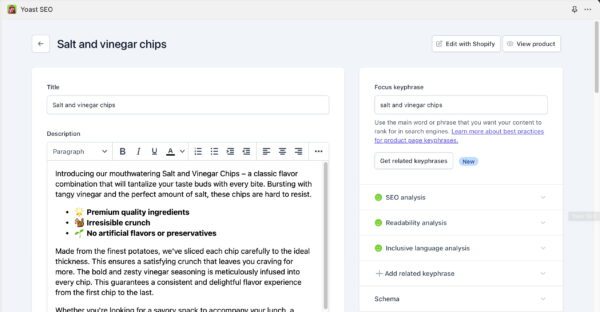
The Yoast SEO interface in Shopify
The Yoast SEO for Shopify app when you’re working on your product page.

All about ecommerce SEO

That’s it! You’ve just learned a lot. But although this is billed as a thorough guide, a complex topic like ecommerce SEO cannot be contained in one single guide. Where possible, we’ve linked to related articles that go deeper into a specific detail — read these to expand your knowledge!

Reasons to choose Shopify as your ecommerce platform

Shopify is one of the most impressive internet success stories. According to BuiltWith, the Canadian ecommerce giant now powers almost five million stores worldwide. Merchants choose Shopify for its ease of use, robust features, scalability, and cost-effectiveness. Let’s go over the main reasons for choosing Shopify.

Table of contents

What is Shopify and what does it do?

Shopify is an ecommerce platform that has everything under one roof. It’s a cloud-based solution that lets merchants create, customize, and manage online stores without issues. Shopify focuses heavily on ease of use and functionality, and with the thought of having businesses run an online business without technical expertise. 

Shopify has quickly become one of the most popular ecommerce platforms. For instance, Shopify dominates the US market, with a market share of around 30%. It helps by easily serving businesses of all shapes and sizes, from small startups to large enterprises. 

Choosing the right ecommerce platform is critical to your online success. There are many good reasons to choose Shopify, as it’s versatile, user-friendly, and scalable. It’s a good solution for most businesses and even comes with tools like Yoast SEO for Shopify that help you with your content marketing and SEO efforts.

Primary features and services of Shopify

One of Shopify’s main features is hosting and scalability. As a managed hosting solution, Shopify offers fast and reliable performance for your pages. Its infrastructure can handle traffic spikes and high-demand sales peaks like those during Black Friday sales. 

Next, Shopify is well-known for its template and customization options. The theme store has over 240 themes, all of which are mobile-friendly. You even get a selection of industry-specific themes to help businesses get online quickly. 

Another strong aspect of Shopify is its tools section and the way it integrates with nearly everything. The app store has almost any app you need, from Shopify SEO tools like Yoast SEO to inventory management options. This breadth of options is very impressive. 

Last but not least, Shopify makes it easy to manage payments and financial transactions. It runs its own payment gateway, Shopify Payments, but it also supports various third-party payment processors. 

These options together form a fully formed product that helps merchants with everything from server management to brand building and marketing. No wonder so many merchants choose Shopify as their ecommerce platform. 

How does Shopify work?

Shopify’s intuitive platform makes starting and running an ecommerce store very easy. It doesn’t matter if you sell just one product or thousands — the software makes it accessible for every type of merchant. 

Simple setup process

One of Shopify’s most impressive aspects is the setup. Entrepreneurs can literally launch an online store within a few hours — without prior technical know-how. The platform offers easy-to-use tools that work by simply dragging and dropping elements. In addition, it offers user-friendly walkthroughs to guide merchants through the process. There are pre-built themes to get started with quickly, and buying premium themes from the Shopify Theme Store is also possible.

Effortless management

Shopify has a clearly organized admin dashboard. Store owners can track orders, manage inventory, and check customer data in a single place. Merchants also enjoy the automation features. For instance, it automatically calculates taxes, handles shipping integrations, and manages checkout processes — a huge time saver!

Of course, as we live in the mobile age, Shopify offers mobile app access. Merchants can manage their stores on the go, so they don’t have to miss anything when they are out and about. We’ve already mentioned that Shopify store themes all scale with and perform properly on mobile devices. 

All of these possibilities make Shopify a very good solution for most stores. Even a solo entrepreneur can build and manage a professional store without issues. This makes it a far more accessible option than platforms like WooCommerce or Adobe Commerce.

7 Key benefits of choosing Shopify

Shopify’s impressive features, scalability, and customer-centric design stand out. Here are some key reasons merchants choose Shopify as their preferred ecommerce platform. 

1. The user-friendly interface

Time and time again, Shopify merchants mention that the clean, intuitive interface is the most important reason for choosing this ecommerce platform. Shopify is one of the most user-friendly e-commerce builders out there, and it’s intuitive for beginners and powerful for experienced users. 

Shopify has an innovative drag-and-drop builder that lets merchants customize the store layout and product pages without coding. The admin interface is clearly organized and simple, even for non-developers. Thanks to Shopify’s guided setup and well-designed templates, business owners can quickly move from concept to live store. In addition, the admin panel gives an easy-to-understand overview of the store’s performance so merchants can manage orders and inventory without issues.

image showing the theme editor interface of shopify, one of the main reasons to choose it
Shopify’s easy-to-use interface makes it a joy to work with

2. Shopify AI Magic

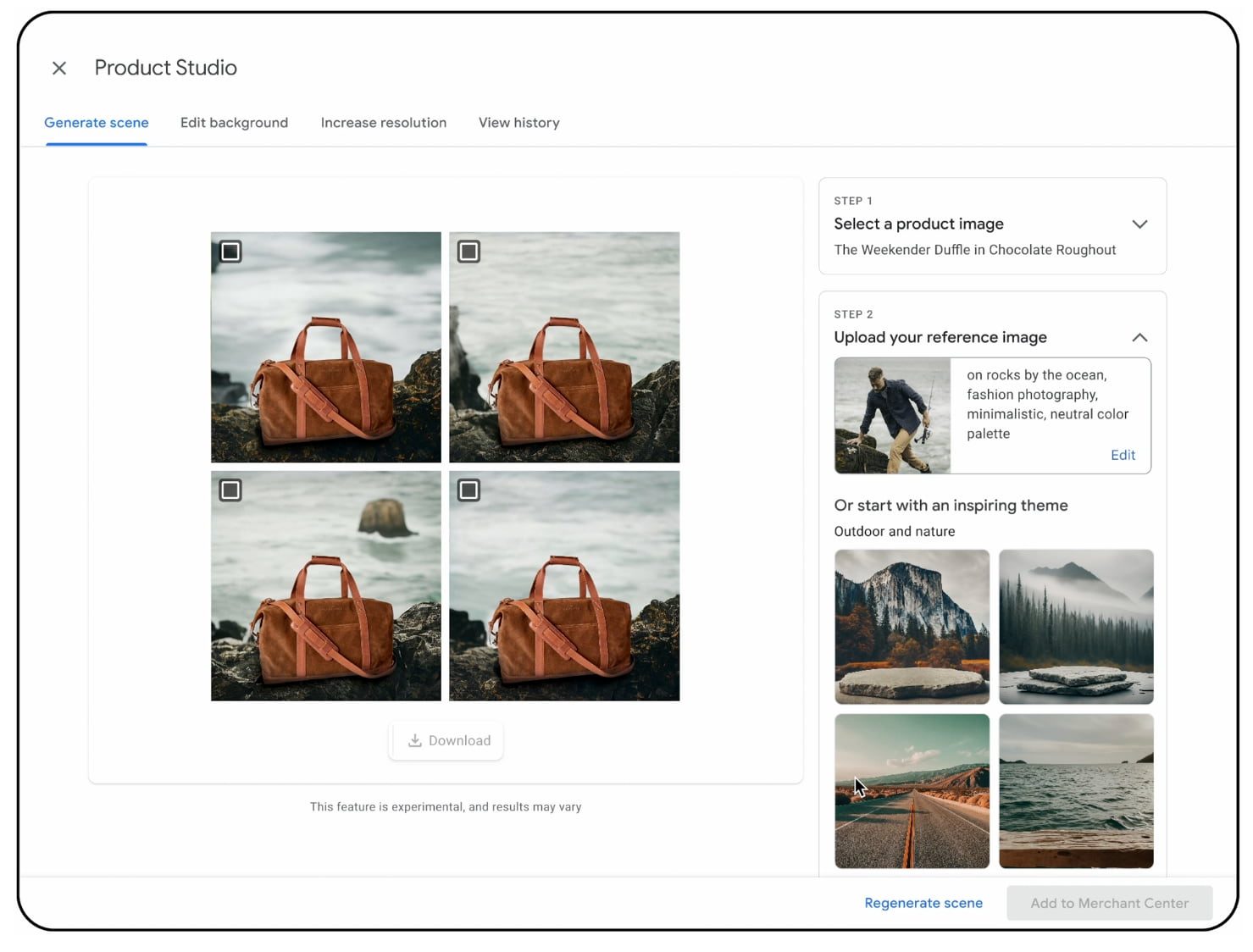
One of the newest benefits is Shopify Magic, an AI-powered solution that makes work easier and more fun. For instance, it has an image editor that automatically cleans up and optimizes product images, and a content generation tool that uses generative AI to write FAQs, product descriptions, and blogs. Email improvements also help dynamically tailor email campaigns for higher engagement rates.

Shopify also has Sidekick, an AI assistant that can help you get more done in your store. This chatbot answers all your questions and advises you on your specific situation, as it knows everything about your store. As a result, you have more time to focus on important things like strategy.

3. Flexible and scalable

Another big benefit of choosing Shopify as an ecommerce platform is its flexibility and scalability. Shopify can grow with a merchant and offers options for large and small businesses. 

It has an affordable pricing structure. The $29/month plan helps small businesses get online quickly without investing too much. For large businesses, there’s Shopify Plus, which supports global enterprise brands like Heinz and Gymshark. This plan offers advanced features like a multi-store setup, custom checkout-out options, and very high API limits. Shopify is also very proud of its 99.98% uptime guarantee, which keeps stores online even in the busiest seasons. 

4. Integrated payment solutions

Another big benefit of Shopify is its ability to simplify payment processes for clients worldwide. It hosts its own payment system, Shopify Payments, a hassle-free payment gateway. Shopify includes this in the subscription costs, and there are no set-up fees, just the going credit card and transaction fees. Shopify also supports over a hundred payment integrations, from Stripe to PayPal.

5. Robust app ecosystem

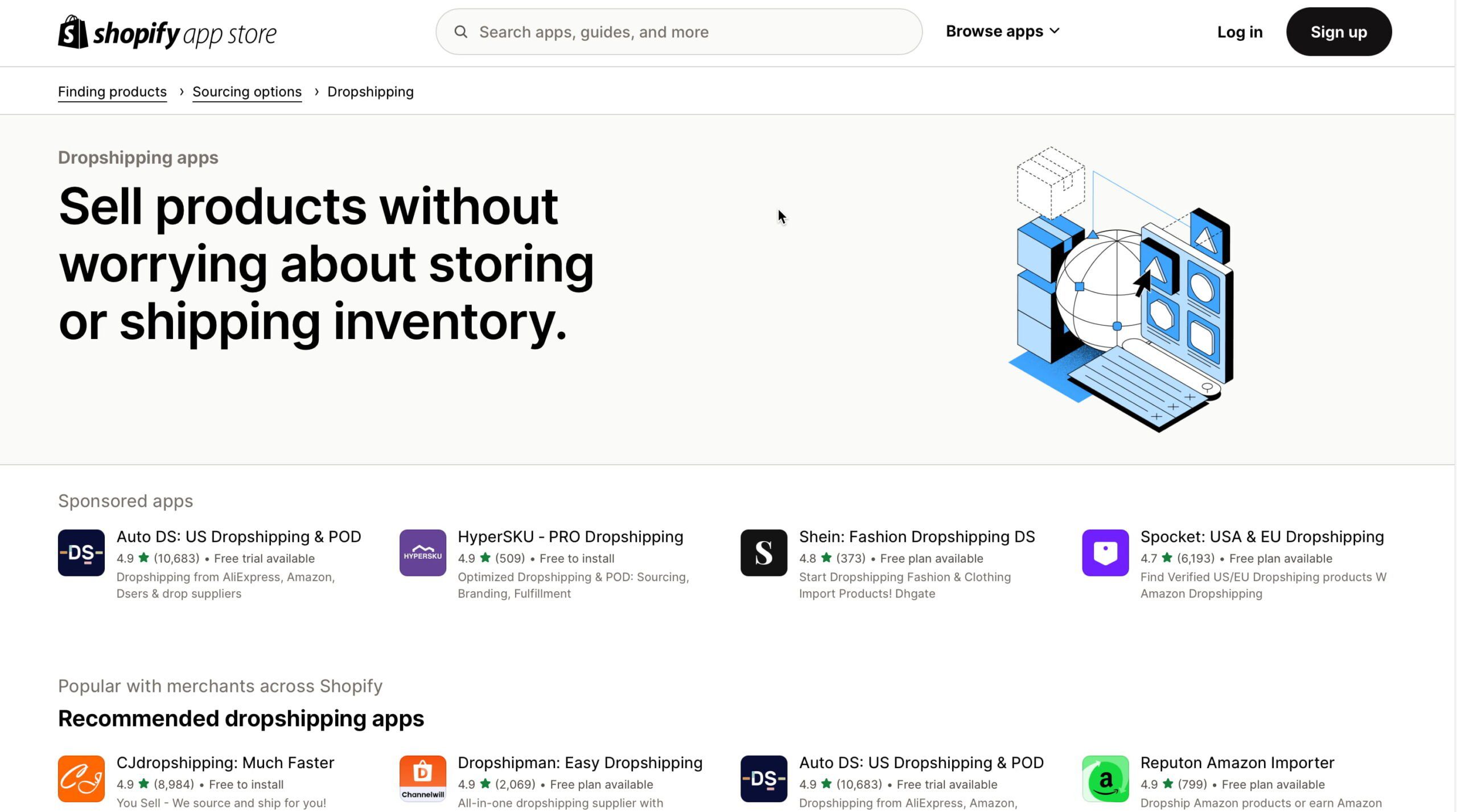
Shopify is a very extendable ecommerce platform. It has an excellent app store, where developers offer a wide range of good apps that improve and expand what Shopify can do. Currently, over 10,000 apps are available in the app store, and new ones are arriving daily. 

Many of these apps integrate deeply with Shopify, allowing marketing automation and personalization that can increase sales. Merchants can install apps to recover abandoned carts, upsell related products, or integrate with CRM and advertising platforms.

Merchants can find apps for nearly everything. Some of the most popular ones are Oberlo for dropshipping, Klaviya and Mailchimp for email marketing, Judge.me and Loox for product and store reviews, and PageFly for building custom landing pages.

This extendability helps merchants scale their work whenever they need it most. 

an example of a search result for shopify apps related to email marketing
Shopify has over 10.000 apps in its app store

6. Comprehensive support

Running an online store is difficult enough without having to worry about technical issues. Luckily, Shopify helps remove that worry with 24/7 technical and customer support. Merchants can access professional assistance via live chat, email, or phone. In addition, it offers loads of learning material in the form of Shopify Academy, community forums, and tutorials. Business owners can quickly learn to make the most of their online stores. 

7. Yoast SEO for Shopify

Shopify comes with all merchants need to run their stores, including tools to improve search engine visibility. While SEO is always in Shopify’s mind, it is good to think beyond the basics that the e-commerce platform offers. Getting traffic is too important to leave it to chance. 

Yoast SEO for Shopify is the perfect tool for merchants looking to get that traffic. This Shopify app is built by a team of SEO experts with decades of experience. Yoast SEO has innovative features like real-time SEO suggestions, helping you optimize your pages and products with actionable insights. Or enhanced structured data for your products to make these stand out in Google. 

Yoast SEO for Shopify also helps you write better product content. Enter your focus keyword and use the feedback to make your product descriptions stand out. A readability analysis also helps you make the content as readable for your customers as possible. There’s a Semrush integration to get keyword data from the editor and AI-powered features to automate some parts of the optimization process. 

Combining Shopify’s framework with Yoast SEO makes your store accessible to search engines and customers.

Optimize your products with Yoast SEO for Shopify to make them stand out

Unique selling points of Shopify

Shopify has a lot going for it as an ecommerce platform, and there are more things it does to stay ahead of the competition. 

Multi-channel selling

One reason Shopify could be chosen over the competition is its ability to sell across multiple channels. Multi-channel options allow merchants to sell their products on social media platforms like Facebook, Instagram, and TikTok, with all the management and insights happening on the main dashboard. Shopify also has point-of-sale options that help merchants offer in-store sales and integrate online and offline. 

Shopify can sync listings to third-party platforms like Amazon, eBay, or Google Shopping, increasing merchants’ visibility. The platform also has many more options for going omnichannel with your store, which makes it a great fit for managing everything all at once. 

Strong security and reliability

Trust is an important aspect of ecommerce. Merchants need to trust ecommerce platforms with their data and trust that they keep it safe and sound. Luckily, Shopify is working hard to provide store owners with a secure shopping environment. Shopify is certified Level 1 PCI-DSS compliant, the highest level of payment security standard, which helps protect customer data. It also has built-in fraud detection features that minimize the risk of chargeback. 

Compared to hosted platforms like WooCommerce, Shopify automatically handles almost every security aspect. This gives merchants peace of mind that their customer’s data is safe.

Considerations before choosing Shopify

Shopify is an all-around great ecommerce platform, but there are some things to remember when merchants choose between the many other options. For one, Shopify’s pricing is decent, with basic monthly plans starting at $29. Still, the cost can add up when you want to add apps, third-party integrations, or want to have a custom theme developed. However, Shopify is often easier to set up and cheaper to run compared to platforms like Adobe Commerce.

Another consideration is the platform’s limitations. Shopify is closed software, so store owners have limited code access. WordPress solutions like WooCommerce might be better if openness is an issue.

These are the main reasons to choose Shopify

Shopify provides a great combination of ease of use, scalability, and features that help merchants thrive. It doesn’t matter if you run a simple store with a small budget or juggle millions of dollars; Shopify has the necessary solutions. It grows with your needs and offers you many options and possibilities to make the most of your business. Moreover, if you add Yoast SEO for Shopify to your store, you can boost visibility on Google, hopefully translating to more traffic and business growth.

So, why wait? Sign up for a free trial with Shopify, add Yoast SEO to your store, and get your business on the road!

10 SEO tips for your Valentine’s Day sale

Valentine’s Day is an interesting shopping event for ecommerce stores. Customers are looking for gifts that help express their love for one another, with flowers, jewelry, and other interesting options. It’s a great opportunity to attract and convert online shoppers. Here are some SEO tips to help make the most of your Valentine’s Day sale!

Table of contents

Start preparing early

As with most sales, you need to plan ahead. Begin planning your Valentine’s Day SEO strategy as early as possible. Ideally, you’d start several months in advance. Research keywords related to Valentine’s Day and your industry to see what comes up. When the sale comes, you’ll be inspired and have new ways to promote your products. If you set up gift guide pages, do so in advance so search engines have enough time to index your pages. This increases your chance to rank when the shopping rush begins.

Create a landing page specifically for your Valentine’s Day sale. Use it to highlight your best deals and popular items that make great gifts. Keep the URL simple and undated so that you can update and reuse it yearly. This approach helps you build SEO value over time while keeping backlinks intact. It also makes your seasonal campaigns easier to manage in the future.

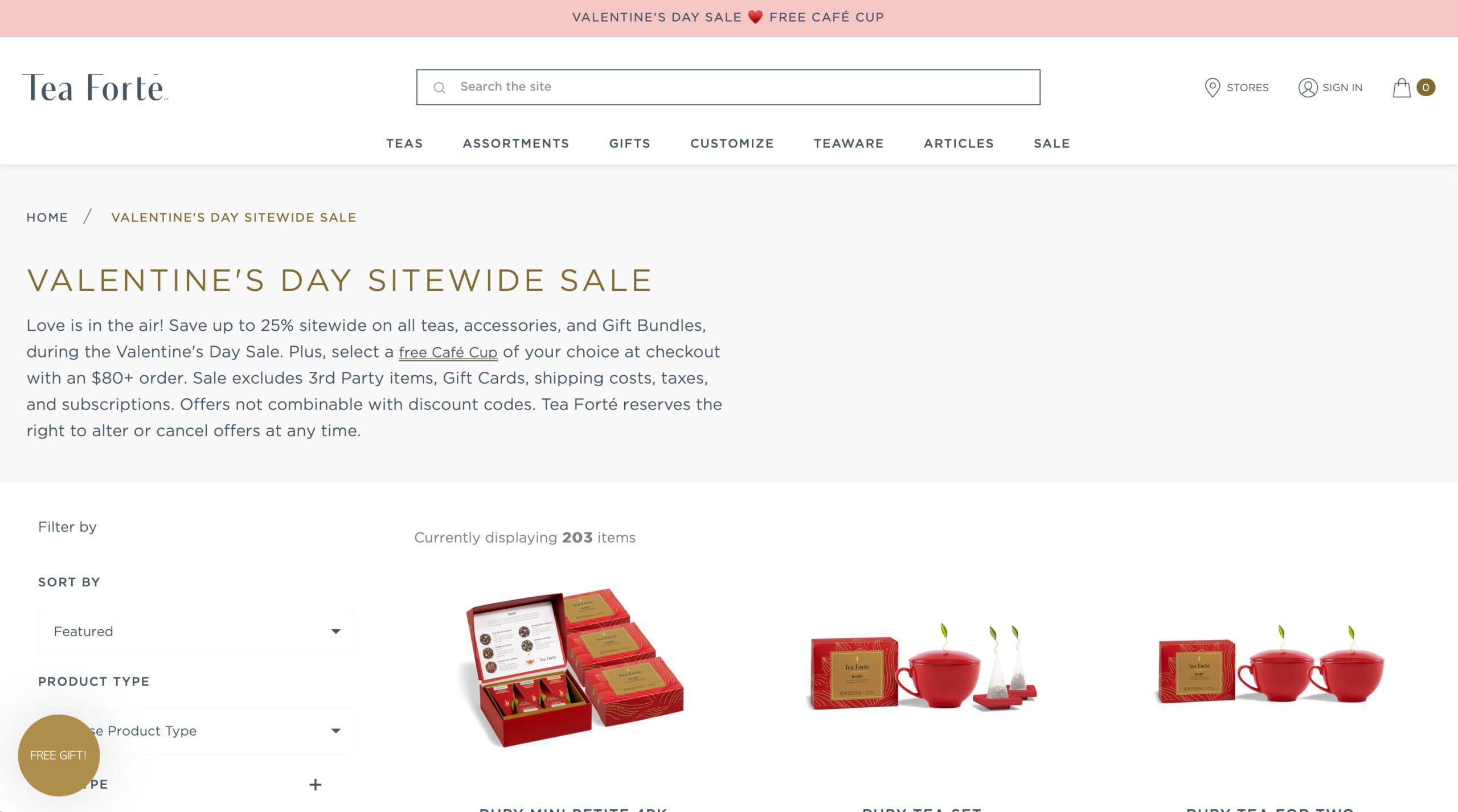
It doesn’t have to be just jewelry or flowers; there are plenty of interesting gift options, like tea

Optimize your product pages

Your product pages will probably see the most traffic and conversions, so be sure to optimize them. Use proper related keywords in the places where they make sense, but don’t overdo it. For example, instead of “Rose bouquet,” try “Classic rose bouquet for Valentine’s Day.” Yoast SEO for Shopify or WooCommerce SEO can help you do this.

Consider conveying that your products are made with a good heart without relying on traditional red heart symbolism. This could involve creative descriptions, imagery, or design elements that convey a sense of warmth, kindness, and generosity without being overtly literal.

As always, add high-quality images to your sales pages with descriptive alt-text, such as “red roses for Valentine’s Day delivery.” This will make your product pages more accessible and understandable for search engines. If you sell jewelry, create specific pages with phrases like “Valentine’s Day jewelry sale.”

When you have options to deliver your product, include the final delivery date in your communication to build trust and ensure customers receive their items on time.

an valentines day seo example from a lego gift guide featuring a bouquet build
Lego published a great gift guide on its site, including great images and content

Create gift guides and seasonal content

Content marketing drives traffic to your site. Good content can help shoppers find the perfect gift. For SEO purposes, Valentine’s Day gift guides can serve well. Make guides like “Top 10 gifts for her” or “Romantic ideas for Valentine’s Day.” In these guides, link to the proper product pages to make it easy for shoppers to buy the listed products.

Keywords like “Unique Valentine’s Day gift” or “Valentine’s Day flower delivery” work well in blog content. There are plenty of relevant content ideas. For instance, you could create themed infographics or videos to share on social media.

Focus on local SEO for delivery or pick-up

Is your business locally oriented, and do you offer local delivery or in-store pick-up? Optimize your sales for local searches! Edit your Google Business Profile and add details about your Valentine’s Day sales, opening hours, and local delivery options. Don’t forget to use location-specific keywords in your content.

Build a bond with your customers and encourage them to leave reviews. Positive reviews are an important part of building your local business. Use local SEO properly to attract customers needing last-minute Valentine’s Day gifts or same-day delivery. 

Social media is a great tool for promoting your Valentine’s Day deals. Remember to post appealing images of your products, such as flower arrangements, gift boxes, or jewelry. Depending on your business, Instagram and Facebook are especially good for showcasing your Valentine’s gifts. You might even try TikTok if you’re good at video content. TikTok even published a guide to help you with your Valentine’s Day sale. 

Remember to think about influencers who like your brand. Influencers can create authentic content to drive traffic to your site. Be sure to include special offers to make them actionable.

Use user-generated content

Social media is also a great place to encourage customers to share their Valentine’s Day experiences with your products. Ask them to post photos of the gifts they purchased, the stories of how they were received, or even a review of the experience of buying from your store. You could even create a branded hashtag and promote it in your social media and email campaigns.

As your website is the focal point, remember to add these posts to it. User-generated content helps build trust and acts as social proof. It’s great for potential customers to see that other customers have had an excellent experience with your business. Seeing happy customers share photos of their Valentine’s Day flower arrangements or jewelry gifts can help others do the same. In addition, you are creating a human connection with your customers.

It’s not just about inspiring customers to want to buy but also about getting them to buy it. Special offers help shoppers complete that last step. Create urgency with limited-time deals, such as “20% off Valentine’s Day gifts for 48 hours.” You can also offer free shipping or discounts on bundles for couples.

Don’t forget to use your email newsletters to announce these promotions. Write subject lines like “Valentine’s Day sale — Shop the perfect gift now” to grab attention and get clicks to your site.

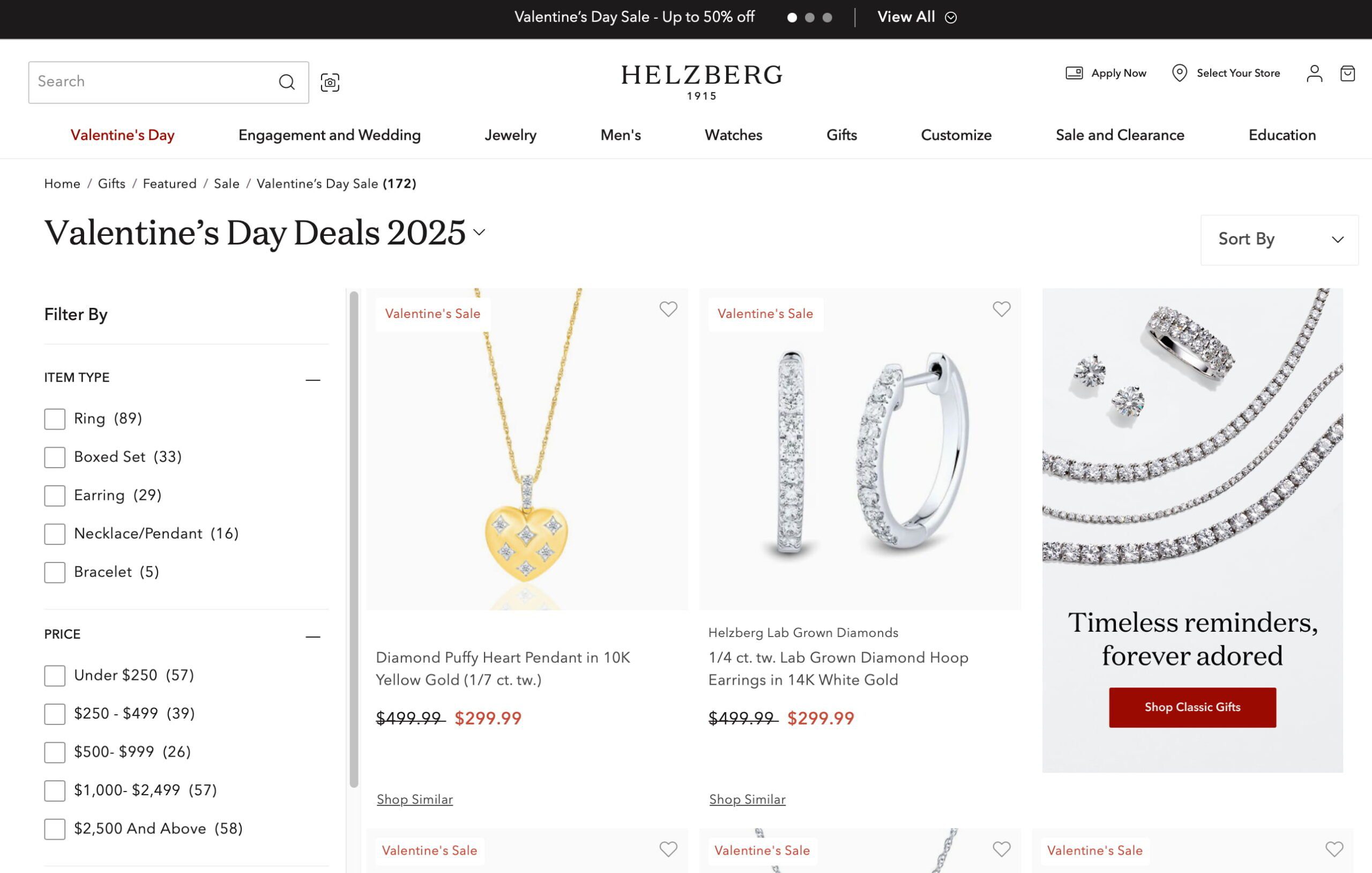
an example of a jewelry store using seo to build rankings and good pages
For a jewelry store, this is always a busy time, so it needs to come prepared

Add festive details to your website

A subtle way to get shoppers in the mood for Valentine’s Day is to add small festive design elements to your store. For example, you can update banners, landing pages, and CTA buttons with a subtle Valentine’s theme, such as hearts or pink and red color schemes. But be sure to keep it subtle. 

You can directly link your Valentine’s Day landing page or related content from your website’s header navigation during the sale to improve your SEO. Many ecommerce stores use dynamic navigation to feature seasonal categories like “New In,” “Back to School,” or “Holiday Deals.” Adding a Valentine’s section makes it easy for shoppers to find your offers quickly.

Some people like to shop at the last moment, so please also cater to them. You can always offer digital gift cards and same-day delivery services. Highlight these offers prominently on your website with phrases like “Still looking? Get it today!” or “Instant Valentine’s Day gifts.” 

PPC ads like “last-minute Valentine’s Day gifts”  in search or on social media help target people needing an urgent solution. It’s a quick and easy solution to get sales from customers running out of time. 

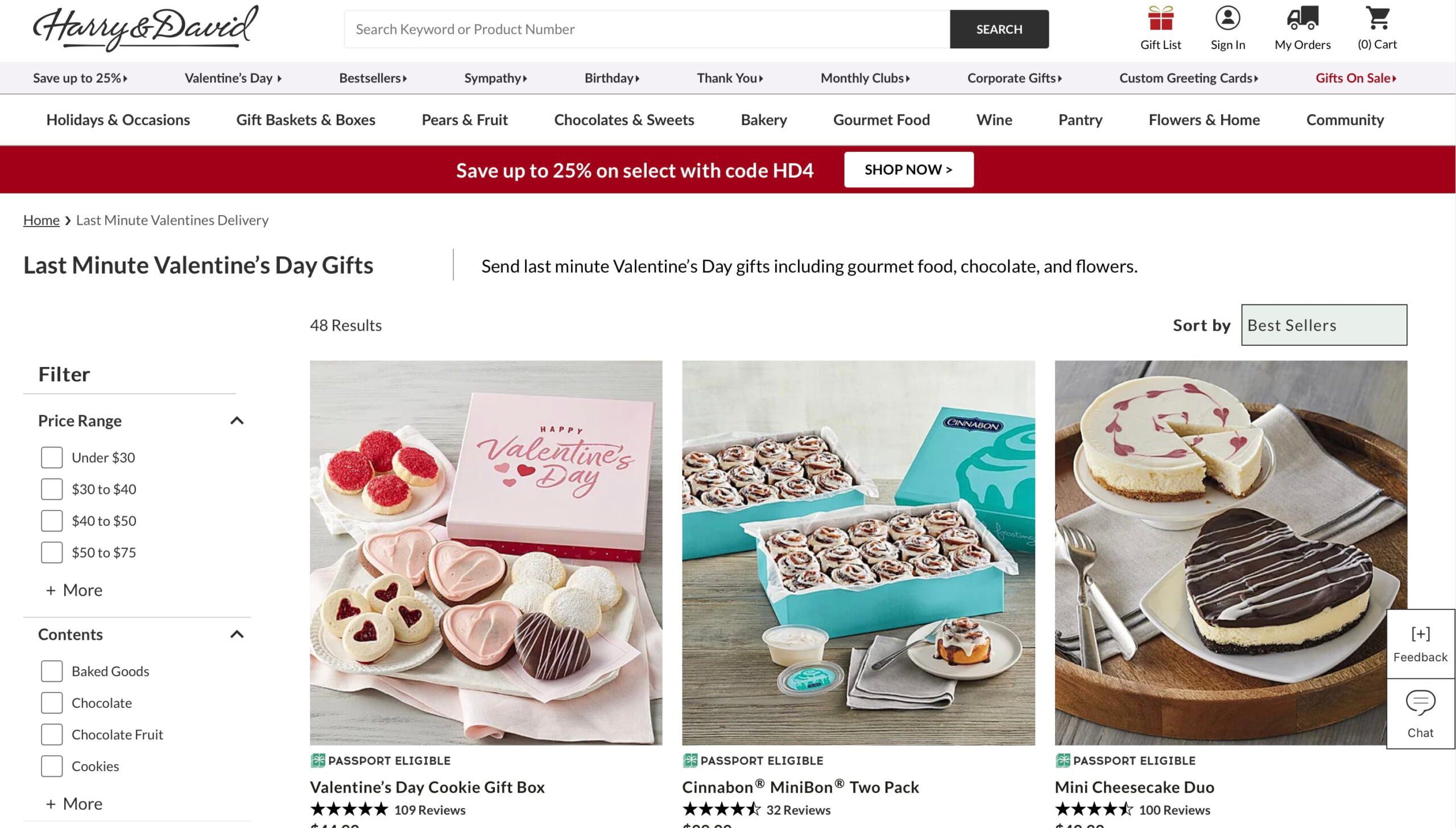
an seo example of a last-minute valentine's day sale at harry and david
You won’t be the only one looking for last-minute Valentine’s gifts!

Track and adjust your strategy

Last but not least, monitor the campaign’s performance. Use analytics and internet marketing tools to track keyword rankings, traffic, and conversions. Find out which products or pages perform well and adjust your strategy where needed. For example, if certain keywords like “Valentine’s Day exclusive jewelry sale” drive traffic, create more content around those topics.

Keep an eye on your competitors, too. If they offer something unique, consider how you might adapt your approach.

That’s it for Valentine’s Day SEO

Planning and great content are the most important things to make your Valentine’s Day sale successful. A targeted campaign can attract more shoppers to your store. Optimize your product pages, create engaging content, and promote your offers via social media and email campaigns. Now, you’ll be ready to turn the season of love into a successful sales season.

Coming up next!

Marketplace SEO tips to improve product listing visibility

You can sell your products online in many marketplaces, and all these platforms benefit from SEO. From improving your photos to writing better product descriptions, on-page SEO is key if you want your product listings to rank in search.

Table of contents

What is marketplace SEO?

Marketplace SEO is about making a platform with many sellers — like Airbnb, Etsy, or Amazon — easy to find on search engines. It means improving product details, organizing the site well, and using customer reviews and content. Optimizing the listings on these platforms helps more people find the products and increases sales for everyone involved.

For instance, Etsy gives store owners plenty of options to improve their product listings by writing detailed product descriptions or adding great images. As a result, every well-optimized, handcrafted item ranks in the search results. Similarly, Airbnb allows property owners to update their listings with local keywords so that they appear when users search for accommodations in specific areas.

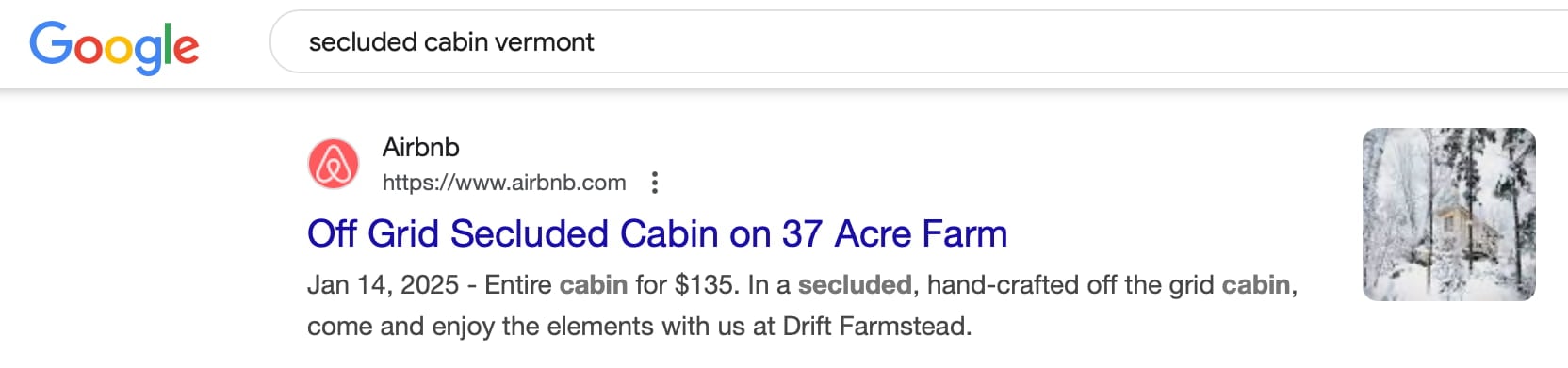
Effective marketplace SEO means that when someone searches for “vintage leather bags,” Etsy listings are among the top results. Or when a traveler looks for “secluded cabin in Vermont,” Airbnb’s optimized listings pop up. The result, of course, is to quickly connect marketplace buyers and sellers.

An Airbnb listing appearing in a Google search for a key term

On-page SEO for marketplaces

You can use on-page SEO as a tool for marketplace SEO. Doing so directly impacts how easily potential customers find your listings. Take the time to optimize elements like titles, descriptions, and images. Ultimately, you’ll find that your marketplace listings will be more visible in search results. This visibility, of course, should hopefully lead to more clicks and more sales.

When each page is optimized correctly, search engines better understand your content, which improves your rankings. This means your marketplace appears in front of the right audience at the right time.

Optimizing images

For marketplace SEO, you need good images to capture attention and show the quality of your products. If possible, make sure that your images are high-resolution and professionally shot. All your images should be relevant and showcase the product from more than one angle to give buyers a good feel for it.

Add clear alt text like “handmade ceramic mug” to make your images more accessible and to help search engines recognize what the image shows. This improves the SEO of your marketplace listings and makes them more appealing to users who use speech-based browsers.

Don’t forget to optimize the image itself. Compress files to maintain quality while reducing load times, as slow-loading images can drive users away. Tools like Squoosh can help with compression without losing quality. Ensure file names are descriptive and include keywords where appropriate, such as “organic-cotton-shirt.jpg,” to boost search visibility further.

Great photography and branding make your products stand out

Create great titles and meta descriptions

Titles and meta descriptions can draw users from search engine results. Crafting an engaging title means more than just adding keywords; it should capture what the page is about. Keep it short but descriptive, like “Elegant Summer Dresses – Affordable Fashion Online.” This approach catches users’ attention and clearly tells them what to expect. Ensure the titles aren’t too long so they appear fully in search results without getting cut off.

Descriptions provide more details about your listing. A good meta description should highlight features and benefits. It should also mention why people should click on your listing instead of your competitors. Here’s a good example: “Discover our range of elegant summer dresses crafted from breathable fabrics for comfort and style. Perfect for any occasion, at prices you’ll love.” This has all the keywords, and it speaks to the customer. Keep it short, accurate and engaging.

Writing great product descriptions

Product descriptions sell your products. If you want to sell your products, you must invest plenty of time in writing great product descriptions. Start by understanding your target audience and use those insights to address their needs and concerns. Write naturally and incorporate all the keywords you want the product to rank for.

Many sellers simply list features, but explaining these in context is better. Here’s an example: “This eco-friendly bamboo toothbrush is designed for comfort and sustainability, reducing your carbon footprint while providing a gentle clean.” By writing this way, you set your products apart from your competitors.

Another way to make your products stand out is through storytelling or vivid language that paints a picture. Here’s one: “Imagine sipping your morning coffee from this handcrafted ceramic mug, its unique glaze reflecting the artisan’s touch.” Instead of simply listing details, you appeal to the buyer’s emotions. This also offers a way to make the shopping experience more personal.

Whatever you do, try to avoid using the text provided by the manufacturer, as these will be used on thousands of sites. Try to make it unique for you and your customers.

An example of a good product description for an Etsy item

Using product specifications properly

You must list specifications to help customers decide if they want to buy this specific product. It’s important to list these product specifications with care. Make sure to present details such as product identifiers, dimensions, materials, weight, and compatibility in a way that’s easy to scan.

This makes it easy for customers to find the information they need quickly. It also helps search engines index your content more effectively. Including specifications can give customers more confidence in buying the product, as they know exactly what they are purchasing.

Additionally, think about the unique features that specifications can highlight. For instance, computer shoppers would love to know what kind of processor a laptop has. Shoppers use these details to compare products based on specific technical attributes. Where applicable, use bullet points to present data clearly and concisely.

Implementing Schema markup

You can’t live without a schema markup if you want to improve your marketplace SEO. Schema markup adds structured data to your products, which helps search engines understand and interpret your products. If you do it well, your products might get rich results, like added star ratings, pricing, and availability.

For instance, an item with a product and reviews markup might show a 4.8-star rating and price directly in Google. These listings appeal to customers and could lead to a better CTR.

If you want to add schema to your products, you need to use specific types of markup relevant to your marketplace, such as Product, Review, and Offer schemas. Tools like Yoast SEO can implement schema code for you automatically. Whatever you do, don’t forget to test your structured data to make sure it’s correctly implemented and up-to-date.

Properly set up products with structured data will get rich results in Google

Use Yoast SEO for Shopify

Working on your online store can be tiresome, but luckily, there are tools to help you. Yoast SEO for Shopify is a great app that makes managing it much easier. It has content optimization features, AI tools for creating awesome titles and meta descriptions, and many schema enhancements. Together, these features help your store’s visibility in search

Conclusion to marketplace SEO

For your marketplace to succeed, you need on-page SEO. Work on product visibility and engagement by improving images, creating clear meta tags, and refining product details. Tools like Yoast SEO for Shopify simplify this process. These methods can attract more visitors and improve your marketplace’s performance.

Coming up next!

Improve local SEO with Google My Business/Business Profile

Every business owner with a website is looking for ways to get noticed in the search results. There are loads of tactics to rank well as a local business, but unfortunately, there is no silver bullet. As with most things SEO, this is a combined effort. One of the ways to get noticed is by offering customers up-to-date information like opening hours and contact information. You can do this using Google Business Profile, formerly Google My Business. But what is it exactly, and why is it so important for local SEO?

Table of contents

What is Google My Business?

Before we start, it’s good to know that Google recently changed its name from Google My Business to Google Business Profile. But even with its new name, Google Business Profile is still your one-stop shop for managing your business information and how it will be presented in the search results. It is an essential tool to adjust how your business is shown in Google Maps, the Knowledge Graph, and organic search results. According to the most recent edition of Whitespark’s Local Search Ranking Factors Survey, Google My Business remains the biggest driver of local SEO success, with reviews coming in second place.

You can manage your business listing by adding NAP details, opening hours, photos, etcetera. There are even unique options to show multiple ways to shop (delivery or curbside pickup). In addition, you get many other options, like managing the reviews your customers leave behind. As you might already know, reviews should be a critical part of your local SEO efforts.

Want to learn more about local SEO and how to get higher rankings in the local search results? Our Local SEO training helps you improve your online presence and attract more online and offline visitors.

How does it work?

Getting started with Google Business Profile is easy; you make an account and claim your business. After filling in your details, you need to verify your business. You can choose between receiving an automated call or text with a verification code, or receiving a real-life postcard from Google at your specified address with the verification code. Some businesses may need to verify with a video. You may have to verify with more than one method. So, why does Google want you to verify your account? They want to ensure that you’re telling the truth and that you’re the business owner listed at the address. Google has a special page that helps you check your verification status.

Once verified, you can fill in all the necessary details and check how your listing is doing. You can get regular insights to see how many impressions, clicks, and subscribers your listing got over time. It’s a great way of getting a feel for how Google and customers perceive your business.

Keep in mind that Google My Business (or Google Business Profile) is not the catch-all tool for your local SEO. It has to work in tandem with your other off-page and on-page SEO efforts. You probably won’t climb the charts if your profile is inaccurate, but you won’t reach the top without a well-optimized site and localized content. These things go hand in hand.

Ranking factors

Google Business Profile uses many factors to determine rankings for businesses. We’ll highlight the three most important ones:

  • Relevance
  • Distance
  • Prominence

Relevance

Relevance determines how well your business fits the search intent of the customer. Is your focus identical to what the customer needs, or are you a bit opaque about what your company does? Vagueness doesn’t rank or sell. Be as clear as you can be, and keep your focus. That way, Google knows what people can expect from you and will be more inclined to show your business in the search results.

Tip: When setting up your profile, Google offers you common services that you can add to your category of business. It’s smart to include these, because they will help your business get found. We’ll talk about these in more detail later on.

Proximity

Proximity is a well-known factor for ranking local businesses. And quite logical when you think about it. You can’t rank in a local search for dentist in Philadelphia when you have located your company in Manhattan. However, the exact way Google determines which businesses to show in a local search is unknown, and it can be pretty hard to rank in a given area. Other factors play a significant role as well. It helps to say you are located in a particular area and show it by having local-oriented content around your business on your site. Google uses what’s known about the searcher’s location to present the most relevant local businesses.

Prominence

Prominence is all about the activity around your listing; this could be the number of reviews, events, local content, et cetera. It also helps to have loads of quality links to your site. It is somewhat hard to determine what prominence means exactly, but one thing is for sure: no one likes inactive profiles. You have to keep it updated with new photos and manage your reviews. As said before, this goes hand in hand with your site, so make sure both listings align and publish content focusing on your local area(s).

It is vital that you keep your business listing accurate and up to date

Optimize your Google Business Profile listing

Any business with a bona fide brick-and-mortar location or an online outlet is eligible for a Google Business listing. But what if you operate your business out of your house and don’t want people to know your address?

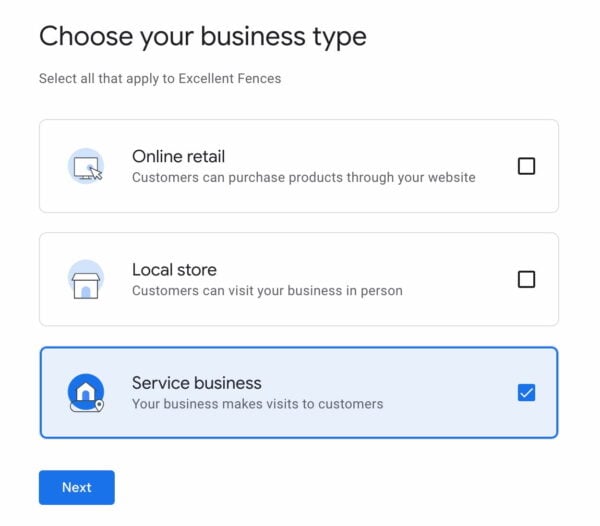
If you don’t operate a walk-up brick-and-mortar location but visit your customers in a particular geographic area, you’re called a “Service Business.” Service businesses include plumbers, carpet cleaners, and courier services. In this case, you’re still eligible for a listing. However, you’ll want to choose “Service business” when Google asks what kind of business you have.

Google asks what kind of business you are operating

Verifying your location

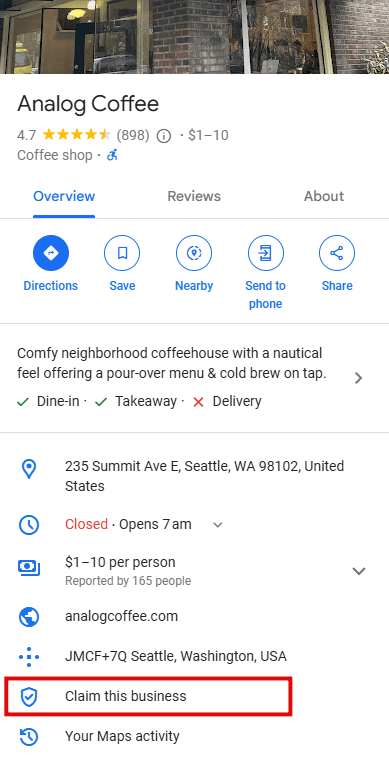
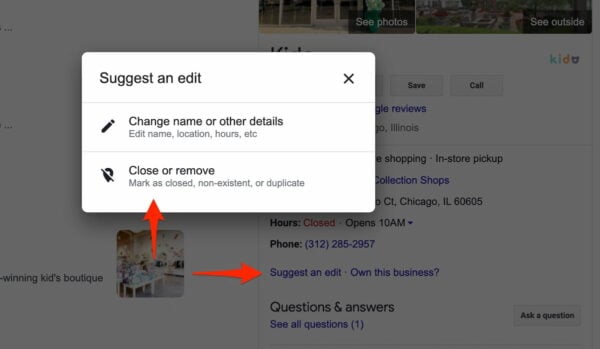
Google tries to make sure that only legitimate businesses are represented in GMB. It requires anyone claiming a Listing to verify their association with the company. The easiest way to start the process is to perform a desktop search on Google for your business name (for example, “Kido Chicago”). You’ll see a link in the panel on the right-hand side of the page that asks, “Own this business?”

Before you click that link to begin the verification process, make sure you are either not signed in to Google (you can create an account in the next step) or are signed into a Google account for your business instead of your personal Gmail. It’s not a requirement; however, sharing access to your listing with employees or other company agents from a business account will be much easier.

Screenshot of a listing for a coffeehouse. Highlighted is the
Click on Claim this business to claim the profile of this business; if you are the owner

Once you fill out the most basic information (see below for what these details are), if it can corroborate your address and phone number, Google will call and ask you to enter a PIN on the screen. If it hasn’t previously seen a business with the phone number and address you submitted, you’ll be mailed a postcard within a week with instructions on how to PIN verify.

Verify with video

Some businesses may need to verify with a video. If you own a physical store, you will need to record your location by showing street signs, your business exterior and interior, and you need to show that you’re authorized to represent this business. You will need to show all these requirements in one continuous recording, so no editing.

If you own a service business, like a plumbing or landscaping business, you don’t have a physical store. That’s why you’ll need to show street signs or the surrounding area where your business is located, your business card or a branded vehicle or business tools, and finally a proof of address. Again, this needs to be done in one continuous recording.

Primary business information

Name, Address, and Phone

This sounds simple, but it’s surprising how many business owners overthink these core attributes or try to “optimize” them. Your Name, Address, and Phone (NAP) are your thumbprint online. If they don’t reflect your business accurately in your Google Business Profile, Google—and your customers—lose trust that you are who you say you are. They will stop sending business your way.

  • Do NOT stuff keywords in your business name. Represent yourself as you would answer the phone or welcome a customer into your store. You probably see spammers doing this and succeeding all the time, but it’ll come back to bite them at some point. Google is monitoring for these kinds of abuses all the time, and they’re getting better at blocking the abusers.
  • Submit the same address you use on your website. If you’re a Yoast user, this should be the address you enter in the Yoast Local SEO plugin. Even if you’re a service-area business, you’ll have to submit a physical address, not a PO box or other mailing-only address.
  • You’ll see a map displayed just alongside your address. Zoom in and double-check that the pin is in the correct place on your business. Google’s pin precision for U.S. addresses is typically pretty good, but it can be spotty in other countries.
  • Don’t use a tracking phone number to segment customers coming from Google vs. other sources. There are ways to do this, but they’re pretty advanced. Implementing tracking numbers incorrectly can do tremendous damage to your local search rankings.

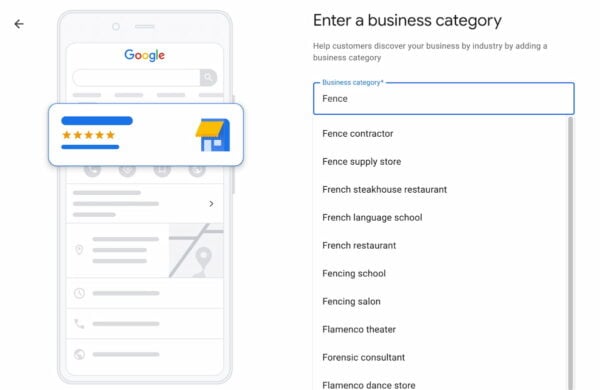
Choose a category for your business

From a rankings standpoint, the business category is the most important attribute you can optimize in your Google Business Profile. In our experience, it’s best to keep an eye on Google’s advice on categories. Remember that advice has changed frequently over the years and might change again.

Start typing, and the categories magically appear. You can add more later on

Google maintains a taxonomy of several thousand categories to describe local businesses. You’ll probably find a match pretty closely by typing in a few characters of a keyword that describes your business.

Google suggests “using as few categories as possible,” as well as categories that are “as specific as possible.” And while it’s true that Google can and does “detect category information from your website and mentions about your business throughout the web,” our advice is to specify as many relevant categories as possible on your Google Business Profile listing.

Google’s automated review system may remove one or two from your listing, but this is not spam—provided you select relevant categories. It helps you show up for as broad a range of searches as possible.

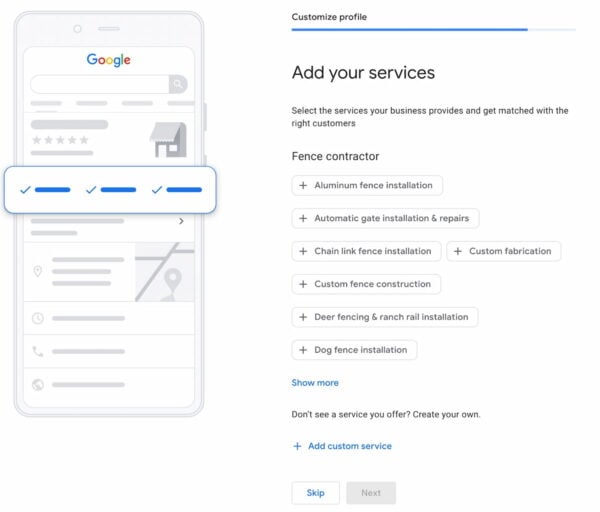
Services businesses can add the specific services you offer

Add your website

In the process, there’s a field to add your website URL, but it doesn’t have to be your “website” per se. In particular, if you operate in more than one location, you may want to enter the page on your website corresponding to the location you’re submitting to Google—rather than your homepage. Opinions are mixed on whether listing your homepage, or a location page will help you rank better, so do what’s best for prospective customers. If you think your homepage will give them the best initial sense of your business, submit it as your “website”. If a location page—or even some other page—will give your audience a better sense, submit that instead.

Add a business description

Later on, you can add a business description to your profile. It’s essential to take a moment and find an excellent way to describe your business on Google. The business description field gives you a maximum of 750 characters to convince people to visit your business. This might be the first thing people read about your business, so make it unique and exciting. Describe what your business offers precisely and how you set yourself apart from your competitors. You can also talk about your history and anything else that’s helpful for customers.

Keep the description short and sweet, and don’t try to push promotions or deals you have running. You also shouldn’t include URLs or HTML code. Give it a think, write a few descriptions and pick the best one!

A unique business description can make you stand out from the rest

More business information

After entering the attributes above, you’re asked to verify your listing. But don’t stop there. There are a few other attributes that are well worth your time to add.

Photos and images

Photos may be the most neglected attribute in all local SEO. The success of Instagram, Pinterest, and any lesser-known apps indicates how visual our internet culture has become. Consumers often select—or reject!—a business because of its photos. Not only on the content of the photos, but consumers also judge the quality and professionalism of the photos.

Photos are essential in the mobile ecosystem that Google Business Profile powers (including Google Maps), where they dominate a business’s representation in Google’s user interfaces. Try to add authentic photos instead of stock photos, and make sure the pictures reflect your business.

As with all local media or social media sites, Google Business Profile has its image format requirements. Take some time to review them and make sure you have high-quality assets for each format. You can find more on improving your images in our image SEO guide.

Business hours

Selecting your opening hours is pretty straightforward. Google has dramatically improved its interface for telling customers when you’re open over the past several years. Hours will be front-and-center wherever customers interact with your business on Google, so they should be accurate. You can even daypart multiple times during the day and add specific hours for holidays and special events.

While you can’t control it, you may be interested to know that Google now displays the busyness of your business in real time. This is based on aggregate location-tracking visitors with Android phones and iOS Google Maps users with location services enabled.

See when a business opens and when the most popular times are

Specific categories of businesses will have the option to add their menu. Suppose you’re lucky enough to be in one of these categories. In that case, we highly recommend adding this, as it gives Google an additional set of keywords that your business should consider relevant.

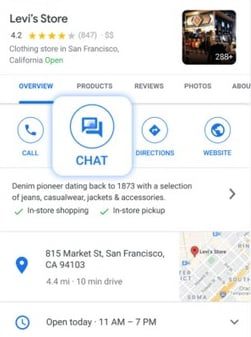
Accept messages for more leads

By default, this feature is turned on. It will add a messaging feature to your Business Profile, and it can be a great way to generate more leads. Of course, you need to keep this chat feature in mind and check regularly for any messages. If you respond quickly and helpfully, you’ll probably turn visitors into customers.

A screenshot of a Levi's store Google Business profile. The chat function is made bigger to highlight where it is on the page.
The chat function

If you’re slow to respond to customers, however, Google might disable this feature for you. So, if you’re not sure you’ll be able to keep track of this feature, it might be better to turn it off.

Share posts on your Business Profile

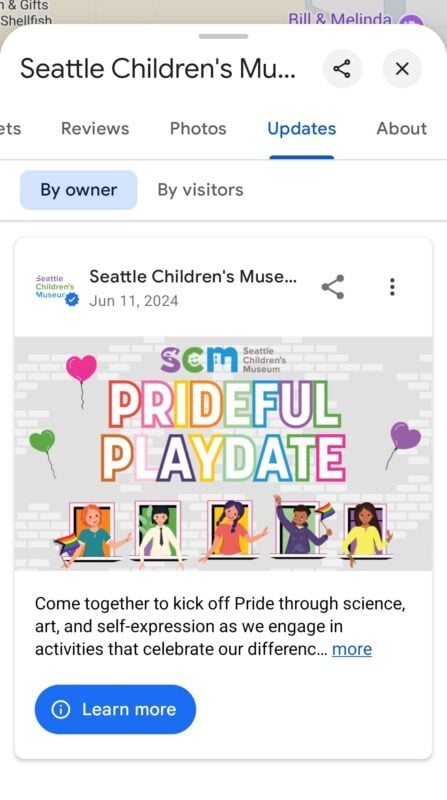
The Posts feature is a very useful way to communicate with your customers from your profile. With posts, you can connect with existing and potential customers through your Business Profile on Google Search and Maps. You can create and share announcements, offers, new or popular items in stock, or event details directly with your customers. Use this to promote your sales, specials, events, news, and offers. You can even add videos and photos to posts to make them more interesting!

A screenshot of the Seattle Children's Museum post on their Business Profile about their prideful playdate event in July.
Example of the post feature

Many options

Since Google Business Profile has grown quite a bit over the years, there are many more options to explore. You don’t need to use all of them, but some are valuable. For example, the Products feature to highlight your products in your listing is a great way to get people interested in what your offer.

Another great option is the possibility of getting potential customers to ask questions that you can respond to. Keep in mind that others can also answer these questions, so keep an eye on this. When it works, it can be a real help in turning visitors into customers.

And, as always, get reviews for your business! With a Business Profile, you can even respond to these reviews. It doesn’t have to be a message. Nowadays, you can also quickly respond with an emoji, like a heart or fire emoji.

Ranking factors beyond your control

There are two significant local search and local SEO ranking factors over which you have little control. They both have to do with the physical location of your business.

The location of your potential customer

The first is the proximity of your business to the location where your prospective customer is performing their search. All other things being equal, Google will display a company closer to the searcher than one farther away from them.

In the early years of Google, its algorithm favored businesses close to the center of a given city or its “centroid.” This was partly because Google wasn’t as good at detecting the location of the searcher as they are now. It defaulted to showing businesses in the areas with the highest population density.

Nowadays, this factor has declined in importance. Especially for mobile searches where Google has a precise idea of where you are. Google has also partially improved at detecting desktop searchers’ location information through surreptitious collection means.

A physical store in the city of your customer’s search question

The second factor is having an address in the city in which your customer is searching.  If your customer is searching in Seattle, your Tacoma or Bellevue-based coffee shop won’t appear. This is simply because it’s irrelevant to the customer’s search.

Short of opening additional locations to target areas where high concentrations of your customers are searching, there’s not much you can do to optimize for these ranking factors. Still, you should be aware of their importance.

Google Business Profile Insights

Google provides a free, lightweight analytics package as part of GBP. This gives you a basic sense of how customers and potential customers view and interact with your listing.

Insights show how often your listing appears in plain old search vs. Google Maps. It also shows the number of clicks to your website, requests for driving directions, phone calls, and more.

There’s also a breakdown of how many customers see your listing for direct searches (for your business specifically) vs. discovery searches (for businesses in your category). While no one outside of Google is entirely sure how they calculate the discovery number, it’s probably as good a barometer for the overall strength of your local SEO as any, mainly if you track it over time.

Troubleshooting listing issues

The most typical GMB troubleshooting issue continues to be duplicate listings for the same business. While it’s gotten harder to detect duplicate listings, it’s much easier to close them.

The first step to identifying duplicates is to search for your business name on Google. If it looks like multiple listings refer to your business, select the one you’d like to report as a duplicate and click “Suggest an Edit.” Follow the suggestions to have the listing marked as duplicate.

Google support staff are generally responsive to these reports within a reasonable time. If you continue to have trouble, ask multiple people—co-workers, friends, family members, or relatives—to report the same problem, and it’s more likely Google will look at it. If your issue seems particularly thorny, you’re most likely to get a response by tweeting @googlemybiz, the official Twitter support channel for Google Business Profile.

Some time ago, Google added a new feature to the Google My Business dashboard. A feature that allows you to manage your reviews and report reviews for removal. You can also check the status of reviews you’ve already reported here. Keep in mind that Google will only remove reviews that violate their policies, such as irrelevant or offensive content.

Structured data and Yoast Local SEO

Google increasingly depends on structured data to determine what your site is about and which elements represent what. This is true for your business information, including the information that Google Business Profile uses. Make sure you add the correct structured data to your site. Enhance your NAP details, opening hours, reviews, product information, et cetera, with Schema.org data. This will make it much easier for Google to determine the validity of your listing. Several tools can help you with this, including our Yoast Local SEO plugin.

Local SEO is critical, even with Google Business Profile

So, you should activate and maintain your Google My Business account and make it awesome. But to get the most out of your listings and to get good rankings, you must have your site in order as well. Optimize every part of it. Create local content for your chosen keyword and business location and get quality local backlinks to build a solid link profile. Ask customers to review your business onsite or on My Business. Make sure your listing is active and attractive; as we said, inaccurate profiles are no good.

Read more: The ultimate guide to small business SEO »

Coming up next!

Google Merchant Center: A guide for ecommerce retailers

Ecommerce businesses always look for ways to improve their online presence to drive sales. Google Merchant Center (GMC) is an essential tool for achieving this, as it helps businesses showcase their products across Google’s ecosystem. This guide aims to provide retailers with an understanding of GMC. It offers useful insights on optimizing product listings and enhancing visibility on Google Shopping.

Table of contents

What is Google Merchant Center?

Google Merchant Center (GMC) is a free-to-use platform for ecommerce businesses that want to use Google’s extensive reach. It is a centralized hub where retailers can upload and manage product data. With this, business owners can make their products visible across various services such as Search, Maps, YouTube, and Google Shopping. Merchant Center is an important part of the ecommerce SEO puzzle.

The homepage of Google Merchant Center

Google Merchant Center Next is now live

With the recent upgrade to Merchant Center Next, the platform offers a more streamlined and intuitive experience. Now, it’s much easier to manage products and improve their performance.

After signing up and logging in, retailers get access to features like Product Studio, an AI-powered tool for creating product images and videos. This tool generates tailored product assets, improves image quality, and removes backgrounds. Plus, the unified product list also allows omnichannel merchants to manage online and local inventory seamlessly.

The new analytics tab provides comprehensive insights into market trends and pricing strategies. For instance, the Pricing tab in Merchant Center Analytics provides retailers with valuable insights into how their product prices compare to those seen by customers on Google.

an image showing the new overview page in google merchant center
The Google Merchant Center Next is much easier to use and comes with great new features

This tool allows merchants to evaluate their pricing strategies by seeing if their products are more expensive, cheaper, or comparable to those competitors offer. The tab offers a breakdown across various brands and products, identifying those with significant price differences. In addition, it also provides sale price suggestions designed to make you more competitive.

Merchant Center Next also has a much better design, with intuitive navigation and easy website verification options. Finally, merchants have an easy-to-understand interface to manage their product information and optimize their presence on Google. The platform’s advanced analytics tools offer a better view of business performance.

The benefits of using Merchant Center

Google Merchant Center offers significant advantages for ecommerce businesses that focus on sales growth. It increases visibility by allowing products to appear in Google Shopping results and ads, reaching millions of potential customers. This broader audience increases conversion chances.

The platform enhances the shopping experience by providing detailed product listings with high-quality images and descriptions. This helps customers make quick, informed decisions, boosting conversion rates.

GMC also provides data-driven insights through its analytics tools. These tools help businesses optimize product listings by analyzing metrics like pricing, clicks, and conversions, improving their ecommerce strategy.

Additionally, GMC supports both free and paid listings. Free listings enhance visibility for smaller businesses without extra costs, while paid ads more effectively target specific customer segments.

Integration with Google’s ecosystem is seamless. It connects with Google Analytics and Google Ads, offering a comprehensive view of marketing efforts and improving ROI measurement.

Lastly, GMC gives businesses flexibility and control over product presentation and placement. This ensures marketing efforts align with business goals. An AI-powered tool like the Product Studio also helps build robust product data, enhancing efficiency.

Setting up Google Merchant Center

You’ll need to set up a GMC account to use Google’s network to improve your ecommerce business. Here’s a step-by-step guide to help you through the process:

  1. Sign up for Merchant Center:

    Visit the Google Merchant Center website and click “Sign Up for Free” to begin registering.

  2. Provide business information:

    Enter your business name, address, and contact details. This information will be used across the various features and tools in GMC. Specify your business model, whether you sell products online, in a physical store, or both. This flexibility allows GMC to tailor its features to suit your business needs.

  3. Verify and claim your website:

    Follow the instructions for the method you choose to complete the verification process. You can use an HTML file upload, an HTML tag, Google Analytics, Google Tag Manager, a code via a business email address, or an ecommerce platform (like Shopify, WooCommerce, or Wix).

  4. Configure shipping and tax settings:

    Set up shipping options and tax information. These settings are important as they affect how your products appear in listings and ads. Highlight any special offers like free shipping to attract more customers. Comply with Google’s shipping and tax information requirements to avoid disapprovals.

  5. Add product information:

    Once your account is set up, add your product information. This involves creating a product feed, which we will cover later.

Integrating with third-party platforms

Managing product data manually can be time-consuming and prone to errors. You can automate this process by integrating Google Merchant Center with third-party ecommerce platforms. Using this process helps your product listings be consistently updated and accurate.

It’s easy to connect your ecommerce platform. In your Merchant Center account, navigate to the “Settings” menu and select “Data sources” and “Add product source” to link it. Follow the on-screen instructions to connect your platform (e.g., Shopify). This typically involves authorizing the connection and selecting the data you wish to sync.

an image showing how to  add product data sources or feeds in google merchant center
Adding product data sources or feeds is also easier in Google Merchant Center

After integration, you can manage your products directly within Merchant Center. Make any necessary updates or modifications to ensure your listings remain competitive and compliant with Google’s policies.

Benefits of integrating your ecommerce platform

There are many benefits to integrating your ecommerce platform with Google Merchant Center. For one, you get automatic updates. So product information, including images, prices, and descriptions, is automatically synced from your ecommerce platform to GMC. This eliminates the need for manual data entry and reduces the risk of discrepancies.

Integrating also leads to streamlined management, as you can manage product data directly from your ecommerce platform. As a result, you’ll free up time and resources to focus on other aspects of your business. It should also lead to fewer errors in your product data. Automated syncing minimizes human errors, so the product information displayed on Google is always accurate and up-to-date.

Merchant Center product data feeds

Product data feeds (or data sources as they are now called) are the backbone of your Google Merchant Center account. These serve as the primary source of information that Google uses to display your products across its platforms. You should optimize these feeds to represent your products accurately and reach the right audience.

What is a product data feed/data source?

A product data feed or data source is a structured file containing detailed information about your products. This file includes attributes such as product titles, descriptions, prices, and images. Google uses this data to create Shopping ads and listings, so keeping it accurate and complete is critical.

Methods of adding products

Google Merchant Center offers multiple methods for uploading product data, providing flexibility to fit your business’s unique needs.

Automatic addition from your online store

Google can automatically add products from your online store using the structured data markup (schema.org) on your product pages. This method ensures that any changes made on your website, such as price updates or product availability, are reflected in Merchant Center. Simply provide your store URL and implement structured data markup on all product pages to enable automatic updates.

Connecting ecommerce platforms

We’ve already mentioned this option before. Connect platforms like Shopify and WooCommerce to Google Merchant Center to sync product data automatically. This integration ensures product information is consistently updated without manual intervention, reducing errors and saving time.

File uploads

Upload product data using a file (e.g., TSV, TXT, XML). This versatile method allows you to compile data from multiple sources into a single file. Make sure to use proper formatting to avoid errors. You can also host the file at a URL for daily syncing with Merchant Center.

Google Sheets template

You can also use a Google Sheets template to manage product data. Any changes made in the spreadsheet automatically sync with Merchant Center. This provides a user-friendly interface for managing data, with automatic updates ensuring consistency.

Manual product entry

You can manually enter product details one by one in Google Merchant Center. This is ideal for small inventories or specific product updates. It allows you to add, edit, or delete products as needed easily.

Content API for Shopping

The Content API for Shopping is a powerful tool that allows developers to programmatically manage their Google Merchant Center accounts. It offers a more dynamic and efficient way to handle large or complex product inventories. This interface lets you automate updates and maintain accurate product data across Google’s platforms.

The elements of a product data feed

Optimizing your product data source involves attention to several key elements:

  • Product titles: To improve search visibility, use clear, descriptive titles with relevant keywords. Avoid using promotional text or excessive punctuation.
  • Product descriptions: Provide detailed and accurate descriptions, highlighting unique features and specifications. Include relevant keywords naturally.
  • Images: Use high-quality images with a plain background. Make sure images are clear, professional, and accurately represent the product.
  • Prices: Keep pricing current and competitive. Keep consistency between the price on your website and in the data feed.
  • Availability: Update product availability regularly to reflect current stock levels. Use attributes such as “in stock,” “out of stock,” or “available for pre-order.”
  • Unique product identifiers: Include GTINs, MPNs, and brand information to help Google accurately categorize and display your products.

Maintaining your Merchant Center account

Regularly checking your GMC account is essential for identifying opportunities and fixing issues. It has various account monitoring tools, such as the overview page. This page provides a snapshot of your account’s performance. It highlights key metrics such as product status and performance trends. Use this page to identify items needing attention and assess the impact of recent changes.

You can use Google Merchant Center’s Products tool to identify errors and issues within your product data feed. Regularly check the “Needs attention” section for warnings and errors. Here, you’ll find missing attributes or policy violations so you can fix them to avoid product disapprovals.

The new version of Merchant Center includes a much-improved analytics section. You’ll find detailed performance reports to analyze pricing, clicks, impressions, and conversion rates here. Use these insights to understand customer behavior and make informed decisions to optimize your product listings and campaigns.

Common issues and how to fix them

Addressing issues in your Google Merchant Center account is crucial for keeping products visible and compliant. Common problems include data errors, policy violations, disapprovals, and performance issues.

For data errors, update your product feed to meet Google’s specifications, correcting any missing attributes or pricing discrepancies. Comply with Google’s Shopping policies to prevent account suspension.

Review disapproved products to identify and fix issues, then request a re-review. Optimize product titles, descriptions, and images to boost relevance. Adjust bids and targeting in Google Ads to improve visibility and reach.

Strategies for performance improvement

Implement effective strategies to boost your Google Merchant Center performance. Update your product data feed with accurate pricing and availability. Enhance product listings with detailed descriptions and high-quality images, and consider adding ratings to build trust.

Use Merchant Promotions to highlight special offers and leverage Google Ads’ audience targeting to reach specific customer segments. Test and optimize campaigns with various ad formats and bidding strategies to refine your approach. You can sustain growth and maximize your ecommerce success by actively managing your GMC account.

To maximize Google Merchant Center’s potential, leverage advanced features like Local Inventory Ads to enhance product visibility and attract local shoppers. Try out Product Studio for AI-powered content creation, streamlining the production of high-quality product assets.

Enhance customer experience by providing clear return policies and ensuring secure data collection. Integrate with tools like Google Analytics and Google Ads for comprehensive insights and targeted marketing strategies.

an example of editing product images with google product studio
Google Product Studio uses AI to help you improve your product listings

All about Google Merchant Center

Google Merchant Center is an indispensable tool for ecommerce businesses that aim to boost their online visibility and sales. By following this guide, SEO experts can harness the full potential of GMC, driving growth and achieving ecommerce success. Login to your GMC account today, start optimizing and watch your business thrive.

Coming up next!

Dropshipping SEO makes your Shopify store successful

Over the years, Shopify has become a leading platform for entrepreneurs looking to tap into the dropshipping model. This approach allows sellers to offer a wide range of products without the hassle of managing inventory or logistics. Understanding how to use SEO effectively is crucial if you want to fully take advantage of the opportunities dropshipping with Shopify provides.

Table of contents

Understanding dropshipping on Shopify

Dropshipping is a distinct way for sellers to approach ecommerce. Dropshipping helps you start and scale an online retail business with minimal financial risk by eliminating the need for inventory management and upfront product investments.

What is dropshipping?

Dropshipping is a fulfillment method where a seller operates an online storefront without holding any physical inventory. Instead, the seller partners with third-party suppliers who manage inventory and logistics, shipping products directly to the end customer. This business model minimizes upfront costs and overhead, enabling you to offer a wide array of products and swiftly adapt to market trends. However, success in dropshipping hinges on strategic supplier relationships, effective digital marketing, and exceptional customer service to meet consumer expectations.

Key benefits of dropshipping

It’s very easy to build an online business based on dropshipping. It doesn’t cost that much to get started. Since there’s no need to purchase inventory upfront, you can start your businesses with less capital.

This business offers great flexibility and scalability. With no physical inventory, you can easily add or remove products and scale your business according to demand. The same goes for the choice of products. Access to huge numbers of products from suppliers worldwide allows you to diversify your offerings and cater to customer needs.

Last but not least, it doesn’t matter where you are located. You can manage your online business from anywhere worldwide with an internet connection.

The ethics of dropshipping

Dropshipping can sometimes raise questions about ethics, especially as more people care about sustainability and fair treatment. As a dropshipper, you can positively impact by choosing suppliers who treat their workers well and use environmentally friendly materials. This means offering products made under fair conditions and that don’t harm the environment. Being clear about your commitment to these values can help you earn the trust of customers who care about making responsible choices.

Sustainable packaging and efficient shipping methods can further show your dedication to protecting our planet. Focusing on ethical practices and following rules and regulations helps you build a business that thrives and supports the well-being of people and the environment.

You can build a successful dropshipping business, but it often requires more dedication and effort than many initially expected. Although dropshipping takes out the logistics part, the other challenges of launching and running an ecommerce business remain. As the owner, you’re tasked with handling returns, managing repair or warranty issues, responding to customer inquiries, and ensuring your products are both high quality and legally compliant. These are the kind of responsibilities many frequently underestimate.

Why choose Shopify for dropshipping?

Shopify is a flexible and user-friendly ecommerce platform that makes the dropshipping process easier. It offers seamless integration with various dropshipping apps, allowing sellers to easily add products to their stores. Shopify’s expansive ecosystem supports everything from payment processing to marketing, making it an ideal choice for dropshippers of all experience levels. With Shopify, you can start a dropshipping business with minimal investment.

Even some multi-million dollar companies have started as a dropshipping business, like Gymshark

How to start dropshipping on Shopify

Select a niche that aligns with your interests and market demand to start dropshipping with Shopify. Research potential products and reliable suppliers using Shopify’s app store to find tools for product selection and order fulfillment.

Once your store is set up, create an engaging user experience and optimize your product listings. Effective marketing strategies should also be implemented to attract and retain customers.

Choosing Shopify as your dropshipping platform gives you access to a powerful toolset. These tools help you simplify your operations and enhance your business’s growth potential. Whether starting from scratch or looking to scale an existing venture, Shopify gives you the flexibility and support you need to thrive in ecommerce.

A quick start guide on how to drop ship on Shopify

Starting a dropshipping business on Shopify is straightforward. Here’s a step-by-step guide to get you started:

  1. Create a Shopify account. Go to Shopify’s website and sign up for a free trial. Once you’re ready to launch, choose a pricing plan that suits your business needs.
  2. Select a niche and products. Research potential niche markets that interest you and have demand. Use tools like Google Trends and market research to select products that appeal to your target audience.
  3. Find reliable suppliers: Use Shopify’s app store to find dropshipping apps like Zendrop or Spocket to source products. Choose suppliers known for quality products and reliable shipping.
  4. Set up your Shopify store. Customize your store with a memorable name and logo. Use Shopify’s themes to design your storefront and create a seamless shopping experience.
  5. Add products to your store. Import products from your dropshipping app to your Shopify store. Write detailed product descriptions and set competitive pricing.
  6. Configure payment and shipping settings. Set up payment gateways like PayPal or Shopify Payments and determine shipping rates and options that suit your business model.
  7. Launch your store. Review all settings and ensure everything functions smoothly. Publish your store and start marketing to attract customers.
shopify app store showing a selection of dropshipping apps
Shopify supports a ton of dropshipping platforms

SEO is key for Shopify dropshipping success

If you are in the dropshipping business, you are probably not alone. Even if you have picked a good niche, there’s still competition. To get traffic and potential customers, you need SEO (Search Engine Optimization). Shopify SEO is crucial for the success of any dropshipping store.

With SEO, you optimize your online store to improve its visibility in search engine results. The goal is to attract organic traffic without relying heavily on paid advertising. If you implement these SEO strategies well, you can significantly enhance visibility, drive traffic, and increase sales for your store.

SEO strategies for Shopify dropshipping

SEO for drop shippers is not that different from other types of ecommerce SEO. The main goals are getting your site structured properly, well-optimized in terms of performance, and filled with excellent, well-researched, and targeted content. This will help Google find, index, and rank your products.

But remember that getting Google to index and rank brand-new websites is harder than ever. Getting Google to see your site positively takes a lot of work. It will take quite a while before every one of your products is indexed—if that even happens. Be sure to set up a Search Console account to see your store’s indexing status and use the feedback provided to improve your store.

Last but not least, you should always monitor what you are doing. Analyze your SEO performance using tools like Google Analytics and Shopify Analytics. Monitor key metrics such as organic traffic, engagement, and conversion rates — find issues, fix and improve.

Keyword research and strategy

Keyword research is key in all types of SEO. Use tools like Google Keyword Planner, Ahrefs, and Semrush to identify relevant keywords that potential customers are searching for. Focus on long-tail keywords that reflect specific search intents, such as “eco-friendly yoga mats” or “durable waterproof hiking boots for women.” After that, develop a keyword map that aligns with your product categories and pages, and make sure that each page targets specific keywords without overlap.

On-page SEO optimization

Optimizing individual pages and writing unique content is a major part of drop shipper SEO. Write unique and engaging product descriptions highlighting each product’s benefits and features. Avoid using generic manufacturer descriptions to ensure originality and relevance.

Next, structure your content with headers and subheaders. Use H1, H2, and H3 tags to structure your content. Each page should have a clear hierarchy, with primary keywords in the H1 tag and supporting keywords in subheaders.

Write compelling product titles and meta descriptions that include target keywords. Use tools like Yoast SEO for Shopify to optimize these elements, and make sure they are engaging and informative.

Technical SEO

For the technical part of the story, focus on site speed and mobile optimization. Make that your Shopify store loads quickly and is mobile-friendly. Use tools like Google PageSpeed Insights to identify and fix performance issues. Also, make sure there are no security and trust issues on your website. Do make sure your site is accessible and complies with web accessibility standards.

Image optimization

Image SEO is a big part of SEO for dropshippers. Use unique images if possible. Make sure images are compressed and optimized for fast loading times without compromising quality. Shopify does a lot of this by default, but it doesn’t hurt to keep an eye on it. Also, use descriptive file names and alt attributes for all product images. This improves image search visibility and enhances accessibility for users with visual impairments.

Content marketing and blogging

You should invest in content marketing to help rank for more terms and show authority. Develop a content marketing strategy with a blog featuring informative and engaging content related to your niche. Topics could include “The Benefits of Sustainable Fashion” or “How to Choose the Right Yoga Mat.” Use internal links within blog posts to direct readers to related product pages, enhancing the user experience and SEO value.

Schema markup and rich snippets

Proper schema structured data implementation for your products is essential if you want them to stand out in the search results. Add product and related properties to your schema markup to provide search engines with easy-to-understand data about your products. This can enhance search result listings with rich snippets, such as product ratings, shipping policies, and prices.

Building quality backlinks

Focus on acquiring high-quality backlinks from authoritative and relevant websites. Engage in guest blogging, participate in industry forums, and collaborate with influencers to gain valuable links. Avoid blackhat tactics like buying links or using link farms, as these can lead to penalties from search engines.

Making the most of Yoast SEO for Shopify

Use the Yoast SEO app for Shopify to streamline your SEO efforts. This tool offers insights and recommendations for optimizing content, managing meta tags, and improving readability, making it easier to implement effective SEO strategies. It even has AI-powered tools to help you write titles and meta descriptions.

an image of the interface of yoast seo for shopify showing the post editor and colored feedback traffic lights
Yoast SEO for Shopify has a suite of tools that help you improve the visibility of your dropshipping store

More SEO tips

There’s always more to do with Shopify SEO, so keep working on your dropshipping store. For instance, if your dropshipping store has a local component, optimize for local SEO by setting up a Google My Business profile and ensuring consistent NAP (Name, Address, Phone Number) information across directories.

You can also create specialized landing pages for specific campaigns or product categories. These pages can target niche keywords and provide a focused experience for visitors, improving conversion rates.

AI and automation tools for dropshipping SEO

It’s 2024, so you can use AI tools to enhance your SEO strategy and speed up the work. Use AI to generate content ideas, optimize product descriptions, and analyze competitive keywords. Remember to give it the human touch, though!

You need SEO to succeed with Shopify dropshipping

SEO is an important component of a successful Shopify dropshipping business. While it requires patience and consistent effort, the rewards for increased visibility and sales potential are significant. Implementing these SEO strategies, including tools like Yoast SEO for Shopify, helps you position your Shopify store for long-term success in the dropshipping business.

Coming up next!

Understanding shopping cart abandonment

As webshop owners, we continuously refine our checkout process by monitoring shopping cart abandonment and running A/B tests. Why do some users fail to make purchases even after adding products to their carts? This article explores that question while considering diverse perspectives about abandoned shopping carts.

Table of contents

Shopping cart abandonment occurs when online shoppers add items to their virtual cart but leave the site without completing the purchase. This often results from unexpected costs, complex checkout processes, or limited payment options. Addressing these issues is vital for ecommerce businesses to boost sales and improve customer satisfaction. Optimizing this is a huge part of ecommerce SEO and Shopify SEO.

Shopping cart abandonment continues to challenge ecommerce businesses, with statistics showing that nearly 70% of potential purchases are left incomplete. This is a huge annual loss. While this represents a significant economic issue, exploring it unveils a complex mix of cultural, technological, and behavioral factors.

Economic and behavioral insights

The many abandoned shopping carts may reflect broader consumer behavior trends, especially in a cautious post-pandemic environment. Consumers are increasingly deliberate about spending, influenced by economic factors like inflation and financial uncertainty. This trend aligns with the behavioral economic principle of loss aversion, where the fear of making a poor purchase decision outweighs the potential benefits.

Cultural variations in shopping behavior

Cultural influences profoundly affect shopping behaviors, with some cultures prioritizing the experience over the transaction. In regions where shopping is viewed as a social activity, higher abandoned shopping cart rates might occur as consumers enjoy browsing without the intent to purchase immediately. This cultural perspective invites businesses to consider localized strategies that respect and leverage these social shopping practices.

For some, shopping isn’t just a functional task; it’s an enjoyable activity akin to window shopping. These users may add items to carts for fun rather than purchase. Online window shopping could explain some cart abandonment, as users may use carts as temporary wish lists, planning to revisit them later.

Technological and psychological dimensions

Technological advancements, such as predictive AI, offer promising solutions to reduce abandoned shopping carts by addressing consumer hesitations. However, this raises privacy concerns, prompting the need for transparent data practices. Psychologically, shoppers may experience decision fatigue or become overwhelmed by choice, leading to abandonment. Simplifying choices and providing clear, concise information can alleviate these issues.

Ethical and environmental considerations

The rise of sustainability and ethical consumption reshapes consumer expectations. As environmental concerns become more prominent, consumers demand transparency and ethical practices from retailers. Businesses that fail to meet these expectations risk losing customers who prioritize these values, highlighting the need for authentic corporate responsibility.

Alternative shopping models

Community-based buying and cooperatives represent alternative shopping models emphasizing collective purchasing power and shared values. These models can reduce abandonment by fostering community and commitment among consumers. Additionally, they challenge traditional capitalist paradigms, offering a collaborative approach to consumption.

Nike has a nice and clean shopping cart with options to save favorite items quickly

Causes of cart abandonment

The reasons for cart abandonment can be surprisingly straightforward, often overlooked during checkout optimization. While many focus on preventing abandonment, it’s crucial to understand why users utilize shopping carts initially. As we discussed, could cultural practices or economic conditions influence shopping behavior, leading to varying patterns of cart usage across different regions?

Research by Close and Kukar-Kinney (2010) highlights that the primary focus shouldn’t solely be on abandonment but also the initial use of shopping carts. Many assume users add products to carts to buy them, but this isn’t always true. A significant portion of users treat shopping carts as wish lists or use them to calculate total costs, including potential hidden fees.

This raises the question: How do digital shopping habits compare to traditional in-store shopping, and what lessons can be drawn from other industries, such as hospitality or travel, where reservations and bookings often follow similar patterns?

Kaufman-Scarborough and Lindquist (2002) also note that shopping carts serve purposes beyond immediate purchases. This implies that “abandonment” might be an oversimplification. Some users explore and tally future purchases without intending to buy immediately.

Session time-out concerns

Session time-out refers to the automatic expiration of a user’s shopping session on an ecommerce website after a period of inactivity. When a session times out, the items in the user’s shopping cart may be lost or require re-addition, leading to frustration and potential abandonment. This technical limitation can significantly impact the shopping experience, particularly for users who take longer to make purchase decisions or are interrupted during the process.

To mitigate abandonment caused by session timeouts, you can extend session durations. You can also implement persistent shopping carts or reminders to encourage users to complete their purchases before the session expires.

Challenges in understanding cart usage

Determining why users abandon carts and how they use them is challenging but possible. Studies and enhanced ecommerce analytics in tools like Google Analytics can provide insights. Exit intent surveys, which appear when users attempt to leave, can offer valuable feedback on abandonment reasons.

The famous Baymard Institute statistics show an average cart abandonment rate of 70.19% (as of September 2024), highlighting the need for comprehensive analysis. Comparative studies across different retail sectors or geographic markets reveal unique patterns or universal truths about consumer behavior.

The Baymard Institute identified several causes of cart abandonment. Here are the main ones:

  • 48% Extra costs too high (shipping, tax, fees)
  • 26% The site wanted me to create an account
  • 25% I didn’t trust the site with my credit card information
  • 23% Delivery was too slow
  • 22% Too long/complicated checkout process
  • 21% I couldn’t see/calculate the total order cost up-front
  • 18% Returns policy wasn’t satisfactory
  • 17% Website had errors/crashed
  • 13% There weren’t enough payment methods
  • 9% The credit card was declined

There are many opportunities to apply insights from mobile app user experience research to improve mobile shopping cart processes. Technological advancements, such as AI and machine learning, can also personalize and streamline the shopping experience on mobile devices.

Suggestions for improvement

To effectively address cart abandonment and its alternative uses, we must consider a range of strategies that incorporate diverse perspectives and innovative thinking. Here are some suggestions that help improve the shopping cart experience.

1. Transparent pricing and costs

While clearly displaying prices and additional costs like shipping is fundamental, consider how cultural perceptions of pricing transparency might vary. In some regions, consumers expect negotiation, while others value fixed, upfront pricing. Brands can experiment with dynamic pricing models or offer region-specific promotions to align with local expectations.

2. Diverse and flexible payment options

Beyond merely outlining payment methods, consider integrating payment innovations such as digital wallets or microfinancing options. These can cater to tech-savvy consumers and those with limited access to traditional banking. Offering payment flexibility reduces barriers and aligns with the growing trend toward financial inclusivity.

3. Streamlined checkout process

Defining checkout steps is crucial, but personalizing the process is equally important. Use data analytics to tailor the checkout experience based on user behavior, such as pre-filling information for returning customers or offering fast-track options for those in a hurry. To minimize friction, consider implementing one-click checkouts, similar to Amazon’s model.

4. Wish lists and alternative engagements

Implementing wish lists is a practical way to differentiate between genuine abandonments and alternative cart uses. However, expanding beyond traditional wish lists to include social commerce features — like sharing wish lists with friends or integrating with social media platforms — can enhance the shopping experience. This builds community and taps into the influence of peer recommendations. Retargeting and cart recovery email campaigns are also valid options.

5. Social commerce and community-driven experiences

Social commerce and community-driven shopping are reshaping how consumers interact with brands. By creating platforms where users can collaborate, share reviews, or engage in group buying, businesses can foster a sense of community that reduces shopping cart abandonment. These experiences transform shopping from a solitary activity to a shared journey, increasing consumer commitment.

6. Ethical and sustainable practices

Aligning with consumer values on sustainability and ethics can mitigate cart abandonment. Clearly communicate how products meet ethical standards, whether through sustainable sourcing or fair trade certification. Transparency can reassure consumers and reduce shopping cart abandonment driven by ethical concerns.

7. Technological integration and innovation

Explore technologies like augmented reality to offer virtual try-ons or 3D product visualizations. These innovations can reduce uncertainty and enhance consumer confidence, particularly in fashion and home furnishings, where physical interaction with products is traditionally valued.

8. Feedback and iterative improvement

Encourage consumer feedback at various shopping journeys to identify pain points leading to abandonment. Based on this feedback, implement iterative improvements, ensuring the shopping experience evolves in line with consumer expectations and technological advancements.

These strategies give businesses insight into the issues and solutions that reduce shopping cart abandonment rates. As a business owner, you want to improve the overall shopping experience for your customers. This comprehensive approach addresses practical and emotional aspects of consumer behaviors. The goal should be to foster loyalty and encourage conversion in a difficult ecommerce environment.

Stumptown Coffee Roasters offers different ways to shop, including a subscription and an option to donate part of the purchase

How do you handle shopping cart abandonment on your site? Do you provide wish lists? Consider these insights to optimize your website’s shopping experience. Maybe you borrowed other innovative strategies from other industries or cultures for your approach to reducing cart abandonment? If not, take a look around and get inspired!

Coming up next!

Black Friday & holiday season SEO 2024: 10 tips to start preparing!

The summer has just ended. Should you already start preparing for Black Friday and the holiday season? Yes! They’re the biggest sales of the year, and ranking in Google is something you take time to do. It’s never too early to start getting your deals ready. So, if you have an online shop or an ecommerce store, let’s start working on your holiday season and Black Friday SEO immediately!

Don’t forget that Black Friday (November 29, 2024) and Cyber Monday (December 2, 2024) are kicking off this year’s holiday shopping season. You can set up a lot of content for all occasions. In this post, we’ll review some things you can do to prepare!

Table of contents

Today, people are used to shopping online. It’s easy and convenient. You don’t have to travel only to find something out of stock. Plus, online stores often offer payment plans. Shopping online is so popular that online sales in the USA during the holiday season hit a record of $221 billion last year! And the numbers will only continue to rise. That’s why it’s safe to assume that people will buy many (if not most) holiday gifts online this year.

Staying on top of trends to prepare for the holiday season is good. E-commerce is still growing, and consumers expect more every year. Here are some actionable tips for the upcoming Black Friday and holiday season to improve your SEO:

  1. Discount deals and alternative payment options (Buy now, pay later) should be part of your ecommerce strategy
  2. Brands should provide a consistent purchasing experience across digital/online and physical stores
  3. To minimize returns, brands should make their product pages as comprehensive as possible
  4. Holiday season marketing campaigns should be tailored to each platform to ensure maximum effectiveness

Online is where it’s at

Of course, in-store or curbside pick-up will still prove popular. However, most people research their ecommerce purchases online – sometimes weeks in advance! So don’t be surprised when the holiday shopping season starts well before Black Friday and continues for weeks.

Extending Black Friday, Cyber Monday, and other holiday season online deals for a few days or weeks can be a good idea. This is especially true if you want to prevent huge crowds from gathering at your store on a specific day. That won’t be a good shopping experience for anyone involved, so spreading these deals over an extended time is probably better.

Start preparing in time

Dive into the data you amassed during previous Black Friday and Cyber Monday events, and see if you can come up with improvements for your holiday season SEO. Bear in mind that it takes a while for content to rank. So, to keep up with the competition, try to get your content in gear at least 45 days ahead. That’s often recommended. Of course, you can always start preparing earlier if that works better for you. Your schedule could look something like this:

  1. 45 Days in advance: Post your promotion to your website calendar and post a save-the-date post on social media and in your email newsletter).
  2. 7 Days in advance: Post upcoming events/promotions on social media and via email. Try to encourage other (small) businesses to share it with their followers.
  3. 1 Day in advance: Post an event reminder post on social media.

It’s a good rule to remember these steps and time frames. However, you can do much more than set up new pages and renew old ones. Let’s look at a few practical tips.

1. Do holiday season keyword research

Keyword research is important all year, but especially during the season when your online store starts having big sales. You have probably worked on this research previously, but now is the time to dive in again. There are always things to learn, like developments in your industry, changes in consumer behavior, or new trends and topics to discuss.

Start early with your research to give yourself enough time to produce high-quality, helpful content that helps reach those new audiences. While using generative AI tools to generate Black Friday SEO content for your ecommerce is enticing, please refrain from doing so. Generative AI can help you do your job but can’t replace your valuable insights and opinions.

2. Set up holiday season gift pages

First, we must consider what category or particular landing pages make sense for the upcoming holidays. You can always set up pages like ‘Best gifts for parents/millennials/teens’, ‘Newest deals for your 6/10/12-year-old’, and ‘Best friend/grandparents/coworker discounts’. You could also think of ‘Top 10 gifts for outdoor/skiing/parasailing enthusiasts’ and ‘Top 3 deals for stay-at-home parents’, etcetera.

Make sure the page titles and meta descriptions of these gift landing– or category pages fit the upcoming holiday season. You can reuse these gift pages for Hanukkah or your summer sale. Find (old) content that fits the holidays, rewrite titles and meta descriptions to match the upcoming season, and chances are you won’t have to do that much work to get them up to date. Be sure to write proper product descriptions and improve the product images. Learn how to write great product descriptions using our product-specific analysis in WooCommerce SEO and Yoast SEO for Shopify.

To increase the chances of your gift pages ranking, boost their internal linking structure. You can also link the previous all-year holiday season pages, such as specific Christmas landing pages (‘Top 7/10/25 gifts for under the Christmas tree’) to boost these when the time has come. That could be around the 45-day mark, but we would be okay with stretching that to 60 days. You’ll need to give Google and other search engines enough time to follow your links and find your specific holiday season SEO landing pages with deals.

Social media like X and Pinterest — though this is technically a visual search engine — can play a massive role in the success of your (online) holiday season sale. Take Pinterest, for instance. Raise your hand if you or your spouse has a Pinterest Christmas wish list. Many people do. If you get your products on people’s wish lists, that can positively impact your sales.

While you’re at it, don’t forget to share your holiday season gift pages on Facebook and Instagram. In the previous section, we’ve mentioned the top 10 lists. We all know these still work pretty well on social media. Yoast SEO can help you optimize your social media posts before you share them.

Email marketing

Last but not least, remember your email marketing! For many companies, newsletters provide a steady stream of income. Be sure to plan a good campaign for your newsletters.

For example, we recommend setting up holiday gift guides and sharing these. You can create an excellent overview of many gifts that many people will enjoy. ELLE and Target have pages like that, and so do more companies.

4. Introduce new products

The holiday season is an excellent time to pitch new products. If you know of potential bestsellers for the upcoming holiday season, start writing content about these products now. You can compare it to tech sites writing about concept iPhones, features that Apple might add, etc.

The more you write about new products upfront, the more likely the sales pages for these products will rank when it matters. You should link all pages you made in advance to that one main page you’ll set up when the product is released and available to buy. Treat that page like cornerstone content.

5. Add structured data to your product pages

When adding or changing your product pages to fit the holiday season, don’t forget to optimize them. Check, for instance, whether you’ve added structured data to your product pages. Rich results that show ratings and prices can give you an edge over your competitors. Our WooCommerce SEO plugin, Local SEO plugin, or Yoast SEO for Shopify app can help you do this to improve your holiday season!

an example of a google search result for a product, in this a listing of a PlayStation 5 sold by Walmart
Example of a product appearing in the search results if you use structured data.

Read more: Structure data with Schema.org: the ultimate guide »

6. Check your product feeds

Don’t forget to optimize your product feeds for Black Friday SEO. This maximizes visibility and sales during this high-traffic online shopping period. Start by ensuring all product information, such as titles, descriptions, prices, and availability, is accurate and up-to-date. Check if the products that need them have relevant Black Friday keywords to enhance discoverability. Use high-quality, clear images to showcase your product.

Use the promotions feature in Google Merchant Center to prominently display special deals and discounts for Black Friday and Cyber Monday. This way, you’ll make your offers more attractive to potential buyers. Please update your feed regularly to reflect real-time inventory changes and fix errors to maintain product visibility.

7. Reuse content

There’s no shame in serving old wine in a new bottle. If you have a Black Friday or a Christmas gift guide for 2023, feel free to reuse it in 2024. Update the year and details like popular brands and products for that year. If the slug of your URL is /black-friday-guide-2023/, change it to /black-friday-guide-2024/ around August next year, and redirect the old URL to the new one. No need to create a new page. It would be a waste of nice inbound links not to reuse that old URL. Of course, this is even easier if you don’t include the year in the URL, so /black-friday-guide/ is also an excellent slug.

In the months before the holiday season, you could even simply repost popular posts from last year (a bit adjusted or updated if needed) on social media. Valentine’s Day might even become Secret Santa. Cyber Monday might match your child’s favorite gifts for Ramadan. These are probably small adjustments; perhaps just adding ‘this Ramadan’ to a meta description or title will do.

Keep reading: Should I update or delete old content? »

8. Optimize for speed and mobile

It’s a good idea to check and optimize your website for speed and mobile use. Trust us; you’ll get these recommendations from an SEO blog or consultant daily. And with good reason! Mobile, site speed, and user experience are essential to get people to spend money on your ecommerce business this Black Friday. When preparing your online store for the holiday sale season, this is as good a time as any to check your mobile website and site speed, and update or improve them if possible.

To start, look at Google’s Core Web Vitals and use these to improve your site. Here are five ways to boost your Core Web Vitals scores.

Read on: How to check site speed »

9. Local business? Focus on local SEO

Investing in local SEO for Black Friday and Christmas shopping is essential for local businesses aiming to attract more customers. Begin by optimizing your Google Business Profile with accurate business information, including address, phone number, business hours, and any special Black Friday/Cyber Monday hours or promotions. Encourage satisfied customers to leave positive reviews. Use local keywords in your content, focusing on terms your community will likely search for, such as “Black Friday deals in [Your City].” Additionally, engage with your local community on social media by promoting special deals to drive more foot traffic to your store.

10. Create a measurement plan

All set? Remember to make a measurement plan to analyze your success. Write down all your plans, then think about how to track all your actions. This is key to knowing what to focus on next year. For detailed instructions on analyzing your Black Friday, Cyber Monday, or Cinco de Mayo shopping, read our post with five tips to measure your holiday sales success.

What should you do when the holiday season is over?

How do you handle the product pages of holiday gift sets after the holidays? Even if the gift set or product was a great success, and you want to offer it again next year, it’ll take a while for the page to be relevant again. What is the best way to deal with these pages in the meantime?

Our advice: Keep the pages up. However, you don’t necessarily want them visible to people browsing your site. So, have the page up without linking, then link to it again during the holiday season. This is better than deleting it and starting again.

Conclusion on holiday season SEO

In short, now’s the time to buckle down and start writing holiday gift pages and content for new products. Remember to plan your social media promotion and analytics. After all, you can never start too early when your online business depends on the holiday season. Be prepared; begin now with your SEO. Good luck with your holiday season sale!

Keep on reading: eCommerce usability: the ultimate guide »

Coming up next!

Improve your Shopify store’s visibility with AI in Yoast SEO

Standing out in the crowded marketplace is crucial for any online store. For Shopify merchants, optimizing SEO titles and meta descriptions is an important step in gaining visibility and attracting potential customers. AI-driven tools like Yoast SEO for Shopify have made this process more efficient and impactful.

SEO titles and meta descriptions are HTML elements that communicate your web page’s content to search engines and users. While these do not directly impact rankings, these components significantly influence click-through rates (CTR) by acting as your virtual calling card in the search results. A well-crafted meta description can entice users to click on your link over others in search engine results pages (SERPs). While Google loves generating them automatically, you can still influence what they show.

How AI is transforming Shopify SEO

Integrating AI in SEO has changed how we all approach optimization tasks. A ton of innovation is happening right now, from AI tools automating keyword research to content creation and from on-page SEO to providing merchants with deeper insights into user intent and consumer behavior. AI can improve the user experience by predicting user needs and customizing content delivery. Ultimately, we are all looking to boost engagement and SEO performance.

AI-generated features for Yoast SEO

As a merchant, you can streamline your Shopify SEO work using AI in your SEO strategies. Our Yoast SEO for Shopify SEO app uses AI to automatically generate SEO titles and meta descriptions that are both keyword-rich and engaging.

One of the most time-consuming aspects of SEO is crafting unique and engaging titles and meta descriptions for each product and page. We’ve built generative AI technology to speed up this process. Thanks to Yoast AI Generate, we can generate optimized titles and descriptions that align with what search engines and users seek. This saves time and ensures consistency and relevance across your site.

Using Yoast SEO on your Shopify store makes improving your SEO much easier. The app handles technical SEO tasks automatically and gives clear feedback with simple color-coded signals. This makes it perfect for beginners just getting started with SEO while also being powerful enough for experts. Plus, Yoast SEO includes access to helpful courses to boost your knowledge.

It also creates structured data to help your store achieve rich results, making it stand out in search engines. With 24/7 support and straightforward tips for optimizing your content, Yoast SEO tackles common challenges. It helps you save time doing SEO tasks and getting noticed in search results. This way, you can focus more on running your business while ensuring your store is easy to find online.

Of course, you can’t simply do what you want here because there are best practices for crafting SEO titles and meta descriptions for Shopify merchants.

Best practices for SEO titles in Shopify

  • Incorporate primary keywords early: Place your primary keyword at the beginning of the title to ensure search engines and users immediately understand the page’s relevance.
  • Branding: Include your store name at the end of the title to increase brand recognition, such as “Buy Eco-Friendly Yoga Mats | YourStoreName.”
  • Character number: While Google has no hard limit, keep your title length in check to ensure they display fully in search results.
  • Unique titles for each page: Ensure each product and page has a unique title to avoid duplication and improve search engine understanding.
  • Use action-oriented language: Encourage clicks with verbs that suggest action, like “Shop,” “Discover,” or “Explore.”

Best practices for meta descriptions in Shopify

And what about meta descriptions? What should you remember while writing or optimizing meta descriptions in Shopify?

  • Focus on benefits and features: Highlight your products’ unique benefits and features to entice users to click.
  • Include a call to action: Use language encouraging users to act, such as “Browse our collection today” or “Order now for free shipping.”
  • Keep it concise and relevant: Ensure the entire description is visible in search results and accurately reflects the page content.
  • Avoid keyword stuffing: Use keywords naturally and sparingly to avoid making the description look spammy.
  • Highlight offers and promotions: If applicable, mention any promotions, discounts, or free shipping offers to attract clicks.
  • Reflect current content and updates: Regularly update meta descriptions to reflect product details, offers, or seasonal campaign changes.
  • Match user intent: Ensure the description aligns with what users are searching for and provides a clear answer or solution to their query.

Use these best practices to enhance the effectiveness of your SEO titles and meta descriptions. Ultimately, these should improve merchants’ visibility and increase click-through rates in search engine results.

Enhancing your Shopify store’s visibility with our AI-generated SEO features is straightforward. Doing so might boost your search engine performance. If you haven’t installed Yoast SEO for Shopify yet, please do so. It’s an amazing SEO app that helps merchants get results. In the latest release, we’ve added AI-generated features. Install the app from the Shopify App Store and integrate it with your store.

We have a guide on how to use the AI Generate features in Yoast SEO for Shopify.

Yoast SEO for Shopify uses generative AI to help you do ecommerce SEO

Once you have optimized your products or pages, scroll down to the Yoast SEO interface’s Title and Meta Description section. Here, you’ll notice a purple button with a sparkle icon: Generate Shopify SEO title or Generate Shopify Meta Description, depending on which you are looking for. Clicking the button will open a modal that shows the Search Appearance preview. It will also show five suggestions for titles or meta descriptions it generated. The AI analyzes your product details, keywords, and user intent to create optimized content.

Carefully review the AI-generated titles and meta descriptions. Ensure they accurately reflect your product details and align with your brand voice. If you are not happy with the first five, hit the button again to have it generate more. Pick the one you are happy with. Make any necessary edits to tailor the content to your specific audience or to highlight unique selling points.

Once you are satisfied with the content, save the changes. Then, track the performance of the updated titles and descriptions using tools like Google Analytics or Shopify analytics tools to assess improvements in CTR and traffic.

It’s now easy for Shopify merchants to improve their SEO in just a few steps — all thanks to AI. These tools can help you aim for greater visibility and more effective engagement with your potential customers.

Conclusion

Titles and meta descriptions are often the first things consumers see from your Shopify store. Optimizing them properly increases visibility and engagement! Yoast SEO for Shopify now makes that process a lot easier. Adopt our AI tools to enhance your SEO strategies and improve your online store’s performance.

Coming up next!