seo enhancements
What is off-page SEO?

SEO can be explained as any effort you make to improve your website. But did you know there’s an important distinction between on-page and off-page SEO? Optimizing your website is called on-page SEO and includes things like site structure, content and speed optimization. Off-page SEO entails, among other things, link building, social media, and local SEO. In other words, generating traffic to your site and making your business appear like the real deal it is. In this post, we answer the question: What is off-page SEO?

Exposure, trust and brand awareness

When focusing on on-page SEO, you’re doing everything in your power to create a good website. You write great content, build a solid site structure, make your website mobile-friendly and work on improving page speed. All is well in the world and you’ve done all you can. Right? Well, there’s another part we can’t forget: off-page SEO. This helps you to bring in those hordes of visitors and potential customers. Both are important pieces of the puzzle.

By writing quality content you can rank in search engines, but by getting a few great, relevant sites to link to that content, you’re increasing the chance that you’ll end up ranking a lot higher. The same goes for building your brand and creating trust. This doesn’t just happen on your site, but mostly off-site. Take reviews, for instance, these can make or break your company. You need them, but they most often appear on external sites. These are all factors that contribute to your rankings.

It’s not only important to rank high for your search term, but also to create trust and a sense of authority. You must appear to be the best search result, not just in a technical and content sense, but also in reality. Popularity, quality, and relevance are everything. Especially now that E-E-A-T (which stands for Experience, Expertise, Authoritativeness and Trustworthiness) has become a core concept in how Google rates your online content.

Links are the threads that keep our web together. Search engines use links to determine how valuable a piece of content or a particular site is. Getting quality links will always be a great tactic if you’re serious about SEO. And who isn’t? In the past, there have been debates on the relevance of links. We firmly believe in the importance of links. That being said, you need the good ones. Don’t buy stuff, and keep a close eye on where and how you’re being linked to. We’ve written several guides on how to get quality links for your site and what you shouldn’t do when link building.

By itself, social media is not essential for ranking well in search engines. It is however growing in popularity, and more and more people are using these platforms for their online searches as well. It’s also a great way to reach more people and grow your brand as a whole.

At the end of the day, SEO is about being found online. By being active on social media, you will be deemed more trustworthy, be more easily found and have a great way to showcase your brand more. People will probably expect to find you there and you don’t want them to end up empty-handed or stumble across your competition. It also gives you a great opportunity to interact with your audience in a fun and approachable way. So make sure to invest in social media to reach your audience.

Local SEO is also off-page SEO

Local SEO is essential if your business is locally oriented. But what is it? Where normally, you would focus your efforts on reaching as many people as possible, wherever they are, local SEO focuses on reaching people in a certain area. So, for example, when you’re a bike repair shop or real estate agent.

For local businesses, part of the off-page SEO is in-person SEO. Word-of-mouth marketing plays a big role in getting people to your business. Not just that, happy customers can leave reviews online that Google – and other potential customers – can use to see how well you are doing. The experiences that people have with your business, should be similar and positive, whether they’re offline or online.

Don’t forget to showcase yourself

Coming back to the importance of showing your expertise or authority on a topic, you need to make sure this isn’t just being said on your website. Make appearances to talk about your field or expertise or service/product with others. By blogging for another website in your field, doing interviews, being a guest on podcasts, or going to events to do a talk or workshop. Share your knowledge and be active to let people know that you’re the go-to person (or website) when it comes to that specific topic.

Off-page SEO is an integral part of your SEO strategy

As we’ve shown, off-page SEO supplements on-page SEO. They go hand in hand. You need to focus on what’s going on outside your website as well. Work on proper link building, branding and your social media efforts to make the most of your SEO. You can optimize your site all you want, but if it isn’t perceived as a quality destination for people, it will be difficult to get people to your website at all.

Read more: The ultimate guide to content SEO »

Coming up next!

24 Effective Link Building Tactics That Work In 2024 via @sejournal, @Brian_W_Gareth

1. Check Your Direct Competitors’ Backlinks

Since link building helps your site rank higher, we can assume that the highest-ranking sites on SERPs have lots of good backlinks.

The same is true for your competitors who rank higher than you.

And if there are a lot of authoritative sites linking to them, wouldn’t it be nice if they linked to you too?

Of course it would.

Find those sites, and you can start building links there too, right?

Not so fast.

Step 1: Uncover Your True Competitors

First, you need to know which sites are your online competitors. You don’t want to waste your time trying to outrank sites that are not even stealing your customers, after all.

Here’s how to identify a direct competitor:

  • Their site serves the same purpose as yours and targets the same audience.
  • It ranks for the same keywords you want to rank for.
  • Their business operates in the same area as yours.
  • They rank higher than you.

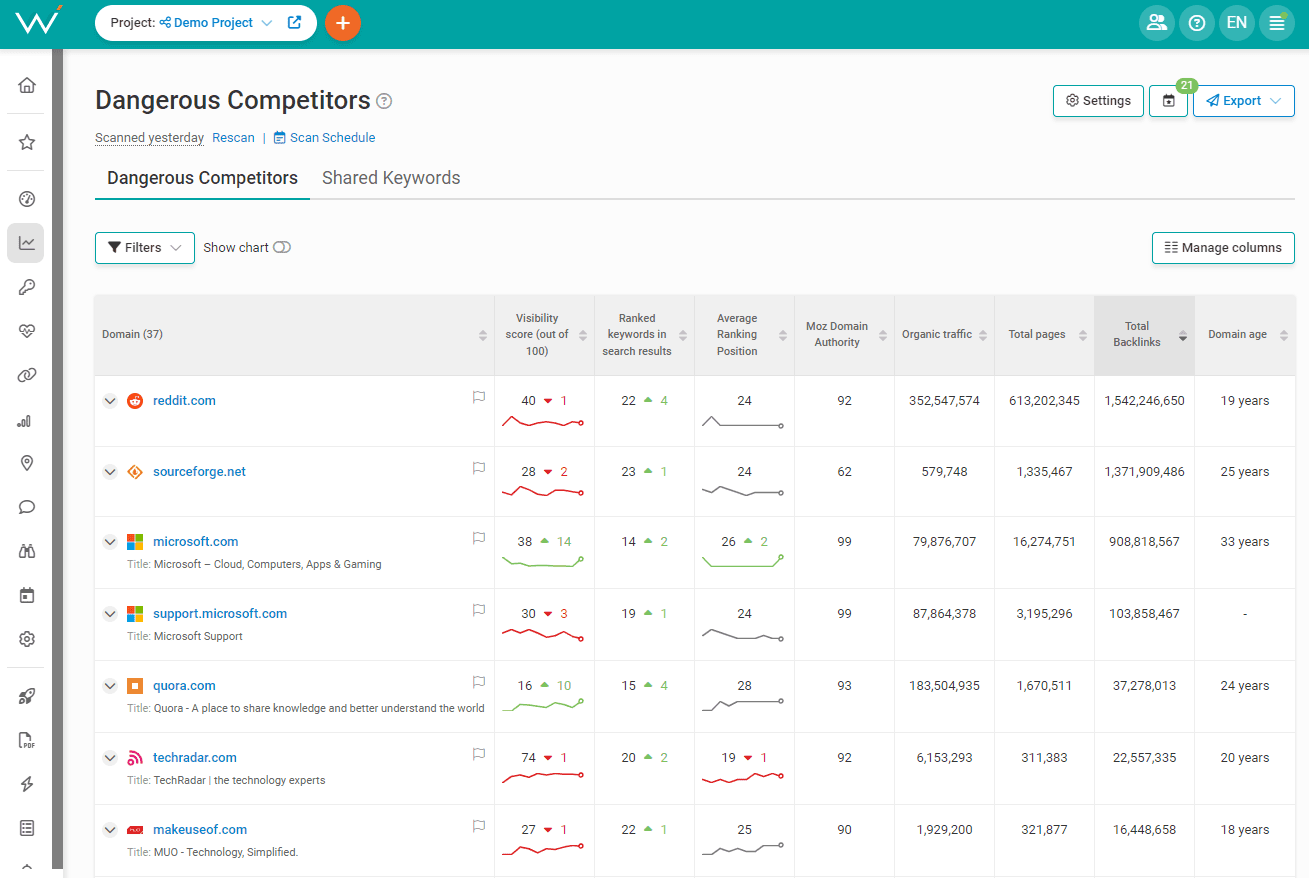
To start looking for your competitors, open WebCEO’s Dangerous Competitors tool.

Screenshot from WebCEO, March 2024

Click on the Settings button and visit these tabs:

  • Keywords: enter your ranking keywords there.
  • Competitors: if you already know some of your competitors, add their URLs there.
  • Search engines: add the search engines where you want to rank. Local business owners will also want to select locations to narrow down the results.

Click on Save, and the tool will generate a table of sites belonging to your potential competitors. Visit those sites to make sure they are indeed your competitors.

Step 2: Check Their Backlinks

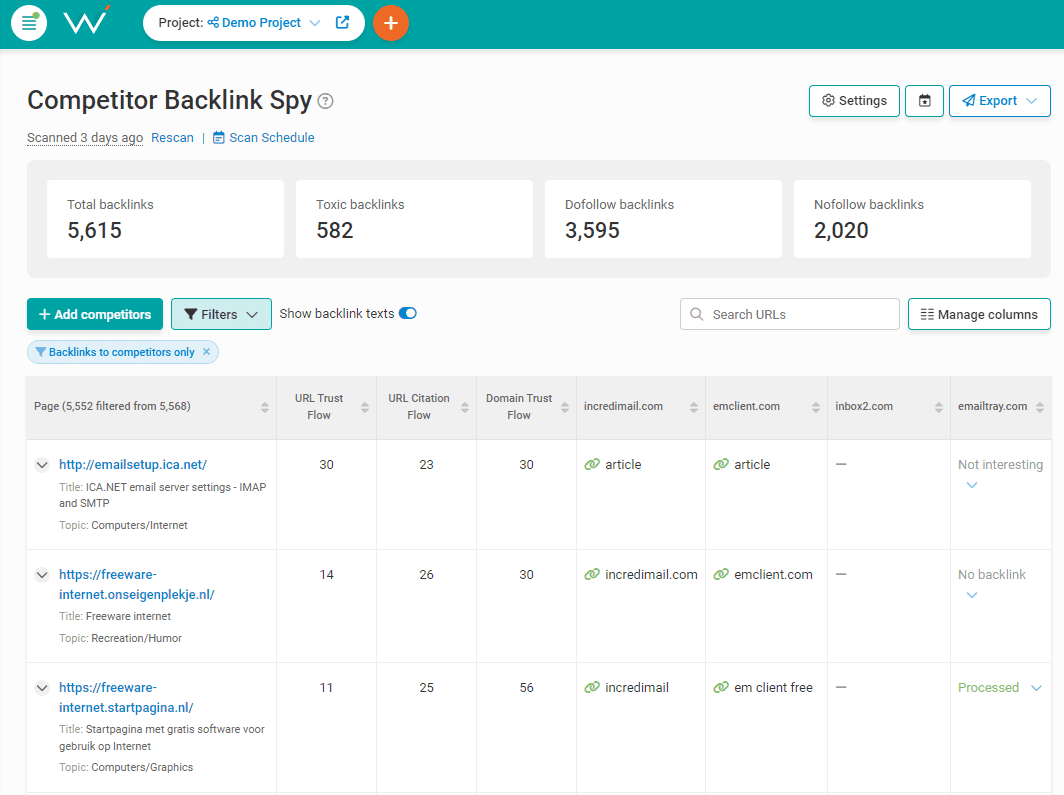
Time for the next step: checking their backlinks in Competitor Backlink Spy.

Screenshot from WebCEO, March 2024
  1. Open Settings and enter your competitors’ URLs in the Competitors tab.
  2. Press Save, and the tool will list all of your competitors’ backlinks – specifically, the pages which link to your competitors.

And now all you need to do is find promising domains among those linking pages. Visit those sites and look for the ones who are likely to give your site a backlink, too – after you’ve created link-worthy content and presented your case to those sites.

By the way, your competitors can also be your backlink donors. Feel free to build links on their sites too!

2. Must-Do Websites For Link Building

Before other sites start linking to yours, you can create a few powerful backlinks yourself. There are websites for that exact purpose:

Carefully pick sites that are relevant to your niche and create listings for your business there. Now you have several authoritative sites in your backlink profile.

What’s more, other websites’ owners can find you there, too. Exposure to others is the first step towards gaining even more backlinks down the line.

And if your site is already well-known enough, you can try creating a Wikipedia page about it. Even though links from Wikipedia are nofollow, the website itself possesses significant authority and can share some of it with you.

3. Run A Blog & Write Articles About Relevant Topics

In order to gain backlinks, you want to have linkworthy content on your website – the more, the better. Write about many different, but related topics about your niche and your business. For example:

  • Your products.
  • News in the industry.
  • Interesting case studies.
  • Recent going-ons in your company.
  • Interviews with clients and partners.

The options are limitless. And the more you know about your work, the more you can share with your visitors. Curious writers attract curious readers. Go wild with your pen!

And when you create your content, there are a few more things you can do to help it get more backlinks:

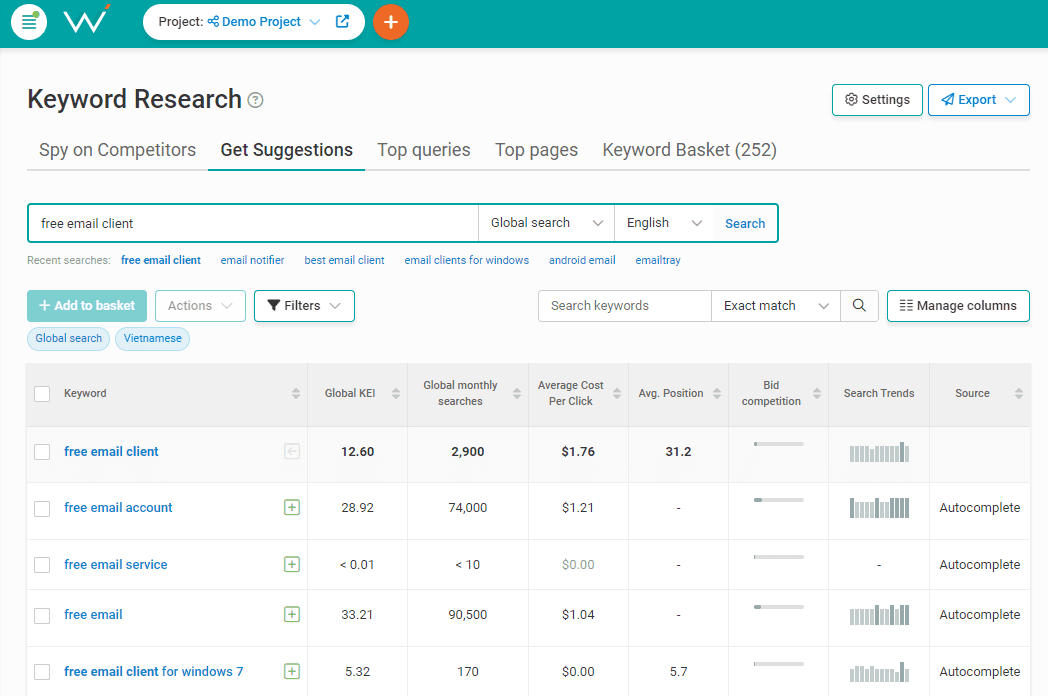
  1. Optimize it for keywords. The higher your content appears in search, the more likely users are to find it – and link to it in their own content if they need to. Use WebCEO’s Keyword Research tool to find search queries your target audience uses the most often.
  2. List your sources – with links. If you refer to other sources in your content, then listing them will make you appear more credible, especially if those sources are also good. And users love linking to credible sites.
  3. Link to other pages on your site. Help your visitors find all the content they may need. Navigation and footer bars are a must since they have links to your homepage, FAQ, contact info pages, and more. However, blog articles on related topics should also link to each other, in case your users need more details.
Screenshot from WebCEO, March 2024

4. Write Guest Articles

Good old guest blogging! The tried and tested method of building links. Write an article for another site and include a link to yours – what could be easier?

Of course, there’s a catch. There are two important steps to take first:

  1. Find relevant sites whose backlinks would be a boon for you;
  2. Convince them to accept a guest post from you.

You already know how to find backlink donors: with Competitor Backlink Spy. Local bloggers, newspapers, and magazines won’t be able to hide from you.

What about the second step? Your best bet here is email outreach.

Pick a promising site whose contact information is available and send them an email like this:

Hi Susan!

I’m John Doe, and I write for {Example Blog}. Nice to e-meet you! I’ve been following your blog for a while, and I’ve found your recent post series about networking very helpful.

Anyway, I’m writing to you because I’m quite familiar with your blog’s topics and I would love to contribute if you’re open to new guest authors. I’ve been brainstorming some topic ideas that I think would be a good match for your blog:

    • {Topic idea #1}
    • {Topic idea #2}
    • {Topic idea #3}

If you have different topics in mind, I will be glad to write about them as well. I appreciate your time and really look forward to working together.

Cheers!

John Doe

If you don’t get a reply, it’s okay to try again – with a different text indicating that it’s not your first try.

Be polite and remember that it’s meant to benefit you both. Good luck!

5. Turn Unlinked Mentions Into Links

If you’ve been around and doing business for a while, people are bound to talk about you. On their sites too.

This is the easiest way to make backlinks. Somebody has already mentioned your business on their site – that’s already most of the work done! All that’s left is to add a link.

Simply contact the person who can edit the page (via email or social media) and ask them to insert your site’s URL into the mention. Done and done.

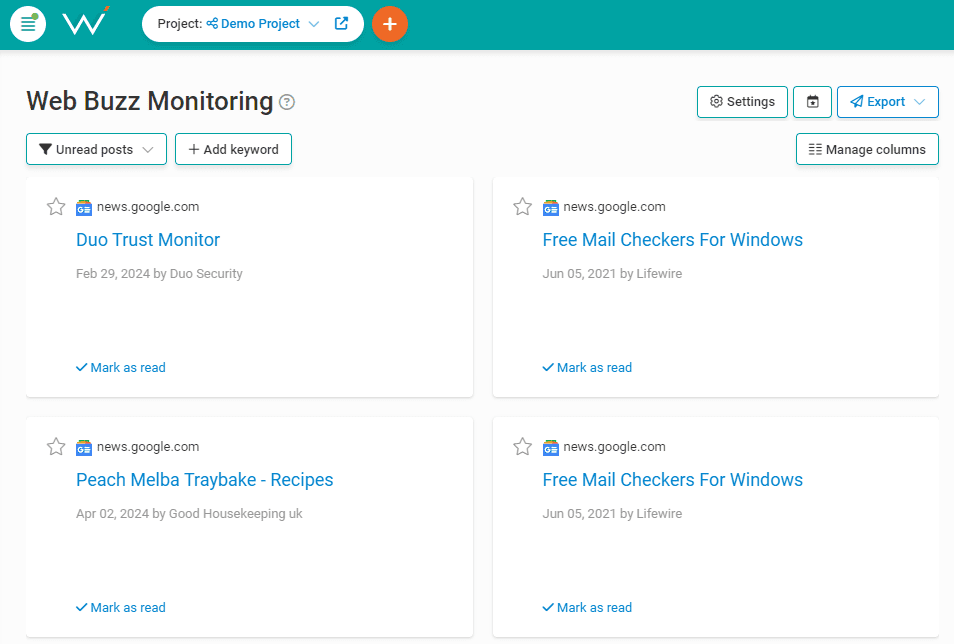
Finding unlinked mentions is even easier: just use a tool like WebCEO’s Web Buzz Monitoring.

Screenshot from WebCEO, March 2024

Just add your brand’s name in the Settings, and the tool will find pages with its unlinked mentions.

6. Provide An Excellent User Experience

Who will want to link to a page that’s barely working? Not the people who give out backlinks, that’s for sure. Even ordinary users will run if a page refuses to work – or even simply offends their eyes.

On the other hand, there are only positives to pages providing good UX:

  • User activity leading to conversions (potentially spreading across the entire site).
  • Positive customer reviews.
  • Increasing Google rankings.
  • And new backlinks, of course.

Imagine a perfect web page from your dreams, or just remember the best website you’ve ever visited some time before. Then make the same thing on your own site (or even better, if you can).

What’s the recipe for the best user experience?

  • Helpful, high-quality content. Being helpful is more important than ever due to Google’s Helpful Content update. Your page can be informative and optimized with the best keywords, but if it doesn’t actually help your visitors, then it’s a huge problem.
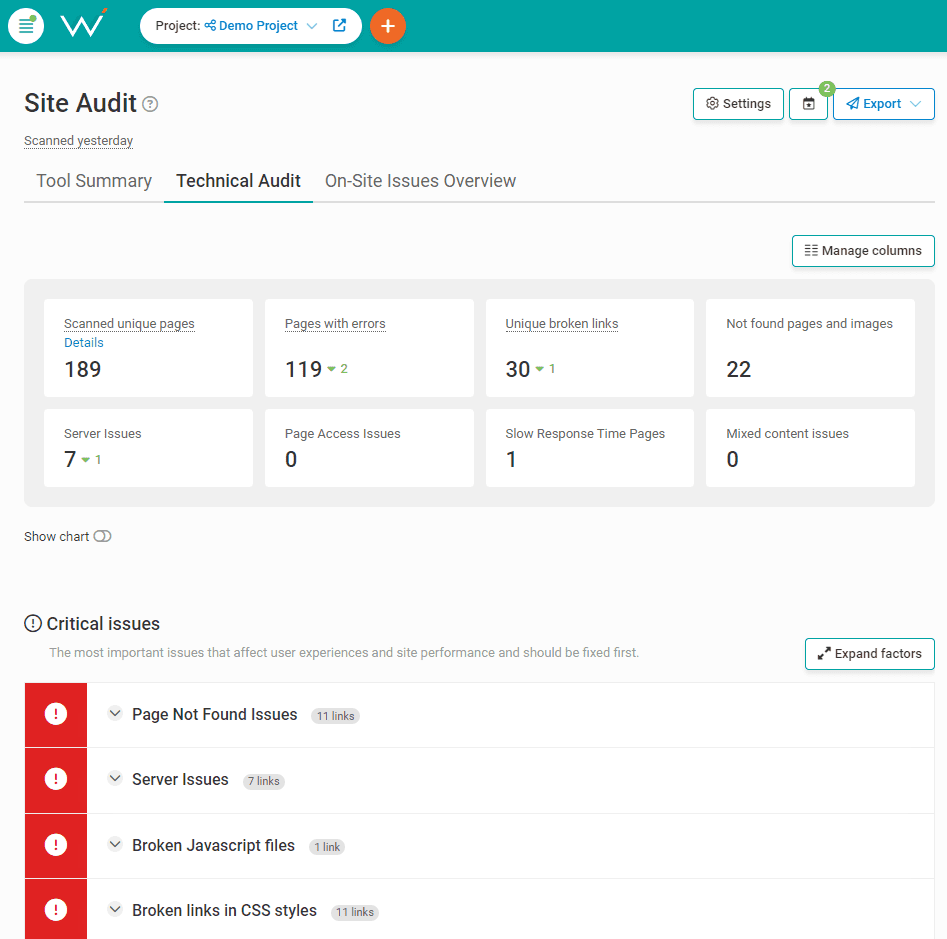
  • High-quality visuals. Users love eye-catching images and videos, especially when they not only inform but also entertain. Make sure your images load correctly! If any of them don’t, find them with WebCEO’s Technical Audit tool and replace them.
  • No site errors. Broken images are but one possible issue that may ruin your site. Scan it for all types of errors with the same Technical Audit tool and fix them ASAP.
Screenshot from WebCEO, March 2024
  • Fast loading speed. A slow-loading page is a useless page: if visitors leave, nothing happens there. Test your site pages with WebCEO’s Speed Optimization tool and follow its tips for making them load faster.
  • Mobile friendliness. Smartphones drive as much traffic as PC, so your site must be optimized for screens of all sizes. Scan your site with the Mobile Optimization tool and follow its recommendations for becoming more mobile-friendly.
  • User accessibility. Make sure your site can be easily used by everybody regardless of their physical ability. Test your site with a tool like EquallyAI’s ARIA to see where you can make improvements.

7. Get Rid Of Harmful Backlinks

Next, make sure your backlink profile isn’t hurting your site. What kind of backlinks can do that?

  • Bought backlinks.
  • Spammy backlinks.
  • Links from irrelevant sites.
  • Links from non-authoritative sites.

If Google detects too many backlinks like that in your profile, it may deem your site untrustworthy and lower its search rankings. It may even incur a manual action.

You can’t let harmful backlinks pile up and bring you down.

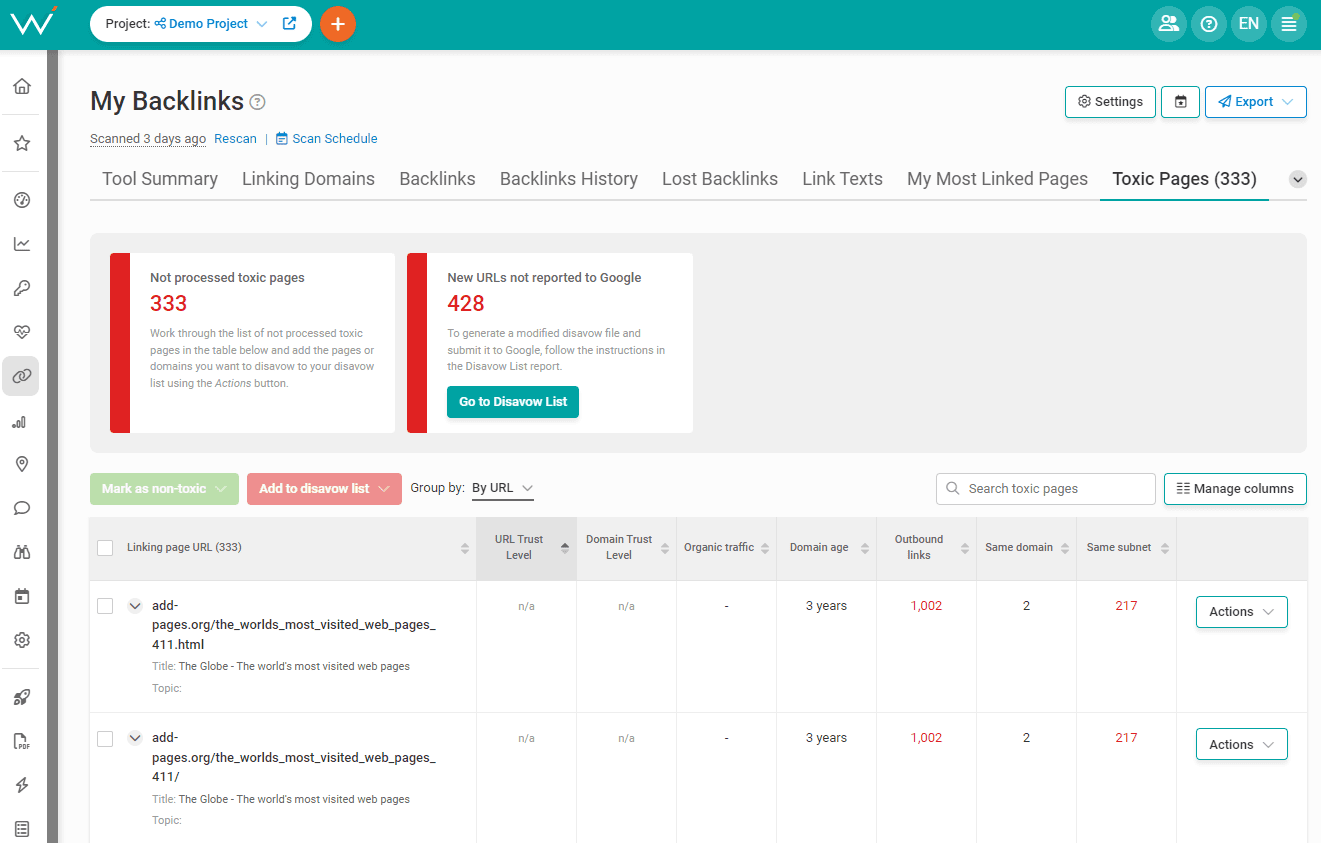
Scan your backlink profile with WebCEO’s Toxic Pages tool.

Screenshot from WebCEO, March 2024

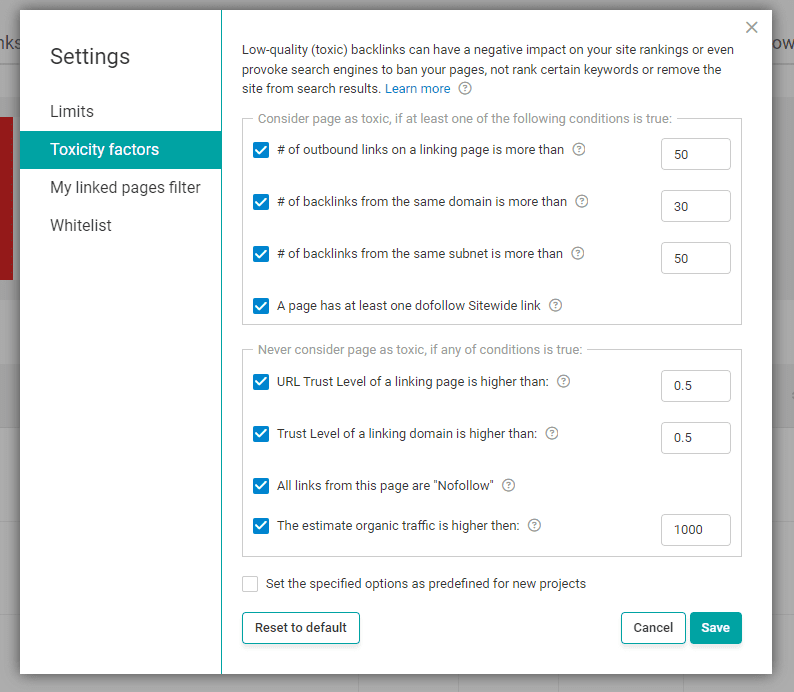
By default, it looks for linking pages that are obviously spammy: those with tons of outbound links and a low trust level. If you want to, tweak the tool’s search criteria to your liking in the Settings. You can even exclude specific domains from the tool’s search if you trust them.

Screenshot from WebCEO, March 2024

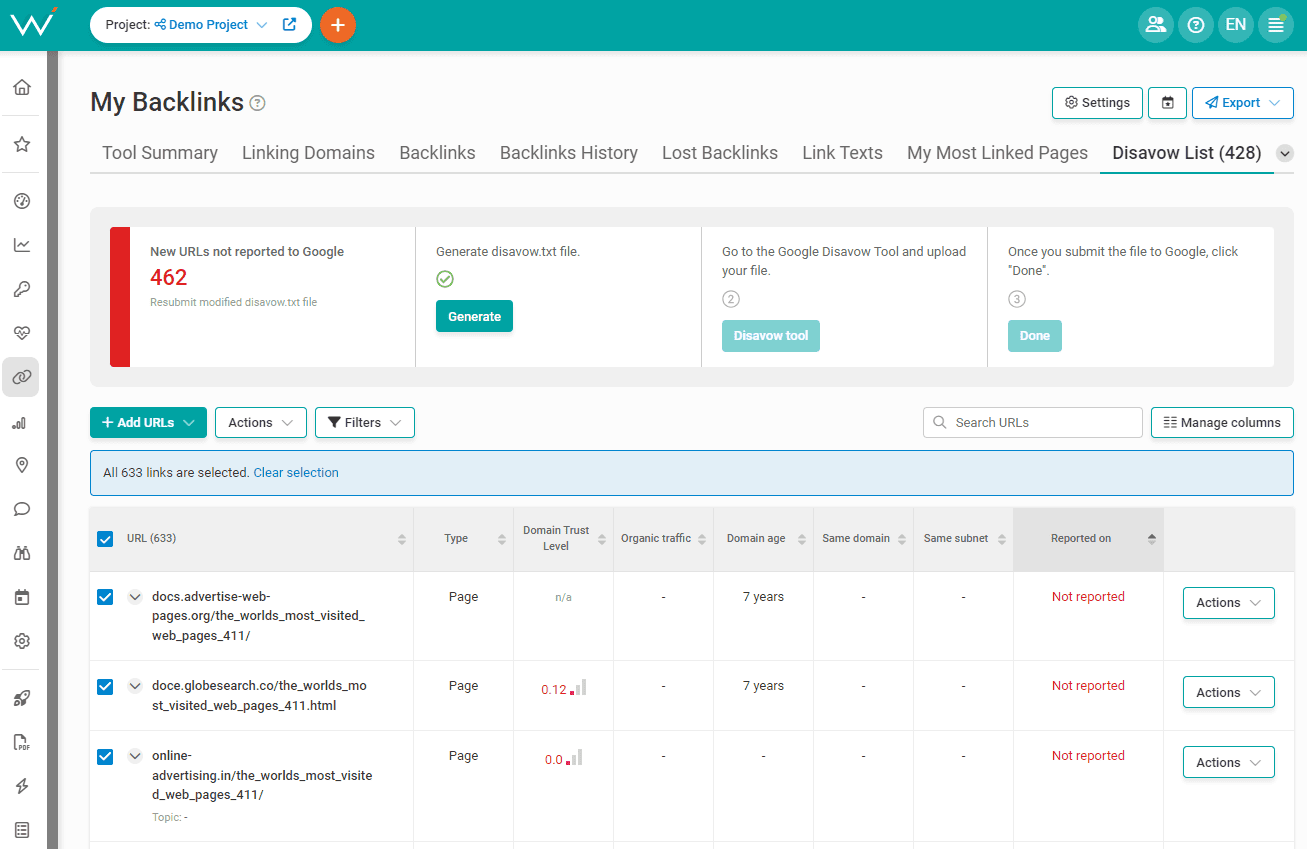
Once you have your list of toxic backlinks, start getting rid of them. Your options are:

  • Delete the backlinks from those pages yourself.
  • Ask somebody who can edit those pages to do it.
  • Generate a disavow list in Toxic Pages and submit it to Google Disavow.
Screenshot from WebCEO, March 2024

Want To See points 8-24?

The full guide is exclusively available to WebCEO users. Sign up for free now and get your link building guide with 24 different tactics that will get you through 2024 and well beyond!

AI-powered Internal Linking Tools

Internal linking is crucial for search engine optimization. It helps Google discover all pages on a site and assign value to each. The more links to a page, the more important it is.

A site’s structure produces internal links. Examples include navigation, footers, “related articles,” and “related products.”

However, the most impactful links are “contextual” because Google looks at the surrounding context to assign relevancy signals. A link in the body of this article is contextual.

Contextual links are hard to scale, especially for sites with thousands of pages, but AI technology can help. AI can spot phrase variations and synonyms to identify relevant pages.

Here are three AI-powered internal linking tools.

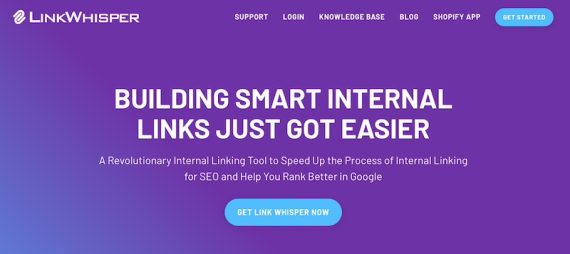
LinkWhisper

Home page of LinkWhisperHome page of LinkWhisper

LinkWhisper

LinkWhisper is a WordPress plugin and Shopify app that analyzes contextual links (internal and external), identifies pages with zero or too few inbound links, and suggests where to add links. The tool focuses on contextual links only, ignoring those in navigation, widgets, and sidebars.

The report is also helpful for identifying broken and orphaned pages — those with no inbound internal links (accessible via external links or sitemaps).

LinkWhisper suggests relevant internal links while in the WordPress editor. It’s a handy reminder. The tool can additionally recommend internal links to a list of pages.

Pricing for LinkWhisper starts at $97 for a one-time WordPress license or $7 per month for the Shopify app with a 7-day trial.

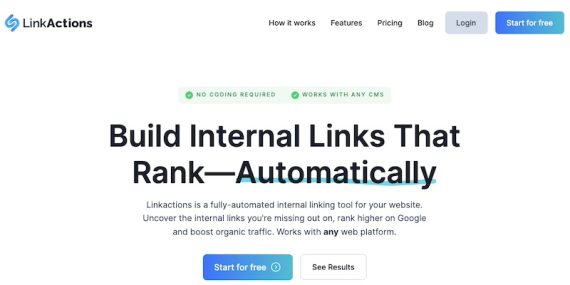
LinkActions

Home page of LinkActionsHome page of LinkActions

LinkActions

LinkActions connects to Search Console to analyze a site’s structure and provide internal linking suggestions. It can also add internal links automatically. Just paste the LinkActions code snippet in your site’s header and enable internal link insertions.

Pricing for LinkActions starts at $64 per month for up to three sites and 1,500 pages. The free trial includes a limited report with no automation.

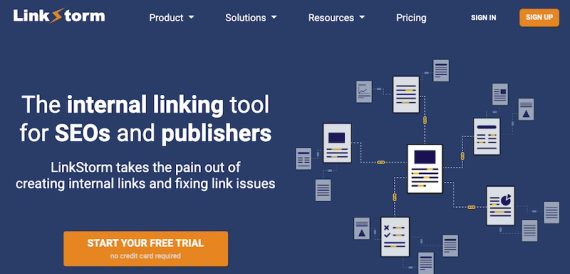
LinkStorm

Home page of LinkStormHome page of LinkStorm

LinkStorm

LinkStorm crawls a site and reveals:

  • Immediate internal linking opportunities based on the content,
  • Additional copy for each article to increase linking opportunities based on the semantic similarity of the two posts.

It also cites the optimal number of internal links for each page and shows where to place a link on the page and the preferred anchor. It does not automatically add the link, however.

LinkStorm costs $30 per month for 1,000 pages across unlimited sites. A free trial is available.

11 Ways That Really Work To Get Backlinks via @sejournal, @rio_seo

If your business isn’t building quality backlinks, you’re not increasing prominence. If you’re not increasing prominence, you’re missing one of the fundamental criteria to rank higher in the search engine results pages (SERPs).

As Google shares, prominence is based on “information that Google has about a business, from across the web, like links, articles, and directories.”

The bottom line is that every business needs quality, white hat backlinks.

White hat backlinks essentially serve as a vote of confidence from a website and tell Google your web page is a trusted resource. The more votes of confidence your web page has, the more prominent it will be seen to be.

White hat backlinks are acquired through ethical means rather than leveraging spam tactics. Yet, obtaining quality backlinks is easier said than done.

If you’re looking to build your white hat backlink strategy, you’re in the right place. This post will share 11 proven strategies that work to get backlinks and boost your SEO strategy.

Let’s dive in and discover the techniques to get quality backlinks for your website.

1. Mine For Broken Links

Broken links negatively impact a user’s experience with a site.

Consider when a user eagerly searching for information clicks a broken link to a site. This likely causes frustration and potentially a lost customer.

Google also continues to prioritize the overall user experience with recent updates.

Broken link building entails finding links to pages that no longer exist and politely reaching out to the website with the broken outbound link to notify them and suggest replacing it with a link to your relevant, high-quality content.

It’s important to understand the difference between dofollow and nofollow links.

Dofollow links are the most valuable for SEO, as they pass link juice from the referring site to your website. These links are seen as endorsements by search engines, indicating that your content is trustworthy and relevant.

Nofollow links have a rel=”nofollow” attribute, which tells search engines not to follow the link or pass any authority. While nofollow links don’t directly impact your SEO, they can still drive traffic to your site and increase your online visibility.

It’s essential to have a healthy mix of both types of backlinks to create a well-rounded backlink profile.

Utilize backlink analysis tools like Ahrefs, Moz, and Semrush to discover broken inbound links to your closest competitors or broken outbound links from prominent industry publications and blogs.

Start with the dofollow links from sites with strong domain authority.

Broken link building takes time and effort, but it can be an easy way to build your backlink profile for sites that prioritize their users’ experiences.

2. Leverage Existing Relationships

Tap into your existing network of partners, suppliers, or satisfied customers.

Reach out to them and propose collaborative projects, testimonials, or case studies that showcase your products or services, providing opportunities for mutual backlinking.

Since you already provide a valuable service to a business, they’ll be more inclined to link back to you, as you’ve already developed a business relationship with them.

Additionally, many businesses already have a partner page to showcase who they do business with.

If they’re not linking to your site already, this should be an easy ask and a quick way to get a credible white hat backlink to your site.

3. Monitor Brand Mentions And Unlinked References

Sometimes, your business may be mentioned, but you aren’t receiving proper credit.

For example, a customer may write a glowing testimonial on a successful blog, or they reference a finding published by your business, but they aren’t linking to your site.

Ask for credit where credit is due. In both instances, you’ve provided a noteworthy service. Ask customers who reference your brand or websites that mention you in any capacity on their sites to provide a backlink.

Also, look for content published on sites that may list your competitors as resources but should have mentioned your relevant brand.

Utilize tools like Google Alerts or Mention to monitor mentions of your brand or your competitors. You’ll receive an email notification whenever a website mentions a designated brand name.

When you come across unlinked references to your website or content, reach out to the site owners and kindly request them to add a backlink for proper attribution or a pertinent inclusion that would benefit their audience.

4. Publish Original Research

Creating high-quality, valuable content is essential for attracting backlinks from authoritative websites. You can become a trusted content-sharing source by leveraging your expertise and original research.

When considering why and when people share content, you must consider the psychology of content sharing.

A recent study found that 94% of respondents said they carefully consider how the information they share will be useful to the recipient.

In the same study, nearly half of the respondents reported sharing content because it allows them to inform others of products they care about and potentially change opinions or encourage actions.

Develop comprehensive guides, research studies, infographics, or industry reports that serve as go-to resources within your niche.

These authoritative assets naturally attract backlinks from websites seeking to provide valuable information to their audience.

Every time a consumer, blog, or business mentions your research, you’ll receive a white hat backlink. The more informative your content is, the more likely it will be shared.

5. Create Engaging Visual Content

Visual content such as infographics, charts, or slideshows attracts attention and shares on social media platforms.

Why is visual content a top priority for marketers? Because it is easily digestible and shareable.

Nearly 41% of marketers said original graphics (e.g., infographics, illustrations) help them reach their marketing goals. And more than 50% of marketers said visual content is very important in their marketing strategy.

Whether you’re creating an infographic or any other type of visual, it’s an easy way to increase the likelihood of your content being shared.

When possible, embed your website’s link within visually appealing content to increase the likelihood of earning backlinks as it gets shared across the web.

6. Publish Ultimate And Step-by-Step Guides

As the name suggests, ultimate guides are the “ultimate” resource on a designated topic.

The word ultimate suggests you have the best, most in-depth current knowledge on the subject, drawing consumers to want to learn more.

A step-by-step guide, in theory, provides an easy way to learn how to do something. Consumers favor ease and simplicity, which a step-by-step guide aims to accomplish.

Both these types of guides can help a business build its backlink profile. For example, if you’ve written an ultimate guide to digital marketing, a writer may reference one of your points in a blog post about affiliate marketing.

Crafting content that offers unique insights, solves problems, or entertains your audience is essential for attracting natural backlinks.

7. Offer Free Valuable Tools Or Resources

Are you a technology company?

Building a free tool or a light version of your solution is an effective way to build quality white hat backlinks, and it can also drive potential leads.

For example, Adobe offers free or “lighter” versions of several of its tools, such as Adobe Acrobat Reader and Adobe Photoshop Express. These allow users to preview the tool’s capabilities and may encourage them to convert to paid users in the future to maximize its software.

Develop free tools, calculators, or templates that provide practical value to your target audience.

Websites and blogs within your industry may naturally link to these resources as references, establishing your website as a go-to destination and earning valuable backlinks in the process.

8. Use Data Aggregators For Citations

A data aggregator, as the name suggests, compiles information from multiple sources, including phone and utility bills, business registration records on government websites, chamber of commerce membership rosters, and other citations for the sole purpose of providing it to search engines.

Local citations help publish your business’s information across the vast search ecosystem.

While the greater majority of searches take place on Google and other popular search engines, these directories also receive traffic – and are another way for consumers to discover your business.

To start, ensure your business is listed on Google Business Profile (formerly Google My Business), Yelp, Facebook, and Apple Maps.

Then, branch out to other general or industry-specific directories. Every directory you’re listed on provides you with a backlink to help you build your backlink profile.

Business owners can provide this information directly to the data aggregators so that they can submit it to other sources on their behalf. In turn, this helps businesses appear in online citations.

Citations may not be as prominent of a search ranking factor as they were in the past; however, their benefits are not completely obsolete, as they can provide hundreds of relevant backlinks to local landing pages.

9. Leverage Public Relations

A public relations plan is a great way to build prominence and authority in your industry. It’s also a surefire way to help build your backlink profile.

Consider content syndication for your press releases and editorial content, which is the process of republishing or distributing content from your website to multiple other news platforms or industry-related websites.

Content syndication often involves partnering with reputable vendors specializing in distributing content across various platforms, websites, and publishers. These vendors have established relationships with news publications and can help amplify your content’s reach.

Each press release or article is an opportunity to add at least one backlink to your content when publishers allow it.

It also establishes your brand as an expert in your industry. The more often you have useful and relevant information to share in your industry, the more you’ll establish yourself as a voice of authority.

Public relations extends to social media, too, where you can share links to content. If users find your content beneficial, they may reshare it, helping you build additional backlinks.

10. Create A Roundup Or “Ask The Experts” Blog Post

Organize expert roundups or interviews featuring prominent figures within your industry.

Ask potential contributors for a short contribution – maybe two to three sentences – to encourage participation.

The less burdensome the ask, the more likely they will want to participate. Asking others for insights around a certain topic can help strengthen your content and add valuable information you may not otherwise have had.

Creating a roundup or an ask-the-experts-style post increases your chances for shareability, too.

When these experts contribute their insights or opinions, they are more than likely to share the content piece with their networks, which will cause the content to reach a wider audience, generating valuable backlinks and exposure for your website.

11. Build Relationships With Influencers And Thought Leaders

Engage with influencers and thought leaders within your industry through social media, forums, or industry events.

Remember to choose influencers whose audience aligns with your target audience. Once you find the right blog niche or influencer to support your brand, send them your product or provide the service free of charge in exchange for a review.

Collaborating with influencers not only helps to generate backlinks but also exposes your brand to a wider audience. When an influencer promotes your content or mentions your brand, their followers are more likely to trust and engage with your website.

Or, if you have a larger budget, you can also pay macro-level influencers to give their honest feedback. Then, have the blog or influencer link back to your product or service.

Additionally, you may provide a blog or influencer with an affiliate link. Whenever a potential customer clicks their affiliate link, they’ll receive a commission.

The commission may come from simply clicking the affiliate link or if the consumer makes a purchase. This link-building endeavor requires more effort on your behalf; however, it also sends higher-quality traffic, which leads to higher conversion rates.

Concluding Thoughts

Cracking Google’s evolving search engine algorithm can be time-consuming and full of trials, tribulations, and errors.

Focusing on backlinks plays a significant role in improving the prominence and relevance of your website in the eyes of search engines.

Acquiring quality backlinks without resorting to paid placement methods is a long-term investment that requires dedication, creativity, and a commitment to providing value to your audience and industry.

By implementing the 12 actionable tactics outlined in this guide, marketing professionals can enhance their website’s authority, brand visibility, and organic search rankings, driving sustainable growth and success in the competitive digital landscape.

More resources: 


Featured Image: one photo/Shutterstock

10 Steps To Grow Your SEO Authority & Topical Expertise via @sejournal, @Brian_W_Gareth

Step 1: Demonstrate Each Element Of E-E-A-T

First things first: how do you assert yourself as an authority on your chosen topic?

If you are familiar with the concept of E-E-A-T, you won’t be surprised that it’s closely tied to topical authority. Working on one is the same as working on the other. And E-E-A-T makes it very easy to understand what exactly you need to do.

What does E-E-A-T mean, and how do you demonstrate it?

  1. Experience: what you have personally dealt with as a person and a professional, and what you can share with your audience. Example: a detailed product review where you describe how you have used it.
  1. Expertise: a high level of skill and knowledge in your field. Example: a Knowledge Panel with an expert’s name, photo, credentials and contact information.
  1. Authoritativeness: earning the title of an expert by creating content and gaining rankings and backlinks over a long time. Example: being referred to as a credible source of information by another website.
  1. Trustworthiness: having a good reputation in the eyes of your target audience. Example: positive user reviews.

Each of these elements signals to Google that your website is run by a real pro who knows what the users want. This is your end goal in very simple terms; now it’s time for details.

Step 2: Stick To A Single Niche

Can you dedicate your site to multiple niches?

Sure. But as the saying goes, the person who chases two rabbits catches neither.

If your chosen niches are not closely related, then Google will not view you as a specialist. But if they are closely related, then it’s very much possible.

For example, TripAdvisor is a very well-known authority on all things related to travel: destinations, HoReCa, popular activities, and more.

If you want to be acknowledged as an expert, the best bet is to pick a single niche – and commit to it fully. But if you are feeling ambitious, then pick several related topics and start pumping out content like the Internet will shut down tomorrow.

Step 3: Start Gaining Experience & Never Stop

How do you get good at something? By doing it countless times, of course!

The more experience and knowledge you have, the more you can put into your content and show to your audience – and to Google. And the more you have to show, the more credible you appear in everyone’s eyes.

And don’t be afraid to make mistakes. A bad experience is also a valuable experience.

Step 4: Create Original, In-Depth Content – Lots Of It

Obviously, no expert steals other people’s work. Real stars create their own content and make it as good as they can.

Be original, be amazing, be productive – that’s pretty clear.

What else should you do to get the most out of your content?

  • Update your outdated content. It’s easier and faster than writing a more up-to-date article from scratch. It’s also more correct from an SEO standpoint, as older pages have more authority than freshly made ones.
  • Include links to other sources. The more authoritative they are, the better. It makes your own content look more credible too, since you clearly know the best sources.
  • Fill your content with relevant keywords and phrases. Only your own experience can identify the best phrases to use, but WebCEO’s Keyword Suggestions tool is a great place to start looking.
  • Promote your content. Social media and email outreach are your best options.

Also, quantity matters as much as quality. If you want to become a real authority, one or two articles won’t be enough no matter how great they are – you will need to make many more to cover your niche in full.

Step 5: Create Different Types Of Content

You may be sticking to one niche, but every niche can be presented in multiple formats.

Therefore, you should rely on more than just blog posts. What else is there?

  • Podcasts.
  • Graphs and diagrams.
  • Case studies and research reports.
  • Images (photos, infographics).
  • Videos (including shorts, streams, webinars).

The more you can make, the better. However, it’s okay to focus on only a few types of content as long as you can make them excellent.

Step 6: Use An Efficient Internal Linking Structure

When one page links to another, it shares some of its own authority with it.

Interlink your site’s pages in an efficient way, and you will achieve two important goals:

  1. Your visitors will easily find any content they want.
  2. Your important pages will receive as much authority as possible.

Note that page authority is not the same as topical authority. But the two are still connected, and increasing one increases the other.

How Do I Create An Efficient Internal Link Structure?

As was mentioned before, you need to create lots of content to explore a niche in full.

Some of the pages you make will be closely related by covering different aspects of the same topic. Those pages can be grouped into a topic cluster.

What Is A Topic Cluster?

A topic cluster has (usually) one page with the main topic and several others with related topics. For example:

10 Steps To Grow Your SEO Authority & Topical ExpertiseScreenshot from Conductor.com, April 2018

The hub page has the most authority in the cluster and shares it with the rest, making them more visible in search, too.

So how do you maximize your page authority – and topical authority with it? For that, you need to know exactly how much authority your pages hold. Find out with WebCEO’s Internal Links tool.

10 Steps To Grow Your SEO Authority & Topical ExpertiseScreenshot from WebCEO, February 2024

Then build topic clusters around your most authoritative pages.

Step 7: Get Backlinks From Authoritative Sites

Remember about authoritativeness? That’s the A in E-E-A-T, and it’s one of the most time-consuming parts because it requires building links to your content – the toughest part of SEO.

But before anything else, you must find trusted sites whose backlinks will boost your authoritativeness. And the best way to do it is to see where your competitors are getting their backlinks.

Open WebCEO’s Competitor Backlink Spy.

10 Steps To Grow Your SEO Authority & Topical ExpertiseScreenshot from WebCEO, February 2024

Add your competitors’ sites in the Settings and press Save. The tool will generate a table with all of your competitors’ backlinks, with anchor texts and domain authority.

Ideally, you will want to build your own backlinks from the most authoritative sites. And yes, your competitors are fair game, too! Here are a few effective link building methods:

  • Create content that’s likely to get backlinks. The best examples include case studies, research papers, and statistics – users love interesting data.
  • Find unlinked mentions of your brand and turn them into backlinks.
  • Find articles with outdated information on other sites. If they have links to outdated sources, offer to replace them with a link to your own, up-to-date source.
  • Find broken links on other sites and offer a replacement from your own site.
  • Collaborate with other specialists in your niche (e.g. via podcasts).

Step 8: Grow Your Online Reputation

Gaining clout requires transparency.

People and companies cannot become authorities by staying hidden in the shadows like the infamous hacker Anonymous. At the very least, you will need to attach a name and a face to your content – for example, in an author bio.

10 Steps To Grow Your SEO Authority & Topical ExpertiseScreenshot from Inc.com

The more professional it looks, the better.

What else can you do?

  • Get positive reviews from your users. Often, they leave a review if you simply ask. Don’t be discouraged by bad reviews – having a few of them makes you look more natural than having none at all.
  • Create an About Us page. Describe your company and your experts, and feel more than free to brag about your successes.
  • Create pages on social media. Ideally, you want a page for your company and a page for each of your experts on every social network where your presence makes sense. Of course, if you work solo, then all you need is a single page just for you. Don’t forget to link to your social media pages from your site.
  • Engage with your followers on social media. Like their posts, follow them back when appropriate and, most importantly, reply to them as soon as possible. Setting up a chatbot can help you tremendously with the latter.
  • Engage with your competitors in social media. Be active on their pages, and you just might end up stealing from them a client or two (or more).

Step 9: Create A Wikipedia Page

Wikipedia is a very well-known and trusted resource. Having a page there is a huge boost to any person or brand’s image – especially if the article is filled with detailed information.

Of course, you can only create a Wikipedia page about yourself as a person if you are already famous. Otherwise, your best bet is a page about your company.

Either way, you are going to need an auto-confirmed Wikipedia account – one that is at least 4 days old and has made at least 10 edits. After that, you can start making your page. Feel free to use other, similar pages as a basis.

And remember to include citations and sources from sites other than your own.

Step 10: Provide Excellent User Experience

And of course, a true expert’s website is expected to run flawlessly. Professionals have standards – and so do users who consult experts.

What can you do to make your site a welcoming place?

  • Increase your loading speed. Find your slow-loading pages with WebCEO’s Speed Optimization tool and follow its recommendations for improving them.
10 Steps To Grow Your SEO Authority & Topical ExpertiseScreenshot from WebCEO, February 2024
  • Ensure mobile-friendliness. Your site must be responsive and work well on all devices. In the same Speed Optimization tool, click the Mobile tab and see where your site is falling short.
  • Fix technical errors. Find all errors on your site with the Technical Audit tool and fix them promptly.
10 Steps To Grow Your SEO Authority & Topical ExpertiseScreenshot from WebCEO, February 2024
  • Translate your content into multiple languages. If you are after a multilingual audience, this is a must.
  • Ensure user accessibility. Make sure all kinds of visitors can use your site, not just healthy ones. Use a tool like ARIA by EquallyAI to see what sort of additions your site needs.

Wrapping Up

If you set the goal to become an expert in your field, then gaining topical authority will be a natural part of the process. It will take years of hard, prolific work; it’s your choice whether to commit or not. But the reward for this choice is acknowledgment in your community and in search engines.

Take the first step on this long road. Arm yourself with SEO tools that will help your content reach the top rankings faster.

Experts Vs. Influencers: Digital PR Alternatives To Link Building via @sejournal, @_kevinrowe

Key opinion leaders (KOLs) have emerged as influential figures, bridging the gap between experts and influencers to build a site’s reputation.

In this article, I will dive into the nuances of KOLs in digital PR for SEO, underscoring their importance in building a real-world reputation that can influence ranking factors, particularly in specialized fields.

I will use my expert evaluation model to analyze Michael E. Porter, a renowned authority in competitive strategy from Harvard Business School.

Porter’s case shows how internal KOLs can shape discourse, drive brand visibility, and influence SEO ranking factors through their expertise and reputation.

This is why you should use digital PR as an alternative to link building.

Key insights from the article:

  • A key opinion leader is a hybrid expert-influencer: A KOL is an expert in a field with the influence of a social media influencer.
  • Utilizing shareable content: Leverage KOLs and engaging content to earn backlinks and enhance SEO rankings.
  • Earn links and brand search volume: KOLs can write guest articles to earn backlinks and increase brand search volume simultaneously.
  • Valuable research studies: Disseminating breakthrough research through KOLs boosts their reputation and establishes them as industry thought leaders.

Let’s begin.

Subject Matter Experts Vs. Influencers

According to Merriam-Webster, an influencer is:

“a person who is able to generate interest in something (such as a consumer product) by posting about it on social media.”

An expert is defined differently as “having, involving, or displaying special skill or knowledge derived from training or experience.”

An influencer may not drive long-term buying decisions but might influence short-term actions or tests. In contrast, an expert influences decisions and actions of important or complex decisions.

The third option is a key opinion leader, which is a hybrid expert & influencer. A KOL has both influence and expert experience in a given field.

If these outcomes are your focus, then keep reading to understand more about KOLs.

What Is A Key Opinion Leader (KOL)?

A key opinion leader is an expert who influences complex and high-value decisions due to their expertise from real-world experiences in a given field.

A KOL typically has a senior role in a company or agency where they actively work in their field.

KOLs influence important decisions and actions in Your Money or Your Life (YMYL) or other complex purchasing decisions.

In my SEJ article, How To Uncover Your Expertise To Become A Journalist’s Source, I provide a not-so-simple expert-evaluation framework for identifying the degree to which an individual is an expert in a specific field.

My expert evaluation model has four key areas.

  • Proven expert knowledge: Depth of knowledge from experience & practice with a demonstration of skill.
  • Develop influential assets: Develop publications & research that lead to reputation & recognition of influencing other experts.
  • Evolving with change: Adapting to feedback from continuous learning that leads to innovative contributions in their field.
  • Improve by teaching: Demonstrating problem-solving and communication skills by teaching, mentorship, and consultation.

Use this model to pitch a KOL to the media as an expert source in a specific field.

The next section explains how to use KOLs in SEO and digital PR to impact Google search positively.

3 Ways To Use KOLs In Digital PR For SEO

KOLs are a digital PR alternative to link building. This alternative can help improve the reputation of a site, its content, and the individual or entity behind it.

Digital PR is an alternative to link building because, although certain attributes of backlinks are most certainly ranking factors, the site’s reputation is a broader list of factors.

How the audience engages with a site’s content contributes to this reputation. This engagement can include:

  • Sharing and linking to content.
  • Mentioning the brand or product and the individuals behind it.
  • Searching brands or concepts on Google.
  • Using insights from experts to make purchasing decisions (manifests in reviews or shares).
  • Integrating insights from an expert’s content to influence writing.

Although an op-ed or guest contributor post from these experts doesn’t directly influence ranking, an expert who is clever can generate ranking signals due to the impact on an audience.

These signals can include the audience taking action like:

  • Searching the brand’s name or concepts in Google.
  • Linking to or mentioning the brand.
  • Returning to a website or a specific article.
  • Discussing the brand.

Generating these signals requires more than an article; it also needs an understanding of the audience’s and media’s trending interests.

From a trend analysis, use the article to share linkable and shareable content assets. An effective article could function as:

  • A source of unique research.
  • A way to distribute unique content assets in a relevant community.
  • Explain research in op-eds or guest contributor articles.

Pro Tips

  • With digital PR, you might not need any blog content as the reputation of the content can be separate from the reputation of the product or company.
  • Sometimes, media trends don’t align with customer interests. This is, unfortunately, a frequent issue. Try to find trends that align with customer and media trends, not just the media.

Let’s examine a key opinion leader whose concepts have influenced my content creation and decision-making, Michael E. Porter.

The Case Of Michael E. Porter

Michael Porter is a leader in competitive strategy and professor emeritus at Harvard University. He’s an economist, researcher, author, advisor, speaker, and teacher.

Michael Porter google name searchScreenshot of search for [michael e porter], Google, January 2024

I created an expert evaluation model to identify the attributes and the degree to which a person is an expert. Porter has strong attributes in every aspect of my expert evaluation model.

Proven Expert Knowledge

He has deep knowledge of competitive strategy from extensive research.

His study on competitive strategy in the 1990s is foundational research that explains what constitutes competitive strategy.

Porter wrote about the study in a popular article in the Harvard Business Review called What is Strategy? in 1996.

He went on to perform research in cluster & competition about how competition clusters to a specific geographic region. This is just a sample of his research.

Porter built off his research to demonstrate experience & practice by founding Monitor Deloitte, a business strategy consultancy for senior management of large organizations and government bodies.

The next attribute to evaluate is building influential assets.

Develop Influential Assets

His research and books have driven the strategy for industry and nations. He has written books about competitive strategy based on his early and new research.

These assets have led him to receive numerous awards and honors, like the 2018 McKinsey Award for the best article in Harvard Business Review for How CEOs Manage Time.

Another piece by Porter called The Five Forces that Shape Strategy in Harvard Business Review became a competitive strategy model called Porter’s Five Forces, now a model taught in universities and frequently written about in business training.

50minutes.com even created a pocketbook that summarizes Porter’s Five Forces.

Evolving With Change

He has adapted to feedback from continuous learning that leads to innovative contributions in their field.

Although starting his research in the late 1970s, he has continued to contribute to more recent topics like augmented reality.

Improve By Teaching

Porter demonstrates problem-solving and communication skills through teaching, mentorship, and consultation.

Porter has taught others his research and has continually written about it, which clearly communicates his thought process.

These are the reasons why he’s become a powerful key opinion leader.

If Porter recommends your business or ideas, expect them to influence decisions and the results.

Let’s examine the value he has created for Harvard as a professor and contributor from an SEO perspective. I’ll use Semrush for this examination.

michael porter expert and influencer at harvard Image from Harvard Business School, January 2024

Brand Search

Porter’s faculty profile on the Harvard Business School appears for over 153 search variations of the name “Michael Porter” in January 2024.

semrush brand keyword search volumeScreenshot from Semrush, January 2024

Hbs.edu benefits from this brand search in several ways:

  • Expert reputation with Google: The brand search contributes to the reputation of the domain in Google.
  • Connection to “business strategy”: Search engines see the website as more relevant to education and business topics, so the course pages can rank more easily.
  • Improve school brand search: Students will search the school with the brand name “Harvard Business School” at various stages of the customer journey – thus further improving the website’s reputation with the search engines.

Google representatives have consistently stated that the expertise and reputation of the individuals and entities behind the website are key factors in ranking.

A strong signal of a site’s reputation is the search for brand names of the individuals and entities behind it.

The keyword “Michael Porter” has 12,100 average monthly searches as of the date of this article.

Links And Traffic

Porter’s page and other faculty KOLs drive the site’s reputation with links and traffic.

561 unique referring domains link to Michael’s faculty page on hbs.edu.

Although this is a small fraction of the total 28,700 referring domains, many of the professors at Harvard Business School are KOLs and contribute to the reputation of the school’s reputation.

Furthermore, according to Semrush, Porter’s page has a highly relevant link profile with placements on Forbes, Semrush, and Alibaba referencing his work.

semrush backlink report
semrush referring domain reportScreenshots from Semrush, January 2024

Overall, the SEO for hbs.edu is terrible since Harvard relies on brand over search for recruitment. But that’s another article.

Wrapping This Up

It’s clear that key opinion leaders like Michael E. Porter aren’t just experts in their fields – they’re game-changers.

Porter’s work at Harvard Business School is a great example of how a KOL can blend deep knowledge, research, and contribution with expert op-eds or guest articles to improve SEO.

This article is a call to action for anyone looking to make a real impact in their field and improve the value of search engines as a key marketing channel.

More resources:


Featured Image: Gearstd/Shutterstock

SEO basics: SEO fact or fiction?

SEO has a somewhat questionable reputation. In the past, people shared supposed tricks that would instantly get you to rank. But a lot has changed in the SEO world. So, are these tricks still true? Let’s take a look at what’s an SEO fact, and what’s SEO fiction!

The origin of this reputation

A lifetime ago, when Google’s algorithm wasn’t that good, you could trick your way into the search results. Putting down keywords in white (so nobody would see, but Google would crawl it) was an effective strategy back then. As was buying bulks of links from questionable sites. As Google evolved, these kinds of dirty SEO tricks started to backfire. 

If you’re wondering whether certain tactics of old school or blackhat SEO still pay off, just think: does it give the user a better experience on your site? Does your website become a better result? If you can answer these questions with yes, then it’s probably a good SEO strategy. Anything that feels like a trick though, probably won’t be a good SEO strategy in the long run. So, let’s look at some SEO statements and find out if they’re fact or fiction!

SEO fact or fiction?

Fact or fiction 1: Content is king

Content is a very important aspect of any SEO strategy. After all, Google crawls texts and determines the ranking of your site on the quality of your texts. High-quality content also leads to lower bounce rates and more social media attention.

SEO fact: Content is king

While backlinks are definitely important for your SEO strategy, you should be rather selective in which kinds of backlinks you’d want to attract to your website. To start, you shouldn’t buy large amounts of links. (Nor should you exchange links.) Secondly, don’t use any automated programs to get links. Moreover, don’t do guest blogging with very thin content and don’t go for links that are unrelated to the topic of your website. You shouldn’t have links from spammy sites whose only purpose is to advertise for gambling, viagra and porn (unless your website is about gambling, viagra and porn). Lastly, make sure there is real content behind the links you use. In a nutshell: you should never pay for links.

If you choose to go overboard on link building, you’ll risk a penguin penalty and lose your rankings in Google. If you want to learn more about link building strategies and other essential SEO skills, you should check out our All-around SEO training! 

SEO fiction: Get as many links as possible

Fact or fiction 3: Keyword density should be sky high

Some people claim you should put as many keywords in your texts as possible. They hope that Google will notice the amount of keywords they’re using and therefore will rank the text highest in the search results. However, their text will become unreadable. So they shouldn’t do that! It’ll definitely backfire. Never write content that’s created for the search engines. Always write content with a real audience in mind. Invest in high-quality content that’ll generate long-term stable traffic to your website.

SEO fiction: keyword density should be sky high

Fact or fiction 4: You don’t need high-end technical skills to do SEO

Technical SEO is definitely an important element of an SEO strategy. And it doesn’t hurt to learn a bit of code (it could even be great fun). However, if you’re using WordPress and our Yoast SEO plugin, your technical SEO is pretty much covered. Our plugin is designed to take care of all the technical aspects of your SEO strategy.

SEO fact: You don’t need high-end technical skills to do SEO

Fact or fiction 5: Meta descriptions don’t matter

Google rewrites 70% of manually added meta descriptions. That means there’s a high chance that a meta description you added manually will be rewritten by Google. However, that doesn’t mean that you shouldn’t pay attention to the content of your meta description. Meta descriptions provide critical information to both search engines and users. Moreover, it’s based on the SEO title and meta description that the user decides whether to visit your page. Neglecting them would be missing an opportunity to get more traffic to your website.

SEO fiction: Meta descriptions don’t matter

Fact or fiction 6: Social media can improve your rankings

Google doesn’t look at your website’s social media performance (like followers or shares) when ranking your content. However, a good social media strategy helps your rankings by boosting your traffic. A lot of traffic makes search engines deem your content as relevant. Furthermore, the difference between search engines and social media has been blurring. For example, both Google and Instagram can be used to find an answer to a question. 

SEO fact: Social media can improve your rankings

Fact or fiction 7: Google will be replaced by AI

While using AI platforms as search engines might be relatively new, AI has been shaping the search engine experience for quite some time. For example, AI is what helps Google provide voice search and image search. And not only are some search engines introducing their own AI language models (like Gemini), they are also integrating AI models into the search engine results.

So while we don’t know exactly what the future holds, it’s clear that Google and AI found a way to work together instead of replacing each other.

SEO fiction: Google will be replaced by AI

Fact or fiction 8: SEO is all tricks

At Yoast, we propose an SEO strategy we refer to as holistic SEO. Holistic SEO means you focus on developing a long-term SEO strategy that focuses on all aspects of website optimization, in order to be the best result. Part of this strategy is to write awesome content, do great PR and social, make sure your website is properly secured and create a superb User Experience. And of course, your website should have technical excellence and an awesome site structure. That’s no trick. That’s just a whole lot of hard work.

SEO fiction: SEO is all tricks

Conclusion

The final SEO fiction actually says it all: SEO is not all tricks. Yoast believes that SEO is a long-term strategy that focuses on creating quality content for your audience and becoming the best result. It is a lot of work, but it will definitely pay off in the long run!

Read more: Holistic SEO »

Coming up next!