Bing Expands Generative Search Capabilities For Complex Queries via @sejournal, @MattGSouthern

Microsoft has announced an expansion of Bing’s generative search capabilities.

The update focuses on handling complex, informational queries.

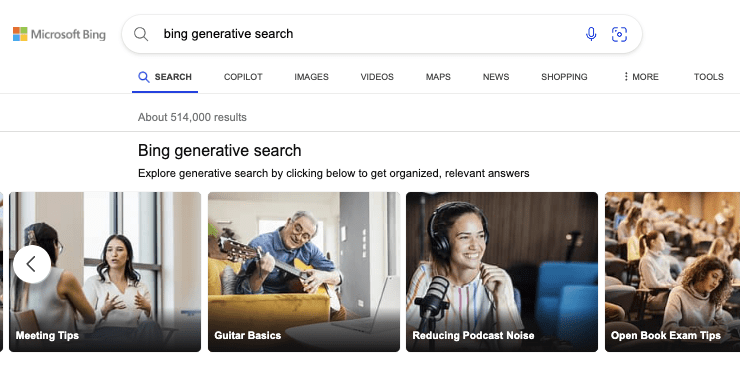
Bing provides examples such as “how to effectively run a one-on-one” and “how can I remove background noise from my podcast recordings.”

Searchers in the United States can access the new features by typing “Bing generative search” into the search bar. This will present a carousel of sample queries.

Screenshot from: blogs.bing.com, October 2024.

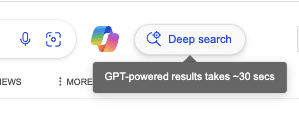
A “Deep search” button on the results page activates the generative search function for other searches.

Screenshot from: blogs.bing.com, October 2024.

Beta Release and Potential Challenges

It’s important to note that this feature is in beta.

Bing acknowledges that you may experience longer loading times as the system works to ensure accuracy and relevance.

The announcement reads:

“While we’re excited to give you this opportunity to explore generative search firsthand, this experience is still being rolled out in beta. You may notice a bit of loading time as we work to ensure generative search results are shown when we’re confident in their accuracy and relevancy, and when it makes sense for the given query. You will generally see generative search results for informational and complex queries, and it will be indicated under the search box with the sentence “Results enhanced with Bing generative search” …”

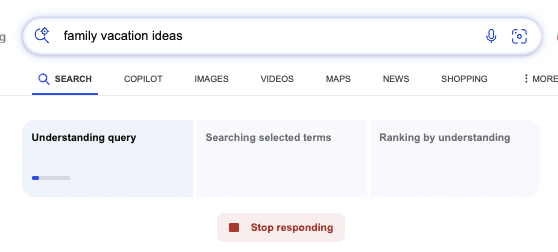
This is the waiting screen you get after clicking on “Deep search.”

Screenshot from: blogs.bing.com, October 2024.

In practice, I found the wait was long and sometimes the searches would fail before completing.

The ideal way to utilize this search experience is to click on the suggestions provided after entering “Bing generative search” into the search bar.

Potential Impact

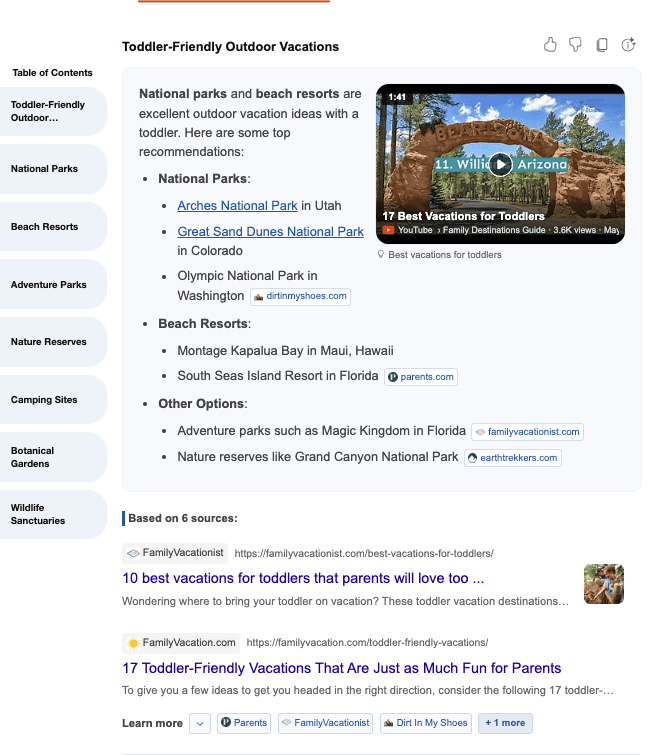
Bing’s generative search results include citations and links to original sources.

Screenshot from: blogs.bing.com, October 2024.

This approach is intended to drive traffic to publishers, but it remains to be seen how effective this will be in practice.

Bing encourages users to provide feedback on the new feature using thumbs up/down icons or the dedicated feedback button.

Looking Ahead

This development comes as search engines increasingly use AI to enhance their capabilities.

As Bing rolls out this expanded generative search feature, remember the technology is still in beta, so performance and accuracy may vary.


Featured Image: JarTee/Shutterstock

Why Google Lighthouse Doesn’t Include INP, A Core Web Vital via @sejournal, @MattGSouthern

Google’s Lighthouse doesn’t use the Interaction to Next Paint (INP) metric in its standard tests, despite INP being one of the Core Web Vitals.

Barry Pollard, Web Performance Developer Advocate on Google Chrome, explained the reasoning behind this and offered insights into measuring INP.

Lighthouse Measures Page Loads, Not Interactions

Lighthouse measures a simple page load and captures various characteristics during that process.

It can estimate the Largest Contentful Paint (LCP) and Cumulative Layout Shift (CLS) under specific load conditions, identify issues, and advise on improving these metrics.

However, INP is different as it depends on user interactions.

Pollard explained:

“The problem is that Lighthouse, again like many web perf tools, typically just loads the page and does not interact with it. No interactions = No INP to measure!”

Custom User Flows Enable INP Measurement

While Lighthouse can’t measure INP, knowing common user journeys allows you to use “user flows” to measure INP.

Pollard added:

“If you as a site-owner know your common user journeys then you can measure these in Lighthouse using ‘user flows’ which then WILL measure INP.”

These common user journeys can be automated in a continuous integration environment, allowing developers to test INP on each commit and spot potential regressions.

Total Blocking Time As An INP Proxy

Although Lighthouse can’t measure INP without interactions, it can measure likely causes, particularly long, blocking JavaScript tasks.

This is where the Total Blocking Time (TBT) metric comes into play.

According to Pollard:

“TBT (Total Blocking Time) measures the sum time of all tasks greater 50ms. The theory being:

  • Lots of long, blocking tasks = high risk of INP!
  • Few long, blocking tasks = low risk of INP!”

Limitations Of TBT As An INP Substitute

TBT has limitations as an INP substitute.

Pollard noted:

“If you don’t interact during long tasks, then you might not have any INP issues. Also interactions might load MORE JavaScript that is not measure by Lighthouse.”

He adds:

“So it’s a clue, but not a substitute for actually measuring INP.”

Optimizing For Lighthouse Scores vs. User Experience

Some developers optimize for Lighthouse scores without considering the user impact.

Pollard cautions against this, stating:

“A common pattern I see is to delay ALL JS until the user interacts with a page: Great for Lighthouse scores! Often terrible for users 😢:

  • Sometimes nothing loads until you move the mouse.
  • Often your first interaction gets a bigger delay.”

Pollard’s Full Post

Why This Matters

Understanding Lighthouse, INP, and TBT relationships is necessary for optimizing user experience.

Recognizing limitations in measuring INP helps avoid misguided optimizations.

Pollard’s advice for measuring INP is to focus on real user interactions to ensure performance improvements enhance UX.

As INP remains a Core Web Vital, grasping its nuances is essential for keeping it within an acceptable threshold.

Practical Applications

To monitor site performance and INP:

  1. Use Lighthouse’s “user flows” for INP measurement in common journeys.
  2. Automate user flows in CI to monitor INP and catch regressions.
  3. Use TBT as an INP proxy, but understand its limitations.
  4. Prioritize field measurements for accurate INP data.
  5. Balance performance optimizations with UX considerations.

Featured Image: Ye Liew/Shutterstock

Google AIO Is Ranking More Niche Specific Sites via @sejournal, @martinibuster

New data from BrightEdge shows significant changes to Google AI Overviews, prioritizing topic-specific sites and a stronger focus on ecommerce ahead of the year-end shopping season.

Google Core Update And AIO

An interesting insight from the data is that there is more overlap between AIO and Google’s organic search results, that there is more agreement between the two results. Is AIO mirroring the organic search results or are the organic search results more closely aligned with AIO?

The organic search results themselves changed after the August 2024 core algorithm update and so did AIO. BrightEdge’s data offers evidence of how Google’s organic search results changed.

BrightEdge data shows:

  • The overlap of URLs cited in AI Overviews with those ranking in the top 100 increased from 37% to 41% post-update.
  • This is following Google’s August 15th Core Update.
  • The shift indicates that AI Overviews are prioritizing organic results more than before, pulling from lower-ranked results to create comprehensive responses.

BrightEdge data shows that AIO is ranking lower-ranked web pages for more precise answers. Something else to consider is that both AIO and the organic search results changed and it could be the criteria for ranking changed in a similar way for both AIO and organic, that the algorithms for both are doing something similar.

A significant characteristic of the last update is that it is showing less of the big brand sites and more of the independent niche sites. BrightEdge data shows that AIO is also ranking websites that are more precisely about a topic.

Keep reading because there’s more about that in BrightEdge’s data which could offer insights into what’s going on in the organic SERPs.

BrightEdge Dataset

Research was conducted using the BrightEdge Data Cube X, an SEO and content performance platform for researching industries. |

Data Cube X Facilitates:

  • Comprehensive Keyword Research
  • Competitive Analysis:
  • Automated AI-Powered Content and Keyword Research
  • Traffic Fluctuation Analysis

Non-Logged-In AI Overviews

Google has rolled out AI Overviews (AIO) to users that are not logged-in to Google accounts, expanding the audience for AIO to a greater amount of people. But it’s not showing across all industries. The data shows that the integration of AIO varies.

Within the context of users who are not logged in, Ecommerce search results for not logged-in users dropped in AIO is less than logged-in users by a whopping 90%.

Users that are not logged-in didn’t see AIO in the following topics:

  • Education: 21% relative decrease
  • B2B Tech: 17% relative decrease
  • Healthcare: 16% relative decrease

Although there’s a decrease in AIO shown to non-logged-in users for ecommerce queries, there is an increase in product grids that are shown to these users compared to logged-in users. BrightEdge speculates that Google is better able to target logged-in users and is thus showing product grids to them on a more precise basis than to non-logged-in users.

More Product Comparisons

BrightEdge’s data indicates that Google AIO is showing more product comparisons and visuals.

Their data shows:

  • In August, product carousels for apparel-related queries increased by 172%.
  • The use of unordered lists across industries rose by 42%.

These adjustments make AI Overviews more user-friendly by organizing complex product features and specifications for easier decision-making.

All of those features allow users to make comparisons between products by what the products look like as well as by price. A takeaway from this data is that it may be increasingly important to show original product images (if possible) and to make sure that images shown are high quality and allow users to get a good sense of the product.

Data is always important and it’s a good way to make a product listing or product review stand apart from competitors. Any information that makes improves a consumer’s decision making is valuable.

A good example is for clothing where it’s not enough to indicate that something is a size small, medium or large. Sizes are inconsistent from manufacturer to manufacturer and even within a brand’s own products. So, for clothing, it may be useful to add comparison information about actual sizes within a product line in terms of inches or metric measurement so that a consumer can make an even better choice.

Comparison between products, especially within the context of a product review, is important. One of the product review best practices (and maybe a ranking factor) that is recommended by Google is a comparison of the product being reviewed. Google’s product reviews best practices recommendation is that publishers compare a product to another product so that users can presumably make a better decision.

Google recommends:

  • “Cover comparable things to consider, or explain which might be best for certain uses or circumstances.”

According to BrightEdge:

“As the holiday shopping season approaches Google is refining AIO search results to focus on comparative content, which rose by 12% in August. AIOs prioritized product carousels with engaging imagery, which rose by 172%. Unordered lists (lists of items that are related but in no specific order, such as general searches for ‘winter boots’ or ‘iPhone cases’) also increased by 42%.”

Google AIO Rankings Are More Precise

A data point that all search marketers should be aware of is that Google is ranking more precise content in AIO in a way that might reflect on what is going on with the organic search algorithms.

BrightEdge discovered that generalist sites had massive decreases in rankings while specialists sites had increases. People like to talk about “authority sites” and what they’re usually referring to is “big brands” with a lot of money and reach. But that’s not authority, it’s just a big brand with reach.

For example, most people consider news organizations as authority sites. But who would you go to for SEO information, Search Engine Journal or big sites like the New York Times or Fox News? What the BrightEdge data shows is that AIO is making a similar consideration of what kinds of sites are actual authorities on a given topic and then showing those sites instead of a big brand site.

The obvious question is, does this have something to do with Google’s last core update in August? One of the goals of Google’s last update is to show more independent sites. If the AIO trends mirror the organic search results to a certain extent, then perhaps what Google’s algorithms are doing is identifying sites that are authoritative in a topic and showing those sites instead of a more general big brand site.

BrightEdge’s data shows that AIO rankings of generalist technology review sites dropped. TechRadar.com dropped by 47.3 and TomsGuide.com dropped by 16.4%. This trend was also seen in health related queries where the kinds of sites that AIO quotes also became more precise.

AIO showed less consumer-focused sites and blogs and began showing more sites that are precisely about health. The BrightEdge data showed that consumer news and general sites like VerywellHealth.com experienced 77.9% drop in AIO exposure and EverydayHealth.com virtually dropped out of AIO with a 95.6% decline.

Sites like MayoClinic.org experienced a 32.4% increase and citations of the U.S. Department of Health & Human Services AIO increased by +83.2%. It’s not just a trend away from consumer and general news sites, it’s a trend toward more precise rankings of expert and authoritative content.

BrightEdge noted that the following precisely-focused sites experienced increases:

  • Spine-Health.com +266.7%
  • Arthritis.org +89.5%
  • BrightEdge’s report observes:

“This demonstrates Google’s push toward more detailed, factual content in AI Overviews.”

AIO And Organic SERPs

Google has significantly increased the use of product carousels for apparel-related queries, reflecting a 172% rise. These carousels and grids allow for easier product comparisons based on visuals, pricing, and features.

AI Overviews and Google’s organic search results have more overlap than before. The reason for that may reflect a change to prioritize increasingly precise answers from sites that are authoritative for specific topics. Niche sites have gained prominence in both organic and AI Overviews while large more general sites have lost visibility.AI Overviews continues to evolve but the changes from last month indicate that there is a certain amount of agreement between what’s in the SERPs and AIO.

Read more about AI Overviews data at BrightEdge

Featured Image by Shutterstock/BobNoah

Google Updates Search Console With Sticky Filters via @sejournal, @MattGSouthern

Google has announced updates to Search Console, introducing sticky filters across Performance reports and streamlining navigation within the tool.

Sticky Filters Across Performance Reports

Google has introduced a feature that allows filters to remain consistent across different Performance reports.

You can now set filters in one report – Search results, Discover, or Google News – and have those filters stay active when switching between reports.

Google says this update is in response to user feedback.

New “Reset Filters” Option

Google has included a “reset filters” button alongside the sticky filters.

This new option allows users to clear all applied filters at once.

Enhanced Tab Navigation

Daniel Waisberg, Search Advocate at Google, highlighted an additional improvement in the platform’s navigation.

When you click on a row in specific tabs of the Performance report (such as Pages, Countries, Devices, Search appearance, or Dates), the report will automatically switch to the Queries tab.

If you’re already in the Queries tab, clicking a row will switch the view to the Pages tab.

Waisberg notes that this update “might sound small, but can save a lot of clicks!”

Why This Matters

These updates are designed to streamline workflows within Search Console.

The sticky filters could reduce time spent on repeated filter applications when comparing data across different report types.

The navigation changes allow you to move more efficiently between queries and pages data.


Featured Image: nampix/Shutterstock

Google’s UGC Push: Sullivan Explains The Shift In Search Results via @sejournal, @MattGSouthern

In a recent interview with Aleyda Solis, Google Search Liaison Danny Sullivan discussed the increasing prominence of user-generated content (UGC) in search results.

Explaining the motivation behind the shift, Sullivan cites a growing demand for UGC, and a rise of “terrible” content created by marketers.

Sullivan explained that, through surfacing UGC, Google aims to provide firsthand perspectives that complement traditional webpages.

He stated:

“It really is something that people are craving, and also part of the reason people are craving is because there’s just a lot of terrible content out there, and there’s a lot of terrible content out there that’s been generated through content marketing.”

Here’s more from Sullivan on Google’s shift toward surfacing more UGC in search results.

The Rise Of UGC In Search Results

Over the past year, there’s been an uptick in forum discussions, Reddit threads, and other types of UGC in Google’s search results.

This content often ranks high, sometimes even outranking established websites and brands.

According to Sullivan, Google is evolving to meet the needs and expectations of searchers:

“People are trying to get more authentic information they want to hear from other people with experiences they value that type of thing and we want to show it when it’s relevant or when we actually think it’s of good quality or that it will be helpful.”

Sullivan acknowledged the challenges of executing this UGC-forward approach:

“We’ll show UGC, and it’s not perfect, sometimes from forums, and it’s embarrassing, and there’s been no lack of people who will show us examples of that happening, and I’m sure that that will continue.”

Sullivan explained that the challenge is assessing the relevance and quality of user-generated content at scale.

The Value Of Niche Forums

Sullivan shared a personal anecdote to illustrate the value of UGC in search results.

When trying to solve an issue with his HVAC system, he came across a niche forum dedicated to his unit’s specific make and model.

Sullivan recounted:

“I ended up in this form just for people who have that car who were sharing, and then someone shared an entire thing on how they managed to do it, and I was like, this is amazing, and it was amazing content. I don’t know if you want to say it wasn’t expert content, but it certainly was experiential content that I found immensely helpful, and I don’t think I’m the only one and it wasn’t from a big giant Forum.”

UGC In Medical Searches

Sullivan touched on the concerns around UGC in medical-related searches, which has been the subject of much debate.

He stated:

“Anybody who’s ever actually suffered a medical ailment may find it’s really useful sometimes to be able to connect to other people who have that same ailment and understand what their experiences were like going through a treatment, or what their experiences were like dealing with an illness or how they’re coping with something.”

Sullivan doesn’t believe in excluding UGC from a whole category of searches.

He continued:

“You really, in my view, don’t just rule out the idea that you just could never show UGC for anything. You try to figure out where you can use the signals and how you can figure out with the system to show the stuff when it seemed to be relevant, when it seemed to be helpful, when it seemed to be part of an overall collection of search resources that you can present to people.”

Refining The Signals

Sullivan said that Google will continue to refine the signals and algorithms to address issues and improve the quality of UGC in search results.

He stated:

“Like with everything in search you should just keep working to try to improve it and adjust it and figure out how to get the better signals and how to get the better information that you’re going to present.”

Sullivan claims that including UGC in search results isn’t about prioritizing certain content.

Rather, he frames it as presenting the most relevant and helpful information for each query.

Sullivan states:

“The balance should really be can we do a better job of showing the best content overall doesn’t matter if it’s from a big site, doesn’t matter if it’s from a small site.”

Clarifying Past Statements

Sullivan emphasized that including UGC in search results is not only about “giving people what they want,” a point he feels he has been misquoted on.

He clarified:

“I again when I go back to nuance because you share things and try to explain to people, and then people will take one little thing and throw it back at you. Like, “It’s what people want,” and I’ve got that over and over. Thank you for everybody who shared, and I’m sure you can share it again, but that’s not what I said in full.

I said that people are trying to get more authentic information. They want to hear from other people with experiences. They value that type of thing, and we want to show it when it’s relevant or when we actually think it’s of good quality or that it will be helpful.”

Looking Ahead

While Google’s championing of UGC is already underway, Sullivan portrayed it as an “evolutionary process” that will continue.

For websites and content creators, this emphasis on UGC reaffirms the value of fostering engaged communities and encouraging discussions around your brand and industry.

Hear Sullivan’s full statements in the interview below:


Featured Image: Tada Images/Shutterstock

Google Clarifies Simultaneous Use of Canonical & Noindex via @sejournal, @martinibuster

Google’s John Mueller clarified the longstanding confusion about whether it’s appropriate to use a noindex rule and a canonical tag on the same page. A 2021 statement suggested that using both might ‘maybe’ work, but his latest statement provides a more detailed and definitive answer.

Noindex Rule And Rel=Canonical

An HTML element is like a building block of a web page. An attribute (like rel=canonical) is something that modifies the element with additional information.

Google’s documentation states:

“rel=”canonical” link annotations: A strong signal that the specified URL should become canonical.”

Here is how the noindex and canonical are supposed to work:

  • The noindex rule is a directive that Google must obey.
  • The rel=canonical is a “strong signal” that can be ignored.

The conundrum is that the noindex seemingly cancels out the canonical because in theory Google won’t see it. So if Google can’t see the canonical then why did John Mueller previously say in a 2021 video that it’s okay to use both?

What Mueller Said In 2021

The person asking the question cited an SEO Office Hours Hangout YouTube video from 2021 where Mueller had recommended using either the canonical or the noindex rule, explaining the differences. But then later he hedged and said that both noindex and canonical can be used at the same time but qualifying that statement by saying that “maybe” Google might forward the canonical signal, thereby keeping a page out of the index while also canonicalizing the preferred web page.

This is the part of the 2021 video of Mueller that the person asking the question referred to:

“…you can also do both of them.

And it’s something… if external links, for example, are pointing at this page then having both of them there kind of helps us to figure out well, you don’t want this page indexed but you also specified another one.

So maybe some of the signals we can just forward along.”

Screenshot Of 2021 SEO Office Hours Hangout Video

As you can see above, John Mueller qualified his statement with a “maybe” which implies that it’s not an absolute black and white statement but rather a statement that’s colored with shades of gray. Mueller didn’t explain why he used the word “maybe” when he answered but it’s a nuance that’s worth noting.

Is It Okay To Use Noindex & Canonical Tag?

This is the question that was asked on Reddit:

“Hi u/johnmu I was watching this …where you advise using noindex and canonical tags at the same time.

Can you please confirm if this is still valid and in case noindexed page has canonical tag you will forward backlink signals to the canonical version?

For example CNN links to /t-shirt/gray/?price=50 page which is noindexed. One can add canonical tag /t-shirt/gray/ alongside with noindex and google may forward CNN link signal to the canonical version.

thanks”

John Mueller Answers Noindex & Canonical Question:

Mueller offered a more absolute answer by affirming that it’s best to pick one or the other, explaining that a noindexed canonical might nor might not be picked up by Google, thereby explaining why he said “maybe” in the 2021 YouTube Video.

He wrote:

“…I’d just pick one (noindex or followed links). Links on a noindexed page can be picked up, but it’s not guaranteed. SEO is often about making your preference very clear and not about maybe’s. Also, it’s helpful to be realistic: sometimes (often) having a good site structure that generally works well for search engines is better than hyper-focusing on links (or any other individual aspect of SEO).”

Mueller’s Answer Explains Use Of Noindex & Canonical

His answer explains a lot and clears up why he hedged in 2021 with a “maybe” while not exactly getting into the details of why Google may or may not pick up a canonical when a noindex rule is invoked.

For those who want a little more detail about why Mueller said the canonical might be picked up, there’s a tweet from 2020 by Google’s Gary Illyes in which he explains the technical reason why Google might see links when there is a noindex in place.

A nerdy detail is that the person who tweeted the question in 2020 was asking about a robots meta noindex with a “follow” directive but the thing is that there is no such thing as a “follow” directive, according to Google’s robots meta tag documentation. The reason there’s no such thing as a “follow” directive is because following links is the default Googlebot behavior.

Gary tweeted:

“something with noindex will never reach the serving index, but we will have the fetched copy for things like link graph calculation.”

A “link graph” calculation is a reference to the (reduced) link graph of websites that is a map of the link relationships between pages and websites.

Screenshot Of Gary Illyes’ Tweet

Read John Mueller’s answer here:

Using noindex with canonical tag?

WordPress Gives WP Engine Users A Reprieve via @sejournal, @martinibuster

Matt Mullenweg posted on WordPress.org that WP Engine users have been granted a reprieve from the block on the WordPress plugin and theme repository until October 1st, allowing them to access updates as usual.

WordPress Versus WP Engine

Matt Mullenweg and popular web host WP Engine have been locked in a conflict for the past week over a commercial licensing fee that other web hosts pay but WP Engine does not. The issue between them stems from the frustrations on Mullenweg’s side with the perception that WP Engine is not giving back enough to WordPress in the way that they should. Prominent figures in the WordPress industry like Joost de Valk agree with Mullenweg that companies, including WP Engine, should give back more to WordPress.

WP Engine has offered their side of the story have gone as far as to send a formal cease and desist letter for what they perceive as an unfair attack on their business.

Regardless of who is right or wrong, WordPress users on WP Engine are caught in the middle of this conflict, with their businesses disrupted by Mullenweg’s decision to block WP Engine from accessing the WordPress.org plugin and theme repository, preventing them from updating plugins and themes.

Temporary Reprieve

Mullenweg posted on WordPress.org that he has heard from WordPress users and has decided to give the WordPress users a chance for WP Engine to set up a solution so that they won’t be inconvenienced. WP Engine has until October 1st to engineer a workaround.

He wrote:

“I’ve heard from WP Engine customers that they are frustrated that WP Engine hasn’t been able to make updates, plugin directory, theme directory, and Openverse work on their sites. It saddens me that they’ve been negatively impacted by Silver Lake‘s commercial decisions.

WP Engine was well aware that we could remove access when they chose to ignore our efforts to resolve our differences and enter into a commercial licensing agreement. Heather Brunner, Lee Wittlinger, and their Board chose to take this risk.

…We have lifted the blocks of their servers from accessing ours, until October 1, UTC 00:00. Hopefully this helps them spin up their mirrors of all of WordPress.org’s resources that they were using for free while not paying, and making legal threats against us.”

Read more at WordPress.org:

WP Engine Reprieve

Featured Image by Shutterstock/Vladimka production

Yoast Co-Founder Suggests A WordPress Contributor Board via @sejournal, @martinibuster

Joost de Valk, co-founder of the Yoast SEO plugin, published an article calling for more equitable contributions from large WordPress companies, greater financial transparency, and a new board that represents the voices of contributors and companies.

Joost de Valk Supports Matt Mullenweg

Joost de Valk’s article is supportive of WordPress and agrees with Automattic’s CEO Matt Mullenweg that WP Engine should contribute more to WordPress. He praises Mullenweg and Automattic for the amount of contributions they make to WordPress, contrasting Mullenweg’s example against those who are financially benefiting the most from WordPress but don’t contribute on a level that’s reflective of their rewards.

He writes:

“I agree with Matt about his opinion that a big hosting company such as WPEngine should contribute more. It is the right thing to do.”

Joost writes that these aren’t just words to him, that they reflect his values and actions, sharing that his organization contributed so much time to the Gutenberg Project that it was literally at the expense of his own for-profit venture in that, while they “still made a lot of money” their revenue did experience a dip.

He thus envisions creating a board that’s representative of stakeholders as a way to encourage a healthy sustainable open source ecosystem with greater transparency and community representation.

Business Success Informs His Opinion

His idea for cultivating a health self-perpetuating open source community has been his guiding principle and is what he credits for his business success. In a 2013 WordCamp presentation he shared his experience of spending many years contributing to WordPress and creating a wildly popular plugin while not yet making any money. He reached a point where he had a day job to support his WordPress hobby and had to decide how to flip that so that they hobby became his day job.

In that presentation (The Victory Of The Commons) he described two ways of thinking about his situation, one in which he just goes all-in and focuses on doing what’s best for him and another path where he does what’s best for him and the WordPress community.

Joost credits his wife with suggesting to solve his problem by looking at it within the framework of the Tragedy Of The Commons. The Tragedy Of The Commons is a concept of how individuals can decide to either manage a shared resource to create a sustainable living for the community or behave in self-interest and eventually deplete the resource, thus harming the entire community.

He shared the following in that 2013 WordCamp presentation:

“So, if everyone in the WordPress community, if we all looked at it like this, we can make money and make sure that we reinvest that money, we’d grow.”

He said that creating something and giving it away is not necessarily good. He said it’s better for everyone to make “piles and piles of money” with the work but giving some of that back supports you and the community in a self-sustaining circle. He insisted that reinvesting “in the pasture” was paramount to working within the WordPress open source community.

“Reinvest some of that profit into all of our main pasture, WordPress. We all benefit.”

New WordPress Foundation Board

One of the solutions that Joost suggests is the creation of a board that provides representation to those who contribute to WordPress. Joost uses the analogy of taxation with representation as the basis for a WordPress Foundation board so that those who contribute can also be heard as part of the decision making process.

What he envisions isn’t a governing board with decision making power but one that serves in an advisory position that can participate as part of a dialogue within the decision-making structure.

He writes:

“I think this could actually help Matt, as I do understand that it’s very lonely at the top.

With such a group, we could also discuss how to better highlight companies that are contributing and how to encourage others to do so.”

The three main points he makes are:

1. Representation Of Stakeholders

“In my opinion, we all should get a say in how we spend those contributions. I understand that core contributors are very important, but so are the organizers of our (flagship) events, the leadership of hosting companies, etc. We need to find a way to have a group of people who represent the community and the contributing corporations.”

2. Facilitation Of Transparent Discussions

“Now I don’t mean to say that Matt should no longer be project leader. I just think that we should more transparently discuss with a ‘board’ of some sorts, about the roadmap and the future of WordPress as many people and companies depend on it.”

3. Encouragement And Recognition Of Contributions

“With such a group, we could also discuss how to better highlight companies that are contributing and how to encourage others to do so.”

Transparency With Money

One of the points that Joost brings up is somewhat separate from the creation of a contributor board and it’s about the payments made to Automattic for trademark deals.  He says that thing mingling of money creates a situation where it’s uncertain how much of it is used by Automattic as contributions to WordPress.

He writes:

“…let everybody see how the money flows.

Currently the way it works is that the money for trademark deals flows to Automattic, but we don’t know how much of the contributions Automattic does are paid for by Newfold, whom we now all know are paying for the use of the trademark. Maybe the money should go directly into the foundation? If not, I think we should at least see how many of the hours contributed by Automattic are actually contributed by Newfold.”

WordPress May Be At A Crossroad

WordPress may be at a historic crossroad that could lead to different outcomes. Joost suggests doubling down on open source by engaging with the entire WordPress community, returning to the ideal of reinvesting in “the pasture” to create a sustainable system that allows everyone to make “piles and piles of money” and achieve the goals users are working toward.

Featured Image by Shutterstock/Shutterstock AI Generator

Squarespace Update Strengthens Its Robust Website Builder via @sejournal, @martinibuster

Squarespace announced updates to their Blueprint AI, automating website creation, and enhancing their tool suite—further strengthening their website building platform for small and medium-sized businesses.

Squarespace

Squarespace is known for their easy to use drag and drop interface that allows user to select a template, modify it with a few clicks and to drag and drop web page elements in order to create a professional looking website. Over 2% of all websites are reported to use Squarespace, showing that it’s a popular choice website building platform for small to medium size businesses.

Blueprint AI

Blueprint AI, launched in late 2023, is Squarespace’s proprietary AI website builder that helps users create a website by answering questions related to what kind of site they’re trying to create. The AI then creates a template based on the answers to the questions. Users can then use Squarespace’s full suite of editing features to further modify their website then modify to suit their needs and create a true custom website.

Other Improvements

Squarespace also announced other improvements that help users switch web page layouts and apply changes, a one-click style changer that instantly creates new style combinations, and a new hub for managing the website brand identify.

The announcement explained:

Layout Switcher:
An adaptive layout menu that enables faster website design experimentation—offering a set of flexible compositions with one’s content automatically embedded, then applied instantly to a page.

Site Themes:
One-click styling combinations that make it easier to preview and apply a new website aesthetic—via handpicked font pairings, color palettes, button styles and more, with recommendations aligned to a customer’s brand personality.

Brand Identity Management:
A central hub for crafting and storing one’s unique brand identity that guides Squarespace’s AI writer to instantly generate first draft, on-brand copy populated across key surface areas, including website text, content descriptions, and client documents, among others.”

Takeaways

Squarespace has about 20 years experience helping businesses easily build websites and start doing business online. This announcement shows that Squarespace continues to improve the already excellent platform that gives businesses the chance to effectively compete online.

Read Squarespace’s announcement:

Squarespace Refresh 2024: Introducing a New Era for Entrepreneurs

Featured Image by Shutterstock/IB Photography

Google Updates Their Spam Policy Documentation via @sejournal, @martinibuster

Google updated their spam documentation, adding a new definition of site reputation abuse as the largest single change, followed by additional information about manual action consequences. The remaining updates are a content refresh aimed at making the documentation easier to understand and more concise. Understanding these changes can provide ideas for how to update your own content effectively.

What Changed

There are about eight kinds of changes made to the documentation that improves the content. That’s seven ways that older content can be made fresher.

These are the types of changes made:

  • More Information About Site Reputation Abuse
  • New Details About Manual Action Consequences
  • Changed Concept Of Thin Affiliate To Thin Affiliation
  • More Appropriate Introductory Sentence
  • Consolidation Of Words: Practices & Spam Practices
  • Added The Concept Of Spam Abuse
  • Improved Conciseness In General
  • Improved Topic: Machine-Generated Traffic

More Information About Site Reputation Abuse

The previous documentation advises that site reputation abuse is when a third party publishes content on an authoritative site with “with little or no first-party oversight” but it didn’t explain what “first-party oversight” is so the new version of the spam documentation adds a new definition.

“Close oversight or involvement is when the first-party hosting site is directly producing or generating unique content (for example, via staff directly employed by the first-party, or freelancers working for staff of the first-party site). It is not working with third-party services (such as “white-label” or “turnkey”) that focus on redistributing content with the primary purpose of manipulating search rankings.”

New Details About Manual Action Consequences

Google added a new sentence explaining that one of the consequences of continuing to violate Google’s spam guidelines is that they can escalate the consequences by removing more sections of a site from the search results. This isn’t a new consequence but it is new information.

This is the new detail in the context of a site that continues to spam:

“…and taking broader action in Google Search (for example, removing more sections of a site from Search results).”

This is an example of refreshing content by adding additional information that was left out of the original version.

Changed Concept Of Thin Affiliate To Thin Affiliation

Google changed the section about “Thin affiliate pages” so that it is now about “Thin affiliation” and added a definition of what they mean.

The original version about thin affiliate pages started like this:

“Thin affiliate pages are pages with product affiliate links…”

The new version starts like this:

“Thin affiliation is the practice of publishing content with product affiliate links…”

More Appropriate Introductory Sentence

Google’s documentation improved the introductory sentence by making it more appropriate for the context of the topic. It now defines what spam is. The new sentence doesn’t replace the the old introductory sentence, the old one simply becomes the second sentence.

Original introductory sentence:

“Our spam policies help protect users and improve the quality of search results.”

New introductory sentence:

“In the context of Google Search, spam is web content that’s designed to deceive users or manipulate our Search systems in order to rank highly. Our spam policies help protect users and improve the quality of search results.”

The new version starts with a definition of spam, which makes sense for documentation about spam.

Consolidation Of Words: Practices & Spam Practices

The following examples show how Google consolidated euphemisms for the same thing (spam) into a single phrase that emphasizes the phrase Spam Practices.

This change combines phrases like ‘content and behaviors’ and ‘forms of spam’ into the simpler phrases ‘practices” and ‘spam practices.’ I’m not sure why Google made this change, but using consistent terminology makes content easier to understand.

Here are some examples of the phrase “practices” and “spam practices” being emphasized:

1. The second paragraph is changed to make it more concise.

This:

“We detect policy-violating content and behaviors both through automated systems….”

Is now this:

“We detect policy-violating practices…”

The sentence becomes easier to understand. <— This is important.

2. Around the fourth paragraph:

This:

“Our policies cover common forms of spam, but Google may act against any type of spam we detect.”

Becomes this:

“Our policies cover common spam practices, but Google may act against any type of spam practices we detect.”

The new sentence above is kind of redundant, but it shows a conscious effort to consolidate similar activities into a single category of activity.

Concept Of Spam Abuse

The next change is to increase the use of the word “abuse” in the new version of the spam policies. Abuse is a word that describes a harmful activity. In the case of SEO, Google may be using that word because it describes an activity that intentionally deceives users and search engines.

The old version used the word 11 times and the new version uses that word 17 times. It’s a relatively minor change but it significantly heightens the concept of spam being a form of abuse.

Here are two examples of how Google added the concept of abuse:

  1. The word “doorways”  is now “doorway abuse”
  2. The phrase “Hidden text and links” is now Hidden text and links abuse”

There are other changes to the documentation where they add the word “abuse” and what’s interesting about that is this is a change to how a concept (abuse) is introduced to make a series of seemingly different things related. This helps reader comprehension because “hidden text” and “doorways” are now connected to each other in the concept of “abuse” in the sense of spam.

Improved Conciseness

Another change which should always be considered in a content refresh is to make phrases more concise.

Google changed the following text:

“Google uses links as a factor in determining the relevancy of web pages. Any links that are intended to manipulate rankings in Google Search results may be considered link spam. This includes any behavior that manipulates links to your site or outgoing links from your site.”

It’s now significantly shorter:

“Link spam is the practice of creating links to or from a site primarily for the purpose of manipulating search rankings.”

Big difference, right? I really like that change because someone probably looked at that original three sentences and considered what the core message was that was trying to get through that thicket of three sentences.

If you read the original three sentences it’s kind of a lot of information that doesn’t really stick in the mind. Considering whether a series of sentences communicate effectively is a good way to approach a content rewrite. Just read it and ask, “what does this mean?” and if the answer is shorter then consider writing that in place of the sentences.

Improved Topic Communication: Machine-Generated Traffic

This next change dramatically improves the machine-generated traffic section because it removes a part that makes it about Google and makes it more about a definition of machine generated traffic.

These sentences:

“Machine-generated traffic consumes resources and interferes with our ability to best serve users. Examples of automated traffic include:”

Are now this:

“Machine-generated traffic (also called automated traffic) refers to the practice of sending automated queries to Google. This includes scraping…”

The part about consuming resources is still there but it’s now moved toward the end of that section.

There are other instances in the documentation were two sentences were shortened into one that gets to the point more directly, concise.

For example, the section about Misleading Functionality replaces two sentences with one sentence that defines what misleading functionality is:

“Misleading functionality refers to the practice of…”

The section about Scraped Content replaced three long sentences with a sentence that defines what scraped content is:

“Scraping refers to the practice of taking content from other sites…”

Content Refresh Versus A Rewrite

The updated spam documentation is not a rewrite but an incremental refresh with some new information. It suggests ways to update your own content by adding new details and making existing information clearer and more concise.

Read the updated documentation:

Spam policies for Google web search

Featured Image by Shutterstock/Shutterstock AI Generator