Google Introduces New Data Privacy Technology for Advertisers via @sejournal, @MattGSouthern

Google has announced a new technology called “confidential matching” to enhance data privacy for advertisers.

Confidential matching, which uses confidential computing technology, allows businesses to use their first-party data for advertising while maintaining stricter privacy controls.

The system employs Trusted Execution Environments (TEEs), a combination of hardware and software that isolates data during processing.

According to Google, this technology prevents external access to the processed data, including by Google itself.

The announcement comes as the tech industry faces increasing scrutiny over data handling and privacy concerns.

Key Features

The new system offers several features that Google claims will enhance data security:

  1. Default security protections for customer information
  2. Increased transparency into product code
  3. Attestation mechanisms to verify data processing

Implementation & Availability

Confidential matching is now the default for Customer Match data connections, including those made through Google Ads Data Manager.

Google plans to expand this technology to other advertising solutions in the coming months.

This technology is available at no additional cost to advertisers. This move could give Google a competitive edge in digital advertising, where privacy concerns have become increasingly important.

Industry Reactions & Concerns

While Google frames this as a positive step towards better data protection, there is potential for Google to consolidate its dominance in the digital advertising space further.

Anthony Katsur, CEO of IAB Tech Lab, expressed support for the initiative, stating that it shows “continued momentum in adopting PET-powered solutions.”

However, it would help to have more transparency regarding how the technology works and its effectiveness in protecting user data.

Broader Privacy Landscape

This development comes amid a shifting landscape in digital privacy, with increasing regulatory scrutiny and growing consumer awareness of data protection issues.

Other major tech companies have introduced privacy-focused initiatives, reflecting a broader industry trend.

The long-term impact of technologies like confidential matching on user privacy and advertising effectiveness is unknown.

Industry folks will be closely monitoring how this technology is implemented and its effects on the digital advertising landscape.

New WordPress Plugin Simplifies Achieving Success via @sejournal, @martinibuster

The co-founders of Yoast have launched a plugin that helps users plan tasks, defeat procrastination, and remove distractions, making it easier to achieve success. This plugin simplifies managing critical tasks like maintaining website health, publishing posts, and updating content.

Why This Plugin Helps Users Become Successful

A reason why some websites fail to achieve all that they are capable of is momentum and consistent output. Creators to have a plan that is rigorously followed generally experience more success in search. Winning is fun but getting there is not always fun.

Immediate rewards are a powerful motivator for success. This new plugin makes achievement feel instantly gratifying, which is why it deserves serious consideration.

Clarity, Focus And Achievements

Working at home as a solopreneur or with remote workers can be challenging because there are so many distractions. People are generally task oriented but not necessarily hard-wired to follow a mental list of things to do. It’s easier when someone tells you what to do but the reality is that we have to take charge and tell ourselves what to do in order to achieve great things.

That’s the brilliant thing about the new Progress Planner plugin, it allows users to create a road map to success within the context of the WordPress site itself, embedded within the environment the user is working in.

One of the ingenious features of Progress Planner is that it gamifies task completion with badges that remind users of how much they’ve achieved, subtly encouraging them to continue completing tasks. It’s literally rewarding the brain with feedback on completion of a task, a mental pat on the back.

The Progress Planner website describes the tool like this:

“It simplifies website management by providing a clear overview of your tasks, tracking your progress, and keeping you motivated.”

Money’s a nice motivator but immediate positive feedback is a powerful motivator for progressing from achievement to achievement.

Progress Planner Beta

The plugin is currently in Beta, which is one step ahead of the Alpha stage where bugs are worked out. This means that the plugin has full functionality but is still collecting feedback from users. Nevertheless, Progress Planner is ready for use right now and the official launch date is set for October 3, 2024.

The plugin is 100% free to use and a pro version is planned for sometime in the future that will add even more features.

Progress Planner, by the co-founders of Yoast, is available right now from the official WordPress Plugin Repository and also in the plugin dashboard in the WordPress admin.

Read more and download the plugin: Progress Planner Plugin At WordPress.org

Visit the Progress Planner Website: Progress Planner

Featured Image by Shutterstock/Cast Of Thousands

Google Integrates Internet Archive Links Into Search Results via @sejournal, @MattGSouthern

Google has announced a new feature integrating links to the Internet Archive’s Wayback Machine within its search results.

This update, rolled out globally today, allows searchers to access archived versions of webpages directly from Google’s search interface.

How To Access The Feature

The new functionality is part of Google’s existing ‘About this page’ feature.

You can now find a link to the Wayback Machine by clicking the three dots next to a search result, selecting “About this result,” and then choosing “More about this page.”

A Google spokesperson explained the rationale behind the update:

“We know that many people, including those in the research community, value being able to see previous versions of webpages when available. That’s why we’ve added links to the Internet Archive’s Wayback Machine to our ‘About this page’ feature.”

The Internet Archive’s Role

The Internet Archive, a non-profit digital library, has been preserving snapshots of websites through its Wayback Machine for over 25 years.

Mark Graham, Director of the Wayback Machine at the Internet Archive, commented on the significance of this integration:

“The web is aging, and with it, countless URLs now lead to digital ghosts. Businesses fold, governments shift, disasters strike, and content management systems evolve—all erasing swaths of online history,” Graham stated. “This digital time capsule transforms our ‘now-only’ browsing into a journey through internet history.”

Limitations

It’s important to note that this feature will not be available for all websites.

Links to archived pages will not appear if the rights holder has opted out of archiving or if the webpage violates content policies.

Implications

This collaboration between Google and the Internet Archive marks a step in improving access to historical web content.

Tools like this are valuable for researchers and general users seeking to understand how online information has changed over time.

Availability

This feature is available now, and users worldwide should be able to access these archive links through Google Search.


Featured Image: Postmodern Studio/Shutterstock

Google Says Fixing Headings Won’t Change Rankings via @sejournal, @martinibuster

Google’s John Mueller answered a question on Reddit about heading elements, confirming a slight impact but downplaying its significance, saying a lot about how Google uses headings.

Hierarchical Heading Structure

Hierarchical and hierarchy in the context of heading elements (H1, H2, etc.) refers to the organization of headings in order of importance or structure. In this context, the word “importance” doesn’t mean importance as a ranking factor, it means importance to the structure of a web page.

Generally a web page could have one H1, indicative of the topic of the entire page and multiple H2 headings that signal what each section of a web page is about. For Google’s purposes, the first heading doesn’t have to be an H1, it can be an H2. Google isn’t mandated to use the first heading as the overall topic, it’s not a directive to their search algorithms where an SEO controls how Google interprets a heading.

The technical specifications of heading elements are found on the pages of the World Wide Web Consortium (W3C), the standards making body that, among many things, defines the purpose and use of HTML elements like headings.

Google generally follows the official W3C technical specifications of HTML elements but for practical purposes isn’t strict about it because many websites use headings for style not semantic purposes.

Are Incorrectly Ordered Headings Harmful To SEO?

The Redditor wanted to know if using the heading elements out of order was “harmful” and to what degree. They used the word “sequential” but the precise word is hierarchical.

They wanted to know how bad was it if the headings were out of order or if one of the headings was skipped entirely.

This is the question:

“How Harmful is having Non sequential header Tags? Like having a h4 title and h1 tags below Or Having a h4, h3 h5 but not h2 tags?”

H1, H2 Headings Have A Slight Impact

Google’s John Mueller confirmed that the heading order has a slight impact. He didn’t say it was a ranking factor nor did he say what kind of impact the heading order had. It could be that the heading order makes it easier for search engines to understand the web page, which is what I believe (meaning, it’s just my opinion and you’re entitled to yours).

This is Mueller’s answer:

“Doing things properly (right order headings) is a good practice, it helps search engines lightly to better understand your content, and it’s good for accessibility. If you’re setting up a new site, or making significant changes on your templates, or just bored :-), then why not take the extra 10 minutes to get this right.”

Sometimes it’s difficult to control the headings because a template might use headings to style sections of a web page, like in the footer or a sidebar. In the context of a WordPress site that means having to create a child template that controls the styles and change the CSS for those sections of the template so that they use CSS and not headings to style them.

Other than that, the heading structure is entirely under control of the publisher, site owner, or SEO.

Yet, having the keywords in the headings might not be enough because the purpose of heading elements is to communicate what a section of a web page is about and, as Mueller goes on to say, headings play a role for accessibility.

Google Says Fixing Headings Won’t Change Rankings

This is the part that some SEOs may find confusing because Google says that fixing the hierarchical structure of headings will not improve the rankings of a website.

A long time ago, like twenty four years ago, heading elements were a critical activity for ranking in Google. I know because I was an SEO in the early 2000s and experienced this first hand. By 2005 the impact to rankings had significantly diminished. I know it was diminished because I was a digital marketer when headings stopped making a critical impact and had evolved to become a signal of what a section of a web page is about.

The search results were full of sites that had no heading elements, it was hard not to notice the change.

But for some reason many in the SEO industry continued to believe that headings are a strong ranking factor. John Mueller’s statement about the diminished impact of heading elements to search rankings confirms the changed role that heading elements play today.

Mueller continued his answer:

“That said, if you have an existing site, fixing this isn’t going to change your site’s rankings; I suspect you’ll find much bigger value in terms of SEO by looking for ways to significantly up-value your site overall.”

What Mueller is talking about is the difference between making a web page for search engines (worrying about how Google will interpret heading elements) and creating a web page for users (worrying if the page contains useful information that is on-topic flows in a logical order).

His statement gives a clue to how Google uses heading elements and is good advice.

Read the discussion:

Non Sequential header tags?

Google Chrome Drops Support For First Input Delay: What It Means via @sejournal, @MattGSouthern

Google Chrome has officially ended support for the First Input Delay (FID) metric, marking a transition to prioritizing Interaction to Next Paint (INP).

The announcement by Rick Viscomi, who oversees web performance developer relations for the Chrome team, confirms INP as the core metric for evaluating interaction responsiveness.

Today’s announcement follows the replacement of FID with INP as a Core Web Vital in May.

The following tools will stop reporting FID data over the next few days:

  • PageSpeed Insights
  • Chrome User Experience Report (CrUX)
  • web-vitals.js
  • Web Vitals extension

Background

The move to replace FID with INP stems from limitations in capturing the full scope of interaction responsiveness on the web.

FID only measured the delay between a user’s input and the browser’s response, overlooking other critical phases.

INP takes a more holistic approach by measuring the entire process, from user input to visual updates on the screen.

Transition Period

While the web-vitals.js library will receive a version bump (5.0) to accommodate the change, most other tools will stop reporting FID data without a version update.

The CrUX BigQuery project will remove FID-related fields from its schema starting with the 202409 dataset, scheduled for release in October.

To aid developers in the transition, the Chrome team is also retiring the “Optimize FID” documentation, redirecting users to the updated “Optimize INP” guidance.

What To Do Next

Here are some steps to take to in light of the transition from FID to INP:

  1. Familiarize yourself with the INP metric by reviewing the official documentation on web.dev. Understand how INP measures the full lifecycle of an interaction from input to visual update.
  2. Audit your site’s current INP performance using tools like PageSpeed Insights or real-user monitoring services that support INP. Identify areas where interaction responsiveness needs improvement.
  3. Consult the “Optimize INP” guidance on web.dev for best practices on reducing input delay, optimizing event handling, minimizing layout thrashing, and other techniques to enhance INP.
  4. Update any performance monitoring tools or custom scripts that currently rely on the deprecated FID metric to use INP instead. For web-vitals.js users, be prepared for the breaking change in version 5.0.
  5. If leveraging the CrUX BigQuery dataset, plan to update data pipelines to handle the schema changes, removing FID fields after the 202409 release in October.

By taking these steps, you can ensure a smooth migration to INP.


Featured Image: Mojahid Mottakin/Shutterstock

New WordPress 6.6.2 Fixes Important Display Issue via @sejournal, @martinibuster

WordPress 6.6.2 introduces 26 bug fixes, including an important one that resolves a CSS issue affecting site appearance. Fifteen fixes address the WordPress core, while eleven focus on the Gutenberg block editor.

Maintenance Release – CSS Specificity

WordPress maintenance releases aren’t generally major updates to WordPress and are intended to fix issues that were introduced through new features from the last major update, in this case version 6.6.

This maintenance release is no different and contains a fix for a feature called CSS specificity that was introduced in WordPress 6.6.

CSS is the code that controls what a web page looks like in terms of colors, sizes, margins and spaces. Specificity means what style belongs to a web page element (like a section of page or something else more granular). CSS Specificity is a reference to a set of rules belonging to the WordPress core that determine which CSS property applies when there is ambiguity as to which property should apply. The purpose of CSS Specificity was initially developed as a way to make it simple for theme developers to overrule WordPress core styles with their own styles.

However it was discovered that the implementation of CSS Specificity introduced several issues that significantly affected what the web page looked like.

WordPress 6.6.2 fixes this issue and for that reason publishers who’ve had issues should consider updating.

Other Fixes

This maintenance release contains 15 fixes to the WordPress core and 11 fixes to the Gutenberg block editor.

Examples of fixes in the Core included in the maintenance release:

Sample Of Fixes In Gutenberg:

Reception Of 6.6.2

Publishers who haven’t experienced this update should feel confident about upgrading to this version. Initial reports in the private Dynamic WordPress Facebook Group is positive, with the admin of the group, David McCan, reporting he’d rolled it out to ten sites without experiencing any issues (link to discussion, must join the Facebook group to read).

Read The Official WordPress announcement

WordPress 6.6.2 Maintenance Release

Featured Image by Shutterstock/Cast Of Thousands

Meta Announces Updates To Business Tools Affecting Advertisers via @sejournal, @MattGSouthern

Meta is restricting data access in its Business Tools. Custom audiences and ad sets may be affected or paused. Advertisers need to adapt their tracking and reporting strategies.

Meta has informed businesses of upcoming changes to its Business Tools that may impact how you use the platforms for advertising.

Key Changes

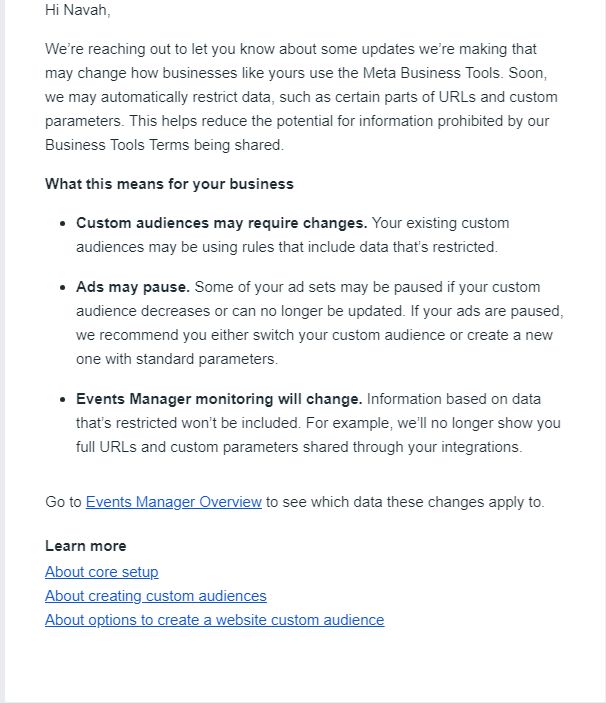
According to an email sent to advertisers, Meta plans to automatically restrict certain data, including parts of URLs and custom parameters.

The company states this reduces the potential for sharing information prohibited by its Business Tools Terms.

Potential Effects On Advertisers

The email outlines several ways these changes may affect businesses:

  1. Custom audiences may require adjustments if they use rules that include data that will be restricted.
  2. Some ad sets may be paused if custom audiences decrease or can no longer be updated.
  3. Events Manager monitoring will change, with restricted data no longer being included in reports.

Meta’s Recommendations

For advertisers whose ads are paused, Meta recommends either switching the custom audience or creating a new one with standard parameters.

The company advises businesses to check their Events Manager Overview to see which data these changes will affect.

Industry Response

Navah Hopkins, Optmyzr Brand Evangelist, commented on LinkedIn about the announcement.

Hopkins noted that the update indicates Meta is prioritizing privacy and that the ability to report and target based on ad interactions may be affected.

She states:

“Really important update on Meta ads: not only will data be restricted, ads with hyper targeted UTMs might be paused!

This is a critical reminder that Meta (Facebook/Instagram/WhatsApp) is taking privacy very seriously and our ability to report and target based on seeing/clicking ads is no longer a guaranteed state.”

Hopkins advised advertisers using UTMs to monitor for paused ads and be prepared to adjust their inclusions. She also suggested informing clients or stakeholders who expect detailed reporting about these upcoming changes.

She added:

“If your ads use UTMs, keep an eye out for paused ads and be prepared to make some compromises on what you include.

Most of us have been moving away from the “perfect” targeting world, towards a privacy compliant one. However, if your clients/stakeholders still hold you accountable for that reporting, be sure to keep them in the know!”

Hopkins shares a screenshot of the email she received from Meta:

Screenshot from: linkedin.com/in/navahhopkins/, September 2024.

Practical Steps For Businesses

In light of this change, and considering Hopkins’ advice, businesses can take several actions:

  • Audit UTMs: Review your tracking parameters for potentially restricted info.
  • Streamline tracking: Focus on core UTM elements like source, medium, and campaign name.
  • Set up ad pause alerts: Stay on top of affected campaigns.
  • Explore alternatives: Look into privacy-compliant analytics tools beyond Meta’s ecosystem.
  • Revamp reporting: Adjust your processes to account for limited data availability.
  • Communicate changes: Keep clients and teams informed about the impact on metrics and performance.
  • Develop privacy-friendly targeting: Test new strategies using broader audience segments.
  • Stay updated: Regularly check Meta’s policies to anticipate future changes.

Advertisers can adapt to Meta’s evolving privacy landscape by implementing these steps while minimizing campaign disruptions.

Context

These changes come amid a broader industry shift towards increased user privacy measures.

As digital platforms evolve their practices, advertisers may need to adapt their strategies to align with new data usage policies.

Meta hasn’t specified an exact date for implementing these changes. Advertisers are advised to stay informed and prepare for potential adjustments.


Featured Image: mundissima/Shutterstock