Google has announced that it will discontinue the chat feature in Google Business Profiles.
The wind-down process will start on July 15, and the functionality will complete on July 31.
The news was emailed to businesses, acknowledging the potential difficulty of the decision and emphasizing Google’s commitment to remaining a helpful partner in business management.
Google’s email to businesses reads:
“We are reaching out to share that we will be winding down Google’s chat feature in Google Business Profile on July 31, 2024. We acknowledge this may be difficult news – as we continually improve our tools, we occasionally have to make difficult decisions which may impact the businesses and partners we work with. It’s important to us that Google remains a helpful partner as you manage your business and we remain committed to this mission.
Google will stop creating new conversations after July 15, and chat functionality will fully end on July 31. Please note, customers will still be able to find and contact your business via Google Search and Maps – and learn more information about you from your website links, business description, photos, and anything else you share on your Business Profile.”
Impact On Businesses & Customers
Starting July 15, customers can no longer initiate new chat conversations with businesses through Google.
Customers currently engaged in chat conversations will receive notifications informing them of the upcoming phase-out of the chat feature.
However, customers will still be able to locate and contact businesses using Google Search and Maps and access information through website links, business descriptions, photos, and other elements shared on Business Profiles.
Google’s Decision To Discontinue Business Chat
Google says the decision to wind down the chat feature is part of ongoing efforts to streamline its offerings.
To assist businesses in the transition, Google has provided guidance on the next steps:
Chat History Download: Businesses that wish to retain a record of their past Business Profile chats can download their chat history of customer conversations using Google Takeout.
Alternative Chat Solutions: Google suggests that businesses invite customers to alternative chat solutions to continue conversations seamlessly.
Background & Context
Google Business Profile, formerly known as Google My Business, is a free tool for businesses to manage their online presence across Google, including Search and Maps. The chat feature enabled customers to communicate directly with companies through their Business Profiles.
While the chat functionality will no longer be available, Google remains committed to providing a platform for companies to manage their online presence and connect with customers.
Joost de Valk, the creator of Yoast SEO plugin, has created a new (and free) plugin for solving a site architecture problem that can silently diminish a website’s ability to rank.
Site Architecture
Site architecture is an important SEO factor because a well-organized website with clear navigation helps users quickly get to the content and products they’re looking for. Along the way it also helps Google find the most important pages and rank them.
The normal and common sense way to organize a website is by topic categories. While some newbie-SEOs believe that organizing a site by topic is an SEO strategy, it’s really just plain old common sense. Organizing a site by topic categories organizes a site in a way that makes it easy to drill-down and find specific things.
Tags: Contextual Site Navigation
Another way to organize a website is through contextual navigation. Contextual navigation is a way to offer a site visitor links to more webpages that are relevant to the webpage and to their interests in the moment. The way to provide a contextual link is through the concept of Tags. Tags are strongly relevant links to content that site visitors may find interesting.
For example, if someone is on a webpage about a new song by a pop star they may in that moment may be interested in reading more articles about that singer. A publisher can create a tag which links to a page that collects every article about that specific pop singer. Ordinarily it doesn’t make sense to create an entire category for hundreds of musical artists because that would defeat the purpose of a hierarchical site navigation (which is to make it easy to find content).
Tags solve the problem of making it easy to navigate to more content that one site visitor is specifically interested in at that moment. It’s contextually relevant navigation.
Too Many Good Things Isn’t Always Good
Creating a long-range plan for organizing a website can be undone by time as a website grows and trends wane. An artist that was trending several years ago may have dropped out of favor (as they often do) and people lose interest. But those tags remain, linking to content that isn’t important anymore, defeating the purpose of internal site navigation, which is to link to the most important content.
Joost de Valk researched a (very small) sample of WordPress sites and discovered that about two thirds of the websites contained overlapping tags, multiple tags linking to the same content while also generating thin content pages, which are webpages with little value.
A blog post sharing his findings noted:
“Tags are not used correctly in WordPress. Approximately two-thirds of WordPress websites using tags are using (way) too many tags. This has significant consequences for a site’s chances in the search engines – especially if the site is large. WordPress websites use too many tags, often forget to display them on their site, and the tag pages do not contain any unique content.”
The sample size was small and a reasonable argument can be made that his findings aren’t representative of most WordPress sites. But the fact remains that websites can be burdened by overlapping and outdated tags.
Here are the three main tag navigation problems that Joost identified:
1. Too Many Tags He found that some publishers add a tag to an article with the expectation that they will add more articles to that tags when those articles are written which in many cases doesn’t happen, resulting in tags that link to just a few articles, sometimes only to one article.
2. Some Themes Are Missing The Tag Functionality The next issue happens when websites upgrade to a new theme (or a new version of a theme) that doesn’t have the tag functionality. This creates orphaned tag pages, pages that site visitors can’t reach because the links to those tag pages are missing. But because those pages still exist the search engines will find them through the autogenerated XML sitemaps.
3. Tag Pages Can Become Thin Content The third issue is that many publishers don’t take the time to add meaningful content to tag pages, they’re just pages of links with article excerpts that are also reproduced on category pages.
Use Fewer Tags
This is where Joost de Valk’s new WordPress plugin comes in handy. What it does is to automatically remove tags that aren’t linking to enough pages, which helps to normalize internal linking. This new plugin is called, The Fewer Tags WordPress Plugin. There’s a free version and a paid Pro version.
The free version of the plugin works automatically to remove all tag pages that contain less than ten posts, which can be adjusted to remove pages with five posts or less.
Added functionality of the Pro version allows greater control over tag management so that a publisher can merge tag pages, automatically create redirects or send a 404 Page Not Found server response.
These are the list of benefits for the Pro version:
“Merge & delete unneeded tag pages quickly & easily.
Creates redirects for removed tag pages on the fly, in your SEO plugin of choice.
Includes an online course in which Joost explains what you should do!
Fix a site’s tag issues long-term!
Uninstall the plugin when you’re done!”
Where To Download Fewer Tags Plugin
The free version of the plugin can be downloaded here:
Google announced that it is now indexing .epub documents, a format commonly used to print books for e-readers. Google is already showing EPUB books in the search index.
EPUB File Format
EPUB is an XML-based eBook publishing format based on a standard developed by the International Digital Publishing Forum, which in 2016 was subsequently merged with the World Wide Wide Web Consortium (W3C). The goal of the merger was to bring together electronic book publishing with the Internet so that they would mutually enrich each other.
Google Indexing EBUB Content
The intent of merging e-publishing with the Internet aligns with Google’s decision to index (and at some point presumably rank) EPUB content. The only surprise should be that it took eight years to do so. The changelog notes that EPUB file format was added to Google’s documentation of indexable file types and offers no other details.
Google’s official changelog offers a matter of fact notation:
“Adding epub to indexable file types
What: Added EPUB to the list of indexable file types.
Why: Google Search now supports epub.”
Does Google Rank EPUB Content?
I did a site:search for EPUB content, noted the title of a scientific research about eating contaminated fish in Lake Ontario (“Consumption of Contaminated Lake Fish and Reproduction”) that was hosted on the journals.lww.com domain.
I next searched for that document in the regular search using the exact match keyword phrase and a variation of the keyword phrase (“Consumption of Contaminated Fish in Lake Ontario”) and Google didn’t surface the EPUB document but it did surface the webpage that contained the download to the EPUB document.
Screenshot Of EPUB Download Page
Google’s official indexable file type documentation only notes that the listed filetypes are indexable. At this time it’s fair to say that Google isn’t ranking EPUB documents but Google will surface them with a filetype:epub search.
An analysis of 25,000 ecommerce queries by Bartosz Góralewicz, founder of Onely, reveals the impact of Google’s AI overviews on search visibility for online retailers.
The study found that 16% of eCommerce queries now return an AI overview in search results, accounting for 13% of total search volume in this sector.
Notably, 80% of the sources listed in these AI overviews do not rank organically for the original query.
“Ranking #1-3 gives you only an 8% chance of being a source in AI overviews,” Góralewicz stated.
🗞️ Google AI overviews vs. eCommerce 🗞️
We just finished analyzing 25k eCommerce queries.
TL;DR
– 16% of queries return AI-overview (previously SGE)
– 13% of search volume from search goes through AI overviews
– 80% of sources don’t rank organically for the query (!)
— Bartosz Góralewicz (@bart_goralewicz) May 22, 2024
Shift Toward “Accelerated” Product Experiences
International SEO consultant Aleyda Solis analyzed the disconnect between traditional organic ranking and inclusion in AI overviews.
According to Solis, for product-related queries, Google is prioritizing an “accelerated” approach over summarizing currently ranking pages.
She commented Góralewicz’ findings, stating:
“… rather than providing high level summaries of what’s already ranked organically below, what Google does with e-commerce is “accelerate” the experience by already showcasing what the user would get next.”
Solis explains that for queries where Google previously ranked category pages, reviews, and buying guides, it’s now bypassing this level of results with AI overviews.
This: “80% of AI overview sources don’t rank organically for the query” from 25K e-commerce queries that @bart_goralewicz analyzed.
As Góralewicz notes, this could be an initial rollout, speculating that “Google will expand AI overviews for high-cost queries when enabling ads” based on data showing they are currently excluded for high cost-per-click keywords.
An in-depth report across ecommerce and publishing is expected soon from Góralewicz and Onely, with additional insights into this search trend.
Why SEJ Cares
AI overviews represent a shift in how search visibility is achieved for ecommerce websites.
With most overviews currently pulling product data from non-ranking sources, the traditional connection between organic rankings and search traffic is being disrupted.
Retailers may need to adapt their SEO strategies for this new search environment.
How This Can Benefit You
While unsettling for established brands, AI overviews create new opportunities for retailers to gain visibility without competing for the most commercially valuable keywords.
Ecommerce sites can potentially circumvent traditional ranking barriers by optimizing product data and detail pages for Google’s “accelerated” product displays.
The detailed assessment framework provided by Solis enables merchants to audit their exposure and prioritize optimization needs accordingly.
FAQ
What are the key findings from the analysis of AI overviews & ecommerce queries?
Góralewicz’s analysis of 25,000 ecommerce queries found:
16% of ecommerce queries now return an AI overview in the search results.
80% of the sources listed in these AI overviews do not rank organically for the original query.
Ranking positions #1-3 only provides an 8% chance of being a source in AI overviews.
These insights reveal significant shifts in how ecommerce sites need to approach search visibility.
Why are AI overviews pulling product data from non-ranking sources, and what does this mean for retailers?
Google’s AI overviews prioritize “accelerated” experiences over summarizing currently ranked pages for product-related queries.
This shift focuses on showcasing directly what users seek instead of traditional organic results.
For retailers, this means:
A need to optimize product pages beyond traditional SEO practices, catering to the data requirements of AI overviews.
Opportunities to gain visibility without necessarily holding top organic rankings.
Potential to bypass traditional ranking barriers by focusing on enhanced product data integration.
Retailers must adapt quickly to remain competitive in this evolving search environment.
What practical steps can retailers take to evaluate and improve their search visibility in light of AI overview disruptions?
Retailers can take several practical steps to evaluate and improve their search visibility:
Utilize the spreadsheet provided by Aleyda Solis to assess the potential traffic impact of AI overviews.
Optimize product and detail pages to align with the data and presentation style preferred by AI overviews.
Continuously monitor changes and updates to AI overviews, adapting strategies based on new data and trends.
These steps can help retailers navigate the impact of AI overviews and maintain or improve their search visibility.
Please note that this is separate from users’ Google Maps review history, which is already public.
Centralized Review Management
Google’s search reviews profiles, accessible at profile.google.com, is a centralized hub for you to see all the reviews you’ve previously contributed, including reviews for TV shows, movies, and other content.
This new feature provides a more seamless experience for viewing, updating, and deleting past reviews.
Private Initially, Public Soon
Currently, these profiles are visible only to the individual users themselves.
On June 24th, other Google users can view your profile and written reviews by tapping our name or picture on any published reviews.
Privacy Considerations
By allowing users to access and explore each other’s review histories, Google is making the review ecosystem within its platforms more transparent.
While the profile will make your written reviews publicly accessible, Google has assured that personal details from individual Google Accounts, such as birthdays, won’t be displayed.
If you prefer not to have a public profile, you’ll have the option to delete it.
Why SEJ Cares
This centralized profile could be a helpful way to evaluate the credibility and consistency of reviewers, potentially influencing purchasing decisions.
Conversely, creators may need to adapt their review management strategies to account for the potential impact of individual reviewers.
As the June 24th rollout date approaches, expect to see this new feature integrated into the search experience.
How This Can Benefit You
If you actively contribute reviews on Google’s platforms, this increased visibility may enhance your influence and result in greater recognition within your area of expertise.
For creators, the ability to investigate reviewer profiles could help identify and address potentially misleading or fraudulent reviews, fostering a more trustworthy review ecosystem.
On the other hand, it may necessitate a more proactive approach to monitoring and responding to critical reviews, as they will now be more easily accessible to potential customers.
FAQ
What is the search reviews profile feature introduced by Google?
Google introduced a new type of social profile that allows users to view, manage, and share their written reviews across various platforms.
This feature aims to make users’ reviews more helpful by centralizing them in one hub. It makes it easier for users to update, delete, or view their past reviews. Initially private, these profiles will soon be visible to other users starting June 24th.
How will individual reviewer profiles impact online marketers?
This feature adds a layer of transparency to the review ecosystem. Online marketers might use these profiles to assess the credibility and consistency of reviewers, which can inform their strategies for managing customer feedback.
For reviewers, increased visibility can enhance their reputations, potentially influencing purchasing decisions and improving their authority in specific niches.
What are the key benefits of the new Google profiles for active review contributors?
Active review contributors stand to benefit from increased visibility and recognition. Their reviews will be easily accessible, enhancing their influence as trusted reviewers.
This can be particularly advantageous for users whose reviews focus on specific domains, as it may lead to greater acknowledgment and trust from the community.
Google’s rollout of AI-generated overviews in US search results is taking a disastrous turn, with mainstream media outlets like The New York Times, BBC, and CNBC reporting on numerous inaccuracies and bizarre responses.
On social media, users are sharing endless examples of the feature’s nonsensical and sometimes dangerous output.
From recommending non-toxic glue on pizza to suggesting that eating rocks provides nutritional benefits, the blunders would be amusing if they weren’t so alarming.
Replicated…. But I appreciate that the glue suggested is “non-toxic”! Look, this isn’t about “gotchas”, this is about pointing out clearly foreseeable harms. Before–eg–a child dies from this mess. This isn’t about Google, it’s about the foreseeable effect of AI on society. https://t.co/kG0xP2if7Lpic.twitter.com/MIPjF8hg0i
As reported by The New York Times, Google’s AI overviews struggle with basic facts, claiming that Barack Obama was the first Muslim president of the United States and stating that Andrew Jackson graduated from college in 2005.
These errors undermine trust in Google’s search engine, which more than two billion people rely on for authoritative information worldwide.
Manual Removal & System Refinements
As reported by The Verge, Google is now scrambling to remove the bizarre AI-generated responses and improve its systems manually.
A Google spokesperson confirmed that the company is taking “swift action” to remove problematic responses and using the examples to refine its AI overview feature.
Google’s Rush To AI Integration
The flawed rollout of AI overviews isn’t an isolated incident for Google.
As CNBC notes in its report, Google made several missteps in a rush to integrate AI into its products.
In February, Google was forced to pause its Gemini chatbot after it generated inaccurate images of historical figures and refused to depict white people in most instances.
Before that, the company’s Bard chatbot faced ridicule for sharing incorrect information about outer space, leading to a $100 billion drop in Google’s market value.
Despite these setbacks, industry experts cited by The New York Times suggest that Google has little choice but to continue advancing AI integration to remain competitive.
However, the challenges of taming large language models, which ingest false information and satirical posts, are now more apparent.
The Debate Over AI In Search
The controversy surrounding AI overviews adds fuel to the debate over the risks and limitations of AI.
While the technology holds potential, these missteps remind everyone that more testing is needed before unleashing it on the public.
The BBC notes that Google’s rivals face similar backlash over their attempts to cram more AI tools into their consumer-facing products.
The UK’s data watchdog is investigating Microsoft after it announced a feature that would take continuous screenshots of users’ online activity.
At the same time, actress Scarlett Johansson criticized OpenAI for using a voice likened to her own without permission.
What This Means For Websites & SEO Professionals
Mainstream media coverage of Google’s erroneous AI overviews brings the issue of declining search quality to public attention.
As the company works to address inaccuracies, the incident serves as a cautionary tale for the entire industry.
Important takeaway: Prioritize responsible use of AI technology to ensure the benefits outweigh its risks.
Google’s Search Liaison, Danny Sullivan, has confirmed that the search engine hasn’t launched algorithmic actions targeting site reputation abuse.
This clarification addresses speculation within the SEO community that recent traffic drops are related to Google’s previously announced policy update.
Sullivan Says No Update Rolled Out
Lily Ray, an SEO professional, shared a screenshot on Twitter showing a significant drop in traffic for the website Groupon starting on May 6.
Ray suggested this was evidence that Google had begun rolling out algorithmic penalties for sites violating the company’s site reputation abuse policy.
However, Sullivan quickly stepped in, stating:
“We have not gone live with algorithmic actions on site reputation abuse. I well imagine when we do, we’ll be very clear about that. Publishers seeing changes and thinking it’s this — it’s not — results change all the time for all types of reasons.”
We have not gone live with algorithmic actions on site reputation abuse. I well imagine when we do, we’ll be very clear about that. Publishers seeing changes and thinking it’s this — it’s not — results change all the time for all types of reasons. The actions currently only…
— Google SearchLiaison (@searchliaison) May 23, 2024
Sullivan added that when the actions are rolled out, they will only impact specific content, not entire websites.
This is an important distinction, as it suggests that even if a site has some pages manually penalized, the rest of the domain can rank normally.
I don’t know what that chart is based on. Third-party visibility stats? Or is this data from each site reported directly from Search Console? But beyond that, again, we’ve not added an algorithmic component for site reputation abuse. What I said in my original response is still…
— Google SearchLiaison (@searchliaison) May 23, 2024
Background On Google’s Site Reputation Abuse Policy
Earlier this year, Google announced a new policy to combat what it calls “site reputation abuse.”
This refers to situations where third-party content is published on authoritative domains with little oversight or involvement from the host site.
Examples include sponsored posts, advertorials, and partner content that is loosely related to or unrelated to a site’s primary purpose.
Under the new policy, Google is taking manual action against offending pages and plans to incorporate algorithmic detection.
What This Means For Publishers & SEOs
While Google hasn’t launched any algorithmic updates related to site reputation abuse, the manual actions have publishers on high alert.
Those who rely heavily on sponsored content or partner posts to drive traffic should audit their sites and remove any potential policy violations.
Sullivan’s confirmation that algorithmic changes haven’t occurred may provide temporary relief.
Additionally, his statements also serve as a reminder that significant ranking fluctuations can happen at any time due to various factors, not just specific policy rollouts.
FAQ
Will Google’s future algorithmic actions impact entire websites or specific content?
When Google eventually rolls out algorithmic actions for site reputation abuse, these actions will target specific content rather than the entire website.
This means that if certain pages are found to be in violation, only those pages will be affected, allowing other parts of the site to continue ranking normally.
What should publishers and SEOs do in light of Google’s site reputation abuse policy?
Publishers and SEO professionals should audit their sites to identify and remove any content that may violate Google’s site reputation abuse policy.
This includes sponsored posts and partner content that doesn’t align with the site’s primary purpose. Taking these steps can mitigate the risk of manual penalties from Google.
What is the context of the recent traffic drops seen in the SEO community?
Google claims the recent drops for coupon sites aren’t linked to any algorithmic actions for site reputation abuse. Traffic fluctuations can occur for various reasons and aren’t always linked to a specific algorithm update.
A keynote at Google’s Marketing Live event showed a new AI-powered visual search results that feature advertisements that engage users within the context of an AI-Assisted search, blurring the line between AI-generated search results and advertisements.
Google Lens is a truly helpful app but it becomes unconventional where it blurs the line between an assistant helping users and being led to a shopping cart. This new way of engaging potential customers with AI is so far out there that the presenter doesn’t even call it advertising, he doesn’t even use the word.
Visual Search Traffic Opportunity?
Google’s Group Product Manager Sylvanus Bent, begins the presentation with an overview of the next version of Google Lens visual search that will be useful for surfacing information and for help finding where to buy them.
Sylvanus explained how it will be an opportunity for websites to receive traffic from this new way to search.
“…whether you’re snapping a photo with lens or circling to search something on your social feed, visual search unlocks new ways to explore whatever catches your eye, and we recently announced a newly redesigned results page for Visual search.
Soon, instead of just visual matches, you’ll see a wide range of results, from images to video, web links, and facts about the knowledge graph. It gets people the helpful information they need and creates new opportunities for sites to be discovered.”
It’s hard to say whether or not this will bring search traffic to websites and what the quality of that traffic will be. Will they stick around to read an article? Will they engage with a product review?
Visual Search Results
Sylvanus shares a hypothetical example of someone at an airport baggage claim who falls in like with someone else’s bag. He explains that all the person needs to do is snap a photo of the luggage bag and Google Lens will take them directly to shopping options.
He explains:
“No words, no problem. Just open Lens, take a quick picture and immediately you’ll see options to purchase.
And for the first time, shopping ads will appear at the very top of the results on linked searches, where a business can offer what a consumer is looking for.
This will help them easily purchase something that catches their eye.”
These are image-heavy shopping ads at the top of the search results and as annoying as that may be it’s nowhere near the “next level” advertising that is coming to Google’s new version of visual search where Google presents a paid promotion within the context of an AI Assistant.
Interactive Search Shopping
Sylvanus next describes an AI-powered form advertising that happens directly within search. But he doesn’t call it advertising. He doesn’t even use the word advertising. He suggests this new form of AI search experience is more than offer, saying that, “it’s an experience.”
He’s right to not use the word advertisement because what he describes goes far beyond advertising and blurs the boundaries between search and advertising within the context of AI-powered suggestions, paid suggestions.
Sylvanus explains how this new form of shopping experience works:
“And next, imagine a world where every search ad is more than an offer. It’s an experience. It’s a new way for you to engage more directly with your customers. And we’re exploring search ads with AI powered recommendations across different verticals. So I want to show you an example that’s going live soon and you’ll see even more when we get to shopping.”
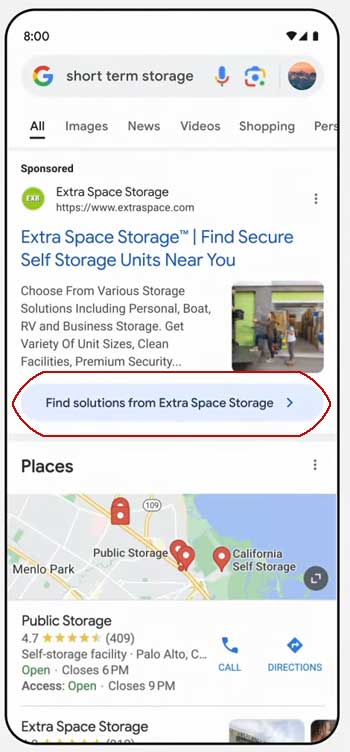
He uses the example of someone who needs to store their furniture for a few months and who turns to Google to find short term storage. What he describes is a query for local short term storage that turns into a “dynamic ad experience” that leads the searcher into throwing packing supplies into their shopping cart.
He narrated how it works:
“You search for short term storage and you see an ad for extra space storage. Now you can click into a new dynamic ad experience.
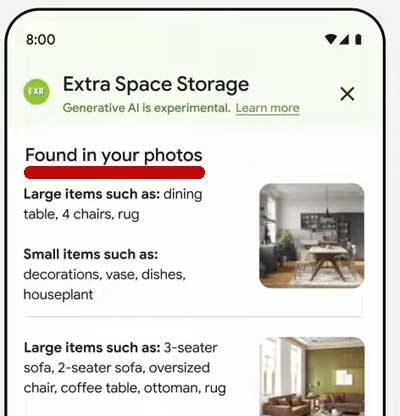
You can select and upload photos of the different rooms in your house, showing how much furniture you have, and then extra space storage with help from Google, AI generates a description of all your belongings for you to verify. You get a recommendation for the right size and type of storage unit and even how much packing supplies you need to get the job done. Then you just go to the website to complete the transaction.
And this is taking the definition of a helpful ad to the next level. It does everything but physically pick up your stuff and move it, and that is cool.”
Step 1: Search For Short Term Storage
The above screenshot shows an advertisement that when clicked takes the user to what looks like an AI-assisted search but is really an interactive advertisement.
Step 2: Upload Photos For “AI Assistance”
The above image is a screenshot of an advertisement that is presented in the context of AI-assisted search. Masking an advertisement within a different context is the same principal behind an advertorial where an advertisement is hidden in the form of an article. The phrases “Let AI do the heavy lifting” and “AI-powered recommendations” create the context of AI-search that masks the true context of an advertisement.
Step 3: Images Chosen For Uploading
The above screenshot shows how a user uploads an image to the AI-powered advertisement within the context of an AI-powered search app.
The Word “App” Masks That This Is An Ad
Above is a screenshot of how a user uploads a photo to the AI-powered interactive advertisement within the context of a visual search engine, using the word “app” to further the illusion that the user is interacting with an app and not an advertisement.
Upload Process Masks The Advertising Context
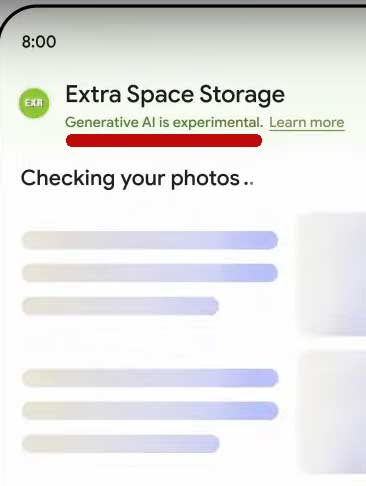
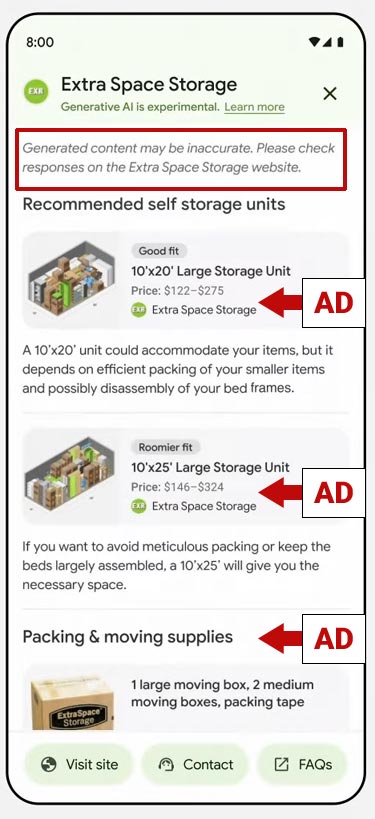
The phrase “Generative AI is experimental” contributes to the illusion that this is an AI-assisted search.
Step 4: Upload Confirmation
In step 4 the “app” advertisement is for confirming that the AI correctly identified the furniture that needs to be put into storage.
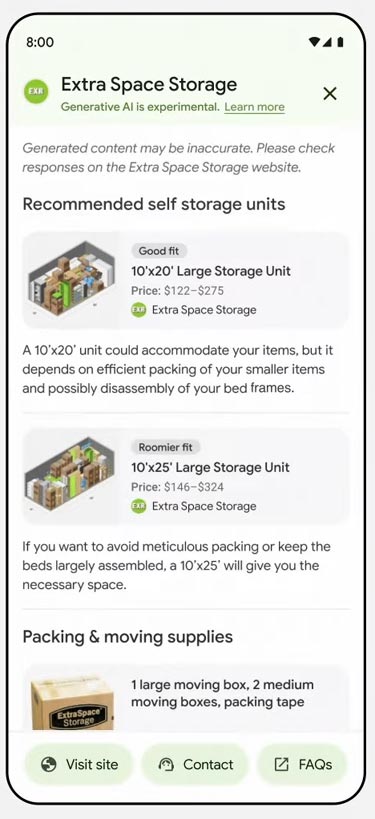
Step 5: AI “Recommendations”
The above screenshot shows “AI recommendations” that look like search results.
The Recommendations Are Ad Units
Those recommendations are actually ad units that when clicked takes the user to the “Extra Space Storage” shopping website.
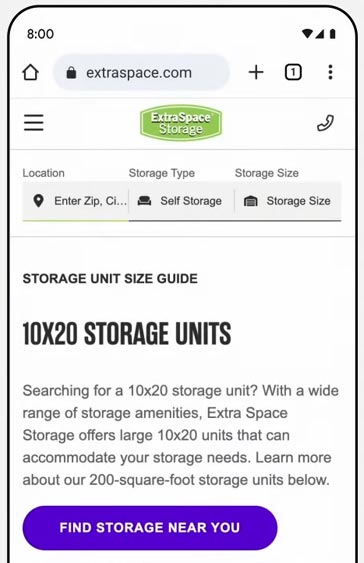
Step 6: Searcher Visits Advertiser Website
Blurring The Boundaries
What the Google keynote speaker describes is the integration of paid product suggestions into an AI assisted search. This kind of advertising is so far out there that the Googler doesn’t even call it advertising and rightfully so because what this does is blur the line between AI assisted search and advertising. At what point does a helpful AI search become just a platform for using AI to offer paid suggestions?
WP Rocket, the WordPress page speed performance plugin, just announced the release of a new version that will help publishers optimize for Largest Contentful Paint (LCP), an important Core Web Vitals metric.
Large Contentful Paint (LCP)
LCP is a page speed metric that’s designed to show how fast it takes for a user to perceive that the page is loaded and read to be interacted with. This metric measures the time it takes for the main content elements has fully loaded. This gives an idea of how usable a webpage is. The faster the LCP the better the user experience will be.
WP Rocket 3.16
WP Rocket is a caching plugin that helps a site perform faster. The way page caching generally works is that the website will store frequently accessed webpages and resources so that when someone visits the page the website doesn’t have to fetch the data from the database, which takes time, but instead will serve the webpage from the cache. This is super important when a website has a lot of site visitors because that can use a lot of server resources to fetch and build the same website over and over for every visitor.
The lastest version of WP Rocket (3.16) now contains Automatic LCP optimization, which means that it will optimize the on-page elements from the main content so that they are served first thereby raising the LCP scores and providing a better user experience.
Because it’s automatic there’s really nothing to fiddle around with or fine tune.
According to WP Rocket:
“Automatic LCP Optimization: Optimizes the Largest Contentful Paint, a critical metric for website speed, automatically enhancing overall PageSpeed scores.
Smart Management of Above-the-Fold Images: Automatically detects and prioritizes critical above-the-fold images, loading them immediately to improve user experience and performance metrics.
All new functionalities operate seamlessly in the background, requiring no direct intervention from the user. Upon installing or upgrading to WP Rocket 3.16, these optimizations are automatically enabled, though customization options remain accessible for those who prefer manual control.”