AI Search Sends Users to 404 Pages Nearly 3X More Than Google via @sejournal, @MattGSouthern

New research examining 16 million URLs aligns with Google’s predictions that hallucinated links will become an issue across AI platforms.

An Ahrefs study shows that AI assistants send users to broken web pages nearly three times more often than Google Search.

The data arrives six months after Google’s John Mueller raised awareness about this issue.

ChatGPT Leads In URL Hallucination Rates

ChatGPT creates the most fake URLs among all AI assistants tested. The study found that 1% of URLs people clicked led to 404 pages. Google’s rate is just 0.15%.

The problem gets worse when looking at all URLs ChatGPT mentions, not just clicked ones. Here, 2.38% lead to error pages. Compare this to Google’s top search results, where only 0.84% are broken links.

Claude came in second with 0.58% broken links for clicked URLs. Copilot had 0.34%, Perplexity 0.31%, and Gemini 0.21%. Mistral had the best rate at 0.12%, but it also sends the least traffic to websites.

Why Does This Happen?

The research found two main reasons why AI creates fake links.

First, some URLs used to exist but don’t anymore. When AI relies on old information instead of searching the web in real-time, it might suggest pages that have been deleted or moved.

Second, AI sometimes invents URLs that sound right but never existed.

Ryan Law from Ahrefs shared examples from their own site. AI assistants created fake URLs like “/blog/internal-links/” and “/blog/newsletter/” because these sound like pages Ahrefs might have. But they don’t actually exist.

Limited Impact on Overall Traffic

The problem may seem significant, but most websites won’t notice much impact. AI assistants only bring in about 0.25% of website traffic. Google, by comparison, drives 39.35% of traffic.

This means fake URLs affect a tiny portion of an already small traffic source. Still, the issue might grow as more people use AI for research and information.

The study also found that 74% of new web pages contain AI-generated content. When this content includes fake links, web crawlers might index them, spreading the problem further.

Mueller’s Prediction Proves Accurate

These findings match what Google’s John Mueller predicted in March. He forecasted a “slight uptick of these hallucinated links being clicked” over the next 6-12 months.

Mueller suggested focusing on better 404 pages rather than chasing accidental traffic.

His advice to collect data before making big changes looks smart now, given the small traffic impact Ahrefs found.

Mueller also predicted the problem would fade as AI services improve how they handle URLs. Time will tell if he’s right about this, too.

Looking Forward

For now, most websites should focus on two things. Create helpful 404 pages for users who hit broken links. Then, set up redirects only for fake URLs that get meaningful traffic.

This allows you to handle the problem without overreacting to what remains a minor issue for most sites.

Google Antitrust Case: AI Overviews Use FastSearch, Not Links via @sejournal, @martinibuster

A sharp-eyed search marketer discovered the reason why Google’s AI Overviews showed spammy web pages. The recent Memorandum Opinion in the Google antitrust case featured a passage that offers a clue as to why that happened and speculates how it reflects Google’s move away from links as a prominent ranking factor.

Ryan Jones, founder of SERPrecon (LinkedIn profile), called attention to a passage in the recent Memorandum Opinion that shows how Google grounds its Gemini models.

Grounding Generative AI Answers

The passage occurs in a section about grounding answers with search data. Ordinarily, it’s fair to assume that links play a role in ranking the web pages that an AI model retrieves from a search query to an internal search engine. So when someone asks Google’s AI Overviews a question, the system queries Google Search and then creates a summary from those search results.

But apparently, that’s not how it works at Google. Google has a separate algorithm that retrieves fewer web documents and does so at a faster rate.

The passage reads:

“To ground its Gemini models, Google uses a proprietary technology called FastSearch. Rem. Tr. at 3509:23–3511:4 (Reid). FastSearch is based on RankEmbed signals—a set of search ranking signals—and generates abbreviated, ranked web results that a model can use to produce a grounded response. Id. FastSearch delivers results more quickly than Search because it retrieves fewer documents, but the resulting quality is lower than Search’s fully ranked web results.”

Ryan Jones shared these insights:

“This is interesting and confirms both what many of us thought and what we were seeing in early tests. What does it mean? It means for grounding Google doesn’t use the same search algorithm. They need it to be faster but they also don’t care about as many signals. They just need text that backs up what they’re saying.

…There’s probably a bunch of spam and quality signals that don’t get computed for fastsearch either. That would explain how/why in early versions we saw some spammy sites and even penalized sites showing up in AI overviews.”

He goes on to share his opinion that links aren’t playing a role here because the grounding uses semantic relevance.

What Is FastSearch?

Elsewhere the Memorandum shares that FastSearch generates limited search results:

“FastSearch is a technology that rapidly generates limited organic search results for certain use cases, such as grounding of LLMs, and is derived primarily from the RankEmbed model.”

Now the question is, what’s the RankEmbed model?

The Memorandum explains that RankEmbed is a deep-learning model. In simple terms, a deep-learning model identifies patterns in massive datasets and can, for example, identify semantic meanings and relationships. It does not understand anything in the same way that a human does; it is essentially identifying patterns and correlations.

The Memorandum has a passage that explains:

“At the other end of the spectrum are innovative deep-learning models, which are machine-learning models that discern complex patterns in large datasets. …(Allan)

…Google has developed various “top-level” signals that are inputs to producing the final score for a web page. Id. at 2793:5–2794:9 (Allan) (discussing RDXD-20.018). Among Google’s top-level signals are those measuring a web page’s quality and popularity. Id.; RDX0041 at -001.

Signals developed through deep-learning models, like RankEmbed, also are among Google’s top-level signals.”

User-Side Data

RankEmbed uses “user-side” data. The Memorandum, in a section about the kind of data Google should provide to competitors, describes RankEmbed (which FastSearch is based on) in this manner:

“User-side Data used to train, build, or operate the RankEmbed model(s); “

Elsewhere it shares:

“RankEmbed and its later iteration RankEmbedBERT are ranking models that rely on two main sources of data: _____% of 70 days of search logs plus scores generated by human raters and used by Google to measure the quality of organic search results.”

Then:

“The RankEmbed model itself is an AI-based, deep-learning system that has strong natural-language understanding. This allows the model to more efficiently identify the best documents to retrieve, even if a query lacks certain terms. PXR0171 at -086 (“Embedding based retrieval is effective at semantic matching of docs and queries”);

…RankEmbed is trained on 1/100th of the data used to train earlier ranking models yet provides higher quality search results.

…RankEmbed particularly helped Google improve its answers to long-tail queries.

…Among the underlying training data is information about the query, including the salient terms that Google has derived from the query, and the resultant web pages.

…The data underlying RankEmbed models is a combination of click-and-query data and scoring of web pages by human raters.

…RankEmbedBERT needs to be retrained to reflect fresh data…”

A New Perspective On AI Search

Is it true that links do not play a role in selecting web pages for AI Overviews? Google’s FastSearch prioritizes speed. Ryan Jones theorizes that it could mean Google uses multiple indexes, with one specific to FastSearch made up of sites that tend to get visits. That may be a reflection of the RankEmbed part of FastSearch, which is said to be a combination of “click-and-query data” and human rater data.

Regarding human rater data, with billions or trillions of pages in an index, it would be impossible for raters to manually rate more than a tiny fraction. So it follows that the human rater data is used to provide quality-labeled examples for training. Labeled data are examples that a model is trained on so that the patterns inherent to identifying a high-quality page or low-quality page can become more apparent.

Featured Image by Shutterstock/Cookie Studio

Google Quietly Raised Ad Prices, Court Orders More Transparency via @sejournal, @MattGSouthern

Google raised ad prices incrementally through internal “pricing knobs” that advertisers couldn’t detect, according to federal court documents.

  • Google raised ad prices 5-15% at a time using “pricing knobs” that made increases look like normal auction fluctuations.
  • Google’s surveys showed advertisers noticed higher costs but didn’t realize Google was causing the increases.
  • A federal judge now requires Google to publicly disclose auction changes that could raise advertiser costs.
Interaction To Next Paint: 9 Content Management Systems Ranked via @sejournal, @martinibuster

Interaction to Next Paint (INP) is a meaningful Core Web Vitals metric because it represents how quickly a web page responds to user input. It is so important that the HTTPArchive has a comparison of INP across content management systems. The following are the top content management systems ranked by Interaction to Next Paint.

What Is Interaction To Next Paint (INP)?

INP measures how responsive a web page is to user interactions during a visit. Specifically, it measures interaction latency, which is the time between when a user clicks, taps, or presses a key and when the page visually responds.

This is a more accurate measurement of responsiveness than the older metric it replaced, First Input Delay (FID), which only captured the first interaction. INP is more comprehensive because it evaluates all clicks, taps, and key presses on a page and then reports a representative value based on the longest meaningful latency.

The INP score is representative of the page’s responsive performance. For that reason**,** extreme outliers are filtered out of the calculation so that the score reflects typical worst-case responsiveness.

Web pages with poor INP scores create a frustrating user experience that increases the risk of page abandonment. Fast responsiveness enables a smoother experience that supports higher engagement and conversions.

INP Scores Have Three Ratings:

  • Good: Below or at 200 milliseconds
  • Needs Improvement: Above 200 milliseconds and below or at 500 milliseconds
  • Poor: Above 500 milliseconds

Content Management System INP Champions

The latest Interaction to Next Paint (INP) data shows that all major content management systems improved from June to July, but only by incremental improvements.

Joomla posted the largest gain with a 1.12% increase in sites achieving a good score. WordPress followed with a 0.88% increase in the number of sites posting a good score, while Wix and Drupal improved by 0.70% and 0.64%.

Duda and Squarespace also improved, though by smaller margins of 0.46% and 0.22%. Even small percentage changes can reflect real improvements in how users experience responsiveness on these platforms, so it’s encouraging that every publishing platform in this comparison is improving.

CMS INP Ranking By Monthly Improvement

  1. Joomla: +1.12%
  2. WordPress: +0.88%
  3. Wix: +0.70%
  4. Drupal: +0.64%
  5. Duda: +0.46%
  6. Squarespace: +0.22%

Which CMS Has The Best INP Scores?

Month-to-month improvement shows who is doing better, but that’s not the same as which CMS is doing the best. The July INP results show a different ranking order of content management systems when viewed by overall INP scores.

Squarespace leads with 96.07% of sites achieving a good INP score, followed by Duda at 93.81%. This is a big difference from the Core Web Vitals rankings, where Duda is consistently ranked number one. When it comes to arguably the most important Core Web Vital metric, Squarespace takes the lead as the number one ranked CMS for Interaction to Next Paint.

Wix and WordPress are ranked in the middle with 87.52% and 86.77% of sites showing a good INP score, while Drupal, with a score of 86.14%, is ranked in fifth place, just a fraction behind WordPress.

Ranking in sixth place in this comparison is Joomla, trailing the other five with a score of 84.47%. That score is not so bad considering that it’s only two to three percent behind Wix and WordPress.

CMS INP Rankings for July 2025

  1. Squarespace – 96.07%
  2. Duda: 93.81%
  3. Wix: 87.52%
  4. WordPress: 86.77%
  5. Drupal: 86.14%
  6. Joomla: 84.47%

These rankings show that even platforms that lag in INP performance, like Joomla, are still improving, and it could be that Joomla’s performance may best the other platforms in the future if it keeps up its improvement.

In contrast, Squarespace, which already performs well, posted the smallest gain. This indicates that performance improvement is uneven, with systems advancing at different speeds. Nevertheless, the latest Interaction to Next Paint (INP) data shows that all six content management systems in this comparison improved from June to July. That upward performance trend is a positive sign for publishers.

What About Shopify’s INP Performance?

Shopify has strong Core Web Vitals performance, but how well does it compare to these six content management systems? This might seem like an unfair comparison because shopping platforms require features, images, and videos that can slow a page down. But Duda, Squarespace, and Wix offer ecommerce solutions, so it’s actually a fair and reasonable comparison.

We see that the rankings change when Shopify is added to the INP comparison:

Shopify Versus Everyone

  1. Squarespace: 96.07%
  2. Duda: 93.81%
  3. Shopify: 89.58%
  4. Wix: 87.52%
  5. WordPress: 86.77%
  6. Drupal: 86.14%
  7. Joomla: 84.47%

Shopify is ranked number three. Now look at what happens when we compare the three shopping platforms against each other:

Top Ranked Shopping Platforms By INP

  1. BigCommerce: 95.29%
  2. Shopify: 89.58%
  3. WooCommerce: 87.99%

BigCommerce is the number-one-ranked shopping platform for the important INP metric among the three in this comparison.

Lastly, we compare the INP performance scores for all the platforms together, leading to a surprising comparison.

CMS And Shopping Platforms Comparison

  1. Squarespace: 96.07%
  2. BigCommerce: 95.29%
  3. Duda: 93.81%
  4. Shopify: 89.58%
  5. WooCommerce: 87.99%
  6. Wix: 87.52%
  7. WordPress: 86.77%
  8. Drupal: 86.14%
  9. Joomla: 84.47%

All three ecommerce platforms feature in the top five rankings of content management systems, which is remarkable because of the resource-intensive demands of ecommerce websites. WooCommerce, a WordPress-based shopping platform, ranks in position five, but it’s so close to Wix that they are virtually tied for position five.

Takeaways

INP measures the responsiveness of a web page, making it a meaningful indicator of user experience. The latest data shows that while every CMS is improving, Squarespace, BigCommerce, and Duda outperform all other content platforms in this comparison by meaningful margins.

All of the platforms in this comparison show high percentages of good INP scores. The number four-ranked Shopify is only 6.49 percentage points behind the top-ranked Squarespace, and 84.47% of the sites published with the bottom-ranked Joomla show a good INP score. These results show that all platforms are delivering a quality experience for users

View the results here (must be logged into a Google account to view).

Featured Image by Shutterstock/Roman Samborskyi

Google Avoids Breakup As Judge Bars Exclusive Default Search Deals via @sejournal, @MattGSouthern

A federal judge outlined remedies in the U.S. search antitrust case that bar Google from using exclusive default search deals but stop short of forcing a breakup.

Reuters reports that Google won’t have to divest Chrome or Android, but it may have to share some search data with competitors under court-approved terms.

Google says it will appeal.

What The Judge Ordered

Judge Amit P. Mehta barred Google from entering or maintaining exclusive agreements that tie the distribution of Search, Chrome, Google Assistant, or the Gemini app to other apps, licenses, or revenue-share arrangements.

The ruling allows Google to continue paying for placement but prohibits exclusivity that could block rivals.

The order also envisions Google making certain search and search-ad syndication services available to competitors at standard rates, alongside limited data sharing for “qualified competitors.”

Mehta ordered Google to share some search data with competitors under specific protections to help them improve their relevance and revenue. Google argued this could expose its trade secrets and plans to appeal the decision.

The judge directed the parties to meet and submit a revised final judgment by September 10. Once entered, the remedies would take effect 60 days later, run for six years, and be overseen by a technical committee. Final language could change based on the parties’ filing.

How We Got Here

In August 2024, Mehta found Google illegally maintained a monopoly in general search and related text ads.

Judge Amit P. Mehta wrote in his August 2024 opinion:

“Google is a monopolist, and it has acted as one to maintain its monopoly.”

This decision established the need for remedies. Today’s order focuses on distribution and data access, rather than breaking up the company.

What’s Going To Change

Ending exclusivity changes how contracts for default placements can be made across devices and browsers. Phone makers and carriers may need to update their agreements to follow the new rules.

However, the ruling doesn’t require any specific user experience change, like a choice screen. The results will depend on how new contracts are created and approved by the court.

Next Steps

Expect a gradual rollout if the final judgment follows today’s outline.

Here are the next steps to watch for:

  • The revised judgment that the parties will submit by September 10.
  • Changes to contracts between Google and distribution partners to meet the non-exclusivity requirement.
  • Any pilot programs or rules that specify who qualifies as a “qualified competitor” and what data they can access.

Separately, Google faces a remedies trial in the ad-tech case in late September. This trial could lead to changes that affect advertising and measurement.

Looking Ahead

If the parties submit a revised judgment by September 10, changes could start about 60 days after the court’s final order. This might shift if Google gets temporary relief during an appeal.

In the short term, expect contract changes rather than product updates.

The final judgment will determine who can access data and which types are included. If the program is limited, it may not significantly affect competition. If broader, competitors might enhance their relevance and profit over the six-year period.

Also watch the ad tech remedies trial this month. Its results, along with the search remedies, will shape how Google handles search and ads in the coming years.

How to Use Google Ads Performance Max Channel Reporting via @sejournal, @brookeosmundson

For years, marketers have asked for better visibility into how individual channels contribute to Performance Max results.

Google has released a tutorial walking advertisers through its new Performance Max channel reporting. This reporting feature offers more transparency into how campaigns perform across Search, YouTube, Display, Gmail, Discover, and Maps.

With this new report, you can now dig deeper into performance by channel and format, making it easier to analyze results and troubleshoot.

Here’s a look at how to find the report and what you can do with it.

Where to Find Channel Performance Reporting

To find and access the channel reporting, head to your Google Ads account.

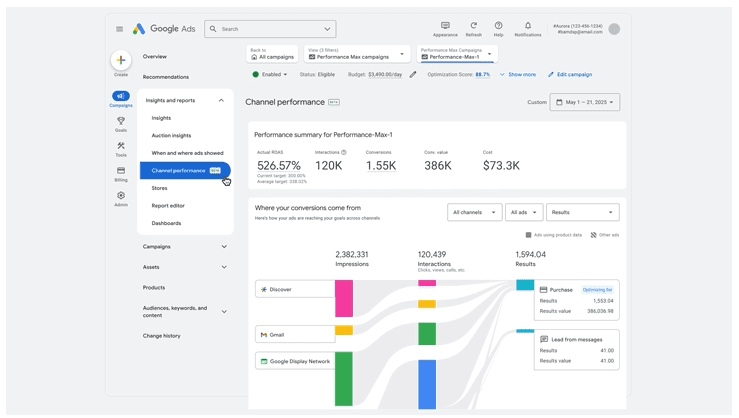
From there, navigate to: Campaign >> Insights & Reports >> Channel Performance

google ads performance max channel reportingImage credit: Google, April 2025

Once you’re there, you’ll see these items:

  • A performance summary overview
  • A channel-to-goals visualization
  • Channel distribution table.

These items provide more than just a static view of performance. You’re able to click on specific channels to drill down into related reports, like placements on the Google Display Network, or Search Terms from the Search channel.

Exploring the Reports and Visualizations

The channel performance page isn’t just a high-level dashboard. It provides several views and reports that give you more context on how your ads are performing across Google’s network. Here’s a closer look at the most useful areas:

Ad Format Views

Not every ad performs the same across channels, which is why Google lets you break results down by ad format.

For example, you can see how video ads perform on YouTube compared to product ads shown on Search. This helps you spot whether one creative type is pulling more weight and whether you need to adjust your creative mix or budgets to support higher-performing formats.

Product-Driven Insights

If you’re running Shopping or retail campaigns, this section shows how ads tied to product data perform across channels.

You can see Shopping ads on Search as well as dynamic remarketing ads on Display. This gives ecommerce advertisers a clearer picture of how product feeds contribute to results beyond just one channel.

Channel Distribution Table

This table is one of the most detailed reports in the new view. It includes impressions, clicks, interactions, conversions, conversion value, and cost, all broken down by channel.

You can customize the table to highlight the metrics that matter most to your goals, such as ROAS or CPA, and even segment results by ad format (like video versus product ads).

Since the table is downloadable, you can also share it with teams or clients for transparent reporting.

Status Column and Diagnostics

The status column acts as a built-in troubleshooting tool. It surfaces issues or recommendations related to specific channels or formats, such as diagnostic warnings if ads aren’t serving as expected.

By reviewing these, you can quickly identify where performance may be limited and take action to resolve issues before they affect results at scale.

Reviewing Single-Channel vs. Cross-Channel CPA

One important takeaway from Google’s tutorial is that looking at average CPA or ROAS for a single channel doesn’t tell the full story.

Performance Max uses marginal ROI optimization, bidding in real time for the most cost-efficient conversions across all channels.

Since users don’t interact with just one channel, this cross-channel view helps advertisers see the broader picture of how campaigns drive results.

That means when evaluating effectiveness, Google recommends to prioritize your goals and audiences over individual channel performance.

How Advertisers Can Benefit From Performance Max Channel Reporting

The new reporting doesn’t change how Performance Max works behind the scenes, but it does help you:

  • Understand which channels support your goals most effectively
  • Identify areas where specific ad formats or channels may need creative or budget adjustments
  • Communicate results more clearly with stakeholders by showing cross-channel contributions

With Search Partner Network reporting coming in the future, Google is signaling a continued investment in giving advertisers deeper visibility.

Performance Max remains a cross-channel campaign type, but channel reporting is a welcome step toward transparency. By digging into these reports, advertisers can better understand how ads perform across Google properties and make smarter optimization decisions.

Google Adds Guidance On JavaScript Paywalls And SEO via @sejournal, @martinibuster

Google is apparently having trouble identifying paywalled content due to a standard way paywalled content is handled by publishers like news sites. It’s asking that publishers with paywalled content change the way they block content so as to help Google out.

Search Related JavaScript Problems

Google updated their guidelines with a call for publishers to consider changing how they block users from paywalled content. It’s fairly common for publishers to use a script to block non-paying users with an interstitial although the full content is still there in the code. This may be causing issues for Google in properly identifying paywalled content.

A recent addition to their search documentation about JavaScript issues related to search they wrote:

“If you’re using a JavaScript-based paywall, consider the implementation.

Some JavaScript paywall solutions include the full content in the server response, then use JavaScript to hide it until subscription status is confirmed. This isn’t a reliable way to limit access to the content. Make sure your paywall only provides the full content once the subscription status is confirmed.”

The documentation doesn’t say what problems Google itself is having, but a changelog documenting the change offers more context about why they are asking for this change:

“Adding guidance for JavaScript-based paywalls

What: Added new guidance on JavaScript-based paywall considerations.

Why: To help sites understand challenges with the JavaScript-based paywall design pattern, as it makes it difficult for Google to automatically determine which content is paywalled and which isn’t.”

The changelog makes it clear that the way some publishers use JavaScript for blocking paywalled content is making it difficult for Google to know if the content is or is not paywalled.

The change was an addition to a numbered list of JavaScript problems publishers should be aware of, item number 10 on their “Fix Search-related JavaScript Problems” page.

Featured Image by Shutterstock/Kues

TablePress WordPress Plugin Vulnerability Affects 700,000+ Sites via @sejournal, @martinibuster

A vulnerability in the TablePress WordPress plugin enables attackers to inject malicious scripts that run when someone visits a compromised page. It affects all versions up to and including version 3.2.

TablePress WordPress plugin

The TablePress plugin is used on more than 700,000 websites. It enables users to create and manage tables with interactive features like sorting, pagination, and search.

What Caused The Vulnerability

The problem came from missing input sanitization and output escaping in how the plugin handled the shortcode_debug parameter. These are basic security steps that protect sites from harmful input and unsafe output.

The Wordfence advisory explains:

“The TablePress plugin for WordPress is vulnerable to Stored Cross-Site Scripting via the ‘shortcode_debug’ parameter in all versions up to, and including, 3.2 due to insufficient input sanitization and output escaping.”

Input Sanitization

Input sanitization filters what users type into forms or fields. It blocks harmful input, like malicious scripts. TablePress didn’t fully apply this security step.

Output Escaping

Output escaping is similar, but it works in the opposite direction, filtering what gets output onto the website. Output escaping prevents the website from publishing characters that can be interpreted by browsers as code.

That’s exactly what can happen with TablePress because it has insufficient input sanitization , which enables an attacker to upload a script , and insufficient escaping to prevent the website from injecting malicious scripts into the live website. That’s what enables the stored cross-site scripting (XSS) attacks.

Because both protections were missing, someone with Contributor-level access or higher could upload a script that gets stored and runs whenever the page is visited. The fact that a Contributor-level authorization is necessary mitigates the potential for an attack to a certain extent.

Plugin users are recommended to update the plugin to version 3.2.1 or higher.

Featured Image by Shutterstock/Nithid

WordPress Ocean Extra Vulnerability Affects Up To 600,000 Sites via @sejournal, @martinibuster

An advisory was issued for the Ocean Extra WordPress plugin that is susceptible to stored cross-site scripting, which enables attackers to upload malicious scripts that execute on the site when a user visits the affected website.

Ocean Extra WordPress Plugin

The vulnerability affects only the Ocean Extra plugin by oceanwp, a plugin that extends the popular OceanWP WordPress theme. The plugin adds extra features to the OceanWP theme, such as the ability to easily host fonts locally, additional widgets, and expanded navigation menu options.

According to the Wordfence advisory, the vulnerability is due to insufficient input sanitization and output escaping.

Input Sanitization

Input sanitization is the term used to describe the process of filtering what’s input into WordPress, like in a form or any field where a user can input something. The goal is to filter out unexpected kinds of input, like malicious scripts**,** for example. This is something that the plugin is said to be missing (insufficient).

Output Escaping

Output escaping is kind of like input sanitization but in the other direction, a security process that makes sure that whatever is being output from WordPress is safe. It checks that the output doesn’t have characters that can be interpreted by a browser as code and subsequently executed, such as what is found in a stored cross-site scripting (XSS) exploit. This is the other thing that the Ocean Extra plugin was missing.

Together, the insufficient input sanitization and insufficient output escaping enable attackers to upload a malicious script and have it output on the WordPress site.

Users Urged To Update Plugin

The vulnerability only affects authenticated users with contributor-level privileges or higher, to a certain extent mitigating the threat level of this specific exploit. This vulnerability affects versions up to and including version 2.4.9. Users are advised to update their plugin to the latest version, currently 2.5.0.

Featured Image by Shutterstock/Nithid