Interaction To Next Paint (INP): Everything You Need To Know via @sejournal, @BrianHarnish

The SEO field has no shortage of acronyms.

From SEO to FID to INP – these are some of the more common ones you will run into when it comes to page speed.

There’s a new metric in the mix: INP, which stands for Interaction to Next Paint. It refers to how the page responds to specific user interactions and is measured by Google Chrome’s lab data and field data.

What, Exactly, Is Interaction To Next Paint?

Interaction to Next Paint, or INP, is a new Core Web Vitals metric designed to represent the overall interaction delay of a page throughout the user journey.

For example, when you click the Add to Cart button on a product page, it measures how long it takes for the button’s visual state to update, such as changing the color of the button on click.

If you have heavy scripts running that take a long time to complete, they may cause the page to freeze temporarily, negatively impacting the INP metric.

Here is the example video illustrating how it looks in real life:

Notice how the first button responds visually instantly, whereas it takes a couple of seconds for the second button to update its visual state.

How Is INP Different From FID?

The main difference between INP and First Input Delay, or FID, is that FID considers only the first interaction on the page. It measures the input delay metric only and doesn’t consider how long it takes for the browser to respond to the interaction.

In contrast, INP considers all page interactions and measures the time browsers need to process them. INP, however, takes into account the following types of interactions:

  • Any mouse click of an interactive element.
  • Any tap of an interactive element on any device that includes a touchscreen.
  • The press of a key on a physical or onscreen keyboard.

What Is A Good INP Value?

According to Google, a good INP value is around 200 milliseconds or less. It has the following thresholds:

Threshold Value Description
200 Good responsiveness.
Above 200 milliseconds and up to 500 milliseconds Moderate and needs improvement.
Above 500 milliseconds Poor responsiveness.

Google also notes that INP is still experimental and that the guidance it recommends regarding this metric is likely to change.

How Is INP Measured?

Google measures INP from Chrome browsers anonymously from a sample of the single longest interactions that happen when a user visits the page.

Each interaction has a few phases: presentation time, processing time, and input delay. The callback of associated events contains the total time involved for all three phases to execute.

If a page has fewer than 50 total interactions, INP considers the interaction with the absolute worst delay; if it has over 50 interactions, it ignores the longest interactions per 50 interactions.

When the user leaves the page, these measurements are then sent to the Chrome User Experience Report called CrUX, which aggregates the performance data to provide insights into real-world user experiences, known as field data.

What Are The Common Reasons Causing High INPs?

Understanding the underlying causes of high INPs is crucial for optimizing your website’s performance. Here are the common causes:

  • Long tasks that can block the main thread, delaying user interactions.
  • Synchronous event listeners on click events, as we saw in the example video above.
  • Changes to the DOM cause multiple reflows and repaints, which usually happens when the DOM size is too large ( > 1,500 HTML elements).

How To Troubleshoot INP Issues?

First, read our guide on how to measure CWV metrics and try the troubleshooting techniques offered there. But if that still doesn’t help you find what interactions cause high INP, this is where the “Performance” report of the Chrome (or, better, Canary) browser can help.

  • Go to the webpage you want to analyze.
  • Open DevTools of your Canary browser, which doesn’t have browser extensions (usually by pressing F12 or Ctrl+Shift+I).
  • Switch to the Performance tab.
  • Disable cache from the Network tab.
  • Choose mobile emulator.
  • Click the Record button and interact with the page elements as you normally would.
  • Stop the recording once you’ve captured the interaction you’re interested in.

Throttle the CPU by 4x using the “slowdown” dropdown to simulate average mobile devices and choose a 4G network, which is used in 90% of mobile devices when users are outdoors. If you don’t change this setting, you will run your simulation using your PC’s powerful CPU, which is not equivalent to mobile devices.

It is a highly important nuance since Google uses field data gathered from real users’ devices. You may not face INP issues with a powerful device – that is a tricky point that makes it hard to debug INP. By choosing these settings, you bring your emulator state as close as possible to the real device’s state.

Here is a video guide that shows the whole process. I highly recommend you try this as you read the article to gain experience.

What we have spotted in the video is that long tasks cause interaction to take longer and a list of JavaScript files that are responsible for those tasks.

If you expand the Interactions section, you can see a detailed breakdown of the long task associated with that interaction, and clicking on those script URLs will open JavaScript code lines that are responsible for the delay, which you can use to optimize your code.

A total of 321 ms long interaction consists of:

  • Input delay: 207 ms.
  • Processing duration: 102 ms.
  • Presentation delay: 12 ms.

Below in the main thread timeline, you’ll see a long red bar representing the total duration of the long task.

Underneath the long red taskbar, you can see a yellow bar labeled “Evaluate Script,” indicating that the long task was primarily caused by JavaScript execution.

In the first screenshot time distance between (point 1) and (point 2) is a delay caused by a red long task because of script evaluation.

What Is Script Evaluation?

Script evaluation is a necessary step for JavaScript execution. During this crucial stage, the browser executes the code line by line, which includes assigning values to variables, defining functions, and registering event listeners.

Users might interact with a partially rendered page while JavaScript files are still being loaded, parsed, compiled, and evaluated.

When a user interacts with an element (clicks, taps, etc.) and the browser is in the stage of evaluating a script that contains an event listener attached to the interaction, it may delay the interaction until the script evaluation is complete.

This ensures that the event listener is properly registered and can respond to the interaction.

In the screenshot (point 2), the 207 ms delay likely occurred because the browser was still evaluating the script that contained the event listener for the click.

This is where Total Blocking Time (TBT) comes in, which measures the total amount of time that long tasks (longer than 50 ms) block the main thread until the page becomes interactive.

If that time is long and users interact with the website as soon as the page renders, the browser may not be able to respond promptly to the user interaction.

It is not a part of CWV metrics but often correlates with high INPs. So, in order to optimize for the INP metric, you should aim to lower your TBT.

What Are Common JavaScripts That Cause High TBT?

Analytics scripts – such as Google Analytics 4, tracking pixels, google re-captcha, or AdSense ads – usually cause high script evaluation time, thus contributing to TBT.
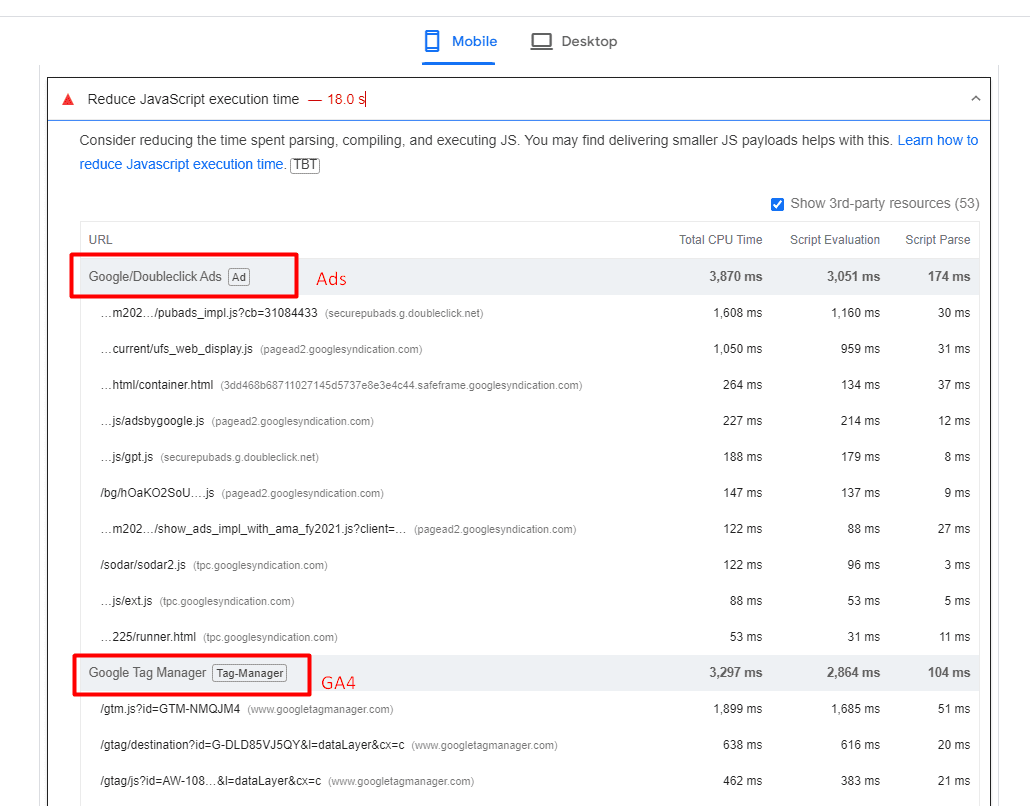
Example of website where ads and analytics scripts cause high javascript execution time.An example of a website where ads and analytics scripts cause high JavaScript execution time.

One strategy you may want to implement to reduce TBT is to delay the loading of non-essential scripts until after the initial page content has finished loading.

Another important point is that when delaying scripts, it’s essential to prioritize them based on their impact on user experience. Critical scripts (e.g., those essential for key interactions) should be loaded earlier than less critical ones.

Improving Your INP Is Not A Silver Bullet

It’s important to note that improving your INP is not a silver bullet that guarantees instant SEO success.

Instead, it is one item among many that may need to be completed as part of a batch of quality changes that can help make a difference in your overall SEO performance.

These include optimizing your content, building high-quality backlinks, enhancing meta tags and descriptions, using structured data, improving site architecture, addressing any crawl errors, and many others.

More resources:


Featured Image: BestForBest/Shutterstock

Google Clarifies H1-H6 Headings For SEO via @sejournal, @martinibuster

Google’s Gary Illyes answered a question about the SEO value of hierarchically ordering heading elements (H1, H2, etc.). His answer offered an insight into the actual value of heading elements for digital marketing.

Heading Elements

In simple terms, HTML Elements are the building blocks of a web page and they all have their place much like the foundation and a roof of a home have their places in the overall structure.

Heading elements communicate the topic and subtopics of a web page and are literally a list of topics when a page is viewed just by their headings.

The World Wide Web Consortium (W3C), which defines HTML, describes headings like this:

“HTML defines six levels of headings. A heading element implies all the font changes, paragraph breaks before and after, and any white space necessary to render the heading. The heading elements are H1, H2, H3, H4, H5, and H6 with H1 being the highest (or most important) level and H6 the least.

Headers play a related role to lists in structuring documents, and it is common to number headers or to include a graphic that acts like a bullet in lists.”

Strictly speaking, it is absolutely correct to order headings according to their hierarchical structure.

What Google Says About Headings

The person asking the question commented that the SEO Starter Guide recommends using heading elements in “semantic” order for people who use screen readers (devices that translate text into spoken words) but that otherwise it’s not important for Google. The person asking the question wanted to know if the SEO Starter Guide was out of date because an SEO tool had a different recommendation.

Gary narrated the submitted question:

“I recently read on the SEO starter guide that “Having headings in semantic order is fantastic for screen readers, but from Google Search perspective, it doesn’t matter if you’re using them out of order.”

Is this correct because an SEO tool told me otherwise.”

It’s a good question because it makes sense to use heading elements in a way that shows the hierarchical importance of different sections of a web page, right?

Here’s Gary’s response:

“We update our documentation quite frequently to ensure that it’s always up to date. In fact the SEO starter guide was refreshed just a couple months back to ensure it’s still relevant, so what you read in the guide is as accurate as it can get.

Also, just because a non-Google tool tells you something is good or bad, that doesn’t make it relevant for Google; it may still be a good idea, just not necessarily relevant to Google.”

Is It Relevant For Google?

The official HTML standards are flexible about the use of headings.

Here’s what the standards say here:

“A heading element briefly describes the topic of the section it introduces. Heading information may be used by user agents, for example, to construct a table of contents for a document automatically.”

And here:

“The heading elements are H1, H2, H3, H4, H5, and H6 with H1 being the highest (or most important) level and H6 the least.”

The official HTML5 specifications for headings state that the hierarchical ordering is implied but that in both cases the headings communicate the start of a new section within a web page. Also, while the official standards encourage “nesting” headings for subtopics but that’s a “strong” encouragement and not a rigid rule.

“The first element of heading content in an element of sectioning content represents the heading for that section. Subsequent headings of equal or higher rank start new (implied) sections, headings of lower rank start implied subsections that are part of the previous one. In both cases, the element represents the heading of the implied section.

Sections may contain headings of any rank, but authors are strongly encouraged to either use only h1 elements, or to use elements of the appropriate rank for the section’s nesting level.”

That last part of the official standards is quite explicit that users are “encouraged” to only use H1 elements, which might sound crazy to some people, but that’s the reality. Still, that’s just an encouragement, not a rigid rule.

It’s only in the official HTML standards for heading elements in the context of accessibility that the recommendations are more rigid about using heading elements with a hierarchical structure (important to least important).

So as you can see, Google’s usage of heading elements appear to be in line with the official standards because the standards allow for deviation, except for accessibility reasons.

The SEO tool is correct that the proper use of heading elements is to put them into hierarchical order. But the tool is incorrect in saying that it’s better for SEO.

This means that H1 is the most important heading for screen readers but it’s not the most important for Google. When I was doing SEO in 2001, the H1 was the most important heading element. But that hasn’t been the case for decades.

For some reason, some SEO tools (and SEOs) still believe that H1 is the most important heading for Google. But that’s simply not correct.

Listen to the SEO Office Hours Podcast at the 13:17 minute mark:

Featured Image by Shutterstock/AlenD

Google’s John Mueller On How To Verify An SEO Agency’s Work via @sejournal, @MattGSouthern

In a recent session of Google’s SEO office-hours Q&A, the Search Relations team addressed a common concern among business owners: how to determine if an SEO agency is actively optimizing your website.

The Business Owner’s Question

The discussion was prompted by a business owner who asked:

“If I have an agency that is managing our organic SEO on a monthly basis, how can I tell if anyone has been actively optimizing? I have a suspicion that the agency has not been optimized out of site for years.”

Google’s Response

In response, John Mueller, a Search Relations team member, shared his experience collaborating with an agency on Google’s Search Central content.

Key Points from Mueller’s Advice

  1. Regular Meetings: Hold frequent discussions with the SEO agency to review their work.
  2. Progress Reports: Request reports that detail the site’s progress over time.
  3. Future Planning: Discussing upcoming work helps ensure the agency addresses your needs.
  4. Client Education: Clients should have a basic understanding of SEO work to better evaluate the agency’s efforts.

While acknowledging that increased engagement requires additional time from both parties, Mueller believes it’s worth the effort.

This allows you to check if the SEO agency is meeting your needs. However, he notes that you need to have some trust in your relationship with the agency.

Resources For SEO Education

To assist businesses in managing their SEO efforts, Mueller pointed to two valuable resources:

  1. Google’s guide on hiring an SEO provides insights into the selection process.
  2. The SEO starter guide offers a foundational understanding of SEO principles.

Mueller’s Full Response

“This is a great question. When we worked with an SEO agency for some of the Search Central content, we had regular meetings to discuss the work that they did, to look at reports about the site’s progress, and to discuss any upcoming work. This did require a bit more time, both from them and from us, but I found it very insightful. I think it helps to lightly understand the kind of work that an agency would do, so that you can confirm that they’re doing what you expect them to do, and even then there’s a component of trust involved. We have a page about hiring an SEO which has some insights, and there’s our SEO starter guide, which can explain a bit more. And also, perhaps some folks from the SEO industry can comment on how they’d help a client understand how they’re spending their time.”

Previous Discussions On SEO Hiring

This advice from Mueller echoes a similar discussion he initiated last year, where he sought recommendations on what businesses should look for when hiring SEO consultants.

The conversation among industry experts highlighted key factors such as experience, customization, transparency, and adherence to ethical practices.

For more insights on choosing the right SEO professional, refer to our previous coverage of that discussion.

When To Seek Professional SEO Help

For businesses unsure about when to seek professional SEO help, here’s an article that outlines five critical situations that warrant hiring an SEO expert.

These include when Google isn’t indexing your site, during site migrations or redesigns, when organic traffic drops significantly, to reverse manual actions, and when current SEO strategies aren’t yielding results.

This information complements Mueller’s advice by helping businesses recognize when professional intervention is necessary.


Featured Image: YouTube.com/GoogleSearchCentral

What SEO Should Know About Brand Marketing With Mordy Oberstein via @sejournal, @theshelleywalsh

For the SEO industry, the Google documents leak offered an important view behind the scenes. Although the leak was not a blueprint of how the algorithm worked, there was considerable confirmation that SEO professionals were right about many elements of the algorithm.

From all the analysis and discussion following the leak, the one insight that got my attention was how important the brand is.

Rand Fishkin, who broke the leak, said this:

“Brand matters more than anything else … If there was one universal piece of advice I had for marketers seeking to broadly improve their organic search rankings and traffic, it would be: “Build a notable, popular, well-recognized brand in your space, outside of Google search.”

Mike King echoed this statement with the following observation:

“All these potential demotions can inform a strategy, but it boils down to making stellar content with strong user experience and building a brand, if we’re being honest.”

Mordy Oberstein, who is an advocate for building a brand online, posted on X (Twitter):

“I am SO happy that the SEO conversation has shifted to thinking about “brand.”

It’s not the first time that “brand” has been mentioned in SEO. We began to talk about this around 2012 after the impact of Panda and Penguin when it first became apparent that Google’s aim was to put more emphasis on brand.

Compounding this is the introduction of AI, which has accelerated the importance of taking a more holistic approach to online marketing with less reliance on Google SERPs.

When I spoke to Pedro Dias, he said, “We need to focus more than ever on building our own communities with users aligned to our brands.”

As someone who had 15 years of offline experience in marketing, design, and business before moving into SEO, I have always said that having this wide knowledge allows me to take a holistic view of SEO. So, I welcome the mindset shift towards building a brand online.

As part of his X/Twitter post, Mordy also said:

“I am SO happy that the SEO conversation has shifted to thinking about “brand” (a lot of which is the direct result of @randfish’s & @iPullRank’s great advice following the “Google leaks”).

As someone who has straddled the brand marketing and SEO world for the better part of 10 years – branding is A LOT harder than many SEOs would think and will be a HUGE adjustment for many SEOs.”

Following his X/Twitter post, I reached out to Mordy Oberstein, Head of SEO Brand at Wix, to have a conversation about branding and SEO.

What Do SEO Pros Need To Know About ‘Brand’ To Make The Mindset Shift?

I asked Mordy, “In your opinion, what does brand and building a brand mean, and can SEO pros make this mindset shift?”

Mordy responded, “Brand building basically means creating a connection between one entity and another entity, meaning the company and the audience.

It’s two people meeting, and that convergence is the building of a brand. It’s very much a relationship. And I think that’s what makes it hard for SEOs. It’s a different way of thinking; it’s not linear, and there aren’t always metrics that you can measure it by.

I’m not saying you don’t use data, or you don’t have data, but it’s harder to measure to tell a full story.

You’re trying to pick up on latent signals. A lot of the conversation is unconscious.

It’s all about the micro things that compound. So, you have to think about everything you do, every signal, to ensure that it is aligned with the brand.

For example, a website writes about ‘what is a tax return.’ However, if I’m a professional accountant and I see this on your blog, I might think this isn’t relevant to me because you’re sending me a signal that you’re very basic. I don’t need to know what a tax return is; I have a master’s degree in accounting.

The latent signals that you’re sending can be very subtle, but this is where it is a mindset shift for SEO.”

I recalled a recent conversation with Pedro Dias in which he stressed it was important to put your users front and center and create content that is relevant to them. Targeting high-volume keywords is not going to connect with your audience. Instead, think about what is going to engage, interest, and entertain them.

I went on to say that for some time, the discussion online has been about SEO pros shifting away from the keyword-first approach. However, the consequences of moving away from a focus on traffic and clicks will mean we are likely to experience a temporary decline in performance.

How Does An SEO Professional Sell This To Stakeholders – How Do They Measure Success?

I asked Mordy, “How do you justify this approach to stakeholders – how do they measure success?”

Mordy replied, “I think selling SEO will become harder over time. But, if you don’t consider the brand aspect, then you could be missing the point of what is happening. It’s not about accepting lower volumes of traffic; it’s that traffic will be more targeted.

You might see less traffic right now, but the idea is to gain a digital presence and create digital momentum that will result in more qualified traffic in the long term.”

Mordy went on to say, “It’s going to be a habit to break out of, just like when you have to go on a diet for a long-term health gain.

The ecosystem will change, and it will force change to our approach. SEOs may not have paid attention to the Google leak documents, but I think they will pay attention as the entire ecosystem shifts – they won’t have a choice.

I also think C-level will send a message that they don’t care about overall traffic numbers, but do care about whether a user appreciates what they are producing and that the brand is differentiated in some way.”

How Might The Industry Segment And What Will Be The Important Roles?

I interjected to make the point that it does look a lot like SEO is finally making that shift across marketing.

Technical SEO will always be important, and paid/programmatic will remain important because it is directly attributable.

For the rest of SEO, I anticipate it merges across brand, SEO, and content into a hybrid strategy role that will straddle those disciplines.

What we thought of as “traditional SEO” will fall away, and SEO will become absorbed into marketing.

In response, Mordy agreed and thought that SEO traffic is part of a wider scope or part of a wider paradigm, and it will sit under brand and communications.

An SEO pro that functions as part of the wider marketing and thinks about how we are driving revenue, how we are driving growth, what kind of growth we are driving, and using SEO as a vehicle to that.

The final point I raised was about social media and whether that would become a more combined facet of SEO and overall online marketing.

Mordy likened Google to a moth attracted to the biggest digital light.

He said, “Social media is a huge vehicle for building momentum and the required digital presence.

For example, the more active I am on social media, the more organic branded searches I gain through Google Search. I can see the correlation between that.

I don’t think that Google is ignoring branded searches, and it makes a semantic connection.”

SEO Will Shift To Include Brand And Marketing

The conversation I had with Mordy raised an interesting perspective that SEO will have to make significant shifts to a brand and marketing mindset.

The full impact of AI on Google SERPs and how the industry might change is yet to be realized. But, I strongly recommend that anyone in SEO consider how they can start to take a brand-first approach to their strategy and the content they create.

I suggest building and measuring relationships with audiences based on how they connect with your brand and moving away from any strategy based on chasing high-volume keywords.

Think about what the user will do once you get the click – that is where the real value lies.

Get ahead of the changes that are coming.

Thank you to Mordy Oberstein for offering his opinion and being my guest on IMHO.

More resources:


Featured Image: 3rdtimeluckystudio/Shutterstock

SEO in the Martech Stack: How Tech Decisions Can Impact SEO via @sejournal, @TaylorDanRW

Organizations typically are a mixture of orientations that impact all aspects of the business from operations, finance, and marketing and sales functions.

This also means it can influence the marketing technology stack, and subsequently, these decisions can impact the performance of marketing channels, including SEO.

When organizations determine the technologies they want to use to build their stack, there are several different objectives and criteria that stakeholders look to satisfy.

Regardless of a stakeholder’s objectives, the overall objective is for the Martech stack to significantly contribute to the success and performance of the business, either directly or indirectly.

This happens directly through acting as a vehicle to drive customer acquisition and conversion or indirectly as a mechanism to improve operational performances.

What Is A Martech Stack?

A marketing technology stack (Martech stack) is the collective noun for an organization group of software, hardware, and tools purchased (or utilized) by the business to monitor and improve marketing performance, monitor and enable sales activities, and improve other business functions such as speed of order fulfillment through to errorless payment gateways.

Typical Martech stacks are compromised of software and technology designed to achieve different tasks and objectives such as:

  • Data analytics tools (warehousing, visualization)
  • CRMs
  • Teamwork and project management tools (JIRA, Trello)
  • Payment gateways & order fulfillment/dispatch

Anecdotally most Martech decisions are led by engineering and infrastructure teams, but influenced by marketing, sales, community, and C-level.

So why is this important to SEO?

A lot of these decisions impact SEO, or potential SEO performance, so it is important that given the opportunity to contribute to these discussions, we do. We must ask the right questions and put forward the right arguments to make the case for, and make the business aware of, the potential impact on SEO performance.

CMOs (and organizations) typically engage with SEOs to achieve one or more of the following objectives:

  • To improve organic search visibility for business-relevant non-branded queries at various stages of the decision funnel.
  • To improve the stability and visibility of desired messaging for branded queries.
  • To work with other departments within the business and improve the user experience and conversion rate of the website for all web traffic.

Not all of the Martech stack will impact SEO performance, and not all arguments are worth having.

If an organization utilizes Salesforce CRM and the tooling is firmly established, moving to Salesforce Commerce Cloud or Experience Cloud as a website platform isn’t likely going to be a decision you will be able to influence – but is one you need to be aware to ensure things like the SEO migration and out-of-the-gate strategy are geared for success.

When Can Martech Decisions Impact SEO?

So how can the Martech stack impact SEO?

Let’s take a look at some common situations in which the business might make Martech decisions that could impact SEO either positively or negatively.

Integrations With Sales CRMs & CRM Led Decision-Making

Sales-oriented organizations tend to base a large number of their technology decision-making around improving sales enablement.

As a result, you see website technologies closely tied to sales CRMs, such as Salesforce and Hubspot.

While both of these are good platforms, websites designed with too much of the influence coming from the sales orientation are often designed to try and funnel a user to completing a sales action, such as downloading a marketing asset, completing a contact form, or requesting a demo as soon as possible.

This direct funnel approach to page templates, and content, doesn’t always create the best environment for organic search. Whilst the pages are hyperfocused on user conversion, they don’t always hold the value proposition and messaging that search engines are looking to rank for all queries.

The conflict you find here with heavy sales orientation is that the client will want these conversion pages to rank for all the high search volume queries, regardless of the funnel stage.

Being able to influence and highlight the need for content and a user experience that caters for and helps satisfy the different reasons as to why a user visits your website (not only just to get in touch) is vital to long-term organic success.

C-Level Led Platform Decisions

In an ideal world, CMOs and CTOs work together to identify and fill gaps in the Martech stack, prioritizing customer-centric technologies that act as enablers to marketing, sales, and operations functions.

Most CMOs/CTOs have their preferred suite of tools and platforms, and they build their playbooks that they take when they move roles, and some of these plays have stack dependencies.

Another time this can happen is when an organization gets a new CMO or Marketing Director, and at their previous company, they’ve used another platform or technology.

In the SaaS space, I see this happen a lot with new CMOs and CTOs wanting to champion a form of headless or React/Nuxt website build in place of the incumbent technology, and similarly, in ecommerce I see this happen a lot when a CMO or CTO inherits a stack they’re not familiar with, and will prefer familiarly regardless of how the existing platform is performing.

Depending on the size of the organization these changes vary in terms of overall disruption. For example, moving from a performant established Salesforce Commerce Cloud build to a Shopify build will bring with it changes in CRM, order management, and development team (who will need to get used to the business), but from an SEO perspective, a forced change in URL structures and other dynamic onsite elements, as Shopify doesn’t have Einstein or Lightning.

As well as highlighting the change variables that will impact SEO performance – and their associated short and long-term risks – this is also an opportunity to utilize SEO data to inform the new site build architecture and use data (to try to ensure) the new stack meets the needs of marketing teams and your audience.

Adopting Technologies For Competitive Advantage

There is also the drive for businesses to continuously identify and adopt emerging technologies to find a competitive advantage over their competition. A 2019 Gartner study found that 68% of CTOs actively invest in emerging technologies to gain a competitive edge.

Outside of personal preference, CMOs/CTOs also decide to make these changes for product, financial, and operational reasons.

Where this is the case, whilst the marketing (and SEO) variables are heavily considered, there is generally an overriding attitude that marketing is the most adaptable and innovative stakeholder in this mix.

Technologies For UX & Legal Compliance

Many website page load and speed issues are caused by third-party tools and software, and these are typically tools for user experience monitoring and AB testing.

Organizations may deploy these technologies in ways that slow down site loading times, negatively affect user experience, and potentially violate data privacy regulations.

From experience, a lot of issues with these tools will be picked up early into an SEO partnership through a baseline technical overview, and once resolved the problem is solved.

But when the business is looking to introduce these tools, SEOs must be consulted as part of the implementation and deployment process.

Outside of UX and AB testing tools, issues can also be caused by the implementation of cookie consent banners and other accessibility tools. With the European Accessibility Act coming into force in 2025, we’re likely going to see these sorts of issues on the rise as organizations adopt third-party accessibility tools.

As these tools often introduce and load scripts, outside of degrading page load speeds, in some instances, the implementations can cause the to close prematurely or create infinite internal linking traps.

Educating stakeholders on best practices for integrating these tools is crucial to maintaining optimal website performance and adhering to consent requirements.

How SEO Can Influence Martech Decisions

While SEO is just one marketing channel, it could be argued its success is the most influenced by the technology decisions that a business makes.

Acknowledging that the stack significantly impacts SEO, a large number of decisions are still made independently of the SEO (and marketing) teams.

Mostly all businesses take elements of each different orientation to be successful, and this means maximizing customer experience. SEO can provide key data that offers insights into the user journey and how users interact and discover the website.

Arming CMOs and CTOs with the foresight and knowledge that these decisions could negatively impact the performance of what could be their biggest traffic-driving channel.

More resources: 


Featured Image: Gorodenkoff/Shutterstock

Research Confirms Google AIO Keyword Trends via @sejournal, @martinibuster

New research by enterprise search marketing company BrightEdge reveals dramatic changes to sites surfaced through Google’s AI Overviews search feature and though it maintains search market share, the data shows that AI search engine Perplexity is gaining ground at a remarkable pace.

Rapid & Dramatic Changes In AIO Triggers

The words that trigger AI Overviews are changing at an incredibly rapid pace. Some keyword trends in June may already changed in July.

AI Overviews were triggered 50% more times for keywords with the word “best” in them. But Google may have reversed that behavior because those phrases, when applied to products, don’t appear to be triggering AIOs in July.

Other AIO triggers for June 2024:

  • “What Is” keywords increased by 20% more times
  • “How to” queries increased by 15%
  • Queries with the phrase “”symptoms of” increased by about 12%
  • Queries with the word “treatment” increased by 10%

A spokesperson from BrightEdge responded to my questions about ecommerce search queries:

“AI’s prevalence in ecommerce is indeed increasing, with a nearly 20% rise in ecommerce keywords showing AI overviews since the beginning of July, and a dramatic 62.6% increase compared to the last week of June. Alongside this growth, we’re seeing a significant 66.67% uptick in product searches that contain both pros and cons from the AI overview. This dual trend indicates not only more prevalent use of AI in ecommerce search results but also more comprehensive and useful information being provided to consumers through features like the pros/cons modules.”

Google Search And AI Trends

BrightEdge used its proprietary BrightEdge Generative Parser™ (BGP) tool to identify key trends in search that may influence digital marketing for the rest of 2024. BGP is a tool that collects massive amounts of search trend data and turns it into actionable insights.

Their research estimates that each percentage point of search market share represents $1.2 billion, which means that gains as small as single digits are still incredibly valuable.

Jim Yu, founder and executive chairman of BrightEdge noted:

“There is no doubt that Google’s dominance remains strong, and what it does in AI matters to every business and marketer across the planet.

At the same time, new players are laying new foundations as we enter an AI-led multi-search universe. AI is in a constant state of progress, so the most important thing marketers can do now is leverage the precision of insights to monitor, prepare for changes, and adapt accordingly.

Google continues to be the most dominant source of search traffic, driving approximately 92% organic search referrals. A remarkable data point from the research is that AI competitors in all forms have not yet made a significant impact as a source of traffic, completely deflating speculation that AI competitors will cut into Google’s search traffic.

Massive Decrease In Reddit & Quora Referrals

Back in May 2024 Google Of interest to search marketers is that Google has followed through in reducing the amount of user generated content (UGC) surfaced through its AI Overviews search feature. UGC is responsible for many of the outrageously bad responses that generated negative press. BrightEdge’s research shows that referrals to Reddit and Quora from AI Overviews declined to “near zero” in the month of June.

Citations to Quora from AI Overviews are reported to have decreased by 99.69%. Reddit fared marginally etter in June with an 85.71% decrease

BrightEdge’s report noted:

“Google is prioritizing established, expert content over user discussions and forums.”

Bing, Perplexity And Chatbot Impact

Market share for Bing continues to increase but only by fractions of a percentage point, growing from 4.2% to 4.5%. But as they say, it’s better to be moving forward than standing still.

Perplexity on the other hand is growing at a monthly rate of 31%. Percentages however can be misleading because 31% of a relatively small number is still a relatively small number. Most publishers aren’t talking about all the traffic they’re getting from Perplexity so they still have a way to go. Nevertheless, a monthly growth rate of 31% is movement in the right direction.

Traffic from Chatbots aren’t really a thing, so this comparison should be put into that perspective. Sending referral traffic to websites isn’t really what chatbots like Claude and ChatGPT are about (at this point in time). The data shows that both Claude and ChatGPT are not sending much traffic.

OpenAI however is hiding referrals from the websites that it’s sending traffic to which makes it difficult to track it. Therefore a full understanding of the impact of LLM traffic, because ChatGPT uses a rel=noreferrer HTML attribute which hides all traffic originating from ChatGPT to websites. The use of the rel=noreferrer link attribute is not unusual though because it’s an industry standard for privacy and security.

BrightEdge’s analysis looks at this from a long term perspective and anticipates that referral traffic from LLMs will become more prevalent and at some point will become a significant consideration for marketers.

This is the conclusion reached by BrightEdge:

“The overall number of referrals from LLMs is small and expected to have little industry impact at this time. However, if this incremental growth continues, BrightEdge predicts it will influence where people search online and how brands approach optimizing for different engines.”

Before the iPhone existed, many scoffed at the idea of the Internet on mobile devices. So BrightEdge’s conclusions about what to expect from LLMs are not unreasonable.

AIO trends have already changed in July, pointing to the importance of having fresh data for adapting to fast changing AIO keyword trends.  BrightEdge delivers real-time data updated on a daily basis so that marketers can make better informed decisions.

Understand AI Overview Trends:

Ten Observations On AI Overviews For June 2024

Featured Image by Shutterstock/Krakenimages.com

SEO For Higher Education: Best Practices For Academic Institutions via @sejournal, @AdamHeitzman

The competition for student enrollment has never been stronger.

Many colleges struggle to stand out online and attract new students. Without a strong SEO strategy, your school remains hidden, and potential students won’t find you.

This includes details about admission processes, available programs, extracurricular activities, and other tiny details that attract the typical student.

A solid SEO strategy helps you appear in search results, increases brand recognition, boosts credibility among parents and students, and ultimately increases enrollment.

Here’s how you can implement it:

Critical Components Of An Effective SEO Strategy

Understanding Your Target Audience

Identify audience segments, such as prospective students, current students, faculty, staff, alumni, and visitors. Rank them by importance based on the institution’s goals. For example, prospective students could be the highest priority.

Understanding these audiences, their needs, and search habits will help you create content and SEO strategies to reach them effectively.

However, with over 17 million high schoolers and 16 million undergraduates in the U.S. (data from 2021), who are your target audiences?

Here’s how to know them:

  • Use surveys among current students to understand their motivations and concerns. For example, use a simple poll on the school website asking, “What are the top three factors you consider when choosing a university?” or “Why did you choose us?”

Their answers can give insights into why your institution was a top choice, and you can include these details while writing landing pages, program pages, or student experience pages.

This makes it easy to lead every page with a promise that matters to your target audience.

  • Analyze website analytics to determine your traffic sources and most popular pages. Traffic sources reveal the demographics engaging with your website and how they are led to it. Analyzing the most popular pages also shows the content that resonates with your target audience.

Merging this analysis helps you create content that targets your audience and meets their search intent.

There are four types of search intent (commercial, transactional, informational, and navigational). For colleges and universities, the most common intents tend to be informational, commercial, and transactional.

Analyzing search intent helps you target keywords that reflect what searchers are looking for. Here’s what that looks like:

  • Informational keywords, such as “best universities in the US,” “top engineering schools,” or “best liberal arts colleges” are common queries for general information. These keywords indicate that searchers are looking for options.
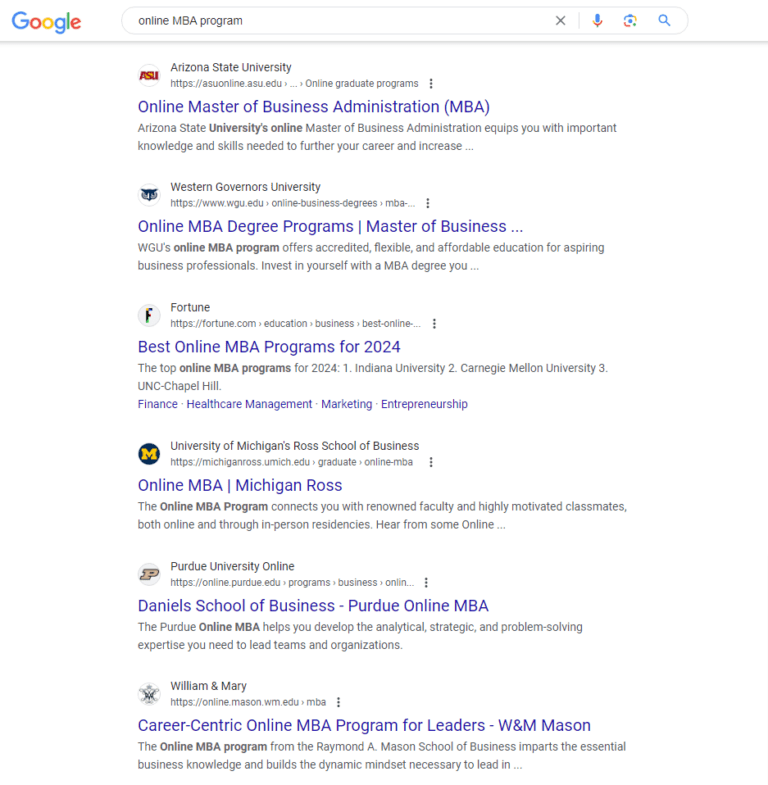
  • Commercial keywords, e.g., “online MBA programs,” “online master’s in data science,” and “nursing programs with scholarships,” are common queries for specific programs. These indicate that searchers want to know about schools offering these programs (and also learn about what sets each institution apart). This is where you create dedicated landing pages for each program explaining why your school should be at the top of students’ minds in their decision-making phase.
  • Transactional keywords, e.g., “application deadlines,” “tuition fees,” or “campus dates,” show intent to do something. These users are closer to making a decision, and they want information on their exact query. These keywords are usually preceded by a branded search (e.g., “UCLA application deadline”).

Creating content that engages your target audience is essential. When your content matches their search intent, it sends positive signals to Google.

This can improve your rankings and increase traffic. Keyword research plays a key role in this process, ensuring your content meets the needs and search habits of your audience.

Read more: How People Search: Understanding User Intent

Keyword Research And Analysis

Keyword research means finding the words students use when they search online. These terms can help your website show up in searches.

Tips to get started:

  • Brainstorm seed keywords: Make a list of words related to your school and programs. For example: “computer science,” “business administration,” “online MBA in marketing,” “online courses,” “coastal university,” and “urban campus.”
  • Use advanced keyword tools: Tools like Semrush and Ahrefs offer detailed insights into search volume, competition, keyword difficulty, and trends. Use these tools to discover keyword opportunities that your competitors might be missing.
  • Identify long-tail keywords: These longer phrases, like “scholarships for international students studying cyber security,” have lower search volumes but higher conversion rates. They attract users who are further along in their decision-making process.
  • Analyze competitor keywords: Use tools to spy on competitors’ keywords and find gaps in their content. Target these gaps to improve your visibility and attract more traffic.
  • Consider seasonal trends: Use tools to analyze search trends throughout the year. Optimize your landing pages for terms like “summer courses” or “fall application deadlines” during relevant periods.

Read more: Keyword Research: An In-Depth Beginner’s Guide

On-Page Optimization

On-page optimization is where you include relevant keywords in your content to improve visibility on search engine results pages (SERPs). Use your primary keyword in:

Google search results for [online MBA program]Screenshot from search for [online MBA program], June 2024
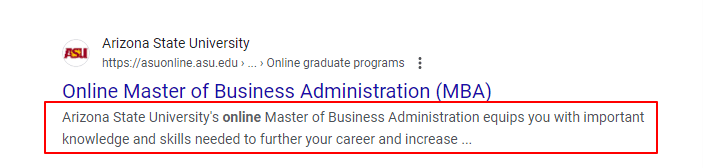
  • Meta Description: It’s a summary of your content located under your title page in search results. You can use it to entice users to click your link by incorporating relevant keywords that provide context to the webpage. See ASU’s copy here:
Arizone state university on SERPScreenshot from search for [online MBA program], June 2024
  • Headers: Headers structure your content and make it easier to read. Use keywords in your main header (H1) and subheaders (H2, H3, etc.) to signal to search engines what your page is about.
  • Body of your content: Incorporate keywords naturally throughout the page. You can also use variations of your keyword – long-term or semantic topics – to avoid repetition and keyword stuffing.

Read more: 12 Essential On-Page SEO Factors You Need To Know

Technical SEO Considerations

The goal of every search engine is to provide relevant content to searchers, and good technical SEO makes your website easier to find and use. Focus on these areas:

  • Page Speed: Your website should load in one to three seconds. A slow site can frustrate users and impact your rankings.
    • Choose reliable hosting: Ensure your hosting can handle your website’s traffic.
    • Compress images and files: Use tools like TinyPNG or ShortPixel to reduce file sizes without losing quality.
    • Enable browser caching: This helps returning visitors load your site faster.
  • Mobile Optimization: Use a responsive design that adjusts to different screen sizes. Test your site on various devices to ensure it works well everywhere.
  • Schema Markup: Add structured data to your website’s HTML. Schema markup, or structured data, allows search engines to understand your institution and its offerings better. It’s a form of code you can add to your website’s HTML that uses a specific vocabulary to label and describe different elements of your content.

Schema Markup is important because it enables search engines to display rich snippets in search results.

These enhanced listings can include star ratings, images, event dates, and other relevant details to make your institution’s results more visually appealing and informative. Here’s an example from Rutgers Business School:

Google search results for [rutgers university]Screenshot from search for [rutgers university], June 2024

You can see details about addresses, tuition fees, campus type, and other helpful links without directly engaging the website.

Research shows that structured data increases click-through rates by presenting users with context-rich information in search results. This captures user attention and builds trust even before they visit the site, which in turn increases organic traffic.

Read more: The Complete Technical SEO Audit Workbook

Implementing Local SEO For Campuses

If your school has multiple campuses, local SEO is important.

  • Create location pages: Make a separate page for each campus with details like address, contact information, and unique programs.
  • Optimize for local keywords: Use keywords that include your city or neighborhood, like “best colleges in downtown Chicago.”
  • Claim your Google Business Profile: Make sure each campus has a Google Business Profile listing with up-to-date information.

Read more: How To Create A Winning Local SEO Content Strategy

Leveraging Video Content

Video content can engage students better than text alone.

  • Create informative videos: Make videos about campus tours, student testimonials, and program highlights.
  • Optimize video titles and descriptions: Use keywords in your video titles and descriptions to help them show up in search results.
  • Embed videos on your website: This can keep visitors on your site longer and improve engagement.

Read more: 10 YouTube Marketing Strategies & Tips (With Examples)

Optimizing Site Structure And Navigation

A well-structured website helps both users and search engines.

  • Simple navigation: Keep your menu simple and easy to use.
  • Clear hierarchy: Organize your pages logically, with main categories and subcategories.
  • Internal linking: Link-related pages to each other to help users find more information and search engines understand your site better.

Read more: Why Google Recommends Hierarchical Site Structure For SEO

Conclusion

Improving your school’s SEO is a long-term investment.

However, you can start today by creating content that targets students to amplify your brand and increase credibility. This will help increase visibility, attract more students, and build your school’s online reputation.

Whether you’re a new or established institution, good SEO practices can help you reach your goals.

More resources:


Featured Image: Prostock-studio/Shutterstock
Google’s Web Crawler Fakes Being “Idle” To Render JavaScript via @sejournal, @MattGSouthern

In a recent episode of the Search Off The Record podcast, it was revealed that Google’s rendering system now pretends to be “idle” to trigger certain JavaScript events and improve webpage rendering.

The podcast features Zoe Clifford from Google’s rendering team, who discussed how the company’s web crawlers deal with JavaScript-based sites.

This revelation is insightful for web developers who use such methods to defer content loading.

Google’s “Idle” Trick

Googlebot simulates “idle” states during rendering, which triggers JavaScript events like requestIdleCallback.

Developers use this function to defer loading less critical content until the browser is free from other tasks.

Before this change, Google’s rendering process was so efficient that the browser was always active, causing some websites to fail to load important content.

Clifford explained:

“There was a certain popular video website which I won’t name…which deferred loading any of the page contents until after requestIdleCallback was fired.”

Since the browser was never idle, this event wouldn’t fire, preventing much of the page from loading properly.

Faking Idle Time To Improve Rendering

Google implemented a system where the browser pretends to be idle periodically, even when it’s busy rendering pages.

This tweak ensures that idle callbacks are triggered correctly, allowing pages to fully load their content for indexing.

Importance Of Error Handling

Clifford emphasized the importance of developers implementing graceful error handling in their JavaScript code.

Unhandled errors can lead to blank pages, redirects, or missing content, negatively impacting indexing.

She advised:

“If there is an error, I just try and handle it as gracefully as possible…web development is hard stuff.”

What Does This Mean?

Implications For Web Developers

  • Graceful Error Handling: Implementing graceful error handling ensures pages load as intended, even if certain code elements fail.
  • Cautious Use of Idle Callbacks: While Google has adapted to handle idle callbacks, be wary of over-relying on these functions.

Implications For SEO Professionals

  • Monitoring & Testing: Implement regular website monitoring and testing to identify rendering issues that may impact search visibility.
  • Developer Collaboration: Collaborate with your development team to create user-friendly and search engine-friendly websites.
  • Continuous Learning: Stay updated with the latest developments and best practices in how search engines handle JavaScript, render web pages, and evaluate content.

Other Rendering-Related Topics Discussed

The discussion also touched on other rendering-related topics, such as the challenges posed by user agent detection and the handling of JavaScript redirects.

The whole podcast provides valuable insights into web rendering and the steps Google takes to assess pages accurately.

See also: Google Renders All Pages For Search, Including JavaScript-Heavy Sites


Featured Image: fizkes/Shutterstock

CWV & Google Page Experience Ranking Factor Updated via @sejournal, @martinibuster

The June 2024 Chrome User Experience Report (CrUX) is out and it shows that websites in the real-world experienced an averaged across the board improvement in all Core Web Vitals (CWV) website performance scores. Some of the improvements are attributable to a change in how Interaction To Next Paint is measured, which will be good news to websites with dialog modals (popups).

CrUX Dataset

The CrUX dataset consists of actual Core Web Vitals performance scores as measured in Chrome browsers when visiting websites. The data comes from browsers that were voluntarily opted in to report website performance metrics. The CrUX dataset is publicly available and is used by PageSpeed Insights, third party tools.

CrUX Influences Page Experience Ranking Factor

The CrUX report is used for Google’s Page Experience Ranking Factor. The data is publicly available and can be used for evaluating performance, including competitor performance. CrUX is important because it is one of the only metrics that a website publishers can check that have something to do with a website ranking factor.

According to Google’s overview documentation:

“The data collected by CrUX is available publicly through a number of Google tools and third-party tools and is used by Google Search to inform the page experience ranking factor.”

While the influence of the Page Experience Ranking Factor may be on the lower side, it’s still important for reasons outside of algorithms like improving conversions and ad clicks.

June 2024 Dataset

The dataset for June 2024 has been published and it shows that Core Web Vitals (CWV) website performance scores have incrementally risen across the board by modest percentages. This shows that website performance continues to be a focus for websites. Most of the popular content management systems are doing their best to improve, with WordPress making positive improvements with each new version that’s released.

The following scores are for origins. Origins are the entire website, which is different from Pages.

These are the average origin scores:

  • Largest Contentful Paint (LCP)
    This is a measurement of how fast the main content of a page loads. It specifically measures the largest image or content block that’s visible in a browser (viewport).
    63.4% (↑ 2.0%) had good LCP
  • Cumulative Layout Shift (CLS)
    Measures how long it takes for web page layout to become stable without elements jumping and shifting on the page.
    77.8% (↑ 0.5%) had good CLS
  • Interaction to Next Paint (INP)
    INP measures how long it takes for a web page to become responsive to user interactions
    84.1% (↑ 1.1%) had good INP
  • Percentage Of Sites With Good CWV
    This is the percentage of sites that had passing scores across all three Core Web Vitals metrics
    51.0% (↑ 2.3%) had good LCP, CLS and INP

Changes To INP Measurements

Chrome made changes to how long it takes for a page to become interactive (Interaction to Next Paint – INP) is measured, making it more accurate. This may have helped to increase the scores of some sites that were inadvertently ranked lower for INP because the metric failed to account for some kinds of popups.

The Chrome team explained:

“The Chrome team has been continuing work on improving efficiencies in Chrome’s handling of the Core Web Vitals metrics and recently launched some changes to INP which may have contributed to the positive trend this month. The most notable change is to better handle use of the basic modal dialogs (alert, confirm, print). While technically these are synchronous and block the main thread—and so are not recommended if there are alternatives—they do present user feedback for an interaction. They were previously not counted as presentation feedback for INP, which could result in very high INP values for sites that did use these. From Chrome 127 the presentation of the modal will mark the end measurement time for INP and so should lead to improved INP times for those sites.”

Read the June 2024 CWV Announcement

The 202406 dataset is live

Featured Image by Shutterstock/Ivan Dudka

What 4,538 Domains Tell Us About ccTLDs Ranking In The US via @sejournal, @Kevin_Indig

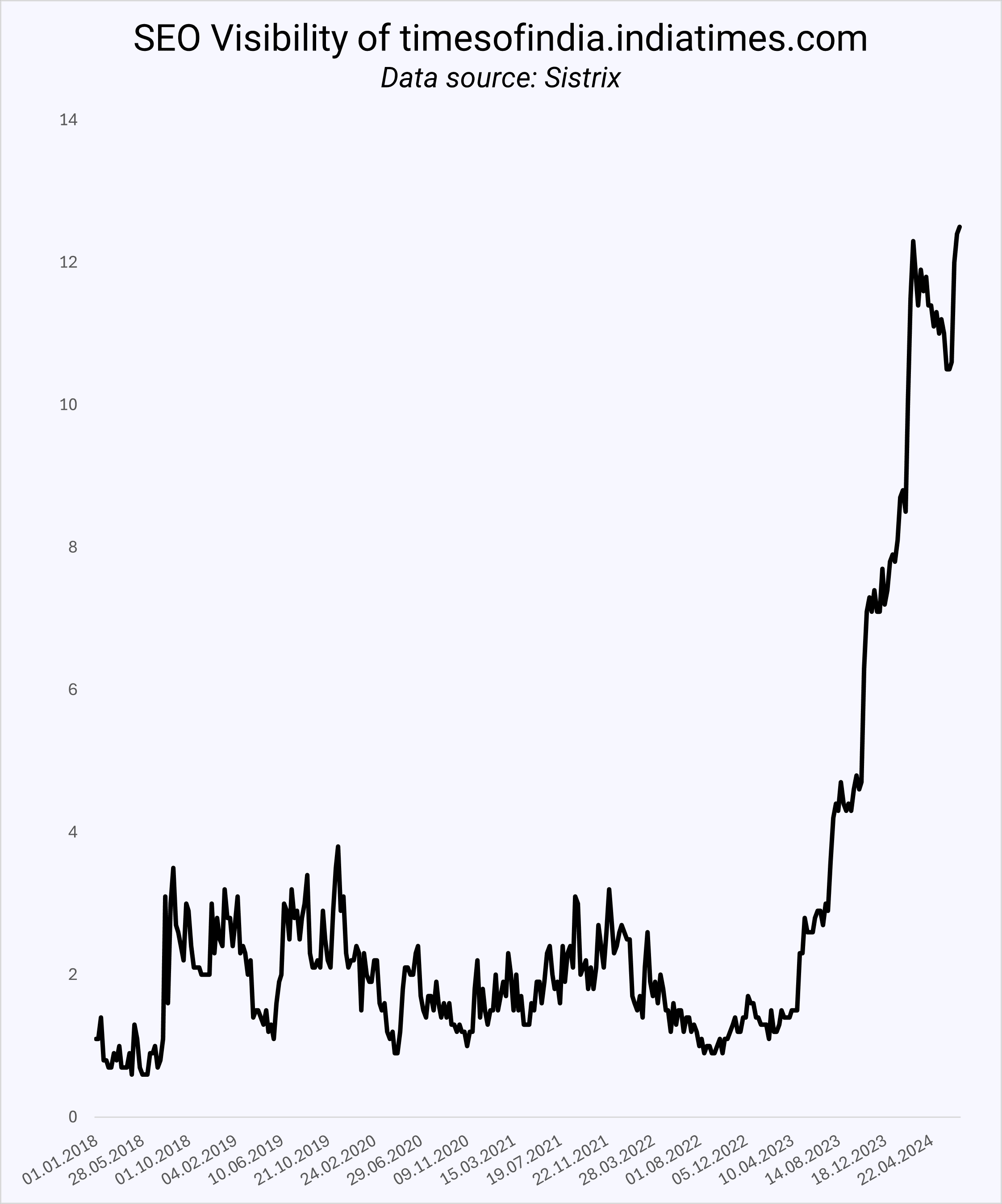
Since the Times Of India quadrupled its organic growth in the US in 12 months, more ccTLDs (international domains) have been spotted ranking in the US.

SEO Visibility of timesof india.comImage Credit: Kevin Indig

More international domains would make sense as Google is testing country labels indicating where the site operates.

Google has also expanded Translated Results:

Translated Results is a Google Search feature that will automatically translate the title link and meta description into the local language of a user, making a website published in one language available to a searcher in another language. If the searcher clicks on the link of a translated result the web page itself will also be automatically translated.

Maybe Google wants more international domains in US Search? If a site in English from another country is a better result in an English-speaking country, why not rank it?

International domains might be most relevant when the location matters less.

For example, publishers could rank in other countries with the same language, but SaaS or ecommerce companies that don’t sell in that specific country would not be a good result. As a result, the playing field for “foreign” domains would grow.

Boost your skills with Growth Memo’s weekly expert insights. Subscribe for free!

Do More ccTLDs Rank In The US?

I picked 1,000 random keywords from a large pool of queries across travel, ecommerce, publishing, SaaS, services, finance, health, and other verticals.

The data surfaced 4,538 domains in organic results. I focused heavily on the first five positions on Google since any URL ranking higher than that likely won’t see much traffic, especially with the flux of SERP features these days.

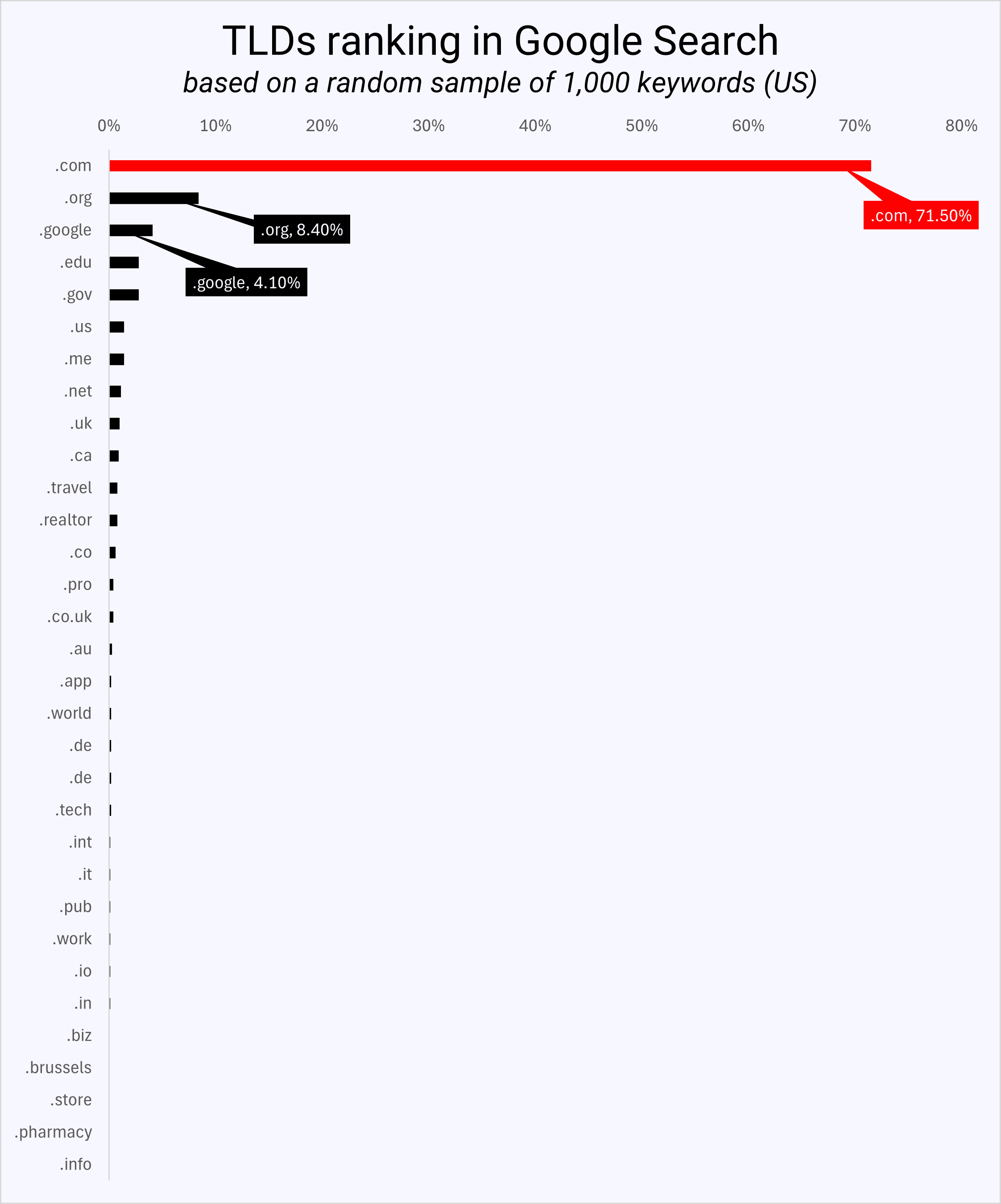
TLDs ranking in Google SearchImage Credit: Kevin Indig

The data shows that .com domains rank 71.8% of the time in the top five positions, followed by .org (8.4%), .google (4.1%), .edu and .gov. Only 52 out of 4,538 domains were from the UK, 11 from Canada, and three from India.

As a result, we can say that international domains performing in the US, like the Times of India, are outliers more than the norm.

What Else Can We Learn From The Data About URL Structure?

The dataset of 1,000 random keywords provides more insights into the nature of TLDs, subdomains, and URL slugs in terms of organic ranks.

TLD Matters A Bit

I wanted to find out if the TLD (.com, .net, .org, etc.) has an impact on ranking. Traditionally, we know that ccTLDs (country-code TLDs like .fr) have a better chance of ranking in their respective country than gTLDs (generic TLDs like .com), which are country-agnostic.

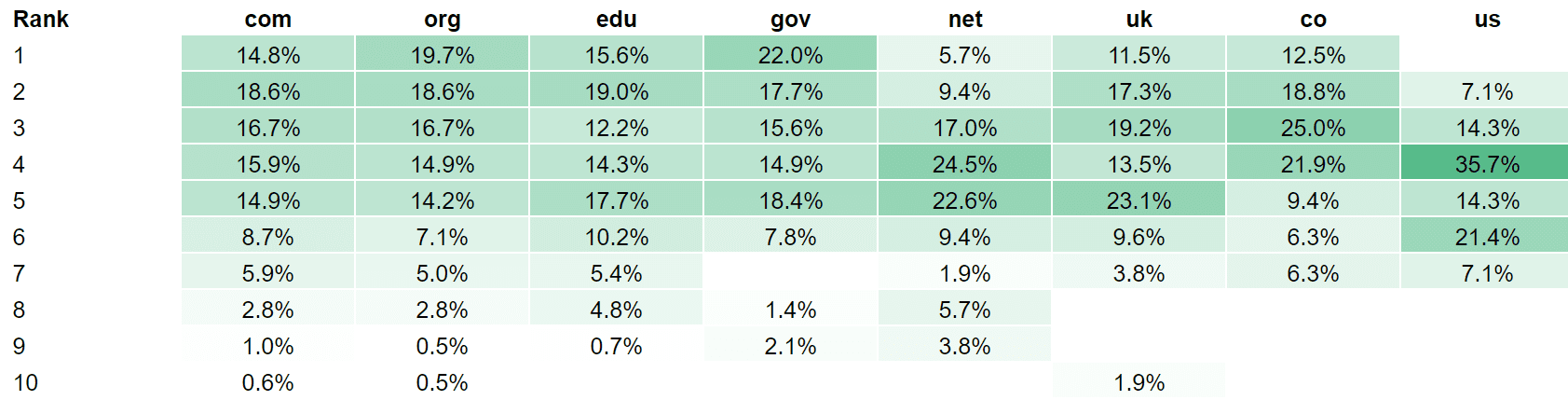
I ran correlations between TLDs and rank across 7,678 results while normalizing for factors around backlinks, content quality, content volume, and rank distribution – but I couldn’t find any relationships. I found that:

  • .net TLDs have a lower chance of showing up in the top two positions.
  • .us didn’t show up in top positions at all (even though I know a .us domain that performs really well).
  • .gov has the best chance to rank at the top – go figure.
  • .uk has a lower chance of ranking at the top compared to .com.
  • .co has a lower chance of ranking at the top than .com.
  • .edu doesn’t perform as well in position 1 compared to .gov.
  • .org has a higher chance of ranking at the top than .com (might be influenced by Wikipedia).
  • .com TLDs rank 71.8% in the top 5 but are registered only 36.31% as often compared to other TLDs (~2x).
TLD by average rank in organic searchTLD by average rank in organic search (Image Credit: Kevin Indig)

The rank benefit of a .com domain is disputable: Due to mere exposure, users are more familiar with .com domains, which means sites might be more likely to link to them, too.

Even if .com domains got a small rank boost from Google, it most likely doesn’t outweigh the importance of content, backlinks, brand, and user experience.

URL Slugs Matter A Bit

Next, I wanted to answer whether having the keyword in the URL slug, the part after the TLD, matters.

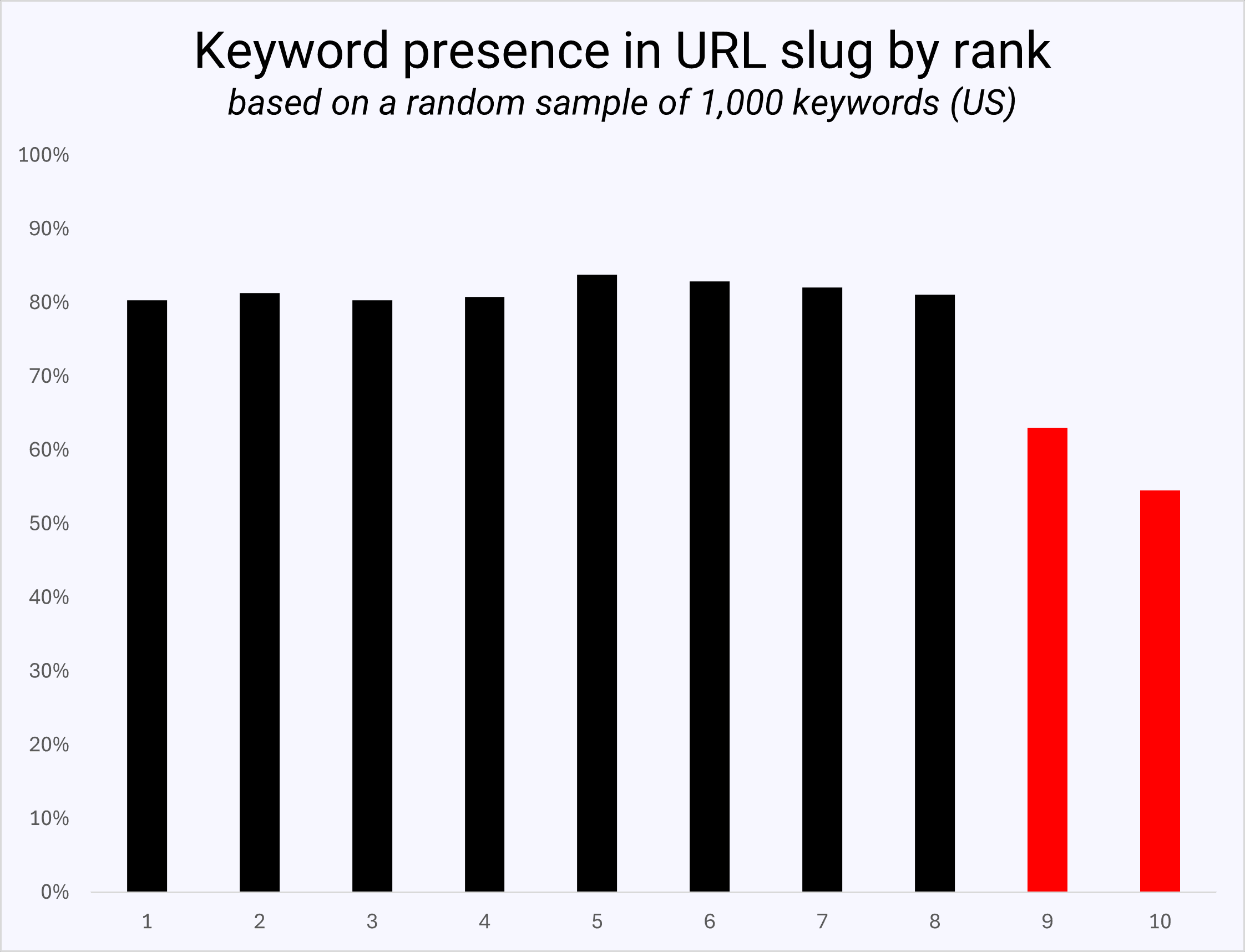
The data shows no advantage to having the keyword in the URL slug for ranking in the top eight positions. However, URLs ranking in positions 9 and 10 carried the keyword way less often, indicating that its tables take to “apply” for the top results.

Keyword presence in URL slug by rankImage Credit: Kevin Indig

In conclusion, scanning for the keyword in the URL or meta title was and is a low-hanging fruit SEO exercise.

From experience, optimizing the slug just to match the keyword is not worth the cost of a redirect. It should be taken into consideration more when creating a new URL.

Subdomains Matter A Lot

Lastly, I was curious whether (non-www) subdomains have an impact on rank.

In Google’s ranking factor leak, we learned that keyword exact-match domains (EMDs) were demoted many years ago. Google also evaluates subdomains separately from root domains, which makes sense because they have a different DNS address.

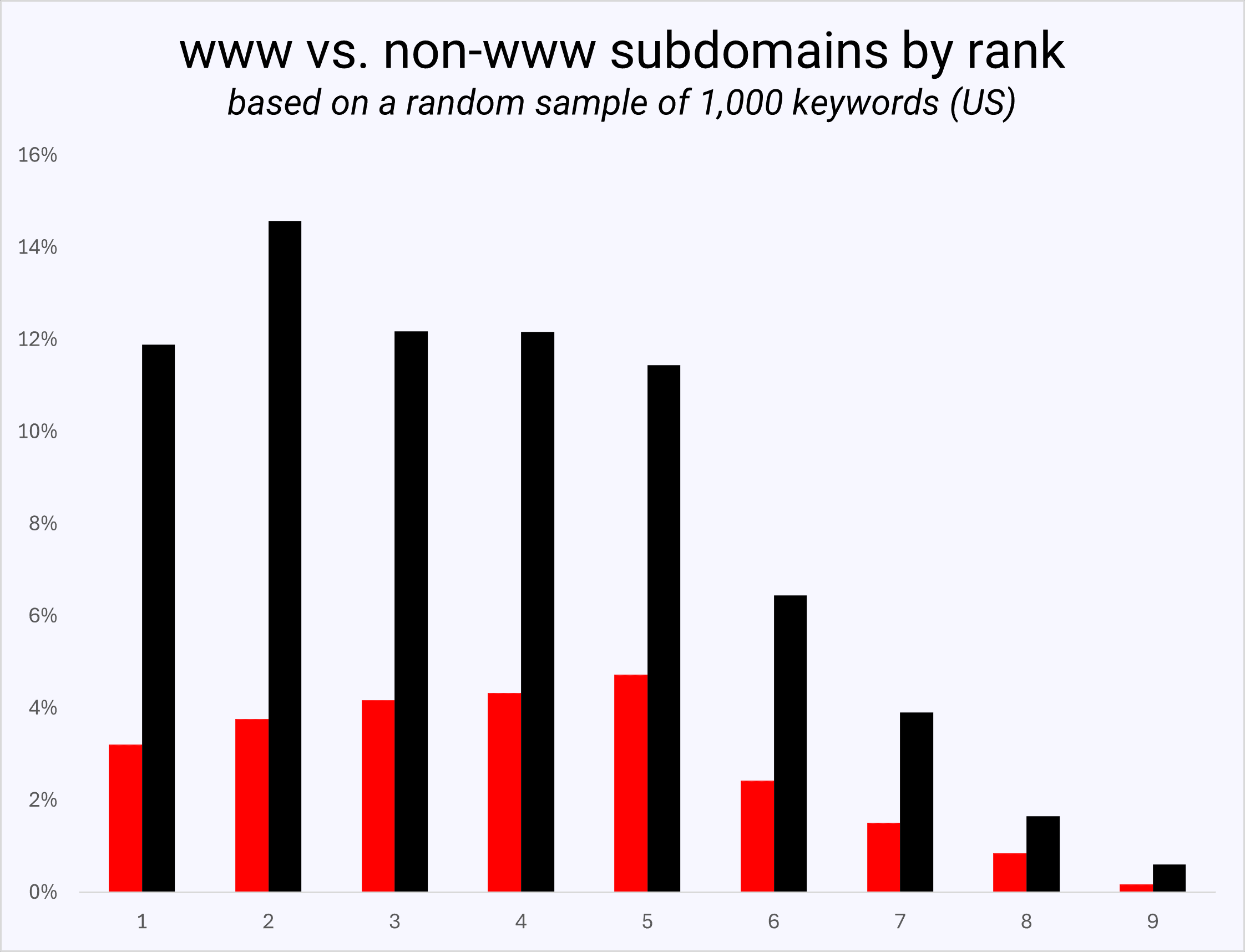
www vs non-www subdomains by rankImage Credit: Kevin Indig

I found in the data that URLs, including www, show up on average thrice as often in the top five results as non-www subdomains.

That ratio shrinks as we go further down the SERPs, meaning there does seem to be a benefit of avoiding subdomains, even though we always have to consider the non-SEO benefits of subdomains.


 Google Tests Country Label In Search Result Snippets

Google’s Now Translating SERPs Into More Languages

Top level domains


Featured Image: Paulo Bobita/Search Engine Journal