A post on LinkedIn questioned the idea that Schema.org structured data has an impact on what a large language model outputs. Apparently there are some SEOs who are recommending structured data to rank better in AI search engines.
Patrick Stox wrote the following post on LinkedIn:
“Did I miss something? Why do SEOs think schema markup will impact LLM output?”
Patrick said “LLM output” in the context of an SEO recommendation so it’s likely that it’s a reference to ChatGPT Search and other AI search engines. So do AI search engines get their data from structured data?
LLMs are trained on web text, books, government records, legal documents and other text data (as well as other forms of media, too) which is then used to produce summaries and answers but without plagiarizing the training data. What that means is that it’s pointless to think that optimizing your web content will result in the LLM itself sending referrals to that website.
AI search engines are grounded on search indexes (and knowledge graphs) through Retrieval Augmented Generation (RAG). Search engine indexes themselves are created from crawled data, not Schema structured data.
Perplexity AI ranks web-crawled content using a modified version of PageRank on their search index, for example. Google and Bing crawl text data and do things like remove duplicate content, remove stop words, and other manipulation of the text extracted from the HTML, plus not every page has structured data on it.
In fact, Google only uses a fraction of the available Schema.org structured data for specific kinds of search experiences and rich results, which in turn limits the kind of structured data that publishers use.
Then there’s the fact that both Bing and Google’s crawlers render the HTML, identify the headers, footers and main content (from which they extract the text for ranking purposes). Why would they do that if they’re going to rely on Schema structured data, right?
The idea that it’s good to use Schema.org structured data to rank better in an AI search engine is not based on facts, it’s just fanciful speculation. Or it could be from a “game of telephone” effect where one person says something and then twenty people later it’s transformed into something completely different.
For example, Jono Alderson proposed that structured data could be a standard that AI search engines could use to understand the web better. He wasn’t saying that AI search engines currently use it, he was just proposing that AI search engines should consider adopting it and maybe that post got telephoned into a full-blown theory twenty SEOs later.
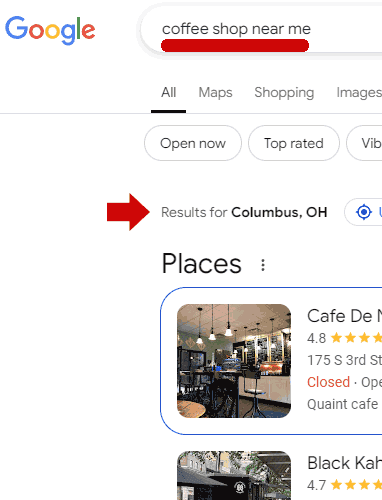
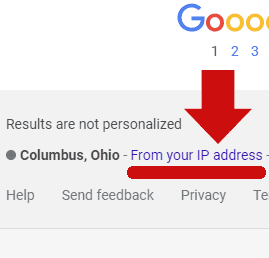
Unfortunately, there’s a lot of unfounded ideas floating around in SEO circles. The other day I saw an SEO assert in social media that Google Local Search doesn’t use IP addresses in response to search “near me” search queries. All anyone had to do to test that idea is to sign into a VPN, choose a geographic location for their IP address and do a “near me” search query and they will see that the IP address used by the VPN influenced the “near me” search results.
Screenshot Of Near Me Query Influenced By IP Address
Google even publishes a support page that says they use IP address to personalize search results yet there are people who believe otherwise because some SEO did a correlation study and when questioned we’re back to someone bellowing that Google lies.
Will You Believe Your Lying Eyes?
Schema.Org Structured Data And AI Search Results
“SEOs” recommending that publishers use Schema.org structured data for LLM training data also makes no sense because training data isn’t cited in LLM output, just for output that is sourced from the web, which itself is sourced from a search index that’s from a crawler. As mentioned earlier, publishers only use a fraction of available Schema.org structured data because Google itself only uses a tiny fraction of it. So it makes no sense for an AI search engine to rely on structured data for their output.
Search marketing expert Christopher Shin (LinkedIn profile) commented:
“Thinking the same thing after reading your post Patrick. This is how I interpret it currently. I thought LLM’s typically do not generate responses from search engines serps but rather from data interpretation. Right? But schema data markup would be used by SER{s to show rich snippets etc. no? I think the key nuance with schema and LLMs is that search engines use schema for SERPs whereas LLM’s use data interpretation when it comes to how schema impacts LLM’s.”
People like Christopher Shin and Patrick Stox give me hope that pragmatic and sensible SEO is still fighting to get through the noise, Patrick’s LinkedIn post is proof of that.
Pragmatic SEO
The definition of pragmatic is doing things for sensible and realistic reasons and not on opinions that are based on incomplete information and conjecture.
Speaking as someone who’s been involved with SEO since virtually the birth of it, not thinking things through is why SEOs and publishers have traditionally wasted time with vaguely defined issues, spun their wheels on useless activities like superficial signals of EEAT and so on and so forth. It’s truly dispiriting to point to documentation and official statements and get blown back with statements like, “Google lies.” That kind of attitude makes a person “want to holler.”
With the punishment for Google’s first search antitrust case expected to be delivered in August 2025, the looming question is what will happen now with a new U.S. President and a new set of Department of Justice (DOJ) appointees.
Early signs suggest the Trump administration will largely stay the course of the Biden administration when it comes to antitrust enforcement against large tech companies, including Google.
Their rationale is drastically different from that of the previous administration, but the recent nominations and appointments for the DOJ suggest that President Trump is serious about holding Google accountable, even if their preferred remedies may differ.
Before we get into it, let’s recap what has happened so far.
The U.S. Vs. Google Case
In August 2024, Federal Judge Amit Mehta ruled that Google violated the U.S. antitrust law by maintaining an illegal monopoly through exclusive agreements it had with companies like Apple to be the world’s default search engine on smartphones and web browsers.
Additionally, Google was found guilty of monopolizing general search text advertising because Google was able to raise prices on search advertising products higher than what the government claimed would have been expected or possible in a fair market.
Potential Remedies For Google
The DOJ submitted two filings with their suggestions to remediate Google’s monopolistic actions.
Proposed remedies range from restrictions on deals that feature Google’s search engine as the default on browsers and devices all the way to a breakup of the company by forcing the sale of Google’s browser Chrome.
Other intriguing remedies that have been proposed include syndicating the Google search algorithm to competitors, forced licensing of ad feeds to competitors, and divesting the Android operating system.
The DOJ under Biden made it clear in their most recent filing on November 20, 2024, that divesting Chrome is their preferred option, along with the discontinuation of exclusive agreements with browsers and phone companies.
The implications of divesting Chrome are also the most wide-reaching – not only is Chrome used by nearly two-thirds of the world’s internet users, but we learned through this trial that click data from Chrome is used to train the search algorithms using Navboost, helping Google maintain its competitive edge.
Losing Chrome’s data would almost certainly guarantee a drastically different Google search engine.
Google filed its response to the DOJ, arguing that the proposed remedies are much wider reaching than what the case was about and that America’s global leadership position in tech could be hindered by this.
Instead, they proposed allowing exclusive agreements to be made with companies like Apple and Mozilla, but with the ability to set a different default search engine on different platforms and browsing modes.
It also proposed that Android device manufacturers could preload multiple search engines, as well as preload Google apps without Google Search or Chrome.
Both sides will return to court for the remedies litigation in May 2025, with a ruling expected to be delivered in August 2025.
What Happens Now
Back to the question at hand: What happens once Trump takes office?
The initial signals, including Trump’s nominations for key roles at the FTC and the Department of Justice Antitrust Division, suggest the administration will continue to use a heavy hand against large tech companies facing antitrust troubles like Google. But, their solutions may differ from the current proposed remedies.
Trump’s Relevant Nominees
Trump has nominated several key individuals who will influence antitrust enforcement, particularly concerning Big Tech companies.
These appointments indicate that the crackdown on tech giants will likely continue, in effect, a surprising bipartisan effort. Trump’s key nominees include:
Gail Slater: Nominated to lead the Department of Justice’s Antitrust Division, Slater has a background as a policy advisor to Vice President-elect J.D. Vance and experience in tech policy at the National Economic Council. If confirmed, she would inherit the antitrust case against Google.
Andrew N. Ferguson: Appointed as Chair of the Federal Trade Commission (FTC), Ferguson has expressed intentions to reassess the agency’s approach to mergers and acquisitions, which has been uncommonly strong against mergers and acquisitions, while still maintaining oversight of dominant tech platforms.
Mark Meador: Appointed as an FTC Commissioner, a role previously held by Ferguson, Meador is recognized for his pro-enforcement stance, especially regarding technology companies, in his previous work with the U.S. Senate Judiciary Committee. His previous work includes drafting legislation aimed at addressing competitive practices in the tech industry.
While all three of these nominees are deeply rooted in the Republican party, they are all united in their pro-enforcement stances when it comes to Big Tech.
This is a departure from the typical Republican pro-business, anti-regulation position, signifying Trump’s seriousness in curbing the power of Google and other tech giants.
The Trump Administration’s Views On Google’s Antitrust Case
Trump’s disdain for Big Tech companies, including Google, has been consistent since his first presidency.
Why does he hate Google so much? A couple of reasons seem most likely:
He sees weakening Big Tech companies as a way to promote “free speech” because of their misinformation moderation policies and claims the search results are biased against conservatives.
Despite this seemingly constant position against Google, President Trump has also suggested that breaking Google up may destroy the company rather than help promote fairness and competition.
He has also warned that breaking up Google may make the U.S. appear weaker to foreign powers because “China is afraid of Google.”
Elsewhere in the administration, Vice President Vance has previously called for the breakup of Google and praised the Biden administration’s Federal Trade Commission Chair, Lina Khan, for her aggressive approach to antitrust enforcement.
Whether they decide to take a stance that is pro-breaking Google up remains to be seen, but it appears that they will be taking office with a desire to strengthen competition in this market.
Final Thoughts
There is a lot of time between Trump taking office and the remedies litigation starting up again for the case against Google in May 2025.
The DOJ still needs to argue why they believe Google should be forced to sell Chrome, and if this is no longer the belief of the DOJ appointees, they will need to argue why other remedies make more sense.
It seems reasonable to assume, based on the appointees, that they will be taking some big swings at Google and arguing for the remedies that they believe would be most effective at enhancing competition.
If you are someone who believes action needs to be taken against Google, Trump’s current anti-Google stance may work in your favor regardless of whether you agree with his rationale for it.
Brick-and-click retailers can struggle to balance local and ecommerce search engine optimization. A physical store wants to target folks in a geographic area and drive in-person visits, while an ecommerce site aims for buyers anywhere.
Different goals, however, don’t necessarily mean there is a problem.
Imagine a furniture retailer with dozens of stores in California and Florida. The CEO could message the marketing team concerned that ecommerce represents less than 20% of total revenue. Her concern the next day could be a new Miami store not appearing on a local Google search.
It feels like a conflict — from link building to content marketing. But it doesn’t have to be. A brick-and-click marketing team can balance the priorities by planning day-to-day SEO activities and developing processes.
3-Part SEO
Marketers often say that SEO has three areas of focus: technical, on-page, and off-page.
Omnichannel marketing teams balance local and ecommerce SEO.
Technical SEO focuses on site speed, URL structure, microdata, and general crawlability. The same technical practices that work for local SEO also help promote products.
Teams of content marketers and on-page optimizers frequently work hand-in-glove to ensure a site ranks for key products, categories, and locations. There is no reason local and ecommerce efforts cannot live in harmony.
Off-page SEO includes backlinks, brand mentions, and filling out and maintaining business profiles, which feed into Google’s local pack and map results. Off-page efforts fit naturally into local optimization even if the focus is ecommerce.
In Action
Sharing tasks for ecommerce and local SEO helps both. Here are priorities, workflows, and automation to streamline the load.
Prioritize setup and integration. Many SEO tasks require initial time-consuming effort followed by less intense maintenance.
For example, optimizing a Google My Business page requires claiming, adding contact info, images, and videos, and encouraging reviews — a lot of upfront work. Keeping the My Business page fresh is much easier.
Similarly, the furniture retailer with dozens of stores might want to set up location-specific landing pages on its website. Each page will have images from the local store, a Google map, store hours, and a greeting from the store manager. Building the pages takes more effort than maintaining them.
Thus a marketing team that prioritizes setup is building the SEO infrastructure to manage selling products online and driving physical foot traffic.
Develop standard operating procedures. Many omnichannel retailers approach SEO by the project. The CEO says to promote the new Miami store, and the team focuses on that effort.
Unfortunately, this sort of project-first approach has three potential problems. It’s (i) reactionary instead of strategic; (ii) creates redundancy, as every project starts anew, and (iii) overlooks critical maintenance.
A better approach is to build a set of standard operating procedures, such as (i) how blog articles are optimized, (ii) the SEO process for adding products or pages, and (iii) a schedule for maintenance and updates.
Use AI to generate content. Working on ecommerce and local SEO simultaneously requires more on-page content.
Developing that extra content may be fairly easy in 2025. Imagine our furniture store. Its content team might produce a blog post targeting the keyword phrase “top Scandinavian design trends for 2025.”
The initial human-written draft could be an AI prompt, generating regional variations like “top Scandinavian design trends for South Florida.”
The primary article would serve as a hub linking to and receiving links from pages of each region.
Automate repetitive tasks. Finally, automation can expedite many aspects of SEO maintenance and improvements. Zapier, generative AI platforms, and similar tools can quickly complete repeat functions and even run SEO audits.
Fundamentals
My impetus for this article was a real-world consultation with a furniture chain. The business focused on the differences between local and ecommerce SEO instead of the overall goal.
Although attracting online buyers and driving in-store traffic may seem different, the SEO fundamentals are the same.
Google has updated its documentation to provide clearer guidance on its site reputation abuse policy.
The changes are meant to you better understand what qualifies as a violation and how to stay compliant.
While the updates don’t change how the policy is applied, they make the rules easier to follow by incorporating more detailed explanations from a recent blog post FAQ.
What Changed?
The updated documentation now includes content directly pulled from Google’s November blog post about site reputation abuse.
That blog post introduced a Q&A section to clarify the policy. Google has now added this FAQ guidance to its official spam policies documentation.
In a statement, Google explained:
“We updated the site reputation abuse policy to include guidance from our blog post’s FAQ on site reputation abuse. These are editorial changes only, no change in behavior.”
This means the policy hasn’t changed—it’s just been rewritten to make it easier to understand.
What Is Site Reputation Abuse?
Site reputation abuse happens when third-party content is published on a well-established website to take advantage of that site’s ranking signals.
Essentially, it occurs when someone uses a reputable site as a shortcut to boost rankings for unrelated or low-quality content rather than earning those rankings independently.
For example:
A news site hosting coupon pages from a third-party service purely to benefit from the site’s strong rankings in Google.
An educational site publishing sponsored reviews about payday loans.
A movie review site hosting unrelated pages about essay writing services or buying social media followers.
However, not all third-party content is considered abuse. Forums, user-generated content, syndicated news articles, and editorial pieces are generally acceptable if they’re not designed to manipulate search rankings.
Why Does This Matter?
These updates make it easier to determine whether your content violates the policy.
For example, Google’s FAQ now clarifies common scenarios, such as:
Third-party content: Simply having third-party content isn’t a violation unless explicitly published to exploit a site’s rankings.
Freelance and affiliate content: Freelance content or affiliate pages are acceptable if they’re not used to manipulate rankings. Affiliate links, when tagged appropriately (e.g., with “nofollow” or “sponsored” attributes), don’t violate the rules.
The FAQ also explains how to address violations. You can fix the issue by removing or relocating problematic content, submitting reconsideration requests in Search Console, and following Google’s spam guidelines.
This is a good reminder to review your content practices to ensure they align with Google’s policies. If you host third-party content, make sure it adds value for users and doesn’t just serve to piggyback off your site’s reputation.
Advancing your in-house SEO career can be incredibly lucrative and fulfilling. But most advice is theoretical, too high-level, and comes from people who haven’t done it.
I had the good fortune of a very fruitful in-house career, leading large organizations at companies like Atlassian, G2, or Shopify.
Over the recent years, I have had the honor of helping companies like Ramp, Hims, Nextdoor, and many others hire top-tier talent and design effective teams.
But my experience is subjective, so I asked four of the most accomplished SEO pros in the world to share their insights as well (you can find their full answers at the end of the Memo):
Image Credit: Kevin Indig
Thank you so much for sharing your valuable insights!
The 5 Core Competencies Of SEO
SEO professionals need five core competencies to succeed in the long-term, that I broke down into three skills each.
I created the framework based on John’s, Malte’s, Jordan’s, Tom’s, and my own experience. Each skill is critical. You cannot just be strong in four. You need to be strong in all of them to succeed in the long term.
Image Credit: Kevin Indig
Skill 1: Communication
Communication is made up of alignment, collaboration, and outward communication.
Creating internal alignment means helping everyone understand what matters in SEO to get buy in, but also contemplate what’s happening in a crisis. For example, when an algorithm update hits your site.
Since SEO is a recommended discipline, it’s critical to collaborate effectively with supporting teams like engineering, design, content, etc., and adjacent teams like legal or procurement.
Outward communication, the way you present yourself and the company at events or on social media, matters it comes to hiring new talent and raising your company’s reputation.
Skill 2: Learning
Learning breaks down into adaptability, experience, and filtering information.
Adaptability is important because Google’s algorithms and design change a lot. Just think about the shift we’re going through with AI search right now. So, you need to be able to shift gears, leave old mental models behind, and develop new ones. You can learn about SEO, but doing it is a different kind of beast. To learn, you can have one or more side projects to tinker with or analyze and reverse engineer other sites.
It’s also important to at least know the basics of other disciplines because they all impact SEO: copywriting, positioning and messaging, conversion optimization, design, web development, and product development.
Lastly, get good at filtering information. What do you read? How do you learn from experiments, and how well are you connected to the industry so you can learn from peers?
Skill 3: Business Savviness
Business savviness breaks down into planning, focus, and execution.
Planning is a crucial skill for almost anything in life. You need to be good at setting goals, priorities, timings, and responsibilities. Planning also includes knowing what resources you need and pitching for them. Also, develop proficiency in forecasting and projecting impact.
Focus is the skill of working on the most important projects while tuning out the noise. It’s measuring the right data to know whether you’re successful and to report upwards and sideways.
Good execution is really hard. In my experience, it comes down to good project management but also understanding how your business and industry work.
Technicality doesn’t mean technical SEO but the skills of automation, data analysis, and a general technical understanding.
Automation is about doing work more efficiently while controlling for dependencies and liabilities. This skill is rapidly becoming more important as AI gets better. It used to be about proficiency with Excel, Google Sheets, SQL, web analytics, etc. But in the future, a lot of it will come down to prompt engineering and workflow automation.
Data analysis is the skill of getting and analyzing data, i.e., knowing which data to look at and how to interpret it well.
A good technical understanding comes down to learning how Google works but also being “technical” enough to talk to engineers and product managers. For example, you want to learn what tech stack your company’s site and application is built on, how the engineering team works, etc.
Leadership is the result of advocacy, hiring, and relationship building. To be clear, you should develop leadership qualities, whether you have management responsibility or not.
Advocacy means representing SEO where it matters. It demands you to proactively find out where conversations happen that impact SEO and how to influence them.
Good hiring skills come down to whether you have a high bar and if you can bring in good talent. Who do you know, and how do you evaluate them for the job?
Relationship building is critical for rapport with your manager and peers. You need allies and “friends” to lean on and learn from. Part of this is getting good at coaching others and finding a good coach.
The five core competencies offer you a helpful overview of what you need to develop. But without understanding how to apply them, they’re only half as useful.
General Vs. Specific Skills
Everybody needs to be proficient in the five core competencies, but you need to adjust the emphasis of your skills based on the industry and business model of the company you work for.
I have three tips for you:
Learn more about technical SEO and product development when you work on larger sites, usually in B2C. Get better at demand generation and content marketing for smaller sites, usually in B2B. The reason is that you want to align your skills with the biggest growth levers of the business.
Develop expertise in SERP Features that matter for your industry. For example:
News: top stories.
Ecommerce: product grids.
SaaS: video carousels.
SMB: Map Packs.
Tailor your skills to the size and maturity of a company. For example, in startups it’s more important to execute fast while you need to invest more time into creating alignment at large enterprises.
Hard Vs. Soft Skills
Hard skills are not as important as soft skills in SEO because you need to constantly adapt to Google changes and learn new hard skills as tech and consumer behavior evolve.
I recommend writing down and refining your mental model about how Google works and what drives success.
Forcing yourself to explain and think about why things are the way they are allows you to truly refine your approach to SEO.
You need to balance two things at the same time: being confident in your approach but open to new insights. Jeff Bezos: “Strong opinions, loosely held.”
Career Planning
This is hard, but most people never think about where they want to be and what it takes to get there.
But without focus, it’s easy to dabble in too many areas and waste time. What are you optimizing for?
Think about your endgame and what you need to get there. Remember, you can always change your goal. But have one.
I love Ray Dalio’s five-step framework for endgame planning 1:
Have clear goals.
Identify and don’t tolerate the problems that stand in the way of your achieving those goals.
Accurately diagnose the problems to get at their root causes.
Design plans that will get you around them.
Do what’s necessary to push these designs through to results.
I want to finish by leaving you with some top-notch resources you can use to keep developing yourself.
1. Malte suggests Learning SEO by Aleyda Solis, probably the most comprehensive repository of SEO learning material.
I present to you the raw inputs I got from John, Tom, Jordan, and Malte:
What core skills and knowledge areas are essential for success in SEO today, and how do you recommend developing them?
Jordan Silton: If I were recreating my personal career path, I would emphasize technical expertise, data analysis, communication skills, and business acumen.
However, SEO roles today are so varied across different business types, industries, and strategies that a multitude of skills are valuable and relevant.
Malte Landwehr: I think SEO has become so diverse that there is no longer one set of skills.
A technical SEO needs very different skills from a content-marketing-focused SEO. A director of SEO needs very different skills from a principal SEO consultant. The SEO work for a B2B SaaS looks totally different from the SEO work for a marketplace or aggregator. News SEO is completely different from ecommerce SEO.
If I had to pick the traits that helped me the most, I would say:
The ability to simultaneously hold multiple, contradicting frameworks and mental models in your head. Two SEOs might tell you two completely different models, how they implement SEO. Both might be wrong – but you might still learn something from both approaches.
Embrace uncertainty. When reverse engineering the Google algorithm, there are many unknowns. You need to get comfortable with that.
ELI5 & ELIPhD. You need to be able to explain SEO to everyone. During your career, you might talk to a CEO, CFO, CMO, CTO, CPO, Head of Web Product, Product Manager, Content Editor, Software Developer, Analyst, and many other roles. Each of these people needs different information. And to convince them, you need to tell different stories. You must develop the ability to talk to each of them.
John Shehata: Today’s SEO landscape has evolved from a generalist approach to a more specialized one. We now see technical SEOs, content SEOs, commerce SEOs, and many more.
The most critical skill right now is adaptability. Google’s algorithms are becoming more sophisticated, advanced, and complex, requiring SEOs to maneuver through frequent changes and quickly pivot strategies when necessary.
Developing this skill involves staying informed through industry updates, engaging with the community, and experimenting to see what works in real time.
Equally important is the ability to think with a business mindset. Historically, SEOs have been focused heavily on driving traffic, but generating traffic for traffic’s sake is no longer enough.
SEOs today need to align their strategies with business goals and revenue streams, focusing on attracting the right audience that converts rather than casting the widest net possible. This shift requires optimizing content not just to attract visitors but to support key business objectives.
Additionally, leveraging AI is essential – not just for automating tasks but for enhancing your analysis and decision-making.
AI can streamline workflows, handle complex data analysis, and support content optimization, allowing SEOs to focus on strategic tasks.
To build these skills, SEOs should learn about AI tools, experiment with them, and stay updated on new developments.
However, none of these skills will be fully effective without strong communication abilities. Being able to translate complex SEO insights into clear, actionable recommendations for non-technical stakeholders is invaluable.
This involves bridging the gap between technical teams and business units, ensuring that all departments are aligned and moving toward shared objectives.
Lastly, data analytics is a foundational skill that ties everything together. A deep understanding of data helps uncover hidden opportunities and supports informed, strategic decisions.
Mastery of tools like Google Analytics, BigQuery, and Looker Studio will allow SEOs to extract meaningful insights that can shape strategies, validate recommendations, and ultimately drive better business outcomes.
Tom Critchlow: This will be no surprise to those who know me, but business skills are critical.
The ability to first understand the full revenue profile and mechanics of the companies you work with, and then being able to communicate confidently, credibly, and clearly.
SEO is more than ever a cross-functional activity and so what we consider “soft skills” are actually critical to be able to convince teams, stakeholders, clients and organizations to invest appropriately in SEO.
Of course, you need some knowledge of SEO too! I think the ideal career experience is a role that allows you to invest in your technical and analytical SEO skills while getting a front-row seat to the wider business context and communication.
What pivotal experiences contributed most to your professional growth?
Jordan Silton: I’ve been fortunate to keep learning different roles, and each shift into a new context accelerated my growth.
Starting in paid search/SEM taught me to monitor KPIs, optimize for ROI, and use an experimental approach to improvement.
Evolving a reporting team into a data science and experimentation team expanded my understanding of how teams and metrics connect across the entire business.
Becoming a product leader was transformational in teaching me how to build consensus and influence to move a business forward.
Malte Landwehr: For me personally, it was a combination of three things:
I started tinkering with websites in my early teen year. I did everything on my own, from repairing corrupted SQL databases, to editing .htaccess files, creating content, attracting visitors, and former partnerships for monetization. This allowed me to understand the full picture of running a website.
I studied Computer Science with a focus on graph algorithms, web scraping, machine learning, information retrieval, and NLP. This allowed me to form a deep understanding of Google’s algorithms and patents.
I worked in Management Consulting. One thing I oversaw was making sure our PowerPoint slides can be read on a BlackBerry in the backseat of a car. This gave me the skills to talk to the C-level and craft proper proposals.
John Shehata: My career growth has been shaped by a diverse range of experiences.
Coming from a technical background as a software engineer and transitioning to marketing has given me a strong foundation.
One key moment was learning to translate complex SEO concepts into a language that editorial, PR, and marketing teams could understand, which helped bridge the gap between SEO needs and business objectives.
Another pivotal decision early in my career was to become a well-rounded marketer instead of specializing only in SEO.
I gained expertise in social media when platforms like Twitter and Facebook were in their infancy, built one of the first social media teams for a major news publisher, and developed a deep understanding of newsletters and partnerships. This diverse experience allowed me to eventually lead global audience development strategies for large organizations.
Managing cross-functional teams was another formative experience.
Working closely with development and engineering teams taught me to speak their language, advocate for SEO needs, and propose technical solutions that accelerated our initiatives.
While working with Editorial teams taught me how to respect the craft and appreciate all the due diligence that goes into writing content.
Working with all these different teams and understanding their strengths and needs, strengthened my ability to push back when necessary and collaborate effectively, which is crucial for driving SEO projects forward within complex organizations.
One of the most fulfilling aspects of my career has been mentoring and team building. I’ve had the privilege of hiring hundreds of SEOs and mentoring some of the best SEOs in the industry, helping them develop their own skills and grow into leadership roles.
Watching them succeed has been one of the most rewarding parts of my journey.
Finally, a turning point in my career was the conscious effort I made to build my personal brand.
Early on, I had supportive managers who encouraged me to refine my public speaking skills and present within the company.
I took these opportunities seriously, which eventually led to my first speaking engagement at SES 18 years ago, the largest SEO conference at the time with thousands of attendees.
From there, I focused on establishing my presence both online and offline, which not only advanced my career but also opened doors for me to promote my own software solutions.
Building a personal brand has proven invaluable in expanding my influence and credibility in the industry.
Tom Critchlow: My first job in digital was as an account manager for a digital agency. The first week on the job the account director and the SEO director both quit!
So, I was left speaking directly to clients about SEO with zero experience. Great way to learn both sides of the equation.
After that, working at Distilled, my brother Will taught me everything I know. I am forever indebted to his guidance.
What are the biggest mistakes you made or have seen others make in developing their career?
Jordan Silton: Most of my early career success was predicated on finding an issue or problem or opportunity and shining a light on it to get others to rally and fix it.
That approach worked well in a world of technical audits and a focus purely on what to do, rather than how to get it done.
I wish I had understood earlier how crucial it is to build up the people and relationships along the way.
In larger organizations (and small ones, too), success is almost exclusively driven by teamwork and communication rather than individual expertise.
Recognizing the value of people in the process transformed my approach, and I believe it has made me a more effective leader.
Malte Landwehr: For a long time, I underestimated the impact a good coach can have. Mindset and manifestation sound like a scam. But they work – also beyond career topics.
John Shehata: One mistake I made early on was focusing too much on rankings as a primary metric. While rankings are a great indicator, they are not the ultimate measure of success.
As I matured, I evolved to focus on traffic, and ultimately how SEO metrics align with overall business goals.
Now, my primary focus is on understanding how each SEO activity impacts revenue and long-term business growth.
I’ve also seen many SEOs panic over algorithm updates. While these changes can be disruptive, a better approach is to remain calm, evaluate the impact, and create both immediate and long-term action plans.
Sometimes, Google reverses its changes, so it’s important not to overreact.
Another common mistake is made by managers transitioning into director roles. Many struggle with balancing tactical and strategic thinking. They might dive into tactical details when speaking with C-level executives instead of focusing on strategy.
Mastering the art of switching between tactical and strategic conversations is crucial for career growth at this level.
Tom Critchlow: Not giving yourself access to context. Whatever role you’re in, if you’re not in the room where budgets are discussed and decisions are made, then you’re missing so much context.
So much of this comes down to your manager and how much they invite you into conversations “above your pay grade,” so to speak.
How do you think strategically about your career?
Jordan Silton: My favorite question about career aspirations is, “What’s your endgame?”
While it’s not crucial to stick to the same endgame, having a clear vision of what you want to achieve is vital.
My aspiration has been fairly consistent in helping businesses turn themselves around and accelerate growth, but my approach has evolved.
Initially, I thought that meant becoming a management consultant, but I was able to reframe this early in my career by realizing that agencies had significant leverage in this area.
This mindset guided my career decisions, including transitioning in-house to gain insight into internal business dynamics and knowing when to leave a successful, industry-leading business to explore opportunities with companies focused on reimagining and rebuilding their brands.
Having an end state to point toward – no matter how much you zigzag to get there – helps ground you in your professional journey.
Malte Landwehr: I am in the incredibly lucky and privileged position that I found something that I thoroughly enjoy doing, happen to be very good at it, and that companies are willing to pay a lot of money for.
I just show up every day at work and focus on whatever task sounds reasonable (and fun) to me.
John Shehata: I’ve always focused on becoming a well-rounded digital marketer rather than a specialist. My strategy was to gain experience across different channels – SEO, social media, newsletters, partnerships, etc. – so I could integrate these areas into a cohesive strategy.
This approach has paid off as I moved into senior leadership roles, where I was able to oversee not just SEO but broader audience development strategies.
Now, as the founder of an SEO software company, my focus has shifted significantly.
Running a SaaS startup requires wearing many hats – product development, sales, support, and client relations – each demanding its own set of skills.
My strategy now is centered on building long-term relationships, and deeply understanding my customers, identifying their pain points, and positioning our software as a long-term solution rather than just a tactical tool.
This means continuously evaluating how our products can deliver real value and helping publishers see the impact through clear, actionable insights.
It’s a constant balance between addressing immediate customer needs and aligning those solutions with their long-term business goals.
In addition, I place a strong emphasis on long-term skill building. I focus on developing skills that I anticipate will be critical in the next 5 to 10 years, such as AI, automation, and business development.
Staying ahead of the curve is essential in such a fast-evolving industry, and it’s important to proactively build expertise in emerging areas.
Another crucial element of my strategy is networking. Building a strong network has consistently opened new doors and opportunities for collaboration.
It’s not just about who you know, but ensuring that the people in your network know the value you bring to the table.
By fostering genuine relationships and contributing to the community, I’ve been able to establish connections that have proven invaluable throughout my career journey.
Tom Critchlow: There’s a great post on a 40-year career that uses a framework of “pace, people, prestige, profit and learning” where different career/life stages require different focus. I like that a lot.
Personally, I’ve always been motivated by learning primarily – the ability to learn new skills and new industries.
Can you suggest any resources or material for career growth?
Jordan Silton: Three books that come to mind immediately are “Turn the Ship Around! A True Story of Turning Followers Into Leaders” by L. David Marquet, “The Checklist Manifesto” by Atul Gawande, and “Never Split the Difference: Negotiating As If Your Life Depended On It” by Christopher Voss and Tahl Raz.
Each of these challenges traditional norms and presents innovative approaches grounded in science and contemporary insights.
Additionally, I’m excited about what Evan LaPointe is building at CORE Sciences. His team leverages clinical insights from neuroscience to evolve business thinking, addressing the many counterproductive norms that persist in the workplace. It’s time to upgrade our understanding, thinking, and practices for better outcomes.
Malte Landwehr: https://learningseo.io/ is the only resource you need to advance your SEO career.
John Shehata: The resources you should focus on depend on where you are in your career.
For early-stage professionals, I recommend mastering tactical skills using resources like Aleyda’s Learning SEO, Moz’s Beginner’s Guide to SEO, WIX, Semrush, or Ahrefs’ Academy.
As you progress, start exploring strategic resources like Kevin’s Growth Memo newsletter.
For more experienced professionals and SaaS owners, I suggest diving into leadership books like “Leaders Eat Last” by Simon Sinek or exploring resources that help you develop a business mindset, Rand Fishkin’s “Lost and Founder,” case studies from Harvard Business Review.
Additionally, staying connected with the SEO community through conferences, webinars, and podcasts is invaluable for continuous learning and networking.
One thing that applies across all stages is the need to stay updated.
SEO and digital marketing are constantly evolving, and keeping a pulse on the latest Google algorithm updates, industry changes, and new tools is crucial to maintaining a competitive edge.
Beyond reading, mentorship is a powerful tool for career growth. Finding a mentor in your field, or becoming one for others, accelerates learning in ways that books and courses alone cannot.
Teaching and guiding others not only solidifies your own understanding but also deepens your expertise.
Finally, hands-on experience is irreplaceable. No amount of reading or watching tutorials can substitute for real-world application.
Create your own projects, build websites, do your own affiliate content, and test different strategies.
Experimenting firsthand is the best way to learn what works and, just as importantly, what doesn’t.
Ultimately, it’s the combination of learning, mentorship, and practical application that will propel your career forward.
Tom Critchlow: I mean, I’m biased, but I think a lot of the SEO MBA archives are relevant!
In particular, the SEO skills maturity matrix is my most popular all-time post and looks at career progression, specifically balancing the “hard” and “soft” skills you need as you grow.
Google quietly updated their Estimated Salary (Occupation) Structured Data page with subtle edits that make the information more relevant and easily understood. The changes show how a page can be analyzed for weaknesses and subsequently improved.
Subtle Word Shifts Make A Difference
The art of writing is something SEO should consider now more than ever. It’s been important for at least the past six years but in my opinion it’s never been more important than it is today because of the preciseness of natural language queries for AI Overviews and AI assistants.
Three Takeaways About Content
The words used on a page can exert a subtle influence in how a reader and a machine understand the page.
Relevance is commonly understood as whether a web page is a match for a user’s search query and the user’s intent, which is an outdated way to think about it, in my opinion.
A query is just a question and the answer is never a web page. The answer is generally a passage in a web page.
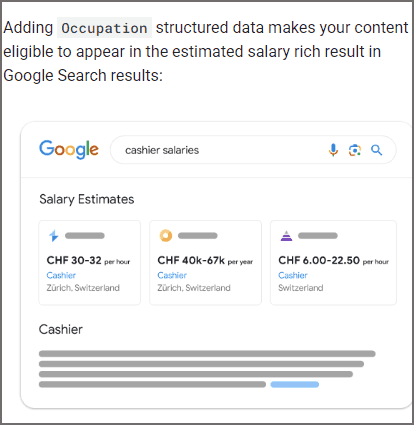
Google’s update to their “Estimated Salary (Occupation) Structured Data” web page offers a view of how Google updated one of their own web pages to be more precise.
There were only two changes that were so seemingly minimal they didn’t even merit a mention on their documentation changelog, they just updated it and pushed it live without any notice.
But the changes do make a difference in how precise the page is on the topic.
First Change: Focus Of Content
Google refers to “enriched search results” as different search experiences, like the recipe search experience, event search experience and the job experience.
The original version of the “Estimated Salary (Occupation) Structured Data” documentation focused on talking about the Job Experience search results. The updated version completely removed all references to the Job Experience and is now more precisely focused on the “estimated salary rich result” which is more precise than the less precise “Job Experience” phrasing.
This is the original version:
“Estimated salaries can appear in the job experience on Google Search and as a salary estimate rich result for a given occupation.”
This is the updated version:
“Adding Occupation structured data makes your content eligible to appear in the estimated salary rich result in Google Search results:”
Second Change: Refreshed Image And Simplified
The second change refreshes an example image.
The change has three notable qualities:
Precisely models a search result
Aligns with removal of “job experience”
Simplifies message
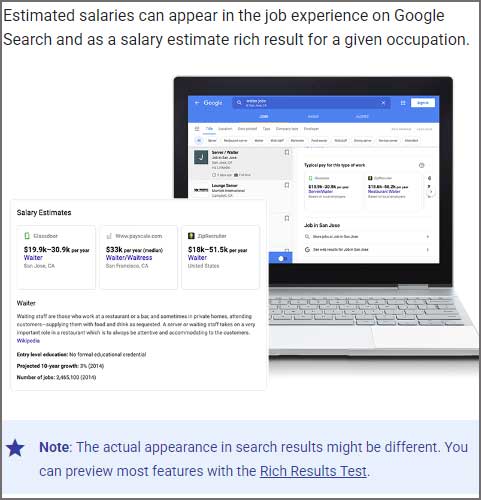
The original image contained a screenshot of a laptop with a search result and a closeup of the search result overlaid. The image looks more at home on a product page than an informational page. Someone spent a lot of time creating an attractive image but it’s too complex and neglects the number one rule of content which is that all content must communicate the message quickly.
All content, whether text or image, is like a glass of water: the important part is the water, not the glass.
Screenshot Of Attractive But Slightly Less Effective Image
The image that replaced it is literally an example of the actual rich result. It’s not fancy but it doesn’t have to be. It just has to do the job of communicating.
Screenshot Of Google’s More Effective Image
The other thing this change accomplishes is that it removes the phrase “job experience” and replaces it with a sentence that aligns with the apparent goal of making this page about the Occupation structured data.
This is the new text:
“Adding Occupation structured data makes your content eligible to appear in the estimated salary rich result in Google Search results:”
Third change: Replace Confusing Sentence
The third change corrected a sentence that was grammatically incorrect and confusing.
Original version:
“You must include the required properties for your content to be eligible for display the job experience on Google and rich results.”
Google corrected the grammar error, made the sentence specific to the ‘estimated salary’ rich result, and removed the reference to Job Experience, aligning it more strongly with estimated salary rich results.
This is the updated version:
“You must include the required properties for your content to be eligible for display in the estimated salary rich result.”
Three Examples For Updating Web Pages
On one level the changes were literally about removing the focus on one topic and reinforcing a slightly different one. On another level it’s an example of giving users a better experience by communicating more precisely. Writing for humans is not just a creative art, it’s also a technical one. All writers, even novelists, understand that the craft of writing is technical because one of the most important factors is communicating ideas. Other issues like being comprehensive or fancy don’t matter as much as the communication part.
I think that the revisions Google made fits into what Google means when it says to make content for humans not search engines.
There are several reasons to migrate your website. They might be to enhance website security through another hosting provider, update your brand image, or improve your user experience.
Whatever the reason, you’ll need to follow a migration process that allows you to update your site without compromising your SEO rankings, traffic, and revenue.
Many SEO professionals face a common fear when it comes to website migration: the loss of valuable traffic, rankings, and users during the transition.
A migration strategy prevents data loss, performance dips, and downtime when you move your site to a new domain, hosting platform, or CMS.
In this guide, I’ll walk you through the 16 best practices for a successful website migration.
The Website Migration Process: A 16-Step Checklist
I’ll break down all the tasks into three phases: planning, pre-migration, and post-migration phase.
Phase 1: Planning
As with any multi-dimensional project, your website migration needs thorough planning. Complete these steps before you begin development:
1. Define Project Scope
First, take inventory of all your webpages. What are you trying to achieve with the migration, and how much of the site will it affect?
Your website migration is set to fail if you don’t have a well-defined goal and scope.
2. Set Migration Team And Responsibilities
Who will lead the project? The in-house SEO team or an outsourced SEO agency?
If you’re managing the project internally, be sure to set up a project management framework so everyone can keep tabs on tasks that belong to them.
3. Manage Cross-Department And Stakeholder Expectations
Which other departments will the project impact? Identify all stakeholders involved in the migration process.
Alongside the SEO and dev teams, this often includes designers, IT staff, quality assurance testers, content managers, product designers, and marketers.
It all depends on what your company is and how many department needs to be involved in an activity like website migration.
You can schedule a meeting to explain why you need it and what you aim to achieve. This is also an excellent opportunity to gather feedback on their specific needs, which could help you choose a better domain (or CMS) that serves your future needs.
Tip: Be transparent about the migration process and what they should expect in terms of functionality, design, and performance.
4. Define Your Timelines And Launch Date
Ideally, your new site should go live when site traffic is at its lowest, and your team has the capacity to respond to any unforeseen hiccups.
Choose a day that has the least impact on your business. This can be during off-hours or when you have little to no low business activity.
You can also do it batch by batch rather than migrate all your pages at once.
Phase 2: Pre-Migration Stage
This is an extension of the planning stage. It’s where you set the foundation for a smooth transition and minimize during or post-migration risks.
5. Run A Detailed Risk Assessment
Audit your webpages to spot potential issues before, during, and after migration. This could be traffic loss, disrupted user flow, broken links, or other technical SEO issues.
Rank these risks by their impact on your business using a simple low-medium-high scale, then tackle the most critical first.
Then, create an effective mitigation plan to minimize the severity of the risks. Some effective techniques are:
Backup all content, meta-data, and configurations before migration.
Use a risk assessment matrix to measure the risks involved in the website migration process and its impact on your business goals.
Use a staging environment to test changes before it goes live.
Implement 301 redirects for all the changed URLs to maintain their SEO value.
6. Define Performance Benchmarks And Set Up Tracking
Build a detailed picture of your site’s existing performance so you have something to compare your new site with.
At this stage, it’s a good idea to back up your existing site in case you need to restore it during the migration process. You’ll want to pull benchmark data for the following:
Core Web Vitals: Use Google’s PageSpeedInsights to measure metrics like loading speed, user interactivity, and visual stability.
Server Response Time: Tools like GTMetrix let you see vitals such as the time to first byte (TTFB) and the overall performance of your website server.
Database Performance Metrics: Analyze database performance to ensure that it can handle the expected traffic loads post-migration. This may require reviewing query execution times, indexing, etc.
Usability Testing: Manually check out all the key areas (conversion elements) to ensure they’re working effectively. You can run A/B tests to identify conversion-deficient areas or pain points that need to be addressed in the new design.
Overall Website Performance: Use Google Analytics, Search Console, or third-party tools like Ahrefs to evaluate your current organic traffic, rankings, indexed pages, crawl errors, indexing rate, and backlinks.
In addition to benchmarking, this is a good time to double-check that you’re tracking all your target keywords in your rank-tracking tool.
This is (very) important as it helps you know how much traffic/rankings you lost/gained after the migration.
7. Ensure Dev and SEO Are Aligned On Performance
If your migration involves a technical overhaul (a CMS change, server migration, or redesign), let your developers know the SEO performance metrics that are important to you. This helps minimize the migration’s impact on your SEO performance.
These migrations might require a complete mapping of old URLs to new ones – give these details to your developers, as missing redirects will tank your rankings and affect organic traffic.
Other issues to look out for are:
Ideally, review your entire SEO performance before and after the migration is complete so that you can compare results.
8. Document Everything
Document all your active server settings and configurations before you migrate your website. This includes the details about the DNS settings, CDN configurations, and hosting environment.
Server documentation has several benefits:
It ensures the new server environment mirrors the old one and reduces the risks of inconsistencies that may cause performance issues.
If any problems arise post-migration, detailed server documentation makes it easier for relevant teams to find, diagnose, and resolve them.
It acts as a comprehensive reference for future migrations or server updates.
Configuration management tools like Ansible, Puppet, or Terraform are popular tools for documenting server configurations in a reusable, readable, and version-controlled format.
Version control tools like Git can also be used to track changes made and collaborate effectively with teams during the migration.
9. Set Up A Testing Environment
It’s best to develop your site in a closed testing environment on a separate server to verify the new site functions properly before launching. This is called a staging website.
It is a clone of your website where you can try out all functionalities – themes, calls to action, plugins, etc. – without disrupting operations on the live website.
A staging website also allows you to identify and fix any potential issues or conflicts before the migration process.
Of course, you’ll need to block public access to the testing environment and prevent search engines from indexing your new pages too soon.
You can either create a robot.txt file to block search engines like Google, add the noindex tag to your new URLs, or set up password protection (.htpasswd).
It looks like this:
Once you have this all set up, run a technical SEO audit on the staging site to find and fix issues before migrating to your live site.
Watch out for little foxes like broken site links, missing alt-texts, meta titles, duplicate URLs, etc., and fix them before migrating to your live website.
Third-party SEO tools like Ahrefs, Semrush, or Screaming Frog can help you achieve this.
Tip: Ensure you have a recent backup of your website after the clone. This way, you have a version to revert to if needed.
10. Conduct A Content Inventory
Now, it’s time to build a complete overview of your existing content and pages.
A content inventory lets you identify if anything goes missing during the migration. Moreover, creating a list of URLs will draw your attention to any existing bugs (like broken links or bad redirects) for you to address before the migration.
You can use a combination of methods to create a comprehensive list of your pages and content assets, such as:
Pulling all your URLs with a site crawler.
Downloading page data from your CMS.
Exporting URLs from Google Search Console.
Don’t forget that site crawlers don’t always pick up orphan pages in a standard crawl if they are not linked internally.
Also, be sure to identify your most valuable pages when assembling your list of URLs. High-value pages are pages with high-intent content, high conversion rates, high traffic levels, and quality backlinks.
This data helps you know which pages to prioritize for minimal impact during the migration.
Finally, if you plan to add additional pages and categories to your new site, this is the time to check that they can fit into your existing architecture. If not, you may need to reconsider your website structure.
Tip: Use a visual sitemap to visualize your current website architecture and find gaps in your content strategy that need to be filled.
Again, ensure you’re tracking the keywords your high-value pages are ranking for. As mentioned above, this helps you to benchmark your performance before and after the migration process.
11. Create A Redirect Map
Next, use your URL list to determine the pages to move to the new site, which ones you can merge, and the ones to drop.
Use redirect links to connect your old content and the new one. So, when users try to access the content on your old page, they’re automatically redirected to the latest version of it.
For your redirect plan, start with the most important pages you identified in the previous step.
Implement a 301 redirect for each page you’re moving to the new site. For context, a 301 redirect indicates that a page has been moved permanently from one URL to another. The authority on the old page is also transferred to the new site.
Technically, your URLs should point to the most relevant page on the new site. For example, let’s assume you have a website (example.com) and want to redirect to a new location:
Old URL: example.com/old-page
New URL: example.com/new-page
In this case, you’ll set up a 301 redirect from “example.com/old-page” to “example.com/new-page.”
Also, avoid redirecting old URLs to your new homepage. This can result in soft 404 errors, which will dilute overall link equity and harm your rankings.
Instead, if you can’t identify an appropriate new page to point to, either create a new page or remove your old URL.
Using our previous example, let’s say you have another URL (example.com/blog); you need to redirect it to the newer version of the page (example.com/new-page/blog).
Old URL: example.com/blog
New URL: example.com/new-page/blog
Then: “example.com/new-page/blog” should 301 redirect to “example.com/new-page.”
This way, each domain is redirected to the most relevant page on your website.
When you’ve completed your redirect map, share a list of your new URLs with your broader marketing team so they can update their campaign links once the new site launches.
Tip: Cross-check your redirects on your staging website to be sure they’re not redirecting to another URL that’s redirected.
This is called chain redirects, and it confuses search engine bots when they try to crawl and index the page.
For best results, ensure your redirects are one-to-one and are ideally not going through redirect chains.
12. Run Pre-Launch Checks
Before launching your new site, you’ll need to run various checks in your testing environment to ensure the new site functions as expected.
Work with your SEO team to confirm if the following elements meet the required standards:
Test Redirects: Ensure that all redirects are correctly implemented and functioning properly. This includes checking the 301 redirects from the old URLs to the new ones to avoid redirect chains or soft 404s.
XML Sitemap: Verify that the new site contains a valid XML sitemap. Use tools like XML Sitemap Validator to check for errors and compliance with search engine requirements.
Robots.txt File: If you’ve added a robots.txt file in the staging file, reconfigure it to include pages you want to index on the search engines.
Canonical URLs: Do all your canonical URLs point to the relevant variant of the page? Consolidate any duplicates to maintain a clear content hierarchy.
Structured Data: Implement structured data (Schema markup) to help search engines understand your pages’ content and deliver rich results to users.
Status Codes: Check the HTTP status code for all pages to ensure they return the correct responses. Address any 404 errors or other related issues immediately.
Internal Linking:Internal links create connections between your webpages and distribute link equity. Review all internal links to ensure that they are intact and redirect users to the right content.
Title Tags, Header Tags, And Meta Descriptions: Are they optimized for the right keywords? Do they follow SEO best practices? Review and update them accordingly.
Tip: Use third-party SEO tools like Ahrefs or Semrush to run a quick audit of your website to find any SEO issues that will become roadblocks during and after migration.
Phase 3: Launch
Now that you’ve crossed all your Ts and dotted your Is, you can proceed to launch your website.
13. Launch And Promote Your New Site
When your site goes live, you’ll need to lift any user and search engine restrictions you set up during the development phase. Remember, the quicker you implement the migration, the better.
Your site will temporarily go offline during the migration, so minimizing downtime will reduce the impact on traffic and revenue.
Remove all the limitations you’ve placed on the staging site so that search engines and users can access it. This includes robots.txt disallows, no index tags, and password protection.
Also, ensure your DNS records point to the right servers after migration.
It’s also a good idea to plan PPC campaigns to coincide with the site launch. Not only will this spread the word about your new site, but it can also help make up for the short-term organic traffic dips you experienced during the migration process.
Phase 4: Post-Migration
Lastly, re-check all the changes to ensure everything is working as intended. Sometimes, the migration may not go as planned, and this is where you decide whether to tweak your edits or roll back to the previous website.
Let’s run through a few of the vitals:
14. Optimize Your Website Performance
Monitor the new website closely to verify if everything is working as it should and check critical aspects of the site, including your new robot.txt file, XML sitemap, redirects, usability, and analytics.
Also, check your website performance compared with your old site. It’s natural to experience a dip in performance for a while, but as the weeks go by, your rankings and traffic should return to their original levels.
To optimize your website:
Use website caching to store content/data so users can access it faster.
Use a CDN (Content Delivery Network) to reduce latency and improve content delivery time.
For best results, minify your JavaScript, CSS, and HTML files to improve Content Delivery Network (CDN) performance. You can also use IPV6 (Internet Protocol version 6) to improve routing efficiency and reduce content delivery times.
Optimize your database systems to improve query speed, user experience, and overall website performance. Best practices such as proper indexing, data tables optimization, query structuring, materialized views, vertical scaling, etc., can help the database handle complex requests without downtime.
Now that you’ve launched your website, you need to revise your technical documents to ensure it’s accurate and up-to-date.
This documentation guides the migration process and can mitigate risks such as duplicate/lost content, missing/broken links, etc.
Also, it allows for faster collaboration between cross-functional teams and stakeholders. Your documentation should include:
A spreadsheet or map of your 301 redirects, including the old and new links.
An updated XML sitemap that lists all necessary pages. This is important for search engine indexing.
Title tags and meta descriptions for all pages on your site.
A report showing performance metrics before and after the migration. You can also add your primary keyword rankings as well.
The state of your robots.txt file to ensure only the right pages are indexed on the search results.
16. Implement Basic Maintenance Practices
Lastly, set preventive maintenance practices to keep your website functioning properly after the backup. This helps you catch and resolve potential issues before they become a bigger problem.
Use third-party SEO tools like Google Search Console, Screaming Frog, Ahrefs, and Semrush as monitoring systems to track your performance metrics and detect anomalies that affect web performance.
These tools also give insight into your user activity on your website and your overall performance strength on the search results.
Tip: Since migration impacts search and user experience, recrawl your new site to ensure it’s performing as required. And if your key performance indicators (KPIs) don’t improve, troubleshoot the causes. These could include:
Pages on your old site are still being indexed.
Slow load times.
Bad redirects.
Missing internal links.
Activate specific alerts on Google Search Console to highlight issues that could affect performance so you can fix them as soon as they occur.
Final Thoughts
Website migration can be a complex undertaking.
Following the above steps will set you up for success and allow you to prepare, execute, and monitor your migration while minimizing associated risks.
Google has made a change to how it’s search results are served which will also help to secure it against bots and scrapers. Whether this will have further effect on SEO Tools or if they can use a headless Chrome that uses JavaScript remains an open question at the moment but it’s likely that Google is using rate limiting to throttle how many pages can be requested within a set period of time.
Google Search Now Requires JavaScript
Google quietly updated their search box to require all users, including bots, to have JavaScript turned on when searching.
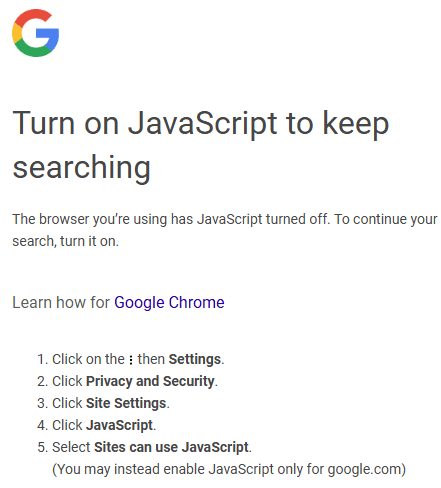
Surfing Google Search without JavaScript turned on results in the following message:
Turn on JavaScript to keep searching The browser you’re using has JavaScript turned off. To continue your search, turn it on.
Screenshot Of Google Search JavaScript Message
In an email to TechCrunch a Google spokesperson shared the following details:
“Enabling JavaScript allows us to better protect our services and users from bots and evolving forms of abuse and spam, …and to provide the most relevant and up-to-date information.”
JavaScript possibly enables personalization in the search experience, which is what that spokesperson may mean by providing the most relevant information. But JavaScript can also be used for blocking bots.
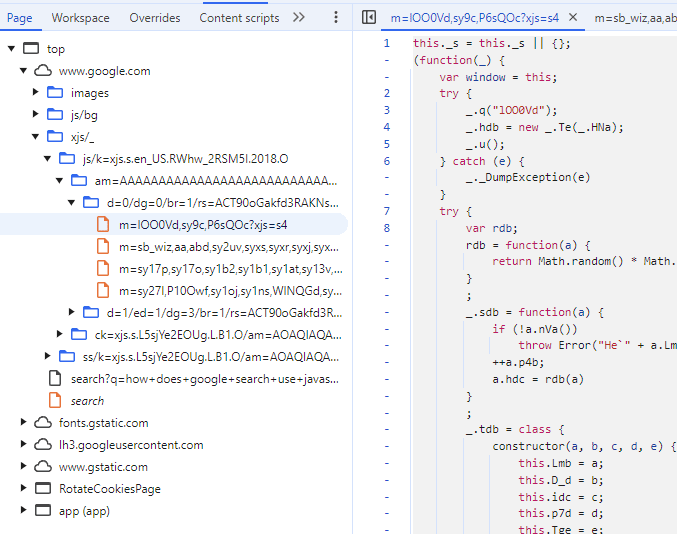
Using the latest version of Chrome I copied some of the JavaScript and ran it through ChatGPT to ask what it does. One part of it may relate to restricting abusive requests for documents.
Screenshot Of Chrome Dev Tools
ChatGPT gave me the following feedback:
“Core Functionalities Randomized Value Generation (rdb)
Generates a random value based on properties (D_d, idc, and p4b) of the input object a, constrained by p7d. This may be used for rate-limiting, exponential backoff, or similar logic.
Purpose and Context From its components, the script:
Likely handles request retries or access control for web resources.
Implements a policy enforcement system, where:
Policies determine if requests are valid.
Errors are logged and sometimes retried based on rules.
Randomized delays or limits might control the retry mechanism.
Appears optimized for error handling and resilience in distributed or high-traffic systems, possibly within a Google service or API.”
ChatGPT said that the code may use rate-limiting which is a way to limit the number of actions a user or a system can take within a specific time period.
Rate-Limiting:
Used to enforce a limit on the number of actions (e.g., API requests) a user or system can perform within a specific time frame. In this code, the random values generated by rdb could be used to introduce variability in when or how often requests are allowed, helping to manage traffic effectively.
Exponential Backoff:
ChatGPT explained that exponential backoff is a way to limit the amount of retries for a failed action a user or system is allowed to make. The time period between retries for a failed action increases exponentially.
Similar Logic:
ChatGPT explained that random value generation could be used to manage access to resources to prevent abusive requests.
I don’t know for certain that this is what that specific JavaScript is doing, that’s what ChatGPT explained and it definitely matches the information that Google shared that they are using JavaScript as part of their strategy for blocking bots.
Your WordPress theme encapsulates your brand and helps provide a good user experience. But people often forget about the search engine optimization aspect of it.
A WordPress theme that isn’t SEO-friendly (or worse, is bloated and slow) can be a real hindrance in the fiercely competitive battle to land on top of the search engine result pages (SERPs).
And since higher rankings can drive more organic traffic, leads, and revenue — this is one element you really want to get right.
In this guide, you’ll learn what an SEO-friendly theme is, what you should consider when selecting one, and which five WordPress themes are best for SEO.
The Basics Of A Search-Friendly WordPress Theme
A WordPress theme built with search engine optimization in mind helps websites achieve better rankings on SERPs.
Optimized WordPress themes are built to elevate your SEO efforts and provide a great user experience.
There are thousands of themes for WordPress users to choose from and thousands more from third-party providers.
Most of these themes make your WordPress website look stunning, but a glance under the hood could tell a different story.
Poor coding, slow loading speeds, and a lack of plugin support can be hiding underneath a beautiful facade. All of these flaws affect search engine rankings.
When you have significant technical SEO issues, Google won’t trust your website as an industry authority, and you’ll likely struggle to reach the first page.
On the other hand, the best WordPress themes for SEO are both stunning and optimized with the latest SEO techniques in mind. They’ll have:
A responsive design.
Clean code.
Fast loading speeds.
And they’ll let you optimize your WordPress website effortlessly.
How To Choose The Best WordPress Theme For SEO
So, how do you choose an SEO-friendly WordPress theme?
You should:
1. Pick A Responsive Theme
Mobile devices (excluding tablets) account for nearly 60% of web page views worldwide.
A majority of smartphone users look up websites, products, and related content on their phones. After all, when you hear about a cool product, you usually don’t want to wait until you’re home to check it out.
SEO-friendly WordPress themes have responsive layouts. A responsive WordPress website will adjust to varying screen sizes across devices with ease.
That way, mobile shoppers aren’t greeted with a poorly adjusted ecommerce homepage when they click through.
Google prefers mobile-friendly websites and offers a tool where you can test how your website fares and performs on different devices.
WooCommerce, Jetpack, Akismet, and Google Analytics are popular plugins. You can also download the best SEO plugins to make optimization easier.
The WordPress theme you pick should support popular plugins, especially those you use regularly.
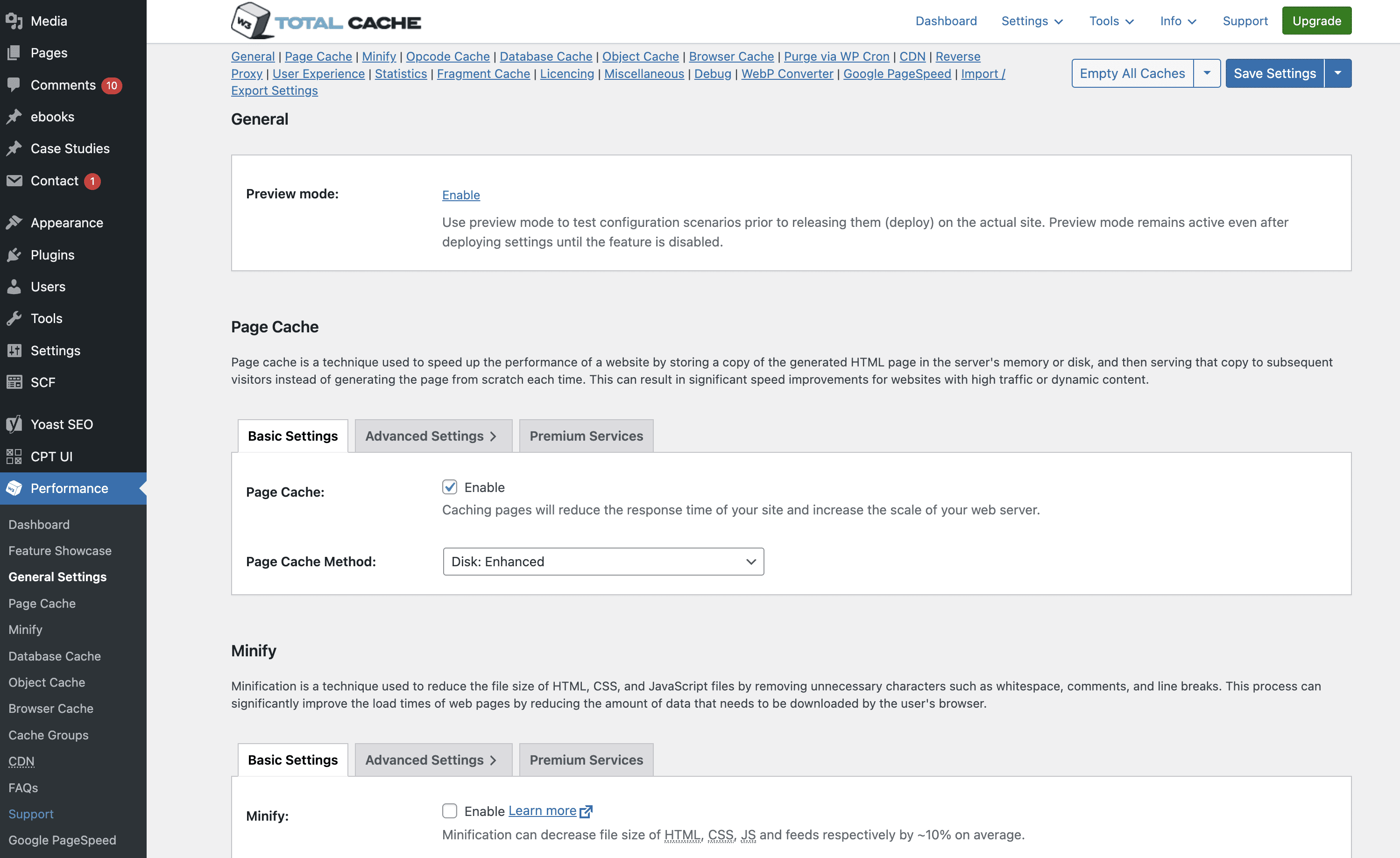
W3 Super Cache is an example of a plugin that’s always active because it maintains optimum page speed. You don’t want it to fail because you switched themes.
Screenshot of W3 Total Cache dashboard in WordPress CMS, November 2024
3. Pick A Theme With Clean Code
Your website is made up of code. If code is poorly written, it can affect your website’s security, speed, and resources.
The same applies to WordPress themes.
The best WordPress themes for SEO have clean code that makes them more secure and reliable, with less downtime.
Clean code and SEO go hand-in-hand. This is because clean code WordPress themes boost page load speed and SEO ranking.
For example, an optimized theme with clean code speeds up updates of essential SEO elements like meta, title, and header tags. This helps search engines to:
Find these tags quickly.
Crawl your website easily.
To analyze your chosen WordPress theme and ensure it has clean code that conforms to the standard WordPress coding conventions, you can make use of themecheck.info.
Upload a theme to the website using a zip file, and it will evaluate the theme for security and code quality.
Note that free WordPress themes don’t have the cleanest code and might pose security threats, especially if the developer copies and alters code from an online source.
4. Choose A Theme That Works On Multiple Browsers
Google Chrome, Mozilla Firefox, Safari, and Opera are common desktop and mobile browsers, but there are several more. You don’t need to cater to all of them, but your theme should work across the most popular browsers.
An SEO-friendly WordPress theme caters to all popular browsers, making it convenient for users to read and share your content, regardless of their browser choice.
Besides supporting different browsers, check version compatibility. Not everyone uses the latest browser version. Often, updates are delayed based on the device or operating system they’re using.
Ideally, your website should work seamlessly on the last five versions of the most popular Windows, iOS, Android, and Linux browsers.
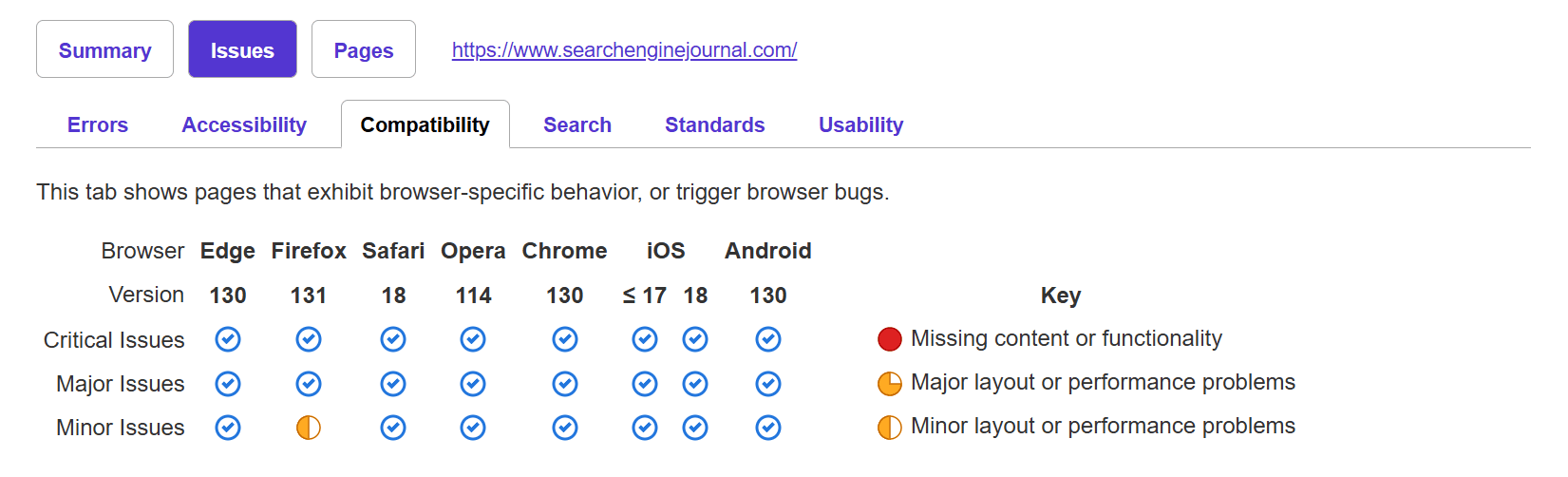
You can use tools like PowerMapper to check browser compatibility.
Screenshot of powermapper.com, November 2024
Developers can also manually run tests to determine compatibility.
5. Evaluate Page Builder Plugins Carefully
A page builder is a WordPress plugin that makes creating your website’s layout easier through drag-and-drop features. You can quickly choose from premade layout options and drag and drop the elements to place them where you want.
Page builders are an excellent option for easy website creation, and most premium WordPress themes offer them.
If you’re a digital marketing agency working with multiple clients, you can use page builders to set up multiple websites quickly.
But page builders do have a few issues.
Page builders generate a lot of code, and, as mentioned earlier, bloated websites are slow. This is bad for SEO.
More importantly, when you create a website using a page builder and then switch themes, the layout – and consequently, the content on it – will require several edits.
You will need to weigh the benefits of drag-and-drop page builders against the development resources required to fix any bloated code. If you’re building websites for clients you will need to expend resources to ensure that the sites perform well by fixing bloated code.
6. Choose A Theme That Loads Quickly
Users have very short attention spans. Many will leave if a website takes more than a few seconds to load. Page speed is crucial for SEO.
Improving page speed has shown tremendous results. A study from NitroPack in partnership with Google showed that compared to a 2-second page load speed, 50% more visitors drop off when a page loads in 3 seconds. And a 0.1 second improvement led to an 8.4% increase in ecommerce conversions.
It’s tempting to go for a reasonably-priced theme with a laundry list of features, like custom widgets or Google Fonts. But if you don’t actually use these functions, then they’re just slowing your website down.
You should pick a fast, lightweight, and customizable WordPress theme with only the features you need. Alternatively, you can pick SEO-optimized themes that let you disable functions you don’t use.
Use Google Search Console to find out how fast your website is and see if it’s slowed down after you’ve installed a theme.
7. Select A Theme That’s Updated Regularly
Regular theme updates are crucial for security and bug fixes. You don’t want a WordPress theme that’s updated once a year.
Developers use updates to provide the latest security patches, fix bugs, address compatibility issues with the latest browsers and plugins, and clean up old code.
Your SEO takes a hit when you use an outdated theme. If your theme isn’t compatible with the latest version of Google Chrome, it won’t load. You’ll lose out on the potential traffic generated by Chrome users and give your competitors a chance to leapfrog you.
Outdated themes might also have limited functionality on newer devices and browsers.
8. Choose A Theme With Good Ratings
The easiest way to identify the best WordPress themes for SEO is to check user reviews and ratings.
Don’t just check the reviews and testimonials on the theme’s official website – check for ratings on third-party websites and social media, too.
Users might not leave SEO-focused reviews, but they will often list things like “slow loading speed” or “not mobile-friendly.” Compare these to your SEO checklist to understand how usable and well-built the theme is.
Compare common user problems with issues that could affect your website in general, and avoid those themes.
While a small number of speed-related complaints in a sea of positive reviews is OK, you should avoid themes with mostly poor reviews.
Best WordPress Themes For SEO
Divi.
Astra.
Kadence.
Hello by Elementor.
GeneratePress.
If you’re looking for the best WordPress theme for SEO, these are it. Let’s take a deeper look into each of them:
Divi
Screenshot of www.elegantthemes.com, November 2024
Divi is an SEO-optimized WordPress theme with a wide range of pre-built templates to suit websites across most niches, including SEO agencies and blogging.
It lets you customize almost every aspect of your WordPress website.
Created by Elegant Themes, Divi has built-in SEO optimization and is regularly updated, so you never have to worry about compatibility.
Astra
Screenshot from wpastra.com, November 2024
Astra is a powerful WordPress theme with retina-ready premade page templates to suit different businesses.
Its lightweight code and fast load speeds make it an excellent option for an SEO-friendly WordPress theme.
Astra supports popular WordPress plugins, including Yoast SEO and All in One SEO. It also supports drag-and-drop page builders such as WPBakery.
Kadence
Screenshot from kadencewp.com, November 2024
Kadence is a multi-purpose WordPress theme that lets you create lightning-fast websites in minutes. It has templates for brands, influencers, small businesses, ecommerce, and agencies.
It also integrates with major plugins, including Elementor, WooCommerce, and Beaver Builder.
Kadence is built with the best SEO practices for markup and schema and lets you customize every element of your website – including header styles, colors, and typography – easily.
Hello By Elementor
Screenshot of elementor.com November 2024
Built with lean, non-intrusive code, Hello by Elementor is the perfect WordPress theme for SEO.
It’s ultra-lightweight, responsive, and claims to load websites in a quarter of a second. A faster website leads to lower bounce rates and happier users.
Despite its focus on speed and using minimal resources, Hello still offers hundreds of templates, plenty of customization options, and regular updates. It also has RTL support.
GeneratePress
Screenshot of generatepress.com, November 2024
Whether you’re a freelancer, startup, or agency, GeneratePress is a great WordPress theme for SEO.
It’s fast, lightweight, and accessible. The free version of the theme is focused on speed and performance, which are essential SEO elements.
Upgrading to the Premium version gives you access to GeneratePress’ block-style website builder (so you never have to learn a line of code), professionally designed starter websites, and customization controls.
Final Thoughts: How To Pick The Best SEO-Optimized WordPress Theme
WordPress themes are a great way to spruce up your website, but they shouldn’t hinder your SEO efforts. Don’t let the overwhelming amount of theme options intimidate you into quickly picking one and settling.
Instead, maintain your cool and pick an SEO-optimized WordPress theme after doing your research.
We will also highlight critical technical elements and new opportunities in voice features and accessibility.
Whether starting out or looking to improve your strategy, read on for practical tips to succeed in SEO.
1. Master Conversational, Long-Tail Keywords
A key difference between text search and voice search is the use of conversational, long-tail keywords.
For example, someone might type, “best Italian restaurant NYC,” while a voice searcher would ask, “What’s the best Italian restaurant in New York City?”
To improve visibility in voice searches, focus on long-tail keywords that reflect natural speech.
Use question phrases like “what,” “where,” and “how.” Tools like AnswerThePublic and AlsoAsked can help you find common questions in your industry.
Example
For instance, a meal delivery service might encounter questions like, “What’s the healthiest meal delivery option?”
The company can increase its chances of ranking in voice searches by creating content that answers these.
2. Aim For Position Zero
Featured snippets, or “position zero,” are short answer boxes at the top of search results. They’re crucial for voice search, as they provide direct answers for virtual assistants.
To improve your chances of getting a featured snippet, offer clear answers to common questions in your field. Use bullet points, numbered lists, or short paragraphs (40-50 words) for easy reading.
Example
Imagine a skincare brand that creates a series of “How to” blog posts addressing common concerns like “How to get rid of acne scars” or “How to build a basic skincare routine.”
By structuring their content in a voice-friendly way and providing direct, actionable answers, they can improve their odds of earning featured snippets for these queries.
3. Prioritize Local SEO
Many voice searches are local, like “coffee shops near me” or “directions to the nearest gas station.”
To take advantage of this traffic, businesses should focus on local SEO.
Encourage satisfied customers to leave reviews, as these can appear in voice search results.
Also, use local keywords throughout your website and create specific pages or posts with phrases like “best [product/service] in [city].”
Example
Consider a local home services company that wants to improve its visibility for voice searches.
This business could use the ‘LocalBusiness’ schema markup, target “near me” keywords, and create city-specific service pages.
This would help search engines understand where the business operates and improve its visibility in local voice searches.
4. Speed Up Your Website
Voice searchers want quick answers, and slow-loading websites can lose them. Page speed is crucial for ranking in both regular and voice searches.
Use tools like Google’s PageSpeed Insights or GTmetrix to check your load times and find improvements.
You can speed up your site by compressing images, minifying CSS and JavaScript, using browser caching, reducing redirects, and upgrading your hosting.
Example
Imagine an ecommerce website that struggles with slow load times due to large product images and inefficient code.
Implementing a series of speed optimizations could improve page load times, provide a better user experience, and increase the site’s chances of ranking for voice searches.
5. Implement Structured Data
Structured data, or schema markup, is code that helps search engines understand your website better.
This extra information can boost your chances of ranking for voice searches and appearing in special search results.
If you own a local business, focus on specific schema types like LocalBusiness, Restaurant, and Product.
These schemas let you share important details such as your business hours, address, menu items, and customer reviews.
Example
Consider a local restaurant that implements RestaurantSchema markup on its website.
By providing search engines with detailed information about their cuisine type, price range, hours, and location, they can improve their chances of appearing in voice search results for queries like “What’s the best sushi restaurant near me?”
6. Craft Voice-Friendly Content
To optimize your content for voice search, think about both what you say and how you say it. People using voice search want clear, brief, and easy-to-understand information.
Here are some tips for creating voice-friendly content:
Answer common questions directly.
Use simple words and short sentences.
Organize your content with H2 tags, bullet points, and numbered lists.
Keep paragraphs short (1-2 sentences).
Write a clear, conversational title that matches what people might ask in a voice search.
FAQ pages work well for voice search optimization because they naturally answer common questions in a straightforward way.
Users often search for “Near Me” phrases such as “pizza near me,” “gas stations near me,” or “ATM near me.” To improve your visibility for these searches, follow these tips:
Add Google Maps to your website to show where your business is located.
Use local keywords, like neighborhood names and landmarks.
Example
If you run a retail business with several locations, create specific pages for each.
You can help customers find their nearest store more easily by including store details, directions, and maps.
7. Improve Accessibility
Voice search is essential for many users with visual impairments or mobility challenges.
Improving your website’s accessibility can help these users and may also improve your voice search rankings. Here are some key accessibility practices:
Include captions and transcripts for video and audio content.
Use semantic HTML markup.
8. Explore Voice-Specific Features
As voice search technology improves, there are new ways to optimize your content.
Here are some features to consider:
Build Alexa skills or Google Actions to connect with voice assistant users.
Use speakable markup to show which parts of your content work well for audio playback.
Optimize for conversational searches on voice shopping sites like Amazon and Walmart.
Make Your Business Voice-Search Ready
Implementing these eight voice search optimization strategies can ensure your business is well-positioned to capture the growing audience of voice search users.
The key to success is to imagine yourself in your target customer’s shoes and consider how they might phrase their queries when speaking to a voice assistant.
As a final tip, it’s always a good idea to conduct your own voice searches related to your industry or niche. Analyze the top-ranking results and identify commonalities or best practices you can apply to your optimization efforts.
By staying proactive and continually refining your approach, you can remain ahead in the ever-evolving world of voice search SEO.