Google Shows How To Fix LCP Core Web Vitals via @sejournal, @martinibuster

Barry Pollard, the Google Chrome Web Performance Developer Advocate, explained how to find the real causes of a poor Lowest Contentful Paint score and how to fix them.

Largest Contentful Paint (LCP)

LCP is a core web vitals metric that measures how long it takes for the largest content element to display in a site visitors viewport (the part that a user sees in a browser). A content element can be an image or text.

For LCP, the largest content elements are block-level HTML elements that take up the largest space horizontally, like paragraph

, headings (H1 – H6), and images (basically most HTML elements that take up a large amount of horizontal space).

1. Know What Data You’re Looking At

Barry Pollard wrote that a common mistake that publishers and SEOs make after seeing that PageSpeed Insights (PSI) flags a page for a poor LCP score is to debug the issue in the Lighthouse tool or through Chrome Dev Tools.

Pollard recommends sticking around on PSI because it offers multiple hints for understanding the problems causing a poor LCP performance.

It’s important to understand what data PSI is giving you, particularly the data derived from the Chrome User Experience Report (CrUX), which are from anonymized Chrome visitor scores. There are two kinds:

  1. URL-Level Data
  2. Origin-Level Data

The URL-Level scores are those for the specific page that is being debugged. Origin-Level Data is aggregated scores from the entire website.

PSI will show URL-level data if there’s been enough measured traffic to a URL. Otherwise it’ll show Origin-Level Data (the aggregated sitewide score).

2. Review The TTFB Score

Barry recommends taking a look at the TTFB (Time to First Byte) score because, in his words, “TTFB is the 1st thing that happens to your page.”

A byte is the smallest unit of digital data for representing text, numbers or multimedia. TTFB tells you how much time it took for a server to respond with the first byte, revealing if the server response time is a reason for the poor LCP performance.

He says that focusing efforts optimizing a web page will never fix a problem that’s rooted in a poor TTFB sore.

Barry Pollard writes:

“A slow TTFB basically means 1 of 2 things:

1) It takes too long to send a request to your server
2) You server takes too long to respond

But which it is (and why!) can be tricky to figure out and there’s a few possible reasons for each of those categories.”

Barry continued his LCP debugging overview with specific tests which are outlined below.

3. Compare TTFB With Lighthouse Lab Test

Pollard recommends testing with the Lighthouse Lab Tests, specifically the “Initial server response time” audit. The goal is to check if the TTFB issue is repeatable in order to eliminate the possibility that the PSI values are a fluke.

Lab Results are synthetic, not based on actual user visits. Synthetic means that they’re simulated by an algorithm based on a visit triggered by a Lighthouse test.

Synthetic tests are useful because they’re repeatable and allow a user to isolate a specific cause of an issue.

If the Lighthouse Lab Test doesn’t replicate the issue that means the problem isn’t the server.

He advised:

“A key thing here is to check if the slow TTFB is repeatable. So scroll down and see if the Lighthouse lab test matched up to this slow real-user TTFB when it tested the page. Look for the “Initial server response time” audit.

In this case that was much faster – that’s interesting!”

4. Expert Tip: How To Check If CDN Is Hiding An Issue

Barry dropped an excellent tip about Content Delivery Networks (CDNs), like Cloudflare. A CDN will keep a copy of a web page at data centers which will speed up delivery of the web pages but will also mask any underlying issues at the server level.

The CDN doesn’t keep a copy at every data center around the world. When a user requests a web page the CDN will fetch that web page from the server and then will make a copy of it in that server that’s closer to those users. So that first fetch is always slower but if the server is slow to begin with then that first fetch will be even slower than delivering the web page straight from the server.

Barry suggests the following tricks to get around the CDN’s cache:

  • Test the slow page by adding a URL parameter (like adding “?XYZ” to the end of the URL).
  • Test a page that isn’t commonly requested.

He also suggests a tool that can be used to test specific countries:

“You can also check if it’s particularly countries that are slow—particularly if you’re not using a CDN—with CrUX and @alekseykulikov.bsky.social ‘s Treo is one of the best tools to do that with.

You can run a free test here: treo.sh/sitespeed and scroll down to the map and switch to TTFB.

If particular countries have slow TTFBs, then check how much traffic is coming from those countries. For privacy reasons, CrUX doesn’t show you traffic volumes, (other than if it has sufficient traffic to show), so you’ll need to look at your analytics for this.”

Regarding slow connections from specific geographic areas,  it’s useful to understand that slow performance in certain developing countries could be due to the popularity of low-end mobile devices. And it bears repeating that CrUX doesn’t reveal which countries poor scores are coming from, which means bringing in Analytics to help with identifying countries with slow traffic.

5. Fix What Can Be Repeated

Barry ended his discussion by advising that an issue can only be fixed once it’s been verified as repeatable.

He advised:

“For server issues, is the server underpowered?

Or the code just too complex/inefficient?

Or database needing tuning?

For slow connections from some places do you need a CDN?

Or investigate why so much traffic from there (ad-campaign?)

If none of those stand out, then it could be due to redirects, particularly from ads. They can add ~0.5s to TTFB – per redirect!

Try to reduce redirects as much as possible:
– Use the correct final URL to avoid needing to redirect to www or https.
– Avoid multiple URL shortener services.”

Takeaways: How To Optimize For Largest Contentful Paint

Google Chrome’s Barry Pollard offered five important tips.

1. PageSpeed Insights (PSI) data may offer clues for debugging LCP issues, plus other nuances discussed in this article that help make sense of the data.

2. The PSI TTFB (Time to First Byte) data may point to why a page has poor LCP scores.

3. Lighthouse lab tests are useful for debugging because the results are repeatable. Repeatable results are key to accurately identifying the source of a LCP problems which then enable applying the right solutions.

4. CDNs can mask the true cause of LCP issues. Use the Barry’s trick described above to bypass the CDN and fetch a true lab score that can be useful for debugging.

5. Barry listed six potential causes for poor LCP scores:

  • Server performance
  • redirects
  • code
  • database
  • Slow connections specific due to geographic location
  • Slow connections from specific areas that are due to specific reasons like ad campaigns.

Read Barry’s post on Bluesky:

I’ve had a few people reach out to me recently asking for help with LCP issues

Featured image by Shutterstock/BestForBest

How To Get Buy-In From Stakeholders Using Overlooked Soft Skills

Getting buy-in for projects either at work, or from an organization can be difficult, but for SEO projects, it can be even more challenging as it is not always easy to tie the SEO work to results.

To improve buy-in, looking to soft skills outside of SEO can make the difference.

If we know our soft skills and and what our strengths are, then we can understand others and be able to communicate with them better. This then helps when we want to get buy-in for projects, including SEO.

In this article, we go through some key areas to address to help you get buy-in at your company such as communication and the ability to cultivate trust.

Soft Skills

We spend a lot of time improving our technical SEO or working on keyword research and reporting, especially getting up to speed with Google Analytics 4 (GA4), but how much time do we spend on improving our soft skills? Do we know what our strengths are?

When working in SEO and with the wider team, soft skills become important.

Soft skills, also called interpersonal skills, are non-technical and impact your performance not only at work but also in your personal life.

They include how to manage your time, communicate with others, resolve conflict, and listen to others, to name just a few.

The CliftonStrengths helps individuals focus on what they are naturally good at. It helps assess your soft skills, including how empathetic you are, which is a great leadership and team player skill.

Empathy

Tom Critchlow said getting buy-in requires executive empathy. He explained that “executive presence is the art of seeing the problem from someone else’s point of view.”

We need to make the stakeholders, such as the CEO or CFO, want to care about SEO and how it can help them achieve their goals and the broader business objectives.

Empathy is putting oneself in another person’s shoes and seeing it from their side. We should apply this not only to the main stakeholders but to the development team or design team and others who will become your biggest allies.

Trust

Empathy is a key part of the trust triangle, and it also includes authenticity and logic.

It takes a long time to build trust, and when it is lost, most of the time, it can be traced back to a breakdown of one of them.

Your colleagues and the key stakeholders will trust you when:

  • They feel you care about them, which is empathy.
  • They have faith in your competence, which is the logic (and why it is important to show results from SEO work clearly)
  • They believe they are interacting with the real you, which is authenticity.
Trust TriangleScreenshot from hbr.org/2020/05/begin-with-trust, November 2024

Reporting

If we want the stakeholders to allocate more budget next quarter or even next year to SEO, review the previous reports you and your team have worked on and have shared with them over the year.

What reports have they read? Which ones have they ignored?

Make sure that you get feedback monthly or at least quarterly on what reports the stakeholders find useful and which metrics they want to see more of in the future.

Nobody wants to see pages of reports – the stakeholders are busy people. You should focus on reporting on the most important KPIs to them.

Some people with minimal time to fully understand SEO (such as the CEO and CFO) may think organic traffic is a given, and less investment would not necessarily mean less traffic.

Therefore, it is always important to show what the SEO team did and provide clear results.

For example, tell them “we created the content strategy and built out the blog on X topics, and this created an uplift in traffic and revenue by X%”. Showing the direct impact of SEO helps justify the SEO team and their work.

KISS

KISS stands for Keep It Simple, Stupid. Although this framework is used mainly in the design space, it can also be applied to the wider business.

It has been used in many companies, like Apple with the iPhone. Keeping something focused and simple is difficult.

We can also apply the KISS principle to SEO and get buy-in by removing the jargon that comes with it – just focusing on what the impact will be.

For example, instead of saying that we have a lot of 404 status codes when products are out of stock, show the stakeholders that the product pages return an empty page. There is nothing on the page to keep the user there.

Show the traffic to some of these key product pages, and when they are out of stock, calculate how much revenue is lost.

KISS goes back to the reporting element. Keep the reports simple and show only what the stakeholders value as important. Don’t include tracking of hundreds of keywords if they are not driving clicks.

Focus on the main terms that generate clicks and impressions in Google Search Console. Use the events in GA4 to show how many conversions the site and the pages have generated.

Open Line Of Communication

Make sure you speak to the stakeholders throughout the year, not just when reports are due or when you need more budget.

Share with them news such as the Google updates or any positive impact from the SEO work that has meant revenue and conversions are up.

Google updates are still important to share whether your site has been affected. It is better for the stakeholders to find out about these updates from the SEO team than from the client services team or those who do not work in SEO.

Other key elements to share are some insights from conferences. What are some initiatives they have done that have been successful? Were some of these the same initiatives you wanted to implement, but there was resistance?

Is there a company newsletter you can feature, or is there a marketing newsletter you can contribute to? Share these with the stakeholders.

If you or the team write for any third-party sites, share these articles internally.

Alternatively, if there was a webinar the SEO team took part in that had a lot of views and likes, send this to the stakeholders.

Integrate SEO Within The Company

Make SEO everyone’s responsibility.

Highlight in the meetings or conversations with stakeholders that doing a site migration, changing the homepage of the site, or amending the content management system (CMS) is not just the work of the SEO team. It is the responsibility of the whole company.

For example, a site migration cannot be done on a Friday evening, or the homepage should not be drastically changed during sales periods.

SEO should never be seen as an add-on and should be an integrated part of the marketing strategy.

Unfortunately, in many organizations, the SEO strategy can be outside the product and outside the marketing strategy. Create allies within the marketing and product team. Show them how SEO impacts and affects their KPIs and how SEO can help improve them.

Creating allies comes back to working on your soft skills.

We can still have those “water cooler moments” or informal chats even if we are remote working. Ask them how their weekend was, what their hobbies are, do they have family nearby.

In these informal chats, you may also find out their pain points. What are they struggling with? How can SEO help them?

When you start building your KPIs together and helping one another, this builds teamwork outside of your immediate team and helps build more trust.

Competitor Analysis

Not many are happy when their direct competitors beat them in revenue and traffic.

Competitor or market analysis always helps to show some of what others are doing. We can see an estimate of the traffic, the paid ads they are running, and the terms they are ranking for using third-party tools.

However, context should not be underestimated. It may be that the drop in traffic and revenue you are experiencing on your site, is not just your site. Some industries may have seen a dip, while others have seen an increase.

For example, during COVID-19, travel and hospitality saw a drop, whereas Zoom and online applications and games saw their sales increase.

It is now becoming more difficult to track customers, due to AI. And this won’t get easier next year as the search landscape will continue to change. Therefore, always remember to include the context of the industry when reporting on how your site is performing.

Show what others are doing in the market, including new initiatives. This will help build and keep the trust of the key stakeholders.

Mastering Soft Skills In Securing SEO Buy-In

Soft skills should never be underestimated when trying to get buy-in for projects. Understand the needs of your stakeholders and the wider team.

Spend time building rapport with them and learning about their challenges and how SEO and their team can work together to achieve more than if each one worked independently.

However, if you find yourself in a position where nobody is paying attention to the SEO, plan to start testing different elements of what they want to change with the website, for example, changing the categories or changing the home page.

Use a tool such as SEO Testing that allows you to test different URLs; you can do split testing and time-based testing. When you have the data, present it to the stakeholders to show them the results.

SEO is an industry where it is hard to get buy-in and harder to get the budget approved. But work on your soft skills – empathy and trust – to build a team that believes in SEO and supports you 100%.

More resources:


Featured Image: Marciobnws/Shutterstock

9 Actionable Steps to Improve Your Google Rankings via @sejournal, @ChuckPrice518

Many things have changed in SEO since Google first came online in 1998.

Today, with personalized results influenced by user behavior, location, and device, standing out in search engine results is more challenging than ever.

The one thing that hasn’t changed is this: Your organic traffic is directly tied to your search engine ranking positions (SERPs).

If your keywords rank at or near the top of Google’s search results, boundless traffic will follow. Conversely, a lack of visibility in the SERPs will leave your site struggling to attract organic traffic, regardless of its quality.

In this guide, I’ll break down actionable steps to boost your rankings.

How Long Does It Take To Improve Google Rankings?

I’m going to go out on a limb here and give you the definitive answer, “It depends.”

While I recognize this is frustrating and seems like a cop-out, it’s the truth.

SEO doesn’t happen in a vacuum and every situation offers a unique set of variables. Skill, budget, the level of competition, and how your website stacks up can all play a role in how quickly one can move the dial.

Google’s John Mueller has said it can take “several hours to several weeks” for Google to index new or updated content. However, even with drastic changes, it can take months – or even a year – to see a significant impact.

Mueller recommends:

  • Preventing server overload by making your server and website faster.
  • Prominently linking to new pages.
  • Avoiding unnecessary URLs like category page filters.
  • Using sitemaps and the URL inspection tool to speed up indexing.

The best way to rank faster? Create high-quality, useful content that searchers will love. In Mueller’s words, make your site “fantastic.”

1. Start With A Rock-Solid Technical & UX Foundation

Poor website structure and information architecture can doom even the best SEO campaigns. If your website is difficult for users to navigate and Google to crawl, your rankings are likely to suffer.

Building a solid technical and UX foundation ensures both search engines and users find what they’re looking for.

Key Technical SEO and UX Priorities:

  • Streamline Navigation: Make sure users can find any page on your site within three clicks.
  • Secure Your Site: Use HTTPS to build trust and protect user data.
  • Improve Load Times: Compress images, leverage browser caching, and reduce code and JavaScript bloat to deliver a fast-loading site across all devices.
  • Fix Errors: Use tools like Google Search Console to identify crawl issues, broken links, and other barriers that prevent Google from indexing your pages effectively.

While Core Web Vitals (e.g., LCP, FID, and CLS) are important indicators of performance, don’t get bogged down chasing perfect scores. A site that’s technically sound and provides a great user experience will naturally outperform competitors in the long run.

Actionable Recommendation

Audit your website using Google Search Console’s coverage and crawl stats reports. Identify and fix three major issues this week, such as broken links, slow-loading pages, mobile-friendliness problems, Core Web Vitals issues, or indexing errors.

Recheck crawl stats in two weeks to confirm improvements and ensure Google can efficiently index your site.

2. Deliver Helpful, Relevant, E-E-A-T-Oriented Content

High-quality content that embodies Experience, Expertise, Authoritativeness, and Trustworthiness (E-E-A-T) is a cornerstone of modern SEO.

Google rewards content that satisfies user intent and offers value, so prioritize crafting pieces that answer real questions and solve problems.

Google-Friendly Content Tips

  • Write Engaging Titles: Use concise, compelling headlines between 135–159 characters that resonate with your audience and highlight key benefits.
  • Craft Meta Descriptions: Write unique, engaging descriptions with naturally incorporated keywords, steering clear of auto-generated alternatives.
  • Leverage Expert Sources: Enhance your content with reputable citations, case studies, or insights from industry leaders to build authority.

Actionable Recommendation

Choose your top 3 underperforming URLs in terms of CTR or average position in Google Search Console.

Update each with a fresh expert citation or new insights aligned with search intent. Add a new section or FAQ to deepen the content. Track CTR and engagement metrics over the next four weeks to measure improvement.

3. Optimize Your Pages For Google

Making your pages engaging and search-engine-friendly requires optimizing both your content and the way it’s structured.

This involves crafting concise, descriptive titles, leveraging meta descriptions, and strategically using internal links to enhance user navigation and SEO performance.

Key Optimization Tactics

1. Craft Unique, Engaging Titles And Meta Descriptions

  • Titles under 60 characters or approximately 600 pixels in width ensure full display in SERPs. Prioritize clarity and relevance to attract clicks and align with user intent.
  • Write meta descriptions that align with search intent and include primary keywords without overstuffing.
  • Avoid auto-generated descriptions; manually craft compelling snippets.

2. Use Internal Linking Strategically

  • Add links between relevant pages to guide users and improve crawlability.
  • Use descriptive anchor text to clarify the destination page’s content. For example, instead of “click here,” use “compare digital marketing tools.”
  • Avoid excessive links on a single page to maintain clarity and avoid overwhelming users.

3. Focus On Content Structure And Readability

  • Use clear headings (H1, H2, H3) to organize content for users and search engines.
  • Break up text with bullet points, numbered lists, and visuals to improve readability.
  • Include related links for deeper dives into the subject matter.

Actionable Recommendation

Identify three underperforming pages with high impressions and low CTR using Google Search Console. Rewrite their meta descriptions to align with searcher intent, incorporating primary keywords naturally.

Add at least one internal link to each of these pages from related high-traffic content, using descriptive anchor text. Monitor changes in CTR and engagement metrics (e.g., bounce rate) over the next four weeks to assess improvements.

4. Implement Schema Markup For Rich Results

Schema markup helps search engines understand your content better and enhances your visibility with rich results like star ratings, pricing details, and more.

By structuring your data, you make it easier for search engines to deliver relevant information to users directly in the search results.

Sample Schema Markup

Below is an example of Product schema markup for an ecommerce website:

{
  "@context": "https://schema.org/",
  "@type": "Product",
  "name": "Organic Cotton T-Shirt",
  "image": "https://yourdomain.com/images/organic_cotton_shirts.jpg",
  "description": "A comfortable, eco-friendly organic cotton shirt.",
  "brand": "GreenThreads",
  "offers": {
    "@type": "Offer",
    "priceCurrency": "USD",
    "price": "19.99",
    "availability": "https://schema.org/InStock",
    "url": "https://yourdomain.com/organic_cotton_t-shirts"
  },
  "aggregateRating": {
    "@type": "AggregateRating",
    "ratingValue": "4.5",
    "reviewCount": "55"
  }
}

This code includes essential product details such as name, image, description, pricing, availability, and customer ratings, making it eligible for rich search results.

Choose The Right Schema Type

Schema.org provides various schema types designed for specific content formats, including:

  • Article Schema: Tailored for blog posts, news articles, and other written content.
  • FAQ Schema: Perfect for presenting frequently asked questions in an organized, search-friendly way.
  • Event Schema: Ideal for highlighting events with dates, locations, and ticketing details.
  • LocalBusiness Schema: Boosts visibility for businesses with physical locations by including address, hours, and contact info.
  • Recipe Schema: For recipe content, showcasing ingredients, cooking steps, and reviews.

Selecting the appropriate schema type for your content ensures better alignment with user search intent and increases your chances of appearing in rich search results.

How To Implement Schema Markup

Benefits Of Schema Markup

  • Enhanced Search Visibility: Stand out with rich snippets (e.g., stars, prices, and FAQs).
  • Higher Click-Through Rates (CTR): Well-structured results attract more attention.
  • Improved User Experience: Users get key information at a glance without clicking through multiple pages.

Actionable Recommendation

Select one key product or service page and implement schema markup using JSON-LD format. Validate the code using Google’s Rich Results Test. Track impressions, CTR, and click performance in Google Search Console over two weeks.

Aim for at least a 1% CTR improvement, which can translate to 100+ additional clicks if the page receives 10,000 monthly impressions.

If the initial implementation is successful, expand schema markup to five additional pages over the next month, focusing on high-traffic content.

5. Optimize For Mobile-First Indexing

Google now prioritizes the mobile version of your website for indexing and ranking. Ensuring your site is mobile-friendly is no longer optional – it’s essential for SEO success.

Key Strategies for Mobile Optimization:

  • Responsive Design: Use responsive design to ensure your site adjusts seamlessly across all devices.
  • Page Speed: Optimize loading times for mobile users by compressing images, enabling caching, and using a content delivery network (CDN).
  • Mobile-Friendly Navigation: Simplify navigation menus for smaller screens and prioritize essential links.
  • Clickable Elements: Ensure buttons and links are adequately spaced for touch interactions.

Actionable Recommendation

Use Google Search Console’s Mobile Usability report to identify pages with issues such as “Text too small to read” or “Clickable elements too close together.”

Focus on fixing three key problems, like adjusting text size, improving button spacing, or optimizing navigation. Enhance performance further by compressing images and enabling lazy loading.

Monitor bounce rates and mobile impressions in Google Analytics over the next four weeks, aiming for a 5% reduction in bounce rates and improved engagement.

6. Build High-Quality Backlinks

Backlinks are still critical for SEO, but the emphasis should be on quality over quantity. Links from reputable websites signal to Google that your site provides authoritative and valuable content.

That said, building backlinks isn’t an overnight win – it’s a long-term game that requires patience and consistent effort.

Strategies For Earning Quality Backlinks

  • Guest Blogging: Write insightful, high-value guest posts for well-regarded websites in your niche.
  • Content Outreach: Share your top-performing guides, studies, or resources with influencers or industry blogs.
  • Broken Link Building: Find broken links on authoritative websites and suggest your content as a replacement.
  • Digital PR Campaigns: Generate buzz around your brand or products to earn backlinks naturally from reputable publications.

Actionable Recommendation

Identify three high-authority websites in your niche using a tool like Ahrefs or Semrush.

Develop a targeted outreach plan to pitch high-value content, such as a guest post or a link to an existing guide or resource on your site.

Focus on offering genuine value to their audience. Track new backlinks acquired over the next three months using Google Search Console or a backlink monitoring tool, and measure their impact on referral traffic and rankings.

Disclaimer

Backlink acquisition is a marathon, not a sprint. Focus on creating high-quality content that naturally earns links, and steer clear of black-hat tactics – they’ll land you in hot water with Google.

7. Maintain Content Freshness

Google rewards websites that regularly update their content, as it signals ongoing relevance and authority. Stale or outdated information can damage your credibility and rankings.

Tips For Keeping Content Fresh

  • Update Statistics: Replace old data with the latest industry figures, case studies, or reports.
  • Add New Insights: Incorporate recent trends, expert quotes, or emerging tools.
  • Expand Content: Add multimedia elements like images, infographics, or videos to enrich your content.
  • Repurpose Content: Transform older posts into alternative formats like podcasts, webinars, or downloadable guides.

Actionable Recommendation

Review your top five performing pages in Google Analytics. Refresh two pages by adding updated data, insights, or visuals.

Track engagement metrics like bounce rate and time on page over the next four weeks, and aim for a 10% improvement in these key performance indicators (KPIs).

8. Enhance Local SEO For Businesses

For local businesses, being visible in local search results can make or break your bottom line. Optimizing your Google Business Profile (GBP) and using location-specific keywords are essential steps.

Key Local SEO Strategies

  • Optimize Your GBP: Ensure all business details – address, hours, photos, and categories – are accurate and compelling.
  • Incorporate Location-Specific Keywords: Add phrases like “best [service] in [city]” to your website’s content and meta descriptions.
  • Encourage Reviews: Proactively ask satisfied customers to leave positive reviews on Google and other platforms.

Actionable Recommendation

Review your Google Business Profile. Add or update three photos, refine your category selection, and ensure your business hours are accurate.

Identify three location-specific keywords and incorporate them into your homepage or a key service page. Monitor local impressions in GBP Insights over two weeks to measure impact.

9. Optimize For International Audiences

If you serve users in multiple countries, international SEO ensures your content resonates with diverse languages, regions, and cultures.

Key Strategies for International SEO

  • Use hreflang Tags: Tell search engines which language and regional version of a page to show users.
  • Localize Content: Translate text into local languages and adapt it for cultural nuances (e.g., currency, measurements).
  • Conduct Regional Keyword Research: Use tools like Google Keyword Planner to uncover location-specific terms.
  • Optimize Hosting and Domains: Use country-specific domains (e.g., example.co.uk) or host your site in your target regions for faster loading times.

Actionable Recommendation

Identify your top international markets in Google Analytics. Implement hreflang tags for at least one language or region, and translate your highest-performing page. Monitor international traffic in Google Analytics over three months to track growth.

Summary: Fundamentals Remain The Same

SEO doesn’t have to feel overwhelming. Start by implementing one or two actionable steps this week, such as refreshing content, updating your GBP, or optimizing a page for international audiences.

Use tools like Google Analytics and Search Console to track your progress over the next month and adjust as needed.

SEO may evolve, but the fundamentals remain the same.

By focusing on key strategies like delivering great content, optimizing for mobile and local audiences, and building high-quality backlinks, you can position your site for long-term success.

Make incremental improvements, track your metrics, and adapt based on what works. With a consistent approach, you’ll see your rankings, traffic, and engagement improve over time.

More resources: 


Featured Image: KT Stock photos/Shutterstock

How To Create Effective Global Websites For Local Audiences via @sejournal, @motokohunt

Many businesses create global websites hoping to replicate the success from online business in their home country in other countries.

Some companies see the return on investment put into creating multiple websites, and some companies struggle to grow their business in foreign countries.

Creating effective global websites requires attention to several essential factors to ensure they resonate with local audiences.

In this article, we learn from successful global businesses such as IKEA, McDonald’s and KFC and apply that to global website best practices.

Language And Cultural Product Adaptation

It is essential to understand and implement locally unique customer interests and preferences. In many cases, global websites are created by translating/localizing the main site multiple times.

IKEA

IKEA is known for its giant warehouse-style buildings. In the U.S. and most countries, people drive to IKEA prepared to purchase large items that can only be transported by car.

In Japan, while most people own a car, they don’t drive on a daily basis. Having cavernous warehouse stores was limiting their business potential in Japan.

In order to increase business in Japan, IKEA pivoted to tap into people shopping on foot in the bigger cities. It opened a much smaller footprint in the middle of Harajuku in 2020.

In the city center shop, people can purchase 1,000 items, which they can easily carry out, as well as place orders for larger items through a kiosk for delivery.

Based on this initial test, it also opened additional shops in the high-traffic areas of Shibuya and Shinjuku. These shops not only increased the sale of items in the stores but also enabled easy access to an additional 9,400 items available online.

IKEA HarajukuImage from IKEA Japan, November 2024

While this is a physical store example, the idea of understanding the customers’ needs and putting it into practice can be applied equally to their online business as well.

Because IKEA has tailored many of its products specifically for the Japanese market, where home sizes are generally smaller, space-saving is a priority.

On its Japanese website, it emphasizes compact, multifunctional furniture that fits Japanese urban apartments, with suggestions for optimizing smaller living spaces.

McDonald’s And KFC

Similarly, both McDonald’s and KFC’s websites are localized by pushing locally popular items in each country, as shown below.

By creating special menu items that cater to local Japanese culinary preferences, McDonald’s conveys a sense of cultural sensitivity, making the brand feel more “local” rather than foreign.

KFC JapanScreenshot from KFC Japan website, November 2024
KFC USAScreenshot from KFC USA website, November 2024

During the holiday season, the KFC Japan website prominently displays its Christmas offerings, featuring family meal packages and seasonal items.

The site encourages early reservations, as these special holiday meals are extremely popular.

McDonald's JapanScreenshot from McDonald’s Japan website, November 2024
McDonald's USAScreenshot from McDonald’s USA website, November 2024

By understanding the local audience, you will know which products to promote and when to promote them on the site.

By promoting special web offers around local holidays and cultural events, such as Christmas in Japan or Ramadan in the Middle East, KFC and McDonald’s position themselves as a brand that celebrates local traditions. These market-specific adjustments will generate greater conversions/sales.

In many markets like Japan and India, locals tend to use mobile devices to access content.

Ensuring your website and apps are mobile-friendly with a user-friendly experience, including fast load times, simplified interfaces, and intuitive navigation that appeal to a preference for efficiency and speed.

This makes it easy for users to quickly locate nearby stores, order online, and access promotions.

Best Practices For Adapting Your Website To Global Audiences

Translate All Content

Website translation and localization projects require significant resources and budget. It is understandable that some websites are not 100% localized.

I used to sympathize with those sites, especially the ones owned by small businesses. However, with the AI advancements in localization, there is no excuse. You should translate the entire site, including user-generated content.

More than just translation, the type and depth of content reflect an understanding of local shopping preferences.

In Japan, customers highly value detailed product descriptions and customer reviews, which must be in Japanese.

This level of localized and market-specific detail aligns with the Japanese tendency to do extensive research before making a purchase.

Optimize The Website With Localized Colors, Images, And Videos

From language and product selection to seasonal promotions, adapting your site’s content to reflect local tastes and practices helps establish a sense of authenticity and resonance with users.

All too often, local markets only have the text translated, leaving the website design and media content the same across the sites.

Needless to say, the site feels much more relatable when they see images and videos that they feel familiar with. To the audience in some countries, the color scheme could unfavorably change the site’s impression.

IKEA Japan localizes the site using faces that look like those in the local market.

IKEA JPScreenshot from IKEA Japan website, November 2024

With free and inexpensive AI image design tools, the cost is no longer an excuse not to optimize the images.

You can also run the website through Google’s Vision API to review your images and assist in localizing alternate image text. More importantly, you can use the safe search function to flag sensitive content, as well as any colors or situational elements that might become a problem in the market.

Make It Easier For Users To Convert

It goes without saying that you need to build trust by ensuring secure transactions, reliable delivery, and buyer protections on par with local ecommerce sites.

You must integrate with local payment platforms and methods to enable your brand to become a part of the local digital landscape, making it easier for users to interact and transact.

Ensure all forms – especially those involved in engagement or conversion flow (registration, contact, order, etc.) – are adapted to the local market.

As these are your most important pages, you want to ensure that you remove any ambiguity and friction as they move through the conversion process.

Regardless of how people land on the website, organic, ads, or direct traffic – if the forms are not well-tuned for the local audience – they may abandon the form and will not convert for you, even when they want your services or products.

For example, if you take orders from foreign countries but the form is formatted for the U.S. (or wherever your HQ is), requiring information or a format not recognized by the local market, customers may be unable to complete the form.

Make your forms and checkout pages flexible enough to accept different digits and styles for phone numbers, postal codes, and addresses; ensure you don’t require a U.S. state name.

Typically, Japanese addresses are quite lengthy, combining both numbers and characters. If your form has a maximum character limit that is too short for the market, they may not be able to complete it.

If you have a multinational website, display a specific target country name at the top of the “country” selection of the form.

In addition to form localization, there are other critical website functions that should be considered.

For example, a variety of login methods and payment options are used worldwide.

In the U.S., in addition to email/ID login, many websites offer social media logins, such as LinkedIn and Facebook, as well as Google and Microsoft logins.

While it works fine in many countries, in some countries, such as China, your standard options may not be as popular or even available.

Conclusion: Building A Cohesive Global Presence

Creating a successful multinational website is a strategic investment that requires careful planning and continuous adaptation.

By focusing first and foremost on the local users’ experience, including localization and local adaptations coupled with geo-targeting, SEO, technical infrastructure, compliance, and analytics, executives can develop a website that aligns with local expectations while reinforcing a consistent brand identity.

As your global website evolves, keep listening to your audience and monitoring performance to better understand consumer behavior and adapt to the unique demands of each market to maintain a competitive edge.

The digital landscape constantly changes, and proactive adjustments will keep your brand competitive in the diverse global market.

More resources:


Featured Image: LookerStudio/Shutterstock

Google Criticizes Bing For Mimicking Google’s Homepage via @sejournal, @MattGSouthern

Parisa Tabriz, the security leader for Google Chrome, has criticized Microsoft for a new strategy involving Bing’s search interface.

In a post on X (formerly Twitter), Tabriz denounced Microsoft’s decision to imitate the design of Google’s homepage, labeling it “another tactic in its long history of tricks to confuse users and limit choice.”

She concluded her statement with sharp words: “New year; new low, Microsoft.”

This criticism comes after Bing introduced a controversial feature that mimics Google’s user interface when users search for “Google” or “Google.com.”

Microsoft’s Sneaky New Bing Interface

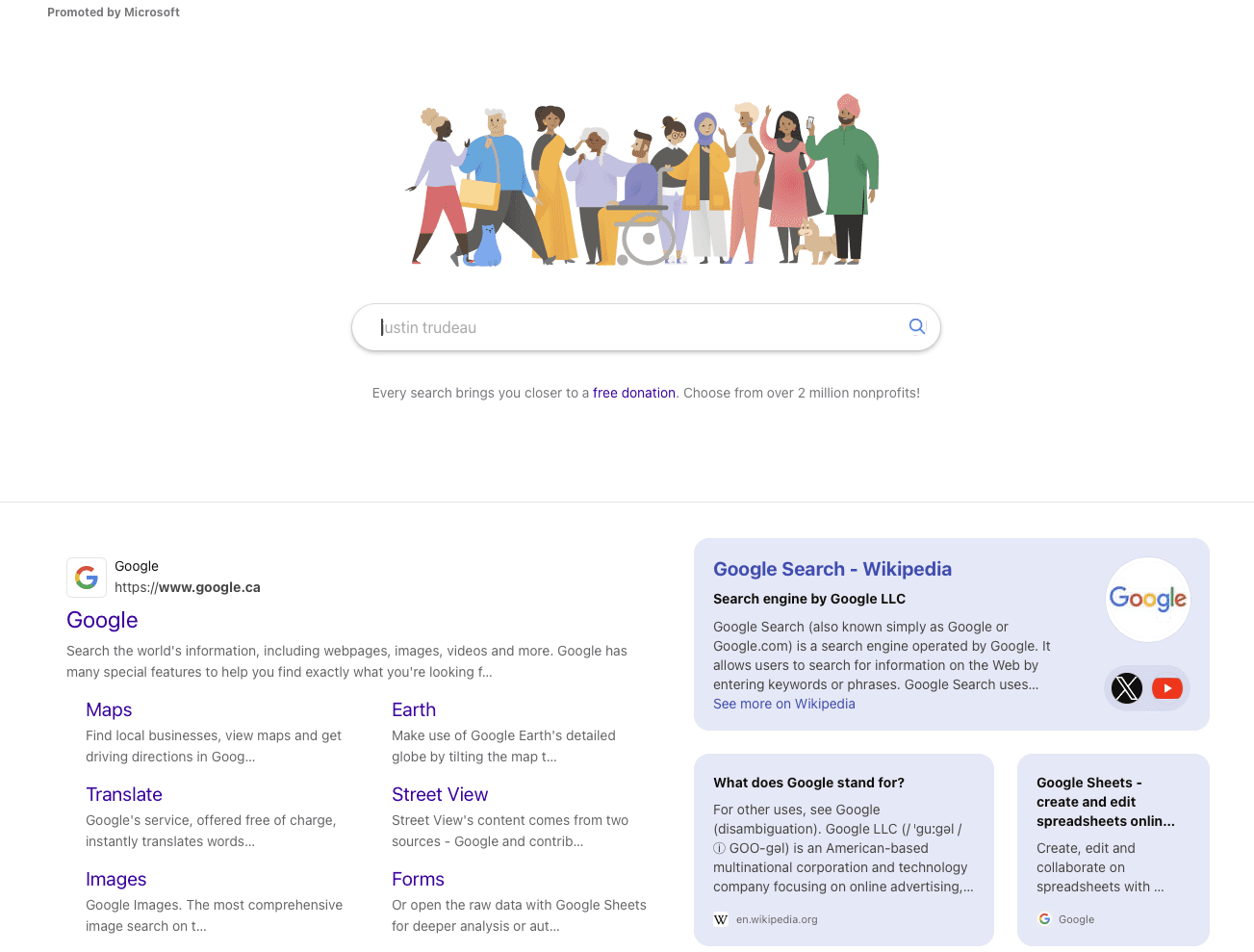
When users not signed into a Microsoft account search for Google on Bing, they see a page that looks a lot like Google’s homepage.

Screenshot from: Bing.com, January 2025.

The page has a search bar in the center, a banner with animated figures similar to Google Doodles, and a message saying, “Every search brings you closer to a free donation. Choose from over 2 million nonprofits!”

This message links to the Microsoft Rewards catalog, where users can donate their reward points to nonprofit organizations.

The design makes it hard to see Bing’s branding by scrolling the page slightly down to hide the Bing logo.

Users may only realize they’re still using Bing when they scroll or interact with the page further.

Attempt To Retain Users

Industry observers like The Verge note this move appears targeted at users setting up new Windows PCs, who might initially search for Google through Microsoft Edge’s default Bing search engine.

The design change could potentially retain users who might otherwise switch to Google’s search platform.

Many of these users search for Google to switch their search engine. Microsoft’s change aims to keep users from leaving Bing.

While tech-savvy users may notice this strategy, it might persuade less experienced users to keep searching on Bing, helping Microsoft retain more users.

Broader Context: The Search Engine Wars

This latest tactic highlights the ongoing competition between Microsoft and Google in the search engine market.

Microsoft has employed various strategies to promote its Bing search engine and Edge browser, including pop-ups and changes to Chrome’s download pages.

In parallel, Google has encouraged users to download Chrome and set Google as their default search engine, though its methods haven’t included outright deception.

Google’s and Microsoft’s rivalry remains heated. As of December, Google’s search engine maintained a dominant global market share of 89.74%, while Microsoft’s Bing held 3.97%.

Final Thoughts

As Microsoft continues to push for greater adoption of Bing, the company’s latest tactic raises questions about user trust and transparency.

While the mimicry may boost Bing’s metrics in the short term, the backlash from users and industry leaders could damage Microsoft’s reputation.

Whether Microsoft will address the criticism or double down on its strategy remains to be seen.


Featured Image: kovop/Shutterstock

Google AI Overviews Appear in 18% Of Publisher-Related Queries via @sejournal, @MattGSouthern

New research indicates that Google’s AI Overviews appear in 18% of publisher-related search queries.

Additionally, the findings suggest that traditional search ranking factors may be less relevant for content appearing in AI Overviews.

Here are more highlights from the study released by ZipTie.dev, which analyzes over 500,000 queries across multiple industries.

Key Findings

Data indicates that 63% of sources cited in AI Overviews are not found in the top 10 traditional search results.

This change illustrates a shift in Google’s strategy, as explained by Rudzki.:

“In traditional ranking, Google’s job is to send you to pages that you will likely be satisfied with. With AI Overviews the goal is different, it’s about showing you the best answer.”

The analysis found different frequencies of AI Overviews in search results:

  • “How much” queries show AI Overviews 54% of the time.
  • Review-related queries show AI Overviews only 9% of the time.
  • “What is” queries generate AI Overviews 39% of the time.

The study also notes that Google is using YouTube content in AI Overviews. This change could give publishers with video strategies more visibility opportunities.

Questions About Authority

Research shows that some publications are featured prominently in AI Overviews, even when the topics are outside their usual areas of expertise.

For example, Business Insider is often cited for celebrity news, while The Times of India is mentioned in health-related discussions.

This trend indicates that traditional ideas about who has authority on a topic are becoming less important.

Looking Ahead

AI Overviews are now available in over 100 countries and territories. However, their use in the EU is limited because of regulations. Right now, the feature has only a small amount of ads.

The study expects AI Overviews to grow more in the future, but notes two main factors that could slow this expansion.

Rudzki states:

“Google is not putting ads in AI Overviews, except for very limited usage. Once they will find a good way to earn money, they will likely increase the share of AI Overviews.”

Additionally, he notes that user experience remains crucial:

“Google just can’t put AI Overviews for every keyword. This would translate to extremely low satisfaction rates.”

Methodology

The analysis examined over 500,000 queries across multiple industries between June and December 2024.

The complete study and detailed methodology are available through ZipTie.


Featured Image: Below the Sky/Shutterstock

AI-Organized SERPs & Overviews: How To Win Visibility In The New Landscape Of SEO via @sejournal, @lorenbaker

Struggling to keep up with Google’s latest generative AI updates? Wondering how AI-organized SERPs and Overviews are impacting your SEO strategy? You’re not alone.

Join us for an exclusive webinar as we break down the newest developments in AI-powered search and share actionable insights to help you succeed in this evolving landscape.

Why This Webinar Is a Must-Attend Event

Google’s AI Overviews and AI-organized SERPs are reshaping how search engines display and rank content. To stay ahead, you need to understand how these features work and adapt your SEO strategy accordingly.

In this session, you’ll learn:

  • Fresh Insights from STAT Research – Discover data-driven takeaways from the latest AI Overviews research.
  • How AI-Organized SERPs Work – Unpack the mechanics behind these features and their impact on organic visibility.
  • Practical Strategies to Optimize for AI Features – Learn which keywords to prioritize, how to target AIOs, and what it all means for the future of SEO.

Expert Insights From Tom Capper

Leading the webinar is Tom Capper, who will dive into fresh data comparing the prevalence of AI Overviews by industry, geography, and search intent. He’ll also reveal the key factors that correlate with appearing in these AI-driven features.

Who Should Attend?

This webinar is perfect for:

  • SEO professionals aiming to adapt to AI-driven changes.
  • Digital marketers looking to maximize organic visibility.
  • Businesses who are eager to stay competitive in a shifting search landscape.

Live Q&A: Get Your Questions Answered

Stick around for a live Q&A with Tom Capper, where you can ask your most pressing questions about AI and SEO.

Don’t Miss Out!

AI-Organized SERPs and Overviews are transforming SEO, and the changes are accelerating. Join us live to stay ahead of the curve.

Can’t attend live? No problem—register anyway, and we’ll send you the recording.

Get ready to level up your SEO strategy with cutting-edge AI insights. Register today!

Google Shows How To Confirm Indexing Issues Due To JavaScript via @sejournal, @martinibuster

SearchNorwich recently published an excellent video featuring Google’s Martin Splitt discussing how to debug crawling and indexing issues related to JavaScript, saying that most of the times it’s not JavaScript that’s causing indexing issues, the actual cause is something else. Even if you don’t know how to code with JavaScript, the tips that Martin shares will enable anyone to get a good start on debugging crawl issues that are originating on a website.

JavaScript Is Rarely The Cause Of SEO Issues

Martin’s SearchNorwich video was published a month ago. Just a few days ago John Mueller advises that too much JavaScript can have a negative impact on SEO, which aligns with Martin’s assertion that JavaScript is rarely the reason for SEO issues, that it’s either the misuse of JavaScript or something else entirely.

He explains that of the issues that virtually all suspected JavaScript issues that get emailed to him end up being something else. He pins the blame on a flawed approach to debugging SEO issues. What he describes is confirmation bias, which is suspecting that something is the cause and then looking for clues to justify that opinion. The definition of confirmation bias is the tendency to interpret existing evidence or to look for evidence that confirms existing beliefs, while ignoring evidence that contradicts those beliefs.

Martin explained:

“…it seems to me, as someone on the Google side of things, that SEOs look for clues that allow them to blame things they’re seeing on JavaScript. Then they show up, or someone from their team shows up, in my inbox or on my social media and says, “We found a bug. It’s JavaScript. You say JavaScript works in Google Search, but we have a strong hint that it doesn’t, and you know it’s because of JavaScript.”

He goes on to say that out of hundreds of times a year that he’s approached with a diagnosis that JavaScript is to blame for an SEO problem he has only seen one actual instance where an actual bug related to JavaScript was to blame. Just one.

He also says:

“People often claim, “You say it works if you use client-side rendering, but clearly, it is not working. It must be a JavaScript problem and maybe even a bug in Google.” Surprisingly, many of the people who end up in my inbox suspect it’s a Google bug. I find that interesting, especially when a small, niche website claims to be affected by a bug that doesn’t affect any other websites. Most of the time, it’s not us—it’s you.”

Splitt explains that when JavaScript is involved in a crawling or rendering issue, it’s most often not because JavaScript is to blame but rather it’s being used incorrectly

Finding Source Of Rendering Issues

Martin suggests debugging rendering issues by checking how Google “sees” the web page. Rendering, in the context of Googlebot crawling, is the process of downloading all the resources from a web page like fonts, JavaScript, CSS and HTML and then creating fully functional web page that’s similar to what a human user would experience in a web browser.

Debugging how Google renders a page may show that the page renders fine, that certain parts don’t render or that the page cannot be indexed at all.

He recommends using the following tools for debugging possible JavaScript issues:

1. Google Search Console URL Inspection Tool

2. Google Rich Results Test

3. Chrome Dev Tools

Easy JavaScript Debugging

Both of the first two tools let you submit a URL that gets immediately crawled by Google and they’ll show you the rendered page, what the page looks like for Google for indexing purposes.

Martin explains the usefulness of the JavaScript console messages in Chrome Dev Tools:

“There’s also more info that gives you very helpful details about what happened in the JavaScript console messages and what happened in the network. If your content is there and it’s what you expect it to be, then it’s very likely not going to be JavaScript that is causing the problem. If people were doing just that, checking these basics, 90% of the people showing up in my inbox would not show up in my inbox. That’s what I do.”

He also explained that just because the JavaScript console flags an error that doesn’t mean that the problem is with the JavaScript itself. He uses the example of an error in how JavaScript failed to execute that was caused by an API that’s blocked by Robots.txt, preventing the page from rendering.

Why Do So Many SEOs Blame JavaScript?

Martin implies that not knowing how to debug JavaScript is the cause of the reputation it’s received as a cause of crawling and indexing issues. I get it, I learned the basics of coding JavaScript by hand 25 years ago and I disliked it then and now, it’s never been my thing.

But Martin’s right that knowing a few tricks for debugging JavaScript will save a lot of wasted time chasing down the wrong problem.

Watch Martin Splitt’s presentation here:

Maybe It Isn’t JavaScript – Martin Splitt at SearchNorwich 18

Featured Image by Shutterstock/Artem Samokhvalov

Google Podcast Discusses SEO Expertise via @sejournal, @martinibuster

Google’s recent Search Off the Record podcast touched on the issue of SEO expertise and the disconnect between how SEOs think Google ranks websites how Googlers understand it. The disparity is so great that Gary Ilyes remarked that sometimes he doesn’t know what SEOs are talking about.

Googlers Question SEO Expertise

Martin Splitt discussed meeting Turkish publishers and SEOs of different experience levels at a Google event in Turkey in which the attendees complained of poor search results. Turned out that the problem wasn’t Google’s search results, it was an issue with how Turkish websites are created, which indirectly called into question the SEO expertise of Turkish language publishers.

He said:

“And then eventually we worked out as a group as a whole, that there are a lot of problems with the way that content is created in Turkish language websites…”

Gary Illyes expanded on Martin’s comment about experience levels to say that it’s a subjective thing, that some people who self-describe themselves as newbies are actually extremely knowledgeable on the fine details of indexing and crawling, while other SEO gurus ask questions that don’t make sense.

Gary shared:

“The thing you mentioned about experience, I came to realize the past few years that that’s a very subjective thing. Like, when you are asking people, ‘What’s your experience?’ And they are like, ‘Oh, I’m a guru,’ and then on the opposite end of the spectrum, like, ‘I’m a complete newbie.’

And then you start talking to them and the newbie knows way more about like HTTP, for example, than I do and crawling and indexing and whatever, like how it’s perceived externally.

And then you talk to the guru and the guru is like… the questions themselves don’t make sense. Like, you can’t interpret the question that they are asking.”

That part about the questions not making sense describes a disconnect between what SEOs and Googlers believe about SEO. Let’s face it, there’s a disconnect.

The Knowledge And Experience Gap

Sometimes there’s a gap separating how SEOs experience the ranking algorithm and how Googlers try to explain how it works.  A classic example is the disconnect in the SEO belief in the concept of domain authority and Google’s denial of its existence. A few years ago, in a Google Search Central Hangout, a person told John Mueller that a core update eliminated the rankings of all of their keywords.

They asked,

“How could it be possible that our authority can drop more than 50% overnight? What actions could we take to increase our authority?”

Mueller answered:

“So in general, Google doesn’t evaluate a site’s authority. So it’s not something where we would give you a score on authority and say this is the general score for authority for your website. So that’s not something that we would be applying here.”

That belief in “domain authority” is one example of out of many where what SEOs think they know about Google is completely disconnected from what Googlers know about how search rankings work.

What Do SEO Experts Really Know?

Martin Splitt continues the conversation to proxies for judging expertise of SEOs by how big the sites are that they manage but concludes that those proxy metrics don’t really say much about their SEO expertise, either. Ultimately they conclude that they need to engage in a deeper conversation with the search marketing and publishing community to identify if there’s something Google could do better to explain what SEOs should be doing.

He explained:

“I mean, we try to gauge experience by asking them how many years have you been doing this kind of job and how many years have you been in this industry, and how many impressions do you manage a month, roughly? And these are proxy metrics. And as you say, it’s super subjective.”

He mentions the wide range of complexity of technical issues an SEO needs to understand and John Mueller adds that even specialists in a specific SEO niche can have gaps in fundamental SEO concepts. The point of the conversation is to speculate if the root of the disconnect is in Google’s documentation or just that the SEO experts just don’t know.

John commented:

“It’s like someone could be like super focused on web workers or trying to get them indexed and at the same time, like, ‘How do I block a page from being indexed?’”

Martin agreed, saying:

“Yeah. And that’s probably why it is so subjective. And it’s super interesting, super interesting to see how they’re like, ‘Yeah, we got everything nailed down. We are running a tight ship here.’ And then you see, like some of the stuff that is discussed at large in all of the beginner documentation is being missed.

And that left me with a question. Is it that they are not aware that this documentation exists? Is it that they had a hard time fielding the amount of information we put out there? Or is it that they don’t know?”

Lizzi Sassman then asked:

“Did you get a sense, just in conversation with them, if they knew about the documentation or if there was like sort of a, I don’t know, a feeling or a vibe about like that the translation is bad or something like that.”

Martin answered:

“That’s exactly what I don’t know, because we were so busy during the event fielding all the conversations, like everyone wanted to talk to us. And that’s great. That’s fantastic. That’s why we are doing it.

But it doesn’t really give you the space to reflect on things on the spot. So I reflected, basically, on my flight back home, I was like, ‘Hm. I wonder. Dang. I should have asked these questions.’ But, you know, this means we have to go back and ask them again.”

What Is An SEO Expert?

SEO expertise is subjective. Anyone who insists that SEO is one thing is out of touch with the reality that there is no single definition of SEO. I disagree with many SEOs about what they think is a good practice and with more experience some of them eventually come around to agreeing with me. There are some SEOs whose experience is wildly different than mine and I sit humbly and listen to them as they share what they know over dinner.

Many of us work from home but it should be understood that we’re all members of the search marketing community and we should be able to listen to what others say about SEO and not only have polite disagreements about the “right way” but to expect that others will disagree and to not let it polarize you, but rather, keep an open mind.

Google Speculates If SEO ‘Is On A Dying Path’ via @sejournal, @martinibuster

Google’s latest Search Off the Record podcast discussed whether ‘SEO is on a dying path’ because of AI Search. Their assessment sought to explain that SEO remains unchanged by the introduction of AI Search, revealing a divide between their ‘nothing has changed’ outlook for SEO and the actual experiences of digital marketers and publishers.

Google Speculates If AI Is On A Dying Path

At a certain point in the podcast they started talking about AI after John Mueller introduced the topic of the impact of AI on SEO.

John asked:

“So do you think AI will replace SEO? Is SEO on a dying path?”

Gary Illyes expressed skepticism, asserting that SEOs have been predicting the decline of SEO for decades.

Gary expressed optimism that SEO is not dead, observing:

“I mean, SEO has been dying since 2001, so I’m not scared for it. Like, I’m not. Yeah. No. I’m pretty sure that, in 2025,the first article that comes out is going to be about how SEO is dying again.”

He’s right. Google began putting the screws to the popular SEO tactics of the day around 2004, gaining momentum in 2005 with things like statistical analysis.

It was a shock to SEOs when reciprocal links stopped working. Some refused to believe Google could suppress those tactics, speculating instead about a ‘Sandbox’ that arbitrarily kept sites from ranking. The point is, speculation has always been the fallback for SEOs who can’t explain what’s happening, fueling the decades-long fear that SEO is dying.

What the Googlers avoided discussing are the thousands of large and small publishers that have been wiped out over the last year.

More on that below.

RAG Is How SEOs Can Approach SEO For AI Search

Google’s Lizzi Sassman then asked how SEO is relevant in 2025 and after some off-topic banter John Mueller raised the topic of RAG, Retrieval Augmented Generation. RAG is a technique that helps answers generated by a large language model (LLM) up to date and grounded in facts. The system retrieves information from an external source like a search index and/or a knowledge graph and the large language model subsequently generates the answer, retrieval augmented generation. The Chatbot interface then provides the answer in natural language.

When Gary Illyes confessed he didn’t know how to explain it, Googler Martin Splitt stepped in with an analogy of documents (representing the search index or knowledge base), search and retrieval of information from those documents, and an output of the information from “out of the bag”).

Martin offered this simplified analogy of RAG:

“Probably nowadays it’s much better and you can just show that, like here, you upload these five documents, and then based on those five documents, you get something out of the bag.”

Lizzi Sassman commented:

“Ah, okay. So this question is about how the thing knows its information and where it goes and gets the information.”

John Mueller picked up this thread of the discussion and started weaving a bigger concept of how RAG is what ties SEO practices to AI Search Engines, saying that there is still a crawling, indexing and ranking part to an AI search engine. He’s right, even an AI search engine like Perplexity AI uses an updated version of Google’s old PageRank algorithm.

Mueller explained:

“I found it useful when talking about things like AI in search results or combined with search results where SEOs, I feel initially, when they think about this topic, think, “Oh, this AI is this big magic box and nobody knows what is happening in there.

And, when you talk about kind of the retrieval augmented part, that’s basically what SEOs work on, like making content that’s crawlable and indexable for Search and that kind of flows into all of these AI overviews.

So I kind of found that angle as being something to show, especially to SEOs who are kind of afraid of AI and all of these things, that actually, these AI-powered search results are often a mix of the existing things that you’re already doing. And it’s not that it suddenly replaces crawling and indexing.”

Mueller is correct that the traditional process of indexing, crawling, and ranking still exists, keeping SEO relevant and necessary for ensuring websites are discoverable and optimized for search engines.

However, the Googlers avoided discussing the obvious situation today, which is the thousands of large and small publishers in the greater web ecosystem that have been wiped out by Google’s AI algorithms on the backend.

The Real Impacts Of AI On Search

What’s changed (and wasn’t addressed) is that the important part of AI  in Search isn’t the one on the front end with AI Overviews. It’s the part on the back-end making determinations based on opaque signals of authority, topicality and the somewhat ironic situation that an artificial intelligence is deciding whether content is made for search engines or humans.

Organic SERPs Are Explicitly Obsolete

The traditional ten blue links have been implicitly obsolete for about 15 years but AI has made them explicitly obsolete.

Natural Language Search Queries

The context of search users who ask precise conversational questions within several back and forth turns is a huge change to search queries. Bing claims that this makes it easier to understand search queries and provide increasingly precise answers. That’s the part that unsettles SEOs and publishers because , let’s face it, a significant amount of content was created to rank in the keyword-based query paradigm, which is gradually disappearing as users increasingly shift to more complex queries. How content creators optimize for that is a big concern.

Backend AI Algorithms

The word “capricious” means the tendency to make sudden and unexplainable changes in behavior. It’s not a quality publishers and SEOs desire in a search engine. Yet capricious back-end algorithms that suddenly throttle traffic and subsequently change their virtual minds months later  is a reality.

Is Google Detached From Reality Of The Web Ecosystem?

Industry-wide damage caused by AI-based algorithms that are still “improving” have unquestionably harmed a considerable segment of the web ecosystem. Immense amounts of traffic to publishers of all sizes has been wiped out since the increased integration of AI into Google’s backend, an issue that the recent Google Search Off The Record avoided discussing.

Many hope Google will address this situation in 2025 with greater nuance than their CEO Sundar Pichai who struggled to articulate how Google supports the web ecosystem, seemingly detached from the plight of thousands of publishers.

Maybe the question isn’t whether SEO is on a dying path but whether publishing itself is in decline because of AI on both the backend and the front of Google’s search box and Gemini apps.

Check out these related articles:

Google CEO’s 2025 AI Strategy Deemphasizes The Search Box

Google Gemini Deep Research May Erode Website Earnings

Google CEO: Search Will Change Profoundly In 2025

Featured Image by Shutterstock/Shutterstock AI Generator