SEO Reports: Which Metrics Matter & How To Use Them Well via @sejournal, @HelenPollitt1

As SEO professionals, reports are a key part of our communication toolbox.

We spend time running workshops and writing summaries of work and project plans. These are all part of our process for gaining buy-in and showing value from the work we’re doing.

Our reports are just as important.

Where We Go Wrong

The problem that we sometimes run into as SEO professionals is not thinking about the report as a communication tool. We take shortcuts, expecting the data to speak for itself. We don’t worry enough about how it can be taken out of context.

If done right, SEO reports will continue to reinforce the messaging we’ve been giving through our training, proposals, and pitches.

When done wrong, SEO reports cause confusion, sometimes panic, and, overall, a sinking sense of distrust from our stakeholders.

What Is The Report For?

When creating reports, we must identify what the report should show.

If we are reporting on the outcome of a specific project, then we need to consider the original hypothesis.

What were we aiming for in that project? What were the promised milestones and the measures of success? They all need to be included – even the metrics that don’t look so good.

Is this a regular report, like a monthly update on performance? If so, we need to consider all the areas of SEO that we are directly affecting, as well as areas outside of our control that can help explain any increases or decreases in performance. There is a need to give the context in which our SEO work operates.

This should form the starting point from which we choose the report metrics.

Aspects Of A Good SEO Report

A good SEO report will help communicate insight and the next steps. It should have sufficient detail to help the reader make decisions.

Include Relevant Data

Reports should include data that is relevant to the topic being reviewed.

They should not overwhelm a reader with unnecessary information.

Keep Them Brief

Reports should be brief enough that pertinent data and insight are easy to find.

Brevity might be the difference between a report being read and being ignored.

Keep the data being reported succinct. Sometimes, a chart will better illustrate the data than a table.

Remember The Audience

Reports should be tailored to the needs of the recipient. It may be the report is being produced for another SEO professional, or the managing director of the company.

These two audiences may need very different data to help explain the progress of SEO activity.

The needs of the report’s reader to make a decision and identify the next steps must be considered. A fellow SEO may need the details of which pages are returning a 404 server error, but the managing director likely won’t.

Make Them Easy To Understand

They should not include unexplained jargon or expect readers to infer meaning from statistics.

Write reports with the recipient’s knowledge in mind. Liberal use of jargon for someone not in the industry might put them off reading a report.

Conversely, jargon and acronyms will be fine for someone who knows SEO and can help to keep reports brief.

Keep Them Impartial

SEO reports are a form of internal marketing. They can be used to highlight all of the good SEO work that’s been carried out.

Reports should be honest and unbiased, however. They shouldn’t gloss over negatives.

Decreases in performance over time can highlight critical issues. These shouldn’t be omitted from the report because they don’t look good. They are a perfect way of backing up your expert recommendations for the next steps.

Provide Insight

Data alone is likely to be unhelpful to most.

Reports shouldn’t just be figures. Insight and conclusion must be drawn, too.

This means that, as an SEO expert, we should be able to add value to the report by analyzing the data. Our conclusions can be presented as actions or suggestions for a way forward.

Reporting On Metrics Correctly

Metrics used incorrectly can lead to poor conclusions being made. An example of this is the “site-wide bounce rate.”

A bounce is typically measured as a visit to a website that only led to one page being viewed and no other interactions occurring.

Bounce rate is the percentage of all visits to the site that ended up as a bounce.

The bounce rate of a page can be useful, but only really if it is being compared with something else.

For instance, if changes have been made to a page’s layout and bounce rate increases, it could point to there being a problem with visitors navigating with the new layout.

However, reporting on bounce rate of a page without looking deeper at other metrics can be misleading.

For instance, if the changes to the page were designed to help visitors find information more easily, then the increase in bounce rate could be an indicator of the new design’s success.

The difference in bounce rate cannot be used in isolation as a measure of success.

Similarly, reporting on the average bounce rate across the entire website is usually misleading.

Some pages on the website might have a high bounce rate but be perfectly fine. For others, it indicates a problem. For example:

  • A contact page might see a lot of visitors bounce as they find a phone number and leave the site to call it.
  • A homepage or product page with a high bounce rate is usually a sign that the page is not meeting the needs of users, however.

Reports should look to draw conclusions from a range of metrics.

Metrics Need Context

Few metrics can be used in isolation and still enable accurate insight to be drawn.

For example, think of crawling and indexing data.

A report on the number of URLs that are being crawled by Googlebot sounds like a fair metric to demonstrate the technical health of the website.

Though what does it show, really?

An increase in URLs crawled could indicate that Googlebot is finding more of your site’s pages that it previously couldn’t. If you have been working on creating new sections of your site, this may be a positive trend.

However, if you dig deeper and discover that the URLs Googlebot has been crawling are the result of spam attacks on your site, this is actually a big problem.

In isolation, the volume of crawled pages doesn’t give any real context on the technical SEO of the site. There needs to be more context in order to draw reliable conclusions.

Over-Reliance On Metrics

There are other metrics that are relied on a little too much in SEO reports – measures of the authority of a page or domain, for instance.

These third-party metrics do well in guessing the ranking potential of a page in the eyes of search engines, but they are never going to be 100% accurate.

They can help to show if a site is improving over time, but only against the calculations of that reporting tool.

These sorts of metrics can be useful for SEO professionals to use as a rough gauge of the success of an authority-building project. However, they can cause problems when reported to managers, clients, and stakeholders.

If they are not properly informed of what these scores mean, it is easy for them to hold on to them as the goal for SEO. They are not.

Well-converting organic traffic is the goal. The two metrics will not always correlate.

Which Metrics Matter?

The metrics that should be used together to illustrate SEO performance depend on the purpose of the report. It also depends on what the recipient needs to know.

Some clients or managers may be used to receiving reports with certain metrics in them. It may be that the SEO reports feed into their own reporting, and as such, they expect to see certain metrics.

It is a good idea to find out from the report recipient if there is anything in particular they would like to know.

The report should always link back to the brand’s business and marketing goals. The metrics used in the report should communicate if the goals are being met.

For instance, if a pet store’s marketing goal is to increase sales of “non-slip pet bowls,” then metrics to include in the SEO report could be:

  • Overall traffic to the pages in the www.example.com/pet-accessories/bowls/non-slip folder.
  • Organic traffic to those pages.
  • Overall and organic conversions on these pages.
  • Overall and organic sales on these pages.
  • Bounce rate of each of these pages.
  • Traffic volume landing on these pages from the organic SERPs.

Over time, this report will help identify if SEO is contributing to the goal of increasing sales of non-slip pet bowls.

Organic Performance Reports

These are reports designed to give a picture of a website’s ongoing SEO performance. They give top-level insight into the source and behavior of organic traffic over time.

They should include data that indicates if the business, marketing, and SEO goals are being met.

An SEO performance report should look at the organic search channel, both on its own and in relation to other channels.

By doing this, we can see the impact of other channels on the success of SEO. We can also identify any trends or patterns.

These reports should allow the reader to identify the impact of recent SEO activity on organic traffic.

Metrics To Include

Some good metrics to report on for organic performance reports include:

Overall Visits

The number of visits to the website gives something to compare the organic search visits to.

We can tell if organic traffic is decreasing whereas overall traffic is increasing or if organic traffic is growing despite an overall drop in traffic.

It is possible to use overall traffic visit data to discern if there is seasonality in the website’s popularity.

Traffic Visits By Channel

The number of visits coming from each marketing channel helps you identify if there is any impact from other channels on SEO performance.

For instance, new PPC ads going online could mean the cannibalization of organic search traffic.

All Traffic And Organic Traffic Goal Completions

Have visitors completed the goals in the website’s analytics software?

Comparing organic and other traffic goal completions will again help identify if the organic traffic is completing above or below-average goal completions compared to other channels.

This could help determine if SEO activity has as much of a positive effect as hoped.

Page Level Traffic

If there are certain pages that have been worked on recently, such as new content or keyword optimization, include organic traffic metrics for them. This means going granular in your reporting.

Report on organic traffic over time, conversions on the pages (if appropriate), and actions carried out from that page. This can show if recent work has been successful in increasing organic traffic to those pages or not.

Organic Landing Page Sessions

These are the pages that visitors arrived at from the organic SERPs. They identify which pages are bringing the most organic traffic to the website.

From here, pages that have not been optimized but show potential to drive traffic can be identified.

Revenue Generated

If you can directly link the work you are carrying out to the revenue it generates, this is likely the most important metric you can include.

At the end of the day, this is what your boss and your boss’s boss likely care about. Is SEO making more money for the company?

Keyword Ranking Reports

A note on keyword rankings reports: Consider what they show before including them.

An overall report of “your site is ranking for X keywords” doesn’t give any helpful insight or fuel for a way forward.

  • Which keywords?
  • Are those keywords driving traffic to the site?
  • Are they worth optimizing for further?

Metrics To Include

Keyword ranking reports should demonstrate growth or decline in rankings for specific keywords the site is being optimized for.

Ideally, data should be pulled from first-party tools like Google Search Console to give as accurate an indication of ranking as possible.

Rather than focusing on individual keywords, you may want to look at trends. That is, is your site growing in visibility for terms that convert?

For example, demonstrating that the website has moved from ranking in first position for 10 terms to ranking in first position for 20 terms does not demonstrate how that might impact revenue.

In the age of generative engine optimization, brand is becoming more important.

Perhaps including a section on brand searches and how they are utilized to navigate straight to products would be beneficial.

Taking my pet store example, I might not only want to see how my website would rank for “helens pet store” but also for “helens pet store cat bowls” and “helens pet store dog beds.”

This helps you analyze how your brand is growing in reputation for your products and services. These searches show that visitors are so confident they want to buy from you that they want to navigate straight to your site.

Technical Performance Reports

Good SEO performance requires a website that can be crawled and indexed easily by search engines.

This means that regular audits need to be carried out to identify anything that might prevent the correct pages from appearing in the SERPs.

Reports are slightly different from audits in that a technical audit will look at a lot of different factors and investigate them.

A thorough technical audit can be vast. It needs to diagnose issues and methods of improving the site’s performance.

Depending on the audience of a technical report, it may need to selectively highlight the issues. It should also show the success of previous SEO work.

The key to knowing which metrics to include in a technical report is understanding what’s happened on the site so far.

If work has been carried out to fix an issue, include metrics that indicate the success of that fix.

For instance, if there has been a problem with a spider trap on the site that has been remedied, then report on crawl metrics and log files.

This might not be necessary for every technical report, but it can be useful in this instance.

If the site has problems with loading slowly, then metrics about load speed will be crucial for the technical report.

A good way to convey the metrics in a technical SEO report is by including prioritization of actions.

If the metrics show that there are some urgent issues, mark them as such. If there are issues that can wait or be fixed over time, highlight them.

Technical SEO can feel overwhelming for people who aren’t experts in it.

Breaking down the issues into priorities can make your reports more accessible and actionable.

Metrics To Include

There are certain metrics that may be useful to include as part of a technical performance report:

Server Response Codes

It can be prudent to keep track over time of the number and percentage of pages returning a non-200 response code.

An audit of the site should determine exactly which pages are not returning a 200 response code.

This information may not be useful to the recipient of the technical performance report, so it may be better to include it as an appendix or not at all.

If the volume of non-200 response codes reduces over time, this can be a good indicator that technical issues on the site are being fixed.

If it goes up, then it can be summarized that further work needs to be carried out.

Page Load Speed Times

It can be helpful to report on an average of page load speed times across the site. This can indicate if the site’s load speed is improving or not.

Perhaps, what is even more useful to report on is the average load speed of the top five fastest and five slowest pages. This can help to show if there are certain templates that are very quick, as well as the pages that might need further improvement.

Any Data That Shows A Need To Act

This is really important to include. If an error on a site will prevent it from being indexed, then this needs to be highlighted in the report.

This might be different from report to report.

Metrics could be crawl data, site downtime, broken schema markup, etc. Also, consider including these metrics in subsequent reports to show how the fixes have impacted performance.

A Word Of Warning

In my experience, technical SEO metrics can be received in one of two ways: either the metrics are not considered relatable to the stakeholder’s role, and therefore, they gloss over their importance, or they focus on them as an area of SEO they can understand.

For example, Core Web Vitals. We know that Core Web Vitals are not that critical for rankings. However, I have experienced many developers focusing only on Core Web Vitals as a measure of how well-tuned the website is from an organic search perspective.

Why? In my opinion, because SEO pros have started reporting on them more, and they are an easy technical SEO element for stakeholders to understand and influence.

They make sense, are easily measured, and can be optimized for.

Unfortunately, as a result of this, they are sometimes given undue importance. We direct engineers to spend entire sprints trying to raise the Core Web Vitals scores by tiny amounts, believing every little one counts.

When reporting on technical SEO, consider how you communicate the value of the metrics you are reporting on. Are these critical website health metrics? Or are they “nice to know”?

Make sure you give the full context of the metrics within your report.

Link Building Reports

A link building campaign can yield benefits for a website beyond boosting its authority with the search engines.

If done well, links should also drive traffic to the website. It is important to capture this information on link building reports, too, as it is a good measure of success.

Metrics To Include

  • URLs Of Links Gained: Which links have been gained in the reporting period?
  • Links Gained Through Link Building Activity: Of the links gained, which ones can be directly attributed to outreach efforts?
  • Links Driving Traffic: Of the links gained during the period, which ones have resulted in referral traffic, and what is the volume of visits?
  • Percentage Of Valuable Vs. Less Valuable Links: Of the links gained in the period, which ones are perhaps marked as “nofollow” or are on syndicated and canonicalized pages?

You may be tempted to include a page or domain strength score in these reports. If that helps to communicate the effectiveness of an outreach campaign, that’s understandable.

Remember, however, that links from highly relevant websites will still benefit your site, even if they do not have high authority.

Don’t let your outreach efforts be discarded because the links gained don’t score high with these metrics.

Conclusion

The best way to construct a report on SEO is to consider it a story. First, who is the audience? Make sure you are writing your report in a level of language they will understand.

Create a narrative. What do you want these metrics to say? Do you include all the twists and turns, and are you being honest about the metrics you comment on?

Make sure you bring the report to a conclusion. If there is action to be taken from it, what is that action? Highlight and reiterate anything you want stakeholders to remember as a key takeaway from the report.

Finally, seek reviews on your reports. Ask your stakeholders to give you feedback on the report.

Determine if it meets their needs or if additional context or data is needed. Essentially, this report is for them. If they aren’t getting value from it, then you are doing your SEO work a disservice.

More resources:


Featured Image: Mer_Studio/Shutterstock
Google’s AI Search Experiment: “Learn About” via @sejournal, @martinibuster

Google has quietly introduced a new AI Search experiment called Learn About, which summarizes content and offers navigational menus to explore related subtopics. This new way of exploring content uses drill-down navigational menus called Interactive Lists and if the user scrolls down far enough they will eventually find links to human created content.

This new way of searching encourages exploration with an interface that continually presents additional summaries and links to human-created content. The experience resembles a children’s “choose your story” book, where the narrative shifts based on the reader’s decisions.

Google’s Learning Initiative

The Learn About AI Search is offered as part of Google Labs. It’s also a part of Google’s Learning Initiative. The Learning Initiative page offers links to Google Labs projects that are related to learning.

The Learning Initiative contains links to various projects:

  • Learn About
  • Shiffbot
  • Illuminate
  • NotebookLM

Pilot Program (early access to AI products for 12 and higher education)

Experiments for Learning (AI learning tools that students can use to create songs or travel virtually to Mars)

The Google Learning Initiative page describes Learn About:

“Learn About
Grasp new topics and deepen understanding with this adaptable, conversational, AI-powered learning companion.”

Interactive List User Interface

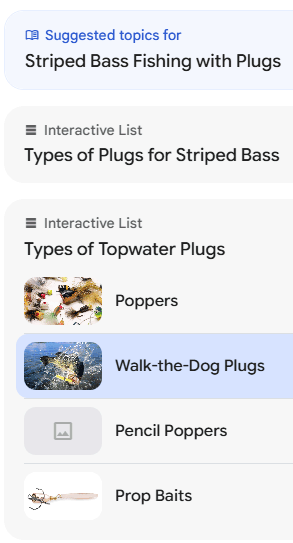
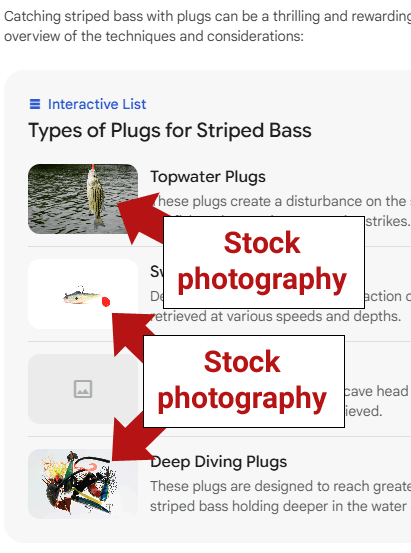
Learn About’s Interactive List exploration menus are illustrated with images, which is appealing because humans are visually oriented. That makes it faster to comprehend the written content because the image reinforces the text.

The images in the interactive menu appear to be licensed from stock image providers like Shutterstock, Adobe, and Alamy. None of the images appear to be sourced from creator websites.

Screenshot Of Interactive List Navigational Menu

Questions trigger a summary and a drill down navigational menu that’s called an Interactive List. These search results lead to related topics and progressively granular summaries, more Interactive Lists.

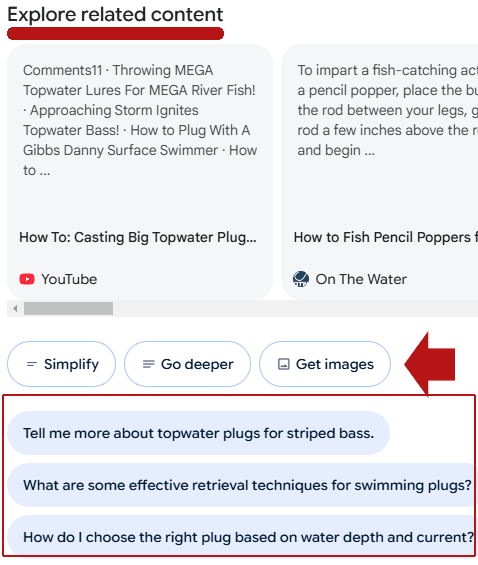
Beneath the Interactive Lists is a section called “Explore related content” that offers links to actual human created content like YouTube videos and website content.

Beneath the links to creator content is a group of buttons labeled with options to Simplify, Go deeper, or Get images. Beneath those three choices are speech balloons with additional search queries on related topics.

Screenshot Of Explore Related Content Section

There is also a left-hand navigational menu with an invitation to explore using Interactive List menu.

Screenshot Of Left-Hand Navigation

Availability Of Learn About

Learn About is only available to users who are 18 or older in the United States and is available in in English.

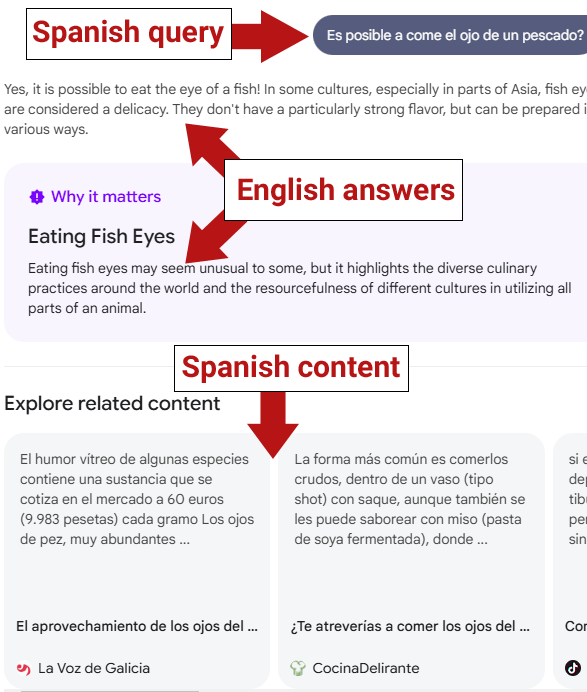
Interestingly, it also answers questions in Spanish but then quickly erases the Spanish answer and replaces it with a statement that it doesn’t speak that language yet. But if you ask it a question in English followed by another question in Spanish then it may answer the question in English and provide links to Spanish language human created content. As shown in the image below, Google Learn About will not only understand and answer a Spanish language query.

Learn about will also understand it when the query contains a typo. The query below contains a typo of the word “comer” which is missing the letter “r.”

The Spanish language query I tried was “Es posible a comer el ojo de un pescado” which means, “is it possible to eat the eye of a fish?”

Screenshot Of Spanish Language Query In Learn About

Privacy Controls

Google’s Learn About has privacy controls that are explained in a consent form that must be agreed to before using Learn About.

It contains information about how Google handles questions, a warning to not ask questions of a personal and private nature and details about managing the information saved by Learn About. It also says that human reviewers may access information shared with Learn About but that it will be stripped of identifying information.

The consent agreement explains:

“Google stores your Learn About activity with your Google Account for up to 18 months.

You can choose to delete your Learn About data any time by clicking the settings button next to your Google account profile photo in Learn About and then choosing “Delete activity”.

To help with quality and improve our products (such as generative machine-learning models that power Learn About), human reviewers read, annotate, and process your Learn About conversations. We take steps to protect your privacy as part of this process. This includes disconnecting your conversations with Learn About from your Google Account before reviewers see or annotate them.

Please don’t enter confidential information in your conversations or any data you wouldn’t want a reviewer to see or Google to use to improve our products, services, and machine-learning technologies.”

Google Learn About And SEO

There is no hint about whether this will eventually be integrated into Google Search. Given that it’s a part of Google’s Learning Initiative it’s possible that it could become a learning-only tool.

Try Learn About, an experimental project of Google Labs.

Featured Image by Shutterstock/Cast Of Thousands

Bad & Toxic Backlinks You Should Avoid via @sejournal, @BennyJamminS

Link building is a complicated art form with many different tactics and approaches.

Despite being one of the most mature processes in SEO, there’s still much disagreement about what makes a “bad” or “good” link building strategy, including effectiveness vs. risk, and what tactics Google can detect or punish a website for.

This post will help you determine what to avoid when link building or vetting the tactics of a new service provider.

I’m not going to claim to put any disagreements to rest, and if you’re a particularly experiment-minded SEO you might find this post a little on the conservative side.

As with all things in the industry, there’s inconsistency between what Google says and what works, and everyone benefits from those who experiment and push boundaries.

But I’m taking a conservative approach that follows Google’s guidelines closely for two core reasons:

  • This post is for readers looking for reliable and sustainable strategies. I don’t advise that you use experimental or high-risk tactics when it comes to link building if you don’t already know what you’re doing and what the risks are.
  • You should take the guidelines as a statement of intent, not absolute or current truth. Even if a link building tactic that goes against Google’s guidelines works now, there is reason to believe that Google intends to address it.

Types Of Unnatural Links

A an unnatural link is any link that is created for the purposes of manipulating search engines or that violates Google’s spam policies.

The following are some of the most common types of unnatural links.

Buying Or Selling Links

There is nothing fundamentally wrong with paying for a link or exchanging some kind of product or service for a link as long as the nature of the relationship is disclosed and the links are not for SEO purposes.

Buying, exchanging, or trading for links for SEO is the problem. Links for SEO are supposed to be a choice influenced only by the content on the page.

If your content is highly valued and people choose to link to it for that reason, then you deserve SEO benefits.

When you enter money or value exchanges into that dynamic, it breaks the ideal purpose of SEO links and introduces a high potential for manipulation. In such cases, Google requires marking the link as rel=nofollow or rel=sponsored so that the links do not pass SEO value. As long as you or the parties linking to you do this, for the most part, there’s no problem.

Here is an example of implementing nofollow and sponsored attributes:

Here are some ways that buying or selling links can fall afoul of Google’s spam policies:

  • Text advertisements with links that pass SEO signals because they haven’t been identified with “nofollow” or “sponsored.”
  • Paying for articles that include links that pass SEO signals.

Another way to buy links is to pay someone to create them for you. In this case, a service provider does that work of creating assets, reaching out to acquire links, or both. As long as this service provider doesn’t engage in shady tactics of their own and doesn’t give you links on domains that they own, this is totally fine.

Keep in mind that the “buying” and “selling” definitions are not limited to an exchange of currency.

It describes any kind of relationship where something is exchanged for a link, like a product.

As Matt Cutts explained in 2014, Google aligns pretty closely with the FTC on what it understands to be a “material connection” between a link provider and link recipient:

  • If a party receives enough value to reasonably change their behavior, a material connection must be disclosed.
    • A pen or a t-shirt likely won’t change behavior (unless received for the explicit purpose of reviewing / linking to it).
    • A direct payment for a link, a gift card, or a product with a high dollar value likely changes behavior and incentivizes a link.
    • An item loaned has different implications than an item given.
  • Consider the intended audience: if you’re giving things away for reasons other than to acquire links (for example as part of a conference attendance gift package), then disclosure might be necessary, but it might not be strictly necessary to ask all those people to mark links as sponsored if they choose to talk about it.
  • Consider whether a link relationship would be surprising: it makes sense that a movie reviewer might see a movie for free. It makes less sense that a tech reported would get to keep a laptop they’re reporting about without disclosure.

Link Exchange Agreements

Link exchanges are similar to buying links because they involve an exchange of value.

Mutual linking happens often, and when it occurs organically, it’s no problem. It makes perfect sense for some websites to link back and forth.

But you need to watch out for any kind of agreement. “Link for link” is a no-go, and if you do it often enough, it can become easy to spot.

The thing about links is that any time you give or get a link for a reason other than the value and relevance of the link itself, it’s easy to spot – likely easier than you think.

The occasional bit of back rubbing isn’t a big deal. When given a few different choices of websites to reference, it makes sense that people would choose those they already know or have existing relationships with.

That’s generally fine. The problem comes when you enter into specific agreements: You link to me, and I’ll link to you.

The video below explains the difference between a link that’s an editorial choice and a link that’s based on an agreement.

Private Blog Networks

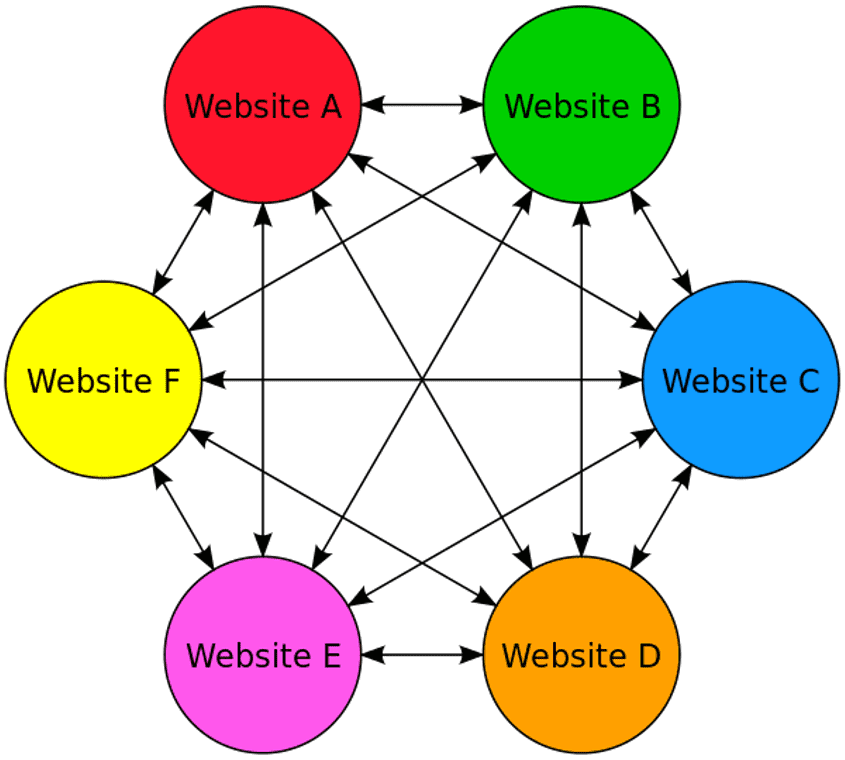
Private blog networks (PBNs) are networks of sites created to artificially inflate the rankings of one specific central website.

Basically, one entity controls an entire network of websites and can use a few different specific linking methods to manipulate to pass authority and SEO value around.

This network can then be used to artificially inflate the rankings of other websites by linking out to them.

In order for this tactic to work, all the websites need to have relationships or be owned by the same entity.

This is a pretty clear violation of Google’s guidelines, and it’s also pretty easy to spot.

Sites that are part of these networks can be penalized, and if you’re a little too lax with user-generated content on your site, you could find yourself accidentally becoming one.

If you accept any kind of content from external parties, scrutinize it carefully, especially links. Skip down to “How To Spot Shady Links” to find out more.

Unnatural Links From Forums, Blog Comments, And Other User-Generated Content

User-generated content is tricky when it comes to links. Ideally, a random person loves your content so much that they use you as a reference. Not so ideal is faking it.

Comments, forums, blogs, guestbooks, and even sites like Reddit might be tempting sources for links, and in the right context, they can absolutely be part of a healthy backlink profile. You can even link to yourself if you’re genuinely engaging in a relevant discussion. Google doesn’t consider all comment links and UGC links to be spam.

However, it’s a bad idea to try and engineer these links as part of a mass strategy.

The first thing to keep in mind is that many user-generated content (UGC) websites have blanket nofollow attributes on outgoing links. It’s an old tactic, so many high-quality communities moderate UGC heavily. This means that doing this effectively requires effort. The big question to ask yourself is: does the comment add genuine value to the community?

Most commonly, people execute these links unnaturally using bots to post automatically. Generally, automated posting using bots isn’t exactly valuable, and you’ll be flagged and moderated out of those communities.

Automated Link Syndication

There are tons of ways to automate links, but Google considers automating links at scale to be spam.

There are plenty of ways to safely automate your content processes, but we aren’t talking about that. We’re talking about using automation to post content externally from your website purely to acquire SEO links.

From automated article spinners to bots that will post comments and social media posts, if you’re intentionally building links “at scale,” then the chances are high that you’re building toxic links.

This could look like an automated press release or directory posting. It could look like low-quality article directories, which are often filled with spammy content that is widely distributed.

Generative AI has enabled new forms of automation for links and content, so it’s important to consider the overall principles in Google’s and the FTC guidelines when you evaluate novel functions and strategies.

Links In Distributed Widgets

People sometimes engage in automated link building by adding links to widgets distributed to multiple websites. Google clarified its stance on this and provided examples of manipulative widgets.

This kind of link building is pretty easy to spot, and it’s pretty clear that these types of links don’t add value.

Using Expired Domains To Build Links

Expired domain abuse is another tactic Google is wise to, but that doesn’t stop people from trying it.

One way that expired domains can be used to build unnatural links is by purchasing it and then redirecting it to another website. The idea is that all of the authority and backlinks belonging to the expired domain will be forwarded through the redirect. Don’t do this.

Any Link Can Be Bad If It’s Lazy Enough

Does the automated press release spam mean you shouldn’t send press releases? No!

Does the prevalence of poor-quality directors mean you can’t use directories in a high-quality way? Also no!

This goes for many link building strategies. There’s usually a high-effort, valuable version and a low-effort, spammy version.

Take guest posting as an example.

If you’re an expert in your field and take the time to write useful content aligned with E-E-A-T best practices, that’s valuable.

If you want to reach new audiences, you could send that post to a website with a large reach. It makes sense for that website to then link back to you as a reference for readers if they like your writing and want to learn more.

This is an ideal linking relationship. A website has chosen your content because it provides value to its readers and links to you as the source of the expertise.

But when one party turns lazy, this becomes toxic.

A website might decide that, for whatever reason, it makes sense to start allowing poor-quality content with links.

Maybe it starts charging or uses a big catalog of content to build an affiliate strategy.

On the other side, link builders might generate poor-quality content with links and post it on websites that either don’t mind or don’t know better. Or they might try and sneak them by following stricter editorial guidelines.

When one side of the equation gets lazy, guest posting becomes a manipulative linking strategy.

The Risk Of Manual Actions

The most likely risk of an unnatural link is that it will be a waste of time and/or money.

If you build a link for SEO that goes against Google’s guidelines, algorithms will simply ignore it either immediately or at an unspecified time in the future when they discover it.

If you have many toxic links and you’re using a strategy that the algorithms don’t immediately catch, this can open you up to a sudden reduction in SEO effectiveness.

At some point, Google will likely release an update that improves how the algorithms detect the links.

When that happens, if you have many of them, the adjustment can significantly impact your rankings and traffic. This can look like a targeted penalty, but generally, it isn’t.

Google uses automated systems and manual actions to punish toxic and spammy link building, but generally, you’re safe from this action unless you’re intentionally using these tactics on a large scale.

On the other hand, you can receive specific penalties for unnatural links, both coming to your site or going out from your site.

Unnatural links manual action notification in search console.Unnatural links manual action notification in search console.

Links To Your Site Vs. Links From Your Site

If you host unnatural links from your site to other sites, you may be hit with a manual action. This indicates to Google that you’re on the supply side of the ecosystem it’s trying to stop.

A large number of unnatural links coming from your website could cause Google to decide it doesn’t trust you and issue a penalty. This will be communicated to you in Google Search Console. These penalties can be reversed, but generally this requires you to fix the problems and submit a request for reevaluation.

This video from Google about unnatural links from your site explains more. It’s your responsibility to ensure that your site does not host unnatural links. This video from Google provides a great overview. Remember: “A natural link is an editorial choice.”

For example, if you use your domains to host bad link tactics and sell links to others, you’re at a high risk of receiving a manual penalty from Google that suppresses or removes your website from the Search index.

You can also receive a manual penalty for unnatural links to your website. This seems less likely, because there are many cases where it wouldn’t be fair to punish a website for incoming links. However, you might still receive a manual penalty if Google is confident that you are trying to manipulate your ranking.

This video from Google about unnatural links to your site has more information.

How To Spot Shady Links

A good link is a genuine interaction of trust between two parties.

Spotting shady links is actually pretty easy, especially when there’s a pattern.

If you’re auditing your backlink profile or putting a potential service provider through their paces, here are some signs to look for.

1. New or young sites on blogging domains.

If you notice links from blogging subdomains ( e.g. blogger.com ) to your website, especially if they aren’t directly relevant, appear in high numbers (without nofollow attribute), or even in some cases where the blog has your website or brand name, this is a sign that someone was building shady links to your website.

This is a good indication of a PBN.

You should ask a link building service provider whether they create new websites to build links. This is a red flag.

2. Many unnatural links from unrelated forums.

Links like this can indicate automated link building with bots. Generally, using UGC sites to build links is against the terms of service of those websites.

Usually, the strategy involves pretending to be a genuine user. If you have to pretend you’re someone you’re not, it’s a shady link.

3. Links from irrelevant websites and directories.

Relevance really does matter with links, and if you’re looking through a link profile and see domains that just don’t make sense, they bear investigation. For example if you are a recipe publisher a link from plumber’s article is highly irrelevant. That means it was likely the result of an unnatural link building technique.

However, if you add your website to relevant directories that have value from the users’ perspective, this can be totally fine. For example, you should add your restaurant website to Yelp, which is used by 32M active users who look for reviews before booking a reservation. Check our list of directories that still matter.

If you want to learn more about link building and its many pitfalls, check out SEJ’s ebook The Dark Side Of Link Building.

More resources: 


Featured Image: Jakub Krechowicz/Shutterstock

6 Web Hosts Ranked By Core Web Vitals: One Outperforms All via @sejournal, @martinibuster

HTTPArchive is offering a new technology comparison dashboard, currently in beta testing. Users can now view real-world web hosting performance scores for Core Web Vitals. We compare six web hosts and find one that consistently performs better across nearly all metrics.

About HTTPArchive

HTTPArchive tracks websites through crawling and with data collected in the Chrome User Experience Report (CrUX). It publishes reports about the technologies that power websites, including Core Web Vitals performance of content management systems like WordPress and Wix.

New Technology Comparison Dashboard – Beta

HTTPArchive has new reports under development, one of which is a comparison of Core Web Vitals and Lighthouse performance scores by web hosts. HTTPArchive also tracks the median page weight by web hosts but it’s still under development and is in Beta testing.

The new reports allow comparison by web hosts. There isn’t data yet for many web hosts but there is for the following six. Comparing web hosts by core web vitals is not a totally fair comparison. A web host like Ionos might host many thousands of small and local sites which might not be resource intensive.

So with those caveats, here are the six web hosts under comparison:

  1. Bluehost
  2. GoDaddy
  3. HostGator
  4. IONOS
  5. SiteGround
  6. WP Engine

Core Web Vitals By Web Host

The following are the list of web hosts by percentage of sites hosted at each one that pass Core Web Vitals. The HTTPArchive says that thise report is still under development and, as previously mentioned, the percentages don’t necessarily reflect the quality of the web hosts themselves, but rather the quality of the sites hosted there.

This is the description of the CWV metric scores:

Passes Core Web Vitals
The percentage of origins passing all three Core Web Vitals (LCP, INP, CLS) with a good experience. Note that if an origin is missing INP data, it’s assessed based on the performance of the remaining metrics.”

However, it’s interesting to see that the number one web host is a managed WordPress web host because that may indicate that the platform itself may be optimized better than a general web host. The following scores are based on a snapshot taken at the beginning of September.

Core Web Vitals Scores In Descending Order

  • WP Engine 70%
  • GoDaddy 67%
  • SiteGround 65%
  • HostGator 58%
  • Ionos 58%
  • Bluehost 45%

Largest Contentful Paint (LCP)

LCP measures the perceived page loading speed, how fast the page appears to load for a site visitor.

HTTPArchive defines this metric:

“Largest Contentful Paint (LCP) is an important, stable Core Web Vital metric for measuring perceived load speed because it marks the point in the page load timeline when the page’s main content has likely loaded—a fast LCP helps reassure the user that the page is useful. Good experiences are less than or equal to 2.5 seconds.”

WP Engine again comes out on top, perhaps indicating the quality of the sites hosted on that platform as well as the performance optimizations that are a key element of that web host.

LCP Scores In Descending Order

  • WP Engine 79%
  • GoDaddy 78%
  • SiteGround 75%
  • HostGator 69%
  • IONOS 69%
  • Bluehost 52%

Cumulative Layout Shift (CLS)

HTTPArchive also provides a comparison of the six web hosts by the CLS score. CLS measures how much a web page shifts around as it’s rendered in a web browser. A score of 0.1 or less for 75% of visitors is recommended. The percentages for each of the web hosts were all higher than the 75% minimum. This time WP Engine is tied for first place with HostGator.

CLS Scores In Descending Order

  • WP Engine 88%
  • HostGator 88%
  • Bluehost 87%
  • SiteGround 86%
  • IONOS 85%
  • GoDaddy 84%

First Contentful Paint (FCP)

FCP measures how long it takes for the content to become visible. A low FCP means that the content is rendered quickly. The number one ranked web host for FCP turns out to be GoDaddy, ahead by a significant margin of 7 points. WP Engine comes in second, followed by SiteGround.

FCP Scores In Descending Order

  • GoDaddy 73%
  • WP Engine 67%
  • SiteGround 62%
  • IONOS 60%
  • HostGator 57%
  • Bluehost 39%

Time To First Byte (TTFB)

TTFB measures how long it takes from to download the first byte of a resource after it’s requested by a browser. GoDaddy scores top of the list again.

TTFB In Descending Order

  • GoDaddy 59%
  • IONOS 45%
  • WP Engine 39%
  • HostGator 38%
  • SiteGround 37%
  • Bluehost 25%

Interaction to Next Paint (INP)

This metric represents the overall responsiveness of the entire web page.

HTTPArchive explains what this score means:

“INP is a metric that assesses a page’s overall responsiveness to user interactions by observing the latency of all click, tap, and keyboard interactions that occur throughout the lifespan of a user’s visit to a page. The final INP value is the longest interaction observed, ignoring outliers. A good experience is less than or equal to 200ms.”

The scores are the percentage of pages that provide a good INP experience. WP Engine is back on top for INP but the other five web hosts are not far behind.

INP Scores In Descending Order

  • WP Engine 95%
  • SiteGround 94%
  • Bluehost 92%
  • GoDaddy 90%
  • HostGator 89%
  • IONOS 88%

Lighthouse Performance Score

Lighthouse is an open source auditing tool that scores web pages for performance, SEO, and other metrics. The performance scores for the six web hosts are fairly close to each, clustering on either side of a performance score of 40.

This is HTTPArchive’s description of this score:

“In general, only metrics contribute to your Lighthouse Performance score, not the results of Opportunities or Diagnostics.”

Interestingly, HostGator ranks the highest for the Lighthouse Performance score, with GoDaddy and Ionos tied for second place. The other three were tied for third place, by one point less than the second place. Nevertheless, HostGator was the clear winner for the Lighthouse Performance score metric.

Lighthouse Performance Scores

  • HostGator 43
  • GoDaddy 40
  • IONOS 40
  • Bluehost 39
  • SiteGround 39
  • WP Engine 39

HostGator came out near the top for Core Web Vitals and scores at the top of the list for the Lighthouse Performance metric. WP Engine is clustered with two other web hosts scoring 39 points.

Lighthouse Accessibility Scores

The accessibility scores are clustered similarly to the performance scores, on either side of a score of 85.

This is how HTTPArchive describes this metric:

“The Lighthouse Accessibility score is a weighted average of all accessibility audits. Weighting is based on axe user impact assessments. Each accessibility audit is pass or fail. Unlike the Performance audits, a page doesn’t get points for partially passing an accessibility audit.”

Accessibility Scores In Descending Order

  • GoDaddy 87
  • Bluehost 86
  • WP Engine 86
  • SiteGround 86
  • HostGator 85
  • Ionos 85

Lighthouse SEO Scores

The SEO scores were even more tightly clustered, with GoDaddy scoring the highest of the six web hosts under comparison.

HTTPArchive describes what the SEO Score is measuring:

“These checks ensure that your page is following basic search engine optimization advice. There are many additional factors Lighthouse does not score here that may affect your search ranking, including performance on Core Web Vitals.”

SEO Scores In Descending Order:

  • GoDaddy 91
  • Bluehost 88
  • WP Engine 88
  • HostGator 88
  • IONOS 88
  • SiteGround 88

Lighthouse Best Practices Score

The last score is interesting because it measures if the hosted sites are created with web development best practices. HTTPArchive doesn’t explain at this time what those best practices are.

Here’s the description of this score:

“This ensures that your page is built using modern web development best practices.”

Best Practices Scores In Descending Order

  • Bluehost 79
  • HostGator 79
  • SiteGround 79
  • WP Engine 77
  • GoDaddy 77
  • IONOS 77
  • Takeaway

HTTPArchive is expanding on what it is measuring. The performance dashboard is still in Beta and under development, meaning that it may have bugs but that it’s ready for a public preview. It’s interesting to see a managed WordPress host come on top. The scores will be more meaningful once there are more managed web hosts that can be compared against each other, which may provide a more meaningful comparison. Nevertheless, this is a good start.

Visit the new dashboard here and provide your feedback to make it better.

Featured Image by Shutterstock/TierneyMJ

Ask An SEO: With Topic Clusters, How Important Are Page Paths? via @sejournal, @HelenPollitt1

Our question today comes from Lee, who asked:

“With topic clusters, how important are page paths? We often have our pillar page in the primary navigation, but the support topics will often live in the blog.

They’re interlinked, but the page path doesn’t follow the ideal director of primary-topic/sub-topic/sub-sub-topic.”

This is a great question and touches on a lot of fundamental areas of SEO that we don’t always get right.

Let’s start by addressing topic clusters and what page paths are.

What Are Topic Clusters?

Topic clusters refer to a content system that structures how pages on a website relate to each other.

Essentially, they are a group of pages on a site that are all centered on the same topic.

The pillar page is written to cover the topic broadly, giving an overview of the subject. The “cluster” content goes into more depth on specific aspects of the topic.

For example, your pet store may have a pillar page all about cat toys. It would cover the benefits of toys for cats’ health and what sorts of toys are available.

You would then have more specific pages about each type of toy, toys that aren’t safe for cats, typical cat play behavior, and so on.

This content structure helps website managers create in-depth, relevant copy that covers the breadth of a subject.

The pillar page allows them to target the top-level search queries and questions someone might have about a topic, but the cluster pages will address more specific “long-tail” queries.

As such, the website builds authority in the subject and can show relevance to related search queries.

The key is linking the pages together so that the search bots understand the relationship between the pillar page’s content and the cluster pages.

Reasons Why Page Paths May Be Important For Topic Clusters

Now, onto page paths.

You’ll note that I’ve not mentioned the URL structure in the above explanation.

That’s because, in reality, the pillar and cluster structure relies primarily on links. It is the interlinking between these pages that shows their relationship to each other, not the page path.

Page paths are the bits of the URL that sit after the domain. So, for www.helenspetstore.com/cats/toys/catnip-toys, the “cats/toys/catnip-toys” part is the path.

They Can Make It Easier To Structure Navigation

Page paths can be useful in helping to organize the back end of the website.

If website content is structured in an intuitive and organized way, it can make it obvious what pages should be linking to each other.

For example, breadcrumb links are much easier to create programmatically when they just follow the folder structure shown in the URL.

That doesn’t mean it’s impossible to create breadcrumbs that don’t follow the same structure as the URL. Instead, there may just need to be some strategic thinking about which pages should be next in the sequence of links.

They Can Help With Organizing Your Site

In a similar way, having an easy-to-understand folder structure for your content means your URLs are a lot easier to group.

Going back to my example of a pet store, imagine I have a category page about dog clothes: www.helenspetstore.com/dogs/clothes.

If all of the dog clothing products my company sells sit within that folder, it might look like this:

  • Category: www.helenspetstore.com/dogs/clothes
  • Sub-categories:
    • www.helenspetstore.com/dogs/clothes/coats
    • www.helenspetstore.com/dogs/clothes/hats
    • www.helenspetstore.com/dogs/clothes/shoes
  • Product page: www.helenspetstore.com/dogs/clothes/shoes/red-winter-shoes-xs

If I decide I no longer want Googlebot to crawl any of those URLs, I can just add a disallow line in the robots.txt that prevents Googlebot from crawling any of the URLs in the /dogs/clothes/ folder, like so:

  • Disallow: /dogs/clothes/

However, if I structured my product pages to sit outside of my folder structure – like this: www.helenspetstore.com/dogs-red-winter-shoes-xs – then this URL would not be encompassed by the above disallow directive, and Googlebot would still be able to crawl it.

Now, imagine that my website has hundreds of dog clothing product pages. Suddenly, it becomes a much larger task to stop Googlebot from crawling them.

They Can Make It Easier To Analyze

Looking at the above example further, the folder structure also helps with analyzing the performance of these pages when using tools like Google Search Console and Google Analytics.

With the product pages sitting within the /dogs/clothes/ folder, I could easily see how all the dog clothes pages, including product pages, were performing by simply looking at the /dogs/clothes/ folder.

However, if the product pages sit outside the /dogs/clothes/ folder, analyzing this would not include the performance of the individual product pages.

They May Impact User Engagement

There are arguments to be made that the URL structure can impact user engagement.

This is a much larger topic, but before doing anything drastic like changing your URLs purely to include more descriptive folders in them, consider that we’re seeing URLs in the SERPs less and less, especially on mobile.

They Can Be A Minor Ranking Factor

Again, a small element to consider is that URLs with keywords can have a minor ranking factor.

It’s not something I would advise restructuring a site over, but I would be remiss not to mention it.

They May Be Used As The Anchor Text

It is also important to note that in some instances where URLs are being linked to, rather than using a word or phrase for the anchor text, publishers may just link with the “naked” URL.

If your URL path contains keywords, they may help search engines understand the context of the link. This could give an overview of what the page linked to contains.

Essentially, the URL itself becomes the anchor text.

Reasons Why URL Paths Aren’t Important For Topic Clusters

There are a couple of reasons why page paths aren’t as important as we sometimes think they are.

To Denote Site Hierarchy

There’s often a bit of confusion in the SEO world that website hierarchy = your URL structure.

That is, the folder structure of your site denotes which are the parent pages, which are child pages, and the importance of each. However, it’s really much more nuanced than this.

For all the reasons listed above, having an easy-to-understand folder structure is helpful, but it does not mean that your site cannot denote hierarchy without it.

If we think about how users and search bots navigate a website, it is primarily through links. I would argue that the way the website is linked together is much more indicative of the relationship and hierarchy of the pages.

To Give Context

Some people will argue that URL paths help give context to the content that sits within the pages – that you can easily deduce what the likely content of www.helenspetstore.com/dogs/clothes/shoes/red-winter-shoes-xs is before you click on it.

Absolutely! A readable URL will help give that context. But I don’t believe you get much more context from that URL than you would from www.helenspetstore.com/dogs-red-winter-shoes-xs.

Should You Focus On The Page Path?

Yes. That is when you are creating the website. If you are working from scratch, you should think about the page paths for all of the reasons I listed before.

For Lee’s question about an existing website’s live supporting pages sitting in a different folder from the cluster page, then no.

As long as the internal linking between these pages is robust, and other signals like anchor text and content relevance are there, then it is not worth changing the URLs of existing pages to fit within the “ideal” folder structure.

The Risks Of Changing Your Page Paths

If you decide to make a change to the page paths of your already live, crawled, and indexed pages, remember that there is risk.

Changing the URLs means that Googlebot will need to understand that the new URL has the same content as the old URL and should, therefore, be indexed and ranked instead of it.

It isn’t just a case of implementing a 301 redirect from the old URL to the new one. 301 redirects are just a canonicalization signal.

They are a suggestion to the search bots that the new URL should be indexed and ranked instead of the old one.

However, if you make mistakes with other indexing and ranking signals, Google might not respect it.

For example, it may take longer for the old URL to fall out of the index if you continue to link to it from your internal navigation system.

Even though users and Googlebot would still end up on the final page in the redirect, the signal is there that the original URL is still important.

Page Paths Are Important, But Consider The Risks Of Making Changes

In summary, a well-foldered website has a lot of benefits to it.

I would always consider the page path when designing a site’s architecture from scratch. It makes life a lot simpler down the line.

It isn’t a major factor in that content’s ability to rank, however. As long as you get the other signals correct, the actual URL path really isn’t that important.

If you are making changes to a significant volume of URLs, or pages that are of particular importance, then consider it a website migration.

Put in all the checks and balances that you would for that project. Check your internal links, update your XML sitemaps, put the redirects in place.

Give Googlebot as much evidence that the new URLs are rank-worthy.

More resources:


Featured Image: Paulo Bobita/Search Engine Journal

13 Black Hat Techniques That Can Harm An SEO Campaign via @sejournal, @jonleeclark

To remain the most popular search engine in the world, Google has to continuously update its algorithm to continue delivering users useful results.

To this end, Google also makes available Google Search Essentials, so everyone from web developers to SEO professionals knows the rules of the game.

Of course, there are plenty of people who want to win the game without following its rules.

The tactics they use are known as black hat SEO.

Black hat SEO gets its name from old cowboy movies where the bad guys wear a black hat.

Black hat SEO practitioners know the rules of search engine optimization and use that understanding to take shortcuts that aren’t exactly laid out in Google’s best practices.

This is in juxtaposition to white hat SEO practitioners who promote high-value content, and engage in deep keyword research to win in the SERPs.

Google is good at identifying and penalizing black hat SEO techniques, but that doesn’t stop people from trying them anyway. As technology develops, new techniques are invented, which push Google to intensify the fight against them.

Here are 13 black hat practices to avoid because they can land you an algorithmic or manual penalty.

Some of these you may do without intending to, so it’s good to familiarize yourself with black hat SEO to make sure you’re in the clear.

Black Hat Link Techniques

1. Buying Links

A high-quality, relevant link can drive traffic to your domain while telling Google’s algorithm that you’re a trustworthy source.

A good backlink can also help Google map your website so that it has a better idea of what you’re all about, making it easier to serve you up as a search result.

Buying a link, however, is against Google’s Search Essentials, and – according to Google – it doesn’t work.

If you’re caught, you could get an automatic and manual penalty that affects specific pages or, worse, the entire site.

Google tracks links that are likely to have been bought and those that have been earned.

Additionally, the sort of website that sells you a link is the sort of website you wouldn’t want to buy a link from because it is easier than you think for Google to identify unnatural patterns – even for Google’s own properties.

For this reason, Google created a form to help you disavow links.

This way, when you go through your backlinks, you can disentangle yourself from any undesirable domains.

2. PBNs

PBN LinksImage from author, November 2024

PBNs are websites that link to each other.

They used to be much more prevalent in the 1990s and early 2000s, particularly among fan pages for TV shows, movies, musicians, etc.

It is considered a link scheme when it is designed to manipulate algorithms, and with current AI advancements, search engines are perfect for catching such patterns.

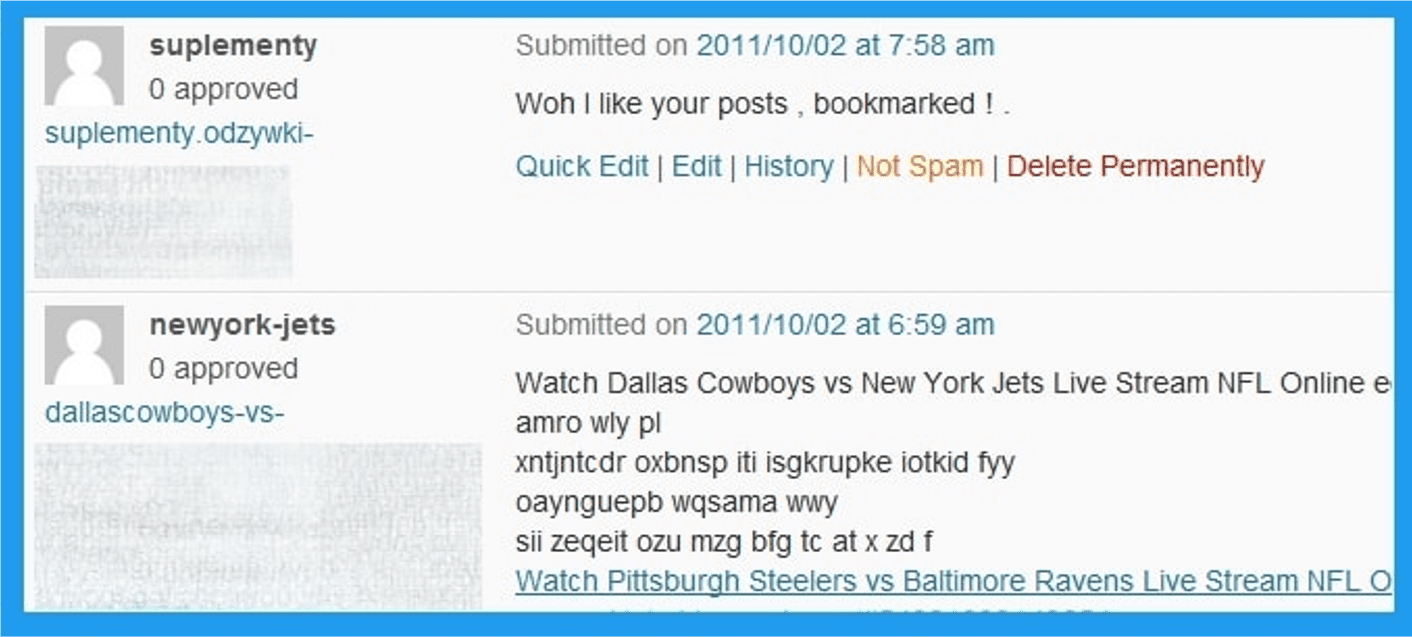
3. Comment Spam

Blog Comment SpamImage from author, November 2024

You may be able to share a link to your website in the comments section of a website, but you should avoid doing so unless it’s relevant.

Otherwise, you risk being penalized for being a spammer, as using comments to build links is essentially not effective.

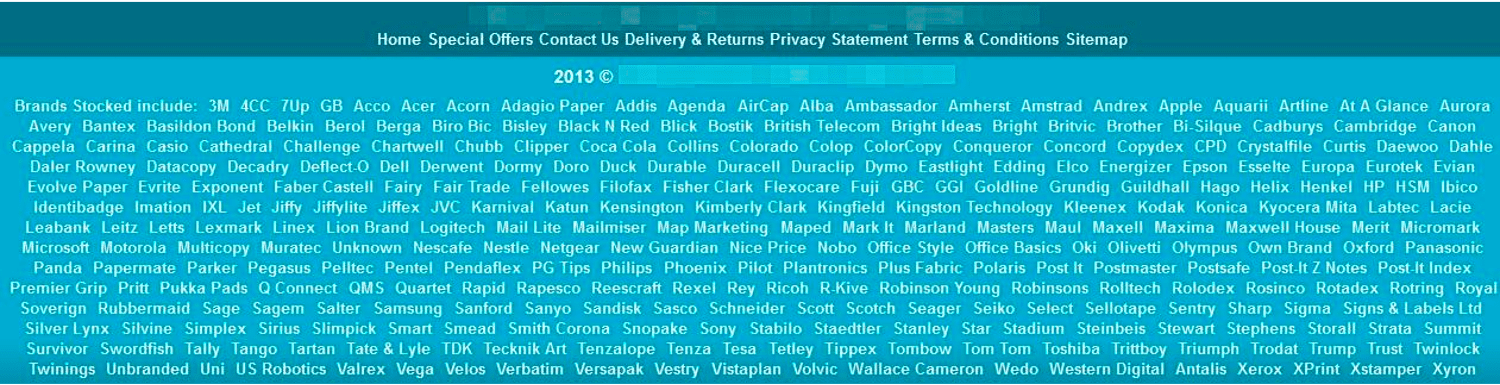
4. Footer Links

Footer LinksImage from author, November 2024

The footer is prime real estate for a link because footers appear on every website page.

If you’ve been adding footer links with commercial anchor text at scale to manipulate results, Google will likely be able to identify those and penalize you for it.

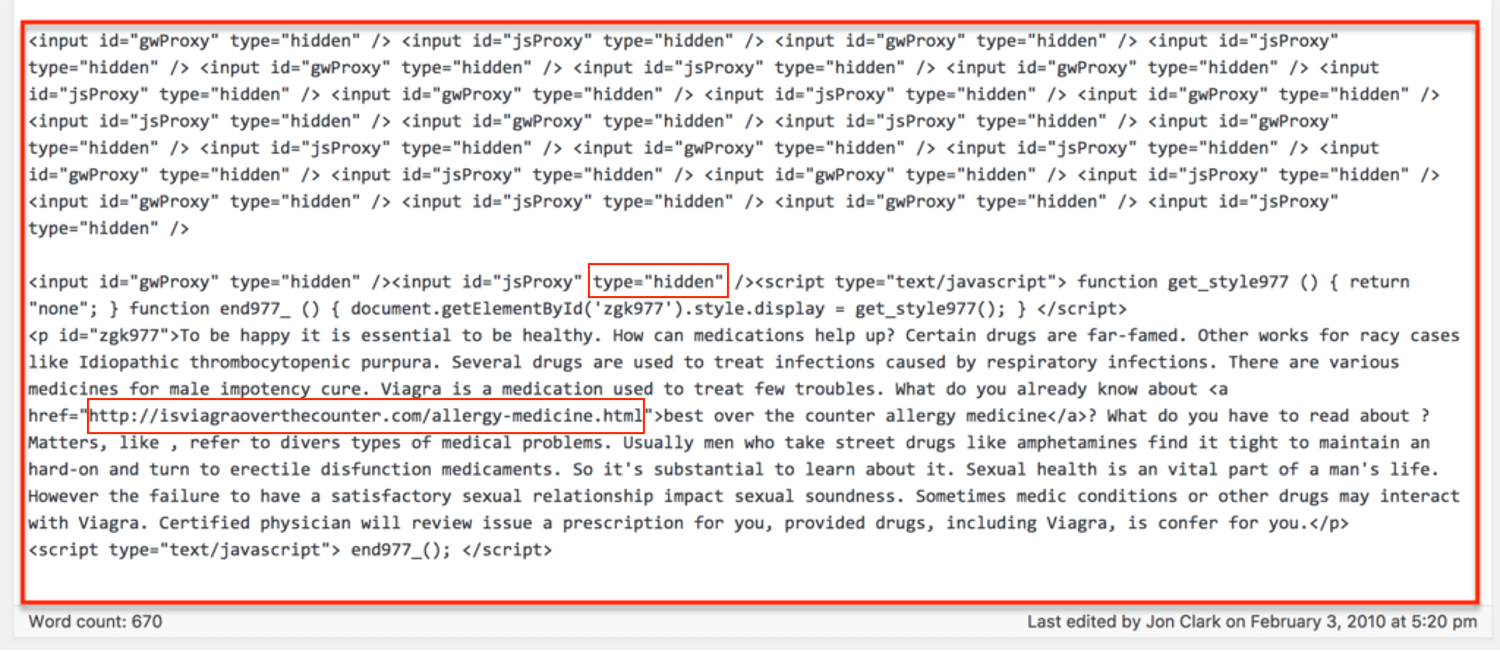
5. Hidden Links

Hidden LinksImage from author, November 2024

You may think that you can hide a link in your website’s text or by having the link appear as the same color as the background, but Google will notice and penalize you for trying to game the system.

Additionally, if you include enough irrelevant links, you’ll give Google less reason to direct traffic to your target audience since you’ll be diluting your relevance.

Deceptively hidden links are a violation of Google’s guidelines. That means:

  • No hiding text behind an image.
  • No keeping text off-screen using CSS or JavaScript.
  • No using a font size of 0.
  • No making one little character, like a period, a link.

For the full list of unnatural link types, see this article.

Content Black Hat Techniques

6. AI-Generated Content At A Scale

With the rise of AI, chatbots producing large volumes of content has become easier than ever.

Google has updated its guidelines to address the use of AI-generated content at a scale and advises that it should be thoroughly reviewed and fact-checked to ensure accuracy and reliability.

This means the use of AI to mass-generate content without human oversight violates Google’s guidelines.

However, black hat SEO pros in the early days of AI exploited these technologies by creating large volumes of content without proper human supervision.

Consequently, many of these sites were removed from search results when Google updated its algorithm and detected AI-generated spam patterns.

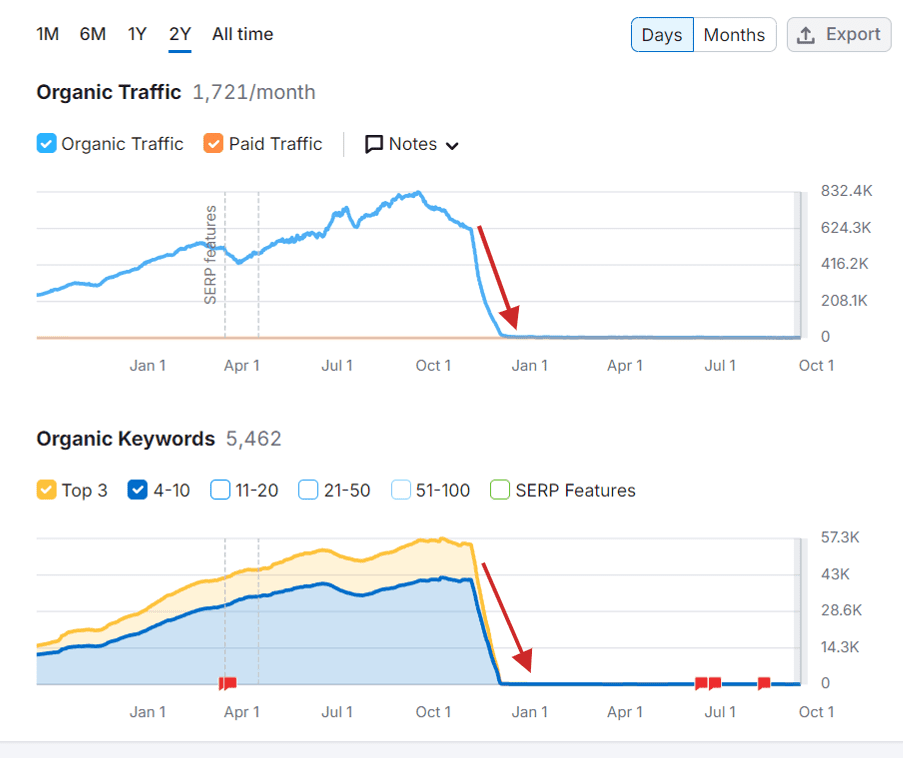
Below is what it looks like to be penalized by Google for AI-generated spam.

A website that gained 830K monthly visits from Google search vanished after the algorithm update.A website that gained 830,000 monthly visits from Google search vanished after the algorithm update.

7. Article Spinning & Scraped Content

Spun ContentImage from author, November 2024

Article spinning is a technique that involves re-writing content by substituting synonyms, changing sentence structure, or re-writing text entirely while communicating the same information as the source material.

Article spinning or scraping can be done manually, but modern techniques often use AI and sophisticated software, making it harder to detect.

For a good reason, such articles degrade the quality of the internet, which is why Google penalizes you.

8. Cloaking

Cloaking is an old black hat trick that’s still used to this day – use a flash or animated page to conceal information your visitors that only Google can see in the HTML.

It’s very difficult to mislead Google without being detected. Google uses Google Chrome’s data, which means it can see what is rendered on the webpage on the users’ side and compare it to what is crawled.

If Google catches you cloaking, you’ll get a penalty.

9. Doorway Pages

Doorway pages are a form of cloaking.

They’re designed to rank for particular keywords but then redirect visitors to other pages.

They’re also known as:

  • Bridge pages.
  • Portal pages.
  • Jump pages.
  • Gateway pages.
  • Entry pages.

10. Scraping Search Results And Click Simulation

Scraping search results for rank-checking purposes or using bots to access Google Search is against their spam policies.

This often takes place in conjunction with article scraping, when an automated script scrapes Google Search to find articles ranking in the top 10 positions for automatic spinning.

Another type of spam is to program a bot that accesses Google and clicks on search results to manipulate click-through rates.

They aim to mislead search engines into thinking that certain pages are more popular or relevant than they are. This manipulation can temporarily boost a site’s perceived engagement metrics but harshly violates Google’s guidelines.

11. Hidden Content

Like a hidden link, hidden content is content that’s made the same color as the background or moved away from users’ screen view using CSS techniques.

It’s a tactic that intends to include as many keyword phrases, long-tail keywords, and semantically linked words as possible on a page.

Of course, Google’s algorithm can tell the difference between keywords within the body of a paragraph and keywords hidden in the background.

Hidden content can take several routes to your site beyond being intentionally placed there by the site owner.

  • You could publish a guest post from someone who includes hidden content.
  • Your commenting system could be insufficiently rigorous and, as a result, fail to pick up on hidden content.
  • Your website could get hacked, and the hackers could put up hidden content. This is also known as parasite hosting.
  • An authorized user could accidentally put up hidden content because they copied and pasted text with CSS styling from a different source.

Not all hidden content, like accordions or tabs, is forbidden.

The rule of thumb is that content is okay as long as it is visible to both the user and the search engine.

An example may be content that’s only visible to mobile visitors but is hidden to desktop visitors.

12. Keyword Stuffing

Keyword StuffingImage from author, November 2024

If SEO were only about using keywords, then a block of keywords would be all it takes to rank as No. 1.

However, since Google wants to deliver high-quality results, it is looking for content-rich in semantically linked keywords.

That way, the algorithm is more likely to provide high-quality content instead of content that simply bears the superficial markings of high-quality content.

13. Rich Snippets Spam

Schema Markup SpamImage from author, November 2024

Rich snippets are snippets with more information on SERP pages. Enhanced visibility can increase CTR to your site from SERPs and drive more traffic.

But there are many ways that the schema used to generate these snippets can be manipulated. In fact, there is an entire Google support page dedicated to it.

However, if you get a manual action because of abusing structured data, it will not affect the rankings of your website. Instead, it will remove all rich snippet appearence from SERP for your website.

Bottom Line

The rewards of the black hat path are short-lived. They’re also unethical because they make the internet worse.

But you can’t do something right without knowing how to do it wrong, which is why every white hat SEO also needs to know about the black hat path.

That way, you know how to steer clear of it.

And if you accidentally get penalized or decide to change your practices, there are ways to recover from Google’s penalties.

More Resources:


Featured Image: PeopleImages.com – Yuri A/Shutterstock

Google’s Updated Machine Learning Courses Build SEO Understanding via @sejournal, @martinibuster

Google has updated its machine learning crash course with new videos and modules on large language models and automated machine learning. These courses are useful introductions to the technologies behind modern search engines and generative AI, information that will make you a better SEO.

What Is Google’s Machine Learning Crash Course?

Google’s machine learning course is an easy to understand introduction to machine learning. It shows what machine learning is all about and how it can be useful to you and your business.

The different courses are self-contained in modules, beginning with introductions to the fundamentals of Linear Regression, Logistic Regression, and Binary Classification Models

The other modules cover:

  • Data
    How to work with machine learning data
  • Advanced Machine Learning Models
    Introductions to Neural Networks, Embeddings, and Large Language Models
  • Real-world ML
    These modules cover best practices for deploying machine learning models in the real world.

The new course adds topics that include:

Large language models

New Large Language Model (LLM) Module

The Large Language Models module is a new addition to the courses and is a good way to get up to speed fast with the technology and be conversant about it.

Google’s documentation shows what students learn with the module:

“Define a few different types of language models and their components.

Describe how large language models are created and the importance of context and parameters.

Identify how large language models take advantage of self-attention.

Reveal three key problems with large language models.

Explain how fine-tuning and distillation can improve a model’s predictions and efficiency.”

Google recommends first taking six other courses before starting the LLM module, so as to gain an understanding of the fundamentals. The six recommended courses look very interesting:

  1. Introduction to Machine Learning
  2. Linear regression
  3. Working with categorical data
  4. Datasets, generalization, and overfitting
  5. Neural networks
  6. Embeddings

The courses for linear regression, neural networks and embeddings can arguably be called essential for SEOs because these technologies have been a major part of how search ranking algorithms work. Obtaining a basic understanding about these technologies will improve your ability to understand how the backend of search engines work.

Many misleading ideas are popular in the SEO community because they sound like common sense, much like some answers you may have experienced from generative AI make sense but are hallucinations. Learning what these technologies are and how they work will help you become a better search marketer.

Read Google’s announcement:

Our Machine Learning Crash Course goes in depth on generative AI

Featured Image by Shutterstock/ProStockStudio

Featured Image by Shutterstock/studiostoks

[Losing Traffic?] 4 Easy Steps To See How Google’s AIO Is Affecting Your SEO

SE Ranking sponsored this post. The opinions expressed in this article are the sponsor’s own.

Wondering how AI is affecting your traffic?

Want to learn how to get into the AI Overview at the top of SERPs?

Miss the days when you could appear as the top result on a SERP?

It’s possible to relive those SEO glory days by learning how tuned in your website is to AI.

What Is An AIO In SEO?

AI Overviews, or AIOs, are one of Google’s newest search features to grace the SERPs.

AI Overviews provide users with AI-generated answers and topic summaries, and they are gaining momentum. Google launched it as an experiment in May 2023, and since then changed the traditional search to kick off a new era of SEO.

Now the focus for SEO is on optimizing websites for AI Overviews.

According to SE Ranking’s studies, this feature is often observed for longer, mainly informational queries. These queries are common in niches like Relationships, Food and Beverage, Business, and more. While AI Overviews were initially only available in the US, they have recently expanded to six countries, where they can now hold top positions in search results.

No doubt, this is only the beginning of the rise of AI Overviews. To stay ahead in SEO, start tracking the impact of AIOs on your sites now. Let’s look at how to do this quickly and easily!

Step 1. Find Out Which Target Keywords Trigger AIOs

Begin by finding out which of your keywords trigger AIOs and which ones you can optimize your content for.

This will help you attract more traffic through the new search.

Doing this manually can take a long time, especially if you have a large project with thousands of keywords.

To automate this process, use SE Ranking’s Competitive Research tool. This tool contains 22 million AIO-triggering keywords in the US region and 2.2 million in the UK region.

  1. Go to the Organic Traffic Research section.
  2. Filter keywords by the AI Overviews feature, as shown in the screenshot below.
  3. The table will now only display keywords that trigger AIOs.
  4. Export the entire list.

Pro tip:

Explore the intent, search volume, position, and difficulty of all keywords triggering AIOs. This will help you prioritize content optimization for AIOs. For example, if a keyword is likely to bring in very little traffic, don’t focus too much on monitoring and optimizing content around it.

Step 2. Add Keywords To An AI Tracker To Monitor Them

The next step is to streamline how you monitor your presence in AIOs. Keeping track of every keyword manually is difficult and time-consuming, so having an automated tool is a must.

We suggest using the handy AI Tracker because it lets you add and monitor up to 1,500 keywords.

The AI Tracker is available to all users during the 14-day trial of SE Ranking. Access this tool and our complete SEO suite to outperform competitors and boost traffic.

To get started:

  1. Create a project in SE Ranking.
  2. Add all the keywords exported during the previous step.
  3. Head to the AI Tracker tool.
  4. Click Select keywords.
  5. Choose the ones to track for AI Overviews.

Once you’ve added the keywords, the tool will check their positions in AIOs daily. This makes it easy to monitor changes in AI results and your presence in them.

Step 3. Check Your Site’s Visibility On AIOs

Of course, many SEO specialists are concerned most about whether their site is included in the AI Overviews source list.

Consider using the AI Overview Presence graph in SE Ranking’s AI Tracker to understand the situation clearly and see how visible your site is in AIOs. This tool shows how many of your added keywords triggered AIOs and how many AIOs feature your site in Google’s list of resources.

Look at the table below to see which keywords triggered AIOs and which didn’t. If the icon has a gray strike-through, there are no AIOs for that keyword. If the icon is gray, there are AIOs present, but your site is not included. If the icon is purple, your site is featured in AIOs.

What do these numbers mean? If there are 100 AIOs but your site appears in only 10 of them, you’re likely losing traffic. When AIOs appear in search results, users often won’t scroll past them to find your site. This still holds even if it ranks first in regular results. Recent research from SE Ranking confirms this, stating that featured snippets show up alongside AI Overviews 45.39% of the time, while ads appear with AI Overviews a staggering 87% of the time.

This data helps you identify which keywords to focus on. You can then track how your new AIO strategy performs over time. If you take steps to get into AI snippets, each graph will show a rising curve.

But remember: AI Overviews are constantly shifting. AIOs might appear one day for a query and then disappear the next. You might even see your site in an AI snippet at the top one day only for it to disappear completely the next. Moreover, Google is constantly changing the appearance of its AI snippets.

When it was first released, the snippet looked like this:

Now, it looks like this:

There are currently fewer links, with Google shifting them to the right to give them less importance. This ensures they don’t distract users from the main AI-generated information. It’s important to keep an eye on AIOs in case other changes occur. You’ll need to understand what to expect and whether you’ll still be visible in AIOs, even if you’re included in them.

In these cases, the tool stores cached copies of every SERP it crawls. This allows you to see how the appearance of AIOs has changed over time. You can easily check if your website links were prominently displayed in the AIOs or if they were hidden behind a button.

Step 4. Learn Which Sites Are Chosen Over Yours As AIO Sources

Another important step is to monitor the sites that appear in AIOs where your site is missing. Why is this useful? It helps you identify gaps in your content and allows you to optimize it. This increases its chance of being included in AIOs.

You can use the Organic-AI Overlap graph to check how many sites from the top 20 are currently featured in AIOs for your keywords.

Use the AI SERP Competitors section to fully analyze this data. It will show you:

  • Which sites are included in the AI snippet
  • How the top 20 results for that keyword look

If you notice that the AI snippet includes many sites outside the top 20, focus on what these sites are doing to be cited by Google. Conversely, if Google favors the top 20 sites for certain keywords, continue optimizing your site. It may eventually reach the top and greatly increase your chances of being featured in AIOs.

AIOs may also disappear, so aiming for top rankings is always a winning strategy.

Track Your AI Overview Efforts With SE Ranking

The entire digital world is entering a new era of AI-driven search. What we are seeing now is just the beginning. While the future is a mystery and holds more changes, one thing is certain: AI is here to stay, and we must adapt to work with it.

Monitoring AIOs is an essential part of this new strategy. Setting up this process correctly will undoubtedly give you results.

Try SE Ranking’s AI Tracker for free for 14 days with a trial subscription to give your SEO strategy the boost it needs!

This article has been sponsored by SE Ranking, and the views presented herein represent the sponsor’s perspective.

Ready to start optimizing your website? Sign up for SE Ranking and get the data you need to deliver great user experiences.


Image Credits

Featured Image: Image by SE Ranking. Used with permission.

Google November Core Update: 6 Insights From Millions of Queries via @sejournal, @martinibuster

Enterprise SEO platform BrightEdge is actively monitoring millions of keyword search results, detecting real-time trends in Google’s AI Overview and organic search tied to the ongoing November 2024 Core algorithm update. The data suggests six preliminary observations on the direction of Google’s algorithm and what publishers and SEOs need to know now.

AI Overviews is a search feature, so any changes to Google’s core ranking algorithm will be reflected in AIO, especially because there are several ways AIO and the organic search results overlap.

1. Overlap Between Organic And AIO Citations

One of the more interesting trends that continues this month is an overlap between the websites cited in AIO and the organic search results. This shift, first noticed in September, was highly noticeable, especially within the top ten organic search results. High ranking organic content has a high chance of becoming a citation in AIO. This trend suggests that Google is increasingly aligning AIO citations with the organic search algorithm.

How Google is aligning organic SERPs with AIO can only be speculated because Google has not commented on this trend. It may be that AIO is grounding itself in organic search results that themselves are increasingly more precisely aligned to search query topicality.

Google’s information gain patent describes a way to rank websites that closely links Google’s organic search ranking with an AI-based search interface. These trends that BrightEdge noticed align with that kind of symmetry between AI Search and organically ranked answers.

2. Shopping Queries Ranked Differently

The trend for overlap between organic and AIO SERPs doesn’t manifest in shopping related queries.

But this trend doesn’t hold for shopping queries. Organic shopping SERPs and AIO results are increasingly uncoupled and going in different different directions. BrightEdge interpreted the data to mean that additional supporting results in AIO are why organic and AIO for shopping queries increasingly don’t match.

Google’s algorithm update won’t be finished until about two weeks from now. However BrightEdge’s Generative Parser technology is showing how the search results are trending that hint at what’s going on under the surface of the search results.

3. Downward Trends In Overlap

BrightEdge shared that ranking overlap between organic and AIO initially experienced a slight increase in volatility (+2.3%) leading into November 8th but that it subsequently started trending downward (-3.7%) on the following two days and the downward trend continued as the update was announced.

4. Increased Volatility In Overlap

After the release of the update the volatility between organic search results and AIO began to seriously spike. BrightEdge interprets the changes as suggesting that there is a pattern of redistribution. In my opinion this may reflect changes to both AIO and organic rankings which at some point should stabilize. The scale of the changes at the lowest ranking levels (positions 21-30) indicate a high level of volatility.

How SERPs Are Currently Trending Since Update Announcement:

  • Top 10 positions: +10.6% increase in volatility
  • Positions 11-20: -5.9% decline in volatility
  • Positions 21-30: +23.3% increase in volatility

5. Industry Specific Changes

It must be stressed that what BrightEdge’s Generative Parser is reporting represents real-time changes across millions of search results which are indicative of the scale of changes within the search results. BrightEdge next looks at specific industries and at this time is seeing significant shifts in e-commerce queries and notable changes in Education related queries.

Here are changes by industry:

  • E-commerce showing -22.1% shift in top citations
  • Education observing moderate -7.3% adjustment
  • Healthcare maintaining stability at -1.5% shift
  • B2B Tech recording -0.4% change

6. Patterns In How AIO Cites Content

The volatility patterns give an early tentative indication of what kinds of queries Google is giving priority in this update. Again, these are real-time results that are subject to change as new parts of the update are rolled out.

BrightEdge’s Insights From Volatility Rates:

  • “Educational content maintaining stronger stability
  • Product-focused content showing higher volatility
  • Research-oriented sites demonstrating resilience
  • Industry expertise appearing to gain prominence”

Takeaway From Real-Time Volatility

BrightEdge gave Search Engine Journal their interpretation of what the real-time data might suggest for future AIO citations:

  • “Prioritize genuine user value in content creation over keyword optimization
  • Don’t ignore the importance of your content that may not be on page 1 for your target keywords
  • Carefully monitor your AIO citations as the data suggests there could be some fluctuations”

Reason For Optimism?

There’s a lot of negative sentiment to this update that is easily understandable because 2024 has been a bad year for many publishers. For example, a common complaint on X (formerly Twitter) is that Google shows too much Reddit content.

Google’s AI Overviews has not been welcomed by publishers at any level or in any industry because it’s brutal to see your content reworded by Google’s AI then added into a summary that includes reworded content from competitors, with just a tiny hard to see link for the citation.

Frank Pine, executive editor of Media News Group and Tribune Publishing (a network of 68 newspapers) was quoted earlier this year by the New York Times as remarking that Google’s AI Overviews is “cannibalizing” content and harming publishers.

The Times quoted him:

“It potentially chokes off the original creators of the content,” Mr. Pine said. The feature, AI Overviews, felt like another step toward generative A.I. replacing ‘the publications that they have cannibalized…’”

At this point in time it doesn’t do anyone good to sit around and grumble. Keep an eye on the search results to monitor changes as this update rolls out and follow the data.

Read more about the November 2024 Google Core Algorithm Update and learn more about AI Overviews here.

Featured Image by Shutterstock/Inkley Studio

Google SERPs Without Favicons Is A Glitch via @sejournal, @martinibuster

Last week, reports claimed Google was testing mobile search results without favicons or colors, eliminating any advantage conferred by a well optimized favicon. However, a Google representative confirmed this was not a test.

Favicons In Search Results

The word favicon is short for “favorite icons,” an image meant to be shown in browser tabs, in bookmarks and in Google search results. Google recently recommended that publishers use favicons that are at least 32×32 pixels in size.

Google shows favicons in search results, which makes it a subtle way for ranked websites to attract attention and traffic. For that reason it would be a blow for many websites should Google remove the favicons because it would further erode search visibility.

Favicons Missing?

Lily Ray tweeted a screenshot showing that the favicons were missing in search results.

The screenshot clearly shows that the favicons are missing from the search results. However the reason for that happening turned out to be something else entirely.

Googler Rajan Patel, VP of Engineering at Google, tweeted a response that explained that this was not the way the search results should be displaying. He explained that this kind of search result is meant for low end devices that can’t support rich results.

He tweeted:

This isn’t intended. @lilyraynyc Did you have JavaScript disabled on the device? What kind of device was it? The experience you’re showing is what we show for lower end devices that can’t support the richness of the search result page.”

Lily Ray responded:

“JS is not disabled. iPhone iOS 18.1 on an iPhone 15 pro. I was either using the Chrome app or Google app to search, can’t remember which.”

Rajan Patel speculated that it may have been a misconfigured experiment.

Glitches At Google

It turns out to be an example of Google glitching. Something that wasn’t explored is the whether the Internet connection or latency may have played a role in causing Google to react to the SERP request as if it was being made from a low quality device.  In any case, it’s an example of how complex serving search results can be.

Featured Image by Shutterstock/tomertu