Google Search Central published new documentation on Google Trends, explaining how to use it for search marketing. This guide serves as an easy to understand introduction for newcomers and a helpful refresher for experienced search marketers and publishers.
The new guide has six sections:
About Google Trends
Tutorial on monitoring trends
How to do keyword research with the tool
How to prioritize content with Trends data
How to use Google Trends for competitor research
How to use Google Trends for analyzing brand awareness and sentiment
The section about monitoring trends advises there are two kinds of rising trends, general and specific trends, which can be useful for developing content to publish on a site.
Using the Explore tool, you can leave the search box empty and view the current rising trends worldwide or use a drop down menu to focus on trends in a specific country. Users can further filter rising trends by time periods, categories and the type of search. The results show rising trends by topic and by keywords.
To search for specific trends users just need to enter the specific queries and then filter them by country, time, categories and type of search.
The section called Content Calendar describes how to use Google Trends to understand which content topics to prioritize.
Google explains:
“Google Trends can be helpful not only to get ideas on what to write, but also to prioritize when to publish it. To help you better prioritize which topics to focus on, try to find seasonal trends in the data. With that information, you can plan ahead to have high quality content available on your site a little before people are searching for it, so that when they do, your content is ready for them.”
Google Search Central updated their favicon documentation to recommend higher-resolution images, exceeding the previous minimum standard. Be aware of the changes described below, as they may impact how your site appears in search results.
Favicon
A favicon is a custom icon that is shown in browser tabs, browser bookmarks, browser favorites and sometimes in the search results. The word “favicon” is short for Favorites Icon.
An attractive favicon is useful for making it easier for users to find links to your site from their bookmarks, folders and browser tabs and can (in theory) help increase clicks from the search results. Thus, a high quality favicon that meets Google’s requirements is important in order to maximize popularity, user interactions and engagements, and visits from the search engine results pages (SERPs).
What Changed?
One of the changes to Google’s documentation is to make it clearer that a favicon must be in a square aspect ratio. The other important change is to strongly emphasize that publishers use a favicon that’s at least a 48×48 pixel size. Eight by eight pixels is still the minimum acceptable size for a favicon but publishers will probably miss out on the opportunity for a better presentation in the search results by going with a an 8×8 pixel favicon.
This is the part of the documentation that changed:
Previous version:
“Your favicon must be a multiple of 48px square, for example: 48x48px, 96x96px, 144x144px and so on (or SVG with a 1:1 (square) aspect ratio).”
New version:
“Your favicon must be a square (1:1 aspect ratio) that’s at least 8x8px. While the minimum size requirement is 8x8px, we recommend using a favicon that’s larger than 48x48px so that it looks good on various surfaces.”
Comparison Of Favicon Sizes
Reason For Documentation Changes
Google’s changelog for documentation says that the change was made to make it clearer what Google’s requirements are. This is an example of Google taking a look at their documentation to see how it can be improved. It’s the kind of thing that all publishers, even ecommerce merchants, should do at least once a year to identify if they overlooked an opportunity to be communicate a clearer message. Even ecommerce or local merchants can benefit from a yearly content review because things change or customer feedback can indicate a gap in necessary information.
This is Google’s official explanation for the change:
“Updated the favicon guidelines to state that favicons must have a 1:1 aspect ratio and be at least 8x8px in size, with a strong recommendation for using a higher resolution favicon of at least 48x48px.
What: Updated the favicon guidelines to state that favicons must have a 1:1 aspect ratio and be at least 8x8px in size, with a strong recommendation for using a higher resolution favicon of at least 48x48px.
Why: To reflect the actual requirements for favicons.”
When managing a website, choosing the right type of redirect is crucial for ensuring a smooth user experience and maintaining SEO performance.
While there are multiple ways to redirect a webpage, the two most common redirects are 301 (permanent) and 302 (temporary).
They both have distinct purposes, and selecting the wrong one can affect your site’s rankings and traffic.
In this guide, we’ll break down the differences between 301 and 302 redirects, provide practical examples of their usage, and explain how each impacts your SEO.
A/B testing, site maintenance, limited-time offers.
SEO Transfer Value
Transfers SEO value and rankings.
The original page retains SEO value.
Indexing In Google
The new URL gets indexed.
The original URL remains indexed.
Now, let’s cover some basics.
What Are HTTP Response Status Codes?
When you visit a website, your browser (like Chrome or Safari) asks the website’s server to send over the webpage so it can show it to you.
Search engines also request this information to index and rank the webpage.
The server responds with a message that lets the browser or search engine know if the request was successful or if there was a problem.
These messages are called HTTP Response Status Codes. They tell the browser whether to show the page, display an error, or take another action (like redirecting you to a different page).
For search engines, these codes help determine how the page should be indexed or whether it should be crawled, redirected, or removed from search results.
There are five main types of HTTP Response Status Codes:
Informational responses (1xx): This means the server received the request and is working on it, but the process isn’t done yet.
Successful responses (2xx): Everything went well. The server received the request, understood it, and provided the webpage as expected.
Redirection responses (3xx): The webpage has moved somewhere else, and the browser or search engine needs to go to a new location to get it (i.e., a redirect).
Client error responses (4xx): There’s a problem with the request from the browser, such as a page not being found (e.g., 404 Not Found).
Server error responses (5xx): The server couldn’t complete the request, usually because something went wrong on the server’s end.
What Are 301 And 302 Redirects?
301 and 302 redirects tell browsers and search engines that the webpage is no longer available at the requested URL.
They also say that the webpage has moved to a new URL and instruct the browser or search engine to automatically navigate to the new location.
Here are some reasons why you might need to redirect a webpage:
To specify the canonical (preferred) version of a URL (e.g., with or without “www”) so all visitors and search engines are directed to the same page.
To launch a new website or update a specific page and guide users to the correct content.
To force the browser to use the secure version of your site (HTTPS) when users try to access the non-secure version (HTTP).
To temporarily send users to a different page while the original one is being updated or fixed.
To redirect outdated content to a newer, more relevant page in order to keep your site up to date.
To fix broken or deleted pages by sending visitors to a functioning page instead.
Whether you should use a 301 or 302 redirect depends on what you’re trying to achieve.
Choosing the wrong type could negatively impact your SEO. While choosing the correct redirect ensures you maintain your current rankings.
What Is A 301 Redirect?
A 301 redirect tells browsers and search engines that a webpage has been moved permanently to a new URL.
It signals that the original URL should no longer be used, and all traffic should be sent to the new location.
This is because any links to the old URL will become broken links once the redirect has been removed. In other words, keeping the redirect active for a year or more ensures you don’t lose traffic if people still link to the old URL.
When Should You Use 301 Redirects?
A 301 redirect is most useful when you’re making permanent changes to your website structure or content.
Here are some common scenarios where a 301 redirect is the right choice:
Changing or moving the URL of a page: If you’re updating a page’s URL for better organization or readability – or if you’re moving it to a different location on your site – use a 301 redirect so that visitors and search engines can still find the page at its new address.
Fixing broken pages (404 errors): If a page has been deleted and is no longer available, use a 301 redirect to send visitors to a similar page (or your homepage) so they don’t get stuck on an error page.
Switching to a new domain: If you’re changing your domain name (for example, as part of a rebrand), use 301 redirects to send traffic from the old domain to your new one.
Cleaning up and combining pages: If you’re merging similar pages into one, use a 301 redirect to ensure that anyone visiting the old pages is automatically sent to the new, combined version.
Redirecting campaign landing pages: If you’ve created temporary landing pages for a promotion or campaign, you can use a 301 redirect to send visitors to a more permanent page after the campaign ends.
Redirecting extra domain names: If you’ve bought extra domain names (like common misspellings of your brand), use a 301 redirect to send visitors who use those domains to your main website.
Establishing a preferred domain: If you need to specify a preferred version of your website (e.g., “www.example.com” vs. “example.com”), a 301 redirect will ensure all visitors and search engines use the correct version.
Merging websites: If you combine two websites into one, use a 301 redirect to guide traffic from the old site to the new one.
What Is A 302 Redirect?
A 302 redirect tells browsers and search engines that a webpage has been moved temporarily to a new URL.
Unlike a 301 redirect, a 302 redirect indicates that the original URL will be used again in the future.
When Should You Use 302 Redirects?
A 302 redirect is useful when you need to send visitors to a different page for a short time, without making permanent changes to your website.
You should only use a 302 if you’re planning to bring the old page back eventually.
Here are some common use cases:
Testing or updating a page: If you’re working on a page and need to send visitors to another version temporarily, you can use a 302 redirect until the updates are done.
Running an A/B test: If you want to test two different versions of a page to see which one works better, you can use a 302 redirect alongside an A/B testing tool to send some visitors to a test version of the page, while the rest see the original version.
Temporarily promoting a different page: If you’re running a short-term promotion, you can use a 302 redirect to temporarily send users to a landing page for the promotion.
Maintenance or downtime: If you need to take a page offline for maintenance, you can use a 302 redirect to send users to a different page while and keep the original URL in place for when maintenance is complete.
Seasonal content: If you have content that’s only relevant at certain times of the year (like holiday sales), a 302 redirect can temporarily send visitors to the seasonal page.
How Do 301 And 302 Redirects Impact SEO?
Search engines treat 301 and 302 redirects differently – which is why it’s so important to choose the right one.
When you use a 301, Google transfers the authority, ranking power, and any backlinks associated with the old URL to the new location. This means the new URL inherits the SEO value that the original page built up over time.
Side note: With a 301 redirect, Google will eventually update its index (and, therefore, search results) to reflect the new URL. This usually happens fairly quickly.
When you use a 302 redirect, Google typically does not pass the ranking authority or backlinks from the old URL to the new one. And the original page continues to appear in the search results, since the change is only considered temporary.
Most problems only arise when people use a 301 or 302 redirect in the wrong context.
For example, using a 302 redirect when the change is actually permanent means Google won’t transfer the SEO value to the new URL. This could harm your new page’s ranking potential and limit your search visibility.
Likewise, if you use a 301 redirect for a change that’s only temporary, Google may treat the original page as permanently moved. This can cause it to lose rankings – even after you switch back to the original page.
“Setting up server side redirects requires access to the server configuration files (for example, the .htaccess file on Apache) or setting the redirect headers with server side scripts (for example, PHP).
You can create both permanent and temporary redirects on the server side.”
If you’re not sure how to do this, you can refer to resources like the Apache .htaccess Tutorial and a URL Rewriting Guide. These guides explain how to manage redirects through your server’s configuration files.
If your server doesn’t run on Apache, you’ll need to contact your host for specific instructions. Hosting platforms that use Nginx or Microsoft IIS will have different methods for setting up redirects.
For WordPress users, several plugins can simplify the process of creating redirects:
Redirection: This plugin allows you to easily manage 301 redirects, track 404 errors, and provides an easy-to-use interface for creating various types of redirects.
Simple 301 Redirects: This plugin focuses exclusively on 301 redirects and is perfect for creating simple, permanent redirects.
Redirects Impact Search Visibility
Understanding the differences between 301 and 302 redirects is crucial for maintaining your website’s SEO and ensuring a smooth user experience.
By choosing the right type of redirect for your needs, you can preserve your site’s ranking power and guide visitors to the correct pages efficiently.
Google CEO Sundar Pichai finally took action and made significant leadership changes.
Prabhakar Raghavan, who ran Google Search, Ads, Commerce, Geo, Assistant, and Payments, now reports to Pichai as Chief Technologist and hands the Search reins over to Nick Fox.
Pichai announced, “He’ll return to his computer science roots and take on the role of Chief Technologist,” which is Latin for “He messed up, so we’re giving him a role that saves face but has no direct impact on our core business.”
This move is a demotion for Raghavan, most likely as the result of a long series of fumbles across Search and AI.
Unless for personal reasons, who would voluntarily step away from Google’s most important position to “go back to their roots”? It doesn’t track.
The Raghavan era marks one of the hardest periods for Google, leaving behind five areas of struggle:
Monopoly
Google’s stock dropped 14% since its all-time high on July 10, in large part because the DOJ revealed that it would take aggressive action against Google.
Image Credit: Kevin Indig
After it was originally assumed that the DOJ sought to prevent Google from making exclusive deals with distributors like Apple, a new possible outcome floating around is to break Google up by detaching Chrome, the Play Store, and Android:
Behavioral and structural remedies that would prevent Google from using products such as Chrome, Play, and Android to advantage Google search and Google search-related products and features.
The DOJ even considers forcing Google to share rank data with competitors:
Barring Google from collecting sensitive user data, requiring it to make search results and indexes available to rivals, letting websites opt out of their content being used to train AI products and making Google report to a “court-appointed technical committee” are also on the table.
Realistically, the chances of these remedies actually coming into effect are low:
It will take years for the court and Google to go through several hoops of appeal.
There’s even a chance that a Trump presidency would veto aggressive remedies.
Precedents like the case against Microsoft show that the actual remedies are not as severe (Microsoft was ruled to split into two companies but found a settlement).
However, the reputation damage from exposed emails and statements during the lawsuits and bad press marks a turnaround from Google’s polished image.
And, there is a chance that the DOJ will follow through, which could weaken Google’s position in Search.
Search
Search has been heading in the wrong direction. Raghavan’s legacy is too many Reddit results, too many ads, unhelpful results, and cluttered SERPs.
Image Credit: Kevin Indig
In Free Content, I wrote about a study from Germany that showed how hard it is for Google to get spammy results out of search results.
Google’s Helpful Content Update sought to mitigate overoptimized search results but caused so much collateral damage that the industry revolted against Google until it released an update to the algorithm that specifically aimed to reestablish the search visibility for small and independent sites.
However, the effect was much smaller than expected, with many affected sites only regaining a fraction of their lost traffic.
An underlying problem with search results quality is the unclear direction or algorithm updates and untransparent and fuzzy guidance of “creating helpful content.”
In that same vein, it also became clear in 2024 that Google reacted to bad press and punished sites like Causal or Forbes, which were called out publicly for questionable practices.
Lars Lofgren uncovered a company within Forbes that also seems to create content on other sites and drives millions in revenue. Shortly after, Google seems to have taken at least some action against the site.
Google’s reactions show how important reputation is for the company.
Brand might be Google’s biggest moat, maybe even bigger than all the data it captures, as we can see at the fact of Google not losing market share in Europe after smartphone manufacturers were forced to show users choice screens for browsers and search engines.
However, most users still choose Google despite randomized choices for other search engines since the search engine market share distribution in the EU remains unchanged.
AI
Artificial intelligence terraforms the tech world. Despite Google having invented most parts of the engine, it’s not driving the car. OpenAI is.
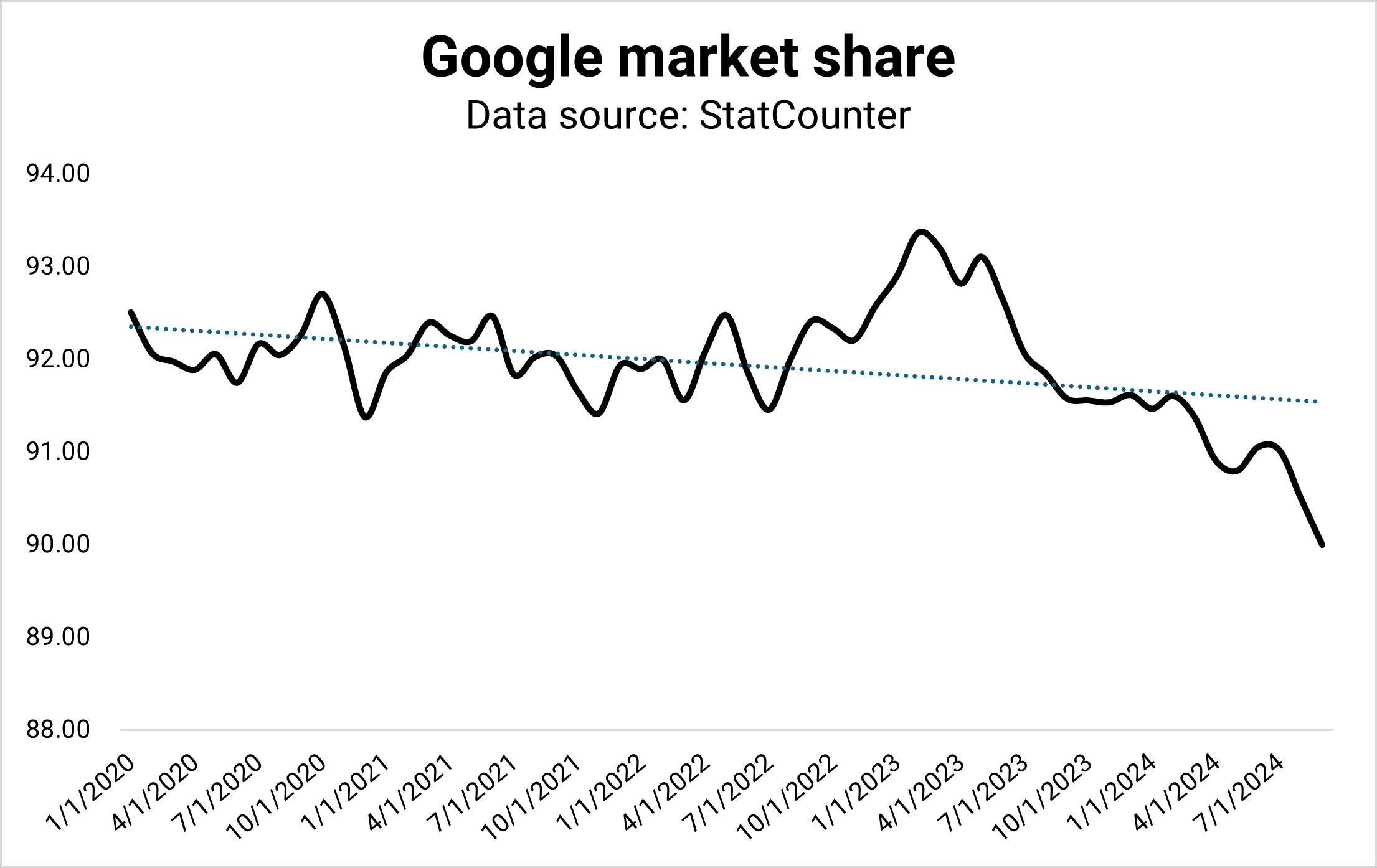
According to StatCounter, Google’s market share dropped to 90% for the first time since the drop to 88% in 2013. The drop could be the result of many reasons, and it could revert.
However, it could also mark a shift from Search to generative AI. I don’t see Google giving away market share to Bing or DuckDuckGo but ChatGPT, Perplexity, and Microsoft Copilot.
Image Credit: Kevin Indig
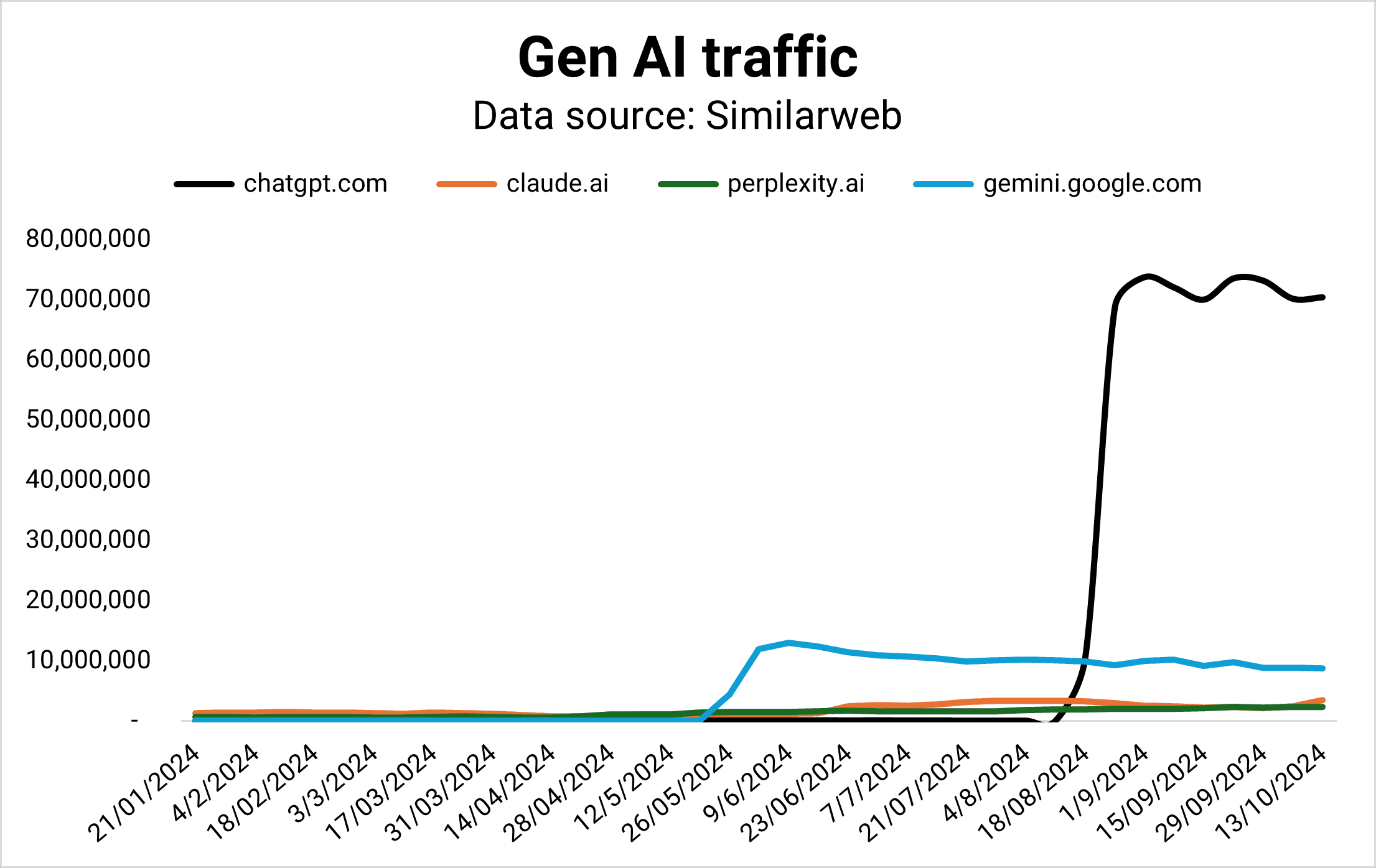
While Google maintains a 90% market share in Search, it doesn’t lead in the market of the future: Gen AI.
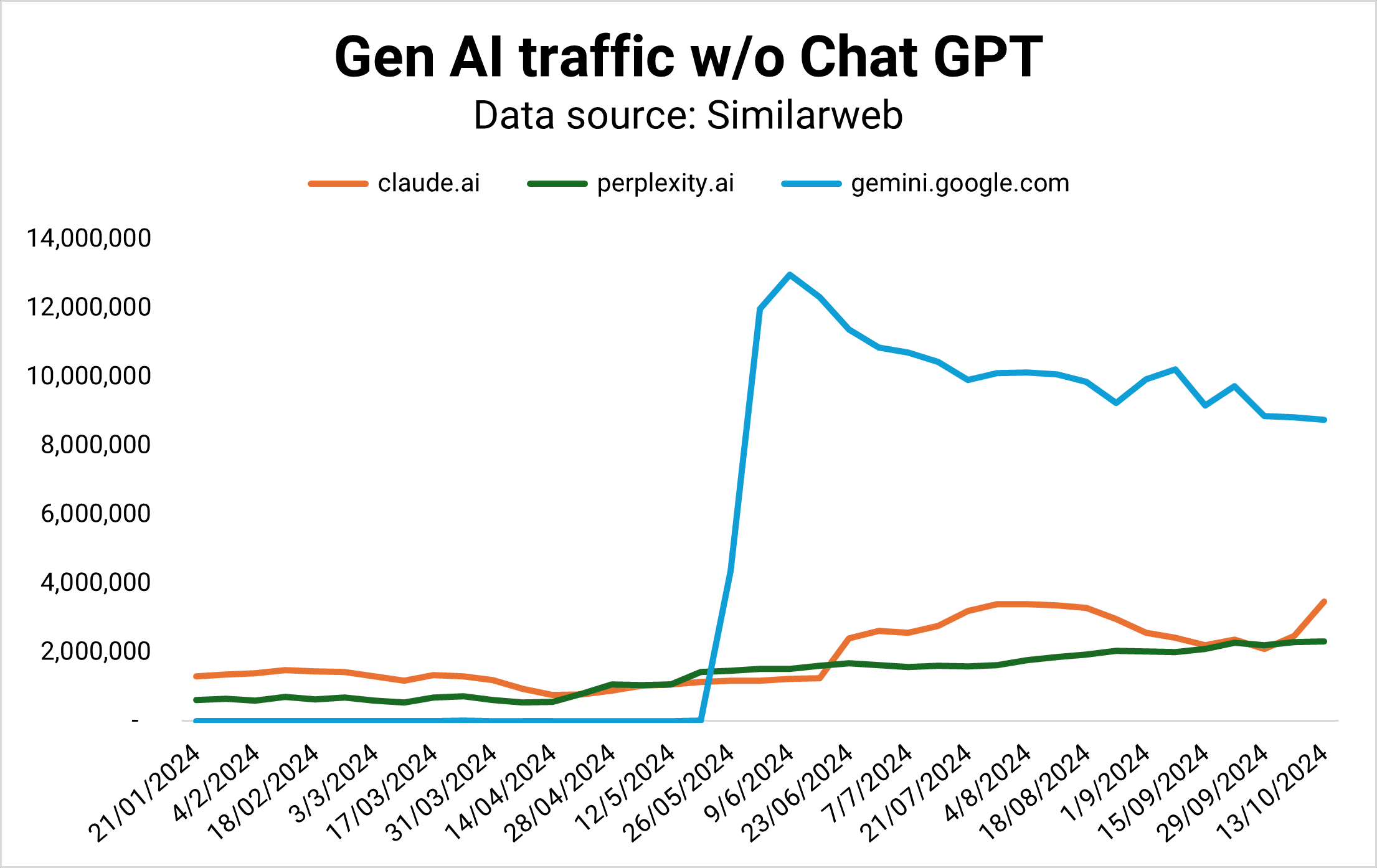
Gemini was supposed to be Google’s horse in the AI race, but its market share is flattening while Claude and Perplexity are gaining ground – fast.
OpenAI is currently winning the Gen AI competition by traffic (Image Credit: Kevin Indig)
Taking Chat GPT out of the picture, we can see that Gemini is stagnating (Image Credit: Kevin Indig)
In 2024, Perplexity answered as many queries per month as it did in the whole year of 2023. The number is still small compared to Google, but the trend is growing.
A series of painful fumbles – from diverse Nazi pictures to fake demo videos and misinformation – mark Google’s chase to keep up with the competition.
Then there are fumbled AI product launches. Google’s first reaction to ChatGPT’s stunning success was a stunning failure. The introduction of Bard in February 2023 cost Alphabet $100 billion in market value due to false facts in the announcement.
In December 2023, an impressive demo of Gemini turned into a PR disaster when it turned out to be fake.
In March 2024, Alphabet’s shares dropped by -5% when it turned out Gemini delivered heavily biased and obscure historical images.
Google wants to get AI right so badly that it’s willing to cut corners. Not something you’d expect from the company that invented the underlying LLM technology (Transformers) in the first place.
Former CEO Eric Schmidt’s opinion about the cause of Google’s struggles didn’t help the situation:
“Google decided that work life balance and going home early and working from home was more important than winning. And the reason startups work is because the people work like hell.”
Google’s AI Overviews are the antithesis of the classic search model. Early referral traffic data from gen AI like ChatGPT, Gemini, and Perplexity shows a tiny amount of users clicking through to sites.
If that’s any indication of what we can expect from AI Overviews, Google is turning from a click distributor to an engagement platform.
Advertising
The big question for Google shareholders is how well the company can navigate advertising in the new LLM search world.
Ads can be complementary to search results. But, when users get the answer directly, sponsored results distract from the experience. The old ad format might not fit the new mold. Google has to figure this out but has not yet delivered an innovative approach.
AI transforms digital advertising across creative + copy, matching/targeting, and spend optimization.
However, with more AI Overviews answering questions in the search results, users might need fewer queries to solve problems overall, shrinking the ad market for Google.
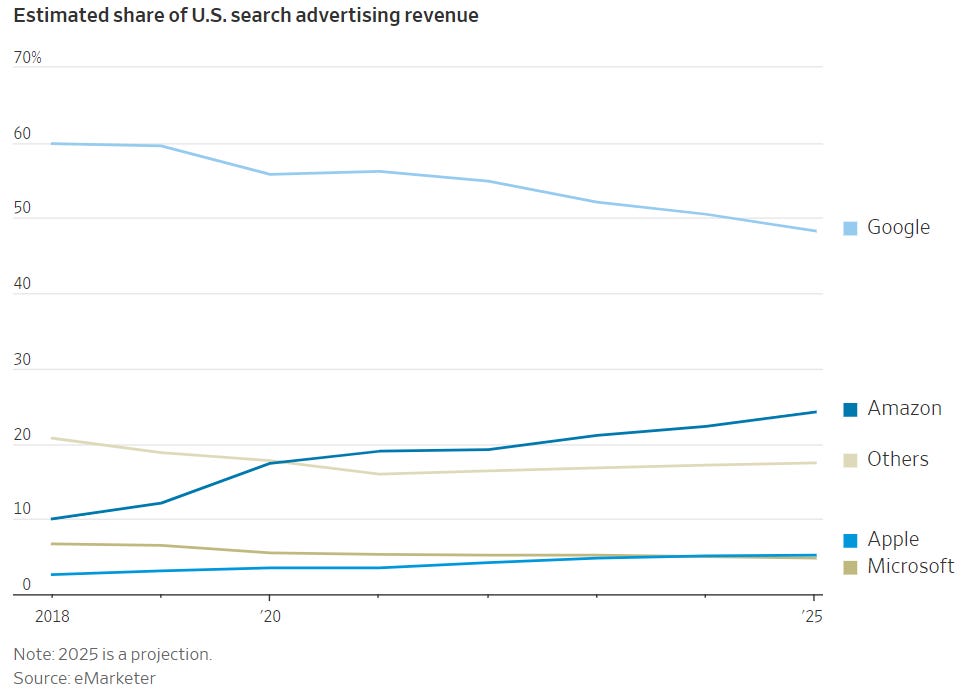
Google is projected to hit an all-time low of less than 50% of available ad dollars next year. Strong challengers like Amazon and TikTok and long-term rivals like Meta are grabbing market share.
Google is projected to hit less than 50% ad revenue market share in 2025 (source) (Image Credit: Kevin Indig)
Google announced a new shopping experience with little to do with a classic search engine.
The reimagined ecommerce experience shows how hard Google wants to compete with Amazon, which faces more competition from TikTok.
As a result, TikTok is competing not only with Google in search but also with ecommerce.
The focus on ecommerce indicates the opportunity for Google to make money from high-intent searches when users don’t need to click through to sites anymore for answers.
But Google wasn’t able to ever kick Amazon off the throne, leaving it exposed for commercial queries.
We can only hope that Prabhakar’s departure leads to a better Google Search. Nick Fox, who will succeed Raghavan, might not be the change agent we seek.
In an email thread with then Head of Search Ben Gomes from 2019, Fox seems open to taking on revenue goals but also not an advocate for it.
To Ben Gomes’ concern:
“…I think we are getting too involved with ads for the good of the product and company…”
Fox responds:
“Given that (a) we’re responsible for Search, (b) Search is the revenue engine of the company, and (c) revenue is weak, it seems like this is our new reality of our jobs?”
However, I question how important Fox is for the future of search anyway. The more important person is Demis Hassabis, founder and CEO of Deep Mind.
Every leadership change brings with it an opportunity to move to a better formation.
With Raghavan’s “promotion” come two important shifts: Gemini moving under Deep Mind, and Assistant moving to the devices team.
Hassabis is the person we need to watch because he now runs Gemini and with it, the quality and volume of AIO answers.
On the talking track, Hassabis stresses the need for responsible use of AI.
Marketers work with search data every day, but we’re greatly underutilizing its potential.
Let me explain.
Search data can tell us all kinds of things about markets, audiences, behavior, and preferences. It’s a source of intelligence that informs smarter, better, more timely business decisions beyond SEO.
In this article, I’ll introduce you to a different way of looking at “search data.”
We’ll talk about sources, which data to pull, and how to use it to arrive at powerful insights quickly.
What Is Search Data?
Search data is any data collected when a user searches a public website by entering a query string to find relevant information (products, information, or answers) from a library of different content (website pages, media) published from different sources (websites, creators).
When people conduct this type of search, they take direct action driven by a need. Put more simply, search data is “active demand.”
Looking at search behavior at scale unlocks a new way of gauging demand for whole industries, specific verticals, unique topics, individual brands, and beyond. This process is known as digital market intelligence.
What Is Digital Market Intelligence?
Digital market intelligence collects and analyzes thousands to (sometimes) millions of digital data points – from public, ethically sourced data – to get to the kind of insights that would traditionally require qualitative surveying.
Except that it’s a lot faster than surveying, and often, it’s more accurate because:
The data reflects real behavior from real people who are free from survey bias or influence.
It collects vast data sets in mere days (versus weeks or even months), ensuring timeliness and relevance.
Data sets contain significantly more data representing huge swaths of the population (versus a small survey sample).
Image from Gray Dot Co, October 2024
Search data is one of the primary inputs in digital market intelligence because it provides an abundance of real user behavior data at an extremely low cost.
Note: DMI is most effective when looking at established industries with a meaningful digital footprint – it doesn’t work for everything!
Where Do We Get The Data?
When most of us think of “search data,” we think of Google data. And make no mistake, that’s a huge piece of the puzzle. Google is still a giant in the search game!
But we’re also stepping out of the silo and acknowledging that sources like YouTube, Pinterest, TikTok, etc. are sources where users exhibit active demand.
The datasets from each are extremely valuable for digital market intelligence because we can tap into them at a marginal cost via APIs, platform-specific reporting tools, and third-party tools.
(For a lot cheaper than traditional consumer insights work!)
Google Search Console.
Google Ads.
Youtube API.
Google Trends.
Third-party tools like Semrush or Ahrefs.
Pinterest.
TikTok.
Image from Gray Dot Co, October 2024
Which Search Data Is Meaningful?
Now that we’ve established where we’re actually sourcing the data, what are we pulling?
Metrics we work with day in and day out are the raw inputs for calculations that answer big business questions:
Image from Gray Dot Co, October 2024
Keyword volume quantifies how often people actively look for products, information, or brands at any given time.
Hashtag volume measures how much of the content landscape is saturated by a given topic or brand.
Keyword intent identifies where people are in the customer journey, plus common behavior and language at different funnel stages.
Competitor research compares demand for brands apples-to-apples, plus how much demand each captures in the landscape.
Historical trends create a clear snapshot of shifts in demand to illustrate the trendline for any topic area over time.
What Can Search Data Tell Us About The Market?
Digital market intelligence can answer a lot of the questions marketing teams and even business leaders run into regularly.
Let’s take a look at some of the most common and illustrate how DMI can yield quick insights using search data.
Did The Market Grow Or Shrink YoY?
This is basically an exercise in summing active demand for the search terms that apply to your business or industry.
In a classic consumer insights sense, the size of the market is generally referred to as the Total Addressable Market.
To quantify TAM using search data, calculate the total keyword volume for the year across relevant search terms. You can source and export keyword volume at scale by using a third-party tool such as Semrush or Ahrefs.
Once you have your TAM total for both years, compare them to quantify the YoY difference. In terms of a calculation, it would look something like this:
[Total volume: Relevant keywords in year A] - [Total volume: Relevant keywords in year B] = YoY change in market size
Is An External Factor Having An Impact?
Your business tactics could drive a jump or drop in performance, but it could be something that’s out of your control altogether.
Leadership will want to know whether it’s the “tide” or something the “boat” (your marketing team) is doing.
Sometimes, the quickest and easiest way to tell is to turn to search data — specifically our often-overlooked friend, Google Trends.
For the sake of example, let’s take a look at a simple case of an external factor driving increased demand for a service. Specifically, did the Olympics drive an increase in the demand for gymnastics lessons?
We know that the Olympics took place between Jul. 26 and Aug. 11, 2024. Now, we need to know how searches for “gymnastics lessons” in this window compare to other periods of time outside of the Olympics.
Screenshot from Google Trends, September 2024
It’s clear from the data that there was a significant increase in interest in gymnastics lessons during the Olympic window.
We see a much smaller increase during the window of the 2020 Olympics (Jul. 23 – Aug. 8, 2021), but we can probably attribute this to COVID-19 and related restrictions/behaviors.
This type of insight isn’t just valuable for gauging whether the industry tide affected performance.
It’s also invaluable for determining when to lean into specific products, information, or trends through levers such as increasing paid spend, launching social campaigns, or shifting the overall marketing mix to meet the moment.
How Does Demand For Our Brand Compare?
Search data allows us to compare active demand for Brand A to active demand for Brand B to answer this age-old question.
For this exercise, pull keyword volumes for any queries that contain Brand A’s name in the string. Then, do the same for Brand B over the same window of time.
Add the keyword volume for each respective brand to come up with the brand total. Then, calculate the difference to understand how they stack up.
[Total volume: Brand A branded KWs over X months] - [Total volume: Brand B branded KWs over X months] = Difference in active brand demand
Are We Visible Enough To Drive Awareness?
The search landscape is one big conversation. “Share of voice” can tell you how much of the conversation the brand is actually participating in.
This measurement takes the total keyword volume a brand is competing for as a percentage of the total volume of possible, relevant keyword opportunities for the brand.
Since only 0.44% of users visit the second page of search results, start by identifying keywords where a brand ranks on page one (either traditional placement, featured snippet, or AI Overviews). Because if it’s not on page one, a brand isn’t actually competing in most cases.
Calculate the aggregate volume for these keywords, divide it by the total volume across all relevant keyword opportunities (regardless of ranking), and multiply by 100.
( Brand-eligible keyword volume] / [Landscape keyword volume] ) x 100 = [% Share of Voice]
It Starts With A Simple Shift In Perspective
Looking at familiar numbers in new ways starts to unlock business-critical narratives.
And it doesn’t stop with search data!
Data from social media platforms and forum sites hold their own unique opportunities to understand markets even more through the lenses of engagement and consumer behavior.
Step one is making the mental shift from search data to demand data.
It’s a subtle shift that can take us out of our siloed way of looking at data. Breaking down those walls is the key to making digital market intelligence work for you.
Go forth and find those illuminating answers — at the speed of modern business.
Google’s John Mueller answered a question on LinkedIn about the ideal content length for performing well on Google. Participants in the discussion pressed for specifics, raised concerns about being SERP-blocked by Reddit, and suggested that Search Console should offer content feedback. Mueller’s response challenged SEOs to rethink their approach to content.
What’s The Best Length Of Content For SEO?
Of course, the underlying problem is the question itself which is asking what should be done in order to make better content for Google, which is the opposite of what Google’s algorithms are set up to identify.
Yet, there is some merit to the question because maybe some people are new to publishing and don’t really understand what the best length is for content. On the other hand, publishing content that’s so long that it veers off topic is a mistake that many people, regardless of experience level, commonly make.
This is the question asked:
“Hi John, is there an ideal content length that performs better on Google search results? Should we focus on creating longer, in-depth articles, or can short-form content rank just as well if it’s concise and valuable?”
There are a lot of ideas about how to make content so it’s understandable if someone is confused about it.
Mueller’s Answer Is Questioned
Google’s John Mueller answered the question and it was a good answer. However others had concerns about the ranking choices that Google makes that can block good content from ranking.
Mueller answered:
“There is no universally ideal content length. Focus on bringing unique value to the web overall, which doesn’t mean just adding more words.”
Mueller’s suggestion to focus on bringing “unique value” with published content is good advice. Adding unique value doesn’t necessarily mean adding more images, more content, less content, more graphs, or step-by-steps. All of those things could be helpful but only if it’s relevant to a user and their query.
Yet, as someone pointed out in that discussion, a site with good content could still lose out in the SERPs due to Google’s “preference” for showing sites like Reddit.
A person with the user name SEOBot _ wrote that Google should offer more information and feedback about what “unique value” content means in relation to their own content. While it might seem strange that a publisher is unclear about what constitutes “unique value” content, the question calls attention to the confusion that some publishers feel about how sites are ranked by Google.
This is the follow up question asked by that person:
“…do you have any example of content on the website that follows this and is able to get the Google love. “Focus on bringing unique value to the web overall, which doesn’t mean just adding more words.” This is a very vague and unrealistic ask if the GSC can start pinpointing this content/section as not making any sense or not adding any value.
We really eager to learn and know how the content is actually generating value to the web. If all the value is being generated by top publishers/brands then what exactly the small publishers/niche site owners suppose to write to survive?”
Mueller responded:
“SEOBot _ If you’re looking for a mechanical recipe for how to make something useful, that will be futile – that’s just not how it works, neither online nor offline. When you think about the real-world businesses near you that are doing well, do you primarily think about which numbers they focus on, or do you think about the products / services that they provide?”
What Mueller seems to be saying is that focusing on site visitors, not Google, is the way to understand what “unique value” content is.
I recently presented at a search marketing conference on the topic of seven things publishers can focus on to improve their content. There’s a lot to say about optimizing content but really, publishers and SEOs can get pretty far by taking Mueller’s advice about thinking about how you would approach selling to people in an actual store or focusing on writing for people (like I’m doing right now).
Others joined the conversation to essentially ask the same thing, looking for specifics on what Google is looking for in content. Mueller had said all there is to say about it.
Mueller advised:
“If you count the words in best seller books, average the count, and then write the same number of words in your own book, will it become a best seller? If you make a phone that has the same dimensions as a popular smartphone, will you sell as many as they do? I love spreadsheets, but numbers aren’t everything. “
Takeaway
If everything a person has learned about SEO centers around strategies for keywords, worrying about “entities” and whether articles are interlinked with the right anchor text then what Mueller is saying will sound confusing. I’ve been doing SEO for 25 years and I remember a time where SEO was about creating content and links for Google. But this isn’t 2004, it’s 2024 and we’ve reached a time with SEO where it’s increasingly not about creating content for Google.
If you’ve been paying attention to the chatter in the SEO space recently, you might have noticed that “brand marketing” has become cool again.
Due to the Google “leaks,” many SEO pros have come to the conclusion that building a strong digital presence will yield SEO results.
Also, water … is wet.
Leaks, floods, and drips aside, there are better reasons why you should be focused on brand marketing right now.
Allow me to explain. [Warning: This post contains excessive amounts of snark.]
Building The Case For Brand Marketing
I’m not going to do the whole “5 reasons why you should focus on brand in 2024.” It would be off-brand for me.
What I would like to do, if you’ll indulge me, is first build up the case by looking at where the ecosystem we call the web is currently at.
I’m less focused on “the benefits” of the brand and more concerned about why the ecosystem itself demands a focus on this type of marketing.
It’s less a matter of “you’ll get X, Y, and Z” by focusing on the brand and more a matter of why you’ll be out of sync with your potential audience as a whole.
The Web Is Moving To Be More Conversational
The internet has become more conversational, and it’s only going to get more conversational.
One of my soapbox points is that content is one of the most quickly changing things on the planet. What we consume, how we consume it, and what we expect out of it are rapidly and constantly changing, and the consequences are often underappreciated.
My classic example of this was the first televised US presidential debate, which took place in 1960 and pitted John F. Kennedy against Richard Nixon.
If you listened to the debate on the radio, you tended to think Nixon won. Those who watched on TV tended to think JFK won.
Why? Well, Richard Nixon comes off as Richard Nixon, and JFK, well looks like JFK. I’m being a bit facetious, but it is true. Nixon famously looked pale, had a five o’clock shadow, and didn’t look directly at the camera.
The evolution of content has extremely understated consequences.
Like in 1960, we are at one of those pivotal moments in the history of content.
Think of the internet like TV commercials. Over time, what once resonated becomes campy and sem, if not downright, spammy.
Could you imagine Coca-Cola running and trying to sell its product using its 1980s Max Headroom “Catch the Wave” commercial?
Try selling my kids a sugar-infused breakfast cereal using a TV commercial from the 1950s. Good luck.
It’s not because those commercials are “bad.” It’s because the language and tone that resonates changes over time.
It’s a simple enough point … unless we’re talking about web content. For some reason, we feel web content and its consumption trends should eternally stay the same.
We write the same kind of content in pretty much the same way and balk at any changes.
But that doesn’t change the reality.
The content we create doesn’t speak to users. It’s not positioned correctly. The tone is off. The goals that support the creation of content, to begin with, are distorted. And more. There are a lot of problems – and to me, they all begin with content not being conversational.
In fact, I will go so far as to say Google should stop saying, “Write for your users,” and should start saying, “Have conversations with your users.”
We all think we’re “writing for our users” – I mean, who else are we trying to lure and convert?
It’s very easy to fool yourself into thinking you are “writing for your users.” It’s harder to convince yourself you are having some sort of dialogue with your users – which is what I think Google really means anyway.
All this said, what do I mean by content not being conversational and how do I know it’s even a problem?
What I Mean By Content Not Being Conversational
It’s not hard to see that we are not engaging our users in a conversation or dialogue.
All you need to do is head over to your nearest landing page and have a look at the language.
How much of it is just the company throwing out jargon or borderline nonsense?
Here’s what I came across in literally less than five minutes of digging around:
Screenshot from author, July 2024
Is it really without limits? Can I literally do whatever I want without any limitations whatsoever? I don’t get it – are we talking about God or graphic design software?
Is the below really a new way to run high-velocity sales? Does it literally refine the entire process like no one else is doing or has done before? Or is the company just saying this and spitting out whatever they think will drive conversions?
Screenshot from author, July 2024
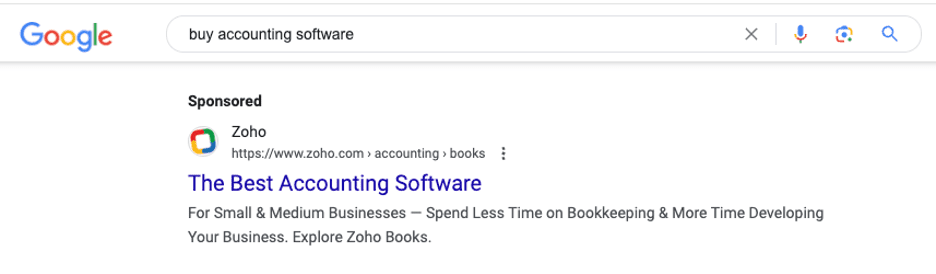
You see this all the time in PPC ads:
Screenshot from search for [buy accounting software], Google, July 2024
No nuance. It is the best accounting software, and I should trust that it is without any form of qualification.
This kind of copy, while it may have worked in the past, doesn’t (and if it does now, it won’t in the relatively near future).
This kind doesn’t actually talk to users in a real way. It actually treats the user like an idiot.
The average web user is far more savvy than they once were, far more mature, and far more skeptical.
Not taking a more genuine approach is starting to catch up with brands.
How Do I Know Not Being Conversational Is Even A Problem?
Greenwashing.
It’s when a company claims to be more environmentally conscious than it is. It’s spin and PR nonsense.
Companies thought they could pull a fast one on unsuspecting users. However, folks are now savvier and are catching on to brands positioning themselves as being “green” when, in reality, they might not be (or at least to the extent advertised).
You cannot get away with it anymore (and you never should have tried). The only thing that works is being genuine.
If your product is not actually “the best,” then don’t say it is – or, in fact, realize there is no “best” or “ultimate” or “fastest” or whatever. There is only what meets the needs of users in what way. That’s fancy talk for “pain points.”
Being genuine means talking to your audience and not at your audience. It’s having a dialogue with them.
Going the “traditional” route with your language is the equivalent of marketing language greenwashing … and it applies to your informational content, too.
Perhaps nothing epitomizes this more than the falling stock of influencer marketing. Study after study shows that younger users are far less likely to purchase something because an influencer is associated with it.
Influencer marketing, as we mostly know it, is a facade pretending it’s not a facade. Do you think Patrick Mahomes really eats Chicken McNuggets or has a strong preference to use State Farm for his insurance needs?
All influencer marketing is just a digital marketing version of a celebrity in a TV commercial.
Do you think whatever TikTok influencer really prefers Capital One or even knows that it’s not a geographical reference?
While the idea of “influencers” seemed like a viable idea at the onset it’s fundamentally not sustainable because it’s fundamentally fraudulent. (For the record, “community” marketing is something else entirely. While it might rely on “influencers” within a community, it is far more genuine.)
It seems that folks have caught on to the idea that maybe this influencer being paid to say or do whatever is not actually an accurate reflection of reality (much like social media influencers themselves, to be honest).
A 2023 Drum article quotes one study as saying upwards of 80% of users say a brand’s use of influencers does not impact them one way or the other.
For the record, there are other studies that indicate that influencer marketing is a viable option. I agree, but I think it needs to be qualified. Just paying an influencer to say good things about your brand is not authentic.
There are authentic ways to work with communities and influential folks within them. That tends to happen more with micro or nano influencers.
Again, it’s rocket science. Everyone knows the influencer is only saying the things they are saying because they’re being paid to. It’s relatively meaningless in a vast majority of cases.
It shows how much savvier the current web user is relative to the past, and it’s supported by where folks are heading and what they are trusting … themselves (DTA, am I right?).
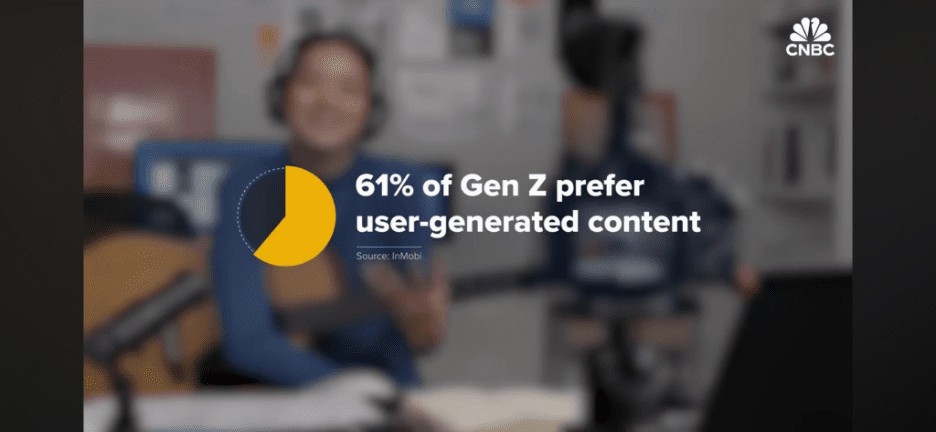
A seemingly endless number of studies show users looking toward user-generated content. CNBC was quoted as saying, “61% of Gen Z prefer user-generated content.”
Image from CNBC, July 2024
Which brings me to my next point.
Informational Content Is Just As Bad & Reddit On The SERP Proves It
Up until this point, I’ve been focused on the nature of commercial content and the demand for conversational content.
The same concept applies to informational content, just for a slightly different reason.
Informational content on the web might not be as opaque as commercial content, but it is entirely sterile and stoic.
By sterile and stoic I mean content that doesn’t actually speak to the user. It takes a topic, breaks the topic down into various subtopics, and simply presents the information, and does so without ever discussing the context of the readers themselves.
No one has more data on emerging content consumption trends than Google and its ability to analyze user behavior in a variety of ways. And what has Google done for informational and commercial queries alike? Plastered the search engine results page with user-generated content.
The proliferation of Reddit on the SERP should tell you everything you need to know about the state of informational content and beyond.
All you need to do is head to the Google SERP and take a look at all of the Reddit results strewn all over the place, from different SERP features to the organic results themselves.
And while SEO pros may be upset about the abundance of Reddit (and rightfully so in my opinion), we have no one to blame but ourselves.
Do you really think Google wants to rank Reddit here, there, and everywhere? I personally don’t. I think Google would much rather have a diverse set of experience-based content to rank.
Regardless of your feelings about Reddit on the SERP, users’ inclination to prefer content created by other users tells you one thing: People are looking to move past all the facades and want something transparent that speaks to them—not at them.
Think about content like dress codes in the office. In the 1950s (at least in the US), it would be unheard of to show up to the office with anything but a suit and tie or a dress.
Just like professional dress codes have become less formal, so has content become “less formal” too.
And it’s a relatively recent development on both fronts. In fact, I would actually argue that office dress codes are a good representation of “where we are at” in terms of how and what we consume in terms of content via-a-vis formality.
While more traditional marketing language might have been acceptable and effective just a few years ago – it’s not any longer (at least not to the extent). We are less formal as a people, which means speaking to each other is also less formal. That has to spill over to web content at some point, and it has.
The AI Of It All
The rise of AI-written content accentuates all of this. When everything starts to sound the same having an actual voice comes more into focus. As AI conversion evolves, users are going to want to know that what they are consuming is “real.”
Much like a paid influencer, AI-written content doesn’t offer an authentic experience. And if we can see one theme in what users are looking for, it is an authentic experience.
I know someone is reading and thinking, “But AI is conversational!”
I would not confuse the fact that AI can reply back to you in an informal way as being an actual conversation or dialogue with another actual lifeform.
I have many relatives who will chew my ear off for hours on end as I nod away – that is not (much to their surprise) a conversation. Inputting prompts in reply back to an LLM and then having that LLM respond is not a conversation. (I feel like it’s insane that I have to say that.)
A real dialogue has to be based on empathy and the coming together of two distinct entities. This is what I mean by conversational. The dialogue has to be based on understanding the user’s pain points and meeting them.
AI not only doesn’t do that – but it dilutes that very concept. AI is content creation inherently devoid of understanding the “other.”
AI-generated content is the exact opposite of empathetic content. It is no wonder that it will drive a greater demand for something that is more connective (i.e., conversational content).
The rise of AI-generated content will inevitably lead to a greater demand for more conversational content simply because it is human nature to yearn for connection and existentially disdain void.
When you couple together the growing impatience with stale and stoic content aligned with the facade of much of the web’s commercial content with the rise of AI, it’s the perfect storm for a shirt in user demand.
A More Conversational Internet Is More Autonomous Internet
What’s this got to do with brand marketing? We’re getting there. One more step.
Users looking for more authentic web experiences point to people not wanting to be sold to. Skepticism and distrust are triggered by being urged to make a purchase.
Rather than being induced to click by some clever headline or urged to make a purchase by some influencer, people want to make their own decisions.
They’re looking for real advice. They’re looking for real information to have real needs met. And then they’re looking to be left alone to use that information to their liking.
It’s not an accident that Google added an “E” to E-E-A-T for “experience.” It wants quality raters to evaluate a page from an experience perspective because it has determined this is what users are looking for.
When your entire modus operandi is to seek out authentic information and experiences, the last thing you’re looking for is to be coerced. The last thing you want is to feel pushed into something.
The quest for authenticity in experience-based information is entirely about being able to make a well-informed, autonomous decision.
Urging users to click and convert with all sorts of marketing language and over-emphasis is antithetical to this mindset. Using language that feels slightly manipulative is antithetical to this mindset.
Trying to create spin and putting up a marketing facade (such as with classic influencer marketing) is antithetical to this mindset.
You can’t have Michael Jordan jumping over Spike Lee in a commercial to sell shoes anymore. It’s not real, and it’s not authentic. It’s fantastical. It’s fake.
You also can’t “drive” conversions by telling users you’ve developed a “new,” “revolutionary,” or “ultimate” solution for them. It’s not real, and it’s not authentic. It’s fantastical. It’s fake.
You have to create an environment where the user feels empowered and uncoerced.
How do you then go about targeting growth and revenue, all while allowing the user to feel autonomous and unsolicited?
Brand marketing.
Brand Is Your Best Friend In An Autonomous Web Scenario
I know there is going to be a tremendous amount of resistance to what I am about to say.
In fact, most companies will balk at my conception of things. For SaaS, it’s probably borderline heretical (I think startup SaaS brands often lag behind consumer trends more than anyone).
If user autonomy is the fundamental brick on the house the ecosystem is built on, then being top of mind is the cement that holds your marketing efficacy together.
What’s the opposite of pushing for clicks and conversions? Allowing the user to come to you at their own time and at their own speed.
Being top of mind is more important than it ever was because it aligns with the underlying psychological profile driving web experiences.
There is a direct equation between the consumer demand for autonomy in the buying journey and brand marketing. Creating the right associations and developing the right positioning with genuine differentiation is of the utmost importance if you want to align with how users think – and, more importantly, feel about the web.
If I had to put in a more “performance-focused” mindset, direct traffic is the future of the web. Get them to come to you on their own terms.
It works for both parties. You’re less susceptible to relying on whatever platform’s funky algorithm (whether it be social or search, it all kind of feels like a mess right now). At the same time, your users don’t feel like you’re overselling, pushing clicks, and otherwise nudging them to convert.
They’re coming to you because they found out about you, liked what they saw or heard, and decided to pursue the possibility of buying from you at their own pace.
Moreover, the brand allows you to connect. Again, in an AI world, the drive for connection will only increase. Brand is the intersection of your identity and your audience’s.
It is an associative connection, and it allows your audience to understand that there is a “you” behind the product or service you are offering.
This is the power of branding in the modern web.
What Kind Of Brand Marketing?
What kind of branding creates autonomy? Education-focused brand marketing.
Brand marketing can mean a lot of things to a lot of different people. Often, on the digital stage, it means pushing the value of your product across the web.
I am not saying that this doesn’t have value or that it shouldn’t be done, etc. I am saying this is product marketing disguised as brand marketing.
90% of your brand marketing should hardly (if at all) push your product (beyond maybe a mention or something subtle of that ilk).
Brand marketing is about fostering an identity (either of a product, service, or the company as a whole) and using that identity to create messaging that positions the said product, service, or company in a certain way, thereby establishing a connection with your target audience.
The associations you build and the sentiment towards your brand that you establish should, hopefully, result in your audience seeing you as a relevant solution. But this is associative, and that’s important to remember.
The kind of branding I am talking about is focused on adding value to your audience’s life. Note that I didn’t say offering value via your product or service to their lives. First comes the value, and then comes the value from your product.
You can’t push the product in what might be called “branding” without first establishing a brand that showcases concern for the user and their life context independent of any “ask” (such as making a purchase).
You wouldn’t ask your neighbor for a cup of sugar before saying, “Hi, good morning. How are you?”
You shouldn’t ask your consumers to open their wallets and fork over money before establishing a real connection.
Yet, this is pretty much the internet as we know it.
A Note On Performance Marketing
I am not advocating you should not use performance-based marketing tactics to increase your reach and sales and whatnot. Performance-based marketing can be a powerful force for growth and revenue expansion.
What I am advocating for is performance sitting within a broader branding context. There has to be a balance between the two (and I don’t think it is an even balance).
With that cliffhanger, perhaps I’ll explore the balance between brand and performance at another time.
Google alone processes over 100 billion searches a month. So, if you get your strategy right, the potential to reach new customers through search is immense.
But here’s the catch: Search algorithms are always changing. The recent introduction of generative AI directly in search has shaken up how users interact with search engines.
What that means for SEO is that you can’t just set it and forget it – your SEO strategy needs to adapt to these changes to stay competitive.
In this guide, we’ll walk you through the steps for creating an effective SEO strategy that aligns with both search engine algorithms and user expectations.
1. Align SEO With Business Goals & Define KPIs
It’s crucial to align your SEO strategy with your overall business goals and define the key performance indicators (KPIs) that will help you measure success.
Knowing where you want to go and how you’ll measure progress ensures that your SEO efforts are focused and effective.
Your SEO goals should support your business objectives, whether that’s increasing brand awareness, driving more traffic, generating leads, or boosting sales.
During this planning phase, you’ll want to define your KPIs.
This is how you’ll measure the success of your implementations and figure out what’s working for you and where you need to make adjustments.
Average engagement time on page and bounce rate. (Bounce rate is not a universal metric for everyone, but is 100% dependent upon the events you set up).
Keep in mind that these are internal SEO KPIs that you can track in analytics.
Higher-level executives may be more interested in overall business impact, such as SEO-supported attribution and how SEO contributes to the customer journey.
It’s also important to convey that SEO is a long-term strategy that may take time to show significant results.
2. Set Realistic Expectations
One of the most common mistakes people unfamiliar with SEO make is expecting overnight results.
SEO is not a direct response style of marketing, and not all SEO strategies result in an immediate outcome.
Because of the variables involved with competition, inbound links, and the content itself, it’s nearly impossible to provide a definite timeframe.
You need to go into the process with an understanding that SEO takes time, and the more competitive the keywords you’re going after, the longer it will take to climb to the top.
This needs to be conveyed to stakeholders from the start to ensure expectations are realistic and to establish consistent, accurate data that earns trust.
SEO can be part of the entire customer journey.
Someone might find your site via organic search, then later see a paid ad, and finally make a purchase. Or they might see an ad first, then search for your brand and find you organically.
This is where multi-touch attribution comes into play. Using multi-touch attribution tracking tools like Triple Whale can help you understand how different channels contribute to conversions.
3. Conduct SEO Audit
Now that you’ve aligned your SEO strategy with your business goals and set the right expectations, it’s time to understand where you currently stand.
An SEO audit serves as the roadmap that will guide you throughout the entire optimization process and allows you to benchmark against your current site.
You need to examine a variety of aspects, including:
Domain name, age, history, etc.
On-page SEO factors like headlines, keyword & topical targeting, and user engagement.
Content organization, content quality, and the quality of your images (no one trusts stock photography).
Once you have a clear understanding of your current SEO status, it’s time to plan your timeframe and allocate budgets and resources.
This is yet another area of life where you get what you pay for. If you’re looking for fast and cheap, you’re not going to get the results you would by investing more time and money.
Obviously, your budget and timeframe will depend on your company’s unique situation, but if you want good results, be prepared to invest accordingly.
Search engine rankings are determined by an algorithm that evaluates a variety of factors to decide how well a website answers a particular search query. And a huge part of that is the use of keywords.
From single words to complex phrases, keywords tell search engines what your content is about. But adding keywords isn’t quite as simple as just plugging in the name of the product or service you want to sell.
You need to do research to ensure keyword optimization and avoid cannibalization, and that means considering the following:
Search Intent
Words often have multiple meanings, which makes it crucial to consider search intent, so you don’t attract an audience that was searching for something else.
For example, if you sell hats, ranking highly for ‘bowler’ will attract users looking for 10-pin bowling in the U.S., or in the UK about cricket and not someone shopping for a bowler hat.
Relevant Keywords
Once you’ve identified the search intent of your target audience, you can determine which keywords are relevant to them.
By aligning your keywords with search intent, you can produce relevant content and increase your chances of ranking higher in SERPs. Besides ranking high, it will also improve user satisfaction and increase conversion rate.
Keyword Research Tools
The brainstorming process is a great place to start keyword research, but to ensure you’re attracting the right audience and proving your value to search engines, you should utilize a research tool.
They can provide valuable data, such as search volume and competition level, and suggest related keywords you might not have considered.
Search Volume
By using keyword research tools, one of the most important metrics to look for is the search volume.
Ideally, you should target relevant keywords with the highest search volumes. However, it is important to assess the competition around that search term.
If you are going to compete with large and well-established brands and you are just starting, perhaps it is a better idea to choose long-tail keywords with less search volume but less competition.
They tend to be longer and are more likely to be used by people with specific stages in the conversion funnel, helping you reach users who are ready to convert.
An example of this would be [vegetarian restaurants in San Antonio], which would most likely be used by someone with a craving for a plant-based meal.
Lastly, remember that tools provide aggregate data of the same search terms with measurable search volumes, which they obtain from different data providers.
Often, there are long-tail searches that users perform, which are the same but formulated differently, and tools may report them as zero search volume due to negligible search volumes.
This phenomenon is likely to increase as highly intelligent AI assistants are integrated into mobile phones, and users are more likely to perform unique voice searches on the same issue.
If a certain problem is relevant to your specific industry and you know it, but tools report zero search volume, it is worth covering it and offering a solution.
You may find you have decent and highly targeted traffic that converts.
5. Define Your Most Valuable Pages
Every team needs an MVP, and in the case of your website, that’s your most valuable pages.
These pages are the ones that do the bulk of the heavy lifting for you.
For non-ecommerce sites, these are usually things like your home page, your services pages, or any pages with demos or other offers.
These pages are also likely MVPs for ecommerce sites, but will also be joined by category and/or product-level pages.
To find which pages are your site’s most important ones, you should consider what your organization is known for.
What verticals do you compete in? What pain points do you solve? Define these or add more based on the high-level keywords you came up with in the previous step.
Once you’ve identified the category and product pages that bring in the most visitors, you’ll be able to focus your strategy on improving them and increasing your organic traffic.
Here is an example from one of the websites I work on, showing how it looks and highlighting the importance of updating outdated content.
An example of content decay: updating content helped regain organic traffic.
Please note that you should refrain from using automatic updates with AI chatbots, as it is one of the most dangerous, spammy SEO tactics that can result in a complete loss of organic traffic.
Read our guide to learn content decay strategies you can implement to keep your organic traffic growing.
7. Optimize For User Experience
Don’t overlook the importance of how your site is structured, both technically and in terms of how users interface with it.
The best content and keyword strategy in the world won’t lead to a single sale if your site is constantly broken or is so frustrating to use that people close your page in disappointment.
You should carefully consider your site’s architecture and user experiences to ensure people are taking the desired actions.
With mobile traffic being 62.15% of total web traffic (and 77% of retail website traffic), optimizing for mobile is even more critical.
If you didn’t have any competition, there would be no need for SEO. But as long as other companies are manufacturing refrigerators, Frigidaire needs to find ways to differentiate itself.
You need to have an idea of what others in your industry are doing so you can position yourself for the best results.
You need to figure out where you’re being outranked and find ways to turn the tables.
You should know which keywords are most competitive and where you have opportunities by performing content gap analysis.
You should understand your competitor’s backlinking and site structure so that you can optimize your own site for the best possible search ranking.
And remember, AI chatbots are your competitor, too, where users can get answers directly without visiting a website.
This means that some of the traffic you might have received in the past could now be staying in the chatbot.
To compete, you need to offer something AI can’t: unique insights, personal experiences, and authoritative content that stands out.
Consider how AI presents information and find ways to differentiate your content. Focus on building your brand authority and providing value that AI chatbots can’t replicate.
Learn more about how to perform this analysis and develop a template for it by reading this piece.
9. Establishing Brand Authority And Link Building
All the points we covered so far are essential for success in SEO, but they are not enough.
You can achieve success by merely improving your website, and if you aim for your brand to exist only in Google Search, you will likely not be able to rank and achieve success.
It’s not such an easy thing to get right, and that is where most companies struggle and why SEO is hard.
To build brand authority, you need the following steps:
Build an email newsletter list.
Share valuable research and insights others want to link to.
Attend conferences relevant to your field and sponsor them if you have enough resources.
Seek opportunities for interviews or speak at conferences.
Host webinars or live sessions to share knowledge and interact with your audience in real time.
Participate in online discussions with your industry community on different platforms such as Linkedin, Twitter, Reddit, or other platforms specific to your industry.
Collaborate with experts in your industry to contribute to your content.
Invite influencers to try your products or services and share their experiences.
Offer effective support to your customers.
Even if you get unlinked brand mentions, it is a step forward in building brand awareness.
Think of for a moment if one reads your unlinked brand mention on a reputable website (or on a TV show) and performs a Google search to find your brand.
However, in the age of AI, another benefit of unlinked brand mentions is that chatbots – which are trained on content across the web – may surface your brand name to users when they perform tasks or research.
10. Integrate SEO Into Your Workflows
SEO doesn’t exist in a vacuum – it impacts many other parts of your organization, including marketing, sales, and IT.
If you’re looking for the budget to perform SEO, you may find some of your employees are already well-qualified to help.
For example, your sales team probably knows which products people are most interested in.
Enlisting them in your SEO strategy development will help with lead generation and finding new targets who are already qualified.
Similarly, SEO can tell your marketing team what types of content resonate best, so they can fine-tune their campaigns. And your copywriters and graphic designers can develop the type of content that will help you shoot up the rankings.
Your IT team probably already has control over your website.
Your SEO strategy should be designed around their expertise, to ensure website design and structure, development cycles, data structure, and core principles are all aligned.
Evaluate your existing software, technology, and personnel, as there’s a good chance you have some of the pieces already in place.
If you need to scale production up, you may find the budget already in place in existing departments.
If you’re an external SEO agency or consultant, it’s crucial to establish strong communication channels with the company’s personnel who are responsible for implementing SEO recommendations and making decisions.
Read our guide on best practices for establishing effective communication between SEO teams in enterprise companies.
11. Align Your SEO Strategy With Your Customer Funnel
At the end of the day, sales are the name of the game. Without customers, there’s no revenue, and that means no business.
To aid in the sales process, your SEO strategy should align with your customer funnel.
Sometimes described as the customer journey, your sales funnel is a summation of the touchpoints customers have with your company as they go from awareness to post-purchase.
SEO fits neatly with every stage of this cycle:
Awareness: In the modern world, many customers first hear about your business online through a Google search, for example. Well-written blog posts are a great way to increase your awareness and increase your brand recognition.
Interest: This is where customers start doing research. And what better place to do research than your website? In-depth guides and ebooks will be a great match for satisfying users’ interests.
Decision: The customer wants to buy and is deciding between you and the competition. Case studies or testimonials could be the thing that sways them.
Purchase: Having a search engine-optimized point of sale makes it easy for people to buy, and optimized product pages are what can move the needle.
Post-purchase: Once you’ve acquired customers, think of ways to retain them by publishing support articles or offering loyalty programs.
12. Report And Measure
Finally, you need to define what success looks like for each KPI measure and report the progress you’re making.
There are a variety of both paid and free tools available that you can use to measure and track conversions, and compare them weekly, monthly, or by another timeframe of your choosing.
Simply find one that works for your budget and needs.
For a guide on how to create impactful reports that generate quality insights, read our guide here.
Conclusion
No one ever said SEO was easy, at least not anyone who has done it. But it’s a vital part of any modern organization’s business plan.
However, with a solid strategy, a willingness to learn, and a little old-fashioned elbow grease, even a complete beginner can send their website to the top of the SERP.
In this piece, we’ve given you 12 steps to take to get your SEO strategy off the ground. But of course, this is just the start.
You need a unique plan that will work for your industry and your needs.
Luckily, Search Engine Journal can help with this, too.
Download our ebook on SEO strategy with a full-year blueprint for an easy-to-follow 12-month plan you can use to develop a solid strategy, track your progress, and adjust to changing situations.
Google Shopping’s generative AI makeover is a reality check for ecommerce marketers seeking organic search traffic.
Google launched the transformed version of Shopping to U.S. consumers on October 15, 2024.
“The new Google Shopping experience uses AI to intelligently show the most relevant products, helping to speed up and simplify” product searches, according to Sean Scott, Google’s vice president and general manager of consumer shopping, in a blog post.
Small and midsized business leaders often shudder when Google changes one of its services. Phrases like “show the most relevant products,” for example, are concerning. What sort of t-shirt or puffer jacket is “relevant”?
Shopping Graph
The answer might be in the Shopping Graph, which, according to Scott, powers the new Google Shopping along with Gemini AI.
A knowledge graph, such as Google’s Shopping Graph, is a map that connects ideas or concepts (nodes) via relationships (edges).
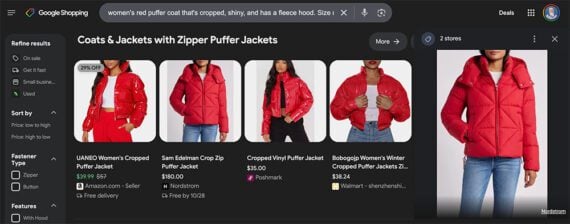
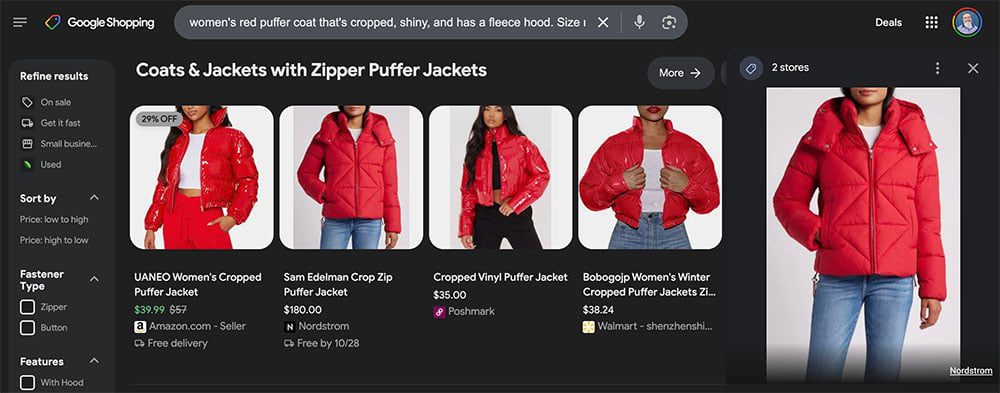
The new Google Shopping can identify puffer coats with zippers. Click image to enlarge.
In a 2023 article, Randy Rockinson, Google’s group product manager for Shopping, described how the Shopping Graph connects concepts.
“Let’s say you’re looking for a puffer jacket,” Rockinson wrote. “That seems easy enough. But what if you have something particular in mind? Maybe you’d love a women’s red puffer coat that’s cropped, shiny, and has a fleece hood.”
In that example, Google’s Shopping Graph understands the connection between a particular jacket on, say, the Nordstrom website and the concepts of red and shiny. It can return a list of products matching the specific request.
Google has used data graphs since at least 2012 and officially announced its Shopping Graph at its 2021 I/O event. Thus retail, direct-to-consumer, and B2B marketers are likely familiar with the concept.
Listings
Google’s Shopping Graph has about 45 billion product listings as of October 2024. Those listings come from several sources, including:
For many merchants, the connection to Google’s Shopping Graph begins with the ecommerce platform. Shopify, BigCommerce, and similar solutions streamline the submission of a well-formated product feed to the Merchant Center.
Nonetheless, knowing that Google Shopping via the Shopping Graph and AI wants to understand details such as whether a puffer jacket is shiny and has a hood unnerves many marketers.
Is your business optimized for these kinds of details?
Product Content
Merchants relying on Google Shopping should audit their product details on that platform, ensuring plenty of specifications and descriptions to help Gemini show personalized results.
Product feed? Showing up in Google Shopping starts with a quality product feed. Ensure that all required attributes — product title, description, price, availability, images — are included and up to date. Use high-quality images. Google Shopping uses images for Google Lens (the visual search tool) and virtual try-on services. And be certain inventory levels are accurate.
Structured data markup? Confirm that your ecommerce site uses structured data markup to give Google more context about your products. Structured data will help Google list and categorize products correctly in its Shopping Graph.
Optimize for visual shopping? In his post, Google’s Scott stated that a primary goal of the new Google Shopping is working with Google Lens and virtual try-ons.
Product reviews? We know that Google’s Shopping Graph gets at least some of its product data from reviews. Thus enabling and encouraging those reviews is a good idea.
Product-focused content marketing? We also know that Google uses YouTube videos as well as third-party blogs, gift guides, and similar to inform the Shopping Graph. Most stores focus only on feeds, which are essential. But don’t stop there. Tutorials, instructions, examples, and more could enable a competitive advantage in Google Shopping.
What’s Next
Search engine optimization and content creation remain at the core of ecommerce marketing as generative AI becomes more prevalent. The new version of Google Shopping is the most recent example.
Understanding how to use the robots.txt file is crucial for any website’s SEO strategy. Mistakes in this file can impact how your website is crawled and your pages’ search appearance. Getting it right, on the other hand, can improve crawling efficiency and mitigate crawling issues.
Google recently reminded website owners about the importance of using robots.txt to block unnecessary URLs.
Those include add-to-cart, login, or checkout pages. But the question is – how do you use it properly?
In this article, we will guide you into every nuance of how to do just so.
What Is Robots.txt?
The robots.txt is a simple text file that sits in the root directory of your site and tells crawlers what should be crawled.
Google will choose the least restrictive one. This means Google will allow access to /downloads/.
Why Is Robots.txt Important In SEO?
Blocking unimportant pages with robots.txt helps Googlebot focus its crawl budget on valuable parts of the website and on crawling new pages. It also helps search engines save computing power, contributing to better sustainability.
Imagine you have an online store with hundreds of thousands of pages. There are sections of websites like filtered pages that may have an infinite number of versions.
Those pages don’t have unique value, essentially contain duplicate content, and may create infinite crawl space, thus wasting your server and Googlebot’s resources.
That is where robots.txt comes in, preventing search engine bots from crawling those pages.
If you don’t do that, Google may try to crawl an infinite number of URLs with different (even non-existent) search parameter values, causing spikes and a waste of crawl budget.
When To Use Robots.txt
As a general rule, you should always ask why certain pages exist, and whether they have anything worth for search engines to crawl and index.
If we come from this principle, certainly, we should always block:
URLs that contain query parameters such as:
Internal search.
Faceted navigation URLs created by filtering or sorting options if they are not part of URL structure and SEO strategy.
Action URLs like add to wishlist or add to cart.
Private parts of the website, like login pages.
JavaScript files not relevant to website content or rendering, such as tracking scripts.
Blocking scrapers and AI chatbots to prevent them from using your content for their training purposes.
Let’s dive into how you can use robots.txt for each case.
1. Block Internal Search Pages
The most common and absolutely necessary step is to block internal search URLs from being crawled by Google and other search engines, as almost every website has an internal search functionality.
On WordPress websites, it is usually an “s” parameter, and the URL looks like this:
https://www.example.com/?s=google
Gary Illyes from Google has repeatedly warned to block “action” URLs as they can cause Googlebot to crawl them indefinitely even non-existent URLs with different combinations.
Here is the rule you can use in your robots.txt to block such URLs from being crawled:
User-agent: *
Disallow: *s=*
The User-agent: * line specifies that the rule applies to all web crawlers, including Googlebot, Bingbot, etc.
The Disallow: *s=* line tells all crawlers not to crawl any URLs that contain the query parameter “s=.” The wildcard “*” means it can match any sequence of characters before or after “s= .” However, it will not match URLs with uppercase “S” like “/?S=” since it is case-sensitive.
Here is an example of a website that managed to drastically reduce the crawling of non-existent internal search URLs after blocking them via robots.txt.
Screenshot from crawl stats report
Note that Google may index those blocked pages, but you don’t need to worry about them as they will be dropped over time.
2. Block Faceted Navigation URLs
Faceted navigation is an integral part of every ecommerce website. There can be cases where faceted navigation is part of an SEO strategy and aimed at ranking for general product searches.
For example, Zalando uses faceted navigation URLs for color options to rank for general product keywords like “gray t-shirt.”
However, in most cases, this is not the case, and filter parameters are used merely for filtering products, creating dozens of pages with duplicate content.
Technically, those parameters are not different from internal search parameters with one difference as there may be multiple parameters. You need to make sure you disallow all of them.
For example, if you have filters with the following parameters “sortby,” “color,” and “price,” you may use this set of rules:
As John Mueller stated in his Reddit post, you don’t need to worry about URL parameters that link to your pages externally.
John Mueller on UTM parameters
Just make sure to block any random parameters you use internally and avoid linking internally to those pages, e.g., linking from your article pages to your search page with a search query page “https://www.example.com/?s=google.”
3. Block PDF URLs
Let’s say you have a lot of PDF documents, such as product guides, brochures, or downloadable papers, and you don’t want them crawled.
Here is a simple robots.txt rule that will block search engine bots from accessing those documents:
User-agent: *
Disallow: /*.pdf$
The “Disallow: /*.pdf$” line tells crawlers not to crawl any URLs that end with .pdf.
By using /*, the rule matches any path on the website. As a result, any URL ending with .pdf will be blocked from crawling.
If you have a WordPress website and want to disallow PDFs from the uploads directory where you upload them via the CMS, you can use the following rule:
In case of conflicting rules, the more specific one takes priority, which means the last line ensures that only the specific file located in folder “wp-content/uploads/2024/09/allowed-document.pdf” is allowed to be crawled.
4. Block A Directory
Let’s say you have an API endpoint where you submit your data from the form. It is likely your form has an action attribute like action=”/form/submissions/.”
The issue is that Google will try to crawl that URL, /form/submissions/, which you likely don’t want. You can block these URLs from being crawled with this rule:
User-agent: *
Disallow: /form/
By specifying a directory in the Disallow rule, you are telling the crawlers to avoid crawling all pages under that directory, and you don’t need to use the (*) wildcard anymore, like “/form/*.”
Note that you must always specify relative paths and never absolute URLs, like “https://www.example.com/form/” for Disallow and Allow directives.
Be cautious to avoid malformed rules. For example, using /form without a trailing slash will also match a page /form-design-examples/, which may be a page on your blog that you want to index.
If you have an ecommerce website, you likely have directories that start with “/myaccount/,” such as “/myaccount/orders/” or “/myaccount/profile/.”
With the top page “/myaccount/” being a sign-in page that you want to be indexed and found by users in search, you may want to disallow the subpages from being crawled by Googlebot.
You can use the Disallow rule in combination with the Allow rule to block everything under the “/myaccount/” directory (except the /myaccount/ page).
And again, since Google uses the most specific rule, it will disallow everything under the /myaccount/ directory but allow only the /myaccount/ page to be crawled.
Here’s another use case of combining the Disallow and Allow rules: in case you have your search under the /search/ directory and want it to be found and indexed but block actual search URLs:
User-agent: *
Disallow: /search/
Allow: /search/$
6. Block Non-Render Related JavaScript Files
Every website uses JavaScript, and many of these scripts are not related to the rendering of content, such as tracking scripts or those used for loading AdSense.
Googlebot can crawl and render a website’s content without these scripts. Therefore, blocking them is safe and recommended, as it saves requests and resources to fetch and parse them.
Below is a sample line that is disallowing sample JavaScript, which contains tracking pixels.
User-agent: *
Disallow: /assets/js/pixels.js
7. Block AI Chatbots And Scrapers
Many publishers are concerned that their content is being unfairly used to train AI models without their consent, and they wish to prevent this.
Here, each user agent is listed individually, and the rule Disallow: / tells those bots not to crawl any part of the site.
This, besides preventing AI training on your content, can help reduce the load on your server by minimizing unnecessary crawling.
For ideas on which bots to block, you may want to check your server log files to see which crawlers are exhausting your servers, and remember, robots.txt doesn’t prevent unauthorized access.
8. Specify Sitemaps URLs
Including your sitemap URL in the robots.txt file helps search engines easily discover all the important pages on your website. This is done by adding a specific line that points to your sitemap location, and you can specify multiple sitemaps, each on its own line.
Unlike Allow or Disallow rules, which allow only a relative path, the Sitemap directive requires a full, absolute URL to indicate the location of the sitemap.
Ensure the sitemaps’ URLs are accessible to search engines and have proper syntax to avoid errors.
Sitemap fetch error in search console
9. When To Use Crawl-Delay
The crawl-delay directive in robots.txt specifies the number of seconds a bot should wait before crawling the next page. While Googlebot does not recognize the crawl-delay directive, other bots may respect it.
It helps prevent server overload by controlling how frequently bots crawl your site.
For example, if you want ClaudeBot to crawl your content for AI training but want to avoid server overload, you can set a crawl delay to manage the interval between requests.
User-agent: ClaudeBot
Crawl-delay: 60
This instructs the ClaudeBot user agent to wait 60 seconds between requests when crawling the website.
Of course, there may be AI bots that don’t respect crawl delay directives. In that case, you may need to use a web firewall to rate limit them.
Troubleshooting Robots.txt
Once you’ve composed your robots.txt, you can use these tools to troubleshoot if the syntax is correct or if you didn’t accidentally block an important URL.
1. Google Search Console Robots.txt Validator
Once you’ve updated your robots.txt, you must check whether it contains any error or accidentally blocks URLs you want to be crawled, such as resources, images, or website sections.
Navigate Settings > robots.txt, and you will find the built-in robots.txt validator. Below is the video of how to fetch and validate your robots.txt.
2. Google Robots.txt Parser
This parser is official Google’s robots.txt parser which is used in Search Console.
It requires advanced skills to install and run on your local computer. But it is highly recommended to take time and do it as instructed on that page because you can validate your changes in the robots.txt file before uploading to your server in line with the official Google parser.
Centralized Robots.txt Management
Each domain and subdomain must have its own robots.txt, as Googlebot doesn’t recognize root domain robots.txt for a subdomain.
It creates challenges when you have a website with a dozen subdomains, as it means you should maintain a bunch of robots.txt files separately.
However, it is possible to host a robots.txt file on a subdomain, such as https://cdn.example.com/robots.txt, and set up a redirect from https://www.example.com/robots.txt to it.
You can do vice versa and host it only under the root domain and redirect from subdomains to the root.
Search engines will treat the redirected file as if it were located on the root domain. This approach allows centralized management of robots.txt rules for both your main domain and subdomains.
It helps make updates and maintenance more efficient. Otherwise, you would need to use a separate robots.txt file for each subdomain.
Conclusion
A properly optimized robots.txt file is crucial for managing a website’s crawl budget. It ensures that search engines like Googlebot spend their time on valuable pages rather than wasting resources on unnecessary ones.
On the other hand, blocking AI bots and scrapers using robots.txt can significantly reduce server load and save computing resources.
Make sure you always validate your changes to avoid unexpected crawability issues.
However, remember that while blocking unimportant resources via robots.txt may help increase crawl efficiency, the main factors affecting crawl budget are high-quality content and page loading speed.


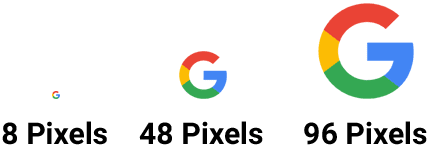
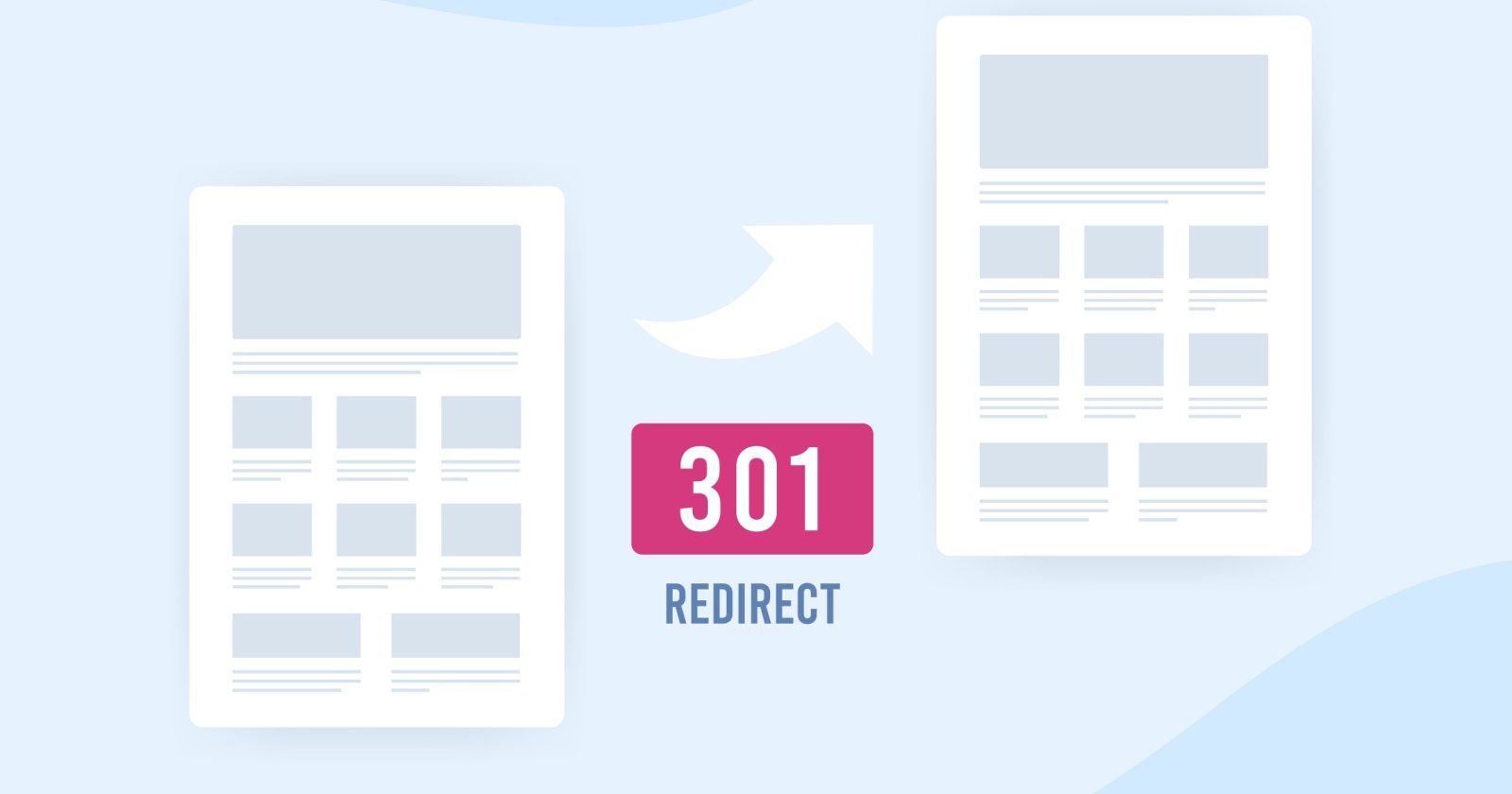
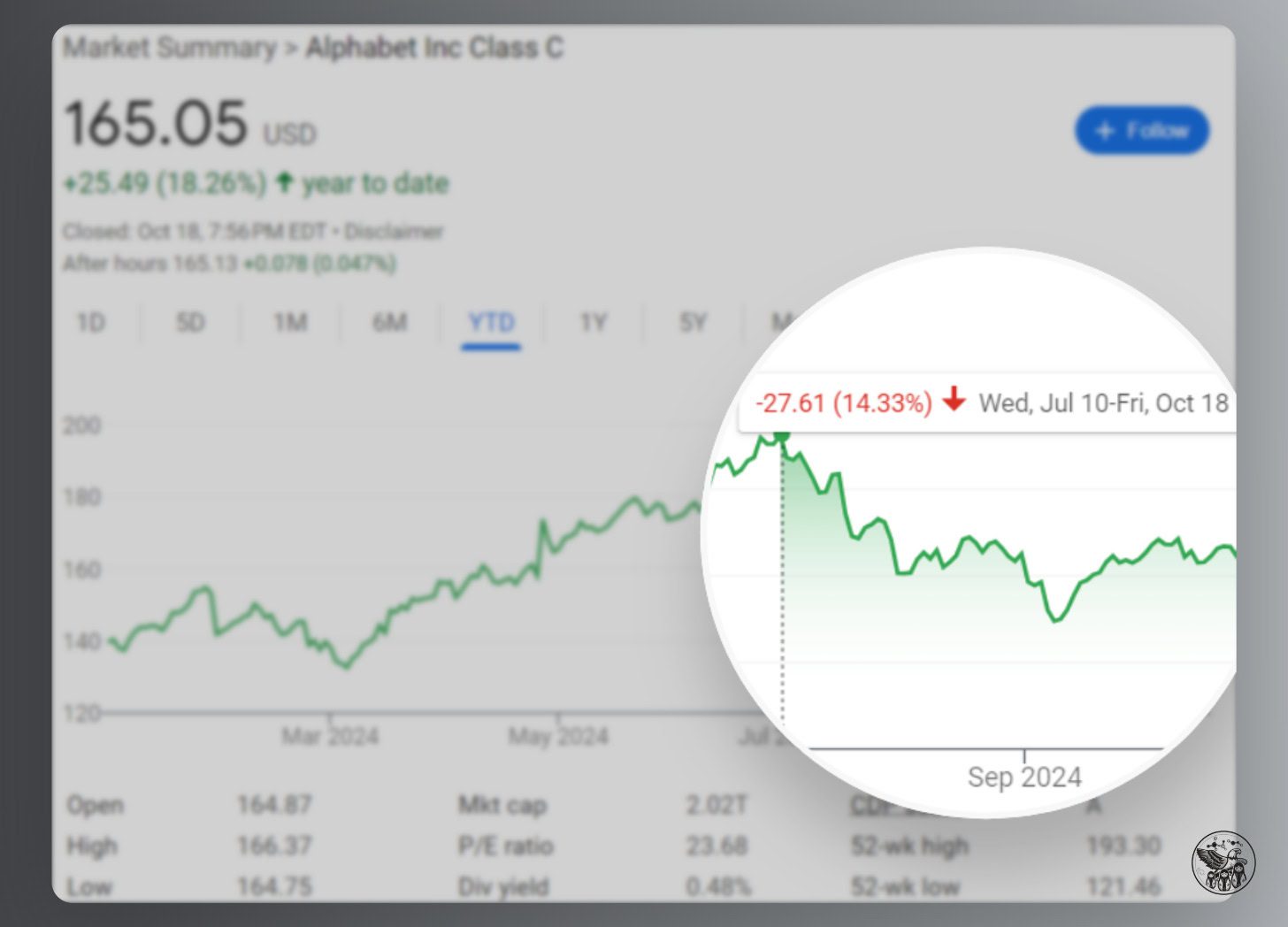
![Google search for [is google going downhill]](https://ecommerceedu.com/wp-content/uploads/2024/10/google-search-99.jpg)