Google Confirms AI Overviews Affected By Core Updates via @sejournal, @MattGSouthern

In a recent LinkedIn exchange, Google’s Senior Search Analyst John Mueller confirmed that core algorithm updates impact the search engine’s AI-powered overviews.

This info gives us a clearer picture of how AI is being woven into Google’s search results.

Responding to a question on LinkedIn, Mueller stated:

“These are a part of search, and core updates affect search, so yes.”

This backs up what folks in the SEO industry have noticed—the sources used in AI overviews seem to change after major algorithm updates.

Background On AI Overviews

Google rolled out AI overviews in US search results a few months back.

These summaries use a special version of Google’s Gemini AI to generate answers at the top of search results. The AI pulls info from different websites and combines it into a short, easy-to-read overview.

The Impact Of Core Updates

Core updates are broad changes to Google’s search algorithms and systems, typically rolled out several times a year.

These updates are intended to improve the quality of search results by reassessing how content is evaluated and ranked.

Google’s most recent core update, launched on August 15, is still rolling out. The company advises waiting until the update is finished before analyzing the impact.

Looking Ahead

As Google keeps integrating AI into search, publishers need more clarity around how core algorithm updates impact these features.

Mueller’s confirmation helps, but there’s still a lot we don’t know. There are still many questions about what makes content show up in AI overviews and whether it’s different from what makes websites rank high in regular search results.


Featured Image: Veroniksha/Shutterstock

6 Ways Spammers Exploit Google With Reddit via @sejournal, @martinibuster

A search marketer named Lars Lofgren felt exasperated by the avalanche of spam hitting Reddit and decided to expose the tricks that spammers are using to exploit Google’s preference for ranking Reddit discussions.

Reddit’s Spam Problem

Lars wrote that the reason he decided to expose how spammers are exploiting Reddit was because he’s a Redditor who is appalled by how spammy Reddit has become which in turn is infecting how spammy Google’s search results have become.

I spoke with Lars by email and he explained his motivation:

“I’m in the SEO industry and I believe in producing great content. That’s always been what motivates me. Produce great content, make Google users happy, Google features my stuff, and everyone wins.

Starting last fall, Google has begun featuring Reddit everywhere. In theory, this can be good. Reddit has tons of authentic conversations. But it’s anonymous, not moderated well, and has no accountability. So great content across the internet is getting buried below spammy Reddit content.

I want to be able to search Google and reliably find great content again, not spam. And a lot of business owners that run great websites have had to do layoffs or even shut down their websites because of this.”

How Spammers Exploit Reddit

Lars wrote an article that exposes six ways that spammers are using Reddit to promote affiliate sites and getting rewarded by Google. In our discussion I asked him if links were commoditized on Reddit and he speculated that it wouldn’t surprise him.

“I wouldn’t be surprised at all if moderators are selling links. …I’d be shocked if it wasn’t happening somewhere on Reddit. Or a company could just buy the link outright, lots of companies do this with blog posts that rank.”

1. Become A Moderator

Moderators have the power to pin a comment to any post. If anyone objects to the spammy activity the moderators can simply ban the users and make them go away.

In our conversation, Lars explained how moderators spam their subreddits and why Google’s uncontrolled ranking of Reddit discussions has corrupted them:

“A moderator of a subreddit can publish a comment of their own to any post in their subreddit. Usually it’ll be a new comment that they make to the conversation. And then pin the comment to the very top of the conversation so everyone sees it.

They can’t modify comments from other users but they can pin any comment of their own. This moderation power is there for communicating to their community, like when a conversation gets too controversial and a moderator wants to slow it down.

Some moderators have realized that their subreddit is being featured for lucrative terms in Google. So they go looking for posts that rank, then pin comments in those posts with a link that makes them a lot of money personally.”

2. Find Posts That Google Ranks

Lars wrote that another tactic spammers use is to identify posts that Google is ranking and then add a new pinned post that contains an affiliate link. A pinned post is a post that’s permanently lodged at the beginning of a discussion. That ensures that it will have maximum exposure and engagement with users who visit Reddit from Google’s search results.

He writes:

“If you were a mod of that subreddit, you could go into that comment thread, add a new comment with your own affiliate link, then pin that comment to the top of the thread. And that’s EXACTLY what someone has done…”

3. Spam A Trusted Subreddit

The next technique doesn’t even involve becoming a mod. Lars described that a spammer just needs to find a subreddit that has a history of ranking in the SERPs. The next step is to create a topic. Lars suggests using a sock puppet to answer the question with a link.

As a moderator at WebmasterWorld for around 20 years, and a forum owner as well, I can confirm that that technique is an old one known as Tag Teaming. Tag Teaming is where a person posts a question then subsequently answers the question with a different account. That second account is called a sock puppet.

Successfully using sock puppets against a seasoned and determined moderator won’t work. But from my experience as a forum owner and a moderator, I know that most moderators are just enthusiasts and rarely have any idea when someone is abusing their forum.  So Lar’s insistence that spammers are using sock puppets is absolutely valid.

4. Create Engagement Bait

Another tactic that Lars exposes is about dropping a mention of a product or website in a Reddit discussion instead of a link. Spammers do this because it has a higher likelihood of surviving moderator scrutiny.

What spammers do is post a discussion that purposely inspires empathy and causes other Redditors to jump in with their advice and experiences. The key to this strategy is to use a sock puppet to post an answer early in the discussion so that when after it begins trending the post with the spam in it will rank higher.

Lars writes:

“Use all your Reddit accounts to pump up the conversation and get it trending. Once that’s done, the community should run with it.

If you hit an emotional pain really well and your product mention looks natural, the subreddit will go crazy. Everyone will jump in, empathize, offer their own suggestions, argue, upvote, the whole thing.”

There’s a similar strategy called Linkbaiting that uses emotional triggers to promote engagement. One of the legendary SEOs from the past, Todd Malicoat, wrote about these triggers 17 years ago (some of which he credited to other people for having invented them). Using emotionally triggering topics is an old but proven tactic.

5. Build A New Subreddit

Lars said that another spam tactic is to build their own subreddit, seed it with sock puppet conversations on topics that are a highly ranked in similar subreddits. Lars explained that Reddit’s recommendation engine will begin surfacing the spam posts to users interested in that topic which will then help the spammy subreddit grow so that the spammer can do whatever they want with it once it’s mature.

6. Aged Reddit Accounts Can Be Bought

Lars revealed that there is a market for aged Reddit member accounts with posting histories that can be purchased for as little as $150. This avoids having to create an army of sock puppets and building a posting history so that they appear to be legit accounts.

Everything Google Ranks Is A Commodity

I’ve been in SEO for twenty five years and one thing that never changes is that everything that Google ranks becomes a commodity. If it ranks then there are a legion of spammers and hackers who desire to exploit it. So it’s not surprising to me that spammers have worked out how to successfully exploit Reddit.

The spam situation is bad news for Google because now it has to police Reddit discussions to weed out the spam. Is Google up to the task?

Read the article by Lars Lofgren:

The Sleazy World of Reddit Marketing, Everything is Fake

Featured Image by Shutterstock/Luis Molinero

What Is Largest Contentful Paint: An Easy Explanation via @sejournal, @vahandev

Largest Contentful Paint (LCP) is a Google user experience metric integrated into ranking systems in 2021.

LCP is one of the three Core Web Vitals (CWV) metrics that track technical performance metrics that impact user experience.

Core Web Vitals exist paradoxically, with Google providing guidance highlighting their importance but downplaying their impact on rankings.

LCP, like the other CWV signals, is useful for diagnosing technical issues and ensuring your website meets a base level of functionality for users.

What Is Largest Contentful Paint?

LCP is a measurement of how long it takes for the main content of a page to download and be ready to be interacted with.

Specifically, the time it takes from page load initiation to the rendering of the largest image or block of text within the user viewport. Anything below the fold doesn’t count.

Images, video poster images, background images, and block-level text elements like paragraph tags are typical elements measured.

LCP consists of the following sub-metrics:

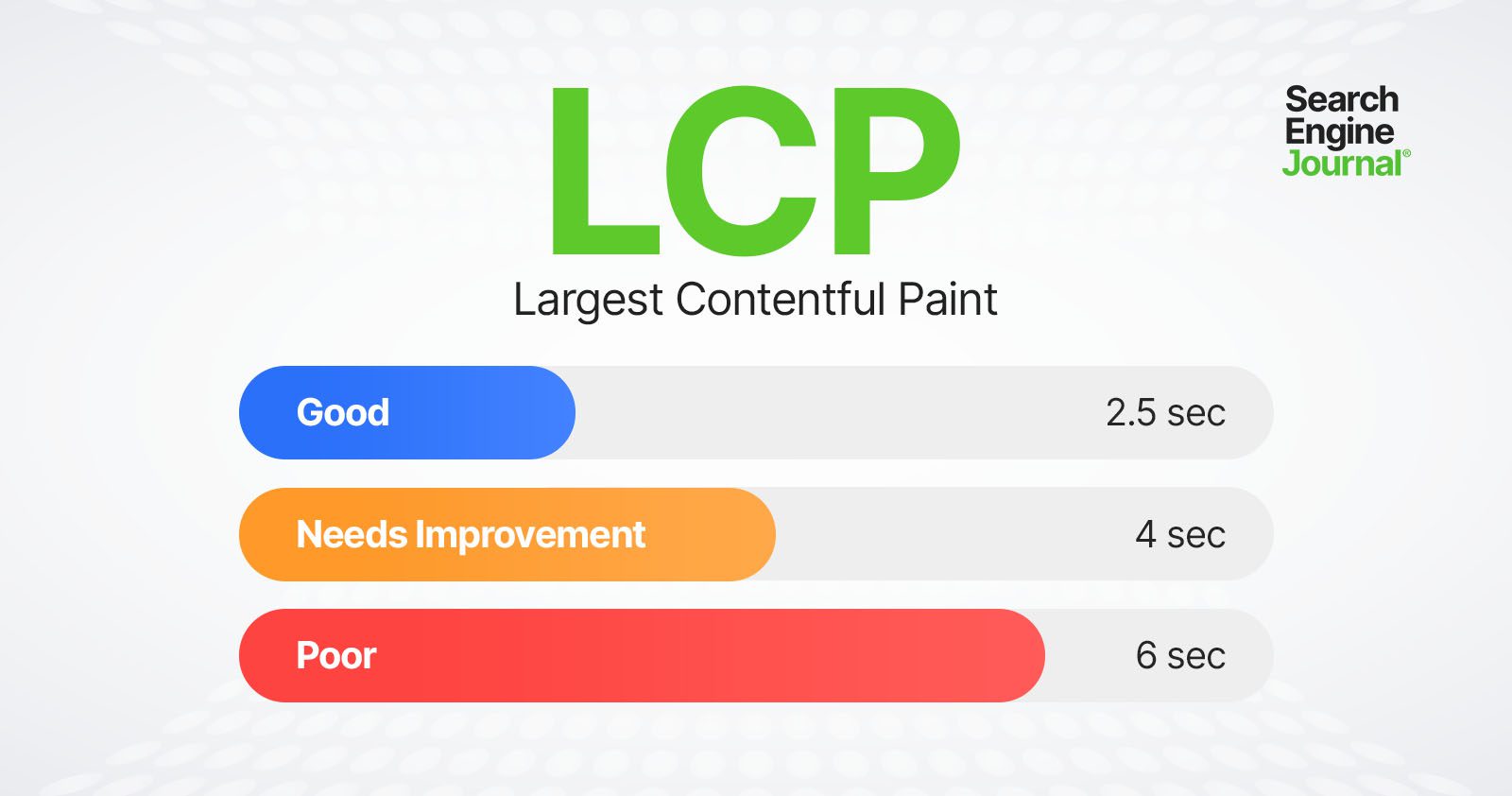
Optimizing for LCP means optimizing for each of these metrics, so it takes less than 2.5 seconds to load and display LCP resources.

Here is a threshold scale for your reference:

LCP thresholdsLCP thresholds

Let’s dive into what these sub-metrics mean and how you can improve.

Time To First Byte (TTFB)

TTFB is the server response time and measures the time it takes for the user’s browser to receive the first byte of data from your server. This includes DNS lookup time, the time it takes to process requests by server, and redirects.

Optimizing TTFB can significantly reduce the overall load time and improve LCP.

Server response time largely depends on:

  • Database queries.
  • CDN cache misses.
  • Inefficient server-side rendering.
  • Hosting.

Let’s review each:

1. Database Queries

If your response time is high, try to identify the source.

For example, it may be due to poorly optimized queries or a high volume of queries slowing down the server’s response time. If you have a MySQL database, you can log slow queries to find which queries are slow.

If you have a WordPress website, you can use the Query Monitor plugin to see how much time SQL queries take.

Other great tools are Blackfire or Newrelic, which do not depend on the CMS or stack you use, but require installation on your hosting/server.

2. CDN Cache Misses

A CDN cache miss occurs when a requested resource is not found in the CDN’s cache, and the request is forwarded to fetch from the origin server. This process takes more time, leading to increased latency and longer load times for the end user.

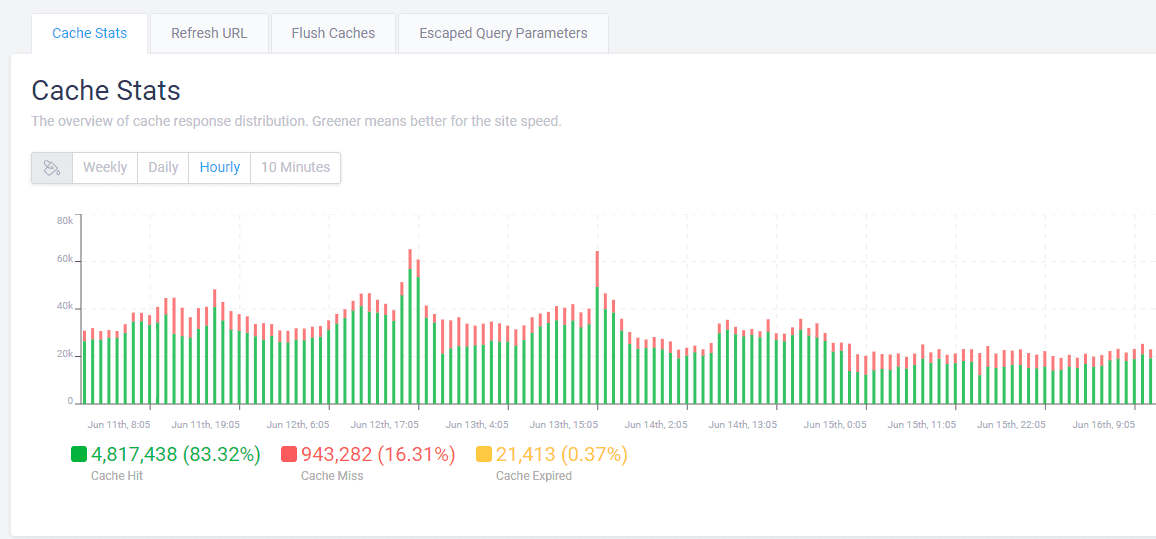
Usually, your CDN provider has a report on how many cache misses you have.

Example of CDN cache reportExample of CDN cache report

If you observe a high percentage ( >10% ) of cache misses, you may need to contact your CDN provider or hosting support in case you have managed hosting with cache integrated to solve the issue.

One reason that may cause cache misses is when you have a search spam attack.

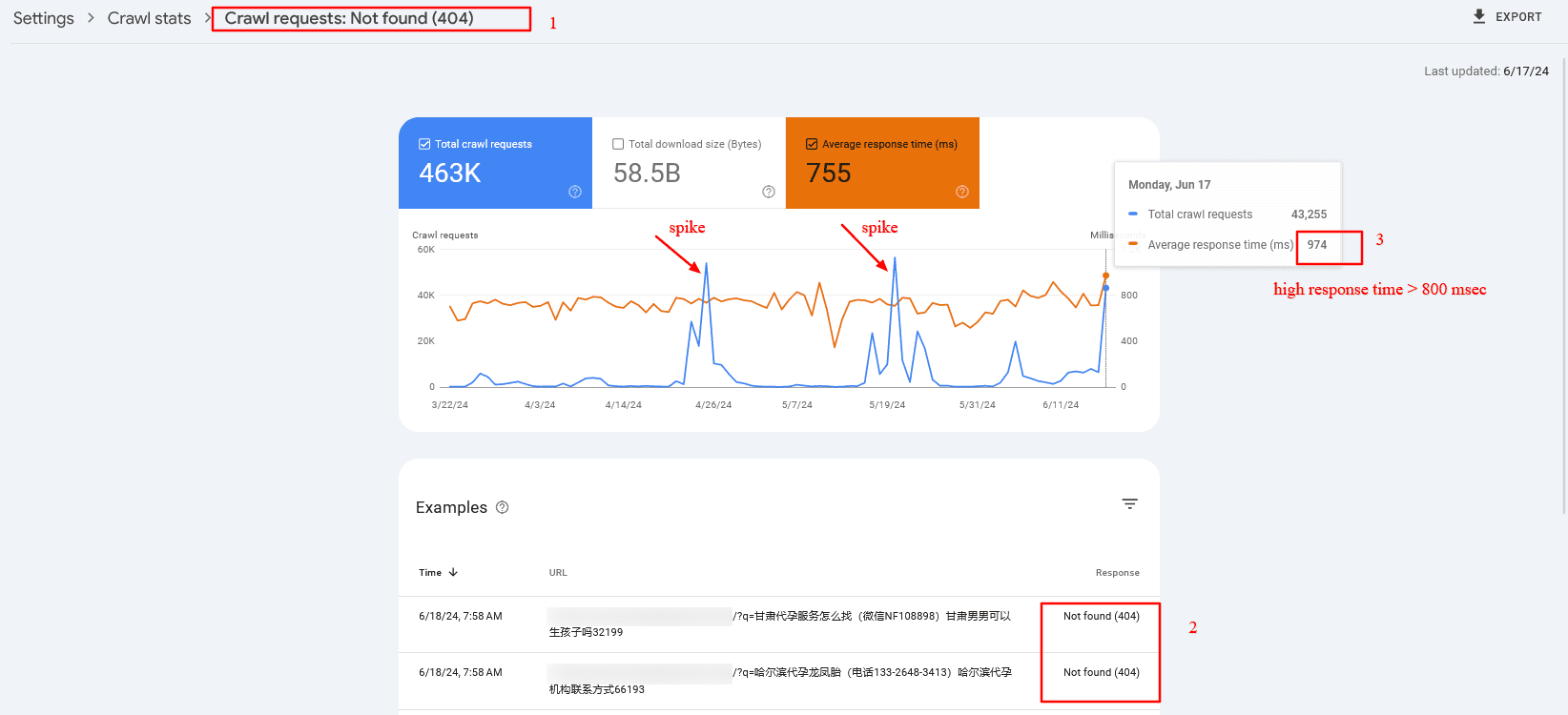
For example, a dozen spammy domains link to your internal search pages with random spammy queries like [/?q=甘肃代], which are not cached because the search term is different each time. The issue is that Googlebot aggressively crawls them, which may cause high server response times and cache misses.

In that case, and overall, it is a good practice to block search or facets URLs via robots.txt. But once you block them via robots.txt, you may find those URLs to be indexed because they have backlinks from low-quality websites.

However, don’t be afraid. John Mueller said it would be cleared in time.

Here is a real-life example from the search console of high server response time (TTFB) caused by cache misses:

Crawl spike of 404 search pages which have high server response timeCrawl spike of 404 search pages that have high server response time

3. Inefficient Server Side Rendering

You may have certain components on your website that depend on third-party APIs.

For example, you’ve seen reads and shares numbers on SEJ’s articles. We fetch those numbers from different APIs, but instead of fetching them when a request is made to the server, we prefetch them and store them in our database for faster display.

Imagine if we connect to share count and GA4 APIs when a request is made to the server. Each request takes about 300-500 ms to execute, and we would add about ~1,000 ms delay due to inefficient server-side rendering. So, make sure your backend is optimized.

4. Hosting

Be aware that hosting is highly important for low TTFB. By choosing the right hosting, you may be able to reduce your TTFB by two to three times.

Choose hosting with CDN and caching integrated into the system. This will help you avoid purchasing a CDN separately and save time maintaining it.

So, investing in the right hosting will pay off.

Read more detailed guidance:

Now, let’s look into other metrics mentioned above that contribute to LCP.

Resource Load Delay

Resource load delay is the time it takes for the browser to locate and start downloading the LCP resource.

For example, if you have a background image on your hero section that requires CSS files to load to be identified, there will be a delay equal to the time the browser needs to download the CSS file to start downloading the LCP image.

In the case when the LCP element is a text block, this time is zero.

By optimizing how quickly these resources are identified and loaded, you can improve the time it takes to display critical content. One way to do this is to preload both CSS files and LCP images by setting fetchpriority=”high” to the image so it starts downloading the CSS file.


But a better approach – if you have enough control over the website – is to inline the critical CSS required for above the fold, so the browser doesn’t spend time downloading the CSS file. This saves bandwidth and will preload only the image.

Of course, it’s even better if you design webpages to avoid hero images or sliders, as those usually don’t add value, and users tend to scroll past them since they are distracting.

Another major factor contributing to load delay is redirects.

If you have external backlinks with redirects, there’s not much you can do. But you have control over your internal links, so try to find internal links with redirects, usually because of missing trailing slashes, non-WWW versions, or changed URLs, and replace them with actual destinations.

There are a number of technical SEO tools you can use to crawl your website and find redirects to be replaced.

Resource Load Duration

Resource load duration refers to the actual time spent downloading the LCP resource.

Even if the browser quickly finds and starts downloading resources, slow download speeds can still affect LCP negatively. It depends on the size of the resources, the server’s network connection speed, and the user’s network conditions.

You can reduce resource load duration by implementing:

  • WebP format.
  • Properly sized images (make the intrinsic size of the image match the visible size).
  • Load prioritization.
  • CDN.

Element Render Delay

Element render delay is the time it takes for the browser to process and render the LCP element.

This metric is influenced by the complexity of your HTML, CSS, and JavaScript.

Minimizing render-blocking resources and optimizing your code can help reduce this delay. However, it may happen that you have heavy JavaScript scripting running, which blocks the main thread, and the rendering of the LCP element is delayed until those tasks are completed.

Here is where low values of the Total Blocking Time (TBT) metric are important, as it measures the total time during which the main thread is blocked by long tasks on page load, indicating the presence of heavy scripts that can delay rendering and responsiveness.

One way you can improve not only load duration and delay but overall all CWV metrics when users navigate within your website is to implement speculation rules API for future navigations. By prerendering pages as users mouse over links or pages they will most likely navigate, you can make your pages load instantaneously.

Beware These Scoring “Gotchas”

All elements in the user’s screen (the viewport) are used to calculate LCP. That means that images rendered off-screen and then shifted into the layout, once rendered, may not count as part of the Largest Contentful Paint score.

On the opposite end, elements starting in the user viewport and then getting pushed off-screen may be counted as part of the LCP calculation.

How To Measure The LCP Score

There are two kinds of scoring tools. The first is called Field Tools, and the second is called Lab Tools.

Field tools are actual measurements of a site.

Lab tools give a virtual score based on a simulated crawl using algorithms that approximate Internet conditions that a typical mobile phone user might encounter.

Here is one way you can find LCP resources and measure the time to display them via DevTools > Performance report:

You can read more in our in-depth guide on how to measure CWV metrics, where you can learn how to troubleshoot not only LCP but other metrics altogether.

LCP Optimization Is A Much More In-Depth Subject

Improving LCP is a crucial step toward improving CVW, but it can be the most challenging CWV metric to optimize.

LCP consists of multiple layers of sub-metrics, each requiring a thorough understanding for effective optimization.

This guide has given you a basic idea of improving LCP, and the insights you’ve gained thus far will help you make significant improvements.

But there’s still more to learn. Optimizing each sub-metric is a nuanced science. Stay tuned, as we’ll publish in-depth guides dedicated to optimizing each sub-metric.

More resources:


Featured image credit: BestForBest/Shutterstock

Data Confirms Disruptive Potential Of SearchGPT via @sejournal, @martinibuster

Researchers analyzed SearchGPT’s responses to queries and identified how it may impact publishers, B2B websites, and e-commerce, discovering key differences between SearchGPT, AI Overviews, and Perplexity.

What is SearchGPT?

SearchGPT is a prototype natural language search engine created by OpenAI that combines a generative AI model with the most current web data to provide contextually relevant answers in a natural language interface that includes citations to relevant online sources.

OpenAI has not offered detailed information about how SearchGPT accesses web information. But the fact that it uses generative AI models means that it likely uses Retrieval Augmented Generation (RAG), a technology that connects an AI language model to indexed web data to give it access to information that it wasn’t trained on. This enables AI search to provide contextually relevant answers that are up to date and grounded with authoritative and trustworthy web sources.

How BrightEdge Analyzed SearchGPT

BrightEdge used a pair of search marketing research tools developed for enterprise users to help identify search and content opportunities, emerging trends and conduct deep competitor analysis.

They used their proprietary DataCube X and the BrightEdge Generative Parser™ to extract data points from SearchGPT, AI Overviews and Perplexity.

Here’s how it was done:

“BrightEdge compared SearchGPT, Google’s AI Overviews, and Perplexity.

To evaluate SearchGPT against Google’s AI Overviews and Perplexity, BrightEdge utilized DataCube X alongside BrightEdge Generative Parser ™ to identify a high-volume term and question based on exact match volumes. These queries were then input into all three engines to evaluate their approach, intent interpretation, and answer-sourcing methods.

This comparative study employs real, popular searches within each sector to accurately reflect the performance of these engines for typical users.”

DataCube X was used for identifying high-volume keywords and questions, all volumes were based on exact matches.

Each search engine was analyzed for:

  1. Approach to the query
  2. Ability to interpret intent
  3. Method of sourcing answers

SearchGPT Versus Google AI Overviews

Research conducted by BrightEdge indicates that SearchGPT offers comprehensive answers while Google AI Overviews (AIO) provides answers that are more concise but also has an edge with surfacing current trends.

The difference found is that SearchGPT in its current state is better for deep research and Google AIO excels at giving quick answers that are also aware of current trends.

Strength: BrightEdge’s report indicates that SearchGPT answers rely on a diverse set of authoritative web resources that reflect academic, industry-specific, and government sources.

Weakness: The results of the report imply that SearchGPT’s weakness in a comparison with AIO is in the area of trends, where Google AIO was found to be more articulate.

SearchGPT Versus Perplexity

The researchers concluded that Perplexity offers concise answers that are tightly focused on topicality. This suggests that Perplexity, which styles itself as an “answer engine” shares the strengths with Google’s AIO in terms of providing concise answers. If I were to speculate I would say that this might reflect a focus on satisfaction metrics that are biased toward more immediate answers.

Strength: Because SearchGPT seems to be tuned more for research and on high quality information sources, it could be said to have an edge over Perplexity as a more comprehensive and potentially more trustworthy tool for research than Perplexity.

Weakness: Perplexity was found to be a more concise source of answers, excelling at summarizing online sources of information for answers to questions.

SearchGPT’s focus on facilitating research makes sense because the eventual context of SearchGPT is as a complement to ChatGPT.

Is SearchGPT A Competitor To Google?

SearchGPT is not a competitor to Google because OpenAI’s stated plans are to incorporate it into ChatGPT and not as a standalone search engine. SearchGPT’s official purpose is not as a standalone search engine but to be integrated into ChatGPT.

This is how OpenAI explains it:

“We also plan to get feedback on the prototype and bring the best of the experience into ChatGPT.

…Please note that we plan to integrate the SearchGPT experience into ChatGPT in the future. SearchGPT combines the strength of our AI models with information from the web to give you fast and timely answers with clear, relevant sources.”

Is SearchGPT then a competitor to Google? The more appropriate question is if ChatGPT is building toward disrupting the entire concept of organic search.

Google has done a fair job of exhausting and disenchanting users with ads, tracking and data mining their personal lives.  So it’s not implausible that a more capable version of ChatGPT could redefine how people get answers.

BrightEdge’s research discovered that SearchGPT’s strength was in facilitating trustworthy research. That makes even more sense with the understanding that SearchGPT is currently planned to be integrated into ChatGPT, not as a competitor to Google but as a competitor to the concept of organic search.

Takeaways: What SEOs And Marketers Need To Know

The major takeaways from the research can be broken down into five ways SearchGPT is better than Google AIO and Perplexity.

1. Diverse Authoritative Sources.
The research shows that SearchGPT consistently surfaces answers from authoritative and trustworthy sources.

“Its knowledge base spans academic resources, specialized industry platforms, official government pages, and reputable commercial websites.”

2. Comprehensive Answers
BrightEdge’s analysis showed that SearchGPT delivers comprehensive answers on any topic, simplifying them into clear, understandable responses.

3. Proactive Query Interpretation
This is really interesting because the researchers discovered that SearchGPT was not only able to understand the user’s immediate information need, it answered questions with an expanded breadth of coverage.

BrightEdge explained it like this:

“Its initial response often incorporates additional relevant information, illustrative examples, and real-world applications.”

4. Pragmatic And Practical
SearchGPT tended to provide practical answers that were good for ecommerce search queries. BrightEdge noted:

“It frequently offers specific product suggestions and recommendations.”

5. Wide-Ranging Topic Expertise
The research paper noted that SearchGPT correctly used industry jargon, even for esoteric B2B search queries. The researchers explained:

“This approach caters to both general users and industry professionals alike.”

Read the research results on SearchGPT here.

Featured Image by Shutterstock/Khosro

Google Offers Solutions for Inaccurate Product Pricing In Search via @sejournal, @MattGSouthern

In the latest edition of Google’s SEO office-hours Q&A video, Senior Search Analyst John Mueller addressed concerns about inaccurate prices in search results.

His advice may be helpful if you’re having similar problems with Google displaying the wrong prices for your products.

Ensuring Accurate Product Prices in Organic Search Results

One of the questions focused on ensuring accurate prices are displayed in organic text results for their products.

In his response, Mueller drew attention to Google Merchant Center feeds.

“I’d recommend using the Merchant Center feeds if you can,” Mueller advised.

He pointed out that Merchant Center offers ways to submit pricing data directly.

He recommends retailers look into this option, implying it’s a low-effort way to ensure accurate prices across search results.

Mueller continues:

“There are ways to submit pricing information in Merchant Center that don’t require a lot of work, so check that out. If you can’t find ways to resolve this, then please drop us a note in the help forums with the details needed to reproduce the issue.”

For those unfamiliar, Google Merchant Center is a tool that allows businesses to upload their product data to Google, making it available for Shopping ads, free listings, and other Google services.

This gives retailers more control over how their product information, including prices, appears across Google’s ecosystem.

Addressing Currency Discrepancies in Rich Results

Another question during the session concerned wrong currencies showing up in rich results.

This can impact how shoppers interact with search results, leading to confused customers and lost sales.

Mueller said this problem stems from Google’s systems potentially viewing pages as duplicates, especially when content is nearly identical across different regional site versions.

He explained,

“Often this is a side effect of Google systems seeing the page as being mostly duplicate. For example, if you have almost exactly the same content on pages for Germany and Switzerland, our systems might see the pages as duplicates, even if there’s a different price shown.”

To resolve this issue, Mueller suggests:

  1. Differentiate content: Pages for different regions or currencies should have sufficiently different content to avoid being flagged as duplicates.
  2. Use Merchant Center: As with the previous question, Mueller recommended using Merchant Center feeds for pricing information instead of relying solely on structured data.

Key Takeaways

This Q&A highlights a common challenge for online stores: Getting Google to show the correct prices in search results.

To help Google get it right, retailers should:

  • Think about using Google Merchant Center to feed in more accurate prices.
  • Ensure different country product page versions aren’t too similar to avoid duplicate content problems.
  • Monitor how prices and currencies look in search results and rich snippets.
  • Use Google’s help forums if there are problems you can’t fix.

Listen to the full Q&A session below:


Featured Image: Tada Images/Shutterstock

Google Casts Doubt On Popular SEO Audit Advice via @sejournal, @martinibuster

Google’s Martin Splitt questioned the usefulness of specific suggestions made by SEO auditing tools, noting that while some advice may be valid, much of it has little to no impact on SEO. He acknowledged that these audits can be valuable for other purposes, but their direct influence on SEO is limited.

Automated SEO Audits

There were two hosts of this month’s Google SEO Office Hours, John Mueller and Martin Splitt. It sounded like the person answering the question was Martin Splitt and the technical level of his answer seems to confirm it.

The person asking the question wanted to know what they should proceed with suggestions made by automated SEO tools that suggest changes that don’t match anything in Google’s documentation.

The person asked:

“I run several free website audits, some of them suggested me things that were never mentioned in the search central documentation. Do these things matter for SEO?”

Martin Splitt On Automated SEO Audits

Martin’s answer acknowledged that some of the suggestions made by SEO audit tools aren’t relevant to SEO.

He answered:

“A lot of these audits don’t specifically focus on SEO and those that don’t still mention a bunch of outdated or downright irrelevant things. unfortunately.

I’ll give you some examples. The text to code ratio, for instance, is not a thing. Google search doesn’t care about it.”

Text to code ratio is an analysis of how much code there is in comparison to how much text is on the page. I believe there was a Microsoft research paper in the early 2000s about statistical analysis of spam sites and one of the qualities of spammy sites that was noted was that there was more text on a typical spam page than code. That might be where that idea came from.

But back in the day (before WordPress) I used to create PHP templates that weighed mere kilobytes, a fraction of what a typical featured image weighs, and it never stopped my pages from ranking, so I knew first-hand that text to code ratio was not a thing.

Next he mentions minification of CSS and JavaScript. Minification is condensing the code by reducing empty spaces and line breaks in the code, resulting in a smaller file.

He continued his answer:

“CSS, JavaScript, not minified that you got apparently as well is suboptimal for your users because you’re shipping more data over the wire, but it doesn’t have direct implications on your SEO. It is a good practice though.”

SEO Is Subjective

Some people believe that SEO practices are an objective set of clearly defined with black and white rules about how to “properly” SEO a site. The reality is that, except for what Google has published in official documentation, SEO is largely a matter of opinion.

The word “canonical” means a known standard that is accepted and recognized as authoritative. Google’s Search Central documentation sets a useful baseline for what can be considered canonical SEO. Official documentation is the baseline of SEO, what can be agreed upon as what is verified to be true for SEO.

The word “orthodox” refers to beliefs and practices that are considered traditional and conventional. A large part of what SEOs consider best practices are orthodox in that they are based on beliefs and traditions, it’s what everyone says is the right way to do it.

The problem with orthodox SEO is that it doesn’t evolve. People do it a certain way because it’s always been done that way. A great example is keyword research, an SEO practice that’s literally older than Google but practiced largely the same way it’s always been done.

Other examples of decades-old SEO orthodoxy are:

  • Meta description should be under 164 words
  • Belief that keywords are mandatory in titles, headings, meta description and alt tags
  • Belief that titles should be “compelling” and “click-worthy”
  • Belief that H1 is a strong SEO signal

Those are the things that were important twenty years ago and became part of the orthodox SEO belief system, but they no longer impact how Google ranks websites (and some of those never did) because Google has long moved beyond those signals.

Limitations Of Google’s Documentation

Martin Splitt encouraged cross-referencing official Google documentation with advice given by SEO auditing tools to be certain that the recommendations align with Google’s best practices, which is a good suggestion that I agree with 100%.

However, Google’s official documentation is purposely limited in scope because they don’t tell SEOs how to impact ranking algorithms. They only show the best practices for optimizing a site so that a search engine understands the page, is easily indexed and is useful for site visitors.

Google has never shown how to manipulate their algorithms, which is why relatively noob SEOs who analyzed Google’s Search Quality Raters guidelines fell short and eventually had to retract their recommendations for creating “authorship signals,” “expertise signals” and so on.

SEJ Has Your Back On SEO

I’ve been in this business long enough to have experienced firsthand that Google is scrupulous about not divulging algorithm signals, not in their raters guidelines, not in their search operators, not in their official documentation. To this day, despite the so-called leaks, nobody knows what “helpfulness signals” are.  Google only shares the general outlines of what they expect and it’s up to SEOs to figure out what’s canonical, what’s outdated orthodoxy and what’s flat out making things up out of thin air.

One of the things I like about Search Engine Journal’s SEO advice is that the editors make an effort to put out the best information, even if it conflicts with what many might assume. It’s SEJ’s opinion but it’s an informed opinion.

Listen to the question and answer at the 11:56 minute mark:

Featured Image by Shutterstock/Ljupco Smokovski

Google: Search Console Data Survives After Domain Expiration via @sejournal, @MattGSouthern

In the August edition of Google’s SEO office-hours Q&A video, John Mueller, Senior Search Analyst at Google, tackled a unique question about domain expiration and Search Console data.

The question highlights the potential risks to Search Console data when domains change hands.

A site owner facing the expiration of their domain and loss of hosting raised concerns about future domain owners’ potential misuse of their Search Console data.

They asked how to remove all URLs associated with the domain to prevent misuse after expiration.

Mueller’s Response

Mueller explained several important points about Search Console data:

  • Search Console info sticks with the website, not the user. New owners who prove they own the site can see all the old data.
  • There’s no “delete all” button for Search Console data.
  • To control the data, you need to keep owning the domain name.
  • If you keep the domain, you can regain ownership in Search Console without losing any old data.
  • If you’ve already taken down the website, you can use domain verification in Search Console to ask Google to hide it from search results temporarily. This doesn’t erase it from Google’s records; it just keeps it out of sight temporarily.
  • Mueller suggests telling the buyer if you have any active removal requests when selling a domain. This way, they can undo it if they want.

His full response:

“This is an interesting question that I don’t think we’ve run across yet. The data in search console is not tied to users, so anyone who verifies a site later on will see that data. There’s no way to reset the data shown there, so you’d have to prevent the domain name from expiring. The advantage of this process is that you can reverify in search console without any data loss.

To remove all content from search for a site that’s already removed from the server you can use the domain verification for search console and submit a temporary site removal request. This doesn’t remove the site from the index, but it will prevent it from being shown for a period of time.

If you’re selling the domain name it would be nice to tell the new owner of this removal request so that they can cancel it.”

Why This Matters

This topic is relevant for all website owners, especially those who might sell or lose their domain. It shows how Search Console data is retained from owner to owner.

It also reminds us to be careful with domain names and search data when ownership changes hands.

What To Do With This Info

  • If you plan to let your domain name expire, remember that whoever buys it next can see your old Search Console data.
  • Even if you’re not using your website anymore, it might be worth keeping the domain name to control who sees your Search Console info.
  • If you can’t access your website anymore, you can use Search Console to ask Google to hide it from search results for a while.
  • If you’re selling your domain, tell the buyer about any requests you’ve made to hide the site from search and about the old data in Search Console.

Understanding these points can help you protect your data and manage how content appears in search, even when domain ownership changes.

Hear the full question and answer below:

Google’s Mueller On August Core Update vs. Ranking Bug Effects via @sejournal, @MattGSouthern

Google recently rolled out two changes that affected website rankings: the August 2024 core update and a fix for a separate ranking problem. These happened around the same time, making it tricky for SEO experts to figure out which change caused what effect on their sites’ search rankings.

John Mueller, Senior Search Analyst at Google, commented on LinkedIn to help clarify things.

The conversation started when Rüdiger Dalchow asked how to tell apart the effects of the core update from those of the ranking issue fix since they happened so close together.

Mueller: Wait Before Analyzing Changes

Mueller’s main advice was to be patient.

He suggests not trying to separate the effects of the ranking fix from those of the core update while everything is still settling.

He pointed out that it’s normal to see rankings fluctuate during this time.

He stated:

“You’d really need to wait until the core update finishes rolling out to make any call about its effect. That’s not to say you should wait with working on your website, it’s just if you want to compare before vs after, waiting for it to be finished is important. From looking at social posts from SEOs tracking these things, there are often fluctuations during the rollout, I don’t think it’s worth trying to separate out the effects from the ranking issue.”

Mueller: Don’t Wait To Improve Your Website

Mueller said not to put off improving your website, but he stressed that it’s important to let the core update finish before jumping to conclusions about how it affected your site.

This is consistent with Google’s usual advice about core updates: wait until they’re fully rolled out before you examine what changed.

In the same conversation, Hans Petter Blindheim suggested adding a special notice in Google Search Console during core updates or when issues occur.

Mueller responded carefully, saying:

“Most websites don’t see big changes, so I’m hesitant to make it seem like an even bigger deal for them.”

He mentioned that Chrome add-ons are available for those who want to monitor these events more closely.

Why This Matters

This conversation shows how complicated Google’s search updates can be and how challenging it is to pinpoint exactly what caused changes in rankings.

While the August 2024 core update is rolling out, Mueller advises focusing on the big picture of site quality instead of figuring out which specific change caused what.

More Information

For those wanting to learn more, Google has recently updated its advice on core updates. This new guide gives more detailed tips for websites affected by these changes.

It includes a step-by-step walkthrough on using Search Console to check if your traffic has dropped and stresses making user-focused improvements to your content.

As always, we’ll monitor this core update closely over the next few weeks. Once it’s fully rolled out, we should have a clearer idea of how it’s affected websites.


Featured Image: Daniel Pawer/Shutterstock

Google Quietly Launches New AI Crawler via @sejournal, @martinibuster

Google quietly added a new bot to their crawler documentation that crawls on behalf of commercial clients of their Vertex AI product. It appears that the new crawler may only crawl sites controlled by the site owners, but the documentation isn’t entirely clear on that point.

Vertex AI Agents

Google-CloudVertexBot, the new crawler, ingests website content for Vertex AI clients, unlike other bots listed in the Search Central documentation that are tied to Google Search or advertising.

The official Google Cloud documentation offers the following information:

“In Vertex AI Agent Builder, there are various kinds of data stores. A data store can contain only one type of data.”

It goes on to list six types of data, one of which is public website data. On crawling the documentation says that there are two kinds of website crawling with limitations specific to each kind.

  1. Basic website indexing
  2. Advanced website indexing

Documentation Is Confusing

The documentation explains website data:

“A data store with website data uses data indexed from public websites. You can provide a set of domains and set up search or recommendations over data crawled from the domains. This data includes text and images tagged with metadata.”

The above description doesn’t say anything about verifying domains. The description of Basic website indexing doesn’t say anything about site owner verification either.

But the documentation for Advanced website indexing does say that domain verification is required and also imposes indexing quotas.

However, the documentation for the crawler itself says that the new crawler crawls on the “site owners’ request” so it may be that it won’t come crawling public sites.

Now here’s the confusing part, the Changelog notation for this new crawler indicates that the new crawler could come to scrape your site.

Here’s what the changelog says:

“The new crawler was introduced to help site owners identify the new crawler traffic.”

New Google Crawler

The new crawler is called Google-CloudVertexBot.

This is the new information on it:

“Google-CloudVertexBot crawls sites on the site owners’ request when building Vertex AI Agents.

User agent tokens

  • Google-CloudVertexBot
  • Googlebot”

User agent substring
Google-CloudVertexBot

Unclear Documentation

The documentation seems to indicate that the new crawler doesn’t index public sites but the changelog indicates that it was added so that site owners can identify traffic from the new crawler. Should you block the new crawler with a robots.txt just in case? It’s not unreasonable to consider given that the documentation is fairly unclear on whether it only crawls domains that are verified to be under the control of the entity initiating the crawl.

Read Google’s new documentation:

Google-CloudVertexBot

Featured Image by Shutterstock/ShotPrime Studio

Non-Digital Marketing Factors That Hurt Digital Marketing ROI via @sejournal, @coreydmorris

Digital marketing is hard.

The number of channels, networks, platforms, websites, technical factors, content needs, and the constant changes by search engines make it a very dynamic and ever-changing layer of overall marketing plans and strategies.

I have a lot of stories about brands who tried things and quit, convinced that it didn’t work for their company.

There are also stories of brands who were convinced it would eventually work and poured hundreds of thousands of dollars into it, hoping it would eventually pay off.

The number of variables and factors to success within digital marketing, ranging from having the right people to the right environment, is high enough.

Maybe your biggest challenges aren’t your personal, team, or department’s obstacles. Maybe they are outside of digital marketing.

No matter your situation – whether you’re eager to invest in digital marketing strategies and channels or are already investing and not getting the expected return – your problem might not be in the channels themselves or the disciplines of SEO and PPC.

You might have jumped to a phase of the digital marketing process without getting through some important prerequisites related to target audience definition, product/service development, brand strategy, and sales operations.

Without the right infrastructure or foundation in place, you might need to pause efforts or at least take a step back and evaluate your gaps to ensure that your digital marketing and search strategy is aligned with your company’s core essence and ongoing customer relationships.

I’ll unpack five hidden, or sometimes just hard to navigate, non-digital marketing aspects that can impact your digital marketing ROI.

1. Stakeholders Who Don’t Define The Target Audience

It goes without saying that at a base level, to do digital marketing – and especially SEO and PPC – you have to have an identified target audience.

In some cases, I have been handed a wealth of persona data, research data about prospects and customers, customer interviews, and intelligence to craft my search marketing strategy and plan.

Sometimes, I have been given just some information through my own discovery questions and have had to do a lot of my own research within keyword research tools, search intent research, and SERP features analysis.

Whatever the organization’s starting point and sophistication, if you ask some basic questions about the target audience to stakeholders responsible for product/service development, sales, finance, customer service, or even field technicians and get inconsistent or incomplete answers, then you have a yellow flag at best and possibly a red flag.

Even if you can target some people who were mentioned by some stakeholders and get them to convert, down the line, you may have issues with them getting all the way to a customer.

If you’re a search marketer or digital marketer focused on a specific channel, it typically isn’t your job to make corporate decisions on who to target or why.

However big or small your organization is, you will experience some of the same issues if you don’t have well-defined, consistent definitions of who your target audience is.

2. Clients Who Think They Have No Competitors

I’ve been down some interesting roads with clients who have brand-new products. It is always exciting to hear about a new idea, service, or product that someone invented.

I have been involved in or cheered on many product and service launches, some of which have created brand-new markets or disrupted entire industries.

Those are groundbreaking moments – and in some cases, the product or service was described as having no competitors.

That can be an issue if you can’t at least figure out who might be the right target or what competitors are selling something (even if different or inferior) when it comes to translating to audiences and targeting.

I can’t count the number of times a client has told me they have no competitors. I take them at their word and know that they are right about the product or service.

However, when it comes to other brands already in their industry or adjacent spaces, there’s always someone showing up for a Google search or eating up display inventory somewhere.

Or, if you’re the only one, then you need to go back to the target audience item that I noted previously, as you haven’t found a real audience but have one that is hypothetical and doesn’t know about the problem you’re solving.

Getting your product or service dialed in, defined, and consistently understood by your full organization is critical.

If you’re marketing to the wrong audiences, focusing on the wrong features or benefits, or using the wrong set of competitors as your reference points, your digital marketing results might drive some activity but suffer from not achieving the desired ROI.

3. A Lack Of Brand Strategy To Guide You

Knowing your audience and your product/service is important when it comes to your targeting, competitor research, and being on the same page to maximize who you can reach and convert.

However, in the absence of a brand strategy and guidance, you might find that you sound just like everyone else in the space or you have an audience of none.

Brand strategy is important – not just the visual identity or voice and tone, but knowing what is truly distinctive about the product, distilled down into messaging that will resonate with the target audience.

In my experience, that is a great blend of common language and knowledge so we can target our audience, but also unique storytelling, messaging, and aspects that set our products/services apart.

Whether you’re starting with a robust brand strategy with information handed to you or have to work through it on the fly, it is important; otherwise, you risk being inconsistent, off-brand, or lost in the crowd while spending a lot of ad dollars and labor to ultimately just blend in.

4. Not Knowing How The Product Is Being Sold

I won’t use this space to discuss all the exhaustive sales versus marketing battles or misalignments that happen. I’m going to assume you have a great relationship with sales.

Or, at the least, that any differences can be reconciled through some workshopping and hard work to get on the same page  – all topics for a different article, book, or training.

What you do need to know is how the team is selling your product or service. (For fully ecommerce, DTC, or zero touch sales process firms, then you can skip to the next section and double the impact of it.)

That might mean getting deep into how they use CRM, demos, sales scripts, what language they use, and all things related to their sales process.

Knowing all that, then digging deep into what a good lead is, a bad lead, qualification criteria, and how organized they are will help you tremendously.

Maybe there’s a sophisticated sales operation, maybe not.

In either case, knowing how products/services are sold, what language is used, what the process is, and how a digital marketing conversion becomes an actual customer can be really valuable for upstream targeting and messaging in your campaigns.

5. Not Having Insight Into Customer Service

A definite hidden issue in digital marketing ROI that isn’t typically in the marketing team’s responsibilities is customer service.

That includes everything from communication during the time products or services are being delivered, to every touchpoint someone might have with your brand.

Customer lifetime value is big to most companies I’ve worked with. It is much cheaper to have someone come back and continue to buy versus the cost of marketing to acquire a new customer.

Beyond that, the value in customer affinity due to referrals, word of mouth, and reviews they leave is important – even for businesses that have a high frequency of customers who only need them once in their lives.

Knowing what makes for a “good” customer, the type that has lifetime value, gives positive reviews, and who you can use for helpful information to target more people just like them, the easier it will make your job.

When customer service teams don’t have a lot of information, aren’t equipped, or are getting a lot of complaints, you can dig into the function itself, the product/service, the brand, or even the target audience who is buying and gain some valuable insights to help optimize not just your marketing, but broader business aspects that are outside of digital marketing yet impact your ROI.

Non-Digital Factors Can Help You Find An A-Ha Moment

Whether you’re someone in a digital marketing role accountable to ROI or oversee it at any level, knowing the full picture of what can impact success is important.

So long ago that I don’t want to mention the year, I was able to do a lot in SEO by myself and not have as many variables.

I’m not here to say the old days were better, though. I’m a big fan of getting things right, being distinctive as a brand, and being the right option for our target customers.

When we are the best for them, they find us, and they have an amazing experience, it is an authentic connection and we can celebrate the successes that come with it.

If you’re struggling with any missing info, not getting the conversions you expect, or aren’t making it through to meaningful ROI, before giving up or giving in, go back to the non-digital marketing factors and see if there’s an “ah ha” or something you can dig deeper into.

More resources: 


Featured Image: alphaspirit.it/Shutterstock