As we enter the holiday season, October’s data reveals significant shifts and stabilization across industries in AI Overviews (AIOs). Critical insights from October reveal growth in certain sectors, stability in others, and strategic changes in content types and sources. These insights offer actionable strategies for marketers aiming to optimize for AIOs during this critical period.
YouTube Citations In AI Overviews: September Through October
YouTube AI Overviews citations surged in September by 400 – 450% more than the baseline from August when YouTube citations were first tracked. The level then stabilized in October at a level of about 110% to 115% of the August baseline. This gives the impression that this level of YouTube AIO citations may represent a new normal.
The kinds of video content that Google AIO tended to cite were:
How-to’s
In-depth reviews
Product comparisons
BrightEdge’s report observed that YouTube AIO citations in November continued to be stable:
Current State (November): Stabilized at approximately 115-120% with minimal day-to-day variation (±3%).
The next few months will show how satisfied users are with YouTube citations. Presumably Google tested YouTube citations before rolling them out so expectations for dramatic a change should be kept in check because the volatility of YouTube AIO citations was low, indicating that Google may have found the sweet spot for these kinds of citations. So don’t expect this level of YouTube citations to drop although anything is possible.
This trend highlights the continued importance of YouTube video channel as a way to expand reach and the continued evolution away from purely text content. If you embed video on web pages then it’s important to use Video Schema.org structured data.
Massive Growth In Travel Industry AIO Citations
Travel AIO citations surged by 700% from September through October. This may reflect Google’s confidence in AI for making travel recommendations.
BrightEdge offered this advice:
“To capture AIO visibility, travel brands should optimize content around seasonal travel, local events, and specific activities. Many of the keywords that are part of this surge start with “Things to do” which then triggers an unordered list.”
Localized and Activity-Specific Travel Queries
Google AIO is showing citations for more localized travel related queries that are more specific and longtail, which may mean that AI Overviews is handling more of the local travel type queries as opposed to the big destination queries that drilled down to the neighborhood level.
BrightEdge explained:
“Initially, travel AIOs were dominated by broad, general queries focused on major tourist destinations. However, as the month progressed, there was an increase in more localized, activity specific, and seasonal travel searches, reflecting a deeper level of user intent. By November, AIOs were increasingly focused on niche travel queries covering smaller cities, specific neighborhoods, and unique local activities.”
Examples of the pattern of travel queries that triggered AIO are:
Top attractions in
Things to do in
Family friendly activities in
Fall festivals in
AIO Is Stabilizing And Maturing
Another interesting insight from the BrightEdge data is that the daily growth of AIO citations slowed down to 1.3%, indicating that we are now entering a more stable phase.
BrightEdge offers this insight:
“We are now six months into the AIO era and seeing macro-changes in AI overviews that are gerng smaller and smaller”
Another statistic that confirms that AIO are here to stay is that volatility in AIO citations decreased by 42%, another sign of stability. This is good news because it means more predictability for what keyword phrases will trigger AIO citations.
BrightEdge notes:
“The stabilization in AIO appearance allows brands to optimize for a consistent presence, par:cularly for evergreen holiday keywords. This benefit campaigns where a steady AIO presence can drive significant traffic and conversions. As AIOs stabilize, planning and incorporating them into strategies becomes easier. This is pivotal insight for marketers who wish to make AI Overviews part of their 2025 strategy.”
Education Topic Performance
Education topics were on a steady growth trajectory of a 5% increase in keyword that trigger AIO, representing 45-50% of keywords. The growth was seen in more complex educational queries like:
cybersecurity certification prerequisites
career options with a psychology degree
psyd vs phd comparison
B2B queries experienced modest growth of 2%, representing 45-50% of keywords and with less volatility in October than September. Healthcare AIO citations were similarly stable with only a 1% change in October and with 73-75% of keywords triggering AIO citations.
Google Chrome collects site engagement metrics, and Chromium project documentation explains exactly what they are and how they are used.
Site Engagement Metrics
The documentation for the Site Engagement Metrics shares that typing the following into the browser address bar exposes the metrics:
chrome://site-engagement/
What shows up is a list of sites that the browser has visited and Site Engagement Metrics.
Site Engagement Metrics
The Site Engagement Metrics documentation explains that the metrics measure user engagement with a site and that the primary factor used is active time spent. It also offers examples of other signals that may contribute to the measurement.
This is what documentation says:
“The Site Engagement Service provides information about how engaged a user is with a site. The primary signal is the amount of active time the user spends on the site but various other signals may be incorporated (e.g whether a site is added to the homescreen).”
It also shares the following properties of the Chrome Site Engagement Scores:
The score is a double from 0-100. The highest number in the range represents a site the user engages with heavily, and the lowest number represents zero engagement.
Scores are keyed by origin.
Activity on a site increases its score, up to some maximum amount per day.
After a period of inactivity the score will start to decay.
What Chrome Site Engagement Scores Are Used For
Google is transparent about the Chrome Site Engagement metrics because the Chromium Project is open source. The documentation explicitly outlines what the site engagement metrics are, the signals used, how they are calculated, and their intended purposes. There is no ambiguity about their function or use. It’s all laid out in detail.
There are three main uses for the site engagement scores and all three are explicitly for improving the user experience within Chromium-based browsers.
Site engagement metrics are used internally by the browser for these three purposes:
Prioritize Resources: Allocate resources like storage or background sync to sites with higher engagement.
Enable Features: Determine thresholds for enabling specific browser features (e.g., app banners, autoplay).
Sort Sites: Organize lists, such as the most-used sites on the New Tab Page or which tabs to discard when memory is low, based on engagement levels.
The documentation states that the engagement scores were specifically designed for the above three use cases.
Prioritize Resources
Google’s documentation explains that Chrome allocates resources (such as storage space) to websites based on their site engagement levels. Sites with higher user engagement scores are given a greater share of these resources within their browser. The purpose is so that the browser prioritizes sites that are more important or frequently used by the user.
This is what the documentation says:
“Allocating resources based on the proportion of overall engagement a site has (e.g storage, background sync)”
Takeaway: One of the reasons for the site engagement score is to prioritize resources to improve the browser user experience.
Role Of Engagement Metrics For Enabling Features
This part of the documentation explains that Chromium uses site engagement scores to determine whether certain browser features are enabled for a website. Examples of features are app banners and video autoplay.
The site engagement metrics are used to determine whether to let videos autoplay on a given site, if the site is above a specific threshold of engagement. This improves the user experience by preventing annoying video autoplay on sites that have low engagement scores.
This is what the documentation states:
“Setting engagement cutoff points for features (e.g app banner, video autoplay, window.alert())”
Takeaway: The site engagement metrics play a role in determining whether certain features like video autoplay are enabled. The purpose of this metric is to improve the browser user experience.
Sort Sites
The document explicitly says that site engagement scores are used to rank sites for browser functions like tab discarding (when memory is tight) or creating lists of the most-used sites on the New Tab Page (NTP).
“Sorting or prioritizing sites in order of engagement (e.g tab discarding, most used list on NTP)”
Takeaway: Sorting sites based on engagement ensures that the user’s most important and frequently interacted-with sites are prioritized in their browser. It also improves usability through tab management and quick access so that it matches user behavior and preferences.
Privacy
There is absolutely nothing that implies that Google Search uses these site engagement metrics. There is nothing in the documentation that explicitly mentions or implicitly alludes to any other purpose for the site engagement metrics except for improving the user experience and usability of the Chrome browser and Chromium-based devices like the Chromebook.
The engagement scores are limited to a device. The scores aren’t shared between the devices of a single user.
The documentation states:
“The user engagement score are not synced, so decisions made on a given device are made based on the users’ activity on that device alone.”
The user engagement scores are further isolated when users are in Incognito Mode:
“When in incognito mode, site engagement will be copied from the original profile and then allowed to decay and grow independently. There will be no information flow from the incognito profile back to the original profile. Incognito information is deleted when the browser is shut down.”
User engagement scores are deleted when the browser history is cleared:
“Engagement scores are cleared with browsing history.
Origins are deleted when the history service deletes URLs and subsequently reports zero URLs belonging to that origin are left in history.”
The engagement score for a website decreases over time if the user doesn’t interact with the site. This is called “decay” when the user engagement score drops in time. Engagement scores are forgotten which improves the relevance of the scores and how the browser optimizes itself for usability and the user experience.
The impact of user engagement scores that “decay to zero” is that the URLs are completely removed from the browser:
“URLs are cleared when scores decay to zero.”
Takeaway: What Could Google Do With This Data?
It’s understandable that some people, when presented with the facts about Chrome site engagement metrics, will ask, “What if Google is using it?”
Asking “what if” is a powerful way to innovate and explore how a service or a product can be improved or invented. However, basing business decisions on speculative ‘what if’ questions that contradict established facts is counterproductive.
These metrics are solely for improving browser user experience and usability, the scores are not synched and are limited to the device, the scores are further isolated in Incognito Mode and the scores are completely erased when users stop interacting with a site.
That means that the question, “What if Chrome shared site engagement signals with Google?” has no basis in fact. The purpose of these signals and their documented use cases are fully transparent and well understood to be limited to browser usability.
Robots.txt just turned 30 – cue the existential crisis! Like many hitting the big 3-0, it’s wondering if it’s still relevant in today’s world of AI and advanced search algorithms.
Spoiler alert: It definitely is!
Let’s take a look at how this file still plays a key role in managing how search engines crawl your site, how to leverage it correctly, and common pitfalls to avoid.
What Is A Robots.txt File?
A robots.txt file provides crawlers like Googlebot and Bingbot with guidelines for crawling your site. Like a map or directory at the entrance of a museum, it acts as a set of instructions at the entrance of the website, including details on:
What crawlers are/aren’t allowed to enter?
Any restricted areas (pages) that shouldn’t be crawled.
Priority pages to crawl – via the XML sitemap declaration.
Its primary role is to manage crawler access to certain areas of a website by specifying which parts of the site are “off-limits.” This helps ensure that crawlers focus on the most relevant content rather than wasting the crawl budget on low-value content.
While a robots.txt guides crawlers, it’s important to note that not all bots follow its instructions, especially malicious ones. But for most legitimate search engines, adhering to the robots.txt directives is standard practice.
What Is Included In A Robots.txt File?
Robots.txt files consist of lines of directives for search engine crawlers and other bots.
Valid lines in a robots.txt file consist of a field, a colon, and a value.
Robots.txt files also commonly include blank lines to improve readability and comments to help website owners keep track of directives.
Image from author, November 2024
To get a better understanding of what is typically included in a robots.txt file and how different sites leverage it, I looked at robots.txt files for 60 domains with a high share of voice across health, financial services, retail, and high-tech.
Excluding comments and blank lines, the average number of lines across 60 robots.txt files was 152.
Large publishers and aggregators, such as hotels.com, forbes.com, and nytimes.com, typically had longer files, while hospitals like pennmedicine.org and hopkinsmedicine.com typically had shorter files. Retail site’s robots.txt files typically fall close to the average of 152.
All sites analyzed include the fields user-agent and disallow within their robots.txt files, and 77% of sites included a sitemap declaration with the field sitemap.
Fields leveraged less frequently were allow (used by 60% of sites) and crawl-delay (used by 20%) of sites.
Field
% of Sites Leveraging
user-agent
100%
disallow
100%
sitemap
77%
allow
60%
crawl-delay
20%
Robots.txt Syntax
Now that we’ve covered what types of fields are typically included in a robots.txt, we can dive deeper into what each one means and how to use it.
The user-agent field specifies what crawler the directives (disallow, allow) apply to. You can use the user-agent field to create rules that apply to specific bots/crawlers or use a wild card to indicate rules that apply to all crawlers.
For example, the below syntax indicates that any of the following directives only apply to Googlebot.
user-agent: Googlebot
If you want to create rules that apply to all crawlers, you can use a wildcard instead of naming a specific crawler.
user-agent: *
You can include multiple user-agent fields within your robots.txt to provide specific rules for different crawlers or groups of crawlers, for example:
user-agent: *
#Rules here would apply to all crawlers
user-agent: Googlebot
#Rules here would only apply to Googlebot
user-agent: otherbot1
user-agent: otherbot2
user-agent: otherbot3
#Rules here would apply to otherbot1, otherbot2, and otherbot3
Disallow And Allow
The disallow field specifies paths that designated crawlers should not access. The allow field specifies paths that designated crawlers can access.
Because Googlebot and other crawlers will assume they can access any URLs that aren’t specifically disallowed, many sites keep it simple and only specify what paths should not be accessed using the disallow field.
For example, the below syntax would tell all crawlers not to access URLs matching the path /do-not-enter.
user-agent: *
disallow: /do-not-enter
#All crawlers are blocked from crawling pages with the path /do-not-enter
If you’re using both allow and disallow fields within your robots.txt, make sure to read the section on order of precedence for rules in Google’s documentation.
Generally, in the case of conflicting rules, Google will use the more specific rule.
For example, in the below case, Google won’t crawl pages with the path/do-not-enter because the disallow rule is more specific than the allow rule.
user-agent: *
allow: /
disallow: /do-not-enter
If neither rule is more specific, Google will default to using the less restrictive rule.
In the instance below, Google would crawl pages with the path/do-not-enter because the allow rule is less restrictive than the disallow rule.
user-agent: *
allow: /do-not-enter
disallow: /do-not-enter
Note that if there is no path specified for the allow or disallow fields, the rule will be ignored.
user-agent: *
disallow:
This is very different from only including a forward slash (/) as the value for the disallow field, which would match the root domain and any lower-level URL (translation: every page on your site).
If you want your site to show up in search results, make sure you don’t have the following code. It will block all search engines from crawling all pages on your site.
user-agent: *
disallow: /
This might seem obvious, but believe me, I’ve seen it happen.
URL Paths
URL paths are the portion of the URL after the protocol, subdomain, and domain beginning with a forward slash (/). For the example URL https://www.example.com/guides/technical/robots-txt, the path would be /guides/technical/robots-txt.
Image from author, November 2024
URL paths are case-sensitive, so be sure to double-check that the use of capitals and lower cases in the robot.txt aligns with the intended URL path.
A special character is a symbol that has a unique function or meaning instead of just representing a regular letter or number. Special characters supported by Google in robots.txt are:
Asterisk (*) – matches 0 or more instances of any character.
Dollar sign ($) – designates the end of the URL.
To illustrate how these special characters work, assume we have a small site with the following URLs:
A common use of robots.txt is to block internal site search results, as these pages typically aren’t valuable for organic search results.
For this example, assume when users conduct a search on https://www.example.com/search, their query is appended to the URL.
If a user searched “xml sitemap guide,” the new URL for the search results page would be https://www.example.com/search?search-query=xml-sitemap-guide.
When you specify a URL path in the robots.txt, it matches any URLs with that path, not just the exact URL. So, to block both the URLs above, using a wildcard isn’t necessary.
The following rule would match both https://www.example.com/search and https://www.example.com/search?search-query=xml-sitemap-guide.
user-agent: *
disallow: /search
#All crawlers are blocked from crawling pages with the path /search
If a wildcard (*) were added, the results would be the same.
user-agent: *
disallow: /search*
#All crawlers are blocked from crawling pages with the path /search
Example Scenario 2: Block PDF files
In some cases, you may want to use the robots.txt file to block specific types of files.
Imagine the site decided to create PDF versions of each guide to make it easy for users to print. The result is two URLs with exactly the same content, so the site owner may want to block search engines from crawling the PDF versions of each guide.
In this case, using a wildcard (*) would be helpful to match the URLs where the path starts with /guides/ and ends with .pdf, but the characters in between vary.
user-agent: *
disallow: /guides/*.pdf
#All crawlers are blocked from crawling pages with URL paths that contain: /guides/, 0 or more instances of any character, and .pdf
The above directive would prevent search engines from crawling the following URLs:
For the last example, assume the site created category pages for technical and content guides to make it easier for users to browse content in the future.
However, since the site only has three guides published right now, these pages aren’t providing much value to users or search engines.
The site owner may want to temporarily prevent search engines from crawling the category page only (e.g., https://www.example.com/guides/technical), not the guides within the category (e.g., https://www.example.com/guides/technical/robots-txt).
To accomplish this, we can leverage “$” to designate the end of the URL path.
user-agent: *
disallow: /guides/technical$
disallow: /guides/content$
#All crawlers are blocked from crawling pages with URL paths that end with /guides/technical and /guides/content
The above syntax would prevent the following URLs from being crawled:
The sitemap field is used to provide search engines with a link to one or more XML sitemaps.
While not required, it’s a best practice to include XML sitemaps within the robots.txt file to provide search engines with a list of priority URLs to crawl.
The value of the sitemap field should be an absolute URL (e.g., https://www.example.com/sitemap.xml), not a relative URL (e.g., /sitemap.xml). If you have multiple XML sitemaps, you can include multiple sitemap fields.
Example robots.txt with a single XML sitemap:
user-agent: *
disallow: /do-not-enter
sitemap: https://www.example.com/sitemap.xml
Example robots.txt with multiple XML sitemaps:
user-agent: *
disallow: /do-not-enter
sitemap: https://www.example.com/sitemap-1.xml
sitemap: https://www.example.com/sitemap-2.xml
sitemap: https://www.example.com/sitemap-3.xml
Crawl-Delay
As mentioned above, 20% of sites also include the crawl-delay field within their robots.txt file.
The crawl delay field tells bots how fast they can crawl the site and is typically used to slow down crawling to avoid overloading servers.
The value for crawl-delay is the number of seconds crawlers should wait to request a new page. The below rule would tell the specified crawler to wait five seconds after each request before requesting another URL.
user-agent: FastCrawlingBot
crawl-delay: 5
Google has stated that it does not support the crawl-delay field, and it will be ignored.
Other major search engines like Bing and Yahoo respect crawl-delay directives for their web crawlers.
Search Engine
Primary user-agent for search
Respects crawl-delay?
Google
Googlebot
No
Bing
Bingbot
Yes
Yahoo
Slurp
Yes
Yandex
YandexBot
Yes
Baidu
Baiduspider
No
Sites most commonly include crawl-delay directives for all user agents (using user-agent: *), search engine crawlers mentioned above that respect crawl-delay, and crawlers for SEO tools like Ahrefbot and SemrushBot.
The number of seconds crawlers were instructed to wait before requesting another URL ranged from one second to 20 seconds, but crawl-delay values of five seconds and 10 seconds were the most common across the 60 sites analyzed.
Testing Robots.txt Files
Any time you’re creating or updating a robots.txt file, make sure to test directives, syntax, and structure before publishing.
The below example shows that Googlebot smartphone is allowed to crawl the tested URL.
Image from author, November 2024
If the tested URL is blocked, the tool will highlight the specific rule that prevents the selected user agent from crawling it.
Image from author, November 2024
To test new rules before they are published, switch to “Editor” and paste your rules into the text box before testing.
Common Uses Of A Robots.txt File
While what is included in a robots.txt file varies greatly by website, analyzing 60 robots.txt files revealed some commonalities in how it is leveraged and what types of content webmasters commonly block search engines from crawling.
Preventing Search Engines From Crawling Low-Value Content
Many websites, especially large ones like ecommerce or content-heavy platforms, often generate “low-value pages” as a byproduct of features designed to improve the user experience.
For example, internal search pages and faceted navigation options (filters and sorts) help users find what they’re looking for quickly and easily.
While these features are essential for usability, they can result in duplicate or low-value URLs that aren’t valuable for search.
The robots.txt is typically leveraged to block these low-value pages from being crawled.
Common types of content blocked via the robots.txt include:
Parameterized URLs: URLs with tracking parameters, session IDs, or other dynamic variables are blocked because they often lead to the same content, which can create duplicate content issues and waste the crawl budget. Blocking these URLs ensures search engines only index the primary, clean URL.
Filters and sorts: Blocking filter and sort URLs (e.g., product pages sorted by price or filtered by category) helps avoid indexing multiple versions of the same page. This reduces the risk of duplicate content and keeps search engines focused on the most important version of the page.
Internal search results: Internal search result pages are often blocked because they generate content that doesn’t offer unique value. If a user’s search query is injected into the URL, page content, and meta elements, sites might even risk some inappropriate, user-generated content getting crawled and indexed (see the sample screenshot in this post by Matt Tutt). Blocking them prevents this low-quality – and potentially inappropriate – content from appearing in search.
User profiles: Profile pages may be blocked to protect privacy, reduce the crawling of low-value pages, or ensure focus on more important content, like product pages or blog posts.
Testing, staging, or development environments: Staging, development, or test environments are often blocked to ensure that non-public content is not crawled by search engines.
Campaign sub-folders: Landing pages created for paid media campaigns are often blocked when they aren’t relevant to a broader search audience (i.e., a direct mail landing page that prompts users to enter a redemption code).
Checkout and confirmation pages: Checkout pages are blocked to prevent users from landing on them directly through search engines, enhancing user experience and protecting sensitive information during the transaction process.
User-generated and sponsored content: Sponsored content or user-generated content created via reviews, questions, comments, etc., are often blocked from being crawled by search engines.
Media files (images, videos): Media files are sometimes blocked from being crawled to conserve bandwidth and reduce the visibility of proprietary content in search engines. It ensures that only relevant web pages, not standalone files, appear in search results.
APIs: APIs are often blocked to prevent them from being crawled or indexed because they are designed for machine-to-machine communication, not for end-user search results. Blocking APIs protects their usage and reduces unnecessary server load from bots trying to access them.
Blocking “Bad” Bots
Bad bots are web crawlers that engage in unwanted or malicious activities such as scraping content and, in extreme cases, looking for vulnerabilities to steal sensitive information.
Other bots without any malicious intent may still be considered “bad” if they flood websites with too many requests, overloading servers.
Additionally, webmasters may simply not want certain crawlers accessing their site because they don’t stand to gain anything from it.
For example, you may choose to block Baidu if you don’t serve customers in China and don’t want to risk requests from Baidu impacting your server.
Though some of these “bad” bots may disregard the instructions outlined in a robots.txt file, websites still commonly include rules to disallow them.
Out of the 60 robots.txt files analyzed, 100% disallowed at least one user agent from accessing all content on the site (via the disallow: /).
Blocking AI Crawlers
Across sites analyzed, the most blocked crawler was GPTBot, with 23% of sites blocking GPTBot from crawling any content on the site.
Orginality.ai’s live dashboard that tracks how many of the top 1,000 websites are blocking specific AI web crawlers found similar results, with 27% of the top 1,000 sites blocking GPTBot as of November 2024.
Reasons for blocking AI web crawlers may vary – from concerns over data control and privacy to simply not wanting your data used in AI training models without compensation.
The decision on whether or not to block AI bots via the robots.txt should be evaluated on a case-by-case basis.
If you don’t want your site’s content to be used to train AI but also want to maximize visibility, you’re in luck. OpenAI is transparent on how it uses GPTBot and other web crawlers.
At a minimum, sites should consider allowing OAI-SearchBot, which is used to feature and link to websites in the SearchGPT – ChatGPT’s recently launched real-time search feature.
Blocking OAI-SearchBot is far less common than blocking GPTBot, with only 2.9% of the top 1,000 sites blocking the SearchGPT-focused crawler.
Getting Creative
In addition to being an important tool in controlling how web crawlers access your site, the robots.txt file can also be an opportunity for sites to show their “creative” side.
While sifting through files from over 60 sites, I also came across some delightful surprises, like the playful illustrations hidden in the comments on Marriott and Cloudflare’s robots.txt files.
Screenshot of marriot.com/robots.txt, November 2024
Screenshot of cloudflare.com/robots.txt, November 2024
Multiple companies are even turning these files into unique recruitment tools.
TripAdvisor’s robots.txt doubles as a job posting with a clever message included in the comments:
“If you’re sniffing around this file, and you’re not a robot, we’re looking to meet curious folks such as yourself…
Run – don’t crawl – to apply to join TripAdvisor’s elite SEO team[.]”
If you’re looking for a new career opportunity, you might want to consider browsing robots.txt files in addition to LinkedIn.
How To Audit Robots.txt
Auditing your Robots.txt file is an essential part of most technical SEO audits.
Conducting a thorough robots.txt audit ensures that your file is optimized to enhance site visibility without inadvertently restricting important pages.
To audit your Robots.txt file:
Crawl the site using your preferred crawler. (I typically use Screaming Frog, but any web crawler should do the trick.)
Filter crawl for any pages flagged as “blocked by robots.txt.” In Screaming Frog, you can find this information by going to the response codes tab and filtering by “blocked by robots.txt.”
Review the list of URLs blocked by the robots.txt to determine whether they should be blocked. Refer to the above list of common types of content blocked by robots.txt to help you determine whether the blocked URLs should be accessible to search engines.
Open your robots.txt file and conduct additional checks to make sure your robots.txt file follows SEO best practices (and avoids common pitfalls) detailed below.
Image from author, November 2024
Robots.txt Best Practices (And Pitfalls To Avoid)
The robots.txt is a powerful tool when used effectively, but there are some common pitfalls to steer clear of if you don’t want to harm the site unintentionally.
The following best practices will help set yourself up for success and avoid unintentionally blocking search engines from crawling important content:
Create a robots.txt file for each subdomain. Each subdomain on your site (e.g., blog.yoursite.com, shop.yoursite.com) should have its own robots.txt file to manage crawling rules specific to that subdomain. Search engines treat subdomains as separate sites, so a unique file ensures proper control over what content is crawled or indexed.
Don’t block important pages on the site. Make sure priority content, such as product and service pages, contact information, and blog content, are accessible to search engines. Additionally, make sure that blocked pages aren’t preventing search engines from accessing links to content you want to be crawled and indexed.
Don’t block essential resources. Blocking JavaScript (JS), CSS, or image files can prevent search engines from rendering your site correctly. Ensure that important resources required for a proper display of the site are not disallowed.
Include a sitemap reference. Always include a reference to your sitemap in the robots.txt file. This makes it easier for search engines to locate and crawl your important pages more efficiently.
Don’t only allow specific bots to access your site. If you disallow all bots from crawling your site, except for specific search engines like Googlebot and Bingbot, you may unintentionally block bots that could benefit your site. Example bots include:
FacebookExtenalHit – used to get open graph protocol.
GooglebotNews – used for the News tab in Google Search and the Google News app.
AdsBot-Google – used to check webpage ad quality.
Don’t block URLs that you want removed from the index. Blocking a URL in robots.txt only prevents search engines from crawling it, not from indexing it if the URL is already known. To remove pages from the index, use other methods like the “noindex” tag or URL removal tools, ensuring they’re properly excluded from search results.
Don’t block Google and other major search engines from crawling your entire site. Just don’t do it.
TL;DR
A robots.txt file guides search engine crawlers on which areas of a website to access or avoid, optimizing crawl efficiency by focusing on high-value pages.
Key fields include “User-agent” to specify the target crawler, “Disallow” for restricted areas, and “Sitemap” for priority pages. The file can also include directives like “Allow” and “Crawl-delay.”
Websites commonly leverage robots.txt to block internal search results, low-value pages (e.g., filters, sort options), or sensitive areas like checkout pages and APIs.
An increasing number of websites are blocking AI crawlers like GPTBot, though this might not be the best strategy for sites looking to gain traffic from additional sources. To maximize site visibility, consider allowing OAI-SearchBot at a minimum.
To set your site up for success, ensure each subdomain has its own robots.txt file, test directives before publishing, include an XML sitemap declaration, and avoid accidentally blocking key content.
Having a strong brand makes everything in SEO easier.
Brands have better user signals on their sites, better click-through rates in the SERPs, and get preferential treatment from Google.
Google’s algorithms elevate sites with strong brand signals and punish companies that are too aggressive about SEO without having “the engine” to back it up.
Image Credit: Lyna ™
There is a common belief that SEO can’t do much about the brand, but that’s wrong. We often simply miss the tools.
Product marketing skills and insights can significantly improve the impact of organic traffic and support brand building in the process.
Both disciplines sit between product development and customer needs. Both work on content, audience understanding, and driving revenue – but from different angles.
Together, they can amplify each other. It’s an opportunity most companies miss, to their detriment.
One key lesson is to think long-term about brand impact. Focusing on the user’s value helps create a stronger brand connection, which pays off over time. It’s about building trust and loyalty that translates into sustained engagement and recognition. – Bar Wolf
Image Credit: Kevin Indig
I spoke with five seasoned product marketing experts about their lessons from decades in the field to distill what SEO pros can learn from product marketing:
Lauren (Hobbs) Decker, senior consultant at Carema and former VP of brand & product marketing at G2.
Sol Masch, group vice president, product at WebMD.
Product Marketing Tools And Frameworks For SEO Pros
Product marketing and SEO are highly complementary. They can unify customer research and quantitative insights for better prioritization and impact measuring.
They can uplevel user experience with the right messaging. And they can improve the quality of traffic with clear differentiation.
It makes sense: The goal of product marketing is to help the product organization bring the product to market with market research, positioning and messaging, go-to-market strategy, customer education, and sales enablement.
While SEO pros research keywords and analyze search volumes, product marketers spend a lot of time talking to customers.
Traffic is great, but what makes people remember your product? – Blake Thorne
Lesson 1: Improve Content With Customer Insights
When product marketers and SEO teams collaborate early and often, they enable the audience to find relevant content that addresses their specific challenges and needs — making marketing efforts more efficient and effective. – Lauren Hobbs Decker
You will surely agree that customer insights are critical for any form of marketing.
In my work with high-performing tech companies, however, I often notice that marketing teams have no idea where to find customer research, and they don’t have open channels to existing customers.
The results of performance marketing, including paid and organic search, made it too attractive to focus on metrics.
The solution is to either collaborate with product marketing to learn from customer insights or get them yourself.
Product marketers get customer insights through:
1-on-1 interviews.
Surveys.
Focus groups.
Reviews.
Customer support/sales.
They look for:
Pain points.
Motivations.
Expectations.
Good questions to ask:
“What challenges are you currently facing in [specific area related to the product’s value]?”
“How are you currently addressing this challenge, and what do you like or dislike about your current solution?”
“When evaluating solutions for this challenge, what are the most important factors you consider?”
“Have you considered making changes to your current approach? If so, what’s holding you back?”
“What would convince you that a new solution is worth exploring or investing in?”
Product analytics data from Amplitude or Mixpanel.
Insights from sales, product, and customer success/support teams.
Analyze the positioning and messaging of key competitors.
SEOs can use customer insights to:
Create product landing pages or category pages (in ecommerce) for use cases and features and competitor comparison pages like ahrefs.com/vs for perceived competitors.
Build lead-gen tools or quizzes based on the most common customer problems and questions.
Generate content for pain points mentioned in interviews that might not have “search volume” but are searched by your target audience.
Use the wording of customers/prospects and embed quotes in the content.
Addressing common pain points and expectations in content.
Prioritizing topics and keywords on the roadmap (instead of by search volume only).
Inform content length and the level of detail.
Incorporate product-tested messaging into meta titles and descriptions.
Tip: AI tools can process large volumes of data from customer reviews, surveys, or social media to identify pain points, motivations, and trends faster than traditional methods.
I so often land on a website via SEO and can see a very strong SEO program at play, but I’m not left with any impression of what the company actually does.
For many SEOs, this moment might be “mission accomplished,” they’ve got their rankings and traffic.
This is where brand and product marketers can step in and work alongside SEOs to augment the experience on that page – what makes people remember the product? What makes people know the brand and have a positive sentiment even if the initial visit is short? – Blake Thorne
Lesson 2: Send Stronger User Signals With Clearer Differentiation
Critical: the approach needs to be differentiated. You need to do things differently (competitive advantage or asymmetry). You cannot expect to do the same things as your competitors and beat them. That’s just a way to end up in attrition warfare and obsession with operational efficiency. Differentiation creates greater value, prices and margins.
For clear differentiation, you need to deeply understand three things: the market, alternatives, and customers.
Figure out what problems customers are trying to solve, the options at their disposal, and the impact that solving those problems has on their business/life. You can use interviews and review platforms like G2 or Trustpilot to source insights.
The way most SEOs measure “the market” is by looking at competitors’ ranking for the same keywords.
That is a good start – and valuable for product marketers – but it needs to go further. SEO pros should also factor in “perceived competitors” (i.e., What alternatives does the customer have in mind that product marketers can bring to the table?).
“Different is better than better.” – Dirk Schart
Good differentiation is very specific and makes it easy for customers to understand the value they get from your product.
There are three outcomes from differentiation work:
Positioning Statements: a clear articulation of how the product fits into the market, who it serves, and why it’s better or different. See an example from Slack: “Making work simpler, more pleasant and more productive.”
Value Propositions: Statements that highlight the key benefits and outcomes customers can expect, tailored to specific customer needs or segments. In the example of Slack, again, “Streamline communication, reduce emails, and increase productivity”
Messaging Frameworks: A spreadsheet covering the product’s unique features and benefits, broken down by audience segments, use cases, or buyer personas.
SEO pros should incorporate differentiation factors into content briefs to influence the tone, sub-topics, meta titles, headings, and CTAs on any page on the site.
In the YMYL/Health space that WebMD participates in, trust from consumers is paramount.
According to a recent Harris Poll study, 1 in 3 Americans don’t know whether the health information they read online and on social platforms is truthful or if the source is being paid to promote things, and ultimately they can’t determine what’s true and what’s false.
WebMD prides itself on editorial integrity – advertisers have zero influence on our editorial content, and all of our content is fact-checked by medical professionals for accuracy.
Moreover, our medical reviewers audit all of our content frequently to ensure that months/years after the content is published, it’s updated as necessary to stay accurate even as medical research & science evolve.
In part, these efforts contribute to WebMD being the most recognized and trusted name in online health – we’ve earned our trust over the past 25 years and have become a household name for quality health information. – Sol Masch
Lesson 3: Drive Better Traffic With Strong Positioning And Messaging
Obviously, driving traffic is not enough. It needs to be the right kind of traffic. Good positioning and messaging can make the difference because they can act as a lens for topic/keyword prioritization.
Messaging can elevate the user experience by showing the copy on landing pages on other types of content that highlight how and why the product is a good fit.
The goal of positioning is to define how a product is perceived by the market relative to its competitors. Who is it for? What problem(s) does it solve? How is it better? It’s high-level and strategic.
Messaging turns the company’s positioning into narratives and statements to use in copy, sales material, and advertising. It’s specific and operational.
For example:
Positioning: “Our app is the easiest way for busy parents to organize their kids’ schedules, standing out for its intuitive design and automatic reminders.”
Messaging: “Effortlessly manage your kids’ schedules with our user-friendly app. Save time and never miss an event with automatic reminders. Trusted by thousands of busy parents.
A basic messaging and positioning framework is the Value Proposition Canvas:
Define jobs (goals), pains (frustrations), and gains (desired outcomes).
Outline the product/feature you offer, pain relievers (how it alleviates frustrations), and gain creators (how it delivers expected outcomes).
Connect each pain with a pain reliever and each gain with a gain creator.
Share your canvas with real customers to confirm alignment with their needs and refine it if necessary.
The Jobs To Be Done is a good alternative for horizontal products that have many use cases (think: Notion).
Identify the focus market (for example, software buyers).
Map all jobs out through brainstorming, user surveys, or keyword research.
Group the jobs.
Create job statements.
Prioritize opportunities depending on how well they’re served at the moment.
These frameworks can literally be spreadsheets with a column for every factor. Don’t overcomplicate it or think you need a fancy tool to build messaging and positioning.
SEO pros can use positioning to identify core topics and keywords within them, and messaging to drive content angles (e.g., “how to do {use case} with {product}”).
Somehow we focused all our energies on rankings/traffic/audience building to create this demand channel, and not enough on the things we’d typically do in a demand channel: Share our brand, get our messaging out there, get people excited about what we do. In other words: actually advertise the product. – Blake Thorne
Bringing Product Marketing And SEO Closer Together
Product marketing and SEO complement each other by sharing insights like search volume or customer research and approaches like positioning or messaging.
But most companies stand in their own way by keeping their respective teams siloed. Shared metrics, i.e., goaling two teams by the same numbers, are the crowbar to break the silos up.
Three actionable and comprehensive metrics to share:
Branded search volume and traffic from branded keywords.
Pipeline contribution (influence on leads and conversions).
The metric mix reflects the whole “funnel” or user journey, can be influenced by both teams, and is actionable.
The benefit for companies that get this right is two teams that are more effective and impactful.
SEO teams have another way to not just drive more and better organic traffic, but to evaluate their impact from a brand perspective (customer sentiment).
Instead of stopping at traffic or obsessing over rankings that are less and less valuable, impact on customer sentiment and pipeline over refuge for a changing SEO landscape.
The question is how to convince leadership to give it a shot. Test into it. Try improving a few product landing pages together, whether you’re in SaaS or ecommerce, and measure the impact on shared metrics.
SEO and product marketing are not exempt from AI disruption. Maybe they have belonged together all along, but the AI tech shift offers an opportunity to run in a new formation and bring SEO and product marketing together.
Brand/product marketing focuses on aligning messaging with customer emotions, behavior and needs, while SEO focuses on visibility.
SEOs can elevate their impact by considering how the brand’s narrative fits into the customer journey – moving beyond keywords to a deeper connection with the audience. – Dirk Schart
Featured Image: Paulo Bobita/Search Engine Journal
Bing continues to develop AI-powered search solutions. It provides the index for OpenAI’s SearchGPT, launched last month. In July, it created its own version of Google’s AI Overviews called “Generative Search.”
Last week, Bing published optimization guidelines for AI-powered search engines. The post advised marketers to focus on query intent while recognizing that keywords inform intent.
Here’s how to do that for today’s search engines.
Keywords Remain Fundamental
The main takeaway from Bing’s guidelines aligns with traditional search engine optimization: put a searcher first. Satisfy the person behind a query and worry less about keyword matching or prominence.
Nonetheless, much of the guidelines address keyword research that, again, signals intent, starting with identifying a core term for a target audience. My recommendations for keyword research tools will help.
But don’t stop there. Once you’ve identified a target search query, extend the research to discover the critical supplement terms to confirm that intent and include them in the content.
Communicate Micro Intent
The post suggested adopting “natural language processing” techniques. NLP helps machines interpret and understand humans. It also helps search engines understand the detailed intent behind each search query, far beyond broad conclusions such as “to purchase,” “to learn,” or “to navigate.”
NLP identifies micro intents unique to each search.
The guidelines offered an example query — “Best eco-friendly coffee maker” — and provide NLP-driven results:
In generative [AI] search systems, search results will showcase a variety of eco-friendly coffee machines and coffee makers available for purchase, highlighting their prices, features, and materials. They’ll feature brands that emphasize sustainable and recycled materials and provide links to articles and guides on sustainable brewing while offering more information on eco-friendly coffee machine options. As you can see, these systems are working to fulfill the intent of the user’s query as effectively as possible.
Understanding how to satisfy micro intents is essential to being surfaced in AI search results. When producing content, search optimizers should reverse engineer how AI platforms interpret each query.
Prompt ChatGPT or Gemini to identify and analyze higher-ranking competitors or those highlighted in AI Overviews (or Generative Search). For example, prompt ChatGPT or Gemini to analyze competitors’ content and explain how it serves searchers better.
You can also prompt ChatGPT or Gemini to analyze the detailed search intent of any query. Similarly, search Google and Bing for, respectively, AI Overviews and Generative Search that respond to a query.
Supplemental Keywords
Bing’s guidelines suggest including supplemental keywords on the page to reinforce the intent, but they don’t state how to find them.
Here are some pointers:
Long-tail searches. Any leading keyword research tool can help. Limit the list to those long-tail queries that satisfy the specific intent you are targeting.
Question searches. I’ve addressed tools to research shoppers’ questions based on a target keyword. Any of them would be helpful. Don’t try to answer all the questions you find. Focus on those that reveal the intent you seek.
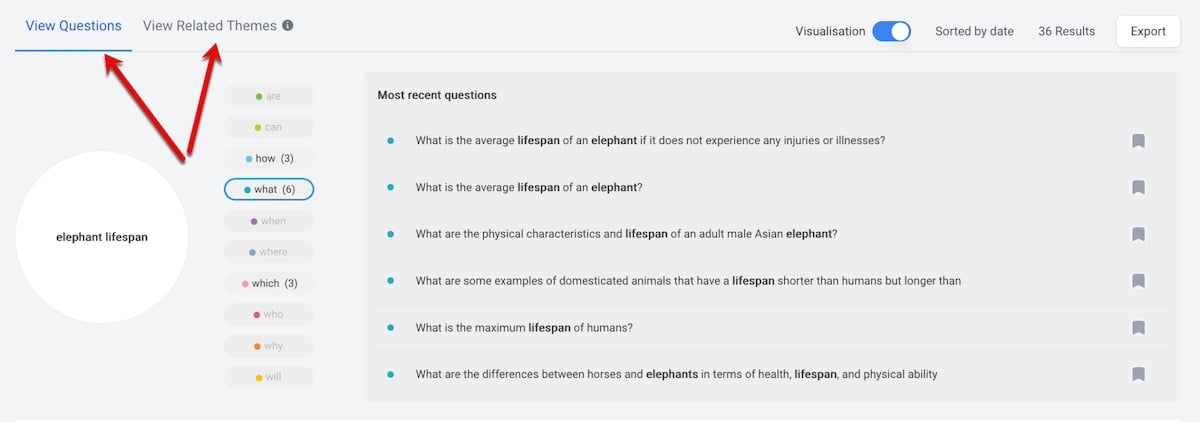
Conversational queries. Buzzsumo’s “Question Analyzer” pulls threads from Reddit, Quora, and similar forum-type sites based on your core term. It’s handy for seeing your target query in real conversations and discovering searchers’ alternative terms. (Check Buzzsumo’s “View related themes” for its suggestions.)
Read forum threads to analyze actual conversations. This Buzzsumo example answers the question, “How long do elephants live?” Click image to enlarge.
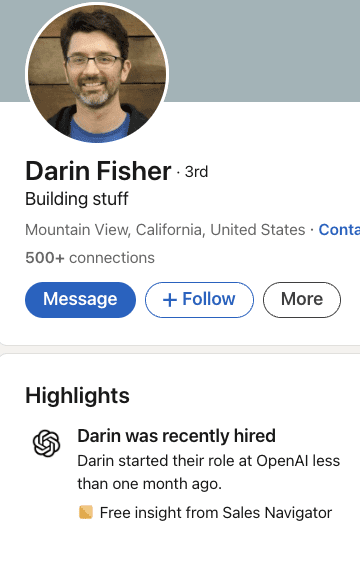
In what appears to be a development in OpenAI’s expansion, former Chrome engineering veteran Darin Fisher has joined the AI company.
This move adds fuel to earlier reports about OpenAI’s plans to develop a web browser to compete with Google Chrome.
Background & Context
Earlier reports from The Information indicated that OpenAI has been quietly assembling a team of former Google developers to work on a new browser project.
The company has reportedly been in discussions with various partners, including Conde Nast, Eventbrite, Redfin, and Priceline, about implementing specialized search features for travel, food, real estate, and retail websites.
Latest Development
According to an update to his LinkedIn profile, Fisher has recently joined OpenAI.
Screenshot from LinkedIn, November 2024.
His arrival is noteworthy, given Fisher’s background in browser development.
His professional history includes contributions to Google Chrome, Mozilla Firefox, and Neeva, making him an asset for OpenAI’s browser ambitions.
You can learn more about Fisher and what he brought to the Chrome team in the video below:
Potential Impact
This development comes at a critical time in the browser market.
Google Chrome dominates with approximately 65% of desktop and 68% of mobile users.
However, the market could shift following recent U.S. Department of Justice proposals suggesting Google should divest its Chrome browser business due to monopoly concerns.
Looking Ahead
While OpenAI’s browser project is reportedly in the early stages, the addition of experienced browser developers like Fisher suggests the company is serious about entering this space.
The potential browser is expected to feature deep integration with ChatGPT and AI-powered search capabilities, though a launch timeline remains unclear.
This move represents another step in OpenAI’s apparent strategy to expand beyond pure AI development into consumer-facing products.
SEO is a multifaceted discipline. It requires a solid strategy, connection to broader digital marketing (and business goals), and accountability.
While there are differing processes, approaches, and even opinions on how you should implement it, it is something that you can’t ignore or push off specific short-term tactics if you want to get to specific long-term results.
I’m against just blindly “doing” best practices or following a prescribed checklist in the absence of a strategy or documented plan.
Rather than giving you a specific checklist of things to do during the year, I’m unpacking activities categorized by daily, monthly, quarterly, and yearly.
I feel strongly that if you have a well-balanced approach to SEO that starts with a strategy and solid goals, then you can move into the ongoing campaign management or tactical implementation phase of moving through your year.
My goal is to unpack this cadence so that you will be able to factor it into your plan and see it through to ultimate return on investment (ROI) and success.
Daily
Educate Yourself
Staying up to date on industry news is a critical aspect of SEO that must be built into any maintenance or ongoing management plan.
This ranges from the mission-critical alerts and updates the search engines announce to keeping tabs on SEO best practices and breaking news from sources like Search Engine Journal.
AI news seems to be constantly disruptive, and we have to be mindful of how SEO is not just all about Google or concepts that we have applied in the past (if you’ve been in the game for a while).
Monitoring your key SEO performance metrics in real-time, or at least once per day, is especially necessary for brands and organizations that rely on ecommerce transactions or lead volume to feed a sales team.
Knowing how your website performs in search through top-level metrics is important for recognizing any red flags. These could include:
A specific or aggregate positioning drop.
An organic traffic drop.
A decrease in sales or lead volume.
Being able to recognize problems as soon as they happen is key.
You need to be able to diagnose issues and reverse any negative trends before they impact your overall marketing and business goals.
By keeping tabs on actual performance, you can compare to benchmarks and baselines to make sure that you fully understand the cause and effect with your metrics and not have an issue happen for too long before you can intervene.
You can monitor less critical KPIs (any that don’t necessitate an immediate reaction) on a weekly basis.
Make Progress On Tactics
A solid digital marketing plan – especially an SEO plan – or campaign must start with strategy (including goals), tactics, assets needed, how it will be measured, and documented steps to be accountable and actionable.
Without a plan, process, or defined approach, you can waste a lot of time chasing specific SEO aspects that might be low impact and low priority – or tactics absent of a strategy that are part of a “best practices” checklist, but not one that is specific to your business.
The daily process should include specific tasks, milestones, and achievable actions that work toward the bigger picture.
The tactics can include things done for the first time in a phased approach or action items more in a rinse-and-repeat methodology.
Regardless, the list of specific technical, on-page, and off-page action items should be defined for the year, broken out into months, and further into tactics and progress that can be made on a daily basis to stay on track.
SEO requires both big-picture thinking and the ability to tackle daily tasks and action items.
Monthly
Report On Performance
Beyond the daily or weekly KPI monitoring, it’s often important to use monthly cycles to more broadly report on performance.
The focus of monthly checkpoints allows for dedicated time to compare a larger sample size of data and see trends.
Monthly performance reporting should include year-over-year comparisons of the completed month plus any available year-to-date stats.
Find meaningful intervals to measure and be consistent. Looking at bigger ranges of time helps to see trends that are hard to decipher in small sample sizes.
Any stories of the what and why for deviations in goal, celebrations for exceeding goals, and metrics that warrant possible changes to the plan are critical to the surface and prioritized through a dashboard or snapshot report of the performance data.
Recap Completed & Continuing Action Items
This is a chance to evaluate the tactics and execution in the previous month against the plan.
Was everything completed?
Were there deviations?
What obstacles or roadblocks were in the way or overcome?
Looking at the past helps shape the future.
When you combine the action items and tactics with the performance data, you should get an overall picture of the reality of what is driving SEO performance.
Plan Next Month’s Action Items & Evaluate The Plan
Monthly intervals are great for ensuring accountability for the completion of tasks.
Even when the year is planned out, things change in SEO, and performance isn’t always what we expect after doing something the first time.
Taking a monthly planning approach, adjustments can be made to the plan, such as doubling down on a specific tactic or adjusting the overall strategy to recalibrate.
By being agile enough to evaluate performance and tactics monthly, you can avoid overthinking things and reacting too swiftly, but also not let too much time pass and lose footing with trends toward goals.
Having a good balance of planned tactics and actions versus the need for agile methods to pivot when needed is often the best approach to staying current and proactive.
Quarterly
Technical Issues Auditing
Assuming you have covered technical issues at the beginning of your SEO focus and are also watching for any that trigger red flags in daily and weekly monitoring, it is important to take a broader look through an audit each quarter.
Plus, comparison to benchmarks and standards for site speed, mobile usability, validation of structured data, and the aspects that aren’t often looked at on a more frequent basis.
On-Page Issues Auditing
Without an audit process and even with frequent monitoring, things happen on websites.
A code update, database update, plugin/extension update, or publishing content can cause duplicate tags, duplicate content, or even missing on-page elements.
A quarterly audit of on-page issues that can be conducted using a wide range of free and subscription third-party tools is important.
There are tools that will even send alerts and factor into the daily process if something changes, like a meta description being wiped out.
Regardless, having a solid tools stack and process for quarterly evaluation and comparison to the previous audit is important to ensure that the results of the audit and any fixes needed are noted and made into the tactical plan.
Link Profile Auditing
Overall, the SEO plan likely includes some form of link building.
Whether that is through attracting links with engaging content or a more focused plan of research and outreach, it is likely a part of the ongoing tactics (or should be considered if it isn’t).
Investing time and effort into the tactics makes it important to have visibility of the overall link profile and progress.
This might be a performance metric tracked in the monthly reporting phase, but quarterly should be audited in a deeper sense.
Evaluating the quality of links, the number of links, the diversity of sources, the relevancy of linked content, comparisons to competitors, comparisons to benchmarks, and period-over-period comparisons are all important aspects to ensure that the plan is performing as intended in the area of backlinks.
Plus, if not caught through daily or monthly efforts, any spammy links or negative SEO attempts can be caught here and addressed through the disavow process, if applicable or if it makes sense for your situation.
Local Listings Audit
Once local listings management is in maintenance mode, there won’t be a frequent need for major changes with NAP (name, address, phone) data or inconsistencies in listing data.
However, that doesn’t mean it won’t happen and can be “set it and forget it.”
This audit can identify issues that can be addressed on a one-off basis as well as provide guidance on performance and any needed changes to the content, reviews, and other aspects of the listings themselves beyond the basic NAP data.
If any third-party data sources or listings were missed, Google Business Profile data could be overwritten with inaccurate listing info.
Even if nothing changes with your management of listings, data can change and needs to be monitored at a minimum.
Yearly
Measure Performance
When running annual plans for SEO – and even when not on annual agreements or evaluation cycles – taking an entire year of data and evaluating it is helpful to advise strategy and find measurable ROI calculations.
SEO is a long-term process that aims to achieve the most competitive positioning and visibility possible in search engines. It is a valuable investment of time to look at performance data over 12-month spans, compare it to previous periods, look at benchmarks, and celebrate successes.
Even if you don’t have annual budgets or agreements with outside partners/providers, taking an annual step back and looking at performance and the effort like an investment rather than an expense is important.
Planning Strategy & Tactics
In addition to reviewing yearly performance data, you should also plan your goals, strategy, and tactics for the next year.
Even though the plan could change a week into maintenance, having a plan and setting a target are key to measuring progress.
Without a plan and using past learnings and a realistic view of the resources being invested in the coming year, there can be a gap between expectations and reality.
It is best to sort this out before getting months down the road.
Conclusion
To reiterate what I noted earlier, SEO isn’t about just following a basic checklist of best practices. It is getting harder and harder to be successful at.
I look at the changes based on AI, Google’s algorithms, and fragmentation in the search market share as an opportunity.
When we have clear goals defined for our strategy, build out the tactics needed to get there, have solid assets (websites, content, etc.), can measure it, and stick to it with a schedule that doesn’t get sidetracked by other priorities or hats we wear, we can get there.
Our annual plan or “checklist” is custom to us with a cadence of daily, monthly, quarterly, and yearly when it comes to things we do, so we can see SEO all the way through to ROI in both short-term and long-term applications.
Google’s click-through rates (CTRs) experienced notable changes across industries and search categories in Q3, according to a report from Advanced Web Ranking.
This report compares Q3 data to the previous quarter. It shows how CTRs can vary and what that means for website traffic.
Key Findings:
Branded searches on mobile saw a 1.07 percentage point increase in CTR for top-ranked sites
Informational queries (containing words like “what,” “when,” “how”) gained 1.63 percentage points on mobile
Commercial queries declined across devices, with mobile dropping 3.51 percentage points
Short keyword searches (1-3 words) showed improved CTR on mobile devices
Industry Winners & Losers
To assess traffic impact, the report looked at changes in CTR alongside search demand trends for different industries.
When both CTR and demand grow at the same time, it signals likely traffic gains. However, if both decrease, it may indicate potential losses.
The Science sector bounced back after two quarters of falling CTR.
The top results saw an increase of 2.48 percentage points (pp) on desktop and 4.16 pp on mobile. Impressions also went up by 33.78%.
The Law, Government & Politics sector had the biggest drop in single-position CTR, with desktop websites ranked second, falling by 9.74 pp. Still, overall demand grew by 32.74%.
After a year of stable CTRs, the Shopping sector experienced a recovery in Q3. The top position increased by 2.30 pp on desktop and 1.94 pp on mobile, with a demand rise of 21.09%.
Other industries with notable CTR increases include:
Automotive: +2.95 pp desktop, +1.40 pp mobile (#1)
Business: +1.52 pp mobile (#1)
Education: +2.53 pp mobile (#1)
Family & Parenting: +2.42 pp desktop, +2.39 pp mobile (#1)
On the losing end, Arts & Entertainment saw desktop CTRs sink 6.56 pp and 1.42 pp for positions one and two and a 4.12 pp mobile slide for the top spot. Impressions also dipped -1.54%.
Key Takeaways
Mobile is crucial, especially in Personal Finance, where mobile CTRs are 34%. Focus on mobile-friendly designs and keep content short.
Users prefer informational content over commercial pages, so prioritize educational material while maintaining clear sales pages.
Different industries require different strategies:
Science and Automotive sectors are growing; add more content here.
Arts and Entertainment need improved audience engagement.
Personal Finance has good CTRs but lower search volume; be ready for traffic drops.
Branded searches perform well on mobile, so focus on building your brand. Track your CTR metrics against industry standards and adjust as trends change.
Looking Ahead
The findings suggest that websites should closely monitor their CTR metrics against industry benchmarks, as rankings alone don’t tell the complete traffic story.
SERP layout variations for different keywords can impact click-through rates as well.
The next report covering Q4 will offer year-end comparisons and trend analysis.
The U.S. Department of Justice (DOJ) has proposed that Google sell its Chrome web browser and possibly the Android mobile operating system.
This suggestion is part of a larger effort to address the company’s alleged monopoly in online search.
In a 23-page brief submitted to the U.S. District Court in Washington D.C., the DOJ outlined extensive measures to dismantle what it claims are Google’s illegal monopolies in general search services and search text advertising.
DOJ Seeks Divestiture of Chrome & Possibly Android
The DOJ’s proposal centers on the divestiture of the Chrome browser, which the agency claims has strengthened Google’s dominance in the search market.
The DOJ wrote in its filing:
“To address these challenges, Google must divest Chrome, which has ‘fortified [Google’s] dominance,’ so that rivals may pursue distribution partnerships that this ‘realit[y] of control’ today prevents.”
The DOJ suggested that Google should sell the Android mobile operating system if behavioral remedies to prevent self-preferencing practices do not restore competition.
However, the DOJ acknowledged that the divestiture of Android “may draw significant objections from Google or other market participants.”
In addition to the structural breakup, the DOJ is seeking a range of conduct remedies, including:
Prohibiting Google from entering into exclusivity agreements
Banning self-preferencing of its search products
Mandating data sharing with rivals
Establishing a Technical Committee to monitor compliance.
The proposed judgment would remain in effect for 10 years.
Google Responds To DOJ’s Proposal
Google swiftly condemned the DOJ’s proposal, calling it a “radical interventionist agenda” that would harm innovation and America’s global technology leadership.
In a blog post, Kent Walker, Google’s President of Global Affairs, said the remedies would:
“.. break a range of Google products — even beyond Search — that people love and find helpful in their everyday lives.”
Walker adds:
“DOJ’s approach would result in unprecedented government overreach that would harm American consumers, developers, and small businesses — and jeopardize America’s global economic and technological leadership at precisely the moment it’s needed most.”
Google raises the following concerns about the DOJ’s plan:
It would require disclosing users’ personal search queries to “unknown foreign and domestic companies.”
It could endanger security and privacy by forcing the sale of Chrome and Android
It may “chill” investment in artificial intelligence where Google is a leader.
Next Steps
The recent court filings are part of the DOJ’s antitrust case against Google, which started in October 2020 with help from several state attorneys.
In September, Judge Amit Mehta found that Google had broken antitrust laws to keep its search and search advertising monopolies. This ruling will lead to a phase where solutions to restore competition will be discussed.
Both sides are expected to present detailed proposals for these solutions in the coming months, with a hearing planned for next year.
The outcome could significantly affect Google’s business model and the online advertising market.
Microsoft announced an update to GraphRAG that improves AI search engines’ ability to provide specific and comprehensive answers while using less resources. This update speeds up LLM processing and increases accuracy.
The Difference Between RAG And GraphRAG
RAG (Retrieval Augmented Generation) combines a large language model (LLM) with a search index (or database) to generate responses to search queries. The search index grounds the language model with fresh and relevant data. This reduces the possibility of AI search engine providing outdated or hallucinated answers.
GraphRAG improves on RAG by using a knowledge graph created from a search index to then generate summaries referred to as community reports.
GraphRAG Uses A Two-Step Process:
Step 1: Indexing Engine The indexing engine segments the search index into thematic communities formed around related topics. These communities are connected by entities (e.g., people, places, or concepts) and the relationships between them, forming a hierarchical knowledge graph. The LLM then creates a summary for each community, referred to as a Community Report. This is the hierarchical knowledge graph that GraphRAG creates, with each level of the hierarchical structure representing a summarization.
There’s a misconception that GraphRAG uses knowledge graphs. While that’s partially true, it leaves out the most important part: GraphRAG creates knowledge graphs from unstructured data like web pages in the Indexing Engine step. This process of transforming raw data into structured knowledge is what sets GraphRAG apart from RAG, which relies on retrieving and summarizing information without building a hierarchical graph.
Step 2: Query Step In the second step the GraphRAG uses the knowledge graph it created to provide context to the LLM so that it can more accurately answer a question.
Microsoft explains that Retrieval Augmented Generation (RAG) struggles to retrieve information that’s based on a topic because it’s only looking at semantic relationships.
GraphRAG outperforms RAG by first transforming all documents in its search index into a knowledge graph that hierarchically organizes topics and subtopics (themes) into increasingly specific layers. While RAG relies on semantic relationships to find answers, GraphRAG uses thematic similarity, enabling it to locate answers even when semantically related keywords are absent in the document.
This is how the original GraphRAG announcement explains it:
“Baseline RAG struggles with queries that require aggregation of information across the dataset to compose an answer. Queries such as “What are the top 5 themes in the data?” perform terribly because baseline RAG relies on a vector search of semantically similar text content within the dataset. There is nothing in the query to direct it to the correct information.
However, with GraphRAG we can answer such questions, because the structure of the LLM-generated knowledge graph tells us about the structure (and thus themes) of the dataset as a whole. This allows the private dataset to be organized into meaningful semantic clusters that are pre-summarized. The LLM uses these clusters to summarize these themes when responding to a user query.”
Update To GraphRAG
To recap, GraphRAG creates a knowledge graph from the search index. A “community” refers to a group of related segments or documents clustered based on topical similarity, and a “community report” is the summary generated by the LLM for each community.
The original version of GraphRAG was inefficient because it processed all community reports, including irrelevant lower-level summaries, regardless of their relevance to the search query. Microsoft describes this as a “static” approach since it lacks dynamic filtering.
The updated GraphRAG introduces “dynamic community selection,” which evaluates the relevance of each community report. Irrelevant reports and their sub-communities are removed, improving efficiency and precision by focusing only on relevant information.
Microsoft explains:
“Here, we introduce dynamic community selection to the global search algorithm, which leverages the knowledge graph structure of the indexed dataset. Starting from the root of the knowledge graph, we use an LLM to rate how relevant a community report is in answering the user question. If the report is deemed irrelevant, we simply remove it and its nodes (or sub-communities) from the search process. On the other hand, if the report is deemed relevant, we then traverse down its child nodes and repeat the operation. Finally, only relevant reports are passed to the map-reduce operation to generate the response to the user. “
Takeaways: Results Of Updated GraphRAG
Microsoft tested the new version of GraphRAG and concluded that it resulted in a 77% reduction in computational costs, specifically the token cost when processed by the LLM. Tokens are the basic units of text that are processed by LLMs. The improved GraphRAG is able to use a smaller LLM, further reducing costs without compromising the quality of the results.
The positive impacts on search results quality are:
Dynamic search provides responses that are more specific information.
Responses makes more references to source material, which improves the credibility of the responses.
Results are more comprehensive and specific to the user’s query, which helps to avoid offering too much information.
Dynamic community selection in GraphRAG improves search results quality by generating responses that are more specific, relevant, and supported by source material.