Google adds ‘ineligibleRegion’ property to video structured data, allowing publishers to specify regions where videos shouldn’t appear in search results.
Google added ‘ineligibleRegion’ to video structured data.
It lets sites specify where videos shouldn’t appear in search.
This offers more control over regional video visibility.
Google’s John Mueller answered a question on Reddit about heading elements, confirming a slight impact but downplaying its significance, saying a lot about how Google uses headings.
Hierarchical Heading Structure
Hierarchical and hierarchy in the context of heading elements (H1, H2, etc.) refers to the organization of headings in order of importance or structure. In this context, the word “importance” doesn’t mean importance as a ranking factor, it means importance to the structure of a web page.
Generally a web page could have one H1, indicative of the topic of the entire page and multiple H2 headings that signal what each section of a web page is about. For Google’s purposes, the first heading doesn’t have to be an H1, it can be an H2. Google isn’t mandated to use the first heading as the overall topic, it’s not a directive to their search algorithms where an SEO controls how Google interprets a heading.
The technical specifications of heading elements are found on the pages of the World Wide Web Consortium (W3C), the standards making body that, among many things, defines the purpose and use of HTML elements like headings.
Google generally follows the official W3C technical specifications of HTML elements but for practical purposes isn’t strict about it because many websites use headings for style not semantic purposes.
Are Incorrectly Ordered Headings Harmful To SEO?
The Redditor wanted to know if using the heading elements out of order was “harmful” and to what degree. They used the word “sequential” but the precise word is hierarchical.
They wanted to know how bad was it if the headings were out of order or if one of the headings was skipped entirely.
This is the question:
“How Harmful is having Non sequential header Tags? Like having a h4 title and h1 tags below Or Having a h4, h3 h5 but not h2 tags?”
H1, H2 Headings Have A Slight Impact
Google’s John Mueller confirmed that the heading order has a slight impact. He didn’t say it was a ranking factor nor did he say what kind of impact the heading order had. It could be that the heading order makes it easier for search engines to understand the web page, which is what I believe (meaning, it’s just my opinion and you’re entitled to yours).
This is Mueller’s answer:
“Doing things properly (right order headings) is a good practice, it helps search engines lightly to better understand your content, and it’s good for accessibility. If you’re setting up a new site, or making significant changes on your templates, or just bored :-), then why not take the extra 10 minutes to get this right.”
Sometimes it’s difficult to control the headings because a template might use headings to style sections of a web page, like in the footer or a sidebar. In the context of a WordPress site that means having to create a child template that controls the styles and change the CSS for those sections of the template so that they use CSS and not headings to style them.
Other than that, the heading structure is entirely under control of the publisher, site owner, or SEO.
Yet, having the keywords in the headings might not be enough because the purpose of heading elements is to communicate what a section of a web page is about and, as Mueller goes on to say, headings play a role for accessibility.
Google Says Fixing Headings Won’t Change Rankings
This is the part that some SEOs may find confusing because Google says that fixing the hierarchical structure of headings will not improve the rankings of a website.
A long time ago, like twenty four years ago, heading elements were a critical activity for ranking in Google. I know because I was an SEO in the early 2000s and experienced this first hand. By 2005 the impact to rankings had significantly diminished. I know it was diminished because I was a digital marketer when headings stopped making a critical impact and had evolved to become a signal of what a section of a web page is about.
The search results were full of sites that had no heading elements, it was hard not to notice the change.
But for some reason many in the SEO industry continued to believe that headings are a strong ranking factor. John Mueller’s statement about the diminished impact of heading elements to search rankings confirms the changed role that heading elements play today.
Mueller continued his answer:
“That said, if you have an existing site, fixing this isn’t going to change your site’s rankings; I suspect you’ll find much bigger value in terms of SEO by looking for ways to significantly up-value your site overall.”
What Mueller is talking about is the difference between making a web page for search engines (worrying about how Google will interpret heading elements) and creating a web page for users (worrying if the page contains useful information that is on-topic flows in a logical order).
His statement gives a clue to how Google uses heading elements and is good advice.
Crawl budget is a vital SEO concept for large websites with millions of pages or medium-sized websites with a few thousand pages that change daily.
An example of a website with millions of pages would be eBay.com, and websites with tens of thousands of pages that update frequently would be user reviews and rating websites similar to Gamespot.com.
There are so many tasks and issues an SEO expert has to consider that crawling is often put on the back burner.
But crawl budget can and should be optimized.
In this article, you will learn:
How to improve your crawl budget along the way.
Go over the changes to crawl budget as a concept in the last couple of years.
(Note: If you have a website with just a few hundred pages, and pages are not indexed, we recommend reading our article on common issues causing indexing problems, as it is certainly not because of crawl budget.)
What Is Crawl Budget?
Crawl budget refers to the number of pages that search engine crawlers (i.e., spiders and bots) visit within a certain timeframe.
There are certain considerations that go into crawl budget, such as a tentative balance between Googlebot’s attempts to not overload your server and Google’s overall desire to crawl your domain.
Crawl budget optimization is a series of steps you can take to increase efficiency and the rate at which search engines’ bots visit your pages.
Why Is Crawl Budget Optimization Important?
Crawling is the first step to appearing in search. Without being crawled, new pages and page updates won’t be added to search engine indexes.
The more often that crawlers visit your pages, the quicker updates and new pages appear in the index. Consequently, your optimization efforts will take less time to take hold and start affecting your rankings.
Google’s index contains hundreds of billions of pages and is growing each day. It costs search engines to crawl each URL, and with the growing number of websites, they want to reduce computational and storage costs by reducing the crawl rate and indexation of URLs.
There is also a growing urgency to reduce carbon emissions for climate change, and Google has a long-term strategy to improve sustainability and reduce carbon emissions.
These priorities could make it difficult for websites to be crawled effectively in the future. While crawl budget isn’t something you need to worry about with small websites with a few hundred pages, resource management becomes an important issue for massive websites. Optimizing crawl budget means having Google crawl your website by spending as few resources as possible.
So, let’s discuss how you can optimize your crawl budget in today’s world.
Well, if you disallow URLs that are not important, you basically tell Google to crawl useful parts of your website at a higher rate.
For example, if your website has an internal search feature with query parameters like /?q=google, Google will crawl these URLs if they are linked from somewhere.
Similarly, in an e-commerce site, you might have facet filters generating URLs like /?color=red&size=s.
These query string parameters can create an infinite number of unique URL combinations that Google may try to crawl.
Those URLs basically don’t have unique content and just filter the data you have, which is great for user experience but not for Googlebot.
Allowing Google to crawl these URLs wastes crawl budget and affects your website’s overall crawlability. By blocking them via robots.txt rules, Google will focus its crawl efforts on more useful pages on your site.
Here is how to block internal search, facets, or any URLs containing query strings via robots.txt:
Each rule disallows any URL containing the respective query parameter, regardless of other parameters that may be present.
* (asterisk) matches any sequence of characters (including none).
? (Question Mark): Indicates the beginning of a query string.
=*: Matches the = sign and any subsequent characters.
This approach helps avoid redundancy and ensures that URLs with these specific query parameters are blocked from being crawled by search engines.
Note, however, that this method ensures any URLs containing the indicated characters will be disallowed no matter where the characters appear. This can lead to unintended disallows. For example, query parameters containing a single character will disallow any URLs containing that character regardless of where it appears. If you disallow ‘s’, URLs containing ‘/?pages=2’ will be blocked because *?*s= matches also ‘?pages=’. If you want to disallow URLs with a specific single character, you can use a combination of rules:
Disallow: *?s=*
Disallow: *&s=*
The critical change is that there is no asterisk ‘*’ between the ‘?’ and ‘s’ characters. This method allows you to disallow specific exact ‘s’ parameters in URLs, but you’ll need to add each variation individually.
Apply these rules to your specific use cases for any URLs that don’t provide unique content. For example, in case you have wishlist buttons with “?add_to_wishlist=1” URLs, you need to disallow them by the rule:
Disallow: /*?*add_to_wishlist=*
This is a no-brainer and a natural first and most important step recommended by Google.
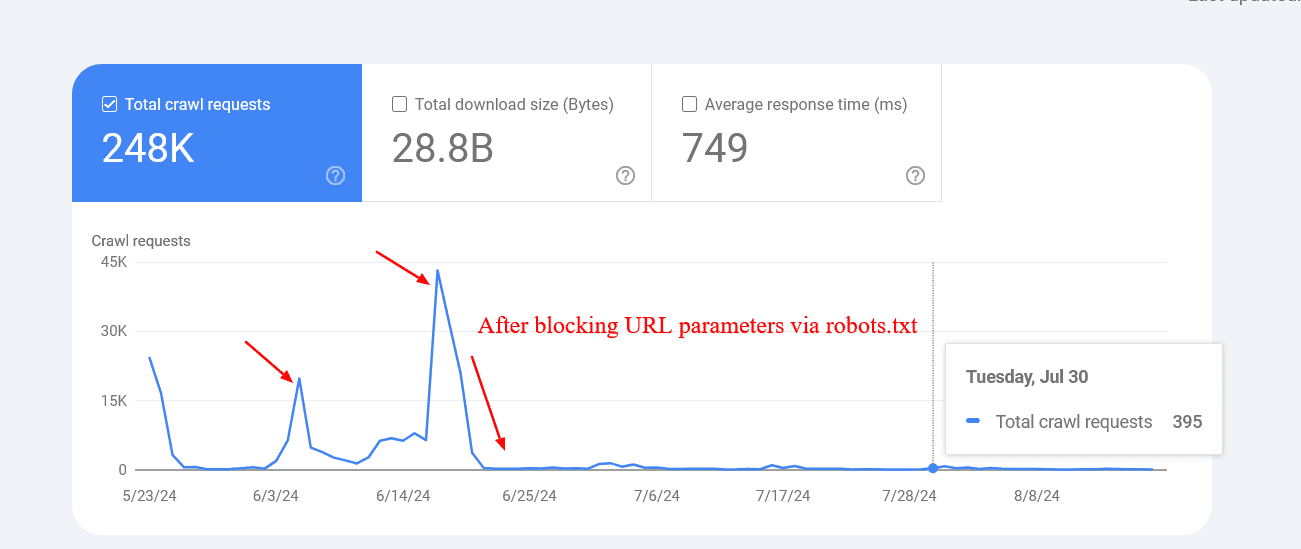
An example below shows how blocking those parameters helped to reduce the crawling of pages with query strings. Google was trying to crawl tens of thousands of URLs with different parameter values that didn’t make sense, leading to non-existent pages.
Reduced crawl rate of URLs with parameters after blocking via robots.txt.
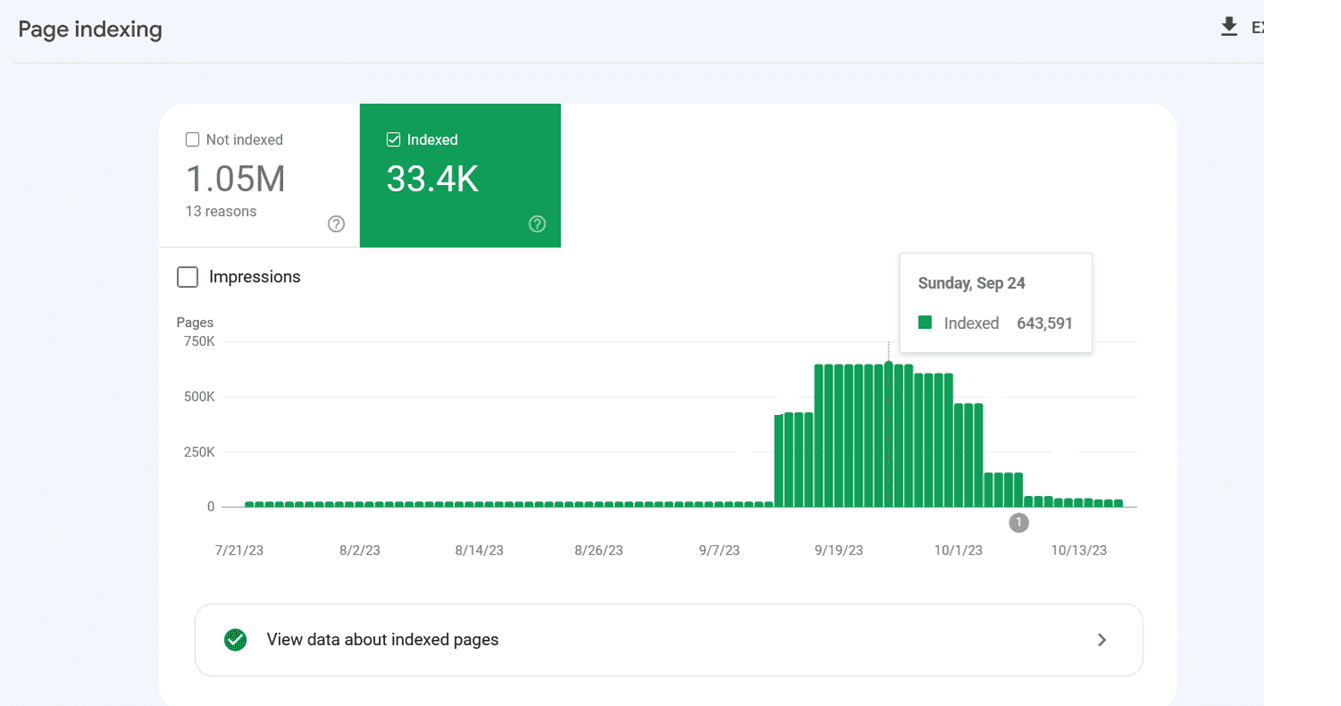
However, sometimes disallowed URLs might still be crawled and indexed by search engines. This may seem strange, but it isn’t generally cause for alarm. It usually means that other websites link to those URLs.
Indexing spiked because Google indexed internal search URLs after they were blocked via robots.txt.
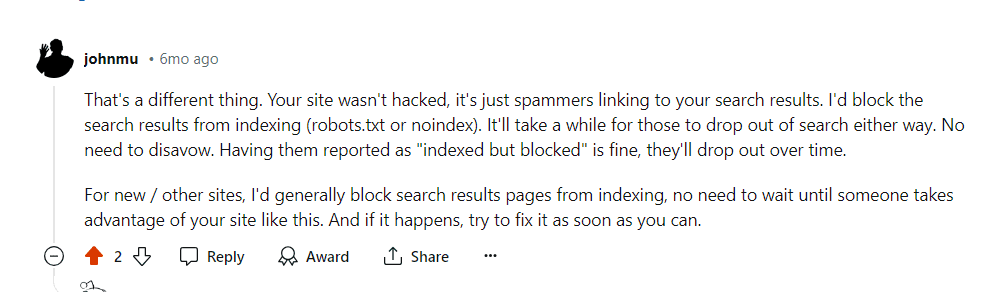
Google confirmed that the crawling activity will drop over time in these cases.
Google’s comment on Reddit, July 2024
Another important benefit of blocking these URLs via robots.txt is saving your server resources. When a URL contains parameters that indicate the presence of dynamic content, requests will go to the server instead of the cache. This increases the load on your server with every page crawled.
Please remember not to use “noindex meta tag” for blocking since Googlebot has to perform a request to see the meta tag or HTTP response code, wasting crawl budget.
1.2. Disallow Unimportant Resource URLs In Robots.txt
Besides disallowing action URLs, you may want to disallow JavaScript files that are not part of the website layout or rendering.
For example, if you have JavaScript files responsible for opening images in a popup when users click, you can disallow them in robots.txt so Google doesn’t waste budget crawling them.
Here is an example of the disallow rule of JavaScript file:
Disallow: /assets/js/popup.js
However, you should never disallow resources that are part of rendering. For example, if your content is dynamically loaded via JavaScript, Google needs to crawl the JS files to index the content they load.
Another example is REST API endpoints for form submissions. Say you have a form with action URL “/rest-api/form-submissions/”.
Potentially, Google may crawl them. Those URLs are in no way related to rendering, and it would be good practice to block them.
Disallow: /rest-api/form-submissions/
However, headless CMSs often use REST APIs to load content dynamically, so make sure you don’t block those endpoints.
In a nutshell, look at whatever isn’t related to rendering and block them.
2. Watch Out For Redirect Chains
Redirect chains occur when multiple URLs redirect to other URLs that also redirect. If this goes on for too long, crawlers may abandon the chain before reaching the final destination.
URL 1 redirects to URL 2, which directs to URL 3, and so on. Chains can also take the form of infinite loops when URLs redirect to one another.
Avoiding these is a common-sense approach to website health.
Ideally, you would be able to avoid having even a single redirect chain on your entire domain.
But it may be an impossible task for a large website – 301 and 302 redirects are bound to appear, and you can’t fix redirects from inbound backlinks simply because you don’t have control over external websites.
One or two redirects here and there might not hurt much, but long chains and loops can become problematic.
In order to troubleshoot redirect chains you can use one of the SEO tools like Screaming Frog, Lumar, or Oncrawl to find chains.
When you discover a chain, the best way to fix it is to remove all the URLs between the first page and the final page. If you have a chain that passes through seven pages, then redirect the first URL directly to the seventh.
Another great way to reduce redirect chains is to replace internal URLs that redirect with final destinations in your CMS.
Depending on your CMS, there may be different solutions in place; for example, you can use this plugin for WordPress. If you have a different CMS, you may need to use a custom solution or ask your dev team to do it.
3. Use Server Side Rendering (HTML) Whenever Possible
Now, if we’re talking about Google, its crawler uses the latest version of Chrome and is able to see content loaded by JavaScript just fine.
But let’s think critically. What does that mean? Googlebot crawls a page and resources such as JavaScript then spends more computational resources to render them.
Remember, computational costs are important for Google, and it wants to reduce them as much as possible.
So why render content via JavaScript (client side) and add extra computational cost for Google to crawl your pages?
Because of that, whenever possible, you should stick to HTML.
That way, you’re not hurting your chances with any crawler.
4. Improve Page Speed
As we discussed above, Googlebot crawls and renders pages with JavaScript, which means if it spends fewer resources to render webpages, the easier it will be for it to crawl, which depends on how well optimized your website speed is.
Google’s crawling is limited by bandwidth, time, and availability of Googlebot instances. If your server responds to requests quicker, we might be able to crawl more pages on your site.
So using server-side rendering is already a great step towards improving page speed, but you need to make sure your Core Web Vital metrics are optimized, especially server response time.
5. Take Care of Your Internal Links
Google crawls URLs that are on the page, and always keep in mind that different URLs are counted by crawlers as separate pages.
If you have a website with the ‘www’ version, make sure your internal URLs, especially on navigation, point to the canonical version, i.e. with the ‘www’ version and vice versa.
Another common mistake is missing a trailing slash. If your URLs have a trailing slash at the end, make sure your internal URLs also have it.
Otherwise, unnecessary redirects, for example, “https://www.example.com/sample-page” to “https://www.example.com/sample-page/” will result in two crawls per URL.
Another important aspect is to avoid broken internal links pages, which can eat your crawl budget and soft 404 pages.
And if that wasn’t bad enough, they also hurt your user experience!
In this case, again, I’m in favor of using a tool for website audit.
WebSite Auditor, Screaming Frog, Lumar or Oncrawl, and SE Ranking are examples of great tools for a website audit.
6. Update Your Sitemap
Once again, it’s a real win-win to take care of your XML sitemap.
The bots will have a much better and easier time understanding where the internal links lead.
Use only the URLs that are canonical for your sitemap.
Also, make sure that it corresponds to the newest uploaded version of robots.txt and loads fast.
7. Implement 304 Status Code
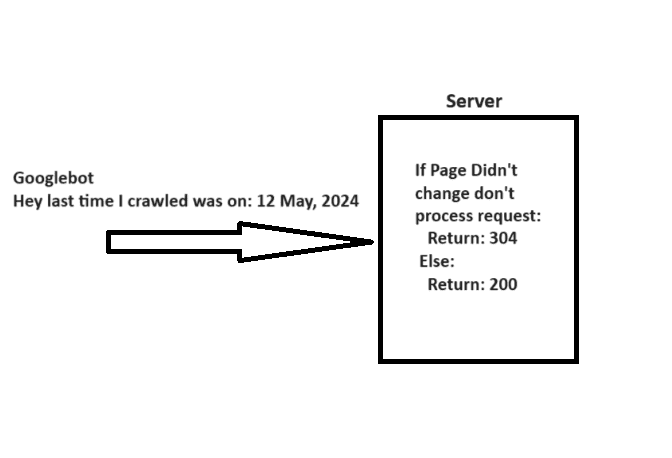
When crawling a URL, Googlebot sends a date via the “If-Modified-Since” header, which is additional information about the last time it crawled the given URL.
If your webpage hasn’t changed since then (specified in “If-Modified-Since“), you may return the “304 Not Modified” status code with no response body. This tells search engines that webpage content didn’t change, and Googlebot can use the version from the last visit it has on the file.
A simple explanation of how 304 not modified http status code works.
Imagine how many server resources you can save while helping Googlebot save resources when you have millions of webpages. Quite big, isn’t it?
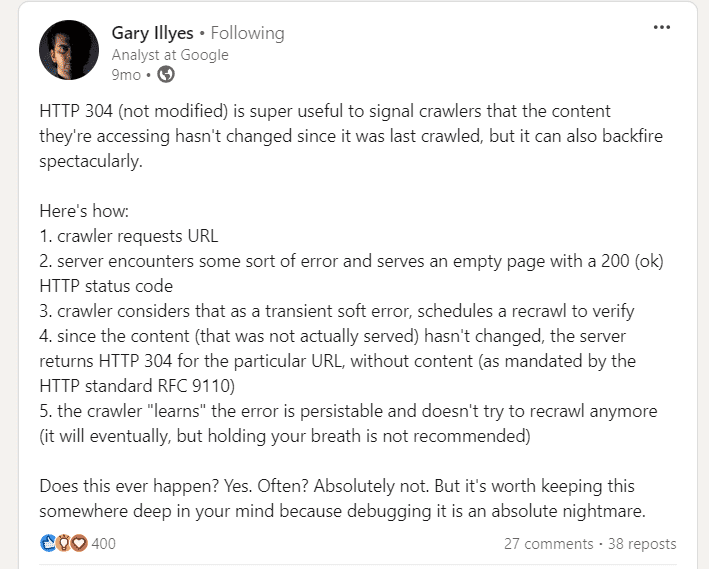
So be cautious. Server errors serving empty pages with a 200 status can cause crawlers to stop recrawling, leading to long-lasting indexing issues.
8. Hreflang Tags Are Vital
In order to analyze your localized pages, crawlers employ hreflang tags. You should be telling Google about localized versions of your pages as clearly as possible.
First off, use the lang_code" href="url_of_page" /> in your page’s header. Where “lang_code” is a code for a supported language.
You should use the element for any given URL. That way, you can point to the localized versions of a page.
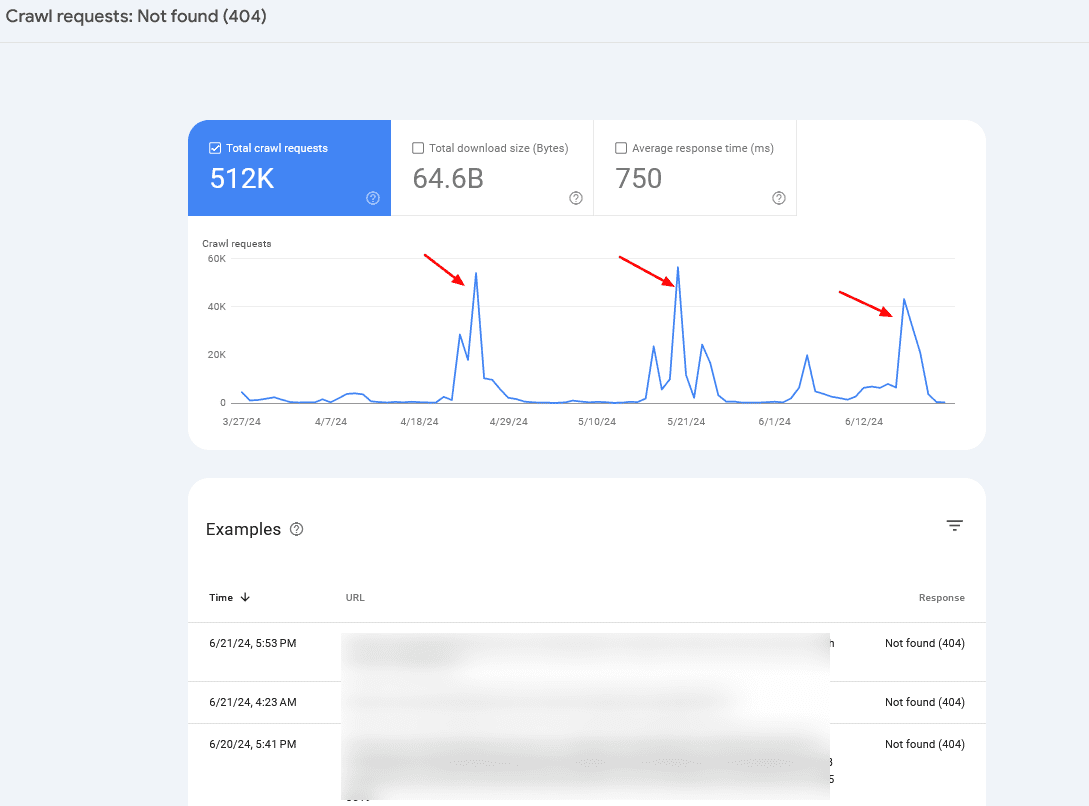
Check your server logs and Google Search Console’s Crawl Stats report to monitor crawl anomalies and identify potential problems.
If you notice periodic crawl spikes of 404 pages, in 99% of cases, it is caused by infinite crawl spaces, which we have discussed above, or indicates other problems your website may be experiencing.
Crawl rate spikes
Often, you may want to combine server log information with Search Console data to identify the root cause.
Summary
So, if you were wondering whether crawl budget optimization is still important for your website, the answer is clearly yes.
Crawl budget is, was, and probably will be an important thing to keep in mind for every SEO professional.
Hopefully, these tips will help you optimize your crawl budget and improve your SEO performance – but remember, getting your pages crawled doesn’t mean they will be indexed.
In case you face indexation issues, I suggest reading the following articles:
Featured Image: BestForBest/Shutterstock All screenshots taken by author
For better or worse, AI has become a dominant force in SEO.
SEO professionals have been grappling with AI for years in Google’s algorithms, but the technology has moved to the forefront of digital marketing. The largest tech companies are developing the technology quickly and pushing products out to customers, trying to stay ahead of the curve.
This has resulted in several AI and generative AI releases, including LLM chatbots, chatbot integrations into search platforms, and AI-based search and research products.
AI threatens to be one of the most disruptive forces in SEO and digital marketing.
SEJ’s latest ebook explores the recent history of AI and developments in the search and marketing industries. It also provides guides and expert advice on building AI into your strategy and workflows.
To compete in search environments built on AI algorithms and with user-facing generative AI features, SEO professionals must learn how the technology works. You need to know how to interact with AI on several fronts:
Optimizing for AI-powered search algorithms.
Building keyword and search strategies that take generative AI search features into account.
Employing AI tools to help improve productivity.
Understanding where AI needs human guidance and what tasks should not be delegated to it.
Differentiating your brand and content from competitors where AI tools have lowered the cost and barriers to marketing at scale.
Creating best practices that define your stance on and relationship to AI and generative AI will position you to succeed as the technology continues to develop and as user trends continue to change.
Look Back On AI Development To Predict Future Trends
Google spent many months rolling out AI products gradually, testing as it went. To understand how AI development will continue impacting SEO, study recent developments and releases, such as how Google has been changing SERP features and algorithms.
See where AI fits into these developments to predict how search might change.
The ebook collects almost a year of SEJ’s coverage of events in the industry and updates from Google, from product testing and releases to public reactions and studies about impact.
One key point is Google’s development of on-SERP features that give users answers without clicking through to a website. These features, including generative AI answers, can make it much more difficult to acquire traffic from certain queries.
That doesn’t mean you can’t make use of these queries, but it’s imperative that you correctly identify user intent for your target queries and build strategies specifically for acquiring SERP features.
SEO Professionals Must Focus On Authority, Brand, And Trust
While disruptive, new user interactions with AI present opportunities. Becoming a cited source can be a great way to power brand awareness. However, trust is also at a premium if you want to keep users’ attention and earn conversions.
Building your content and information architecture with AI in mind can help you stand out in multiple touchpoints of a user’s journey.
Understanding where you must differentiate yourself from automated marketing and build humanity into your brand is now a powerful way to stand out in the minds of users. Building content with AI-friendly organization but human-focused insights helps you serve the right audiences at the right time.
The ebook collects insights from SEJ contributors focused on how building AI into your content strategy goes beyond using it to create for you.
Effectively incorporating generative AI into your workflows requires that you understand how it works and what it’s good at.
You can use generative AI tools to build connections between ideas and words quickly, to parse a lot of data to find commonalities, and to draft and expand ideas, among many other things.
Generative AI can make some tasks much faster, but accuracy will always be an issue, so it’s best when the tasks involve redundancy or human checks.
For example, you could use generative AI to assist with internal linking. It’s ideal for quickly evaluating the pages of a website and suggesting semantic connections between pages. Then, a human can review for accuracy and execute the links that make sense.
We collected some of the best examples of how generative AI tools can improve human workflows in the SEO In The Age Of AI Ebook.
To learn about all this and more, download your copy of SEO In The Age Of AI.
Many SEO pros dream of going solo, especially early in their careers. It’s tempting, right? More money, freedom, flexibility, and growth opportunities.
But here’s the deal: Just deciding to go independent doesn’t magically make all that happen.
I learned quickly that success as an independent SEO consultant requires more than just SEO skills. You also need business smarts, self-discipline, and the ability to overcome serious challenges.
During my journey, I’ve hit quite a few roadblocks. I’ve also seen other talented SEO professionals struggle with the same issues. Some even gave up and went back to full-time jobs. Ouch!
That’s why I’m writing this. I want to help you avoid these setbacks. I will share seven big mistakes I’ve seen new SEO consultants make. These are the kinds of errors that can stop your independent career before it even gets going.
But don’t worry! I’m not just here to point out problems. I’ll show you how to dodge these pitfalls and set yourself up for success from day one.
My goal? To help you fast-track your learning curve and build an incredible career as an independent SEO consultant. Let’s dive in!
Learn The Top Seven Mistakes To Avoid As A New Independent SEO Consultant
1. Not Building Your Brand First (Your Unique Selling Point)
When you start your solo SEO journey, building your personal brand is crucial. It’s not just about being visible – it’s about showing what makes you unique in the SEO world. From day one, you need to highlight your specific approach or focus.
Why? Your unique spin sets you apart in a crowded market. It helps potential clients understand why they should pick you over others.
You may be a tech SEO wizard or focus on local SEO for small businesses. Or you’ve developed a unique process for content optimization. Whatever it is, make it known!
A strong, distinctive brand makes attracting the right clients easier. It helps you build recognition and establish yourself as a go-to expert in your niche. You can build your brand through:
Writing in-depth articles and tutorials about your specific area of expertise in SEO.
Being present on SEO podcasts or interviews on YouTube.
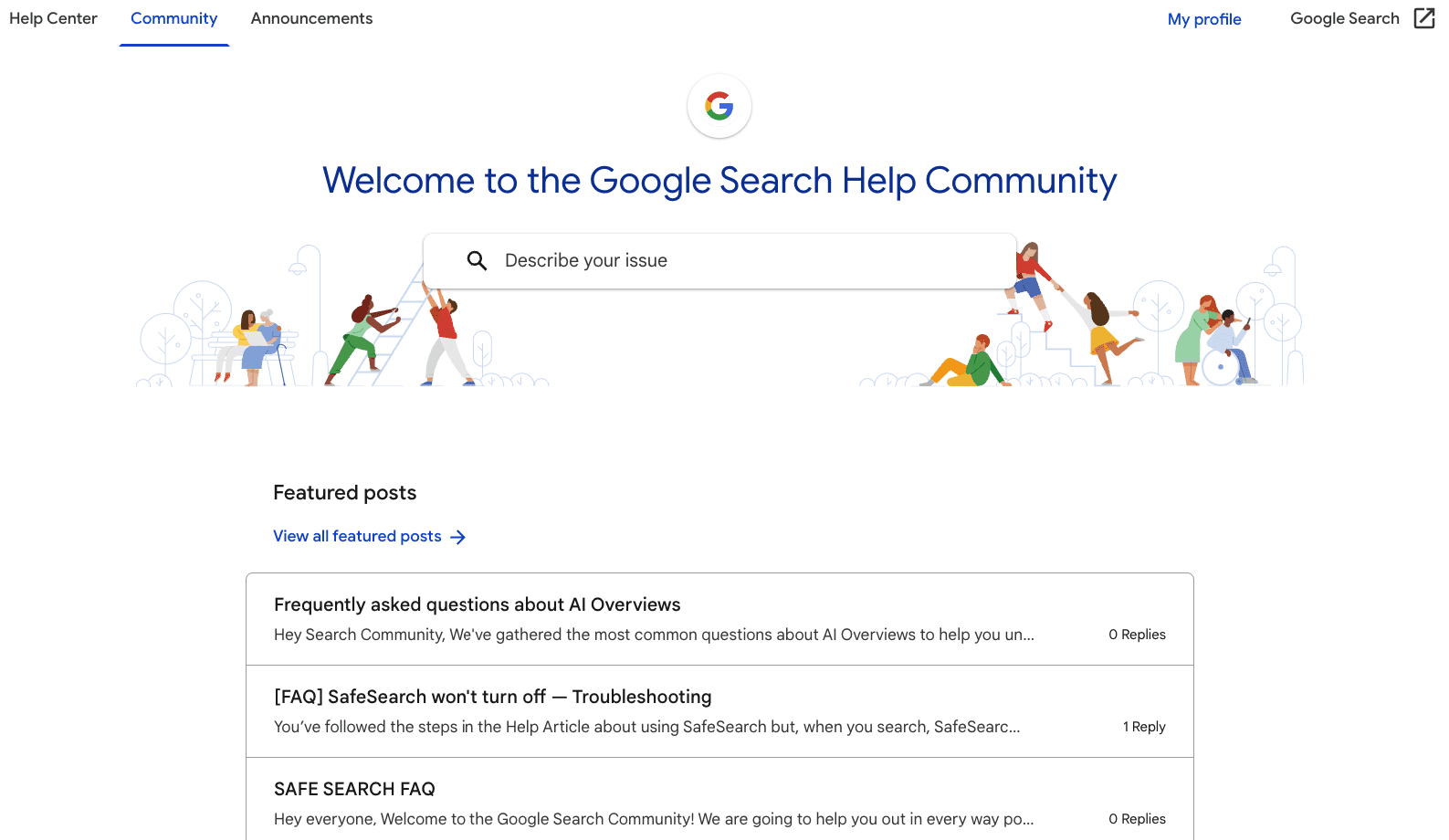
Offering advice in the Google Search Help Community or on SEO-specific Subreddits like r/SEO (also an excellent way to land new clients).
Sharing detailed breakdowns of your methods.
Image from Google Search Help Community, August 2024
The key? Always inject your unique perspective into these contributions and genuinely help other people. This will gradually build your reputation and attract clients who love your style.
Remember, effective brand-building takes time. Be patient, stay consistent, and clearly envision what you want to be known for in the SEO world.
My Experience: I focused on sharing my detailed approach to SEO auditing. I decided to be transparent about my process. I created in-depth guides that outlined my auditing methodology. By openly sharing this process, I showed my expertise and gave potential clients a clear picture of my value. While some consultants kept their methods secret, I chose to be open and educational.
It took a few months, but people started to recognize me as an SEO auditing expert. This approach became my unique selling point and the cornerstone of my personal brand.
2. Not Having A Website (Your Digital Business Card)
As an independent SEO consultant, setting up your own website should be your first priority. It’s a crucial mistake to overlook this step.
Your website is your digital business card. It’s where you showcase your SEO knowledge, unique approach, and specialty. Think of it as your own space on the internet, where you’re in control.
On your website, you set the rules. You control:
Your service offerings.
Your pricing structure.
Display of your expertise.
Presentation of your credentials.
It’s the ideal platform to demonstrate your SEO skills in action. Potential clients can see firsthand what you are up to in SEO.
Creating a website is easier than ever now. You can use WordPress or other content management systems to get started quickly. You don’t need advanced technical skills to set up a professional-looking site.
Remember, your website is often your first impression on potential clients. It reflects your brand and your capabilities. Don’t underestimate its importance in establishing your credibility as an SEO consultant.
A well-optimized, informative website can significantly accelerate your progress in attracting clients and building your reputation. It’s an investment in your business that pays dividends in the long run.
So, prioritize getting your website up and running. It’s a critical step in your journey as an independent SEO consultant.
3. Not Diversifying Your Income Sources (Financial Security 101)
Let me tell you something important: having just one job and one source of income is the least secure financial situation. If that job ends, you’re left with nothing. Zero income.
That’s why being an independent consultant can actually be more financially secure than a traditional job. I know many people fear going independent but trust me, it can offer greater stability if you do it right.
Want to secure yourself financially as an independent SEO consultant? Here’s how:
Work with multiple clients. There’s little chance all your clients will leave at the same time.
Start a newsletter or YouTube channel. Build an audience and accept sponsorships.
Be open to sponsorships from SEO companies or tool providers. If you’re good, they will reach out to you.
Create and sell a course. Share your expertise and create an additional income stream.
Keep exploring new possibilities. The sky’s the limit when it comes to creating income streams!
The key rule? Have multiple income sources that don’t depend on each other. This gives you a safety net and opens up more growth opportunities.
By diversifying your income streams, you’re not just increasing your earning potential. You’re building a more resilient business that can handle market ups and downs, and client turnover.
Remember, building multiple income streams takes time and effort. Start with your core consulting service, then gradually add other streams as you establish yourself in the industry.
Don’t put all your eggs in one basket. Diversify your income and build a more secure future for yourself!
4. Avoiding Sharing Your Knowledge Publicly (Your Expertise Showcase)
I’ve seen many SEO consultants hesitate to share their knowledge publicly.
They worry that if they reveal their “secrets,” clients will use this info and not need their services. But guess what? That’s totally wrong!
In reality, the more you share and the more detailed you are, the more clients will reach out to you. Here’s why:
Sharing shows off your expertise and builds trust with potential clients.
Detailed content proves how much you really know. This often sets you apart from others.
Public sharing makes you a thought leader in the SEO world.
Sure, some people, SEO professionals, or companies with in-house SEO experts might use your published knowledge. And that’s okay! Isn’t helping others part of why we do this?
The clients you want will be impressed by what you share but won’t be able to replicate your expertise. They’ll want you to implement these strategies for them. These are the clients who will come to you – you won’t need to chase them.
Clients who find you through your shared content are different. They understand the value of SEO and appreciate expertise. Working with these clients is usually super productive and enjoyable.
Remember, by sharing your knowledge, you’re not giving away your value – you’re showing it off. Your unique insights, experience, and ability to apply this knowledge are what clients are paying for.
So don’t be afraid to share what you know. It’s not just good for others – it’s great for your business too!
5. Underestimating Your SEO Projects (The Perfectionist’s Trap)
Let me tell you something: It doesn’t matter how experienced you are in SEO. If you’re new to being an independent consultant, you’re probably going to underestimate your projects.
This is especially true if you’re a perfectionist like me. You’ll want to go above and beyond for your clients, especially your first ones. And that’s great – it’s actually cool to be so dedicated.
But here’s the catch: You need to be careful. It’s super easy to underestimate a project and end up working for free. Trust me, I’ve done this more times than I’d like to admit.
Here’s what usually happens:
You want to impress your new clients, so you over-deliver.
You spend way more time than you planned on the project.
You end up working tons of unpaid hours.
Your clients will definitely love your effort. But this approach? It’s not sustainable for your business.
So, how do you avoid this trap? Simple: Clearly set the scope of work from the start and be super detailed about what’s included in your service.
For anything extra or outside the agreed scope, just charge on an hourly basis. This way, you can:
Meet your clients’ additional needs without working for free.
Keep your services flexible.
Make sure you’re fairly paid for all your work.
Remember, it’s awesome to be passionate about your work and want to deliver the best for your clients. But as an independent consultant, you must also protect your time and keep your business profitable.
My Experience: When I first started consulting, I often found myself working late into the night to deliver more than I’d promised. My clients were thrilled, but I was exhausted and underpaid. Learning to clearly define project scopes and charge properly for extra work was crucial for my mental health.
Don’t make the same mistakes I did. Value your time and expertise – your business depends on it!
6. Not Setting Boundaries With Your SEO Clients (Balancing Act)
Let’s talk about setting boundaries with clients. It’s tricky, right? You want to build friendly, professional relationships with your clients as an independent SEO consultant.
One of my unique selling points is treating clients as partners and friends. They don’t want just another SEO agency – they want a partner. Here’s what I offer:
Direct contact with me.
Easy accessibility.
Flexibility.
Fast response times.
These are things clients often don’t get from big SEO agencies, and they’re what set independent consultants like us apart.
But here’s the catch: this approach can cost you if you don’t set clear boundaries. Without them, you risk burning out and getting resentful.
At the very least, you should:
Not answer immediately on your off days.
Only respond to real emergencies during vacations.
You need to find that sweet spot that works for both you and your clients. It’s all about creating a sustainable working relationship.
Remember, setting boundaries doesn’t mean giving poor service. It means creating a framework that lets you consistently deliver top-notch work without sacrificing your well-being.
Be clear about these boundaries from the start. Most clients will respect them, especially when they understand that these boundaries help you provide better service in the long run.
My Experience: When I first started, I was available to clients 24/7. They loved it, but I burned out fast, and my work suffered. By setting clear boundaries – like specific office hours and response times for non-emergencies – I was able to provide better service and keep a healthier work-life balance. My clients respected these boundaries, and our relationships actually improved!
Don’t make the same mistake I did. Set clear boundaries from the start. Your clients will respect you for it, and you’ll be able to serve them better in the long run.
7. Not Starting Your Newsletter Immediately (Your Audience Awaits)
Listen up! Starting your own SEO newsletter should be a day one priority. When you set up your website, make sure to add a newsletter sign-up option right away.
This simple step can make a huge difference in your success as an independent SEO consultant.
Why is a newsletter so crucial? Here is why:
It makes you less dependent on Google for visibility. We all know how unpredictable search rankings can be, right?
Once you have a few thousand subscribers, it’s a great way to diversify your income. Consider creating premium content, promoting your services, or even accepting sponsorships.
Most importantly, it helps you build a base of fans you can always reach out to. These are people who know you and like your content. Their value is huge compared to people just discovering you for the first time.
You can use this list to:
Get opinions by running polls.
Find new clients.
Promote your products and services.
My Personal Experience
I recently launched my first SEO course, and wow, did it drive home the importance of having a loyal following. I promoted the course through:
My own newsletter, social media channels, and YouTube.
The results? Eye-opening. Despite the broad reach of paid advertising, the only people who actually bought my course were those who had been following me for a while.
My newsletter, social media channels, and YouTube were the only ones that converted. All other channels? Zero customers.
I didn’t see this coming, but it clearly shows the power of having a base of fans and followers who trust you. These are your people, your tribe. That’s why it’s crucial to start building your tribe from day one.
Remember, your newsletter subscribers are more than just potential customers. They’re your community. Nurture this relationship by consistently providing value, and they’ll become your most loyal supporters and clients.
Starting a newsletter might seem like extra work when you’re just beginning, but trust me, it’s an investment in your future success as an independent SEO consultant. Don’t make the mistake of overlooking this powerful tool.
So, from day one, focus on growing your list. Encourage sign-ups on your website, promote your newsletter on social media, and always deliver value to your subscribers.
In time, this list will become one of your most valuable assets as an independent SEO consultant.
Final Words Of SEO Wisdom
Becoming a successful independent SEO consultant isn’t just about your SEO skills. It’s about avoiding common pitfalls that can hinder your progress.
Build your brand from day one. Create a professional website. Diversify your income sources. Share your knowledge publicly. Accurately estimate your projects. Set clear boundaries with clients. Start and grow your newsletter immediately.
These steps aren’t just good practices – they’re essential for long-term success. They’ll help you build a sustainable business, attract the right clients, and establish yourself as a respected SEO consultant.
The path of an independent consultant isn’t always easy, but it’s incredibly rewarding. By avoiding these common mistakes, you’re setting yourself up for a thriving, fulfilling career in SEO.
Start implementing these strategies today. Your future self will thank you.
Read more:
Featured Image: PeopleImages.com – Yuri A/Shutterstock
Google’s Danny Sullivan explained the recent update, addressing site recoveries and cautioning against making radical changes to improve rankings. He also offered advice for publishes whose rankings didn’t improve after the last update.
Google’s Still Improving The Algorithm
Danny said that Google is still working on their ranking algorithm, indicating that more changes (for the positive) are likely on the way. The main idea he was getting across is that they’re still trying to fill the gaps in surfacing high quality content from independent sites. Which is good because big brand sites don’t necessarily have the best answers.
He wrote:
“…the work to connect people with “a range of high quality sites, including small or independent sites that are creating useful, original content” is not done with this latest update. We’re continuing to look at this area and how to improve further with future updates.”
A Message To Those Who Were Left Behind
There was a message to those publishers whose work failed to recover with the latest update, to let them know that Google is still working to surface more of the independent content and that there may be relief on the next go.
Danny advised:
“…if you’re feeling confused about what to do in terms of rankings…if you know you’re producing great content for your readers…If you know you’re producing it, keep doing that…it’s to us to keep working on our systems to better reward it.”
Google Cautions Against “Improving” Sites
Something really interesting that he mentioned was a caution against trying to improve rankings of something that’s already on page one in order to rank even higher. Tweaking a site to get from position six or whatever to something higher has always been a risky thing to do for many reasons I won’t elaborate on here. But Danny’s warning increases the pressure to not just think twice before trying to optimize a page for search engines but to think three times and then some more.
Danny cautioned that sites that make it to the top of the SERPs should consider that a win and to let it ride instead of making changes right now in order to improve their rankings. The reason for that caution is that the search results continue to change and the implication is that changing a site now may negatively impact the rankings in a newly updated search index.
He wrote:
“If you’re showing in the top results for queries, that’s generally a sign that we really view your content well. Sometimes people then wonder how to move up a place or two. Rankings can and do change naturally over time. We recommend against making radical changes to try and move up a spot or two”
How Google Handled Feedback
There was also some light shed on what Google did with all the feedback they received from publishers who lost rankings. Danny wrote that the feedback and site examples he received was summarized, with examples, and sent to the search engineers for review. They continue to use that feedback for the next round of improvements.
He explained:
“I went through it all, by hand, to ensure all the sites who submitted were indeed heard. You were, and you continue to be. …I summarized all that feedback, pulling out some of the compelling examples of where our systems could do a better job, especially in terms of rewarding open web creators. Our search engineers have reviewed it and continue to review it, along with other feedback we receive, to see how we can make search better for everyone, including creators.”
Feedback Itself Didn’t Lead To Recovery
Danny also pointed out that sites that recovered their rankings did not do so because of they submitted feedback to Google. Danny wasn’t specific about this point but it conforms with previous statements about Google’s algorithms that they implement fixes at scale. So instead of saying, “Hey let’s fix the rankings of this one site” it’s more about figuring out if the problem is symptomatic of something widescale and how to change things for everybody with the same problem.
Danny wrote:
“No one who submitted, by the way, got some type of recovery in Search because they submitted. Our systems don’t work that way.”
That feedback didn’t lead to recovery but was used as data shouldn’t be surprising. Even as far back as the 2004 Florida Update Matt Cutts collected feedback from people, including myself, and I didn’t see a recovery for a false positive until everyone else also got back their rankings.
Takeaways
Google’s work on their algorithm is ongoing: Google is continuing to tune its algorithms to improve its ability to rank high quality content, especially from smaller publishers. Danny Sullivan emphasized that this is an ongoing process.
What content creators should focus on: Danny’s statement encouraged publishers to focus on consistently creating high quality content and not to focus on optimizing for algorithms. Focusing on quality should be the priority.
What should publishers do if their high-quality content isn’t yet rewarded with better rankings? Publishers who are certain of the quality of their content are encouraged to hold steady and keep it coming because Google’s algorithms are still being refined.
Google’s John Mueller answered a question about why Google indexes pages that are disallowed from crawling by robots.txt and why the it’s safe to ignore the related Search Console reports about those crawls.
Bot Traffic To Query Parameter URLs
The person asking the question documented that bots were creating links to non-existent query parameter URLs (?q=xyz) to pages with noindex meta tags that are also blocked in robots.txt. What prompted the question is that Google is crawling the links to those pages, getting blocked by robots.txt (without seeing a noindex robots meta tag) then getting reported in Google Search Console as “Indexed, though blocked by robots.txt.”
The person asked the following question:
“But here’s the big question: why would Google index pages when they can’t even see the content? What’s the advantage in that?”
Google’s John Mueller confirmed that if they can’t crawl the page they can’t see the noindex meta tag. He also makes an interesting mention of the site:search operator, advising to ignore the results because the “average” users won’t see those results.
He wrote:
“Yes, you’re correct: if we can’t crawl the page, we can’t see the noindex. That said, if we can’t crawl the pages, then there’s not a lot for us to index. So while you might see some of those pages with a targeted site:-query, the average user won’t see them, so I wouldn’t fuss over it. Noindex is also fine (without robots.txt disallow), it just means the URLs will end up being crawled (and end up in the Search Console report for crawled/not indexed — neither of these statuses cause issues to the rest of the site). The important part is that you don’t make them crawlable + indexable.”
Takeaways:
1. Mueller’s answer confirms the limitations in using the Site:search advanced search operator for diagnostic reasons. One of those reasons is because it’s not connected to the regular search index, it’s a separate thing altogether.
“The short answer is that a site: query is not meant to be complete, nor used for diagnostics purposes.
A site query is a specific kind of search that limits the results to a certain website. It’s basically just the word site, a colon, and then the website’s domain.
This query limits the results to a specific website. It’s not meant to be a comprehensive collection of all the pages from that website.”
2. Noindex tag without using a robots.txt is fine for these kinds of situations where a bot is linking to non-existent pages that are getting discovered by Googlebot.
3. URLs with the noindex tag will generate a “crawled/not indexed” entry in Search Console and that those won’t have a negative effect on the rest of the website.
Using HTML elements, SEO professionals are able to communicate information about the page to users and search bots.
This can help to clarify the importance, nature, and order of content on a page, as well as its relationship to other webpages.
What Are HTML Attributes?
Attributes are additional information added to HTML elements. They sit within the element, such as:
They are values that are used to modify the element, giving additional context about it.
In the case of the HTML tag above, the attribute, rel=”canonical” modifies the link tag to say to the search bots that this URL should be considered the canonical of a set.
Format Of HTML Attributes
HTML attributes consist of a name and a value.
For example, when defining an image, the name “src” is used and the value is the file name of the image. The “alt” attribute specifies an alternative text to show if the image cannot be displayed.
Types Of HTML Attributes
Attributes are usually classified in four ways; required, optional, standard or event.
Required attributes are ones where their absence from a tag means that tag would not function correctly.
Optional ones are, as the name suggests, not required for the tag to work but can be used to specify additional information or behaviour for that tag.
There are attributes that can be used with most HTML elements, and some that are very specific.
For example, the “style” attribute can be used to define the look of an element like the colour or font size. These universal attributes are known as “standard” or “global” attributes.
There are other attributes that can only be used with certain elements. Commonly, ones that are used for SEO will modify a link tag. These are elements like “rel” and “hreflang.”
Event attributes are added to an element to define how that element should behave in response to certain actions like a user mousing over a button. These attributes define how a function should be executed.
For example, an “onclick” attribute would define what a JavaScript function should do when a user clicks a button. These attributes allow developers to create more interactive pages from HTML tags.
Why HTML Attributes Are Important
HTML attributes are important because they allow developers to add additional context and functionality to websites.
They are particularly important for SEO because they give much-needed context to tags. They are critical in how we guide the search bots in crawling and serving webpages.
Attributes allow us to easily prevent the following of certain links, or denote which pages in a set should be served to users in different countries or using other languages.
They allow us to easily signify that a page should not be indexed. A lot of the fundamental elements of technical SEO are actually controlled through HTML attributes.
Common Attributes Used In SEO
1. Name Attribute
The name attribute is used with the tag.
It is essentially a way of specifying to any bots that may visit the page if the following information applies to them or not.
For example, including means that all bots should take notice of the “noindex” directive.
You will often hear this called the “meta robots tag.”
If the following were used , only Google’s bot would need to take notice of the “noindex” directive.
This is a good way of giving commands to some search bots that are not needed for all.
2. Noindex Attribute
The “noindex” attribute is one commonly used in SEO.
You will often hear it being called the “noindex tag,” but more accurately, it is an attribute of the tag.
It’s formulated:
This piece of code allows publishers to determine what content can be included in a search engine’s index.
By adding the “noindex” attribute, you are essentially telling a search engine it may not use this page within its index.
This is useful if there is sensitive content you want to not be available from an organic search. For instance, if you have areas on your site that should only be accessible to paid members, allowing this content into the search indices could make it accessible without logging in.
The “noindex” directive needs to be read to be followed. That is, the search bots need to be able to access the page to read the HTML code that contains the directive.
As such, be careful not to block the robots from accessing the page in the robots.txt.
3. Description Attribute
The description attribute, better known as the “meta description,” is used with the tag.
The content of this tag is used in the SERPs underneath the content of the
tag.
Screenshot from author, August 2024
It allows publishers to summarise the content on the page in a way that will help searchers determine if the page meets their needs.
This does not affect the rankings of a page but can help encourage clicks through to the page from the SERPs.
It is important to realize that in many instances, Google will ignore the content of the description attribute in favor of using its own description in the SERPs.
This is the text that a user will see on the page that looks clickable.
This is used for clickable links that will appear in the
of the page.
The tag is used to link a resource to another and appears in the
of the page.
These links are not hyperlinks, they are not clickable. They show the relationship between web documents.
5. Rel=”nofollow”, rel=”ugc” And rel=”sponsored attributes”
The rel=”nofollow” attribute tells bots that the URL within the href attribute is not one that can be followed by them.
Using the rel=”nofollow” attribute will not affect a human user’s ability to click on the link and be taken to another page. It only affects bots.
This is used within SEO to prevent search engines from visiting a page or from ascribing any benefit of one page linking to another.
This arguably renders a link useless from the traditional SEO link-building perspective, as link equity will not pass through the link.
There are arguments to say that it is still a beneficial link if it causes visitors to view the linked-to page, of course!
Publishers can use the “nofollow” attribute to help search engines determine when a linked-to page is the result of payment, such as an advert.
This can help prevent issues with link penalties, as the publisher is admitting that the link is the result of a legitimate deal and not an attempt to manipulate the rankings.
The rel=”nofollow” attribute can be used on an individual link basis like the following:
In 2019, Google announced some changes to the way it used the “nofollow” attribute.
This included introducing some additional attributes that could be used instead of the “nofollow” to better express the relationship of the link to its target page.
These newer attributes are the rel=”ugc” and rel=”sponsored.”
They are to be used to help Google understand when a publisher wishes for the target page to be discounted for ranking signal purposes.
The rel=”sponsored” attribute is to identify when a link is the result of a paid deal such as an advert or sponsorship. The rel=”ugc” attribute is to identify when a link has been added through user-generated content (UGC) such as a forum.
Google announced that these and the “nofollow” attribute would only be treated as hints.
Whereas previously, the “nofollow” attribute would result in Googlebot ignoring the specified link, it now takes that hint under advisement but may still treat it as if the “nofollow” is not present.
The purpose of the hreflang attribute is to help publishers whose sites show the same content in multiple languages.
It directs the search engines as to which version of the page should be shown to users so they can read it in their preferred language.
The hreflang attribute is used with the tag. This attribute specifies the language of the content on the URL linked to.
It’s used within the
of the page and is formatted as follows:
It’s broken down into several parts:
The rel=”alternate,” which suggests the page has an alternative page relevant to it.
The href= attribute denotes which URL is being linked to.
The language code is a two-letter designation to tell the search bots what language the linked page is written in. The two letters are taken from a standardized list known as the ISO 639-1 codes
The hreflang attribute can also be used in the HTTP header for documents that aren’t in HTML (like a PDF) or in the website’s XML sitemap.
The rel=”canonical” attribute of the link tag enables SEO professionals to specify which other page on a website or another domain should be counted as the canonical.
A page being the canonical essentially means it is the main page, of which others may be copies.
For search engine purposes, this is an indication of the page a publisher wants to be considered the main one to be ranked, the copies should not be ranked.
The canonical attribute looks like this:
The code should sit in the
of the page. The web page stated after the “href=” should be the page you want the search bots to consider the canonical page.
This tag is useful in situations where two or more pages may have identical or near-identical content on them.
9. Uses Of The Canonical Attribute
The website might be set up in such a way that this is useful for users, such as a product listing page on an ecommerce site.
For instance, the main category page for a set of products, such as “shoes”, may have copy, headers, and a page title that have been written about “shoes.”
If a user were to click on a filter to show only brown, size 8 shoes, the URL might change but the copy, headers, and page title might remain the same as the “shoes” page.
This would result in two pages that are identical apart from the list of products that are shown.
In this instance, the website owner might wish to put a canonical tag on the “brown, size 8 shoes” page pointing to the “shoes” page.
This would help the search engines to understand that the “brown, size 8 shoes” page does not need to be ranked, whereas the “shoes” page is the more important of the two and should be ranked.
Issues With The Canonical Attribute
It’s important to realize that the search engines only use the canonical attribute as a guide, it is not something that has to be followed.
There are many instances where the canonical attribute is ignored and another page selected as the canonical of the set.
The src= attribute is used to reference the location of the image that is being displayed on the page.
If the image is located on the same domain as the container it will appear in, a relative URL (just the end part of the URL, not the domain) can be used.
If the image is to be pulled from another website, the absolute (whole) URL needs to be used.
Although this attribute doesn’t serve any SEO purpose as such, it is needed for the image tag to work.
11. Alt Attribute
The above image tag example also contains a second attribute, the alt= attribute.
This attribute is used to specify what alternate text should be shown if the image can’t be rendered.
The alt= attribute is a required element of the tag, it has to be present, but can be left blank if no alternative text is wanted.
There is some benefit to considering the use of keywords within an image alt= attribute. Search engines cannot determine with precision what an image is of.
Great strides have been made in the major search engines’ ability to identify what is in a picture. However, that technology is far from perfect.
As such, search engines will use the text in the alt= attribute to better understand what the image is of.
Use language that helps to reinforce the image’s relevance to the topic the page is about.
This can aid the search engines in identifying the relevance of that page for search queries.
It is crucial to remember that this is not the primary reason for the alt= attribute.
This text is used by screen readers and assistive technology to enable those who use this technology to understand the contents of the image.
The alt= attribute should be considered first and foremost to make websites accessible to those using this technology. This should not be sacrificed for SEO purposes.
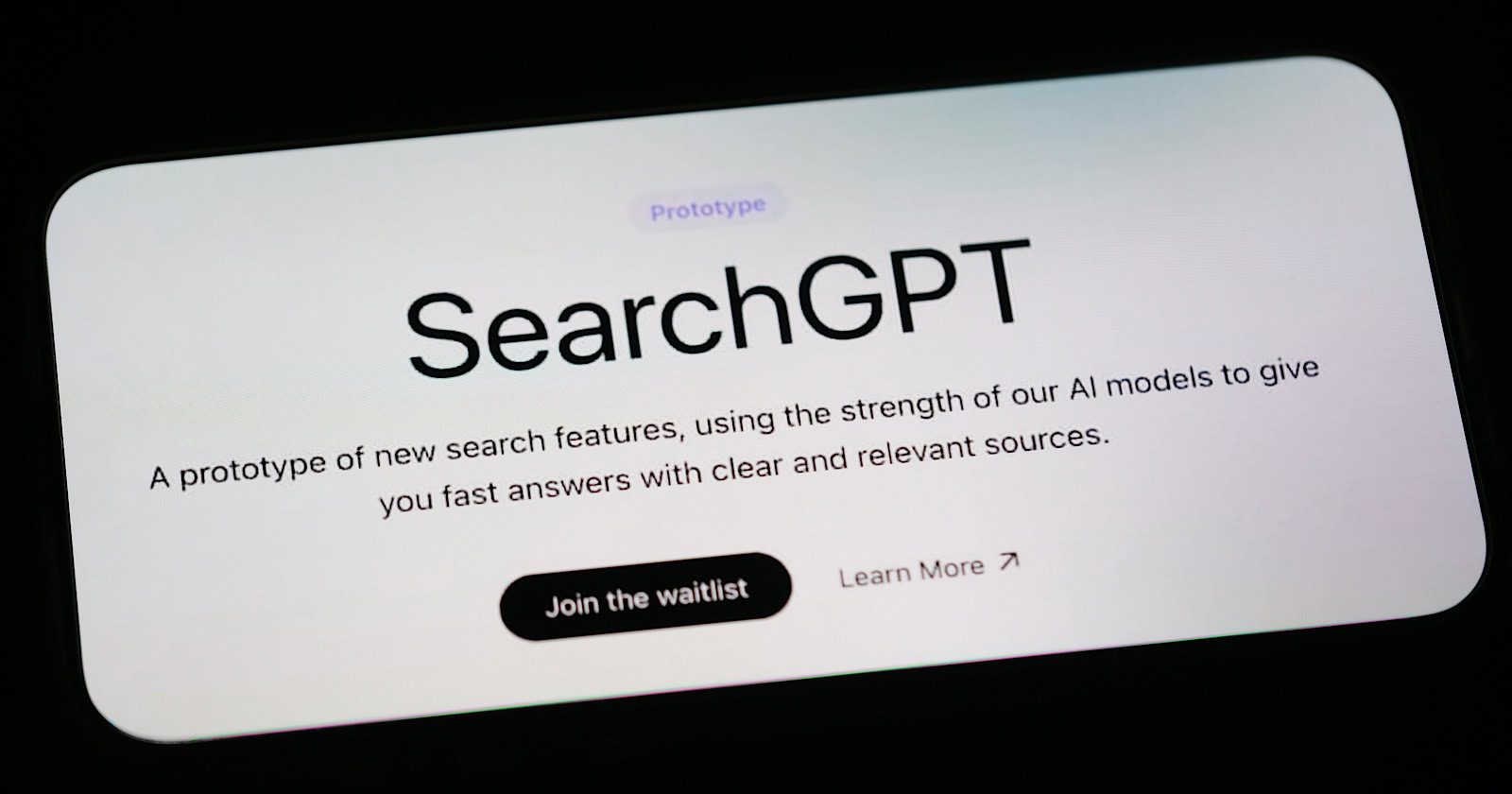
OpenAI, the company behind ChatGPT, has introduced a prototype of SearchGPT, an AI-powered search engine.
The launch has sparked considerable interest, leading to discussions about its potential to compete with Google.
However, early studies and user feedback indicate that while SearchGPT shows promise, it has limitations and needs more refinement.
Experts suggest it needs further development before challenging current market leaders.
Study Highlights SearchGPT’s Strengths and Weaknesses
SE Ranking, an SEO software company, conducted an in-depth analysis of SearchGPT’s performance and compared it to Google and Bing.
The study found that SearchGPT’s search results are 73% similar to Bing’s but only 46% similar to Google’s.
Interestingly, 26% of domains ranking in SearchGPT receive no traffic from Google, indicating opportunities for websites struggling to gain traction.
The study highlighted some of SearchGPT’s key features, including:
The ability to summarize information from multiple sources Provide a conversational interface for refining searches Offering an ad-free user experience.
However, the research noted that SearchGPT lacks the variety and depth of Google’s search results, especially for navigational, transactional, and local searches.
The study also suggested that SearchGPT favors authoritative, well-established websites, with backlinks being a significant ranking factor.
Around 32% of all SearchGPT results came from media sources, increasing to over 75% for media-related queries.
SE Ranking notes that SearchGPT needs improvement in providing the latest news, as some news results were outdated.
User Experiences & Limitations Reported By The Washington Post
The Washington Post interviewed several early testers of SearchGPT and reported mixed reviews.
Some users praised the tool’s summarization capabilities and found it more helpful than Google’s AI-generated answers for certain queries.
Others, however, found SearchGPT’s interface and results less impressive than those of smaller competitors like Perplexity.
The article also highlighted instances where SearchGPT provided incorrect or “hallucinated” information, a problem that has plagued other AI chatbots.
While the SE Ranking study estimated that less than 1% of searches returned inaccurate results, The Washington Post says there’s significant room for improvement.
The article also highlighted Google’s advantage in handling shopping and local queries due to its access to specialized data, which can be expensive to acquire.
Looking Ahead: OpenAI’s Plans For SearchGPT and Potential Impact on the Market
OpenAI spokesperson Kayla Wood revealed that the company plans to integrate SearchGPT’s best features into ChatGPT, potentially enhancing the popular language model’s capabilities.
When asked about the possibility of including ads in SearchGPT, Wood stated that OpenAI’s business model is based on subscriptions but didn’t specify whether SearchGPT would be offered for free or as part of a ChatGPT subscription.
Despite the excitement surrounding SearchGPT, Google CEO Sundar Pichai recently reported continued growth in the company’s search revenue, suggesting that Google may maintain its dominant position even with the emergence of new AI-powered search tools.
Top Takeaways
Despite its current limitations, SearchGPT has the potential to shake up online information seeking. As OpenAI iterates based on user feedback, its impact may grow significantly.
Integrating SearchGPT’s best features into ChatGPT could create a more powerful info-seeking tool. The proposed subscription model raises questions about competition with free search engines and user adoption.
While Google’s search revenue and specialized query handling remain strong, SearchGPT could carve out its own niche. The two might coexist, serving different user needs.
For SearchGPT to truly compete, OpenAI must address accuracy issues, expand query capabilities, and continuously improve based on user input. It could become a viable alternative to traditional search engines with ongoing development.
Google’s John Mueller answered a Reddit question about how to lower a website’s spam score. His answer reflected an important insight about third-party spam scores and their relation to how Google ranks websites.
What’s A Spam Score?
A spam score is the opinion of a third-party tool that reviews data like inbound links and on page factors based on whatever the tool developers believe are spam-related factors and signals. While there are a few things about SEO that most people can agree on there is a lot more about SEO that digital marketers dispute.
The reality is that third-party tools use unknown factors to assign a spam score, which reflects how a search engine might use unknown metrics to assess website quality. That’s multiple layers of uncertainty to trust.
Should You Worry About Spam Scores?
The question asked in Reddit was about whether they should be worrying about a third-party spam score and what can be done to achieve a better score.
This is the question:
“My site is less than 6 months old with less than 60 blog posts.
I was checking with some tool it says I have 302 links and 52 referring domains. My worry is on the spam score.
How should I go about reducing the score or how much is the bad spam score?”
Google’s John Mueller answered:
“I wouldn’t worry about that spam score.
The real troubles in your life are apt to be things that never crossed your worried mind, the kind that blindside you at 4 p.m. on some idle Tuesday.”
He then followed up with a more detailed response:
“And to be more direct – Google doesn’t use these spam scores. You can do what you want with them. They’re not going to change anything for your site.
I’d recommend taking the time and instead making a tiny part of your website truly awesome, and then working out what it would take the make the rest of your website like that. This spam score tells you nothing in that regard. Ignore it.”
Spam Scores Tells You Nothing In That Regard
John Mueller is right, third-party spam scores don’t reflect site quality. They’re only opinions based on what the developers of a tool believe, which could be outdated, could be insufficient, we just don’t know because the factors used to calculate third-party spam scores are secret.
In any case, there is no agreement about what ranking factors are, no agreement of what on-page and off-page factors are and even the idea of “ranking factors” is somewhat debatable because nowadays Google uses various signals to determine if a site is trustworthy and relies on core topicality systems to understand search queries and web pages. That’s a world-away from using ranking factors to score web pages. Can we even agree on whether there’s a difference between ranking factors and signals? Where does something like a (missing) quality signal even fit in a third-party spam metric?
Popular lists of 200 ranking factors often contain factual errors and outdated ideas based on decades-old concepts of how search engines rank websites. We’re in a period of time when search engines are somewhat moving past the concepts of “ranking factors” in favor of core topicality systems for understanding web pages (and search queries) and an AI system called SpamBrain that weeds out low-quality websites.
So yes, Mueller makes a valid point when he advises not to worry about spam scores.