How New Chrome AI Feature Challenges SEO To Evolve via @sejournal, @martinibuster

A Google Chrome Engineer published a LinkedIn post outlining the new Chrome AI History feature and the signals it uses to surface previously visited sites. The post illustrates that natural language browser history search could become a traffic source, and SEO must evolve in response.

History Search Powered By AI

Google recently announced a new opt-in feature in Chrome that gives users the benefit of AI to search through their browser history and find a page that they have previously visited. This makes it easier for a site that has previously been visited to obtain another visit from the same person.

Chrome AI History Searches Page Content

Chrome Engineering Leader Addy Osmani wrote a description of the new Chrome AI History feature that contained some undocumented information about how it works which shows how text and images are used as data sources for the AI to identify a site that a user had previously visited.

The Chrome Browser history normally just searches the URL and Page Title to find something in the search history. “History Search, powered by AI” looks at the webpage content, including the images.

Osmani shared an example where he identified a page he had previously visited in which the AI used image content to find what he was looking for.

He gave an example of finding a page he visited that’s related to shopping:

“Recently, I was browsing for a new sweater and took a look at a few options across a few sites. I saw some neat Burberry designs. But there was one specific Burberry sweater I liked from a while back that said “England” on it. I can’t remember where I saw it or how to find that page again.

With AI history search, I simply type “Burberry sweater England” and voilà – the exact page appears, even though “England” was only mentioned within an image on the site.”

What does he mean that the word “England” was only mentioned in an image? He doesn’t specifically say that the word was in the image meta data like in the alt tag. I assumed that’s what he meant, that the word England was in the image metadata. So I found the exact page he was looking at (it’s in a video he embedded in his LinkedIn post) and checked the source code and the word “England” was not in the meta data.

If you watch the video the AI Browser history shows multiple pages so it’s possible that the AI simply ignored the word “England” just surfaced everything that had a partial match. But, Osmani said it was surfaced because of the image.

Here’s a screenshot from his video:
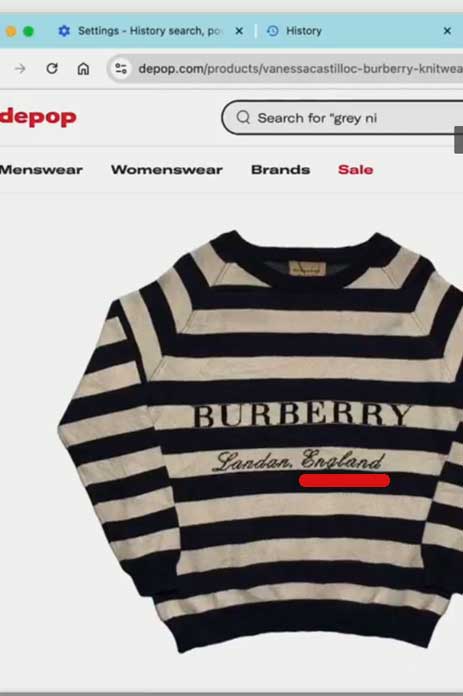
Screenshot of a page surfaced by Chrome AI Browser History result

Here’s the AI search results showing multiple pages in the results:
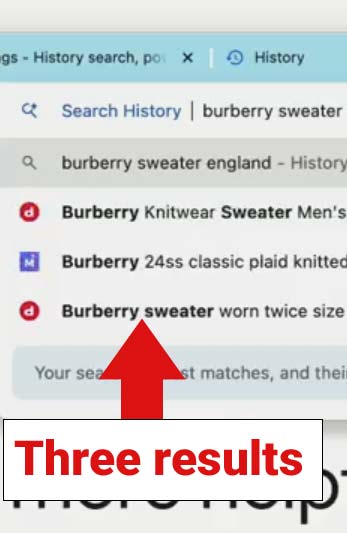
Screenshot of Chrome AI Browser history

The above image shows that the AI history surfaced more than just one page and the other pages weren’t about a shirt that said England, only the one. So it could very well be that the AI history was surfacing the England page not because it had the word England in the image but because it was relevant for the words Burberry and Sweater. But again, it could be because the word was in the image, this is something that needs clarification.

Osmani then offers two more examples that show how using keywords that appear in the page content will help surface web pages that a user had previously visited.

AI Browser Search Documentation

Google maintains a help page dedicated to this new feature where it lists the following tips that also give more information about how the AI browser search works.

  • “When you search short and simple text, you’ll be matched directly to the page title or URL. You won’t find an AI-powered result.
  • You can rate the best match result. At the bottom of the best match result, select Thumbs up or Thumbs down .
  • If you select Thumbs down , you can provide additional feedback on why the result didn’t meet your needs.
  • You can also search for browsing history in the address bar.”

Takeaways

Chrome AI search enables repeat visitors through natural language searches. But when users search with simple text Chrome will default to simple keyword matching to the page title and URL.

  • Exact keywords are not necessary
  • URLs are not necessary
  • Short simple text is matched via Title tag and URL
  • Keywords in title tag and URL that match to how users will remember the site (the topic) can still be important
  • The ability to rate results shows that this feature will continue to evolve

Chrome AI History is a useful feature and will likely become more prominent as people become more aware of it and people become more accustomed to using AI that’s built into their browsers and devices. This doesn’t mean it will become useful to add keywords all over the meta data but it does show how the future of SEO is growing to accommodate more than just search as AI takes a greater role in surfacing web pages.

Featured Image by Shutterstock/Cast Of Thousands

Survey Shows Ecommerce Strategies For 2024 Holiday Season via @sejournal, @martinibuster

WooCommerce survey offers insights into the strategies that online retailers are using to prepare for Black Friday and Cyber Monday (BFCM) and why it’s important to be proactive.

Online Sales Is Most Important Sales Channel

One of the important takeaways from the survey is that 76% of respondents confirmed that their online sales are the primary revenue channel during the holidays, highlighting the importance of a high performance website that’s optimized for sales.

46% of stores answered that up to 30% of their annual sales volume happens during a combination of the BFCM and holiday period, while 24% answered that over 30% of sales occurred during that period. 8% of stores reported that over 50% were accounted for during the BFCM and holiday season.

Top Merchants Prepare Early

Interestingly, almost 20% prepare for BFCM three to over six months ahead of time, although most merchants tend to prepare closer to the holiday season. Online stores with revenues of $250K or more were 12% likelier to prepare ahead of time, with 34% preparing 3- 6 months in advance.

This is the breakdown of how early merchants are preparing:

  • 26% prepare 1 to 4 weeks ahead
  • 27% prepare 1 to 3 months ahead
  • 13% prepared 3 to 6 months ahead
  • 4% prepare 6+ months ahead

Strategies Merchants Plan To Use

Many online merchants are planning for a strong holiday season, with 26% of stores increasing inventory as a main part of their strategy.

The top strategies reported by merchants are:

  • Increase inventory
  • Marketing
  • Promotions
  • Website optimization

Email outreach was reported by 29% of merchants to be their most effective marketing channel. The next top marketing channel is organic search at 25%. Content marketing was reported by 6% and the balance is social, and search ads.

34% of merchants plan to change alter their strategies in the following ways:

  • 26% will add new products.
  • 24% are making marketing enhancements.
  • 16% are making website improvements.
  • 10% are focusing on early sales.
  • 9% are offering special discounts.

Changes to customer engagement, social media, and inventory management round out the list of changes.

Takeaway:

It’s important to understand what other merchants are doing to prepare for the competitive BFCM shopping season and to make sure that you or your clients are considering all available opportunities to make take a greater share of the sales and not leaving anything behind due to a lack of planning.

Read the report by WooCommerce:

WooCommerce Black Friday Trends

Featured Image by Shutterstock/Red Vector

Boost Your Conversions: Transform Your Landing Pages In Just 14 Days via @sejournal, @unbounce

This post was sponsored by Unbounce. The opinions expressed in this article are the sponsor’s own.

Your landing pages serve as pivotal points for converting visitors into customers. However, too many websites don’t focus on the first impression and lose crucial moments to engage and convert their audience.

Crafting a compelling landing page isn’t just about aesthetics—it’s about strategically guiding your audience towards taking action.

Landing pages must hit it out of the park right away. They must match the interests and expectations of the users, provide a good and valuable experience, and clear next steps.

The following eight strategies can help you improve landing pages and focus on the KPIs that matter to drive performance. The right targeting, approach, and execution convert more visitors into leads and customers.

For a faster pace, implement the strategies below with the help of a 14-day free trial with Unbounce to quickly transform your landing pages and ramp up conversions.

Mameraman/Shutterstock, August 2024

Building an Effective Landing Page: Key Elements and Strategies

1. Set Clear Goals

  • Define what you want to achieve with your landing pages: Whether it’s lead generation, sales, or webinar sign-ups, having clear goals will guide your design and content decisions.
  • Understand your audience: Tailor the content, design, and offer to the specific needs and preferences of your target audience. Use language that resonates with them and addresses their pain points.
  • Segmentation: If possible, segment your audience and create different landing pages for each segment to better address their specific needs.

2. Provide A Clear Value Proposition

  • Make the offer front and center: Your landing page should clearly communicate what you offer and why it matters to your audience. Learn how to craft compelling value propositions with insights from Unbounce’s guide on effective messaging.
  • Clearly state what your Unique Selling Point (USP) is. Clearly communicate what makes your offer unique and why the visitor should care. Show how you can address any pain points of your audience. Your value proposition should be prominently displayed, usually in the headline and subheadline.
  • Benefits over features: Focus on the benefits your product or service provides rather than just listing features. Explain how it solves a problem or fulfills a need for the user.

3. Build Visual Appeal

  • Engage your visitors with visually appealing content: Incorporate relevant images or videos that resonate with your target audience. Use professionally designed templates that are suited for your audience. Customize them to match your brand’s aesthetics and messaging.
  • Clean layout: Keep the design simple, with a clear visual hierarchy that guides the visitor’s attention toward the CTA. Avoid clutter and unnecessary distractions.
  • Mobile-friendly design: Ensure the landing page is mobile-friendly and looks great on all devices. With a significant portion of traffic coming from mobile, responsiveness is crucial.

4. Optimize Load Time

  • Fast loading speed: Ensure your landing page loads quickly. A slow page can lead to high bounce rates, especially on mobile devices. Use tools like Google PageSpeed Insights to optimize load times.
  • Minimal scripts and heavy elements: Avoid heavy scripts, large images, or unnecessary elements that can slow down the page.
  • Responsive design: Ensure your landing page is optimized for all devices. A responsive design enhances user experience, reduces bounce rates, and boosts conversion rates. This includes ensuring that your landing page is optimized for phones, tablets, and all desktop browsers.

5. Write A Compelling Call-To-Action (CTA)

  • Guide visitors towards taking the desired action with a clear and prominent CTA button.
  • Use language that is compelling and time-sensitive: This adds urgency to your CTA, such as “start, today, now”. Be specific with your CTA and spell out exactly what the value proposition is, like “Start your 14-day free trial today”.
  • Consider the design and placement of your CTA: It should be prominently displayed, before the fold so it’s at a person’s eye line when they land on your page. Also, try using contrasting colors to draw attention.

6. Perform A/B Testing for Optimization

  • Continuous testing: Regularly A/B test different elements of your landing page, such as headlines, CTAs, images, and forms, to determine what works best. If you’d like more tips on how to conduct effective A/B tests, check out this step-by-step guide.
  • Data-driven decisions: Use analytics and user behavior data (e.g., heatmaps, session recordings) to inform your decisions and continuously optimize the landing page.

7. Build Trust And Credibility

  • Social proof: Include testimonials, customer reviews, case studies, or trust badges to build credibility. Showcasing well-known clients or partnerships can also enhance trust.
  • Transparency: Provide clear information about what visitors can expect after converting (e.g., what happens after they sign up). If applicable, mention any guarantees or refund policies.

8. Ensure Compliance And Security

  • GDPR and privacy compliance: If you’re collecting personal data, ensure your landing page complies with GDPR or other relevant privacy laws. Include a clear privacy policy and obtain consent where necessary.
  • Secure connection: Use HTTPS to secure data transmission and give visitors confidence that their information is protected.

Creating a high-performing landing page involves thoughtful attention to every detail that impacts user experience and conversion rates. By focusing on a compelling value proposition, a strong and clear CTA, trust-building elements, and ongoing optimization, you can develop a landing page that not only captures attention but also drives meaningful results.

Implementing these best practices will position your brand as a leader in the industry, ensuring that your landing page effectively converts visitors and meets your business goals.

How To Choose the Best Landing Page Provider

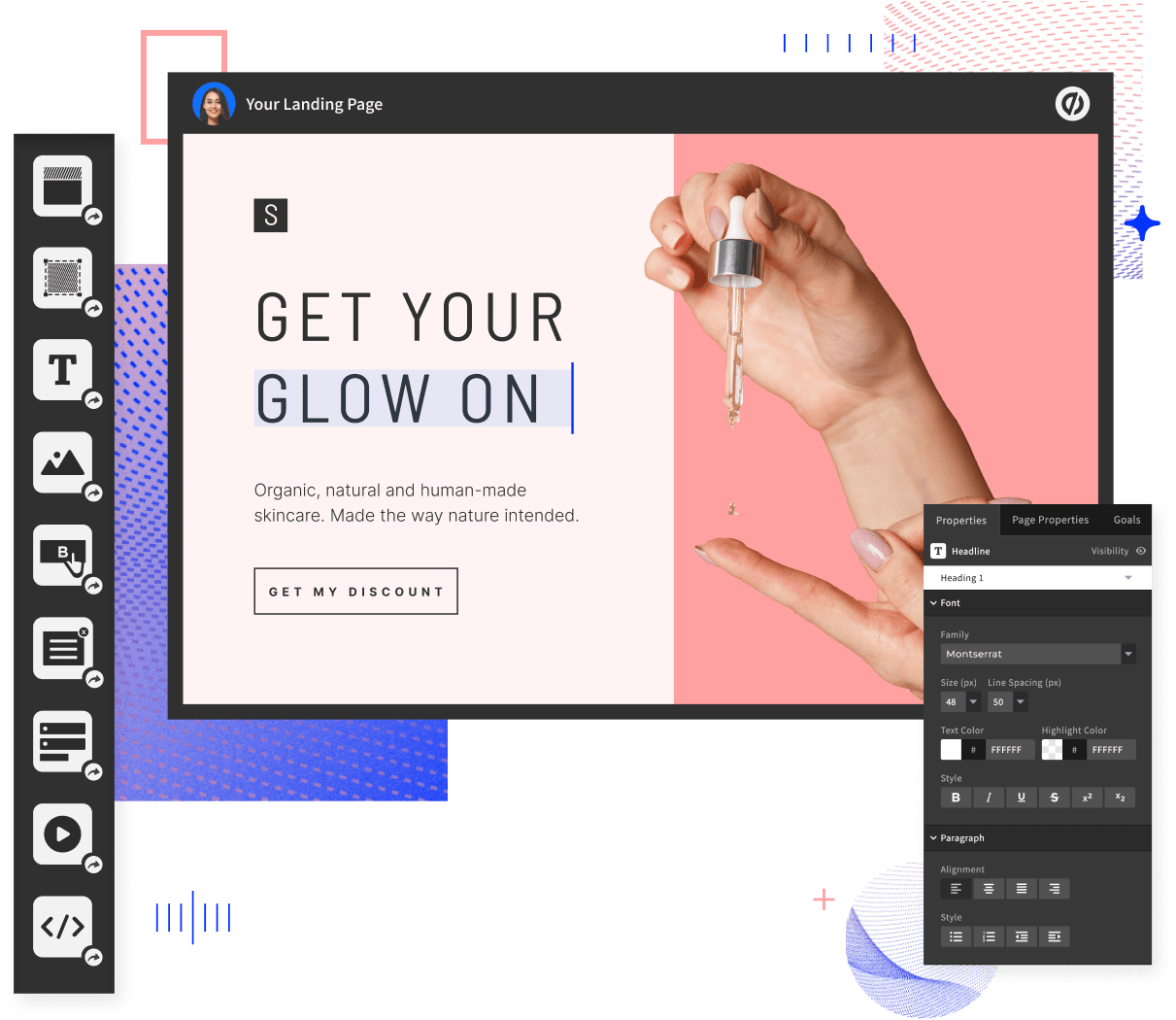
When looking to create a landing page we recommend choosing a platform that specializes in landing pages, so you get the best-in-class tool. Ideally, you are looking for a tool that can empower you or your marketers to create and optimize high-converting landing pages quickly and effortlessly without the need for developers or designers. Here are the must-haves from a landing page builder that will elevate your digital marketing strategy:

  • Drag-and-drop builder: Look for a landing page provider that offers the option to customize landing pages to align with your brand identity without any coding skills required. This allows you to set up your landing page quickly and efficiently.
  • A/B testing: Find a tool that allows you to experiment with variations to find the highest performing designs and content. This, in turn, allows you to increase your conversion rates.
  • Templates: You want the choice of access to professionally designed templates tailored to various industries and goals for quick deployment.
  • Integration: Choose a tool that offers seamless integration with your marketing tools.
  • Tailored content: Find a landing page builder that allows you to create dynamic content based on your audience to build authentic connections and increase conversions.

Unbounce.com, August 2024

Expert Insights: Why Unbounce Is Essential

  • Speed and efficiency: With Unbounce’s user-friendly, drag-and-drop interface you can quickly launch landing pages, saving valuable time and resources. This allows you to focus on other critical aspects of your business. (You can also include custom code, if you prefer.)
  • Conversion-centric design: Unbounce has 100+ templates designed with conversion principles in mind, ensuring that your landing pages are both attractive and effective.
  • A/B testing: Unbounce offers seamless, built-in A/B testing so you can make data-driven optimization decisions with confidence.
  • Advanced targeting and personalization: Unbounce offers dynamic text replacement to deliver personalized experiences to your visitors, enhancing their likelihood to convert.
  • AI-powered traffic optimization: Unbounce’s Smart Traffic automatically directs visitors to where they’re most likely to convert, based on data from over two billion conversions.
  • Seamless integration: With dozens of integrations, including Hubspot, Mailchimp, and Salesforce, and thousands more available through Zapier, your worlds can talk to each other at the click of a button.

Free trial: Take advantage of the Unbounce 14-day free trial so you can test out the platform and see how you can transform your visitors’ journey into a positive and higher-converting experience today.

    Real Success Stories With Unbounce

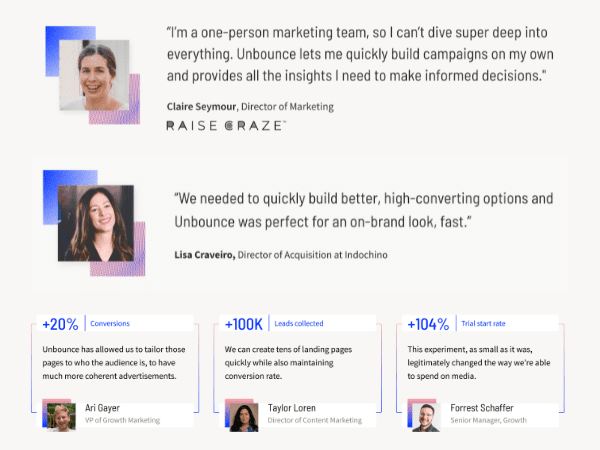
    Businesses like Going and Webistry have leveraged Unbounce to achieve remarkable results in conversions and customer acquisition. Learn more about their success stories here.

    Screenshots from unbounce.com, August 2024

    Elevate Your Marketing Game With Unbounce

    In the competitive realm of digital marketing, having the right tools is essential. Unbounce equips you with the expertise and resources to build landing pages that deliver results. Take the first step towards maximizing your marketing efforts with Unbounce’s proven solutions. Sign up today for a 14-day free trial and transform your digital presence.

    Your journey to higher conversions and business growth starts now. Unbounce’s 14-day free trial offers you a risk-free opportunity to explore the platform and see first-hand how it can benefit your business.

    By the end of this trial, you will have created, tested, and optimized landing pages that drive results. You’ll gain valuable insights into your audience’s behavior and preferences, allowing you to make informed decisions, refine your marketing strategies, and increase your ROI

    Final Thoughts

    In the competitive world of digital marketing, having the right tools can make all the difference. Unbounce gives you the expertise, resources, and insights you need to build high-converting landing pages that propel your business forward. Don’t miss out on this opportunity to elevate your marketing game.

    Sign up for the Unbounce 14-day free trial today and take the first step towards unlocking your business potential.


    Image Credits

    Featured Image: Image by Unbounce. Used with permission.

    In-Post Images: Images by Unbounce. Used with permission

    Google Quietly Cancels Google Trends Subscriptions via @sejournal, @martinibuster

    Google emailed users to communicate that it is ending the Google Trends subscriptions for trend alerts, warning that the program will no longer be available beginning on October 29, 2024 and that all existing alerts will end.

    Google Trends is popular with many users, especially those who are digital marketers.

    Aleyda Solis posted about it on X (formerly Twitter):

    Can Still Make A Copy

    The email stated that users can still obtain a copy of their data from the Google Trends subscription page before the 29th.

    Google Trends Users Disappointed

    A discussion on Reddit showed that many users were disappointed that the service was ending.

    One Redditor commented:

    “It’s really disappointing to see Google shutting down yet another useful feature. It feels like they used to be all about rolling out innovative tools that made our lives easier – I’ve used quite a few of them over the years. But lately, it seems like they’re closing these services one by one.”

    Another Redditor commented that the unreliability of Google’s services is what stops them from using Google Gemini because they don’t want to rely on a service that can’t be depended to be around in the near future.

    Full Text Of Email

    This is the text of the email sent to subscribers:

    “We’re writing to let you know about some upcoming changes to Google Trends subscriptions.

    As of 29 October 2024, Google Trends trend notifications will no longer be supported and existing alerts will no longer be sent. In addition, creating new trend alerts using the subscription page will no longer be possible.

    You can still copy your subscriptions from the Google Trends subscription page before 29 October 2024, if you wish to keep a record of them.

    We understand this change may affect how you stay updated on trends. While email subscriptions will no longer be supported, there are alternative ways to access trending information:

    Homepage Newsletter: Visit the Google Trends homepage to sign up for our daily newsletter and receive the latest trends in your inbox.

    RSS Feed: Subscribe to the RSS feed for real-time updates on trending topics. We hope these alternatives will help you continue to discover insights on Google Trends.”

    Read the discussion on on Reddit:

    Google Trends email subscriptions will terminate as of 29 October 2024

    Featured Image by Shutterstock/Cast Of Thousands

    Google’s August Core Update Rollout Completed via @sejournal, @MattGSouthern

    Google has announced the completion of its August core update. Website owners and SEO professionals can now fully assess the update’s impact on search performance.

    The August core update, launched on August 15, is part of Google’s ongoing effort to improve the quality and usefulness of its search engine.

    Gradual, Extended Rollout

    Unlike typical day-to-day updates, core updates require an extended rollout. For the August update, Google indicated it could take up to a month to finish.

    With its completion confirmed, now is the time to analyze the data and identify any significant ranking shifts.

    “You’d really need to wait until the core update finishes rolling out to make any call about its effect,” John Mueller, Google’s Senior Search Analyst, stated in a LinkedIn discussion last month. “If you want to compare before vs after, waiting for it to be finished is important.”

    Mueller also noted that it’s normal for search rankings to fluctuate during the rollout process, cautioning against drawing conclusions.

    Measuring Content Quality

    Throughout the rollout period, Google reiterated that core updates are intended to better match search results with content that provides users genuine value and relevance.

    The company has maintained that sites focused predominantly on search engine optimization rather than helping users are likelier to experience negative ranking impacts.

    To help affected sites, Google recently updated its guidance on core algorithm updates, providing clearer recommendations for pinpointing and addressing significant ranking drops using tools like Search Console.

    Refined Advice For Recovery

    The revised core update documentation emphasizes substantive content improvements over quick remedies.

    It encourages thorough self-auditing against Google’s quality guidelines, stressing meaningful changes aligned with user needs rather than deleting underperforming pages outright.

    The updated guidance states

    “Things to keep in mind when making changes [include] prioritizing substantive, user-centric improvements rather than quick fixes. Removing content should be a last resort…suggesting it was created for search engines rather than users.”

    Additionally, Google’s refreshed advice sets realistic expectations that regaining lost rankings may require waiting for future core updates even after enhancements are implemented.

    AI Overviews Also Impacted

    In a related development, Mueller confirmed that Google’s AI-generated overviews displayed in some search results are also influenced by core algorithm updates, tying the experimental AI features more directly to the core ranking systems.

    “These [AI overviews] are a part of search, and core updates affect search, so yes,” Mueller stated when asked if the overviews are subject to core update changes.

    Looking Ahead

    While disruptive, Google maintains these core updates are necessary to continually refine how its systems prioritize the most useful information for search queries.

    Publishers should focus content strategies on meeting user needs rather than pursuing SEO in isolation. As AI-generated overviews become further intertwined with core ranking systems, demonstrating true value may be more critical than ever.


    Featured Image: Longfin Media/Shutterstock

    Augmentation: Yelp Sues Google For SERP Features – Justified? via @sejournal, @Kevin_Indig

    Yelp filed an antitrust lawsuit against Google for stifling competition and keeping searchers in its walled garden.

    Almost a month after Google was declared to be a monopoly, Yelp brings forward legal complaints for using SERP features to keep traffic on its site and illegally scraping and using Yelp’s content.

    In a CEO statement, Yelp lists interesting research papers about the impact of SERP features on organic traffic and implied revenue.

    After dissecting the referenced papers and comparing them with my own findings from +7,000 results, I can confirm that the impact on traffic from most SERP features is negative.

    Most companies have no idea about the traffic impact of SERP features and how to develop strategies that factor them in.

    Click Drainer

    SERP features are Google’s way of augmenting search results with potentially helpful direct answers.

    You search for inspiration, and Google shows you images and video carousels. You search for products, and Google shows you stores near you that carry them or carousels of products you can buy online.

    The benefit for companies is that they get a channel to customers with a stronger purchase intent. The risk is that Google sends out less traffic.

    In some cases, SERP features can make a whole class of keywords redundant for SEO.

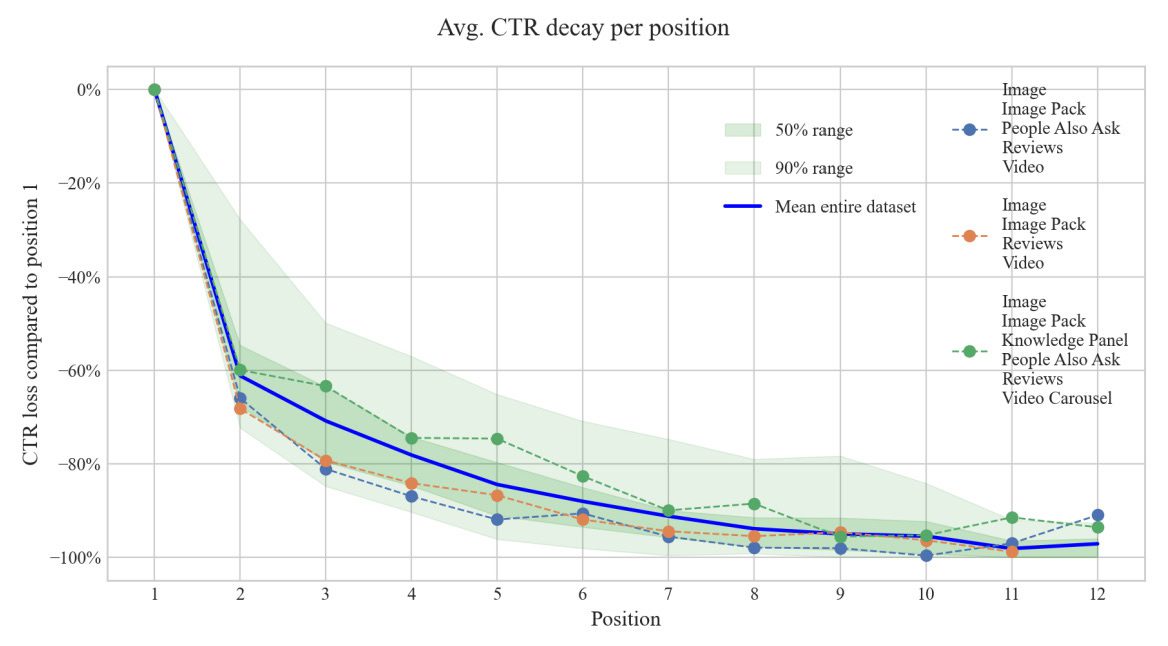
    Yelp’s announcement cites an interesting paper from Germany by Fubel et al.: “Beyond Rankings: Exploring the Impact of SERP Features on Organic Click-through Rates,” which highlights the traffic impact of SERP features.

    CTR by position based on whether certain SERP Features are present or notCTR by position based on whether certain SERP features are present or not. (Image Credit: Kevin Indig)

    The cliff notes:

    Goal: The study sought to find out to what extent SERP features extend or inhibit clicks to organic results.

    Method: The researchers compared predicted CTR with actual CTR for SERP features across six million clicks, 24 million impressions, 67,000 keywords, and 43 ecommerce stores from May to August 2022. To reduce noise, they filtered out any result below 20 impressions.

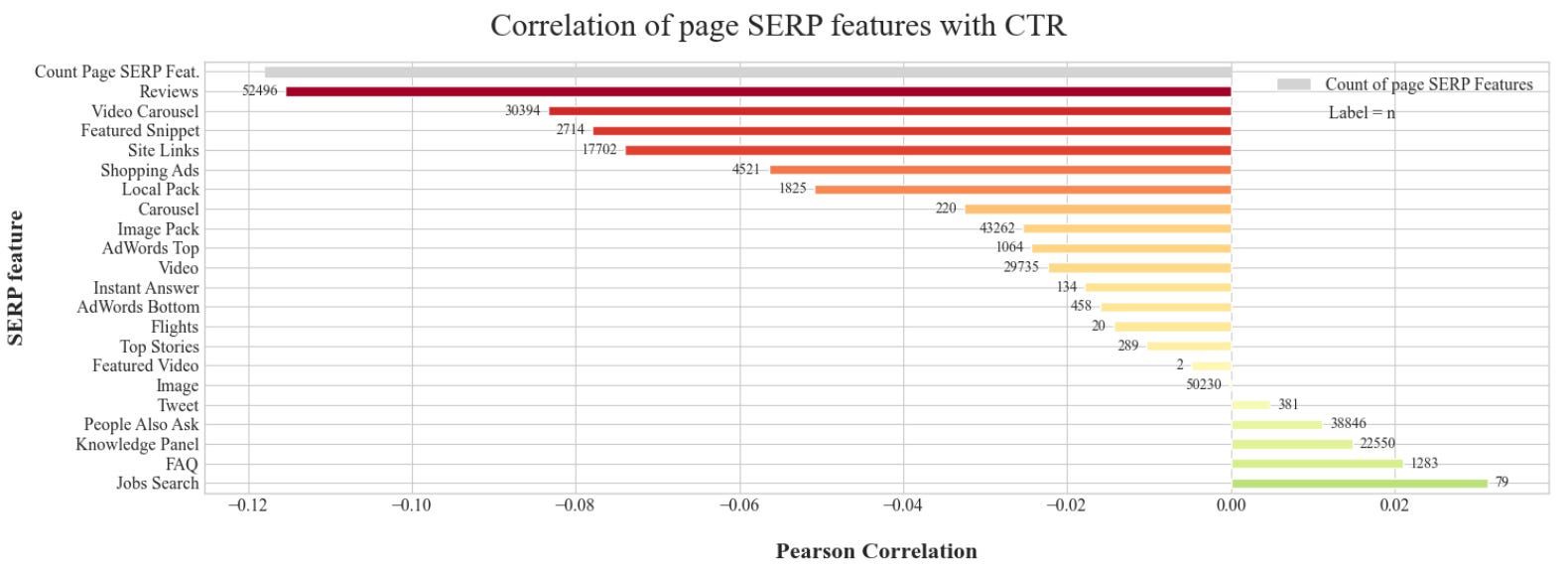
    Correlation of page SERP features with CTRImage Credit: Kevin Indig

    Results: The presence of most SERP features hurts CTR. Most SERPs show four to six SERP features.

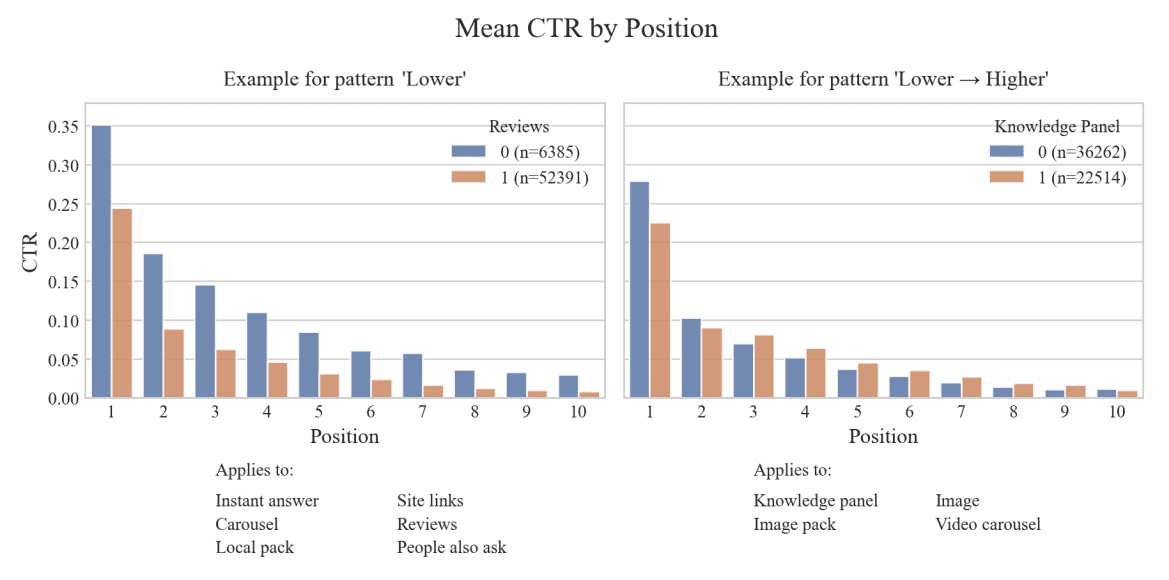
    Some SERP features decrease clicks on all web results; others lower clicks on the first three results and raise them for the others. But most SERP features improve CTR for sites linked in them and reduce it for everyone else.

    Mean CTR by positionClick distribution when SERP features are present (1) and not (0) based on their position. (Image Credit: Kevin Indig)

    It’s refreshing to see SERP features researched scientifically. One challenge of researching SERP features and Google results, in general, is that findings quickly become stale because Google makes so many changes.

    SERP layouts can change daily, and Google constantly introduces new SERP features. One example is shopping, where Google introduced free listings and query refinements since the study came out (in 2023).

    Some SERP Features show up more often in specific positionsSome SERP features show up more often in specific positions. (Image Credit: Kevin Indig)

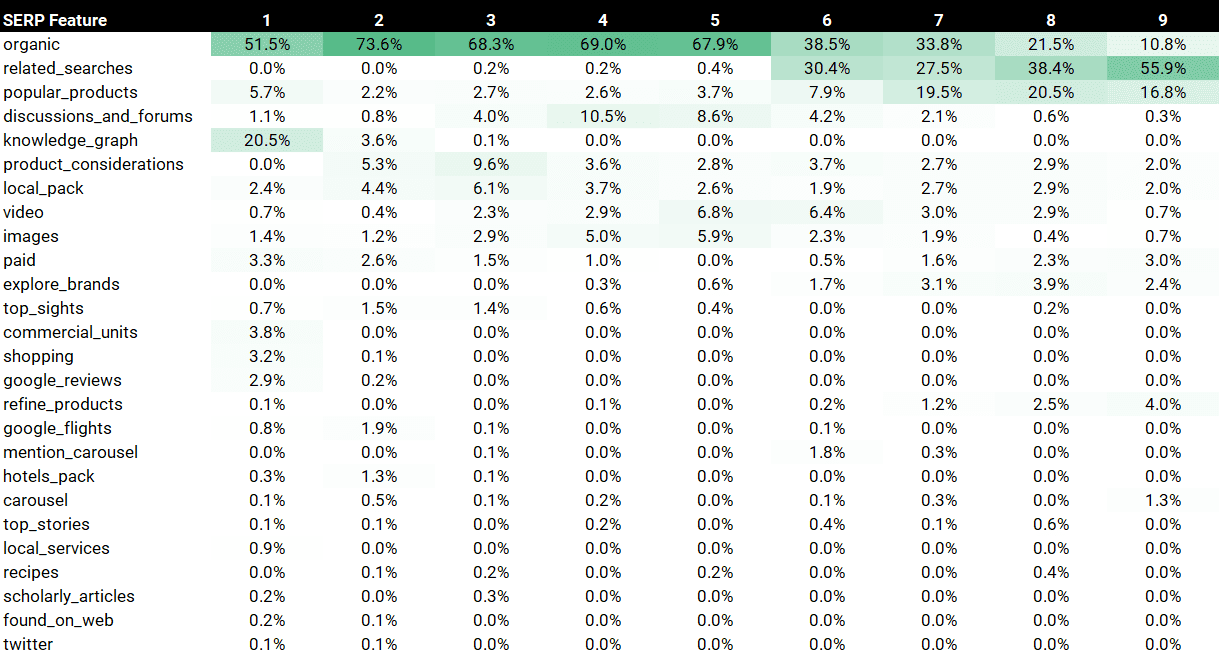
    To add to the paper, I conducted my own analysis of 1,000 random keywords across 7,869 results (US) and found overlapping results:

    1. Organic results appear most often in position 2 (73.6%) rather than 1 (51.5%).
    2. Knowledge graphs are the SERP feature most often appearing in position 1, followed by popular products (5.7%).
    3. Discussions & Forums hover mostly around positions 3 to 6.
    4. Video and image carousels often appear in positions 4 to 6.
    5. Related searches or popular products often appear in positions 6 to 9.

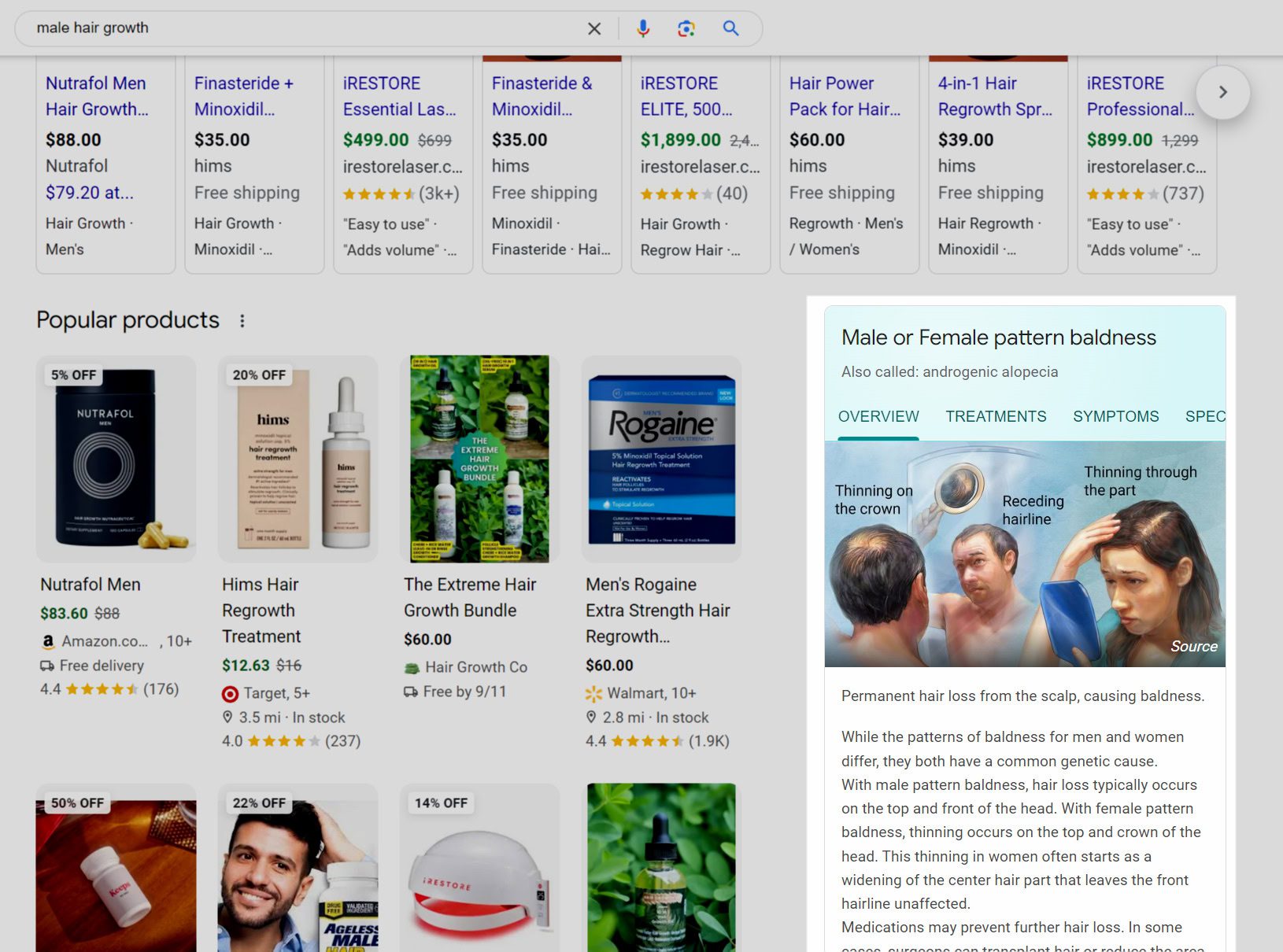
    Knowledge graphs seem to be the most click-draining SERP feature, with an increased impact on mobile due to the screen real estate they occupy.

    Related to findings in the German research paper, searches that return a knowledge graph are hard to monetize in nature because users are exploring a topic. As a result, Google keeps users on the platform until they express more transactional intent.

    An example is the keyword “male hair growth,” where Google displays ads, organic listings, and a knowledge card.

    How much traffic do classic web results get when Google gives the answer away before organic results appear?How much traffic do classic web results get when Google gives the answer away before organic results appear? (Image Credit: Kevin Indig)

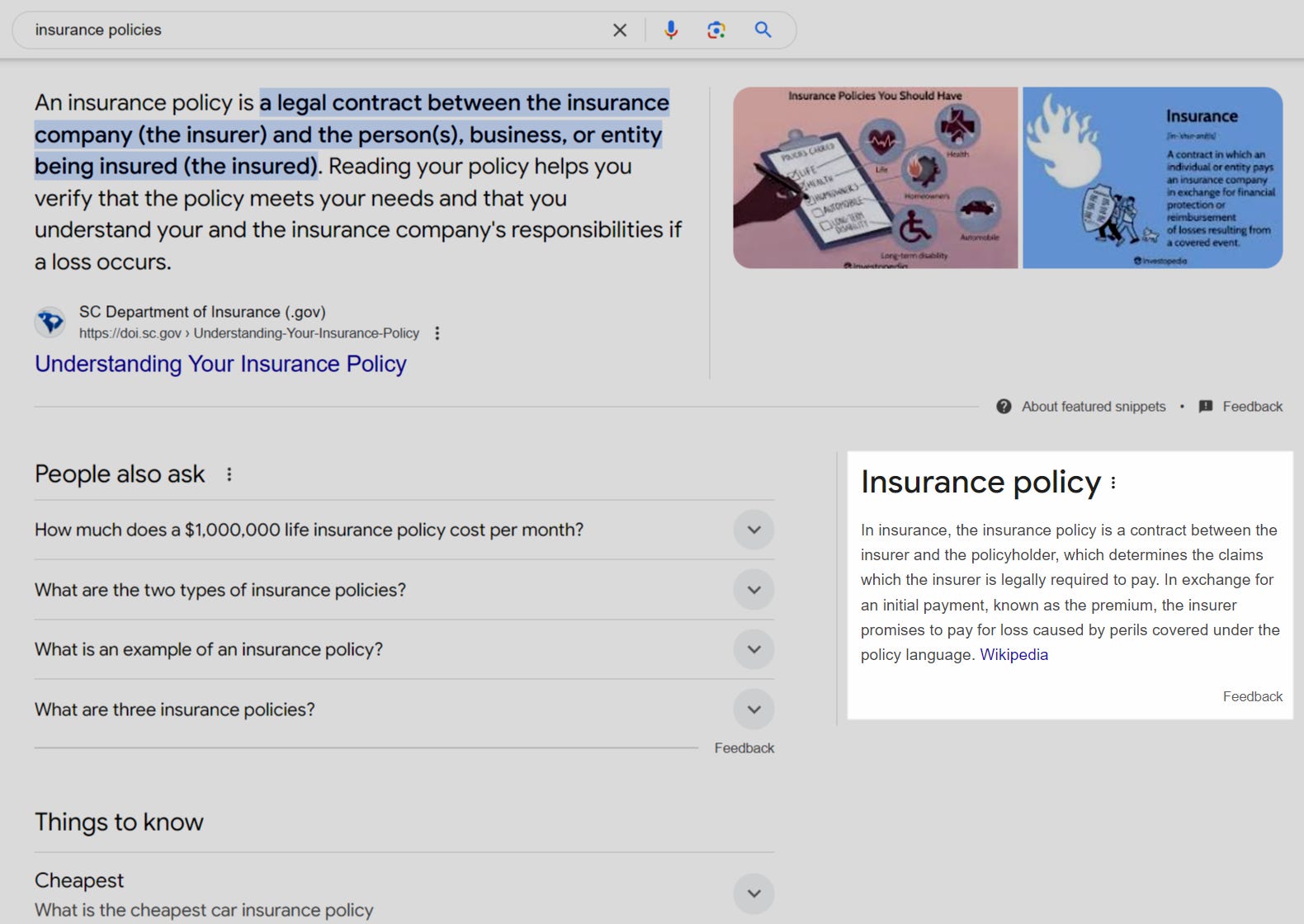
    Another example is the keyword “insurance policies,” where Google shows a Featured Snippet and a Knowledge Card.

    What do you need the Featured Snippet for when Google gives the answer itself?What do you need the Featured Snippet for when Google gives the answer itself? (Image Credit: Kevin Indig)

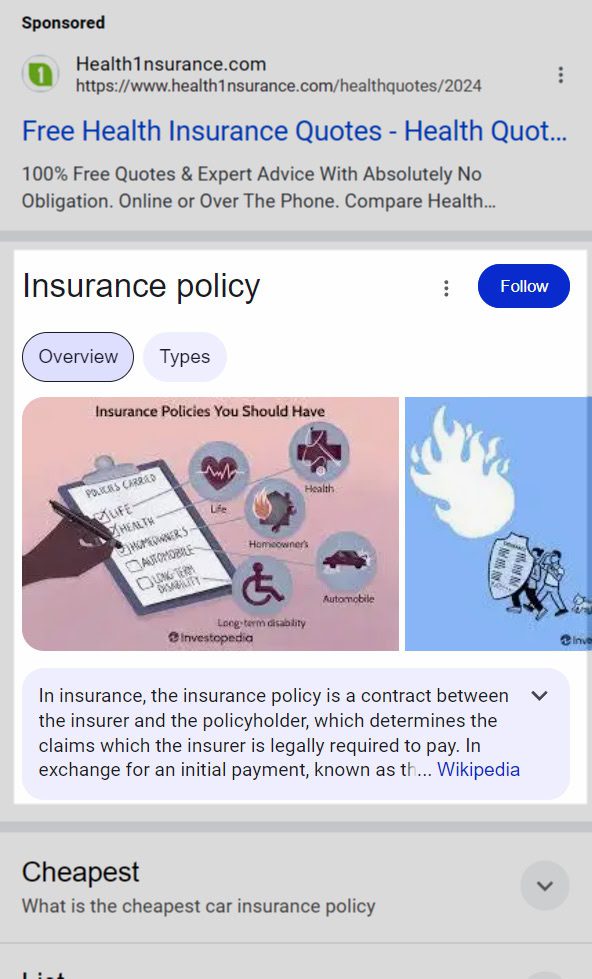
    The impact is much more severe on mobile, where Google gives the answer and makes many organic results redundant.

    Users see the Knowledge Card long before any organic results appear.Users see the Knowledge Card long before any organic results appear. (Image Credit: Kevin Indig)

    Strategically, SERP features cannot replace a No. 1 rank, but they can enhance traffic returns, as long as you’re in the top 10 results. The key to factoring SERP features into your SEO strategy is a) monitoring them and b) prioritizing keywords accordingly.

    For monitoring, you need a solution (either a third-party tool or building your own solution with an API) that helps you understand which keywords show what kind of SERP feature over time.

    Certain SERP features, like Knowledge Graphs and Local Packs, can significantly lower clicks. All the search volume in the world doesn’t matter if you don’t get the clicks.

    For prioritization, you need to prioritize keywords according to the findings in the German research paper and my analysis: target image carousels, free shopping listings, and video carousels.

    That said, one SERP feature bears a bigger risk than any other: AI Overviews. In a world where users get direct answers to complex questions from LLMs, there is less space for SERP features, which are most useful for shorter search queries.

    Sundar Pichai: “People are using it to Search in entirely new ways, and asking new types of questions, longer and more complex queries, even searching with photos, and getting back the best the web has to offer.”

    The impact of AI on search is also the real motivation for the Yelp lawsuit.

    The Real Motivation

    Googler’s Tip About Favicons Can Make A Big Difference via @sejournal, @martinibuster

    Google’s John Mueller responded to a LinkedIn post about the visual impact of favicons in search results, sharing a tip that isn’t officially documented but could improve their visibility.

    Favicons

    Favicons are small icons that represent a website’s brand that are displayed in browser tabs, bookmarks, browser history and in search engine results pages (SERPs). They improve brand recognition, draws attention to itself and makes it easier to identify a brand when it’s in the search results.

    Discussion On LinkedIn

    A post in LinkedIn by Mark Williams-Cook (LinkedIn profile) highlighted the value of a good favicon in the search results, speculating that they might make a difference in search results interactions.

    A discussion followed in which others observed the value of a favicon that draws attention to itself in the search results and that an eye-catching favicon is useful for SearchGPT.

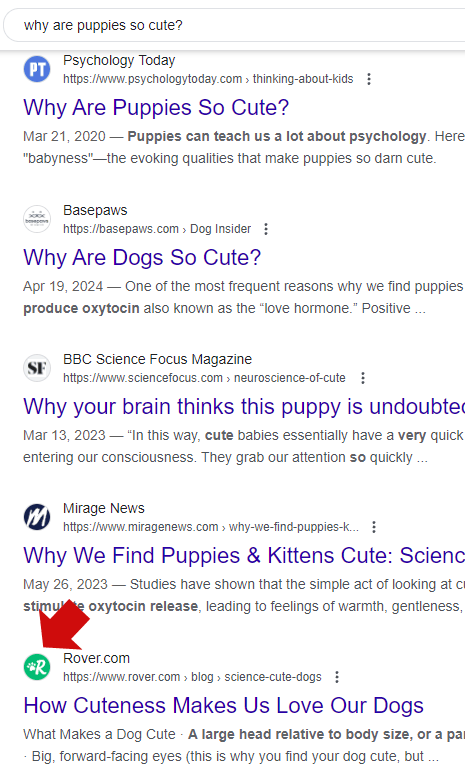
    The following screenshot shows how some favicons blend into the search results while two of them stand out, especially the one with the bold color scheme.

    Screenshot Of Favicons In The SERPs

    A distinctive favicon won’t help a site rank better but as can be seen above it can help the page stand out in the search results.

    A Good Tip For Favicons

    John Mueller’s observation about favicons mentions something really obvious but is also not mentioned in any of the official documentation about favicons. Mueller simply said that it’s not a bad idea if the favicon looks attractive when cropped into a circle.

    This is what Mueller said:

    “Round-croppable favicons, for those who like technical SEO.”

    Designing a favicon that looks attractive when cropped into a circle something that is obvious in retrospect but easily overlooked. Considering a favicon by how well it appears cropped in a circle suggests the usefulness of testing a favicon to see what it looks like when cropped into a circle or even designing a favicon that is already in a circle so that it fills the entire available space when it’s displayed in the search results (or anywhere else).

    None of Google’s documentation on favicons mentions that they are cropped into a circle nor does Google advise that it might be a good idea to design them in a round configuration.

    This tip is a small and seemingly obvious one but it can make a big difference.

    Read the LinkedIn discussion here:

    I imagine custom favicons make an actual difference with SERP interaction…

    Read Google’s Favicon documentation

    Define a favicon to show in search results

    Landing page guidelines – Favicons

    Visual Elements gallery of Google Search – Attribution

    Featured Image by Shutterstock/Cast Of Thousands
    Google’s New Support For AVIF Images May Boost SEO via @sejournal, @martinibuster

    Google announced that images in the AVIF file format will now be eligible to be shown in Google Search and Google Images, including all platforms that surface Google Search data. AVIF will dramatically lower image sizes and improve Core Web Vitals scores, particularly Largest Contentful Paint.

    How AVIF Can Improve SEO

    Getting pages crawled and indexed are the first step of effective SEO. Anything that lowers file size and speeds up web page rendering will help search crawlers get to the content faster and improve the amount of pages crawled.

    Google’s crawl budget documentation recommends increasing the speeds of page loading and rendering as a way to avoid receiving “Hostload exceeded” warnings.

    It also says that faster loading times enables Googlebot to crawl more pages:

    Improve your site’s crawl efficiency

    Increase your page loading speed
    Google’s crawling is limited by bandwidth, time, and availability of Googlebot instances. If your server responds to requests quicker, we might be able to crawl more pages on your site.

    What Is AVIF?

    AVIF (AVI Image File Format) is a next generation open source image file format that combines the best of JPEG, PNG, and GIF image file formats but in a more compressed format for smaller image files (by 50% for JPEG format). AVIF supports transparency like PNG and photographic images like JPEG does but does but with a higher level of dynamic range, deeper blacks, and better compression (meaning smaller file sizes). AVIF even supports animation like GIF does.

    Is AVIF Supported?

    AVIF is currently supported by Chrome, Edge, Firefox, Opera, and Safari browsers. Not all content management systems support AVIF. However, both WordPress and Joomla support AVIF. In terms of CDN, Cloudflare also already supports AVIF.

    I couldn’t at this time ascertain whether Bing supports AVIF files and will update this article once I find out.

    Current website usage of AVIF stands at 0.2% but now that it’s available to surfaced in Google Search, expect that percentage to grow. AVIF images will probably become a standard image format because of its high compression will help sites perform far better than they currently do with JPEG and PNG formats. https://w3techs.com/technologies/overview/image_format

    AVIF Images Are Automatically Indexable By Google

    According to Google’s announcement there is nothing special that needs to be done to make AVIF image files indexable.

    “Over the recent years, AVIF has become one of the most commonly used image formats on the web. We’re happy to announce that AVIF is now a supported file type in Google Search, for Google Images as well as any place that uses images in Google Search. You don’t need to do anything special to have your AVIF files indexed by Google.”

    Read Google’s announcement:

    Supporting AVIF in Google Search

    Featured Image by Shutterstock/Cast Of Thousands
    5 SEO Insights About Outbound Links via @sejournal, @martinibuster

    Outbound have traditionally been considered a ranking or relevance related factor but those ideas are outdated now that search engines use AI for spam detection and the ranking process. It’s time to consider new ways of thinking about outbound links.

    1. A Page Is About Multiple Subtopics

    One thing people worry about is whether linking out to pages that aren’t specifically about what the entire page is about is a good practice. The more important thing to think about is if the sentence or paragraph supports an irrelevant outbound link then the bigger problem is that the entire paragraph is off-topic and should be removed. Every outbound link should be relevant to the context where it originates and every context should be relevant within the overall context of the entire page.

    A webpage is rarely ever about one topic. It’s usually about one topic and the related subtopics, whatever makes sense for the user.

    • Never link out because you think it will make the page more relevant for the topic or subtopic.
    • Always link out if it makes sense within the context.
    • If the content says that research proves X,Y, and Z then it makes sense to link out to a page about that research so that the user knows this is a fact.

    A page that links out to other pages that are on related subtopics is fine.

    2. Relevance Is Not Always About Keywords

    In the context of outbound links, relevance could be said to be about how closely related a word, sentence, paragraph or webpage is to whatever is being linked to.

    A more up to date definition of relevance is how closely the link aligns with the needs or expectations of the reader at the exact moment that an outbound link can satisfy those needs or expectations.

    3. Poor Outbound Links May Impact Site Quality

    Linking to low quality sites could cause Google to consider the linking site as also low quality. What a site links to may impact the quality of the site. But what’s a low quality site?

    Check If The Site Is Created For Search Engines

    The most current definition of a low quality site is one that is created to rank for search engines. That can be an affiliate site that’s created to rank for specific keyword phrases without any expertise, or anything to new or unique to add to what is already ranking for the topic.

    Typical signs of site created to rank are keyword focused content (instead of reader-focused content), keyword focused titles, keyword focused headings, and virtually all the pages are about keywords with the highest level of query volume and the headings are an exact match for People Also Ask phrases, that kind of thing.

    In a way, judging if a site is created for search engines can also be one of those “you know it when you see it” type judgments calls.

    4. Quality Check All Outbound Links

    One way to evaluate a site you’re considering linking to is to look at the sites that they are linking to. If it looks like they’re engaged in selling links then I would consider the entire site to be poisoned.

    Link sellers are easy to spot. They typically link to three pages, two of them are to reputable websites and one of them is a low quality site that no sane person would link to.  Yes, it’s that easy to spot and yes they are naïve to believe they can mask their link selling by linking to two reputable sites.

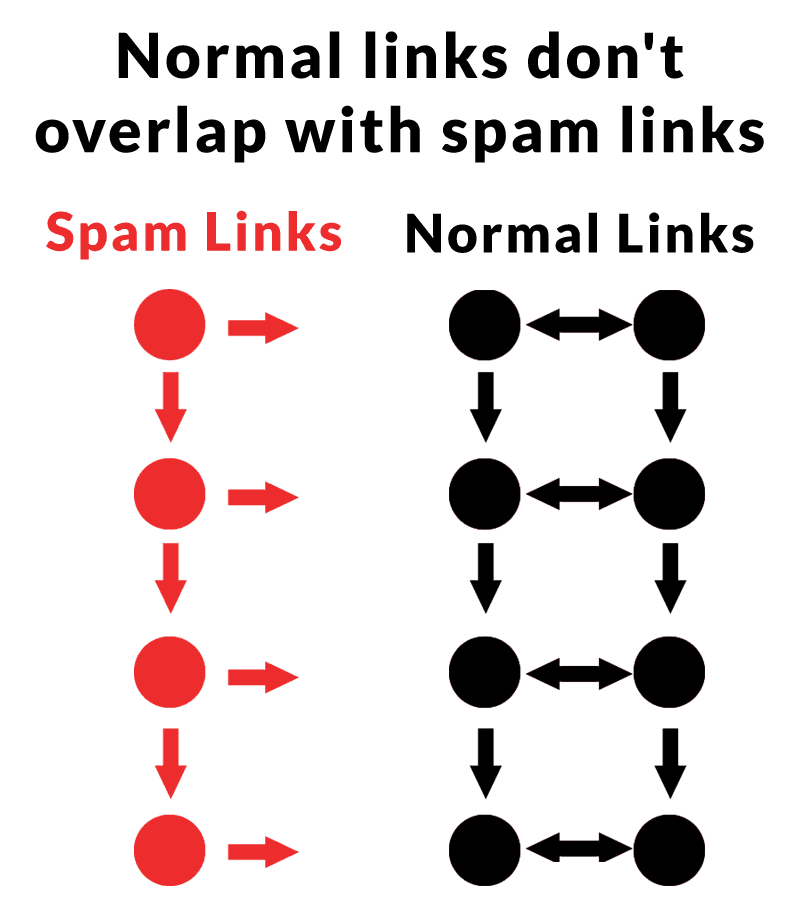
    The following image represents the linking patterns of spam sites and normal sites. Spam sites tend to link to other spam sites and to reputable sites. A reputable site never links to a spam site (unless they were tricked by a link builder). This is an insight discovered in a research paper about link spam detection that looked at the direction of links.

    Diagram example showing how spam links tend to form communities outside of the link communities of normal pages.Spammy links and normal links tend to form communities with their linking patterns. While spammy pages may link to normal pages, normal pages rarely link to spammy pages. This creates a map of the Internet that makes it easier to find linking patterns between normal pages, while rejecting the spam links.

    If the sites you link to have spammy outbound links, then maybe you should reconsider linking out to those sites. 

    The point is that low quality sites link to normal sites. And normal sites don’t tend to link to low quality sites. This is the directional quality of outbound links which was discovered in 2007 as a way to unmask spam sites and help confirm normal sites by their outbound links (PDF on Archive.org). Even though that research paper is old, the insight about the directional quality of outbound links may still be pertinent today.

    Google uses an AI system called SpamBrain to discover spammy links, so it’s not inconceivable that directionality of outbound links is one of many considerations for determining spammy sites and networks of spammy sites.

    Google’s documentation says this about SpamBrain, the spam fighting AI:

    “Links still help us discover and rank results in meaningful ways, and we made a lot of progress in 2021 to protect this core signal. We launched a link spam update to broadly identify unnatural links and prevent them from affecting search quality.”

    And elsewhere this:

    “SpamBrain is our AI-based spam-prevention system. Besides using it to detect spam directly, it can now detect both sites buying links, and sites used for the purpose of passing outgoing links.”

    5. Linking To .Edu and .Gov Sites Makes No Difference

    Linking out to .edu and .gov pages is ok as long as it meets the information needs of the reader at the moment they come across the link.

    Some people believe that linking to .gov and .edu pages helps rankings. This idea has been around since the very early 2000s.

    • Googlers have consistently debunked the idea that that .gov and .edu pages have a special ranking benefit.
    • There is no patent or research that explicitly or implicitly says that sites with links from .edu and .gov sites are considered higher quality.
    • The entire idea is pure conjecture.

    Outbound Links And Modern SEO

    AI, neural networks and transformer based systems like BERT have changed how search engines detect site quality and links. This means that old practices related to outbound links should be reconsidered.

    Featured Image by Shutterstock/eamesBot

    CMOs Called Out For Reliance On AI Content For SEO via @sejournal, @martinibuster

    Eli Schwartz, Author of Product-Led SEO, started a discussion on LinkedIn about there being too many CMOs (Chief Marketing Officers) who believe that AI written content is an SEO strategy. He predicted that there will be reckoning on the way after their strategies end in failure.

    This is what Eli had to say:

    “Too many CMOs think that AI-written content is an SEO strategy that will replace actual SEO.

    This mistake is going to lead to an explosion in demand for SEO strategists to help them fix their traffic when they find out they might have been wrong.”

    Everyone in the discussion, which received 54 comments, strongly agreed with Eli, except for one guy.

    What Is Google’s Policy On AI Generated Content?

    Google’s policy hasn’t changed although they did update their guidance and spam policies on March 5, 2024 at the same time as the rollout of the March 2024 Core Algorithm Update. Many publishers who used AI to create content subsequently reported losing rankings.

    Yet it’s not said that using AI is enough to merit poor rankings, it’s content that is created for ranking purposes.

    Google wrote these guidelines specifically for autogenerated content, including AI generated content (Wayback machine copy dated March 6, 2024)

    “Our long-standing spam policy has been that use of automation, including generative AI, is spam if the primary purpose is manipulating ranking in Search results. The updated policy is in the same spirit of our previous policy and based on the same principle. It’s been expanded to account for more sophisticated scaled content creation methods where it isn’t always clear whether low quality content was created purely through automation.

    Our new policy is meant to help people focus more clearly on the idea that producing content at scale is abusive if done for the purpose of manipulating search rankings and that this applies whether automation or humans are involved.”

    Many in Eli’s discussion were in agreement that reliance on AI by some organizations may come to haunt them, except for that one guy in the discussion

    Read the discussion on LinkedIn:

    Too many CMOs think that AI-written content is an SEO strategy that will replace actual SEO

    Featured Image by Shutterstock/Cast Of Thousands