What Is Social Media Automation? Top Tools and Tips

Table of Contents

If you’re like us, you prefer fun jobs over tedious tasks. (Actually, if you were into tedium, you probably wouldn’t be reading this blog in the first place.) That’s why you’re going to love social media automation tools.

Social media automation tools allow you to automate boring, time-consuming tasks so you can get back to the fun stuff, like creating stunning content.

In this blog, you’ll learn how to automate tasks on social media with tools that help you improve response time, reduce the time spent on repetitive tasks, and give you the insights you need to create more engaging content.

Bonus: Get a free social media strategy template to quickly and easily plan your own strategy. Also use it to track results and present the plan to your boss, teammates, and clients.

What is social media automation?

Social media automation is the process of using tools or software to manage repetitive tasks on social media platforms, like posting content or producing reports, without manual labor.

Tools that automate post-scheduling, basic customer service, and analytics reports can save social media managers valuable time for higher-priority tasks.

What can you automate in social media marketing?

You can automate many (but not all!) tedious social media marketing tasks. And don’t worry—we’ll get to the software tools that can take care of these tasks for you at the bottom of this post.

Some aspects of content creation

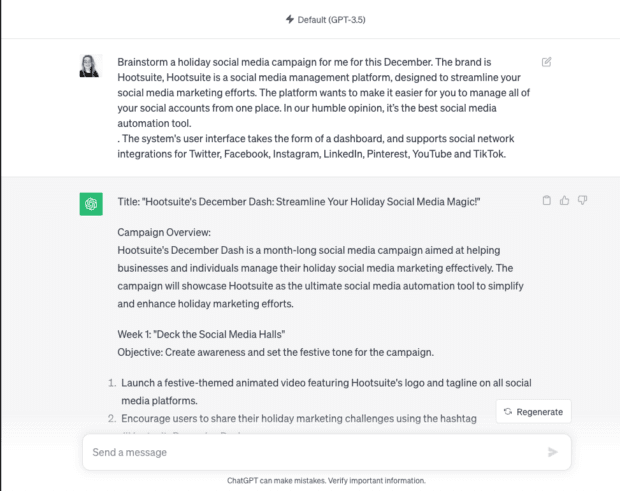
Let’s face it: we can’t always be the Vincent Van Gogh-esque creative geniuses we often are. Sometimes, we’re more like Vincent Van No. But, if you need a hand brainstorming content ideas, you can always turn to a generative AI tool to help you out.

Look, you can (and should) automate text-based content, visuals, and videos using generative AI. But you absolutely need to review and edit AI-generated results. AI isn’t perfect (none of us are), but it’ll give you that get-up-and-Gogh boost you need.
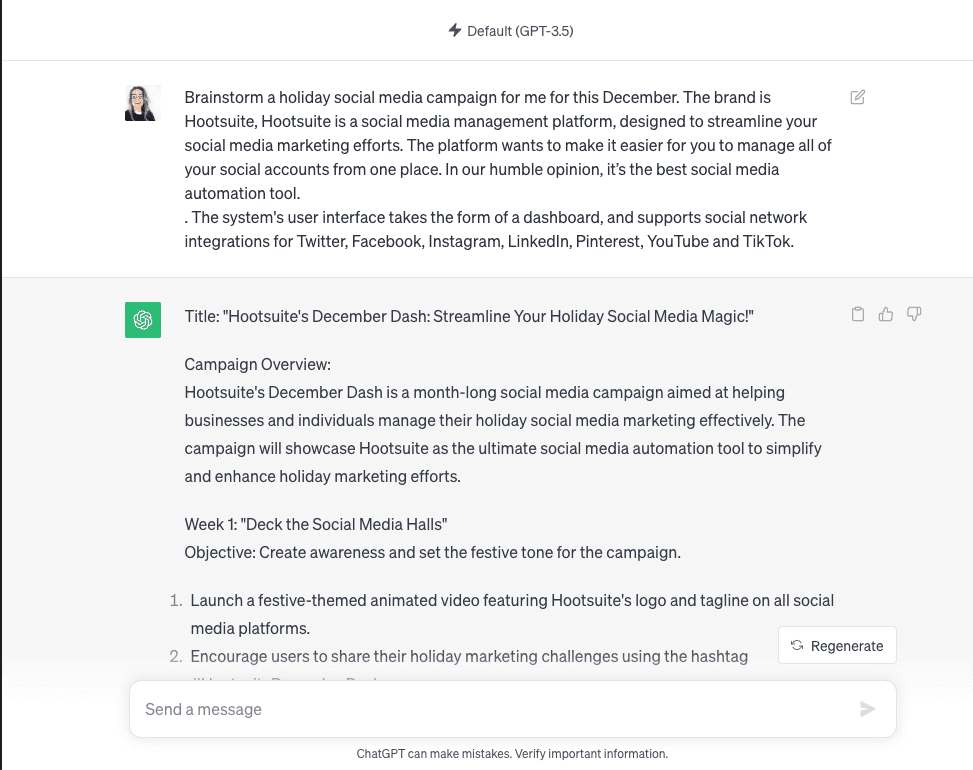
ChatGPT prompt brainstorm a social media campaign for December

Source: ChatGPT

Social scheduling and publishing

Switching between different social accounts to publish multiple times per day can take up a lot of time. Especially because the best time to post and content best practices vary by platform.

Automatic social media posting saves time and increases efficiency without reducing content quality. Once your content is locked and loaded, you can use automated social media posting to schedule the appropriate pieces and post times on each network. Then sit back, relax, and let the robots take your posts over the finish line.

Basic customer service

The Hootsuite 2023 social trends report saw a massive dip in online customer satisfaction rates. But why are people so unhappy? Once the world officially reopened (bye-bye COVID), business owners stopped paying attention to online customer service.

So, what does this mean for your business? There’s a gaping hole in the ecommerce market, one you can fill with better customer service. And one way to do that is to use customer interaction automation.

You don’t need a human team member to answer common questions like “What are your hours?” and “Do you have any coupons available?” Likewise, you can automate service requests related to package tracking, refund status, and other issues tied to your CRM.

Conversational AI tools can handle more basic work without drastically affecting your business’s bottom line.
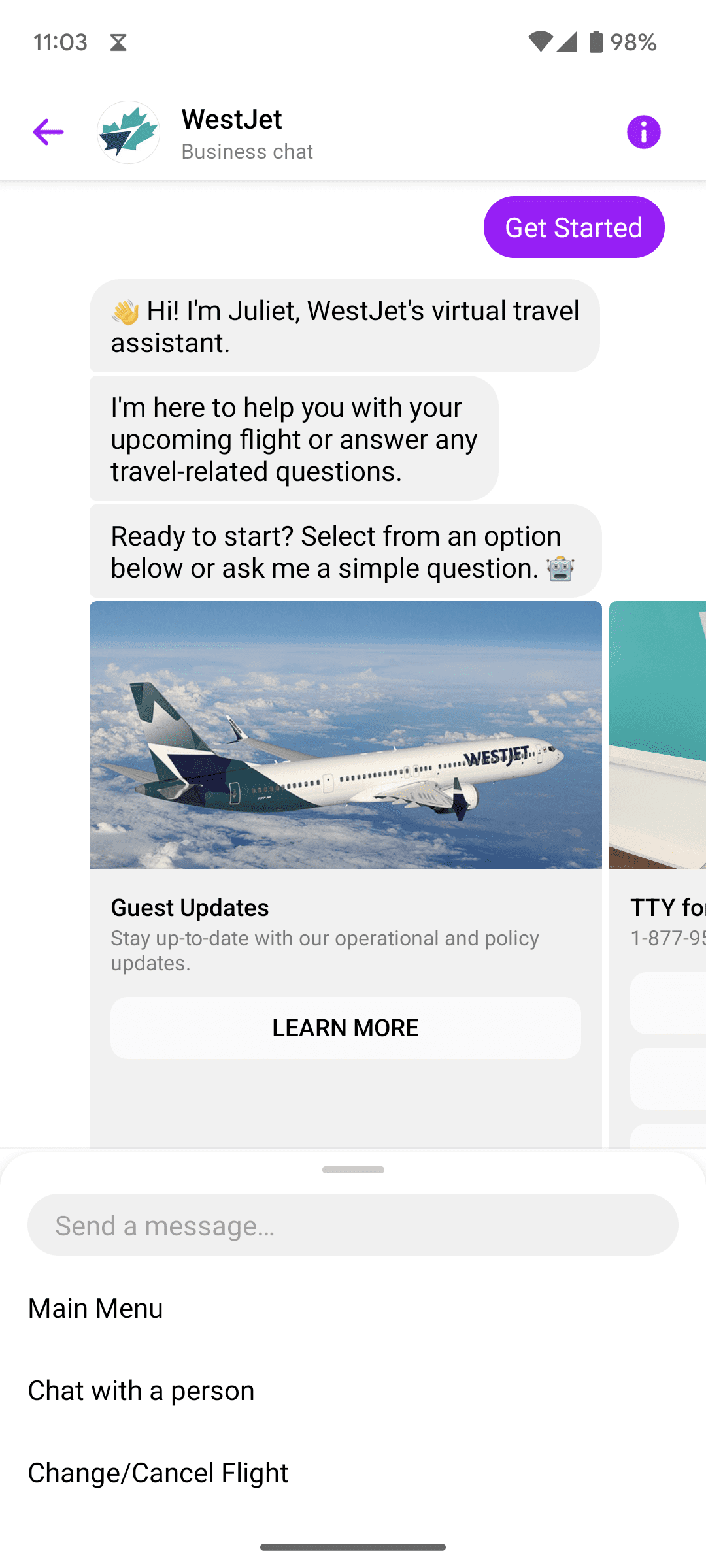
WestJet virtual assistant answers to upcoming flight and travel related questions

Data collecting

Automated data collection makes analytical reporting and decision-making a lot easier. Luckily, social media marketing automation was practically built to take care of the tedious number crunching you truly hate.

Automated data collection can include things like:

  • Platform-specific social data, like the best time to post on Instagram vs. TikTok
  • Post engagement stats, like likes, comments, shares, and more
  • Keyword or hashtag tracking, which allows you to see exactly what people are saying about your brand, themes related to your industry, and your competitors

If you find the right tool, you can even automate your reporting, generating client-ready dashboards and reports with just a few clicks.
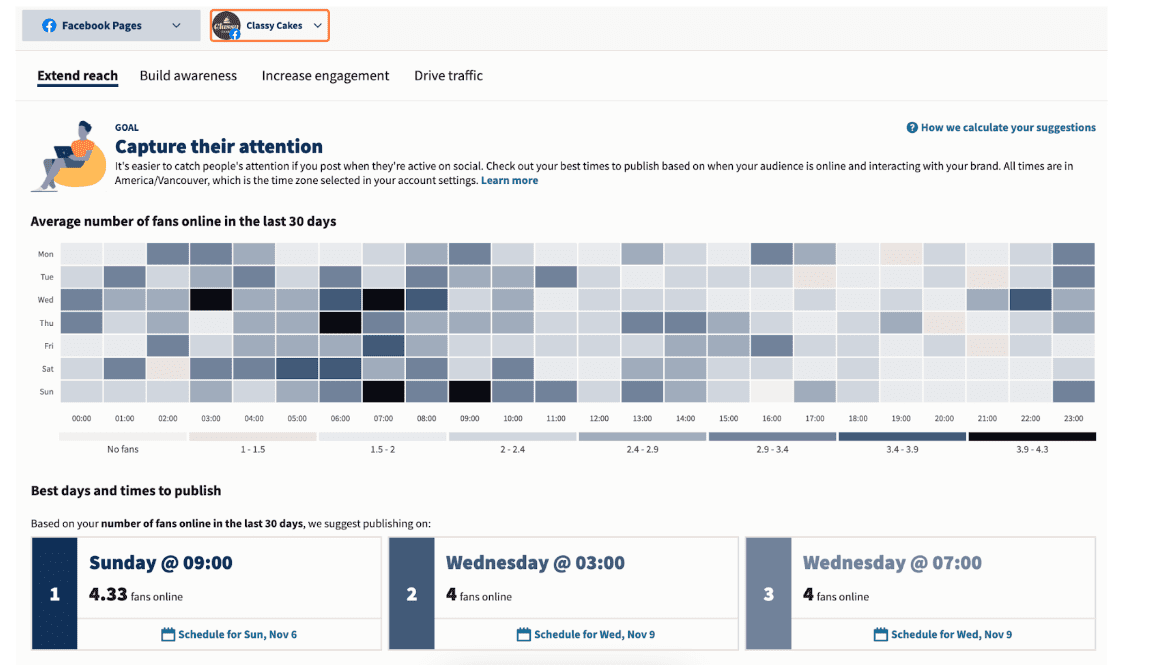
Hootsuite Facebook pages Best times and days to publish graph

Source: Hootsuite

Start a free Hootsuite trial today

Common mistakes when automating social media marketing

DON’T put all of your faith in your tools

A poor builder blames his hammer when the house falls down. When you publish a “Don’t worry, be happy” post the same day as a global tragedy, the same goes for you.

tl;dr? Don’t set it and forget it unless you want your house to topple. Automating social media marketing doesn’t mean you flip a switch and walk away.

It’s important to monitor any automated outputs, including your publishing schedule. That way, you can make any adjustments required in real time.

World-changing crises happen all the time on social media. A poorly timed post can make your brand look out of touch or tactless.

DON’T use spammy bots

Just because some tools exist doesn’t mean you should use them. Remember: use bots for good, not evil. Embrace bots that help improve customers’ lives and your own.

AI tools that speed up customer service response times? Great. An inbox to manage DMs, comments, and tags from multiple networks in one place? Excellent.

But bots that automatically comment on or like social posts? Not such a good idea. They can cause lasting damage to your relationships with your audience. They can also land you in hot water with the social networks themselves.

DON’T cross-post without customizing

Cross-posting the same content to multiple social media accounts might seem like the easiest option. But it’s certainly not the most effective.

Some tools (including social media platforms) allow you to automatically cross-post to other platforms. Don’t be tempted.

Social platforms have different image display ratios, character count limits, and social features. Audiences on those platforms have different expectations, demographics, and word preferences. It’s highly unlikely that your link-heavy Facebook post, for example, will perform as well on linkless Instagram.

Instead, take the time to adjust your message for each platform’s audience. At the bare minimum, you’ll want to review:

  • User handles, which can vary between platforms
  • Image specs, like file type, size, cropping, etc.
  • Text, including platform character count and platform-specific language
  • Hashtags, including number and usage

Instead of cross-posting, use automated social media publishing at set times to use your time most efficiently.

4 top social media automation tools

1. Hootsuite

Number one on our list is Hootsuite (what, are you surprised?). Hootsuite provides a comprehensive social media management platform that offers a wide range of automation features. We’ve got so many features, in fact, that we broke them out one by one below.

Hootsuite streamlines your social media marketing efforts, making it easier for you to manage all of your social accounts from one place. In our humble opinion, it’s the best social media automation tool.

Price: Free trial, followed by a tiered paid subscription starting at $99/month.

This tool is best for: Medium-to-large teams, social media marketers, and content creators.

Here’s a breakdown of Hootsuite’s key automation tools and why you should care about them.

OwlyWriter AI

OwlyWriter AI is Hootsuite’s AI-driven, social-media-specific content-generating tool. Use it to save major time generating and testing social media captions.
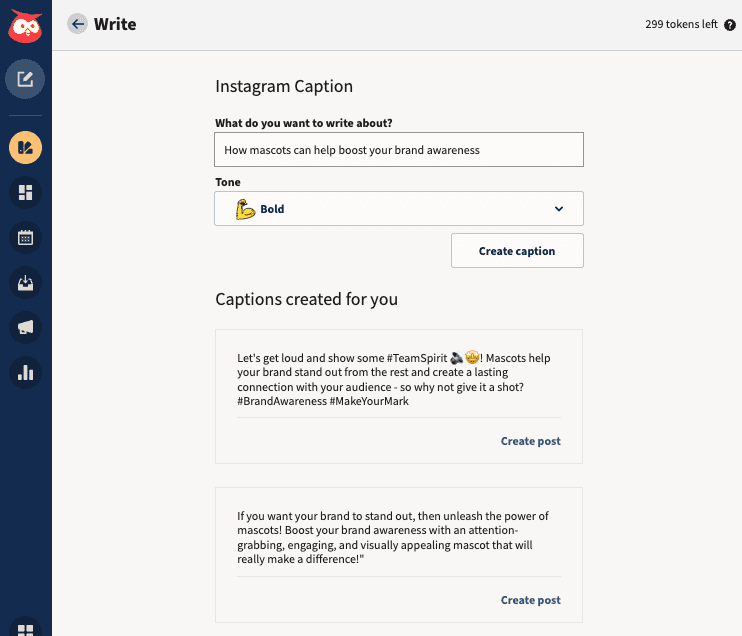
OwlyWriter AI Instagram caption generator

Key features:

  • Rapid content generation. Create engaging and relevant social media posts in seconds, saving you time and creative energy.
  • Instant insights. Automatically identify and repurpose your top-performing posts—without manually reviewing your past content.

Best Time to Publish

Timing is crucial; you want to post when your audience is happily browsing. Hootsuite’s Best Time to Publish feature analyzes, optimizes, and automates your posting schedule.
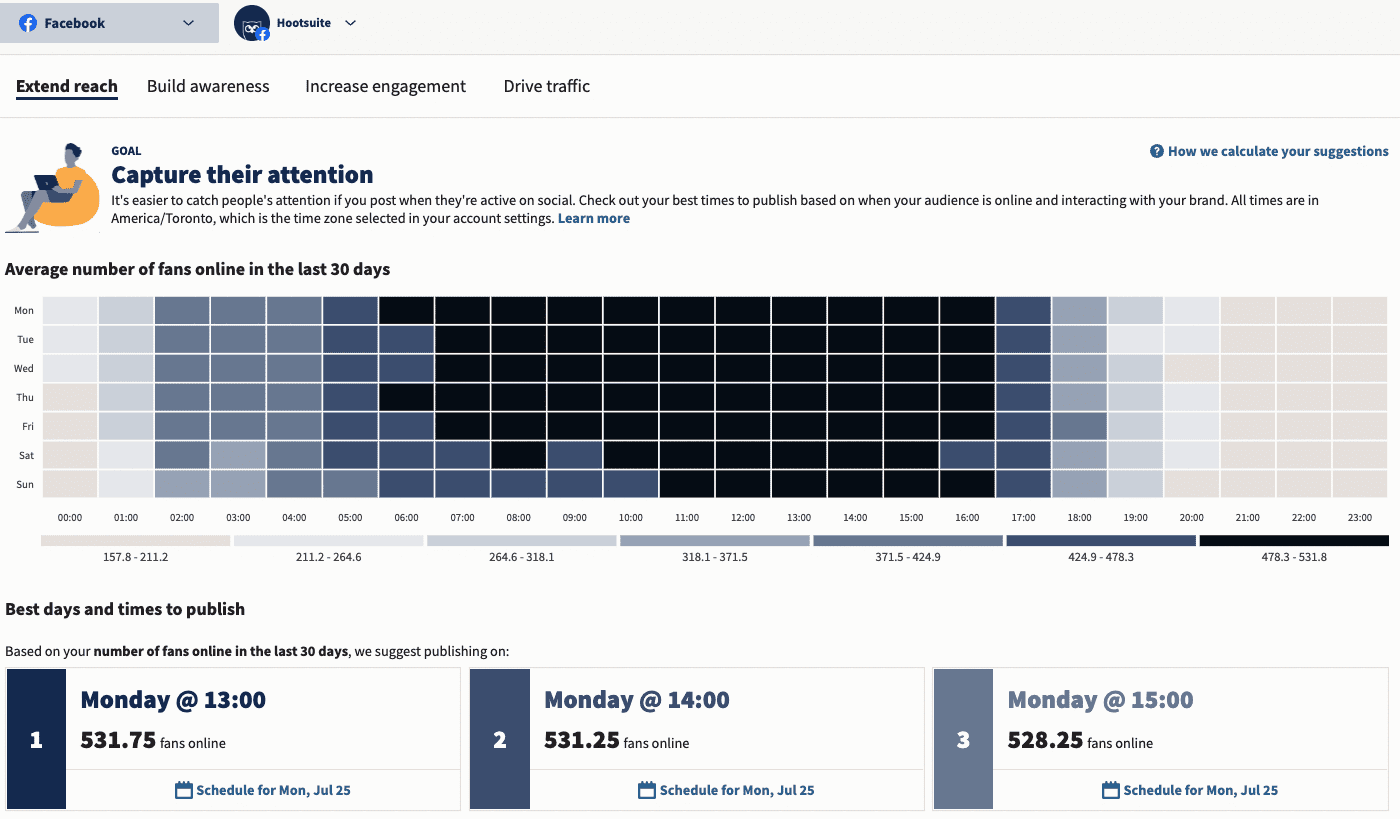
Best Time to Publish feature on Hootsuite

Key features:

  • Data analysis. Analyzes your audience’s online behavior to determine the ideal times for posting.
  • Improved visibility. Automatically schedule content for maximum reach and engagement. Increases the chances of your content being seen by your target audience.

Analytics

Most social platforms offer native analytics tools. But it can be a huge drain on your time to analyze each platform separately and compile manual reports.

Hootsuite Analytics makes this process a lot simpler. Create custom boards that show you an at-a-glance view of the metrics you want to track. Then, use automated reporting to export and send data to clients, managers, or yourself without lifting a finger.

Once you’ve set up your reports, you can measure your content performance as often as you like. You’ll get real-time updates and high-level overviews for quarterly or annual reviews.
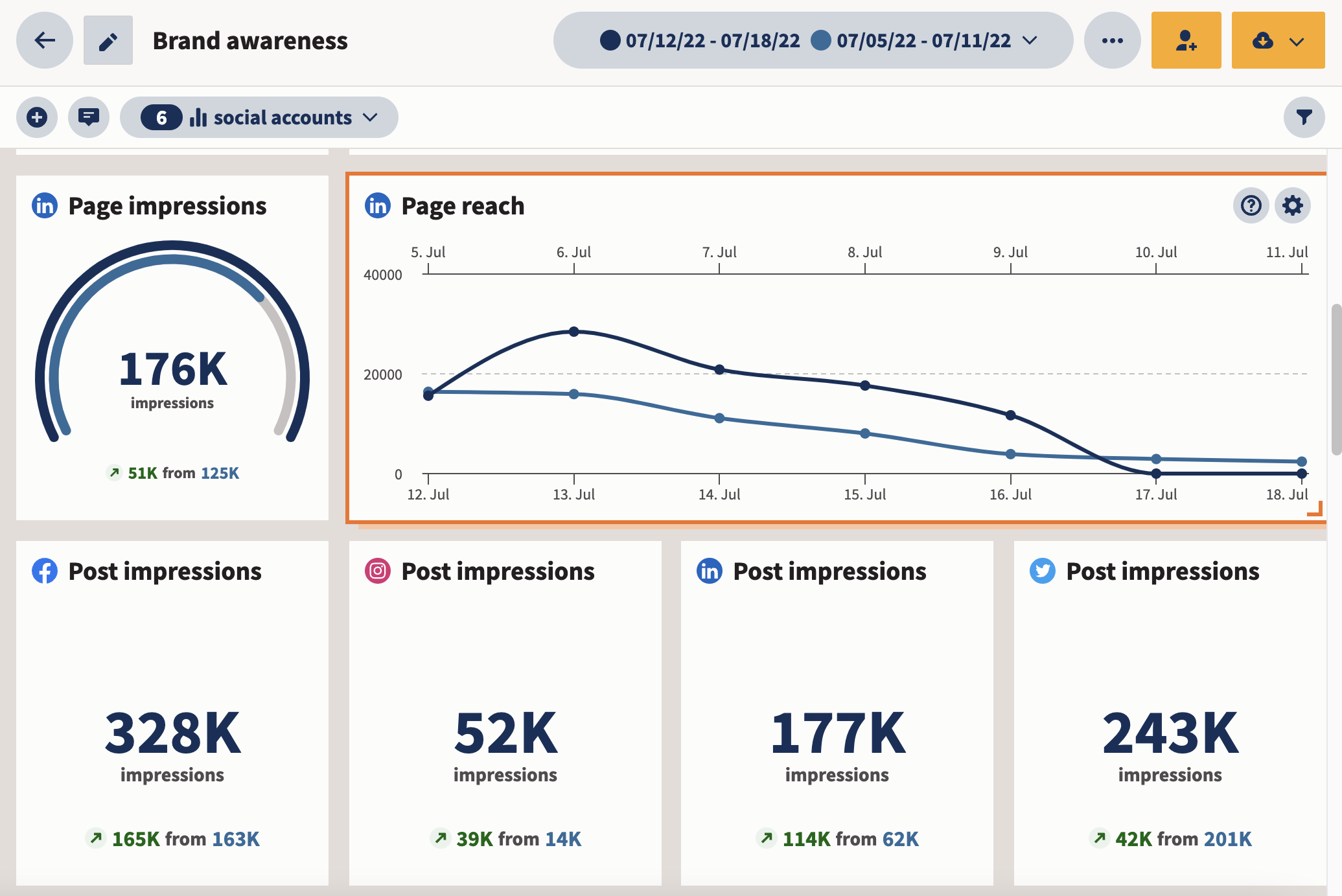
Hootsuite Analytics brand awareness page impressions and reach

Key features:

Social Advertising

Hootsuite Social Advertising allows you to test hundreds of Facebook and Instagram ads and automatically reallocate your budget to the best-performing ones. It ensures you’re targeting the right audiences with the right metrics for maximum ROI.

You can automatically boost your budget or even start a new campaign based on pre-set triggers. This tool will even provide daily automatic ad performance recommendations.

Hootsuite Social Advertising also syncs your CRM or email list to your Facebook ad account, so you always have up-to-date custom audiences.
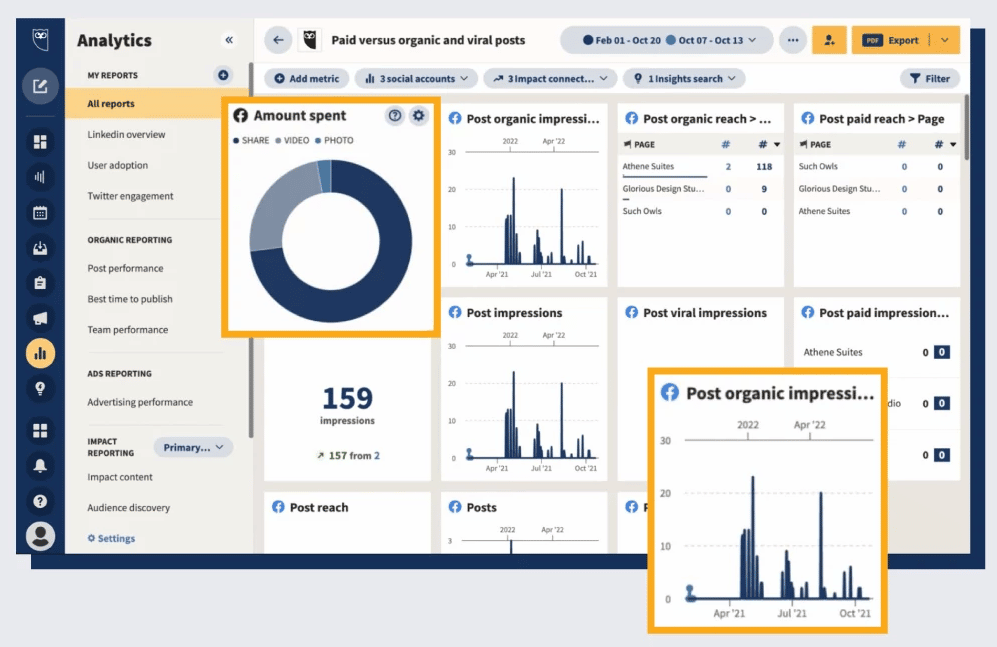
Hootsuite Social Advertising amount spent and post organic impressionsKey features:

  • Campaign management. Create, launch, and manage social ad campaigns from one platform.
  • Targeting options. Reach your ideal audience through advanced targeting capabilities.
  • Budget control. Set and monitor ad budgets to optimize your ROI.

Inbox

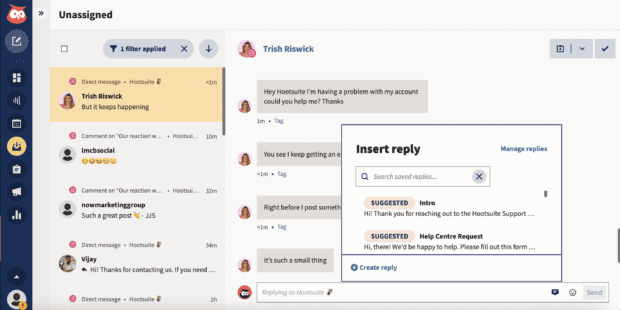
Hootsuite Inbox allows you to manage conversations and mentions across all of your social platforms from one dashboard. You can also use the Saved Replies feature to address common interactions automatically.

Key features:

  • Unified inbox. View and respond to messages from multiple social media platforms in one place.
  • Workflow management. Assign tasks to team members and streamline your response process.
  • Real-time engagement. Enhance customer service by quickly addressing queries and feedback.
  • Customer feedback. Automatically trigger customer satisfaction surveys.
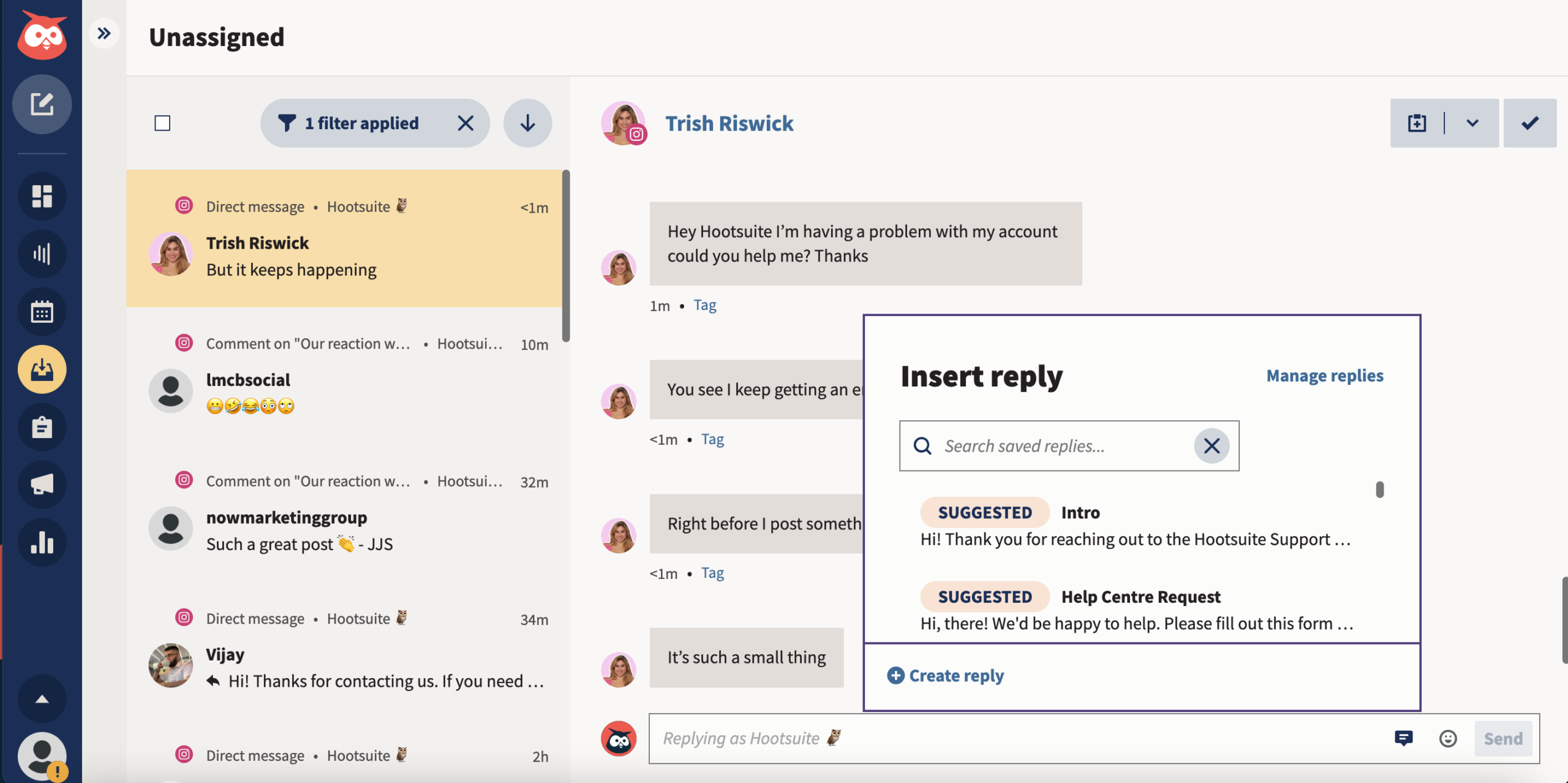
Hootsuite Inbox insert reply

2. Meta Business Suite

If you primarily use Meta platforms, Meta Business Suite provides some great tools to help you automate your social media posts, Stories, ads, and analytics.

Just a note: You can create and schedule posts in the Business Suite, but only for your Meta accounts. If you’re a content creator or marketer on LinkedIn, Pinterest, YouTube, or Twitter, you may want to use third-party social media automation software.

Meta Business Suite is a good tool for smaller teams who are only on Instagram and Facebook. If you’re a larger team with needs like content approval workflows, then you should consider Hootsuite.
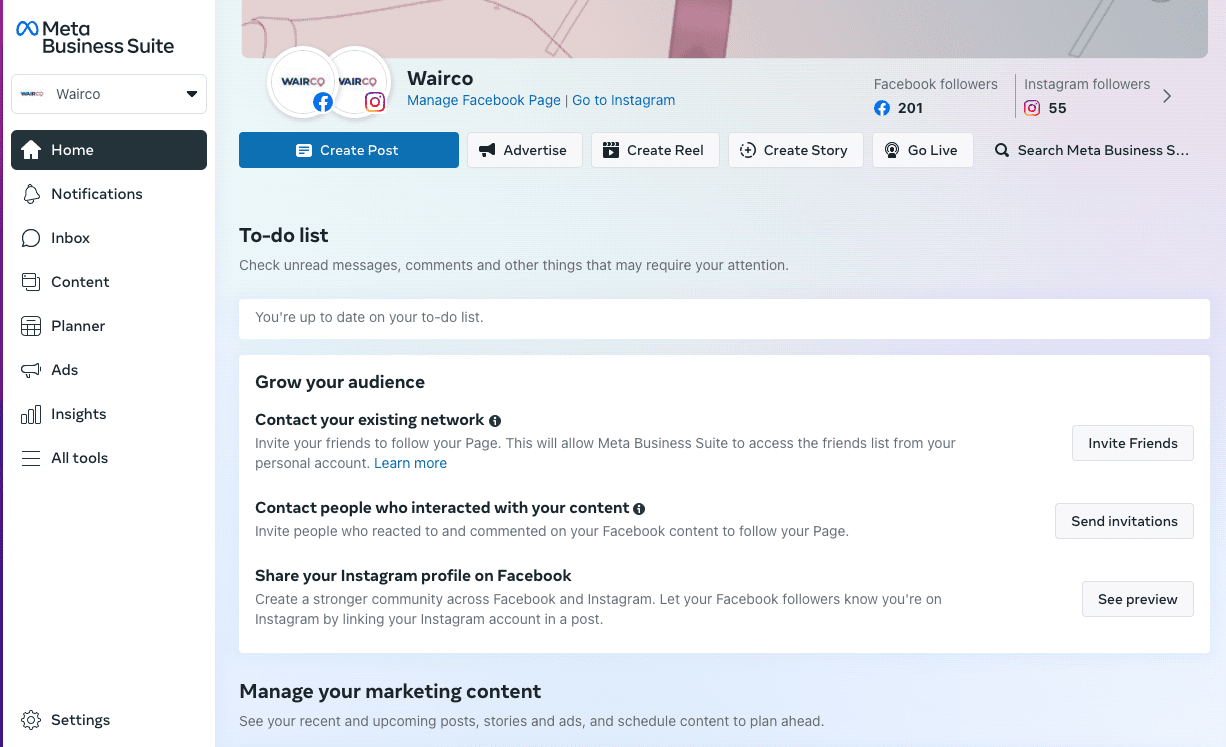
Meta Business Suite Manage Facebook page and Instagram for Wairco brand

Source: Meta Business Suite

Key features

  • Scheduling. Scheduling capabilities for Facebook and Instagram
  • Reporting. Analytics for Facebook and Instagram
  • Media. Free music library

Price: Free

This tool is best for: Smaller teams only on Facebook or Instagram

3. Brandwatch

This tool helps automate social listening by analyzing social conversations in real-time. It provides alerts of spikes in social conversation or sentiment. This automatically informs you of potential crises or viral hits before they happen.

As far as automation tools for social media go, Brandwatch is like your resident watchdog. You set up a few different listening streams, then watch it work for you.

Oh, and best of all, this tool can integrate with Hootsuite.
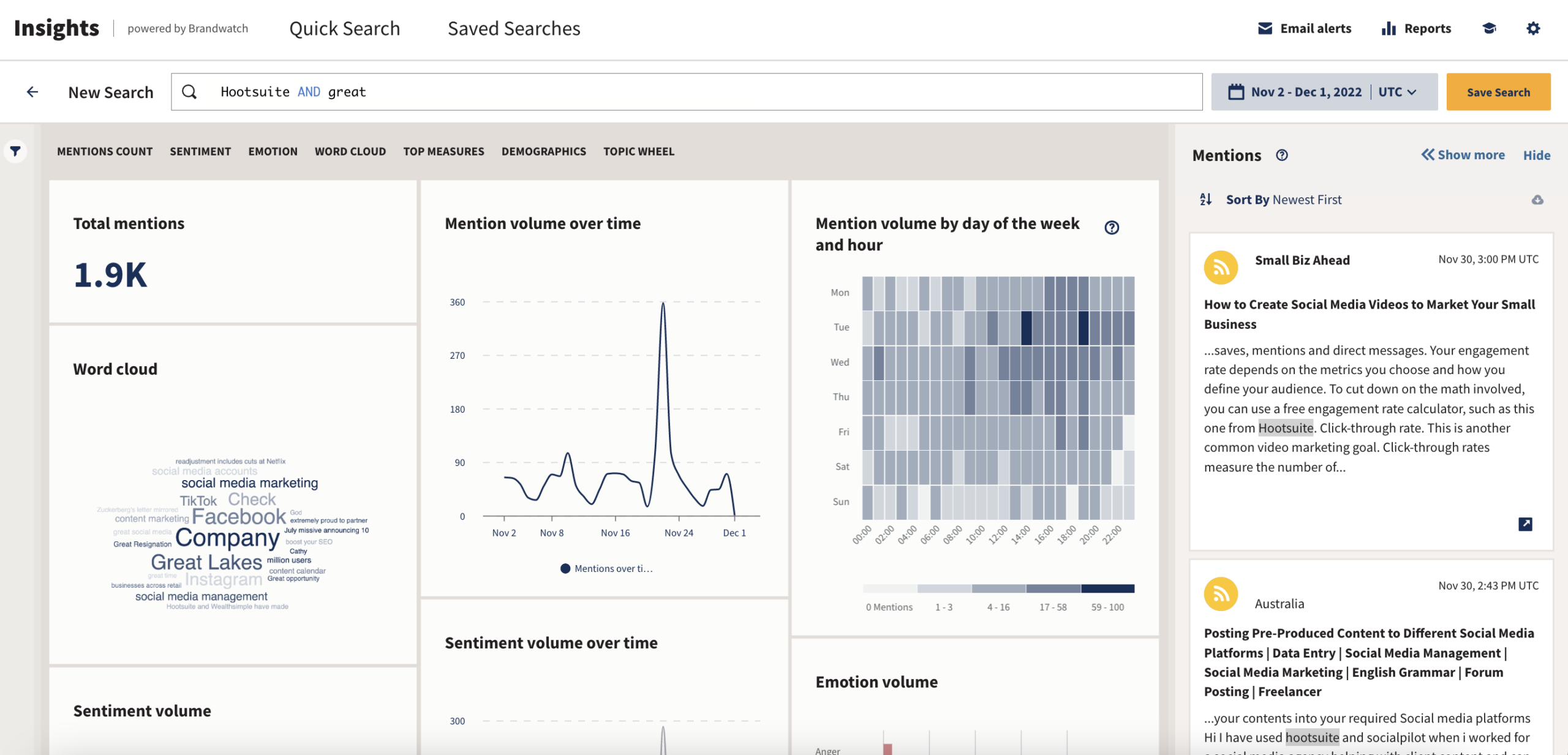
Brandwatch Insights total mentions and mention volume over time

Source: Brandwatch for Hootsuite

Key features:

  • Instant analysis. Real-time analysis of social conversations offers up-to-the-minute insights into what’s happening in your industry or among your audience.
  • Alerts. Receive alerts for spikes in social conversation or shifts in sentiment, allowing you to proactively address potential crises or capitalize on viral trends.
  • Integration with Hootsuite. Seamlessly integrate Brandwatch with Hootsuite, bettering your social media management capabilities.

Price: Brandwatch offers various pricing tiers to suit the needs of different businesses, from small startups to large enterprises.

This tool is best for: Brandwatch is ideal for businesses looking to automate social listening, monitor their online reputation, and stay ahead of trends and potential issues in real time.

4. ChatGPT

Generative AI tools like ChatGPT can help with social automation in more ways than you think. Yes, this powerful tool will write captions for you, but it can also help you brainstorm content calendars, rewrite old content or strategies with a new lens, and kickstart your content ideation.

One small disclaimer: ChatGPT is a tool that needs to be trained. You’ll likely have to spend some time figuring out which prompts will work for your brand. It also doesn’t do much for big social pain points like automatic posting, changing formats, and understanding the algorithm. So, you’ll have to keep a keen eye on the outputs.
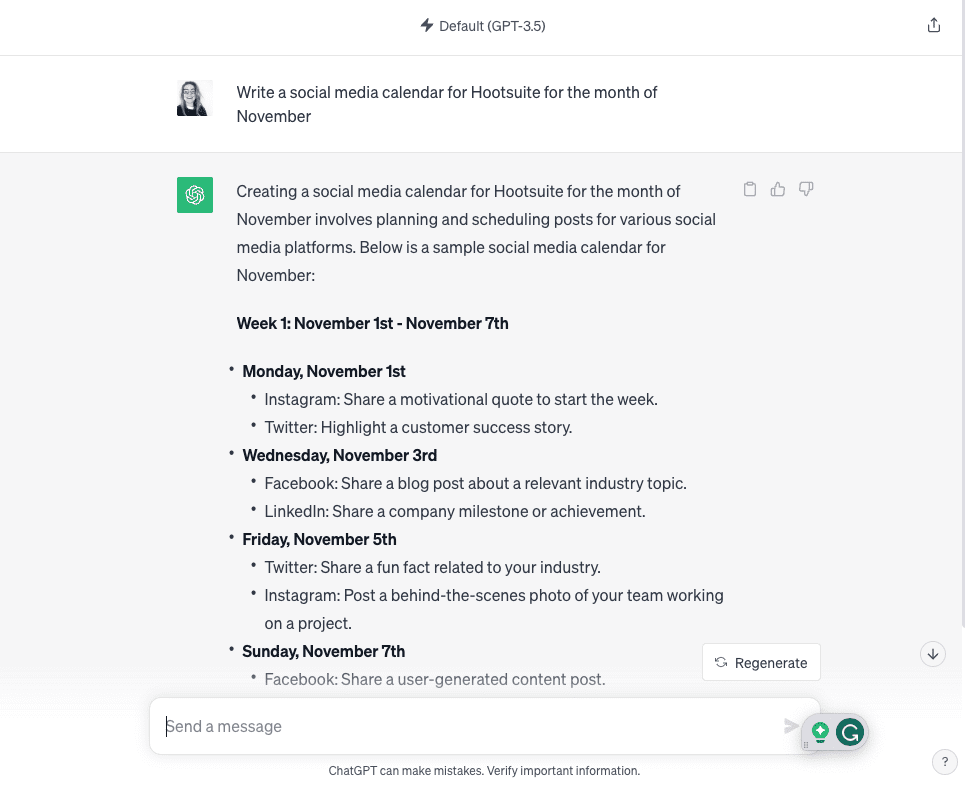
ChatGPT write a social media calendar for Hootsuite for the month of November

Source: ChatGPT

Key features:

  • Personalization. You can use it to tailor your content to your brand’s voice and style, ensuring consistency, but it does take some experimenting with different prompts.
  • Brainstorming. Receive fresh perspectives, new angles, and ideas for your social needs.
  • Instant output. Immediate results can save you time and effort.

Price: Free! Paid accounts start at $20/month.

This tool is best for: Content creators, social media marketers, and teams of all sizes.

Save time managing your social media and get your content seen using Hootsuite. Schedule and publish content, engage your audience, and measure the performance of all your accounts, across multiple networks—all from a single dashboard. Try it free today.

Get Started

With files from Christina Newberry.

Do it better with Hootsuite, the all-in-one social media tool. Stay on top of things, grow, and beat the competition.

Free 30-Day Trial

10 Social Media Customer Service Templates for 2024

Table of Contents

Picture this: You’re in the middle of a social media crisis (oh no!), and you have thousands of messages flooding your inboxes. But wait! All you and your team need to do is grab a social media customer service template and hit Reply All.

Even if you’re not in crisis mode, templated responses or messages can save you tons of time and improve your social media customer service.

This blog has every and any social media customer service template you could ever want. (Hootsuite to the rescue, amiright?) Copy, paste, and save these for a built-in response to anything your audience throws at you. You’re welcome.


Reduce response time (and your workload)

Manage all your messages stress-free with easy routing, saved replies, and friendly chatbots. Try Hootsuite’s Inbox today.

Book a Demo

What are social media customer service templates?

Social media customer service templates are pre-written, standardized responses. They’re designed for use by busy social media marketers and content creators when interacting with customers and followers on social media platforms.

These templates help streamline communication and ensure a consistent and efficient approach to addressing inquiries, comments, reviews, and other forms of engagement on social media.

Why are social response templates so handy?

Social response templates are one of the best time-saving tools, but they have other knock-on benefits, like boosting your social CRM. Here are a few reasons why you’ll love having them readily available.

Save time

Social response templates save valuable time by giving you plug n’ play, ready-to-go responses. They eliminate the need to craft individual responses for common customer inquiries or interactions.

Instead of typing out the same responses repeatedly, marketers can simply grab a template and customize it as needed.

Ensure consistency

Maintaining a consistent brand voice and messaging across all social media interactions is crucial.

Templates help ensure that responses align with your brand’s tone, style, and key messaging, making building a strong and recognizable online presence easier.

Plus, if you’re getting trolled online, it can be easy to lose your cool. Templated responses ensure emotional consistency, too.

Enhance efficiency

Templates make managing a high volume of customer inquiries and comments easier. They allow marketers to respond quickly and efficiently, especially during peak engagement times.

Want to increase your efficiency even more? Pair your templated responses with a platform that has a social inbox. A social inbox allows you to respond to messages from all of your social media platforms in one place (cough, like Hootsuite, cough).

Psst: Interested in more customer service SaaS? Check out the 6 best customer service tools for 2024.

Keep your information accurate

Any good template should be reviewed and approved before being implemented. This process guarantees that your team is supplying accurate, up-to-date information and responses. This reduces the risk of providing incorrect or outdated information to customers.

Manage customer expectations

Templates can be tailored to set clear expectations, such as response times or next steps. This helps answer questions before they’re asked and fosters a positive customer experience.

Best practices for using templated responses

Before we give you the goods (AKA our social media response examples), we first need to let you in on how to make the most of your templates.

Keep the following best practices in mind when you operate:

Customization

While templates save time, you will want to customize the responses to each situation. Personalizing your templated response to address an individual’s needs will help you establish a connection with them. This helps your audience to feel seen and heard.

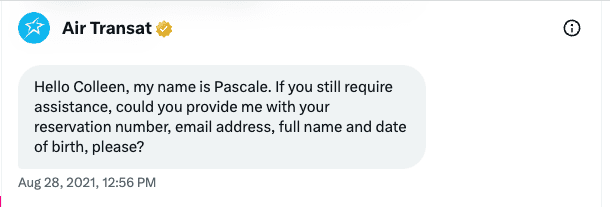
In the social media customer service example below, you can see the representative used the customer’s first name and offered their own name.

Air Transat personalized customer service message example with name

Use a social media management tool

Tools like Hootsuite Inbox are key when it comes to managing templated responses. You’ll have all of your messages from all of your different platforms in one place, making it so you can:

  • Filter messages to the right department for a response with automated message routing.
  • Input your templated responses as auto-responses and saved replies.
  • Track the history of communication between an individual and all of your brand’s social media accounts (so you’ll know which messages have already been sent and exactly how to personalize responses).
  • Add notes to your customers’ profiles (so any member of your team knows what they need to know about your customer when personalizing templated responses).
  • Handle messages team-wide with features like task assignments, statuses, and filters.
  • Track CSAT metrics across all communication channels.
Hootsuite Inbox insert reply

Training

Train your social media community management team on when and how to use templates effectively. Ensure they understand the importance of personalization while using templates as a starting point.

Stay updated

It’s a good idea to assign either a time in your monthly schedule to evaluate your templates or have everyone on your team look for outdated templates.

Social media trends, customer expectations, and your products or services may change—your templates should change with them.

A/B testing

The templated responses below are a good start, but you’ll still want to A/B test them. A/B testing will show you which kind of message works best for your audience. Adjust and refine your templates based on the feedback and engagement they generate.

Continuous improvement

Collect and analyze customer and team feedback to understand if your templates are serving your social media metrics. Adapting to your customer’s needs and changing social media dynamics will help you meet your goals.

10 social media response examples for any situation

Here are ten social media customer service examples and templates to use at your leisure.

Responding to negative reviews or comments

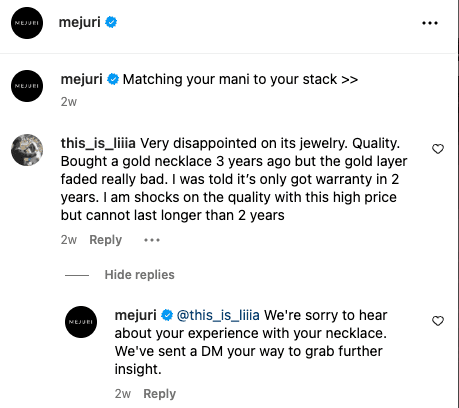
Mejuri Instagram comment reply to negative review

Source: Mejuri on Instagram

Template 1: Apologetic and proactive

“We’re sorry to hear about your experience. We take your feedback seriously and are working to address this issue. Please DM us with more details so we can make it right.”

Template 2: Empathetic and resolution-focused

“Thank you for sharing your concerns. We’re disappointed to hear about your experience, and we’d like to make it up to you. Please message us with more information, and we’ll do our best to resolve this for you.”

Template 3: Gratitude and assurance

“We appreciate your feedback, even if it’s not all positive. We’re committed to improving and would love to hear more about your concerns. Please reach out to us privately so we can address them.”

Customer praise

Template 1: Grateful and friendly

“Your kind words made our day! We’re delighted to hear that you had a great experience with us. Thanks for being an amazing part of our community!”

Template 2: Personalized and appreciative

“We’re thrilled to read your positive feedback, [Customer Name]! We’re so glad we could meet your expectations. We look forward to serving you again soon.”

Template 3: Sharing the love

“Big shoutout to [Customer Name] for the fantastic review! Your support means the world to us, and we can’t wait to continue exceeding your expectations.”

Handling a crisis on social media

Template 1: Transparent and informative

“We’re currently experiencing technical issues, and we’re sorry for any inconvenience this may be causing. Our team is working tirelessly to resolve the problem. We appreciate your patience.”

Template 2: Apologetic and responsive

“We sincerely apologize for the recent issue. We’re actively investigating the matter and will keep you updated on our progress. Thank you to everyone who brought this to our attention.”

Template 3: Assurance and support

“We understand your frustration, and we’re committed to finding a solution. If you have any questions or need assistance, please don’t hesitate to reach out to our support team. We’re here for you.”

Responding to customer inquiries

Template 1: Prompt and helpful

“Hi [Customer Name], we’re here to assist you! Please DM us with your order number and any questions you have, and we’ll get back to you ASAP.”

Template 2: Friendly and personalized

“Hey [Customer Name], thanks for reaching out about [specific issue]. We’d be happy to help with the [Questions or Concern]. Just send us a message, and we’ll assist you right away.”

Template 3: Informative and resourceful

“Hello there! You’ve got questions, and we’ve got answers. Check out our FAQ section [link] for quick info, or DM us, and we’ll provide all the help you need.”

Responding to positive comments

Template 1: Grateful and positive

“Wow, thanks for the love, [Customer Name]! We’re thrilled to hear you’re enjoying our [product/service]. Your support made our day!”

Template 2: Reciprocal and appreciative

“Your kind words warm our hearts, [Customer Name]. We’re grateful to have such amazing customers like you. Your satisfaction is our top priority!”

Template 3: Celebratory and interactive

“High-five, [Customer Name]! Your positive vibes are infectious. Let’s keep the good times rolling. What’s your favorite thing about [product/service]?”

Engaging with user-generated content

Template 1: Uplifting and encouraging

“We’re loving this amazing photo you shared, [Name]. Your creativity is inspiring! Keep tagging us in your posts. Who else wants to join in?”

Template 2: Appreciative and supportive

“Thank you for showcasing our [product/service] in such a fantastic way, [Name]. We’re honored to have you as a part of our community!”

Template 3: Encouraging participation

“They say a picture’s worth a thousand words, and your content speaks volumes, [Name]! We want to see more. Share your photos with our products and use [Branded Hashtag] for a chance to be featured on our page!”

Responding to a complaint when the solution isn’t instant

Template 1: Acknowledgment and assurance

“We’re sorry for the inconvenience you’ve experienced. We understand your concern, and our team is actively working on finding the right solution for you. Your satisfaction is important to us, and we appreciate your patience. We’ll keep you updated as we work to resolve this.”

Template 2: Empathy and next steps

“We understand the frustration this situation must be causing you. While we can’t provide an immediate solution, rest assured that we’re dedicated to resolving this issue. In the meantime, please feel free to reach out if you have any questions or need updates on our progress. We value your understanding.”

When refunds are late

Template 1: Apology and explanation

“We apologize for the delay in your refund. [Reason here: This could be a high volume of requests or necessary wait times]. We understand your concern and are working diligently to process your refund as soon as possible. Thank you for your patience.”

Template 2: Assurance and resolution

“Your refund is important to us, and we’re sorry for the delay. Our finance team is actively working on processing it. We’ll make sure to expedite the process, and you should receive your refund shortly. Thank you for your understanding, and please don’t hesitate to contact us if you have any further questions.”

Celebrating milestones

Template 1: Excited and grateful

“We’re over the moon to reach [milestone] with you! Thank you all for your incredible support. Here’s to many more [milestones] together!”

Template 2: Reflective and thankful

“As we hit [milestone] with you, we can’t help but look back on our journey. It wouldn’t be possible without wonderful people like you. Thank you for being a part of this incredible ride.”

Template 3: Humble and motivated

“We’re humbled to reach [milestone] with you, and it only fuels our determination to keep doing what we’re doing. Thank you for being here!”

Responding to hateful or trolling comments

Template 1: Calm and respectful

“We value constructive feedback, but let’s keep the conversation respectful. Feel free to share your concerns without the insults.”

Template 2: Deflection and positivity

“It’s unfortunate to see negativity, but we choose to focus on the positive energy here. Thanks to everyone who supports us and spreads good vibes.”

Template 3: Reporting and moderation

“We’re committed to maintaining a safe and welcoming community. Please report any inappropriate comments or messages, and we’ll take action accordingly.”

Save time managing your social media and get your content seen using Hootsuite. Schedule and publish content, engage your audience, and measure the performance of all your accounts, across networks—all from a single dashboard. Try it free today.

Save time on social messaging with automated responses, smarter workflows, and friendly chatbots — all in the Hootsuite Inbox.

Free Demo

WhatsApp Emoji: How To Use Them and What They Mean

Table of Contents

Have you ever misunderstood a WhatsApp emoji meaning?

Much like going in for a hug when a handshake was intended, emoji faux pas can be embarrassing. Maybe your friend came to you with news of a recent breakup, and you reacted with the tears-of-joy 😂 emoji when you really meant to use the sobbing 😭 emoji. Awkward.

And when it comes to miscalculating WhatsApp emoji meanings, the stakes only get higher for business owners or social marketers. If, for example, you use the eggplant 🍆 emoji in the wrong place, you could offend your audience or even lose out on business.

To be absolutely sure you’re not miscommunicating, you need to be on the up-and-up with emoji meanings on WhatsApp. Find everything you need to know about emojis and WhatsApp below.

Bonus: Here’s everything you need to know about Instagram emojis and secret TikTok emojis.

Bonus: Download a free guide to discover which hashtags to use to boost traffic and target customers on social media. And then learn how you can use Hootsuite to measure results.

WhatsApp emoji translator

Quick tip: Puzzled by WhatsApp emoji meanings but in a hurry? Use Hootsuite’s free emoji translator. It breaks down each emoji’s meaning and how people typically react to it. It’s an emoji cheat sheet you’ll want to keep in your back pocket!

What are WhatsApp emoji and where can you use them?

Emojis are small pictorial symbols that convey emotions, expressions, and reactions in text messages, social media messages, and more.

WhatsApp emojis, in particular, are specific to the app. While they serve the same purpose, they look slightly different than those you see on other apps, like Instagram and TikTok.

But why do WhatsApp emoji matter to business owners and marketers? If you have a more casual tone of voice, want to be relatable, or are trying to reach a younger demographic, you’ll want to incorporate emojis into your WhatsApp marketing plan.

To use WhatsApp emojis, head into a conversation and tap the smiley face icon. You’ll see the whole selection of WhatsApp emojis here; tap one to select it. To switch back to your keyboard, tap the keyboard icon.

You can use WhatsApp emojis in your day-to-day business comms. Do you have a WhatsApp business account? If not, find out why you should get one and how to sign up.

WhatsApp emojis can add depth and nuance to your business communication, helping you convey emotions, reactions, and sentiments more effectively. They are especially valuable when you want to maintain a friendly and approachable tone while engaging with colleagues, clients, or customers on the platform.

You can use them when providing customer support, troubleshooting, or in your team-to-team communication on the app. You can do so in one of two ways:

  1. As an addition to your text, or
  2. As a reaction to a message

WhatsApp emoji reactions add an emoji to a message, using it to communicate a sentiment.

How do you use WhatsApp emoji reactions?

When someone sends you a message, you can respond with an emoji directly on their message. Here’s the step-by-step:

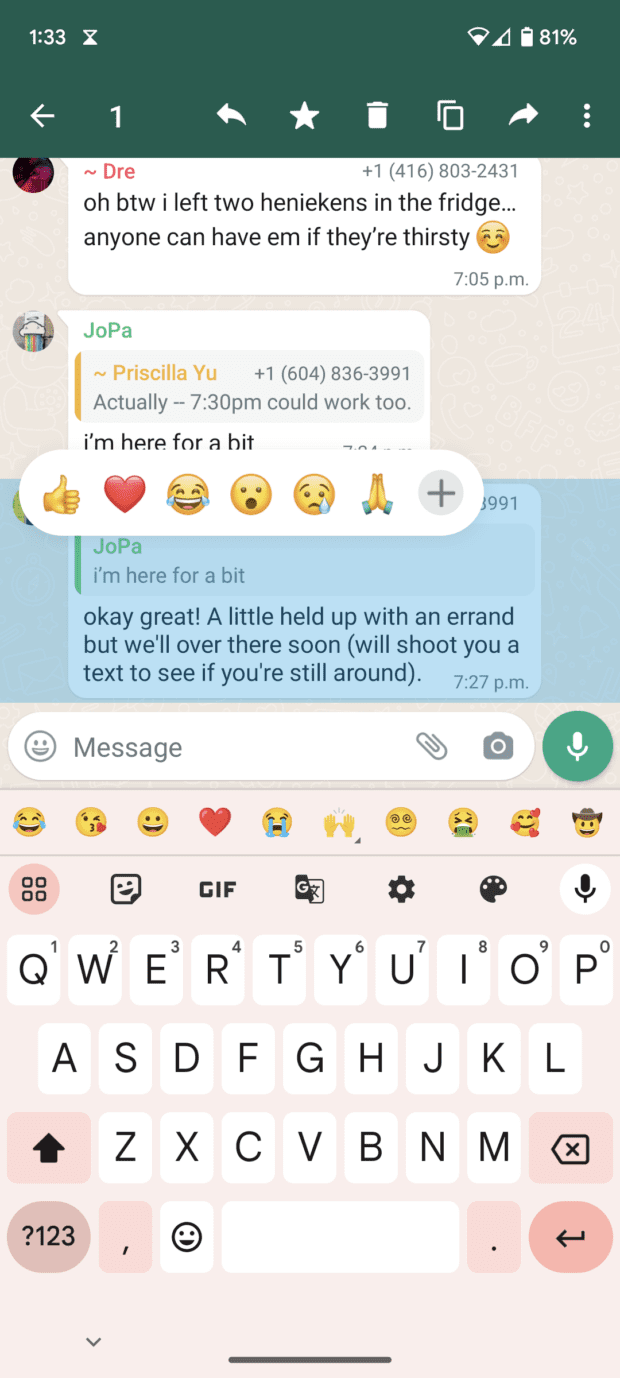
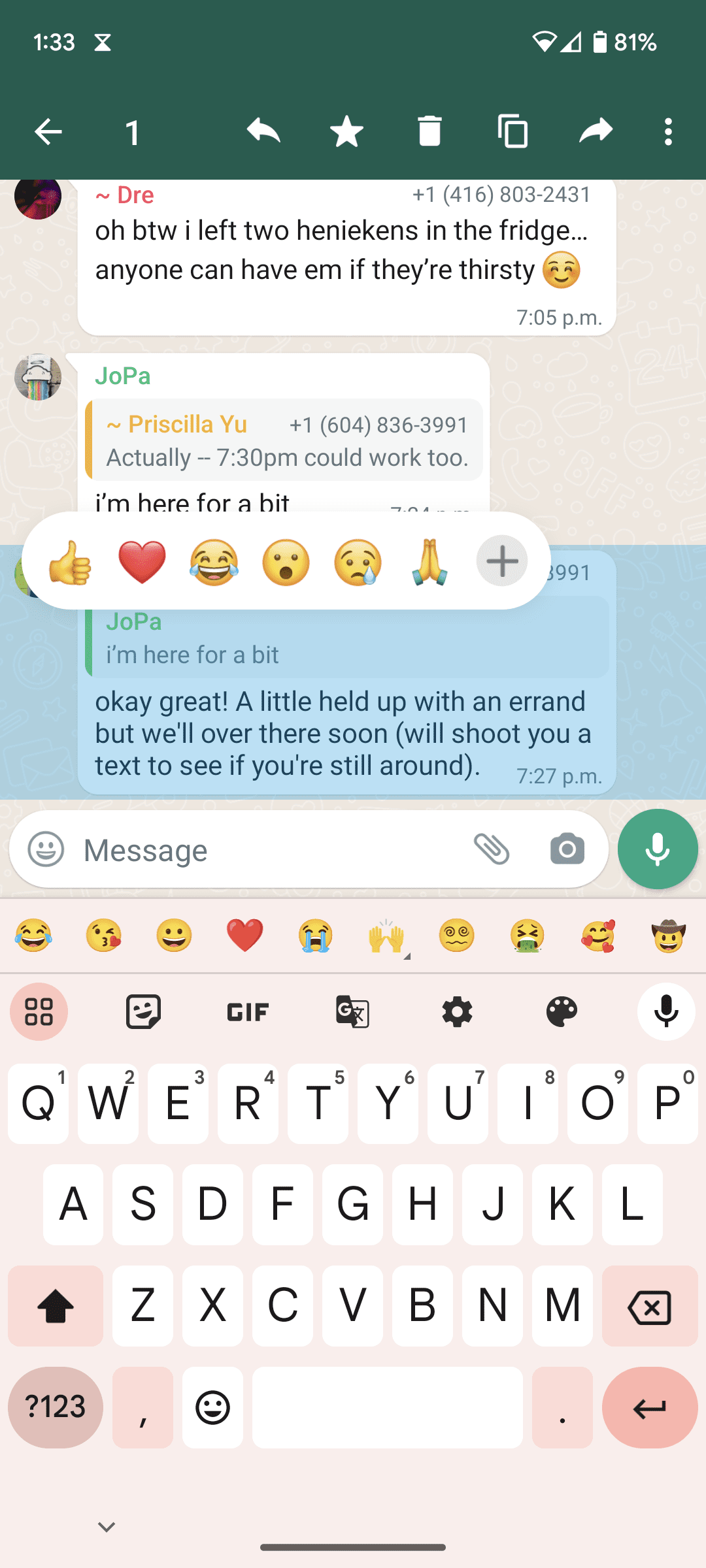
Step 1. Press and hold the text box you want to respond to.

A few popular emoji reactions will pop up.

popular emoji reactions in WhatsApp message

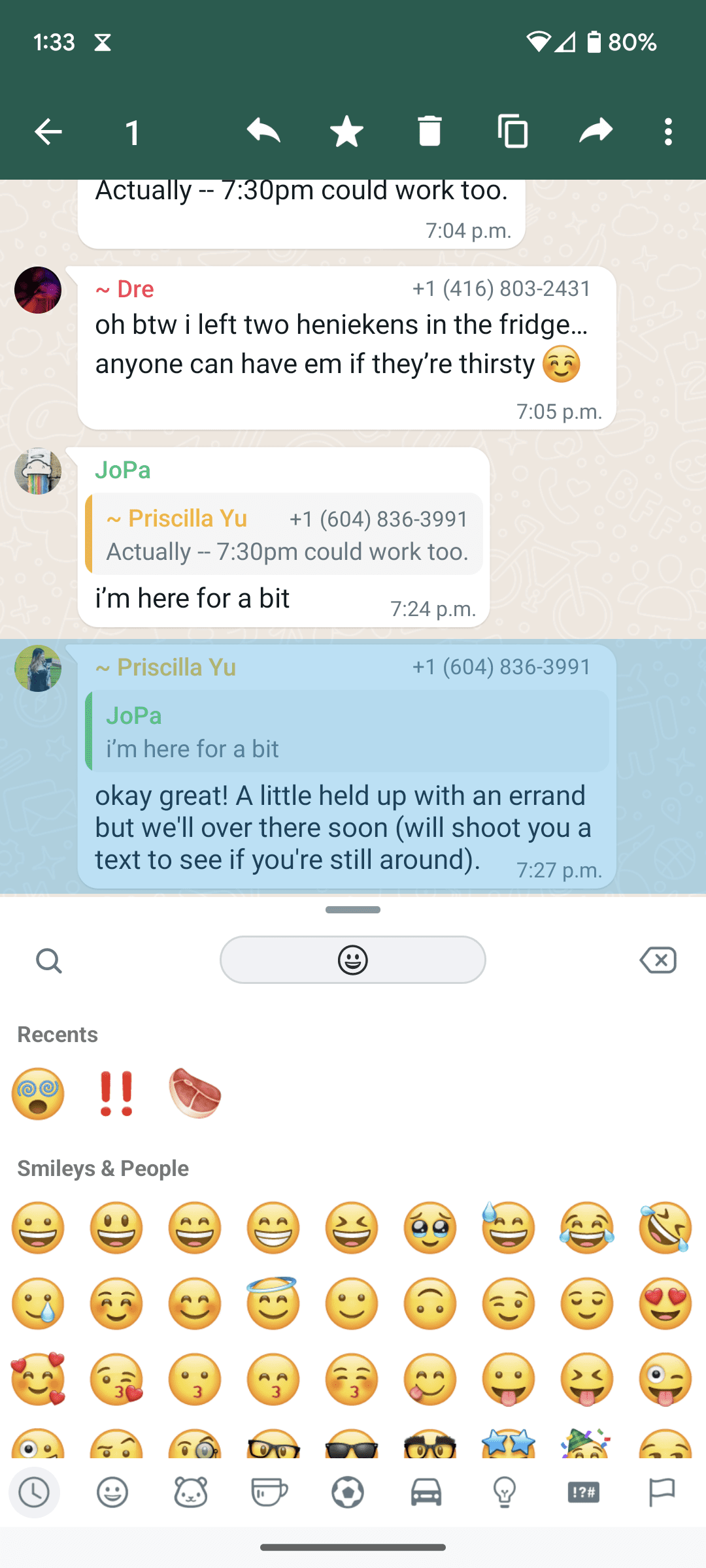
Step 2. Choose one of the suggested emojis.

Or you can click the plus icon for the library of WhatsApp emojis.

recent emoji examples with smiley faces and people

Step 3. Click the emoji you want to use.

Of course, each emoji has its own meaning. We’ll dive into the meaning of WhatsApp emojis below.

Step 4. If you’re happy with your selection, you’re done!

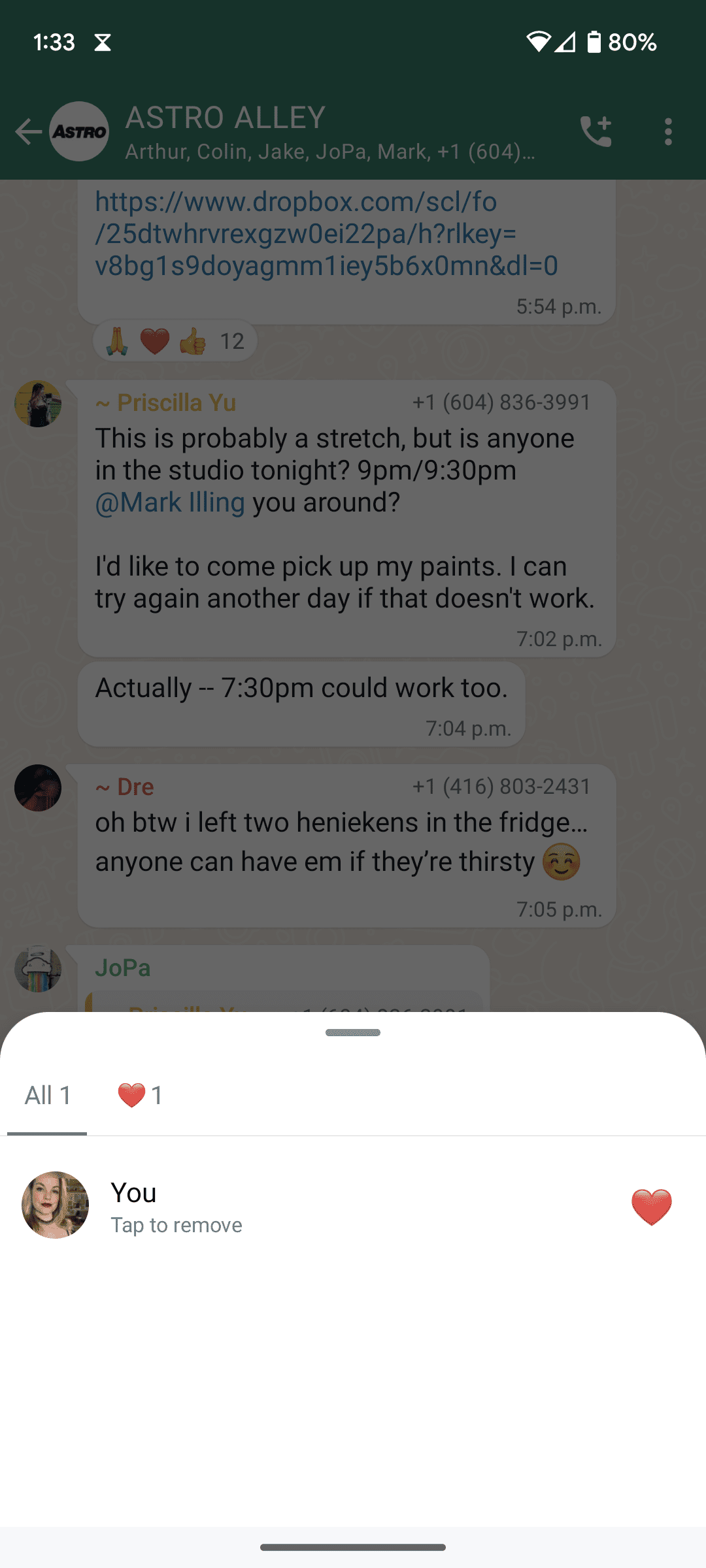
If you want to change your emoji, press and hold it to bring up a new box.

Step 5. Click “Tap to remove” to delete your selection.

message reaction screen and option to remove emoji

This screen will also show you who has reacted to the message with which emoji.

Step 6. Repeat steps 1-3 above to choose a new emoji.

Some things to note: You can only react with one emoji per message, but you can change that emoji as many times as you like. Reactions to deleted or disappearing messages will be removed along with the message.

Bonus: Take a look at the Discord and Snapchat-specific emoji meanings.

Popular WhatsApp emoji and what they mean

Curious what the 🥰 means in WhatsApp? Or what the combination 🥺 👉 👈 means? We’re here to help. Here are some of the most popular emojis on WhatsApp and the context they come with.

Psst: Find a full list of emoji meanings here.

List of individual WhatsApp symbols and their meanings

Emoji WhatsApp emoji meaning
✨ Sparkles The sparkle emoji, occasionally called the stars emoji, is used as a form of ✨emphasis✨. It’s equally used to denote positive emphases, like love, excitement, or newness, as it is to denote a sarcastic or mocking tone.

For example, one could say, “My boss gave me more work for the same amount of money ✨blessed✨”

🥰 Smiling face with hearts The smiling face with hearts emoji expresses a burst of affection. Use this emoji when you want to show gratitude and love.
🥺 Pleading The pleading emoji essentially denotes the puppy-dog eyes of light-hearted begging or wanting something very badly.
If you aren’t wearing your glasses, the holding-back-tears emoji looks a lot like the pleading emoji. These emojis can be used to express similar sentiments.

But holding-back-tears emoji can express a range of emotions, including a pained smile or someone putting on a brave face while they’re upset. It can also express the feeling of experiencing something overwhelmingly cute or joyful.

❤️ Red heart The red heart emoji is the universal signal for love, thanks, and gratitude. Despite its amorous appearance, this emoji can be either platonic or romantic. Corporations often use it in more informal settings, like social media captions.
🔥 Fire The fire or flame emoji is used to denote when something is “on fire” or lit. Colloquially, this expresses agreement, celebration or excitement.
🤌 Finger purse The finger purse or pinched fingers emoji is used to express the Italian hand gesture of the same kind and was (in part) created by Adriano Farano, an Italian media entrepreneur. In Italy, it expresses disagreement, frustration, or disbelief and often means “What do you want?” or “What are you saying?”

But here’s where it gets interesting. Emojis can be used anywhere in the world, and so the 🤌 meaning changes depending on which localized setting you’re using it in. This little guy means something different in Israel, India, Nigeria, and beyond.

☺️ The WhatsApp smiley meaning is simply to express positive acknowledgment. This emoji’s meaning is fairly broad, you can’t go wrong using it in most settings, so long as they’re positive or neutral.

List of WhatsApp emojis in combinations and their meanings

Emoji combination WhatsApp emoji meaning
🥺 👉 👈 Shy. This emoji combination should be used when you’re feeling a little bashful. It can be sent with an emotionally risky text.
🏃‍♀️💨 Gotta go or on my way! This emoji combination basically means you’re going somewhere fast.
🤔🤚 This combination means “hold up” or “wait a minute.” You can use it when you’ve been sent a confusing, shocking or strange message.
😎🤏😳🕶🤏 What did I just see? Use this combination when you’ve been sent something shocking, disturbing, or surprising.
☝️🤓 On it! When you’re asked to do something, especially something that requires mental work, use this combination to say you’ve got it.
👁👄👁 It is what it is. This emoji combination is used to show a blank stare or the common thought-terminating cliché, it is what it is.
🍆 💦 👄 or 🍑 👅💦 These emoji combos are NSFW. So, if you’re running a business, it’s best to avoid these.

Build a more effective WhatsApp presence with Hootsuite. Respond to questions and complaints, create tickets from social conversations, and work with chatbots all from one dashboard. Get a free demo to see how it works today.

Do it better with Hootsuite, the all-in-one social media tool. Stay on top of things, grow, and beat the competition.
Free 30-Day Trial

10 Best LinkedIn Marketing Tools for Faster Growth

Table of Contents

While many social networks saw business use decline in 2023, LinkedIn saw 5% business use growth. (Second only to the 16% business use growth of TikTok.)

Hootsuite’s Social Trends Report finds that change in usage is driven by a renewed focus on ROI. LinkedIn is the platform of choice for many businesses looking to make deals and recruit top talent. Especially those focused on B2B sales.

LinkedIn marketing tools make it easier to build an effective brand presence on the platform. They also help you understand the results of your efforts. That’s important for tracing everything back to that critical ROI.

Let’s take a look at how to incorporate LinkedIn marketing tools into your social strategy.


#1 Social Media Tool

Create. Schedule. Publish. Engage. Measure. Win.

Free 30-Day Trial

What’s the purpose of LinkedIn marketing tools?

Before we dive into our list, let’s talk about why you might want to use LinkedIn marketing tools in the first place.

Scheduling content

Scheduling content on LinkedIn allows you to focus your energy on creating quality posts, articles, and job listings. This is a better use of your skills than the manual labor of creating posts on the fly.

Creating your content in batches allows you to:

  • Star focused on the themes central to your marketing strategy and goals,
  • streamline campaigns, and
  • get feedback on post drafts from team members and stakeholders.

When you choose a LinkedIn scheduling tool that also allows you to schedule content for other platforms, the benefits increase exponentially.

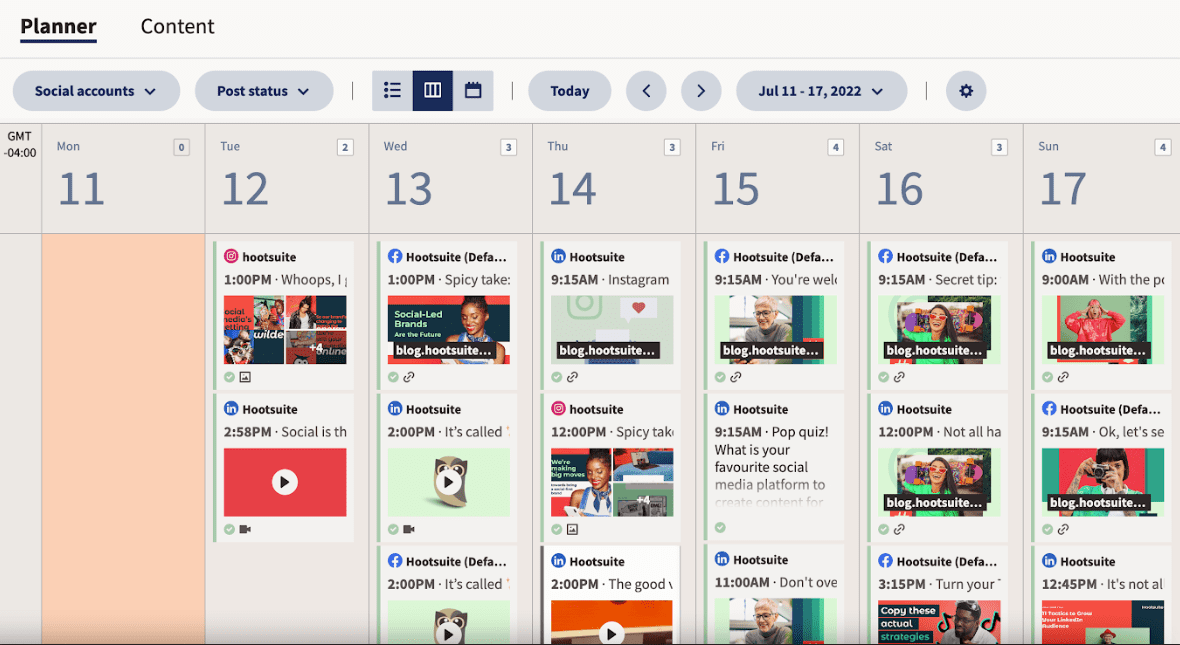
Hootsuite Planner calendar scheduled social posts

With a unified view, you can develop synergies throughout your content plan. This saves time switching between tabs. It also lets you check that you’re spacing your content appropriately for connections who follow you in more than one place.

Automated messaging

This is an area where you have to be careful, as most automated messaging tools are prohibited on LinkedIn. That’s because LinkedIn wants to encourage real connections between real people and companies. If you use blackhat strategies to game the system, you risk having your account restricted or even shut down. (Just don’t use them at all — that’s our strong recommendation.)

However, there are some legit tools you can use to automate messaging tasks on LinkedIn, completely risk-free. These are primarily tools that help you and your team manage, respond to, and streamline incoming messages. For example, tools that route incoming messages to the most appropriate person on your team, or that allow you to save templated responses to common inquiries.

To get into the finer details, check out our post on LinkedIn automation tools.

Performance insights

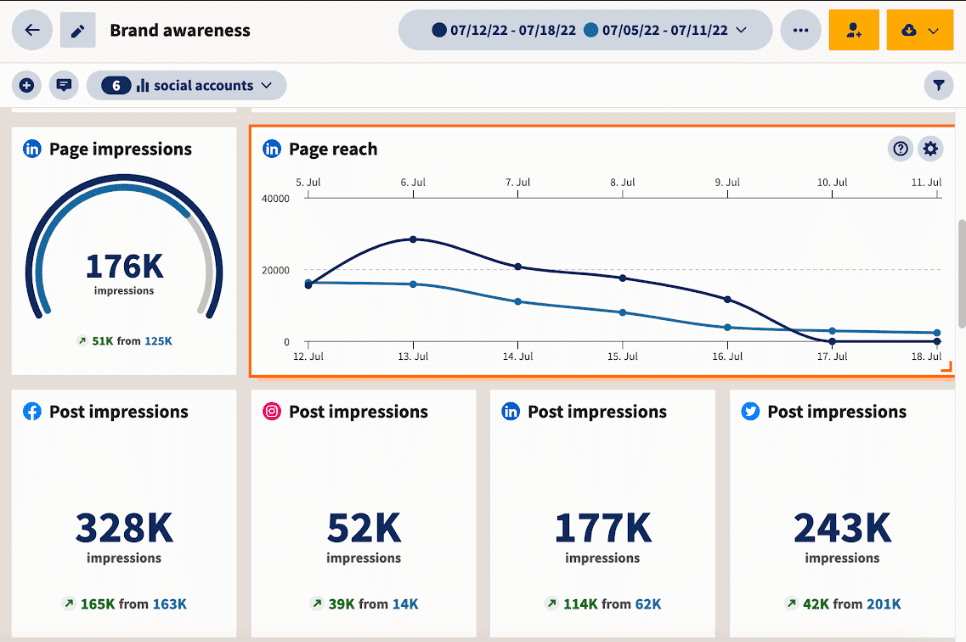
Measuring your performance on LinkedIn is critical to making that performance better. Improving your LinkedIn strategy involves studying both your best and your worst content. Learning from past performance shows what you should do more of, and which strategies you should leave behind.

LinkedIn brand awareness page impressions and reach

Start free 30-day trial

Again, it’s helpful to analyze your results in the full context of your overall social strategy. Sure, LinkedIn will likely always be your prime social platform for recruiting — but it is also a valuable social marketing platform. Understanding how LinkedIn results compare to those on other platforms helps you understand how best to allocate your limited social marketing resources.

Generating more leads

As any good salesperson knows, you always need more leads to fill your funnel. And LinkedIn is the top platform for B2B marketers worldwide. So any tools that can connect you with more leads on LinkedIn and help your social selling efforts are worth your attention.

LinkedIn lead generation tools help ramp up your marketing efforts by ensuring you reach the right people (e.g. decision makers who can purchase your product or service) at the right time. This is the best way to maximize ROI over the long run.

Audience and competitor research

The best LinkedIn marketing tools help you improve your content marketing strategy. Detailed audience and competitor research are key here.

Odds are, your content is not going to go viral on LinkedIn. The LinkedIn algorithm is actually designed to stop content from going viral. That’s because LinkedIn is focused on connecting users with professional advice and expertise that is specifically relevant to them.

Put another way, the LinkedIn algorithm is designed to show people the content they are most likely to engage with. This differs from passive content consumption. That means early engagement signals are even more important on LinkedIn than on other social platforms.

The catch is that LinkedIn mainly values thoughtful comments from relevant people. These are worth far more than likes, shares, or ultra-brief comments. Audience and competitor research is the best way to understand what your target audience wants, and to learn what’s working best for others in your niche.

All of this can help to extend reach and engagement, which then reinforce each other in a virtuous circle.

10 best LinkedIn marketing tools for 2024

1. Hootsuite

We’re listing Hootsuite as a single LinkedIn marketing tool here. But in reality it’s a suite of social media management tools that help to enhance your entire LinkedIn marketing strategy. It can help with all the elements listed above — and a few more.

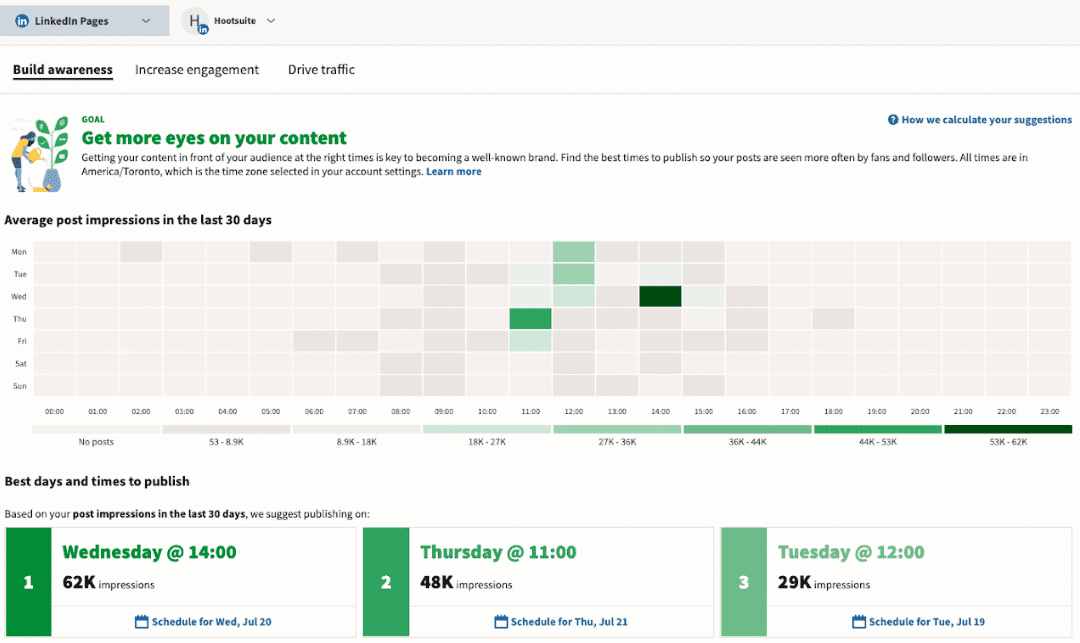
Hootsuite may be best known for its scheduling capabilities. And those are certainly helpful for saving time when sharing content on LinkedIn – either in isolation or as part of a larger social campaign. But perhaps the most useful feature of the Hootsuite scheduler for LinkedIn is its built-in recommendations for the best times to post based on your content goals.

Hootsuite graph best times and days to publish on LinkedIn

Start free 30-day trial

In terms of messaging, Hootsuite Inbox helps you stay on top of both public and private LinkedIn messages by corralling everything in one social inbox. You can use automated filtering to assign messages to the right team members. This shows both followers and the algorithm that you’re active and engaged.


Reduce response time (and your workload)

Manage all your messages stress-free with easy routing, saved replies, and friendly chatbots. Try Hootsuite’s Inbox today.

Book a Demo

Audience and competitor research is another area where Hootsuite really shines. Using Hootsuite Analytics, you can build an audience profile with interests and behaviors from across your social profiles. Then use the built-in benchmarking tools to gain insights about your industry as a whole, or even specific competitors.

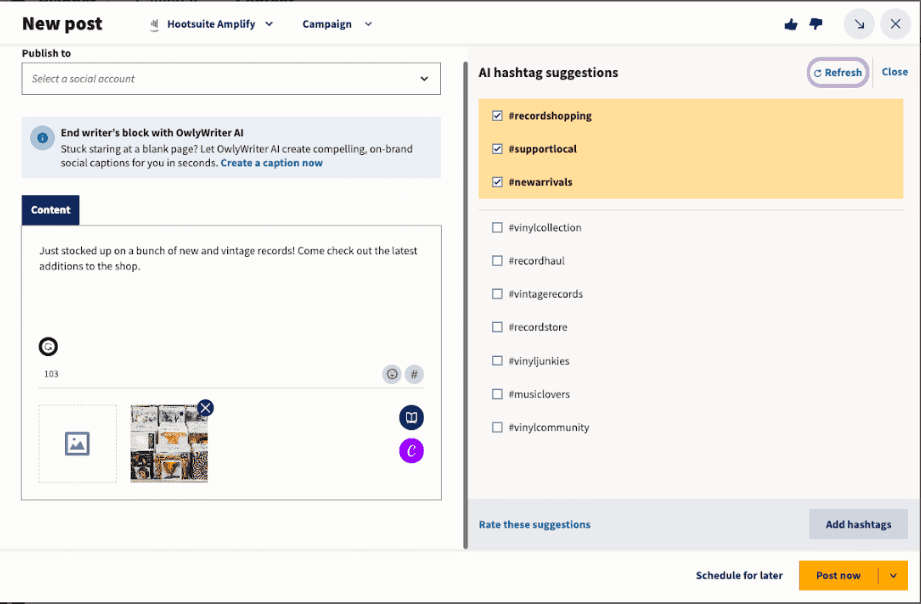
Map your findings back to your own specialist areas of knowledge to create LinkedIn marketing content and develop a brand voice that speaks directly to your most valuable followers. When organic content performs well, boost your best posts with just a couple of clicks. Take it all a step further by using Hootsuite’s built-in AI hashtag generator to find the growth-oriented hashtags that are most likely to maximize your LInkedIn audience.

new post on Hootsuite AI hashtag suggestions OwlyWriter

Or, use OwlyWriter AI to generate automatic captions when you share curated content on LinkedIn. Show both humans and robots that you are adding value and perspective to everything you post.

Finally, track your results and refine your strategy in real time with custom reports that come automatically to your inbox, or create easy-to-read reporting presentations for multiple stakeholder groups with a few clicks.

Pro tip: LinkedIn is one of the best social media platforms on which to make use of an employee advocacy strategy. Hootsuite Amplify has you covered there.

2. Native LinkedIn marketing tools

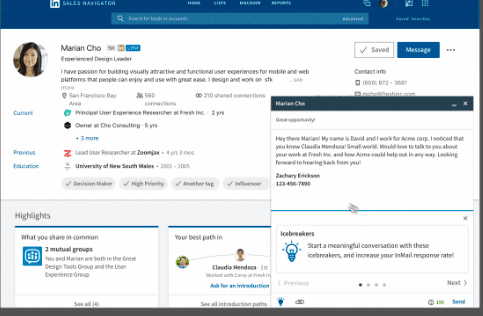
LinkedIn Sales Navigator home page with profile and highlights

Source: LinkedIn

Several paid and free LinkedIn marketing tools are built right into the social network itself. Some of the most important native LinkedIn tools for marketing are:

  • LinkedIn’s native scheduler: Post up to 90 days in advance using your laptop or Android device. For full details, check out our blog on how to schedule posts on LinkedIn.
  • LinkedIn native Page and Profile analytics: Track visitors, followers, competitors, and content effectiveness. Premium LInkedIn users get additional profile analytics data. Read more about LinkedIn analytics tools.
  • Sponsored Messaging: This paid solution can help you reach new contacts and bring in leads.
  • Sales Navigator: Another paid LinkedIn tool to help sales professionals save leads, get relevant alerts, and reach an extended network.

3. Crystal

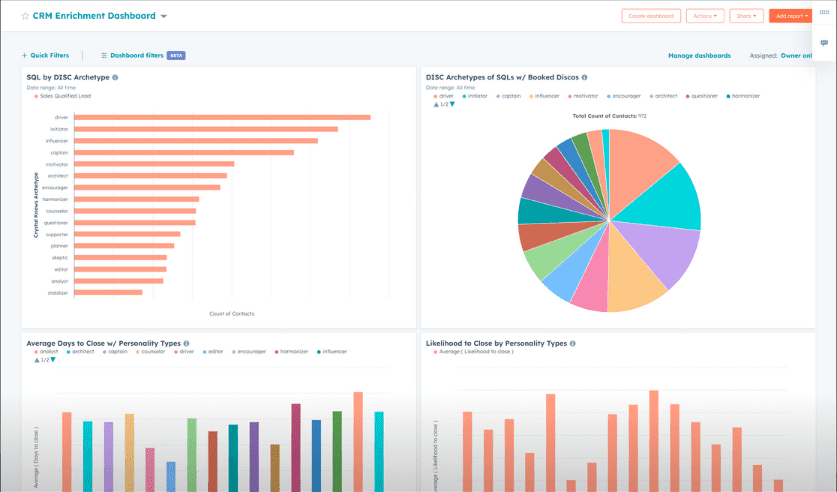
Crystal CRM enrichment dashboard

Source: Crystal

Crystal is an AI-powered tool that uses publicly available data on your prospects to collect information about their personality. It then extrapolates insights that help you understand their communication style and purchase motivations, as well as how they make decisions.

On the marketing side, Crystal integrates with your CRM to pull personality data that leads to better campaign and message targeting on LinkedIn.

All of this allows your sales and marketing teams to build stronger connections using LinkedIn. Accessed through a Chrome extension, you can use this tool with public LinkedIn profiles as well as LinkedIn Recruiter and LinkedIn Sales Navigator.

4. Zopto

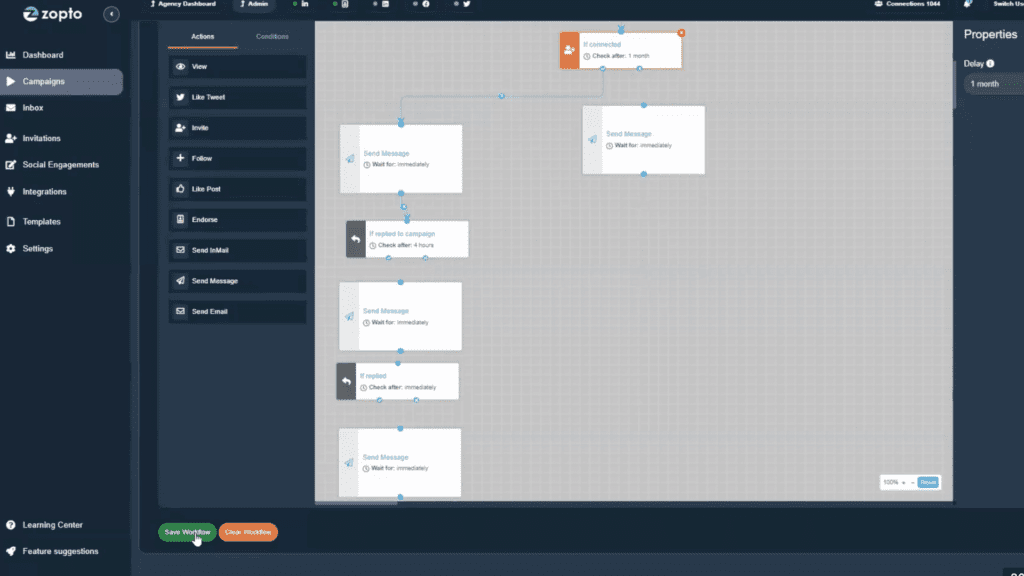
Zopto campaigns actions overview

Source: Zopto

Zopto allows you to import lists from your CRM to create targeted campaigns on LInkedIn. You can also use Zopto to build new, advanced prospect lists and filter them using a wide range of factors. It includes a LinkedIn scheduler.

Zopto uses a dedicated IP address, messaging scale-up, and randomization to simulate natural behavior. They say, “our platform works seamlessly with LinkedIn’s policies, ensuring your outreach is both effective and ethical!”

5. Canva

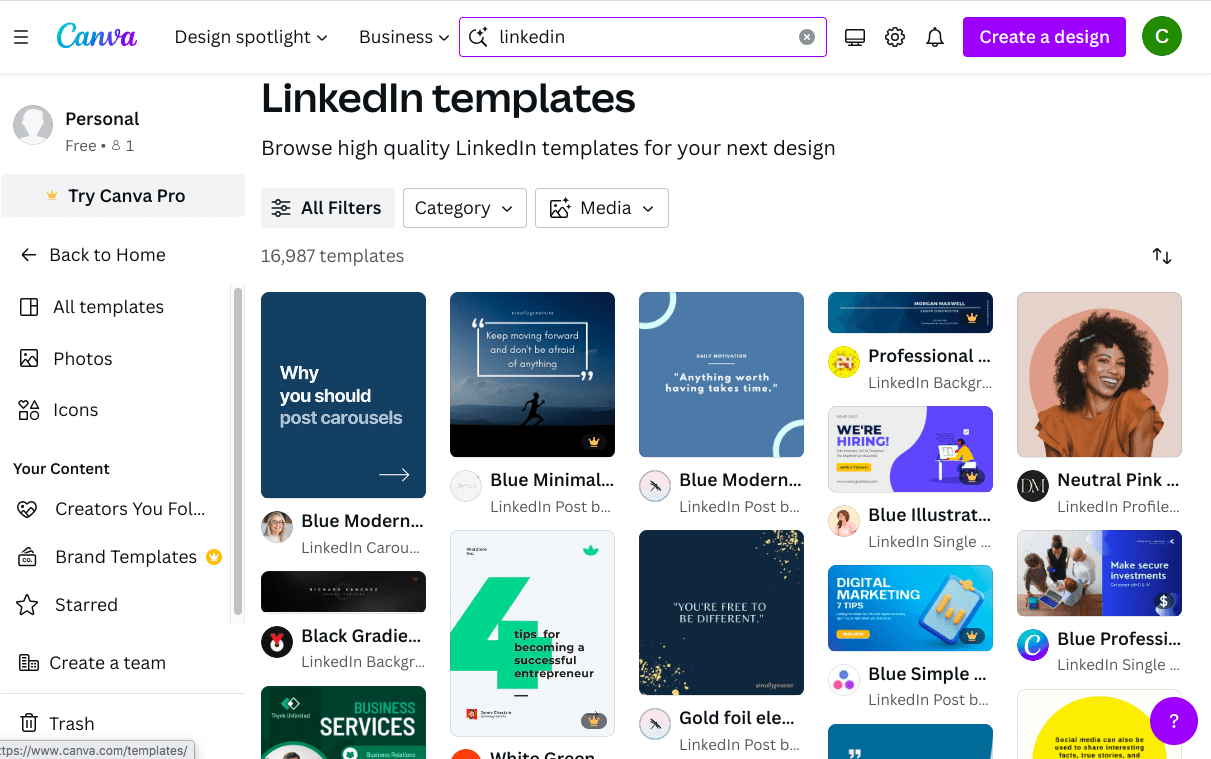
Canva LinkedIn templates design

Source: Canva

You might not think about design as much for your LinkedIn posts as you do for your content on other social platforms. But great-looking images are key to stopping the scroll on LinkedIn, too. Canva has a collection of free Linkedin post templates to make sure your posts start off on the right foot.

You can also design your LinkedIn company page or profile banner with Canva, helping you look more professional. (Looking professional is what LinkedIn is all about, after all.)

Great news for Hootsuite users: You can access Canva directly within Hootsuite to add some flair to your LinkedIn posts without switching tabs.

6. 6sense

6sense add filters with criteria

Source: 6sense

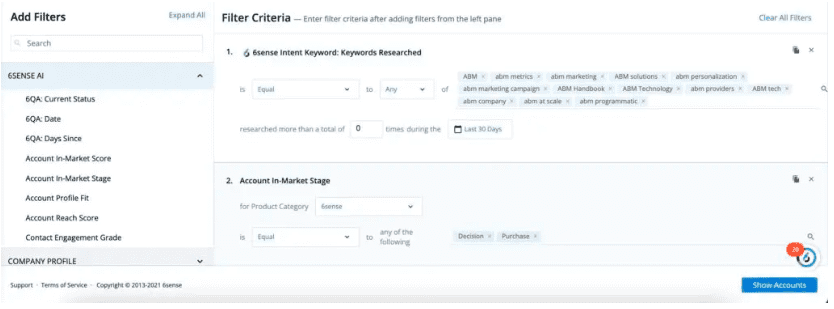
6sense is a great solution for those looking for LinkedIn B2B marketing tools They use potential buyers’ “digital breadcrumb trails” to uncover buying signals. This helps you better understand your audience so you can create targeted LinkedIn campaigns that speak directly to your prospects’ pain points and reach them at the right point in the purchasing cycle.

6sense integrates with LinkedIn, so there’s no need to worry about running afoul of the LinkedIn user agreement. It’s all about adding insights to your existing LinkedIn relationships and campaigns so you can target the right people at the right time.

7. B2Linked

B2Linked platform specific campaigns related to Information Technology

Source: B2Linked

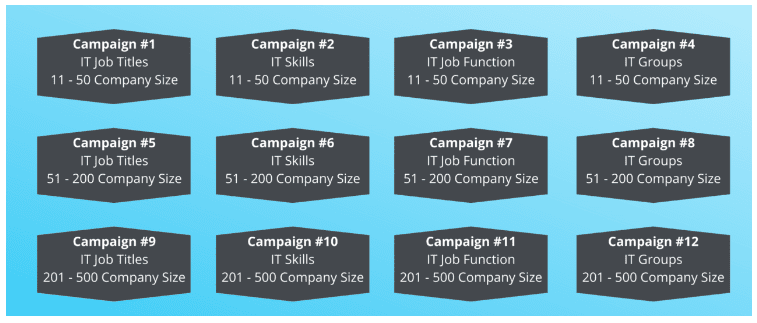
B2Linked is a certified LinkedIn partner focused on helping businesses with LinkedIn ad campaigns. LinkedIn is all they do, so they have platform-specific expertise. They use micro-segmentation, advanced ad bidding, and A/B testing, among other strategies, to maximize ROI. Their LinkedIn ad reporting is also top-notch.

Their tools for LinkedIn marketing are only accessible through an account management package, so this is not a cheap option. (Packages start at $2,000/month.) But for those who want to really focus on LinkedIn marketing and advertising, it may be worth the investment.

8. Terminus

Terminus campaign overview graph with top engagement by type

Source: Terminus

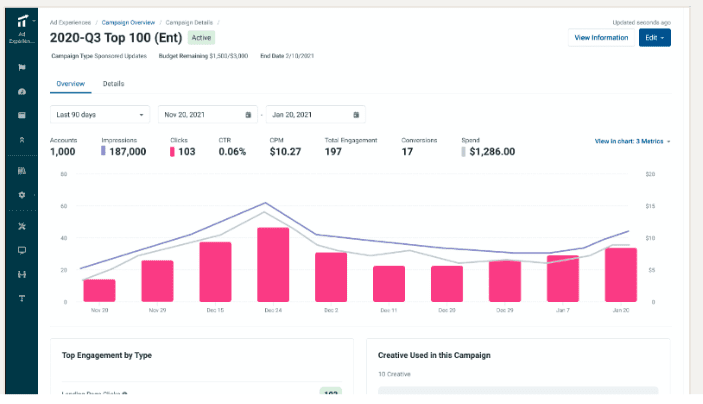
Terminus is another certified LinkedIn marketing partner focused on LinkedIn ads. Their tools can help with account matching, targeting, and reporting for all LinkedIn ad types. Terminus connects to your CRM and can be used to coordinate multi-channel ad campaigns. (It’s not exclusive to LinkedIn.)

9. Sprout Social

Sprout Social all messages

Source: Sprout Social

Sprout Social is another tool that integrates with LinkedIn and does not raise user agreement concerns.

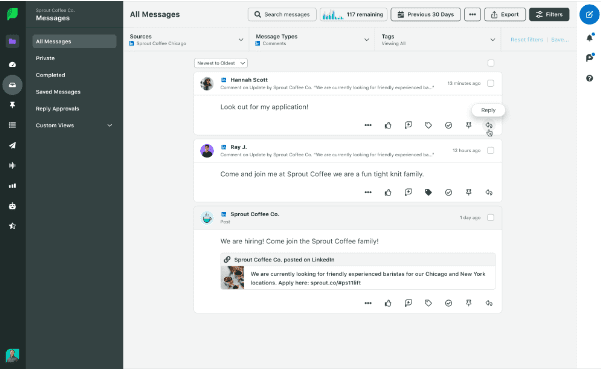
Sprout allows you to schedule LinkedIn content and analyze performance. There are useful targeting filters and collaboration tools, too.

See how Sprout Social compares to Hootsuite.

10. Dux-Soup

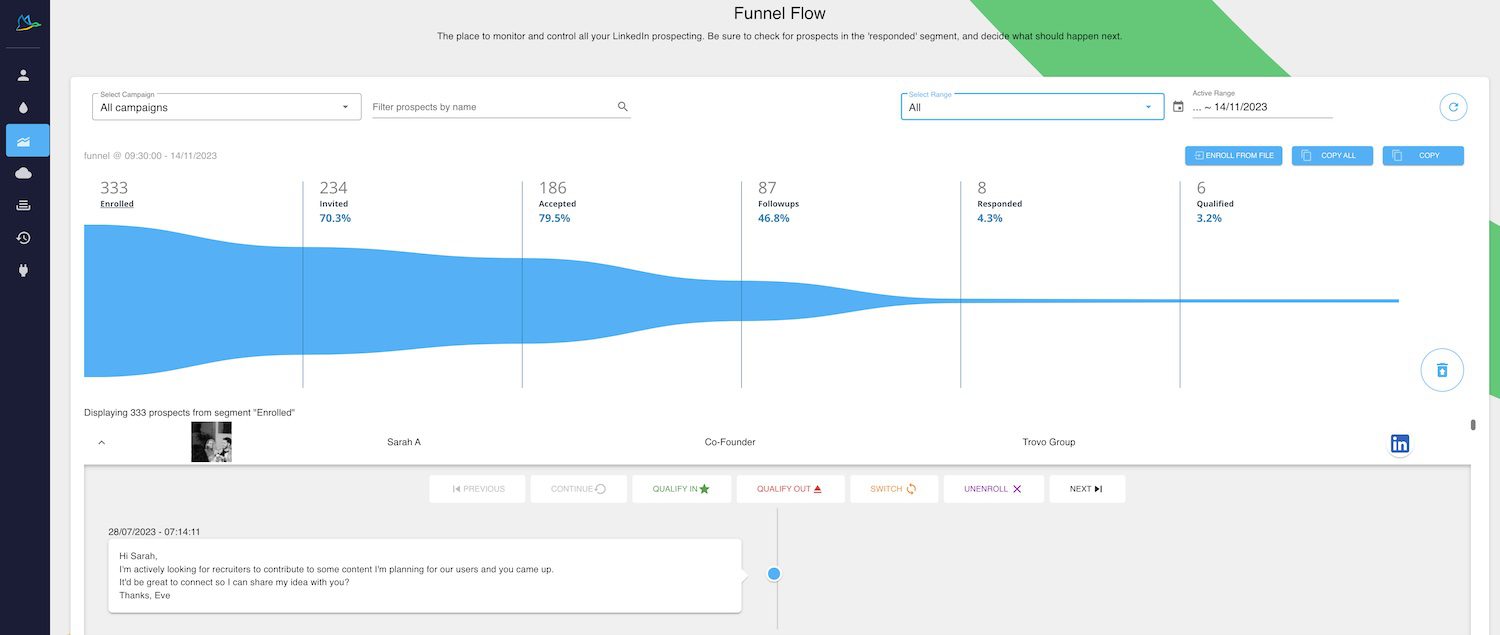
Dux-Soup funnel flow all campaigns graph

Source: Dux-Soup

Dux-Soup connects your CRM with LinkedIn so you can grow your LInkedIn network while centralizing prospect data and generating more leads.

It helps you find relevant LInkedIn profiles, send connection requests, and then follow up automatically with InMails and messages. Building your LinkedIn network creates new leads for your sales team. Pairing this with an employee advocacy strategy can help build an even larger network that maximizes your LinkedIn marketing collateral.

A warning, though: Dux-Soup’s LinkedIn marketing automation tools may conflict with the LinkedIn user agreement. Make sure you understand how it works and what you’re getting into.

Easily manage your LinkedIn Page and all your other social channels using Hootsuite. From a single dashboard, you can schedule and share content (including video), reply to comments, and engage your network. Try it free today.

Get Started

Easily create, analyze, promote and schedule LinkedIn posts alongside your other social networks with Hootsuite. Get more followers and save time.

Free 30-Day Trial (risk-free!)

15 Recent and Popular Social Media Memes

Whether you’re “extremely online” or just a weekend Instagram warrior, you’ve definitely encountered a meme at some point in your social media life. A sad dog with a hilarious caption; a panel from Spiderman with some perfectly stupid new labels; an overlay of a dancing Bill Hader interrupting a TikTok video.

The more time you spend online, the more familiar you’ll get with popular or recurring social media memes. You might even start to see mash-ups of well-known memes (and that’s probably when you should put down your phone and go outside for a bit).

If you’ve never dabbled in the fine art of meme-ery, maybe now’s the time to consider it. Memes can really help fill your social media content calendar and are pretty much guaranteed to delight your audience. And with fresh memes going viral daily, you’ll never run out of inspiration.

Obviously, memes aren’t appropriate for every type of account. If you run a funeral home, for example, maybe this isn’t the blog post for you.

But for brands that want to come across as playful, personable, and authentic, read on for more meme intel and dozens of viral examples to get the creative juices flowing.

Bonus: Download our free, customizable social media calendar template to easily plan and schedule all your content in advance.

What is a meme on social media?

A social media meme is “a joke or comment made for sharing on social networks. It usually appears in the form of a graphic or GIF with text above the image or superimposed.”

Another way of looking at it: memes are visual or textual media (or, on TikTok or Reels, audio clips!) that have been manipulated by an internet user for the purpose of self-expression.

Often, memes are created from images, video, or audio that existed for another purpose. A screenshot from a movie, a clip from a news broadcast gone wrong, an image from a comic strip that’s used to express a reaction to a current event. Memes can also be text-based though, taking a phrase (like a great line in Succession or a mispronunciation by the Pope) and putting it into all sorts of new contexts.

Memes spread across social media networks, with users taking a format and putting their own spin on it. There are dozens of websites and apps out there that can help you generate your own meme in just a few seconds.

And memes are popular: memes are the second most common type of content for Millennial and Gen Z users to share. Some social media accounts are even exclusively devoted to sharing memes — either re-posting other people’s meme creations or producing their own riffs on popular memes.

They’re so easy to make (even if you aren’t a pro at creating social media visuals), and are basically joke machines: just take the existing template, and put a spin on it that will crack up your specific audience.

That being said, memes can also be used for not-so-funny purposes, too. As the BBC put it, “memes can have a serious side, according to researchers looking at modern forms of communication. They are a language in themselves, with a capacity to transcend cultures and construct collective identities between people. These sharable visual jokes can also be powerful tools for self-expression, connection, social influence, and even political subversion.”

What is meme short for?

“Meme” comes from the Greek word mimema, which means “imitated.” Pretty high-brow heritage for a bunch of goofy internet jokes, right?

British evolutionary biologist Richard Dawkins coined the term in 1976 as a way to describe replicating and mutating cultural ideas. In his work, cultural memes are parallel to biological genes, which also carry information and have the ability to evolve.

“Memes,” in Dawkins’ original definition, could be applied to ideas, skills, fashions, or phrases, and transmitted through communication and culture — conversations, TV broadcasts, emails, you get the gist. Religious or political ideas, for example, are considered memes in his work.

But internet culture has really claimed the word for user-made and distributed media. Today, if someone refers to a meme outside of an extreme academic context, you can be sure they’re talking about a LOLcat.

Viral memes on social media in 2023

While most memes have a pretty short life cycle, there are plenty of memes that have stood the test of time (we’re looking at you, Confused Math Woman). Maybe these 2023 all-star memes will turn out to offer lifelong laughs? Either way, if they spark some inspiration in you — to either share them or make ‘em your own — follow that instinct. Meme hard! Meme often!

Kevin James Smirking

This Getty Images photo of Kevin James sheepishly smiling with his hands in his pockets makes the perfect blank canvas for adding a sassy caption.

Kevin James smirking with hands in his pocket memeSource: Know Your Meme

“Girl Math”

A joke (told by women, for women) about justifying costs. If your audience primarily identifies as women, go on and have a laugh about how the “cost per wear” of an outfit makes a fashion splurge seem like a totally reasonable idea.

@fvhzm

#itsbasicallyfree but it’s also basically a secondary income 💁‍♀️ Let us know if you need us to #girlmath one of your purchases! 🤪

♬ original sound – FVHZM

Celebrity Relationships

During the writing of this story, we saw the rise and fall of Kylie Jenner and Timothee Chalamet, so we’re not getting too attached to the Taylor Swift/Travis Kelce relationship. But the “it” couple of the moment provides a great opportunity for meme-able paparazzi photos. Young love brings plenty of dramatic facial expressions, it seems.

@parademag

If Taylor likes football we ALL like football 😤 #taylorswift #traviskelce #taylorswifttraviskelce #memes

♬ Red – (Taylor’s version)

…or hilarious contrasts, as in the case of Justin and Hailey Bieber.

Barbie vs. Oppenheimer

The launch date of two diametrically opposite movies provided a lot of fun for the internet. Obviously, the trend has died down now, but take it as inspiration anyways. What kind of hilariously contrasting pop culture moments are happening right now that you can pit against each other in a meme?
Oppenheimer Barbie movie release opposite style of houses next door

Crunchy Cat

Though this green screen effect cat (eating something very loud and unidentifiable) was first uploaded to TikTok in 2022, it really popped off in 2023 as a hilarious accent to pretty much any situation.

@_supersillygoose

nam nam nam 😋😋😋 #paris #bones #cat #crunchy #crunchitymunchity

♬ original sound – GOOSE

Animals. Always

When will funny animals ever go out of style for memes? Relabel this chill chicken, or any other animal, with your own context.

Our fave? These fuzzy besties:

Astrological Signs

No one can resist an astrology meme. It’s… in the stars.

Which Are You?

Encourage your followers to tag themselves (as you simultaneously totally roast them).

Dancing Bill Hader

This clip from an old SNL sketch just brings the feel-good vibes. Layer it on top of a big product announcement you’re feeling smug about, why dontcha?

Kardashian Pregnancy Announcement

Back in the summer, Kourtney Kardashian made a dramatic pregnancy announcement using a sign at a concert… which naturally turned into a blank canvas for meme creators around the world. Look for future celebrity milestones like this to transform into your own memes.

Renaissance Paintings

It’s instant comedy: contrast an image from a Renaissance painting with a modern problem, and you’ve struck gold.

Roman Empire

Though this social media meme started with creators asking the men in their lives just how often they think about the Roman Empire (spoiler: a lot?), it’s now a fun thing to post about what your Roman Empire is: the thing you can’t stop thinking about.

@livbaron

asking my dad how often he thinks about the Roman Empire #romanempire #romanempireboyfriend

♬ original sound – liv baron

Smurf Cat

Why is this photo-realistic Smurf Cat trending? We couldn’t say. But the people have spoken, repurposing this cutesy character in all sorts of contexts.

@aim.vsp

WE LIVE WE LOVE WE LIE🗣️🔥#catsmurf #smurfcat #thespectere #edit #vsp #youthshake #meme #fyp

♬ original sound – Crcl.𝖆𝖎𝖒

“Bad Idea, Right?”

Use this clip from Olivia Rodrigo’s latest single to underscore a hilarious mistake.

@ashleylamarca

“I want curly hair” – no you don’t💀

♬ bad idea right? – Olivia Rodrigo

This Guy Reading a Book

A vintage comic strip that features a blank canvas (the book) and a dramatic reaction (the face)? You really can’t go wrong.

A Scary Halloween House

This spooky Halloween house dominated the meme cycle in October 2023. There’s still time to add your own hilarious caption! We believe in you!

Text-based posts

There’s a wide world of people sharing screenshots of text content to visual apps: Tweets that really make people laugh tend to make their way to Instagram to be repurposed and captioned.

It’s good practice to credit where you find these. Savvy brands might punch up these sort of minimalist posts with a punch of color or by using a branded background, to help them blend in with the rest of your feed.

By their nature, memes are always evolving and changing. Your best bet for keeping up with what’s going on in the world of TikTok, Instagram, Twitter/X, and Facebook is to be active on those platforms.

Explore popular content, and watch for emerging trends and patterns first-hand by getting right up into the action. (Feeling overwhelmed by the endless content? Set up specific Streams in your Hootsuite dashboard to focus your attention on the memes that matter most to your company or industry.)

Save time managing your social media presence with Hootsuite. Publish and schedule posts, find relevant conversations, engage your audience, measure results, and more — all from one simple dashboard. Try it free today.

Do it better with Hootsuite, the all-in-one social media tool. Stay on top of things, grow, and beat the competition.
Free 30-Day Trial