What Is Largest Contentful Paint: An Easy Explanation via @sejournal, @vahandev

Largest Contentful Paint (LCP) is a Google user experience metric integrated into ranking systems in 2021.

LCP is one of the three Core Web Vitals (CWV) metrics that track technical performance metrics that impact user experience.

Core Web Vitals exist paradoxically, with Google providing guidance highlighting their importance but downplaying their impact on rankings.

LCP, like the other CWV signals, is useful for diagnosing technical issues and ensuring your website meets a base level of functionality for users.

What Is Largest Contentful Paint?

LCP is a measurement of how long it takes for the main content of a page to download and be ready to be interacted with.

Specifically, the time it takes from page load initiation to the rendering of the largest image or block of text within the user viewport. Anything below the fold doesn’t count.

Images, video poster images, background images, and block-level text elements like paragraph tags are typical elements measured.

LCP consists of the following sub-metrics:

Optimizing for LCP means optimizing for each of these metrics, so it takes less than 2.5 seconds to load and display LCP resources.

Here is a threshold scale for your reference:
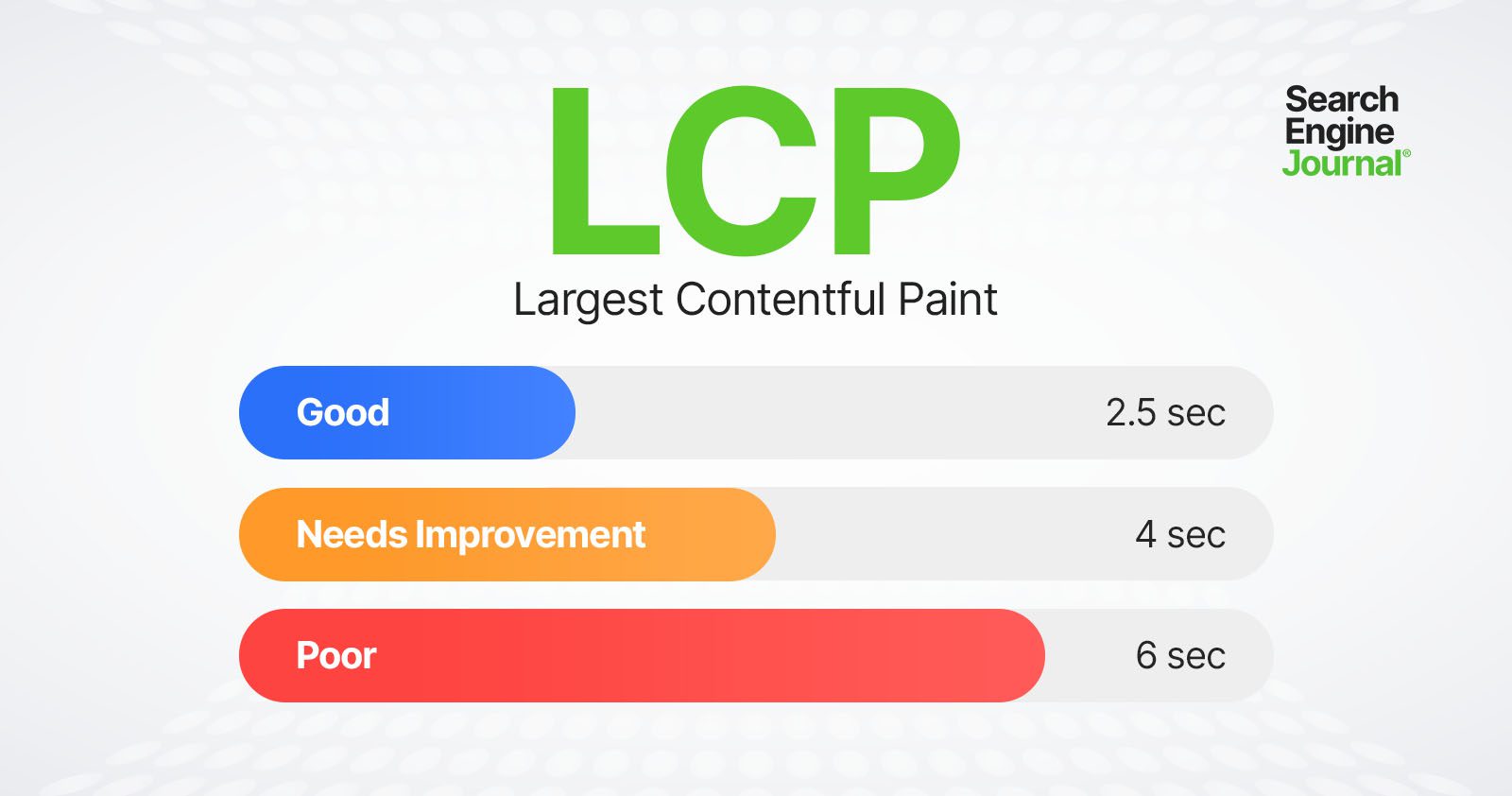
LCP thresholdsLCP thresholds

Let’s dive into what these sub-metrics mean and how you can improve.

Time To First Byte (TTFB)

TTFB is the server response time and measures the time it takes for the user’s browser to receive the first byte of data from your server. This includes DNS lookup time, the time it takes to process requests by server, and redirects.

Optimizing TTFB can significantly reduce the overall load time and improve LCP.

Server response time largely depends on:

  • Database queries.
  • CDN cache misses.
  • Inefficient server-side rendering.
  • Hosting.

Let’s review each:

1. Database Queries

If your response time is high, try to identify the source.

For example, it may be due to poorly optimized queries or a high volume of queries slowing down the server’s response time. If you have a MySQL database, you can log slow queries to find which queries are slow.

If you have a WordPress website, you can use the Query Monitor plugin to see how much time SQL queries take.

Other great tools are Blackfire or Newrelic, which do not depend on the CMS or stack you use, but require installation on your hosting/server.

2. CDN Cache Misses

A CDN cache miss occurs when a requested resource is not found in the CDN’s cache, and the request is forwarded to fetch from the origin server. This process takes more time, leading to increased latency and longer load times for the end user.

Usually, your CDN provider has a report on how many cache misses you have.
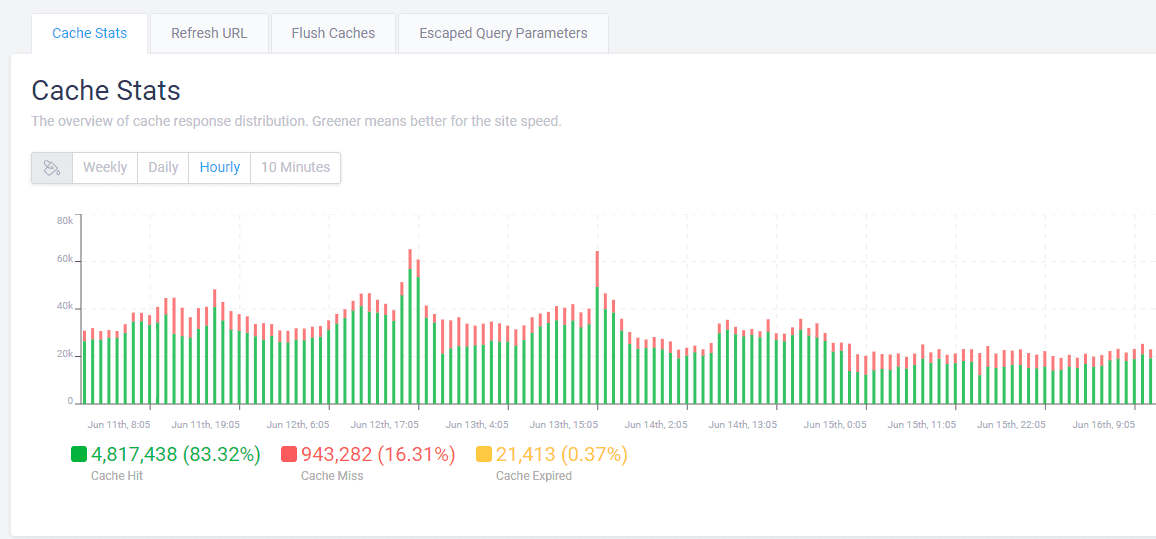
Example of CDN cache reportExample of CDN cache report

If you observe a high percentage ( >10% ) of cache misses, you may need to contact your CDN provider or hosting support in case you have managed hosting with cache integrated to solve the issue.

One reason that may cause cache misses is when you have a search spam attack.

For example, a dozen spammy domains link to your internal search pages with random spammy queries like [/?q=甘肃代], which are not cached because the search term is different each time. The issue is that Googlebot aggressively crawls them, which may cause high server response times and cache misses.

In that case, and overall, it is a good practice to block search or facets URLs via robots.txt. But once you block them via robots.txt, you may find those URLs to be indexed because they have backlinks from low-quality websites.

However, don’t be afraid. John Mueller said it would be cleared in time.

Here is a real-life example from the search console of high server response time (TTFB) caused by cache misses:
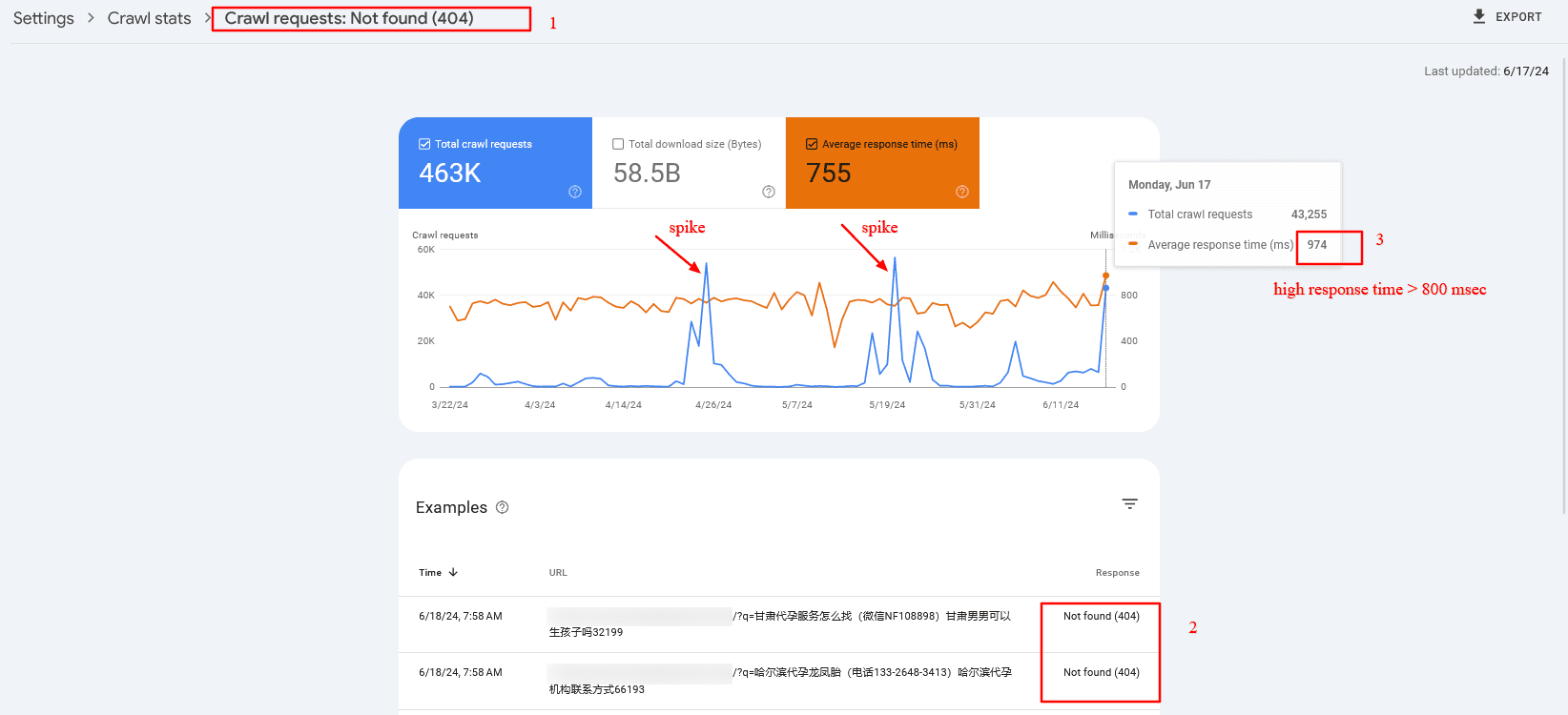
Crawl spike of 404 search pages which have high server response timeCrawl spike of 404 search pages that have high server response time

3. Inefficient Server Side Rendering

You may have certain components on your website that depend on third-party APIs.

For example, you’ve seen reads and shares numbers on SEJ’s articles. We fetch those numbers from different APIs, but instead of fetching them when a request is made to the server, we prefetch them and store them in our database for faster display.

Imagine if we connect to share count and GA4 APIs when a request is made to the server. Each request takes about 300-500 ms to execute, and we would add about ~1,000 ms delay due to inefficient server-side rendering. So, make sure your backend is optimized.

4. Hosting

Be aware that hosting is highly important for low TTFB. By choosing the right hosting, you may be able to reduce your TTFB by two to three times.

Choose hosting with CDN and caching integrated into the system. This will help you avoid purchasing a CDN separately and save time maintaining it.

So, investing in the right hosting will pay off.

Read more detailed guidance:

Now, let’s look into other metrics mentioned above that contribute to LCP.

Resource Load Delay

Resource load delay is the time it takes for the browser to locate and start downloading the LCP resource.

For example, if you have a background image on your hero section that requires CSS files to load to be identified, there will be a delay equal to the time the browser needs to download the CSS file to start downloading the LCP image.

In the case when the LCP element is a text block, this time is zero.

By optimizing how quickly these resources are identified and loaded, you can improve the time it takes to display critical content. One way to do this is to preload both CSS files and LCP images by setting fetchpriority=”high” to the image so it starts downloading the CSS file.


But a better approach – if you have enough control over the website – is to inline the critical CSS required for above the fold, so the browser doesn’t spend time downloading the CSS file. This saves bandwidth and will preload only the image.

Of course, it’s even better if you design webpages to avoid hero images or sliders, as those usually don’t add value, and users tend to scroll past them since they are distracting.

Another major factor contributing to load delay is redirects.

If you have external backlinks with redirects, there’s not much you can do. But you have control over your internal links, so try to find internal links with redirects, usually because of missing trailing slashes, non-WWW versions, or changed URLs, and replace them with actual destinations.

There are a number of technical SEO tools you can use to crawl your website and find redirects to be replaced.

Resource Load Duration

Resource load duration refers to the actual time spent downloading the LCP resource.

Even if the browser quickly finds and starts downloading resources, slow download speeds can still affect LCP negatively. It depends on the size of the resources, the server’s network connection speed, and the user’s network conditions.

You can reduce resource load duration by implementing:

  • WebP format.
  • Properly sized images (make the intrinsic size of the image match the visible size).
  • Load prioritization.
  • CDN.

Element Render Delay

Element render delay is the time it takes for the browser to process and render the LCP element.

This metric is influenced by the complexity of your HTML, CSS, and JavaScript.

Minimizing render-blocking resources and optimizing your code can help reduce this delay. However, it may happen that you have heavy JavaScript scripting running, which blocks the main thread, and the rendering of the LCP element is delayed until those tasks are completed.

Here is where low values of the Total Blocking Time (TBT) metric are important, as it measures the total time during which the main thread is blocked by long tasks on page load, indicating the presence of heavy scripts that can delay rendering and responsiveness.

One way you can improve not only load duration and delay but overall all CWV metrics when users navigate within your website is to implement speculation rules API for future navigations. By prerendering pages as users mouse over links or pages they will most likely navigate, you can make your pages load instantaneously.

Beware These Scoring “Gotchas”

All elements in the user’s screen (the viewport) are used to calculate LCP. That means that images rendered off-screen and then shifted into the layout, once rendered, may not count as part of the Largest Contentful Paint score.

On the opposite end, elements starting in the user viewport and then getting pushed off-screen may be counted as part of the LCP calculation.

How To Measure The LCP Score

There are two kinds of scoring tools. The first is called Field Tools, and the second is called Lab Tools.

Field tools are actual measurements of a site.

Lab tools give a virtual score based on a simulated crawl using algorithms that approximate Internet conditions that a typical mobile phone user might encounter.

Here is one way you can find LCP resources and measure the time to display them via DevTools > Performance report:

You can read more in our in-depth guide on how to measure CWV metrics, where you can learn how to troubleshoot not only LCP but other metrics altogether.

LCP Optimization Is A Much More In-Depth Subject

Improving LCP is a crucial step toward improving CVW, but it can be the most challenging CWV metric to optimize.

LCP consists of multiple layers of sub-metrics, each requiring a thorough understanding for effective optimization.

This guide has given you a basic idea of improving LCP, and the insights you’ve gained thus far will help you make significant improvements.

But there’s still more to learn. Optimizing each sub-metric is a nuanced science. Stay tuned, as we’ll publish in-depth guides dedicated to optimizing each sub-metric.

More resources:


Featured image credit: BestForBest/Shutterstock

13 Steps To Boost Your Site’s Crawlability And Indexability via @sejournal, @MattGSouthern

One of the most important elements of search engine optimization, often overlooked, is how easily search engines can discover and understand your website.

This process, known as crawling and indexing, is fundamental to your site’s visibility in search results. Without being crawled your pages cannot be indexed, and if they are not indexed they won’t rank or display in SERPs.

In this article, we’ll explore 13 practical steps to improve your website’s crawlability and indexability. By implementing these strategies, you can help search engines like Google better navigate and catalog your site, potentially boosting your search rankings and online visibility.

Whether you’re new to SEO or looking to refine your existing strategy, these tips will help ensure that your website is as search-engine-friendly as possible.

Let’s dive in and discover how to make your site more accessible to search engine bots.

1. Improve Page Loading Speed

Page loading speed is crucial to user experience and search engine crawlability. To improve your page speed, consider the following:

  • Upgrade your hosting plan or server to ensure optimal performance.
  • Minify CSS, JavaScript, and HTML files to reduce their size and improve loading times.
  • Optimize images by compressing them and using appropriate formats (e.g., JPEG for photographs, PNG for transparent graphics).
  • Leverage browser caching to store frequently accessed resources locally on users’ devices.
  • Reduce the number of redirects and eliminate any unnecessary ones.
  • Remove any unnecessary third-party scripts or plugins.

2. Measure & Optimize Core Web Vitals

In addition to general page speed optimizations, focus on improving your Core Web Vitals scores. Core Web Vitals are specific factors that Google considers essential in a webpage’s user experience.

These include:

To identify issues related to Core Web Vitals, use tools like Google Search Console’s Core Web Vitals report, Google PageSpeed Insights, or Lighthouse. These tools provide detailed insights into your page’s performance and offer suggestions for improvement.

Some ways to optimize for Core Web Vitals include:

  • Minimize main thread work by reducing JavaScript execution time.
  • Avoid significant layout shifts by using set size attribute dimensions for media elements and preloading fonts.
  • Improve server response times by optimizing your server, routing users to nearby CDN locations, or caching content.

By focusing on both general page speed optimizations and Core Web Vitals improvements, you can create a faster, more user-friendly experience that search engine crawlers can easily navigate and index.

3. Optimize Crawl Budget

Crawl budget refers to the number of pages Google will crawl on your site within a given timeframe. This budget is determined by factors such as your site’s size, health, and popularity.

If your site has many pages, it’s necessary to ensure that Google crawls and indexes the most important ones. Here are some ways to optimize for crawl budget:

  • Using a clear hierarchy, ensure your site’s structure is clean and easy to navigate.
  • Identify and eliminate any duplicate content, as this can waste crawl budget on redundant pages.
  • Use the robots.txt file to block Google from crawling unimportant pages, such as staging environments or admin pages.
  • Implement canonicalization to consolidate signals from multiple versions of a page (e.g., with and without query parameters) into a single canonical URL.
  • Monitor your site’s crawl stats in Google Search Console to identify any unusual spikes or drops in crawl activity, which may indicate issues with your site’s health or structure.
  • Regularly update and resubmit your XML sitemap to ensure Google has an up-to-date list of your site’s pages.

4. Strengthen Internal Link Structure

A good site structure and internal linking are foundational elements of a successful SEO strategy. A disorganized website is difficult for search engines to crawl, which makes internal linking one of the most important things a website can do.

But don’t just take our word for it. Here’s what Google’s search advocate, John Mueller, had to say about it:

“Internal linking is super critical for SEO. I think it’s one of the biggest things that you can do on a website to kind of guide Google and guide visitors to the pages that you think are important.”

If your internal linking is poor, you also risk orphaned pages or pages that don’t link to any other part of your website. Because nothing is directed to these pages, search engines can only find them through your sitemap.

To eliminate this problem and others caused by poor structure, create a logical internal structure for your site.

Your homepage should link to subpages supported by pages further down the pyramid. These subpages should then have contextual links that feel natural.

Another thing to keep an eye on is broken links, including those with typos in the URL. This, of course, leads to a broken link, which will lead to the dreaded 404 error. In other words, page not found.

The problem is that broken links are not helping but harming your crawlability.

Double-check your URLs, particularly if you’ve recently undergone a site migration, bulk delete, or structure change. And make sure you’re not linking to old or deleted URLs.

Other best practices for internal linking include using anchor text instead of linked images, and adding a “reasonable number” of links on a page (there are different ratios of what is reasonable for different niches, but adding too many links can be seen as a negative signal).

Oh yeah, and ensure you’re using follow links for internal links.

5. Submit Your Sitemap To Google

Given enough time, and assuming you haven’t told it not to, Google will crawl your site. And that’s great, but it’s not helping your search ranking while you wait.

If you recently made changes to your content and want Google to know about them immediately, you should submit a sitemap to Google Search Console.

A sitemap is another file that lives in your root directory. It serves as a roadmap for search engines with direct links to every page on your site.

This benefits indexability because it allows Google to learn about multiple pages simultaneously. A crawler may have to follow five internal links to discover a deep page, but by submitting an XML sitemap, it can find all of your pages with a single visit to your sitemap file.

Submitting your sitemap to Google is particularly useful if you have a deep website, frequently add new pages or content, or your site does not have good internal linking.

6. Update Robots.txt Files

You’ll want to have a robots.txt file for your website. It’s a plain text file in your website’s root directory that tells search engines how you would like them to crawl your site. Its primary use is to manage bot traffic and keep your site from being overloaded with requests.

Where this comes in handy in terms of crawlability is limiting which pages Google crawls and indexes. For example, you probably don’t want pages like directories, shopping carts, and tags in Google’s directory.

Of course, this helpful text file can also negatively impact your crawlability. It’s well worth looking at your robots.txt file (or having an expert do it if you’re not confident in your abilities) to see if you’re inadvertently blocking crawler access to your pages.

Some common mistakes in robots.text files include:

  • Robots.txt is not in the root directory.
  • Poor use of wildcards.
  • Noindex in robots.txt.
  • Blocked scripts, stylesheets, and images.
  • No sitemap URL.

For an in-depth examination of each of these issues – and tips for resolving them, read this article.

7. Check Your Canonicalization

What a canonical tag does is indicate to Google which page is the main page to give authority to when you have two or more pages that are similar, or even duplicate. Although, this is only a directive and not always applied.

Canonicals can be a helpful way to tell Google to index the pages you want while skipping duplicates and outdated versions.

But this opens the door for rogue canonical tags. These refer to older versions of a page that no longer exist, leading to search engines indexing the wrong pages and leaving your preferred pages invisible.

To eliminate this problem, use a URL inspection tool to scan for rogue tags and remove them.

If your website is geared towards international traffic, i.e., if you direct users in different countries to different canonical pages, you need to have canonical tags for each language. This ensures your pages are indexed in each language your site uses.

8. Perform A Site Audit

Now that you’ve performed all these other steps, there’s still one final thing you need to do to ensure your site is optimized for crawling and indexing: a site audit.

That starts with checking the percentage of pages Google has indexed for your site.

Check Your Indexability Rate

Your indexability rate is the number of pages in Google’s index divided by the number of pages on your website.

You can find out how many pages are in the Google index from the Google Search Console Index by going to the “Pages” tab and checking the number of pages on the website from the CMS admin panel.

There’s a good chance your site will have some pages you don’t want indexed, so this number likely won’t be 100%. However, if the indexability rate is below 90%, you have issues that need investigation.

You can get your no-indexed URLs from Search Console and run an audit for them. This could help you understand what is causing the issue.

Another helpful site auditing tool included in Google Search Console is the URL Inspection Tool. This allows you to see what Google spiders see, which you can then compare to actual webpages to understand what Google is unable to render.

Audit (And request Indexing) Newly Published Pages

Any time you publish new pages to your website or update your most important pages, you should ensure they’re being indexed. Go into Google Search Console and use the inspection tool to make sure they’re all showing up. If not, request indexing on the page and see if this takes effect – usually within a few hours to a day.

If you’re still having issues, an audit can also give you insight into which other parts of your SEO strategy are falling short, so it’s a double win. Scale your audit process with tools like:

9. Check For Duplicate Content

Duplicate content is another reason bots can get hung up while crawling your site. Basically, your coding structure has confused it, and it doesn’t know which version to index. This could be caused by things like session IDs, redundant content elements, and pagination issues.

Sometimes, this will trigger an alert in Google Search Console, telling you Google is encountering more URLs than it thinks it should. If you haven’t received one, check your crawl results for duplicate or missing tags or URLs with extra characters that could be creating extra work for bots.

Correct these issues by fixing tags, removing pages, or adjusting Google’s access.

10. Eliminate Redirect Chains And Internal Redirects

As websites evolve, redirects are a natural byproduct, directing visitors from one page to a newer or more relevant one. But while they’re common on most sites, if you’re mishandling them, you could inadvertently sabotage your indexing.

You can make several mistakes when creating redirects, but one of the most common is redirect chains. These occur when there’s more than one redirect between the link clicked on and the destination. Google doesn’t consider this a positive signal.

In more extreme cases, you may initiate a redirect loop, in which a page redirects to another page, directs to another page, and so on, until it eventually links back to the first page. In other words, you’ve created a never-ending loop that goes nowhere.

Check your site’s redirects using Screaming Frog, Redirect-Checker.org, or a similar tool.

11. Fix Broken Links

Similarly, broken links can wreak havoc on your site’s crawlability. You should regularly check your site to ensure you don’t have broken links, as this will hurt your SEO results and frustrate human users.

There are a number of ways you can find broken links on your site, including manually evaluating every link on your site (header, footer, navigation, in-text, etc.), or you can use Google Search Console, Analytics, or Screaming Frog to find 404 errors.

Once you’ve found broken links, you have three options for fixing them: redirecting them (see the section above for caveats), updating them, or removing them.

12. IndexNow

IndexNow is a protocol that allows websites to proactively inform search engines about content changes, ensuring faster indexing of new, updated, or removed content. By strategically using IndexNow, you can boost your site’s crawlability and indexability.

However, using IndexNow judiciously and only for meaningful content updates that substantially enhance your website’s value is crucial. Examples of significant changes include:

  • For ecommerce sites: Product availability changes, new product launches, and pricing updates.
  • For news websites: Publishing new articles, issuing corrections, and removing outdated content.
  • For dynamic websites, this includes updating financial data at critical intervals, changing sports scores and statistics, and modifying auction statuses.
  • Avoid overusing IndexNow by submitting duplicate URLs too frequently within a short timeframe, as this can negatively impact trust and rankings.
  • Ensure that your content is fully live on your website before notifying IndexNow.

If possible, integrate IndexNow with your content management system (CMS) for seamless updates. If you’re manually handling IndexNow notifications, follow best practices and notify search engines of both new/updated content and removed content.

By incorporating IndexNow into your content update strategy, you can ensure that search engines have the most current version of your site’s content, improving crawlability, indexability, and, ultimately, your search visibility.

13. Implement Structured Data To Enhance Content Understanding

Structured data is a standardized format for providing information about a page and classifying its content.

By adding structured data to your website, you can help search engines better understand and contextualize your content, improving your chances of appearing in rich results and enhancing your visibility in search.

There are several types of structured data, including:

  • Schema.org: A collaborative effort by Google, Bing, Yandex, and Yahoo! to create a unified vocabulary for structured data markup.
  • JSON-LD: A JavaScript-based format for encoding structured data that can be embedded in a web page’s or .
  • Microdata: An HTML specification used to nest structured data within HTML content.

To implement structured data on your site, follow these steps:

  • Identify the type of content on your page (e.g., article, product, event) and select the appropriate schema.
  • Mark up your content using the schema’s vocabulary, ensuring that you include all required properties and follow the recommended format.
  • Test your structured data using tools like Google’s Rich Results Test or Schema.org’s Validator to ensure it’s correctly implemented and free of errors.
  • Monitor your structured data performance using Google Search Console’s Rich Results report. This report shows which rich results your site is eligible for and any issues with your implementation.

Some common types of content that can benefit from structured data include:

  • Articles and blog posts.
  • Products and reviews.
  • Events and ticketing information.
  • Recipes and cooking instructions.
  • Person and organization profiles.

By implementing structured data, you can provide search engines with more context about your content, making it easier for them to understand and index your pages accurately.

This can improve search results visibility, mainly through rich results like featured snippets, carousels, and knowledge panels.

Wrapping Up

By following these 13 steps, you can make it easier for search engines to discover, understand, and index your content.

Remember, this process isn’t a one-time task. Regularly check your site’s performance, fix any issues that arise, and stay up-to-date with search engine guidelines.

With consistent effort, you’ll create a more search-engine-friendly website with a better chance of ranking well in search results.

Don’t be discouraged if you find areas that need improvement. Every step to enhance your site’s crawlability and indexability is a step towards better search performance.

Start with the basics, like improving page speed and optimizing your site structure, and gradually work your way through more advanced techniques.

By making your website more accessible to search engines, you’re not just improving your chances of ranking higher – you’re also creating a better experience for your human visitors.

So roll up your sleeves, implement these tips, and watch as your website becomes more visible and valuable in the digital landscape.

More Resources:


Featured Image: BestForBest/Shutterstock
SEO Aspects of Content Syndication

Syndicating content to other platforms can generate more views and increase a brand’s visibility.

Popular syndication platforms include Medium, Substack, and LinkedIn. Many established media outlets allow the placement of quality and relevant content on their websites.

Publishers who syndicate content have two ways to point it to their sites as the source:

  • A link to their original article. This is a weak signal to Google (plus, the links are typically nofollow) but can direct some traffic from the syndicated content back to your site.
  • A rel= “canonical” link element pointing to the source is a stronger signal and may send external link equity back to your article. Not all sites offer this option, however. LinkedIn and Substack, for example, do not allow canonicals.

I prefer links and canonicals where possible, for search engines and referral traffic. However, even with both options in place, Google may choose to index and rank syndicated content versus the original article.

Google Decides

We’ve long known that rel= “canonical” is not a directive. Even to eliminate internal duplicate content, Google will decide which page to index and rank based on internal links and other signals (such as content depth and relevancy).

The same exists for cross-site canonical tags. Based on the domain authority and external links, Google may rank a non-original version of syndicated content. Google’s John Mueller confirmed this. When asked why Google often ranks syndicated content over the original, Mueller stated:

In general, when you syndicate or republish your content across platforms, you’re trading the extra visibility within that platform with the possibility that the other platform will appear in the search results above your website…

…the rel=canonical is not a directive, even within the same site. And if the pages are different, it doesn’t make sense for search engines to treat the pages as being equivalent. If you want to make sure that “your” version is the one shown in the search, you need to use `noindex` on the alternate versions.

Unfortunately, I’m unaware of syndication platforms that would noindex a page on their site.

In the same thread, Mueller cautioned website owners against noindexing their own content in fear of duplicate content penalty, stating that if you cannot noindex syndicated content, let Google decide, adding there’s no such thing as a duplicate content penalty.

SEO Implications

Content syndication is not a tactic for search engine optimization, but it could benefit content and brand exposure.

There’s no reliable way to ensure that Google will perceive your site as the original source and rank the content accordingly.

Yet there are a few ways to make content syndication SEO-friendlier:

  • Pick syndication partners that allow rel= “canonical” tags to point back to your site (which Google may or may not follow)
  • To keep your site’s content original, create different versions of an article when syndicating. This is time-consuming and only possible when you syndicate your content manually. It doesn’t ensure that your article will outrank syndicated versions. Nonetheless, many search engine optimizers (including me) still recommend it.

In short, syndicated content can reach a much wider audience and is thus a helpful marketing tactic. It does little, however, for search engine optimization.

3-Tiered Index Hints SEO Link Value

Leaked documentation from Google suggests that where the search giant stores a link to a web page determines, at least in part, the page’s authority.

Google stores its index of web pages on a three-tiered hardware system, each with different processing speeds. The leak from Google’s engineering documents, first reported by consultant Mike King, suggests a link’s authority depends on its storage tier — faster tiers equate to more authority.

“It was something we already suspected, but data in the leak suggests that the value of a link relates to where the page that the link exists on is stored in Google’s index,” says consultant Barry Adams, who helps publishers optimize articles for the Google News ecosystem, including Top Stories and Discover. He also noted that Google’s News algorithm processes content much faster than universal search.

Photo of computer RAM sticks on a motherboard

Google stores its index of web page links across three hardware tiers. Links on the RAM tier likely have higher authority.

“When an article is published, Google wants to show it in Top Stories as soon as possible because people want the latest news and updates. A lot of the processes that Google would perform as part of regular indexing and ranking of content don’t necessarily apply to News. To process News search results, Google has to take a few shortcuts along the way,” says Adams.

Ted Kubaitis at SEO Tool Lab has tested how quickly Google recognizes and incorporates new links into its rankings. So far, Google has taken at least three weeks to recognize and apply the authority of new backlinks to the rankings of web pages. News cycles are much faster.

Google upended Yahoo years ago as the leading search engine by treating links as recommendations by web users and ranking pages accordingly. The more recommendations or links a web page has from other domains, the higher that page tends to rank. Google calls this “citation indexing.” The logic is circular. If all other ranking factors are equal, a link from a web page with many trustworthy links pointing to it has more authority than a page with no links.

Storage Tiers

Google’s index of web pages resides on three hardware tiers:

  • RAM: This is the fastest and most valuable tier, reserved for popular and highly ranked web pages. RAM storage includes popular News stories, which suggests backlinks from News articles pass more authority than those from niche blogs or low-traffic sites.
  • Solid state drives: The middle tier offers faster retrieval than traditional rotating hard drives but is slower than RAM. Pages stored here are less frequently accessed than those in RAM but still hold significant value.
  • Hard disk drives: The slowest tier, rotating hard disks, stores older or less frequently accessed pages. These pages are less valuable in terms of link value.

News Publishers

Engagement is a long-suspected ranking signal, especially in Google’s Discover feed. The leak data confirms what I and other SEO consultants already surmised: Google’s ranking algorithm likely tracks user interaction metrics.

That means search-result listings must generate clicks and engagement to last. To secure a top ranking, pages must appear in search results and receive clicks from users who then stick around for at least a few seconds. If they bounce (leave right away) and visit another listing for longer, a page won’t likely maintain its rankings.

News publishers with rigid paywalls experience low engagement metrics, resulting in lesser rankings in Google Discover feeds and thus fewer external citations.

To mitigate, many publishers implement a “leaky” paywall wherein visitors can view a few free pages before subscribing. This approach encourages engagement, enhancing the content’s potential inclusion in Top Stories and Discover feeds. However, excessive ads, pop-up overlays, and interstitials can boost bounce rates and lower engagement signals.

SEO Implications

For search optimizers, this three-tiered revelation necessitates a shift in link-building tactics. Traditional methods, such as acquiring links from niche sites or older content likely stored on less valuable tiers, may have a diminishing impact on rankings.

Thus link-building tactics should prioritize web pages stored on Google’s RAM tier. This means securing mentions in high-traffic news articles and publications, which pass a higher link value.

Barry Adams states, “You need creative link-building campaigns with creative content marketing to generate news stories. You also need what I call serious PR to try and get press coverage in news stories.”

Google’s recent addition of Site Reputation Abuse to its web spam policies — “when third-party pages are published with little or no first-party oversight or involvement” — could eventually result in the search engine ignoring press release pickups, particularly if absentee publishers aggregate company news releases on a no-index subdomain.

As of this writing, I still see positive results from search-engine-optimized press releases, whether they generate original news coverage or get aggregated on a publisher’s subdomain. But publishers and press release distributors appear to be scrutinizing the content much more diligently.

The Right Way to Pass PageRank

PageRank is a component of Google’s search algorithm that assigns a value to web pages based on the number and quality of inbound links. The term is sometimes called “link equity.”

Google offers many tools to manage PageRank. Some transfer equity from one page to the next; others prevent it. All the tools are requests to Google, not directives.

Here is how to use the tools correctly

301 Redirects

A 301 redirect is Google’s strongest signal for passing link equity. In 2013, Matt Cutts (then head of Google’s webspam team) confirmed that 301 redirects pass most PageRank to a destination page but not all. In 2016, Google’s Gary Illyes tweeted that 301 and 302 redirects retain all PageRank.

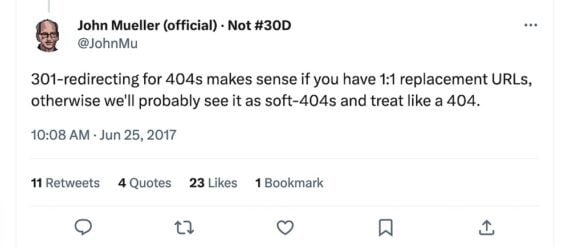
However, Google has repeatedly stated that 301 redirects may pass no link equity for anything other than 1:1 URL replacements, such as redesigns or replatforms. If the destination page differs from the original, Google may treat it as a soft 404 (i.e., a 200 OK response code for a nonexistent page) and pass no link equity. Google’s John Mueller tweeted as much in 2017.

Screenshot of John Mueller's tweet

In a 2017 tweet, Google’s John Mueller stated 301s are best for 1:1 URL replacements.

Rel=”canonical” Tag

Rel=”canonical” is a link tag to inform search engines of the original content URL without redirecting users to it. It is often used for content syndication or internal duplicate content.

Rel=”canonical” passes PageRank to the original page. But like 301 redirects, Google may ignore it and choose a representative URL based on other signals.

Nofollow Attribute

Search optimizers use the nofollow link attribute to prevent the passing of PageRank, such as for links from sponsored posts and ads. It used to be a strong directive to Google, but, like 301s and canonical tags, it is now a request.

Still, websites should include either rel=nofollow or rel=sponsored attributes for paid or affiliate links. Similarly, seek the removal of links from low-grade or spammy sites to yours, even if nofollowed.

However, nofollow meta tags (versus link attributes) apply to an entire page and are strictly honored by Google. So no equity will pass from links pointing to your site from pages with the following nofollow in the header code:


Disavow Files

Search optimizers use disavow files to prevent PageRank from passing to their sites from spammy ones. Disavow is a request to Google and is best used only if the site has received a manual link-related penalty.

Interaction To Next Paint (INP): Everything You Need To Know via @sejournal, @BrianHarnish

The SEO field has no shortage of acronyms.

From SEO to FID to INP – these are some of the more common ones you will run into when it comes to page speed.

There’s a new metric in the mix: INP, which stands for Interaction to Next Paint. It refers to how the page responds to specific user interactions and is measured by Google Chrome’s lab data and field data.

What, Exactly, Is Interaction To Next Paint?

Interaction to Next Paint, or INP, is a new Core Web Vitals metric designed to represent the overall interaction delay of a page throughout the user journey.

For example, when you click the Add to Cart button on a product page, it measures how long it takes for the button’s visual state to update, such as changing the color of the button on click.

If you have heavy scripts running that take a long time to complete, they may cause the page to freeze temporarily, negatively impacting the INP metric.

Here is the example video illustrating how it looks in real life:

Notice how the first button responds visually instantly, whereas it takes a couple of seconds for the second button to update its visual state.

How Is INP Different From FID?

The main difference between INP and First Input Delay, or FID, is that FID considers only the first interaction on the page. It measures the input delay metric only and doesn’t consider how long it takes for the browser to respond to the interaction.

In contrast, INP considers all page interactions and measures the time browsers need to process them. INP, however, takes into account the following types of interactions:

  • Any mouse click of an interactive element.
  • Any tap of an interactive element on any device that includes a touchscreen.
  • The press of a key on a physical or onscreen keyboard.

What Is A Good INP Value?

According to Google, a good INP value is around 200 milliseconds or less. It has the following thresholds:

Threshold Value Description
200 Good responsiveness.
Above 200 milliseconds and up to 500 milliseconds Moderate and needs improvement.
Above 500 milliseconds Poor responsiveness.

Google also notes that INP is still experimental and that the guidance it recommends regarding this metric is likely to change.

How Is INP Measured?

Google measures INP from Chrome browsers anonymously from a sample of the single longest interactions that happen when a user visits the page.

Each interaction has a few phases: presentation time, processing time, and input delay. The callback of associated events contains the total time involved for all three phases to execute.

If a page has fewer than 50 total interactions, INP considers the interaction with the absolute worst delay; if it has over 50 interactions, it ignores the longest interactions per 50 interactions.

When the user leaves the page, these measurements are then sent to the Chrome User Experience Report called CrUX, which aggregates the performance data to provide insights into real-world user experiences, known as field data.

What Are The Common Reasons Causing High INPs?

Understanding the underlying causes of high INPs is crucial for optimizing your website’s performance. Here are the common causes:

  • Long tasks that can block the main thread, delaying user interactions.
  • Synchronous event listeners on click events, as we saw in the example video above.
  • Changes to the DOM cause multiple reflows and repaints, which usually happens when the DOM size is too large ( > 1,500 HTML elements).

How To Troubleshoot INP Issues?

First, read our guide on how to measure CWV metrics and try the troubleshooting techniques offered there. But if that still doesn’t help you find what interactions cause high INP, this is where the “Performance” report of the Chrome (or, better, Canary) browser can help.

  • Go to the webpage you want to analyze.
  • Open DevTools of your Canary browser, which doesn’t have browser extensions (usually by pressing F12 or Ctrl+Shift+I).
  • Switch to the Performance tab.
  • Disable cache from the Network tab.
  • Choose mobile emulator.
  • Click the Record button and interact with the page elements as you normally would.
  • Stop the recording once you’ve captured the interaction you’re interested in.

Throttle the CPU by 4x using the “slowdown” dropdown to simulate average mobile devices and choose a 4G network, which is used in 90% of mobile devices when users are outdoors. If you don’t change this setting, you will run your simulation using your PC’s powerful CPU, which is not equivalent to mobile devices.

It is a highly important nuance since Google uses field data gathered from real users’ devices. You may not face INP issues with a powerful device – that is a tricky point that makes it hard to debug INP. By choosing these settings, you bring your emulator state as close as possible to the real device’s state.

Here is a video guide that shows the whole process. I highly recommend you try this as you read the article to gain experience.

What we have spotted in the video is that long tasks cause interaction to take longer and a list of JavaScript files that are responsible for those tasks.

If you expand the Interactions section, you can see a detailed breakdown of the long task associated with that interaction, and clicking on those script URLs will open JavaScript code lines that are responsible for the delay, which you can use to optimize your code.

A total of 321 ms long interaction consists of:

  • Input delay: 207 ms.
  • Processing duration: 102 ms.
  • Presentation delay: 12 ms.

Below in the main thread timeline, you’ll see a long red bar representing the total duration of the long task.

Underneath the long red taskbar, you can see a yellow bar labeled “Evaluate Script,” indicating that the long task was primarily caused by JavaScript execution.

In the first screenshot time distance between (point 1) and (point 2) is a delay caused by a red long task because of script evaluation.

What Is Script Evaluation?

Script evaluation is a necessary step for JavaScript execution. During this crucial stage, the browser executes the code line by line, which includes assigning values to variables, defining functions, and registering event listeners.

Users might interact with a partially rendered page while JavaScript files are still being loaded, parsed, compiled, and evaluated.

When a user interacts with an element (clicks, taps, etc.) and the browser is in the stage of evaluating a script that contains an event listener attached to the interaction, it may delay the interaction until the script evaluation is complete.

This ensures that the event listener is properly registered and can respond to the interaction.

In the screenshot (point 2), the 207 ms delay likely occurred because the browser was still evaluating the script that contained the event listener for the click.

This is where Total Blocking Time (TBT) comes in, which measures the total amount of time that long tasks (longer than 50 ms) block the main thread until the page becomes interactive.

If that time is long and users interact with the website as soon as the page renders, the browser may not be able to respond promptly to the user interaction.

It is not a part of CWV metrics but often correlates with high INPs. So, in order to optimize for the INP metric, you should aim to lower your TBT.

What Are Common JavaScripts That Cause High TBT?

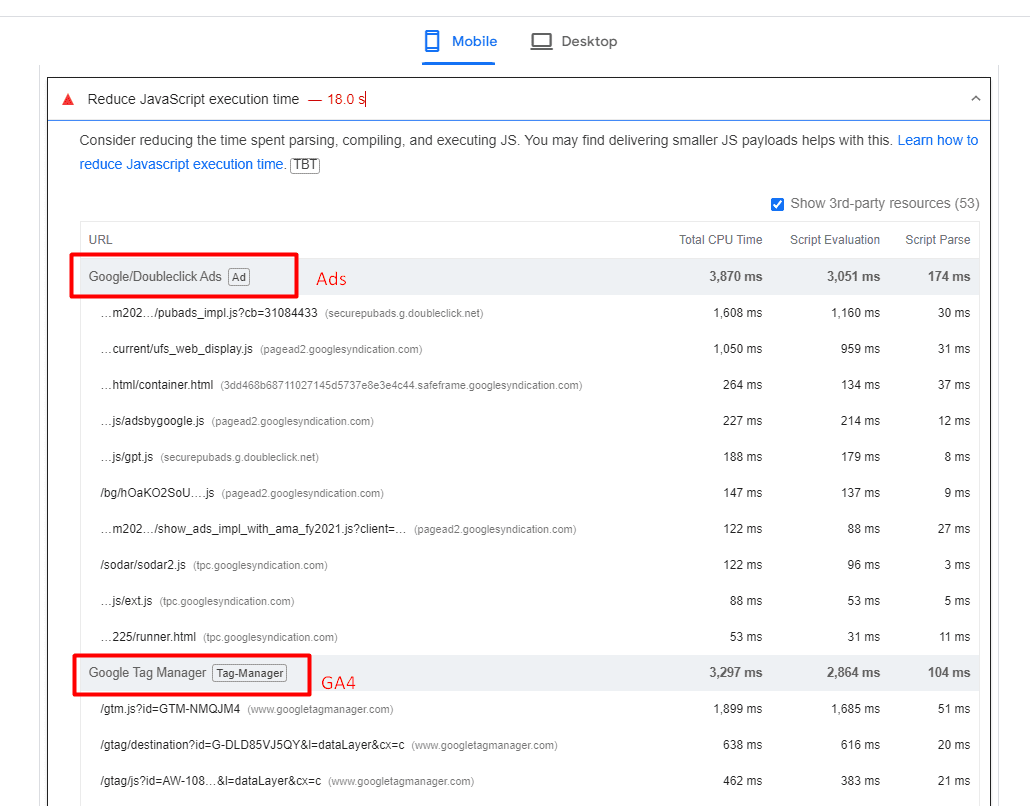
Analytics scripts – such as Google Analytics 4, tracking pixels, google re-captcha, or AdSense ads – usually cause high script evaluation time, thus contributing to TBT.

Example of website where ads and analytics scripts cause high javascript execution time.An example of a website where ads and analytics scripts cause high JavaScript execution time.

One strategy you may want to implement to reduce TBT is to delay the loading of non-essential scripts until after the initial page content has finished loading.

Another important point is that when delaying scripts, it’s essential to prioritize them based on their impact on user experience. Critical scripts (e.g., those essential for key interactions) should be loaded earlier than less critical ones.

Improving Your INP Is Not A Silver Bullet

It’s important to note that improving your INP is not a silver bullet that guarantees instant SEO success.

Instead, it is one item among many that may need to be completed as part of a batch of quality changes that can help make a difference in your overall SEO performance.

These include optimizing your content, building high-quality backlinks, enhancing meta tags and descriptions, using structured data, improving site architecture, addressing any crawl errors, and many others.

More resources:


Featured Image: BestForBest/Shutterstock

How To Use Python To Test SEO Theories (And Why You Should) via @sejournal, @andreasvoniatis

When working on sites with traffic, there is as much to lose as there is to gain from implementing SEO recommendations.

The downside risk of an SEO implementation gone wrong can be mitigated using machine learning models to pre-test search engine rank factors.

Pre-testing aside, split testing is the most reliable way to validate SEO theories before making the call to roll out the implementation sitewide or not.

We will go through the steps required on how you would use Python to test your SEO theories.

Choose Rank Positions

One of the challenges of testing SEO theories is the large sample sizes required to make the test conclusions statistically valid.

Split tests – popularized by Will Critchlow of SearchPilot – favor traffic-based metrics such as clicks, which is fine if your company is enterprise-level or has copious traffic.

If your site doesn’t have that envious luxury, then traffic as an outcome metric is likely to be a relatively rare event, which means your experiments will take too long to run and test.

Instead, consider rank positions. Quite often, for small- to mid-size companies looking to grow, their pages will often rank for target keywords that don’t yet rank high enough to get traffic.

Over the timeframe of your test, for each data point of time, for example day, week or month, there are likely to be multiple rank position data points for multiple keywords. In comparison to using a metric of traffic (which is likely to have much less data per page per date), which reduces the time period required to reach a minimum sample size if using rank position.

Thus, rank position is great for non-enterprise-sized clients looking to conduct SEO split tests who can attain insights much faster.

Google Search Console Is Your Friend

Deciding to use rank positions in Google makes using the data source a straightforward (and conveniently a low-cost) decision in Google Search Console (GSC), assuming it’s set up.

GSC is a good fit here because it has an API that allows you to extract thousands of data points over time and filter for URL strings.

While the data may not be the gospel truth, it will at least be consistent, which is good enough.

Filling In Missing Data

GSC only reports data for URLs that have pages, so you’ll need to create rows for dates and fill in the missing data.

The Python functions used would be a combination of merge() (think VLOOKUP function in Excel) used to add missing data rows per URL and filling the data you want to be inputed for those missing dates on those URLs.

For traffic metrics, that’ll be zero, whereas for rank positions, that’ll be either the median (if you’re going to assume the URL was ranking when no impressions were generated) or 100 (to assume it wasn’t ranking).

The code is given here.

Check The Distribution And Select Model

The distribution of any data represents its nature, in terms of where the most popular value (mode) for a given metric, say rank position (in our case the chosen metric) is for a given sample population.

The distribution will also tell us how close the rest of the data points are to the middle (mean or median), i.e., how spread out (or distributed) the rank positions are in the dataset.

This is critical as it will affect the choice of model when evaluating your SEO theory test.

Using Python, this can be done both visually and analytically; visually by executing this code:

ab_dist_box_plt = (

ggplot(ab_expanded.loc[ab_expanded['position'].between(1, 90)], 

aes(x = 'position')) + 

geom_histogram(alpha = 0.9, bins = 30, fill = "#b5de2b") +
geom_vline(xintercept=ab_expanded['position'].median(), color="red", alpha = 0.8, size=2) +

labs(y = '# Frequency n', x = 'nGoogle Position') + 

scale_y_continuous(labels=lambda x: ['{:,.0f}'.format(label) for label in x]) + 

#coord_flip() +

theme_light() +

theme(legend_position = 'bottom', 

axis_text_y =element_text(rotation=0, hjust=1, size = 12),

legend_title = element_blank()

)

ab_dist_box_plt

The chart shows that the distribution is positively skewedImage from author, July 2024

The chart above shows that the distribution is positively skewed (think skewer pointing right), meaning most of the keywords rank in the higher-ranked positions (shown towards the left of the red median line).

Now, we know which test statistic to use to discern whether the SEO theory is worth pursuing. In this case, there is a selection of models appropriate for this type of distribution.

Minimum Sample Size

The selected model can also be used to determine the minimum sample size required.

The required minimum sample size ensures that any observed differences between groups (if any) are real and not random luck.

That is, the difference as a result of your SEO experiment or hypothesis is statistically significant, and the probability of the test correctly reporting the difference is high (known as power).

This would be achieved by simulating a number of random distributions fitting the above pattern for both test and control and taking tests.

The code is given here.

When running the code, we see the following:

(0.0, 0.05) 0

(9.667, 1.0) 10000

(17.0, 1.0) 20000

(23.0, 1.0) 30000

(28.333, 1.0) 40000

(38.0, 1.0) 50000

(39.333, 1.0) 60000

(41.667, 1.0) 70000

(54.333, 1.0) 80000

(51.333, 1.0) 90000

(59.667, 1.0) 100000

(63.0, 1.0) 110000

(68.333, 1.0) 120000

(72.333, 1.0) 130000

(76.333, 1.0) 140000

(79.667, 1.0) 150000

(81.667, 1.0) 160000

(82.667, 1.0) 170000

(85.333, 1.0) 180000

(91.0, 1.0) 190000

(88.667, 1.0) 200000

(90.0, 1.0) 210000

(90.0, 1.0) 220000

(92.0, 1.0) 230000

To break it down, the numbers represent the following using the example below:

(39.333,: proportion of simulation runs or experiments in which significance will be reached, i.e., consistency of reaching significance and robustness.

1.0) : statistical power, the probability the test correctly rejects the null hypothesis, i.e., the experiment is designed in such a way that a difference will be correctly detected at this sample size level.

60000: sample size

The above is interesting and potentially confusing to non-statisticians. On the one hand, it suggests that we’ll need 230,000 data points (made of rank data points during a time period) to have a 92% chance of observing SEO experiments that reach statistical significance. Yet, on the other hand with 10,000 data points, we’ll reach statistical significance – so, what should we do?

Experience has taught me that you can reach significance prematurely, so you’ll want to aim for a sample size that’s likely to hold at least 90% of the time – 220,000 data points are what we’ll need.

This is a really important point because having trained a few enterprise SEO teams, all of them complained of conducting conclusive tests that didn’t produce the desired results when rolling out the winning test changes.

Hence, the above process will avoid all that heartache, wasted time, resources and injured credibility from not knowing the minimum sample size and stopping tests too early.

Assign And Implement

With that in mind, we can now start assigning URLs between test and control to test our SEO theory.

In Python, we’d use the np.where() function (think advanced IF function in Excel), where we have several options to partition our subjects, either on string URL pattern, content type, keywords in title, or other depending on the SEO theory you’re looking to validate.

Use the Python code given here.

Strictly speaking, you would run this to collect data going forward as part of a new experiment. But you could test your theory retrospectively, assuming that there were no other changes that could interact with the hypothesis and change the validity of the test.

Something to keep in mind, as that’s a bit of an assumption!

Test

Once the data has been collected, or you’re confident you have the historical data, then you’re ready to run the test.

In our rank position case, we will likely use a model like the Mann-Whitney test due to its distributive properties.

However, if you’re using another metric, such as clicks, which is poisson-distributed, for example, then you’ll need another statistical model entirely.

The code to run the test is given here.

Once run, you can print the output of the test results:

Mann-Whitney U Test Test Results

MWU Statistic: 6870.0

P-Value: 0.013576443923420183

Additional Summary Statistics:

Test Group: n=122, mean=5.87, std=2.37

Control Group: n=3340, mean=22.58, std=20.59

The above is the output of an experiment I ran, which showed the impact of commercial landing pages with supporting blog guides internally linking to the former versus unsupported landing pages.

In this case, we showed that offer pages supported by content marketing enjoy a higher Google rank by 17 positions (22.58 – 5.87) on average. The difference is significant, too, at 98%!

However, we need more time to get more data – in this case, another 210,000 data points. As with the current sample size, we can only be sure that <10% of the time>

Split Testing Can Demonstrate Skills, Knowledge And Experience

In this article, we walked through the process of testing your SEO hypotheses, covering the thinking and data requirements to conduct a valid SEO test.

By now, you may come to appreciate there is much to unpack and consider when designing, running and evaluating SEO tests. My Data Science for SEO video course goes much deeper (with more code) on the science of SEO tests, including split A/A and split A/B.

As SEO professionals, we may take certain knowledge for granted, such as the impact content marketing has on SEO performance.

Clients, on the other hand, will often challenge our knowledge, so split test methods can be most handy in demonstrating your SEO skills, knowledge, and experience!

More resources: 


Featured Image: UnderhilStudio/Shutterstock

Why Now’s The Time To Adopt Schema Markup via @sejournal, @marthavanberkel

There is no better time for organizations to prioritize Schema Markup.

Why is that so, you might ask?

First of all, Schema Markup (aka structured data) is not new.

Google has been awarding sites that implement structured data with rich results. If you haven’t taken advantage of rich results in search, it’s time to gain a higher click-through rate from these visual features in search.

Secondly, now that search is primarily driven by AI, helping search engines understand your content is more important than ever.

Schema Markup allows your organization to clearly articulate what your content means and how it relates to other things on your website.

The final reason to adopt Schema Markup is that, when done correctly, you can build a content knowledge graph, which is a critical enabler in the age of generative AI. Let’s dig in.

Schema Markup For Rich Results

Schema.org has been around since 2011. Back then, Google, Bing, Yahoo, and Yandex worked together to create the standardized Schema.org vocabulary to enable website owners to translate their content to be understood by search engines.

Since then, Google has incentivized websites to implement Schema Markup by awarding rich results to websites with certain types of markup and eligible content.

Websites that achieve these rich results tend to see higher click-through rates from the search engine results page.

In fact, Schema Markup is one of the most well-documented SEO tactics that Google tells you to do. With so many things in SEO that are backward-engineered, this one is straightforward and highly recommended.

You might have delayed implementing Schema Markup due to the lack of applicable rich results for your website. That might have been true at one point, but I’ve been doing Schema Markup since 2013, and the number of rich results available is growing.

Even though Google deprecated how-to rich results and changed the eligibility of FAQ rich results in August 2023, it introduced six new rich results in the months following – the most new rich results introduced in a year!

These rich results include vehicle listing, course info, profile page, discussion forum, organization, vacation rental, and product variants.

There are now 35 rich results that you can use to stand out in search, and they apply to a wide range of industries such as healthcare, finance, and tech.

Here are some widely applicable rich results you should consider utilizing:

  • Breadcrumb.
  • Product.
  • Reviews.
  • JobPosting.
  • Video.
  • Profile Page.
  • Organization.

With so many opportunities to take control of how you appear in search, it’s surprising that more websites haven’t adopted it.

A statistic from Web Data Commons’ October 2023 Extractions Report showed that only 50% of pages had structured data.

Of the pages with JSON-LD markup, these were the top types of entities found.

  • http://schema.org/ListItem (2,341,592,788 Entities)
  • http://schema.org/ImageObject (1,429,942,067 Entities)
  • http://schema.org/Organization (907,701,098 Entities)
  • http://schema.org/BreadcrumbList (817,464,472 Entities)
  • http://schema.org/WebSite (712,198,821 Entities)
  • http://schema.org/WebPage (691,208,528 Entities)
  • http://schema.org/Offer (623,956,111 Entities)
  • http://schema.org/SearchAction (614,892,152 Entities)
  • http://schema.org/Person (582,460,344 Entities)
  • http://schema.org/EntryPoint (502,883,892 Entities)

(Source: October 2023 Web Data Commons Report)

Most of the types on the list are related to the rich results mentioned above.

For example, ListItem and BreadcrumbList are required for the Breadcrumb Rich Result, SearchAction is required for Sitelink Search Box, and Offer is required for the Product Rich Result.

This tells us that most websites are using Schema Markup for rich results.

Even though these Schema.org types can help your site achieve rich results and stand out in search, they don’t necessarily tell search engines what each page is about in detail and help your site be more semantic.

Help AI Search Engines Understand Your Content

Have you ever seen your competitor’s sites using specific Schema.org Types that are not found in Google’s structured data documentation (i.e. MedicalClinic, IndividualPhysician, Service, etc)?

The Schema.org vocabulary has over 800 types and properties to help websites explain what the page is about. However, Google’s structured data features only require a small subset of these properties for websites to be eligible for a rich result.

Many websites that solely implement Schema Markup to get rich results tend to be less descriptive with their Schema Markup.

AI search engines now look at the meaning and intent behind your content to provide users with more relevant search results.

Therefore, organizations that want to stay ahead should use more specific Schema.org types and leverage appropriate properties to help search engines better understand and contextualize their content. You can be descriptive with your content while still achieving rich results.

For example, each type (e.g. Article, Person, etc.) in the Schema.org vocabulary has 40 or more properties to describe the entity.

The properties are there to help you fully describe what the page is about and how it relates to other things on your website and the web. In essence, it’s asking you to describe the entity or topic of the page semantically.

The word ‘semantic’ is about understanding the meaning of language.

Note that the word “understanding” is part of the definition. Funny enough, in October 2023, John Mueller at Google released a Search Update video. In this six-minute video, he leads with an update on Schema Markup.

For the first time, Mueller described Schema Markup as “a code you can add to your web pages, which search engines can use to better understand the content. ”

While Mueller has historically spoken a lot about Schema Markup, he typically talked about it in the context of rich result eligibility. So, why the change?

This shift in thinking about Schema Markup for enhanced search engine understanding makes sense. With AI’s growing role and influence in search, we need to make it easy for search engines to consume and understand the content.

Take Control Of AI By Shaping Your Data With Schema Markup

Now, if being understood and standing out in search is not a good enough reason to get started, then doing it to help your enterprise take control of your content and prepare it for artificial intelligence is.

In February 2024, Gartner published a report on “30 Emerging Technologies That Will Guide Your Business Decisions,”  highlighting generative AI and knowledge graphs as critical emerging technologies companies should invest in within the next 0-1 years.

Knowledge graphs are collections of relationships between entities defined using a standardized vocabulary that enables new knowledge to be gained by way of inferencing.

Good news! When you implement Schema Markup to define and connect the entities on your site, you are creating a content knowledge graph for your organization.

Thus, your organization gains a critical enabler for generative AI adoption while reaping its SEO benefits.

Learn more about building content knowledge graphs in my article, Extending Your Schema Markup From Rich Results to Knowledge Graphs.

We can also look at other experts in the knowledge graph field to understand the urgency of implementing Schema Markup.

In his LinkedIn post, Tony Seale, Knowledge Graph Architect at UBS in the UK, said,

“AI does not need to happen to you; organizations can shape AI by shaping their data.

It is a choice: We can allow all data to be absorbed into huge ‘data gravity wells’ or we can create a network of networks, each of us connecting and consolidating our data.”

The “networks of networks” Seale refers to is the concept of knowledge graphs – the same knowledge graph that can be built from your web data using semantic Schema Markup.”

The AI revolution has only just begun, and there is no better time than now to shape your data, starting with your web content through the implementation of Schema Markup.

Use Schema Markup As The Catalyst For AI

In today’s digital landscape, organizations must invest in new technology to keep pace with the evolution of AI and search.

Whether your goal is to stand out on the SERP or ensure your content is understood as intended by Google and other search engines, the time to implement Schema Markup is now.

With Schema Markup, SEO pros can become heroes, enabling generative AI adoption through content knowledge graphs while delivering tangible benefits, such as increased click-through rates and improved search visibility.

More resources: 


Featured Image by author

AI Overviews: Initial Tests and Studies

Google went public with AI Overviews in late May. I’ve been tracking queries and third-party studies since then.

AI Overviews occasionally produces incorrect answers. An account on X, Goog Enough, curates some of these errors. To its credit, Google has fixed many glitches, mainly by limiting the occurrence of Overviews and excluding user-generated content from the sources.

Here’s what we know thus far in AI Overview’s rollout.

15% of Queries

An article last week in Search Engine Land cited a study from BrightEdge, the search engine optimization firm, that found Overviews now shows for just 15% of queries. This aligns with my observations for queries I am following. Others in the industry have similar experiences.

Public AI Overviews only show for U.S.-based searchers signed in to Google accounts. Hence the visibility is likely even lower.

Labs vs. Public

Searchers who signed up for the Labs version of Search Generative Experience — the predecessor of AI Overviews — may see Labs-only results. To access public results, those searchers must opt out of Labs or create a Google profile in Chrome to test both.

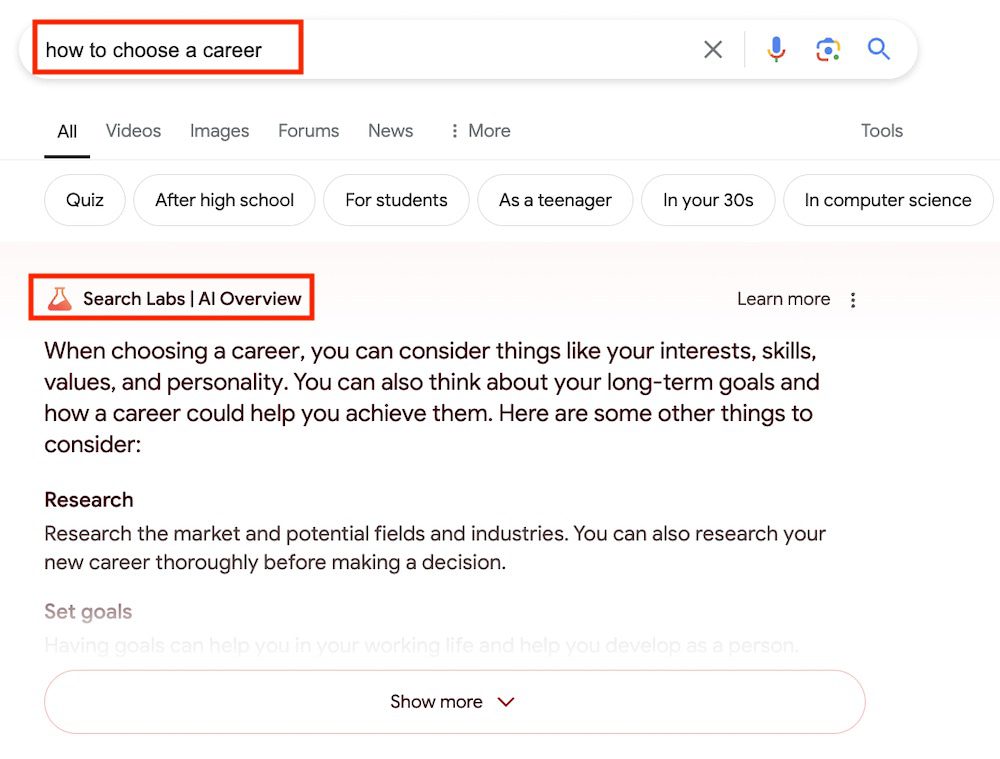
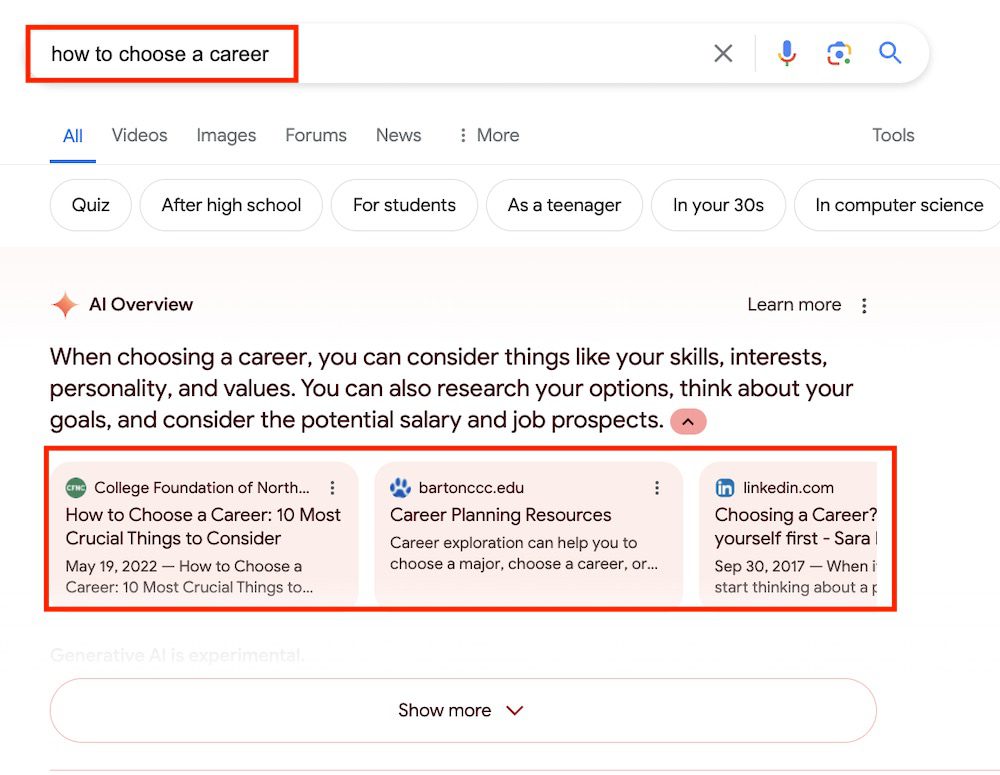
I tested the query “how to choose a career.” When logged-in to my Labs profile, I see an Overview with the notation “Search Labs” above it.

Search Labs participants see a unique notation above the Overview. Click image to enlarge.

When using my non-Labs profile, I see the same AI Overviews with visible sources.

Public, non-Labs searchers see sources below the Overview. Click image to enlarge.

Optimizing for AI Overviews

In testing SGE results before the public rollout of Overviews, we knew getting a site listed in an AI answer wasn’t too difficult. From Google’s 2023 SGE patent:

  • AI answers in Google summarize existing search results
  • Google generates references (i.e., links in the answers) after creating the summaries.

The relative ease apparently remains. A simple test by search optimizer Cyrus Shepard immediately generated a link in AI Overviews. He first identified a query that produced an Overview for which his page ranked organically with a featured snippet. He then updated that page with a paragraph closely matching the text in the Overview. A link to his page appeared right away.

However, Shepard listed two caveats:

  • His page lost the featured snippet.
  • The link in the Overview disappeared quickly.

The link disappeared too soon for meaningful conclusions, such as the impact on featured snippets. However, the rapid change — in and then out of Overviews — suggests the fluidity of AI answers and caution in implementing new optimization tactics. Google is changing AI Overviews seemingly daily. While short-lived gains are possible, there’s too little data for long-term action.

How SEO Experts Can Utilize ChatGPT For BigQuery With Examples via @sejournal, @vahandev

AI is shaping every field by making skills (such as coding or data visualization) accessible to everyone, which weren’t available in the past.

An AI operator who can run the right prompts can perform low- and medium-level difficulty tasks, allowing more focus on strategic decision-making.

In this guide, we will walk you through step by step how to use AI chatbots with ChatGPT as an example to run complex BigQuery queries for your SEO reporting needs.

We will review two examples:

It will also give you an overall idea of how you can use chatbots to reduce the burden when running SEO reports.

Why Do You Need To Learn BigQuery?

SEO tools like Google Search Console or Google Analytics 4 have accessible user interfaces you can use to access data. But often, they limit what you can do and show incomplete data, which is usually called data sampling.

In GSC, this happens because the tool omits anonymized queries and limits table rows to up to 1,000 rows.

Screenshot from GSC Screenshot from Google Search Console, May 2024

By using BigQuery, you can solve that problem and run any complex reports you want, eliminating the data sampling issue that occurs quite often when working with large websites.

(Alternatively, you may try using Looker Studio, but the purpose of this article is to illustrate how you can operate ChatGPT for BigQuery.)

For this article, we assume you have already connected your GSC and GA4 accounts to BigQuery. If you haven’t done it yet, you may want to check our guides on how to do it:

SQL Basics

If you know Structured Query Language (SQL), you may skip this section. But for those who don’t, here is a quick reference to SQL statements:

Statement Description
SELECT Retrieves data from tables
INSERT Inserts new data into a table
UNNEST Flattens an array into a set of rows
UPDATE Updates existing data within a table
DELETE Deletes data from a table
CREATE Creates a new table or database
ALTER Modifies an existing table
DROP Deletes a table or a database.

The conditions we will be using so you can familiarize yourself:

Condition Description
WHERE Filters records for specific conditions
AND Combines two or more conditions where all conditions must be true
OR Combines two or more conditions where at least one condition must be true
NOT Negates a condition
LIKE Searches for a specified pattern in a column.
IN Checks if a value is within a set of values
BETWEEN Select values within a given range
IS NULL Checks for null values
IS NOT NULL Checks for non-null values
EXISTS Checks if a subquery returns any records

Now, let’s dive into examples of how you can use BigQuery via ChatGPT.

1. How To Analyze Traffic Decline Because Of Google Algorithm Impact 

If you have been affected by a Google algorithm update, the first thing you should do is run reports on affected pages and analyze why you have been impacted.

Remember, the worst thing you can do is start changing something on the website right away in panic mode. This may cause fluctuations in search traffic and make analyzing the impact even harder.

If you have fewer pages in the index, you may find using GSC UI data satisfactory for analyzing your data, but if you have tens of thousands of pages, it won’t let you export more than 1,000 rows (either pages or queries) of data.

Say you have a week of data since the algorithm update has finished rolling out and want to compare it with the previous week’s data. To run that report in BigQuery, you may start with this simple prompt:

Imagine you are a data analyst experienced in Google Analytics 4 (GA4), Google Search Console, SQL, and BigQuery.
Your task is to generate an SQL query to compare 'WEB' Search Console data for the periods '2024-05-08' to '2024-05-20' and '2024-04-18' to '2024-04-30'. 
Extract the total clicks, impressions, and average position for each URL for each period. 
Additionally, calculate the differences in these metrics between the periods for each URL 
(where average position should be calculated as the sum of positions divided by the sum of impressions).

Details:

BigQuery project name: use_your_bigquery_projectname
Dataset name: searchconsole
Table name: searchdata_url_impression
Please provide the SQL query that meets these requirements.

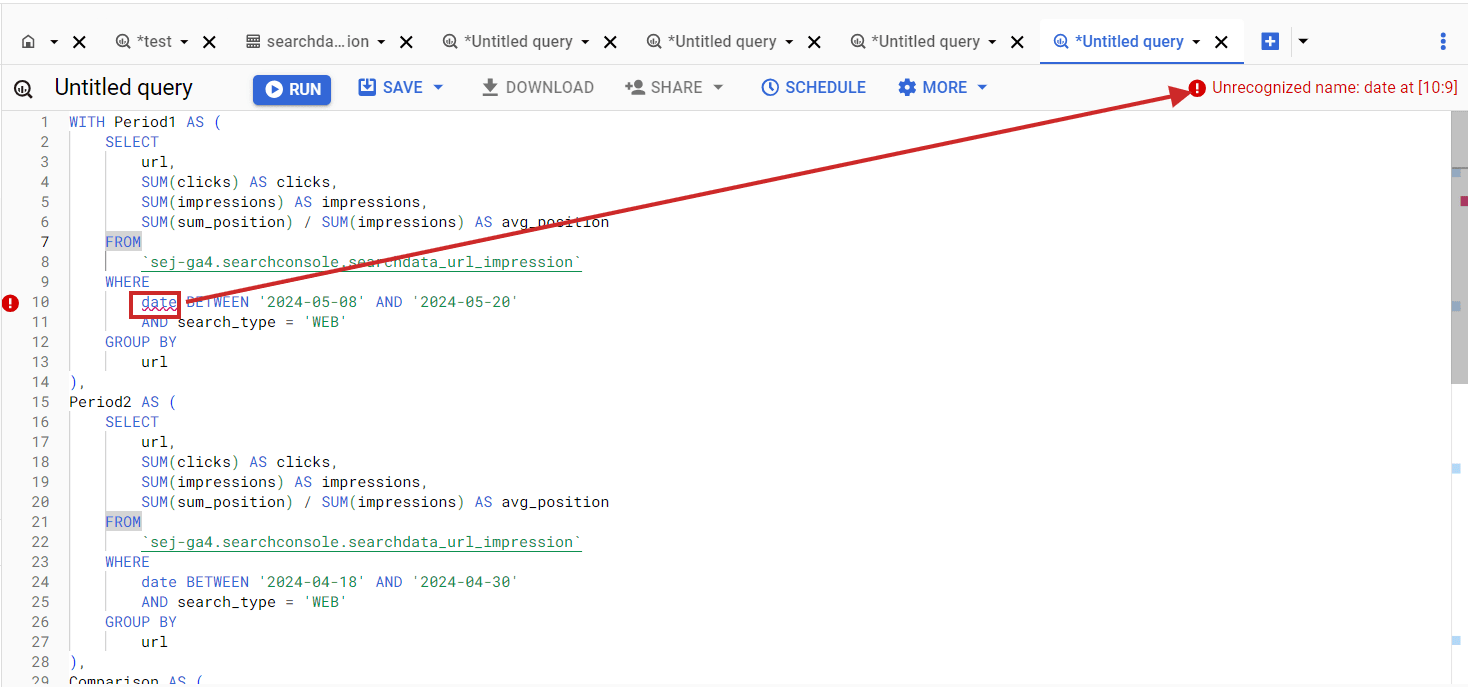
Once you get an SQL code, copy and paste it into the BigQuery SQL editor, but I bet the initial code you will get will have errors. For example, table column names may not match what is in your BigQuery dataset.

Error in BigQuery SQL when column name doesn't match the dataset column.Error in BigQuery SQL when column name doesn’t match the dataset column.

Things like this happen quite often when performing coding tasks via ChatGPT. Now, let’s dive into how you can quickly fix issues like this.

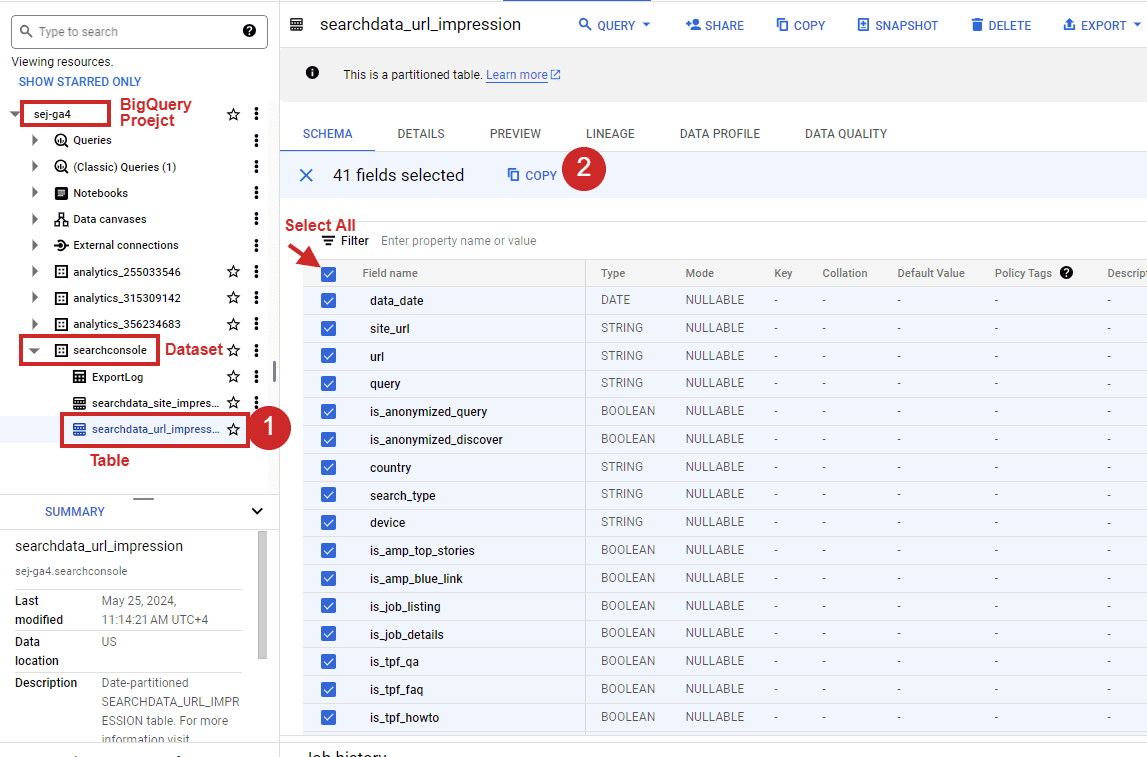
Simply click on your dataset in the left-right panel, select all columns on the right side, and click Copy as Table.

How to select all columns of table in bigquery.How to select all columns of the table in BigQuery.

Once you have it, just copy and paste it as a follow-up prompt and hit enter.

Generate SQL again by taking into account that my table schema is as follows : 
"fullname mode type description
data_date DATE 
site_url STRING 
url STRING 
query STRING 
is_anonymized_query BOOLEAN 
is_anonymized_discover BOOLEAN 
country STRING 
search_type STRING 
device STRING 
is_amp_top_stories BOOLEAN 
is_amp_blue_link BOOLEAN 
is_job_listing BOOLEAN 
is_job_details BOOLEAN 
is_tpf_qa BOOLEAN 
is_tpf_faq BOOLEAN 
is_tpf_howto BOOLEAN 
is_weblite BOOLEAN 
is_action BOOLEAN 
is_events_listing BOOLEAN 
is_events_details BOOLEAN 
is_search_appearance_android_app BOOLEAN 
is_amp_story BOOLEAN 
is_amp_image_result BOOLEAN 
is_video BOOLEAN 
is_organic_shopping BOOLEAN 
is_review_snippet BOOLEAN 
is_special_announcement BOOLEAN 
is_recipe_feature BOOLEAN 
is_recipe_rich_snippet BOOLEAN 
is_subscribed_content BOOLEAN 
is_page_experience BOOLEAN 
is_practice_problems BOOLEAN 
is_math_solvers BOOLEAN 
is_translated_result BOOLEAN 
is_edu_q_and_a BOOLEAN 
impressions INTEGER 
clicks INTEGER 
sum_position INTEGER 
is_product_snippets BOOLEAN 
is_merchant_listings BOOLEAN 
is_learning_videos BOOLEAN "

This will fix the generated SQL according to the GSC table structure as follows:

WITH period1 AS (
 SELECT 
   url,
   SUM(clicks) AS clicks,
   SUM(impressions) AS impressions,
   IFNULL(SUM(sum_position) / NULLIF(SUM(impressions), 0), 0) AS avg_position
 FROM 
   `use_your_bigquery_projectname.searchconsole.searchdata_url_impression`
 WHERE 
   data_date BETWEEN '2024-05-08' AND '2024-05-20' 
 AND search_type = 'WEB'
  GROUP BY 
  url
), 
period2 AS (
 SELECT 
  url,
  SUM(clicks) AS clicks,
  SUM(impressions) AS impressions,
  IFNULL(SUM(sum_position) / NULLIF(SUM(impressions), 0), 0) AS avg_position
 FROM 
  `use_your_bigquery_projectname.searchconsole.searchdata_url_impression`
  WHERE 
  data_date BETWEEN '2024-04-18' AND '2024-04-30'
 AND search_type = 'WEB'
 GROUP BY 
 url
),
comparison AS (
 SELECT
  COALESCE(p1.url, p2.url) AS url,
  IFNULL(p1.clicks, 0) AS clicks_period1,
  IFNULL(p2.clicks, 0) AS clicks_period2,
  IFNULL(p1.impressions, 0) AS impressions_period1,
  IFNULL(p2.impressions, 0) AS impressions_period2,
  IFNULL(p1.avg_position, 0) AS avg_position_period1,
  IFNULL(p2.avg_position, 0) AS avg_position_period2,
  IFNULL(p1.clicks, 0) - IFNULL(p2.clicks, 0) AS clicks_diff,
  IFNULL(p1.impressions, 0) - IFNULL(p2.impressions, 0) AS impressions_diff,
  IFNULL(p1.avg_position, 0) - IFNULL(p2.avg_position, 0) AS avg_position_diff
 FROM
  period1 p1
 FULL OUTER JOIN
   period2 p2
 ON
  p1.url = p2.url
)
SELECT 
 url,
 clicks_period1,
 clicks_period2,
 clicks_diff,
 impressions_period1,
 impressions_period2,
 impressions_diff,
 avg_position_period1,
 avg_position_period2,
 avg_position_diff
FROM 
 comparison
ORDER BY 
 url;

Now, run it and enjoy the data either by exporting it into the CSV or Google Sheets.

How to run SQL in BigQueryHow to run SQL in BigQuery.

In case you have millions of URLs, you may not be able to work in Google Sheets or CSV export because the data is too big. Plus, those apps have limitations on how many rows you can have in a single document. In that case, you can save results as a BigQuery table and connect to it with Looker Studio to view the data.

But please remember that BigQuery is a freemium service. It is free up to 1 TB of processed query data a month. Once you exceed that limit, your credit card will be automatically charged based on your usage.

That means if you connect your BigQuery to Looker Studio and browse your data there, it will count against your billing every time you open your Looker dashboard.

That is why, when exports have a few tens of thousands or hundreds of thousands of rows, I like using Google Sheets. I can easily connect it to Looker Studio for data visualization and blending, and this will not count against my billing.

If you have ChatGPT Plus, you can simply use this custom GPT I’ve made, which takes into account table schemas for GA4 and Search Console. In the above guide, I assumed you were using the free version, and it illustrated how you can use ChatGPT overall for running BigQuery.

In case you want to know what is in that custom GPT, here is the screenshot of the backend.

Custom GPT with bigQuery table schemasCustom GPT with BigQuery table schemas.

Nothing complicated – you just need to copy tables from BigQuery as JSON in the step explained above and upload them into the custom GPT so it can refer to the table structure. Additionally, there is a prompt that asks GPT to refer to the JSON files attached when composing queries.

This is another illustration of how you can use ChatGPT to perform tasks more effectively, eliminating repetitive tasks.

If you need to work with another dataset (different from GA4 or GSC) and you don’t know SQL, you can upload the table schema from BigQuery into ChatGPT and compose SQLs specific to that table structure. Easy, isn’t it?

As homework, I suggest you analyze which queries have been affected by AI Overviews.

There is no differentiator in the Google Search Console table to do that, but you can run a query to see which pages didn’t lose ranking but had a significant CTR drop after May 14, 2024, when Google introduced AI Overviews.

You can compare the two-week period after May 14th with the two weeks prior. There is still a possibility that the CTR drop happened because of other search features, like a competitor getting a Featured Snippet, but you should find enough valid cases where your clicks were affected by AI Overviews (formerly Search Generative Experience or “SGE”).

2. How To Combine Search Traffic Data With Engagement Metrics From GA4 

When analyzing search traffic, it is vital to understand how much users engage with content because user engagement signals are ranking factors. Please note that I don’t mean the exact metrics defined in GA4.

However, GA4’s engagement metrics – such as “average engagement time per session,” which is the average time your website was in focus in a user’s browser – may hint at whether your articles are good enough for users to read.

If it is too low, it means your blog pages may have an issue, and users don’t read them.

If you combine that metric with Search Console data, you may find that pages with low rankings also have a low average engagement time per session.

Please note that GA4 and GSC have different attribution models. GA4 uses last data-driven or last-click attribution models, which means if one visits from Google to an article page once and then comes back directly two more times, GA4 may attribute all three visits to Google, whereas GSC will report only one.

So, it is not 100% accurate and may not be suitable for corporate reporting, but having engagement metrics from GA4 alongside GSC data provides valuable information to analyze your rankings’ correlations with engagement.

Using ChatGPT with BigQuery requires a little preparation. Before we jump into the prompt, I suggest you read how GA4 tables are structured, as it is not as simple as GSC’s tables.

It has an event_params column, which has a record type and contains dimensions like page_location, ga_session_id, and engagement_time_msec.  It tracks how long a user actively engages with your website.

event_params key engagement_time_msec is not the total time on the site but the time spent on specific interactions (like clicking or scrolling), when each interaction adds a new piece of engagement time. It is like adding up all the little moments when users are actively using your website or app.

Therefore, if we sum that metric and average it across sessions for the pages, we obtain the average engagement time per session.

Now, once you understand engagement_time_msec , let’s ask ChatGPT to help us construct a query that pulls GA4 “average engagement time per session” for each URL and combines it with GSC search performance data of articles.

The prompt I would use is:

Imagine you are a data analyst experienced in Google Analytics 4 (GA4), Google Search Console, SQL, and BigQuery.
Compose a SQL query that pulls the following data from Google Search Console for each URL for the previous 7 days, excluding the current day:

1. Clicks,
2. Impressions,
3. Average position (calculated as the sum of positions divided by the sum of impressions).

From GA4 BigQuery table unnest from event_params ga_session_id, engagement_time_msec and page_location.
Select only rows which have engagement_time_msec set as not null group all sessions with the same IDs and page_location and SUM engagement_time_msec and devides to SUM of sessions number 

Join GA4 and Google Search Console data by URLs for the same period. 
Additonally Optimize the query to pull from GA4's table partitions and not query the entire table.

Details:
1. BigQuery project name: use_your_bigquery_projectname 
2. GA4 dataset name: use_your_ga4_bigquery_dataset_name
3. GA4 table name: use_your_ga4_bigquery_table_name_under_dataset
3. Google Search Console dataset name: use_your_gsc_bigquery_table_name_under_dataset
3. Google Search Console table name: use_your_gsc_bigquery_table_name_under_dataset
4. Here is BigQuery tables schemas for GA4: [copy table schema here]
5. Here is BigQuery tables schemas for Google Search Console: [copy table schema here]


Once I copied and pasted into BigQuery, it gave me results with “average engagement time per session” being all nulls. So, apparently, ChatGPT needs more context and guidance on how GA4 works.

I’ve helped to provide additional knowledge as a follow-up question from GA4’s official documentation on how it calculates engagement_time_msec. I copied and pasted the document into the follow-up prompt and asked to refer to that knowledge when composing the query, which helped. (If you get any syntax error, just copy/paste it as a follow-up question and ask to fix it.)

As a result of 15 minutes of effort, I got the right SQL:


WITH
-- Step 1: Filter GA4 data for the last 7 days and unnest event_params
ga4_data AS (
  SELECT
    event_date,
    event_timestamp,
    (SELECT value.int_value FROM UNNEST(event_params) WHERE key = 'ga_session_id') AS ga_session_id,
    (SELECT value.int_value FROM UNNEST(event_params) WHERE key = 'engagement_time_msec') AS engagement_time_msec,
    (SELECT value.string_value FROM UNNEST(event_params) WHERE key = 'page_location') AS page_location
  FROM
    `your_bq_project_name.your_bq_ga4_dataset.events_*`
  WHERE
     _TABLE_SUFFIX BETWEEN FORMAT_DATE('%Y%m%d', DATE_SUB(CURRENT_DATE(), INTERVAL 8 DAY))
    AND FORMAT_DATE('%Y%m%d', DATE_SUB(CURRENT_DATE(), INTERVAL 1 DAY))
    AND (SELECT value.int_value FROM UNNEST(event_params) WHERE key = 'engagement_time_msec') IS NOT NULL
),

-- Step 2: Aggregate GA4 data by session ID and page location
aggregated_ga4_data AS (
  SELECT
    page_location,
    SUM(engagement_time_msec/1000) / NULLIF(COUNT(DISTINCT ga_session_id), 0) AS avg_engagement_time_msec
  FROM
    ga4_data
  GROUP BY
    page_location
),
-- Step 3: Filter GSC data for the last 7 days and select urls which had clicks
gsc_data AS (
  SELECT
    url,
    SUM(clicks) AS clicks,
    SUM(impressions) AS impressions,
    SUM(sum_position) / SUM(impressions) AS avg_position
  FROM
    `your_bq_project_name.searchconsole.searchdata_url_impression`
  WHERE
    data_date BETWEEN DATE_SUB(CURRENT_DATE(), INTERVAL 8 DAY) AND DATE_SUB(CURRENT_DATE(), INTERVAL 1 DAY)
    and 
    clicks > 0
  GROUP BY
    url
)

-- Joining Google Search Console data with GA4 data by page_location and url 
SELECT
  gsc.url,
  gsc.clicks,
  gsc.impressions,
  gsc.avg_position,
  ga4.avg_engagement_time_msec
FROM
  gsc_data AS gsc
LEFT JOIN
  aggregated_ga4_data AS ga4
ON
  gsc.url = ga4.page_location
ORDER BY
  gsc.clicks DESC;

This pulls GSC data with engagement metrics from GA4.

Search Console combined data with GA4Search Console combined data with GA4

Please note that you might notice discrepancies between the numbers in the GA4 UI and the data queried from BigQuery tables.

This happens because GA4 focuses on “Active Users” and groups rare data points into an “(other)” category, while BigQuery shows all raw data. GA4 also uses modeled data for gaps when consent isn’t given, which BigQuery doesn’t include.

Additionally, GA4 may sample data for quicker reports, whereas BigQuery includes all data. These variations mean GA4 offers a quick overview, while BigQuery provides detailed analysis. Learn a more detailed explanation of why this happens in this article.

Perhaps you may try modifying queries to include only active users to bring results one step closer to GA4 UI.

Alternatively, you can use Looker Studio to blend data, but it has limitations with very large datasets. BigQuery offers scalability by processing terabytes of data efficiently, making it ideal for large-scale SEO reports and detailed analyses.

Its advanced SQL capabilities allow complex queries for deeper insights that Looker Studio or other dashboarding tools cannot match.

Conclusion

Using ChatGPT’s coding abilities to compose BigQuery queries for your reporting needs elevates you and opens new horizons where you can combine multiple sources of data.

This demonstrates how ChatGPT can streamline complex data analysis tasks, enabling you to focus on strategic decision-making.

At the same time, these examples taught us that humans absolutely need to operate AI chatbots because they may hallucinate or produce wrong answers.

More resources: 


Featured Image: NicoElNino/Shutterstock