WordPress Elementor Widgets Add-On Vulnerability via @sejournal, @martinibuster

A WordPress plugin add-on for the popular Elementor page builder recently patched a vulnerability affecting over 200,000 installations. The exploit, found in the Jeg Elementor Kit plugin, allows authenticated attackers to upload malicious scripts.

Stored Cross-Site Scripting (Stored XSS)

The patch fixed an issue that could lead to a Stored Cross-Site Scripting exploit that allows an attacker to upload malicious files to a website server where it can be activated when a user visits the web page. This is different from a Reflected XSS which requires an admin or other user to be tricked into clicking a link that initiates the exploit. Both kinds of XSS can lead to a full-site takeover.

Insufficient Sanitization And Output Escaping

Wordfence posted an advisory that noted the source of the vulnerability is in lapse in a security practice known as sanitization which is a standard requiring a plugin to filter what a user can input into the website. So if an image or text is what’s expected then all other kinds of input are required to be blocked.

Another issue that was patched involved a security practice called Output Escaping which is a process similar to filtering that applies to what the plugin itself outputs, preventing it from outputting, for example, a malicious script. What it specifically does is to convert characters that could be interpreted as code, preventing a user’s browser from interpreting the output as code and executing a malicious script.

The Wordfence advisory explains:

“The Jeg Elementor Kit plugin for WordPress is vulnerable to Stored Cross-Site Scripting via SVG File uploads in all versions up to, and including, 2.6.7 due to insufficient input sanitization and output escaping. This makes it possible for authenticated attackers, with Author-level access and above, to inject arbitrary web scripts in pages that will execute whenever a user accesses the SVG file.”

Medium Level Threat

The vulnerability received a Medium Level threat score of 6.4 on a scale of 1 – 10. Users are recommended to update to Jeg Elementor Kit version 2.6.8 (or higher if available).

Read the Wordfence advisory:

Jeg Elementor Kit <= 2.6.7 – Authenticated (Author+) Stored Cross-Site Scripting via SVG File

Featured Image by Shutterstock/Cast Of Thousands

WordPress Translation Plugin Vulnerability Affects +1 Million Sites via @sejournal, @martinibuster

A critical vulnerability was discovered in the WPML WordPress plugin, affecting over a million installations. The vulnerability allows an authenticated attacker to perform remote code execution, potentially leading to a total site takeover. It is listed as rated 9.9 out of 10 by the Common Vulnerabilities and Exposures (CVE) organization.

WPML Plugin Vulnerability

The plugin vulnerability is due to a lack of a security check called sanitization, a process for filtering user input data to protect against the upload of malicious files. Lack of sanitization in this input makes the plugin vulnerable to a Remote Code Execution.

The vulnerability exists within a function of a shortcode for creating a custom language switcher. The function renders the content from the shortcode into a plugin template but without sanitizing the data, making it vulnerable to code injection.

The vulnerability affects all versions of the WPML WordPress plugin up to and including 4.6.12.

Timeline Of Vulnerability

Wordfence discovered the vulnerability in late June and promptly notified the publishers of WPML which remained unresponsive for about a month and a half, confirming response on August 1, 2024.

Users of the paid version of Wordfence received protection eight days after discovery of the vulnerability, the free users of Wordfence received protection on July 27th.

Users of the WPML plugin who did not use either version of Wordfence did not receive protection from WPML until August 20th, when the publishers finally issued a patch in version 4.6.13.

Plugin Users Urged To Update

Wordfence urges all users of the WPML plugin to make sure they are using the latest version of the plugin, WPML 4.6.13.

They wrote:

“We urge users to update their sites with the latest patched version of WPML, version 4.6.13 at the time of this writing, as soon as possible.”

Read more about the vulnerability at Wordfence:

1,000,000 WordPress Sites Protected Against Unique Remote Code Execution Vulnerability in WPML WordPress Plugin

Featured Image by Shutterstock/Luis Molinero

WordPress Cache Plugin Vulnerability Affects +5 Million Websites via @sejournal, @martinibuster

Up to 5 million installations of the LiteSpeed Cache WordPress plugin are vulnerable to an exploit that allows hackers to gain administrator rights and upload malicious files and plugins

The vulnerability was first reported to Patchstack, a WordPress security company, which notified the plugin developer and waited until the vulnerability was patched before making a public announcement.

Patchstack founder Oliver Sild discussed this with Search Engine Journal and provided background information about how the vulnerability was discovered and how serious it is.

Sild shared:

“It was reported to through the Patchstack WordPress Bug Bounty program which offers bounties to security researchers who report vulnerabilities. The report qualified for a $14,400 USD bounty. We work directly with both the researcher and the plugin developer to ensure vulnerabilities get patched properly before public disclosure.

We’ve monitored the WordPress ecosystem for possible exploitation attempts since the beginning of August and so far there are no signs of mass-exploitation. But we do expect this to become exploited soon though.”

Asked how serious this vulnerability is, Sild responded:

“It’s a critical vulnerability, made particularly dangerous because of its large install base. Hackers are definitely looking into it as we speak.”

What Caused The Vulnerability?

According to Patchstack, the compromise arose because of a plugin feature that creates a temporary user that crawls the site in order to then create a cache of the web pages. A cache is a copy of web page resources that stored and delivered to browsers when they request a web page. A cache speeds up web pages by reducing the amount of times a server has to fetch from a database to serve web pages.

The technical explanation by Patchstack:

“The vulnerability exploits a user simulation feature in the plugin which is protected by a weak security hash that uses known values.

…Unfortunately, this security hash generation suffers from several problems that make its possible values known.”

Recommendation

Users of the LiteSpeed WordPress plugin are encouraged to update their sites immediately because hackers may be hunting down WordPress sites to exploit. The vulnerability was fixed in version 6.4.1 on August 19th.

Users of the Patchstack WordPress security solution receive instant mitigation of vulnerabilities. Patchstack is available in a free version and the paid version costs as little as $5/month.

Read more about the vulnerability:

Critical Privilege Escalation in LiteSpeed Cache Plugin Affecting 5+ Million Sites

Featured Image by Shutterstock/Asier Romero

Free WordPress AI Writing Assistant By Jetpack via @sejournal, @martinibuster

Jetpack announced a free WordPress writing tool called Write Brief With AI that improves the clarity and conciseness of content. The AI writing assistant is based on an internal tool used at Automattic and is now available without limitations regardless of whether a user is subscribed to Jetpack AI Assistant or not.

Write Brief With AI Is Free

The new AI tool started as an internal writing tool used at Automattic, the company behind WordPress.com, Jetpack, WooCommerce, and other companies. They are now integrating as part of the Jetpack AI plugin. Although Jetpack AI is a premium plugin (with a limited free trial), the functionality and usage of Write Brief with AI is available to all users both free and paid.

What It Does

The new Jetpack AI writing tool does three important things that can improve engagement and the overall quality of the content.

  1. It measures the readability of the text.
  2. Flags long-winded sentences.
  3. Highlights words that convey uncertainty.

Importance Of Readability

Readability and a direct writing style are important for clearly expressing the content’s topic, which can indirectly benefit SEO, conversions, and engagement. This is because clarity and conciseness make the topic more evident and easily understood by search algorithms.

Why Removing Uncertainty Is Important

Regarding flagging words that sound uncertain, that has the effect of encouraging the writer to consider revisions that make the content more definitive and confident.

Here are examples of how confident writing improves content:

Example 1

This sentence expresses uncertainty:

I think we should consider expanding our marketing efforts.

This improved version of the same sentence is more confident:

We should expand our marketing efforts.

Example 2

This sentence is unconfident:

Maybe we should review the budget before making a decision.

This sentence is direct and definitive:

We should review the budget before making a decision.

The above examples show how improving directness and making sentences more decisive removes a level of ambiguity and makes them more understandable.

Will that help a web page rank better? Communicating without ambiguity makes it easy for search-related algorithms to understand content which in turn makes it easier to rank for the respective topic.

Embedded Within The WordPress Editor

The editor is located within the WordPress editor. Blocks must be enabled because it won’t work within the Classic Editor. Additionally, the functionality is turned off by default and has to be activated by toggling on within the AI Assistant Settings sidebar.

Should You Try Write Brief With AI?

If your site is already using blocks then it may be convenient to give the new writing assistant a try. The tool is focused on improving content according to best practices but not actually doing the writing itself. That’s a good use of AI because it preserves the authenticity of human authored content.

Download Jetpack and activate the free trial of the AI Assistant. Write Brief With AI is switched off by default, so toggle it on in the AI Assistant settings.  While AI Assistant is limited in how many times it can be used, Write Brief With AI is in Beta and can be used without limitations.

Download Jetpack here:

Jetpack by Automattic

Learn More About Write Brief With AI

Read more at the official WordPress.com announcement:

Clearer Writing at Your Fingertips: Introducing Write Brief with AI (Beta)

Read the documentation on requirements, activation instructions and how to use it:

Create Better Content with Jetpack AI

Featured Image by Shutterstock/Velishchuk Yevhen

Why WordPress 6.6.1 Was Flagged For Trojan Malware via @sejournal, @martinibuster

Multiple user reports have surfaced warning that the latest version of WordPress is triggering trojan alerts and at least one person reported that a web host locked down a website because of the file. What really happened turned into a learning experience.

Antivirus Flags Trojan In Official WordPress 6.6.1 Download

The first report was filed in the official WordPress.org help forums where a user reported that the native antivirus in Windows 11 (Windows Defender) flagged the WordPress zip file they had downloaded from WordPress contained a trojan.

This is the text of the original post:

“Windows Defender shows that the latest wordpress-6.6.1zip has Trojan:Win32/Phish!MSR virus when i try downloading from the official wp site

it shows the same virus notification when updating from within the WordPress dashboard of my site

Is this a false positive?”

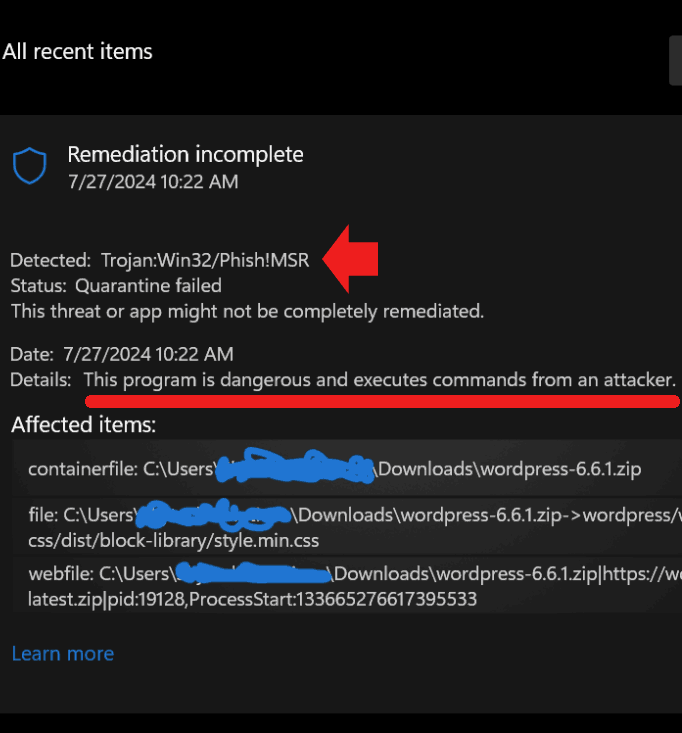
They also posted screenshots of the trojan warning that listed the status as “Quarantine failed” and that WordPress zip file of version 6.6.1 “is dangerous and executes commands from an attacker.”

Screenshot Of Windows Defender Warning

Screenshot of alert to a Trojan virus file in WordPress 6.6.1

Someone else affirmed that they were also having the same issue, noting that a string of code within one of the CSS files (style code that governs the look of a website, including colors) was the culprit that was triggering the warning.

They posted:

“I am experiencing the same issue. It seems to occur with the file wp-includescssdistblock-librarystyle.min.css. It appears that a specific string in the CSS file is being detected as a Trojan virus. I would like to allow it, but I think I should wait for an official response before doing so. Is there anyone who can provide an official answer?”

Unexpected “Solution”

A false positive is generally a result that tests as positive when it’s not actually a positive for whatever is being tested for. WordPress users soon began to suspect that the Windows Defender trojan virus alert was a false positive.

An official WordPress GitHub ticket was filed where the cause was identified as an insecure URL (http versus https) that’s referenced from within the CSS style sheet. A URL is not commonly considered a part of a CSS file so that may be why Windows Defender flagged this specific CSS file as containing a trojan.

Here’s the part where things went off in an unexpected direction. Someone opened another WordPress GitHub ticket to document a proposed fix for the insecure URL, which should have been the end of the story but it ended up leading to a discovery about what was really going on.

The insecure URL that needed fixing was this one:

http://www.w3.org/2000/svg

So the person who opened the ticket updated the file with a version that contained a link to the HTTPS version which should have been the end of the story but for a nuance that was overlooked.

The (‘insecure’) URL is not a link to a source of files (and therefore not insecure) but rather an identifier that defines the scope of the Scalable Vector Graphics (SVG) language within XML.

So the problem ultimately ended up not being about something wrong with the code in WordPress 6.6.1 but rather an issue with Windows Defender that failed to properly identify an “XML namespace” instead of mistakenly flagging it as a URL linking to downloadable files.

Takeaway

The false positive trojan file alert by Windows Defender and subsequent discussion was a learning moment for many people (including myself!) about a relatively arcane bit of coding knowledge regarding the XML namespace for SVG files.

Read the original report:

Virus Issue :wordpress-6.6.1.zip shows a virus from windows defender

How WooCommerce Plans To Boost Developers & Merchants via @sejournal, @martinibuster

WooCommerce announced their roadmap for the future of WooCommerce, emphasizing two-way communication with the developer ecosystem in order to be responsive to their needs which further the goals of improving the experience for developers, merchants and customers.

WooCommerce highlighted seven important areas for innovation and six specific areas that are targeted for enhancements that will improve developer and merchant experience.

1. Stronger WooCommerce And Developer Communication

WooCommerce recently launched a newsletter that seeks to keep developers in the look with the latest WooCommerce news, offering early previews of new features, plus tutorials and other information that will keep the community in the loop.

The announcement explains three benefits of the newsletter:

  1. “Exclusive Insights:
    Gain access to behind-the-scenes knowledge and tips that can elevate your development game.
  2. Latest Content:
    Engage with newly published blog posts and documentation, showcasing our latest releases, resources, advisories, and more.
  3. Feature Updates and Announcements:
    Keep your projects current by receiving the latest updates on new features and essential changes in WooCommerce.”

2. Upgrading The WooCommerce Blog and Documentation

Another area of improvement that relates to communication is to emphasizing the official WooCommerce blog as a reliable source of information that’s important to developers.

WooCommerce is also committing to improving their documentation with more guides, step-by-step tutorials, best practices and also making it easier to navigate and find needed information.

The roadmap explains:

“Our goal is to fill crucial knowledge gaps in areas such as extensibility, block development, and theme customization, empowering developers to start and thrive on our platform.

This is a welcome news for developers. One person commented on X (formerly Twitter):

“Coincidentally, I saw this immediately after reading my developers’ frustrations about the documentation for the new product editor in our internal discussions – so it’s good to see that improving this is on the roadmap.

Specifically, we have several plugins which add functionality to the ‘Edit Product’ screen, so we need to integrate them with the new product editor. My developers are finding this unnecessarily difficult because:

– The developer information about each feature is scattered throughout multiple news articles when it should be collated in one location.

– The links to the GitHub discussions about the new Product Editor in the “Roadmap Insights” articles point to the WooCommerce Product Block Editor discussion category (which doesn’t exist anymore) instead of the new WooCommerce New Product Editor one.

– We’re reluctant to update our plugins that integrate with the variations editor because the hooks and filters required for this extension are currently marked as experimental, so we might have to redo work if they change in future.

– We were expecting to see a timeline for the new product editor in January/February but this still isn’t clear, so we don’t know how heavily to prioritize the changes in our plugins.”

3. Improvements To REST API V3

Improvements to the REST API v3 are a top priority, with a focus on backward compatibility. They are also committing to reducing the backlog of issues and new feature requests plus improving API performance.

They also said they would focus on:

“…upgrading API documentation, error handling, and debugging capabilities.”

4. Improve Feedback Loop on Extensibility

A feedback loop is the communication between WooCommerce and the developers who use it, with the goal of improvement being a collaboration that results in a superior product that better serves developer and merchant needs.

Extensibility refers to the flexibility of WooCommerce to be extended and adapted, which is an important benefit of WooCommerce. Thus, one of the “destinations” in the WooCommerce roadmap is to make sure that it is adaptable and easily molded by developers.

Communication between developers and WooCommerce is a key part of maintaining and improving the extensibility of WooCommerce.

WooCommerce commented:

“As we make new features the default experience, we are working to create space for collaboration with our developer community in order to refine these features, incorporate feedback, and gradually move towards full adoption.

In the past year, we have begun using GitHub Discussions, Developer Office Hours, and other sources of feedback to shape and prioritize extensibility points in particular. This iterative process not only enhances the platform but also strengthens the ecosystem, making WooCommerce a more robust solution for everyone.”

5. WooCommerce Is Committed To A Block-Based Future

WooCommerce committed to a 100% block-based feature development in late 2023 as part of a vision of making WooCommerce easier to use for non-coders. A second motivation is to create a more adaptable shopping platform to build upon. As part of this commitment WooCommerce is signaling that now is the time to stop relying with older solutions like shortcodes and legacy APIs.

The statement read:

“If your solutions are still relying on shortcodes or other legacy APIs, it’s time to embrace blocks and modernize your approach.”

WooCommerce announced steps they are taking to bridge the transition to a fully block-based development platform:

  • Adding more resources to the WooCommerce Developer Documentation
  • Increased frequency of communication on the WooCommerce blog
  • More posts to introduce new features tutorials for how to use them
  • A renewed focus on creating video tutorials

6. Streamlined onboarding:

WooCommerce is focusing on further simplifying the process of setting up a store and getting online faster. They are also improving the workflow for developers who set up stores for merchants. They said that their experience from simplifying the setup process was an approximately 60% increase in completion rates.

7. Modern Store Customization

Another focus is on being able to integrate the customization options available to WordPress in general but WooCommerce is also looking into creating fully optimized commerce-based themes that are specific to WooCommerce.

They write:

“While we’re ensuring compatibility with all block-based themes in the WordPress ecosystem, we’re also exploring what it would look like to provide our own fully block-based, commerce-optimized theme out of the box.”

Six Specific Areas For Future Improvements

  1. Flexible product management
  2. Optimized order management and fulfillment
  3. Revamping merchant analytics
  4. Accessible stores
  5. Evolving checkout experience
  6. Better integration of order confirmation with summary and shipping information

WooCommerce Roadmap Leans In On Community

The Roadmap outlined by WooCommerce recognizes that the user community is its strength, thus it’s focused on building a stronger product based on what developers need to provide merchants with the ecommerce experience merchants expect. Focusing on creating more documentation and videos shows that WooCommerce is engaging to support the WordPress developer community and intends to remain the leading ecommerce platform.

Read the WooCommerce roadmap announcement:

WooCommerce in 2024 and beyond: Roadmap update

Featured Image by Shutterstock/Luis Molinero

WordPress Releases 6.6.1 To Fix Fatal Errors In 6.6 via @sejournal, @martinibuster

A week after releasing the troubled version 6.6, WordPress has released another version that fixes seven major issues including two that caused fatal errors (website crashes), another issue that caused a security plugins to issue false warnings plus several more that created unwanted UI changes.

Fatal Errors In WordPress 6.6

The one issue that got a lot of attention on social media is one that affected users of certain page builders and themes like Divi. The issue, while relatively minor, dramatically changed the look of websites by introducing underlines beneath all links. Some on social media joked that this was a fix and not a bug. While it’s a generally a good user practice to have underlines beneath links, underline aren’t necessary in all links, like in the top-level navigation.

A post on the WordPress.org support forums was the first noticeable indications in social media that something was wrong with WordPress 6.6:

“Updating to 6.6 caused all links to be immediately underlined on a staging divi themed site.”

They outlined a workaround that seemed to alleviate the issue but they were unsure about what the root cause of the problem was.

They then posted:

“But does anyone think this means I still have something wrong with this staging site, or is this a WordPress version update issue, or more likely a divi theme issue I should speak to them about? Also, if anyone is even familiar with expected Rparen error…that I’m just riding with at the moment, that might help. Thanks.”

Divi issued an emergency fix for that their users could apply even though the issue was on the WordPress side, not on the Divi side.

WordPress later acknowledged the bug and reported that they will be issuing a fix in version 6.6.1.

The Other Issues Fixed In 6.6.1

Fatal Error

is_utf8_charset() undefined when called by code in compat.php (causes a fatal error).

A section of code in 6.6 caused a critical issue (fatal error) that prevents the website from functioning normally. It was noticed by users of WP Super Cache. WP Super Cache developed a temporary workaround that consisted of completely disabling the website caching.

Their notation in GitHub stated:

“Disabling the cache removes the error but is far from ideal.”

Php Fatal Error

“PHP Fatal error: Uncaught Error: Object of class WP_Comment could not be converted to string.”

There was a problem with a part of the WordPress code where one part was trying to get the name of the person who left a comment on a post. This part of the program was supposed to receive a number (the comment ID) but sometimes it was getting a more complex piece of information instead (a WP_Comment object) which then triggered a PHP “fatal error.” An analogy might be like trying to fit a square peg into a round hole, it doesn’t work.

This issue was discovered by someone who was using the Divi website builder.

The other bugs that are fixed didn’t cause websites to crash but they were inconvenient:

Read the full details of WordPress 6.6.1 maintenance release:

WordPress 6.6.1 Maintenance Release

Featured Image by Shutterstock/HBRH

WP Engine WordPress Hosting Acquires NitroPack via @sejournal, @martinibuster

Managed WordPress web host WP Engine announced that they are acquiring NitroPack, a leading SaaS website performance optimization solution. The acquisition of of NitroPack by WP Engine demonstrates their continued focus on improving site performance for clients.

NitroPack

NitroPack is a relatively pricey but well regarded site performance solution that has for years been known as a leader. WP Engine and NitroPack formed a partnership in 2023 that would power WP Engine’s PageSpeed Boost product that is offered internally to customers. The NitroPack team will now become integrated within WP Engine this month, July.

There are no immediate plans to change the pricing options for NitroPack so it’s safe to say that it will continue to be a standalone product. WP Engine commented to Search Engine Journal that there will be no immediate changes in services pricing or billing for current NitroPack customers.

“We have no immediate plans to change the pricing options for NitroPack products.

Today NitroPack works with page builders and other hosting providers and that will continue to be available. In the coming months, we will continue to leverage NitroPack to enhance additional functionality to Page Speed Boost for WP Engine’s customers.”

What the acquisition means for WP Engine customers is that WP Engine will continue to leverage NitroPack’s technology to add even more functionalities to their PageSpeed Boost product.

The WP Engine spokesperson said that these new integrations will be coming to WP Engine PageSpeed Boost in a matter of months.

They shared:

“In the coming months, we will continue to leverage NitroPack’s strength to enhance additional functionality to Page Speed Boost.”

Read the official announcement:

WP Engine Acquires NitroPack, Extending Leadership in Managed WordPress Site Performance

Featured Image by Shutterstock/Asier Romero

WordPress 6.6: The 6 highlights in this release!

WordPress 6.6 is here and it comes with a suite of new features and improvements. Features that will give you more control over the look of your website, peace of mind when auto-updating plugins, and introduce you to some improved workflows. Here’s a sneak peek into the key highlights of this release.

Page previews in the site editor

The site editor now comes with a visual overview of your pages, also allowing you to preview a page before clicking edit. It creates a very natural workflow and makes working from the site editor easier. Make sure to check it out. You can find the editor under Appearance in the side menu of your WordPress dashboard.

Screenshot of the page overview in the site editor

More control over design

As they’ve done for the past couple of releases, the WordPress team has once again added loads of features that allow WordPress users more freedom in web design. WordPress 6.6 allows for more color palettes and font sets within one theme, making it easier for users to customize their website without compromising overall design and consistency. This feature, although aimed at theme developers, benefits everyone using a block theme.

But this release also comes with the ability to easily set negative margins for blocks, add background images to be used site-wide, section-specific styling, box shadows for our featured images and more.

Override your synced patterns

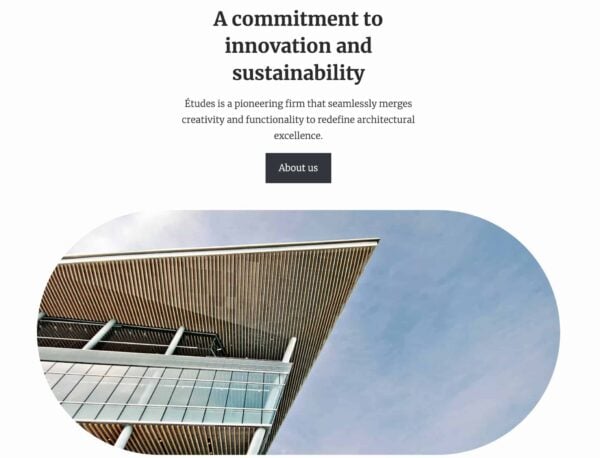
Are you familiar with synced patterns in WordPress? A synced pattern can be described as a few blocks, grouped together, to be used in different places on a website. To give an example, the image below shows a standard synced pattern that comes with a WordPress theme and it consists of a heading, paragraph, button and image.

WordPress 6.6: example of synced pattern
An example of a synced pattern in WordPress

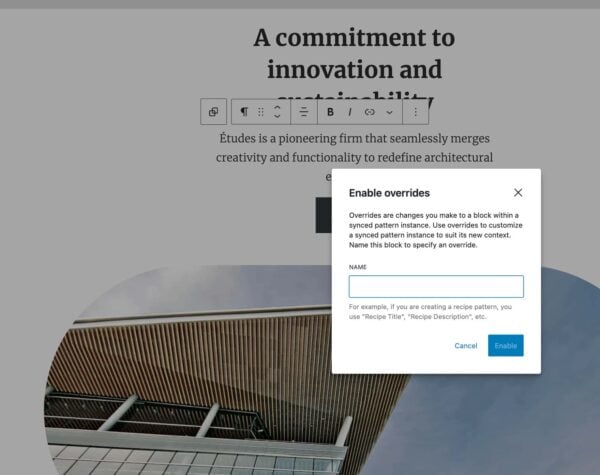
You can add this pattern to different pages for consistency (and it can save you loads of time). The new feature in WordPress 6.6 now adds the ability to do an ‘override’ of this pattern that allows you to tweak the pattern where needed. You can edit headings, paragraphs, buttons and images blocks to customize the pattern per instance while continuing to use the overall pattern for consistency. Simply go to your synced pattern, click edit, select the block you want to change and go to Advanced in settings to find the override feature.

WordPress 6.6: override function in synced patterns
The override feature while editing a synced pattern

Keep your plugins up to date

A really cool feature in WordPress 6.6 is the optional rollback for your automatically updated plugins. The idea is that you can set your plugins to auto-update without having to worry about any unexpected negative impact. This new feature makes it possible to restore your plugin to the previous version if anything goes wrong. This allows you to keep your plugins updated and improve your security. While also making sure your website keeps working and behaving as it should.

What’s new in the block editor?

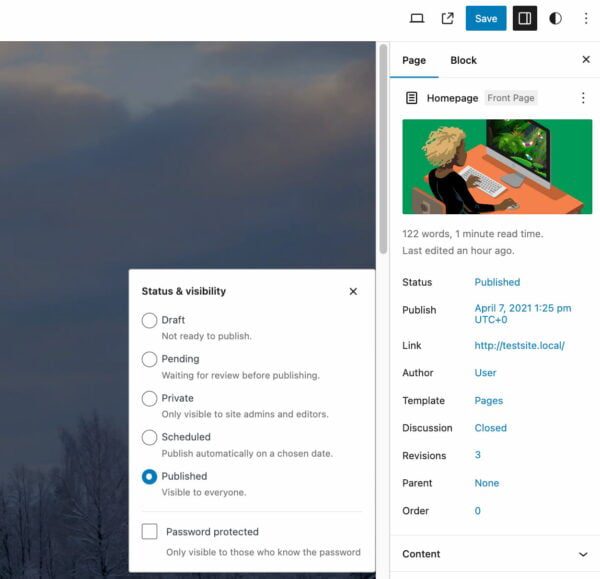
This latest release comes with a new publish flow in the sidebar of your post or page. It shows the featured image at the top and shows all the other page settings in a list. You can simply click the setting you want to edit and it will give you a pop-up as shown in the screenshot below. It might take you a few seconds (or clicks) to figure out where everything has moved. But it looks very clean and makes everything feel very unified.

WordPress 6.6: new publish flow
Publish flow in WordPress 6.6

Another small and nifty feature I’d like to highlight is the shortcut that you can now use to group blocks together. Select the blocks of your choice and use Ctrl + G on Windows or ⌘ + G on MacOS.

Performance and accessibility

What’s a WordPress release without any performance and accessibility enhancements? Of course, WordPress 6.6 comes with a bunch of them. Performance updates such as a 40% reduction in template loading time in the editor, removing unnecessary WP_Theme_JSON calls and getting rid of lazy loading post embeds. The accessibility improvements have been mainly focused on interaction with blocks and patterns and the data views component that powers the new site editing. Read all about this and more in the WordPress 6.6 release notes.

Read more: WordPress 6.5: The features you want to know about »

Coming up next!

WordPress Nested Pages Plugin High Severity Vulnerability via @sejournal, @martinibuster

The U.S. National Vulnerability Database (NVD) and Wordfence published a security advisory of a high severity Cross Site Request Forgery (CSRF) vulnerability affecting the Nested Pages WordPress plugin affecting up to +100,000 installations. The vulnerability received a Common Vulnerability Scoring System (CVSS) rating of 8.8 on a scale of 1 – 10, with ten representing the highest level severity.

Cross Site Request Forgery (CSRF)

The Cross Site Request Forgery (CSRF) is a type of attack that takes advantage of a security flaw in the Nested Pages plugin that allows unauthenticated attackers to call (execute) PHP files, which are the code level files of WordPress.

There is a missing or incorrect nonce validation, which is a common security feature used in WordPress plugins to secure forms and URLs. A second flaw in the plugin is a missing security feature called sanitization. Sanitization is a method of securing data that’s input or output which is also common to WordPress plugins but in this case is missing.

According to Wordfence:

“This is due to missing or incorrect nonce validation on the ‘settingsPage’ function and missing santization of the ‘tab’ parameter.”

The CSRF attack relies on getting a signed in WordPress user (like an Administrator) to click a link which in turn allows the attacker to complete the attack. This vulnerability is rated 8.8 which makes it a high severity threat. To put that into perspective, a score of 8.9 is a critical level threat which is an even higher level. So at 8.8 it is just short of a critical level threat.

This vulnerability affects all versions of the Nested Pages plugin up to and including version 3.2.7. The developers of the plugin released a security fix in version 3.2.8 and responsibly published the details of the security update in their changelog.

The official changelog documents the security fix:

“Security update addressing CSRF issue in plugin settings”

Read the advisory at Wordfence:

Nested Pages <= 3.2.7 – Cross-Site Request Forgery to Local File Inclusion

Read the advisory at the NVD:

CVE-2024-5943 Detail

Featured Image by Shutterstock/Dean Drobot