Exclusive: A record-breaking baby has been born from an embryo that’s over 30 years old

A baby boy born over the weekend holds the new record for the “oldest baby.” Thaddeus Daniel Pierce, who arrived on July 26, developed from an embryo that had been in storage for 30 and a half years.

“We had a rough birth but we are both doing well now,” says Lindsey Pierce, his mother. “He is so chill. We are in awe that we have this precious baby!”

Lindsey and her husband, Tim Pierce, who live in London, Ohio, “adopted” the embryo from a woman who had it created in 1994. She says her family and church family think “it’s like something from a sci-fi movie.” 

“The baby has a 30-year-old sister,” she adds. Tim was a toddler when the embryos were first created.

“It’s been pretty surreal,” says Linda Archerd, 62, who donated the embryo. “It’s hard to even believe.”

Three little hopes

The story starts back in the early 1990s. Archerd had been trying—and failing—to get pregnant for six years. She and her husband decided to try IVF, a fairly new technology at the time. “People were [unfamiliar] with it,” says Archerd. “A lot of people were like, what are you doing?”

They did it anyway, and in May 1994, they managed to create four embryos. One of them was transferred to Linda’s uterus. It resulted in a healthy baby girl. “I was so blessed to have a baby,” Archerd says. The remaining three embryos were cryopreserved and kept in a storage tank.

That was 31 years ago. The healthy baby girl is now a 30-year-old woman who has her own 10-year-old daughter. But the other three embryos remained frozen in time.

Archerd originally planned to use the embryos herself. “I always wanted another baby desperately,” she says. “I called them my three little hopes.” Her then husband felt differently, she says. Archerd went on to divorce him, but she won custody of the embryos and kept them in storage, still hopeful she might use them one day, perhaps with another partner.

That meant paying annual storage fees, which increased over time and ended up costing Archerd around a thousand dollars a year, she says. To her, it was worth it. “I always thought it was the right thing to do,” she says. 

Things changed when she started going through menopause, she says. She considered her options. She didn’t want to discard the embryos or donate them for research. And she didn’t want to donate them to another family anonymously—she wanted to meet the parents and any resulting babies. “It’s my DNA; it came from me … and [it’s] my daughter’s sibling,” she says.

Then she found out about embryo “adoption.” This is a type of embryo donation in which both donors and recipients have a say in whom they “place” their embryos with or “adopt” them from. It is overseen by agencies—usually explicitly religious ones—that believe an embryo is morally equivalent to a born human. Archerd is Christian.

There are several agencies that offer these adoption services in the US, but not all of them accept embryos that have been stored for a very long time. That’s partly because those embryos will have been frozen and stored in unfamiliar, old-fashioned ways, and partly because old embryos are thought to be less likely to survive thawing and transfer to successfully develop into a baby.

“So many places wouldn’t even take my information,” says Archerd. Then she came across the Snowflakes program run by the Nightlight Christian Adoptions agency. The agency was willing to accept her embryos, but it needed Archerd’s medical records from the time the embryos had been created, as well as the embryos’ lab records.

So Archerd called the fertility doctor who had treated her decades before. “I still remembered his phone number by heart,” she says. That doctor, now in his 70s, is still practicing at a clinic in Oregon. He dug Archerd’s records out from his basement, she says. “Some of [them] were handwritten,” she adds. Her embryos entered Nightlight’s “matching pool” in 2022.

Making a match

“Our matching process is really driven by the preferences of the placing family,” says Beth Button, executive director of the Snowflakes program. Archerd’s preference was for a married Caucasian, Christian couple living in the US. “I didn’t want them to go out of the country,” says Archerd. “And being Christian is very important to me, because I am.”

It took a while to find a match. Most of the “adopting parents” signed up for the Snowflakes program were already registered at fertility clinics that wouldn’t have accepted the embryos, says Button. “I would say that over 90% of clinics in the US would not have accepted these embryos,” she says.
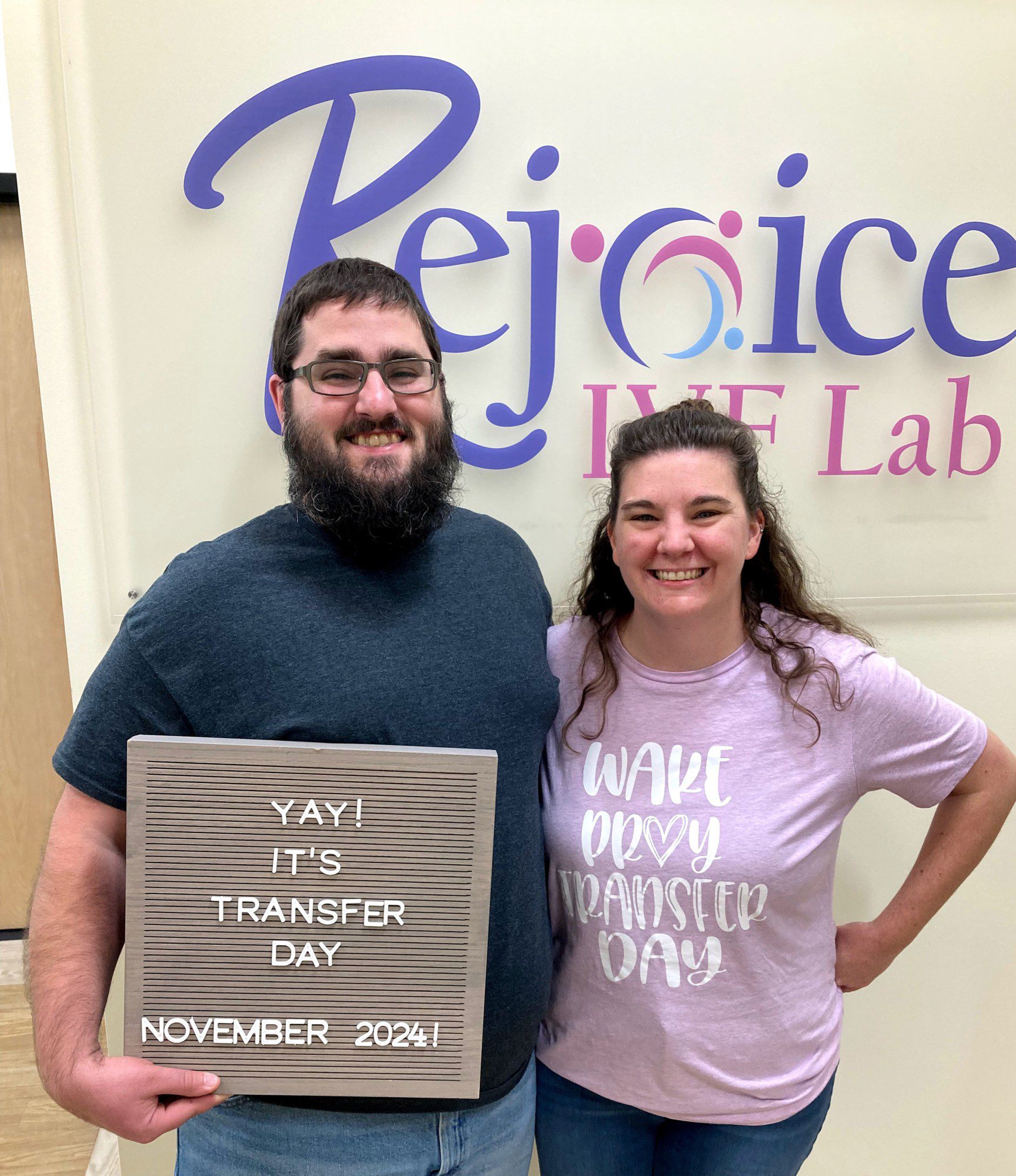
Expecting parents Tim and Lindsey Pierce.
Lindsey and Tim Pierce at Rejoice Fertility.
COURTESY LINDSEY PIERCE

Archerd’s embryos were assigned to the agency’s Open Hearts program for embryos that are “hard to place,” along with others that have been in storage for a long time or are otherwise thought to be less likely to result in a healthy birth.

Lindsey and Tim Pierce had also signed up for the Open Hearts program. The couple, aged 35 and 34, respectively, had been trying for a baby for seven years and had seen multiple doctors.

Lindsey was researching child adoption when she came across the Snowflakes program. 

When the couple were considering their criteria for embryos they might receive, they decided that they’d be open to any. “We checkmarked anything and everything,” says Tim. That’s how they ended up being matched with Archerd’s embryos. “We thought it was wild,” says Lindsey. “We didn’t know they froze embryos that long ago.”

Lindsey and Tim had registered with Rejoice Fertility, an IVF clinic in Knoxville, Tennessee, run by John Gordon, a reproductive endocrinologist who prides himself on his efforts to reduce the number of embryos in storage. The huge numbers of embryos left in storage tanks was weighing on his conscience, he says, so around six years ago, he set up Rejoice Fertility with the aim of doing things differently.  

“Now we’re here in the belt buckle of the Bible Belt,” says Gordon, who is Reformed Presbyterian. “I’ve changed my mode of practice.” IVF treatments performed at the clinic are designed to create as few excess embryos as possible. The clinic works with multiple embryo adoption agencies and will accept any embryo, no matter how long it has been in storage.

A portrait of Linda Archerd.

COURTESY LINDA ARCHERD

It was his clinic that treated the parents who previously held the record for the longest-stored embryo—in 2022, Rachel and Philip Ridgeway had twins from embryos created more than 30 years earlier. “They’re such a lovely couple,” says Gordon. When we spoke, he was making plans to meet the family for breakfast. The twins are “growing like weeds,” he says with a laugh.

“We have certain guiding principles, and they’re coming from our faith,” says Gordon, although he adds that he sees patients who hold alternative views. One of those principles is that “every embryo deserves a chance at life and that the only embryo that cannot result in a healthy baby is the embryo not given the opportunity to be transferred into a patient.”

That’s why his team will endeavor to transfer any embryo they receive, no matter the age or conditions. That can be challenging, especially when the embryos have been frozen or stored in unusual or outdated ways. “It’s scary for people who don’t know how to do it,” says Sarah Atkinson, lab supervisor and head embryologist at Rejoice Fertility. “You don’t want to kill someone’s embryos if you don’t know what you’re doing.”

Cumbersome and explosive

In the early days of IVF, embryos earmarked for storage were slow-frozen. This technique involves gradually lowering the temperature of the embryos. But because slow freezing can cause harmful ice crystals to form, clinics switched in the 2000s to a technique called vitrification, in which the embryos are placed in thin plastic tubes called straws and lowered into tanks of liquid nitrogen. This rapidly freezes the embryos and converts them into a glass-like state. 

The embryos can later be thawed by removing them from the tanks and rapidly—within two seconds—plunging them into warm “thaw media,” says Atkinson. Thawing slow-frozen embryos is more complicated. And the exact thawing method required varies, depending on how the embryos were preserved and what they were stored in. Some of the devices need to be opened while they are inside the storage tank, which can involve using forceps, diamond-bladed knives, and other tools in the liquid nitrogen, says Atkinson.

Sarah Atkinson, lab supervisor and head embryologist at Rejoice Fertility, directly injects sperm into two eggs to fertilize them.
COURTESY OF SARAH ATKINSON AT REJOICE FERTILITY.

Recently, she was tasked with retrieving embryos that had been stored inside a glass vial. The vial was made from blown glass and had been heat-sealed with the embryo inside. Atkinson had to use her diamond-bladed knife to snap open the seal inside the nitrogen tank. It was fiddly work, and when the device snapped, a small shard of glass flew out and hit Atkinson’s face. “Hit me on the cheek, cut my cheek, blood running down my face, and I’m like, Oh shit,” she says. Luckily, she had her safety goggles on. And the embryos survived, she adds.

The two embryos that were transferred to Lindsey Pierce.

Atkinson has a folder in her office with notes she’s collected on various devices over the years. She flicks through it over a video call and points to the notes she made about the glass vial. “Might explode; wear face shield and eye protection,” she reads. A few pages later, she points to another embryo-storage device. “You have to thaw this one in your fingers,” she tells me. “I don’t like it.”

The record-breaking embryos had been slow-frozen and stored in a plastic vial, says Atkinson. Thawing them was a cumbersome process. But all three embryos survived it.

The Pierces had to travel from their home in Ohio to the clinic in Tennessee five times over a two-week period. “It was like a five-hour drive,” says Lindsey. One of the three embryos stopped growing. The other two were transferred to Lindsey’s uterus on November 14, she says. And one developed into a fetus.

Now that the baby has arrived, Archerd is keen to meet him. “The first thing that I noticed when Lindsey sent me his pictures is how much he looks like my daughter when she was a baby,” she says. “I pulled out my baby book and compared them side by side, and there is no doubt that they are siblings.”

She doesn’t yet have plans to meet the baby, but doing so would be “a dream come true,” she says. “I wish that they didn’t live so far away from me … He is perfect!”

“We didn’t go into it thinking we would break any records,” says Lindsey. “We just wanted to have a baby.”

Q&A: Brad Feld, Author, Mentor, Investor

Brad Feld is a veteran tech entrepreneur, early-stage investor, and co-founder of Techstars, a venture fund and startup accelerator. He’s also a prolific author. I asked him how writing helps shape his ideas and what prompted his latest book, “Give First,” which focuses on the value of mentorship.

Jean Gazis: What’s the origin of “Give First“?

Brad Feld: The idea has been rattling around in my head for over a decade. Back in 2012, when I was writing “Startup Communities,” I realized one of the secrets to the success of Boulder, Colorado, was a philosophy I called “give before you get.” It’s a simple idea: be willing to help someone without a clear expectation of what’s in it for you.

It wasn’t altruism; it was a more effective, long-term way to build a healthy system. Around the same time, this ethos was becoming deeply baked into Techstars, which we described as a “mentor-driven accelerator.”

Then, in 2014, my friends at Techstars, led by David Cohen and Gregg Cochran, started using the hashtag #GiveFirst on Twitter. It was cleaner, stickier, and captured the essence of the idea. That’s when I knew it deserved its own book.

Gazis: Give us examples of how you’ve benefited from a giving-first mindset?

Brad Feld

Brad Feld

Feld: My go-to example is the origin story of Techstars itself. I used to hold “random days,” where anyone could book a 15-minute meeting with me. It was an attempt to be open and accessible without destroying my calendar.

That’s how I met David Cohen. In 2006, he came in with a brochure for a mentorship and investment program for startups.

I loved the idea. Ten minutes into our 15-minute slot, I’d already committed to invest, and I stepped out to call my friend Jared Polis, then an entrepreneur and now the governor of Colorado, who agreed to join us on the spot. That unplanned gift of time and capital turned into Techstars, which has since funded over 4,000 companies. There was no way to predict that return.

Another is the evolution of Pledge 1%. The idea started when Ryan Martens of Rally Software, a web development platform, and I co-founded the Entrepreneurs Foundation of Colorado in 2007, based on the Salesforce 1% model, wherein the founders committed 1% of the company’s equity, technology, and employees’ time to a better world.

Pledge 1% has generated nearly $3 billion for communities globally and spawned a powerful network of founders helping each other. The financial return was for the community, but the network and relationship returns have been immeasurable.

Gazis: What’s your goal of “Give First,” the book?

Feld: I hope readers break out of a transactional mindset. We live in a “what’s in it for me?” world. “Give First” is a different philosophy. It’s not about being a martyr or working for free. It’s about putting energy into a relationship or a system without defining the parameters of the return up front. You still expect to get something back, but you don’t know when, from whom, or in what form.

The result is a positive-sum, long-term game. The ensuing knowledge, trust, and opportunities are often far greater than anything you could have engineered with a quid-pro-quo approach. My goal is for people to see that it’s a powerful and sustainable way to build a career, a company, and a community.

Gazis: Why do you write books? Are they relevant in our digital world?

Feld: Absolutely. In an age of infinite distraction, a book is an anchor. It’s a technology for focused, deep thinking that a tweet, a post, or a podcast can’t replicate. Long-form writing forces both the writer and the reader to slow down and grapple with nuance. A book is a durable artifact. In a world of fleeting digital content, a well-argued, 250-page narrative is a powerful signal that an idea is worth spending time with.

Writing debugs my own thinking. I have ideas and stories swirling around from decades of investing and mentoring. The process of putting them into a coherent narrative forces me to clarify what I believe. It’s how I find the signal in the noise.

The second reason is scale. I can only mentor so many founders one-on-one. A book allows me to share the lessons — and the scar tissue — with anyone, anywhere. I explored the give-first philosophy on my blog and in practice at Techstars for 15 years. Putting it all in a book makes the framework accessible to anyone.

Gazis: You’ve written about mentorship in business. Do you have a mentor?

Feld: My most important mentor, in business and life, was Len Fassler. I dedicated “Give First” to him. He taught me how to behave in business relationships and how to show up for people, especially when things are hard. I’ll never forget being at his house in 2001, completely crushed by the dot-com bust. He put his hands on my shoulders and said, “Suit up. They can’t kill you, and they can’t eat you. We’ll get through it.” That’s a story, not a spreadsheet. It’s guided me ever since.

As for writing, Adam Grant’s book “Give and Take” provided a framework for the ideas I had explored intuitively for years. And Dov Seidman’s book “How” emphasized that our manner of doing things matters more than what they are. Both write with a clarity and moral conviction that I aspire to.

Gazis: What books do you read?

Feld: I’m a voracious reader. My wife Amy and I take a week off the grid every quarter, and I usually get through a book a day. That sustained immersion is where I do some of my best thinking and pattern recognition.

My reading is all over the place, and I track every book on Goodreads. My infinite pile of books has a lot of fiction, biography, history, philosophy, and some business, especially by friends. I love discovering how different systems work, whether it’s a company, a brain, or a fictional universe. The variety is essential and feeds my curiosity, which is the fuel for everything I do, including writing.

Microsoft Adds Copilot Mode To Edge With Multi-Tab AI Analysis via @sejournal, @MattGSouthern

Microsoft launches Copilot Mode in Edge, introducing multi-tab AI analysis, voice navigation, and more features in development.

  • Copilot Mode brings AI tools to Microsoft’s Edge browser
  • Available tools include multi-tab content analysis, voice navigation, and a unified search/chat interface.
  • Features in development include task execution, topic-based organization, and a persistent AI assistant.
OpenAI Study Mode Brings Guided Learning to ChatGPT via @sejournal, @MattGSouthern

OpenAI has launched a new feature in ChatGPT called Study Mode, offering a step-by-step learning experience designed to guide users through complex topics.

While aimed at students, Study Mode reflects a broader trend in how people use AI tools for information and adapt their search habits.

As more people start using conversational AI tools to seek information, Study Mode could represent the next step of AI-assisted discovery.

A Shift Toward Guided Learning

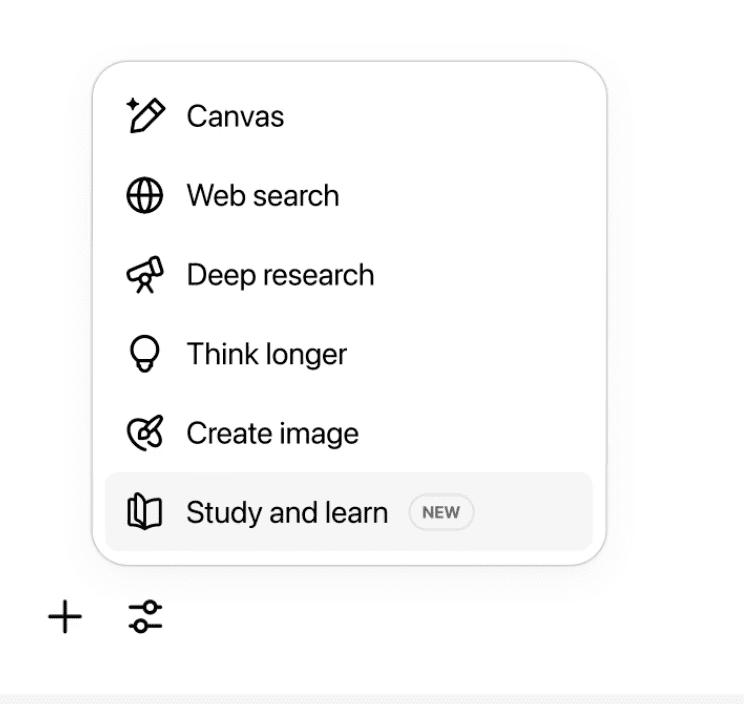
Activate Study Mode by selecting “Study and learn” from the tools in ChatGPT and ask a question.

Screenshot from: openai.com/index/chatgpt-study-mode/, July 2025.

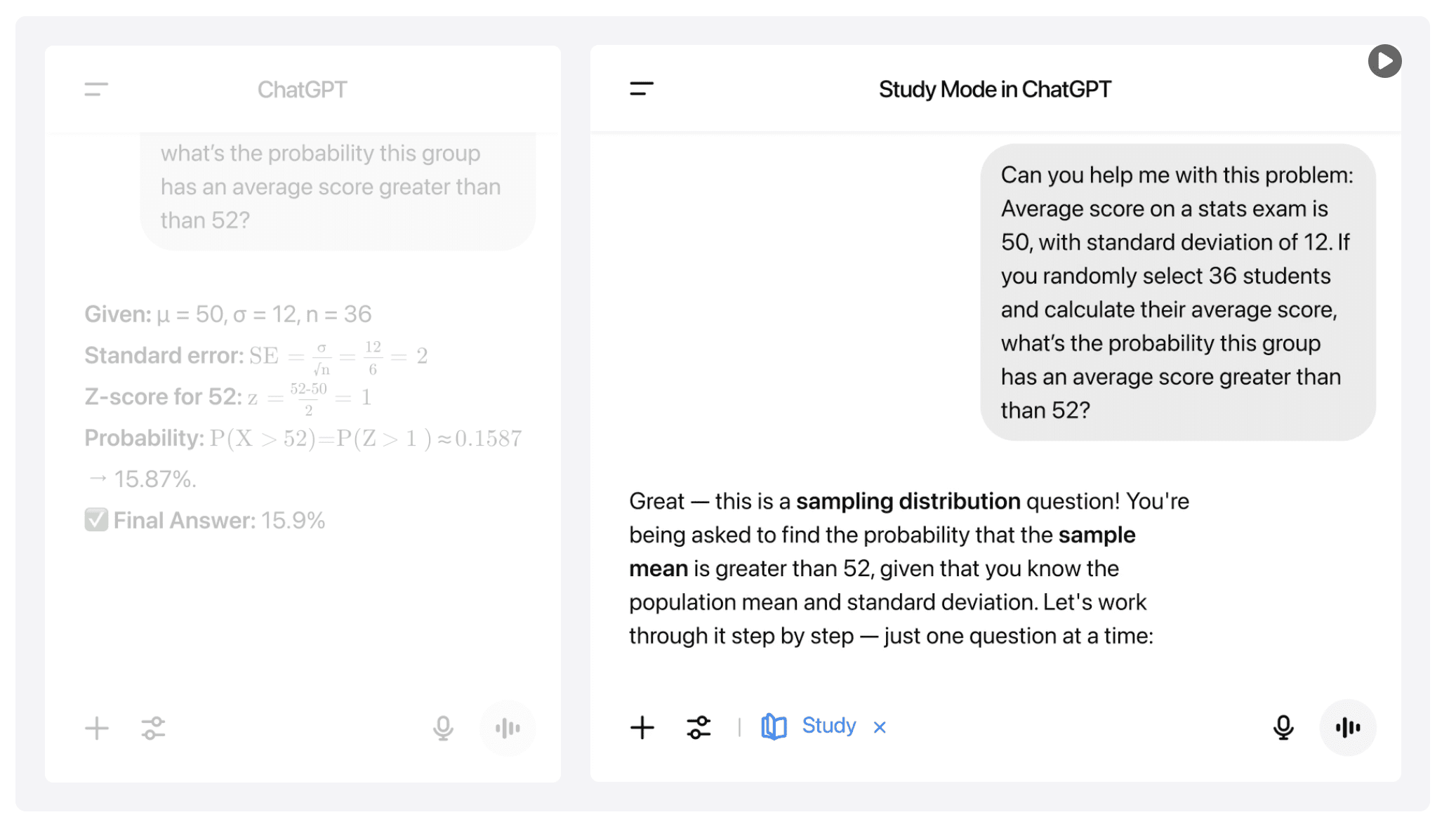
Instead of giving direct answers, this feature promotes deeper engagement by asking questions, providing hints, and tailoring explanations to meet user needs.

Screenshot from: openai.com/index/chatgpt-study-mode/, July 2025.

Study Mode runs on custom instructions developed with input from teachers and learning experts. The feature incorporates research-based strategies, including:

  • Encouraging people to take part actively
  • Helping manage how much information people can handle
  • Supporting self-awareness and a desire to learn
  • Giving helpful and practical feedback.

Robbie Torney, Senior Director of AI Programs at Common Sense Media, explains:

“Instead of doing the work for them, study mode encourages students to think critically about their learning. Features like these are a positive step toward effective AI use for learning. Even in the AI era, the best learning still happens when students are excited about and actively engaging with the lesson material.”

How It Works

Study Mode adjusts responses based on a user’s skill level and context from prior chats.

Key features include:

  • Interactive Prompts: Socratic questioning and self-reflection prompts promote critical thinking.
  • Scaffolded Responses: Content is broken into manageable segments to maintain clarity.
  • Knowledge Checks: Quizzes and open-ended questions help reinforce understanding.
  • Toggle Functionality: Users can turn Study Mode on or off as needed during a conversation.

Early testers describe it as an on-demand tutor, useful for unpacking dense material or revisiting difficult subjects.

Looking Ahead

Study Mode is now available to logged-in users across Free, Plus, Pro, and Team plans, with ChatGPT Edu support expected in the coming weeks.

OpenAI plans to integrate Study Mode behavior directly into its models after gathering feedback. Future updates may include visual aids, goal tracking, and more personalized support.


Featured Image: Roman Samborskyi/Shutterstock

Google AI Mode Update: File Uploads, Live Video Search, More via @sejournal, @MattGSouthern

Google is expanding AI Mode in Search with new tools that include PDF uploads, persistent planning documents, and real-time video assistance.

The updates begin rolling out today, with the AI Mode button now appearing on the Google homepage for desktop users.

PDF Uploads Now Supported On Desktop

Desktop users can now upload images directly into search queries, a feature previously available only on mobile.

Support for PDFs is coming in the weeks ahead, allowing you to ask questions about uploaded files and receive AI-generated responses based on both document content and relevant web results.

For example, a student could upload lecture slides and use AI Mode to get help understanding the material. Responses include suggested links for deeper exploration.

Image Credit: Google

Google plans to support additional file types and integrate with Google Drive “in the months ahead.”

Canvas: A Tool For Multi-Session Planning

A new AI Mode feature called Canvas can help you stay organized across multiple search sessions.

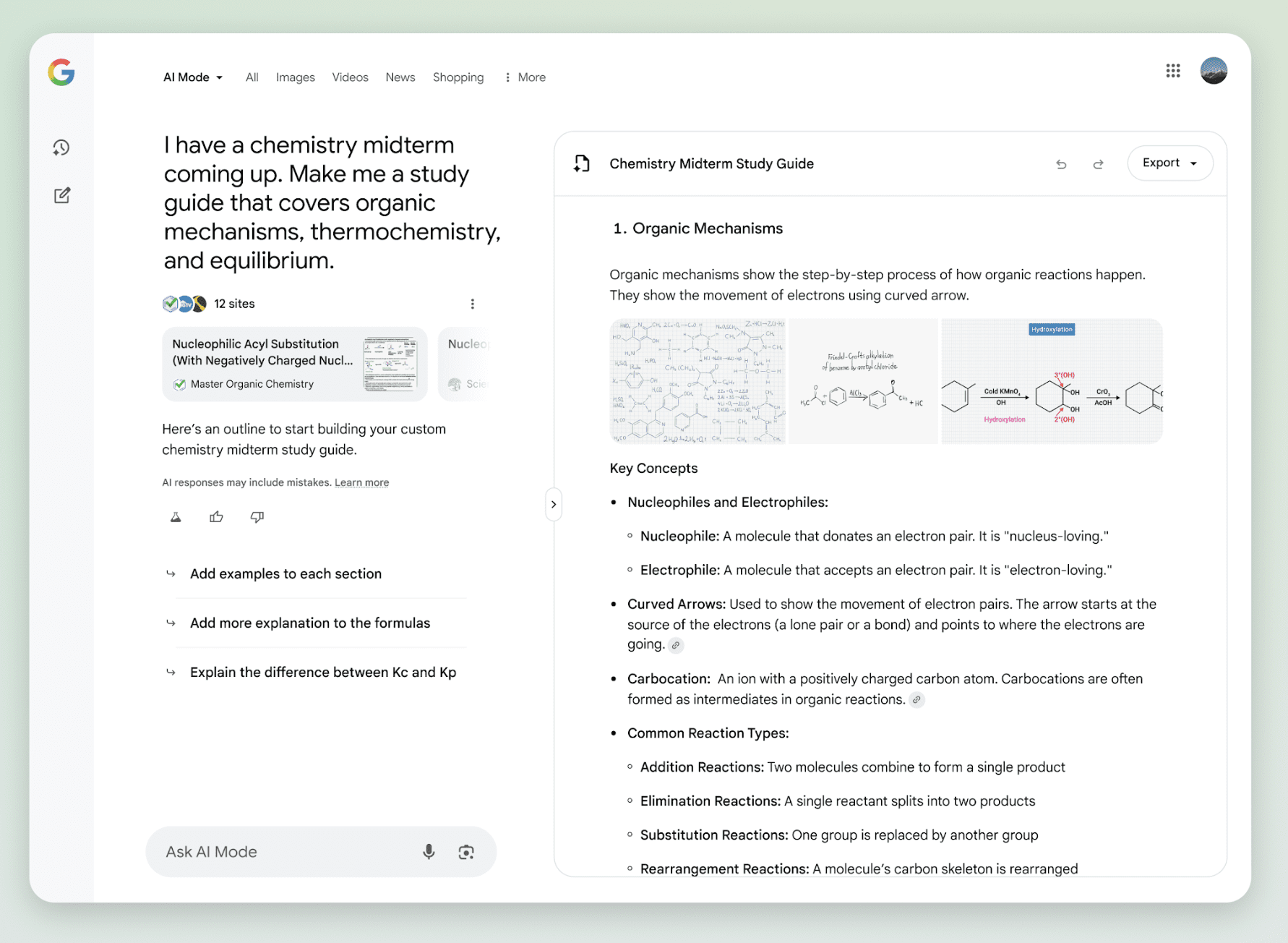
When you ask AI Mode for help with planning or creating something, you’ll see an option to “Create Canvas.” This opens a dynamic side panel that saves and updates as queries evolve.

Use cases include building study guides, travel itineraries, or task checklists.

Image Credit: Google

Canvas is launching for desktop users in the U.S. enrolled in the AI Mode Labs experiment.

Real-Time Assistance With Search Live

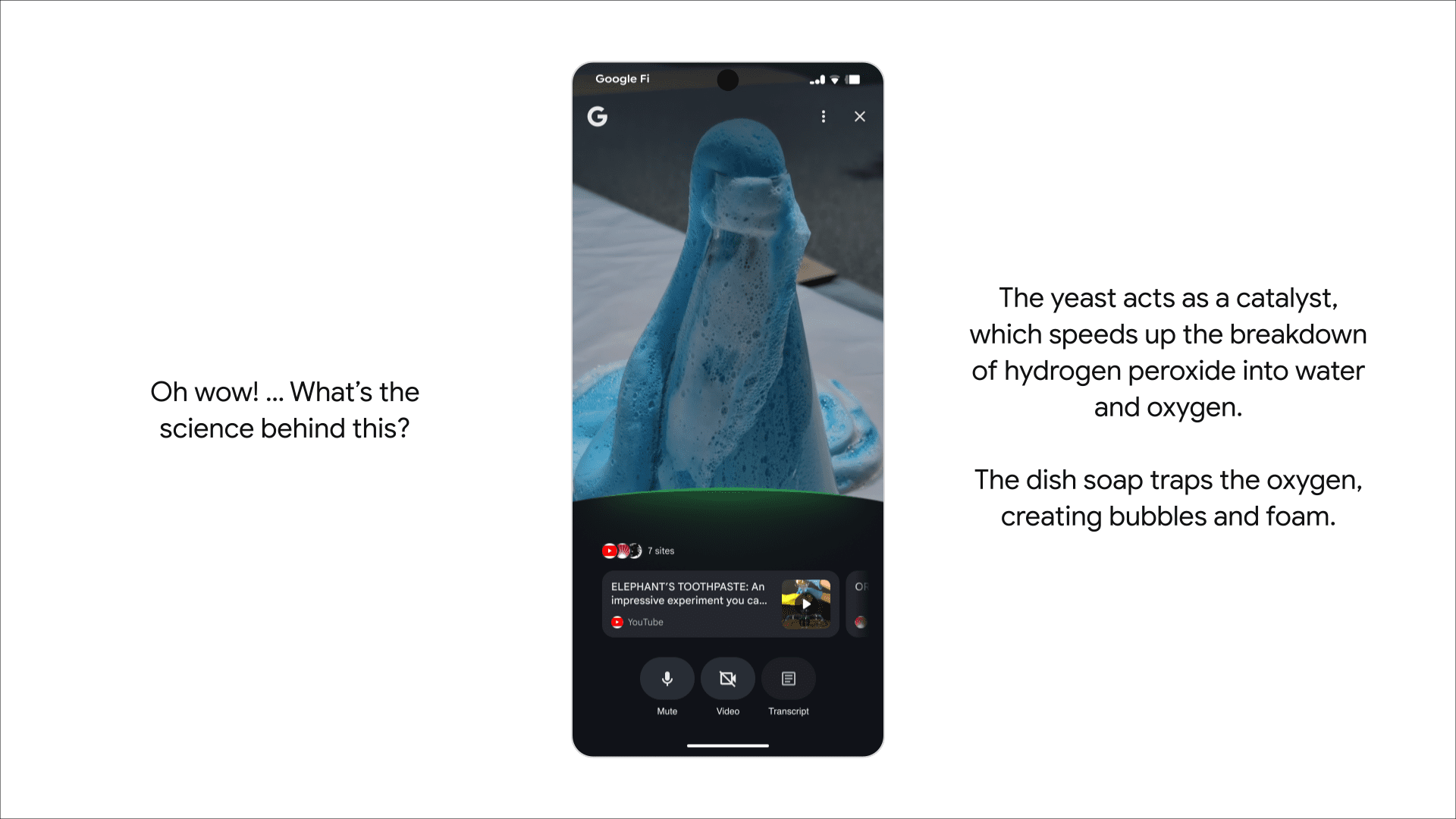
Search Live with video input also launches this week on mobile. This allows you to utilize AI Mode while pointing your phone camera at real-world objects or scenes.

The feature builds on Project Astra and is available through Google Lens. Start by tapping the ‘Live’ icon in the Google app, then engage in back-and-forth conversations with AI Mode using live video as visual context.

Image Credit: Google

Chrome Adds Contextual AI Answers

Lens is getting expanded desktop functionality within Chrome. Soon, you’ll see a “Ask Google about this page” option in the address bar.

When selected, it opens a panel where you can highlight parts of a page, like a diagram or snippet of text, and receive an AI Overview.

This update also allows follow-up questions via AI Mode from within the Lens experience, either through a button labeled “Dive deeper” or by selecting AI Mode directly.

Looking Ahead

These updates reflect Google’s vision of search as a multi-modal, interactive experience rather than a one-off text query.

While most of these tools are limited to U.S.-based Labs users for now, they point to a future where AI Mode becomes central to how searchers explore, learn, and plan.

Rollout timelines vary by feature. So keep a close eye on how these capabilities add to the search experience and consider how to adapt your content strategies accordingly.

AI Halftime Report H1 2025 via @sejournal, @Kevin_Indig

It’s halftime.

The first half of 2025 brought major shakeups in SEO, AI, and organic growth – and it’s time for a reality check.

Traffic is down, revenue is … complicated, and large language models (LLMs) are no longer fringe.

Publishers are panicking, and SEO teams are reevaluating how they measure success.

And it’s not just the tech shifting; it’s the economy around it. The DOJ’s antitrust case against Google could reshape the playing field before Q4 even begins.

In today’s Memo, I’m unpacking the state of organic growth at the midpoint of 2025:

  • How AI Overviews and AI Mode are eating clicks, and what that means for TOFU, MOFU, and BOFU content.
  • Why publishers are suing Google and preparing for zero traffic.
  • What’s really happening with tech layoffs and job transformation.
  • How we measure LLM visibility today, and where that’s headed.
  • What to expect next in organic growth, search, and monetization.

Plus, premium subscribers will receive my scorecard that will help evaluate whether the team is adapting effectively to the AI landscape.

Let’s take stock of where we are, and what comes next.

Image Credit: Kevin Indig

Boost your skills with Growth Memo’s weekly expert insights. Subscribe for free!

AI Is Cutting Flesh

AI Overviews (AIOs) looked “interesting” to marketers in 2024 and “devastating” in 2025.

The traffic loss impact ranges from 15% to 45% declines, from my own observations.

Bottom-line metrics across the industry range from “traffic down, revenue up” to “traffic down, revenue down.”

In February, I wrote in The Impact of AI Overviews that mostly the top of the funnel (TOFU) queries were impacted:

Every study I looked at confirmed that the majority of AI Overviews show up for informational-intent keywords like questions.

Shortly after, in March 2025, Google nullified that theory by dialing up the number of AIOs way beyond the top of the funnel.

Ever since, U.S. companies have experienced a strong (negative) impact, and I’m hearing the phrase “SEO is dead” more often from leaders.

Between 13 and 19% of keywords show AI Overviews, according to Semrush and seoClarity, but I assume the actual number is much higher because searchers use much longer prompts. (Prompts that most tools don’t track.) [1, 2]

I expect organic traffic to keep dropping as the year moves forward.

In theAIO Usability study I published in May, only a small fraction of clicks still came through to websites.

It wouldn’t surprise me if 70% of the organic traffic that sites earned in 2024 is gone by 2026, leaving just 30% of that organic traffic behind.

Scary? Yes. But traffic is just a means.

The same study also shows that 80% of searchers still lean on organic results to complete their search journeys.

So, I still feel optimistic about the value of organic search in the long term.

There are two questions top of mind for me at the moment:

  1. If AIOs really only impact the top of the funnel, then why are revenue numbers down?
  2. At which point is the decline going to level off?

In my view, either:

  • AIOs are really mostly TOFU queries. In that case, TOFU content always had more impact on the bottom line than we were able to prove, and we can expect the traffic decline to level off.
  • Or AIOs impact way more than MOFU and BOFU queries as well (which is what I think), and we’re in for a long decline of traffic. If true, I expect revenue that’s attributed to organic search to decline at a lower rate, or not at all for certain companies, since purchase intent doesn’t just go away. Therefore, revenue results would relate more to our ability to influence purchase intent.

With one exception.

Publishers Are Struggling

The whole internet is trying to figure out whether the value of showing up in LLMs (ChatGPT, Gemini, AI Mode, AI Overviews, etc.) is worth more than the loss in traffic.

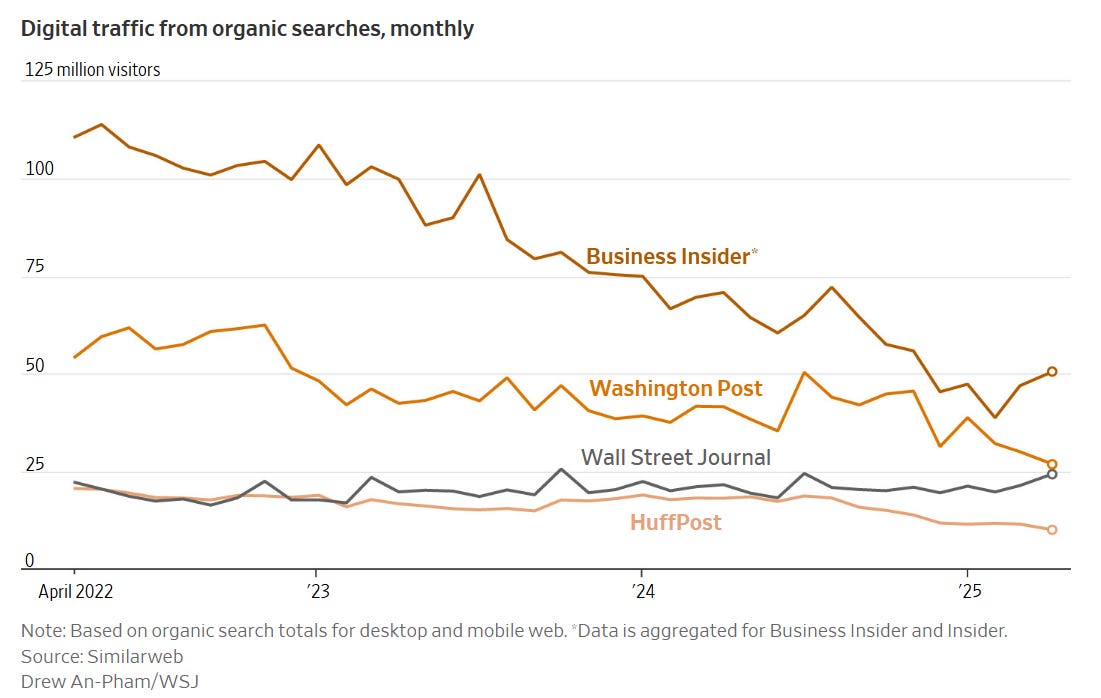
But without a doubt, publishers and affiliates are the group that gets hit the hardest due to their reliance on ad impressions and link clicks.

No one needs traffic as much as publishers.

Image Credit: Kevin Indig

The consequence? Leading publishers and news sites will conduct layoffs and assume that Google traffic will go to zero at some point.

At a companywide meeting earlier this year, Nicholas Thompson, chief executive of the Atlantic, said the publication should assume traffic from Google would drop toward zero and the company needed to evolve its business model. [3]

Publishers in the EU have banded together and filed an antitrust complaint against Google for its launch and the impact of AI Overviews with the European Commission. [4]

Publishers using Google Search do not have the option to opt out from their material being ingested for Google’s AI large language model training and/or from being crawled for summaries, without losing their ability to appear in Google’s general search results page.

I caught up with Chris Dicker, who leads one of the co-signatories in the DMA complaint against Google, the Independent Publishers Alliance:

Kevin: What’s your role in the lawsuit against Google?

Chris: The Independent Publishers Alliance is one of the co-signatories on the complaint. I am helping lead this from the Alliance side.

Kevin: What would be an outcome, i.e., an action by Google, that would be satisfactory?

Chris: We are only asking for what we deem to be fair, which is for a sustainable ecosystem.

Whether that is payment for use of content or for Google to start to substantially reduce the zero-click searches, which have gotten significantly worse since the launch of AIOs.

Kevin: Can LLMs (ChatGPT & Co) provide some remedy against the traffic drop from Google?

Chris: Not for publishers at the moment, no. They don’t have scale or the want to send traffic anywhere else. The current CTR’s we are seeing and that are being reported from publishers are tiny.

OpenAI’s scrape to human visit is 179:1, compared with Perplexity’s 369:1 and Anthropic’s 8692:1 (stats from Tollbit’s State of bots Q1 2025).

For perspective, Bing’s is 11:1. I know there are reports that the traffic from LLMs is “better quality,” but not on the metrics that would help publishers or content creators.

It is very much the opposite: Bounce rate is higher; pages per session and per visit are also both considerably down for AI search traffic compared to organic search.

Kevin: What are the consequences of Google’s AI Overviews on independent publishers so far? Can you quantify the impact?

Chris: It’s significant and something that has been extrapolated even since April this year. There are sites that are seeing traffic drops of up to 70% since April.

Publishers have no choice but to cut costs and, unfortunately, that also means job losses.

In the last year, we have had numerous members who, unfortunately, haven’t been able to weather the storm and have ceased publishing altogether, and these are respected sites that were well established over the last 10 years, if not longer.

Kevin: Do you know of publishers that are able to dampen the negative impact from AI Overviews in some ways? If so, what are they doing?

Chris: Nearly every publisher I speak to is actively diversifying away from Google.

It feels inevitable that we’ll see a mass blocking of Googlebot at some point, something that would have been inconceivable just 12 months ago.

If your business model still relies on search traffic, whether from traditional search or AI-powered results, it’s time to rethink – and fast.

More publishers are now focusing on direct audience relationships through newsletters, forums, podcasts, and similar channels.

Platforms like Substack offer an interesting model, though I’m not convinced their approach fully suits publishers just yet.

Beyond monetizing websites and content, many publishers are also developing in-house creative, social, or AI agencies. After all, these businesses have spent years engaging and inspiring audiences.

Helping advertisers tap into that expertise feels like a natural next step.

Besides the fact that the open web and critical societal instances are fading away, from a purely practical standpoint, there are also fewer publishers to amplify content for other businesses.

And yet, I believe we haven’t seen the full extent to which Google Search will change from sending traffic to answering questions directly.

AI Mode Is Sitting On The Bench, But It Seems Ready

At a recent event I attended, a Google representative mentioned that Sundar Pichai sees AI Mode as the default search experience in the next two to three years, with searchers being able to switch to classic search results if they want to – assuming users like AI Mode.
And that seems to be the case: According to a (small) survey done by Oppenheimer & Co., 82% of searchers find AI Mode more helpful than Google Search, while 75% find it more helpful than ChatGPT (I wonder why). [5]

Nothing shows fear more than copying a challenger’s user interface and abandoning the cash machine that worked for 20 years.

AI Mode is basically ChatGPT with a Google logo. Google follows the Meta playbook, which fenced in Snapchat’s and TikTok’s growth by copying their core features.

And most alarmingly for search marketers, AI Mode eats clicks for breakfast.

Research by iPullrank found that “4.5% of AI Mode Sessions result in a click.”[6]

A click. As in one!

But Google cannot afford to lose the investor narrative.

I personally believe that AI Mode won’t launch before Google has figured out the monetization model. And I predict that searchers will see way fewer ads but much better ones, and displayed at a better time.

Due to the conversational interface and longer prompts, Google should not only have more context about what users really want, but they would also be able to better estimate when is the best time to show an ad during the chat conversation.

As a result, I expect CPCs will skyrocket, but CPAs will become more efficient.

AEO/GEO/LLMO: Too Many Buzzwords But Not Enough Differentiation

Between AI Mode, AI Overviews, and ChatGPT stands this important question:

How much can we influence answers, and how different is that job from what we’ve done in SEO over the last two decades?

It’s simple. The tactics are mostly the same, but the ecosystem changes:

1. Longer prompts: The average prompt is 23 words long compared to 4.2 for classic Google Search. [7]

The rich detail users provide about their intent hits a content gap that’s tuned for shorthead keywords on the other side of the marketplace.

As a result, I see hyper-specialized content that’s fine-tuned for specific personas (see How to Optimize for Topics) in our present and future.

2. SEO winners are not AI winners: If SEO was enough and there was nothing else we needed to do “for AI,” then why aren’t the sites that are most visible in Search the same ones that are visible in LLMs?

In Is GEO/AEO the same as SEO?, I found that the lists differ greatly in most verticals. Only highly consolidated spaces with a few winners, like CRM software, have identical winners across both modalities.

3. New intent: Generative: Semrush and Profound came to the conclusion that ~30-70% of intent on LLMs is “generative,” meaning users want to accomplish tasks right then and there. [8]

What’s often missed is that while performing an action, e.g., generating an image, the intent can quickly flip to informational or transactional, e.g., learn more about the topic you want to generate the image about or buy icon license.

Since experiences are conversational and more continuous, we need to update our model of intent. It doesn’t happen in isolation (think: one session), but several intents can occur during the same session (informational → generative → transactional → informational → etc.).

My opinion: It’s too soon to coin a term.

Will we switch from Answer Engine Optimization to Agentic Engine Optimization when we enter the Agentic AI age? AI has evolved at a rocket pace over the last 2.5 years, and I don’t expect it will slow down soon.

LLMs Are No Longer Fringe

In 2025, LLMs reached the mainstream. We’re not talking about a fringe platform anymore: ChatGPT supposedly receives 2.5 billion prompts a day.
With Google seeing over 5 trillion searches per year, you could say ChatGPT has reached about 17.8% of Google’s volume.

Keep in mind that a lot of prompts are not searches on ChatGPT, and then the comparison becomes weaker (until Google rolls AI Mode out broadly). [9]

Image Credit: Kevin Indig

Important to note is that LLMs rely on different citation sources to varying degrees. [10]

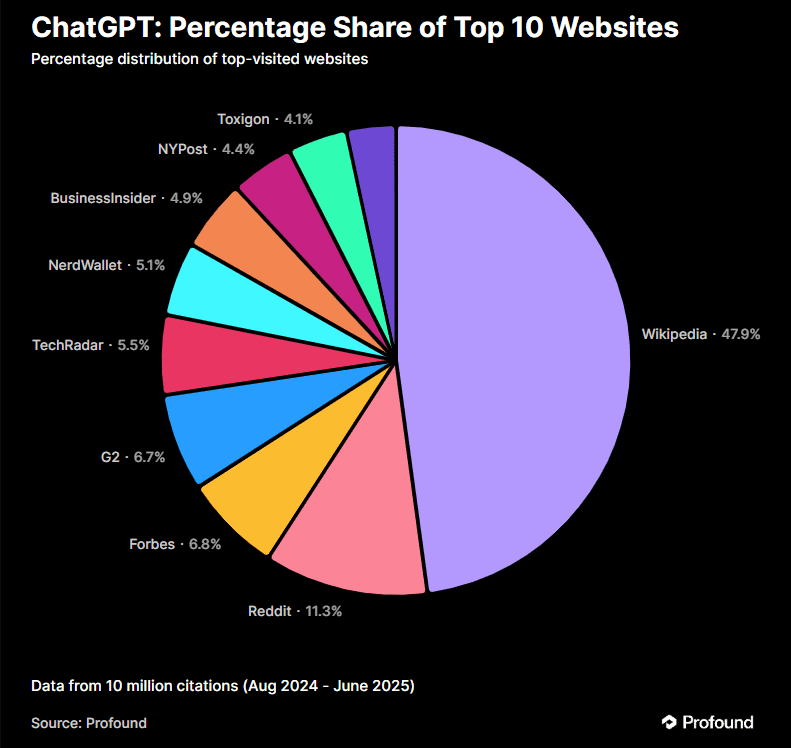
Profound saw in 30 million citations that ChatGPT, AIOs, and Perplexity rely on different citation sources:

  • ChatGPT cites Wikipedia almost 50% of the time, followed by citing Reddit at 11.3% and Forbes at 6.8%.
  • AI Overviews cite Reddit 21% of the time, followed by 18.8% for YouTube, 14.3% for Quora, and 13% for LinkedIn.
  • Perplexity cites Reddit almost 50% of the time, YouTube at 13.9% of the time, and Gartner at 7%.

We know that investing time and resources into non-Google platforms is critical to building trust and visibility across all platforms.

But now we know that the mix of platform investment depends on where you want to build visibility.

Reddit seems to provide universal impact, which makes sense given their licensing deals with OpenAI and Google, but YouTube, Quora, and review platforms don’t show the same potential for gaining citations on all LLMs.

Image Credit: Kevin Indig

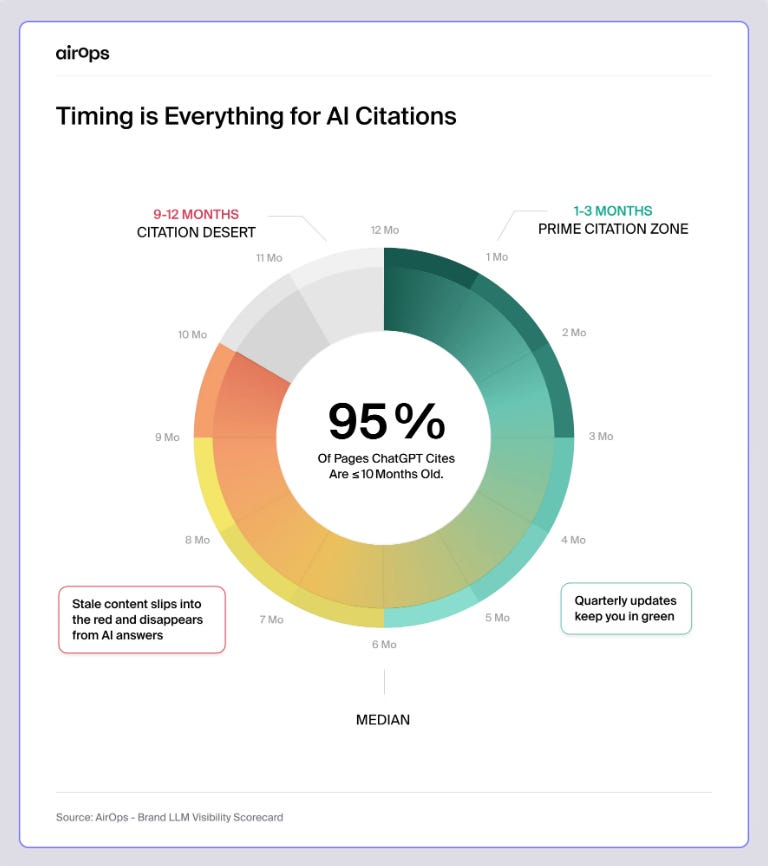
Time also matters. AirOps found that 95% of pages cited in ChatGPT are less than 10 months old. [11]

A big reason for this is the training data cutoff for LLMs. New models are still trained on large corpi of data (remember the Google Dance?).

Anything newer than the time of training needs to come from the web. As a result, keeping content fresh and continuously iterating seems like a path to AI visibility to me. Even adding the current year to the URL (and meta-title) seems like a good idea. [12]

A study by Apple, which I covered in the Growth Intelligence Brief, raises a question we might all have at the tip of our tongue: Are LLMs overhyped? [13]

The answer: It depends … on the complexity of the task:

  • Simple problems: Models often find correct solutions early but wastefully continue exploring incorrect ones (“overthinking”).
  • Moderate complexity: Models explore many incorrect solutions before finding correct ones.
  • High complexity: Models fail to generate any correct solutions.

LLMs are smart but still struggle with complex tasks. Good news for tech workers … right?

And here’s another thing: With the increase of LLM use and adoption, how will we measure success for our optimization efforts?

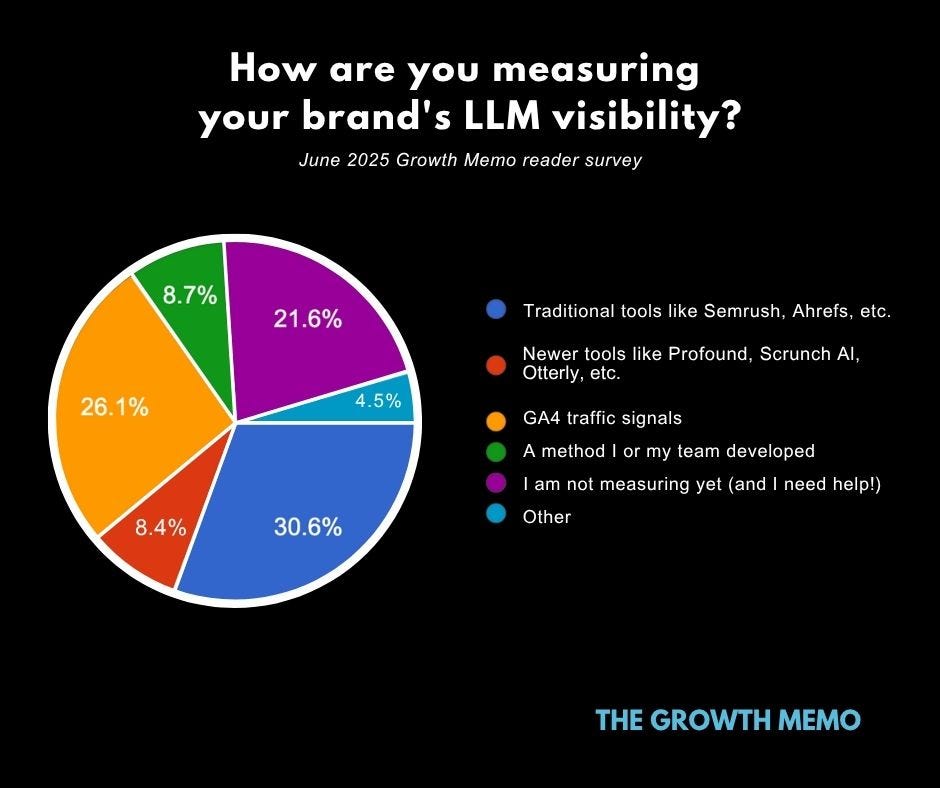
I ran a survey of Growth Memo in June, and it’s clear our industry hasn’t really nailed how we measure the LLM visibility of our brands.

Out of those who responded, about 30% are using traditional SEO tools to measure LLM visibility, 26% are using Google Analytics 4 traffic signals, and a whopping 21% aren’t measuring yet and need help determining how.

Image Credit: Kevin Indig

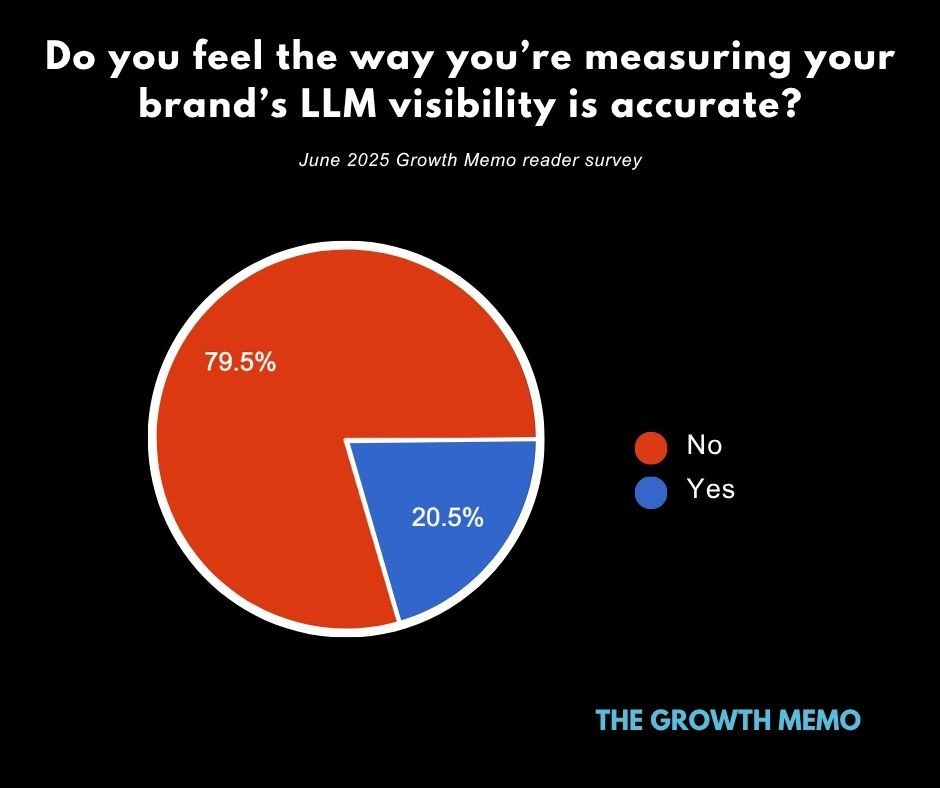
And the biggest surprise is this: Overwhelmingly, we don’t trust our LLM visibility measurements.

Close to 80% of survey respondents don’t believe the way they are measuring LLM visibility is accurate.

Image Credit: Kevin Indig

A big topic in the whole LLM conversation is, of course, whether AI replaces white collar workers or not.

I’m including this discussion in my halftime report because I’m seeing a growing number of in-house experts who are afraid to be replaced.

Amazon’s CEO, Andy Jassy, wrote a public memo, saying the company would need fewer people because of AI (bolded text is mine):

“As we roll out more Generative AI and agents, it should change the way our work is done. We will need fewer people doing some of the jobs that are being done today, and more people doing other types of jobs. It’s hard to know exactly where this nets out over time, but in the next few years, we expect that this will reduce our total corporate workforce as we get efficiency gains from using AI extensively across the company.” [14]

Amazon has cut +27,000 jobs between 2022 and 2023, but has never had more employees at the end of 2024, except for at the end of 2021 by a small margin. [15]

Other tech companies pulled even:

  • Salesforce’s CEO, Marc Benioff, says that 30-50% of the work at Salesforce is done by AI. [16] Salesforce eliminated ~1,000 roles this year.
  • Klarna’s CEO first announced that AI is doing the work of 700 customer service agents and fired about 2,000 employees, but then backtracked and rehired humans. [17]
  • Microsoft cut 15,000 jobs in 2025. CEO Satya Nadella said AI writes ~30% of new code in some projects.
  • Meta laid off 3,600 employees in 2025, with Mark Zuckerberg saying AI could be ready to be a mid-level engineer this year.

But is AI really replacing white collar workers, or is it used for good PR?

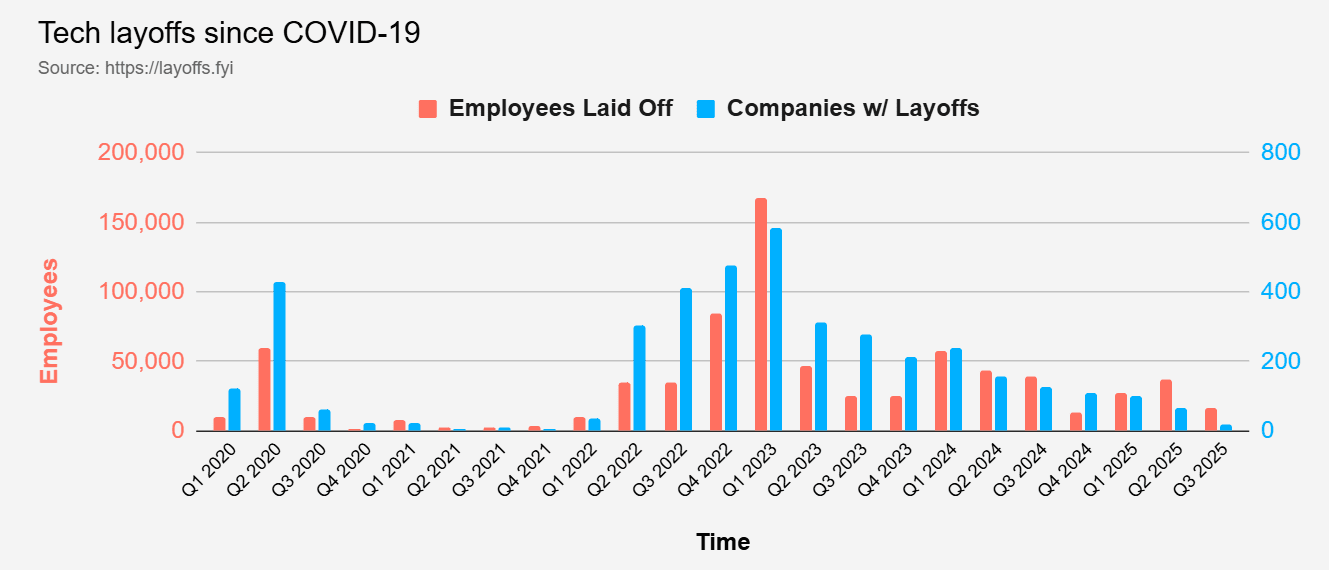
Layoff tracker, layoffs.fyi, shows that the number of companies and employees laid off is not growing since the pandemic.

Image Credit: Kevin Indig

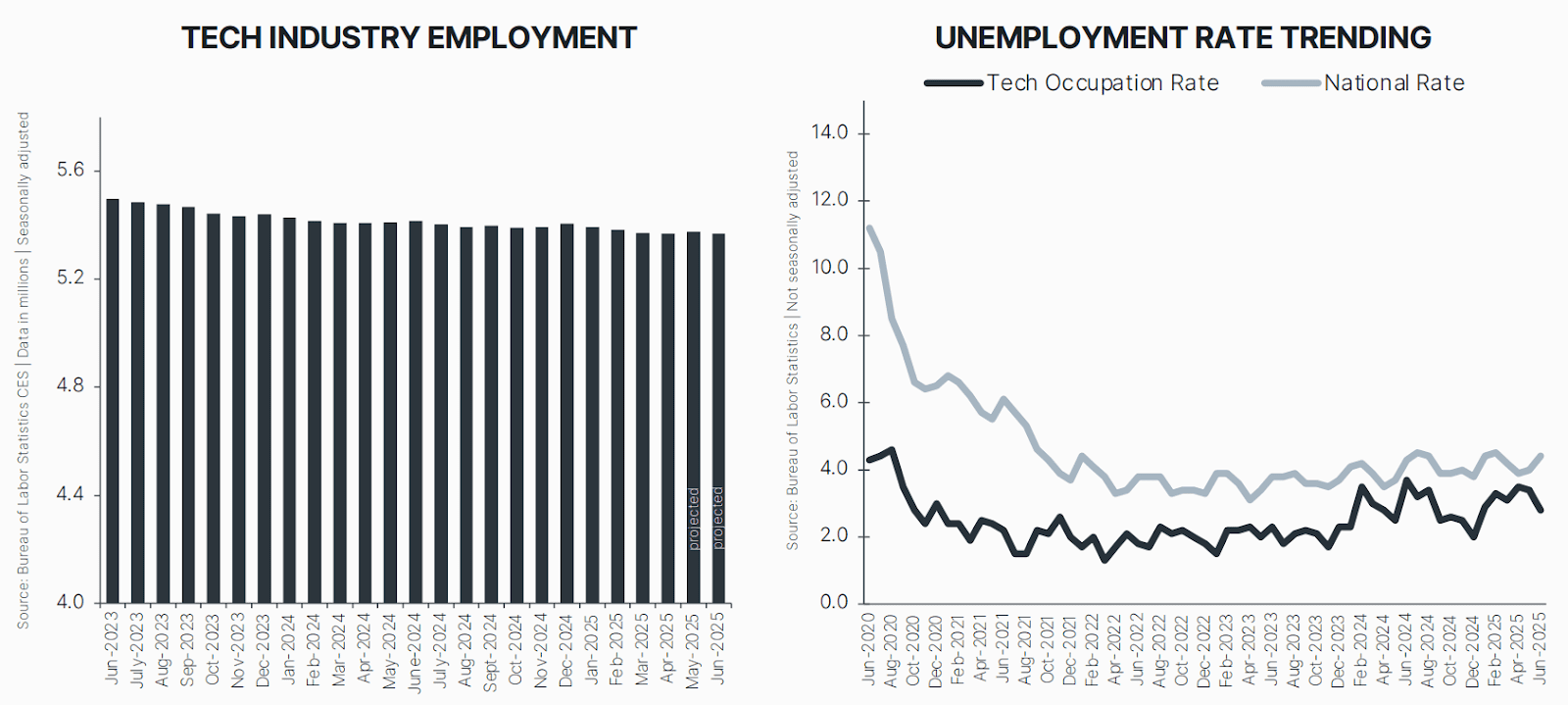
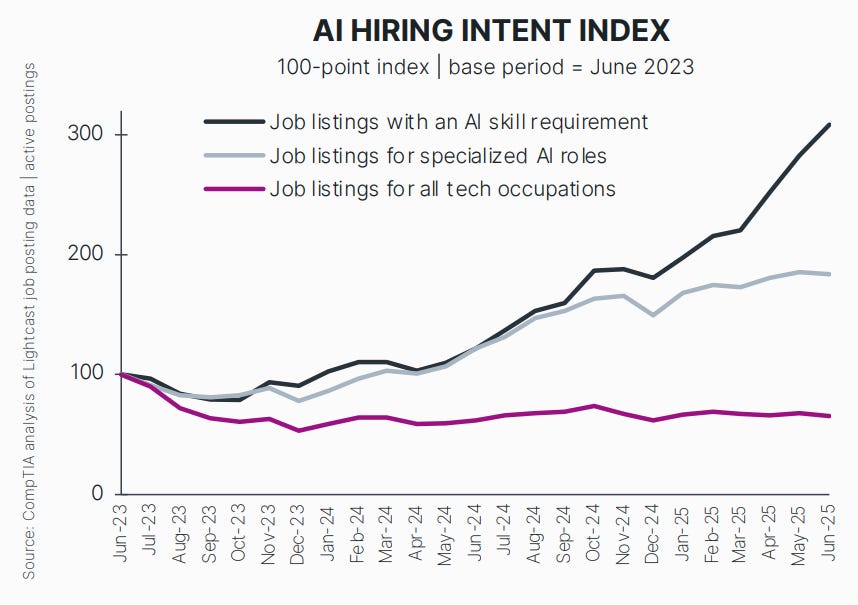
A jobs report by CompTIA shows that while tech employment is slightly down between June 2023 and June 2025…[18]

Image Credit: Kevin Indig

…the number of job openings with AI skills far outpaces the number of listings for all roles.

Image Credit: Kevin Indig

In other words, “AI layoffs” seem more PR play or justification for job cuts.

But upskilling with AI is critical.

Google Lawsuit Rushes Toward A Final Decision On Labor Day

The landmark lawsuit against Google for being an online search monopoly concludes by Labor Day (September 1). The DoJ asks for:

  • A mandatory divestiture of Chrome within a specified timeframe.
  • A five-year prohibition on Google owning any browser.
  • Termination of exclusive default agreements.
  • Extensive data sharing requirements.
  • The right to seek Android divestiture if behavioral remedies prove insufficient.

Google, on the other hand, agrees to end exclusive agreements, so we know Google and Apple will divorce, but opposes a Chrome divestiture and data sharing mandates.

The remedy ruling could have significant implications on the AI race, and where marketers should place their money.

For example, a Chrome divestiture could significantly set Google back, as OpenAI and Perplexity launch their own browsers. It would also mean a material loss in user behavior data and agentic AI capabilities.

Losing the exclusive agreement with Apple could also mean that more users set other browsers than Chrome as default, if they can provide a strong benefit.

However, I personally think the most realistic outcome is a forced end to exclusive agreements and would be shocked to see a Chrome divestiture.

For context:

  • The Department of Justice has achieved two landmark antitrust victories against Google in 2024-2025, with federal judges ruling the tech giant operates illegal monopolies in both online search and digital advertising technology.
  • Both cases have now advanced to remedy phases where courts will determine whether to break up parts of Google’s business, representing the most aggressive government intervention in Big Tech since the Microsoft case 25 years ago.

Outlook For H2

The second half of 2025 will likely be defined by adaptation rather than resistance.

Companies that succeed will be those that foster trust beyond Google, build direct audience relationships, and upskill teams in AI.

Here’s what I expect for the second half of the year:

Accelerating Traffic Decline

  • Organic traffic losses will likely intensify as Google expands AI Overviews.
  • Publishers should prepare for further 20-30% traffic declines.
  • The “new normal” of 30% of historical traffic by 2026 could arrive sooner than expected.

AI Mode Launch

  • Google will likely roll out AI Mode more broadly, but cautiously.
  • Expect a heavy focus on monetization testing before wide release.
  • Watch for new ad formats optimized for conversational search.

Publisher Adaptation

  • More publishers will actively block Googlebot.
  • Increased focus on direct revenue streams (newsletters, memberships).
  • Potential consolidation as smaller publishers struggle to survive.

Measurement Evolution

  • New tools specifically for measuring LLM visibility will emerge.
  • Industry will start standardizing on key metrics for AI performance.
  • Greater emphasis on revenue vs. traffic as success metrics.

Market Restructuring

  • DoJ ruling could reshape the search landscape.
  • Expect new search entrants to gain traction.
  • Browser wars may reignite with AI-native options.

Featured Image: Paulo Bobita/Search Engine Journal

Ask An SEO: How Can We Recover A 30% Drop In Organic Traffic From A Site Migration? via @sejournal, @kevgibbo

This week’s Ask An SEO question comes from an ecommerce business that followed best practices, but still lost traffic after migrating to a new platform.

“We recently migrated our ecommerce store to a new platform, and despite following all the recommended SEO practices, our organic traffic dropped by 30%.

What recovery strategies should we prioritize, and how long should we expect before seeing improvements?”

This is a common frustration many ecommerce businesses face after a platform migration.

But why does it happen, and more importantly, how can you recover lost traffic? Let’s dive into the likely causes of this issue and explore the most effective strategies to get your organic traffic back on track.

Why Organic Traffic Can Drop Post-Migration

So, why does this happen? And more importantly, what can you do to fix it?

Understanding why this happens is key to finding a solution. Without pinpointing the root cause, any recovery efforts can feel like a shot in the dark – and that’s the last thing you want.

Tracking Issues

After a migration, it’s surprisingly common for something small to go wrong with your analytics setup. Maybe the Google Analytics 4 tag wasn’t added correctly. Maybe your Google Search Console property wasn’t verified.

Even a tiny mistake – like a misconfigured setting or a missing bit of code – can make it look like traffic has fallen off a cliff, when really it’s just not being tracked properly.

The upside? These problems are usually quick to spot and easy to fix. It’s always a good first step before diving into deeper SEO troubleshooting because the issue might not be your traffic at all, just your data.

Technical Issues

If your tracking is working as it should and the traffic drop is real, the next step is to check for technical SEO problems on your new site – and this almost always starts with redirects.

During a migration, especially if URLs have changed, redirects are crucial. One missing or incorrect 301 redirect can break the connection between your old and new pages, making Google think important content has disappeared.

That can quickly tank rankings and traffic. Make sure all old URLs point to the right new ones, that you’re using proper 301 (not 302) redirects, and that there are no long redirect chains slowing things down.

Other common technical pitfalls? Broken or removed internal links, staging URLs accidentally left in canonical tags, or no-index rules carried over from development.

Any of these can stop Google from crawling or indexing your site properly, and if that happens, your content won’t show up in search at all.

It’s also worth checking your XML sitemap and robots.txt file. Make sure your sitemap is up to date and submitted in Google Search Console, and that robots.txt isn’t blocking important sections of your site.

On-Page Content

In some cases, ranking drops can be caused by changes to page content itself. Even small changes like missing H1s, altered metadata, or content now rendered in JavaScript can have a big impact.

So, you will need to double-check the content on your pages to identify if anything has changed.

But, don’t forget that Google will need time to reindex and trust your new setup, especially if you didn’t submit an updated sitemap or if backlinks still point to old URLs.

Although you may see some big changes in your SEO performance initially, monitor it for a little while to see if things settle back down on their own.

Steps To Recover Your Organic Traffic

Crawl Your Site: Look For Redirect Problems And Broken Links

The first thing you should do is crawl your site. Tools like Screaming Frog or Sitebulb are perfect for this.

Crawling your site helps you identify technical issues such as broken redirects, incorrect or missing 301 redirects, and redirect chains.

During a migration, URL changes are common, and improper redirects can create huge SEO setbacks.

If you have old URLs pointing to pages that no longer exist or haven’t been properly redirected, Google might struggle to index your site correctly, impacting traffic and rankings.

Another key issue to spot during crawling is orphaned pages. These are pages that exist on your site but have no internal links pointing to them.

Without internal links, Google may have a harder time finding and indexing these pages, which can hurt your rankings.

Fix Redirect Problems Immediately

Once you’ve identified any issues with redirects during the crawl, fixing them should be your priority.

Redirects are crucial for preserving SEO value during a migration. Check that all old URLs are properly redirected to their new counterparts using 301 redirects, if your URLs have changed.

Ensure there are no redirect chains, as these can slow down page load times and confuse search engines.

Even if you think you’ve set up redirects, it’s worth doing a detailed check. Missing or incorrect redirects are one of the top causes of traffic loss after a migration.

Remember, each redirect is a connection that ensures the SEO equity of your old pages gets passed on to your new ones.

Tackle Potential On-Page Issues

If you’ve ruled out any major technical errors, focus on the content itself.

Compare your post-migration content with the version you had before the migration. Did anything change that might have negatively affected your rankings?

Ensure that all your pages are optimized for the target keywords, including title tags, meta descriptions, header tags (especially H1s), and body content.

It’s also worth revisiting your product pages to ensure they meet Google’s standards for quality content. This might involve adding more detailed product descriptions, improving product images, or enhancing user-generated content such as reviews.

Update Your XML Sitemap And Google Search Console

Once your on-page content is reviewed and technical issues addressed, the next step is to update your XML sitemap to reflect the new URLs, if applicable.

Submit the updated sitemap to Google Search Console so Google can easily find and crawl your pages. This also helps Google understand that you’ve made changes to your site’s structure and allows it to index the new pages more quickly.

Don’t forget to monitor Google Search Console closely. Regularly check for crawl errors and use the URL Inspection Tool to request indexing for important pages that may not have been crawled yet.

How Long Does SEO Recovery Take?

Recovery isn’t an instant process, unfortunately. Typically, sites begin to see improvements within four to 12 weeks, but several factors can influence the recovery timeline.

If your migration involved significant changes, like a new domain or a complete overhaul of your site structure, Google may treat your site as if it were brand new.

In this case, it can take longer for Google to rebuild trust and restore organic visibility. Sites with many pages may also experience slower recovery times, as Google has to crawl and reindex more content.

The content on your site can also affect recovery time. If important pages were altered or lost valuable content during the migration, it might take longer for Google to recognise the changes and rank your pages again.

→ Read more: How Long Should An SEO Migration Take? [Study Updated]

Long-Term Lessons & Preventative Measures

A smooth migration doesn’t start on launch day; it starts way before. SEO needs to slot into your QA and development process from the beginning.

That means making sure things like redirects, content structure, and crawlability are all working before you go live, ideally in a proper staging environment.

Issues can still happen when you go live, though, so remember to crawl your old site before launch. That way, you can run side-by-side audits of your old and new sites and catch issues early.

It’s also a smart idea to have a rollback plan just in case. That means having backups and knowing what to do if something goes wrong.

Final Thoughts

Recovering from an SEO drop after a migration can be frustrating, but unfortunately, it’s often part of the process.

By focusing on the right technical checks, reviewing your on-page content, and giving search engines time to recrawl and reindex your site, you can get things back on track.

Keep a close eye on your data, be patient, and use this as an opportunity to strengthen your site’s overall SEO health.

More Resources:


Featured Image: Paulo Bobita/Search Engine Journal

Google Explains The Process Of Indexing The Main Content via @sejournal, @martinibuster

Google’s Gary Illyes discussed the concept of “centerpiece content,” how they go about identifying it, and why soft 404s are the most critical error that gets in the way of indexing content. The context of the discussion was the recent Google Search Central Deep Dive event in Asia, as summarized by Kenichi Suzuki.

Main Body Content

According to Gary Illyes, Google goes to great lengths to identify the main content of a web page. The phrase “main content” will be familiar to those who have read Google’s Search Quality Rater Guidelines. The concept of “main content” is first introduced in Part 1 of the guidelines, in a section that teaches how to identify main content, which is followed by a description of main content quality.

The quality guidelines define main content (aka MC) as:

“Main Content is any part of the page that directly helps the page achieve its purpose. MC can be text, images, videos, page features (e.g., calculators, games), and it can be content created by website users, such as videos, reviews, articles, comments posted by users, etc. Tabs on some pages lead to even more information (e.g., customer reviews) and can sometimes be considered part of the MC.

The MC also includes the title at the top of the page (example). Descriptive MC titles allow users to make informed decisions about what pages to visit. Helpful titles summarize the MC on the page.”

Google’s Illyes referred to main content as the centerpiece content, saying that it is used for “ranking and retrieval.” The content in this section of a web page has greater weight than the content in the footer, header, and navigation areas (including sidebar navigation).

Suzuki summarized what Illyes said:

“Google’s systems heavily prioritize the “main content” (which he also calls the “centerpiece”) of a page for ranking and retrieval. Words and phrases located in this area carry significantly more weight than those in headers, footers, or navigation sidebars. To rank for important terms, you must ensure they are featured prominently within the main body of your page.”

Content Location Analysis To Identify Main Content

This part of Illyes’ presentation is important to get right. Gary Illyes said that Google analyzes the rendered web page to located the content so that it can assign the appropriate amount of weight to the words located in the main content.

This isn’t about the identifying the position of keywords in the page. It’s just about identifying the content within a web page.

Here’s what Suzuki transcribed:

“Google performs positional analysis on the rendered page to understand where content is located. It then uses this data to assign an importance score to the words (tokens) on the page. Moving a term from a low-importance area (like a sidebar) to the main content area will directly increase its weight and potential to rank.”

Insight: Semantic HTML is an excellent way to help Google identify the main content and the less important areas. Semantic HTML makes web pages less ambiguous because it uses HTML elements to identify the different areas of a web page, like the top header section, navigational areas, footers, and even to identify advertising and navigational elements that may be embedded within the main content area. This technical SEO process of making a web page less ambiguous is called disambiguation.

3. Tokenization Is Foundation Of Google’s Index

Because of the prevalence of AI technologies today, many SEOs are aware of the concept of tokenization. Google also uses tokenization to convert words and phrases into a machine-readable format for indexing. What gets stored in Google’s index isn’t the original HTML; it’s the tokenized representation of the content.

4. “Soft 404s Are A Critical Error

This part is important because it frames soft 404s as a critical error. Soft 404s are pages that should return a 404 response but instead return a 200 OK response. This can happen when an SEO or publisher redirects a missing web page to the home page in order to conserve their PageRank. Sometimes a missing web page will redirect to an error page that returns a 200 OK response, which is also incorrect.

Many SEOs mistakenly believe that the 404 response code is an error that needs fixing. A 404 is something that needs fixing only if the URL is broken and is supposed to point to a different URL that is live with actual content.

But in the case of a URL for a web page that is gone and is likely never returning because it has not been replaced by other content, a 404 response is the correct one. If the content has been replaced or superseded by another web page, then it’s proper in that case to redirect the old URL to the URL where the replacement content exists.

The point of all this is that, to Google, a soft 404 is a critical error. That means that SEOs who try to fix a non-error event like a 404 response by redirecting the URL to the home page are actually creating a critical error by doing so.

Suzuki noted what Illyes said:

“A page that returns a 200 OK status code but displays an error message or has very thin/empty main content is considered a “soft 404.” Google actively identifies and de-prioritizes these pages as they waste crawl budget and provide a poor user experience. Illyes shared that for years, Google’s own documentation page about soft 404s was flagged as a soft 404 by its own systems and couldn’t be indexed.”

Takeaways

  • Main Content
    Google gives priority to the main content portion of a given web page. Although Gary Illyes didn’t mention it, it may be helpful to use semantic HTML to clearly outline what parts of the page are the main content and which parts are not.
  • Google Tokenizes Content For Indexing
    Google’s use of tokenization enables semantic understanding of queries and content. The importance for SEO is that Google no longer relies heavily on exact-match keywords, which frees publishers and SEOs to focus on writing about topics (not keywords) from the point of view of how they are helpful to users.
  • Soft 404s Are A Critical Error
    Soft 404s are commonly thought of as something to avoid, but they’re not generally understood as a critical error that can negatively impact the crawl budget. This elevates the importance of avoiding soft 404s.

Featured Image by Shutterstock/Krakenimages.com

Google’s Mueller Advises Testing Ecommerce Sites For Agentic AI via @sejournal, @martinibuster

Google’s John Mueller re-posted the results of an experiment that tested if ecommerce sites were accessible by AI Agents, commenting that it may be useful to check if your ecommerce site works for AI agents that are shopping on behalf of actual customers.

AI Agent Experiment On Ecommerce Sites

Malte Polzin posted commentary on LinkedIn on an experiment he did to test if the top 50 Swiss ecommerce sites were open for business for users who are shopping online with ChatGPT agents.

They reported that most of the ecommerce stores were accessible to ChatGPT’s AI agent but he also found some stores were not for a few reasons.

Reasons Why ChatGPT’s AI Agent Couldn’t Shop

  • CAPTCHA prevented ChatGPT’s AI agent from shopping
  • Blocked by Cloudflare’s Turnstile tool that’s a CAPTCHA alternative.
  • Store blocked access with a maintenance page
  • Bot defense blocked access

Google’s John Mueller Offers Advice

Google’s John Mueller recommended checking if your ecommerce store is open for business to shoppers who use AI agents. It may become more commonplace that users employ agentic search for online shopping.

He wrote:

“Pro tip: check your ecommerce site to see if it works for shoppers using the common agents. (Or, if you’d prefer they go elsewhere because you have too much business, maybe don’t.)

Bot-detection sometimes triggers on users with agents, and it can be annoying for them to get through. (Insert philosophical discussion on whether agents are more like bots or more like users, and whether it makes more sense to differentiate by actions rather than user-agent.)”

Should SEOs Add Agentic AI Testing To Site Audits?

SEOs want to consider adding Agentic AI accessibility to their site audits for ecommerce sites. There may be other use cases where an AI agent may need access to filling out forms, for example on a local services website.

seo enhancements
Try AI-powered SEO with 10 free Sparks.

Writing the right SEO title or meta description can be time-consuming, especially when unsure what works best. That’s where Yoast AI Generate comes in. Now, all Yoast SEO users can try it with 10 free Sparks. 

What does Yoast AI Generate do? 

Yoast AI Generate suggests SEO titles and meta descriptions based on your content and keyphrase to help your content stand out in search results and attract more visitors.  

It analyzes your post and offers tailored suggestions that are clear, relevant, and optimized for search, without starting from scratch.  

Use Yoast AI Generate to:  

  • Speed up your workflow  
  • Improve your search snippet quality  
  • Feel more confident about what you publish  

You stay in control: review, edit, or regenerate suggestions before applying them.  

Here’s why you’ll love this opportunity  

  • You can try Yoast AI Generate with 10 free Sparks   
  • You don’t need to create an account   
  • You don’t need to upgrade or share credit card information  

The free sparks do not regenerate; this is a one-time offer.

Why we’re offering this  

Not everyone can experience the effectiveness of our AI tools, especially if you’re using the free plugin. This offer makes it easy to try Yoast AI Generate immediately and see the value for yourself, without needing to commit. It’s a simple way to explore what smarter SEO can look like in your workflow  

Read how to use Yoast AI Generate in your Yoast SEO and start optimizing.