Black Friday & holiday season SEO 2024: 10 tips to start preparing!

The summer has just ended. Should you already start preparing for Black Friday and the holiday season? Yes! They’re the biggest sales of the year, and ranking in Google is something you take time to do. It’s never too early to start getting your deals ready. So, if you have an online shop or an ecommerce store, let’s start working on your holiday season and Black Friday SEO immediately!

Don’t forget that Black Friday (November 29, 2024) and Cyber Monday (December 2, 2024) are kicking off this year’s holiday shopping season. You can set up a lot of content for all occasions. In this post, we’ll review some things you can do to prepare!

Table of contents

Today, people are used to shopping online. It’s easy and convenient. You don’t have to travel only to find something out of stock. Plus, online stores often offer payment plans. Shopping online is so popular that online sales in the USA during the holiday season hit a record of $221 billion last year! And the numbers will only continue to rise. That’s why it’s safe to assume that people will buy many (if not most) holiday gifts online this year.

Staying on top of trends to prepare for the holiday season is good. E-commerce is still growing, and consumers expect more every year. Here are some actionable tips for the upcoming Black Friday and holiday season to improve your SEO:

  1. Discount deals and alternative payment options (Buy now, pay later) should be part of your ecommerce strategy
  2. Brands should provide a consistent purchasing experience across digital/online and physical stores
  3. To minimize returns, brands should make their product pages as comprehensive as possible
  4. Holiday season marketing campaigns should be tailored to each platform to ensure maximum effectiveness

Online is where it’s at

Of course, in-store or curbside pick-up will still prove popular. However, most people research their ecommerce purchases online – sometimes weeks in advance! So don’t be surprised when the holiday shopping season starts well before Black Friday and continues for weeks.

Extending Black Friday, Cyber Monday, and other holiday season online deals for a few days or weeks can be a good idea. This is especially true if you want to prevent huge crowds from gathering at your store on a specific day. That won’t be a good shopping experience for anyone involved, so spreading these deals over an extended time is probably better.

Start preparing in time

Dive into the data you amassed during previous Black Friday and Cyber Monday events, and see if you can come up with improvements for your holiday season SEO. Bear in mind that it takes a while for content to rank. So, to keep up with the competition, try to get your content in gear at least 45 days ahead. That’s often recommended. Of course, you can always start preparing earlier if that works better for you. Your schedule could look something like this:

  1. 45 Days in advance: Post your promotion to your website calendar and post a save-the-date post on social media and in your email newsletter).
  2. 7 Days in advance: Post upcoming events/promotions on social media and via email. Try to encourage other (small) businesses to share it with their followers.
  3. 1 Day in advance: Post an event reminder post on social media.

It’s a good rule to remember these steps and time frames. However, you can do much more than set up new pages and renew old ones. Let’s look at a few practical tips.

1. Do holiday season keyword research

Keyword research is important all year, but especially during the season when your online store starts having big sales. You have probably worked on this research previously, but now is the time to dive in again. There are always things to learn, like developments in your industry, changes in consumer behavior, or new trends and topics to discuss.

Start early with your research to give yourself enough time to produce high-quality, helpful content that helps reach those new audiences. While using generative AI tools to generate Black Friday SEO content for your ecommerce is enticing, please refrain from doing so. Generative AI can help you do your job but can’t replace your valuable insights and opinions.

2. Set up holiday season gift pages

First, we must consider what category or particular landing pages make sense for the upcoming holidays. You can always set up pages like ‘Best gifts for parents/millennials/teens’, ‘Newest deals for your 6/10/12-year-old’, and ‘Best friend/grandparents/coworker discounts’. You could also think of ‘Top 10 gifts for outdoor/skiing/parasailing enthusiasts’ and ‘Top 3 deals for stay-at-home parents’, etcetera.

Make sure the page titles and meta descriptions of these gift landing– or category pages fit the upcoming holiday season. You can reuse these gift pages for Hanukkah or your summer sale. Find (old) content that fits the holidays, rewrite titles and meta descriptions to match the upcoming season, and chances are you won’t have to do that much work to get them up to date. Be sure to write proper product descriptions and improve the product images. Learn how to write great product descriptions using our product-specific analysis in WooCommerce SEO and Yoast SEO for Shopify.

To increase the chances of your gift pages ranking, boost their internal linking structure. You can also link the previous all-year holiday season pages, such as specific Christmas landing pages (‘Top 7/10/25 gifts for under the Christmas tree’) to boost these when the time has come. That could be around the 45-day mark, but we would be okay with stretching that to 60 days. You’ll need to give Google and other search engines enough time to follow your links and find your specific holiday season SEO landing pages with deals.

Social media like X and Pinterest — though this is technically a visual search engine — can play a massive role in the success of your (online) holiday season sale. Take Pinterest, for instance. Raise your hand if you or your spouse has a Pinterest Christmas wish list. Many people do. If you get your products on people’s wish lists, that can positively impact your sales.

While you’re at it, don’t forget to share your holiday season gift pages on Facebook and Instagram. In the previous section, we’ve mentioned the top 10 lists. We all know these still work pretty well on social media. Yoast SEO can help you optimize your social media posts before you share them.

Email marketing

Last but not least, remember your email marketing! For many companies, newsletters provide a steady stream of income. Be sure to plan a good campaign for your newsletters.

For example, we recommend setting up holiday gift guides and sharing these. You can create an excellent overview of many gifts that many people will enjoy. ELLE and Target have pages like that, and so do more companies.

4. Introduce new products

The holiday season is an excellent time to pitch new products. If you know of potential bestsellers for the upcoming holiday season, start writing content about these products now. You can compare it to tech sites writing about concept iPhones, features that Apple might add, etc.

The more you write about new products upfront, the more likely the sales pages for these products will rank when it matters. You should link all pages you made in advance to that one main page you’ll set up when the product is released and available to buy. Treat that page like cornerstone content.

5. Add structured data to your product pages

When adding or changing your product pages to fit the holiday season, don’t forget to optimize them. Check, for instance, whether you’ve added structured data to your product pages. Rich results that show ratings and prices can give you an edge over your competitors. Our WooCommerce SEO plugin, Local SEO plugin, or Yoast SEO for Shopify app can help you do this to improve your holiday season!

an example of a google search result for a product, in this a listing of a PlayStation 5 sold by Walmart
Example of a product appearing in the search results if you use structured data.

Read more: Structure data with Schema.org: the ultimate guide »

6. Check your product feeds

Don’t forget to optimize your product feeds for Black Friday SEO. This maximizes visibility and sales during this high-traffic online shopping period. Start by ensuring all product information, such as titles, descriptions, prices, and availability, is accurate and up-to-date. Check if the products that need them have relevant Black Friday keywords to enhance discoverability. Use high-quality, clear images to showcase your product.

Use the promotions feature in Google Merchant Center to prominently display special deals and discounts for Black Friday and Cyber Monday. This way, you’ll make your offers more attractive to potential buyers. Please update your feed regularly to reflect real-time inventory changes and fix errors to maintain product visibility.

7. Reuse content

There’s no shame in serving old wine in a new bottle. If you have a Black Friday or a Christmas gift guide for 2023, feel free to reuse it in 2024. Update the year and details like popular brands and products for that year. If the slug of your URL is /black-friday-guide-2023/, change it to /black-friday-guide-2024/ around August next year, and redirect the old URL to the new one. No need to create a new page. It would be a waste of nice inbound links not to reuse that old URL. Of course, this is even easier if you don’t include the year in the URL, so /black-friday-guide/ is also an excellent slug.

In the months before the holiday season, you could even simply repost popular posts from last year (a bit adjusted or updated if needed) on social media. Valentine’s Day might even become Secret Santa. Cyber Monday might match your child’s favorite gifts for Ramadan. These are probably small adjustments; perhaps just adding ‘this Ramadan’ to a meta description or title will do.

Keep reading: Should I update or delete old content? »

8. Optimize for speed and mobile

It’s a good idea to check and optimize your website for speed and mobile use. Trust us; you’ll get these recommendations from an SEO blog or consultant daily. And with good reason! Mobile, site speed, and user experience are essential to get people to spend money on your ecommerce business this Black Friday. When preparing your online store for the holiday sale season, this is as good a time as any to check your mobile website and site speed, and update or improve them if possible.

To start, look at Google’s Core Web Vitals and use these to improve your site. Here are five ways to boost your Core Web Vitals scores.

Read on: How to check site speed »

9. Local business? Focus on local SEO

Investing in local SEO for Black Friday and Christmas shopping is essential for local businesses aiming to attract more customers. Begin by optimizing your Google Business Profile with accurate business information, including address, phone number, business hours, and any special Black Friday/Cyber Monday hours or promotions. Encourage satisfied customers to leave positive reviews. Use local keywords in your content, focusing on terms your community will likely search for, such as “Black Friday deals in [Your City].” Additionally, engage with your local community on social media by promoting special deals to drive more foot traffic to your store.

10. Create a measurement plan

All set? Remember to make a measurement plan to analyze your success. Write down all your plans, then think about how to track all your actions. This is key to knowing what to focus on next year. For detailed instructions on analyzing your Black Friday, Cyber Monday, or Cinco de Mayo shopping, read our post with five tips to measure your holiday sales success.

What should you do when the holiday season is over?

How do you handle the product pages of holiday gift sets after the holidays? Even if the gift set or product was a great success, and you want to offer it again next year, it’ll take a while for the page to be relevant again. What is the best way to deal with these pages in the meantime?

Our advice: Keep the pages up. However, you don’t necessarily want them visible to people browsing your site. So, have the page up without linking, then link to it again during the holiday season. This is better than deleting it and starting again.

Conclusion on holiday season SEO

In short, now’s the time to buckle down and start writing holiday gift pages and content for new products. Remember to plan your social media promotion and analytics. After all, you can never start too early when your online business depends on the holiday season. Be prepared; begin now with your SEO. Good luck with your holiday season sale!

Keep on reading: eCommerce usability: the ultimate guide »

Coming up next!

Improve your Shopify store’s visibility with AI in Yoast SEO

Standing out in the crowded marketplace is crucial for any online store. For Shopify merchants, optimizing SEO titles and meta descriptions is an important step in gaining visibility and attracting potential customers. AI-driven tools like Yoast SEO for Shopify have made this process more efficient and impactful.

SEO titles and meta descriptions are HTML elements that communicate your web page’s content to search engines and users. While these do not directly impact rankings, these components significantly influence click-through rates (CTR) by acting as your virtual calling card in the search results. A well-crafted meta description can entice users to click on your link over others in search engine results pages (SERPs). While Google loves generating them automatically, you can still influence what they show.

How AI is transforming Shopify SEO

Integrating AI in SEO has changed how we all approach optimization tasks. A ton of innovation is happening right now, from AI tools automating keyword research to content creation and from on-page SEO to providing merchants with deeper insights into user intent and consumer behavior. AI can improve the user experience by predicting user needs and customizing content delivery. Ultimately, we are all looking to boost engagement and SEO performance.

AI-generated features for Yoast SEO

As a merchant, you can streamline your Shopify SEO work using AI in your SEO strategies. Our Yoast SEO for Shopify SEO app uses AI to automatically generate SEO titles and meta descriptions that are both keyword-rich and engaging.

One of the most time-consuming aspects of SEO is crafting unique and engaging titles and meta descriptions for each product and page. We’ve built generative AI technology to speed up this process. Thanks to Yoast AI Generate, we can generate optimized titles and descriptions that align with what search engines and users seek. This saves time and ensures consistency and relevance across your site.

Using Yoast SEO on your Shopify store makes improving your SEO much easier. The app handles technical SEO tasks automatically and gives clear feedback with simple color-coded signals. This makes it perfect for beginners just getting started with SEO while also being powerful enough for experts. Plus, Yoast SEO includes access to helpful courses to boost your knowledge.

It also creates structured data to help your store achieve rich results, making it stand out in search engines. With 24/7 support and straightforward tips for optimizing your content, Yoast SEO tackles common challenges. It helps you save time doing SEO tasks and getting noticed in search results. This way, you can focus more on running your business while ensuring your store is easy to find online.

Of course, you can’t simply do what you want here because there are best practices for crafting SEO titles and meta descriptions for Shopify merchants.

Best practices for SEO titles in Shopify

  • Incorporate primary keywords early: Place your primary keyword at the beginning of the title to ensure search engines and users immediately understand the page’s relevance.
  • Branding: Include your store name at the end of the title to increase brand recognition, such as “Buy Eco-Friendly Yoga Mats | YourStoreName.”
  • Character number: While Google has no hard limit, keep your title length in check to ensure they display fully in search results.
  • Unique titles for each page: Ensure each product and page has a unique title to avoid duplication and improve search engine understanding.
  • Use action-oriented language: Encourage clicks with verbs that suggest action, like “Shop,” “Discover,” or “Explore.”

Best practices for meta descriptions in Shopify

And what about meta descriptions? What should you remember while writing or optimizing meta descriptions in Shopify?

  • Focus on benefits and features: Highlight your products’ unique benefits and features to entice users to click.
  • Include a call to action: Use language encouraging users to act, such as “Browse our collection today” or “Order now for free shipping.”
  • Keep it concise and relevant: Ensure the entire description is visible in search results and accurately reflects the page content.
  • Avoid keyword stuffing: Use keywords naturally and sparingly to avoid making the description look spammy.
  • Highlight offers and promotions: If applicable, mention any promotions, discounts, or free shipping offers to attract clicks.
  • Reflect current content and updates: Regularly update meta descriptions to reflect product details, offers, or seasonal campaign changes.
  • Match user intent: Ensure the description aligns with what users are searching for and provides a clear answer or solution to their query.

Use these best practices to enhance the effectiveness of your SEO titles and meta descriptions. Ultimately, these should improve merchants’ visibility and increase click-through rates in search engine results.

Enhancing your Shopify store’s visibility with our AI-generated SEO features is straightforward. Doing so might boost your search engine performance. If you haven’t installed Yoast SEO for Shopify yet, please do so. It’s an amazing SEO app that helps merchants get results. In the latest release, we’ve added AI-generated features. Install the app from the Shopify App Store and integrate it with your store.

We have a guide on how to use the AI Generate features in Yoast SEO for Shopify.

Yoast SEO for Shopify uses generative AI to help you do ecommerce SEO

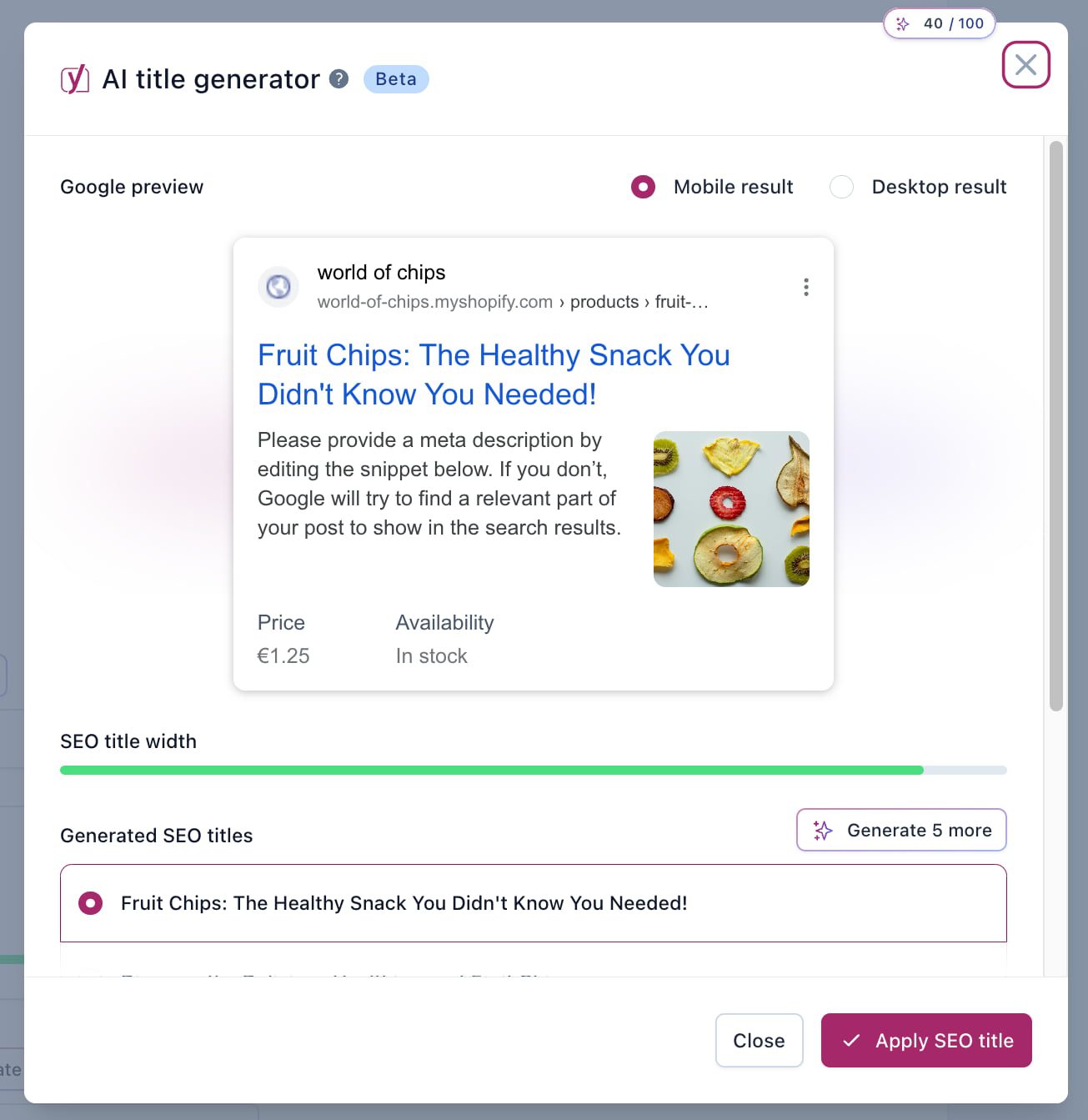
Once you have optimized your products or pages, scroll down to the Yoast SEO interface’s Title and Meta Description section. Here, you’ll notice a purple button with a sparkle icon: Generate Shopify SEO title or Generate Shopify Meta Description, depending on which you are looking for. Clicking the button will open a modal that shows the Search Appearance preview. It will also show five suggestions for titles or meta descriptions it generated. The AI analyzes your product details, keywords, and user intent to create optimized content.

Carefully review the AI-generated titles and meta descriptions. Ensure they accurately reflect your product details and align with your brand voice. If you are not happy with the first five, hit the button again to have it generate more. Pick the one you are happy with. Make any necessary edits to tailor the content to your specific audience or to highlight unique selling points.

Once you are satisfied with the content, save the changes. Then, track the performance of the updated titles and descriptions using tools like Google Analytics or Shopify analytics tools to assess improvements in CTR and traffic.

It’s now easy for Shopify merchants to improve their SEO in just a few steps — all thanks to AI. These tools can help you aim for greater visibility and more effective engagement with your potential customers.

Conclusion

Titles and meta descriptions are often the first things consumers see from your Shopify store. Optimizing them properly increases visibility and engagement! Yoast SEO for Shopify now makes that process a lot easier. Adopt our AI tools to enhance your SEO strategies and improve your online store’s performance.

Coming up next!

Learn why Yoast SEO for Shopify will boost your results

Our mission at Yoast is ‘SEO for everyone,’ and we believe that Shopify merchants can benefit greatly from SEO. That’s why we built an app that helps you attract more people to your online store: Yoast SEO for Shopify. This app stands out from the crowd because we built it with a team with many, many years of experience in SEO. But how does it attract more people to your store? And what can you do with it? Here, we’ll explain why Yoast SEO for Shopify is the best solution for your online store!

Table of contents

First, a note about SEO

Making your online store a success takes a lot of work. No magic bullet will bring you loads of customers without you having to do anything — and you should not trust those claiming that. We sometimes call SEO “Seriously Effortful Optimization.” Holistic SEO takes time and effort; it’s as simple as that.

Tools like Yoast SEO for Shopify make turning your store into a success story significantly easier, but it still requires sweat and tears. You need to write and improve your product content and continually track whether what you are doing works. If it doesn’t, you should adjust course and try again.

Over time, Shopify merchants like you get to know the tools, the content, and your audience and understand what works and what doesn’t — experience will help you in your commercial journey.

No single app can guarantee instant top rankings and ecommerce success. Instead, it acts as a valuable resource to guide your efforts. Engaging thorough keyword research, optimizing product descriptions, improving site user experience, and building quality backlinks are all essential tasks that improve visibility.

That being said, we built Yoast SEO for Shopify as a helpful guide — a personal SEO assistant, if you will — to help you reach your goals.

Here’s what you can expect when you install Yoast SEO for Shopify.

We are SEO experts

For almost 15 years, Yoast has been building products that help people with WordPress websites with their SEO. With over 13 million active installs and websites ranging in size from the bakery around the corner to some of the most popular, hugest sites on the planet, we’re not afraid to call Yoast SEO the #1 SEO plugin for WordPress.

You might wonder what this has to do with you as a Shopify merchant. Well, we’ve built our Shopify app using all the learnings and SEO expertise we’ve acquired over the years — which is a lot!

This experience resulted in an app that handles much of the technical SEO stuff for you. For example, the latest best practice for meta robots directives, product structured data, correctly setting indexing controls on paginated states, and all of the nuances of how various open graph and SEO settings work together.

What does all of this mean? The takeaway is that these settings are important in how high you end up in the search results. We also have close contact with Google and collaborate with them regularly. This makes it easy for us to stay updated on the latest SEO developments. This helps us constantly improve our app to ensure you stay on top of the latest changes in SEO.

We’re building innovative Shopify AI features

Like our WordPress plugin, Yoast SEO for Shopify has amazing AI features. We’re starting with our award-nominated feature Yoast AI Generate feature to help you quickly generate titles and meta descriptions. Later, we’ll also bring other features to Shopify.

Yoast AI Generate is easy to use and greatly enhances your Shopify SEO work. By clicking the ‘Use AI’ button, the tool will generate five titles or meta descriptions based on the content you are working on. Pick the one you like and save your work. If you are not happy with the options, simply generate five more. Of course, you can always tweak them before applying them. Here’s a guide on how to use the Generate AI feature in Yoast SEO for Shopify.

This is just the start of using the power of generative AI to help you improve your Shopify store!

Get a little help from generate AI with Yoast SEO for Shopify

We make it easier to modify Shopify themes

When you install an SEO app, it needs to change your online store and theme. Don’t worry, this is normal. Depending on the other apps that you’re running, some other modifications will already have been made to your theme files.

Unfortunately, many of the new apps you install will apply their changes to what’s already there. That’s why ecommerce stores often end up with mismatched, malformed, and missing bits of (SEO) code, especially if you’ve historically used multiple apps.

The Yoast SEO for Shopify app is smart. It conditionally removes potentially conflicting code and cleanly outputs its own rather than forcing it on top of what’s already there. The app also helps you clean up your store when you delete it, should you choose to do that.

Our structured data is comprehensive

Structured data helps Google and other search engines better understand your pages, benefiting your rankings. Our structured data approach does a great job of connecting and describing products and pages. We don’t output ‘bits and pieces’ of structured data. We tie the structured data together and output it in a way that minimizes conflict and overlap. Of course, you can decide which pieces you want to turn on or off.

Our developer documentation has more technical insights into our Schema structured data implementation.

We support Shopify review apps

Structured data also allows your customers’ ratings to appear in the search results. This is essential when you have an online store. It shows other (potential) customers that you are trustworthy and will increase their chances of visiting your website. That’s why we support many review apps on Shopify.

We handle the structured data for your ratings and reviews to make those ratings appear in the search results. We currently support several review apps, including some of the most popular ones in the Shopify App Store, like Judge.me, Look, Ali Reviews, and Opinew.

example of a rich result for a product in google
Structured data helps your products to stand out in Google

Yoast SEO offers much control

With Yoast SEO for Shopify, you decide how your titles and meta descriptions are set up per content type. This allows you to consistently show your titles and meta descriptions in the search results. We integrate directly into Shopify to give you control per post, page, or product on an individual level. Our app gives you this page-level control, allowing you to make these changes per page or product you’re working on.

We help you create high-quality content

Content is a key element in SEO. Google uses any chance they get to remind the SEO world of the importance of high-quality content. To start and keep ranking, you need to keep producing great content. Content that’s easy to understand for site visitors and search engines. That’s why readability is important when creating content for your product pages and blog posts. Writing high-quality blog posts and creating great product descriptions should always be a priority.

It’s important to conduct keyword research for your online store and keep up that flow of fresh content. The right content helps search engines like Google understand what your website is about, which helps them direct the right audience to your pages. Perhaps even more important, it strengthens the relationship with your audience when you provide them with high-quality content. Yoast SEO for Shopify is the SEO solution that gives you direct feedback on the content you’re writing to help you improve it for site visitors and search engines.

To help you discover high-quality keywords to rank for, we’ve built an integration with the leading online marketing platform Semrush. Our content dashboard will show you which articles and product pages need optimization so you will always know what to do next.

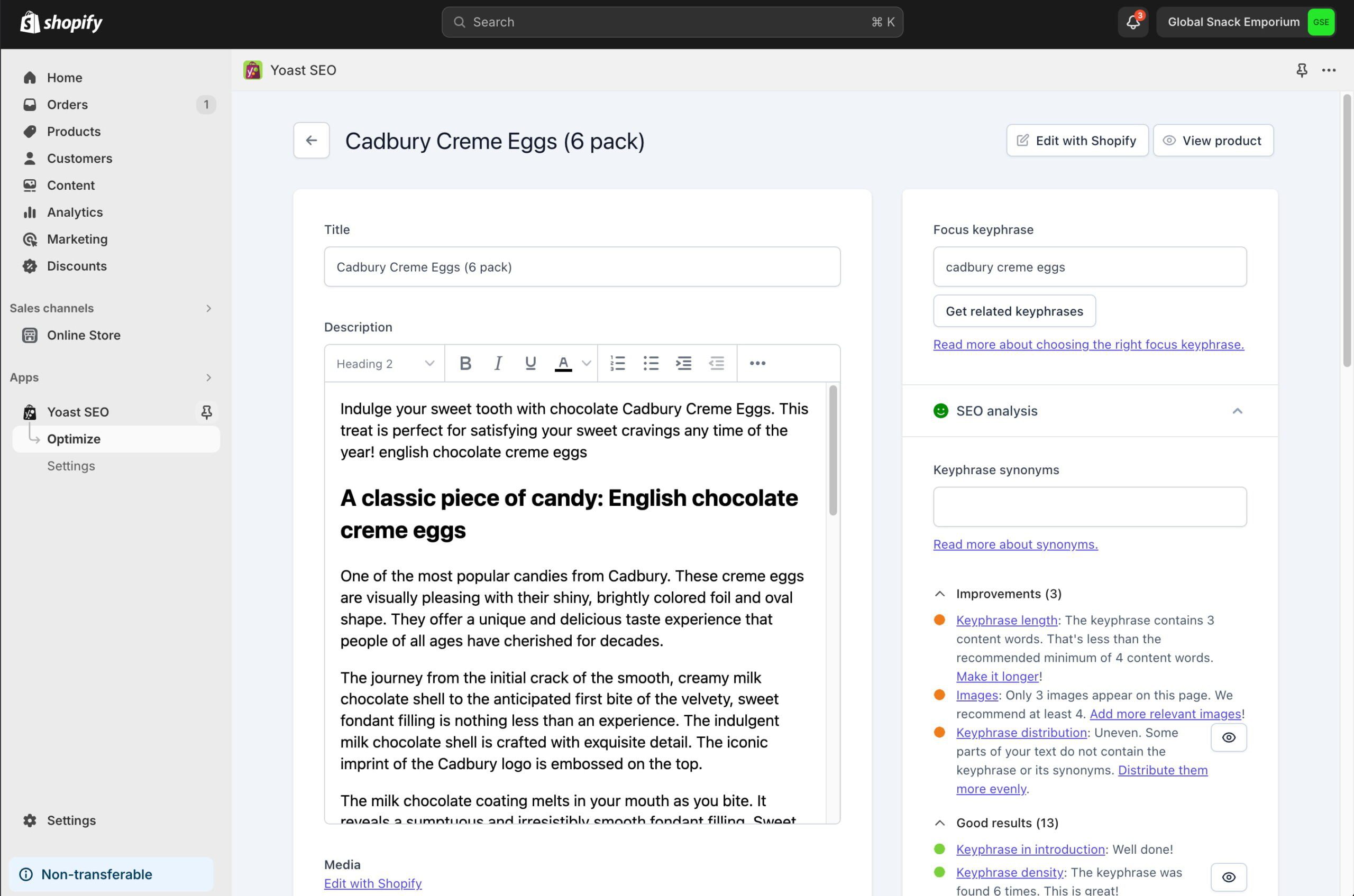
yoast seo for shopify seo analysis with product description opened
Yoast SEO for Shopify makes it easy to optimize your product descriptions by following the traffic light feedback

We understand content in 20 languages

Yoast SEO is the best app for understanding content written in your language and giving you direct feedback. Currently, it can do this in 20 different languages: English, Dutch, German, French, Russian, Italian, Spanish, Swedish, Portuguese, Polish, Arabic, Hebrew, Hungarian, Norwegian, Turkish, Czech, Japanese, Greek, Slovak and Indonesian. Remember that we can only provide an analysis of the language set for the theme.

There are a lot of SEO apps out there that are focused on the English language. Thanks to our team of linguists, we can offer feedback on your content in any of the languages above! With Yoast SEO, you have one SEO app that helps you write great content (in the language of your choice) and fixes a lot of the technical SEO for you.

See how content appears in search and social

Our search and social media appearance tools are essential to understanding how your products and content will appear on other platforms. They allow you to let your content shine and help it reach the audience you are looking for. The search appearance section previews how your content will look on Google, and the social media appearance section will do the same for platforms like Facebook or X.

Yoast SEO for Shopify has a bulk editor

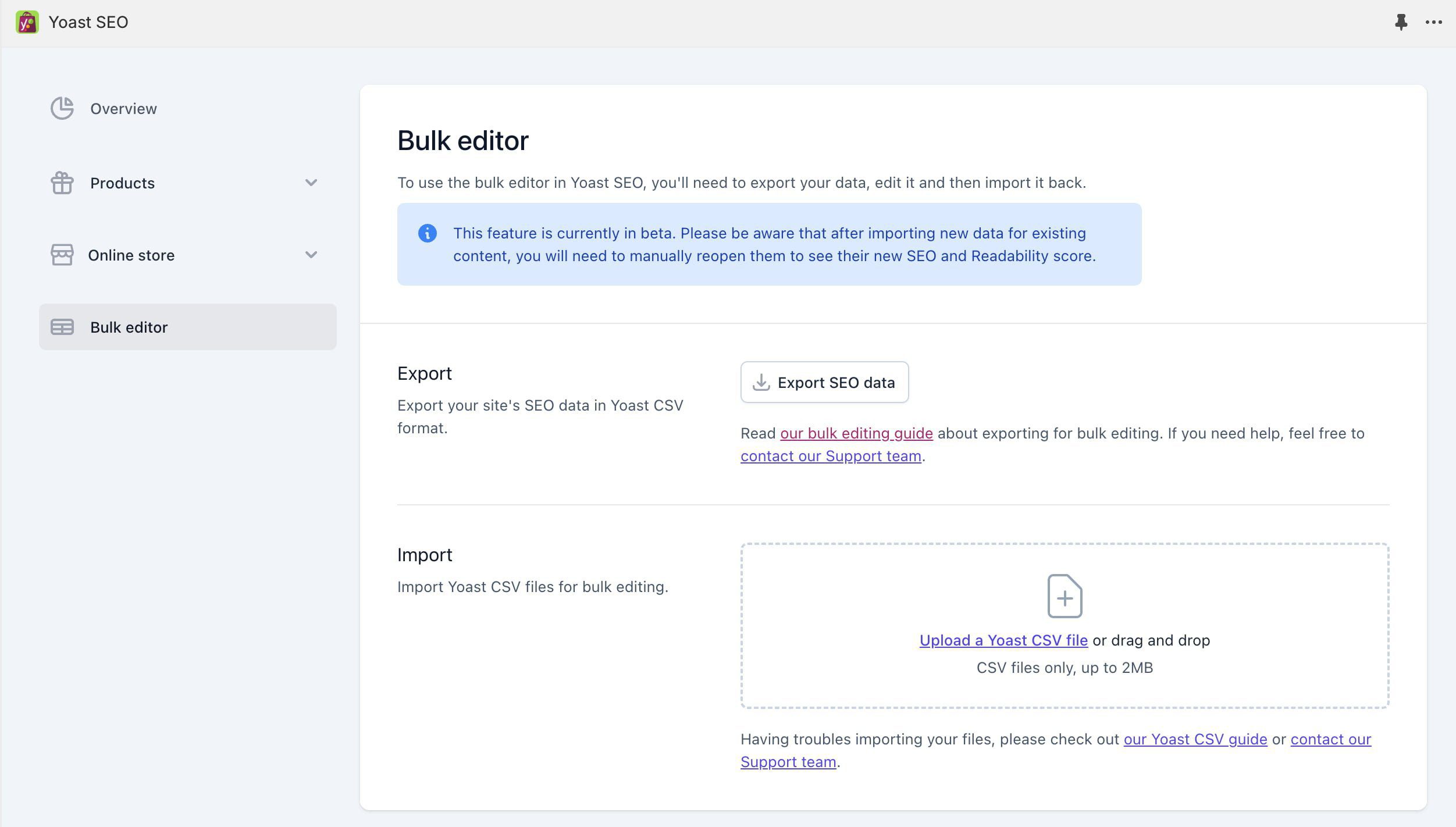
The bulk editor feature in Yoast SEO for Shopify, currently in beta form, is useful for efficiently managing and optimizing the SEO of multiple pages. It lets you simultaneously update titles, meta descriptions, and more across multiple pages. This, of course, can save Shopify merchants time compared to manual, page-by-page edits.

Here are some of the items you can edit from the bulk editor using the provided CSV file:

  • SEO titles
  • Meta descriptions
  • Focus keyphrases
  • Related keyphrases
  • Canonical URLs
  • Robots meta tags
  • Social media titles and descriptions
  • Schema structured data page and article types
the interface of the bulk editor of yoast seo for shopify, showing the import and export options for csv files
The bulk editor in Yoast SEO for Shopify makes it easier to manage data in bulk

To conclude

There are many SEO apps available for your Shopify store. And it’s up to you which is best for your specific needs. We hope this article gives you more insight into our Shopify SEO app’s features and how it can help you climb those rankings! To read more about our app, visit our Yoast SEO for Shopify page.

Coming up next!

seo enhancements
The critical role of UX in ecommerce SEO

Online retailers work hard to make their stores stand out from the competition. One of the main points they should focus on is offering the best user experience. Combined with a proper SEO strategy, this can lead to great results. Search engines like Google prioritize user satisfaction, so integrating UX and ecommerce SEO helps improve search rankings and build a long-term relationship with your customers.

UX is the underrated SEO powerhouse

Traditionally, SEO focused on keywords, backlinks, and technical factors. However, Google’s algorithms also focus on user engagement and satisfaction. A great UX is not simply an add-on but the foundation of your SEO efforts.

As Steve Jobs famously said, “Design isn’t just what it looks like and feels like — design is how it works.” High-quality UX/UI design can increase visitors’ time on a website and lead to better conversion rates. Such metrics indicate to search engines that the site effectively addresses user needs, which could warrant higher rankings.

Customers seek a seamless experience when buying something. A great UX can influence those purchasing decisions and set your brand apart from competitors in a market with similar products and services.

As another business leader, Dr. Ralf Speth, ex-CEO of Jaguar Land Rover, famously said: “If you think good design is expensive, you should look at the cost of bad design.”

Improving conversion rates through UX

A website’s design, performance, and functionality directly impact its conversion rates. A well-executed user interface can boost conversions. Such enhancements attract more visitors and convert them into loyal customers. There are many sections on your online store that could benefit from UX improvements.

For example, abandonment of shopping carts is a big issue in ecommerce. There are many reasons why users leave their carts without buying. Most of these are tied to the buyer journey, but many customers also leave their carts due to issues with the store or the buying process UX. In numbers: the Baymard Institute found “that 22% of US online shoppers have abandoned an order in the past quarter solely due to a “too long/complicated checkout process,” while 17% left because of technical issues on the site.”

Improving page speed is also one of the pillars of UX. Portent found “that the difference in ecommerce conversion rate between blazing-fast and modestly quick sites is sizable. A site that loads in 1 second has an ecommerce conversion rate 2.5x higher than a site that loads in 5 seconds.”

These are all things you can fix in your UX strategy. In a well-known study, Forester Research showed that businesses can expect up to $100 in return for every dollar spent on UX. For many retailers, investing in UX and ecommerce SEO can drive business growth.

The importance of mobile optimization

Since mobile has far eclipsed desktop traffic in market share, optimizing for mobile is more important than ever. At the start of 2024, Statista calculated that smartphones were responsible for 77 percent of retail site traffic globally and for generating two-thirds of online shopping orders.

First impressions matter

Creating a positive first impression is critical for ecommerce businesses. Research suggests that users form an opinion about a website in just 50 milliseconds. Key factors influencing these lightning-fast judgments include visual complexity, prototypicality, and exposure time. Prototypicality refers to how closely a website aligns with users’ expectations based on familiar design patterns. Exposure time is the brief period visitors initially see and evaluate a site.

Websites that are visually simple yet stick to common conventions are perceived as more appealing, even within this short exposure time. As visitors spend more time on a site, the familiar structure becomes as influential as its simplicity. Focus on these design elements to make visitors happy and improve engagement.

Google NavBoost and user trust

Recent insights into Google’s NavBoost highlight the role of user behavior in search rankings. NavBoost analyzes user interactions, particularly click patterns, to refine search results based on user satisfaction. Metrics such as “good clicks” (indicating user satisfaction) and “last longest click” (where users spend the most time) directly correlate with UX.

A positive user experience leads to higher rates of good clicks and lower bounce rates. This shows that UX is important in establishing trust and credibility through Google’s E-E-A-T framework (Expertise, Experience, Authoritativeness, Trustworthiness).

The symbiosis of UX and SEO

UX and SEO are one. You might even call it SXO: Search Experience Optimization. Search engines prioritize websites that offer good user experiences. That makes sense because it aligns with their goal of delivering valuable content to users. A focus on UX boosts user satisfaction and could enhance search engine rankings. Those rankings could help drive traffic and improve conversions.

Strategic initiatives for UX and SEO

There are many things to do if you want to enhance both UX and ecommerce SEO, here are just a couple of them:

  1. Responsive design: Make your website mobile-friendly, as mobile devices account for over half of global web traffic. Responsive design improves user satisfaction by providing a seamless experience across devices. As a result, it might positively influence search engine rankings. For example, eCommerce giants like Amazon excel in responsive design. These stores make sure that users have a consistent and user-friendly experience whether they are browsing on a desktop, tablet, or smartphone. This adaptability helps capture and retain mobile users.
  2. Clear navigation and structure: Develop intuitive site architecture that facilitates easy navigation. This not only enhances the user experience but also aids search engines in understanding and indexing content effectively. A well-designed navigation system with a robust site search option can improve user satisfaction. For instance, ASOS, a popular online fashion retailer, offers a well-organized navigation menu with clear categories, making it easy for users to quickly find what they’re looking for.
  3. Improve performance: Optimize page speed to reduce bounce rates and improve user engagement. Google’s Core Web Vitals highlight the importance of fast, stable, and interactive pages. Practical steps include compressing images, leveraging browser caching, and using content delivery networks (CDNs). Research shows that a site that loads in one second can have a conversion rate 2.5 times higher than one that takes five seconds.
  4. Engaging content: Create informative, relevant, and engaging content. High-quality content draws users in and sends positive signals to search engines. For example, incorporating detailed product descriptions, customer reviews, and engaging blog posts can enrich the user experience and encourage visitors to spend more time on your site.
  5. Accessibility: Incorporate accessibility features to accommodate all users, including those with disabilities. This aligns with UX best practices and ecommerce SEO requirements. Following the Web Content Accessibility Guidelines (WCAG) ensures your site is usable for a diverse audience, enhancing user satisfaction and search visibility.
  6. A/B testing: Implement A/B testing to refine your UX and conversion strategies. This involves comparing two versions of a webpage to see which performs better. For example, testing different CTAs, headlines, or images can provide insights into what resonates most with your audience. Businesses can continuously optimize their site for better engagement and conversion rates by iterating based on real user feedback.

A strategy for success with UX and SEO

Today, it would be foolish not to integrate UX into your SEO strategy. Focus on user experience design and combine it with proven SEO strategies. This helps ecommerce businesses improve search visibility, engage users, and support long-term growth. This approach helps customers find and appreciate online stores, which leads to loyal customers and increased revenue.

Coming up next!

seo enhancements
7 common technical ecommerce SEO mistakes to prevent

Ecommerce mistakes are as common as shopping carts filled to the brim during a Black Friday sale. Why is that, you ask? Well, the ecommerce world is complex. It’s easy for online retailers to trip over unexpected — but also quite common — hurdles. But fear not! Identifying and correcting these technical SEO mistakes helps turn your online store into a success story.

Table of contents

1. Poorly structured online stores

A well-organized site structure is fundamental for both user experience and SEO. It helps search engines crawl and index your site efficiently while guiding users seamlessly through your products and categories. Yet, many ecommerce retailers make the mistake of using very complex site structures.

Common issues:

  • Inconsistent URL structures: URLs that lack a clear hierarchy or use random character strings can confuse users and search engines.
  • Lack of breadcrumbs: Without breadcrumbs, users might struggle to navigate back to previous categories or search results, leading to a frustrating user experience.
  • Ineffective internal linking: Poor internal linking can prevent search engines from understanding the relationship between pages and dilute the distribution of page authority.

Solutions:

  • Organize URLs: Develop a clear and logical URL structure that reflects your site hierarchy. For example, use /category/subcategory/product-name instead of non-descriptive strings. This structure helps search engines understand the importance and context of each page.
  • Implement breadcrumbs: Breadcrumb navigation provides a secondary navigation aid, showing users their current location within the site hierarchy. Ensure breadcrumbs are visible on all pages and structured consistently.
  • Optimize internal linking: Create a strategic internal linking plan to connect related products and categories. Use descriptive anchor text to improve keyword relevance effectively. Check 404 errors and fix these, if necessary.

More tips:

  • Faceted navigation: If your site uses faceted navigation for filtering products, ensure it’s implemented to avoid creating duplicate content or excessive crawl paths. Use canonical tags or noindex directives where necessary.
  • Site architecture depth: Keep your site architecture shallow, ideally allowing users and search engines to reach any page within as few clicks as possible from the homepage. This enhances crawlability and improves user experience.
  • XML sitemaps: Regularly update your XML sitemap to reflect your site’s current structure and submit it to search engines. This ensures all important pages are indexed efficiently.

2. Ignoring mobile optimization

It seems strange to say this in 2024, but mobile is where it’s at. Today, if your online store isn’t optimized for mobile, you’re missing out on a big chunk of potential customers. Mobile shopping is not just a trend; it’s the norm. Remember, your customers are swiping, tapping, and buying on their phones — don’t make the mistake of focusing your ecommerce business on desktop users only.

Common issues:

  • Slow mobile load times: Mobile users demand quick access to content. Slow-loading pages can drive potential customers away and negatively impact your performance.
  • Poor user interface and user experience: A website design that doesn’t adapt well to mobile screens can make navigation difficult and frustrate users.
  • Scaling issues: Websites that aren’t responsive can appear cluttered or require excessive zooming and scrolling on mobile devices.

Solutions:

  • Responsive design: Ensure your website uses a responsive design that automatically adjusts the layout, images, and text to fit any screen size seamlessly.
  • Optimize mobile performance: Improve load times by compressing images, minifying CSS and JavaScript files, and using asynchronous loading for scripts. Use tools like Google PageSpeed Insights to identify speed bottlenecks and fix mobile SEO.
  • Improve navigation: Make your mobile navigation intuitive and easy to use. Consider implementing a fixed navigation bar for easy access and use clear, concise labels for menu items.
  • Streamline the checkout process: Simplify the mobile checkout process by reducing the required fields, enabling auto-fill for forms, and providing multiple payment options such as digital wallets. Ensure that call-to-action buttons are prominently displayed and easy to tap.
  • Test across devices: Regularly test your site on various devices and screen sizes to ensure a consistent and smooth user experience.

More tips:

  • Leverage mobile-specific features: Use device-specific capabilities like geolocation to enhance user experience. For example, offer location-based services or promotions.
  • Optimize images for mobile: Use responsive images that adjust in size depending on the device. Implement lazy loading so images only load when they appear in the viewport, improving initial load times.

3. Neglecting Schema structured data markup

Schema structured data markup is code that helps search engines understand the context of your content. Among other things, search engines use this to help display rich snippets in search results. Despite its benefits, many ecommerce sites underestimate its potential, missing out on enhanced visibility and click-through rates.

Common issues:

  • Lack of implementation: Many ecommerce sites make the mistake of failing to implement schema markup, leaving potential enhancements in search results untapped.
  • Incorrect or incomplete markup: When schema markup is applied incorrectly or not fully utilized, it can lead to missed opportunities for rich snippets.
  • Overlooking updates: Schema standards and best practices evolve, and failing to update markup can result in outdated, incomplete, or ineffective data.

Solutions:

  • Implement product schema: Use product schema markup to display key details such as price and availability directly in search results. This can make your listings more attractive and informative to potential customers.
  • Utilize review and rating schema: Highlight customer reviews and ratings with schema markup to increase trust and engagement. Rich snippets featuring star ratings can significantly improve click-through rates.
  • Add breadcrumb schema: Implement breadcrumb schema to enhance navigation paths in search results. This makes it easier for search engines to understand your site’s structure.
  • Use structured data testing tools: Use Google’s Rich Results Test and Schema Markup Validator to ensure your markup is correctly implemented and eligible for rich results. Address any errors or warnings promptly.

More tips:

  • Expand to additional schema types: Beyond product and review schema, consider using additional types relevant to your site, such as FAQ schema for common questions or product variant schema.
  • JSON-LD format: Implement schema markup using JSON-LD format, which is Google’s recommended method. It’s easier to read and maintain, especially for complex data sets.

4. Inadequate page speed optimization

Page speed is critical to user experience and SEO. Google’s emphasis on Core Web Vitals and page experience underscores the importance of fast, smooth, and stable web experiences. Slow pages frustrate users and negatively impact SEO, which can reduce visibility and traffic.

Common issues:

  • Large, unoptimized images: High-resolution images that aren’t compressed can significantly increase load times. This is one of the biggest and most common ecommerce mistakes.
  • Render-blocking resources: CSS and JavaScript files that prevent a page from rendering quickly can delay visible content.
  • Poor server response times: Slow server responses can delay the initial loading of a page, affecting LCP.

Solutions:

  • Optimize images: Compress images using formats like WebP and utilize responsive image techniques to serve appropriately sized images for different devices.
  • Eliminate render-blocking resources:
    • Defer non-critical CSS: Load essential CSS inline for above-the-fold content and defer the rest.
    • Async JavaScript: Use the async attribute for scripts that can load asynchronously or defer for scripts that are not crucial for initial rendering.
  • Improve server response times:
    • Use a Content Delivery Network (CDN) to cache content closer to users.
    • Optimize server performance by upgrading hosting plans, using faster DNS providers, and implementing HTTP/2 — or the upcoming HTTP/3 standard — for faster data transfer.
  • Enhance Core Web Vitals:
    • For LCP: Optimize server performance, prioritize loading of critical resources, and consider preloading key assets.
    • For INP: Focus on minimizing CPU processing by running code asynchronously, breaking up long tasks, and ensuring the main thread is not blocked by heavy JavaScript execution.
    • For CLS: Set explicit dimensions for images and ads, avoid inserting content above existing content, and ensure fonts load without causing layout shifts.

More tips:

  • Lazy loading: This method delays the loading of off-screen images and videos until they are needed, reducing initial load times.
  • Minimise HTTP requests: Reduce the number of requests by combining CSS and JavaScript files, using CSS sprites, and eliminating unnecessary plugins or widgets.
  • Use browser caching: Implement caching policies to store static resources on users’ browsers, reducing load times for returning visitors.

5. Improper canonicalization

Canonicalization helps search engines understand the preferred version of a webpage when multiple versions exist. This is important for ecommerce sites, where similar or duplicate content is common due to variations in products, categories, and pagination. Improper canonicalization can lead to duplicate content issues.

Common issues:

  • Duplicate content: Multiple URLs displaying the same or similar content can confuse search engines, leading to reduced performance.
  • Product variations: Different URLs for product variations (e.g., size, color) can create duplicate content without proper canonical tags.
  • Pagination: Paginated pages without canonical tags can lead to indexing issues.

Solutions:

  • Use canonical tags: Implement canonical tags to specify the preferred version of a page. This tells search engines which URL to index and attribute full authority to, helping to consolidate ranking signals.
  • Handle product variations: For product pages with variations, use canonical tags to point to the main product page.
  • Optimize pagination: Link pages sequentially with clear, unique URLs (e.g., using “?page=n”) and avoid using URL fragment identifiers for pagination. Make sure that paginated URLs are not indexed if they include filters or alternative sort orders by using the “noindex” robots meta tag or robots.txt file.

More tips:

  • Consistent URL structures: To minimize the potential for duplicate content, maintain a consistent URL structure across your site. Use descriptive, keyword-rich URLs that clearly convey the page’s content.
  • Avoid session IDs in URLs: If your ecommerce platform uses session IDs, configure your system to avoid appending them to URLs, as this can create multiple versions of the same page.
  • Monitor changes: Track any changes to your site architecture or content management system that could affect canonicalization.

6. Not using XML sitemaps and robots.txt effectively

XML sitemaps and robots.txt files help guide search engines through your ecommerce site. These tools ensure that search engines can efficiently crawl and index your pages. Missing or misconfigured files can lead to indexing issues, negatively impacting your site’s SEO performance.

Common issues:

  • Incomplete or outdated XML sitemaps: Many sites fail to update their sitemaps, which excludes important pages from search engine indexing.
  • Misconfigured robots.txt files: Incorrect directives in robots.txt files can inadvertently block search engines from accessing critical pages.
  • Exclusion of important pages: Errors in these files can result in important pages, like product or category pages, being overlooked by search engines.

Solutions:

  • Create and update XML sitemaps: Generate an XML sitemap that includes all relevant pages, such as product, category, and blog pages. Regularly update the sitemap to reflect new content or structure changes and submit it to search engines via tools like Google Search Console.
  • Optimize robots.txt files: Ensure your robots.txt file includes directives to block irrelevant or duplicate pages (e.g., admin pages, filtering parameters) while allowing access to important sections. Use the file to guide crawlers efficiently through your site without wasting crawl budget.
  • Use sitemap index files: For large ecommerce sites, consider using a sitemap index file to organize multiple sitemap files. This approach helps manage extensive product catalogs and ensures comprehensive coverage.

More tips:

  • Dynamic sitemaps for ecommerce: Implement dynamic sitemaps that automatically update to reflect inventory changes, ensuring that new products are indexed quickly.
  • Leverage hreflang in sitemaps: If your site targets multiple languages or regions, include hreflang annotations within your XML sitemaps to help search engines identify the correct version for each user.

7. Failing to optimize for international SEO

For ecommerce retailers targeting global markets, international SEO is crucial for reaching audiences in different countries and languages. A good international SEO strategy ensures your site is accessible and relevant to users worldwide. International ecommerce SEO is all about maximizing your global reach and sales potential — it would be a mistake to forget about this.

Common issues:

  • Incorrect hreflang implementation: Misconfigured hreflang tags can display incorrect language versions to users, confusing search engines and visitors.
  • Uniform content across regions: Using the same content for regions without localization can make your site less appealing to local audiences.
  • Ignoring local search engines: Focusing solely on Google can mean missing out on significant portions of the market in countries where other search engines dominate.

Solutions:

  • Implement hreflang tags correctly: Use hreflang tags to indicate language and regional targeting for your pages. This helps search engines serve users the correct language version. Ensure each hreflang tag references a self-referential URL and includes all language versions.
  • Create region-specific content: Localize your content to reflect cultural nuances, currency, units of measure, and local terminology. This enhances user experience and increases relevance and engagement.
  • Optimize for local search engines: Optimize your site according to their specific algorithms and requirements in markets where other search engines like Baidu (China) or Yandex (Russia) are prevalent.
  • Use geotargeted URLs: Implement subdirectories (e.g., example.com/us, example.com/fr) or country-code top-level domains (ccTLDs) such as example.fr to effectively target specific countries.

More tips:

  • Local backlinks: Build backlinks from local websites to improve visibility in specific regions. Set up local PR campaigns and partnerships to build credibility and authority.
  • CDNs and server locations: Host your site on servers within your target market to improve load times and performance for users in that region.
  • Structured data for local business: Use structured data markup to highlight local business information, such as location and contact details.

8. Not using Yoast SEO for Shopify

This is a bit of a sneaky addition, but number eight in this list of common ecommerce mistakes to avoid is not using Yoast SEO for Shopify or our WooCommerce SEO add-on. Both come with solutions for many of the common errors described in this article. Our tools make it easier to manage ecommerce SEO and Shopify SEO so you can focus on improving many other aspects of your online store. We provide a solid groundwork in a technical SEO sense and provide tools to improve your product content. We even have AI features that make this takes easier than ever.

Be sure to check out Yoast SEO for Shopify and WooCommerce SEO!

Common ecommerce mistakes to avoid

Regular technical audits and improvements are crucial if you want your online store to keep performing well. Addressing these technical issues helps ecommerce retailers improve search visibility, user experience, and conversion rates. Just be sure not to make these common ecommerce SEO mistakes again!

Coming up next!