Enterprise PPC Success Checklist: Setting Your Campaigns Up For Success via @sejournal, @navahf
There’s a lot of well-meaning PPC advice out there. This advice often finds its way to bosses/clients who ask, “Why aren’t we doing ___?”
The problem is most of these studies and data sets are focused around ecommerce. Enterprise accounts (even enterprise ecommerce) will behave differently than their non-enterprise counterparts.
There are a few reasons why there’s a shortage of enterprise advice:
- Ad networks (particularly Google) tend to focus on ecommerce.
- It’s easier to build statistically relevant data sets for ecommerce because there’s more data than lead gen.
- Enterprise brands tend to have a lot of red tape to get through, so it’s harder to share what works.
We’re going to invest a bit of time digging into enterprise PPC, and how to set yourself up for success in your account as well as how to communicate that success to stakeholders.
Like anything in PPC, it’s important to balance this advice with what you know is actually important for your account.
The Checklist
We’ll be diving into each of these in-depth, but if you only have time for a quick skim, here are the main questions to ask yourself:
- Have I built in enough time to launch the campaign?
- Do I trust my CRM set-up and my internal processes?
- How much flexibility do I have with technical implementation?
- Which channels will meet with creative approval?
- Did I opt out of all auto-generated content (and should I fight to let some stay)?
- Are my budget pacing rules in line with my finance team’s expectations?
- Have I set myself up for all markets I need to serve (national/domestic)?
- Will I be able to pull reports on metrics my stakeholders are expecting?
Have I Built Enough Time To Launch The Campaign?
Whether you’re building for an enterprise or an SMB (small/medium business), ad platforms take time to stand up. This is due to ad platform verification and learning periods.
As a general rule, you will need to build in at least one to two weeks for account verification. This is required for everyone and is a safety measure to ensure the ad account represents the business it’s going to be promoting.
Ad networks (particularly Google) are fairly strict about double serving (i.e. you can’t have more than one ad account targeting potential traffic). The verification process (done through postcard) is a way to ensure your account is assigned to you and protects you from bad actors setting up another ad account targeting your business.
Beyond verification, you’ll need at least five to seven days minimum for your accounts to clear learning periods. These are for ad networks to understand your account/campaign and make meaningful budget allocation choices. During this time, you may need to use volume or impression share bidding due to the lack of conversions.
We’ll go into conversions in depth later in the post, but there are some pitfalls for brand-new enterprise accounts to avoid:
- Using any smart (conversion) based bidding until you have at least 60 conversions in a 30 day period.
- Setting up your account as a “Smart” campaign account (you need to create your account without a campaign).
If you’re adding a campaign to an existing account, you’ll be able to bypass most of these items, however, you still want to make sure you build in time for:
- Confirming conversion actions are correct.
- Learning period for new campaigns (still takes five days).
- Ad approval process (two to three days).
Do I Trust My CRM/Internal Processes?
Ad networks are moving away from offline conversions, which means it’s even more important than ever that your CRMs are able to connect with your ad networks.
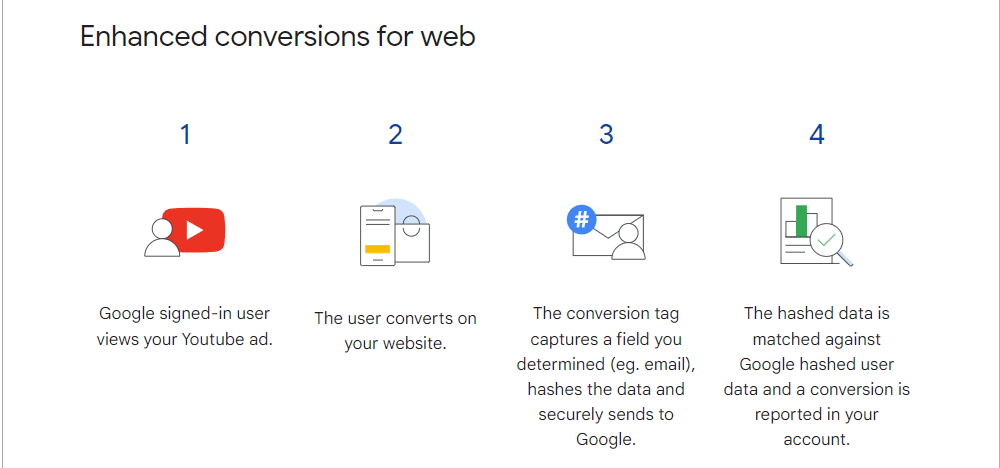 Screenshot from author, August 2024
Using Enhanced Conversions With CRMs
There’s a lot that can go wrong with CRM set-up and management, and those mistakes can skew lead scoring and reporting. Make sure that you trust how leads are received and tagged before beginning any serious spend.
It’s worth noting that Google (and other ad platforms) can take in the customer value (and lifetime value) of a client. So you’ll want to consider passing that info through as revenue and profit-based bidding tends to lead to better results than just conversions.
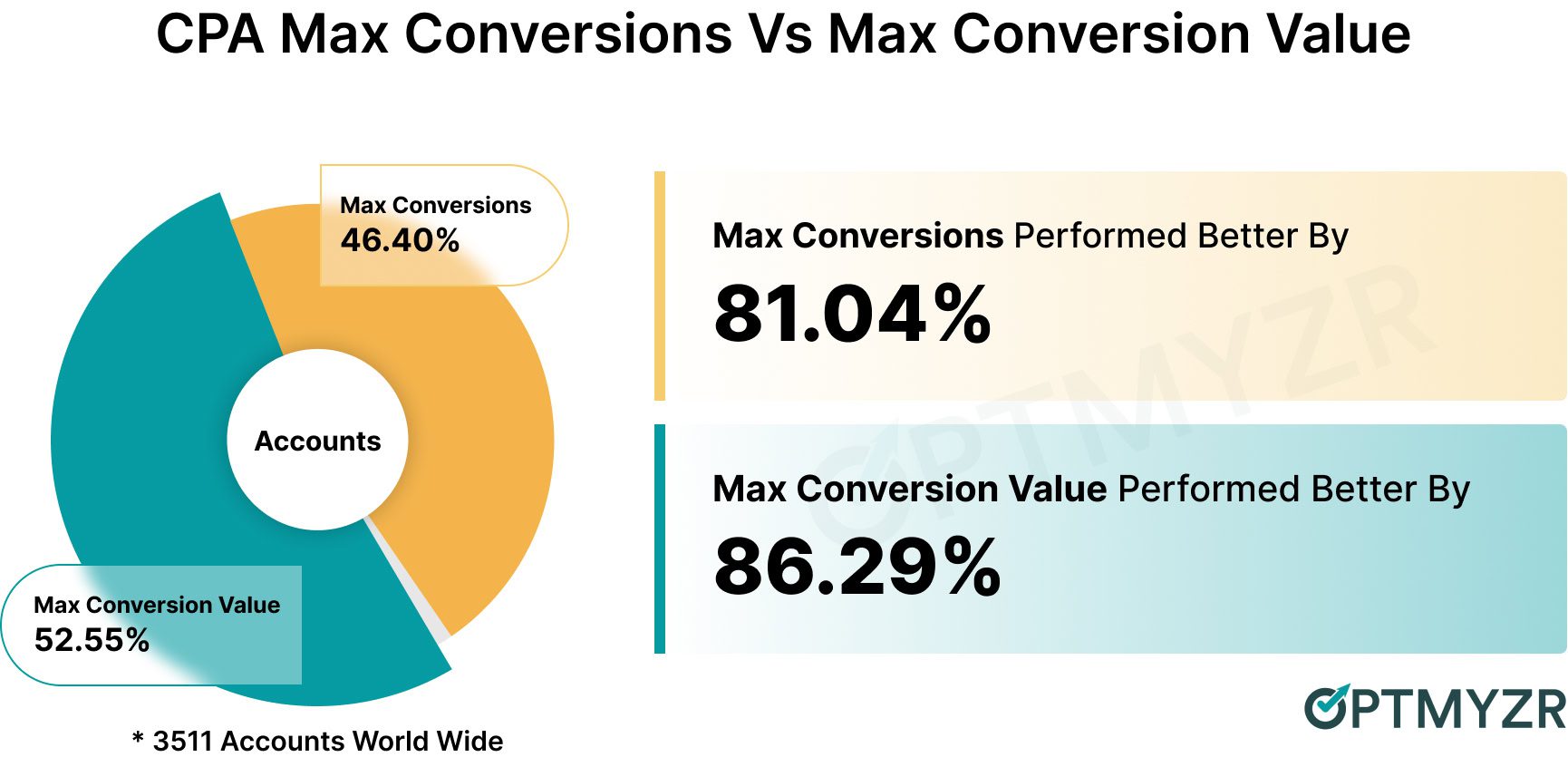 Image from Optmyzr, August 2024
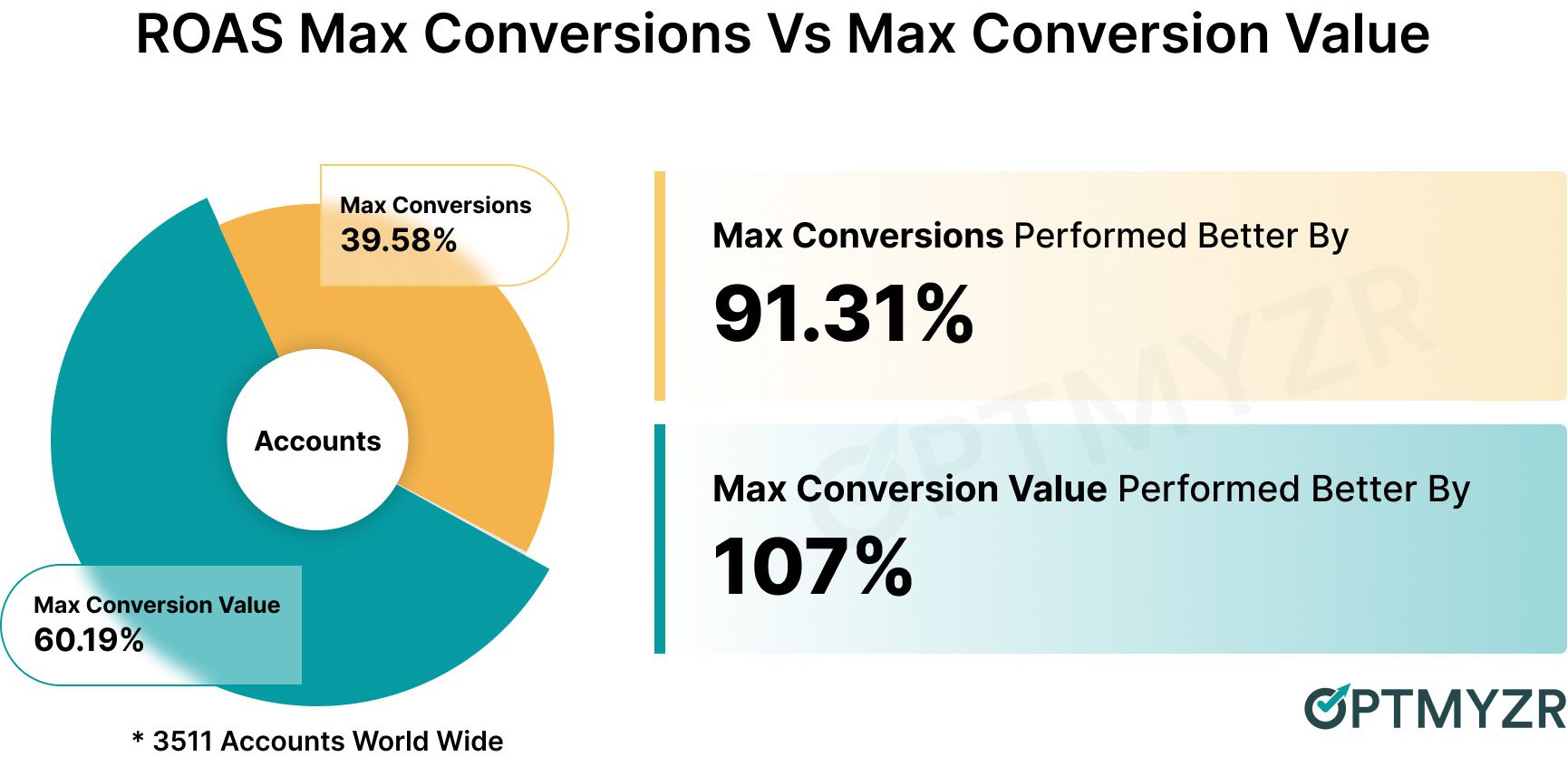 Image from Optmyzr, August 2024
However, the CRM is just one piece of the puzzle. You also need to make sure your internal teams are prepared to handle the new leads and tag them correctly.
Depending on how your team is incented, they may put in dummy data or inaccurate data to stop their co-workers from “taking” their deals
How Much Flexibility Do I Have With Technical Implementation?
One of the most insidious parts of enterprise setup is clearing IT permissions.
Google Tag Manager (GTM) is the easiest/safest way to go through tracking pixels because once you get that installed, you can add any new pixels without needing to touch the site.
However, if you’re not allowed to touch the main site at all, you may need to look at landing page solutions or lead gen/call ads.
Here are the main considerations to be prepared to answer when helping your IT team get on board with implementing entities for you.
- Privacy compliance requires that users be asked for consent to track. Even if there’s no conversion tracking, there are still cookies to remember preferences. This is needed for everyone, and if they’re going to help you get that set up, it will cause no performance issues to include conversion tracking pixels.
- Plan to test conversion actions and build in rules around spam leads (excluding “1234567890” as a phone number, “test” in any field, etc.). Additionally, you may need to ask for help configuring revenue tracking in analytics/CRMs. Make sure you ask for exactly what you need and include documentation on why.
In an ideal world, you’d have your IT team set you up with consent mode. However, if you can’t, pushing for GTM is an acceptable compromise.
If your IT teams will budge at all, you may need to opt for auto or smart bidding. This means opting for max clicks or target impression share with a bid cap or manual bidding with bid adjustments.
Which Channels Will Get Creative Approval?
Different channels are going to have different tools for approval. Google is really useful at allowing for both control and leaning into AI.
And when you lean into AI, you’re able to use brand safety standards. Additionally, there are placement controls so that you can ensure brand alignment. These include:
- Brand standards for AI.
- Placement reports for exclusions.
- Ad previews.
Microsoft also allows full control and allows you to use Copilot to generate images and videos. LinkedIn, by and large, is in full control.
Meta is the one with the most risk for control because it tends to require more automation for performance gains. That said, all brands can avail themselves of more rigid controls.
Finally, there are several visual platforms that allow you to use either influencer, user-generated, or other content for ad placements. When you’re working with humans for videos, it’s on you to ensure that they meet your own brand standards.
So it’s less a question about brand standards in terms of fonts, colors, and design, and more a question of, will you be able to secure the talent for the video you want to produce?
Did I Opt Out Of All Things Auto (& Should I Fight To Keep Some)?
Most ad platforms will, by default, opt you into expansion of placements, expansion of traffic, as well as new creatives. You, as the practitioner, will need to decide which ones to keep, if any.
In most cases, on the enterprise side, none of them will fall under compliance, so you will want to opt out of all of them.
Here Is A List Of The Most Common Pitfalls In Terms Of Automated Settings
- Automated created assets: Text, image, and video creative that gets created and added to your ads based on ad rank and placement type. Opt out of this in the account settings, as well as in the asset section of your campaign menu.
- Automatically applied recommendations: These can be useful and should be reviewed. but not applied. Make sure you turn them off in account settings and review them in recommendations.
- URL expansion in performance max: While this is a reasonable stand-in for Dynamic Search Ads (DSA), it’s important to remember that you won’t have the same level of control. This means your SEO-exclusive pages (blog, sitemap, etc) might get pulled in. Just be sure to leave that unchecked.
- Setting your bidding to a bidding strategy you don’t intend: Because ad platforms want you to use conversion-based bidding, manual and automatic bidding are hidden in the drop-down menu.
Are My Budget Pacing Rules In Line With Finance’s Expectations?
It’s critical to remember that stated budgets aren’t guarantees of actual spend. Ad platforms will do their best to average out across 30.4 days of your stated daily budget.
All budgets should be able to fit enough interactions in their advertising schedule to get at least one lead/sale on paper. In practice, this translates to my bids not exceeding 10% of the daily budget rule because 10% is a really good conversion rate for non-branded.
However, starting a new campaign and account to lead to even more fluctuation. As a campaign is ramping up, you may have low- or high-spending days. This is normal but might cause finance to worry.
As a general rule, using portfolio bidding strategies is a great way to ensure bid caps and floors for all campaign types. However, if you’re using SA360, you’ll also have access to these for Performance Max campaigns (not available in “regular” Google Ads).
Whether you use portfolio bidding strategies to ensure auction price stability or not, remember that any major change to bidding strategies (including budget, goal, and type) will initiate a learning period. If a campaign is on the newer side, it might not have the conversions to quickly clear this learning period.
As a general rule, it’s a good idea to ask for about 20% more budget than you anticipate needing in the first 90 days of a campaign, which can be utilized for testing or to shore up any fluctuation in new campaigns.
Have I Set Myself Up For All Markets I Intend To Service (International/Domestic)?
Managing multiple markets is always tricky, and if you’re targeting more than just one country, it gets even more complex. Different people search and think in different ways, and if you take the same campaign that worked in one market, it may struggle in another.
Add to this the different costs of living and internet connectivity in different markets, and there’s a lot to think about before getting to translations.
As a general rule, you should not include more than one country per ad account so you can run the schedule based on that country. Additionally, if a market is a growing market, you don’t want that bad data averaging into your thriving markets.
On translating your campaigns: make sure you can service any language you’re translating into. Even though there are great deals to be had on non-English ad buys, the inability to service those customers will turn it into waste.
Make sure you know the different privacy compliance regulations for each market. Any campaigns targeting outside the US will likely need consent mode enabled.
Will I Be Able To Report On The Metrics My Stakeholders Are Expecting?
On a similar note, many are used to thinking of PPC as fast-paced and perfect reporting. This is no longer the case. It’s really important that you set out a framework from the beginning for which metrics your stakeholders will hold you accountable.
If they care about return on ad spend, conversion tracking must be set up correctly. For brands that refuse to allow third-party integrations on their sites, this may cause tracking and reporting issues.
As a general rule, getting buy-in for conversion tracking isn’t as hard as getting CRM/sales data to sync up.
However, if you can clear that hurdle, you’ll be able to report on lead quality as well as average customer value. Without that information, reports will be limited to objective CPA, conversion rate, and ad-specific metrics.
I like getting stakeholders invested in impression share and understanding how much impression share is lost due to rank or budget so they have a clear understanding of what their choices mean for the account.
Finally, try to work with the organic team to link up Search Console so you can share organic reports between teams.
Final Takeaways
Whether you’re setting up campaigns for enterprises or SMBs, there are some core focal areas for every PPC practitioner.
Hopefully, you found this a helpful start on your own enterprise PPC checklist.
More resources:

Featured Image: PeopleImages.com – Yuri A/Shutterstock