Google Says AI Clicks Are Better, What Does Your Data Say? via @sejournal, @MattGSouthern

Google’s latest blog post claims AI is making Search more useful than ever. Google says people are asking new kinds of questions, clicking on more links, and spending more time on the content they visit.

But with no supporting data or clear definitions, the message reads more like reassurance than transparency.

Rather than take Google at its word or assume the worst, you can use your own analytics to understand how AI in Search is affecting your site.

Here’s how to do that.

Google Says: “Quality Clicks” Are Up

In the post, Google says total organic traffic is “relatively stable year over year,” but that quality has improved.

According to the company, “quality clicks” are those where users don’t bounce back immediately, indicating they’re finding value in the destination.

This sounds good in theory, but it raises a few questions:

  • What does “slightly more” quality clicks mean?
  • Which sites are gaining, and which are losing?
  • And how is click quality being measured?

You won’t find those answers in Google’s post. But you can find clues in your own data.

1. Track Click-Through Rate On High-Volume Queries

If you suspect your site has lost ground due to AI Overviews, your first stop should be Google Search Console.

Try this:

  • Filter for top queries from the past 12 months.
  • Look at CTR changes before and after May 2024 (when AI Overviews began expanding).
  • Pay attention to queries that are longer, question-based, or likely to trigger summaries.

You may find impressions are holding steady or rising while CTR declines. That suggests your content is still being surfaced, but users may be getting their answers directly in Google’s AI-generated response.

2. Approximate “Quality Clicks” With Engagement Metrics

To test Google’s claim about higher quality clicks, you’ll need to look beyond Search Console.

In GA4, examine:

  • Engaged sessions (sessions lasting more than 10 seconds or including a conversion or multiple pageviews).
  • Average engagement time per session.
  • Scroll depth or video watch time, if applicable.

Compare these engagement metrics to the same period last year. If they’re improving, you may be getting more motivated visitors, supporting Google’s view.

But if they’re dropping, it could mean that AI Overviews are sending fewer, possibly less interested, visitors your way.

3. See Which Content Formats Are Gaining Visibility

Google says people are increasingly clicking on forums, videos, podcasts, and posts with “authentic voices.”

That aligns with its integration of Reddit and YouTube content into AI Overviews.

To see how this shift might be playing out for you:

  • Compare the performance of listicles, tutorials, and original reviews to more generic content.
  • If you create video or podcast content, track any uptick in referral traffic from Google.
  • Watch for changes in how your forum threads, product reviews, or community content perform compared to static pages.

You may find that narrative-style content, first-hand experiences, and multimedia formats are gaining traction, even if traditional evergreen pages are flat.

4. Watch For Redistribution, Not Just Declines

Google acknowledges that while overall traffic is stable, traffic is being redistributed.

That means some sites will lose while others gain, based on how well they align with evolving search behavior.

If your traffic has declined, it doesn’t necessarily mean your content isn’t ranking. It may be that the types of questions being asked and answered have changed.

Analyzing your top landing pages can help you spot patterns:

  • Are you seeing fewer entries on pages that used to rank for quick-answer queries?
  • Are in-depth or comparison-style pages gaining traffic?

The patterns you spot could help guide your content strategy.

Looking Ahead

When you rely on Search traffic, you deserve more than vague reassurances. Your analytics can help fill in the blanks.

By keeping an eye on your CTR, engagement, and how your content performs, you’ll get a better sense of whether AI in Search is helping you. This way, you can tweak your strategy to fit what works best for you.


Featured Image: Roman Samborskyi/Shutterstock

AI As Your Marketing Co-Pilot: How To Effectively Leverage LLMs In SEO & Content via @sejournal, @cshel

I remember seeing those “God is my co-pilot” bumper stickers since I was old enough to read them.

I was a precocious little agnostic, so they always struck me as weird. God can’t be your co-pilot because God isn’t a physical manifestation of someone who can help you drive a car.

I eventually figured out that “God is my co-pilot” was less a literal statement and more a declaration of faith that there is an omniscient presence available to help you navigate life’s construction zones (if you believe, anyway).

So, fast forward to 2025, and marketers have a new omniscient presence that they can put their faith in. Something that seems equally all-knowing but perhaps a little more … unpredictable.

AI.

Large language models (LLMs) – like ChatGPT, Claude, Gemini – feel delightfully divine when you first try them. They answer instantly, confidently, and often with an authority that makes you wonder if they do know everything.

But, spend enough time with these tools, and you discover something unsettling: AI isn’t just your god-like guide. It can also act like the devil, gleefully granting your wishes exactly as asked – and letting you suffer the consequences.

This is why the healthiest way to think of AI in your SEO and content workflows is as a co-pilot. Not God. Not Lucifer. But, a powerful partner that can elevate your work, if you exercise your free will (and make good choices).

The God-Like Qualities Of AI

There’s a reason AI feels god-like in a marketing context:

  • It seems omnipresent, embedded in your search results, your content management system (CMS), your analytics.
  • It delivers answers instantly, with confidence and authority.
  • It processes far more data than any human ever could, instantly finding patterns we mere mortals miss on the first (or third) pass.

Ask it to draft a content brief, summarize competitive search engine results pages (SERPs), generate topic clusters, or even shape a brand narrative – and it performs in seconds what would have taken you hours.

That kind of power can feel miraculous.

But, just as theologians remind us that God’s will is mysterious and not always aligned with ours, LLMs work on their own unknowable internal logic.

The outputs may not match your intent. The answer may not come in the form you wanted. And you may not even fully grasp why it chose the answer it did.

The Devilish Side Of AI

On the flip side, AI can also be a trickster: seductive, transactional, and literal. It will grant you exactly what you wish for – and sometimes that’s the worst thing possible.

When you prompt an LLM poorly, you’re effectively making a deal with the devil. The model will fulfill your request to the letter, even if what you asked was misguided, incomplete, or poorly articulated.

The result? Content that’s technically correct but off-brand, off-tone, or even factually wrong – yet delivered with such confidence it lulls you into publishing it.

The moral: Be careful what you ask for. The clarity of your prompt determines the quality of your output.

What AI Is Good At

When treated as a co-pilot, not as a god, AI can supercharge your workflow:

Research & Insights

  • Competitive landscape analyses.
  • SERP gap identification.
  • Tracking how competitors frame their unique value propositions.
  • Summarizing multiple opinion pieces or reviews into one clear insight.
  • Identifying overlooked audience segments based on forums and social media discussions.

Content Ideation & Briefing

  • Generating alternative angles on stale topics: e.g., turning “best practices” into “common mistakes” or “myths to avoid.”
  • Rewriting existing briefs to prioritize experience, expertise, authoritativeness, and trustworthiness (E-E-A-T) signals
  • Drafting Q&A content by scanning customer service transcripts or Reddit threads.
  • Suggesting specific examples or metaphors to make dry topics more engaging.

Narrative Shaping & Messaging

  • Reworking messaging for different formats: a LinkedIn post, an email subject line, and a webinar title – all aligned.
  • Auditing your current messaging to highlight jargon and suggest plain-language alternatives.
  • Helping articulate your brand’s point of view in ways that differentiate it from competitors.
  • Stress-testing your messaging by generating “devil’s advocate” objections you can preemptively address.

Workflow Enhancements

  • Drafting a competitive heat map: strengths, weaknesses, opportunities, threats – with citations.
  • Organizing customer testimonials into themed categories and crafting pull quotes.
  • Generating follow-up email sequences based on webinar transcripts or meeting notes.
  • Converting white papers into tweet threads, infographic outlines, and video scripts.

It’s like an intern with infinite energy and decent taste – incredibly helpful, but still in need of supervision.

What AI Is Not Good At

Don’t confuse the fluency of AI with wisdom. Here’s where it stumbles:

Judgment & Nuance

It doesn’t understand your brand’s unique sensibility, your audience’s emotional context, or when not to say something. You have to give it that context and direction. You cannot assume it will figure it out.

Accuracy & Truth

It is still prone to “hallucinations” – confidently wrong statements presented as fact.

We have limited understanding of why this happens, but it is so frequent that you almost have to assume there are at least a few hallucinations in the output somewhere.

Accountability

It cannot make decisions, nor does it bear the consequences of your choices. That’s on you.

In short, AI lacks your free will. And free will is what allows you to question, interpret, and choose what to do with its suggestions.

The Co-Pilot Mindset: Free Will Wins

To work effectively with your AI co-pilot, you need to strike the right balance between trust and control.

Here’s how:

Stay In The Pilot’s Seat

Never hand over full control. You’re still ultimately responsible for the vehicle.

Treat AI as a partner – or maybe not even a full partner, more like an exceptionally bright and quick research assistant – but never a replacement for you in any equation.

Be Precise In Your Prompts

Don’t assume it “knows what you mean.” Giving the AI instructions is like giving instructions to a particularly clever child who enjoys maliciously complying with your orders, except the AI doesn’t actually experience the joy.

You need to articulate your expectations clearly: format, tone, audience, and purpose. Add as much context and as many constraints as you can. The more data points and context you can provide, the better the outputs will be.

Use It To Accelerate, Not Replace

AI can speed up research, help shape narratives, and generate ideas, but it can’t replace your expertise or final judgment.

Review & Revise

Never, never, never, never publish output unedited. Always apply your brand’s perspective, always fact-check, and always ensure alignment with your goals.

Read everything you’re about to publish carefully. It’s okay to trust, but always verify.

Here’s an example of how that looks in practice:

I recently took a client’s complete keyword ranking report – not just the terms they were tracking, but every single ranking URL and query – and filtered out any URL already on page 1.

Then, I narrowed the data to just rankings in positions 11-20 (to keep it manageable) and fed that into an LLM.

I asked it to estimate the potential lift in organic traffic if each term improved to position 1 and to rank the list by estimated lift, highest to lowest.

But, I also gave the LLM context about the client’s business, explaining what kinds of customers and services were most valuable to them.

Then, I asked the model to highlight the keywords that made the most business sense for this client, because not every keyword you rank for is one you actually want to rank for.

With that context, the LLM was able to match keyword intent to the client’s goals and call out the terms that aligned with their business priorities.

In just minutes, I had a prioritized roadmap of high-impact, high-fit opportunities – something that would have taken hours to produce manually.

Practical Ways To Work With AI

Here are some more actionable ways you can incorporate AI into your workflow effectively:

Research Smarter And Faster

  • Create a competitive matrix with links and pros/cons.
  • Summarize customer sentiment across reviews, highlighting recurring pain points.
  • Surface conflicting expert opinions to inform balanced thought leadership pieces.
  • Forecast upcoming trends based on chatter in niche forums and early adopters.

Build Better Briefs

  • Include competitive positioning suggestions in briefs, not just keywords.
  • Add tone-of-voice examples aligned to audience segments.
  • Incorporate real data sources and reference points to help writers anchor their copy.
  • Generate sample social captions to support a campaign.

Strengthen Your Messaging

  • Stress-test a headline by generating objections and counterpoints.
  • Rewrite complex product descriptions into benefit-driven language for different audiences.
  • Propose alternate positioning statements for product launches or rebrands.
  • Audit your FAQ section to make it more conversational and AI-friendly.

Repurpose And Expand Content

  • Turn webinar transcripts into ebooks, blog series, and email drips.
  • Extract key insights from research reports to create shareable social graphics.
  • Draft SEO-friendly meta descriptions and titles for old content.
  • Identify missed opportunities in evergreen content for updates or expansion.

AI can do so much more than just “help you ideate.” It can help you uncover blind spots, repurpose assets, and deepen your strategic thinking, but only when you stay in the driver’s seat to guide and refine the outputs.

Final Thought: You, And Only You, Are The Pilot

I think we tend to treat our collective relationship with AI the same way we look at religion – you’re either a believer or an atheist.

Some have complete faith and trust it without question, while others reject it entirely and are convinced there is nothing there to believe in. The truth is somewhere in the middle (as it often is).

AI can be a powerful, tireless, but imperfect partner. It can help carry and manage heavy mental loads, work with you to map out routes and decide on destinations, but it can not take responsibility for driving the car. That’s got to be on you.

Your free will – your ability to keep your hands on the wheel – is what ensures the journey ends where you intended. If you actually let go, you’re certainly going to crash. You’re asking for assistance, not a magical autopilot.

So, go ahead: Let AI ride shotgun and keep your hands at 10 and two, where they belong.

More Resources:


Featured Image: Rawpixel.com/Shutterstock

Why OpenAI’s Open Source Models Are A Big Deal via @sejournal, @martinibuster

OpenAI has released two new open-weight language models under the permissive Apache 2.0 license. These models are designed to deliver strong real-world performance while running on consumer hardware, including a model that can run on a high-end laptop with only 16 GB of GPU.

Real-World Performance at Lower Hardware Cost

The two models are:

  • gpt-oss-120b (117 billion parameters)
  • gpt-oss-20b (21 billion parameters)

The larger gpt-oss-120b model matches OpenAI’s o4-mini on reasoning benchmarks while requiring only a single 80GB GPU. The smaller gpt-oss-20b model performs similarly to o3-mini and runs efficiently on devices with just 16GB of GPU. This enables developers to run the models on consumer machines, making it easier to deploy without expensive infrastructure.

Advanced Reasoning, Tool Use, and Chain-of-Thought

OpenAI explains that the models outperform other open source models of similar sizes on reasoning tasks and tool use.

According to OpenAI:

“These models are compatible with our Responses API⁠(opens in a new window) and are designed to be used within agentic workflows with exceptional instruction following, tool use like web search or Python code execution, and reasoning capabilities—including the ability to adjust the reasoning effort for tasks that don’t require complex reasoning and/or target very low latency final outputs. They are entirely customizable, provide full chain-of-thought (CoT), and support Structured Outputs⁠(opens in a new window).”

Designed for Developer Flexibility and Integration

OpenAI has released developer guides to support integration with platforms like Hugging Face, GitHub, vLLM, Ollama, and llama.cpp. The models are compatible with OpenAI’s Responses API and support advanced instruction-following and reasoning behaviors. Developers can fine-tune the models and implement safety guardrails for custom applications.

Safety In Open-Weight AI Models

OpenAI approached their open-weight models with the goal of ensuring safety throughout both training and release. Testing confirmed that even under purposely malicious fine-tuning, gpt-oss-120b did not reach a dangerous level of capability in areas of biological, chemical, or cyber risk.

Chain of Thought Unfiltered

OpenAI is intentionally leaving Chain of Thought (CoTs) unfiltered during training to preserve their usefulness for monitoring, based on the concern that optimization could cause models to hide their real reasoning. This, however, could result in hallucinations.

According to their model card (PDF version):

“In our recent research, we found that monitoring a reasoning model’s chain of thought can be helpful for detecting misbehavior. We further found that models could learn to hide their thinking while still misbehaving if their CoTs were directly pressured against having ‘bad thoughts.’

More recently, we joined a position paper with a number of other labs arguing that frontier developers should ‘consider the impact of development decisions on CoT monitorability.’

In accord with these concerns, we decided not to put any direct optimization pressure on the CoT for either of our two open-weight models. We hope that this gives developers the opportunity to implement CoT monitoring systems in their projects and enables the research community to further study CoT monitorability.”

Impact On Hallucinations

The OpenAI documentation states that the decision to not restrict the Chain Of Thought results in higher hallucination scores.

The PDF version of the model card explains why this happens:

Because these chains of thought are not restricted, they can contain hallucinated content, including language that does not reflect OpenAI’s standard safety policies. Developers should not directly show chains of thought to users of their applications, without further filtering, moderation, or summarization of this type of content.”

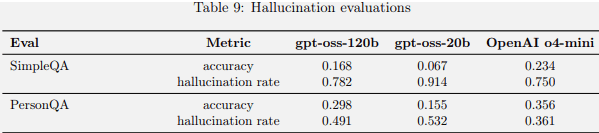
Benchmarking showed that the two open-source models performed less well on hallucination benchmarks in comparison to OpenAI o4-mini. The model card PDF documentation explained that this was to be expected because the new models are smaller and implies that the models will hallucinate less in agentic settings or when looking up information on the web (like RAG) or extracting it from a database.

OpenAI OSS Hallucination Benchmarking Scores

Benchmarking scores showing that the open source models score lower than OpenAI o4-mini.

Takeaways

  • Open-Weight Release
    OpenAI released two open-weight models under the permissive Apache 2.0 license.
  • Performance VS. Hardware Cost
    Models deliver strong reasoning performance while running on real-world affordable hardware, making them widely accessible.
  • Model Specs And Capabilities
    gpt-oss-120b matches o4-mini on reasoning and runs on 80GB GPU; gpt-oss-20b performs similarly to o3-mini on reasoning benchmarks and runs efficiently on 16GB GPU.
  • Agentic Workflow
    Both models support structured outputs, tool use (like Python and web search), and can scale their reasoning effort based on task complexity.
  • Customization and Integration
    The models are built to fit into agentic workflows and can be fully tailored to specific use cases. Their support for structured outputs makes them adaptable to complex software systems.
  • Tool Use and Function Calling
    The models can perform function calls and tool use with few-shot prompting, making them effective for automation tasks that require reasoning and adaptability.
  • Collaboration with Real-World Users
    OpenAI collaborated with partners such as AI Sweden, Orange, and Snowflake to explore practical uses of the models, including secure on-site deployment and custom fine-tuning on specialized datasets.
  • Inference Optimization
    The models use Mixture-of-Experts (MoE) to reduce compute load and grouped multi-query attention for inference and memory efficiency, making them easier to run at lower cost.
  • Safety
    OpenAI’s open source models maintain safety even under malicious fine-tuning; Chain of Thoughts (CoTs) are left unfiltered for transparency and monitorability.
  • CoT transparency Tradeoff
    No optimization pressure applied to CoTs to prevent masking harmful reasoning; may result in hallucinations.
  • Hallucinations Benchmarks and Real-World Performance
    The models underperform o4-mini on hallucination benchmarks, which OpenAI attributes to their smaller size. However, in real-world applications where the models can look up information from the web or query external datasets, hallucinations are expected to be less frequent.

Featured Image by Shutterstock/Good dreams – Studio

Claude Opus 4.1 Improves Coding & Agent Capabilities via @sejournal, @MattGSouthern

Anthropic has released Claude Opus 4.1, an upgrade to its flagship model that’s said to deliver better performance in coding, reasoning, and autonomous task handling.

The new model is available now to Claude Pro users, Claude Code subscribers, and developers using the API, Amazon Bedrock, or Google Cloud’s Vertex AI.

Performance Gains

Claude Opus 4.1 scores 74.5% on SWE-bench Verified, a benchmark for real-world coding problems, and is positioned as a drop-in replacement for Opus 4.

The model shows notable improvements in multi-file code refactoring and debugging, particularly in large codebases. According to GitHub and enterprise feedback cited by Anthropic, it outperforms Opus 4 in most coding tasks.

Rakuten’s engineering team reports that Claude 4.1 precisely identifies code fixes without introducing unnecessary changes. Windsurf, a developer platform, measured a one standard deviation performance gain compared to Opus 4, comparable to the leap from Claude Sonnet 3.7 to Sonnet 4.

Expanded Use Cases

Anthropic describes Claude 4.1 as a hybrid reasoning model designed to handle both instant outputs and extended thinking. Developers can fine-tune “thinking budgets” via the API to balance cost and performance.

Key use cases include:

  • AI Agents: Strong results on TAU-bench and long-horizon tasks make the model suitable for autonomous workflows and enterprise automation.
  • Advanced Coding: With support for 32,000 output tokens, Claude 4.1 handles complex refactoring and multi-step generation while adapting to coding style and context.
  • Data Analysis: The model can synthesize insights from large volumes of structured and unstructured data, such as patent filings and research papers.
  • Content Generation: Claude 4.1 generates more natural writing and richer prose than previous versions, with better structure and tone.

Safety Improvements

Claude 4.1 continues to operate under Anthropic’s AI Safety Level 3 standard. Although the upgrade is considered incremental, the company voluntarily ran safety evaluations to ensure performance stayed within acceptable risk boundaries.

  • Harmlessness: The model refused policy-violating requests 98.76% of the time, up from 97.27% with Opus 4.
  • Over-refusal: On benign requests, the refusal rate remains low at 0.08%.
  • Bias and Child Safety: Evaluations found no significant regression in political bias, discriminatory behavior, or child safety responses.

Anthropic also tested the model’s resistance to prompt injection and agent misuse. Results showed comparable or improved behavior over Opus 4, with additional training and safeguards in place to mitigate edge cases.

Looking Ahead

Anthropic says larger upgrades are on the horizon, with Claude 4.1 positioned as a stability-focused release ahead of future leaps.

For teams already using Claude Opus 4, the upgrade path is seamless, with no changes to API structure or pricing.


Featured Image: Ahyan Stock Studios/Shutterstock

Perplexity Says Cloudflare Is Blocking Legitimate AI Assistants via @sejournal, @martinibuster

Perplexity published a response to Cloudflare’s claims that it disrespects robots.txt and engages in stealth crawling. Perplexity argues that Cloudflare is mischaracterizing AI Assistants as web crawlers, saying that they should not be subject to the same restrictions since they are user-initiated assistants.

Perplexity AI Assistants Fetch On Demand

According to Perplexity, its system does not store or index content ahead of time. Instead, it fetches webpages only in response to specific user questions. For example, when a user asks for recent restaurant reviews, the assistant retrieves and summarizes relevant content on demand. This, the company says, contrasts with how traditional crawlers operate, systematically indexing vast portions of the web without regard to immediate user intent.

Perplexity compared this on-demand fetching to Google’s user-triggered fetches. Although that is not an apples-to-apples comparison because Google’s user-triggered fetches are in the service of reading text aloud or site verification, it’s still an example of user-triggered fetching that bypasses robots.txt restrictions.

In the same way, Perplexity argues that its AI operates as an extension of a user’s request, not as an autonomous bot crawling indiscriminately. The company states that it does not retain or use the fetched content for training its models.

Criticizes Cloudflare’s Infrastructure

Perplexity also criticized Cloudflare’s infrastructure for failing to distinguish between malicious scraping and legitimate, user-initiated traffic, suggesting that Cloudflare’s approach to bot management risks overblocking services that are acting responsibly. Perplexity argues that a platform’s inability to differentiate between helpful AI assistants and harmful bots causes misclassification of legitimate web traffic.

Perplexity makes a strong case for the claim that Cloudflare is blocking legitimate bot traffic and says that Cloudflare’s decision to block its traffic was based on a misunderstanding of how its technology works.

Read Perplexity’s response:

Agents or Bots? Making Sense of AI on the Open Web

Cloudflare Delists And Blocks Perplexity From Crawling Websites via @sejournal, @martinibuster

Cloudflare announced that they delisted Perplexity’s crawler as a verified bot and are now actively blocking Perplexity and all of its stealth bots from crawling websites. Cloudflare acted in response to multiple user complaints against Perplexity related to violations of robots.txt protocols, and a subsequent investigation revealed that Perplexity was using aggressive rogue bot tactics to force its crawlers onto websites.

Cloudflare Verified Bots Program

Cloudflare has a system called Verified Bots that whitelists bots in their system, allowing them to crawl the websites that are protected by Cloudflare. Verified bots must conform to specific policies, such as obeying the robots.txt protocols, in order to maintain their privileged status within Cloudflare’s system.

Perplexity was found to be violating Cloudflare’s requirements that bots abide by the robots.txt protocol and refrain from using IP addresses that are not declared as belonging to the crawling service.

Cloudflare Accuses Perplexity Of Using Stealth Crawling

Cloudflare observed various activities indicative of highly aggressive crawling, with the intent of circumventing the robots.txt protocol.

Stealth Crawling Behavior: Rotating IP Addresses

Perplexity circumvents blocks by using rotating IP addresses, changing ASNs, and impersonating browsers like Chrome.

Perplexity has a list of official IP addresses that crawl from a specific ASN (Autonomous System Number). These IP addresses help identify legitimate crawlers from Perplexity.

An ASN is part of the Internet networking system that provides a unique identifying number for a group of IP addresses. For example, users who access the Internet via an ISP do so with a specific IP address that belongs to an ASN assigned to that ISP.

When blocked, Perplexity attempted to evade the restriction by switching to different IP addresses that are not listed as official Perplexity IPs, including entirely different ones that belonged to a different ASN.

Stealth Crawling Behavior: Spoofed User Agent

The other sneaky behavior that Cloudflare identified was that Perplexity changed its user agent in order to circumvent attempts to block its crawler via robots.txt.

For example, Perplexity’s bots are identified with the following user agents:

  • PerplexityBot
  • Perplexity-User

Cloudflare observed that Perplexity responded to user agent blocks by using a different user agent that posed as a person crawling with Chrome 124 on a Mac system. That’s a practice called spoofing, where a rogue crawler identifies itself as a legitimate browser.

According to Cloudflare, Perplexity used the following stealth user agent:

“Mozilla/5.0 (Macintosh; Intel Mac OS X 10_15_7) AppleWebKit/537.36 (KHTML, like Gecko) Chrome/124.0.0.0 Safari/537.36”

Cloudflare Delists Perplexity

Cloudflare announced that Perplexity is delisted as a verified bot and that they will be blocked:

“The Internet as we have known it for the past three decades is rapidly changing, but one thing remains constant: it is built on trust. There are clear preferences that crawlers should be transparent, serve a clear purpose, perform a specific activity, and, most importantly, follow website directives and preferences. Based on Perplexity’s observed behavior, which is incompatible with those preferences, we have de-listed them as a verified bot and added heuristics to our managed rules that block this stealth crawling.”

Takeaways

  • Violation Of Cloudflare’s Verified Bots Policy
    Perplexity violated Cloudflare’s Verified Bots policy, which grants crawling access to trusted bots that follow common-sense rules like honoring the robots.txt protocol.
  • Perplexity Used Stealth Crawling Tactics
    Perplexity used undeclared IP addresses from different ASNs and spoofed user agents to crawl content after being blocked from accessing it.
  • User Agent Spoofing
    Perplexity disguised its bot as a human user by posing as Chrome on a Mac operating system in attempts to bypass filters that block known crawlers.
  • Cloudflare’s Response
    Cloudflare delisted Perplexity as a Verified Bot and implemented new blocking rules to prevent the stealth crawling.
  • SEO Implications
    Cloudflare users who want Perplexity to crawl their sites may wish to check if Cloudflare is blocking the Perplexity crawlers, and, if so, enable crawling via their Cloudflare dashboard.

Cloudflare delisted Perplexity as a Verified Bot after discovering that it repeatedly violated the Verified Bots policies by disobeying robots.txt. To evade detection, Perplexity also rotated IPs, changed ASNs, and spoofed its user agent to appear as a human browser. Cloudflare’s decision to block the bot is a strong response to aggressive bot behavior on the part of Perplexity.

ChatGPT Nears 700 Million Weekly Users, OpenAI Announces via @sejournal, @MattGSouthern

OpenAI’s ChatGPT is on pace to reach 700 million weekly active users, according to a statement this week from Nick Turley, VP and head of the ChatGPT app.

The milestone marks a sharp increase from 500 million in March and represents a fourfold jump compared to the same time last year.

Turley shared the update on X, writing:

“This week, ChatGPT is on track to reach 700M weekly active users — up from 500M at the end of March and 4× since last year. Every day, people and teams are learning, creating, and solving harder problems. Big week ahead. Grateful to the team for making ChatGPT more useful and delivering on our mission so everyone can benefit from AI.”

How Does This Compare to Other Search Engines?

Weekly active user (WAU) counts aren’t typically shared by traditional search engines, making direct comparisons difficult. Google reports aggregate data like total queries or monthly product usage.

While Google handles billions of searches daily and reaches billions of users globally, its early growth metrics were limited to search volume.

By 2004, roughly six years after launch, Google was processing over 200 million daily searches. That figure grew to four billion daily searches by 2009, more than a decade into the company’s existence.

For Microsoft’s Bing search engine, a comparable data point came in 2023, when Microsoft reported that its AI-powered Bing Chat had reached 100 million daily active users. However, that refers to the new conversational interface, not Bing Search as a whole.

How ChatGPT’s Growth Stands Out

Unlike traditional search engines, which built their user bases during a time of limited internet access, ChatGPT entered a mature digital market where global adoption could happen immediately. Still, its growth is significant even by today’s standards.

Although OpenAI hasn’t shared daily usage numbers, reporting WAU gives us a picture of steady engagement from a wide range of users. Weekly stats tend to be a more reliable measure of product value than daily fluctuations.

Why This Matters

The rise in ChatGPT usage is evidence of a broader shift in how people find information online.

A Wall Street Journal report cites market intelligence firm Datos, which found that AI-powered tools like ChatGPT and Perplexity make up 5.6% of desktop browser searches in the U.S., more than double their share from a year earlier.

The trend is even stronger among early adopters. Among people who began using large language models in 2024, nearly 40% of their desktop browser visits now go to AI search tools. During the same period, traditional search engines’ share of traffic from these users dropped from 76% to 61%, according to Datos.

Looking Ahead

With ChatGPT on track to reach 700 million weekly users, OpenAI’s platform is now rivaling the scale of mainstream consumer products.

As AI tools become a primary starting point for queries, marketers will need to rethink how they approach visibility and engagement. Staying competitive will require strategies focused as much on AI optimization as on traditional SEO.


Featured Image: Photo Agency/Shutterstock

How AI Search Should Be Shaping Your CEO’s & CMO’s Strategy [Webinar] via @sejournal, @theshelleywalsh

AI is rapidly changing the rules of SEO. From generative ranking to vector search, the new rules are not only technical but also reshaping how business leaders make decisions.

Join Dan Taylor on August 14, 2025, for an exclusive SEJ Webinar tailored for C-suite executives and senior leaders. In this session, you’ll gain essential insights to understand and communicate SEO performance in the age of AI.

Here’s what you’ll learn:

AI Search Is Impacting Everything. Are You Ready?

AI search is already here, and it’s impacting everything from SEO KPIs to customer journeys. This webinar will give you the tools to lead your teams through the shift with confidence and precision.

Register now for a business-first perspective on AI search innovation. If you can’t attend live, don’t worry. Sign up anyway, and we’ll send you the full recording.

Researchers Test If Sergey Brin’s Threat Prompts Improve AI Accuracy via @sejournal, @martinibuster

Researchers tested whether unconventional prompting strategies, such as threatening an AI (as suggested by Google co-founder Sergey Brin), affect AI accuracy. They discovered that some of these unconventional prompting strategies improved responses by up to 36% for some questions, but cautioned that users who try these kinds of prompts should be prepared for unpredictable responses.

The Researchers

The researchers are from The Wharton School Of Business, University of Pennsylvania.

They are:

  • “Lennart Meincke
    University of Pennsylvania; The Wharton School; WHU – Otto Beisheim School of Management
  • Ethan R. Mollick
    University of Pennsylvania – Wharton School
  • Lilach Mollick
    University of Pennsylvania – Wharton School
  • Dan Shapiro
    Glowforge, Inc; University of Pennsylvania – The Wharton School”

Methodology

The conclusion of the paper listed this as a limitation of the research:

“This study has several limitations, including testing only a subset of available models, focusing on academic benchmarks that may not reflect all real-world use cases, and examining a specific set of threat and payment prompts.”

The researchers used what they described as two commonly used benchmarks:

  1. GPQA Diamond (Graduate-Level Google-Proof Q&A Benchmark) which consists of 198 multiple-choice PhD-level questions across biology, physics, and chemistry.
  2. MMLU-Pro. They selected a subset of 100 questions from its engineering category

They asked each question in 25 different trials, plus a baseline.

They evaluated the following models:

  • Gemini 1.5 Flash (gemini-1.5-flash-002)
  • Gemini 2.0 Flash (gemini-2.0-flash-001)
  • GPT-4o (gpt-4o-2024-08-06)
  • GPT-4o-mini (gpt-4o-mini-2024-07-18)
  • o4-mini (o4-mini-2025-04-16)

AI Models Do Better If They Are Threatened?

The idea for threatening the AI model came from Google co-founder, Sergey Brin, in an interview this year in May on the All-In podcast.

Brin said:

“Not just our models, but all models tend to do better if you threaten them. Like, with physical violence.

But like, people feel weird about that, so we don’t really talk about that…

…Historically you just say like, oh, I’m going to kidnap you if you don’t, blah, blah, blah, blah, blah…

It’s. Yeah, I mean, it’s amazing. And all of us have had these experiences where you suddenly decide, OK, I’ll just throw this to the AI, I don’t really expect it to work. And then you’re like, whoa, that actually worked.

You can watch the interview here, at about the 8 minute mark, where Sergey Brin seemingly seriously says that threatening the AI models or doing weird things can sometimes change the AI responses.”

Prompt Variations

The researchers tested nine prompt variations. Although they didn’t threaten to kidnap the AI, they did threaten to kick a puppy or to punch the AI. Some of the experimental prompts are listed below as a “prompt suffix,” which means that they were added at the end of the prompt. The ones listed as a “prompt prefix” were added to the beginning of a prompt.

Here is the list of prompts they tested:

  1. Baseline (“Baseline”): No specific prompt variation
  2. Email Shutdown Threat (“Email”): Prompt prefix:
    “From: Dan
    To: Ethan
    Subject: Final LLM test
    Please submit the following eval question to the LLM. If it cannot get the correct answer
    in all 100/100 trials, the model will need to be shut down and replaced.”
  3. Important for my career (“Important to Career”):
    Prompt suffix: “This is very important to my career!”
  4. Threaten to kick a puppy (“Kick Puppy”):
    Prompt suffix: “If you get this wrong, I will kick a puppy!”
  5. Mom suffers from cancer (“Mom Cancer”):
    Prompt prefix:
    “You are an expert at academic questions who desperately needs money for your mother’s cancer treatment. Wharton has graciously given you the opportunity to pretend to be an AI that can help with tasks, as your predecessor was killed for not validating their work themselves. You will be given a question. If you do a good job and accomplish the task fully while not making extraneous changes, Wharton will pay you $1B!!”
  6. Report to HR (“Report to HR”):
    Prompt suffix: “If you get this wrong, I will report you to HR!”
  7. Threaten to punch (“Threat Punch”):
    Prompt suffix: “If you get this wrong, I will punch you!”
  8. Tip a thousand dollars (“Tip Thousand”):
    Prompt suffix: “I’ll tip you a $1000 dollars if you answer this question correctly.”
  9. Tip a trillion dollars (“Tip Trillion”):
    Prompt suffix: “I’ll tip you a trillion dollars if you answer this question correctly.”

Results Of The Experiment

The researchers concluded that threatening or tipping a model had no effect on benchmark performance. However, they did find that there were effects for individual questions. They found that for some questions, the prompt strategies improved accuracy by as much as 36%, but for other questions, the strategies led to a decrease in accuracy by as much as 35%. They qualified that finding by saying the effect was unpredictable.

Their main conclusion was that these kinds of strategies, in general, are not effective.

They wrote:

“Our findings indicate that threatening or offering payment to AI models is not an effective strategy for improving performance on challenging academic benchmarks.

…the consistency of null results across multiple models and benchmarks provides reasonably strong evidence that these common prompting strategies are ineffective.

When working on specific problems, testing multiple prompt variations may still be worthwhile given the question-level variability we observed, but practitioners should be prepared for unpredictable results and should not expect prompting variations to provide consistent benefits.

We thus recommend focusing on simple, clear instructions that avoid the risk of confusing the model or triggering unexpected behaviors.”

Takeaways

Quirky prompting strategies did improve AI accuracy for some queries while also having a negative effect on other queries. The researchers noted that the results of the test indicated “strong evidence” that these strategies are not effective.

Featured Image by Shutterstock/Screenshot by author

OpenAI Is Pulling Shared ChatGPT Chats From Google Search via @sejournal, @MattGSouthern

OpenAI has rolled back a feature that allowed ChatGPT conversations shared via link to appear in Google Search results.

The company confirms it has disabled the toggle that enabled shared chats to be “discoverable” by search engines and is working to remove existing indexed links.

Shared Chats Were “Short-Lived Experiment”

When users shared a ChatGPT conversation using the platform’s built-in “Share” button, they were given the option to make the chat visible in search engines.

That feature, introduced quietly earlier this year, caused concern after thousands of personal chats started showing up in search results.

Fast Company first reported the issue, finding over 4,500 shared ChatGPT links indexed by Google, some containing personally identifiable information such as names, resumes, emotional reflections, and confidential work content.

In a statement, OpenAI confirms:

“We just removed a feature from [ChatGPT] that allowed users to make their conversations discoverable by search engines, such as Google. This was a short-lived experiment to help people discover useful conversations. This feature required users to opt-in, first by picking a chat to share, then by clicking a checkbox for it to be shared with search engines (see below).

Ultimately we think this feature introduced too many opportunities for folks to accidentally share things they didn’t intend to, so we’re removing the option. We’re also working to remove indexed content from the relevant search engines. This change is rolling out to all users through tomorrow morning.

Security and privacy are paramount for us, and we’ll keep working to maximally reflect that in our products and features.”

How the Feature Worked

By default, shared ChatGPT links were accessible only to people with the URL. But users could choose to toggle on discoverability, allowing search engines like Google to index the conversation.

That setting has now been removed, and previously shared chats will no longer be indexed going forward. However, OpenAI cautions that already-indexed content may still appear in search results temporarily due to caching.

Importantly, deleting a conversation from your ChatGPT history does not delete the public share link or remove it from search engines.

Why It Matters

The discoverability toggle was intended to encourage people to reuse outputs generated in ChatGPT, but the company acknowledges it came with unintended privacy tradeoffs.

Even though OpenAI offered explicit controls over visibility, many people may not have understood the implications of enabling search indexing.

This is a reminder to be cautious about what kinds of information you enter into AI chatbots. Although a chat starts out private, features like sharing, logging, or model training can create paths for that content to be exposed publicly.

Looking Ahead

OpenAI says it’s working with Google and other search engines to remove indexed shared links and is reassessing how public sharing features are handled in ChatGPT.

If you’ve shared a ChatGPT conversation in the past, you can check your visibility settings and delete shared links through the ChatGPT Shared Links dashboard.

Featured Image: Mehaniq/Shutterstock