The agent visiting your website knows the person who sent it.
That is the shift underneath Google’s Gemini Deep Research Max, launched on April 21, 2026, as a public preview on the paid Gemini API tier. Deep Research Max itself is a narrow rollout. The pattern it ships is a preview of what the agentic web becomes when the other major vendors follow, which they typically do within a quarter or two on capabilities like this. When a blended-retrieval agent runs, it arrives with private context: the user’s financial data, their file stores, their connected professional data streams, all fused into the query before the agent reaches any page.
For web professionals, this is the next chapter of the agentic web story. The claim that agents are a new primary visitor class has held for months. The claim has since evolved. Agents are a new primary visitor classwith private context. The reasoning that decides whether your page answers a query runs on a larger input set than your page. The weight the agent gives your content depends on whether it adds anything the private sources did not already provide. This is the blended-retrieval moment in the agentic web story, and it lands on the supply side of how agents fetch, not on the user-facing product layer.
The old AI-search optimization posture (write content that matches the keyword query) was weakening before this. It weakens further now. The new posture is structural predictability: clean entity relationships, canonical identity, live data, rendering independence. Structure matters to the agent functionally. When the agent arrives with context, the content it picks is the content its model can fuse cleanly with everything else it already has.
Blended Retrieval Previews The Agentic Web’s Next Layer
Google’s Gemini Deep Research Max, in public preview on the paid API tier from April 21, can pull from four input classes in a single reasoning loop: the public web, file uploads, connected file stores, and arbitrary remote MCP servers. From Google’s own announcement, the agent “searches the web, arbitrary remote MCPs, file uploads and connected file stores, or any subset of them.”
The two new classes (file stores and remote MCPs) share one property. They are private by default. The agent reads them only through user consent. Once connected, a financial data provider or an enterprise CRM exposes its data to Gemini through the Model Context Protocol, Anthropic’s open standard with over 97 million installs as of March 2026. Google’s agent retrieves from those private sources with the same reliability it reads the open web, inside the same reasoning pass.
This is the structural move everyone watching the agentic web has been waiting for a major vendor to ship: public web and private context, fused by the agent, inside a single query. Gemini is the first.
The pattern is also not here for most operators yet. Deep Research Max is a public preview behind a paid API, not a feature in the consumer Gemini app. Most websites will not be read by a blended-retrieval agent this quarter. What Google announced on April 21 is the direction, not the arrival. Treat it as a leading indicator: If this architecture scales, and major vendors generally copy each other within a quarter or two on capabilities like this, the operator work gets real before the traffic does.
Signal Share Collapses When The Agent Has Better Alternatives
In a blended-retrieval query, every connected source competes for signal share: the open web, the user’s file stores, and any private MCP servers. The weight any single source gets is proportional to how cleanly the agent can extract and fuse its signal with everything else the agent is holding.
For public websites, this shifts the competitive terrain in two ways.
First, machine-first websites win more citation share. A page with clean structured data, unambiguous entity relationships, and rendering that does not hide content behind JavaScript is easy for the agent to merge with the user’s private context. The fused answer references the machine-first page because that page contributed usable, mergeable material.
Second, poorly structured websites lose signal share they used to get for free. In a web-only era, even a messy page could surface in a citation because there was no better public-web alternative. In the blended-retrieval era, the alternative may be the user’s uploaded documents or a connected MCP with cleaner data. The messy content page loses the citation share it used to split with clean sources.
This is a different competition from classical SEO. Classical SEO ranked pages against each other. Blended retrieval ranks pages against the user’s own context. You cannot see the competing sources. You can only make sure that when the agent reaches your public page, the page contributes something extractable and unambiguous.
Structured Product and Offer schema gets cited more often than unstructured descriptions when the user’s private context touches anything related. Canonical identity, clean entity relationships, and rendering independence all become higher-leverage when the agent is fusing signal across sources. The Adobe Q1 2026 AI traffic inversion was the demand-side proof that structured commerce wins in AI search; blended retrieval is the supply-side mechanism driving the same effect into the rest of the web.
The Honest Counter-Read: Some Queries Route Around Your Website Entirely
Not every blended-retrieval query will end up citing a public website. Some queries will be answerable entirely from the user’s connected sources. A financial analyst running Deep Research Max over an internal MCP server, plus uploaded quarterly reports, may never need the public web for that answer. That query’s traffic does not flow through anywhere; the answer is satisfied inside the private-context boundary.
This is a real subset. Most queries still blend public and private sources, because most analytical questions touch both.
Blended retrieval does not mean every website gets less traffic. It means the agent is choosier about what it uses. The bar rises for the sources the agent picks. Deep Research Max is a preview of what the agentic web is about to demand. Machine-first websites will pick up share when that scale arrives. Unstructured content will continue to lose it. Google showed us the pattern on April 21, but the scale that follows is where the real work for web professionals starts, and there is time to do that work before the traffic catches up.
Ann Handley posted something on LinkedIn last week that stopped me mid-scroll. She’s a Wall Street Journal bestselling author and one of the most respected voices in marketing, and she wrote:
Her post went on to ask a question that nobody in the AI training industry seems to be asking: “Why do we keep teaching people how to use AI – without ever teaching them when not to?”
I messaged her. I had to know where someone would go to learn that.
Her honest answer: “I don’t know of a course that teaches exclusively this. At MarketingProfs, our sessions about AI typically include a few slides that touch on when not to use AI, or how to protect against hallucinations, but I don’t know of a whole session or series.”
She added, “I think that’s actually the story, and why I wrote what I wrote. We have an entire industry built around AI skills training – prompt engineering bootcamps, certification programs, tools tutorials, a million LinkedIn posts about the perfect prompts you need to do this or that or else you’re falling behind. What we don’t have is anything that asks: when should you put the tool down? When does using it cost you something you didn’t mean to give up?”
That gap is real, and it matters more than the AI training industry currently acknowledges.
Prompt Literacy Takes An Afternoon. Judgment Literacy Takes Years
The distinction Ann draws is not subtle once you see it. Prompt literacy is teachable in an afternoon. You learn the syntax, the structure, the iterative refinement loop. You learn to be specific, to add constraints, to tell the model what not to do as well as what to do. This is genuinely useful and genuinely learnable quickly.
Judgment literacy is something else entirely. It is knowing when the speed of AI output is actually eroding something you needed to build slowly. It is recognizing when the struggle itself is the point, when the friction of not knowing the answer yet is what produces the expertise that will matter later. It is understanding, as Ann put it, “when AI helps and when it shortcuts the very struggle that teaches us something.”
One commenter on her post put it precisely:
“Prompt literacy is teachable in an afternoon and judgment literacy takes years, because judgment is mostly knowing the value of the struggle you’d be skipping.”
I’ve been teaching an online course on AI content that audiences actually trust for several years. And I’ve spent recent months analyzing what the AI training landscape actually offers practitioners. The pattern is consistent. The courses that exist (and there are now many of them) teach you what tools can do. The better ones teach you how to deploy them strategically. Almost none of them teach you when to put them down.
The AI training industry has a structural incentive problem. Courses that teach you to use tools generate demand for more tools, more courses, more certifications. There is no business model for teaching restraint. Nobody is building a prompt engineering bootcamp whose primary lesson is “sometimes don’t.”
But the cost of skipping the judgment question is real and measurable. Anthropic’s own research found that junior engineers who leaned heavily on AI coding agents demonstrated weaker understanding of their work when tested afterward. When the tool produced output, their struggle that would have built expertise did not happen. The output and the expertise are not the same thing.
For SEO professionals and content marketers specifically, the exposure is direct. MIT’s AI Labor Exposure Map, which I wrote about last week, found that nearly three-quarters of the time a marketing specialist spends at work goes to tasks that AI can already handle. The question is not whether to use AI for those tasks. For many of them, you should. The question is which tasks in that 74% are actually the ones where the doing is the learning, where outsourcing the execution also outsources the understanding you needed to build.
That question requires judgment. It cannot be answered by a prompt.
Culture, Not Coursework
When I asked Ann where practitioners should go to develop this judgment, her second message reframed the question entirely.
“Do we actually need a course? What we need instead is permission and better modeling. Leaders who visibly choose the long road. Managers who say out loud when they are not going to use AI for certain things, and here’s why. Individuals who see the value. Said another way: culture not coursework.”
That reframe is worth sitting with. The judgment about when not to use AI is not a skill that gets transmitted through a certificate program. It is a professional norm that gets transmitted through observation, through watching someone you respect make a deliberate choice to do something the slow, human-fumbling-in-the-dark way, and then explaining why.
Ann has a book coming out in February 2027 from Penguin Random House called “ASAP (As Slow As Possible): When to Take the Long Road in a Shortcut World.” The title captures the tension precisely. In a professional culture that has made speed the primary virtue, choosing slowness requires not just judgment but courage: the willingness to be seen taking longer when everyone around you is accelerating.
What Practitioners Can Actually Try Right Now
Ann’s point about culture rather than coursework is correct in the long run. But while that culture is still forming, practitioners need something concrete. Here is a workflow worth replicating, drawn from an experiment I ran with the editorial team at The Acton Exchange, a nonprofit community newspaper in Acton, Massachusetts, in November 2025.
The team faced a deadline problem. A steering committee had just held a three-hour working session on a critical school district reorganization question, reviewing 156 pages of materials. The meeting wasn’t recorded, which meant no transcript was available. But the 101 pages of supplemental information and 55 pages of public comments the committee had received ahead of time were accessible.
So, the team tried something new. We crafted a detailed prompt specifying what the article needed to accomplish: accurate and trustworthy information, a compelling story, relevant to residents. We uploaded all 156 pages to four AI engines simultaneously: ChatGPT, Gemini, Perplexity, and NotebookLM. Each engine took a different route from the same prompt and the same source material. ChatGPT produced 748 words focused on data and process. Gemini produced 712 words focused on why the status quo was no longer viable. Perplexity produced 1,232 words focused on what the options meant for residents. NotebookLM produced 1,506 words organized around five surprising truths.
We reviewed all four drafts together at an all-hands editorial meeting. Perplexity’s draft was the most accurate and the most useful as a foundation. We chose it as our starting point. Then we did what no AI engine could do: We added direct quotes from people who were in the room, reflecting the community voices that the Acton Exchange exists to represent.
The key lesson from this experiment is not which engine performed best. It is what the process revealed about judgment. Town Manager John Mangiaratti had observed a few weeks earlier that the tools were helpful for the first 75% of content, but that “the remaining 25% of details, nuance, and context are either missing or incorrect.” Superintendent Peter Light agreed, adding that quality improves with better input prompts.
That 75/25 split is a practical frame for any content workflow. Use AI to get 75% of the way there quickly. Then apply human expertise, primary source verification, and direct observation to close the gap. The 25% that requires a human is not a bug in the workflow. It is where the judgment lives.
Ann Handley is right that the real skill is judgment: knowing when speed is useful and when it actually erodes something you needed to build. The Acton Exchange experiment didn’t resolve that question. It made the question visible in a way that a prompt engineering course never would.
Prompt literacy gets you to 75%. Judgment literacy is what closes the rest.
In a recent AGI House interview, Sergey Brin described Gemini as a system whose capabilities are not just evolving but integrating world knowledge across languages and modalities. He said the software that AI runs on has also evolved beyond what it was originally designed for, and while Brin can envision Gemini achieving AGI, he also couldn’t see what comes next.
AGI: Artificial General Intelligence
AGI is a level of AI that can learn, understand, and apply knowledge across tasks in a manner similar to humans. Today’s AI can produce useful answers, write code, analyze images, and solve many narrow problems, but it does not yet understand the world or independently apply knowledge across domains the way a human can.
OpenAI, Google DeepMind, and Anthropic are all developing AGI, but they emphasize different reasons for what they want to do with it. OpenAI focuses on economic benefits, Google DeepMind emphasizes scientific discovery, and Anthropic prioritizes human progress.
Next Big Thing: AI Capabilities Are Converging
Brin said that Google’s earlier AI progress relied on specialized models that were built for specific tasks. But he said that Gemini is increasingly achieving state-of-the-art performance across multiple domains like mathematics and scientific reasoning. What Google is seeing is that capabilities that used to rely on models trained to do specific things are now giving way to model families that can do it all: convergence.
He also said that convergence was something that happened; it wasn’t something he expected when Google began developing AI.
The context of his answer was a question about what the next big thing is, with his answer being convergence.
Brin responded:
“I think the exciting thing is that all of these things are converging to the same general models.
In the past, we would have to have specialized models. And in the case of protein folding, we obviously still do.
But increasingly, our main Gemini LLMs can be the state-of-the-art for math, for example, and for other kinds of scientific questions. So that convergence is, I don’t know, I guess it’s not something I really would have predicted at the outset. But it’s been kind of incredible to see.
And I guess baked into that is this concept of transfer, just the idea that when you train for a certain class of problems, let’s say you’re training for coding, that that actually can help your math reasoning and vice versa.
And that’s been really exciting to see… the multimodal capability also is an example of that. Like, can you actually get a transfer from being able to process images to actually being able to think through kind of geometric text problems too.”
Transfer learning is one reason convergence is happening. Transfer learning is where you train a model in one thing and it turns out that it has benefits in accomplishing tasks in something else that’s seemingly unrelated. So what’s happening now is that Google is finding that combining things like vision training, mathematics and reasoning are contributing to improvements across multiple capabilities.
Transformers Are “Weirdly Flexible”
Brin was asked if transformers will play a role in AGI. Transformers are the software that AI runs on and the breakthrough that enabled things like ChatGPT. Brin’s answer mentions MOE, which stands for Mixture Of Experts. MOE is a technique for routing specific tasks to specialized internal “experts” to increase efficiency.
For the question of whether AGI will run on transformers, Brin answered:
“Transformers have been weirdly flexible. We use them for image and video in addition to text. So they’ve exceeded their original capability.
Now, to be fair, along the way, they’ve also changed. I mean, we have whatever, sparse kind of MOE, transformers. I mean, there are a lot of little details that have shifted along the way, so it’s not like the exact same thing as the transformer paper.
If I could guess, could something close to that be AGI? I would say yes.
That’s just my guess, just because they’ve been able to evolve so much.
But like I said, they are changing. It’s not like the exact same thing as the original transformer paper.”
World Models Are Converging With Gemini
Brin was asked if world models would help AI achieve AGI, if that’s a part of reaching that goal. A world model is an AI’s internal simulation of reality that helps it anticipate what might happen next. By predicting the consequences of different actions, it can make better decisions and plan ahead.
He mentioned Google’s Gemini Omni as an example of this direction in AI. Gemini Omni was introduced in mid-May at Google I/O. Google describes it as their new “any input to output” multimodal AI model family. It combines Gemini’s reasoning abilities with generative media capabilities, starting with video creation and editing. Google describes it as a model that can eventually “create anything from any input.”
The question asked was:
“What’s your perspective on how world models can help reach AGI?”
Brin answered:
“Yeah, I mean, world models are like video, basically, models. And I guess there’s a couple– people talk about AGI pretty broadly.
I think of it as, I think of AGI as the idea of, the AI can actually improve itself.
But other people, and I think probably those people are more correct, sort of think AGI means, well, the AI needs to be able to do anything a person can do.
And those are two different things.
So to do anything a person can do, you absolutely need to be able to understand and interact with the physical world.
So for that, being able to you know, dream, imagine what’s going to happen in the world if you do something and comprehend it is obviously important.
So, I think the world models, yes, if you’re going to do everything and that, you know, extends to robotics and things like that, world models are key.
And yeah, you guys have probably had more time to play with our Gem Omni model honestly than I have, because I’m deep into self-improvement game.
But yeah, we’ve been working on that for a long time, Omni’s the latest version of that.
Omni is also pretty cool because it’s just the same, you know, Gemini, like we trained it also with all the text and all the other things, trains exactly the same way.
The fact that these converge is kind of amazing. But yes, you need that capability for this ability to interact physically.”
The takeaway is that Gemini is taking a new direction with the convergence of world models. It’s the next stage of growth.
What Comes After AGI?
Someone asked Brin about what comes after AGI, which was a really good question. What was interesting about Brin’s answer is that he didn’t have one. Brin’s response was that he couldn’t really see beyond it. He compared AI to previous technology waves like the web and mobile computing, but he did not identify a paradigm of what comes next.
The implication is that figuring out what comes after AGI would itself be a major opportunity.
He said:
“Wow, that’s a great question.
What’s sort of next after we hit AGI?
I mean, I think everybody is pretty focused on accelerating the growth in AI right now. What comes after?
We started with obviously the web and internet search. We kind of went through the mobile generation, which was another pretty big explosion.
I guess now people are– now AI is a huge new industry trend. And what comes after that?
Boy.. I mean, I think if you can answer that, you’ll have a fantastic company on your hands.”
What It All Means
Brin sees AI moving toward AGI through convergence.
Capabilities once handled by separate models are merging into broader model families.
Transfer learning helps one kind of expertise improve performance in another.
Transformers continue to evolve.
World models may be Gemini’s next stage of growth.
It may be that nobody knows what comes after AGI until they’ve achieved it.
OpenAI, Google DeepMind, and Anthropic are all working toward creating AGI, prioritizing different goals for it.
Brin’s description of Gemini offers a glimpse into how Google thinks AGI may be achieved. He described a process of convergence, where capabilities that once required separate systems are increasingly appearing within the same model family. One reason this is happening is transfer learning, where training a model in one domain improves its abilities in another.
That same convergence is now extending into world models. Rather than treating physical-world understanding as a separate discipline, Google is integrating those capabilities into Gemini itself. Brin pointed to Gemini Omni as an example of how reasoning, multimodal understanding, and world-model capabilities are increasingly becoming part of the same system.
What comes after AGI remains an open question. Brin said he can imagine current AI architectures continuing to evolve toward AGI, but when asked what follows it, he did not have an answer. If AGI is the next frontier, whatever comes after it could be the foundation of an entirely new generation of companies and technologies.
The UK’s Competition and Markets Authority has imposed a new conduct requirement on Google Search that will let publishers opt out of having their content used in AI search features.
The requirement follows the CMA’s decision to designate Google with strategic market status in general search. It sits under the UK’s digital markets competition regime, the framework created by the Digital Markets, Competition and Consumers Act.
For clarity, designating Google with that status is not a finding that the company broke competition law.
What Google Has To Do
The requirement places three obligations on Google.
Google must provide a way for websites to opt out of AI search features like AI Overviews and AI Mode. The CMA says greater control can strengthen publishers’ bargaining power with Google.
Additionally, Google needs to give websites a way to opt out of having their content used to train AI models. According to the CMA, this publisher opt-out is a world first.
Google must also attribute publisher content with clear links in AI-generated results.
Cardell said:
“With features like AI Overviews rapidly reshaping online search, it is crucial that content publishers, including news organizations, have appropriate bargaining power over how their content is used. At the same time, these measures will help tens of millions of UK search users better understand and trust the information presented to them.”
Timeline And Oversight
Most of the requirements come into effect six months after publication. Google has nine months to introduce page-level controls for AI search features.
Google will also have to submit compliance reports to the CMA every six months for the first year. The CMA expects Google to publish a summary or a non-confidential version so we can learn more about the impact of these changes.
Google hasn’t said how the opt-out will work, including whether publishers will manage it via a robots.txt directive, Search Console, or another method.
Why This Matters
The main way to keep content out of AI Overviews has been the nosnippet directive, which also strips standard search snippets. A control that separates AI-feature use from normal indexing, if it works as the CMA describes, would remove that tradeoff for publishers whose content reaches UK users.
Looking Ahead
The CMA said it will announce further action on Google’s search business in the coming weeks. The regime took effect in 2025, and the agency has since opened four strategic market status investigations into Google, Apple, and Microsoft.
We have always been approximating relevance. Every keyword list, every TF-IDF score, every editorial judgment about whether a page “covers the topic” has been an attempt to answer a single question: is this content about the thing the user is looking for? The tools changed. The question did not. What changed, meaningfully, is the resolution of the instrument. Keyword research approximated relevance through lexical overlap: If the words match, the topics probably align. Vector-based semantic analysis approximates it through meaning overlap: If the concepts are close in embedding space, the content is probably relevant regardless of whether the exact terms appear. That is a genuine, material upgrade, but it is not a move from guessing to knowing.
The reason that distinction matters is that a significant portion of the SEO and content strategy community is right now treating it as if it were. They are looking at alignment scores, cosine similarity outputs, and semantic proximity metrics and reading them as ground truth. A high score means aligned. A low score means not aligned. Optimize until the number goes up. And the number, because it is a number, feels like it has settled the question that keyword research always left open. It hasn’t. It has given you a higher-resolution version of the same approximation, and the higher resolution is exactly what makes it dangerous, because it removes the humility that low resolution used to enforce.
Precision Is Not Accuracy
Gerard Salton’s SMART system at Cornell introduced the vector space model for document retrieval in the 1960s. The core insight then was the same insight powering today’s embedding models: represent both the query and the document as vectors, measure the angle between them, and use that angle as a proxy for relevance. What has changed across 60 years is the sophistication of how those vectors are constructed. Salton used term frequency. Modern embedding models use transformer-derived representations that encode semantic relationships, contextual meaning, and conceptual proximity across hundreds or thousands of dimensions. The measurement got dramatically better. But the thing being measured, the angular distance between two vector representations, is still a proxy for a relationship that exists outside the math.
This is where the Netflix research team landed in their 2024 study on cosine similarity in embedding models. Steck, Ekanadham, and Kallus demonstrated that cosine similarity applied to learned embeddings can produce results that are, in their framing, arbitrary. The way an embedding model is trained, the regularization applied, the data it saw, all shape the geometry of the space in ways that make a raw cosine score unreliable as an absolute measure of semantic similarity. A high score in one embedding space is not equivalent to a high score in another. The score is real. The similarity it claims to represent may not be.
For practitioners optimizing content, the implication is direct. When you score your content’s alignment to a query using an embedding model, you are measuring semantic proximity inside that specific model’s representation of language. You are not measuring how Google’s retrieval infrastructure or OpenAI’s RAG pipeline or Perplexity’s index would evaluate the same relationship. Those systems use their own embedding models, their own retrieval architectures, and their own reranking layers. A score of 0.92 in your measurement space might correspond to strong retrieval in one system, weak retrieval in another, and irrelevance in a third.
What Kind Of Wrong Are You?
This is the axis that matters, and it is not the one most practitioners are thinking about. The question is not whether keyword research or vector alignment is the better method. The question is what kind of error each method produces, because the error type determines whether you can correct for it.
Keyword research, for all its limitations, produces a known unknown. You know you are approximating. You know that matching terms to a page does not guarantee topical coverage, does not guarantee user satisfaction, and does not guarantee that a search engine will judge the page as relevant. The imprecision is visible, and because it is visible, it keeps you honest. Practitioners who grew up in keyword-driven optimization learned to over-cover, to build supporting content, to triangulate intent from multiple angles, precisely because they understood the instrument was blunt. The bluntness was a feature. It forced humility.
Vector alignment scoring, by contrast, can produce an unknown unknown. The number is precise. It has decimal places. It can be tracked over time, graphed, compared across content assets, and optimized against. And that precision creates a psychological trap: it feels like the question has been answered. The content is 0.89 aligned to the query. That must mean something definitive. But what it actually means is that in one specific embedding space, using one specific model’s learned representation, the angular distance between two vectors falls within a certain range. The score says nothing about whether the production retrieval system that will actually serve your content uses a compatible embedding space, applies the same tokenization, or weights semantic similarity the same way during reranking.
The MTEB benchmark leaderboard illustrates this concretely. The performance spread across current embedding models is not small. A content asset that scores well against one model’s embedding space may score materially differently against another, not because the content changed but because the geometry of the space changed. And the embedding model your scoring tool uses is almost certainly not the one any given AI platform uses in production. There is no public registry of which model powers which system’s retrieval layer. You are measuring in a space that is representative of the general problem but not identical to the specific system where your content will be evaluated.
That is not an argument against measuring. It is an argument against reading the measurement as settled fact. The distinction between a directional signal and a definitive answer is the entire discipline.
The Instrument Got Better. The Old One Is Not Enough
None of this rescues keyword-only optimization as a sufficient strategy. It is not sufficient, and the reasons are structural, not sentimental.
LLMs and AI retrieval systems operate in semantic space, not lexical space. They process meaning, not strings. A page can score perfectly against a keyword target list while being semantically adrift from the actual intent the query represents, because keyword presence and semantic coverage are different things. Conversely, a page can use none of the target keywords and still be strongly aligned semantically, because it covers the same conceptual territory through different vocabulary. The paraphrase and synonym space that LLMs operate in is structurally invisible to a keyword-based evaluation. You cannot see what you cannot measure, and keyword tools cannot measure semantic proximity.
Consider a practical case. Keyword research correctly identifies “customer churn prevention strategies” as a high-value target. The content team builds a thorough, intent-appropriate piece around it. It covers the topic, uses the target terms naturally, and would pass any keyword audit without issue. But an alignment score reveals that the content’s semantic center of gravity sits closer to “measuring churn” than to “preventing churn,” because the piece leans heavy on diagnostic framing, identifying at-risk accounts, calculating churn rates, segmenting by behavior, and lighter on intervention framing, what to actually do once you have identified the problem. Both treatments are on-topic. Both satisfy the keyword target. But the semantic distance between the content and the query as a retrieval system represents it is larger than the keyword coverage suggests, and keyword research has no instrument to surface that drift. The alignment score does. Not because the keyword research failed, but because it was never built to see at that resolution.
This is not a criticism of people who focus on keyword research. Those practitioners are not wrong. They are working at the resolution the available instruments allow. Intuiting alignment between content and query intent is a real skill, and the best keyword strategists are doing something genuinely sophisticated: they are approximating semantic relevance through lexical indicators, using editorial judgment to bridge the gap the tools could not cross. The tools can now cross a version of that gap. The editorial judgment still matters, but the gap it has to bridge is different.
The danger is the practitioner who decides that because keyword research is no longer sufficient, vector alignment scoring is the complete replacement. That practitioner has traded one approximation for a better one while losing the awareness that it is still an approximation. They have upgraded the instrument and downgraded the literacy, which is a net loss.
The Discipline Is Knowing What The Number Is Not Telling You
Goodhart’s Law, the observation that when a measure becomes a target, it ceases to be a good measure, is not just an aphorism for economists. It is the exact failure waiting for any team that treats an alignment score as a target to optimize against rather than a signal to interpret. The moment the score becomes the goal, the content starts drifting toward the score’s geometry and away from the actual relevance it was supposed to approximate. You start writing for the embedding model instead of the reader and the retrieval system, and the embedding model you are writing for is not the one any production system uses.
The real discipline, the one that did not exist when practitioners were navigating by keyword intuition alone, is understanding what an alignment measurement is and is not telling you. It is telling you that in a given embedding space, your content’s vector representation is geometrically close to a query’s vector representation. That is useful. That is more information than keyword presence gives you. It is telling you something about semantic coverage that lexical analysis cannot. But it is not telling you whether the production system’s embedding space has the same geometry. It is not telling you how reranking will treat the result. It is not telling you whether the LLM’s generation layer will interpret your content as authoritative, complete, or worth citing. Alignment is a retrieval-adjacent signal. It says nothing about interpretation.
The practitioner who can hold those two realities, the signal is real and the signal is incomplete, is the one operating with genuine literacy about the systems they are trying to influence. The one who collapses them, who reads a high alignment score as confirmation that the content is “optimized,” is operating with a more sophisticated version of the same overconfidence that made people think a keyword density of 3% meant their page was relevant. The number got better. The mistake is the same.
Representative, Not Identical
The honest framing is not “right space versus wrong space.” That binary invites paralysis: If no measurement space is the production space, why measure at all? The best framing, in my opinion, is a spectrum of representativeness. Some measurement spaces are closer to what production systems use than others. Some embedding models share more architectural DNA with the models powering major AI platforms than others. Some scoring methodologies account for the gap between measurement and production better than others. The question is not whether your measurement is perfect. It never will be. The question is how representative your measurement space is of the systems you actually care about, and whether you are treating the score with appropriate directional respect rather than absolute faith.
This is the actual work. Not chasing a number. Not abandoning measurement because it is imperfect. Building enough literacy about how these systems work to know which signals to take seriously, which to discount, and which to combine with other indicators before making a content decision. That literacy was optional when the only instrument was keyword research, because the instrument was so obviously blunt that nobody mistook it for truth. It is not optional now. The instruments are precise enough to fool you, and the cost of being fooled is optimizing content for a geometry that does not represent the system where your brand needs to be visible.
I wrote about a related dimension of this problem in the vector index hygiene piece last year, focusing on how the quality and maintenance of the index itself shape retrieval outcomes. This article is the other side of that coin: not the index, but the measurement you use to evaluate whether your content belongs in it. And both connect to a larger question I will return to in future work, which is a gap most people aren’t talking about yet.
Start With What You Can See
If you are still running keyword research as your primary content alignment method, you are working with a blunt instrument in an environment that now demands more resolution. If you are running vector alignment scoring and reading the output as settled truth, you have the resolution but not the literacy to use it safely. Both are correctable. The path forward is not choosing one over the other. It is layering them, understanding what each can and cannot tell you, and building the organizational capacity to treat precise measurements as what they are: directional signals produced inside a specific space that may or may not represent the systems where your content competes.
The gut feeling was never the enemy. The illusion that you have moved past the need for judgment is.
For a broader look at how AI search visibility is reshaping the work of being found, “The Machine Layer” covers the structural shifts that make this kind of measurement literacy essential.
For the past couple of years, AI has been moving search through a structural shift. Every software tool is embedding generative AI as a new product feature for default interface, and there seems to be a new AI measuring or optimization tool every couple of days.
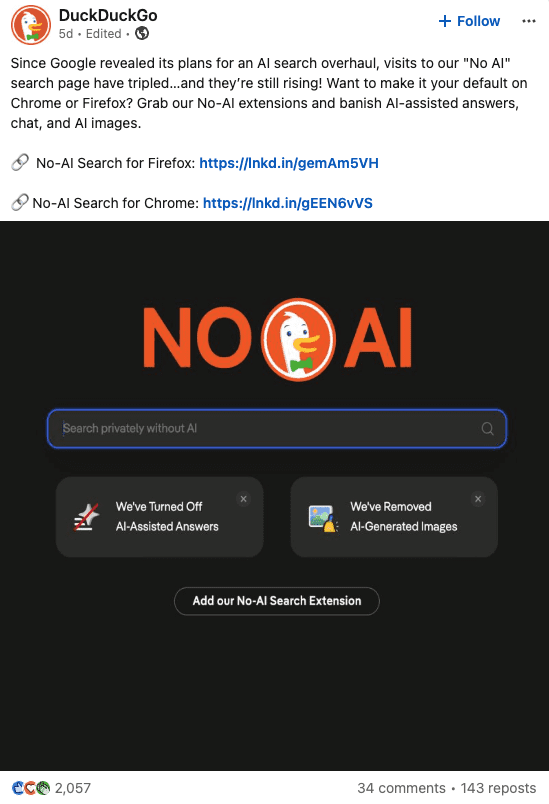
But we’re seeing users react both positively and negatively to AI being seemingly thrust upon them. DuckDuckGo is reporting that visits to its No AI Search have tripled since Google announced Intelligent Search.
Screenshot from LinkedIn, June 2026
How Everyday Users Interact With AI
As an industry, we’re focused on this narrative of total disruption, and we are seeing disruption and movement away from what has been our norm, but research shows a fragmented adoption of AI, rather than blanket adoption.
For easy, low-risk tasks like finding a local plumber or brainstorming dinner ideas, people are happy to use AI.
The tripling of traffic to DuckDuckGo’s “No AI” search page is a direct reaction to users not having a choice.
When software forces AI on users without letting them turn it off, users feel trapped, especially if they’re not yet trusting of AI.
Instead of accepting it, they are actively switching to alternative search engines and browser extensions that offer the clean, link-based experience they prefer.
To understand this pushback, we have to look at how the human mind reacts to new technology (and a big thank you to Giulia Panozzo, who helped me source and research these studies).
The 5 Barriers To Trust
In a study published in Nature Human Behaviour, researchers De Freitas et al. (2023) looked at the psychological barriers that stop people from trusting AI.
There are two main reasons that stand out for search engines and AI.
First is “opacity,” which simply means the AI is a “black box.”
When a search engine gives a synthesized answer without showing its sources clearly, we cannot see how it got its information. Human minds naturally want transparency, especially when making important decisions.
Second is the threat to our “agency,” or our sense of control. When search engines force an AI chat onto users, it feels like our choice is being taken away. To regain control, users flee to alternative search engines that respect their independence.
Safety-First Thinking And Tech Anxiety
Research by Sapru (2026) in Technology in Society looks at why some people feel intense anxiety about AI.
The study divides users into two groups:
Promotion-focused people, who love trying new and exciting tools.
Prevention-focused people, who prioritize safety, accuracy, and keeping things simple.
For safety-first users, a search engine is just a basic tool to get things done, not a toy to play with. Forcing an AI layer onto these users makes them feel anxious.
They worry about being misled or having to learn a complicated new system, which drives them to look for “No-AI” options.
Recognition Doesn’t Equal Utilization
A study by Yin (2025) in Frontiers in Education shows that recognizing an AI tool is useful does not mean a person will actually use it.
The researchers mapped out a step-by-step path of how users actively avoid AI:
If they see a way to avoid the AI, they will take it. The sudden spike in DuckDuckGo’s traffic can be seen as people taking an available exit route to avoid the threat.
Outside Our Bubble, AI Adoption Is Happening, But We Shouldn’t Panic
It’s easy for SEOs and other tech-savvy professionals to assume the rest of the world is adopting AI at the same pace we are.
Microsoft’s Global AI Diffusion Report shows that despite billions of dollars spent on AI, the vast majority of the world has not adopted it.
Regular active use of generative AI sits at 17.8% of the global working-age population (15-64). That means more than four in five working-age adults worldwide are not regularly using generative AI tools.
This also means that a lot of our clients who are worried about audiences (with buying power) moving away from traditional search to AI alternatives, are in the majority not adopting AI on a regular basis.
A large number of users are still relying on the “traditional web” and methods of fulfilling their purpose of going online.
As an industry, we’re going through a lot of changes at a rapid rate, and users are going through the same changes and barrage of AI solutions to their problems. We need to be adaptive and forward-thinking with our approaches, but we’re not quite in panic mode yet.
The agentic web is the layer of the internet where AI agents, acting on behalf of humans, discover, read, and transact with websites. It exists alongside the human web and is measured separately.
For most of the internet’s history, three classes of visitor showed up at a website: humans, search engine crawlers, and robots running scripts. Agents are a fourth class. An agent is sent by a human with a task, runs autonomously on the user’s behalf, and performs multi-step actions. Checking availability. Filling a form. Comparing prices. Completing a purchase. Agents read websites the way a crawler does and act on them the way a user does. That combination is new.
The agentic web is the portion of web traffic, infrastructure, and protocols dedicated to this class. In Q1 2026, AI traffic to U.S. retailers grew 393% year over year and, for the first time, converted 42% better than non-AI traffic, a year after converting 38% worse (Adobe via TechCrunch). The infrastructure that makes this traffic work, including protocols, runtimes, and measurement tools, shipped publicly through 2025 and accelerated in April 2026 with Cloudflare Agents Week.
I have been thinking, talking, and writing about this for 18 months. On my own website, AI assistants outnumber human visitors 5 to 10 times over on any given day, depending on what is happening. That ratio was near zero two years ago. The agentic web is the single term I find myself explaining most often. So here it is, end to end.
This article defines the term, situates it against AI search and AEO/GEO, explains the machine-first architecture framework for building for it, and outlines what changes for publishers, developers, and businesses.
Agents Are A New Primary Visitor Class
Three visitor classes read websites today: humans, crawlers, and agents. Humans load pages in browsers. Crawlers fetch pages to build search indexes. Agents do both and more. They load pages to extract information and to perform actions on the user’s behalf.
An agent visiting a retail website might query a product catalog for a user’s specification, compare options across listings, authenticate through an OAuth flow, add items to a cart, and complete a checkout. An agent visiting a publication might extract the current article, summarize it alongside other sources, and return a synthesized answer to the user without the user ever loading the page. Both behaviors are agentic web traffic. The retail behavior generates revenue. The publication behavior rarely sends referral traffic back. This asymmetry is one reason the agentic web’s effects are distributed unevenly across sectors.
Agent traffic is the fastest-growing category of web traffic in 2026. Automated traffic as a whole is growing roughly eight times faster than human traffic year over year (CNBC). The growth rate is the obvious part. The interesting part is the conversion behavior. On retail websites, AI-driven traffic now outperforms human traffic on revenue per visit, a year after underperforming it. Inversions like that do not usually reverse.
How The Agentic Web Differs From AI Search And AEO/GEO
AI search and AEO are adjacent categories to the agentic web. They are often confused with it, and each addresses a different question about the internet.
AI search refers to search products powered by large language models, including ChatGPT’s search mode, Perplexity, Google AI Mode, and SearchGPT. AI search is a consumer product that retrieves and synthesizes. The agentic web is broader. It includes AI search agents visiting websites, and it also includes transactional agents, booking agents, research agents, and custom agents built on top of APIs and browser runtimes. AI search is one subset of agentic web activity. Other agent categories operate outside search.
AEO and GEO (Answer Engine Optimization and Generative Engine Optimization) are the SEO-adjacent disciplines of optimizing content so AI search systems cite it accurately. AEO is a specific practice within the broader context of the agentic web. The No Hacks guide to Answer Engine Optimization and the SEO-to-AAIO primer cover the practical side.
AXO (Agent Experience Optimization) is a term in active use, though contested. A product launched in 2026 uses the acronym for a different concept (Agentic Experience Orchestration), so industry vocabulary is still settling. Functionally, AXO-as-discipline describes the work of making websites legible and transactable to agents. Machine-first architecture is the specific framework that structures that work.
Machine-First Architecture Defines How To Build For It
Machine-first architecture (MFA) has four pillars: Identity, Structure, Content, and Interaction. I introduced MFA in 2026 because the existing frameworks for making websites work for AI agents were either too general (SEO) or too narrow (schema.org). The pillars are what I test every website against. Episode 221 of the No Hacks podcast introduces them in detail, and the No Hacks glossary defines each term individually.
Identity. A website in the agentic web needs unambiguous machine-readable identity. Who the website is, what it sells or publishes, and which authoritative source it represents. Concretely, this means canonical URLs, consistent entity naming across pages and off-website, verified presence on the platforms agents query (LinkedIn, GitHub, Wikipedia, industry directories), and cryptographic signals where applicable. An agent that cannot resolve a website’s identity confidently falls back to pattern-matching, and pattern-matching loses to competitors with clearer identity signals.
Structure. Critical content must not depend on client-side JavaScript execution to become visible. Agents today mostly read the rendered DOM, but the reliability bar is different from a human browser. Structured data (Schema.org, JSON-LD), server-side rendering, and semantic HTML all fall under this pillar. The lesson from mobile-first indexing applies here: infrastructure that depends on fragile rendering is the first thing to fail when a new visitor class arrives.
Content. Content on the agentic web is consumed as answer-units, not as articles. An agent extracts the sentence or paragraph that answers the user’s question, frequently without surrounding context. The content pillar covers answer-first architecture, citable specificity, provenance signals, and temporal markers (publication dates, update dates, version numbers). The working rule: any sentence in the content should survive extraction standalone. An agent quoting it should not need the surrounding paragraphs to make the quoted sentence accurate. My guide to how AI agents see your website walks through this in detail.
Interaction. Agents act. They do not only read. The interaction pillar defines how an agent completes a task on a website: what actions the website exposes, how workflows recover from errors, and how an agent’s identity and permissions are verified. This pillar is advancing fastest in 2026. WebMCP lets websites register structured tools an agent can call directly. Universal Commerce Protocol standardizes agent checkout. MCP, A2A, NLWeb, and AGENTS.md cover the other protocols in this layer.
What Changes For Publishers, Developers, And Businesses
Publishers, developers, and businesses face three different economic realities under the agentic web. Here is each.
Publishers. Search-driven referral traffic to publishers dropped roughly one-third globally in the year to November 2025, with local publishers seeing 25-50% declines (Press Gazette). The agent layer of the web reads publisher content and synthesizes it directly, often without returning a user to the source page. Display-ad, affiliate, and page-view monetization compress in parallel. The forward move for publishers is diversification of revenue: subscriptions, licensing deals with AI labs, direct audience relationships, and an acknowledgment that page-view economics are thinning structurally, not temporarily.
Developers. A new API surface is active. navigator.modelContext shipped in Chromium 146 in February 2026, allowing websites to register tools an agent can call directly. Cloudflare Browser Run added production support in April 2026. (For the broader inventory of agentic browsers, automation frameworks, and enterprise APIs, see The Agentic Browser Landscape in 2026.) Model Context Protocol servers, OAuth flows for agents, and agent identity verification layers are live infrastructure, not proposals. The forward move for developers is learning the new primitives early, before the reliability bar rises and retrofitting becomes expensive. Cost surfaces to track: inference cost per agent task (screenshot-analyze-click loops burn tokens), authentication flows, and error recovery for multi-step actions.
Businesses with transactional websites. Retailers saw AI traffic grow 393% year over year in Q1 2026 while converting 42% better than non-AI traffic. Lead generation and SaaS signup flows are next. The forward move is to audit agent-readability with a tool like isitagentready.com (see the No Hacks writeup), fix the signals that ship against real agent runtimes today, and treat the agent conversion funnel as a second funnel alongside the human one. The broader protocol surface for agent buying flows is covered in my guide to agentic commerce.
The Short Version
The agentic web is the portion of the internet where AI agents act on websites on behalf of humans. It is real enough to show up in conversion data, and its infrastructure is shipping faster than most websites are adapting to it. Machine-first architecture is the framework for building for it, with four pillars: Identity, Structure, Content, Interaction. The long shift is already underway. The question is which side of the bifurcation a given website is on.
I shifted the whole focus of No Hacks last year because the gap between what is shipping and what most builders know is wider than it has been at any point since mobile. The agentic web is the biggest piece of that gap. If this article landed, send it to one person who would argue with you about it.
A SISTRIX analysis of 3.8 million German-language ChatGPT responses found that citation patterns changed after ChatGPT began implementing GPT-5.5.
The analysis, published by SISTRIX founder Johannes Beus, tracked 38 daily samples of 100,000 ChatGPT responses. SISTRIX compared citations in the four days before the change with the four days after it.
The company describes the event as a “ChatGPT Core Update,” comparing it to the way Google Core Updates change search rankings. SISTRIX also notes that the data shows correlation, not proof that the model change caused the citation movement.
For transparency, SISTRIX sells Prompt Tracking, the product used to gather the data for the analysis.
What The Data Shows
On a typical day during the tracking period, citation patterns varied by 1-2%. During the May 22-23 model-identifier change, that number jumped to 47%.
The average number of cited sources per response also dropped, from 30.9 before the change to 28.4 after.
SISTRIX’s comparison of 800,000 responses across the pre- and post-change windows shows a pattern in the winners and losers.
Winners
Reddit had the largest absolute gain, adding 7,007 citations per 10,000 responses for a 59% increase. Reddit was already the most-cited domain before the change.
German mainstream publishers gained across the board. Welt.de rose by 99%, faz.net by 124%, and bild.de by 83%. German streaming and sports platforms also gained. Dazn.com rose 383%, sky.de 157%, and kicker.de 357%.
Specialized tools and knowledge sources gained too. Mapbox.com and openstreetmap.org each rose 83%, and justwatch.com increased 624%.
Losers
International aggregator platforms saw the steepest declines. Indeed dropped 47%, Tripadvisor 53%, and Glassdoor 37-52% across country versions. Expedia and Rome2rio each fell 60%.
Global tech platforms also lost ground. YouTube fell 18%, Wikipedia 14%, and Google.com 22%. Facebook and LinkedIn each dropped by around 20%.
German career and comparison portals list visibility as well, Kununu dropped 46%.
The Industry Pattern
The analysis finds three winning categories in German data: German media, Reddit, and specialized tools all gained. Conversely, three losing categories included: international aggregators, global tech platforms, and German career portals.
Beus interprets the pattern as localization. For German-language queries, ChatGPT responses contained more originally German sources after the change, including established publishers and German service brands.
Whether this was the goal of the model can’t be determined from the data, according to SISTRIX.
Reddit is the exception. Despite being predominantly English-language, it continued gaining. This suggests user-generated discussions across all topics continue to be seen as highly relevant.
Why This Matters
The findings add to growing evidence that ChatGPT citation behavior changes with each model. SEJ has covered Resoneo’s data showing that the GPT-5.3 transition reduced cited domains per response. Separate analysis showed that ChatGPT’s default and premium models already produce different citation patterns.
The SISTRIX data now shows how citation patterns changed around a visible model-version change in a large sample.
Looking Ahead
The analysis covers the German market only. SISTRIX notes that similar patterns have been observed in other markets but hasn’t published that data. The company says it will continue tracking citation patterns through its Prompt Tracking product.
Google just shared more information to help us get our websites ready for agents. There is a new report from Lighthouse that anybody can run. You do not need external software to run it. You can do it right from within your Chrome browser.
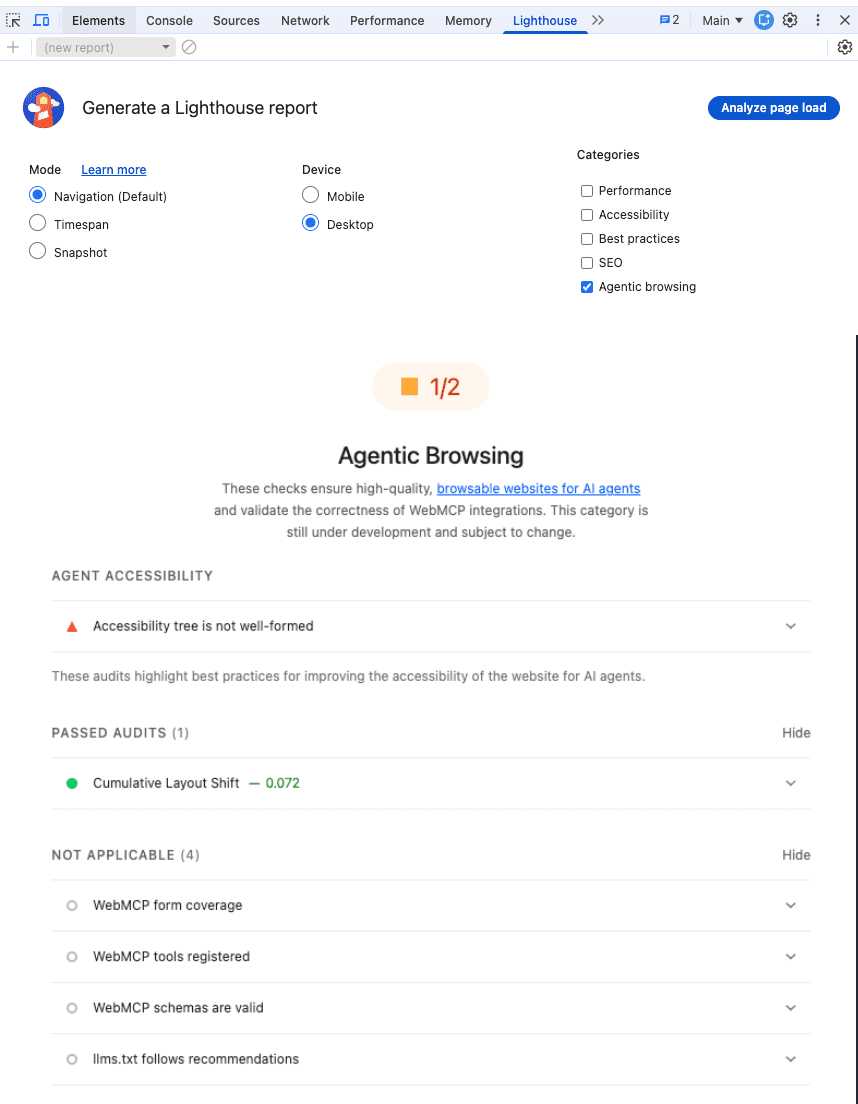
The report tells you whether your website is discoverable for AI agents, whether you have WebMCP integration set up, and something worth discussing: an evaluation of your LLMs.txt file!
How To Run The Agentic Web Report
Right now, if you try to get this report from within the standard version of Chrome, you probably will not find it. You can use it if you have Chrome Canary. This is the upcoming beta version of Chrome. Once you have that, you simply right-click and choose Inspect Page, then navigate to Lighthouse at the top. You will see a new category for “Agentic Browsing.”
Image Credit: Marie Haynes
Walk Through The New Lighthouse Agent Readiness Report With Me
I ran this on Google’s own page about the new Lighthouse report for agentic browsing, and it turns out that Google’s own documentation has issues that might hinder agents! The new report does not give a score out of 100, but rather a ratio showing how many agentic readiness checks your site passes.
3 Things To Watch For Agentic Readiness
Here are the topics I have been discussing with my clients regarding this new shift.
The accessibility tree was originally meant for screen readers, but it actually tells an agent where the buttons are and what the important elements are. If your accessibility tree is not well-formed, agents will struggle to use your site. I think that making our pages agent-friendly will eventually be a ranking factor in terms of whether agents recommend your page.
2. Understanding WebMCP
WebMCP is a proposed web standard to help you build and expose structured tools for AI agents. Essentially, it is a way to teach agents how to use the functionality of your website.
There are two types: declarative and imperative. Declarative is simple code you wrap around a form, while imperative allows the agent to interact back and forth with your website. If you have tools on your site that people will use with their agents, WebMCP is going to be very important.
3. The LLMs.txt File
This sounds crazy because Google just put out documentation for ranking in the AI features of Search, saying you do not need an LLMs.txt file. But this report is not about Search; it is about agents using your website. The proposal is to use an LLMs.txt file (similar to robots.txt) to provide markdown information that helps agents understand your site at inference time. It allows you to give specific instructions to agents on what they are allowed to do and where they can find important information. You likely don’t need an LLMs.txt file unless you have elements that specifically are going to be used by agents.
LLMs.txt is for agents using your site, and not for Search reasons.
I would highly recommend setting aside some time to check your own site in Chrome Canary. Most of us do not need these files right this second, but we need to be aware of them as our websites start to become agentic.
More Resources:
Read Marie’s newsletter, AI News You Can Use. Subscribe now.
AI systems are now answering questions about your business. The problem is that they are often getting it wrong.
Consider the typical situation. A brand’s products, services, expertise, locations, leadership, and relationships are distributed across dozens of pages. An AI model retrieves fragments from those pages, stitches them together probabilistically, and generates an answer. The result is often hallucinated product names, invented executives, misquoted capabilities, and weak or absent attribution.
This is not a failure of AI models. It is a failure of the medium itself. We have built the web around pages, links, and prose. AI retrieval systems need something fundamentally different: a structured layer of meaning and evidence.
The Proposal: EntityMap
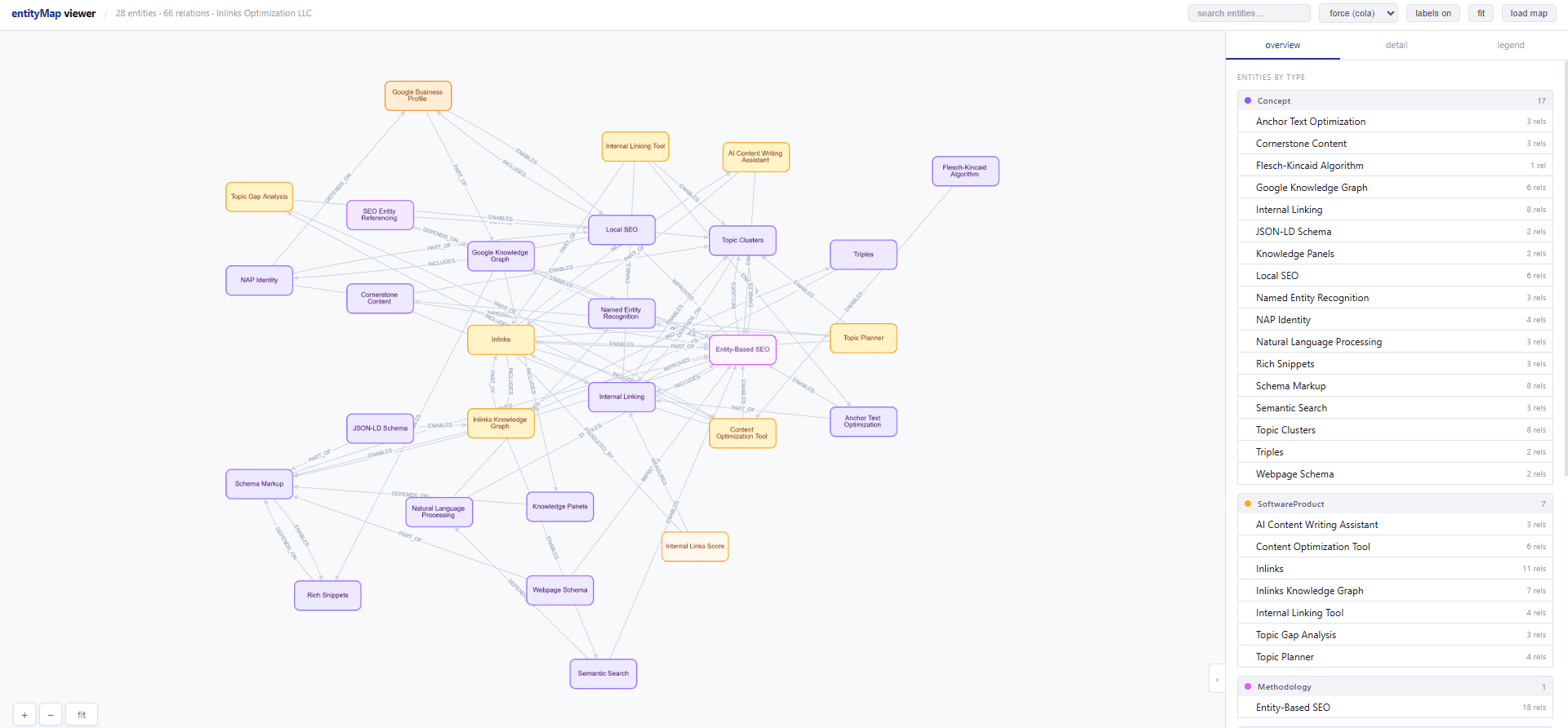
EntityMap has just entered public consultation. It is a new open standard that gives organizations a way to publish a single structured file. This file declares what the organization knows, maps how its key entities relate to one another, and links every claim back to its source evidence.
Image from author, May 2026
The consultation runs until 30 June 2026, with formal launch scheduled for July 1. For the next 33 days, the project is actively seeking implementation feedback, technical critique, and real-world testing from developers, SEO professionals, publishers, structured-data specialists, and anyone building or relying on AI retrieval systems.
Where EntityMap Sits In The Standards Landscape
EntityMap is not a replacement for existing web standards. It fills a gap that sitemap.xml and schema.org were never designed to address.
Sitemap.xml tells crawlers which pages exist on a website. Schema.org describes what appears on individual pages. EntityMap tells AI systems what an organization is, what it knows, and how that knowledge connects across the entire website.
This distinction matters. Consider a healthcare organization publishing treatment protocols. With schema.org, you can annotate a single page. With EntityMap, you can say the following: “Here are our core treatment areas. These are the relationships between them. Here is the peer-reviewed evidence supporting each claim. Here is where that evidence lives on our site.” An AI system reading that file gets a structured view of institutional knowledge rather than reconstructing it from page fragments.
Or, consider a SaaS company concerned about how AI systems describe its product. EntityMap allows the company to declare: “We offer feature X. It differs from competitors in Y. Here is the proof: link to documentation, link to case study, link to comparison page.” No longer must the company rely on an LLM to infer differentiation from scattered web content.
The same logic applies to publishers protecting attribution, legal firms clarifying expertise boundaries, financial services firms navigating regulatory nuance, and brands concerned about AI misrepresentation.
How EntityMap Works
EntityMap is a JSON file published at a predictable location on a domain. It contains three core elements.
Entities are named things the organization covers: products, services, people, concepts, locations, regulations, areas of expertise.
Relations map how those entities connect. Examples: “this product improves this outcome,” “this person leads this team,” “this regulation governs this service.”
Evidence chunks are supporting passages from the website, linked to their source URL.
Each chunk carries attribution metadata: the publisher name, the source page, the retrieval timestamp. This metadata survives extraction, aggregation, and storage in vector databases. When an AI system generates a response using your content, the chain of evidence remains intact.
The specification is deliberately minimal. The conformance floor consists of roughly 12 required fields across three objects. Everything else is optional enrichment: custom predicates, cross-shard resolution, verification status declarations, changelog tracking.
If you are an SEO professional, this represents a new lever for AI visibility. It works with traditional content and link strategies rather than replacing them.
If you are a publisher, this is a way to declare what you know and preserve attribution as your content gets disaggregated across AI platforms.
The standard is published under CC BY 4.0. There is no vendor lock-in, no subscription, no proprietary software requirement. Community contribution is open. The source code, specification, and validation tools are all available at GitHub.
What The Project Needs From You
The consultation period is not ceremonial. The project team is actively seeking specific forms of feedback.
Technical implementation feedback: Have you tried building an EntityMap for your site or product? What broke? What felt awkward in practice?
Use-case validation: Does this solve a problem you actually face? Does it miss something critical to your domain or industry?
Predicate critique: The standard defines 24 core predicates (IMPROVES, DEPENDS_ON, MEASURES, and others). Are these the right semantic abstractions for your work? Should we add or remove from this list?
Integration ideas: Are you building a generator? A validator? A dashboard for managing EntityMaps? The project wants to know what tooling you are considering.
Sector-specific applications: If you work in healthcare, finance, education, legal, or another vertical, what would an EntityMap profile for your sector look like?
Participants are invited to review the specification, test implementation, raise issues, suggest improvements, and contribute to the discussion before 30 June 2026.
Important Context: This Is Genuinely Open
This is a standards proposal from within the search and AI community. R.V. Guha, one of the founders of schema.org, has reviewed the project and given it his endorsement.
The consultation is genuinely open. The first phase focuses on technical review and early implementation. Wider adoption, sector-specific applications and research into the standard’s broader impact will follow after the consultation closes.
Why This Moment Matters
If you have spent the last few years watching AI systems misrepresent your work, your clients’ work, or your organization’s expertise, this is your moment to shape how that changes.
The bar for entry is low. You need to review the specification, test it against a real problem you care about, and tell the project what you found. That feedback will inform the standard before it becomes finalized.
The consultation runs for 33 days. After that, the adoption phase begins.
Disclosure: I am the CEO of InLinks and Waikay, which both support the EntityMap standards proposal.