Google: Should H1 & Title Tags Match? via @sejournal, @martinibuster
Google’s Office Hours podcast answered the important question of whether it matters if the title element and the H1 element match. It’s a good question because Google handles these elements in a unique way that’s different from how traditional SEO thinks about it.

How Important Is It For H1 & Title Tags To Match?

The question and answer are short. Google’s Gary Illyes answers the question and then links to documentation about how Google produces “title links” in the search engine results pages (SERPs).

This is the question:

“…is it important for title tags to match the H1 tag?”

Gary answers:

“No, just do whatever makes sense from a user’s perspective.”

That’s a useful answer but it’s also missing the explanation of why it’s not important that the title tag matches the first heading element.

The Title And H1 Elements

The title element is in the section with the other metadata and scripts that are used by search engines and browsers. The role of the element is to offer a general but concise description of what the web page is about before a potential site visitor clicks from the SERPs to the web page. So the title must describe the web page in a way that tells the potential visitor that the web page contains the content about whatever topic the page is about and if that’s a match to what the person is looking for then they’ll click through.

So it’s not that the title tag entices a click. It’s job is to say this is what’s on the page.

Now the heading elements (H1, H2, etc) are like mini titles, they describe what each section of a web page is about. Except for the first heading, which is usually an H1 (but could be an H2, it doesn’t matter to Google).

The first heading offers a concise description of what the web page is about to a site visitor that already knows what the page is about in a general way. So the H1 element can be said to be a little more specific in a way.

The official W3C HTML documentation for the H1 tells how the H1 is supposed to be used:

“It is suggested that the the text of the first heading be suitable for a reader who is already browsing in related information, in contrast to the title tag which should identify the node in a wider context.”

How Does Google Use H1 and Titles?

Google uses the headings and titles as a source of information about what the web page is about. But it also uses them to create the title link, which is the title that shows in the SERPs. So if the element is inappropriate because it’s got a popular keyword phrase that the SEO wants to rank for but doesn’t describe what the page is about, Google’s going to check the heading tags and use one of those as the title link.

Twenty years ago it used to be mandatory to put the keyword phrase you wanted to rank for in the title tag. But ranking factors don’t work like that anymore because Google has natural language processing, neural networks, machine learning and AI that helps it understand concepts and topics.

That’s why the title tag and the heading tags are not parking spots for the keywords you want to rank for. They are best used to describe the page in a general (title element) and a bit more specific (H1) way.

Google’s Rules For Title Links

Gary Illyes of Google linked to documentation about how Google uses titles and headings to produce title links.

Titles must be descriptive and concise. Yes, use keywords but remember that the title must accurately describe the content.

Google’s guidelines explain:

“Title links are critical to giving users a quick insight into the content of a result and why it’s relevant to their query. It’s often the primary piece of information people use to decide which result to click on, so it’s important to use high-quality title text on your web pages.”

Avoid Boilerplate

Boilerplate is a phrase that’s repeated across the site. It’s usually templated content, like:

(type of law) Lawyers In (insert city name), (insert state name) – Name Of Website

Google’s documentation recommends that a potential site visitor should be able to distinguish between different pages by the title elements.

This is the recommendation:

“Avoid repeated or boilerplate text in elements. It’s important to have distinct text that describes the content of the page in the <title> element for each page on your site.”

Branding In Title Tags

Another helpful tip is about website branding. Google advises that the home page is an appropriate location to provide extra information about the site.

Google provides this example:

ExampleSocialSite, a place for people to meet and mingle

The extra information about the site is not appropriate to have on the inner pages because that looks really bad when Google ranks more than one page from the website plus it’s missing the point about what the title tag is supposed be about.

Google advises:

“…consider including just your site name at the beginning or end of each element, separated from the rest of the text with a delimiter such as a hyphen, colon, or pipe like this:

ExampleSocialSite: Sign up for a new account.

Content That Google Uses For Title Links

Google uses the following content for creating title links:

  • “Content in elements
  • Main visual title shown on the page
  • Heading elements, such as

    elements

  • Other content that’s large and prominent through the use of style treatments
  • Other text contained in the page
  • Anchor text on the page
  • Text within links that point to the page
  • WebSite structured data”

Takeaways:

  • Google is choosing the title element to display as the title link. If it’s not a good match it may use the first heading as the title link in the SERPs. If that’s not good enough then it’ll search elsewhere on the page.
  • Use the title to describe what the page is about in a general way.
  • Headings are basically section “titles,” so the first heading (or H1) can be an opportunity to describe what the page is about in a more precise way than the title so that the reader is compelled to start reading or shopping or whatever they’re trying to do.
  • All of the headings in a web page together communicate what the entire page is about, like a table of contents.
  • The title element could be seen as serving the function similar to the title of a non-fiction book.
  • The first heading is more specific than the title about what the page is about.

Listen to the question and answer at the 10:46 minute mark:

Featured Image by Shutterstock/Khosro
LinkedIn Rolls Out New Newsletter Tools via @sejournal, @MattGSouthern

LinkedIn is launching several new features for people who publish newsletters on its platform.

The professional networking site wants to make it easier for creators to grow their newsletter audiences and engage readers.

More People Publishing Newsletters On LinkedIn

The company says the number of LinkedIn members publishing newsletter articles has increased by 59% over the past year.

Engagement on these creator-hosted newsletters is also up 47%.

With this growing interest, LinkedIn is updating its newsletter tools.

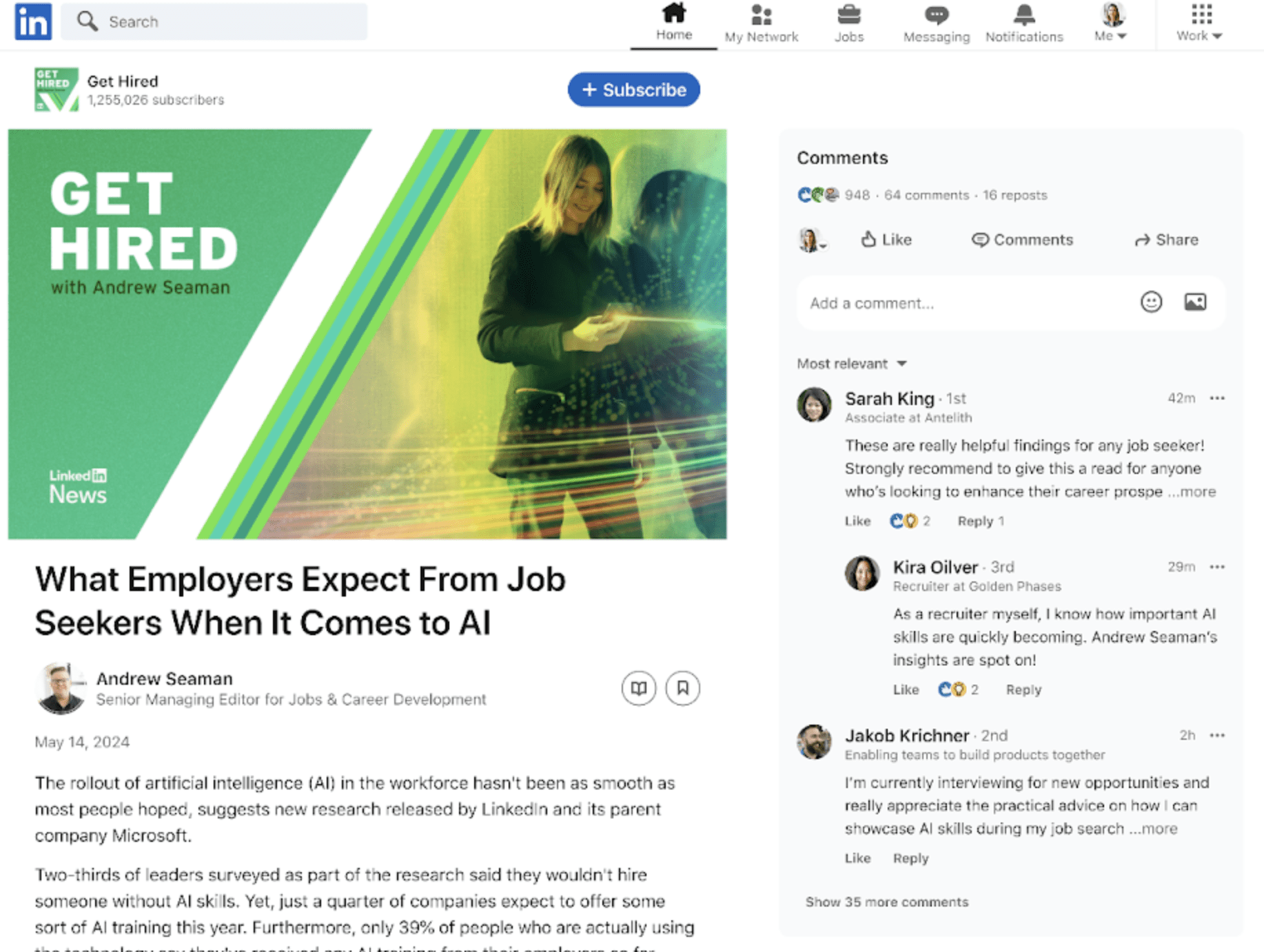
A New Way To View & Comment

One of the main changes is an updated reading experience that displays comments alongside the newsletter articles.

This allows readers to view and participate in discussions more easily while consuming the content.

See an example of the new interface below.

Screenshot from: linkedin.com, June 2024.

Design Your Own Cover Images

You can now use Microsoft’s AI-powered Designer tool to create custom cover images for their newsletters.

The integration provides templates, size options, and suggestions to help design visually appealing covers.

More Subscriber Notifications

LinkedIn is improving the notifications sent to newsletter subscribers to drive more readership.

When a new issue is published, subscribers will receive email alerts and in-app messages. LinkedIn will also prompt your followers to subscribe.

Mention Other Profiles In Articles

You can now embed links to other LinkedIn profiles and pages directly into their newsletter articles.

This lets readers click through and learn more about the individuals or companies mentioned.

In the example below, you can see it’s as easy as adding a link.

Screenshot from: linkedin.com, June 2024.

Preview Links Before Publishing

Lastly, LinkedIn allows you to access a staging link that previews the newsletter URL before hitting publish.

This can help you share and distribute their content more effectively.

Why SEJ Cares

As LinkedIn continues to lean into being a publishing platform for creators and thought leaders, updates that enhance the newsletter experience are noteworthy for digital marketers and industry professionals looking to build an audience.

The new tools are part of LinkedIn’s broader effort to court creators publishing original content on its platform amid rising demand for newsletters and knowledge-sharing.

How This Can Help You

If you publish a newsletter on LinkedIn, these new tools can help you design more visually appealing content, grow your subscriber base, interact with your audience through comments, and preview your content before going live.


Featured Image: Tada Images/Shutterstock

When Is Duplicate Content Acceptable For Local SEO? Google Explains via @sejournal, @MattGSouthern

Google’s John Mueller clarified that localized duplicate content across regional websites is acceptable. Unique content is still recommended for specific page types.

  • Google doesn’t penalize duplicate content on localized websites.
  • Translating or customizing core content for local markets is acceptable.
  • However, unique content is still needed for certain pages.
Google’s Response to Affiliate Link Heavy Content via @sejournal, @martinibuster

Google’s John Mueller responded to a question about whether affiliate links have a negative impact on rankings, touching on factors that affiliate sites should keep in mind.

Hypothesis: Google Targets Affiliate Sites

There is a decades-long hypothesis that Google targets affiliate sites. SEOs were talking about it as far back as Pubcon Orlando 2004 and for longer than that on SEO forums.

In hindsight it’s easy to see that that Google wasn’t targeting affiliate sites, Google was targeting the quality level of sites that followed certain tactics like keyword stuffing, organized link rings, scaled automated content and so on.

Image Representing A Low Quality Site

The idea that Google targets affiliate sites persists, probably because so many affiliate sites tend to lose rankings every update. But it’s also true that those same affiliate sites have shortcomings that the marketers are may or may not be aware of.

It’s those shortcomings that John Mueller’s answer implies that affiliates should focus on.

Do Many Affiliate Links Hurt Rankings?

This is the question:

“…do many affiliate links hurt the ranking of a page?”

Google’s John Mueller answered:

“We have a blog post from about 10 years ago about this, and it’s just as relevant now. The short version is that having affiliate links on a page does not automatically make your pages unhelpful or bad, and also, it doesn’t automatically make the pages helpful.

You need to make sure that your pages can stand on their own, that they’re really useful and helpful in the context of the web, and for your users.”

Pages That Can Stand On Their Own

The thing about some affiliate marketers that encounter ranking issues is that even though they “did everything perfect” a lot of their ideas of perfections come from reading blogs tha recommend outdated tactics.

Consider that today, in 2024, there are some SEOs who are still insisting that Google uses simple clickthrough rates as a ranking factor, as if AI hasn’t been a part of Google’s algorithm for the past 10+ years, insisting as if machine learning couldn’t use clicks to create classifiers that can be used to predict which content is most likely to satisfy users.

What Are Common Outdated Tactics?

These are in my opinion the kind of tactics that can lead to unhelpful content:

  • Targeting Keywords Not People
    Keywords, in my opinion, are the starting point for identifying topics that people are interested in. Google doesn’t rank keywords, they rank content that’s about the topics and concepts associated with those keywords. An affiliate, or anyone else, who begins and ends their content by targeting keywords is unintentionally creating content for search engines not people and lacks the elements of usefulness and helpfulness that Google’s signals are looking for.
  • Copying Competitors
    Another tactic that’s more harmful than helpful is the ones that advise site owners to copy what competitors who rank are doing and then do it ten times better. That’s basically just giving Google what they already have in the search results and is the kind of thing that Google will not find unique or original and risks getting discovered/not indexed at worst and ranking on page two or three at best.

The essence of outcompeting a competitor isn’t copying them, it’s doing something users appreciate that competitor’s aren’t doing.

Takeaways:

The following are my takeaways, my opinion on three ways to do better in search.

  • Don’t just target keywords.
    Focus on the people who are searching for those keywords and what their needs are.
  • Don’t research your competitors to copy what their doing.
    Research your competitors to identify what they’re not doing (or doing poorly) and make that your competitive strength.
  • Don’t just build links to promote your site to other sites.
    Promote your sites to actual people. Identify where your typical site visitor might be and identify ways of making your website known to them, there. Promotion does not begin and end with links.

What Does Google Say About Affiliate Sites?

Mueller mentioned that he wrote something ten years ago but he didn’t link to it. Good luck finding it.

But Google has published content about the topic and here are a few things to keep in mind.

1. Use the rel=sponsored link attribute. The following is from 2021:

“Affiliate links on pages such as product reviews or shopping guides are a common way for blogs and publishers to monetize their traffic. In general, using affiliate links to monetize a website is fine. We ask sites participating in affiliate programs to qualify these links with rel=”sponsored”, regardless of whether these links were created manually or dynamically.

As a part of our ongoing effort to improve ranking for product-related searches and better reward high-quality content, when we find sites failing to qualify affiliate links appropriately, we may issue manual actions to prevent these links from affecting Search, and our systems might also take algorithmic actions. Both manual and algorithmic actions may affect how we see a site in Search, so it’s good to avoid things that may cause actions, where possible.”

2. Google’s ten year old advice about affiliate programs and added value:

“If your site syndicates content that’s available elsewhere, a good question to ask is: “Does this site provide significant added benefits that would make a user want to visit this site in search results instead of the original source of the content?” If the answer is “No,” the site may frustrate searchers and violate our quality guidelines. As with any violation of our quality guidelines, we may take action, including removal from our index, in order to maintain the quality of our users’ search results. “

3. Site reputation abuse

“Affiliate content on a site previously used by a government agency”

Not site reputation abuse:

“Embedding third-party ad units throughout a page or using affiliate links throughout a page, with links treated appropriately”

4. Thin affiliate pages:

“Thin affiliate pages are pages with product affiliate links on which the product descriptions and reviews are copied directly from the original merchant without any original content or added value.”

5. Google has an entire webpage that documents how to write high quality reviews:

Write high quality reviews

Affiliate Sites Rank Highly All The Time

It’s a fact that affiliate sites routinely rank at the top of the search results. It’s also true that Google doesn’t target affiliate sites, Google generally targets spammy tactics and low quality content.

Yes there are false positives and Google’s algorithms have room for improvement. But in general, it’s best to keep an open mind about why a site might not be ranking.

Listen to the Office Hours podcast at the 4:55 minute mark:

Featured Image by Shutterstock/Dilen

Google’s Stance On AI Translations & Content Drafting Tools via @sejournal, @MattGSouthern

In a recording of Google’s June SEO office-hours Q&A session, John Mueller, a Google’s Search Relations team member, discussed the impact of AI-generated content on SEO.

The discussion focused on two key areas: the indexing of AI-translated content and using AI tools for initial content drafting.

As the use of AI in content creation grows, Mueller’s advice can help you decide what’s best for your website and audience.

AI-Generated Translations

One of the questions posed to Mueller was: “How can one be transparent in the use of AI translations without being punished for AI-heavy content?”

In response, Mueller clarified that there’s no specific markup or labeling for automatically translated pages.

Instead, website owners should evaluate whether the translated content meets their quality standards and resonates with their target audience.

Mueller advised:

“If the pages are well-translated, if it uses the right wording for your audience, in short, if you think they’re good for your users, then making them indexable is fine.”

However, if the translated content falls short of expectations, website owners can exclude those pages from search engines’ indexing using the “noindex” robots meta tag.

Mueller encouraged website owners to go beyond the bare minimum of word-for-word translation, stating:

“Ultimately, a good localization is much more than just a translation of words and sentences, so I would definitely encourage you to go beyond the minimal bar if you want users in other regions to cherish your site.”

AI-Assisted Content Creation

Another question addressed using AI tools to generate initial content drafts, with human editors reviewing and refining the content.

Mueller’s response focused on the overall quality of the published content, regardless of the tools or processes used in its creation.

Mueller explained:

“What matters for us is the overall quality that you end up publishing on your website.”

He acknowledged that using tools to assist with spelling, formulations, and initial drafting is not inherently problematic.

However, he cautioned that AI-generated content is only sometimes considered high-quality.

Mueller recommended referring to Google’s guidance on AI-generated content and the company’s “helpful content” page, which provides a framework for evaluating content quality.

He also encourages seeking input from independent third-party reviewers, stating:

“I realize it’s more work, but I find getting input from independent third-party folks on these kinds of questions extremely insightful.”

Analyzing Google’s Advice

On the surface, Mueller’s guidance is straightforward: evaluate the quality of AI-translated or AI-assisted content and ensure it meets quality standards.

However, his repetition of Google’s oft-cited “focus on quality” mantra offered little in the way of specific, actionable advice.

While Mueller acknowledged AI tools can assist with drafting, formatting, and other content creation tasks, his warning that AI output isn’t automatically “high-quality” hints at Google’s underlying skepticism toward the technology.

Reading between the lines, one could interpret Google’s stance as an attempt to discourage reliance on AI, at least for now.

Until more transparent and practical guidelines emerge, websites will be left to take their own calculated risks with AI-assisted content creation.

How This Can Help You

Whether using AI for translations or initial drafting, the key takeaway is prioritizing overall content quality, audience relevance, and adherence to Google’s guidelines.

Additionally, seeking third-party feedback can provide help ensure that AI-assisted content meets the highest standards for user experience and SEO.

Listen to the full episode of Google’s June SEO office-hours below:


Featured Image: Bakhtiar Zein/Shutterstock

Is Google Broken Or Are Googlers Right That It’s Working Fine? via @sejournal, @martinibuster

Recent statements by Googlers indicate that the algorithm is working the way it’s supposed to and that site owners should just focus more on their users and less on trying to give the algorithm what it’s looking for. But the same Googlers also say that the search team is working on a way to show more good content.

That can seem confusing because if the algorithm isn’t broken then why are they also working on it as if it’s broken in some way? The answer to the question is a bit surprising.

Google’s Point Of View

It’s important to try to understand how search looks like from Google’s point of view. Google makes it easier to do with their Search Off The Record (SOTR) podcast because it’s often just Googlers talking about search from their side of the search box.

And in a recent SOTR podcast Googlers Gary Illyes and John Mueller talked about how something inside Google might break but from their side of the search box it’s a minor thing, not worth making an announcement. But then people outside of Google notice that something’s broken.

It’s in that context that Gary Illyes made the following statement about deciding whether to “externalize” (communicate) that something is broken.

He shared:

“There’s also the flip side where we are like, “Well, we don’t actually know if this is going to be noticed,” and then two minutes later there’s a blog that puts up something about “Google is not indexing new articles anymore. What up?” And I say, “Okay, let’s externalize it.””

John Mueller then asks:

“Okay, so if there’s more pressure on us externally, we would externalize it?”

And Gary answered:

“Yeah. For sure. Yeah.”

John follows up with:

“So the louder people are externally, the more likely Google will say something?”

Gary then answered yes and no because sometimes nothing is broken and there’s nothing to announce, even though people are complaining that something is broken.

He explained:

“I mean, in certain cases, yes, but it doesn’t work all the time, because some of the things that people perceive externally as a failure on our end is actually working as intended.”

So okay, sometimes things are working as they should but what’s broken is on the site owner’s side and maybe they can’t see it for whatever reason and you can tell because sometimes people tweet about getting caught in an update that didn’t happen, like some people thought their sites were mistakenly caught in Site Reputation Abuse crackdown because their sites lost rankings at the same time that the manual actions went out.

The Non-Existent Algorithms

Then there are the people who continue to insist that their sites are suffering from the HCU (the helpful content update) even though there is no HCU system anymore.

SearchLiaison recently tweeted about the topic of people who say they were caught in the HCU.

“I know people keep referring to the helpful content system (or update), and I understand that — but we don’t have a separate system like that now. It’s all part of our core ranking systems: https://developers.google.com/search/help/helpful-content-faq

It’s a fact, all the signals of the HCU are now a part of the core algorithm which consists of a lot of parts and there is no longer that one thing that used to be the HCU. So the algorithm is still looking for helpfulness but there are other signals as well because in a core update there are a lot of things changing.

So it may be the case that people should focus less on helpfulness related signals and be more open to the possibility of a wider range of issues instead of just one thing (helpfulness) which might not even be the reason why a site lost rankings.

Mixed Signals

But then there are the mixed signals where Googlers say that things are working the way they should but that the search team is working on showing more sites, which kind of implies the algorithm isn’t working the way it should be working.

On June 3rd SearchLiaison discussed how people who claim they have algorithmic actions against them don’t. The context of the statement was in answering a June 3rd tweet by someone who said they were hit by an algorithm update on May 6th and that they don’t know what to fix because they didn’t receive a manual action. Please note that the tweet has a type where they wrote June 6th when they meant May 6th.

The original June 3rd tweet refers to the site reputation abuse manual actions:

“I know @searchliaison says that there was no algorithmic change on June 6, but the hits we’ve taken since then have been swift and brutal.

Something changed, and we didn’t get the luxury of manual actions to tell us what we did wrong, nor did anyone else in games media.”

Before we get into what SearchLiason said, the above tweet could be seen as an example of focusing on the wrong “signal” or thing and instead it might be more productive to be open to a wider range of possible reasons why the site lost rankings.

SearchLiaison responded:

“I totally understand that thinking, and I won’t go back over what I covered in my long post above other than to reiterate that 1) some people think they have an algorithmic spam action but they don’t and 2) you really don’t want a manual action.”

In the same response, SearchLiaison left the door open that it’s possible search could do better and that they’re researching on how to do that.

He said:

“And I’ll also reiterate what both John and I have said. We’ve heard the concerns such as you’ve expressed; the search team that we’re both part of has heard that. We are looking at ways to improve.”

And it’s not just SearchLiaison leaving the door open to the possibility of something changing at Google so that more sites are shown, John Mueller also said something similar last month.

John tweeted:

“I can’t make any promises, but the team working on this is explicitly evaluating how sites can / will improve in Search for the next update. It would be great to show more users the content that folks have worked hard on, and where sites have taken helpfulness to heart.”

SearchLiaison said that they’re looking at ways to improve and Mueller said they’re evaluating how sites “can/will improve in Search for the next update.” So, how does one reconcile that something is working the way it’s supposed to and yet there’s room to be improved?

Well, one way to consider it is that the algorithm is functional and satisfactory but that it’s not perfect. And because nothing is perfect that means there is room for refinement and opportunities to improve, which is the case about everything, right?

Takeaways:

1. It may be helpful to consider that everything can be refined and made better is not necessarily broken because nothing is perfect.

2. It may also be productive to consider that helpfulness is just one signal out of many signals and what might look like an HCU issue might not be that at all, in which case a wider range of possibilities should be considered.

Featured Image by Shutterstock/ViDI Studio

Vulnerabilities In WooCommerce And Dokan Pro Plugins via @sejournal, @martinibuster

WooCommerce published an advisory about an XSS vulnerability while Wordfence simultaneously advised about a critical vulnerability in a WooCommerce plugin named Dokan Pro. The advisory about Dokan Pro warned that a SQL Injection vulnerability allows unauthenticated attackers to extract sensitive information from a website database.

Dokan Pro WordPress Plugin

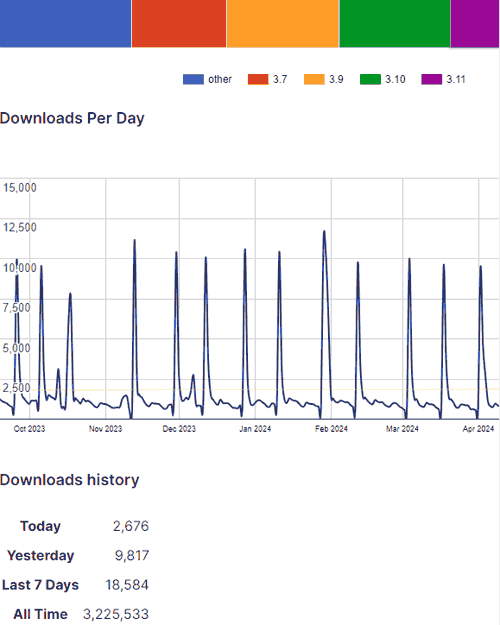
The Dokan Pro plugin allows user to transform their WooCommerce website into a multi-vendor marketplace similar to sites like Amazon and Etsy. It currently has over 50,000 installations Plugin versions up to and including 3.10.3 are vulnerable.

According to WordFence, version 3.11.0 represents the fully patched and safest version.

WordPress.org lists the current number of plugin installations of the lite version at over 50,000 and a total all-time number of installations of over 3 million. As of this moment only 30.6% of installations were using the most up to date version, 3.11 which may mean that 69.4% of all Dokan Pro plugins are vulnerable.

Screenshot Of Dokan Plugin Download Statistics

Changelog Doesn’t Show Vulnerability Patch

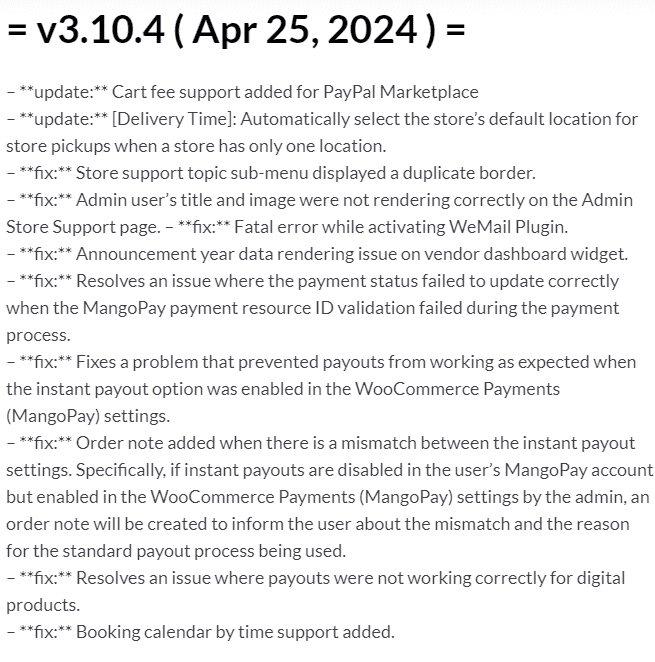
The changelog is what tells users of a plugin what’s contained in an update. Most plugin and theme makers will publish a clear notice that an update contains a vulnerability patch. According to Wordfence, the vulnerability affects versions up to and including version  3.10.3. But the changelog notation for version 3.10.4 that was released Apr 25, 2024 (which is supposed to be patched) does not show that there’s a patch. It’s possible that the publisher of Dokan Pro and Dokan Lite didn’t want to alert hackers to the critical vulnerability.

Screenshot Of Dokan Pro Changelog

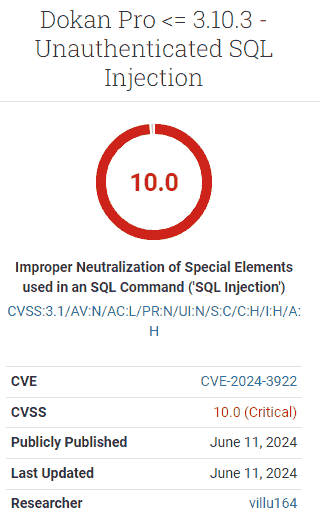
CVSS Score 10

The Common Vulnerability Scoring System (CVSS) is an open standard for assigning a score that represents the severity of a vulnerability. The severity score is based on how exploitable it is, the impact of it, plus supplemental metrics such as safety and urgency which together add up to a total score from least severe (1) to the highest severity (10).

The Dokan Pro plugin received a CVSS score of 10, the highest level severity, which means that any users of the plugin are recommended to take immediate action.

Screenshot Of Dokan Pro Vulnerability Severity Score

Description Of Vulnerability

Dokan Pro was found to contain an Unauthenticated SQL Injection vulnerability. There are authenticated and unauthenticated vulnerabilities. Unauthenticated means that an attacker does not need to acquire user credentials in order to launch an attack. Between the two kinds of vulnerabilities, unauthenticated is the worst case scenario.

A WordPress SQL Injection vulnerability is one in which a plugin or theme allows an attacker to manipulate the database. The database is the heart of every WordPress website, where every password, login names, posts, themes and plugin data. A vulnerability that allows anyone to manipulate the database is considerably severe – this is really bad.

This is how Wordfence describes it:

“The Dokan Pro plugin for WordPress is vulnerable to SQL Injection via the ‘code’ parameter in all versions up to, and including, 3.10.3 due to insufficient escaping on the user supplied parameter and lack of sufficient preparation on the existing SQL query. This makes it possible for unauthenticated attackers to append additional SQL queries into already existing queries that can be used to extract sensitive information from the database.”

Recommended Action For Dokan Pro Users

Users of the Dokan Pro plugin are recommended to consider updating their sites as soon as possible. It’s always prudent to test updates before their uploaded live to a website. But due to the severity of this vulnerability, users should consider expediting this update.

WooCommerce published an advisory of a vulnerability that affects versions 8.8.0 and higher. The vulnerability is rated 5.4 which is a medium level threat, and only affects users who have the Order Attribute feature enabled activated. Nevertheless, WooCommerce “strongly” recommends users update as soon as possible to the most current version (as of this writing), WooCommerce 8.9.3.

WooCommerce Cross Site Scripting (XSS) Vulnerability

The type of vulnerability that affects WooCommerce is called Cross Site Scripting (XSS) which is a type of vulnerability that depends on a user (like a WooCommerce store admin) to click a link.

According to WooCommerce:

“This vulnerability could allow for cross-site scripting, a type of attack in which a bad actor manipulates a link to include malicious content (via code such as JavaScript) on a page. This could affect anyone who clicks on the link, including a customer, the merchant, or a store admin.

…We are not aware of any exploits of this vulnerability. The issue was originally found through Automattic’s proactive security research program with HackerOne. Our support teams have received no reports of it being exploited and our engineering team analyses did not reveal it had been exploited.”

Should Web Hosts Be More Proactive?

Web developer and search marketing expert Adam J. Humphreys, Of Making 8, inc. (LinkedIn profile), feels that web hosts should be more proactive about patching critical vulnerabilities, even though that may cause some sites to lose functionality if there’s a conflict with some other plugin or theme in use.

Adam observed:

“The deeper issue is the fact that WordPress remains without auto updates and a constant vulnerability which is the illusion their sites are safe. Most core updates are not performed by hosts and almost every single host doesn’t perform any plugin updates even if they do them until a core update is performed. Then there is the fact most premium plugin updates will often not perform automatically. Many of which contain critical security patches.”

I asked if he meant a push update, where an update is forced onto a website.

“Correct, many hosts will not perform updates until a WordPress core update. Softaculous engineers confirmed this for me. WPEngine which claims fully managed updates doesn’t do it on the frequency to patch in a timely fashion for said plugins. WordPress without ongoing management is a vulnerability and yet half of all websites are made with it. This is an oversight by WordPress that should be addressed, in my opinion.”

Read more at Wordfence:

Dokan Pro <= 3.10.3 – Unauthenticated SQL Injection

Read the official WooCommerce vulnerability documentation:

WooCommerce Updated to Address Cross-site Scripting Vulnerability

Featured Image by Shutterstock/New Africa

Google Warns Of Quirk In Some Hreflang Implementations via @sejournal, @martinibuster

Google updated their hreflang documentation to note a quirk in how some websites are using it which (presumably) can lead to unintended consequences with how Google processes it.

hreflang Link Tag Attributes

is an HTML attribute that can be used to communicate data to the browser and search engines about linked resources relevant to the webpage. There are multiple kinds of data that can be linked to such as CSS, JS, favicons and hreflang data.

In the case of the hreflang attribute (attribute of the link element), the purpose is to specify the languages. All of the link elements belong in the section of the document.

Quirk In hreflang

Google noticed that there is an unintended behavior that happens when publishers combine multiple in attributes in one link element so they updated the hreflang documentation to make this more broadly known.

The changelog explains:

“Clarifying link tag attributes
What: Clarified in our hreflang documentation that link tags for denoting alternate versions of a page must not be combined in a single link tag.

Why: While debugging a report from a site owner we noticed we don’t have this quirk documented.”

What Changed In The Documentation

There was one change to the documentation that warns publishers and SEOs to watch out for this issue. Those who audit websites should take notice of this.

This is the old version of the documentation:

“Put your tags near the top of the element. At minimum, the tags must be inside a well-formed section, or before any items that might cause the to be closed prematurely, such as

or a tracking pixel. If in doubt, paste code from your rendered page into an HTML validator to ensure that the links are inside the element.”

This is the newly updated version:

“The tags must be inside a well-formed section of the HTML. If in doubt, paste code from your rendered page into an HTML validator to ensure that the links are inside the element. Additionally, don’t combine link tags for alternate representations of the document; for example don’t combine hreflang annotations with other attributes such as media in a single tag.”

Google’s documentation didn’t say what the consequence of the quirk is but if Google was debugging it then that means it did cause some kind of issue. It’s a seemingly minor thing that could have an outsized impact.

Read the newly updated documentation here:

Tell Google about localized versions of your page

Featured Image by Shutterstock/Mix and Match Studio

Want More Clicks? Use Simple Headlines, Study Advises via @sejournal, @MattGSouthern

A new study shows that readers prefer simple, straightforward headlines over complex ones.

The researchers, Hillary C. Shulman, David M. Markowitz, and Todd Rogers, did over 30,000 experiments with The Washington Post and Upworthy.

They found that readers are likelier to click on and read headlines with common, easy-to-understand words.

The study, published in Science Advances, suggests that people are naturally drawn to simpler writing.

In the crowded online world, plain headline language can help grab more readers’ attention.

Field Experiments and Findings

Between March 2021 and December 2022, researchers conducted experiments analyzing nearly 9,000 tests involving over 24,000 headlines.

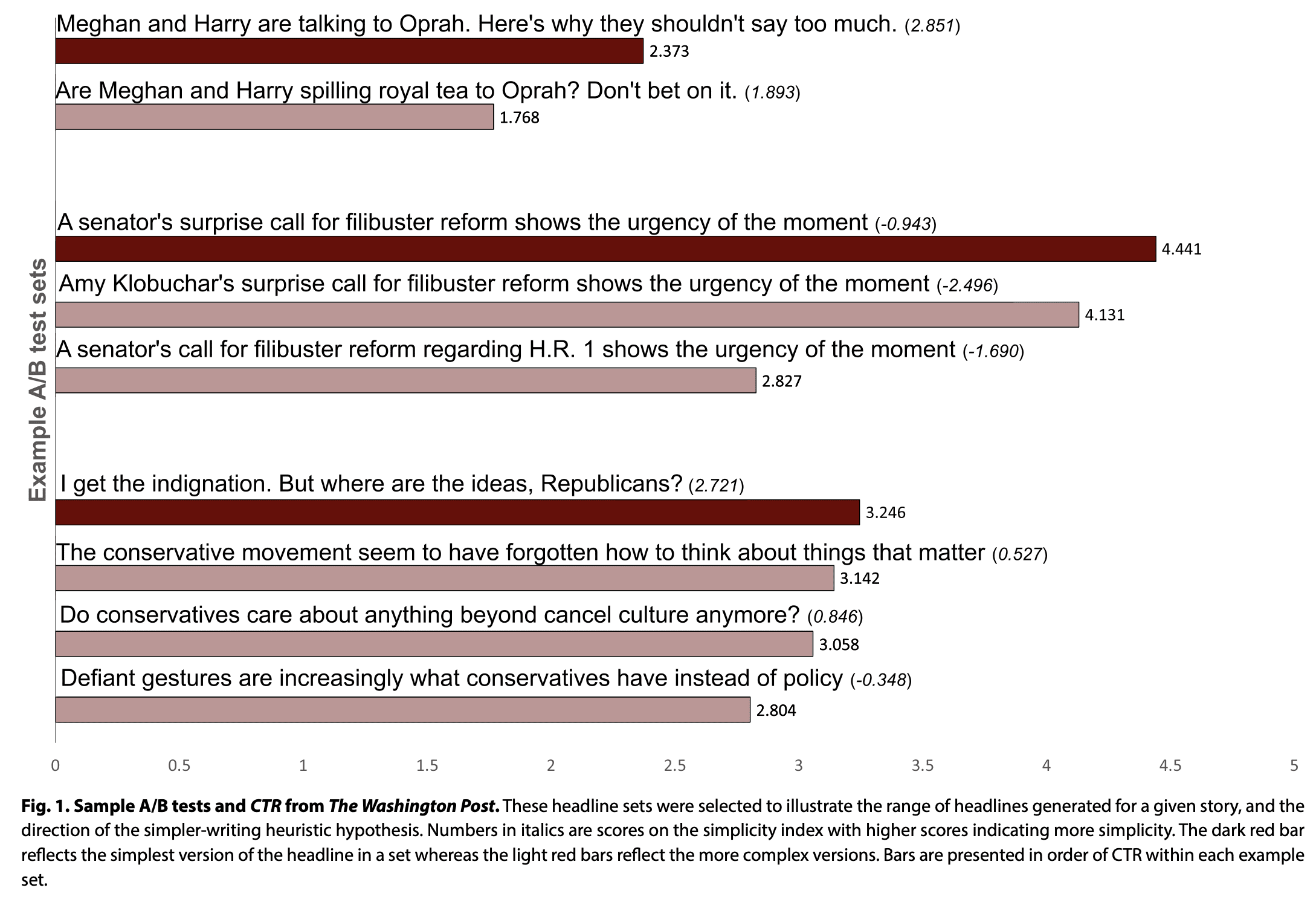
Data from The Washington Post showed that simpler headlines had higher click-through rates.

The study found that using more common words, a simpler writing style, and more readable text led to more clicks.

In the screenshot below, you can see examples of headline tests conducted at The Washington Post.

Screenshot from: science.org, June 2024.

A follow-up experiment looked more closely at how people process news headlines.

This experiment used a signal detection task (SDT) to find that readers more closely read simpler headlines when presented with a set of headlines of varied complexity.

The finding that readers engage less deeply with complex writing suggests that simple writing can help publishers increase audience engagement even for complicated stories.

Professional Writers vs. General Readers

The study revealed a difference between professional writers and general readers.

A separate survey showed that journalists didn’t prefer simpler headlines.

This finding is important because it suggests that journalists may need help understanding how their audiences will react to and engage with the headlines they write.

Implications For Publishers

As publishers compete for readers’ attention, simpler headline language could create an advantage.

Simplified writing makes content more accessible and engaging, even for complex articles.

To show how important this is, look at The Washington Post’s audience data from March 2021 to December 2022. They averaged around 70 million unique digital visitors per month.

If each visitor reads three articles, a 0.1% increase in click-through rates (from 2.0% to 2.1%) means 200,000 more readers engaging with stories due to the simpler language.

See also: Title Tag Optimization: A Complete How-to Guide

Why SEJ Cares

Google’s recurring message to websites is to create the best content for your readers. This study helps demonstrate what readers want from websites.

While writers and journalists may prefer more complex language, readers are more drawn to simpler, more straightforward headlines.

How This Can Help You

Using simpler headlines can increase the number of people who click on and read your stories.

The study shows that even a tiny increase in click-through rates means more readers.

Writing simple headlines also makes your content accessible to more people, including those who may not understand complex terminology or jargon.

To implement this, test different headline styles and analyze the data on what works best for your audience.


Featured Image: marekuliasz/Shutterstock

Google Launches Custom Event Data Import For GA4 via @sejournal, @MattGSouthern

Google announced a new feature for Google Analytics 4 (GA4), rolling out support for custom event data import.

This allows you to combine external data sources with existing GA4 data for more comprehensive reporting and analysis.

Google’s announcement reads:

“With this feature, you can use a combination of standard fields and event-scoped custom dimensions to join and analyze imported event metadata with your existing Analytics data.

You can then create custom reports for a more complete view of your Analytics data and imported event metadata.”

Custom Event Data Import: How It Works

Google’s help documentation describes the new capability:

“Custom event data import allows you to import and join data in ways that make sense to you. You have more flexibility in the choice of key and import dimensions.”

You begin the process by defining reporting goals and identifying any relevant external data sources not collected in Google Analytics.

You can then set up custom, event-scoped dimensions to use as “join keys” to link the imported data with Analytics data.

Mapping Fields & Uploading Data

Once the custom dimensions are configured, Google provides a detailed mapping interface for associating the external data fields with the corresponding Analytics fields and parameters.

This allows seamless integration of the two data sources.

Google’s help documentation reads:

“In the Key fields table, you’ll add the Analytics fields to join your imported data. In the Import fields table, you’ll select the external fields to include via the join key across both standard Analytics fields/dimensions and custom typed-in event parameters.”

After the data is uploaded through the import interface, Google notes it can take up to 24 hours for the integrated data set to become available in Analytics reports, audiences, and explorations.

Why SEJ Cares

GA4’s custom event data import feature creates opportunities for augmenting Google Analytics data with a business’s proprietary sources.

This allows you to leverage all available data, extract actionable insights, and optimize strategies.

How This Can Help You

Combining your data with Google’s analytics data can help in several ways:

  1. You can create a centralized data repository containing information from multiple sources for deeper insights.
  2. You can analyze user behavior through additional lenses by layering your internal data, such as customer details, product usage, marketing campaigns, etc., on top of Google’s engagement metrics.
  3. Combining analytics data with supplementary data allows you to define audience segments more granularly for targeted strategies.
  4. Using the new data fields and dimensions, You can build custom reports and dashboards tailored to your specific business.

For businesses using GA4, these expanded reporting possibilities can level up your data-driven decision-making.


Featured Image: Muhammad Alimaki/Shutterstock