Google Shares Tips To Improve SEO Through Internal Links via @sejournal, @MattGSouthern

In a new installment of its “SEO Made Easy” video series, Google provides three simple guidelines for utilizing internal linking to improve SEO.

The video, presented by Google’s Martin Splitt, offers valuable insights for improving site structure and user experience.

Strategic internal linking highlights your most valuable content, ensuring users and search engines can identify them quickly.

Additionally, internal linking can help search engines understand the relationships between pages, potentially leading to better rankings.

3 Tips For Internal Linking

Splitt emphasized three main points regarding the effective use of internal links:

  1. User Navigation: Internal links guide users through a website, helping them find related content and understand the site’s structure.
  2. Search Engine Crawling: Google’s web crawler, Googlebot, uses internal links to discover new pages and understand the relationships between different pages on a site.
  3. HTML Best Practices: Properly using HTML elements, particularly the < a> tag with an href attribute, is essential for creating effective links.

The Importance Of Meaningful Anchor Text

One of Google’s key recommendations is to use descriptive, meaningful anchor text for links.

Splitt demonstrated how clear anchor text improves user experience by allowing visitors to quickly scan a page and understand where each link will lead them.

He stated:

“Users and Bots alike prefer meaningful anchor text. Here on the left you see what that looks like each link has meaningful words as anchor text and you can easily spot what the link will take you to.”

See the examples he’s referring to in the image below:

Screenshot from: YouTube.com/GoogleSearchCentral, July 2024.

Splitt continues:

“On the right you see a page that doesn’t use meaningful anchor text and that isn’t a good user experience especially when you try to quickly scan the page and find the right link to use.”

Balancing Link Quantity

While internal linking is vital, Splitt cautioned against overdoing it.

He advises applying critical judgment when adding links and creating logical connections between related content without overwhelming the user or diluting the page’s focus.

Technical Considerations For Links

The video also touched on the technical aspects of link implementation.

Splitt discouraged using non-standard elements like spans, divs, or buttons to create links, saying if an element behaves like a link, it should be coded as one using the proper HTML structure.

Screenshot from: YouTube.com/GoogleSearchCentral, July 2024.

In Summary

These are the key takeaways from Google’s video on internal linking:

  • Internal linking is a fundamental aspect of SEO and user experience.
  • Focus on creating meaningful, descriptive anchor text for links.
  • Use internal links strategically to guide users and search engines through your site.
  • Balance the number of links to avoid overwhelming users or diluting page focus.
  • Stick to proper HTML structure when implementing links.

See the full video below:


Featured Image: Screenshot from YouTube.com/GoogleSearchCentral, July 2024. 

Google Cautions: Exponential Content Growth Causes Re-Evaluation via @sejournal, @martinibuster

Google’s John Mueller answered a question about the impact of increasing a website’s size by ten times its original size. Mueller’s answer should give pause to anyone considering making their site dramatically larger, as it will cause Google to see it as a brand new website and trigger a re-evaluation.

Impact Of Making A Site Bigger

One of the reasons for a site migration is joining two websites into one website, which can cause a site to become even larger. Another reason for an increase in size is the addition of a massive amount of new products.

This is the question that was asked in the SEO Office Hours podcast:

“What’s the impact of a huge expansion of our product portfolio on SEO Performance, for example going from 10,000 to products to 100,000?”

It must be pointed out that the question is about a site growing ten times larger.

This is is Mueller’s answer:

“I don’t think you have to look for exotic explanations. If you grow a website significantly, in this case, by a factor of 10, then your website will overall be very different. By definition, the old website would only be 10% of the new website. This means it’s only logical to expect search engines to re-evaluate how they show your website. It’s basically a new website after all.

It’s good to be strategic about changes like this, I wouldn’t look at it as being primarily an SEO problem.”

Re-Evaluate How Google Shows A Website

Mueller said it’s not primarily an SEO problem but  it’s possible most SEOs would disagree because anything that affects how a search engine shows a site is an SEO problem. Maybe Mueller meant that it should be seen as a strategic problem?

Regardless, John Mueller’s answer means that growing a site exponentially in a short amount of time could cause Google to re-evaluate a site because it’s essentially an an entirely new website, which might be an undesirable scenario.

Although Mueller didn’t specify how long a re-evaluation can take, he has indicated in the past that it can take months. Maybe things have changed but this is what he said four years ago about how long a sitewide evaluation takes:

“It takes a lot of time for us to understand how a website fits in with regards to the rest of the Internet.

…And that’s something that can easily take, I don’t know, a couple of months, a half a year, sometimes even longer than a half a year, for us to recognize significant changes in the site’s overall quality.”

The implication of a sitewide evaluation triggered by an exponential growth in content is that the optimized way to approach content growth is to do it in phases. It’s something to consider.

Listen to the Google SEO Office Hours podcast at the 4:24 minute mark:

Featured Image by Shutterstock/ShotPrime Studio

Google Abandons Third-Party Cookie Phaseout via @sejournal, @MattGSouthern

Google has announced it will no longer phase out third-party cookies in Chrome.

Instead, it’s trying a new approach that emphasizes user choice and control over their web browsing privacy.

Major Policy Reversal

For years, the company had been working towards eliminating third-party cookies, repeatedly delaying the implementation due to various challenges.

Instead of deprecating these cookies, Google will introduce a new experience in Chrome that allows users to make informed choices about their privacy settings.

Anthony Chavez, VP of Privacy Sandbox at Google, stated in the announcement:

“We are proposing an updated approach that elevates user choice. Instead of deprecating third-party cookies, we would introduce a new experience in Chrome that lets people make an informed choice that applies across their web browsing, and they’d be able to adjust that choice at any time.”

User Control At The Forefront

Under this new proposal, Chrome users can set their privacy preferences, which will apply across their web browsing activities.

This pivot comes after extensive feedback from various stakeholders, including regulators like the UK’s Competition and Markets Authority (CMA) and Information Commissioner’s Office (ICO), as well as publishers, web developers, standards groups, civil society, and advertising industry participants.

Continued Commitment To Privacy Sandbox

Despite this major change in direction, Google remains committed to its Privacy Sandbox initiative. The company plans to continue developing and offering Privacy Sandbox APIs to improve privacy protection and utility for those who choose to use them.

Additionally, Google intends to introduce IP Protection into Chrome’s Incognito mode, further enhancing user privacy options.

Implications For the Digital Advertising Landscape

This reversal is likely to have far-reaching implications for the digital advertising industry. Advertisers and publishers preparing for a cookieless future may need to reassess their strategies.

Google has stated that it will continue to consult with the CMA, ICO, and other global regulators as it finalizes its new approach. The company also intends to engage with the industry as it rolls out these changes.

In Summary

As Google shifts its approach to third-party cookies, here are key points to remember:

  • Google isn’t phasing out third-party cookies as previously planned.
  • Users will have more control over their privacy settings in Chrome.
  • The Privacy Sandbox project will continue, offering alternative technologies.
  • This change will affect advertisers, publishers, and users differently.
  • The full impact of this decision on the digital advertising landscape remains to be seen.

Featured Image: photosince/Shutterstock

Google Says This Will Cancel Your “Linking Power” via @sejournal, @martinibuster

Google’s John Mueller was asked in an SEO Office Hours podcast if blocking the crawl of a webpage will have the effect of cancelling the “linking power” of either internal or external links. His answer suggested an unexpected way of looking at the problem and offers an insight into how Google Search internally approaches this and other situations.

About The Power Of Links

There’s many ways to think of links but in terms of internal links, the one that Google consistently talks about is the use of internal links to tell Google which pages are the most important.

Google hasn’t come out with any patents or research papers lately about how they use external links for ranking web pages so pretty much everything SEOs know about external links is based on old information that may be out of date by now.

What John Mueller said doesn’t add anything to our understanding of how Google uses inbound links or internal links but it does offer a different way to think about them that in my opinion is more useful than it appears to be at first glance.

Impact On Links From Blocking Indexing

The person asking the question wanted to know if blocking Google from crawling a web page affected how internal and inbound links are used by Google.

This is the question:

“Does blocking crawl or indexing on a URL cancel the linking power from external and internal links?”

Mueller suggests finding an answer to the question by thinking about how a user would react to it, which is a curious answer but also contains an interesting insight.

He answered:

“I’d look at it like a user would. If a page is not available to them, then they wouldn’t be able to do anything with it, and so any links on that page would be somewhat irrelevant.”

The above aligns with what we know about the relationship between crawling, indexing and links. If Google can’t crawl a link then Google won’t see the link and therefore the link will have no effect.

Keyword Versus User-Based Perspective On Links

Mueller’s suggestion to look at it how a user would look at it is interesting because it’s not how most people would consider a link related question. But it makes sense because if you block a person from seeing a web page then they wouldn’t be able to see the links, right?

What about for external links? A long, long time ago I saw a paid link for a printer ink website that was on a marine biology web page about octopus ink. Link builders at the time thought that if a web page had words in it that matched the target page (octopus “ink” to printer “ink”) then Google would use that link to rank the page because the link was on a “relevant” web page.

As dumb as that sounds today, a lot of people believed in that “keyword based” approach to understanding links as opposed to a user-based approach that John Mueller is suggesting. Looked at from a user-based perspective, understanding links becomes a lot easier and most likely aligns better with how Google ranks links than the old fashioned keyword-based approach.

Optimize Links By Making Them Crawlable

Mueller continued his answer by emphasizing the importance of making pages discoverable with links.

He explained:

“If you want a page to be easily discovered, make sure it’s linked to from pages that are indexable and relevant within your website. It’s also fine to block indexing of pages that you don’t want discovered, that’s ultimately your decision, but if there’s an important part of your website only linked from the blocked page, then it will make search much harder.”

About Crawl Blocking

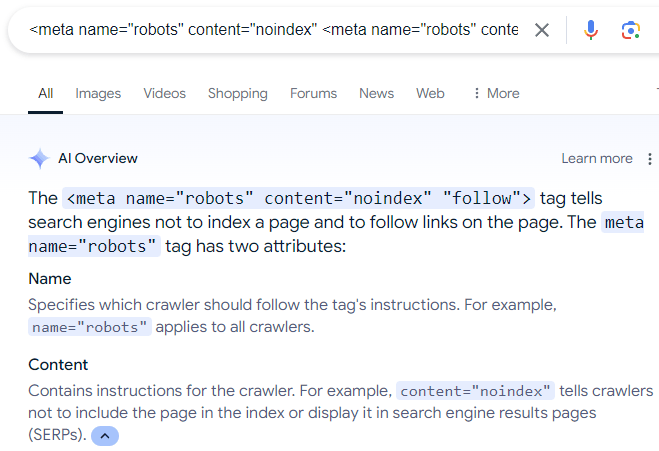
A final word about blocking search engines from crawling web pages. A surprisingly common mistake that I see some site owners do is that they use the robots meta directive to tell Google to not index a web page but to crawl the links on the web page.

The (erroneous) directive looks like this:

There is a lot of misinformation online that recommends the above meta description, which is even reflected in Google’s AI Overviews:

Screenshot Of AI Overviews

A screenshot of Google's AI Overviews recommending an erroneous robots directive configuration

Of course, the above robots directive does not work because, as Mueller explains, if a person (or search engine) can’t see a web page then the person (or search engine) can’t follow the links that are on the web page.

Also, while there is a “nofollow” directive rule that can be used to make a search engine crawler ignore links on  a web page, there is no “follow” directive that forces a search engine crawler to crawl all the links on a web page. Following links is a default that a search engine can decide for themselves.

Read more about robots meta tags.

Listen to John Mueller answer the question from the 14:45 minute mark of the podcast:

Featured Image by Shutterstock/ShotPrime Studio

Google Says How To Get More Product Rich Results via @sejournal, @martinibuster

In an SEO Office Hours podcast, Google’s John Mueller answered the question of how to get more product rich results to show in the search results. John listed four things that are important in order to get rich results for product listings.

Product Rich Results

Product search queries can trigger rich results that presents products in a visually rich manner that Google refers to as Search Experiences.

Google product search experiences can include:

  • Product snippets that include ratings, reviews, price, and whether availability information.
  • Visual representations of products
  • Knowledge panel with vendors and products
  • Product images in Google Images search results
  • Result enhancements (reviews, shipping information, etc.)

John Mueller Answers Question About Product Rich Results

The person asking the question wanted to know how to get more “product snippets in Search Console” which confused Mueller because product snippets are displayed in the search results, not search console. So Mueller answered the question in the context of search results.

This is the question:

“How to increase the number of product snippets in Search Console?”

John Mueller explained that there were four things to get right in order to qualify for product rich results.

Mueller answered:

“It’s not really clear to me what exactly you mean… If you’re asking about product rich results, these are tied to the pages that are indexed for your site. And that’s not something which you can change by force.

It requires that the page be indexed, that the page has valid structured data on it, and that our systems have determined that it’s worth showing this structured data.”

So, according to John Mueller, these are the four things to get right to qualify for product rich results:

  1. Page must be indexed
  2. The page has valid structured data
  3. Google’s systems determine that it’s worth showing
  4. Submit a product feed

1. Page Indexing

Getting a page indexed (and ranked) can be difficult for some search queries. People who come to me with this kind of problem tend to have content quality issues that can be traced back to using outdated SEO strategies like copying what’s already ranking in the SERPs but making it “better” which often results in content that’s not meaningfully different than what Google is already ranking.

Content quality on the page level and on the site level are important. Focusing on content that has that little extra, like better images, helpful graphs, or content that’s more concise, all of that is so much better than focusing on keywords and entities.

2. Valid Structured Data

This is another area that explains why some sites lose their rich results or fail to get them altogether. Google changes their structured data recommendations and usually the structured data plugins will update to conform to the new guidelines. But I’ve seen examples where that doesn’t happen. So when there’s a problem with rich results, go to Google’s Rich Results Test tool first.

It’s also important to be aware that getting the structured data correct is not a guarantee that Google will show rich results for that page, it’s just makes the page qualified to show in the rich results.

3. How Does Google Determine Something’s Worth Showing?

This is the part that Google doesn’t talk about. But if you’re read about reviews systems, quality guidelines, Google’s SEO starter guide and maybe even the Search Quality Raters Guidelines then that should be more than enough information to inform any question about content quality.

Google doesn’t say why they may decline to show an image thumbnail as a rich result or why they’ll not show a product in the rich results. My opinion is that debugging the issue is more productive if the problem is reconceptualized as a content quality issue. Images are content, if it’s on the page, even if it’s not text, it’s content. Evaluate all of the content in terms of how the images or products or whatever might look like in the search results. Does it look good as a thumbnail? Is the content distinctive or helpful or useful, etc.?

4. Merchant Feed

John Mueller lastly said that the merchant feed is another way to get products from a website to show as a rich result in Google.

Mueller answered:

“There’s also the possibility to submit a feed to your merchant center account, to show products there. This is somewhat separate, and has different requirements which I’ll link to. Often a CMS or platform will take care of these things for you, which makes it a bit easier.”

Mueller linked to this page:
Onboarding Guide – Create a feed

There’s also another page about Rich Snippets, which is more about text snippets:

Product snippet (Product, Review, Offer) structured data

Getting Product Rich Results in Google

While John Mueller listed four ways to get product rich results, Google Search Experiences, it’s not always as easy as 1, 2, 3, and 4. There are always nuances to be aware of.

Listen to the Google SEO Office Hours podcast at the 7:00 minute mark:

Featured Image by Shutterstock/ViDI Studio

Google Warns Of Last Chance To Export Notes Search Data via @sejournal, @martinibuster

Google updated their documentation for the Google Labs Google Notes experiment to remind users that Notes will go away at the end of July 2024 and showed how to download notes content, with a final deadline beyond which it will be impossible to retrieve it.

Google Notes

Notes is an experimental feature in Google Labs that lets users annotate search results with their ideas and experiences. The idea behind it is to make search more helpful and improve the quality of the search results through the opinions and insights of real people. It’s almost like Wikipedia where members of the public curate topics.

Google eventually decided that the Notes feature had undergone enough testing and they decided that their are shutting down Google Notes, a decision announced in April 2024.

Update To Documentation

The official documentation was updated to make it clear that Notes is shutting down at the end of July and that users who wish to download their data can do us with their Google Takeout, a Google Accounts feature that allows users to export their content from their Google Account. Google Takeout allows Google Account holders to export data from Google Calendar, Google Drive, Google Photos, a total of up to 56 kinds of content can be exported.

Google’s Search Central document changelog explains:

“A note about Notes

What: Added a note about the status of Notes to the Notes documentation.

Why: Notes is winding down at the end of July 2024.”

This is the new announcement:

“Notes is winding down at the end of July 2024. If you created a note, your notes content is available to download using Google Takeout through the end of August 2024.”

Check out the updated Google Notes documentation here:

Notes on Google Search and your website (experimental)

Featured Image by Shutterstock/ra2 studio

WP Engine WordPress Hosting Acquires NitroPack via @sejournal, @martinibuster

Managed WordPress web host WP Engine announced that they are acquiring NitroPack, a leading SaaS website performance optimization solution. The acquisition of of NitroPack by WP Engine demonstrates their continued focus on improving site performance for clients.

NitroPack

NitroPack is a relatively pricey but well regarded site performance solution that has for years been known as a leader. WP Engine and NitroPack formed a partnership in 2023 that would power WP Engine’s PageSpeed Boost product that is offered internally to customers. The NitroPack team will now become integrated within WP Engine this month, July.

There are no immediate plans to change the pricing options for NitroPack so it’s safe to say that it will continue to be a standalone product. WP Engine commented to Search Engine Journal that there will be no immediate changes in services pricing or billing for current NitroPack customers.

“We have no immediate plans to change the pricing options for NitroPack products.

Today NitroPack works with page builders and other hosting providers and that will continue to be available. In the coming months, we will continue to leverage NitroPack to enhance additional functionality to Page Speed Boost for WP Engine’s customers.”

What the acquisition means for WP Engine customers is that WP Engine will continue to leverage NitroPack’s technology to add even more functionalities to their PageSpeed Boost product.

The WP Engine spokesperson said that these new integrations will be coming to WP Engine PageSpeed Boost in a matter of months.

They shared:

“In the coming months, we will continue to leverage NitroPack’s strength to enhance additional functionality to Page Speed Boost.”

Read the official announcement:

WP Engine Acquires NitroPack, Extending Leadership in Managed WordPress Site Performance

Featured Image by Shutterstock/Asier Romero

OpenAI GPT-4o Mini Costs Less & Wallops Competition via @sejournal, @martinibuster

OpenAI rolled out GPT-4o mini, a replacement for GPT 3.5 Turbo that is more powerful than other models in its class. Because it’s hyper efficient, GPT 4o mini will make AI available to more people at a cheaper price through better end-user applications.

GPT-4o mini

GPT-4o mini is a highly efficient version of GPT-4o that is cheaper to run and is fast. Despite it’s designation as “mini” this language model is outperforms GPT-4 and GPT-3.5 turbo, as well as solidly outperforming Google’s comparable model, Gemini Flash 1.5.

Preliminary scores by the open source Large Language Model Systems Organizations shows GPT-4o Mini outperforming Anthropic’s Claude 3 Opus and Google’s Gemini Flash 1.5 and reaching benchmark scores that are comparable to GPT 4.5 Turbo and Gemini 1.5 Pro.

Screenshot Of Language Model Scores

Cost Effective Language Model

An important feature of GPT-4o mini is that it’s cheaper to use, 60% cheaper than GPT 3.5 Turbo, which means that companies that make AI products based on OpenAI language models will be able to offer high performance AI applications that cost significantly less. This makes AI available to more people around the world.

According to OpenAI:

“Today, we’re announcing GPT-4o mini, our most cost-efficient small model. We expect GPT-4o mini will significantly expand the range of applications built with AI by making intelligence much more affordable. GPT-4o mini scores 82% on MMLU and currently outperforms GPT-41 on chat preferences in LMSYS leaderboard(opens in a new window). It is priced at 15 cents per million input tokens and 60 cents per million output tokens, an order of magnitude more affordable than previous frontier models and more than 60% cheaper than GPT-3.5 Turbo.

a text and vision model in the Assistants API, Chat Completions API, and Batch API. Developers pay 15 cents per 1M input tokens and 60 cents per 1M output tokens (roughly the equivalent of 2500 pages in a standard book). We plan to roll out fine-tuning for GPT-4o mini in the coming days.”

GPT-4o mini Availability

GPT 4o mini is available today to users of ChatGPT Free, Plus and Team, with GPT-3.5 no longer a selectable option. Enterprise users will have access next week.

Read the official announcement:

GPT-4o mini: advancing cost-efficient intelligence

Featured Image by Shutterstock/Dean Drobot

Google Confirms Ranking Boost For Country Code Domains via @sejournal, @martinibuster

Google’s Gary Illyes answered a question about a ranking preference given to sites that use country level domain names and explained how that compares to non-country domain names. The question occurred in the SEO Office Hours podcast.

ccTLD Aka Country Code Domain Names

Domain names that are specific to countries are called ccTLDs (Country Code Top Level Domains). These are domain names that target specific countries. Examples of these ccTLDs are .de (Germany), .in (India) and .kr (Korea). These kinds of domain names don’t target specific languages, they only target Internet users in a specific country.

Some ccTLDs are treated by Google for ranking purposes as if they are regular Generic Top Level Domains (gTLDs), which are domains that are not specific to a country. A popular example is .io, which technically is a ccTLD (pertaining to the British Indian Ocean Territory) but because of how it’s used, Google treats it like a regular gTLD (generic top level domain).

Ranking Boosts For ccTLDs

The question that Gary Illyes answered was about the ranking boost given to ccTLDs.

This is the question:

“When a Korean person searches Google in Korean, does a com.kr domain or a .com domain do better?”

Gary Illyes answered:

“Good question. Generally speaking the local domain names, in your case .kr, tend to do better because Google Search promotes content local to the user.”

A lot of people want to rank better in a specific country and one of the best practices for doing that is to register a domain name that is specific to the country. Google will give it a ranking boost over other sites that are not explicitly targeting a specific country.

Gary continued his answer by explaining the ranking boost of a ccTLD over a generic top level domain (gTLD), like .com, .net and so on.

This is Gary’s explanation:

“That’s not to say that a .com domain can’t do well, it can, but generally .kr has a little more benefit, albeit not too much. “

Targeting Country Versus Targeting Language

Lastly, Gary mentioned that targeting a user’s language has more impact than the domain name.

He continued his answer:

“If the language of a site matches the user’s query language, that probably has more impact than the domain name itself.”

A benefit of targeting a language is that a site is able regardless of the country that a user is searching from whereas the country code top level domain name targets a country.

Something that Gary didn’t mention is that using a ccTLD can inspire user trust from searchers whose country matches the country that the domain name is targeting and because of that searchers on Google may be more inclined to click on a search result that uses the geotargeted ccTLD.

If a user is in Korea they may feel that a .kr domain is meant specifically for them. If a searcher is in Australia they may feel more inclined to click on a .au domain name.

Listen to the podcast answer from the 3:35 minute mark:

Featured Image by Shutterstock/Dean Drobot

Google Clarifies H1-H6 Headings For SEO via @sejournal, @martinibuster

Google’s Gary Illyes answered a question about the SEO value of hierarchically ordering heading elements (H1, H2, etc.). His answer offered an insight into the actual value of heading elements for digital marketing.

Heading Elements

In simple terms, HTML Elements are the building blocks of a web page and they all have their place much like the foundation and a roof of a home have their places in the overall structure.

Heading elements communicate the topic and subtopics of a web page and are literally a list of topics when a page is viewed just by their headings.

The World Wide Web Consortium (W3C), which defines HTML, describes headings like this:

“HTML defines six levels of headings. A heading element implies all the font changes, paragraph breaks before and after, and any white space necessary to render the heading. The heading elements are H1, H2, H3, H4, H5, and H6 with H1 being the highest (or most important) level and H6 the least.

Headers play a related role to lists in structuring documents, and it is common to number headers or to include a graphic that acts like a bullet in lists.”

Strictly speaking, it is absolutely correct to order headings according to their hierarchical structure.

What Google Says About Headings

The person asking the question commented that the SEO Starter Guide recommends using heading elements in “semantic” order for people who use screen readers (devices that translate text into spoken words) but that otherwise it’s not important for Google. The person asking the question wanted to know if the SEO Starter Guide was out of date because an SEO tool had a different recommendation.

Gary narrated the submitted question:

“I recently read on the SEO starter guide that “Having headings in semantic order is fantastic for screen readers, but from Google Search perspective, it doesn’t matter if you’re using them out of order.”

Is this correct because an SEO tool told me otherwise.”

It’s a good question because it makes sense to use heading elements in a way that shows the hierarchical importance of different sections of a web page, right?

Here’s Gary’s response:

“We update our documentation quite frequently to ensure that it’s always up to date. In fact the SEO starter guide was refreshed just a couple months back to ensure it’s still relevant, so what you read in the guide is as accurate as it can get.

Also, just because a non-Google tool tells you something is good or bad, that doesn’t make it relevant for Google; it may still be a good idea, just not necessarily relevant to Google.”

Is It Relevant For Google?

The official HTML standards are flexible about the use of headings.

Here’s what the standards say here:

“A heading element briefly describes the topic of the section it introduces. Heading information may be used by user agents, for example, to construct a table of contents for a document automatically.”

And here:

“The heading elements are H1, H2, H3, H4, H5, and H6 with H1 being the highest (or most important) level and H6 the least.”

The official HTML5 specifications for headings state that the hierarchical ordering is implied but that in both cases the headings communicate the start of a new section within a web page. Also, while the official standards encourage “nesting” headings for subtopics but that’s a “strong” encouragement and not a rigid rule.

“The first element of heading content in an element of sectioning content represents the heading for that section. Subsequent headings of equal or higher rank start new (implied) sections, headings of lower rank start implied subsections that are part of the previous one. In both cases, the element represents the heading of the implied section.

Sections may contain headings of any rank, but authors are strongly encouraged to either use only h1 elements, or to use elements of the appropriate rank for the section’s nesting level.”

That last part of the official standards is quite explicit that users are “encouraged” to only use H1 elements, which might sound crazy to some people, but that’s the reality. Still, that’s just an encouragement, not a rigid rule.

It’s only in the official HTML standards for heading elements in the context of accessibility that the recommendations are more rigid about using heading elements with a hierarchical structure (important to least important).

So as you can see, Google’s usage of heading elements appear to be in line with the official standards because the standards allow for deviation, except for accessibility reasons.

The SEO tool is correct that the proper use of heading elements is to put them into hierarchical order. But the tool is incorrect in saying that it’s better for SEO.

This means that H1 is the most important heading for screen readers but it’s not the most important for Google. When I was doing SEO in 2001, the H1 was the most important heading element. But that hasn’t been the case for decades.

For some reason, some SEO tools (and SEOs) still believe that H1 is the most important heading for Google. But that’s simply not correct.

Listen to the SEO Office Hours Podcast at the 13:17 minute mark:

Featured Image by Shutterstock/AlenD