Google Search Relations team members John Mueller and Martin Splitt discussed vibe coding websites on a recent episode of Search Off The Record.
Both found that AI coding tools could produce functional sites quickly. But getting SEO right still required specific technical direction, the same kind you’d give a human developer.
Telling AI To ‘Add Some SEO’
Mueller compared the experience of vibe coding to working with a developer who doesn’t specialize in search.
Mueller said on the podcast:
“You can always tell the AI system, now add some SEO to it. But how that works out is if you go to a developer and add some SEO and it’s like, what do you mean. Sprinkle some meta tags and add some structured data.”
Vague instructions produce vague results, whether the builder is human or AI. Mueller said he got better outcomes by telling the system what he wanted from the start. That included the domain name, canonical setup, sitemap files, and a robots.txt.
He checked whether the pages used reasonable HTML and linked properly. He also set up pre-publish checks to verify that URLs returned content and that JavaScript files weren’t blocked by robots.txt.
What They Built
Mueller has been building test websites to see how Googlebot handles requests. He deployed them to Firebase hosting using Hugo as a static site generator, with GitHub for version control.
He recently switched from VS Code with Copilot to command line tools. He named Claude Code and Gemini CLI as what he currently uses.
Splitt tried Google AI Studio to build a client-side tool with JavaScript. He described the output as readable, looking like a standard Next.js application. But he hit a loop where the AI kept using a library he didn’t want.
Splitt said:
“I asked it for a half an hour. I tried to make it not do what it wanted to do, and want to do what I wanted to do. And that was weird.”
The Technical Knowledge Question
Both acknowledged the tension in vibe coding’s promise that you don’t need to know how to code.
Mueller noted that technical understanding helps at every stage. Knowing what kind of site generator you want and how to structure pre-publish checks produced better results. Without that background, the AI will make assumptions. It might choose a static site generator, a JavaScript-heavy setup, or a full CMS with a database backend.
Mueller said:
“All of these are reasonable assumptions where if you talk to a developer they will also make these assumptions. But if you just tell the AI system like I want a website, then it will pick one.”
For personal projects and low-risk static sites, the stakes are low enough to experiment. But for anything involving user data or a production service, Mueller added that you’d want someone who understands what they’re doing.
Vibe-Coded Sites & Search Visibility
The sites Mueller built produced reasonable HTML that wouldn’t stand out as vibe-coded.
“Practically speaking, nobody can really recognize as being like, this is a vibe coded website,” he said, adding that common vibe coding frameworks can leave recognizable patterns.
He also pointed to a related risk with content. Once a site looks polished, it’s tempting to have the AI write the content too. Mueller acknowledged the tool can do that but said it’s not where he sees the most value.
Splitt agreed. AI-written content raises the question of why someone would visit a site instead of talking to the AI directly.
Mueller has flagged similar gaps in vibe-coded sites before. He reviewed a vibe-coded Bento Grid Generator on Reddit. He identified issues with crawlability, obsolete meta tags, and content stored in JavaScript files that search engines couldn’t access.
Looking Ahead
The podcast didn’t include formal guidance or policy positions on vibe-coded sites. Mueller and Splitt were sharing what they’ve tried and what they’ve run into.
For people testing these tools, the message is that AI can handle parts of code generation well, especially for lower-risk projects. It doesn’t make SEO decisions on its own. Those still require someone who knows what to ask for.
Featured Image: YouTube.com/GoogleSearchCentral, May 2026.
More Google Ads updates are arriving on the heels of Google Marketing Live 2026.
Google just announced several bidding and budgeting updates across Search, Shopping, and Performance Max campaigns, including a new beta called Journey-aware Bidding.
The feature aims to help Google Ads optimize towards the full lead-to-sale journey instead of relying mostly on front-end conversion actions like form fills.
Google also expanded Smart Bidding Exploration into additional campaign types and introduced new demand-led budget pacing updates for Search and Shopping campaigns.
The announcements mark one of the larger bidding-focused updates Google Ads has introduced since last year.
Journey-Aware Bidding Targets A Longstanding Lead Gen Problem
Journey-aware Bidding may draw the most attention from lead generation advertisers.
According to Google, Search campaigns using Target CPA bidding can learn from both biddable and non-biddable conversion goals.
That requires advertisers to track the full path from lead to sale.
Google says the feature helps its systems better understand downstream business outcomes instead of relying primarily on front-end conversion actions like form fills.
The feature is still in beta and appears to be designed for advertisers with longer sales cycles and more complex qualification processes.
That could include B2B advertisers, healthcare organizations, higher education institutions, and financial services brands.
Smart Bidding Exploration Expands Into More Campaign Types
Google also announced that Smart Bidding Exploration will expand into Performance Max and Shopping campaigns through upcoming betas.
Google first introduced the feature for Search campaigns last year.
It allows advertisers to set a ROAS tolerance. Then, that gives Google more flexibility to pursue additional queries that may fall outside tighter efficiency targets.
According to Google, Search campaigns using Smart Bidding Exploration saw a 27% increase in unique converting users on average.
Google plans to launch the beta for Performance Max campaigns with product feeds and Shopping campaigns in the coming weeks.
Google Introduces Demand-Led Budget Pacing
Google also announced new demand-led budget pacing updates for Search and Shopping campaigns.
The feature automatically shifts spend toward periods where Google predicts stronger consumer demand while reducing spend during slower periods.
Google says campaigns will still remain within monthly budget limits and daily spending caps.
The update builds on campaign total budgets, which launched earlier this year across Search, Shopping, and Performance Max campaigns.
What This Means For Advertisers
Journey-aware Bidding could be particularly useful for advertisers that already import offline conversions and CRM data back into Google Ads.
That may help advertisers with longer sales cycles better connect campaign performance to qualified pipeline and downstream revenue instead of lead volume alone.
The Smart Bidding Exploration expansion may also create opportunities for advertisers looking to scale beyond existing query coverage.
At the same time, some advertisers may approach those updates cautiously.
Advertisers operating under strict efficiency targets, compliance requirements, or tightly controlled query strategies may hesitate to give bidding systems broader exploration flexibility.
The budget pacing updates may also raise concerns for advertisers already frustrated with Google’s recent pacing changes tied to ad scheduling.
Google has stated that ads will still only run during scheduled days and hours. However, the company is increasingly pushing campaigns to spend toward full monthly budget targets within those available windows.
The demand-led pacing updates may also create new challenges for advertisers using scripts or third-party budget management platforms.
Many pacing systems rely on more predictable daily spend patterns to control budgets, dayparting, or campaign allocation.
If Google begins shifting spend more aggressively toward projected demand spikes, advertisers may need to recalibrate some of those pacing thresholds and automation rules.
That could be particularly important for agencies and enterprise advertisers managing large account structures with strict budget controls.
Looking Ahead
These updates also arrive just weeks before Google Marketing Live 2026, where Google will likely announce additional AI Max, bidding, and automation updates across Search and Performance Max campaigns.
Google has already expanded AI Max into more Search workflows over the past year, including broader query expansion, creative automation, and Dynamic Search Ads migration plans.
Given that direction, it would not be surprising to see Google continue adding more automation around bidding, targeting, budget pacing, and campaign management during this year’s event.
Y Combinator general partner Aaron Epstein was joined by Raphael Schaad, founder of Cron that was sold to Notion, to discuss common mistakes made with AI designed websites. They identified seven common mistakes vibe coders made with their websites that should be avoided.
Positive And Negatives
The podcast started out by acknowledging that being able to vibe code a website is a positive thing that doesn’t have to turn out poorly just because they’re not a designer. Then they started visiting vibe coded websites and encountering multiple issues that fit into the following seven categories.
1. Generic Design Trends
The first problem they highlighted is the trend of letting the AI decide the look and feel. A recent discussion on Twitter called attention to people who turn to AI and ask, “give me something modern” and what they end up getting is something generic. And that shouldn’t be surprising because if you leave the choices to an LLM you will 100% get the most common design choices.
The design may look modern in isolation, but it loses brand value because it lacks uniqueness, it feels familiar, generic, and unoriginal. One of the examples is a layout grid that resembles a bento-box (a neatly packed Japanese lunch), which they said looked fine but is also non-original.
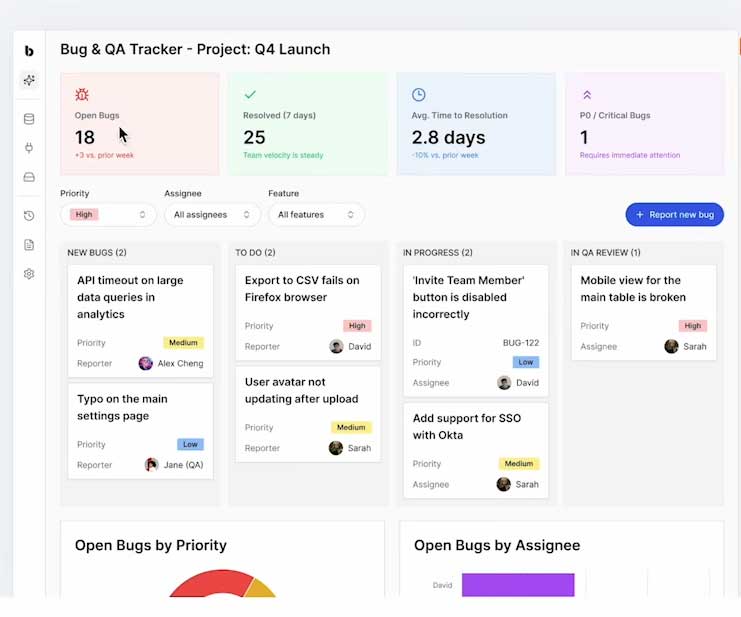
Another example was the generic software dashboard, with the point being the generic aspect of it. This kind of error can slip in at any point, where something looks professional but is generic.
Aaron Epstein commented:
“Go back to the engineers tab here.
Now, if this is their product, one of the other things that stands out to me is this kind of dashboard that’s got, you know, it’s got like the red, green, blue, purple kind of callouts up here.
That’s one of the hallmark classic things that a lot of AI design tools will actually create.”
Screenshot Of Generic Software Dashboard
Raphael responded:
“Yeah, every fake dashboard looks basically like something like that.”
Aaron Epstein:
They’ve got the icons that are a darker version of the lighter background color. It’s usually like the Google colors, you know, it’s like red, yellow, green, blue.
Raphael Schaad:
“The Fisher-Price primary…”
Aaron Epstein:
“So that… we tend to see a lot.”
They cited five examples of generic design trends:
Overusing purple gradients
Repeating generic AI design patterns
Using bento-box layouts without originality
Generic visual elements like the example of the software dashboard
Relying on standard icons or emoji-like elements
All of those design trends that LLMs lean on end up creating a visual experience that looks other AI-built sites.
Raphael explained:
“This all kind of started when I had like a late night thought and tweeted that I see a lot of dumb hover effects on landing pages of startups these days, presumably vibe coded. And so I was kind of curious to peel the layer back there.
It’s like, how did these, like what I thought were dumb effects, how did they make it into LLMs and why are they everywhere now?
A couple other trends that we then was kind of like purple gradients. All of a sudden, all startup websites had purple gradients everywhere. Or these sections that kind of like fade as you go in, as you scroll, and they fade in and fade out.”
Aaron noted that all of those design trends are not inherently bad. What makes them bad now is that LLMs are making them common, thereby draining them of any originality they used to have.
Raphael agreed with Aaron’s assessment, explaining how this happens:
“And one of the key things was when there was a good website kind of establishing a trend, it took a while in the old world for others to kind of like copy these trends.
But now with LLMs, if there’s a good website with a purple gradient, it makes it into the LLM because the LLM gets trained on like the good examples that get linked to a lot. And then all of a sudden, like the next week, all the startup websites look the same.”
2. Unexpected User Interaction Feedback
User interaction feedback is important because it eliminates uncertainty by acknowledging that a click did something. User interaction feedback signals that something is clickable. All of those things are a part of a design language that site visitors expect to see.
Unexpected interaction feedback is a poor user experience because it breaks the pattern that a user expects when they visit a website. It’s like walking through a lobby and bumping into a glass wall in the middle of the room. It’s not supposed to be there and is distracting and disorienting, a poor user experience.
The podcast recommended avoiding these seven interactions:
Lines following the user down the page
Cursor-following lights
Superfluous background animation effects
Automatic fade-ins
Moving buttons or shifting UI elements
Hover effects that move elements without a clear purpose
Animations that draw more attention than the product
3. Broken or Confusing UX Patterns
These are mistakes where the page becomes harder to use because the interaction model is unclear.
Scroll jacking
Non-standard navigation
Menus that jump or behave inconsistently
Clickable-looking elements that do not behave clearly
Buttons that move or auto-advance
Hover-only interactions
Hidden functionality behind hover
Duplicate or awkward sticky header behavior
Scroll hijacking was one the most common issues they encountered, stopping four times to comment on yet another site that was hijacking the browser scrolling.
At one point, Raphael commented:
“But it still feels like going through molasses… Like hijacking the …actual native browser scrolling to do some fancy thing with JavaScript to actually have the hooks to do all these animations.”
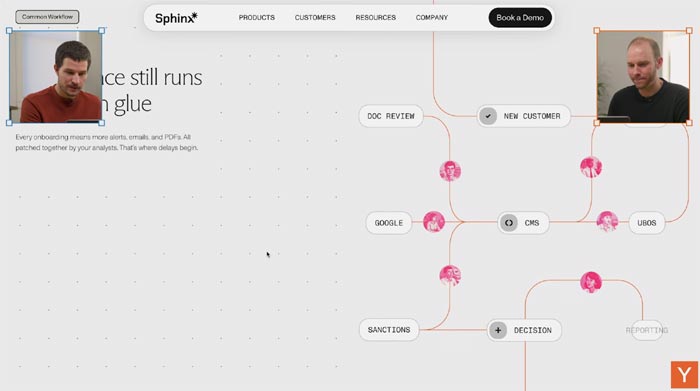
Another instance of scroll hijacking was the by-product of an animation that was loading and preventing the user from progressing.
Aaron Epstein commented as he scrolled down a page:
“What happens when we go further down?
…Valued and trusted by, okay, we’ve got a bunch of lines going everywhere. All right, so we’ve got that line following you down the page pattern again.”
Screenshot: “And now we’re scroll-jacked”
At this point the page stopped responding because of all the animations going on and Raphael said:
And now we’re scroll-jacked.
We’re locked into this position here of the website in order to build up this animation.
And I wonder what it wants to tell me, like, why is it important to capture me here on this point to build out this animation, where is it just like showing it already in the build-out state?”
Aaron noted that the animation and the scroll jacking is distracting him from what the page is trying to communicate.
He observed:
“And I find the animation is getting all of my attention, rather than what it says all the way over here on the left side. So I’m not even noticing any of this.
And this is not, on the right side, it’s not giving me enough visual information to communicate something valuable about what they do or how the product works.
So I just kind of miss everything over here on the side.
The animation is too distracting.”
The core problem here is that the site stops behaving like users expect. That creates friction, confusion, and sometimes mistrust, but certainly confusion, which is the opposite of what a website should be doing: offering clarity and communicating.
4. Weak Messaging and Product Explanation
These are mistakes where the design looks impressive, but the visitor still does not understand the product.
Unclear value proposition
Missing or vague explanation of what the product does
Not making clear who the product is for
Not explaining why the audience should care
Too little useful information above the fold
Product demos or examples without enough context
I see this kind of thing a lot with B2B type sites where you read the content and nothing on the page connects with explaining what the product or service is, much less communicating why I should care. In the past it was human slop written by someone who is more concerned with sounding techie and advanced. But nowadays it’s AI slop where content lacks purpose and is prone to using ambiguous words that have more than one meaning or words that are basically just lazy because they don’t do any work, don’t accomplish anything, fail to move the ball down the field.
A landing page is a customer acquisition channel. If visitors cannot quickly understand the product and its value, the design has failed.
5. Poor Information Hierarchy And Structure
These are mistakes where the page has too many competing visual or textual elements. The key thing here is visual or text elements that are competing for the site visitor’s attention.
Too many text styles
Extra labels that do not add meaning
Weak hierarchy between logo, headline, subhead, and supporting text
Sections that feel visually overbuilt
Decorative elements that add vertical space without improving clarity
AI can add structure that looks designed, but the structure may not help the reader process the page. Always be aware that AI tends to crank out content elements that look like their busy doing work but aren’t doing any work at all. And when I say work, I mean doing something purposeful, for a reason. Every word and visual element should do some work, accomplish something. This is something to be aware of when designing with AI.
6. Inconsistent Brand and Visual System
These are mistakes where the site lacks a unified identity. The site may contain attractive image assets, but they do not feel like they are a part of one coherent brand or visual style. These are hallmarks of an AI being prompted to do something modern or trendy or stylish but without having an established visual language or system in place.
Inconsistent visual language across sections
Colors that do not feel coordinated with the logo or brand
Product visuals that do not match the landing page style
Sections that look like they were generated separately
Brand choices that feel inherited from AI defaults rather than intentional
7. Lack Of Experienced-Based Judgment and Over-Reliance on AI
This is the underlying issue behind each category of issue with poorly vibe-coded websites. AI lets anyone design a site and create image and text assets. But it needs firm direction by someone with experience and expertise. The quality of the output is entirely dependent on the quality of the prompt, what was input.
The problem isn’t that AI makes AI slop. A lack of experience, expertise is what leads to the slop.
Here are the issues that lead to poorly designed vibe-coded websites:
Accepting all AI changes
Outsourcing taste to the LLM
Letting AI decide the brand direction
Starting from AI output instead of brand strategy
Spending saved time on more effects instead of clearer thinking
Forgetting that the human is now the editor
The insight and takeaway from reviewing poorly vibe-coded websites is that AI removes technical friction but it doesn’t replace judgment that comes from experience and expertise. The person vibe coding a website still has to decide what best serves the site visitor and the business goal.
Watch the podcast: Common Mistakes With Vibe Coded Websites
Google’s John Mueller answered a question about whether Google’s Preferred Sources feature can override standard ranking signals in Top Stories. His answer offers some clarity about how user preference can influence visibility without giving preferred sites a free pass around Google’s quality systems.
Google’s Preferred Sources
Google Preferred Sources is a Search feature that enables users to choose specific websites and news outlets they want to see more often in Top Stories. Search queries that trigger news results will then show the preferred sites for those users in the Top Stories feature.
Preferred Sources gives users some control over which publishers appear more frequently when relevant news results are shown. Google expanded Preferred Sources globally on April 30, 2026, making it available in all languages supported by Google Search.
The phrase, Google’s Preferred Sources, inadvertently can lead to the belief that these sites are the sites that Google itself chooses to trust but that’s not what it is. Google’s Preferred Sources are the sites that users trust.
Google’s official documentation explains what Preferred Sources is:
“If you’re a website owner, you can help your audience find your publication as a preferred source in Google Search. When a user selects your site as a preferred source, your content is more likely to appear for them during relevant news queries in “Top Stories”.”
The phrase “more likely to appear” implies a weighting effect. The signal is also implied to be limited to the audience that selected it. A preferred source may have a better chance of appearing for relevant news queries to the audience that selected it. There’s nothing in the official documentation that says it will help the site rank in the Top Stories news feature for anyone else.
That distinction is important for publishers and SEOs because it keeps the feature in perspective as a way to strengthen the connection between a publication and its loyal readers.
But, as you’ll see a little further below, there’s a curious similarity to the Preferred Sources feature and a Google patent for trusted websites algorithm.
Question About Preferred Sources And Ranking Signals
An SEO asked on Bluesky whether Google’s Preferred Sources feature can override standard ranking signals. The question focused on whether a followed site could appear in Top Stories even if its content had low helpful content scores or was AI-generated.
It’s a valid question that provides a little insight into how Google’s ranking algorithms work. What takes precedence, a user’s express desire to see an algorithmically determined low quality site or Google’s algorithm?
On one hand, how likely is it that a user will want to see an unhelpful and spammy website?
But on the other hand, how likely is it that Google’s determination that a site is unhelpful is wrong, even when users clearly want to see it?
So the question that was asked is more than theoretical and the answer may shed a little light on the inner workings of Google’s search algorithms.
“Do “Preferred Sources” override standard ranking signals? If a user follows a site, will it appear in Top Stories even if its content has low “helpful content” scores or is AI-generated, effectively letting user preference “win” over the general algorithm? Thanks!”
What would you do in the case of a spammy site, give the user what they want, ignore their preference, or flag the spammy site as possibly not spammy?
Does a user preference outweigh other ranking and quality signals?
Is the Preferred Sources trigger limited to just Top Stories or can it be used as an external signal of trustworthiness?
Is Google’s Preferred Sources A Trust Signal?
I think there is a small possibility that Google’s Preferred Sources feature could be a user trust signal because there are patents that talk about “trust buttons” that users can click to express their opinion that they trust a particular website.
“The user visits sites that they trust and click a “trust button” that tells the search engine that this is a trusted site.
The trusted site “labels” other sites as trusted for certain topics (the label could be a topic like “symptoms”).
A user asks a question at a search engine (a query) and uses a label (like “symptoms”).
The search engine ranks websites according to the usual manner then it looks for sites that users trust and sees if any of those sites have used labels about other sites.
Google ranks those other sites that have had labels assigned to them by the trusted sites.”
Does that sound a little bit like Google’s Preferred Sources to you?
John Mueller’s Answer
Mueller’s answer is ambiguous because he states that it doesn’t make sense to show a spammy site but that it’s also helpful to show users sites that they want to see.
He responded:
“We document it as ‘When a user selects your site as a preferred source, your content is more likely to appear for them during relevant news queries in “Top Stories”.’ I don’t think it makes sense to show spam to users just because of that, but it does help a user to see their preferred sources more.”
What he did there was to rely on Google’s official documentation and repeated what it said there, likely because that’s the canonical external source for Preferred Sources.
The person who asked the question responded to Mueller to note that sometimes Google ranks low quality sites.
They wrote:
“However, Google sometimes considers content to be good when it actually isn’t…
Thanks anyway!”
Google’s Preferred Sources is an interesting feature because it’s one of the few ways that an SEO and site publishers can encourage users to send a positive signal to Google that will have a definite ranking change.
One of the more interesting moments in Google’s latest Ads Decoded podcast centered around a growing advertiser concern about AI-generated creative.
As more brands gain access to the same AI tools, will advertising eventually start feeling repetitive?
Ginny Marvin, Ads Liaison at Google, raised that question directly during the discussion, asking whether the industry was heading toward a “sea of sameness.”
The response from Charles Boyd, Groupe Product Manager for Creative at Google, offered a clearer look on how Google is positioning AI creative tools inside Google Ads and where the company believes advertiser differentiation still comes from.
Google Says AI Creative Should Expand Creative Variation
Throughout the episode, Google repeatedly framed AI creative tools as systems designed to expand variation, accelerate testing, and adapt messaging across different audiences and placements.
Google repeatedly positioned these tools as dependent on advertiser strategy and direction.
Boyd described the value of generative tools as “the ability to quickly create different creative styles and iterations at scale.”
A large part of the industry conversation around AI advertising has focused on concerns about generic outputs and loss of differentiation.
Google appears to be taking the opposite position.
The company seems to believe advertisers with a strong understanding of their audience, messaging, and brand voice will be able to scale those strengths more efficiently through AI-assisted creative workflows.
Instead, Google appears to be positioning AI as infrastructure that helps advertisers produce more combinations, more testing opportunities, and more audience-specific variations.
That distinction gives more context to how Google is approaching AI creative tools.
Google Wants Advertisers Steering AI Creative
Another phrase Google returned to multiple times during the episode was “advertiser-in-the-loop.”
The broader point was that automation should still include advertiser guidance and oversight.
Google highlighted several tools designed to give advertisers more control over how AI-generated assets are created:
Text guidelines
Brand guidance
AI briefs
Asset Studio
Video enhancement previews
Text disclaimers
Final URL expansion controls
Boyd explained that advertisers can now provide specific text instructions directly inside campaigns.
For example, a brand could tell Google not to describe products using certain language or positioning:
Google literally will check every asset that gets created against each one of the guidelines that you provide.
According to Google, advertisers can specify up to 40 text guidelines within a campaign.
That is a noticeable shift from earlier automation features, which often felt far more rigid from a brand and messaging perspective.
The addition of text guidelines, AI briefs, and expanded creative controls suggests Google is trying to give advertisers more influence over how AI-generated assets are created and adapted across campaigns.
Google Is Increasingly Focused On Creative Breadth
Another notable takeaway from the episode was how often Google discussed creative diversity and variation.
The conversation repeatedly touched on:
Multiple responsive search ads
Different landing pages
Different aspect ratios
Audience-specific messaging
Diverse asset combinations
Creative tailored to different stages of the customer journey
At one point, Boyd encouraged advertisers to consider having multiple responsive search ads with different landing pages inside the same ad group.
That guidance would have sounded unusual to many PPC practitioners several years ago.
Google’s reasoning is that systems like AI Max can dynamically combine the following o better align messaging with different user journeys:
Headlines
Descriptions
Landing pages
Audience intent signals
Search context
Asset combinations
This feels connected to a larger shift happening across Google Ads.
Campaign optimization increasingly revolves around combinations of signals instead of isolated assets or keywords.
Sarah Hathiramani, Director of Product Management for YouTube Ads, reinforced this idea when discussing Demand Gen and YouTube creative:
There may be different audiences that you’re going after, and those audiences are going to resonate with very different creative messages.
That point becomes more important as Google’s systems increasingly personalize creative combinations dynamically.
Veo Signals Where Google Thinks Creative Production Is Going
The episode also offered another look at how Google sees AI changing creative production itself.
Hathiramani discussed Veo integrations inside Google Ads and Asset Studio.
According to Google, advertisers can upload up to three images and generate multiple short-form video variations automatically.
Google positioned this as a way to reduce production barriers for advertisers that may not have dedicated video resources:
Instead of asking every advertiser to become an in-house video production company, we’re able to use Veo to leverage automation while maintaining transparency and control.
That could be particularly meaningful for smaller advertisers or brands that historically relied heavily on static image creative.
It also reflects a larger trend happening across Google Ads.
The company increasingly wants advertisers participating across more inventory types, placements, formats, and surfaces.
AI-generated creative helps reduce some of the operational burden required to do that.
At the same time, Google repeatedly stressed that advertisers still need strong inputs.
Marvin specifically noted that brands with a clear voice and point of view are likely to benefit most from these tools.
What This Means For Advertisers
One of the more noticeable themes throughout the episode was how often Google emphasized creative breadth.
Multiple landing pages, multiple responsive search ads, audience-specific messaging, different aspect ratios, and structured asset testing all came up repeatedly across Search, Performance Max, Demand Gen, and YouTube.
That guidance reflects how Google’s systems increasingly optimize around combinations of assets, intent signals, placements, and audiences rather than isolated ads or keywords.
For advertisers, that may require a shift away from building a small set of highly controlled assets toward developing broader creative coverage across different audience stages and formats.
Looking Ahead
This episode offered a clearer look at how Google is talking about AI creative internally ahead of Google Marketing Live.
The discussion repeatedly centered around advertiser controls, creative testing, audience-specific messaging, and broader asset variation across campaigns.
That may be one of the more important signals for advertisers paying attention to where Google Ads is heading next.
Google appears to be encouraging advertisers to build more adaptable creative systems rather than relying on a small set of static assets.
The post identifies five measurement areas where the company says the two systems diverge. It also names “abstention” as a design choice for AI-powered retrieval.
What Microsoft Described
The post argues that traditional search indexing and grounding indexing share the same foundation but serve different goals.
Traditional search, the team writes, asks “which pages should a user visit?” The grounding layer asks “what information can an AI system responsibly use to construct a response?”
Microsoft identifies five categories where the measurement requirements differ.
On factual fidelity, the team notes that some ranking mismatch is tolerable in traditional search because a user can click through and evaluate. In grounding, the post describes breaking content into retrievable chunks as a process that “can distort page substance in ways that never appear in any ranking signal.”
For source attribution quality, the Bing team calls attribution helpful in traditional search but “a core signal” in grounding. Not all indexed content matters equally as evidence for an AI answer, the team adds.
On freshness, Microsoft notes a clear difference in cost. Stale content in search is a ranking problem. In grounding, the post says, “a stale fact produces a misleading response.”
For coverage of high-value facts, the post explains that a missed document in search is recoverable because alternative results exist. In grounding, the index must ensure “the specific facts and sources that people are likely to ask about are actually available and groundable.”
On contradictions, traditional search can surface one source above another and let the user decide. A grounding system can’t do that. “An AI system that silently arbitrates between contradictory sources is one that may confidently assert the wrong thing,” the team says.
Abstention And Iterative Retrieval
The post also covers two design differences between the systems.
Microsoft calls declining to answer “abstention.” For a grounding system, that’s a valid outcome when support is missing, stale, or conflicting. Traditional search doesn’t need to make this judgment because it presents options for a human to evaluate.
Iterative retrieval is the other difference. Traditional search is typically a single interaction where a query goes in and ranked results come out. Grounding systems may need to ask follow-up questions, refine retrieval based on intermediate results, and combine evidence from multiple sources.
Errors in early retrieval steps “compound through subsequent reasoning steps in ways that no human reviewer would catch in real time,” the post adds.
Context
This blog post comes after a series of moves by Microsoft to build out its grounding tooling and give publishers visibility into it.
This post is more conceptual than those prior announcements. It doesn’t introduce new tools or features. Instead, it lays out the engineering principles the company describes as guiding its index evolution.
Why This Matters
This framework clarifies what Microsoft says its systems need from the index for AI answers.
Microsoft states grounding relies on the same crawling, quality, and web understanding as search, but grounded answers require accurate, fresh, attributable, and consistent evidence. Stale facts, weak sources, and contradictions pose risks when content is used for answers.
Looking Ahead
The post offers insight into why some content is easier for AI to cite. If the Citation Share and intent-label features previewed at SEO Week ship, they could help test whether the measurement priorities described here show up in actual publisher data.
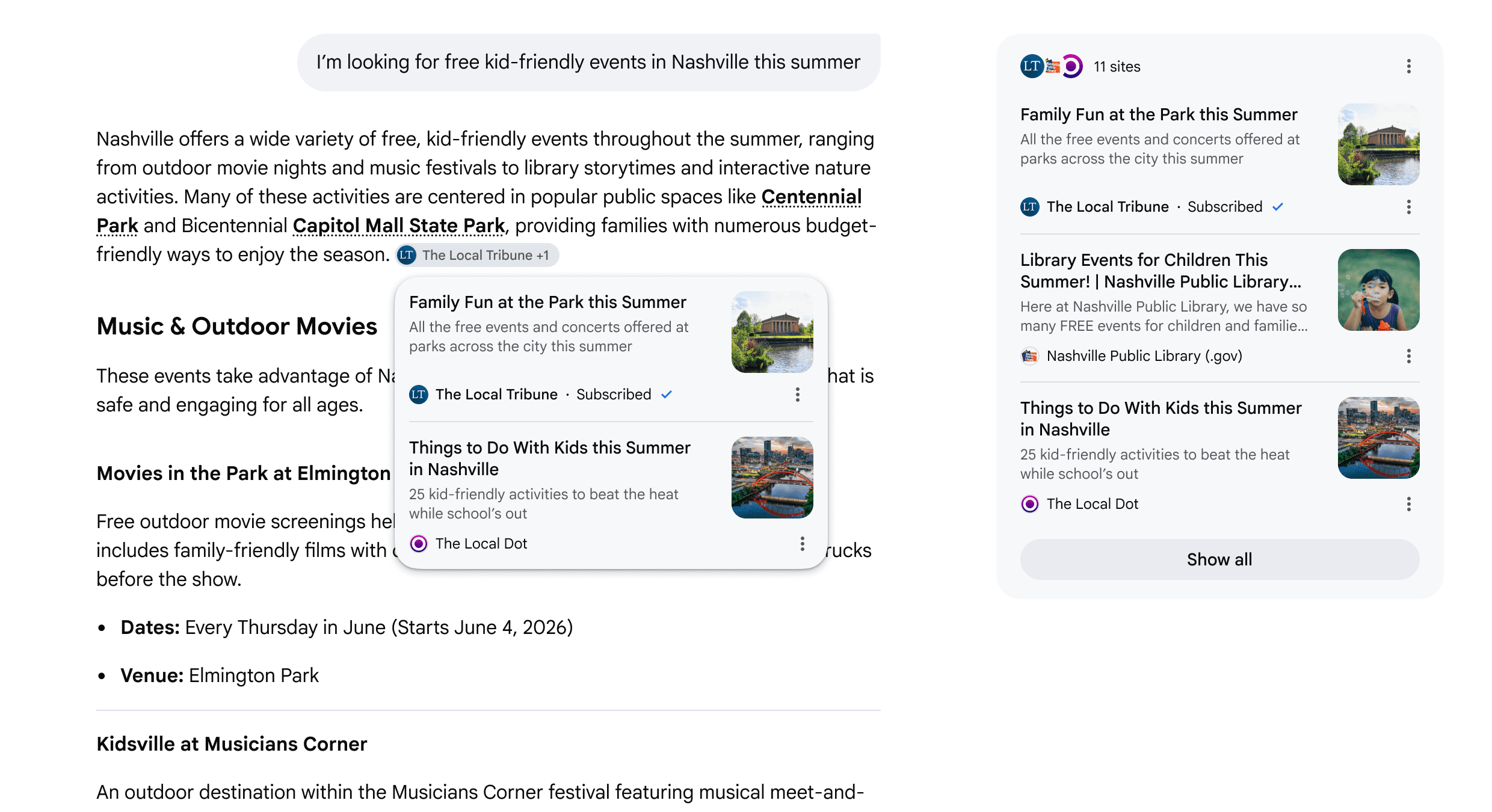
Google is rolling out five updates to how links appear in its generative AI Search experiences, including AI Mode and AI Overviews. The changes add subscription labels and inline links within responses, among other features.
Here’s an example of how the changes will appear:
Image Credit: Google
Hema Budaraju, VP of Product Management, wrote about the updates in a blog post.
What’s New
The updates cover five areas of link display across Google’s generative AI Search features.
Subscription Highlighting In AI Mode & AI Overviews
Google is now labeling links from users’ news subscriptions in AI Mode and AI Overviews.
Google announced subscription highlighting in December for the Gemini app but didn’t provide a timeline for AI Mode or AI Overviews. Today’s announcement confirms the expansion to both surfaces.
Google said that in early testing, people were “significantly more likely” to click links labeled as their subscriptions. The company didn’t share specific numbers.
Publishers who want to help subscribers connect their subscriptions with Google can find details on Google’s developer website.
Topic Suggestions After AI Responses
Serchers will start to see suggestions for related content at the end of many AI responses. These link to articles or analyses on different aspects of the topic.
Discussion and Social Media Previews
Google’s AI responses will include previews of perspectives from public online discussions, social media, and other firsthand sources.
The company is also adding context to these links, such as creator names and community names.
See a provided example:
Image Credit: Google
More Inline Links Within Responses
Users will start to see more links directly within AI response text, positioned next to the relevant passage. Google didn’t quantify how many more inline links users will see or where the change will appear.
See a provided example:
Image Credit: Google
Link Hover Previews on Desktop
On desktop, hovering over an inline link in Google’s AI experiences will show a preview of the linked website. The preview includes the site name and page title. Google noted that people hesitate to click links when they don’t know where they lead.
See a provided example:
Why This Matters
Image Credit: Google
These updates show Google trying to make links more visible in AI Search at a time when publishers are closely monitoring referral traffic.
More inline links, hover previews, discussion cards, and subscription labels all point in the same direction. Google wants AI responses to feel less like dead ends and more like starting points for deeper exploration of the web.
That matters because the debate around AI Search has centered on whether AI answers reduce the need to click. Google is now adding more ways to click, but it isn’t providing the data publishers need to judge the impact.
For websites, that leaves the update in a familiar place. The link treatment may improve visibility, but the traffic impact will still need to be measured in analytics after the rollout reaches its audience.
Looking Ahead
The next question is how consistently these link treatments appear across AI Search surfaces.
Google didn’t provide rollout details for most of the updates, including geography, language, eligibility, or timing. That makes early testing difficult to interpret until we can see where the features appear and which types of queries trigger them.
A discussion on Twitter about the many people posting that they’ve left WordPress for Astro went modestly viral, with longtime WordPress supporters explaining why they ditched WordPress for Astro. Statistics show that WordPress is losing users and Astro is gaining them at a rate of 100% year over year, indicating that the shift toward Astro is more than a passing trend.
An argument could be made that the WordPress marketshare percentage is inflated because a significant number of WordPress websites are abandoned or spam. The official WordPress statistics show that 10.56% of WordPress websites haven’t been updated since 2022. That means, if you don’t count abandoned websites, the actual WordPress marketshare is less than the 42.2%.
Astro Downloaded 2.5 Million Times Per Week
Astro is a static site generator and web framework. It’s not a content management system, it is software that generates websites from content. Sites created with Astro are called static because they are classic HTML web pages that are not dynamically generated from a database the way that PHP-based sites built with WordPress are. The consequence is that Astro-based sites download faster and are less complicated.
Astro had been steadily gaining popularity since it debuted in 2021. The idea that Astro is not popular and that the hoopla is loud voices is demonstrably false. Astro’s popularity is real. It is currently being downloaded at a rate of 2.5 million downloads per week. That’s a 100% increase from 2025 when it was being downloaded at a rate of 1.4 million weekly downloads.
Screenshot Of The Astro Download Statistics
Joost de Valk, founder of the Yoast SEO plugin, may have identified one of the reasons why so many people are turning to Astro. He recently wrote of an epiphany in which he realized he didn’t need a content management system (CMS); he just needed a website.
“For twenty years, ‘I want a website’ meant “I need a CMS.” WordPress, Joomla, Drupal: the conversation was always about which one. That framing is outdated. People never wanted a CMS. They want a website.”
Some Doubt The Astro Reality
Rayhan Arif, a WordPress business person, recently expressed his incredulity over the many tweets and blog posts by people sharing their experience leaving WordPress for Astro.
“Every “’leaving WordPress’ post I come across seems to point to Astro. But when I dig a little deeper, I often don’t see any prior conversations or context showing those people were actually using WordPress in the first place.
To me, it starts to feel less organic and more like a coordinated narrative almost like a well-planned negative campaign against WordPress. It even makes me wonder whether some companies might be incentivizing this kind of messaging for their own business gains.
I could be wrong, but that’s honestly the impression I’ve been getting.”
That tweet seemed to imply that Cloudflare, which acquired Astro at the beginning of 2026, may have been orchestrating a whisper campaign. But nobody in that discussion agreed with him.
Astro Had Momentum Predates Cloudflare’s Acquisition
One of the first responses pushed back against the idea of a whisper campaign. Tommy J. Vedvik argued that the movement toward Astro was already happening before Cloudflare acquired Astro or created EmDash.
“You’re probably wrong if you think it’s Cloudflare who’s behind it. This happened way before Cloudflare acquired Astro or created EmDash”
David V. Kimball made a similar point from his own experience, saying he had been encouraging people to move away from WordPress before Astro became part of a broader public conversation.
“No, I’ve been pushing people away from WordPress to Astro before it was cool, starting about two years ago.”
He added that he had not seen many others doing the same until recently, but described himself as “a living breathing person” who had already helped many people make that move.
The pushback did not prove that every post was organic, but it did challenge the idea that the pattern began with Cloudflare. The replies suggested that Astro had already been gaining ground among some developers before the recent attention around EmDash.
Not everyone who left WordPress rushed toward Astro. Front end developer Tammy Hart shared that she was a WordPress defector but that she loathed Astro.
Longtime WordPress Defecting To Astro
Several respondents made a point of establishing their WordPress credentials. That became one of the thread’s strongest themes: the most detailed criticisms were not coming from people with no history in WordPress, but from people who said they had built careers, businesses, or client work around it.
Daniel Schutzsmith responded by identifying himself as both an Astro user and a long-time WordPress professional.
“Real Astro user here and I think you’ll see I’ve made 100s of sites with WordPress, been WCUS organizer 3 times, WCNYC organizer 2 times, and WCMIA organizer 1 time.”
Keanan Koppenhaver made a similar credibility claim, writing:
“Former VIP-agency dev, WP agency owner, current plugin owner and multi-time WordCamp speaker, here.
I’m using Astro for a lot now! Still WP in some cases, but Astro, especially when you’re working by yourself or with a git-knowledgeable small team, helps you move way faster.”
Mike Sewell acknowledged that he used both WordPress and Astro but that WordPress is no longer his go-to:
“I have been building client sites with WordPress since 2010. I still use it for some jobs, but I have found myself more and more reaching for other tools – nextjs + sanity, 11ty, and experimenting with EmDash. WordPress isn’t going anywhere but it’s no longer my go to.”
Many others shared similar backgrounds with WordPress, showing that there may be a movement from within the WordPress ecosystem that is moving away from WordPress.
The Matt Mullenweg Effect
While most users shared that the reason for leaving WordPress were pragmatic reasons like Astro’s performance and relative simplicity, Schutzsmith, the former WordCamp organizer who had built hundreds of WordPress sites, explained that his reason for moving away from WordPress was due to clients expressing skittishness about committing to WordPress after Matt Mullenweg’s actions which left hundreds, if not thousands, of WP Engine customers unable to update their WordPress websites.
Schutzsmith shared:
“Matt steered it in a horrible direction and now it’s become very hard to sell WP to enterprise clients that literally see the drama he creates by seeing the articles and videos across publications and influencers about it.
That impact has not gone away. In fact, the monumental expansion of things like Claude Code and OpenAI Codex, make moving to a less dramatic, more stable content management system, a no-brainer.
Selling enterprise on JavaScript based solutions has become much easier than convincing that same buyer that their site won’t be affected if Matt has another meltdown.
The minute he said .org is his personal website to distribute plugins and themes, it made it no longer safe for the enterprise.”
Schutzsmith was speaking from professional experience, later explaining that six of his client’s websites hosted on WP Engine were disrupted because of actions taken by Mullenweg.
AI Coding Tools Are Making Astro Viable
Lastly, AI-assisted coding was one of the highest cited explanations for why Astro is receiving more attention now. Several replies in the discussion suggested that AI tools make code-first site development feel faster and less dependent on traditional CMS interfaces.
David Hamilton described Astro as a strong fit for Claude Code, writing:
“I use astro because it is ridiculously compatible with Claude code.
I haven’t had to open a CMS a figma board or anything.
My latest websites are all made through Claude and astro, I don’t see myself moving back to the traditional website builders anytime soon.”
There were many others who shared the exact same experience.
A Balanced View Of AI And Web Development
Yet there are others like Kevin Geary, developer of the Etch website builder, who express a nuanced opinion of using AI for creating websites.
In a separate post from several weeks earlier he wrote:
“A logical, evidence-based conclusion about where AI fits into a quality development workflow is: AI is a great tool for improving productivity but has to be heavily reviewed and steered by someone who actually knows what they’re doing.
If you’re in the 100% anti-AI camp, you’re likely taking a purely emotional position.
And if you’re in the “AI can do it all, run 18 agents at a time, coders are cooked” camp, you’re also taking a purely emotional position.”
Is The WordPress Ecosystem Eroding?
Anecdotal evidence indicates that WordPress veterans are leaving or minimizing their use of WordPress, largely because of the benefits of Astro, not necessarily because WordPress is a poor experience. Some are choosing Astro because it is faster. Others are using it because AI coding tools make code-first workflows easier and faster. Some are choosing it because their sites are mostly static, making WordPress somewhat overkill for their situation.
Then there are some who believe that the WordPress governance drama has become a business risk.
The larger story is not that Astro is replacing WordPress; it’s still too early to make that claim. The more important question is whether the turn toward Astro is a sign that WordPress has become overly complex and that it’s now easier to build with AI.
Ironically, on the other side of that argument, WordPress is on the verge of a major transformational change due to AI. WordPress version 7.0 is set to bring all the benefits of AI into WordPress at a scale that no other CMS or website-building framework can match. The massive community of plugin and theme developers is poised to roll out AI-assisted features that will be hard to compete against.
OpenAI has officially launched the next phase of advertising inside ChatGPT, introducing a beta self-serve Ads Manager alongside new CPC bidding and expanded measurement tools.
The update moves ChatGPT advertising further beyond its original pilot phase. Advertisers can now create and manage campaigns directly through OpenAI instead of relying only on managed partnerships and agency relationships.
While marketers already expected self-serve buying to arrive, this launch adds several pieces advertisers have been waiting for. That includes direct campaign management, click-based bidding, and conversion measurement capabilities.
OpenAI says U.S. advertisers can now register for access, upload ads, manage budgets, control pacing, and monitor campaign performance through the new platform.
What’s New With ChatGPT Ads
OpenAI originally launched ChatGPT ads with a smaller group of advertisers to test demand, delivery, and performance.
Since then, the company has expanded partnerships with major agency groups including Dentsu, Omnicom Group, Publicis Groupe, and WPP.
The company also added technology partners including Adobe, Criteo, Kargo, Pacvue, and StackAdapt.
Now, OpenAI is opening direct access through its own Ads Manager platform.
The rollout is currently limited and still in beta. OpenAI says it plans to gradually expand access as testing continues.
For advertisers, the move makes ChatGPT feel much closer to a traditional media buying platform than an experimental ad environment.
During the early pilot phase, advertisers primarily purchased ChatGPT ads on a CPM basis. OpenAI says CPC bidding gives advertisers more flexibility to align spend with engagement and downstream actions.
Many ChatGPT sessions involve active research and decision-making behavior. Users are often comparing products, evaluating services, or asking for recommendations before taking action elsewhere.
That creates a very different environment from passive scrolling on social platforms.
For performance marketers, CPC buying also creates a more familiar testing framework. Advertisers can evaluate traffic quality and engagement without relying entirely on impression-based buying models.
In a LinkedIn post, David Dugan, Head of Global Solutions at OpenAI stated:
What’s stood out most in my first month is how thoughtfully this is being built. We’re creating a new ads model – one that supports businesses and broader access to AI while staying grounded in clear principles around answer independence, privacy, and user control.
OpenAI says both CPM and CPC bidding will remain available moving forward.
More Conversion Measurement Coming
OpenAI also announced expanded measurement capabilities through Conversions API support and pixel-based tracking.
Advertisers can now measure actions like purchases, sign-ups, or lead submissions after someone interacts with an ad.
At the same time, OpenAI continues to emphasize privacy protections around ChatGPT advertising.
The company says advertisers will receive aggregated reporting and campaign insights without access to private conversations or personal user data.
That distinction will likely remain important as advertising inside AI platforms continues to expand.
OpenAI also says stronger conversion signals will help improve ad relevance and optimization over time.
What Advertisers Should Watch Next
This launch gives advertisers more legitimate ways to test ChatGPT as a performance channel.
Self-serve buying lowers the barrier to entry for smaller businesses and in-house teams. CPC bidding also gives marketers more control over how budgets are evaluated during early testing.
Still, advertisers should keep expectations realistic in the near term.
This platform is still early. Benchmarks are limited. Measurement standards are still developing, and user behavior inside AI platforms continues to evolve quickly.
The more interesting shift may be how quickly ChatGPT is adopting the same infrastructure advertisers expect from larger ad platforms.
Self-serve buying, conversion tracking, bidding flexibility, and partner integrations are now becoming standard parts of the platform.
Now that the ads platform is out, will you be testing ChatGPT ads in 2026?
Google is testing Web Bot Auth, an experimental protocol designed to help websites verify that automated traffic is really coming from the bot or service it claims to represent. The new protocol could give site owners a dependable way to separate legitimate automated traffic from bots that hide or misrepresent who they are.
A new developer support page was published provide information on how to verify requests with the Web Bot Auth protocol, which is currently in an experimental phase.
What Google’s Web Bot Auth Is Based On
The new protocol is technically called the HTTP Message Signatures Directory. It’s a proposed technical standard designed to automate trust between web services. It helps websites recognize verified automated services without requiring each side to manually exchange security keys beforehand.
The basic idea is similar to giving verified automated services a standardized way to present credentials. Instead of relying only on names, user-agent strings, or private setup between companies, the protocol gives websites a repeatable way to check whether an automated request can be verified. That matters because many bots can claim to be something they are not. Web Bot Auth does not decide whether a bot is good or bad, but it can give site owners a stronger signal about whether the bot is really the service it claims to be.
A Reliable Way To Identify Bots
The cryptographic part is important because it makes identity harder to fake. Today, a rogue bot can claim to be a legitimate crawler by copying a name or user-agent string. Web Bot Auth is designed to move beyond that kind of self-identification by giving websites a way to check whether an automated request matches the service’s cryptographic credentials.
Under this protocol, a bot would need more than a label saying who it is. It would need to prove that identity in a way that a website can validate. That could give site owners a secure basis for allowing verified automated services while blocking bots that cannot prove who they are. The protocol does not automatically decide which bots should be allowed or blocked, but it could give websites a more dependable signal for making that decision.
Cryptographic verification is what makes Web Bot Auth better than current bot identification methods. Instead of relying on signals that can be misrepresented, it gives websites a way to verify automated requests. That means recognition is based less on what a bot says about itself and more on whether its identity can be confirmed by cryptographic credentials.
Caveat: It’s In An Experimental Phase
The proposed protocol will make it possible to distinguish between rogue bots that are impersonating trusted crawlers from the genuine bots from trusted services. This protocol is like a whitelist of what’s allowed which may make it easier to isolate untrusted crawlers.
However, because this is an experimental phase, the “whitelist” currently only applies to a subset of traffic, such as the Google-Agent . Google is “not yet signing every request,” so a missing signature does not automatically mean a bot is rogue. Site owners are advised to continue using IP addresses and reverse DNS alongside the protocol to avoid accidentally blocking legitimate traffic that hasn’t migrated yet.
What It Does
The new standard replaces manual setup between websites and bots, crawlers, and other automated services with a three-step discovery process:
Standardized Key Files: Keys are stored in a common format, JSON Web Key Set (JWKS), that all servers can read.
Well-Known Addresses: It defines a specific “home” on a website (/.well-known/) where these keys are always kept.
Self-Identifying Requests: It adds a new header, Signature-Agent, to HTTP requests that acts like a digital business card, pointing the receiver directly to the sender’s key directory.
Benefits For Automated Services And Websites
Web Bot Auth could make bot verification easier to scale by reducing the need for manual setup between each website and automated service. It also gives automated services a more consistent way to stay recognizable when their security details change, which can help avoid broken verification over time.
Web Bot Auth Is Experimental
Google stresses that users should continue using existing standards such as user-agent IP-based bot verification, stressing that the standard itself is a proposal that is subject to change.
The new documentation provides the following warning:
“The experimental status means that:
Not all Google user agents are using Web Bot Auth.
Google is not yet signing every request of agents using the protocol.
We recommend that in addition to Web Bot Auth you continue relying on IP addresses, reverse DNS, and user-agent strings as we gradually roll out signed traffic.
If you’re a developer or system administrator looking to allowlist our experimental AI agents, you can implement verification through the Web Bot Auth protocol:
Using a product or service that supports Web Bot Auth
Verifying requests yourself”
Nevertheless, the standard does aim to simplify bot identification and controlling bot traffic by using a cryptographic protocol that a rogue agent can’t spoof, provide insights into how bots are interacting with your traffic, and to build a better way to control the currently out of control situation with bot crawling.
Google encourages users interested in the protocol to contact their web hosting providers to see if they intend to support the experimental protocol, keep up to date with the latest changes published by the Web Bot Auth Working Group and to send feedback through Google’s official Web Bot Auth feedback form.