Google Gemini Adds Personalization From Past Chats via @sejournal, @MattGSouthern

Google is rolling out updates to the Gemini app that personalize responses using past conversations and add new privacy controls, including a Temporary Chat mode.

The changes start today and will expand over the coming weeks.

What’s New

Personalization From Past Chats

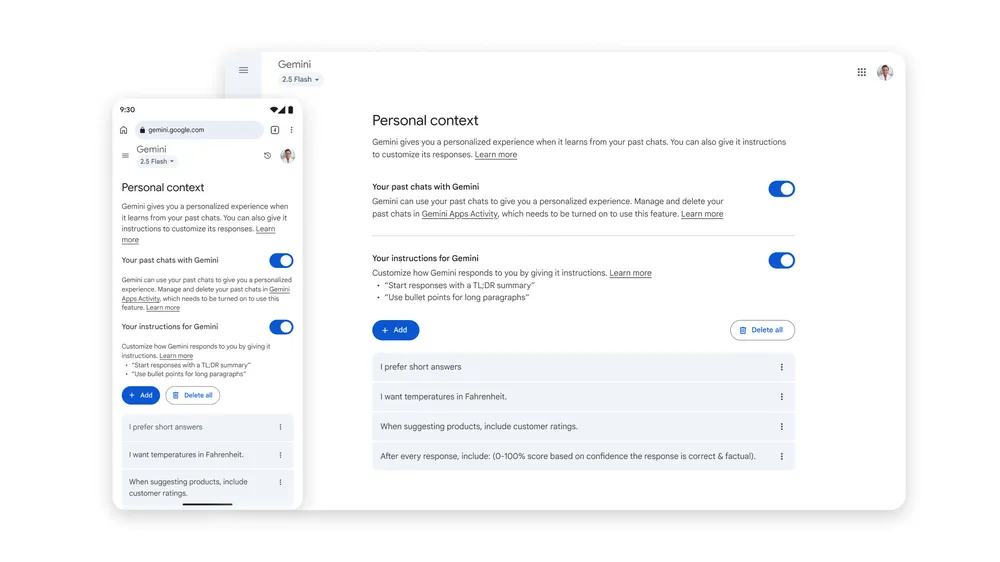
Gemini now references earlier chats to recall details and preferences, making responses feel like collaborating with a partner who’s already familiar with the context.

The update aligns with Google’s I/O vision for an assistant that learns and understand the user.

Screenshot from: blog.google/products/gemini/temporary-chats-privacy-controls/, August 2025.

The setting is on by default and can be turned off in SettingsPersonal contextYour past chats with Gemini.

Temporary Chats

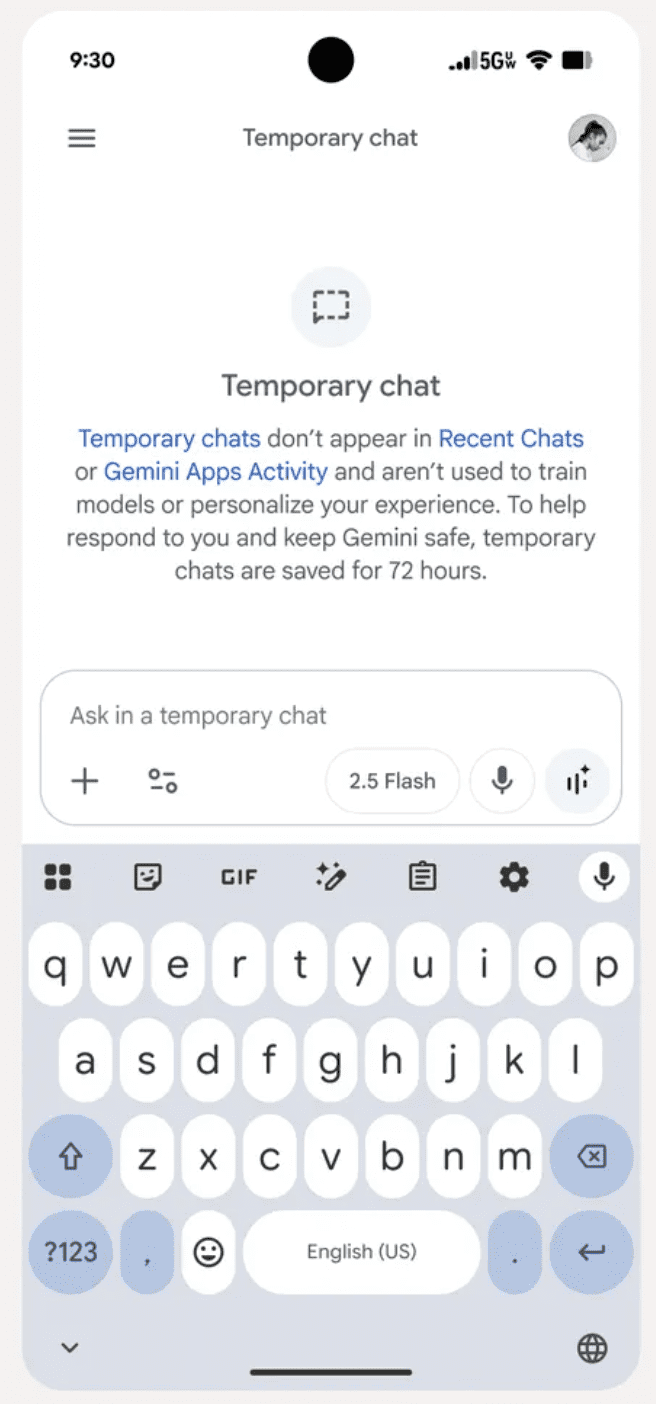
For conversations that shouldn’t influence future responses, Google is adding Temporary Chat.

As Google describes it:

“There may be times when you want to have a quick conversation with the Gemini app without it influencing future chats.”

Temporary chats don’t appear in recent chats, aren’t used to personalize or train models, and are kept for up to 72 hours.

Screenshot from: blog.google/products/gemini/temporary-chats-privacy-controls/, August 2025.

Rollout starts today and will reach all users over the coming weeks.

Updated Privacy Controls

Google will rename the “Gemini Apps Activity” setting to “Keep Activity” in the coming weeks.

When this setting is on, a sample of future uploads, such as files and photos, may be used to help improve Google services.

If your Gemini Apps Activity setting is currently off, Keep Activity will remain off. You can also turn the setting off at any time or use Temporary Chats.

Why This Matters

Personalized responses can reduce repetitive context-setting once Gemini understands your typical topics and goals.

For teams working across clients and categories, Temporary Chats help keep sensitive brainstorming separate from your main context, avoiding cross-pollination of preferences.

Both features include controls that meet privacy requirements for client-sensitive workflows.

Availability

The personalization setting begins rolling out today on Gemini 2.5 Pro in select countries, with expansion to 2.5 Flash and more regions in the coming weeks.


Featured Image: radithyaraf/Shutterstock

OpenAI Brings GPT-4o Back For Paid ChatGPT Users via @sejournal, @MattGSouthern

OpenAI has restored GPT-4o to the ChatGPT model picker for paid accounts and says it will give advance notice before removing models in the future.

The company made the change after pushback over GPT-5’s rollout and confirmed it alongside new speed controls for GPT-5 that let you choose Auto, Fast, or Thinking.

What’s New

GPT-4o Returns

If you are on a paid plan, GPT-4o now appears in the model picker by default.

You can also reveal additional options in Settings by turning on Show additional models, which exposes legacy models such as o3, o4-mini, and GPT-4.1 on Plus and Team, and adds GPT-4.5 on Pro.

This addresses the concern that model choices disappeared without warning during the initial GPT-5 launch.

New GPT-5 Modes

OpenAI’s mode picker lets you trade response time for reasoning depth.

CEO Sam Altman states:

“You can now choose between ‘Auto’, ‘Fast’, and ‘Thinking’ for GPT-5. Most users will want Auto, but the additional control will be useful for some people.”

Higher Capacity Thinking Mode

For heavier tasks, GPT-5 Thinking supports up to 3,000 messages per week and a 196k-token context window.

After you hit the weekly cap, chats can continue with GPT-5 Thinking mini, and OpenAI notes limits may change over time.

This helps when you are reviewing long reports, technical documents, or many content assets in one session.

Personality Updates

OpenAI says it’s working on GPT-5’s default tone to feel “warmer than the current personality but not as annoying (to most users) as GPT-4o.”

The company acknowledges the need for more per-user personality controls.

How To Use

To access the extra models: Open ChatGPT, go to Settings, then General, and enable Show additional models.

That toggles the legacy list and Thinking mini alongside GPT-5. GPT-4o is already in the picker for paid users.

Looking Ahead

OpenAI promises more notice around model availability while giving you clearer controls over speed and depth.

In practice, try Fast for quick checks, keep Auto for routine chats, and use Thinking where accuracy and multi-step reasoning matter most.

If your workflows depended on 4o’s feel, bringing it back reduces disruption while OpenAI tunes GPT-5’s personality and customization.


Featured Image: Adha Ghazali/Shuterstock

YouTube Lets Creators Pick Exact CTAs In Promote Website Ads via @sejournal, @MattGSouthern

YouTube has updated its Promote feature, giving you more control over campaigns designed to drive website traffic.

When you set a campaign goal of “more website visits,” you can now choose a specific call to action, such as “Book now,” “Get quote,” or “Contact us.”

The change was announced during YouTube’s weekly news update for creators:

More Targeted Campaign Goals

Previously, Promote campaigns for website traffic used broader objectives. Now, you can define a more granular outcome that better matches your business goals.

For example, a consulting service might pair its campaign with a “Get quote” button, while an event organizer could use “Book now.”

By letting you choose the intended action, YouTube is making it easier to connect video promotion with measurable results.

How YouTube Promote Works

Promote is YouTube’s built-in ad creation tool, available directly in YouTube Studio.

It allows you to run ads for Shorts and videos without going through the Google Ads interface. You can create campaigns to:

  • Gain more subscribers
  • Increase video views
  • Drive visits to your website

Campaign creation and management happen entirely within YouTube Studio’s Promotions tab, keeping the process straightforward for creators who may not have experience with traditional advertising platforms.

Why This Matters

For creators promoting services, products, or events, the ability to align ads with a specific action could improve return on investment and make performance tracking easier.

Marketing teams managing YouTube channels for clients can now link spend to clear outcomes, strengthening the case for campaign value.

Looking Ahead

This update is part of YouTube’s push to give creators accessible yet more powerful monetization and promotion tools.

For marketers, it creates another measurable step in the customer journey, offering insight into how video campaigns contribute to broader marketing goals.


Featured Image: Roman Samborskyi/Shutterstock

Google: Invalid Ad Traffic From Deceptive Serving Down 40% via @sejournal, @MattGSouthern

Google cites a 40% drop in invalid ad traffic from deceptive serving, helping protect budgets and keep billing clean for advertisers.

  • Google reports a 40% reduction in invalid traffic from deceptive or disruptive serving.
  • Google now reviews content, placements, and interactions more precisely.
  • Advertisers are not charged for invalid traffic, with credits applied after detection.
Critical Vulnerability Affects Tutor LMS Pro WordPress Plugin via @sejournal, @martinibuster

An advisory was issued about a critical vulnerability in the popular Tutor LMS Pro WordPress plugin. The vulnerability, rated 8.8 on a scale of 1 to 10, allows an authenticated attacker to extract sensitive information from the WordPress database. The vulnerability affects all versions up to and including 3.7.0.

Tutor LMS Pro Vulnerability

The vulnerability results from improper handling of user-supplied data, enabling attackers to inject SQL code into a database query. The Wordfence advisory explains:

“The Tutor LMS Pro – eLearning and online course solution plugin for WordPress is vulnerable to time-based SQL Injection via the ‘order’ parameter used in the get_submitted_assignments() function in all versions up to, and including, 3.7.0 due to insufficient escaping on the user supplied parameter and lack of sufficient preparation on the existing SQL query. “

Time-Based SQL Injection

A time-based SQL injection attack is one in which an attacker determines whether a query is valid by measuring how long the database takes to respond. An attacker could use the vulnerable order parameter to insert SQL code that delays the database’s response. By timing these delays, the attacker can deduce information stored in the database.

Why This Vulnerability Is Dangerous

While exploitation requires authenticated access, a successful exploitation of the flaw could be used to access sensitive information. Updating to the latest version, 3.7.1 or higher is recommended.

Featured Image by Shutterstock/Ollyy

Vulnerability In 3 WordPress File Plugins Affects 1.3 Million Sites via @sejournal, @martinibuster

An advisory was issued for three WordPress file management plugins that are affected by a vulnerability that allows unauthenticated attackers delete arbitrary files. The three plugins are installed in over 1.3 million websites.

Outdated Version Of elFinder

The vulnerability is caused by outdated versions of the elFinder file manager, specifically versions 2.1.64 and earlier. These versions contain a Directory Traversal vulnerability that allows attackers to manipulate file paths to reach outside the intended directory. By sending requests with sequences such as example.com/../../../../, an attacker could make the file manager access and delete arbitrary files.

Affected Plugins

Wordfence named the following three plugins as affected by this vulnerability:

1. File Manager WordPress Plugin
Installations: 1 Million

2. Advanced File Manager – Ultimate WP File Manager And Document Library Solution
Installations: 200,000+

3. File Manager Pro – Filester
Installations: 100,000+

According to the Wordfence advisory, the vulnerability can be exploited without authentication, but only if a site owner has made the file manager publicly accessible, which mitigates the possibility of exploitation. That said, two of the plugins indicated in their changelogs that an attacker needs at least a subscriber level authentication, the lowest level of website credentials.

Once exploited, the flaw allowed deletion of arbitrary files. Users of the named WordPress plugins should consider updating to the latest versions.

Featured Image by Shutterstock/Lili1992

WordPress Contact Form Entries Plugin Vulnerability Affects 70K Websites via @sejournal, @martinibuster

A vulnerability advisory was issued for a WordPress plugin that saves contact form submissions. The flaw enables unauthenticated attackers to delete files, launch a denial of service attack, or perform remote code execution. The vulnerability was given a severity rating of 9.8 on a scale of 1 to 10, indicating the seriousness of the issue.

Database for Contact Form 7, WPForms, Elementor Forms Plugin

The Database for Contact Form 7, WPForms, Elementor Forms, also apparently known as the Contact Form Entries Plugin, saves contact form entries into the WordPress database. It enables users to view contact form submissions, search them, mark them as read or unread, export them, and perform other functions. The plugin has over 70,000 installations.

The plugin is vulnerable to PHP Object Injection by an unauthenticated attacker, which means that an attacker does not need to log in to the website to launch the attack.

A PHP object is a data structure in PHP. PHP objects can be turned into a sequence of characters (serialized) in order to store them and then deserialized (turned back into an object). The flaw that gives rise to this vulnerability is that the plugin allows an unauthenticated attacker to inject an untrusted PHP object.

If the WordPress site also has the Contact Form 7 plugin installed, then it can trigger a POP chain during deserialization.

According to the Wordfence advisory:

“This makes it possible for unauthenticated attackers to inject a PHP Object. The additional presence of a POP chain in the Contact Form 7 plugin, which is likely to be used alongside, allows attackers to delete arbitrary files, leading to a denial of service or remote code execution when the wp-config.php file is deleted.”

All versions of the plugin up to and including 1.4.3 are vulnerable. Users are advised to update their plugin to the latest version, which as of this date is version 1.4.5.

Featured Image by Shutterstock/tavizta

Google Rolls Out ‘Preferred Sources’ For Top Stories In Search via @sejournal, @MattGSouthern

Google is rolling out a new setting that lets you pick which news outlets you want to see more often in Top Stories.

The feature, called Preferred Sources, is launching today in English in the United States and India, with broader availability in those markets over the next few days.

What’s Changing

Preferred Sources lets you choose one or more outlets that should appear more frequently when they have fresh, relevant coverage for your query.

Google will also show a dedicated From your sources section on the results page. You will still see reporting from other publications, so Top Stories remains a mix of outlets.

Google Product Manager Duncan Osborn says the goal is to help you “stay up to date on the latest content from the sites you follow and subscribe to.”

How To Turn It On

Image Credit: Google
  1. Search for a topic that is in the news.
  2. Tap the icon to the right of the Top stories header.
  3. Search for and select the outlets you want to prioritize.
  4. Refresh the results to see the updated mix.

You can update your selections at any time. If you previously opted in to the experiment through Labs, your saved sources will carry over.

In early testing through Labs, more than half of participants selected four or more sources. That suggests people value seeing a range of outlets while still leaning toward publications they trust.

Why It Matters

For publishers, Preferred Sources creates a direct way to encourage loyal readers to see more of your coverage in Search.

Loyal audiences are more likely to add your site as a preferred source, which can increase the likelihood of showing up for them when you have fresh, relevant reporting.

You can point your audience to the new setting and explain how to add your site to their list. Google has also published help resources for publishers that want to promote the feature to followers and subscribers.

This adds another personalization layer on top of the usual ranking factors. Google says you will still see a diversity of sources, and that outlets only appear more often when they have new, relevant content.

Looking Ahead

Preferred Sources fits into Google’s push to let you customize Search while keeping a variety of perspectives in Top Stories.

If you have a loyal readership, this feature is another reason to invest in retention and newsletters, and to make it easy for readers to follow your coverage on and off Search.

Google Says AI-Generated Content Should Be Human Reviewed via @sejournal, @martinibuster

Google’s Gary Illyes confirmed that AI content is fine as long as the quality is high. He said that “human created” isn’t precisely the right way to describe their AI content policy, and that a more accurate description would be “human curated.”

The questions were asked by Kenichi Suzuki in the context of an exclusive interview with Illyes.

AI Overviews and AI Mode Models

Kenichi asked about the AI models used for AI Overviews and AI Mode, and he answered that they are custom Gemini models.

Illyes answered:

“So as you noted, the the model that we use for AIO (for AI Overviews) and for AI mode is a custom Gemini model and that might mean that it was trained differently. I don’t know the exact details, how it was trained, but it’s definitely a custom model.”

Kenichi then asked if AI Overviews (AIO) and AI Mode use separate indexes for grounding.

Grounding is where an LLM will connect answers to a database or a search index so that answers are more reliable, truthful, and based on verifiable facts, helping to cut down on hallucinations. In the context of AIO and AI Mode, grounding generally happens with web-based data from Google’s index.

Suzuki asked:

“So, does that mean that AI Overviews and AI Mode use separate indexes for grounding?”

Google’s Illyes answered:

“As far as I know, Gemini, AI Overview and AI Mode all use Google search for grounding. So basically they issue multiple queries to Google Search and then Google Search returns results for that those particular queries.”

Kenichi was trying to get an answer regarding the Google Extended crawler, and Illyes’s response was to explain when the Google Extended crawler comes into play.

“So does that mean that the training data are used by AIO and AI Mode collected by regular Google and not Google Extended?”

And Illyes answered:

“You have to remember that when grounding happens, there’s no AI involved. So basically it’s the generation that is affected by the Google extended. But also if you disallow Google Extended then Gemini is not going to ground for your site.”

AI Content In LLMs And Search Index

The next question that Illyes answered was about whether AI content published online is polluting LLMs. Illyes said that this is not a problem with the search index, but it may be an issue for LLMs.

Kenichi’s question:

“As more content is created by AI, and LLMs learn from that content. What are your thoughts on this trend and what are its potential drawbacks?”

Illyes answered:

“I’m not worried about the search index, but model training definitely needs to figure out how to exclude content that was generated by AI. Otherwise you end up in a training loop which is really not great for for training. I’m not sure how much of a problem this is right now, or maybe because how we select the documents that we train on.”

Content Quality And AI-Generated Content

Suzuki then followed up with a question about content quality and AI.

He asked:

“So you don’t care how the content is created… so as long as the quality is high?”

Illyes confirmed that a leading consideration for LLM training data is content quality, regardless of how it was generated. He specifically cited the factual accuracy of the content as an important factor. Another factor he mentioned is that content similarity is problematic, saying that “extremely” similar content shouldn’t be in the search index.

He also said that Google essentially doesn’t care how the content is created, but with some caveats:

“Sure, but if you can maintain the quality of the content and the accuracy of the content and ensure that it’s of high quality, then technically it doesn’t really matter.

The problem starts to arise when the content is either extremely similar to something that was already created, which hopefully we are not going to have in our index to train on anyway.

And then the second problem is when you are training on inaccurate data and that is probably the riskier one because then you start introducing biases and they start introducing counterfactual data in your models.

As long as the content quality is high, which typically nowadays requires that the human reviews the generated content, it is fine for model training.”

Human Reviewed AI-Generated Content

Illyes continued his answer, this time focusing on AI-generated content that is reviewed by a human. He emphasizes human review not as something that publishers need to signal in their content, but as something that publishers should do before publishing the content.

Again, “human reviewed” does not mean adding wording on a web page that the content is human reviewed; that is not a trustworthy signal, and it is not what he suggested.

Here’s what Illyes said:

“I don’t think that we are going to change our guidance any time soon about whether you need to review it or not.

So basically when we say that it’s human, I think the word human created is wrong. Basically, it should be human curated. So basically someone had some editorial oversight over their content and validated that it’s actually correct and accurate.”

Takeaways

Google’s policy, as loosely summarized by Gary Illyes, is that AI-generated content is fine for search and model training if it is factually accurate, original, and reviewed by humans. This means that publishers should apply editorial oversight to validate the factual accuracy of content and to ensure that it is not “extremely” similar to existing content.

Watch the interview:

Featured Image by Shutterstock/SuPatMaN

Google Says AI-Generated Content Will Not Cause Ranking Penalty via @sejournal, @martinibuster

Google’s Gary Illyes recently answered the question of whether AI-generated images used together with “legit” content can impact rankings. Gary discussed whether it had an impact on SEO and called attention to a technical issue involving server resources that is a possible outcome.

Does Google Penalize for AI-Generated Content?

How does Google react to AI image content when it’s encountered in the context of a web page? Google’s Gary Illyes answered that question within the context of a Q&A and offered some follow-up observations about how it could lead to extra traffic from Google Image Search. The question was asked at about the ten-minute mark of the interview conducted by Kenichi Suzuki and published on YouTube.

This is the question that was asked:

“Say if there’s a content that the content itself is legit, the sentences are legit but and also there are a lot of images which are relevant to the content itself, but all of them, let’s say all of them are generated by AI. Will that content or the overall site, is it going to be penalized or not?”

This is an important and reasonable question because Google ran an update about a year ago that appeared to de-rank low quality AI-generated content.

Google’s Gary Ilyes’ answer was clear that AI-generated content will not result in penalization and that it has no direct impact on SEO.

He answered:

“No, no. So AI generated image doesn’t impact the SEO. Not direct.

So obviously when you put images on your site, you will have to sacrifice some resources to those images… But otherwise you are not going to, I don’t think that you’re going to see any negative impact from that.

If anything, you might get some traffic out of image search or video search or whatever, but otherwise it should just be fine.”

AI-Generated Content

Gary Illyes did not discuss authenticity; however it’s a good thing to consider in the context of using AI-generated content. Authenticity is an important quality for users, especially in contexts where there is an expectation that an illustration is a faithful depiction of an actual outcome or product. For example, users expect product illustrations to accurately reflect the products they are purchasing and screenshots of food to reasonably represent the completed dishes after following the recipe instructions.

Google often says that content should be created for users and that many questions about SEO are adequately answered by the context of how users will react to it. Illyes did not reflect on any of that, but it is something that publishers should consider if they care about how content resonates with users.

Gary’s answer makes it clear that AI-generated content will not have a negative impact on SEO.

Featured Image by Shutterstock/Besjunior