Wix’s New AI Assistant Enables Meaningful Improvements To SEO, Sales And Productivity via @sejournal, @martinibuster

Wix announced a new chat-based AI assistant named Astro that simplifies site operations and business tasks, giving users faster access to tools and insights that support business growth, better SEO, and improved site performance.

Wix Astro offers the following benefits and advantages:

  • Carry out operational and administrative actions using conversational prompts.
  • Navigate and use site management tools in the Wix dashboard.
  • Offers personalized suggestions and up-to-date performance feedback to fine-tune the website.
  • Reviews site analytics, including traffic patterns, purchase behavior, and search visibility, to guide strategy.
  • Can generate articles, newsletters, and promotional content.
  • Enables users to expand business opportunities by adding new products for sale and trying out alternative fulfillment models like dropshipping and other customizations.

Users can also use Astro to manage their Wix plans, receive personalized plan recommendations and also access administrative details related to billing, invoices and transactions.

According Guy Sopher, Head of the AI Platform Group at Wix:

“Astro seamlessly integrates powerful capabilities into a single interface, making it easier than ever for users to manage their businesses efficiently, with this being the largest collection of skills we’ve ever incorporated into a single assistant at Wix. Boasting hundreds of different skills and capabilities, with more added every day, Astro acts as a trusted guide, Astro provides real-time insights and personalized recommendations to help users optimize their sites.”

By streamlining workflows and simplifying access to essential tools, it empowers users to accomplish more in less time. As they engage more deeply with the platform’s features, they can ultimately unlock greater opportunities for growth, visibility, and business success.”

Other platforms are currently planning to roll out AI for their customers but Wix is out there doing it right now. Wix Astro solidifies Wix’s position as an industry leader in deploying technology in meaningful ways that offers their users competitive advantages over other platforms.

Read more about Wix’s thoughtful deployment of AI:

Powerful AI. Wherever you need it.

Featured Image by Shutterstock/SAG stock

Google Files Patent On Personal History-Based Search via @sejournal, @martinibuster

Google recently filed a patent for a way to provide search results based on a user’s browsing and email history. The patent outlines a new way to search within the context of a search engine, within an email interface, and through a voice-based assistant (referred to in the patent as a voice-based dialog system).

A problem that many people have is that they can remember what they saw but they can’t remember where they saw it or how they found it. The new patent, titled Generating Query Answers From A User’s History, solves that problem by helping people find information they’ve previously seen within a webpage or an email by enabling them to ask for what they’re looking for using everyday language such as “What was that article I read last week about chess?”

The problem the invention solves is that traditional search engines don’t enable users to easily search their own browsing or email history using natural language. The invention works by taking a user’s spoken or typed question, recognizing that the question is asking for previously viewed content, and then retrieving search results from the user’s personal history (such as their browser history or emails). In order to accomplish this it uses filters like date, topic, or device used.

What’s novel about the invention is the system’s ability to understand vague or fuzzy natural language queries and match them to a user’s specific past interactions, including showing the version of a page as it looked when the user originally saw it (a cached version of the web page).

Query Classification (Intent) And Filtering

Query Classification

The system first determines whether the intent of the user’s spoken or typed query is to retrieve previously accessed information. This process is called query classification and involves analyzing the phrasing of the query to detect the intent. The system compares parts of the query to known patterns associated with history-seeking questions and uses techniques like semantic analysis and similarity thresholds to identify if the user’s intent is to seek something they’d seen before, even when the wording is vague or conversational.

The similarity threshold is an interesting part of the invention because it compares what the user is saying or typing to known history-seeking phrases to see if they are similar. It’s not looking for an exact match but rather a close match.

Filtering

The next part is filtering, and it happens after the system has identified the history-seeking intent. It then applies filters such as the topic, time, or device to limit the search to content from the user’s personal history that matches those criteria.

The time filter is a way to constrain the search to within a specific time frame that’s mentioned or implied in the search query. This helps the system narrow down the search results to what the user is trying to find. So if a user speaks phrases like “last week” or “a few days ago” then it knows to restrict the query to those respective time frames.

An interesting quality of the time filter is that it’s applied with a level of fuzziness, which means it’s not exact. So when a person asks the voice assistant to find something from the past week it won’t do a literal search of the past seven days but will expand it to a longer period of time.

The patent describes the fuzzy quality of the time filter:

“For example, the browser history collection… may include a list of web pages that were accessed by the user. The search engine… may obtain documents from the index… based on the filters from the formatted query.

For example, if the formatted query… includes a date filter (e.g., “last week”) and a topic filter (e.g., “chess story”), the search engine… may retrieve only documents from the collection… that satisfy these filters, i.e., documents that the user accessed in the previous week that relate to a “chess story.”

In this example, the search engine… may apply fuzzy time ranges to the “last week” filter to account for inaccuracies in human memory. In particular, while “last week” literally refers to the seven calendar days of the previous week, the search engine… may search for documents over a wider range, e.g., anytime in the past two weeks.”

Once a query is classified as asking for something that was previously seen, the system identifies details in the user’s phrasing that are indicative of topic, date or time, source, device, sender, or location and uses them as filters to search the user’s personal history.

Each filter helps narrow the scope of the search to match what the user is trying to recall: for example, a topic filter (“turkey recipe”) targets the subject of the content; a time filter (“last week”) restricts results to when it was accessed; a source filter (“WhiteHouse.gov”) limits the search to specific websites; a device filter (e.g., “on my phone”) further restricts the search results from a certain device; a sender filter (“from grandma”) helps locate emails or shared content; and a location filter (e.g., “at work”) restricts results to those accessed in a particular physical place.

By combining these context-sensitive filters, the system mimics the way people naturally remember content in order to help users retrieve exactly what they’re looking for, even when their query is vague or incomplete.

Scope of Search: What Is Searched

The next part of the patent is about figuring out the scope of what is going to be searched, which is limited to predefined sources such as browser history, cached versions of web pages, or emails. So, rather than searching the entire web, the system focuses only on the user’s personal history, making the results more relevant to what the user is trying to recall.

Cached Versions of Previously Viewed Content

Another interesting feature described in the patent is web page caching. Caching refers to saving a copy of a web page as it appeared when the user originally viewed it. This enables the system to show the user that specific version of the page in search results, rather than the current version, which may have changed or been removed.

The cached version acts like a snapshot in time, making it easier for the user to recognize or remember the content they are looking for. This is especially useful when the user doesn’t remember precise details like the name of the page or where they found it, but would recognize it if they saw it again. By showing the version that the user actually saw, the system makes the search experience more aligned with how people remember things.

Potential Applications Of The Patent Invention

The system described in the patent can be applied in several real-world contexts where users may want to retrieve content they’ve previously seen:

Search Engines

The patent refers multiple times to the use of this technique in the context of a search engine that retrieves results not from the public web, but from the user’s personal history, such as previously visited web pages and emails. While the system is designed to search only content the user has previously accessed, the patent notes that some implementations may also include additional documents relevant to the query, even if the user hasn’t viewed them before.

Email Clients

The system treats previously accessed emails as part of the searchable history. For example, it can return an old email like “Grandma’s turkey meatballs” based on vague, natural language queries.

Voice Assistants

The patent includes examples of “a voice-based search” where users speak conversational queries like “I’m looking for a turkey recipe I read on my phone.” The system handles speech recognition and interprets intent to retrieve relevant results from personal history.

Read the entire patent here:

Generating query answers from a user’s history

AI Costs Drop 280x In 18 Months: What This Means For Marketers via @sejournal, @MattGSouthern

The cost of using advanced AI has fallen sharply.

Since late 2022, the price of using GPT-3.5-level AI models has dropped from $20.00 to just $0.07 per million tokens.

According to Stanford HAI’s AI Index Report, that’s a 280-fold reduction in less than two years.

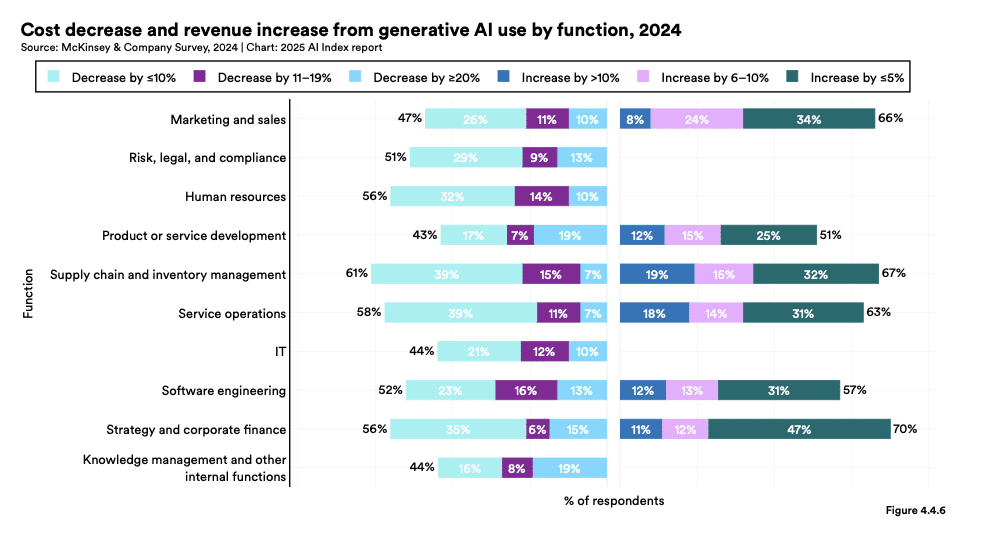
This massive cost drop is changing the pricing of AI marketing tools. Tools that only big companies could afford are now within reach for businesses of all sizes.

AI Cost Reduction

The report shows that large language model (LLM) prices have fallen between 9 and 900 times yearly, depending on the task.

These cost reductions change the ROI for AI in marketing. Tools that were too expensive before could now pay off even for medium-sized companies.

Source: McKinsey & Company Survey, 2024 | Chart: 2025 AI Index report

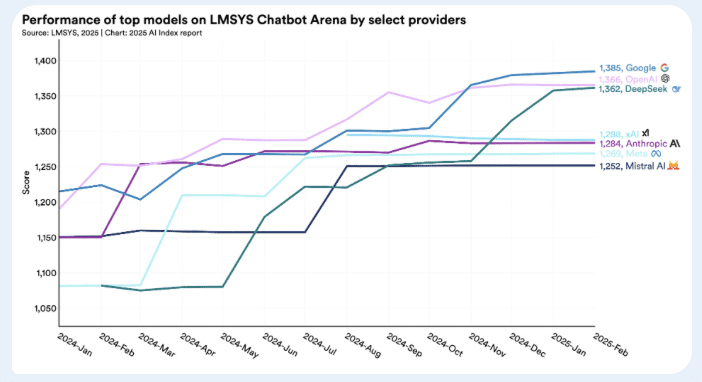
The gap between the best AI models is closing. The difference between the first and tenth-ranked models has shrunk from 11.9% to just 5.4% over the past year.

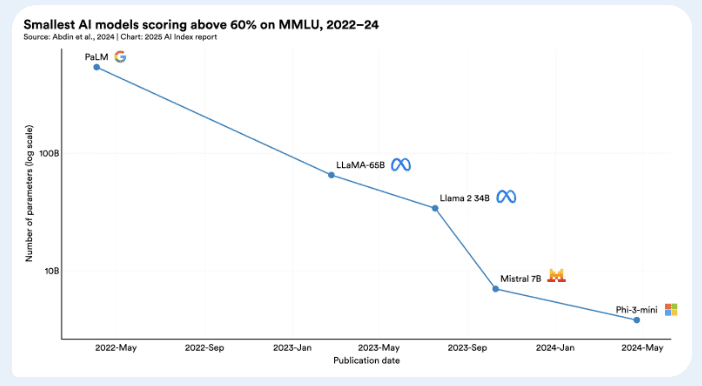
The report also shows that AI models are getting smaller while staying powerful. In 2022, to get 60% accuracy on the MMLU benchmark (a test of AI reasoning), you needed models with 540 billion parameters.

By 2024, models 142 times smaller could do the same job. This means businesses can now use advanced AI tools with less computing power and lower costs.

Chart: 2025 AI Index Report

What This Means For Marketers

For marketers, these changes bring several potential benefits:

1. Advanced Content Creation at Scale
The price drop makes it affordable to create and optimize content in bulk. Tasks can now be automated cheaply without losing quality.

2. Better Analysis
Newer AI models can process up to 1-2 million tokens (pieces of text) at once. This is enough to analyze entire websites for competitive insights.

3. Smarter Knowledge Management
Retrieval-augmented generation (RAG), where AI pulls information from your company’s data, is improving. This helps marketers build systems that ensure AI outputs match their brand voice and expertise.

The End of AI Moats?

The report shows that AI models are becoming more similar in performance, with little difference between leading systems.

This suggests that the edge in marketing technology may shift from the raw AI power to how well you use it, your strategy, and your integration skills.

As AI capabilities become more common, the real difference-maker for marketing teams will be how effectively they use these tools to create unique value for their companies.

For more on the state of AI, see the full report.

Google Confirms Discover Coming To Desktop Search via @sejournal, @MattGSouthern

Google has announced plans to bring Discover to desktop search. This move could change how publishers get traffic from Google.

The news came from the Search Central Live event in Madrid and was first shared by SEO expert Gianluca Fiorelli on X.

Google has tested Discover on desktop before, but this is the first time it has confirmed it’s happening. The company hasn’t said when it will launch.

What Is Google Discover?

Google Discover is a feed that shows content based on what you might like. It appears in the Google app, Chrome’s new tab page, and google.com on phones.

Unlike regular searches, you don’t need to type anything. Discover suggests content based on your interests and search history.

As Google defines it:

“Discover is a part of Google Search that shows people content related to their interests, based on their Web and App Activity.”

Why This Matters: Discover’s Growing Impact on Publisher Traffic

This desktop launch is important as Discover has become a bigger traffic source for many sites.

A January survey from NewzDash found that 52% of news publishers consider Discover a top priority. The survey also showed that 56% of publishers saw recent traffic increases from Discover.

Martin Little from Reach plc (publisher of UK news sites like Daily Mirror) recently said that Google Discover has become their “single largest traffic referral source.”

Little told Press Gazette:

“Discover is making up for [search traffic losses] and then some. Almost 50% of our titles are growing year-on-year now, partly because of the shifts in Google.”

Optimizing Content for Google Discover

You don’t need special markup or tags to appear in Discover. However, Google suggests these best practices:

  • Create quality content that matches user interests
  • Use good, large images (at least 1200px wide)
  • Write honest titles that accurately describe your content
  • Don’t use misleading previews to trick people into clicking
  • Focus on timely, unique content that tells stories well

Little noted that Discover prefers “soft-lens” content – personal stories, lifestyle articles, and niche topics. Breaking news and hard news often don’t do as well.

“You don’t get court content in there, no crime, our council content doesn’t get in there,” Little explained what Discover tends to avoid.

Desktop Expansion: Potential Traffic Implications

The desktop rollout could significantly change traffic patterns for publishers already using mobile Discover.

Google’s presentation slide at the Madrid event highlighted “expanding surfaces,” which suggests Google wants a more consistent experience across all devices.

For SEO pros, this is both an opportunity and a challenge. Desktop users browse differently from mobile users, which might affect how content performs in Discover.

Building a Discover Strategy

Publishers wanting to get more Discover traffic should consider these approaches:

  1. Monitor performance: Use Search Console’s Discover report to track how your content is doing.
  2. Diversify content: Don’t ignore traditional search traffic while optimizing for Discover.
  3. Focus on keeping readers: Consider using newsletters to turn Discover visitors into regular readers.
  4. Use effective headlines: Publishers note that Discover often picks headlines with a “curiosity gap” – titles that tell enough of the story but hold back key details to encourage clicks.

What’s Next?

As Google expands Discover to desktop, publishers should prepare for traffic changes. This move shows Google’s shift from just answering searches to actively suggesting content.

While we don’t know the exact launch date, publishers who understand and optimize for Discover will have an advantage.


Featured Image: DJSully/Shutterstock

WordPress Plugin Extends Yoast SEO via @sejournal, @martinibuster

The Progress Planner WordPress plugin has announced a new integration with Yoast SEO, enabling users to take full advantage of Yoast’s features to maximize website search performance.

Progress Planner Plugin

Progress Planner is developed by the same people who created Yoast SEO, ensuring that both plugins work perfectly together. The main functionality of the plugin is to help WordPress users maintain their website so that it performs at its best. The new functionalities extends the usefulness of Progress Planner as it now encompasses SEO.

The new functionality offers personalized suggestions of how to set Yoast SEO plugin for maximum performance.

According to the Progress Planner announcement:

“Progress Planner’s assistant, Ravi, will provide smart recommendations, guiding users to their next best task. Progress Planner will check whether Yoast SEO users have properly configured the settings of their plugins and will help and motivate users to make corrections.”

This is a brand new functionality and many others are planned.

Read more about the Progress Planner’s Yoast integration:

Level up your SEO-game: Progress Planner’s new integration with Yoast

Download the plugin at the official WordPress.org plugin repository: Progress Planner

Featured Image by Shutterstock/Krakenimages.com

Google Merchant Center Updates: Changes For Online Sellers via @sejournal, @MattGSouthern

Google is changing its Merchant Center rules. These updates will roll out in two phases and affect how sellers list products in Shopping ads and free listings.

The changes impact instalment pricing, energy labels, member pricing, and US sales tax information.

Immediate Changes (Starting April 8)

Three key changes are now in effect:

1. New Instalment Pricing Rules

Google no longer allows the [price] attribute to be used for deposits on installment products.

Sellers must use the [downpayment] sub-attribute within the [installment] attribute. The [price] attribute must show what customers pay when paying in full upfront.

2. Updated Energy Labels:

For EU countries, Google replaced the energy efficiency class attributes with the broader [certification] attribute.

This supports both new and old EU energy labels. Norway, Switzerland, and the UK still use the original energy attributes.

3. Better Delivery Options:

Google added more delivery details at the product level. New attributes include [carrier_shipping] and options to specify business days for handling and transit. These help show more accurate delivery times in ads and listings.

Changes Starting July 1

More changes are coming on July 1:

Member Pricing Updates

Google will stop allowing member prices in the regular [price] or [sale_price] attributes. This applies worldwide for both paid and free membership programs.

Instead, use the [loyalty_program] attribute. Products that don’t follow this rule might be disapproved after July 1.

No More US Sales Tax Requirements

Google will stop requiring US sellers to provide sales tax information through the [tax] and [tax_category] attributes or Merchant Center settings.

Products previously rejected for missing tax information may start appearing in results, which could affect your ad spending.

Google notes that US sellers must still submit tax information until July 1.

What These Changes Mean for Sellers

These updates will require changes to how you structure product data.

If you offer payment plans, the new rules clarify how to show full payment versus installment options. This helps shoppers understand pricing better.

The energy label changes for EU countries match current regulations and give more options for showing graphical labels.

The member pricing change will affect many retailers. You must use the loyalty program attribute instead of regular price fields if you offer loyalty discounts.

Once the sales tax requirement ends, US sellers will benefit from simpler feeds, which may fix some common disapproval issues.

Getting Your Merchant Center Ready

To keep your listings working well:

  1. Check your feeds for any outdated attributes
  2. Update installment pricing right away
  3. EU sellers: switch to the new certification attribute for energy labels
  4. Change how you handle loyalty pricing before July 1
  5. Watch for improved performance of listings that were previously disapproved for tax issues

Google notes:

“With this change, offers currently disapproved for missing tax information may begin to receive traffic.”

By adapting to these changes early, you can avoid disruptions to your Shopping ads and listings while benefiting from better product data and delivery information.


Featured Image: BestForBest/Shutterstock

WordPress Contributor Cutbacks Cause Core Development To Stall via @sejournal, @martinibuster

WordPress project leaders recently discussed how to proceed due to concern that organizations have dramatically cut back on the number of hours donated to contributing to WordPress. They decided that WordPress 6.8 would be the final major release of 2025 and that minor core releases will continue as needed.

While no formal commitment was made to future major releases after 2025, it kind of implies that future major releases are limited to one per year as long as the current contributor levels remain at this low level.

However that’s not for certain and it went unstated and prompted one of the contributors to ask the question in one of the comments:

“Is the new release cadence one major release a year now, or is that just for this year?

If getting users to wait a year for major updates, can I suggest some work towards an open road map so people can at least see what they are waiting for and in an ideal world, where resources are limited, vote on said features to help prioritise what the community wants from WordPress.”

Gutenberg & Core Trac Tickets Remain Flat

Gutenberg and Core Trac ticket volumes remained flat for the past six months, which means that the total number of tickets (number of unresolved issues) remains essentially the same, signalling stagnation in development as opposed to forward momentum.

New feature development in Gutenberg has declined sharply since January, which means that the creation of new blocks, capabilities, and user experience improvements has also slowed. This is cause for concern because a drop in new feature development indicates that the editor is not gaining new capabilities as quickly as it was in previous months, resulting in fewer enhancements, fewer innovations, and potentially less progress toward the long-term goals of the block editor project.

Work On Release Automation

One of the benefits discussed for slowing down the pace of development is that it frees up time to work on release automation, which means automating parts of the development. What exactly that means is not documented.

This is what the documentation says about it in the context of a benefit of slowing down the pace of development:

“Allows for work to further automate release processes, making future releases quicker and less manual.”

Focus On Canonical WordPress Plugins

It was decided that focusing on WordPress.org developed plugins, called canonical plugins, offered a path forward to improving core and adding features to it outside of contributions to the core itself. The canonical plugins discussed are Preferred Languages, 2FA (two-factor authentication), and Performance tools.

A long-running issue about the canonical plugins discussed at the meeting is the lack of user feedback about their canonical plugins, noting that the main source of feedback is when something breaks. The only other user feedback metric they have to work with is active installations, which doesn’t tell them anything about how users interact with a canonical plugin feature or how they feel about its usefulness and usability.

The documentation notes:

“First is the need for better means to collect user feedback. Active installs is currently the only metric available, but doesn’t provide enough value. Does a user actually interact with the feature? In what ways? Do they feel it’s valuable? Feedback is mainly received from users when something breaks. There was agreement to explore telemetry and ways to establish meaningful feedback loops within canonical plugins.”

Another issue with canonical plugins is that they’re not widely promoted and apparently many people don’t even know about them, partly because there’s no clear way for users to discover and  access them.

They wrote:

“The second improvement needed is promotion. It’s often not widely known that canonical plugins exist or that they are officially maintained. Different ways to raise awareness about canonical plugins will be explored, including posts on the WordPress.org News blog, mentioning them in presentations such as State of the Word, and possibly the currently barren Tools page in the WordPress admin.”

That issue was echoed in the comments section by core contributors:

“Can you post a link so I can view all the canonical plugins please?

Is it the random selection under the dotorg user account?
https://profiles.wordpress.org/wordpressdotorg/#content-plugins

Or is it the six plugins listed as ‘beta’?

https://wordpress.org/plugins/browse/beta/”

“Also agree with the other commenters and the post that canonical plugins are woefully under promoted. As a developer and WordPress professional they are rarely on my radar until I stumble upon them. Is there even a link to them in the repository where we can view them all?”

Backlog Management

Contributors were encouraged to continue to work on clearing the backlog of around 13,000 tickets (open issues or feature requests) in both the Core Track and Gutenberg repository. Minor releases can continue with bugfixes.

Final Decisions

The final decisions made are that WordPress 6.8 will be the final major release of 2025. Gutenberg plugin releases will continue every two weeks and minor core releases will continue throughout the year, as needed, with a more relaxed pace for including enhancements. However, the rule of “no new files in minor releases” will still be followed. The project will begin quarterly contributor strategy calls to keep discussions going and adapt as needed.

Read the official documentation of the meeting:

Dotorg Core Committers Check In

Featured Image by Shutterstock/Tithi Luadthong

Google Says Disavow Tool Not Part Of Normal Site Maintenance via @sejournal, @martinibuster

Google’s John Mueller, at the Search Central NYC event, answered a question about what to do about toxic backlinks and responded with an overview of what goes on inside Google with links in order to explain why the disavow tool is something only sites that are guilty of something and know it should be using.

What To Do If Disavow Tool Is No Longer Available?

Google has a tool that allows publishers and SEOs to disavow links, which is basically telling Google to not count certain links. The purpose of the disavow tool arose after Google penalized countless thousands of sites for buying links. This was during the Penguin update in 2012. Getting rid of paid links was a difficult thing and some link sellers were asking for payment for removing the links. SEOs raised the idea of a disavow tool to help them get rid of the links their clients and themselves purchased and after a time Google agreed to provide that tool for that one purpose: to remove paid links.

Someone submitted a question for John Mueller to answer, asking what should SEOs do if the disavow tool is no longer available, asking:

“How can we remove toxic backlinks?”

The phrase “toxic backlinks” is something that the SEO backlink removal services and tools invented as part of scaring people into buying their backlink data and tools. That’s not a phrase that Googlers used, it’s totally 100% invented by SEO tool companies.

Google’s John Mueller answered:

“So internally we don’t have a notion of toxic backlinks. We don’t have a notion of toxic backlinks internally.

So it’s not that you need to use this tool for that. It’s also not something where if you’re looking at the links to your website and you see random foreign links coming to your website, that’s not bad nor are they causing a problem.

For the most part, we work really hard to try to just ignore them. I would mostly use the disavow tool for situations where you’ve been actually buying links and you’ve got a manual link spam action and you need to clean that up. Then the Disavow tool kind of helps you to resolve that, but obviously you also need to stop buying links, otherwise that manual action is not going to go away.”

Disavowing Links Is Not Normal Site Maintenance

Mueller continued his answer by pointing out that using a disavow tool on a regular basis is not a normal thing to do as part of site maintenance.

He said:

“But that’s essentially like from my point of view, the disavow tool is not something that you need to do on a regular basis. It’s not a part of normal site maintenance. I would really only use that if you have a manual spam action.”

I know there are some people who are “victims” of bad inbound links and blame those links for their poor rankings. So they disavow the bad links and their rankings never improve. One would think that the failure of the disavow tool to fix their ranking problems would cause them to see if something else is the problem but some people are so convinced that their sites are perfect that considering their site is poorly optimized is not an option for them.

But all of the cases I’ve looked at where people say they’re victims of negative SEO, 100% of them have problems with their SEO or content issues. Google’s algorithms aren’t affected by random links, that’s just not how link ranking algorithms work.

Featured Image by Shutterstock/Krakenimages.com

Shopify CEO’s Memo Marks A Pivotal Moment For AI In The Workplace via @sejournal, @martinibuster

A memo by Shopify’s CEO Tobi Lütke sets a company-wide expectation for the use of AI not just throughout the company but also encourages employees to think about how their end users can use AI. Everyone needs to read this because it marks a pivotal moment in how everyone should be using AI to hundredfold increase what they can accomplish and to visualize how AI can be employed for end users as well.

The internal memo details a company-wide reflexive AI usage strategy, which means using AI as a matter of course. It sets the stage for reshaping how merchants use Shopify and points toward a future where entrepreneurship on Shopify is AI-native by design. The memo signals how AI is swiftly becoming central to how all businesses will operate, especially yours.

Reflexive Use Of AI

The heart of the memo is the CEOs encouragement of discovering how AI can be applied to every aspect of how work gets done internally, citing his own usage of AI and how he feels he’s only scratching the surface of how it can be integrated into his own workflow. He asks all employees to “tinker” with AI and encourage company-wide adoption so that the usage of AI becomes reflexive.

His use of the word reflexive is important because it means doing something without consciously thinking about it. The express meaning then is that he really wants AI everywhere and the reason for that is because AI has the ability to boost productivity not just ten times but a hundredfold.

Tobias advocates for the transformational qualities of AI as a productivity multiplier, citing the reflexive use of it for unlocking exponential gains in what can be accomplished at Shopify.

He wrote:

“We are all lucky to work with some amazing colleagues, the kind who contribute 10X of what was previously thought possible. It’s my favorite thing about this company. And what’s even more amazing is that, for the first time, we see the tools become 10X themselves.

I’ve seen many of these people approach implausible tasks, ones we wouldn’t even have chosen to tackle before, with reflexive and brilliant usage of AI to get 100X the work done.”

Workplace Expectations and Requirements

What’s important about the Lütke memo is that it sets expectations about the use of AI in the workplace in a way that should serve as an inspiration for how all workplaces may consider following as well.

Using AI effectively is now a fundamental expectation of all Shopify employees and it will be factored into the peer and performance review questionnaires. Employees will be mandated to demonstrate why AI cannot be used to accomplish goals before asking for more resources. The expectations for AI usage is not just about software engineers, it applies to all employees, including all the way to the top at the executive management level.

AI At Every Workflow Step

The memo sets the expectation that AI must be involved during the GSD (Get Sh*t Done) prototype phase and at a “fraction of the time it used to take.” Teams are also encouraged to envision their projects as if AI were also a part of the team.

He writes:

“What would this area look like if autonomous AI agents were already part of the team? This question can lead to really fun discussions and projects.”

And elsewhere:

“In my On Leadership memo years ago, I described Shopify as a red queen race based on the Alice in Wonderland story—you have to keep running just to stay still. In a company growing 20-40% year over year, you must improve by at least that every year just to re-qualify. This goes for me as well as everyone else.

This sounds daunting, but given the nature of the tools, this doesn’t even sound terribly ambitious to me anymore. It’s also exactly the kind of environment that our top performers tell us they want. Learning together, surrounded by people who also are on their own journey of personal growth and working on worthwhile, meaningful, and hard problems is precisely the environment Shopify was created to provide. This represents both an opportunity and a requirement, deeply connected to our core values of Be a Constant Learner and Thrive on Change. These aren’t just aspirational phrases—they’re fundamental expectations that come with being a part of this world-class team. This is what we founders wanted, and this is what we built.”

Learning, Collaboration, and Community

The other exciting part of Lütke’s memo for AI usage in the workplace is that he encourages employees to share their discoveries and breakthroughs with each other so that all employees can benefit from new and creative ways of getting things done with AI, to share all of their wins with each other.

“We’ll learn and adapt together as a team. We’ll be sharing Ws (and Ls!) with each other as we experiment with new AI capabilities, and we’ll dedicate time to AI integration in our monthly business reviews and product development cycles. Slack and Vault have lots of places where people share prompts that they developed, like #revenue-ai-use-cases and #ai-centaurs.”

Takeaways

Lütke’s memo shows how AI is radically changing the workplace at Shopify and how it can spread across every workforce, including your own.

Shopify is envisioning the next stage of ecommerce entrepreneurship, AI-everything, where AI is an ubiquitous presence for merchants. This is an example of the kind of leadership all entrepreneurs and small businesses should have, to start thinking of how they can integrate AI for themselves and their customers instead of lowering the window blinds to spy across the street to see what competitors are doing.

Read the entire memo:

Featured Image by Shutterstock/TarikVision