Why Google Ads Fails B2B (And How to Fix It)

This post was sponsored by Vehnta. The opinions expressed in this article are the sponsor’s own.

Why isn’t Google Ads working for my B2B marketing campaigns?

How do I improve lead quality in B2B Google Ads campaigns?

What’s the best way to scale Account-Based Marketing (ABM) using Google Ads?

The good news: Google Ads isn’t broken in B2B; it’s just being used wrong.

The platform works brilliantly for consumer brands because their strategies align with consumer behavior, but B2B operates in an entirely different universe with complex buying journeys involving multiple stakeholders.

This guide will help you modify Google Ads to perform better for B2B paid marketing campaigns.

Issue 1: AI Automation Optimizes For The Wrong B2B Objectives

Google’s AI-powered automation creates the biggest challenge for you at this time.

Why? The actions that signal customer engagement for Google Ads do not align with how B2B shoppers behave, leading to incorrect AI analysis of and actions taken on B2B ad success.

For example:

  • Performance Max campaigns optimize for volume conversions rather than quality opportunities, resulting in a doubling of lead volume while halving lead quality.
  • Google Smart Bidding tends to attract users who are likely to take lightweight actions, such as downloads or sign-ups; these actions are unlikely to result in qualified B2B buyers, leading to low-value conversions and wasted spend.

How To Fix Google Ad AI’s Misalignment For B2B PPC

Phase 1: Implement Strategic AI Controls

  1. Disable automatic audience expansion in Search campaigns to maintain targeting precision.
  2. Use Target ROAS instead of Target CPA, setting values based on actual customer lifetime value.
  3. Create separate campaigns for different buying stages with stage-appropriate conversion goals.
  4. Start Performance Max with limited budgets (20-30% of total spend) until optimization stabilizes.

Phase 2: Configure B2B-Specific Signals

  1. Upload customer lists with consistent firmographic data as audience signals.
  2. Set up similar audiences based on highest-value customers, not highest-converting leads.
  3. Monitor search terms weekly and add negatives aggressively.
  4. Use custom conversion goals weighted toward pipeline contribution, not form submissions.

The Easy Way

Vehnta accelerates campaign optimization, enabling precise targeting and performance tracking across your entire B2B account list.

With its Similarity feature and AI-powered Keyword & Ad Generator, you can create high-performing, B2B-optimized campaigns in minutes, avoiding wasted spend on low-value conversions.

Insights are available from day one, and campaigns can be optimized manually or with AI. Plus, with seamless Google Ads integration and automated multilingual message diversification at scale, Vehnta lets you go to market faster and more effectively.

What You Get

  • Faster launch cycles.
  • More qualified leads.
  • Better performance.
  • Scalable impact. without the usual manual overhead.

Campaigns are built on intelligent targeting and high-quality inputs, so optimization starts smart and improves from there.

The Result

  • Reduced wasted budget on low-value conversions like downloads or sign-ups.
  • Focused paid ad spend on high-intent, high-fit prospects.

Issue 2: Generic Targeting Wastes Budget On Wrong Audiences

Most B2B campaigns tend to target broad demographics rather than specific firmographics, resulting in wasted spend on prospects that are a poor fit.

Traditional metrics create a “metrics mirage” where campaigns focused on clicks draw unqualified leads instead of high-intent decision-makers.

Additionally, broad messaging often fails to resonate across diverse markets, whereas precise targeting is effective at scale.

One multinational retailer with 500+ locations across four countries cut costs by 60% and tripled engagement by implementing hyper-local, multilingual campaigns tailored to specific regions.

How To Fix PPC Ad Targeting Waste

Phase 1: Implement Firmographic Precision

Phase 2: Configure Account-Level Monitoring

  • Set up cross-domain tracking to monitor multiple touchpoints from the same organization.
  • Use UTM parameters with company identifiers to track organizational buying patterns.
  • Create audiences based on account-level engagement patterns.

The Easy Way

Vehnta’s Similarity engine leverages a 500M+ company database to identify prospects that match your best customers with surgical precision.

Simply:

  1. Insert one or more existing customers or your Ideal Customer Profile (ICP) into the Similarity Engine.
  2. The Similarty Engine analyzes economic data, industry sectors, and semantic relevance to find similar companies.

This approach makes targeting 10x faster than manual audience research.

Additionally, it provides precision that extends far beyond basic lookalike audiences.

Then, the Search Terms feature provides full visibility into searches performed by your target audience, organized by company and location for actionable insights.

What You Get

  • A radically faster, more precise way to build high-value target lists.
  • Prospect lists that closely mirror your best customers, aligned to your ICP from day one.
  • Full visibility into the actual search behavior of those companies.

The Result

  • Smarter segmentation.
  • Faster activation.
  • Better-performing campaigns fueled by insight, not assumptions.

Issue 3: Marketing/Sales Alignment Problems

B2C metrics fail to capture the complexity of B2B interactions, resulting in a fundamental disconnect between marketing activities and sales outcomes.

Most B2B marketing teams operate under the myth that success requires high lead volumes, but this creates qualification bottlenecks since most B2B sales teams can effectively pursue only a few qualified opportunities simultaneously.

This quality-over-quantity approach delivers results: an enterprise SaaS provider targeting only $1B+ companies achieved 70% cost reduction and 3x engagement by focusing on ultra-precise targeting aligned with sales capacity.

Steps to Fix Marketing/Sales Misalignment

Align Campaigns with Sales Capacity

  • Calculate your sales team’s true capacity for working on qualified opportunities.
  • Set monthly lead generation goals that align with sales capacity, rather than arbitrary growth targets.
  • Develop lead scoring systems that qualify prospects before they reach the sales team.
  • Implement progressive profiling to gather firmographic information during conversion.

Optimize for Opportunity Quality

The Easy Way

Vehnta’s Insight Collection provides real-time business intelligence that automatically qualifies prospects, focusing on high-quality opportunities from pre-qualified target companies instead of generating hundreds of unqualified leads monthly.

The VisionSphere function provides a ranked list of companies most interested in your business, calculated by proprietary algorithms reflecting genuine buying interest.

What You Get

  • Consistently higher-quality pipeline, driven by real-time insight into which companies actually show buying intent.
  • Focused efforts on prospects that are already aligned with your offering.
  • A ranked view of interested accounts.
  • Clarity on where to prioritize and when to engage.
  • More efficient sales motions.
  • Stronger conversion rates.
  • Faster deal velocity.

All the intelligence you need, without the noise.

Issue 4: Scalability Of ABM Approaches

The challenge of scaling Account-Based Marketing through Google Ads lies in managing hundreds of target accounts while maintaining surgical precision.

Traditional ABM approaches require significant manual effort and dedicated specialists, making it difficult to achieve scale without compromising quality.

However, this complexity can be overcome: a global manufacturer targeting 4,000+ plant locations reduced spend from $160K to $40K while generating 2.5x more qualified leads through automated ABM systems.

How To Fix Account-Based Marketing (ABM) Scalability

Phase 1: Implement Automated Account Intelligence

  • Use advanced similarity algorithms to identify high-value prospects matching your best customers.
  • Automate audience research and list-building processes that typically consume weeks of specialist time.
  • Deploy AI-powered campaign creation that generates optimized targeting in minutes.
  • Set up automated monitoring across hundreds of target accounts without additional team members.

Phase 2 Create Scalable Precision Systems

  • Build campaigns that automatically diversify messaging across multiple languages.
  • Implement systems providing full visibility into search behavior across target companies.
  • Use proprietary algorithms to rank companies by genuine buying interest.
  • Deploy real-time optimization eliminating manual analysis while maintaining quality.

The Easy Way

Vehnta accelerates campaign execution through a truly scalable ABM approach, enabling accurate targeting and real-time performance tracking across your entire B2B account list.

Integrated AI Campaign Generation allows marketers to generate highly relevant, B2B-tailored campaigns in minutes, not days, while minimizing budget waste on low-intent traffic. From day one, teams gain access to actionable insights and can fine-tune performance manually or through automated optimization.

Thanks to seamless Google Ads integration and automated multilingual message diversification at scale, Vehnta eliminates the operational friction that often stalls ABM at the execution phase.

What you get: ABM that finally matches the speed and scale of your growth ambitions, without the typical overhead. Campaigns go live faster, reach the right accounts with precision, and continuously improve through data-driven optimization. Marketing teams save time, reduce costs, and drive more qualified pipeline, while maintaining control and strategic clarity. The complexity is gone; the impact remains.

The Strategic Transformation: From Volume to Value

The transformation from failing to succeeding with B2B Google Ads requires fundamentally rethinking how paid search fits into complex, multi-stakeholder B2B sales processes. Companies achieving breakthrough results abandon volume-based B2C tactics for precision-focused, account-based strategies that create budget efficiency and market dominance within targeted segments.

The competitive opportunity is significant: while competitors chase high-volume keywords and vanity metrics, strategic B2B marketers focus on qualified accounts and pipeline impact using advanced targeting intelligence and automated optimization systems.

Ready to transform your B2B Google Ads approach?

Discover how Vehnta works and achieve precision at scale—cut costs, improve targeting, and align every campaign with how your customers actually buy.

Book a demo: boost leads, cut costs.

Image Credits

Featured Image: Image by Vehnta. Used with permission.

Google Launches Offerwall To Expand Monetization Options via @sejournal, @MattGSouthern

Google has launched Offerwall, a new feature in Google Ad Manager designed to help publishers diversify their revenue beyond traditional ads.

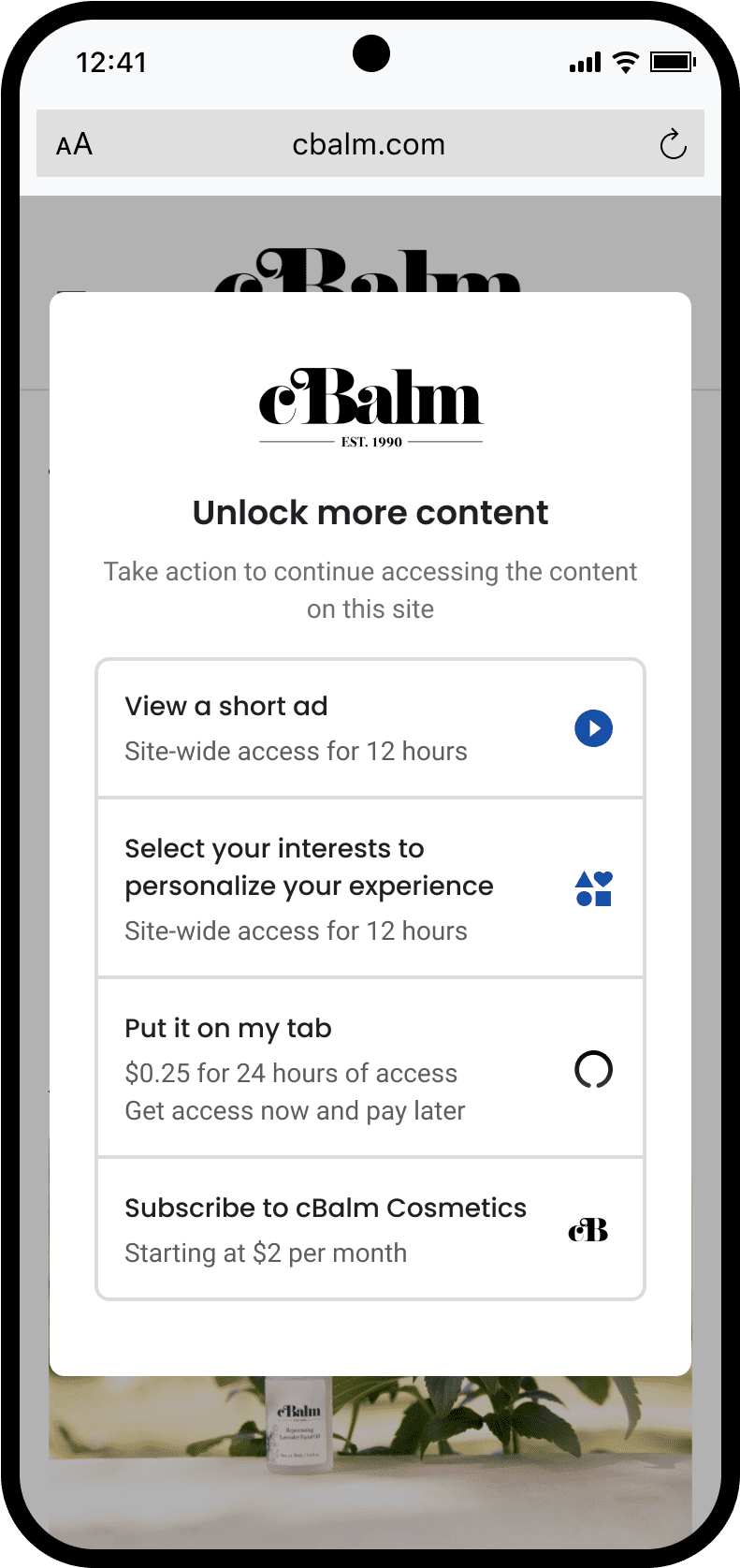
The tool, now generally available after testing with over 1,000 publishers, allows audiences to choose how they access content, including watching short ads, completing surveys, or making micro payments.

According to Google, early adopters of Offerwall have seen an average revenue increase of 9%

A Response to Changing Publisher Needs

Peentoo Patel, Product Director at Google Ad Manager, says in an announcement:

“For years, our publishing partners have asked for more and different ways to monetize their content beyond traditional ads.”

Offerwall gives audiences more control over how they engage with content, while providing publishers with additional monetization paths.

Key Capabilities of Offerwall

Offerwall includes several features aimed at helping publishers implement flexible monetization strategies:

  • Multiple Access Options: Audiences can access content by choosing from short ads, micro payments, interest-based surveys, or other publisher-defined methods.
  • Custom Integrations: Publishers can add their own access models, such as newsletter sign-ups or subscription trials.
  • Rewarded Ads: A familiar model for users who prefer to watch an ad in exchange for content access.
  • Survey Access: Completing a survey grants access while providing publishers with valuable audience insights.
  • Supertab Payment Integration (Beta): Enables single-use payments or subscriptions.
  • Optimize (AI-Driven Timing): Uses AI to determine the ideal moment to present the Offerwall, aiming to maximize engagement and revenue.

Here’s an example of what you might see on a publisher’s site when they use Offerwall:

Screenshot from: blog.google/products/ads-commerce/offerwall-gives-publishers-more-options-audiences-more-control/, June 2025.

Focus On Small Publishers

Google highlighted Offerwall’s potential benefits for smaller publishers, who may lack the development resources to build custom paywalls or alternative monetization systems.

Offerwall provides these tools with minimal setup, integrated directly into Google Ad Manager.

This could help close the resource gap between large and small media businesses by making diversified monetization models more accessible.

Implementation & Strategy

For publishers already using Google Ad Manager, Offerwall can be integrated with existing workflows.

The tool’s flexibility allows for gradual experimentation. You can start with basic rewarded ads or surveys and expand into micro payments or subscriptions as user behavior data accumulates.

The Optimize feature may also reduce friction in testing by automating decision-making about when to present monetization options.

Looking Ahead

The introduction of Offerwall underscores a broader shift in digital publishing. As privacy regulations evolve and traditional ad models face pressure, publishers are exploring new ways to monetize their content without compromising the user experience.

Marketers working with publisher partners may need to adapt to new engagement patterns and evaluate how Offerwall could affect campaign performance and analytics.

Offerwall is now available to all publishers through Google Ad Manager.


Featured Image: Roman Samborskyi/Shutterstock

How CMOs Can Use Conversion Tracking & Attribution For Smarter Paid Media Strategy via @sejournal, @MenachemAni

For chief marketing officers of retail brands and businesses, knowing which channels and campaigns deserve the marketing budget can directly impact the success and length of their tenure.

But in today’s omnichannel environment of walled gardens, customers engage with your campaigns (and other assets) multiple times before converting.

Since there is no perfect conversion tracking or attribution, you need a system to decide where to spend your money.

Too many marketers still rely on outdated or overly complex attribution models, incomplete data, or pure guesswork.

Common side effects include over-investing in either the upper or lower funnel, while underfunding channels and campaigns that balance demand generation and demand capture.

In this article, we’ll break down how CMOs and marketing leaders can use conversion tracking and attribution data to:

  • Understand true channel performance.
  • Make better budget decisions.
  • Improve full-funnel efficiency.

Conversion Tracking In Google Ads: Limitations & Blind Spots

Running a Google Ads or paid media campaign without native conversion tracking is asking for trouble.

Not only will your account operate with blinders that prevent the system from finding improvements and patterns, but you won’t also have any in-platform metrics to measure your own database against.

I also see some accounts can take several weeks for reporting data to be attributed fully, primarily because of the click-to-purchase duration.

Google may not be fully accurate with all metrics, but you want it to understand what actions are meaningful to your business.

Lead Generation

  • Online conversion actions: form fill, chat, phone call.
  • Offline conversion stages: qualified lead, converted lead.
  • Support tools: WhatConverts, HubSpot, or other CRM to track lead data + Zapier for connectivity.

With leads, there is a challenge in terms of reconciling what is recorded online and what happens outside of the Google ecosystem.

Google’s system knows it got you a certain number of form fills, chats, or calls. It needs to know how many of those were good quality leads. How many of those went on to become actual sales?

That would lead you to create a “next step” in the process, such as qualified leads, and feed this back into Google. You can also then bid against those or use them as observations, but they will be in the system as a positive funnel event.

Read more: Building A Lead Generation Plan

Ecommerce

  • Online conversion actions: purchase, add to cart.
  • Offline conversion stages: subscriber, repeat buyer.
  • Support tools: Shopify to track returns, exchanges, etc.

For ecommerce, it’s typically a lot simpler to track the right events, but it’s trickier to rate their value to the business.

Google can record purchase transactions as an event, but it lacks your backend data on which locations have the fewest returns or exchanges, which products lead to higher rates of subscription and repeat purchases, and what each product’s margin is.

If you’re using Shopify, they have a Google and YouTube app that does pretty much all the heavy lifting you need to do to link the two platforms and track ecommerce sales.

How To Use Performance Data To Fuel Better Marketing Investments

“I know which channels and campaigns are providing the best ROI” is verbal gold for a CMO.

Being able to quantify the impact of where they spend their marketing budget positions them to make smarter decisions and increase their value to the business that employs them.

Unfortunately, this is easier said than done. Here are some ways to think through the more common hurdles that get in your way as a marketing leader.

Thinking Through In-Platform Attribution

Once you set up tracking and make sure you’re getting good performance data in, you can use it to inform attribution and omnichannel strategy.

My methodology is different from how many marketers approach this. I’m of the mind that attribution is not something that can be fully solved, and over-relying on third-party tools will set you in the wrong direction because they all have different biases.

Certain tools can’t see the actual power of YouTube, for example.

One study by Haus showed that YouTube in-platform reporting is three times less than what they see. So many third-party attribution tools can’t see view-through or engagement data for YouTube, so they end up with a higher-than-ideal margin of error on the reporting.

Some other tools can see the click and view attribution for Meta, but only click attribution for Google. What I like to do is optimize each campaign in-platform based on that platform’s data.

Handling Conflicting Attribution Data

When we come across situations where different platforms show us conflicting attribution data, we use overall sales reports and tools like TripleWhale or Northbeam to help validate that data.

This helps us understand directionally, if we put another 20% of our budget into a specific campaign type, how does that impact the overall revenue?

It’s really about looking at blended numbers – some people call it media efficiency rate (MER) or blended return on ad spend (ROAS) – to see how that data changes over time with different campaign and marketing changes.

We use this to allocate budget according to what really moves the needle as far as revenue and profit are concerned. This is much better than just relying on what a platform tells you.

With lead generation, this is less of a problem because most lead form fills happen pretty quickly after the initial click.

If the user submits the form on the same page they landed on, you will very likely capture UTM and GCLID parameters.

For lead gen, we typically look to verify that the number of leads in the customer relationship management (CRM) is within 10% of what Google attributes to itself.

Point Of Diminishing Returns: Why All Growth Stalls

One thing many people forget is that with visibility and success in digital advertising, you pay a price in terms of incremental headroom.

In other words, you have much more untapped opportunity at 30% impression share than you do at 85%. Getting from 30% to 85% is going to probably be much less expensive than going from 85% to 90%.

If you look at Google Ads’ own attribution, there’s a finite amount of headroom with Search and Shopping.

Once you hit the top of that, it usually tapers off somewhere between 70-80%, and you’ve got to start finding other campaigns/platforms to start feeding the funnel. That could be other Google properties (like YouTube) or channels like Facebook, Instagram, or TikTok.

Fortunately, Google is now starting the rollout to show you this data for Performance Max in addition to Search and Shopping. This means you can take advantage of benefits like finding new advertising opportunities while still applying optimization tactics that you’re used to.

The other thing that’s really important, especially for newer advertisers, is not to expect the same performance from every campaign type.

People who have been around the block in PPC know, for example, that a 5x ROAS on branded search is realistic, but for YouTube, it might be 1x or even less.

You need to be okay with that, as long as you can get all the numbers to line up in terms of your total costs versus total revenue and margin.

Good Strategy Is Always Built On Clear Business Goals

Conversion tracking and attribution are essential parts of the CMO toolkit, but they mean little without the skill and literacy to interpret performance data in the context of a business.

If we were to sum up the most important part of this thought process, it would be:

  • Native platform tracking is crucial, but it’s only one part of the puzzle. Feed meaningful business outcomes back to the ad platforms to improve performance over time.
  • No attribution model is perfect. Treat attribution as directional rather than as an absolute, and be cautious about over-relying on third-party insights as they have their own blind spots.
  • Use blended metrics and cross-platform validation to make strategic choices based on actual business needs and financial goals, not just the metrics that one channel reports.
  • Recognize diminishing returns as you scale inside one platform and diversify intelligently across multiple channels to maintain growth.

Ultimately, your ability to optimize campaigns hinges on a central, unbiased source of truth that isn’t influenced by the incentives of any single ad platform.

Google or Meta are businesses built to serve their own business objectives and those of their shareholders, which don’t always align with those of your business.

By owning your data and attribution strategy, you set your brand up to make smarter, more confident marketing investments instead of pinning all your hopes on a long shot that’s rarely (if ever) accurate.

More Resources:


Featured Image: voronaman/Shutterstock

Why Brand Advertising Matters For Paid Media Performance via @sejournal, @iambenwood

The twin forces of disrupted attribution and changing user behavior are reshaping how audiences discover brands.

Google’s mass rollout of AI Overviews and its experimental AI Mode are not surface-level UX tweaks; they represent a fundamental transformation of the search experience – one that compresses the journey from query to answer.

PPC is now a more competitive, constrained, and less predictable environment.

If Google is effectively skipping traditional landing pages in certain query classes, by serving direct answers, the margin for interrupting or influencing a user shrinks dramatically.

If you are not building a brand that people proactively seek out – or that AI systems actively reference – you are playing an increasingly expensive, inefficient game.

Brand Advertising Isn’t Brand Bidding

First, let’s define the terms clearly, as this distinction is often misunderstood in performance marketing circles.

Brand advertising refers to any paid activity designed to build awareness, familiarity, and positive association with your brand.

The primary objective isn’t immediate conversion; it’s to create a demand and a pipeline that your lower-funnel activities can later capture.

By contrast, brand bidding occurs when someone already knows your brand and actively searches for it.

Bidding on your own brand terms in Google Ads or Bing ensures you’re visible when that existing demand materialises – but it’s harvesting, not creating demand.

Brand advertising builds the mental availability that ensures your brand is considered when a user enters a buying journey. Brand bidding simply captures people who were already predisposed to choose you.

Both are important, but confusing the two leads to systemic underinvestment in activities that generate future growth.

In longer buying cycles, particularly in B2B, high-ticket B2C, and considered-purchase categories, persistent brand presence is critical.

Research from the Ehrenberg-Bass Institute consistently shows that memory structures built over time have a powerful impact on future buying decisions.

Furthermore, research points to the fact that if you’re not already on someone’s shortlist before they start looking for a solution, you’re unlikely to be chosen vs. those brands who are.

The day one list diagramImage from author (research by Google x Bain Consulting), April 2025

When the balance between brand and performance activity is right, each amplifies the other, creating what is called the Multiplier Effect, a virtuous cycle where brand-driven demand lowers cost-per-acquisition (CPA), improves Quality Scores, and enhances overall media efficiency.

The Advertising ‘Doom Loop’

Despite its proven impact, brand advertising remains chronically underfunded in performance-led organisations. Why?

In part, because it doesn’t fit neatly into short-term attribution models. Brand activity often influences outcomes weeks or months later, in ways that are difficult to measure through traditional last-click frameworks.

This measurement gap creates what WARC calls the “Advertising Doom Loop.” Here’s how it unfolds:

  1. Advertisers focus disproportionately on easily measurable performance channels, such as paid search.
  2. Brand-building budgets are cut because they lack immediate, attributable return on investment (ROI) in platforms like Google Analytics 4.
  3. As brand equity erodes, acquisition costs rise and conversion rates fall.
  4. To compensate, advertisers double down on short-term tactics, further starving brand investment.
  5. The cycle repeats, gradually eroding long-term growth potential.

This loop is not theoretical. It’s been observed repeatedly across sectors and is backed by large-scale research studies and documented in a recent WARC study.

The brands that escape the doom loop understand that marketing is interconnected.

Short-term sales activation delivers immediate returns, but brand building provides compound growth over time, lowering customer acquisition costs (CACs), increasing customer loyalty, and insulating against category volatility.

Ignoring brand advertising might look efficient quarter-to-quarter, but over a multi-year horizon, it is a recipe for brand decline.

Why Brand Interest Is Your Most Defensible Asset

In a world of AI-curated answers and zero-click behavior, one channel remains relatively stable: branded search interest.

When a user types your name, your product, or your branded category term into Google, you control the narrative. These searches are:

  • Cheaper than competitive generic terms.
  • Higher converting, often by a factor of 2x or more.
  • Less vulnerable to displacement by AI Overviews, as of current observation (which still reference brand entities prominently).

At Hallam, we’ve seen this play out across multiple paid search accounts.

Brands with stronger brand search volumes and higher unaided awareness consistently achieve lower CPAs, better Quality Scores, and more efficient media performance across both search and display.

Graph showing impact on branded clicks from running brand advertising campaignsThe impact of running brand advertising campaigns on search demand and clicks for one of our clients (Image from author, April 2025)

This shows the compounding value that brand equity brings to lower-funnel paid media campaigns.

Measurement Solutions

One of the biggest challenges performance marketers face today is how to measure the impact of brand campaigns.

Marketers must treat brand search volume, direct traffic trends, and assisted conversions as leading indicators of paid media effectiveness.

If your top-of-funnel strategy includes YouTube, connected TV, or programmatic display, shifts in these upstream metrics are early signals of success, even before conversions materialize.

For example, metrics that directly track interest in your brand, such as share of search, have been proven to be leading indicators of market share.

Moreover, investment in econometric modeling, brand uplift studies, and incrementality testing will become critical tools for understanding the true impact of marketing spend and providing a holistic view of performance as we move into the future.

When And How To Get Started

If paid search is becoming more competitive and less reliable for visibility, the logical response is to rebalance your media mix, and that starts with brand.

1. Run Paid Media To Uplift Brand Search Volume

Don’t just optimize for direct conversions. Optimize for subsequent branded search. YouTube, connected TV, and upper-funnel Meta campaigns can all drive brand interest that pays off later through more efficient search activity.

Tracking this means looking beyond last-click. Use view-through conversions, uplift studies, and brand search volume trends to measure the impact.

2. Invest In Non-Google Surfaces

A diversified paid media strategy is no longer a nice-to-have; it’s essential. That includes:

  • YouTube Shorts and creator content to build brand relevance.
  • Programmatic display and native ads on publisher sites may support discoverability
  • Paid partnerships and sponsorships that build reputation across the web.

These touchpoints feed awareness, and could also contribute to the knowledge graph and large language models (LLMs).

3. Align PPC With SEO To Influence AI Outputs

Yes, SEO still plays a role, but performance marketers should work alongside organic teams to ensure:

  • Branded pages are structured correctly for AI inclusion.
  • Top-performing PPC assets (e.g., headlines, product descriptions) are reflected in organic content.
  • Messaging consistency across paid and organic channels supports brand memorability.

Final Thoughts

Clicks are now harder to win. Impressions are becoming more expensive. And digital attribution data is increasingly unreliable.

In this environment, the brands that thrive will be the ones that people search for by name, that AI references unprompted, and that exist in the user’s mind long before they type anything at all.

That doesn’t happen by accident. It happens when paid media stops acting like a demand-harvesting function and starts behaving like a brand growth engine.

More Resources:


Featured Image: Master1305/Shutterstock

Ultimate PPC Campaign Optimization: 6 New Ways To Easily Run Dozens Of PPC Campaigns For Different Sectors via @sejournal, @CallRail

Tip #1. Boost Relevance: Use Industry-Specific Conversion Signals To Customize Google Ads Messaging

Increasing clicks is as easy as increasing how relevant your ads are to your potential customers.

Sounds easy, but when you’re managing different brands, many industries, or multiple brick-and-mortar locations, it can quickly become difficult to understand exactly what each individual person needs.

What’s New That You Should Change & Try

Google Ads Responsive Search Ads and Assets (Structured Snippets) now allow faster VOC-driven testing.

Voice-of-customer (VOC) insights from tools like CallRail reveal what customers actually say before converting.

Now, you can use this real language to supercharge your ad messaging.

Is This Change Worth It?

Yes.

When you align your ad messaging with what your customers actually say, you boost ad relevance, increase clickthrough rates, and lower your cost per lead by matching real search intent.

You’ll see:

  • Higher relevance: This is crucial in paid advertising is critical because it directly impacts three major outcomes: cost, performance, and customer experience.
  • Lower Costs: Ad platforms like Google Ads reward high relevance with better quality scores, which can lower your cost per click (CPC) and help you win better ad placements without paying a premium.
  • Higher Engagement: When your ads match exactly what users are searching for or thinking about, you naturally boost clickthrough rates (CTR) because the ad feels more useful and timely.
  • Better Conversion Rates: Relevant ads lead to more qualified traffic, meaning users are more likely to take action once they land on your site, whether that’s calling, booking, or buying.
  • Improved Brand Trust: Ads that clearly resonate with real customer language and needs feel authentic, which strengthens brand credibility over time.

Which Industries Benefit Most From This PPC Engagement Boosting Technique?

  • Legal Services: Top keywords we’ve identified for you are [free consult] & [local attorney]
  • Home Services: [emergency repair] & [same-day service] are great seed keywords for this industry.
  • Medical/Dental: [accepts insurance] & [licensed doctor] are good starting points for PPC keyword lists.

Your industry not listed? See other industry insights here.

How did we discover those seed keywords?

By analyzing customer responses, transcripts, and chats for true language keywords that your customers are likely typing into search or ChatGPT.

How To Find Your Best PPC Conversion Signals

Effort Manual Method CallRail
Time Required High Low
Accuracy Depends on human analysis Automated and precise
Insights Available CTRs, keyword performance CTRs, keyword-level call tracking, automated trends
Effort Intensive Minimal

Manual Method For Finding PPC Conversion Signals

  • Analyze Campaign Data: Manually review metrics like click-through rates (CTR), conversion rates, and cost per conversion to evaluate performance.
  • Identify High-Performing Keywords: Manually analyze calls to find and optimize keywords driving the best results while excluding irrelevant terms.
  • Track User Behavior: Use tools like Google Analytics to observe user actions, such as pages visited or time on site, before converting.
  • Tie Conversions to Campaign Factors: Manually connect conversion data to specific ads, keywords, or timeframes for insights.
  • Challenges: Time-intensive, prone to human error, and limited in precision without advanced tools.

CallRail Method for Finding PPC Conversion Signals

  • Call Tracking: Easily and quickly track inbound calls back to specific ads, campaigns, or keywords to identify high-performing strategies.
  • Keyword-Level Attribution: Automatically pinpoint which keywords drive calls or form submissions without manual effort.
  • Automated Insights: Leverage AI-generated call transcripts, summaries, and data to detect patterns, trends, and high-performing campaigns effortlessly.
  • Integrations: Connect with platforms like Google Ads or HubSpot to centralize and streamline conversion tracking.
  • Key Benefits: Saves time, eliminates guesswork, provides precise and actionable insights to optimize PPC campaigns effectively.

The Manual Way:

  1. Spend hours manually analyzing call transcripts for high-intent phrases.
  2. Create tightly themed ad groups based on these phrases.
  3. Constantly refine keyword match types to match real search behavior (favor phrase match for accuracy).
  4. Use dynamic keyword insertion carefully to keep VOC language in ads.

Easy Way With CallRail: 

  1. Use CallRail’s free trial to extract VOC insights.
  2. Insert VOC themes into responsive search ad headlines and structured snippets.

Tip #2. Save Time: Automate Campaign Creation With Pre-Built Google Ads Templates & CRM Signals

Launching campaigns faster without sacrificing quality can transform how efficiently your agency operates.

Is This Change Worth It?

Absolutely.

When you automate campaign creation, your team gets more time back to focus on strategy instead of setup.

It means:

  • Faster launches.
  • Fewer errors.
  • Campaigns that are tailored more precisely to your clients’ real needs.

What’s New That You Should Change & Try

Google Ads Customer Match and Microsoft Ads Customer Match now enable direct CRM syncing to personalize campaigns automatically.

You can dynamically create or adjust campaigns based on real customer behavior without manual uploads.

Why Do This

Automating your campaign setup drastically reduces your manual workload, speeds up your time-to-market, and helps your team personalize campaigns at scale across locations or services.

Which Industries Benefit Most From This Time-Saving PPC Technique?

  • Franchise & Multi-Location Retail
  • Home Services (HVAC, plumbing, roofing)
  • B2B SaaS with structured sales pipelines

How To Set Up Automated PPC Campaign Launching

The Manual Way:

  1. Build templated campaign structures with core keywords, ads, and extensions.
  2. Pre-create negative keyword lists to prevent budget waste.
  3. Use shared audiences and budgets across locations.

Easy Way With CallRail:

  1. Connect CallRail and your CRM to automatically trigger ad group or campaign launches.

Tip #3. Maximize ROI: Make Budget Optimization Dynamic With Real-Time Call Quality Feedback

Prioritizing ad spend on only the highest quality leads gives you better results without raising your budget.

Is This Change Worth It?

Definitely.

Budget optimization with real-time PPC feedback ensures that you’re spending on what actually drives value: qualified leads.

It’s one of the fastest ways to improve ROI and prove your worth to your clients.

What’s New That You Should Change & Try

Google Ads Offline Conversion Imports and Enhanced Conversions for Leads now allow you to sync call quality and CRM outcomes directly into Google Ads bidding models.

Why Do This

Prioritizing your budget based on high-quality leads maximizes your ROI, eliminates wasted ad spend, and delivers more valuable outcomes for your business or agency.

Which Industries Benefit Most From This Budget Optimization Technique

  • Healthcare & Dental Clinics
  • Legal & Financial Services
  • Auto Services

How To Optimize Your Budget Based On Real-Time Call Quality

Manual Way:

  • Score calls manually within your CRM for quality.
  • Adjust campaign-level bid adjustments or device-level bidding based on quality trends.
  • Create automated rules to pause poor-performing keywords or boost strong ones.

Easy Way With CallRail:

  1. Use call scoring to automatically sync quality signals.
  2. Set Google Ads offline conversion imports to trigger budget shifts based on call outcomes.

Tip #4: Boost Engagement: Use Enhanced Click-to-Call Campaigns With Visual SERP Signals

Visual and call-first strategies make it easier for customers to connect and convert faster.

Is This Change Worth It?

Yes, especially if your audience is mobile-first.

Adding call-focused enhancements and visuals doesn’t just boost engagement—it shortens the path between search and conversion, making it easier for ready-to-buy users to reach you.

What’s New That You Should Change & Try

Google Ads Call Ads, Image Extensions, and Microsoft Ads Multimedia Ads now create visually compelling, mobile-first experiences optimized for immediate customer action.

Why Do This

Upgrading your ads with richer visuals and call-driven formats helps you drive higher engagement on mobile, improve click-to-call rates, and accelerate customer connections.

Which Industries Benefit Most From This Engagement-Boosting Technique

  • Restaurants & Local Retail
  • Urgent Services (locksmiths, HVAC repair)
  • Senior Services (assisted living, home care)

How To Enhance Your Click-to-Call Campaigns

Manual Way:

  • Add call extensions and image extensions to mobile ads.
  • Schedule call ads during business hours only.
  • Use structured snippets highlighting key services.

Easy Way With CallRail:

  1. Integrate CallRail click-to-call tracking.
  2. Analyze peak call times and optimize ad schedules accordingly.

Tip #5: Smarter Targeting: Layer First-Party Lead Journey Data Into Performance Max Campaigns

Bringing offline lead intelligence into your campaigns boosts targeting precision and conversion rates.

Is This Change Worth It?

Absolutely.

Using your first-party data to influence Performance Max campaigns gives you more control, better targeting, and higher returns, especially in a world where third-party cookies are disappearing.

What’s New That You Should Change & Try

Google Ads Performance Max campaigns now support Customer Value Mode (2024 smart bidding innovation) to better optimize for high-value leads.

Why Do This

Feeding your first-party lead journey data into campaigns improves your targeting precision, nurtures your prospects at the right moment, and increases your conversion rates while lowering acquisition costs.

Which Industries Benefit Most From This Smart Targeting Strategy

  • Real Estate
  • Home Improvement & Contractors
  • Higher Education & Vocational Schools

How To Layer Lead Journey Data Into Your Performance Max Campaigns

Manual Way:

  1. Export CRM lead journey stages manually.
  2. Create custom audience segments inside Google Ads.
  3. Build distinct asset groups based on customer intent (“researching,” “ready to buy”).

Easy Way With CallRail:

  1. Use CallRail to sync call outcomes and CRM data into Google Ads.
  2. Automate audience signal feeding to Performance Max.

Tip #6: Lower CPCs: Run Campaigns By Location With Local Keyword + Phone Call Clustering

Geo-targeted strategies help you win more conversions while keeping your ad costs low.

Is This Change Worth It?

Definitely.

Location-based clustering lets you dominate profitable micro-markets without blowing your budget. It’s one of the smartest ways to lower CPCs and outmaneuver bigger competitors.

What’s New That You Should Change & Try

Google Ads Location Extensions, Dynamic Location Insertion, and Microsoft Ads Location Extensions now provide better local customization tools, enhanced by AI call tracking.

Why Do This

Using hyperlocal targeting based on real-world call and keyword data helps you increase your relevance, lower your CPCs, and dramatically improve your local conversion rates.

Which Industries Benefit Most From This Geo-Targeting Upgrade

  • Multi-Location Healthcare
  • Legal Services in competitive markets
  • Home Services (regional licensing differences)

How To Run Localized Campaigns With Call Clustering

Manual Way:

  1. Segment geo-targeted campaigns by ZIP code.
  2. Analyze location performance reports weekly.
  3. Use ad customizers to insert city/region names dynamically into ad copy.

Easy Way With CallRail:

  1. Leverage CallRail’s AI keyword clustering to identify top-performing regions.
  2. Automatically adjust geographic targeting based on call conversion trends.

Scale Smart, Not Wide

Scaling PPC for your SMB clients across different sectors is no longer about throwing more campaigns against the wall and hoping something sticks. It’s about smarter personalization, automation, and quality-driven optimizations.

Tangible PPC elements like keywords, ad groups, budget rules, and conversion actions remain critical to long-term success, especially when fueled by clean first-party data.

By implementing even 1–2 of these new methods per client vertical, you can reduce your manual work, improve your lead quality, and drive better outcomes for your agency and your clients.

Ready to future-proof your PPC strategy?

Start with data. Start with automation. And start by refining the tangible parts of your campaigns to dominate every sector you serve.

Ecommerce PPC Challenges & Strategies For Second-Hand Retailers

The second-hand ecommerce sector is significant.

The market for global resale apparel alone reached $227 billion in 2024 and is projected to hit $367 billion by 2029.

This once traditional way of shopping in thrift stores and auction houses has changed drastically. U.S. online resale is expected to nearly double by 2029, reaching $40 billion.

What’s referred to as the “second-hand economy” represents a shift in how people shop, their adaptability to economic changes, and a way of acting on growing sustainability concerns by buying pre-loved items.

As this market expands at pace, brands are ramping up their investment in paid search, with major players like eBay spending over $150 million per year on Google Ads alone.

With this growth in PPC spending, brands are looking to scale and scale fast.

However, running PPC for second-hand or resale ecommerce is a very different ballgame from a traditional ecommerce model, where brands are either manufacturing the items they sell or reselling new items.

In this post, I’ve shared five ecommerce PPC strategies for second-hand retailers that will help find success.

Before we jump into them, let’s dig into a few key challenges that are unique to managing paid search in this market.

Key Challenges Unique To PPC For Second-Hand Retailers

Inventory Turnover And One-Of-A-Kind Products

The flow of products will vary by retailer.

Take eBay, for example. It likely has hundreds (even thousands) of certain items, but for smaller retailers or specialised brands (such as antique or vintage resellers), it is most likely dealing with one-of-a-kind products.

In this scenario, once a product is gone, it’s gone.

Bidding algorithms get little time to learn which products convert the best, as many items may only be in the feed briefly, whereas others may remain in the product feed for a long time and be deprioritized by newer items.

Frequent Product Updates & Data Quality

For some second-hand retailers, inventory can change daily (or hourly) as new products are acquired and are listed on the site to sell through as soon as possible.

This movement, whether fast or slow, impacts both PPC campaigns that use product feeds (such as Google Shopping or Performance Max) as new data is fed into the campaigns on a frequent basis.

It can also impact search campaigns as products move in and out of stock.

Let’s say a brand has a search campaign bidding on keywords themed around “second-hand Herman Miller chairs.” It sells through 80% of the stock and is waiting for new SKUs to be added.

The efficiency of the campaign will decline, and spend could be wasted. This isn’t just for second-hand retailers; it also applies to all PPC ecommerce strategies.

In addition, data quality has to be bulletproof to ensure that products are entered into the most relevant auctions and searchers are provided with the best possible data prior to clicking through.

For example, say one product is uploaded with the title: Nike – Air Force 1 ’07 – White – Size 10. And another: Carhartt Hoodie.

In this scenario, retailers will be forever going back and forth across various teams to fix data issues with the feed (something I’ve seen firsthand).

Then, throw in brands such as Depop and Vinted, which have user-generated listings, and the task of creating a refined, rich data feed becomes even more complex.

Dynamic Budget Allocation

With an ever-changing flow of products and search queries, accurately forecasting and allocating budgets can be a difficult task.

A category may perform great one month, where SKUs that are in high demand are in stock, then drop off the following month as the conversion rate declines due to a less desirable product selection.

Dynamic budget allocation is essential, as there are so many moving parts.

Advertisers must monitor stock levels across many touchpoints (e.g., brand, category, material) and trends in search queries, and undertake systematic performance reviews to feed into how much budget to cut out for PPC and where to allocate this.

Complex Measurement And Reporting

With SKUs coming and going, traditional product reporting is limited.

Advertisers can’t rely on item-level metrics alone, as many items have zero sales (or a single sale) before being removed from the feed and out of product/listing groups.

This essentially takes away the traditional strategy of catering to your “best sellers” first – a strategy that relies on accrued product-level data to feed into various characteristics set by advertisers (e.g., X number of sales over X days at a ROAS of X = best seller).

Second-hand retailers must aggregate their product data to uncover trends in brands, styles, materials, product types, and more.

This comes with a level of expertise in creating these reports and the time to maintain, update, and actually use them to inform the PPC strategy.

So, How Can Second-Hand Retailers Succeed In Paid Search Given The Limitations?

Despite these challenges, second-hand retailers can thrive with PPC.

Here are five strategies that are tried and tested and will lay the groundwork for creating a second-hand PPC powerhouse.

1. Optimize And Enrich Your Shopping Feed

Product feeds are the heart of PPC for ecommerce.

Campaign types that use product listings, such as Google Shopping and Performance Max, allow advertisers to get their products in front of searchers prior to clicking through.

Google search for the query Screenshot from search for [second hand supreme jackets], Google, March 2025

As with a couple of points raised so far, this isn’t a strategy exclusive to second-hand retailers, but the importance of making sure data is rich and processes are in place is critical with many different SKUs flowing in and out of the inventory.

So that you can sleep at night knowing you’re matching the most relevant queries and ensure you have the best possible data in your feed, I’d recommend this approach:

  • The Basics: Create a structure and put a process in place that accounts for every stakeholder who will be involved in feeding data at any point. If you want to ensure you spot any anomalies immediately (definitely recommended), you could use a third-party tool, export your feed to a sheet, and build a script to check that all SKUs follow the same pattern.
  • The Next Step: Custom labels, keyword research, supplemental feeds, and more. This could be:
    • Adding detailed information on the condition of an item in the description, with a summary in the title (e.g., new with tags, used once, X number of owners, etc.).
    • Qualifying that the items are not brand new. This will help with both entering into ad auctions for pre-loved/second-hand queries. It will also help qualify traffic as your listing will clearly show up front that it is not new.
    • Categorizing groupings such as era, designer, or material for antique and vintage stores. This is useful for structuring both the feed and the way campaigns are grouped in the ad platform.

2. Think Categories (Or Bespoke Groupings), Not Individual Product Sales

Ecommerce PPC strategies are often built on best-selling product data.

This segment naturally demands the highest budget allocation as conversion rate, return on ad spend (ROAS), etc., is often the highest.

However, many second-hand retailers may only ever have one (or a handful) of every item, which almost breaks apart the traditional approach of managing paid search for ecommerce.

All is not lost, though. Brands can find success by segmenting (and reporting) by category and using this to steer budgeting, forecasting, day-to-day optimisation, and more.

Aggregating this data helps to:

  • Uncover meaningful trends to both share with the wider business and feed into bidding algorithms.
  • Set the foundations for adapting to change. For example, say a luxury handbag reseller receives a high intake of products from a new brand/designer. A category-level split will help facilitate driving visibility for these items through PPC, whereas if a “best-seller” structure were used, it would not contain the new items and wouldn’t prioritize them.
  • Assist with flexing media budgets, as depending on size, some retailers may be dealing with hundreds of thousands of items and being able to pull back and scale spend on what works is crucial.

3. Don’t Be Afraid To Broaden Your Reach, With Care

I have seen many brands in this space doubling down on Search and Shopping, with strict query funneling to only serve ads for queries that contain “second-hand”/”pre-loved”/”used.”

This is logical and may work well. However, for this theoretical example where we don’t have data, this strategy neglects multiple audiences who are not only in the market for the items, but may convert higher for the short term and help drive up Customer Lifetime Value (CLV) in the long run.

This strategy makes the assumption that if the query has been pre-qualified (second-hand/pre-loved/used, etc.), the audience searching will be the most profitable, which, in my experience, is not always the case.

Take a second-hand camera retailer, for example. If it only bids on pre-qualified queries such as “used Canon cameras” or “second-hand point-and-shoot cameras,” it would miss all users who are looking for the brands they sell, general camera queries, longer-tail searches, and more.

This is where campaign types such as Performance Max and especially Dynamic Search Ads (DSA) are certainly worth testing to expand your reach and serve ads for intent-driven searches across a wide range of audiences.

4. Align PPC Efforts With Inventory And Operations

This isn’t exclusive to second-hand retailers, but it is especially important.

Cross-team collaboration is a must when products are flowing in and out of stock, and retailers have an ever-changing number of products on site.

Data should flow both ways:

PPC → Wider Team (Merchandising, Buying, Operations, etc.)

  • Which categories/brands/designers have indexed up or down vs. average over a certain time period?
  • Are there any new queries that can help with product acquisition?
  • How has category X trended over time since stock volume increased considerably?

Wider Team → PPC

  • We’ve got X units of brand A and more to come over the next three months. How do we prioritize this?
  • The stock of category X has begun drying up. There’s not much on the market, so a restock is unlikely soon.
  • Returns for brand X are 50% above average. How much are we spending on these items each month?

Creating a virtuous cycle will only improve PPC performance and build relationships.

Finding the best way to pull this data may take time, as teams will need to share various datasets (stock reports, CRM, order books, etc.) to then feed into a centralized report, but the payoff is definitely worth it.

5. Think Outside Of The PPC Box

In the world of second-hand retail, the importance of PPC teams having a clear understanding of profitability outside of account-level KPIs such as ROAS or cost per acquisition (CPA) is crucial.

Unlike a traditional ecommerce model where brands manufacture the products themselves, the second-hand market, whatever the product may be, will likely make less margin comparatively due to lower prices, costs of acquiring the product, operational expenses, etc.

Here are a few metrics I would highly recommend keeping close to when making strategic PPC decisions:

  • Return Rate: The average return rate for ecommerce was 16.9% in 2024, with products that require specific fits (clothing, shoes, etc.) rising as high as 30%, and even further during peak. With margin front of mind, weaving these rates into PPC budgeting, forecasting, and setting KPI is essential.
  • New Customer Acquisition Cost (nCAC): This measures the average expense incurred to acquire a new customer and is calculated by total new customer marketing expenses/number of new customers acquired. While it may not be the primary goal, nor are all accounts built to accommodate clear, new, and returning budget splits, this is a metric that must be observed in line with CLV, ROAS, etc.
  • Customer Lifetime Value (CLV): PPC teams operating within this business model have to look past the first sale. CLV helps quantify the long-term value of a customer, which unlocks more informed decisions for budgeting, forecasting, and optimization, especially when acquiring new customers.

In second-hand retail, where margins are tighter, understanding the full customer journey and setting KPIs using a clear view of profitability will empower PPC teams to make smarter, more commercially aligned decisions.

Summary: A Different Approach, A World Of Potential

With changing inventory and tighter margins, advertisers need to adopt a different approach to PPC.

Whether a billion-dollar resale store with self-serving listings or a small clothing store, the same principles apply. As with most things PPC, it all comes back to having clear, accurate data.

Advertisers have a wealth of tactics to consider, from ensuring the feed is the best it can be to setting targets using bespoke groupings that change over time.

One-size-fits-all approaches may bring short-term stability, but for long-term growth and scalability, the teams that think and adapt quickly will lead the pack.

More Resources:


Featured Image: Wayhome Studio/Shutterstock

      Google PMax: Inside The Negative Keyword Limit Increase & What’s Next via @sejournal, @adsliaison

      As Google’s Ad Product Liaison, I often share updates and insights with the community of digital advertisers and, best of all, get to hear your feedback first-hand.

      We heard quite a lot after our recent announcement that, after a period of beta testing, we’re rolling out negative keywords in Performance Max (PMax) campaigns with a restriction.

      We had set a cap of 100 negative keywords per campaign.

      While the ability to add negative keywords in PMax directly in Google Ads without having to request them through Support or an account rep has been a long-time ask, we heard very quickly that the cap of 100 negative keywords felt too restrictive for many.

      Here’s a look behind the scenes at the reasoning behind the initial cap, what we learned from your feedback, and the subsequent decision to increase the limit to 10,000 negative keywords per campaign.

      Why The Cap In The First Place?

      AI, by its nature, thrives on flexibility, adapting to real-time data and user behavior.

      Performance Max is an AI-powered, goal-based campaign type that’s designed to find conversions based on the goals you set.

      The intention of capping negative keywords in PMax at 100 was to give advertisers additional control while still giving PMax the flexibility to achieve your campaign’s stated goal – a limit of 100 negatives felt like a reasonable starting point.

      To arrive at that number, we analyzed PMax campaigns in which negative keywords had been added via Support or their account rep.

      We found that the 100-keyword limit would cover the vast majority of campaigns using negative keywords.

      We also saw that the majority of submitted negative keywords had no actual serving impact – their ads already weren’t triggering for terms advertisers had concerns about.

      In many other cases, other targeting exclusions would have been more suitable for blocking unwanted traffic.

      We saw this in our beta testing as well. In short, 100 felt like a good compromise between offering enough flexibility without dramatically increasing the risk of accidentally blocking valuable traffic.

      Negative keywords are just one way to control where your ads show on Search. Other controls such as brand exclusions, account level negative keywords and keyword prioritization are also available.

      The initial cap of 100 negative keywords aimed to:

      • Preserve AI Optimization: Excessive negative keywords can act as rigid constraints, preventing the AI from exploring valuable search paths and hindering its ability to identify emerging trends. Essentially, it can stifle the algorithm’s ability to find the most efficient conversions. Very large negative keyword lists can potentially negatively impact the machine learning systems and hurt performance.
      • Prevent Accidental Traffic Exclusion: We aimed to prevent advertisers from inadvertently excluding valuable traffic through overly broad negative keyword scopes and missing potential high-intent customers.

      What Your Feedback Told Us

      We heard advertiser feedback loud and clear that while negative keywords are welcomed, the cap of 100 felt too restrictive.

      We heard from brands that quickly hit the 100 limit before including the key themes they wanted to negate. In short, it wasn’t a practical solution for many.

      After looking at options, the team agreed to align with the limits in Search campaigns and raise the threshold to 10,000 negative keywords per PMax campaign.

      That’s obviously a significant jump from 100 and way more than nearly every business will need or should use, but aligning on one common threshold simplifies things and gives advertisers plenty of room to experiment.

      Actionable Insights And Considerations For Measuring Impact

      Adding negative keywords to a Performance Max campaign can, of course, impact where your ads show on Search and Shopping inventory.

      While the increased limit provides greater control, it’s crucial to use negative keywords strategically. Here are several things to keep in mind when applying negative keywords in PMax:

      • Judicious Application: Avoid overly broad exclusions that might hinder the AI’s ability to find valuable conversions. Prioritize high-impact negatives that address specific ROI concerns. Keep in mind that account-level negative keywords you’ve added for brand suitability purposes already apply to your PMax campaigns.
      • Match Type Precision: Understand the nuances of broad, phrase, and exact match negative keywords in PMax. Negative match types work differently than their positive counterparts. For negative broad match keywords, your ad won’t show if the search contains all your negative keyword terms, even if the terms are in a different order. Phrase match negatives exclude queries containing the exact phrase, while exact match excludes only the specific query. Use them strategically to balance precision and reach.
      • Performance Monitoring: Closely monitor key metrics like conversions, conversion value, and conversion rates to ensure negative keywords have a positive rather than negative impact on performance.
      • Conflict Resolution: Be aware that if a user search matches both a positive signal and a negative keyword, the negative keyword will take precedence, and your ad will not be eligible to serve for that query.
      • Beyond Negative Keywords: Remember that PMax offers other control mechanisms to inform when your ads can trigger on Search.
      • Regular Audits: Just as with your Search campaigns, be sure to regularly audit your negative keywords to identify where you might be blocking potential valuable traffic. And Search Term Insights can help you identify query themes and individual search terms you might want to block with negative keywords.

      Your Questions Answered

      I received several questions about this update from advertisers on LinkedIn and X (Twitter) and want to address some of those here.

      “The real challenge is how negative keywords interact with PMax’s black-box decision-making. Will we get more visibility into which search terms PMax is actually serving against? And how will negatives impact machine learning optimization long term?”

      While PMax is designed to automate many aspects of campaign management, we recognize the importance of providing advertisers with meaningful insights.

      The introduction of negative keywords is one of several recent steps towards providing additional controls.

      Search Terms Insights for PMax provides a view of the search term categories as well as specific search terms that triggered your ads in Search. You’ll find performance metrics at the search term level.

      Search Terms Insights is designed to make analyzing search term data easier by already grouping similar searches into broader categories, saving you the time to sift through individual search terms.

      This data can be downloaded and available via scripts and the Google Ads API.

      As for the long-term impact of negative keywords on campaign optimization, it’s important to strike a balance.

      While negative keywords provide crucial control, an overly restrictive approach could limit the system’s ability to learn and adapt to new opportunities.

      As noted above, our recommendation remains to use negative keywords strategically to exclude truly irrelevant traffic, allowing the AI to continue exploring and finding valuable conversions within the defined boundaries you set.

      Reporting and insights are areas the team is actively focused on. Stay tuned for more on this.

      “Google never needed <100 negative keywords in order to have>

      Our intention was never to encourage spending on irrelevant queries.

      Performance Max is a goal-based campaign type which means it’s designed to find more of the conversions that you indicate are valuable to your business.

      The initial cap of 100 negative keywords was tested in beta and seemed to provide a reasonable level of control while still allowing the AI the necessary flexibility.

      We acknowledge that our initial assessment was not sufficient for many advertisers, and that’s why we listened to your feedback and made the significant increase to 10,000.

      “Why can’t negative keywords be limitless at any/every account level? Are there technical/operational issues that would be impacted?”

      This is a fair question. There are limits on certain entities in Google Ads accounts to help ensure system and process stability. We have more details on various entity limits here.

      “Will Google give us the ability to see the previously applied negative keyword lists we used to do via Support or our reps.”

      Yes, you’ll be able to see and edit negative keywords and negative keyword lists that were previously added by Support or a rep.

      “Why weren’t negative keywords available from the very start when PMax launched.”

      The core principle behind PMax is leveraging AI to discover conversions across Google’s channels.

      When PMax launched in 2021, the vision was to give advertisers a streamlined way to tell Google what they want to optimize for and then allow the system to learn and find those desired customers across all of Google’s inventory.

      Exclusions were seen as unnecessary and potential impediments to optimization.

      Over time, and with advertiser feedback in mind, features within PMax have expanded. And the pace of new insights and controls has been accelerating in recent months.

      “What about negative keyword lists?”

      Many of you asked about the possibility of using negative keyword lists within Performance Max campaigns, as you can in Search campaigns.

      We are actively working on this and expect to have more to share on support for negative keyword lists in PMax later this year.

      How PMax Is Evolving

      I recently shared the overview below of many of the recent reporting and control updates for PMax at the Paid Search Association Conference.

      These features are aimed at giving you more tools and information to steer PMax to find more of the conversions you want to generate for your business.

      Features like brand guidelines help ensure your responsive display ads and auto-generated video ads reflect your brand’s visual identity.

      Ginny Marvin presented recent PMax controls and insights updates at the Paid Search Association ConferenceRecent controls and insights updates for PMax. Image from author, March 2025

      Stay tuned for more on search terms data and analysis capabilities as well as additional insights this year.

      This is an area we are actively focused on. And keep the feedback coming.

      More Resources:


      Featured Image: Gorodenkoff/Shutterstock

      [SEO & PPC] How To Unlock Hidden Conversion Sources In Your Sales & Marketing Funnel via @sejournal, @calltrac

       This post was sponsored by CallTrackingMetrics. The opinions expressed in this article are the sponsor’s own.

      Did you know 92% of all customer interactions are from phone calls?

      And very few know how to track conversions from phone calls.

      Brands meticulously track clicks, impressions, and online interactions through SEO, pay-per-click (PPC) ads, and data-driven strategies.

      Yet, one critical piece is often missing: offline conversions.

      Many high-intent customer interactions, especially in industries like healthcare, legal, home services, and B2B, happen over the phone.

      If you’re in an industry that receives any number of calls, you may be struggling to connect these calls to your digital marketing efforts, leading to:

      1. Inefficient marketing strategies.
      2. Wasted ad spend.
      3. Difficulty proving ROI.

      How do you fix this? Call tracking.

      By leveraging AI-powered tools and advanced attribution technology, marketers can bridge the online-offline gap, ensuring no lead goes unnoticed.

      How To Attribute Sales To Phone Calls

      TL;DR: Historically, you could not attribute conversions to phone calls; now, you can.

      Yes, offline conversions can be tracked.

      And despite the high percentage of customer interactions happening over the phone, many brands fail to track which ad or campaign led to those calls.

      This could stem from knowledge gaps, tight budgets, or reluctance to integrate more technology into their stack.

      Without call attribution, businesses are left guessing about what’s driving revenue.

      What Is Offline Conversion Attribution?

      Offline conversion attribution is the process of linking your online marketing efforts to offline sales or actions.

      It helps you understand which digital marketing channels and campaigns contribute to offline conversions, such as in-store purchases, phone call inquiries, or signed contracts.

      How Offline Conversion & Phone Call Attribution Works

      By paying attention to phone call conversion data, you can:

      1. Connect Online Interactions To A Phone Call: A user clicks on a digital ad, visits a website, fills out a form, or calls a business after seeing an online campaign.
      2. Store User Data In One Place: Data from these interactions (such as email, phone number, or a unique tracking ID) is captured and stored.
      3. Match Callers With Offline Events: When a purchase or conversion happens in-store, over the phone, or through a sales team, businesses match it back to the initial online touchpoint.
      4. Analyze & Optimize Webpages With Content That Converts: You can analyze which digital campaigns, keywords, or ads drive the most offline conversions, optimizing their marketing strategy accordingly.

      What You Can Do With Phone Call Conversion Data

      When you introduce a tool that acts as Google Analytics for phones, you’ll be able to:

      • Improve ROI Measurement: Helps businesses understand the real impact of digital marketing on offline sales.
        Enhance Ad Targeting: Enables better retargeting of high-intent users.
        Optimize Budget Allocation: Allows marketers to invest more in channels that drive actual sales, not just clicks or website visits.
        Bridge the Online-Offline Gap: Particularly important for industries like retail, automotive, healthcare, and B2B, where many transactions happen offline.

      Examples of Offline Conversion Attribution

      1. A customer finds your business through organic search.
      2. They see a retargeting ad on Facebook.
      3. Finally, they click a PPC ad and call to book an appointment.

      Without call tracking, the PPC ad might receive full credit, even though SEO and social played key roles. Choosing the right attribution model ensures data-driven marketing decisions.

      Best Tools for Offline Conversion Tracking

      • Google Ads Offline Conversion Tracking
      • Facebook Offline Conversions API
      • CRMs like HubSpot or Salesforce
      • Call tracking software like CallTrackingMetrics

      SEO & Call Tracking: Connecting Organic Efforts To Real-World Conversions

      Gain Keyword Attribution Beyond Clicks

      Rankings, traffic, and forms typically measure SEO success fills. But what about phone calls? Call tracking technology with dynamic number insertion (DNI) allows businesses to:

      • Identify which organic search queries lead to phone calls
      • Optimize content around real customers’ questions and concerns
      • Understand which landing pages drive the most offline conversions

      For example, if multiple callers reference a specific product-related question, that insight can inform new blog topics or FAQ pages to improve SEO efforts, driving even more right-fit traffic into your sales funnel and conversion metrics.

      Optimize For True Local SEO

      Local search is a major driver of inbound calls. When combined with call tracking, businesses can finally understand:

      • Which local listings (Google Business Profile, Yelp, etc.) generate the most calls?
      • What information do customers search for before calling?
      • How to refine location-based content for higher engagement

      How Call Insights Can Strengthen Your SEO Strategy

      Phone calls aren’t just conversions—they’re valuable sources of customer insights that your teams can use to refine ad strategies, train teams on sales pitches, and identify areas for growth in your content strategy. Each conversation has the potential to reveal the common questions, pain points, and content gaps that businesses can address to improve their marketing performance.

      1. Identify FAQs for Stronger Content

      Often, customers call a company’s support phone number when they can’t find information online, either about a product or service they’re considering buying or one they’ve already purchased. By analyzing call transcripts, businesses can spot recurring questions and proactively address them in blog posts, FAQs, or product pages.

      For example, if a home services company frequently gets calls asking, “Do you offer emergency repairs on weekends?”, this signals a need to make that information more visible on their website. A dedicated service page or blog post could reduce unnecessary calls while improving customer experience.

      2. Refine Your Website Messaging

      If callers repeatedly ask about pricing, product differences, or service details, your website messaging probably isn’t clear enough.

      For instance, an e-commerce brand selling fitness equipment might notice that callers often ask, “What’s the difference between your basic and premium treadmill?” Adding a simple comparison chart or explainer video can help lessen confusion and improve conversions.

      3. Fill Content Gaps To Reduce Sales Friction

      Repeated calls about the same topic are a good indicator of missing or unclear content. A B2B SaaS company, for example, might receive frequent inquiries about integrating with a particular CRM or social platform. Instead of solely relying on customer support, the marketing team could identify this pain point and create a step-by-step guide or video tutorial to address it, which would reduce friction and improve self-service for prospects.

      PPC & Call Attribution: Maximizing ROI With Better Insights

      Tracking clicks alone doesn’t reveal the full ROI of PPC campaigns. Many conversions, especially phone calls, happen offline and go untracked. Without attribution, businesses may waste ad spend and overlook high-intent leads. This section explores how call tracking connects PPC efforts to real conversions, improving marketing efficiency.

      Paid Search: Wasted Spend Without the Full Picture

      A high cost-per-click (CPC) doesn’t guarantee strong ROI if businesses aren’t tracking offline conversions. Without call tracking, marketers risk:

      • Over-investing in underperforming keywords
      • Missing opportunities to optimize campaigns for call-driven leads
      • Failing to attribute revenue-generating phone calls to PPC efforts

      When a business fails to account for ROI in the form of phone calls, they’re losing an opportunity to accurately account for their real CPC and allocate resources accordingly.

      Call Tracking + Google Ads = Smarter Bidding

      PPC campaigns are only as effective as the data behind them. Without tracking phone calls, businesses risk misallocating budgets to keywords that drive clicks but not conversions. Integrating call tracking with Google Ads provides a clearer picture by linking calls to the specific campaigns, ad groups, and keywords that drive valuable conversions.

      With AI-powered call scoring, marketers can identify high-intent leads and adjust bidding strategies based on actual conversion data—not just clicks. This ensures ad spend is focused on quality leads rather than wasted traffic.

      Retargeting with First-Party Data

      Not every caller converts immediately. Call tracking allows businesses to retarget high-intent leads with personalized follow-ups. By analyzing call topics, marketers can tailor ads or email sequences to address specific customer concerns, increasing the likelihood of conversion.

      Additionally, integrating call data with CRM platforms like HubSpot and Salesforce ensures sales teams can nurture prospects effectively, preventing lost opportunities. By combining PPC insights with offline conversions, businesses gain a clearer understanding of customer behavior, leading to smarter ad spend and more targeted outreach.

      Back To Basics: Omnichannel Attribution & The Power Of Call Data

      As marketing shifts to a mix of online and offline tactics, attribution models must evolve. By integrating call tracking with Google Analytics, CRM systems, and automation tools, businesses can gain a complete view of the customer journey.

      A company that integrates CallTrackingMetrics with Google Analytics and its CRM can:

      • See exactly which campaigns drive calls.
      • Automate follow-ups based on conversation insights.
      • Optimize for higher-value interactions.

      AI & Conversation Intelligence

      Call tracking is no longer just about recordings or basic attribution. AI-driven call analysis provides deep insights, such as:

      • Customer intent and sentiment analysis.
      • Common objections that impact sales.
      • Automated lead qualification based on real conversations.

      By leveraging AI, businesses can better understand customer needs, improve sales strategies, and ensure marketing efforts are driving meaningful engagement. Implementing AI-driven call tracking empowers teams to make data-backed decisions that enhance both customer experience and conversion rates.

      Proving Marketing’s True Impact

      Marketers are often challenged to prove ROI beyond what we might call “vanity metrics”, like impressions and clicks. Though these have a place in any strategy, these metrics don’t necessarily move the needle toward sales goals.

      Call tracking, on the other hand, delivers revenue-focused attribution, showing exactly how digital marketing contributes to bottom-line growth. This kind of revenue-focused attribution can help an entire company analyze past efforts and accurately forecast revenue based on real campaigns, real calls, and real results

      Case Study: This study from CallTrackingMetrics demonstrated how AI-driven call tracking optimized PPC ROAS and improved lead quality​.

      Want to see how conversation intelligence can improve your marketing performance? Check out our guide to building an effective omnichannel communications strategy.

      Ready to get to work? Book a demo with our team and see how CallTrackingMetrics’ products can help you.


      Image Credits

      Featured Image: Image by CallTrackingMetrics. Used with permission.

      13 Google Ads Settings To Check When Running International PPC Campaigns via @sejournal, @brookeosmundson

      Expanding your Google Ads campaigns to international markets sounds exciting – until you realize just how many settings can make or break your results.

      If you assume that what works in your home country will work everywhere, think again. From currency mismatches to targeting mishaps, international PPC comes with a unique set of challenges.

      To avoid costly mistakes, here are the key Google Ads settings you need to check before launching or optimizing an international campaign.

      1. Location Targeting: Are You Reaching The Right Audience?

      This may seem like a no-brainer, but many advertisers forget to refine location settings properly.

      By default, Google Ads includes users who “show interest in” a location – meaning people outside your target country might see your ads.

      What to do: Change your location targeting to “Presence: People in or regularly in your targeted locations” if you only want to reach users physically present in your chosen market. This helps avoid wasting spend on irrelevant clicks.

      2. Ad Scheduling: Does It Align With Local Time Zones?

      Your ad schedule may be perfectly optimized for your home market, but time zones shift everything when running internationally.

      What’s peak conversion time in New York might be the middle of the night in Paris.

      What to do: Set your ad schedule based on the local time zone of the targeted market, ensuring your ads run during business hours or when your audience is most active.

      Another best practice is to keep your international PPC campaigns in their own ad account, which can be nested underneath an MCC account.

      That way, you can set your time zone at the local time zone at the account level and not have to do complicated time zone conversions if they were to all be in the same ad account.

      Trust me, a separate ad account will save you so much time in the long run!

      3. Currency And Conversion Tracking: Are Your Numbers Making Sense?

      Imagine checking your return on ad spend (ROAS) and thinking you’re crushing it, only to realize later that you’ve been calculating revenue in USD while spending in GBP. Ouch.

      What to do: Make sure your Google Ads billing currency matches your reporting metrics. Also, confirm that your conversion values reflect the correct currency to avoid misleading performance insights.

      This is another case in point for having a separate Google Ads account for international PPC campaigns, instead of housing every campaign under one ad account.

      4. Language Settings: Are Your Ads Reaching The Right Speakers?

      Google’s language targeting doesn’t translate your ads. It only determines who sees them based on their browser settings.

      If you’re targeting users in Spain but only using English keywords, you’re missing a huge chunk of potential customers.

      What to do: Set up separate campaigns for different languages within a region, using properly localized ad copy and keywords that match how people search.

      5. Keyword Match Types: Are They Performing Well Across Markets?

      Search behavior varies by country. A broad match keyword that works in the U.S. might trigger irrelevant searches in Germany. Even worse, direct translations of keywords can change meaning entirely.

      What to do: Research local search behavior before deciding on match types. Use exact and phrase match strategically to control spend in new markets, and analyze search term reports frequently.

      Have a solid negative keyword strategy in place at the start to mitigate any keyword match types going rogue.

      6. Bidding Strategies: Are They Aligned With Market Conditions?

      Bidding strategies that work in one country might not translate well to another due to competition levels, cost-per-click (CPC) differences, and conversion rates.

      For example, say you’re using a Target Cost Per Acquisition (CPA) bid strategy for your United States campaigns, and the CPA is set at $50.

      It would be unwise to set that same CPA target on international PPC campaigns without knowing purchase behaviors in the region you’re targeting.

      There may be less competition in those areas, so you may want to start with a lower CPA target to avoid overspending.

      What to do: Start with manual or “Maximize Clicks” to understand market dynamics before switching to automated bidding.

      If using Smart Bidding, give the algorithm time to learn and adjust based on local performance trends. Understanding your international markets is key when getting started with Smart Bidding.

      7. Product Feed Optimization: Is Your Shopping Feed Localized?

      For Google Shopping campaigns, simply adding a product feed to a new country isn’t enough.

      Product titles, descriptions, and even pricing can impact how well your ads perform.

      But localization goes beyond just translation – it’s about using the terminology and structure that aligns with how local shoppers search.

      For example, a “sneaker” in the U.S. is a “trainer” in the UK, and European shoppers may prioritize brand and material in product titles more than U.S. shoppers do.

      Additionally, some countries have strict rules on tax and shipping display, meaning incorrect settings could lead to product disapprovals.

      What to do: Optimize product feeds for each country you plan to run ads in. Ensure titles use local terms, pricing is in the correct currency, and required attributes (such as tax settings) are properly configured.

      Also, check product imagery. Some countries have cultural sensitivities that may affect what’s acceptable to showcase.

      8. Regulatory And Compliance Settings: Are You Following Local Laws?

      Different countries have unique regulations for digital advertising, from GDPR in the EU to stricter ad policies in regions like China. Violating these can not only get your ads disapproved but could also lead to legal trouble.

      For example, the EU’s GDPR rules require explicit user consent for data collection, meaning that cookie-based remarketing might require additional compliance measures.

      Meanwhile, certain industries, like finance or healthcare, have extra advertising restrictions in countries like Canada and Australia.

      What to do: Familiarize yourself with country-specific regulations and ensure your ads, landing pages, and data collection methods comply.

      Google may also restrict certain industries or ad types in specific markets. Google’s advertising policies page is a good place to start, but consulting a legal expert in your target market is even better.

      9. Payment Methods: Are You Aware Of Billing Differences?

      Google Ads billing methods vary by country, and some regions have restrictions on payment types.

      Not all credit cards or invoicing options available in the United States work in other countries.

      This account setting is yet another reason why you should consider a separate Google Ads account per region that you plan to run ads in.

      What to do: Before launching, check Google Ads’ payment options for each country and ensure your billing setup won’t disrupt your campaigns (if running international ads in the same account).

      10. Audience Targeting: Are You Using The Right Signals?

      Your U.S. audience lists might not translate well internationally due to differences in customer behavior and market dynamics.

      If you’re using imported lookalike audiences or U.S.-based remarketing lists, they may underperform because user intent differs significantly between markets.

      For example, an in-market audience for “luxury watches” in the U.S. may skew toward younger professionals. Whereas in Japan, that same audience might lean more toward older, high-income shoppers.

      What to do: Build new audience lists for each market rather than relying on U.S.-based data.

      Use Google’s audience insights to refine targeting based on regional behavior and test performance before scaling.

      11. Ad Copy And Ad Assets: Have You Adjusted For Cultural Nuances?

      A direct translation of your ad copy isn’t enough; cultural differences impact how messages resonate.

      A phrase that works in one country could come across as awkward, or even offensive, elsewhere.

      For instance, humor that performs well in U.S. ads may not have the same impact in Germany, where direct and factual messaging tends to work better.

      Similarly, a “limited-time offer” urgency tactic in Japan could feel too aggressive, as consumers there often value trust and relationships over hard selling.

      What to do: Localize your ad copy beyond just translation. Adapt messaging to fit local customs, humor, and expectations. Also, check that ad assets (like callouts or structured snippets) make sense in the market.

      12. Competitive Analysis: Are Your Benchmarks Realistic?

      While this may not be a direct Google Ads setting, I felt it was worth including because competitive analysis is crucial when launching in new markets.

      CPCs, conversion rates, and ad competition vary significantly by country. If you assume costs and performance will mirror your home market, you might be in for a surprise.

      What to do: Use tools like Google Ads Auction Insights, industry benchmarks, and other competitor analysis tools to set realistic expectations for performance in each country.

      13. Landing Pages: Are They Properly Localized?

      Again, this isn’t a Google Ads setting to check, but because your ads have to go to some sort of landing page, this is another crucial check before launching your international PPC campaigns.

      Sending international users to a generic English landing page (or worse, an untranslated one) is a surefire way to tank conversion rates.

      Even if the international region you’re targeting is an English-speaking country, they still may use localized language or phrases different from the United States.

      What to do: Ensure landing pages are fully localized with correct language, currency, cultural references, and legal disclaimers. Even small details like using “shopping cart” vs. “basket” can impact conversion rates.

      Get The Details Right Before Scaling

      Running Google Ads internationally is more than just expanding targeting. It requires a deep understanding of regional differences in search behavior, competition, and user expectations.

      A small oversight in settings can drain budgets fast, so double-checking these key areas ensures your campaigns run smoothly.

      With the right approach, international PPC campaigns can unlock massive growth potential.

      Just make sure Google Ads isn’t working against you because of pre-applied settings that don’t align with your new market.

      More Resources:


      Featured Image: dee karen/Shutterstock

      How To Drive Google Shopping Growth With Only One Of Each Product

      Google Shopping is a Google Ads product that allows advertisers to serve feed-based ads on the search engine results page (SERPs).

      The auction for Shopping Ads works in a similar way to Google Text Ads, in the sense that the auction is query-based.

      However, Google Shopping does not target keywords and uses the feed (and a few other factors) to determine when and where to serve ads.

      Here’s an example of the Google Shopping results on a SERP:

      Screenshot of the Google Shopping results when a search is made for 'Tiago Lemos 1010 New Balance' Screenshot from search for [tiago lemos 1010 new balance], Google, January 2025

      Advertisers are set to ramp up their spending on U.S. retail media search ads, with a projected 23.4% year-over-year growth in 2028, pushing the total spend to $76.83 billion.

      Google Shopping offers advertisers the freedom to serve:

      • Product images.
      • Clear product titles.
      • Content-rich descriptions.
      • Upfront pricing.
      • Promotions.
      • Shipping costs.

      Google Shopping allows advertisers to inform searchers about their products prior to clicking through – and when compared to standard text ads – has the potential to drive better-qualified traffic.

      From multinational retailers to local bakeries, hundreds of thousands of brands use Google Shopping to get their products in front of searchers every day.

      How To Find Success With Google Shopping Ads?

      Many factors determine how online advertising performs, from key performance indicators (KPIs) to pricing, payment options, imagery, site speed, the social responsibility of a company, and more.

      However, looking solely from an ad platform perspective at Google Shopping, the one factor that will determine success is data.

      • Product Feed: The data within your feed should be high quality, accurate, and well-planned. This is the heart of Google Shopping and is a huge factor in determining the search queries your shopping ads will enter the auction for. Where possible, ingest additional data that will help feed bidding strategies, reports, and more with valuable insights about your products.
      • Segmentation: There are many ways to segment Google Shopping campaigns: by margin, product categories, search query length, best sellers, and more. Segmentation and structure are important because this is where advertisers can control their budgets, set targets, and lay the foundations for scaling spend.
      • Budgets and Bidding: If your structure and segmentation lend themselves to your KPIs, you’ll be able to set budgets with confidence and build a portfolio of bidding targets that will work towards the correct goal.
      • Refinement: There aren’t any keywords, but there are negative keywords. Use these to refine your campaigns and ad groups to enter auctions for search queries that align with your KPIs. It may be that for upper funnel generic queries, you want to serve a certain category but not another; this is a perfect use case for negating queries and funneling traffic.
      • Performance Max: I couldn’t talk about shopping without mentioning PMax. All of the above applies; the only difference is that segmentation works slightly differently with asset groups and one single target, which is set at the campaign level vs. ad group level for Google Shopping.

      With these basics in place, from the moment you activate your campaigns, you’ll be gathering data and learning.

      This learning is the backbone of shopping campaigns, providing Google (and the bidding algorithm) crucial data all the way down to an SKU level.

      Over time, you’ll start to uncover a wealth of insights, such as:

      • Which products have the highest conversion rate?
      • How does engagement look for category A when served for upper funnel search queries?
      • What happens to the conversion rate when products A, B, and C drop out of stock?

      This data feeds machine learning as Google understands how your products perform across hundreds of thousands of touchpoints.

      This model fits most ecommerce brands with multiple stocks of each item to gather learnings overtime on what works and what doesn’t.

      But if you’ve only got one of every product, how can you drive success on Google Shopping when once a product’s gone, it’s gone?

      What Business Models Have One Of Each Product?

      • Auctions, e.g., eBay.
      • Marketplaces, e.g., Etsy.
      • Second-hand/pre-loved, e.g., Vinted.
      • A mix of the above. Typical retailers who have adopted a marketplace feature or a pre-loved arm of their business, such as Farfetch.

      The scale of the business, vertical, market, etc., all play a role in determining the stock of each SKU.

      Take a brand like eBay, a global online marketplace with both auction and “buy it now” functionality. They have thousands of items where the stock level is above one, and thousands where it is one of one.

      There are thousands of auction houses, second-hand retailers, marketplaces, and more that have a similar setup, but on a smaller scale.

      But for this post, we are focussing solely on one of one product.

      How Does This Business Model Impact Google Shopping?

      This campaign type thrives on data, and this flows through every layer, from the bidding strategy down to individual SKU performance.

      The feed is the heart of Google Shopping, and with the SKUs changing frequently (depending on the business), accruing data on which SKU performs the best/worst works differently as SKUs sell through and may not be in the feed again for weeks, months, or in some cases, ever again.

      There are a number of considerations that need to be taken into account:

      • Learning: With only one of each SKU, items may sell out quickly, whereas some items may be in the feed for longer. Bidding algorithms will struggle to gather data to optimize toward your KPIs, and a lack of historical data will be limiting for machine learning, especially at a product level.
      • Feed: The data within your product feed should be rich, up-to-date, and aligned with your paid media goals. This is even more important when SKUs are being added/removed frequently, as this will cause instability with learning, crawls, and more.
      • Reporting: With one-of-a-kind SKUs, the interpretation of the data within the ad platform is critical; it’s not like you can filter by sales > 0 over a date range and decide how to structure your campaigns, as many SKUs will have been and gone.
      • Automation: Bid strategies can certainly be used, but unlike traditional retailers who may have in-platform ROAS/CPA targets that remain fairly stable, the intricacies of category performance and knowing exactly what products have sold is critical as this is ever-changing and will impact how you feed data into machine learning.
      • Budget Allocation: When building for the long term, fluctuations in performance make it difficult to set budgets to get the most out of your media spend. Watertight reporting is essential, and communication between teams is key to helping spot trends, plan inventory ahead of time, and stay as efficient as possible.
      • Dynamic Retargeting (and PMax): Dynamic retargeting uses the feed to serve product ads to audiences (e.g., website visitors who have added an item to a cart and not purchased) and can be run in isolation or as part of PMax. Having one of every product creates a disconnect as multiple users could be interested in one item, and when it’s sold, it’s gone from the feed.

      These are just a snapshot of the limitations, and there are more.

      But that certainly doesn’t mean it’s a non-starter.

      A different approach is needed, compared to Google Shopping, for a traditional e-commerce model. Above all, communication and planning will be the backbone for success as these campaigns most certainly don’t fall into “set and forget” paid search management.

      Can You Scale Google Shopping For This Business Model?

      Absolutely.

      This will require a fresh perspective on how you report, optimize, and plan your media budget, but it’s certainly achievable.

      Look at eBay. It spends >$150 million each year on Google Ads, with the majority being through Product Listing Ads (PLAs).

      Here are a few approaches that are tried and tested:

      Reporting

      Product-level reports are going to be useful for any ecommerce business. However, with products dropping in and out of stock frequently, a focus on categories (or bespoke groupings) is essential.

      Say you’re a home furniture auction house with a large inventory. In the mass of data, you’ll need to find trends, and these trends sit within various categories, which are formed from aggregated product data over time.

      This could be:

      • Top-searched designers or brands.
      • Most purchased colors of category A.
      • Share of search by category across AOV brackets.

      This data will feed into almost all strategies and tactics adopted in the account, from structuring to forecasting and setting bidding targets.

      This reporting can be automated and then queried to provide each stakeholder with a different view of performance that all leads back to driving growth through Google Shopping:

      • Buyers may want to see which categories or designers are indexing highly by search volume to feed into planning, which, in turn, helps Google Shopping as the products/categories that are performing the best are then stocked moving forward.
      • Paid search teams will want a view of how ROAS/CAC has trended over time by category to know how to set realistic targets at the campaign, ad group, and product group levels.
      • Analytics teams need a view of the time lag between the first session date by campaign and the purchase date to provide feedback to marketing teams on how to accurately report on Google Ads performance.

      Optimization

      Google is going to struggle to gain enough data to optimize at a product level.

      Mirroring your reporting, you will need a view of performance at the category (or another grouping) level, as individual product performance isn’t going to feed into your campaigns as it would for a typical ecommerce store sat on the stock.

      You’ll need to do the work analysing performance across multiple segments to build a picture of how each category performs to then set budgets and bidding targets and maintain the day-to-day tasks required to manage Google Shopping campaigns.

      Product Feed

      It is critical that your feed is optimized and you are ingesting as much supplemental data as possible (within reason).

      This data will feed into your Google Shopping campaigns, and the time invested will pay for itself down the line.

      Take the furniture store example. It can supplement its data with era, designer, etc. When new items are added, this additional data can help group products into segments with realistic targets and budgets vs. being dropped into a top-level category and leaning on product performance to determine what SKUs to serve.

      Above all, there has to be ownership and a process for adding SKUs to the feed.

      Although products will be moving in and out of your feed frequently, there will likely be cohorts of SKUs that will remain in the feed for a while, which you should keep an eye on as these may need removing/scaling back in line with efficiency.

      Summary: Advertisers Will Need To Think On Their Feet

      A great deal of the work involved in navigating this business model and scaling Google Shopping happens outside of the ad accounts.

      Advertisers need to interpret and share data across the wider business, and this process works both ways.

      What are buyers in the company looking at bringing in and where would this sit with the Google Shopping strategy? Are there categories trending upwards that can be shared with the wider team to capitalize on?

      Without stable product data, advertisers will need to think on their feet and get fully ingrained within the business, which in 2025 is essential – whatever the business model.

      More Resources:


      Featured Image: BestForBest/Shutterstock