Now, we’re going to cover the final step before activating your value-based bidding strategy: choosing the right bid strategy for your lead generation campaigns.
The big benefit of value-based bidding is that it allows you to prioritize conversions that are most likely to drive higher revenue or achieve your specific business goals, such as sales, profit margins, or customer lifetime value.
By assigning different values to different conversion actions, you gain greater control over your bidding strategy and optimize for conversions that deliver the most significant impact.
Whether it’s a purchase, a lead, or a specific action on your website, value-based bidding ensures that your bids reflect the true worth of each conversion, enabling you to maximize your return on investment (ROI).
The bidding strategy you select to optimize for value depends on a few factors. Check out this two-minute video for a quick overview, and then keep reading to dive deeper.
Which Value-Based Bidding Strategy Should You Choose?
With value-based bidding, Smart Bidding predicts the value of a potential conversion with each auction.
If the bid strategy determines that an impression is likely to generate a conversion with high value, it will place a higher bid.
If this bid strategy determines that the impression isn’t likely to generate a high-value conversion, it’ll place a lower bid.
Value-based bidding can use data from all of your campaigns, including the conversion values you are reporting, to optimize performance.
It also uses real-time signals, such as device, browser, location, and time of day, and can adjust bids based on whether or not someone is on one of your remarketing lists.
To start bidding for value, ensure the following:
Measure at least two unique conversion values optimized for your business.
Have at least 15 conversions at the account level in the past 30 days. (Note: Demand Gen should have at least 50 conversions in the past 35 days, with at least 10 in the last seven days or 100 conversions in the past 35 days.)
You’ve got two bidding strategy options to tell Google how you want to optimize for value:
Maximize conversion value.
Maximize conversion value with a target ROAS.
Here’s a quick way to think about each before we dig in further:
Maximize conversion value
Target ROAS
Goal
Maximize conversion values for a specific budget.
Maximize conversion values for a target return on ad spend.
When
Your priority is to maximize value and spend the budget.
You don’t have a specific ROI target.
You have a specific ROI target.
Maximize Conversion Value
This option focuses on maximizing conversion value within a defined budget.
It’s suited for advertisers who prioritize driving the highest possible value within a specific allocated budget.
Advertisers often start with this before moving to a target ROAS strategy.
Maximize Conversion Value At A Target ROAS
This option allows you to set a specific target return on ad spend (ROAS) and instructs Google Ads to optimize your bids to achieve that target while maximizing conversion value.
Target ROAS: Why Your Budget Should Be Uncapped
When bidding with a target ROAS, your campaign budget should not be limited or capped.
That may sound scary at first, but let me reassure you that it doesn’t mean you don’t have control over your campaign spend!
Your ROAS target is the lever that manages your spend.
With a target ROAS, you’re telling Google to optimize for value at that specific target rather than find as much value within a specific budget.
So, when your budget is limited, it potentially prevents the system from having the flexibility to find the next conversion at your target.
Setting Your ROAS Targets
You can choose whether to use a recommended target ROAS or set your own.
When setting ROAS targets, use the last 30 days’ return on ad spend as a benchmark.
Google’s target ROAS recommendations are calculated based on your actual ROAS over the last few weeks.
This recommendation excludes performance from the last few days to account for conversions that may take more than a day to complete following an ad click or interaction (such as an engaged view).
While you can launch value-based bidding directly, you may want to start with a small test using a campaign experiment. This allows you to compare the performance of value-based bidding against your existing bidding strategy and make data-driven decisions.
You have two options to create a campaign experiment:
One-Click Experiment From Recommendations Page
You may see suggestions on implementing value-based bidding on your Recommendations page.
The recommendation to “Bid more efficiently with Maximize conversion value” will show if our simulations identify that your account is measuring two or more unique conversion values and will likely benefit from this strategy.
From this recommendation, you can create a one-click experiment to test the impact of value-based bidding on a specific campaign.
Custom Experiment
You also have the option to create a more tailored experiment to test value-based bidding in your campaign.
Be sure to choose a campaign that receives sufficient traffic and conversions to generate statistically significant results.
Configure the experiment to use value-based bidding, while the original campaign continues to use your existing bidding strategy.
See the instructions here to set up a custom experiment.
How To Jumpstart Value-Based Bidding
You can employ strategies to jumpstart the system, such as initially setting a low ROAS target or starting with Maximize conversion value without a ROAS target.
If you opt to start with Maximize conversion value without a target, be sure that your budgets are aligned with your daily spend goals.
Allow A Ramp-Up Period Before You Optimize
Once you’ve launched value-based bidding, give the system a ramp-up period of two weeks or three conversion cycles. This allows Google Ads to learn and optimize your bids effectively.
When measuring performance, be sure to exclude this initial period from your analysis to obtain accurate insights.
We’ve now covered all the basics for getting started with value-based bidding.
In our last segment, we’ll discuss monitoring and optimizing your performance to drive value for your business.
Whether you’re an in-house marketer or working at an agency, effective bid management is crucial for scaling success.
However, understanding how to optimize and adjust bids effectively in Google Shopping ads can be challenging, especially with all the different settings and levers that can be pulled!
Google Shopping has come a long way since its original inception in 2022 – and up until 2012, Google Shopping was free!
It seems that every year, more is needed to win the bidding war against rising costs in the Google Ads platform and keep brands’ profitability in check.
In this article, we’ll explore the strategies, tools, and best practices that can help you win the bidding war and maximize ROI on your Google Shopping campaigns.
1. Understanding The Google Shopping Auction Model And Its Impact On Bidding
Before we jump into bid management strategies, it’s essential to understand how Google Shopping works behind the scenes. Unlike Search campaigns, Google Shopping doesn’t rely on keywords to trigger ads.
Instead, product listing ads (PLAs) appear based on a combination of your product feed data and the user’s search intent. Google uses a unique auction system, and your bids interact with factors like relevance, user behavior, and other competitors in the space.
The Role Of Quality Score In Google Shopping
Quality Score plays a role in Google Shopping bid management, but a bit differently from Search campaigns.
Factors such as the product feed quality, landing page relevance, and historical campaign performance can influence how often your ads appear and at what cost. Here’s how to ensure you’re optimizing for Quality Score in Shopping:
Product Feed Optimization: Ensure that your product titles, descriptions, and attributes are clear and relevant.
Accurate Categorization: Place your products in the most appropriate categories for better relevance.
Optimized Landing Page: Make sure the page that users land on after clicking the ad is optimized for a better user experience, and don’t forget about mobile!
How Bid Amount Affects Visibility
Higher bids don’t always guarantee visibility, and low bids don’t always exclude you from auctions.
It’s a balance of ensuring your product feed is optimized while bidding strategically based on the product’s potential to convert.
Bidding strategies should reflect the actual performance of your products and overall business goals related to those campaigns.
2. Craft A Strategic Bidding Approach
One of the first decisions you need to make when managing Google Shopping bids is whether to rely on manual or automated bidding.
Both approaches have advantages depending on your business objectives, campaign budget, and the scale of your operations.
Manual Bidding: This gives you more control, allowing you to adjust bids based on performance. For example, if you notice that certain products are underperforming, you can reduce their bids to allocate budget to higher-performing products.
Automated Bidding: Automated strategies like Maximize Conversion Value or Target ROAS (Return on Ad Spend) use machine learning to adjust your bids dynamically based on real-time auction signals. These can be ideal for large product catalogs or when performance data is inconsistent across different products.
Google has added more automated bidding strategies over the years, making it easier to effectively bid based on your business goals.
However, the added complexity of choosing Standard Shopping campaigns versus the newer Performance Max campaign type allows for different bid strategies.
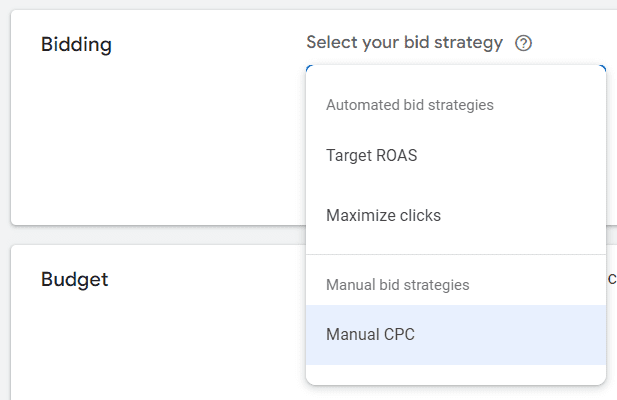
If choosing Standard Shopping campaigns, you have the option of these two automated bid strategies:
Maximize Clicks: Helps you get as many clicks as possible within your target daily budget.
Target ROAS: Helps you maximize conversion value while reaching an average return on ad spend that you choose.
Screenshot from author, August 2024
If you choose to set up a Performance Max campaign with your product feed linked, you have the option of more bid strategies:
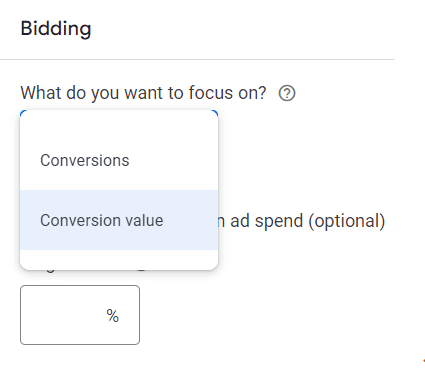
Maximize Conversions: Helps generate the most amount of conversions within your daily budget, regardless of conversion value.
Maximize Conversion Value: Helps generate the highest conversion value within your daily budget.
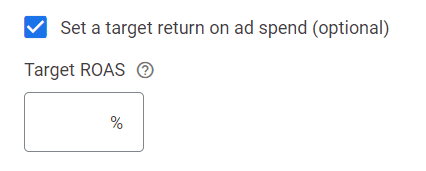
Additionally, Performance Max campaigns have the optional “Target ROAS” input to yield a little bit more control over your campaign bid strategy.
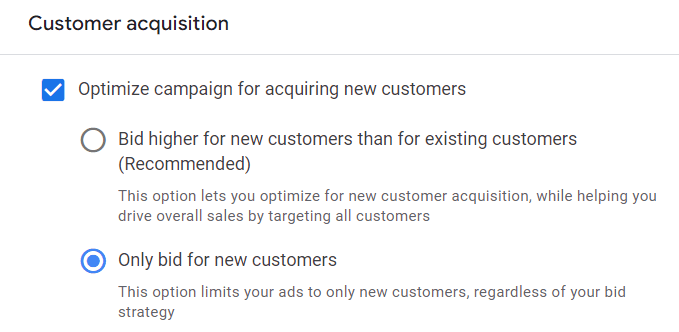
Lastly, you now have the option to choose how to bid for acquiring new customers – a very welcome addition to further maximize those ad dollars!
In Google Ads, you can choose to either bid higher for new customers than existing customers. Or, you can bid for new customers only.
Screenshot from author, August 2024
For Google Shopping campaigns specifically, you may want to choose to bid higher for new customers instead of excluding them altogether, especially if your brand is used to having repeat customers.
This essentially means you’re willing to pay more to get a new customer, knowing they will likely purchase again in the future, leading to incremental revenue.
For higher-ticket items that users may only purchase once every few years, it may be worthwhile to choose ‘bid for new customers only’.
At the end of the day, make sure to choose the customer acquisition strategy that aligns with your business goals.
Segmentation And Granularity In Bidding
A key component to effective bid management is to segment your campaigns and ad groups properly. This allows for more granular control over bids and enables better performance optimization.
Product-Level Bidding: Rather than bidding at the campaign or ad group level, product-level bidding allows you to adjust bids based on each product’s unique performance metrics. Products that generate more conversions or revenue should receive higher bids, while underperforming products can have bids scaled back.
Segment by Profit Margin or Price Point: Grouping products based on their profit margins or price points can help you adjust bids based on the product’s value to your business. High-margin products may justify higher bids since they offer better ROI.
Seasonality and Time Sensitivity: Adjust bids based on trends in user behavior throughout the year. For instance, products may perform better during certain seasons or promotional events, requiring temporary bid increases.
3. Use Your Own Data & KPIs To Inform Your Bid Management
Knowing which metrics to monitor is critical for making informed bidding decisions. Below are the core KPIs to watch closely:
Cost Per Conversion (or CPA) and Return On Ad Spend (ROAS): These two metrics provide insights into your campaign’s efficiency. You want to identify which products or campaigns have the highest ROAS and optimize bidding for those.
Impression Share and Click-Through Rate (CTR): These metrics can give you a sense of how your bids are affecting visibility. If you’re seeing low impression shares on profitable products, it may be time to increase your bids.
Conversion Rate: Analyze conversion rates to identify which products are most likely to turn clicks into sales, then adjust your bids accordingly.
Lifetime Value (LTV) and Customer Acquisition Costs (CAC): If your business has repeat purchases, focusing on lifetime value can give you an advantage when bidding on products that may have lower immediate returns but higher long-term value.
Knowing these KPIs for your business can help shape your bid management strategy and make strategic changes based on your Google Shopping performance in comparison to your business’s set KPIs.
For example, if you have an average conversion rate of 4% as a whole, but your Google Shopping campaigns are only providing a 2% conversion rate, that may tell you something needs to be optimized.
You may need to take a look at the keywords your products are showing up for and do some negative keyword management. Additionally, maybe your ads aren’t reaching the right users and you need to further refine audience targeting within your campaigns.
Another example of using your own data is knowing your profit margin for products. If you have a subset of products that have a high-profit margin, you can add a custom label into your product feed that denotes those products.
From there, you can segment your campaigns to have a higher priority on those particular products or choose to bid higher on them because they’re worth more to you and your business.
Leveraging Bid Simulators And Other Tools
Google also provides several tools that can help inform your bid decisions:
Bid Simulators: These help you understand how different bid levels would impact your impression share, clicks, and conversions. You can use this data to adjust your bids in a way that maximizes your return without overspending.
Custom Labels: By using custom labels in your product feed, you can segment your products by performance, seasonality, or promotion. This way, you can quickly adjust bids based on these factors.
Scripts and Third-Party Tools: Tools like Optmyzr or custom Google Ads scripts can automate bid adjustments based on performance data, allowing you to focus on strategy rather than manual labor.
4. Optimize Your Bid Management For Long-Term Success
Bid management is not a “set it and forget it” exercise. Continual testing, analyzing, and adjusting are necessary to maintain and improve campaign performance over time.
Bid management should also not be used for daily volatile changes at the campaign level.
If you’re micromanaging performance each day and changing bid strategies too often, you may end up with sub-optimal performance because you’re not giving Google enough time to learn and optimize based on performance.
It’s about finding a healthy balance between “set and forget” and “over-optimizing”. Going back to point #3, knowing the values of your core business metrics and goals makes it easier to react to performance swings and know when to take action.
Some ways to optimize for long-term success include:
A/B Testing on Bids: Running A/B tests on bid adjustments allows you to assess the impact of bid changes without risking your entire budget. Test different bidding strategies on subsets of your campaigns or products to see what delivers the best performance.
Seasonal Adjustments: Stay ahead of trends by adjusting your bids before key periods like Black Friday or holiday shopping spikes. Predictive adjustments can help you capture market share before your competitors ramp up.
Monitor Competitor Behavior: Keep an eye on your competition. If you notice that competitors are aggressively bidding on certain products, you may need to adjust your strategy to compete, either by raising bids or adjusting product listings.
Prepare For Future Changes In Google Ads
Google Shopping is constantly evolving, and as machine learning models become more sophisticated, the way bids are managed will continue to change.
Staying informed about new features, tools, and best practices will help you maintain a competitive edge. Subscribe to updates, attend industry events, and engage with the community to keep your knowledge fresh.
Summary
Google Shopping bid management requires a balance between data-driven strategies, an understanding of the auction system, and a willingness to experiment and adapt.
By leveraging the tips and strategies discussed in this article, you’ll be better equipped to navigate the complexities of Google Shopping and drive profitable growth for your brand or clients.
Keep refining your approach, test new strategies, and stay on top of Google Shopping developments to stay competitive and ahead of the bid war.
The next key is to assign the right values for the conversion actions that are important to your business.
We know this step is often seen as trickier for lead gen-focused businesses than, say, ecommerce businesses.
How much is a whitepaper download, newsletter signup, or online quote request worth to your business? While you may not have exact figures, that’s OK. What you do know is they aren’t all valued equally.
Check out the quick 2-minute video in our series below, and then keep reading as we dive deeper into assigning conversion values to optimize your value-based bidding strategy.
Understanding Conversion Values
First, let’s get on the same page about what “conversion value” means.
Conversion value is simply a numerical representation of how much each of these conversions is worth to your business.
Estimating The Value Of Each Conversion
Ideally, you’d have a precise understanding of how much revenue each conversion generates.
However, we understand that this is not always feasible.
In such cases, it’s perfectly acceptable to use “proxy values” – estimations that align with your business priorities.
The important thing is to ensure that these proxy values reflect the relative importance of different conversions to your business.
For example, a whitepaper download may indicate less “value” than a product demo registration based on what you understand about your past customer acquisition efforts.
Establishing Proxy Values
Let’s explore some scenarios to illustrate how you might establish proxy values.
Take the event florist example mentioned in the video. You’ve seen that clients who provide larger guest counts or budgets in their online quote requests tend to result in more lucrative events.
Knowing this, you can assign higher proxy values to these leads compared to those with smaller guest counts or budgets.
Similarly, if you’re an auto insurance advertiser, you might leverage your existing lead scoring system as a basis for proxy values. Leads with higher scores, indicating a greater likelihood of a sale, would naturally be assigned higher values.
You don’t need to have exact value figures to make value-based bidding effective. Work with your sales and finance teams to help identify the key factors that influence lead quality and value.
This will help you understand which conversion actions indicate a higher likelihood of becoming a customer – and even which actions indicate the likelihood of becoming a higher-value customer for your business.
Sharing Conversion Values With Google Ads
Once you’ve determined the proxy values for your conversion actions, you’ll need to share that information with Google Ads. This enables the system to prioritize actions that drive the most value for your business.
To do this, go to the Summary tab on the Conversions page (under the Goals icon) in your account. From there, you can edit your conversion actions settings to input the value for each. More here.
As I noted in the last episode, strive for daily uploads of your conversion data, if possible, to ensure Google Ads has the most up-to-date information by connecting your sources via Google Ads Data Manager or the Google Ads API.
Conversion value rules allow you to adjust the value assigned to a conversion based on specific attributes or conditions that aren’t already indicated in your account. For example, you may have different margins for different types of customers.
Instead of every lead form submission having the same static value you’ve assigned, you can tell Google Ads which leads are more valuable to your business based on three factors:
Location: You might adjust conversion values based on the geographical location of the user. For example, if users in a particular region tend to convert at a higher rate or generate more revenue.
Audience: You can tailor conversion values based on specific audience segments, such as first-party data or Google audience lists.
Device: Consider adjusting conversion values based on the device the user is using. Perhaps users on mobile devices convert at a higher rate – you could increase their conversion value to reflect that.
When implementing these rules, your value-based bidding strategies (maximize conversion value with an optional target ROAS) will take them into account and optimize accordingly.
Conversion value rules can be set at the account or campaign levels. They are supported in Search, Shopping, Display, and Performance Max campaigns.
Google Ads will prioritize showing your ads to users predicted to be more likely to generate those leads you value more.
Conversion Value Rules And Reporting
These rules also impact how you report conversion value in your account.
For example, you may value a lead at $5, but know that these leads from Californian users are typically worth twice as much. With conversion value rules, you could specify this, and Google Ads would multiply values for users from California by two and report that accordingly in the conversion volume column in your account.
Additionally, you can segment your conversion value rules in Campaigns reporting to see the impact by selecting Conversions, then Value rule adjustment.
There are three segment options:
Original value (rule applied): Total original value of conversions, which then had a value rule applied.
Original value (no rule applied): Total recorded value of conversions that did not have a value rule applied.
Audience, Location, Device, or No Condition: The net adjustment when value rules were applied.
You can add the conversion value rules column to your reporting as well. These columns are called “All value adjustment” and “Value adjustment.”
Also note that reporting for conversion value rules applies to all conversions, not just the ones in the ‘conversions’ column.
Conversion Value Rule Considerations
You can also create more complex rules by combining conditions.
For example, if you observe that users from Texas who have also subscribed to your newsletter are exceptionally valuable, you could create a rule that increases their conversion value even further.
When using conversion value rules, keep in mind:
Start Simple: Begin by implementing a few basic conversion value rules based on your most critical lead attributes.
Additive Nature of Rules: Conversion value rules are additive. If multiple rules apply to the same user, their effects will be combined.
Impact on Reporting: The same adjusted value that’s determined at bidding time is also used for reporting.
Regular Review for Adjustment: As your business evolves and you gather more data, revisit your conversion values and rules to ensure they remain aligned with your goals.
Putting The Pieces Together
Assigning the right values to your conversions is a crucial step in maximizing the effectiveness of your value-based bidding strategies.
By providing Google Ads with accurate and nuanced conversion data, you empower the system to make smarter decisions, optimize your bids, and ultimately drive more valuable outcomes for your business.
Up next, we’ll talk about determining which bid strategy is right for you. Stay tuned!
Value-based bidding is only as successful as the inputs you provide. It’s not just about having data; it’s about having the right data.
In last week’s article of this value-based bidding series, we looked at how to determine whether this strategy will be a good fit for your business.
Now, we’re going to dig into the steps needed to ensure you’ve got the right data foundation for value-based bidding to be effective in this second video of our series.
Once you’ve got your data foundation established, the other key piece is telling Google what your goals are. You need to set clear goals so that Google’s AI knows what to aim for.
It may sound a bit daunting at first, but with a few steps, you can ensure your value-based bidding campaigns are firing on all cylinders.
Step 1: Tighten Up Your Tracking
The first order of business is to make sure your Google Tag or Google Tag Manager is properly installed and configured across your website.
This little snippet of code is responsible for measuring crucial information about user interactions, particularly those important lead form submissions to be used as your initial conversion action.
Step 2: Share Offline Conversion Data
Not all valuable customer interactions happen online.
Phone calls and other offline conversion events are often just as important in your lead generation efforts.
Each stage of the offline sales cycle – lead, marketing qualified lead, sales qualified lead, closed deal, etc. – has a certain value for your business.
Sharing this offline conversion event data back into your campaigns helps drive your value-based bidding strategy to find more of the conversions you value most.
Enhanced Conversions for Leads: Now, let’s dive a bit deeper. The most durable method for sharing offline sales conversion data is enhanced conversions for leads.
Enhanced conversions for leads allows you to attribute offline conversions back to your Google Ads campaigns. When a user submits a form on your site, it sends back hashed lead information that you specify, such as an email address.
You then store that lead in your CRM or database, and when that lead converts or completes a further action, you upload that hashed lead information for Google to match it back to the ad that drove the lead (auto-tagging is required).
If you’re currently using offline conversion import (OCI) to bring in your offline data, we recommend transitioning to enhanced conversions for leads for several reasons: It’s privacy-safe and can provide more accurate measurement, supports cross-device conversions and engaged-view conversions, and is easier to implement because you don’t need to make any modifications to your lead forms or CRM systems to receive a GCLID.
You can implement enhanced conversions for lead using the Google tag or with Google Tag Manager – more on making this switch here.
Google Ads Data Manager: Google Ads Data Manager is designed to make it easier to import and activate your offline conversion and first party-data in one central location.
You’ll find “Data manager” under the Tools icon in your Google Ads account. This is where you can connect your first-party data sources, such as BigQuery, Google Cloud, HTTPS, HubSpot, Snowflake, Google Sheets and more via a direct partner connection or Zapier.
Note, if you don’t see your preferred data source listed among the featured products, be sure to click “Search all” to find more options.
Configure your data sources to ensure that all your conversion data, regardless of where it originates, is feeding into Google’s AI.
You can also access and configure your Google tag from Data Manager.
Step 3: Use Data-Driven Attribution
As you know, the customer journey is rarely linear. People might visit your website several times from various sources and interact with your brand on multiple channels before finally submitting a lead, signing up for your newsletter, or becoming a customer.
A data-driven attribution model takes all of these touchpoints into account, assigning credit to each interaction based on its actual contribution to the conversion.
It looks at conversions from your website and Google Analytics from Search, Shopping, YouTube, Display and Demand Gen ads, and determines which keywords, ads and campaigns have the most impact on your goals.
The benefit of this approach to attribution, especially when using value-based bidding strategies, is that it gives Google’s AI a more nuanced understanding of what’s driving results than a last-click or other static attribution model.
This means the system can make better-informed decisions about where and how to allocate your ad spend to find more conversion value based on your goals.
Setting The Right Goals
Now that you’ve got the right data flowing in, it’s time to tell Google’s AI what to focus on.
While you can – and should – track a variety of actions within Google Ads, when it comes to bid optimization, it’s important to choose a single, primary goal and focus on one single stage of the customer journey.
Ideally, your primary goal should be the action that’s closest to the end of the customer journey where you have sufficient conversion volume.
You’ll want to make sure this action occurs at least 15 times per month at the account level so that Google’s AI has enough data to work with.
Additionally, the shorter the conversion delay (the time between an ad click and the conversion), the better.
That doesn’t mean that if you have a long sales cycle and relatively low closed-deal conversion volume you can’t use value-based bidding.
You’ll just need to look at other actions your potential customers take that have more volume and a shorter conversion delay. This could be a lead form submission, a product demo request, a free trial sign-up, etc.
Keep The Data Fresh
Lastly, you want to be sure to upload your conversion data to Google Ads frequently, preferably on a daily basis.
This ensures that Google AI always has the most up-to-date information, allowing it to make the most accurate predictions and optimizations.
Again, you can upload this data by connecting your sources in Data Manager or the Google Ads API.
What’s Next
We’ve covered a lot of ground, from ensuring you’re capturing the right data to setting clear goals for Google’s AI.
Next week, we’ll get into actually assigning values to your conversions, a crucial step in maximizing the return on your ad spend and bidding to value.
For lead gen marketers, we know it’s not just about generating leads; it’s about attracting the right leads – those that are most likely to convert into valuable customers.
Value-based bidding is a strategic approach that allows businesses to focus on optimizing campaigns for conversions that truly matter.
We’ve seen value-based bidding work for online sales and brick-and-mortar businesses as well, but here we’re going to focus on using it for driving higher quality leads.
This is the first of five articles I’ll be sharing weekly to delve in deeper and build on each episode of our new video series on value-based bidding for lead generation.
As you’ll see in this first video below, each is short enough to take in over a quick coffee break.
We’ll start from the beginning and cover what it is and whether value-based bidding could be the right strategy to elevate your lead generation efforts in Google Ads.
The Power Of Quality Leads
Not every customer brings the same value to your business. High-quality leads are more likely to engage with your brand, convert into paying customers, and contribute to long-term business growth.
Value-based bidding is particularly beneficial for businesses that typically need to nurture relationships with customers between an initial online conversion and a final sale.
By focusing on quality leads, you can streamline your sales funnel, improve conversion rates, and ultimately boost your bottom line.
So how can you do that with value-based bidding?
Bidding To Value
Value-based bidding allows you to prioritize specific value goals that align with your business goals.
These goals could encompass sales, revenue, profit margins, or even the lifetime value of a customer.
With this strategy, Google’s AI uses billions of combinations of signals along with your first party data to identify conversions that are most likely to deliver on your defined value objectives.
It then optimizes bids to focus your ad spend on reaching those higher value customers.
The Basic Mechanics Of Value-Based Bidding
Value-based bidding offers two primary pathways to optimize your campaigns by bringing values into Smart Bidding:
VALUE-BASED BIDDING
Maximize conversion value with a target ROAS Drive as much conversion value at a particular ROI.
Maximize conversion value (no ROAS target specified) Get as much value within a set budget.
Maximize conversion value: If you’re working with a fixed budget, this option focuses on extracting the maximum lead conversion value from your campaign within the constraints of your budget.
Set a ROAS (Return on Ad Spend) target: This option enables you to optimize for conversion value at a specific target ROAS to help ensure your ad spend generates a desired level of return. When you set a ROAS target, the system will optimize to find as much value as possible on average at your target. There are data thresholds to using target ROAS which we will cover later in this series, but this is the preferred strategy when you want to achieve specific ROAS goals and be able to respond dynamically to shifts in demand. Target ROAS is available for single campaigns or a portfolio strategy applied to multiple campaigns.
Value-based bidding will maximize the conversion value based on budget constraints and ROAS targets where applicable, so higher value customers will be prioritized over volume alone.
Keep this in mind when comparing target CPA performance, which optimizes for conversion volume irrespective of value.
While the emphasis will be on attracting high-value customers, it’s important to note that you might still see some medium to low-value customers depending on the dynamics of the ad auction.
When using ROAS targets, the higher your target, the fewer auctions your ads are likely to enter. In other words, ROAS targets are your lever to make your ads more or less likely to enter the auction.
Is Value-Based Bidding The Right Fit For Your Business?
Value-based bidding has seen success across a spectrum of industries, but whether it’s the right fit for you depends on your specific business needs and capabilities.
Before embracing this strategy, you’ll need to address these key questions:
Can You Assign Meaningful Values To Your Conversion Actions?
You are likely already differentiating your customers’ value in some facet, formally or informally.
You’ll need to set a concrete value to each conversion, whether through static proxy values like lead scores or dynamic economic values such as total profit. (We’ll cover proxy values more in the third article in this series.)
Do You Need To Strike A Balance Between Volume And Value Goals?
Bidding to value means your campaigns likely will not generate the same volume of conversions as they would using Maximize conversions with an optional target CPA bid strategy. This strategy is designed to return a higher total value of conversions. Bid simulators can help you to understand this tradeoff.
If you want to maintain a certain level of traffic, use the Smart Bidding bid simulator to help you gauge the optimal ROAS target that will yield your desired volume of leads while maintaining a focus on quality.
Lowering your target ROAS will increase your reach, and raising your target ROAS will decrease reach while seeking out higher value conversions.
Are You Able To Measure And Connect Your Value Data To Google Ads?
Access to accurate and comprehensive value data is a must for implementing value-based bidding effectively. To start, this means having proper site tagging to track conversions.
Feeding the right first-party data values into Google Ads is key to training the system to identify and differentiate predicted customer value for each auction.
If your value objective is sales value, for example, you’ll need to be able to measure and connect that data back to your Google Ads account. We’ll cover how to do that later in this series.
Reaping The Rewards Of Value-Based Bidding
The initial setup of value-based bidding typically requires some effort up front, but don’t let that intimidate you.
You can start with a more basic set up and adopt more sophisticated approaches that have more technical requirements, such as optimizing for margin or lifetime values for example, later if you wish.
Value-based Smart Bidding gives the system the flexibility to set each bid based on the predicted value of the conversion and target higher value conversions. Over time, it learns which users are more likely to be higher value and more profitable, then bids accordingly.
Bidding to find the most valuable customers can deliver incremental revenue uplift and profitability. Businesses that have found success with this strategy report a marked improvement in lead quality.
On average, advertisers that switch their bid strategy from a target CPA to target ROAS can see 14% more conversion value at a similar return on ad spend.1
Beyond The Basics
While we’ve covered the foundational aspects of value-based bidding, we’re just getting started.
In the upcoming articles in this series, we’ll dive deeper into this strategy, including how to identify and leverage the right data and values for your business, and how to share your value information with Google Ads.
By aligning your campaigns with the conversions that truly matter most to your business objectives, you can optimize your ad spend, maximize your return on investment, and achieve sustainable business growth.
Up next week, we’ll talk about figuring out the right data and values.
There are often times when more than one keyword (and/or search theme) in your account will be eligible to match for a search term. Yet only one will be selected to compete in each auction.
So, how does Google choose which of your keywords to put forward?
There’s a prioritization framework for that!
We’ve also recently launched several updates to query matching controls, including the new brand inclusions and brand exclusions, to help you steer traffic where you want it.
While the keyword and search theme prioritization framework for query matching isn’t entirely new, it’s evolved in meaningful ways with recent AI advancements.
Now is a good time to dive into the mechanics of keyword prioritization and query matching controls. This will give you a better foundation for organizing your campaigns and ad groups, building keyword lists (positive and negative), selecting keyword match types, and using search themes to drive performance.
We’ll cover various scenarios and what to keep in mind for each prioritization rule – as well as what you need to know about the latest in query matching controls.
Why Keyword Prioritization Matters
Keyword prioritization rules help ensure keyword-to-query relevance to deliver better user experiences and advertiser outcomes.
But another big benefit of keyword prioritization rules is that they help address the reasons why advertisers resorted to using “keyword sculpting” techniques that entailed complex account and bid structures in order to route traffic where they wanted.
How Keyword Prioritization Works In Google Ads
I think of the four priority levels, or rules, shown above in two batches:
Priority rules 1 & 2 apply to scenarios when you have a keyword or search theme that’s identical to the search term or spell-corrected search term.
Priority rules 3 & 4 apply to scenarios when you don’t have an identical keyword or search theme and have multiple matches that could enter the auction.
Top Priority: Identical Exact Match Keywords
If you have an eligible exact match keyword that is identical to the search term or spell-corrected search term, that keyword will be prioritized to enter the auction over all other keywords in the account.
This prioritization rule means:
The exact match keyword [skydiving license] will match to the identical query “skydiving license”.
The identical exact match keyword [skydiving license] will also be prioritized over the same keyword duplicated in phrase or broad match – whether in the same or a different ad group.
It will be prioritized over Performance Max for Search text ads.
And it will be prioritized over any other relevant phrase or broad match keyword that could otherwise match to the query, such as “skydiving certification” or “skydiving licensing.”
Also important to note, if you have the broad match campaign setting enabled, those keywords will be treated as if both a broad match and an exact match version of the keyword were enabled.
If this:
Then that:
Identical or spell-corrected exact match keyword to the query.
The identical exact match keyword will be prioritized.
Identical or spell-corrected exact match keyword to the query is duplicated in phrase and/or broad match in the account.
The identical exact match keyword will be prioritized over the duplicated phrase and/or broad match keywords.
Identical or spell-corrected exact match keyword to the query is duplicated in a Performance Max search theme.
The identical exact match keyword will be prioritized over Performance Max, even if there is a duplicate search theme.
The broad match campaign setting is enabled, and an identical keyword to the query.
The identical broad match keyword will be treated as an exact match version and will be prioritized.
The broad match campaign setting is enabled and an identical exact match keyword to the query in another campaign.
The keyword with the highest Ad Rank will be prioritized.
Keep in mind:
Misspelled/spell-corrected search terms are considered “identical,” but plurals or synonyms are not.
So [skydoiving license] would be considered identical to [skydiving license], but [skydiving licenses] or [freefall license] would not.
The keyword has to be eligible to serve in order to match – this is true across all prioritization rules.
For example, if the campaign is limited by budget the keyword won’t always be able to trigger an ad.
Or if the targeting doesn’t align, the creatives or landing pages in the ad group are all disapproved, or the keyword has low search volume status, you may see traffic go to other keywords or Performance Max.
2nd Priority: Phrase, Broad Match, Or Search Themes That Are Identical To The Query
Next up, if you don’t have the identical exact match keyword, the system will look to see if there’s a phrase or broad match keyword, or Performance Max search theme that’s identical to the query or spell-corrected query.
This prioritization rule means:
A Search keyword that’s identical to the query will be prioritized over Performance Max, regardless of match type – exact (as covered by the first priority), phrase or broad.
This is worth reiterating because I often see it misunderstood: If you have an identical Search keyword to the query of any match type, Performance Max will not be considered for selection. With one exception . . .
If you have duplicate search themes and phrase or broad match keywords that are identical to the query, priority will be based on Ad Rank.
For example, if you have both the search theme and phrase match keyword “skydiving license” and that’s the query, the ad with the highest Ad Rank will be selected for the auction.
That’s because Performance Max search themes have the same prioritization as phrase and broad match keywords.
If you have the identical search theme to the query in Performance Max but not an identical keyword in Search, the search theme will be prioritized.
If this:
Then that:
Identical or spell-corrected Search keyword and not an identical Performance Max search theme.
The identical Search keyword will be prioritized over Performance Max, regardless of match type.
Identical or spell-corrected Search keyword + an identical Performance Max search theme.
Prioritization will be based on Ad Rank.
Identical or spell-corrected phrase match + broad match Search keywords.
Identical search theme in Performance Max and not an identical Search keyword.
The identical Performance Max search theme will be prioritized.
Keep in mind:
Misspelled/spell-corrected search terms are considered “identical,” but plurals or synonyms are not. So [skydoiving license] would be considered identical to [skydiving license], but [skydiving licenses] or [freefall license] would not.
There is no performance benefit from repeating the same keyword in multiple match types in a campaign.
Because the system prioritizes eligible keywords that are identical to the search term, you will have the identical keyword covered with any single match type.
Further, there’s a misconception that exact match keywords are “cheaper” than their phrase or broad match types.
If the factors are equal (ad, landing page, bid strategy), the cost for the same broad or phrase match keyword to pick up the identical exact match traffic will be equivalent. More on keyword matching options here.
If you are using phrase and/or broad match keywords and have duplicate keywords across match types within your ad groups, you can dedupe and remove the redundant keywords in the most restricted match types.
We recommend using search themes to fill gaps, rather than duplicate your keywords, in order to help steer the AI in Performance Max. More on search themes here.
Alright, now for the scenarios when you don’t have the identical match to the query in your account, we’re moving on to the next two rules of prioritization . . .
This is the new(ish) kid on the prioritization block – and the biggest recent advancement in keyword selection for Search campaigns.
AI-based keyword prioritization introduces relevance signals to identify the best keywords from the most relevant ad groups when multiple ad groups are eligible to match to a query.
This prioritization rule means:
Relevance is determined by looking at:
The meaning of the search term.
The meaning of all the keywords in the ad group.
The landing pages within the ad group.
Keywords with a lower Ad Rank but higher relevance can be selected over keywords with lower relevance.
AI-based prioritization currently works on keyword-based Search campaigns only (e.g. it does not work on Dynamic Search Ads).
It is used when your keywords aren’t identical to the search term.
If this
Then that
Phrase and/or broad match keywords in multiple ad groups are eligible to match to a query.
AI prioritization first looks at each ad group as a whole to better understand the creative and intent and selects the most relevant ad group(s) and keyword(s) for the auction.
If more than one keyword/ad group is found to be highly relevant, the one with the highest Ad Rank will be selected.
Multiple phrase and/or broad match keywords in the same ad group are eligible to match to a query.
Keep in mind:
A big benefit of AI-based keyword prioritization is that it reduces the need to create granular campaign structures to route traffic manually while still giving you control over which keyword matches to a query using thoughtful ad group theming.
To that end, AI-based prioritization only works as well, as it can infer relevance. This is why ad group theming is so important, particularly when using broad match.
Grouping your keywords into similar themes with relevant assets and landing pages makes it easier for Google to understand the intent of your keywords and landing pages and select the best match for the intent of the user’s search.
For example: Looking closer at the example outlined in the Help Center, a search for “skydiving certifications near me” could match to the ad groups “Skydiving License” and “Advanced Skydiving Courses.”
Both ad groups have related intent to the query, but the “Skydiving License” ad group has keywords and a landing page specific to licensing. Whereas the “Advanced Skydiving Courses” ad group has keywords and a landing page focused on advanced courses.
Because ‘license’ (included in both the keywords and landing page) + ‘certifications’ (included in the search term) are seen as significantly more related than ‘courses’ + ‘certifications’ to a search for “skydiving certifications,” the “Skydiving License” ad group is selected.
(Having worked on many education and certification campaigns over the years, I particularly appreciate this example!)
4th And Final: Ad Rank
Ad Rank is the final prioritization rule used to determine which keyword (or search theme) in your account will be selected to enter the auction. We’ve already covered some of the scenarios in which Ad Rank is used when the other rule criteria aren’t met.
Ad Rank considers a number of factors, including ad quality components, in real-time with every auction to determine which, if, and where your ads are shown relative to other advertisers. More on Ad Rank here.
This prioritization rule means:
If you have the identical keyword to the query repeated in both phrase and broad match, priority will be based on Ad Rank. The ad with the highest Ad Rank will be prioritized.
If you have the identical search theme in Performance Max and phrase or broad match keyword in Search, priority will be based on Ad Rank.
If there are multiple highly relevant phrase and/or broad match keywords eligible after being considered by AI-based keyword prioritization, Ad Rank is then used to make the final selection to enter the auction.
If this
Then that
Duplicated phrase and broad match keywords that are identical to the query or spell-corrected query.
Prioritization will be based on Ad Rank.
Identical or spell-corrected keyword + an identical Performance Max search theme to the query or spell-corrected query.
Duplicated phrase and broad match keywords that are identical to the query or spell-corrected query.
AI prioritization finds multiple highly relevant phrase and/or broad match keywords.
The broad match campaign setting is enabled and an identical exact match keyword to the query in another campaign.
Keep in mind:
Ad Rank also considers other factors, such as your bid, the expected impact of assets and ad formats (e.g., sitelinks, location assets, etc.), and the context of the person’s search.
When you run Performance Max and Search campaigns and don’t have an identical keyword to the search query, the campaign or ad with the highest Ad Rank will be selected.
And a quick note on Quality Score: Quality Score is based on historical impressions for identical searches of your keyword, which means the match type you use doesn’t impact Quality Score – nor does changing match types.
For example, if all else is equal (bid, ad, etc.), the broad match keyword running shoes and exact match keyword [running shoes] will have the same Quality Score.
If your broad match keyword running shoes matches to the search “shoes for running”, that doesn’t factor into Quality Score.
This feature (initially called brand restrictions) ensures your ads match only to queries related to your brand name in broad match campaigns.
To use brand inclusions, you’ll need to turn the broad match keywords setting on in your campaign. This will automatically set or change your keywords in the campaign to broad match.
After you create a brand list at the account level, you can apply it to the campaign.
It’s first important to note that there are ongoing, continuous improvements in broad match, and AI advancements are helping to accelerate progress.
For example, in the recent six months, broad match performance improved by 10% for advertisers using Smart Bidding due to AI-powered improvements to quality, relevance, and language understanding1.
And, in addition to using Smart Bidding, there are key controls for steering broad match. We have already touched on the importance of ad group theming, for example.
Brand inclusions is a new control that enables advertisers to use broad match effectively in their branded campaigns.
This means:
You can focus traffic only on queries that include your brand while also using the additional signals available to broad match, including landing pages, keywords in your ad group, previous searches, and more.
You may also now see recommendations to switch your brand-focused campaigns to broad match and apply brand inclusions.
If this
Then that
A search query contains a brand that is applied to your branded campaign with brand inclusions.
The query will match to the most relevant broad match brand keyword(s) in your brand campaign.
A search query does not contain a brand that is applied to your branded campaign with brand inclusions.
The query will not match to any of the broad match keywords in your branded campaign.
A search query contains a competitor brand that is not applied to your branded campaign with brand inclusions.
Keep in mind:
Brands are not the same as keywords. Unlike keywords, brands are treated like individual entities.
We use logos, websites, and trademarks to determine the right brand and related products.
There’s no need to include misspellings, variants, or versions in other languages in your brand lists.
If there is a strong correlation between the query and brand entity, your brand products will be associated with the brand.
Brand Exclusions For Search
Already available for Performance Max, brand exclusions will be rolling out for Search in the coming months.
Brand exclusions offer a streamlined solution to prevent traffic from queries associated with certain brand names and misspellings.
As with brand inclusions, you create brand lists at the account level. Then apply them for exclusion to your Search and/or Performance Max campaigns.
This means:
You can exclude matches to searches for competitor brands, for example.
Brand exclusions for Search apply to all match types and Dynamic Search Ads.
You can also use brand exclusions to prevent matches to other brands mentioned alongside the brand you’ve specified.
For example, if you want traffic for “google” but want to avoid comparisons like “google vs samsung phone.”
Or you can prevent traffic on sub-brand queries. For example, you may want traffic for “google” but not “google maps.”
You will be able to apply brand lists for exclusion to multiple Search and/or Performance Max campaigns.
If this
Then that
A search query contains a brand that is applied to your campaign(s) with brand exclusions.
The query will not match to any of the keywords in those campaign(s).
A search query does not contain a brand name.
The query may match to eligible, relevant keywords in your campaigns.
A search query contains a competitor brand that is not applied to your campaign(s) with brand exclusions.
The query may match to eligible, relevant keywords in your campaign(s).
Keep in mind:
Brands are not the same as keywords. Unlike keywords, brands are treated like individual entities.
We use logos, websites, and trademarks to determine the right brand and related products.
There’s no need to include misspellings, variants, or versions in other languages in your brand lists.
If there is a strong correlation between the query and brand entity, the brand’s products will be associated with the brand.
The simplest variant will typically capture all variants when multiple variants of a brand have at least one common word, such as “Google” and “Google LLC.”
For example, “Google” will capture all variants of search queries that include “Google.” You don’t need to add the other variants to your list.
However, when multiple variants of a brand don’t have common words, such as “Google”, “YouTube”, and “Alphabet”, you’ll need to create a list that includes all of the variants.
Otherwise, the more general brand will often, but not always, capture all traffic related to all brands. (More here.)
Brands vs. keywords: You can still add brands as negative keywords, but since negative keywords are limited in that they don’t exclude brand variants, we recommend only using negative keywords for blocking traffic that’s undesired, regardless of performance.
Negative Keywords Block Misspellings
Negative keywords are a valuable control to prevent traffic from unwanted search terms.
And this is a very welcomed update. Negative keywords now prevent matching to misspelled queries. Below are examples of scenarios I’ve been asked about.
This means:
Now, instead of having to monitor your search terms or think of possible ways people might misspell your keywords, you just have to enter the correct spelling.
Misspellings as negatives won’t block correctly spelled queries, but correct spellings as negatives will block their misspelled queries. See examples below.
It will block misspellings but not synonyms, singular or plural versions, and other close variations.
You’ll still need to add those if you want to exclude them. (e.g., YT would be a variant of YouTube, and the misspelling would be yiotube.) See examples below.
You can likely do some negative keyword list culling to remove misspellings and streamline things in your account.
If this
Then that
You add the correctly spelled “loan” as a negative keyword.
It will block searches with “lian,” “laon,” etc. because they will be recognized as misspellings of “loan.”
You have the correctly spelled keyword “car loan” and add the misspelling “lian” as a negative.
It will not block correctly spelled “loan” queries.
It will block queries such as “car lian.”
You have the keyword “bedding” and add the correctly spelled negative keyword “beds.”
You’d still be able to match for “bedding” searches because “beds” is a variant, not a misspelling of “bedding.”
You have the keyword “YouTube” and the search query is “YT”.
You’d still be able to match for “YT” searches because beds
Keep in mind:
This update applies to campaign-level and account-level keywords. More on negative keywords here.
Misspellings will apply to all negative keywords, regardless of match type.
Wondering if a word will be considered a misspelling of your keyword? A good way to check is to search on Google to see if it returns “These are results for” the spell-corrected query.
Will Pausing Low Volume Keywords And/or Ad Groups Impact Query Matching And Performance?
Lastly, another recent change raised some questions that I want to touch on.
Earlier this year, we notified advertisers that we would be automatically pausing Search ad groups and keywords that haven’t received an impression within the previous 13 months.
Clutter happens and idle ad groups and keywords that hadn’t been contributing to performance for some time can add up.
We don’t expect pausing ad groups or keywords that haven’t had an impression for more than a year to have a noticeable impact on your Search campaign traffic or to change the traffic mix between your Search and Performance Max campaigns.
You can continue to review and unpause any keywords or ad groups you think are still needed…however, this brings us back to account structure and ad group theming for relevance.
If you think these paused ad groups or keywords should have been matching to queries and generating impressions, consider before simply re-enabling them:
Look at whether these ad groups/keywords will be additive or if other keywords or ad groups are already covering this traffic.
Consider expanding the match type of these keywords to capture more queries.
Then, take a broader look at your ad groups’ creative theming, keeping the relevance signals that AI-based prioritization looks at in mind, including the other keywords and landing pages in the ad group.
Key Takeaway
Now that you have a deeper understanding of how these keyword prioritization rules and query matching controls work, take a fresh look at your account.
You may find opportunities to reorganize and consolidate your campaigns and focus on making your ad groups more tightly themed.
These efforts will help you streamline your account (e.g., simplify management) while also ensuring you are matching relevant queries with your most relevant ads to drive results.
Notes
1Google Internal Data, Oct 2023 – Mar 2024. Performance refers to conversions/conversion value at constant ROI.
This post was sponsored by Adpulse. The opinions expressed in this article are the sponsor’s own.
As managers of paid media, one question drives us all: “How do I improve paid ad performance?”.
Given that our study found close variant search terms perform poorly, yet more than half of the average budget on Google & Microsoft Ads is being spent on them, managing their impact effectively could well be one of your largest optimization levers toward driving significant improvements in ROI.
“Close variants help you connect with people who are looking for your business, despite slight variations in the way they search.”support.google.com
Promising idea…but what about the execution?
We analyzed over 4.5 million clicks and 400,000 conversions to answer this question: With the rise in close variants (intent matching) search terms, what impact are they having on budgets and account performance? Spoiler alert, the impact is substantial.
True Match Vs. Close Variants: How Do They Perform?
To understand close variant (CV) performance, we must first define the difference between a true match and a close variant.
What Is a True Match?
We still remember the good-old-days where keyword match types gave you control over the search terms they triggered, so for this study we used the literal match types to define ‘close variant’ vs ‘true match’.
Exact match keyword => search term matches the keyword exactly.
Phrase match keyword => search term must contain the keyword (same word order).
Broad match keyword => search term must contain every individual word in the keyword, but the word order does not matter (the way modified broad match keywords used to work).
What Is a Close Variant?
If you’re not familiar with close variants (intent matching) search terms, think of them as search terms that are ‘fuzzy matched’ to the keywords you are actually bidding on.
Some of these close variants are highly relevant and represent a real opportunity to expand your keywords in a positive way.
Some are close-ish, but the conversions are expensive.
And (no shocks here) some are truly wasteful.
….Both Google and Microsoft Ads do this, and you can’t opt-out.
To give an example: if you were a music therapist, you might bid on the phrase match keyword “music therapist”. An example of a true match search term would be ‘music therapist near me’ because it contains the keyword in its true form (phrase match in this case) and a CV might be ‘music and art therapy’.
How Do Close Variants Compare to True Match?
Short answer… poorly, on both Google and Microsoft Ads. Interestingly however, Google showed the worst performance on both metrics assessed, CPA and ROAS.
CVs have been embraced by both platforms with (as earlier stated), on average more than half of your budget being spent on CV variant matches. That’s a lot of expansion to reach searches you’re not directly bidding for, so it’s clearly a major driver of performance in your account and, therefore, deserving of your attention.
We anticipated a difference in metrics between CVs and true match search terms, since the true match search terms directly align with the keywords you’re bidding on, derived from your intimate knowledge of the business offering.
True match conversions should therefore be the low-hanging fruit, leaving the rest for the platforms to find via CVs. Depending on the cost and ROI, this isn’t inherently bad, but logically we would assume CVs would perform worse than true matches, which is exactly what we observed.
How Can You Limit Wastage on Close Variants?
You can’t opt out of them, however, if your goal is to manage their impact on performance, you can use these three steps to move the needle in the right direction. And of course, if you’re relying on CVs to boost volume, you’ll need to take more of a ‘quality-screening’ rather than a hard-line ‘everything-must-go’ approach to your CV clean out!
Step 1: Diagnose Your CV Problem
We’re a helpful bunch at Adpulse so while we were scoping our in-app solution, we built a simple spreadsheet that you can use to diagnose how healthy your CVs are. Just make a copy, paste in your keyword and search term data then run the analysis for yourself. Then you can start to clean up any wayward CVs identified.Of course, by virtue of technology, it’s both faster and more advanced in the Adpulse Close Variant Manager 😉.
Step 2: Suggested Campaign Structures for Easier CV Management
Brand Campaigns
If you don’t want competitors or general searches being matched to your brand keywords, this strategy will solve for that.
Set up one ad group with your exact brand keyword/s, and another ad group with phrase brand keyword/s, then employ the negative keyword strategies in Step 3 below. You might be surprised at how many CVs have nothing to do with your brand, and identifying variants (and adding negative keywords) becomes easy with this structure.
Don’t forget to add your phrase match brand negatives to non-brand campaigns (we love negative lists for this).
Non-Brand Campaigns with Larger Budgets
We suggest a campaign structure with one ad group per match type:
Example Ad Groups:
General Plumbers – Exact
General Plumbers – Phrase
General Plumbers – Broad
Emergency Plumbers – Exact
Emergency Plumbers – Phrase
Emergency Plumbers – Broad
This allows you to more easily identify variants so you can eliminate them quickly. This also allows you to find new keyword themes based on good quality CVs, and add them easily to the campaign.
Non-Brand Campaigns with Smaller Budgets
Smaller budgets mean the upside of having more data per ad group outweighs the upside of making it easier to trim unwanted CVs, so go for a simpler theme-based ad group structure:
Example Ad Groups:
General Plumbers
Emergency Plumbers
Step 3: Ongoing Actions to Tame Close Variants
Adding great CVs as keywords and poor CVs as negatives on a regular basis is the only way to control their impact.
For exact match ad groups we suggest adding mainly root negative keywords. For example, if you were bidding on [buy mens walking shoes] and a CV appeared for ‘mens joggers’, you could add the single word “joggers” as a phrase/broad match negative keyword, which would prevent all future searches that contain joggers. If you added mens joggers as a negative keyword, other searches that contain the word joggers would still be eligible to trigger.
In ad groups that contain phrase or broad match keywords you shouldn’t use root negatives unless you’re REALLY sure that the root negative should never appear in any search term. You’ll probably find that you use the whole search term added as an exact match negative much more often than using root negs.
The Proof: What (and Why) We Analyzed
We know CVs are part of the conversations marketers frequently have, and by virtue of the number of conversations we have with agencies each week, we’ve witnessed the increase of CV driven frustration amongst marketers.
Internally we reached a tipping point and decided to data dive to see if it just felt like a large problem, or if it actually IS a large enough problem that we should devote resources to solving it in-app. First stop…data.
Our study of CV performance started with thousands of Google and Microsoft Ads accounts, using last 30-day data to May 2024, filtered to exclude:
Shopping or DSA campaigns/Ad Groups.
Accounts with less than 10 conversions.
Accounts with a conversion rate above 50%.
For ROAS comparisons, any accounts with a ROAS below 200% or above 2500%.
Search terms in the study are therefore from keyword-based search campaigns where those accounts appear to have a reliable conversion tracking setup and have enough conversion data to be individually meaningful.
The cleaned data set comprised over 4.5 million clicks and 400,000 conversions (over 30 days) across Google and Microsoft Ads; a large enough data set to answer questions about CV performance with confidence.
Interestingly, each platform appears to have a different driver for their lower CV performance.
CPA Results:
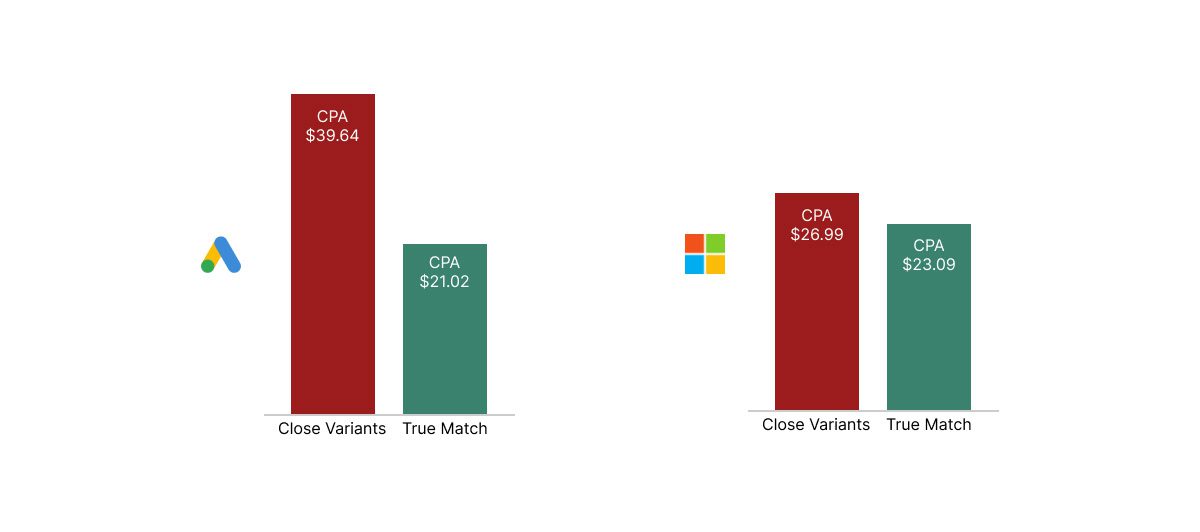
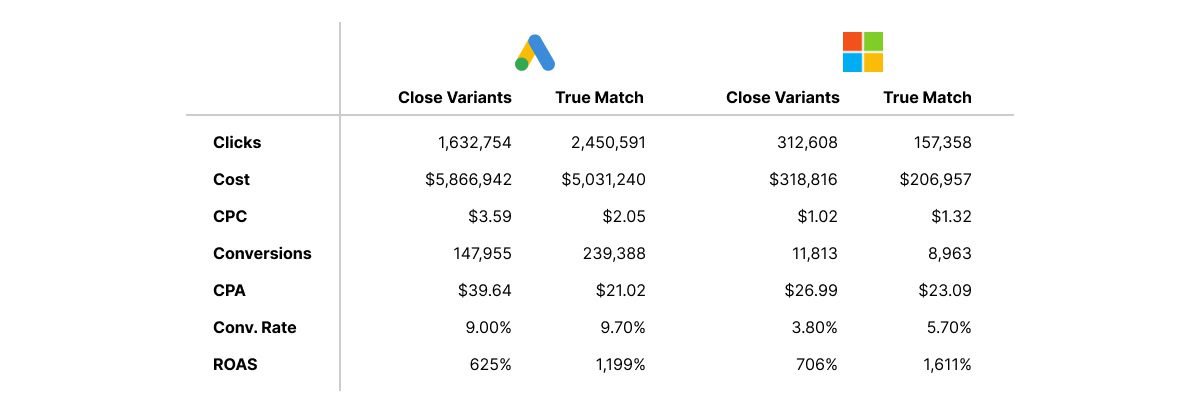
Google Ads was able to maintain its conversion rate, but it chased more expensive clicks to achieve it…in fact, clicks at almost double the average CPC of true match! Result: their CPA of CVs worked out roughly double the CPA of true match.
Microsoft Ads only saw slightly poorer CPA performance within CVs; their conversion rate was much lower compared to true match, but their saving grace was that they had significantly lower CPCs, and you can afford to have a lower conversion rate if your click costs are also lower. End outcome? Microsoft Ads CPA on CVs was only slightly more expensive when compared to their CPA on true matches; a pleasant surprise 🙂.
Image created by Adpulse, May 2024
ROAS Results:
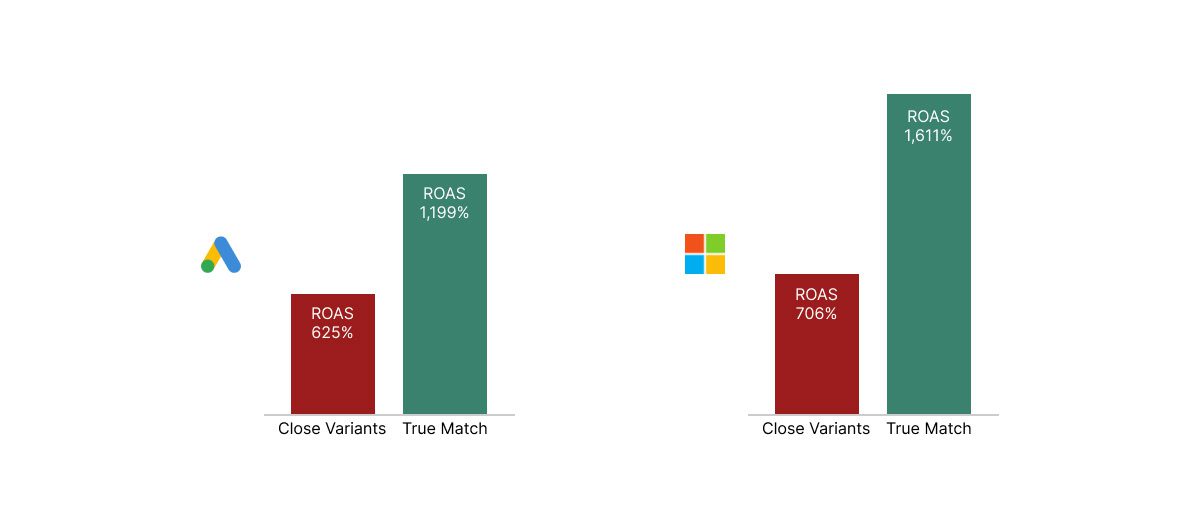
Both platforms showed a similar story; CVs delivered roughly half the ROAS of their true match cousins, with Microsoft Ads again being stronger overall.
Image created by Adpulse, May 2024
Underlying Data:
For the data nerds amongst us (at Adpulse we self-identify here ✋!)
Image created by Adpulse, May 2024
TL;DR
Close variant search terms consume, on average, more than half an advertiser’s budget whilst in most cases, performing significantly worse than search terms that actually match the keywords. How much worse? Read above for details ^. Enough that managing their impact effectively could well be one of your largest optimization levers toward driving significant improvements in account ROI.