Microsoft Ads made some significant enhancements for ads in Copilot last week.
Not only have they made updates to the Copilot user experience, they’ve integrated more AI features for advertisers within Microsoft Ads.
These updates continue to shape how users interact with Copilot and how advertisers interact with the Microsoft Ads platform.
Let’s take a look at the new updates rolling out.
New Streamlined Experience for Ads in Copilot
Part of the evolution of Microsoft Copilot is aiming to simplify, yet personalize, the user’s digital experience.
The update will now better depict the difference between an organic listing and a sponsored conversation within Copilot.
They’re making that happen by featuring ads in Copilot below the Copilot organic response.
To make the experience more relevant to users, there will be fewer annotations and extensions shown.
Additionally, ads will now be triggered based on the whole conversation within Copilot, not just the last prompt a user gives.
Copilot has released a feature called “ad voice” which will introduce how the ads are relevant and connected to their Copilot conversation. This is shown before an ad blocker to give the user a chance to experience the ads within the conversation.
The updated experience will roll out later this month, starting on copilot.microsoft.com, and then will expand to both iOS and Android apps, along with the experiences in Bing and Microsoft Edge.
New Generative AI Tools in Microsoft Ads Platform
On the other side of Copilot updates, there’s a few new features using Copilot’s AI technologies to help advertisers boost productivity and insights.
Diagnostics Tool
The new Diagnostics feature in Copilot for Microsoft Ads will help lend a hand to advertisers to review items like:
Campaign setup
Assess overall account health
Diagnose where to shift attention or focus to
Provide next steps on a diagnosis
This takes place within the Copilot conversation experience and is set to start piloting later this month.
It’s goal is to save advertisers time on day-to-day campaign management so they can spend more time analyzing and optimizing their accounts.
Performance Snapshot
Another new feature within Copilot for Microsoft Ads is the performance snapshot.
Similar to the diagnostics tool, advertisers will use the conversational experience to ask Copilot how their accounts are doing.
They can get insights on items like:
Summary of key insights
Account or campaign key insights
Trends
Any anomalies
And more.
The performance snapshot will also start piloting later this month, and will gradually roll out to all eligible regions when available.
Summary
Microsoft continues to develop and evolve its solutions from direct feedback from users and advertisers, which is a welcome experience for advertisers alike.
For advertisers already using Microsoft Ads, look for these key features in the upcoming weeks or months.
If you’re not currently using Microsoft Ads, it may be worth testing out a portion of your PPC budget this season to compare how its performance measures up against your Google Ads campaigns.
We’ll explore four key themes that can drive more successful international PPC results:
Keyword localization.
Geo-specific bid adjustments.
Market-specific creative adaptation.
Leveraging automation tools for international scaling.
1. Keyword Localization: Translating Intent, Not Just Language
Keyword localization is a cornerstone of international PPC success, but it’s often misunderstood as a simple translation exercise.
When translating keywords from one language to another, it’s not a “2+2=4” equation most of the time.
In reality, it’s much more complex.
Keyword localization involves understanding the intent behind searches and adapting keywords to match the local language, cultural context, and user behavior.
Steps To Effective Keyword Localization
Market Research: Before diving into translation, research how consumers in the target country search for products or services. This involves understanding search intent, popular terms, slang, and regional dialects.
Translation with a twist: Work with native speakers or linguists familiar with the market. Tools like Google Translate can give you a starting point, but they won’t capture cultural subtleties. Manual keyword research in local search engines is vital.
Use local search engines: Google may dominate globally, but other regions may favor different search engines. Baidu in China, Yandex in Russia, and Naver in South Korea have distinct algorithms and keyword trends. Tailor your keywords to the dominant platform in each market.
Test and optimize: International markets are fluid. What works in one month might need refinement in the next. Regularly review performance and optimize based on search trends, conversion data, and shifting customer behaviors.
For example, in Spain, the keyword “coches baratos” (cheap cars) may seem like a direct translation of its English counterpart.
However, further research might reveal that “ofertas coches” (car deals) or “vehículos económicos” (affordable vehicles) performs better depending on user intent.
2. Geo-Specific Bid Adjustments: Tailor Bids For Performance By Region
International campaigns are prone to fluctuations in performance, driven by differences in local competition, purchasing power, and user behavior.
Geo-specific bid adjustments allow you to tailor your bidding strategy to the realities of each market, maximizing return on ad spend (ROAS).
Below are some best practices for geo-specific bidding:
Analyze Regional Performance: Use data to assess performance on a country or even city level. Look for patterns like higher conversion rates in certain regions and adjust bids accordingly. This is especially important in diverse markets where sub-regions may perform differently, like the UK or Canada.
Adjust Bids Based on Currency Value and Buying Power: Regions with lower purchasing power or fluctuating currency values may require different bid strategies. In some markets, a lower cost-per-click (CPC) approach could help maintain profitability.
Consider Time Zone Differences: Adjust bids based on peak performance hours in each time zone. A broad international campaign can benefit from time-based adjustments that ensure ads show during peak periods in each country.
For instance, if your campaign targets both New York and Berlin, you may find that your peak performance hours vary drastically, necessitating different bid adjustments to maximize efficiency.
In this instance, it’s likely worth segmenting your campaigns by region to account for maximum return on investment or ROI in each region.
In larger enterprise accounts, most regions have different audience sizes, which require different budgets.
If your brand falls into that category, it may be worth creating a separate Google Ads account per region, which can roll up into one MCC account for easier management.
3. Market-Specific Creative Adaptation: Speak The Local Language Through Ad Copy
One of the most common mistakes in international PPC campaigns is failing to adapt ad creatives to local contexts.
Just as keyword localization requires cultural adaptation, ad creatives must be tuned to resonate with local audiences.
A few approaches to localized creative to think about include:
Ad Copy and Messaging: Localize ad copy to reflect cultural preferences, holidays, humor, and common phrases. Avoid literal translations that may miss the mark. Collaborate with local copywriters who understand the nuances of language and sentiment.
Visual Adaptations: Imagery that works in one region may not resonate in another. If your ad visuals feature people, clothing, or settings, make sure they align with local norms and expectations.
Calls to Action (CTAs): CTAs should be adapted based on local shopping behaviors. In some regions, urgency works well (“Buy Now”), while in others, a softer approach may perform better (“Learn More” or “Discover”).
For example, a successful ad campaign in the US using a humorous tone may need to be entirely rethought for a market like Japan, where subtlety and respect play a bigger role in advertising.
4. Leveraging Automation Tools For International Scaling
Managing international PPC campaigns across multiple markets can quickly become overwhelming.
Automation tools, both native to ad platforms and third-party solutions, can help streamline campaign management while still allowing for localized control.
Automation Tactics To Help Scale International PPC Campaigns
Smart Bidding: Utilize Google or Microsoft’s automated bidding strategies tailored to individual market performance. Smart bidding leverages machine learning to optimize bids for conversions or ROAS, adjusting bids based on real-time data.
Dynamic Search Ads (DSAs): Dynamic Search Ads can help expand your reach by automatically generating ad headlines based on your website’s content. For international campaigns, ensure that your website is properly localized to ensure the DSAs serve relevant, accurate ads.
Automated Rules and Scripts: Set up automated rules or scripts to adjust bids, pause underperforming keywords, or raise budgets during peak times. For example, you might set rules to increase bids during holidays specific to individual regions, like Singles’ Day in China or Diwali in India.
Automation tools should be used to complement your manual efforts, not replace them. While they can help manage large campaigns more efficiently, regular oversight and optimization are still essential.
A Holistic Approach To International PPC Success
Expanding into international PPC campaigns presents both challenges and opportunities.
Success depends on taking a holistic approach that incorporates keyword localization, tailored bidding strategies, localized creatives, and effective use of automation.
By adapting your strategies to each specific market, you’ll be able to tap into the unique search behaviors, cultural nuances, and competitive dynamics of global consumers.
Remember that the global PPC landscape is constantly evolving, and regular monitoring, testing, and optimization will be key to staying ahead of the competition.
Whether you’re managing campaigns in-house or as part of an agency, these best practices will help you optimize your international PPC efforts and drive better performance across borders.
The much anticipated launch of ads in AI Overviews is officially live.
Originally announced in May’s Google Marketing Live event, it’s now available for mobile users in the United States.
Through several months of testing, early findings show ads in AI Overviews have been helpful to quickly connect users to brands at the exact right moment.
How It Works
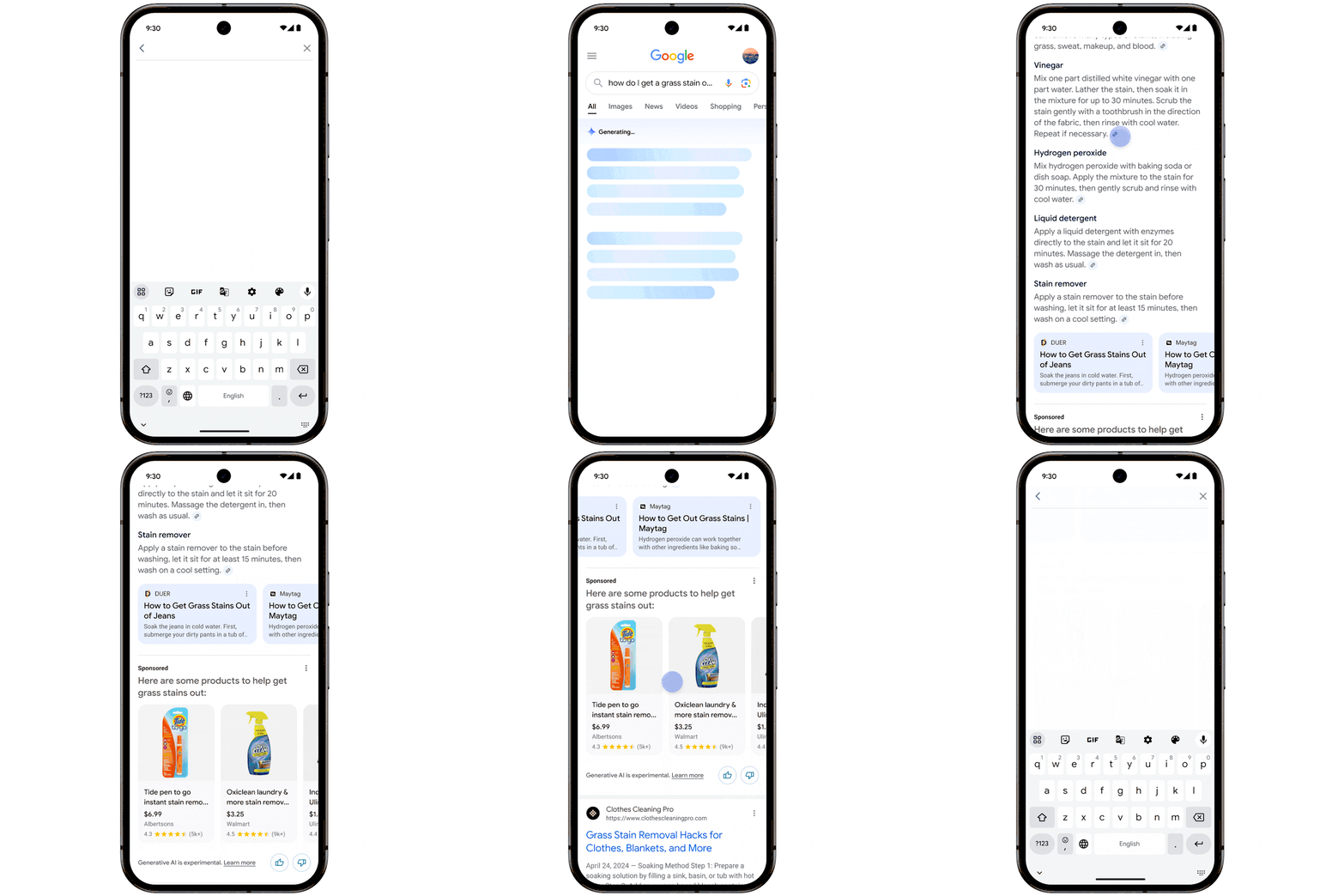
When a user searches for something in Google, a new ad format is shown in the AI Overview section along with other helpful content that is relevant to the query.
If a user asks a question, their AI Overviews results may include helpful solutions, articles related to their search, or a new Shopping ad format.
For ads shown in AI Overviews, they’ll still have the standard “Sponsored” label to denote an ad.
What This Means For Advertisers
For those already running Shopping, Performance Max, or AI-powered Search ads, your ads are now eligible to serve in those placements.
No other action is needed on your part to show ads in AI Overviews.
Considering AI Overviews is the first experience a user sees when searching on Google, this can be a great way to get in front of your audience sooner.
As other ad types are now being pushed further down the fold, capturing as many relevant ad placements as you can will be crucial, especially during key research moments.
Google also mentioned in their announcement that having different types of information in AI Overviews can help alleviate the need for additional searches.
If that’s the case, we could see search trends or volume decrease over time, but it’s still too early to tell.
Serving ads in the AI Overviews section is an opportunity to introduce your brand and products earlier on during the customer journey, such as when they’re asking a question.
This can lead to better brand recall, keeping you top of mind in their decision making process.
Looking Ahead
It’s not clear yet how advertisers will be able to segment campaign performance by these new placements.
Since campaign types like Search, Shopping and Performance Max are automatically eligible to show ads in AI Overviews, it’s also unclear if they will be able to opt out of showing in certain places, like they can for the Search Partner Network, for example.
We have reached out to the Google Ads Liaison for more information and will update this story as more becomes available.
Google is rolling out new Google Lens features to make visual shopping easier for users.
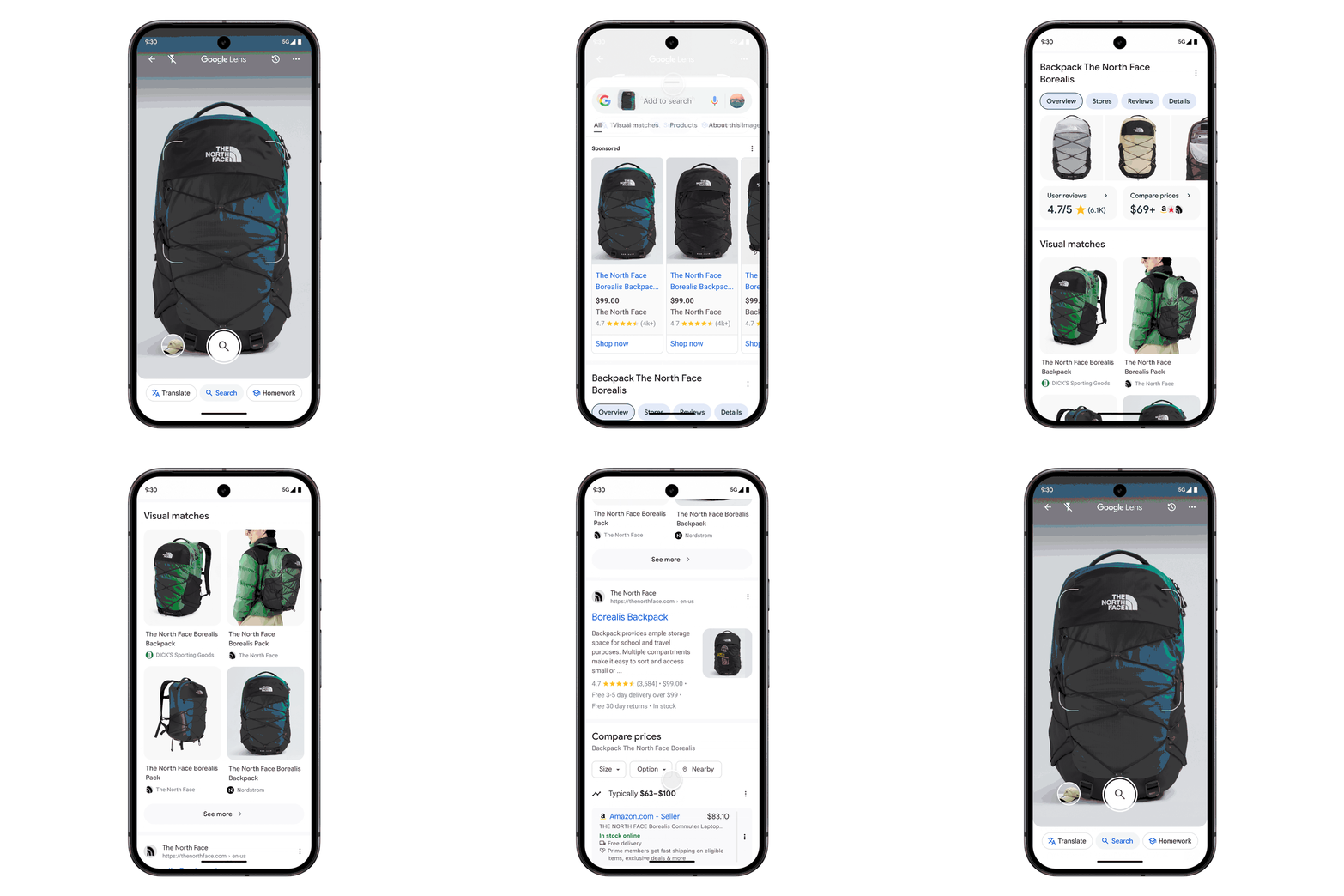
Starting this week, users will now start to see detailed product information when using Google Lens to search.
This update gives advertisers a new opportunity to showcase their products in a new way that engages users in real time.
A New Results Page For Google Lens Searches
Rolling out today, Google Lens will show more prominent product information when the product is identified.
Users will now be able to see information for products like:
Price comparisons across retailers
Current deals on the product
Product reviews
Where to buy
This update is fueled by the Google Shopping Graph, and that’s where Google Shopping Ads come into play.
New Shopping Ads Placement In Time For The Holidays
With the new Google Lens results experience, Shopping ads will now be eligible to show in this placement.
While it’s rolling out today for both Android and iOS, it’s only available in select countries as of now.
Additionally, Google is prioritizing Shopping ad placements for top holiday categories including:
Toys
Electronics
Beauty.
How Will This New Shopping Ads Placement Work?
Your Google Shopping ads will show up in the same format as it currently does for keyword or query searches.
The benefit of this is that users are already familiar with that format, and are more likely to engage with the well-known format.
As visual search continues to become more prominent, it’s more important than ever to keep an up-to-date product feed with relevant titles, product descriptions, and accurate details in order to show for Google Lens searches.
If you’re an advertiser, no additional action is required to show up for the new Google Lens shopping ads experience.
Looking Ahead
Since the announcement is new and the experience is rolling out today, it’s not available to all countries or product categories yet.
Google will continue to roll out this experience to other product categories throughout Q4 and into 2025 as it evolves.
There’s no word yet on the type of reporting advertisers will have access to with this new placement. We’ll continue to update as more information becomes available.
In case you missed it, Google just rolled out the AI Image Editor to support additional campaign types.
Originally launched for Performance Max campaigns, it now supports these additional types:
Search
Display
App
Demand Gen.
If you’re not familiar with the AI Image Editor tool, have no fear!
This tutorial, originally posted by Google Ads, breaks down how you can start taking advantage of the tool to save you time and money.
What Can the AI Image Editor Do?
With the help of Google AI, the image editor tool can help create new high quality image assets, as well as edit existing assets in your PPC campaigns.
When it comes to editing image assets, there’s a wide variety of features to choose from. These include:
Removing image background
Replacing image background
Add and erase objects and images
Extend images outside their existing aspect ratio.
How to Find the Google Ads AI Image Editor Tool
There are two different ways to access the AI image editor tool in Google Ads.
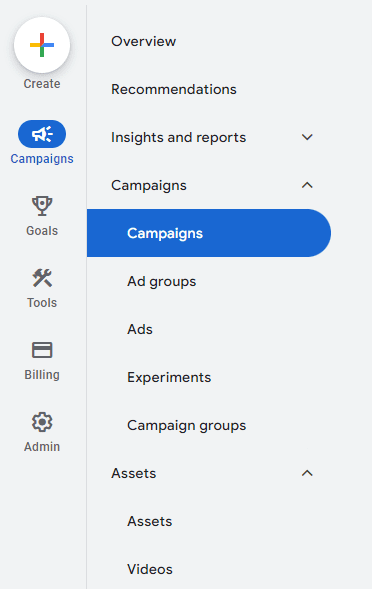
On the left-hand side of the menu, click the “+” Create button, then choose “Asset”.
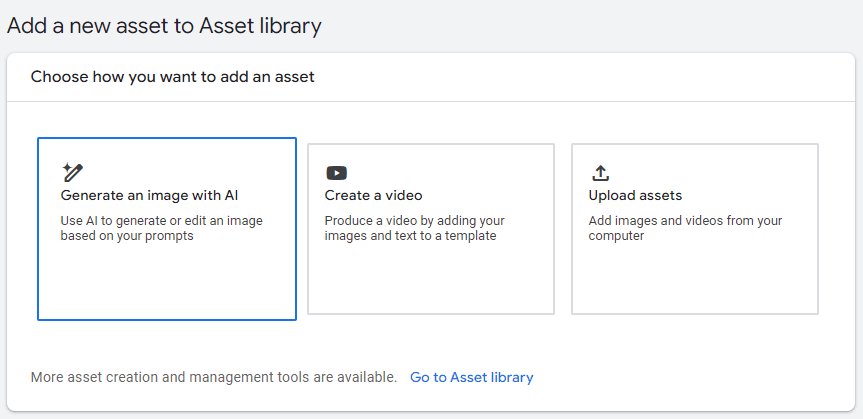
Additionally, you can click “Assets” in the left-hand menu to be taken to the Asset Library.
From there, you choose “Generate an image with AI” to get started.
To generate a new image, you’ll need to give a description of what you want it to look like.
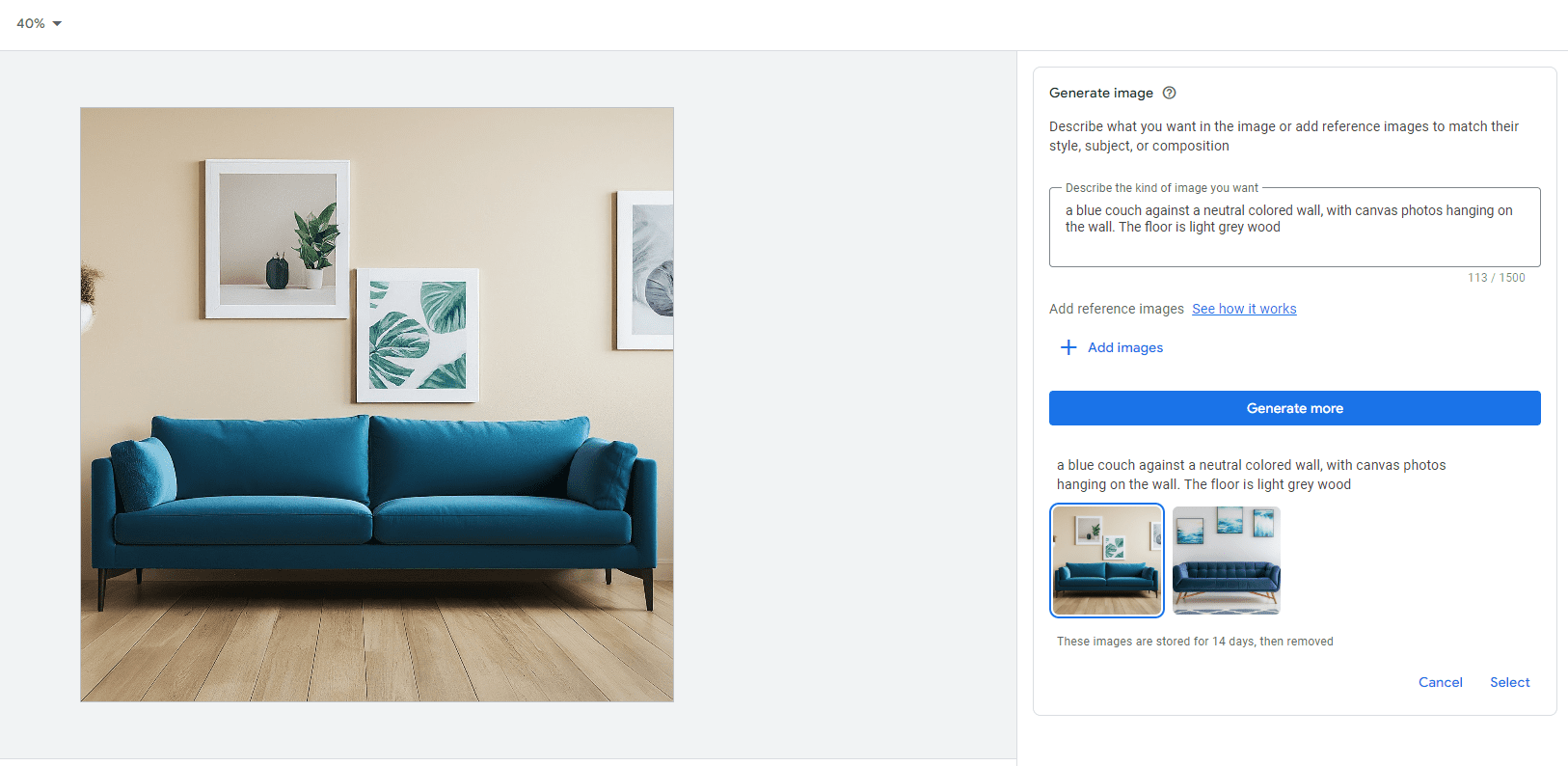
In the example below, I typed “A blue couch against a neutral colored wall, with canvas photos hanging on the wall. The floor is light grey wood.”
In the example, it generated two images to choose from, with the option to generate more.
Once you’ve selected the image you want to use, then you can get to editing more.
How to Edit Image Assets with Google AI
Now that you’ve selected your image to use, you can edit the following aspects:
Remove background
Erase object
Add new object
Replace object
Expand image
Adjust color
Click on any of the options on the right-hand side to start editing.
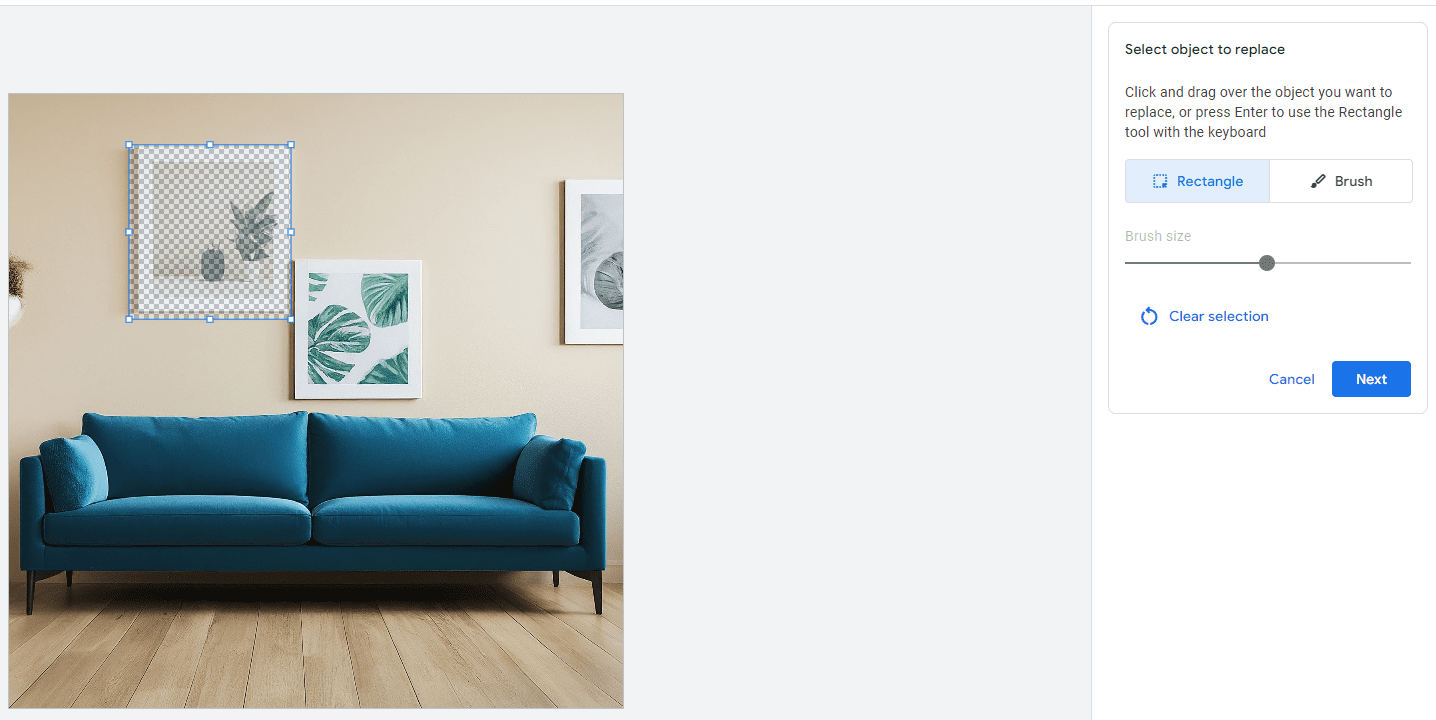
In this example, say I want to remove one of the canvas photos in the background and replace it with a clock.
First, click on “Replace object”, then click and drag over the canvas photo. Then, click “Next”.
Then, to replace an object, create a description of the type of object you want to replace the selected object with. Then, click “Generate”.
Continuing in this example, I wrote, “A square clock that matches the blue color couch.”
In this example, Google AI gave me three options to choose from, with the option to generate more.
You can follow these examples with the other functionalities all within the AI image editor tool.
Summary
The Google Ads AI image editor can help save advertisers time and resources with asset creation.
It gives you creative flexibility with built-in controls to ensure the images meet your level of standards and produce accurate content to complement your ads.
Now that the tool has expanded to more campaign types, it opens up new possibilities for more brands while keeping their brand identity aligned.
Will you be trying the AI image editor tool out anytime soon?
However, setting up your first campaign can feel overwhelming if you’re new to the game. Even if you’re a PPC pro, it can be hard to keep up with all the changes in the interfaces, making it easy to miss key settings that can make or break performance.
In this guide, you’ll find the essential steps to set up a successful paid search campaign, ensuring you’re equipped with the knowledge to make informed decisions that lead to positive results.
Step 1: Define Your Conversions & Goals
Establishing clear goals and understanding what constitutes a conversion is the foundation of a successful paid search campaign.
This clarity ensures that every aspect of your campaign is aligned with your business objectives.
Identify Your Key Performance Indicators (KPIs)
In order to identify those KPIs, it’s crucial to understand the overarching business objectives. Begin by mapping out your broader business goals.
From there, you can define specific KPIs for each objective. Some examples include:
Sales: Number of transactions, revenue generated.
Leads: Number of form submissions, phone calls, appointments created.
Traffic: Click-through rate (CTR), number of sessions.
Brand Awareness: Impressions, reach.
Set Up Conversion Tracking
Knowing your goals is one thing, but being able to accurately measure them is a completely different ballgame.
Both Google and Microsoft Ads have dedicated conversion tags that can be added to your website for proper tracking.
Additionally, Google Analytics is a popular tool to track conversions.
Choose what conversion tags you need to add to your website and ensure they’re added to the proper pages.
In this example, we’ll use Google Ads.
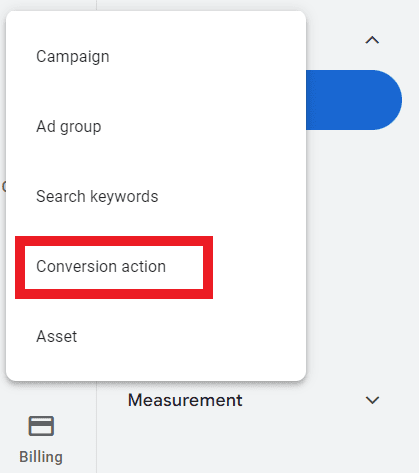
To set up conversion tracking using a Google Ads tag, click the “+” button on the left-hand side of Google Ads, then choose Conversion action.
Screenshot from Google Ads, September 2024
You’ll choose from the following conversions to add:
Website.
App.
Phone calls.
Import (from Google Analytics, third party, etc.).
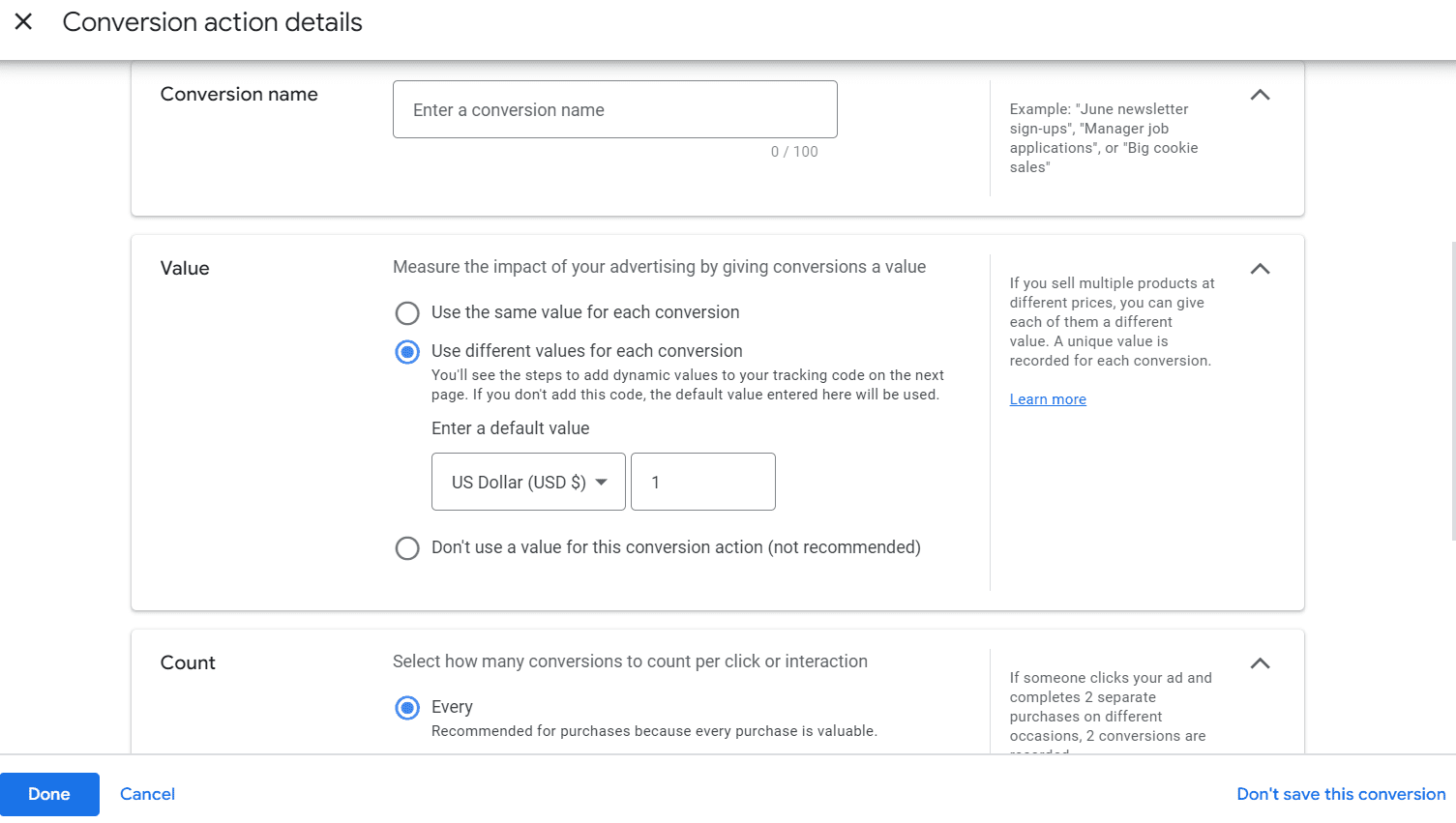
After choosing, Google Ads can scan your website to recommend conversions to add, or you have the option to create a conversion manually:
Screenshot from Google Ads, September 2024
During this step, it’s essential to assign value(s) to conversions being created, as well as the proper attribution model that best represents your customer journey.
Most PPC campaigns are now using the data-driven model attribution, as opposed to a more traditional “last click” attribution model. Data-driven attribution is especially helpful for more top-of-funnel campaigns like YouTube or Demand Gen campaign types.
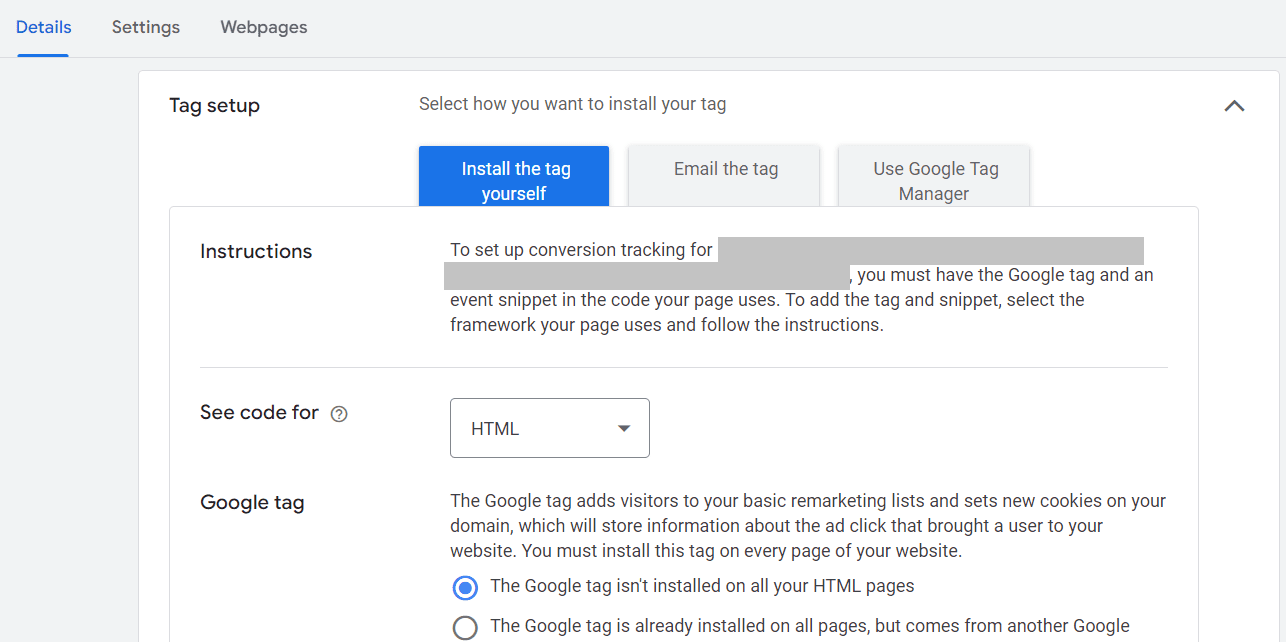
After the conversion has been created, Google provides the necessary code and instructions to add to the website.
Screenshot from Google Ads, September 2024
Enable Auto-Tagging
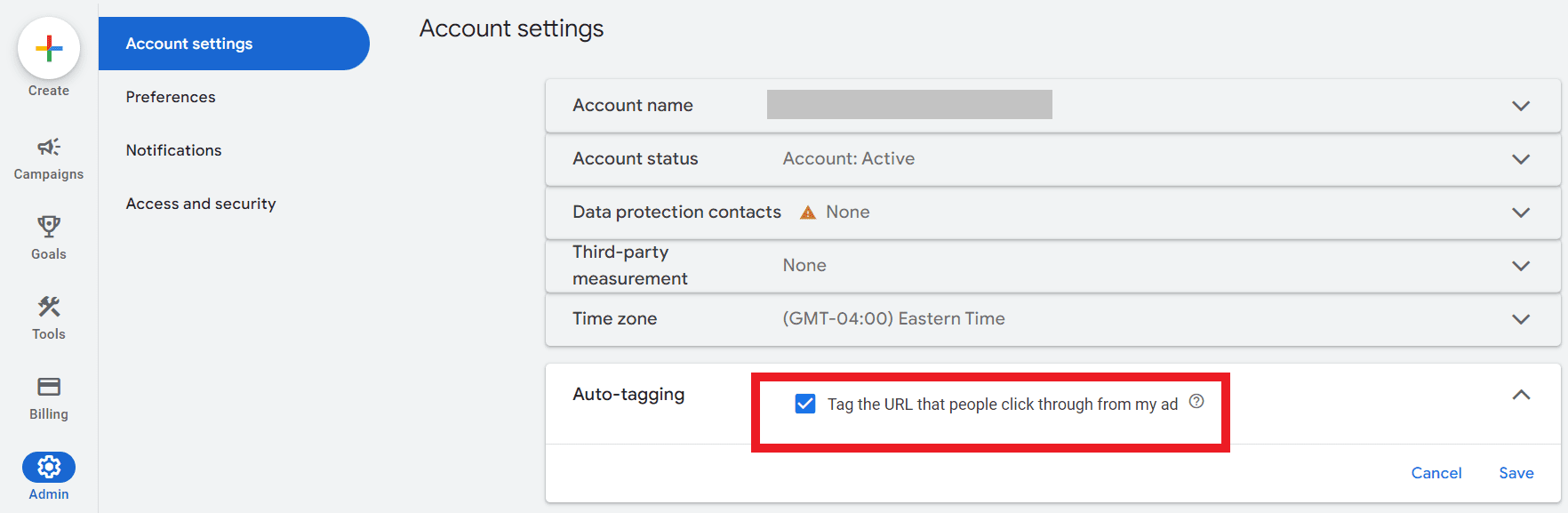
Setting up auto-tagging from the get-go eliminates the need to append UTM parameters to each individual ad, saving you time during setup.
It also allows for seamless data import into Google Analytics, enabling detailed performance analysis within that platform.
To enable auto-tagging at the account level, navigate to Admin > Account settings.
Find the box for auto-tagging and check the box to tag ad URLs, then click Save.
Screenshot from Google Ads, September 2024
Step 2: Link Any Relevant Accounts
Linking various accounts and tools enhances your campaign’s effectiveness by providing deeper insights and seamless data flow.
Now, this step may come sooner if you plan to import conversions from Google Analytics into Google Ads, as the accounts will have to be linked prior to importing conversions.
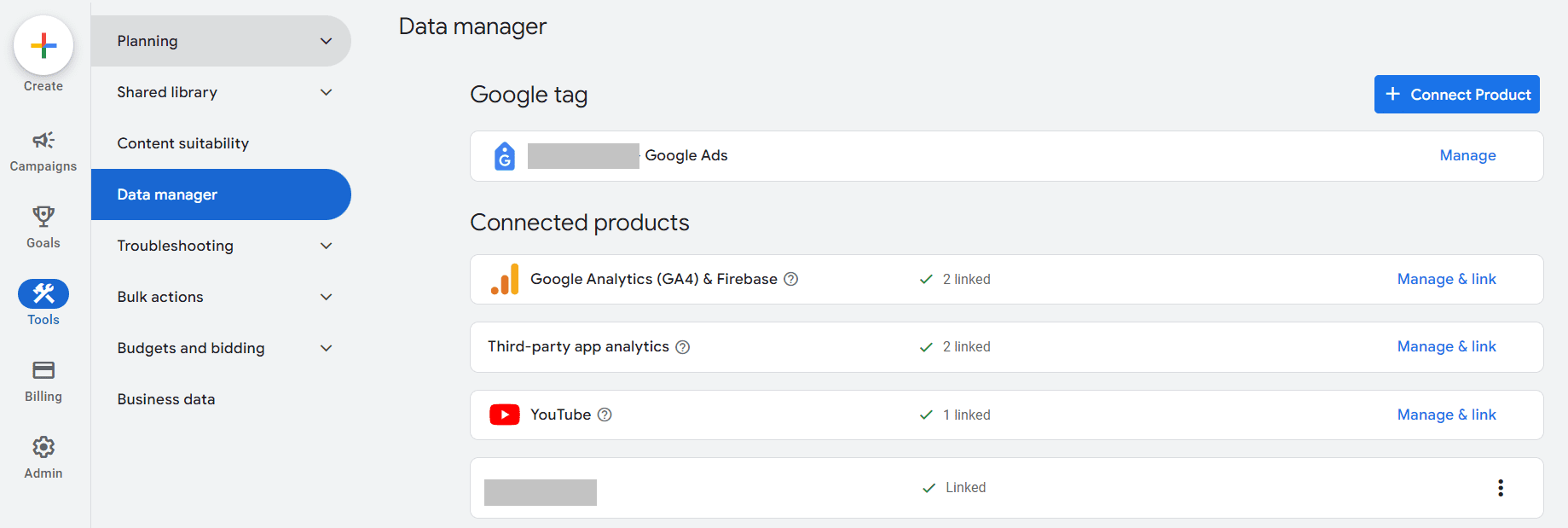
To link accounts, navigate to Tools > Data manager.
Screenshot from Google Ads, September 2024
You can link accounts such as:
Google Analytics.
YouTube channel(s).
Third-party analytics.
Search Console.
CRM tools (Salesforce, Zapier, etc.).
Ecommerce platforms (Shopify, WooCommerce, etc.).
Tag Manager.
And more.
Step 3: Conduct Keyword Research & Structure Your Campaign
Now that you’ve got the foundations of goals and conversions covered, it’s time to complete some keyword research.
A robust keyword strategy ensures your ads reach the right audience, driving qualified traffic to your site.
Start With A Seed List
Not sure where to start? Don’t sweat it!
Start by listing out fundamental terms related to your products or services. Consider what your customers would type into a search engine to find you.
Doing keyword research into search engines in real-time can help discover additional popular ways that potential customers are already searching, which can uncover more possibilities.
Additionally, use common language and phrases that customers use to ensure relevance.
Use Keyword Research Tools
The Google Ads platform has a free tool built right into it, so be sure to utilize it when planning your keyword strategy.
All these insights help not only determine what keywords to bid on but also help form the ideal budget needed to go after those coveted keywords.
When researching keywords, try to identify long-tail keywords (typically, these are phrases with more than three words). Long-tail keywords may have lower search volume but have higher intent and purchase considerations.
Lastly, there are many paid third-party tools that can offer additional keyword insights like:
These tools are particularly helpful in identifying what competitors are bidding on, as well as finding gaps or opportunities that they are missing or underserving.
Group Keywords Into Thematic Ad Groups
Once you have your core keywords identified, it’s time to group them together into tightly-knit ad groups.
The reason for organizing them tightly is to increase the ad relevance as much as possible. Each ad group should focus on a single theme or product category.
As a good rule of thumb, I typically use anywhere from five to 20 keywords per ad group.
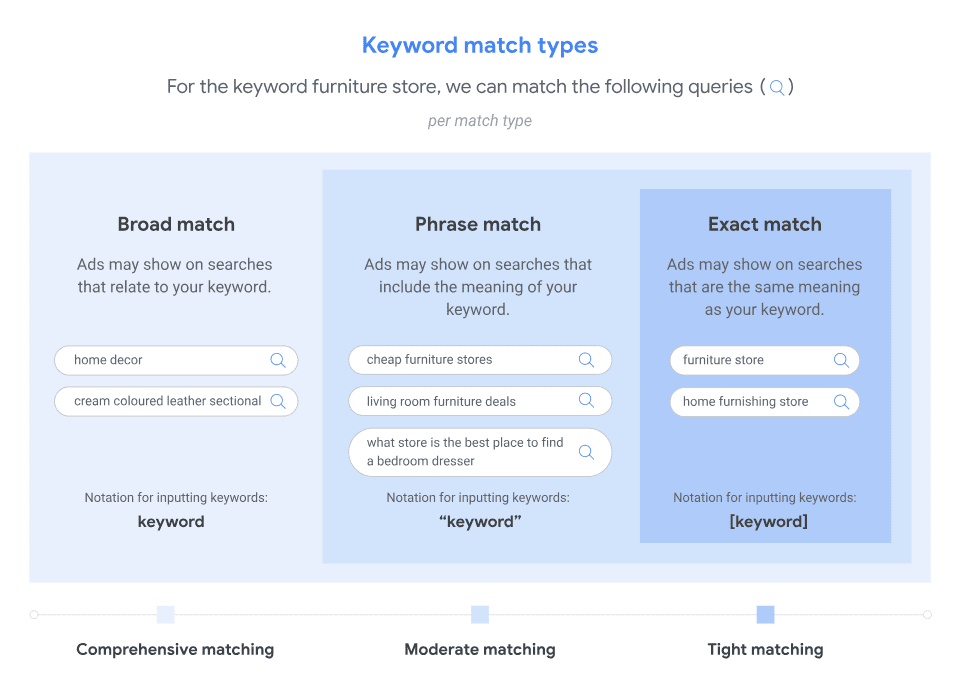
Another item to keep in mind is which match types to use for keyword bidding. See the example below from Google on the three keyword match types available:
Broad.
Phrase.
Exact.
Image credit: support.google.com, September 2024
Create A Hierarchical Campaign Structure
Once your ad groups have been segmented, it’s time to build the campaign structure(s).
You’ll want to divide your account into campaigns based on broader categories, such as:
Product lines.
Geographic regions.
Marketing goals.
Search volume.
For example, you can create one campaign for “Running Shoes.” Within that campaign, you create three ad groups:
Men’s running shoes.
Women’s running shoes.
Trail running shoes.
Now, there may be times when you have a keyword with an abnormally higher search volume than other keywords within a particular category.
Depending on your budget, it may be worth segmenting those high-volume search term(s) into its own campaign solely for better budget optimization.
If a high-volume keyword is grouped into ad groups with low-volume keywords, it’s likely that most of the ads served will be for the high-volume keyword.
This then inhibits the other low-volume keywords from showing, and can wreak havoc on campaign performance.
Utilize Negative Keywords
Just as the keywords you bid on are crucial to success, so are the negative keywords you put into place.
Negative keywords can and should be added and maintained as ongoing optimization of any paid search campaign strategy.
The main benefit of negative keywords is the ability to exclude irrelevant traffic. They prevent your ads from showing on irrelevant searches, saving budget and improving CTR over time.
Negative keywords can be added at the ad group, campaign, or account level.
Step 4: Configure Campaign Settings
Now that you’ve got the campaign structure ready to go, it’s time to start building and configuring the campaign settings.
Campaign settings are crucial to get right in order to optimize performance towards your goals.
There’s something to be said with the phrase, “The success is in the settings.” And that certainly applies here!
Choose The Right Bidding Strategy
You’ll have the option to choose a manual cost-per-click (CPC) or an automated bid strategy. Below is a quick rundown of the different types of bid strategies.
Manual CPC: Allows you to set bids for individual keywords, giving you maximum control. Suitable for those who prefer more hands-on management.
Target Return on Ad Spend (ROAS): Optimizes bids to maximize revenue based on a target ROAS you set at the campaign level.
Target Cost Per Acquisition (CPA): Optimizes bids to achieve conversions at the target CPA you set at the campaign level.
Maximize Conversions: Sets bids to help get the most conversions for your budget.
Set Your Daily Budget Accordingly
Review your monthly paid search budget and calculate how much you can spend per day throughout the month.
Keep in mind that some months should be different to account for seasonality, market fluctuations, etc.
Additionally, be sure to allocate campaign budgets based on goals and priorities to maximize your return on investment.
You’ll also want to keep in mind the bid strategy selected.
For example, say you set a campaign bid strategy with a Target CPA of $30. You then go on to set your campaign daily budget of $50.
That $50 daily budget would likely not be enough to support the Target CPA of $30, because that would mean you’d get a maximum of two conversions per day, if that.
For bid strategies that require a higher CPA or higher ROAS, be sure to supplement those bid strategies with higher daily budgets to learn and optimize from the beginning.
Double-Check Location Settings
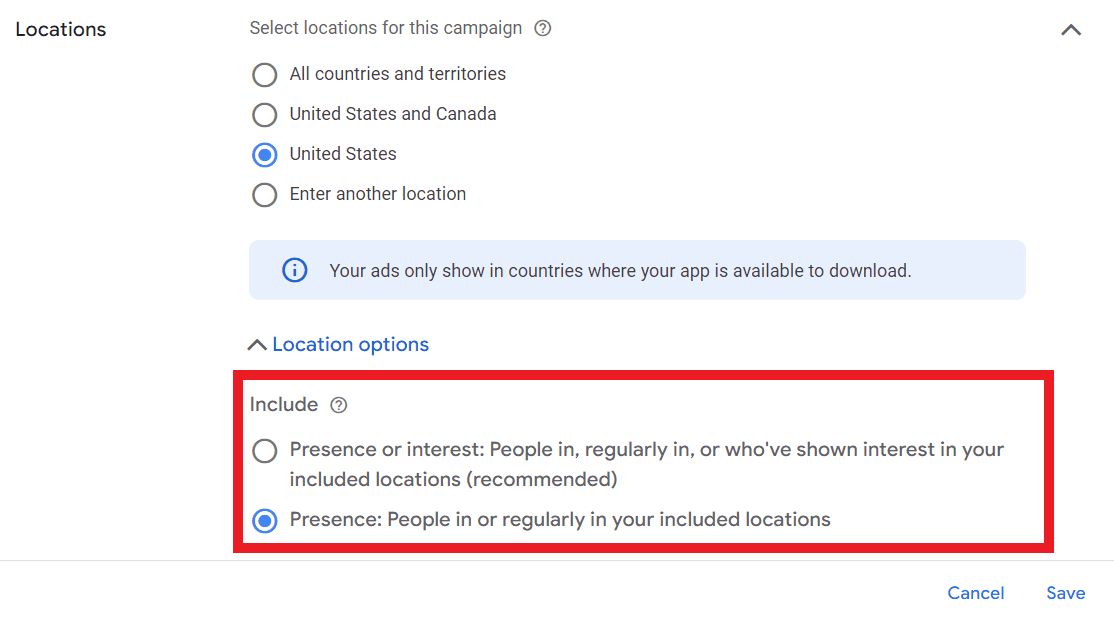
When choosing locations to target, be sure to look at the advanced settings to understand how you’re reaching those users.
For example, if you choose to target the United States, it’s not enough to enter “United States” and save it.
There are two options for location targeting that many fail to find:
Presence or interest: People in, regularly in, or who’ve shown interest in your included locations.
Presence: People in or regularly in your included locations.
Screenshot from Google Ads, September 2024
Google Ads defaults to the “presence or interest” setting, which I’ve seen time and time again where ads end up showing outside of the United States, in this example.
Again, the success is in the settings.
There are more settings to keep in mind when setting up your first paid search campaign, including:
Ad scheduling.
Audience targeting.
Device targeting.
And more.
Step 5: Write Compelling Ad Copy
Your ad copy is the gateway to attracting qualified customers.
Crafting the perfect mix of persuasion and relevancy into your ad copy can significantly impact your campaign’s success.
Create Attention-Grabbing Headlines
The headline is the most prominent part of the ad copy design on the search engine results page. Since each headline has a maximum character limit of 35 characters, it is important to make them count.
With Responsive Search Ads, you can create up to 15 different headlines, and Google will test different variations of them depending on the user, their search query, and multiple other factors to get that mix right.
Below are some tips for captivating a user’s attention:
Use Primary Keywords: Include your main keywords in the headline to improve relevance and Quality Score.
Highlight Unique Selling Points (USPs): Showcase what sets your product or service apart, such as free shipping, 24/7 support, or a unique feature.
Incorporate Numbers and Statistics: Use numbers to catch attention, like “50% Off” or “Join 10,000+ Satisfied Customers.”
Include a Strong Call-to-Action (CTA): Encourage immediate action with phrases like “Buy Now,” “Get a Free Quote,” or “Sign Up Today.”
Write Persuasive Descriptions
Description lines should complement the headline statements to create one cohesive ad.
Typically, two description lines are shown within any given ad. Each description line has a 90-character limit.
When creating a Responsive Search Ad, you can create four different descriptions, and then the algorithm will show variations of copy tailored to each individual user.
Expand on Headlines: Provide additional details that complement your headline and reinforce your message.
Address Pain Points: Highlight how your product or service solves specific problems your audience faces.
Use Emotional Triggers: Appeal to emotions by emphasizing benefits like peace of mind, convenience, or excitement.
Incorporate Keywords Naturally: Ensure the description flows naturally while including relevant keywords to maintain relevance.
Make Use Of Ad Assets (Formerly Extensions)
Because of the limited character count in ads, be sure to take advantage of the myriad of ad assets available as complements to headlines and descriptions.
Ad assets help provide the user with additional information about the brand, such as phone numbers to call, highlighting additional benefits, special offers, and more.
Some of the main ad assets used include:
Sitelinks.
Callouts.
Structured Snippets.
Calls.
And more.
You can find a full list of available ad assets in Google Ads here.
Step 6: Ensure An Effective Landing Page Design
You’ve spent all this time crafting your paid search campaign strategy, down to the keyword and ad copy level.
Don’t stop there!
There’s one final step to think about before launching your first paid search campaign: The landing page.
Your landing page is where users land after clicking your ad. An optimized landing page is critical for converting traffic into valuable conversions and revenue.
Ensure Relevancy And Consistency
The content and message of your landing page should directly correspond to your ad copy. If your ad promotes a specific product or offer, the landing page should focus on that same product or offer.
Use similar language, fonts, and imagery on your landing page as in your ads to create a cohesive user experience.
Optimize For User Experience (UX)
If a user lands on a page and the promise of the ad is not delivered on that page, they will likely leave.
Having misalignment between ad copy and the landing page is one of the quickest ways to waste those precious advertising dollars.
When looking to create a user-friendly landing page, consider the following:
Mobile-Friendly Design: Ensure your landing page is responsive and looks great on all devices, particularly mobile, as a significant portion of traffic comes from mobile users.
Fast Loading Speed:Optimize images, leverage browser caching, and minimize code to ensure your landing page loads quickly. Slow pages can lead to high bounce rates.
Clear and Compelling Headline: Just like your ad, your landing page should have a strong headline that immediately communicates the value proposition.
Concise and Persuasive Content: Provide clear, concise information that guides users toward the desired action without overwhelming them with unnecessary details.
Prominent Call-to-Action (CTA): Place your CTA above the fold and make it stand out with contrasting colors and actionable language. Ensure it’s easy to find and click.
Step 7: Launch Your Campaign
Once you’ve thoroughly completed these six steps, it’s time to launch your campaign!
But remember: Paid search campaigns are not a “set and forget” strategy. They must be continuously monitored and optimized to maximize performance and identify any shifts in strategy.
Create a regular optimization schedule to stay on top of any changes. This could look like:
Weekly Reviews: Conduct weekly performance reviews to identify trends, spot issues, and make incremental improvements.
Monthly Strategy Sessions: Hold monthly strategy sessions to assess overall campaign performance, adjust goals, and implement larger optimizations.
Quarterly Assessments: Perform comprehensive quarterly assessments to evaluate long-term trends, budget allocations, and strategic shifts.
When it comes to optimizing your paid search campaign, make sure you’re optimizing based on data. This can include looking at:
Pause Underperforming Keywords: Identify and pause keywords that are not driving conversions or are too costly.
Increase Bids on High-Performing Keywords: Allocate more budget to keywords that are generating conversions at a favorable cost.
Refine Ad Copy: Continuously test and refine ad copy based on performance data to enhance relevance and engagement.
Enhance Landing Pages: Use insights from user behavior on landing pages to make data-driven improvements that boost conversion rates.
Final Thoughts
Setting up your first paid search campaign involves multiple detailed steps, each contributing to the overall effectiveness and success of your advertising efforts.
By carefully defining your goals, linking relevant accounts, conducting thorough keyword research, configuring precise campaign settings, crafting compelling ad copy, and optimizing your landing pages, you lay a strong foundation for your campaign.
Remember, the key to a successful paid search campaign is not just the initial setup but also ongoing monitoring, testing, and optimization.
Embrace a mindset of continuous improvement, leverage data-driven insights, and stay adaptable to maximize your campaign’s potential.
TikTok is no longer just a platform for viral dances and meme-worthy content.
With its latest feature, Search Ads, TikTok is positioning itself as a serious player in the world of paid search marketing.
Announced on September 24th, TikTok launched its highly anticipated Search Ads in the United States, giving marketers a new way to reach consumers when they are actively looking for content, products, or services on the platform.
This move opens up a world of possibilities for brands as we head into the most lucrative time of the year: the holiday shopping season.
What Makes TikTok Search Ads Different?
TikTok Search Ads aren’t just a copy of what we see on Google or Microsoft Ads. TikTok ads blend seamlessly into the organic content flow. The ads feel less intrusive, more engaging, and natural to users who are already in discovery mode.
TikTok’s advanced algorithm is another major advantage. The platform is known for keeping users engaged through relevant content suggestions.
Search Ads also benefit from this targeting power. Marketers can reach their desired audience based on demographics, behaviors, and interests.
Currently, Traffic and Web Conversion objectives are supported in the TikTok Ads Manager, allowing the opportunity to optimize for scale and performance.
A unique aspect of TikTok’s Search Ads is the ability to use video ads. TikTok, as a video-first platform, allows brands to create dynamic, visually appealing content to engage users.
The Power of Search on TikTok Today
Search is crucial in a consumer’s journey, signaling intent. Until now, TikTok was mainly a discovery platform.
With Search Ads, TikTok merges discovery and intent, allowing brands to engage users actively searching for specific things.
TikTok users conduct over 3 billion searches annually. People look for more than entertainment; they seek product reviews, tutorials, beauty tips, and more.
TikTok has become a favorite for Gen Z and Millennials looking for authentic, community-driven content. Search Ads give advertisers a chance to target these users when they’re ready to explore or buy.
Even though ads have been available in the search results before, brands now have direct control over what keywords their ads show up for.
For example, a skincare brand could target users searching for “best moisturizers for dry skin.” This puts brands in front of consumers when their intent to act is at its highest.
The Impact on Holiday Marketing Campaigns
The timing of TikTok Search Ads couldn’t be better for marketers preparing for the holidays. This time of year is highly competitive, with Black Friday and the Christmas season driving huge e-commerce sales.
Consumer search intent spikes during the holiday season. People are actively searching for gifts, deals, and product reviews.
TikTok Search Ads help brands capture demand at the right moment. Marketers can target users looking for “best gifts for dads” or “holiday outfit ideas,” ensuring their brand is visible when intent is highest.
With TikTok’s video-first format, brands can showcase products more creatively than static images or text.
Video ads allow marketers to show their products in action, whether through unboxing videos or tutorials. This resonates with TikTok’s audience, who love authentic, engaging content—especially during the holidays.
How to Get Started with TikTok Search Ads
If you’re looking to add TikTok Search Ads to your holiday strategy, here’s how to begin:
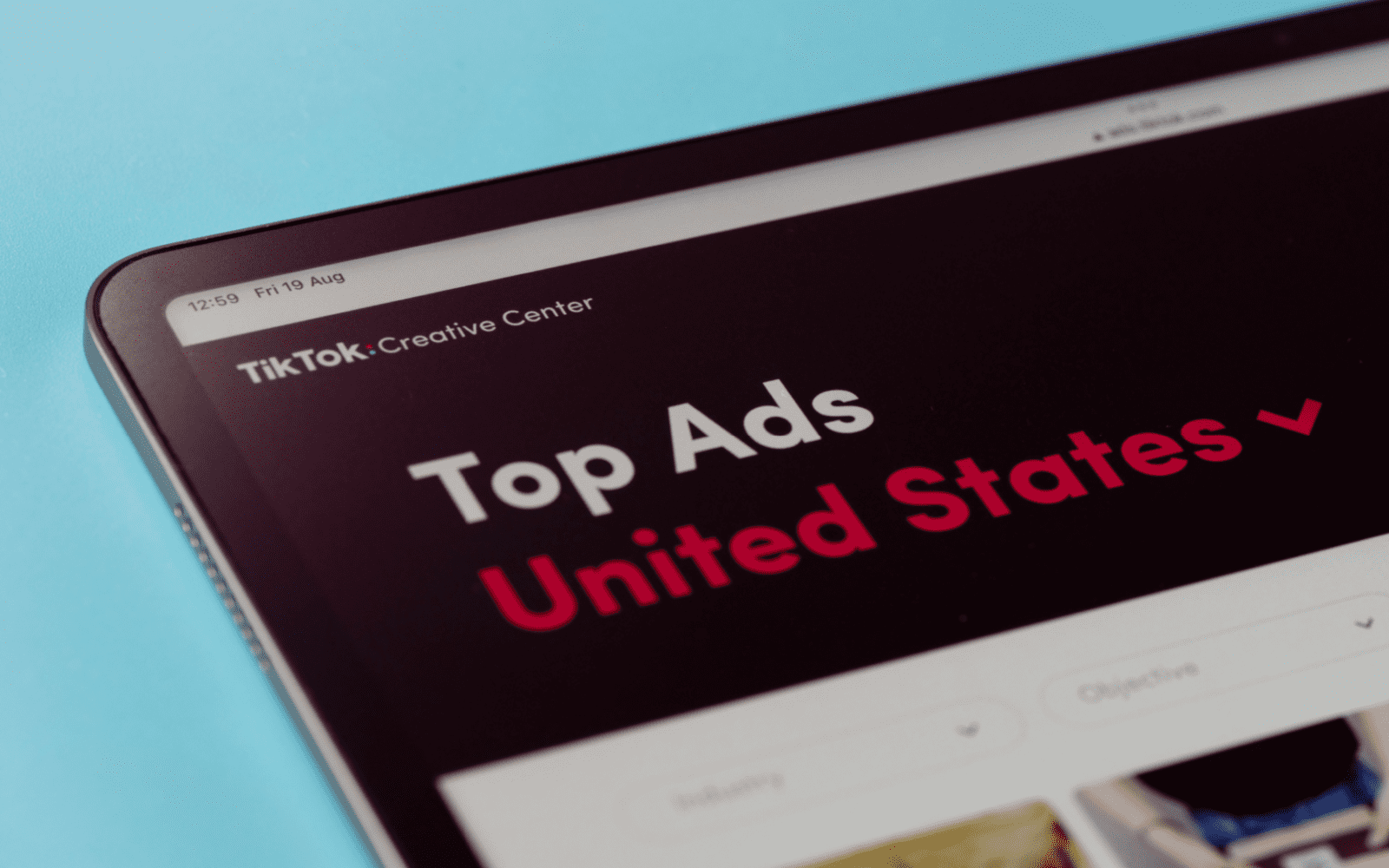
Identify Your Keywords: Understand what your audience searches for on TikTok. Use TikTok’s Creative Center to find trending keywords relevant to your industry.
Create Engaging Video Content: Make your ads visually appealing. They should fit into the organic content flow of TikTok.
Monitor Performance: Track impressions, clicks, and conversions in TikTok Ads Manager. Adjust your campaigns based on performance data.
Leverage TikTok’s Algorithm: Take advantage of TikTok’s powerful recommendation engine. Target the right users by setting up campaigns based on interests and behaviors.
To create your first TikTok Search Ads campaign, navigate to the TikTok Ads Manager.
When creating a new campaign, choose from either of the following campaign objectives to create a Search campaign:
Traffic
Website conversions
From there, the TikTok Ads Manager provides a new campaign flow with search-specific features. This includes a keyword research tool as well as the ability to add negative keywords.
TikTok Search Ads support both video and image carousel assets, which opens up the market to businesses who may not have video content readily available.
Final Thoughts
TikTok Search Ads provide a fresh way for brands to reach an engaged audience. As the holiday season nears, this feature allows marketers to target consumers when they’re ready to buy.
TikTok combines discovery with intent-driven advertising, making its search offering unique from other platforms like Google and Microsoft Ads.
This new feature could give your brand the edge it needs during the busiest shopping time of the year. Will you be making TikTok Search Ads part of your holiday PPC strategy this year?
For some years now (ever since Google Merchant Center was introduced in 2010), ecommerce advertisers have been working with product feeds.
It’s historically been a complex and often fragile process, but thanks to the introduction of Google Merchant Center Next, we have some new tools at our fingertips.
Here’s a look at how things are changing with Next.
The History Of Google Merchant Center
Back in the very beginning, we remember having to download CSV files from the website with all product information, and embarking on a long process of cleaning up and formatting the data so that it could be manually uploaded into Google Merchant Center (GMC).
In the early days, before policies became more strict, you could even use Merchant Center to advertise anything from repair services to round-the-world gap year vacations!
But in time, GMC became far more sophisticated (and also more restricted). Along with increased restrictions came the ease of use. Uploading data became much easier and more stable.
Eventually, plugins and connectors began doing most of the job for you, then platforms like Shopify got native integrations, and now with the advent of Google Merchant Center Next, you almost don’t need feeds at all!
Common Complaints About GMC
For most of the past 14 years of Merchant Center history, you’ve likely heard a few bits of common wisdom repeated ad nauseam:
Optimize your shopping feeds inside of GMC! Keep your Google categories accurately assigned inside of GMC! Add your metadata inside of GMC! Fill out all the boxes in GMC!
The world is slowly changing, and now, with GMC Next, you don’t have to make these changes within the GMC interface.
The changes need to happen on the website. While feeds won’t totally go away overnight (and neither will the need to optimize products), Google Merchant Center Next is ushering in a new feed-less era.
Announced at Google Marketing Live 2023, Merchant Center Next actually hasn’t taken hold as rapidly as expected. Even over a year after its announcement, most but not all of our client accounts have shifted over.
The core differentiator with Merchant Center Next is the simplification of website verification and the automatic population of product feeds from your website. This means that Google will scrape product information, pricing, imagery, and more directly from your site.
Additionally, it has integrated a new feature called Product Studio that allows you to use AI to update or change your product images and offers more comprehensive performance insights.
Screenshot from Google Merchant Center Next, August 2024
Many marketers had a negative gut reaction to the announcement of Next, but our entire team at Discosloth was actually pretty excited about this development.
Feed management (and especially the involvement of any third-party integrations, connectors, and tools) has always been a bit clunky, so the removal of any friction is a welcome feature.
While you can still use Shopify to upload your product data, many people have found it to be more difficult with some products not being uploaded properly. As it turns out, feeds have technically gone away, but in a way, they have actually just been renamed to Data Sources.
Screenshot from Google Merchant Center Next, August 2024
It appears that product feeds, as we know them, might be going away.
This doesn’t mean that product data management will become obsolete; rather, it indicates a shift in how this data is handled within the Merchant Center Next ecosystem.
The Mindset Change
I ultimately think that removing feeds is a fantastic approach because it shifts the mindset of marketers. Rather than focusing on incremental metadata optimization on hidden feeds, it will instead encourage advertisers to update & improve the actual listings on the actual site.
Rather than just making sure endless attributes are filled out in the backend, it means that the actual website and associated metadata will need to be correctly optimized. This eliminates double work and conflicting data.
When the website itself is the primary focus, it has positive effects on performance for all channels, like organic or social – not just paid.
While many paid marketers have been focused only on optimizing products and images within the Merchant Center, without paying any attention to the website listings, now may be the time to change that approach.
Thanks to this, the website owners may start seeing a better overall conversion rate for the entire website, across all channels.
This is a great step in the right direction. Contrary to what many naysayers think about the onset of AI and generative automation, I’m a fan of taking away the grunt work from marketing and handing it all to the robots.
A more automated approach to feed management will undoubtedly grant us a lot more bandwidth to make actual strategy and content decisions on the products themselves.
While we’ve been seeing more comprehensive data on product performance appearing in Google Merchant Center over the last few years, now may be the time to dig a little bit deeper.
While GA4 has widely become useless for advanced data analysis, the new GMC Next allows us to see website traffic for both paid and organic traffic from product listings, review competition and visibility, and get better data on the best-selling products and new trends.
Perhaps the feature I like the most: comparing the prices of your stock-keeping units (SKUs) vs. competitors. This is the kind of data that has been classically underused.
Instead of a misguided focus on inserting our favorite keywords into descriptions, we can finally focus on the quality and competitiveness of your products.
Screenshot from Google Merchant Center Next, August 2024
Taking Merchant Center Beyond Optimization
Performance Max and Demand Gen campaign types have given us some new tools and strategies to use in ecommerce advertising, but it’s become harder to see granular data on where your ads are appearing, detailed performance metrics, and perhaps most notably, which keyword terms & specific audiences these campaigns are appearing for.
Many advertisers are afraid that Google Merchant Center Next may be on a similar path of removing even more granular data and making it even harder for advertisers to be specific in our ad targeting.
But so far, most of the early complaints people had when Next was introduced have already been fixed. We got access back to supplemental feeds, we can now make bulk changes (even though it’s not as easy as it used to be) and we can once again appeal any incorrectly disapproved products.
Of course SKUs and product feeds need to be optimized, but this shouldn’t be anything out of the ordinary.
Optimizing this should be an assumed baseline for any ecommerce storefront.
Merchant Center Next, as we’ve found, is most effectively used for tactics far beyond what the old Merchant Center offered. Some of the most important tactics we now use include things like getting insights on specific SKUs to make sure you always hold in inventory, and diving deep into competitive visibility and pricing in order to massively increase sales.
Earlier this year, Google introduced new AI features into its Google Ads platform to help streamline work for many advertisers.
One of those new features comes in the form of AI video enhancements.
This is no surprise since video makes up over 65% of all internet traffic.
Read on to learn more about the AI video enhancements tutorial and how they can help streamline your PPC campaign optimization.
How do AI Video Enhancements Work?
In Google Ads, the AI video enhancement tool uses smart automation features to enhance your videos in a variety of ways.
It’s important to note that video enhancements are turned on by default but can easily be turned off at any time.
The feature can be found within your Google Ads campaign settings.
If you’re creating a new Google Ads campaign, this setting will only be available if you choose “Sales” as the goal and “Video” as the campaign type.
From there, go down to “Additional settings” to find the AI video enhancements settings:
Types of Enhancements Available
Google’s new AI video enhancements provide marketers with two areas to optimize current video assets.
#1: Additional video sizes and ratios
The first enhancement type can take existing horizontal videos and create additional versions for vertical and square ratios for optimal viewing.
The new ratio sizes that Google can create include:
1:1
4:5
9:16
This feature can help the new video sizes feel more native to users viewing on mobile devices and create a better user experience.
#2: Get shorter versions of video ads
Say you’ve got a stellar video asset, but it may be too long to keep a user’s attention.
This new video enhancement uses Google AI to select key moments in the existing video to create shorter versions while keeping the original video message and appearance.
Per Google, these shorter video versions will automatically start running if they pass a quality review.
What are the benefits of using AI Video Enhancements?
As we come into Q4, time is of the essence for every marketer.
Resources are trying to do more with less, all while producing optimal PPC campaign results.
If you or your team are strapped for time or have a heavy workload, testing the Google AI video enhancements could be a key helper for your creative assets.
Some key benefits of testing out video enhancements include:
Reducing workload and budget
Takes the heavy lifting out of manually optimizing creatives
Can help boost campaign effectiveness
May help improve conversions
In Summary
With the ability to automatically generate different video sizes and ratios and create shorter versions of longer video ads, these tools are designed to save time and reduce the manual effort of video editing.
As marketers head into Q4 and face increasing demands, utilizing Google’s AI video enhancements can help lighten workloads, improve campaign effectiveness, and potentially increase conversions while keeping within budget constraints.